Why I built a collection of 5 free, zero-signup career finance tools for solo builders

Hey everyone,

Transitioning to freelance work, contracting, or solo building comes with a massive administrative tax. Suddenly, you have to verify market salaries, audit long legal contracts, calculate multi-variable hourly rates, map out an exit timeline, and figure out corporate tax structures (LLC vs Sole Prop).

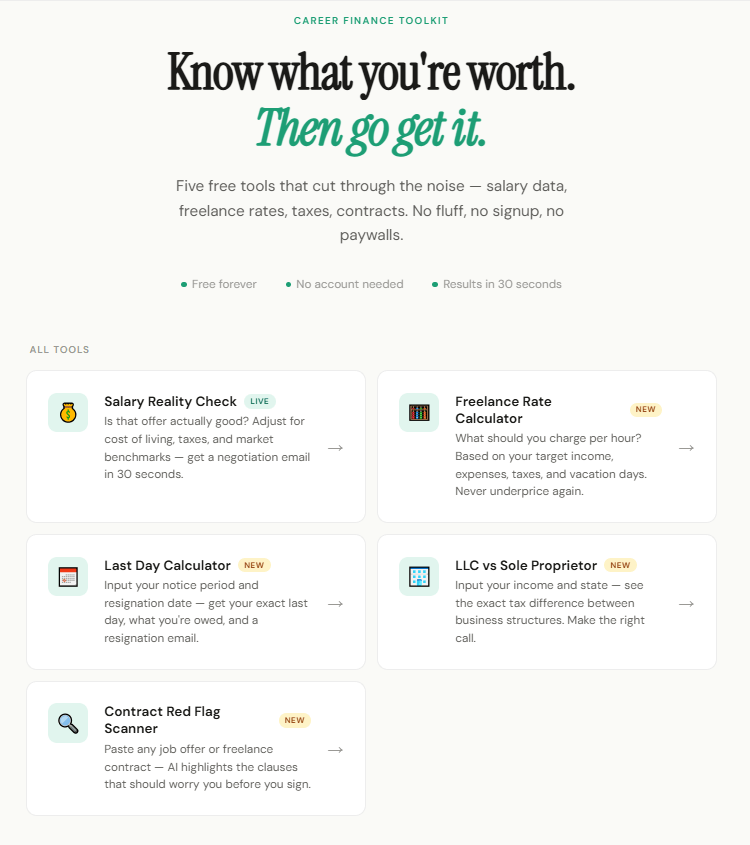
To eliminate this operational friction, I built SalaryParity—a completely free dashboard packed with 5 focused financial and admin utilities.

Here is how the workspace is structured:

Salary Reality Check: Instantly validates corporate offers against baseline market metrics.

Contract Scanner: Analyzes agreement text to highlight liability risks and IP traps before you sign.

Freelance Rate Calculator: factors in taxes, tools, overhead, and unbillable hours to give you a true sustainable rate.

Last Day: A runway tracker to plan your exit strategy from full-time employment.

LLC vs. Sole Proprietor: Maps out the exact revenue inflection point where incorporating actually makes tax sense.

There are no email capture walls, no popups, and no sign-ups. You can play with all 5 tools instantly.

Check out the live project here: https://www.salaryparity.com/

I’d love to know what calculation models or administrative pain points I should build into the dashboard next!

🚀 New React Challenge: Instant UI with useOptimistic

Ever clicked a like button and watched it stall for a second while the server thinks about it? That tiny delay makes your app feel sluggish. React 19 ships useOptimistic to fix exactly that — the UI changes before the server responds, and snaps back automatically if something goes wrong.

🔥 Start the Challenge Now

🧩 Overview

Learn React’s useOptimistic hook by building instant heart toggles. Click the heart, see it turn red immediately, and let React handle the server in the background. If the request fails, the heart reverts on its own — no manual rollback code.

✅ Requirements

  • Render two cards side by side: one labeled “Successful toggle” and another “Error toggle”.
  • Both cards start with the heart in a neutral (not liked) state.
  • Clicking the heart on the successful toggle card must:
    • Turn the heart red immediately, before the server responds.
    • Keep the heart red after the server confirms the change.
  • Clicking the heart on the error toggle card must:
    • Turn the heart red immediately, before the server responds.
    • Revert the heart to neutral after the server responds with an error.
  • Use the useOptimistic hook together with startTransition to manage the optimistic state.

💡 Notes

  • addOptimistic must be called inside startTransition — otherwise React warns even though the UI still updates.
  • The passthrough state only needs to be a boolean (just the like value). The rest of data can stay static.
  • toggleFavoriteError always throws. A try/catch with console.error prevents the red error overlay in dev without affecting the optimistic revert.
  • The data-testid attributes in the starter are already wired to the tests — don’t rename or remove them.

🧪 Tests

  1. renders the app title
  2. renders both cards with labels
  3. starts with hearts not liked
  4. optimistically toggles the heart immediately and persists on success
  5. reverts the heart on server error

If you’ve been writing setState(optimisticValue), then try/catch with manual rollbacks, useOptimistic deletes all that boilerplate. Give it a try and feel how snappy your UI can be.

🔥 Start the Challenge Now

Resolvendo a Alucinação da IA na Arquitetura de Software com Code Property Graphs e .NET 9

A ascensão das ferramentas de Inteligência Artificial Generativa transformou radicalmente a produtividade na engenharia de software. Hoje, assistentes de código conseguem gerar classes inteiras, refatorar algoritmos complexos e propor padrões de projeto em segundos.

No entanto, como Engenheiro de Software trabalhando em ambientes corporativos de alta complexidade, esbarrei repetidamente no maior gargalo dessas ferramentas: a alucinação contextual e a quebra de fronteiras arquiteturais.

Quem nunca viu uma IA sugerir a criação de um arquivo no diretório errado? Ou pior, fazer a camada de Domain depender diretamente de um componente de Infrastructure, violando frontalmente os princípios da Clean Architecture?

Para resolver esse problema de forma determinística, decidi criar o Code Property Graph (CPG): um ecossistema que mapeia toda a estrutura estática do código (camadas, namespaces, classes e dependências) e atua como uma “guarda de fronteira” contra as alucinações da IA.

🏗️ O Conceito: Mapeando Código como Conhecimento
O projeto, que disponibilizei de forma open-source no meu GitHub (CodePropertyGraph), foi desenhado em três grandes módulos, abraçando uma abordagem que chamo de Paradigma Híbrido (Relacional + Grafo).

  1. O Motor Híbrido: SQL com Alma de Grafo (1-Sql)
    Mapear dependências em bancos puramente relacionais costuma gerar tabelas associativas complexas. Por outro lado, forçar uma equipe a adotar um banco de grafos nativo (como Neo4j) apenas para essa análise pode gerar fricção operacional.

Minha solução foi criar um banco relacional otimizado para travessias. Uma tabela central CodeElement (o nó do grafo) armazena Classes, Interfaces e Records. Tabelas associativas como ElementDependency atuam como as arestas.

Com isso, antes de a IA gerar um código, o sistema pode rodar uma validação determinística:

SQL

-- Identificando violação clássica: Domain dependendo de Infrastructure
SELECT 
    SourceElem.Name AS ArquivoIncorreto,
    TargetElem.Name AS DependenciaProibida
FROM ElementDependency Dep
INNER JOIN CodeElement SourceElem ON Dep.SourceElementId = SourceElem.Id
INNER JOIN Layer SourceLayer ON SourceElem.LayerId = SourceLayer.Id
INNER JOIN CodeElement TargetElem ON Dep.TargetElementId = TargetElem.Id
INNER JOIN Layer TargetLayer ON TargetElem.LayerId = TargetLayer.Id
WHERE SourceLayer.Name = 'Domain' AND TargetLayer.Name = 'Infrastructure';

Se a query retornar dados, a IA é bloqueada de prosseguir com a sugestão. Simples e infalível.

  1. O Cérebro: Backend em .NET 9.0 (2-BackEnd)
    Para orquestrar essa lógica, criei uma API robusta em .NET 9.0. Seguindo estritamente os princípios SOLID, implementei o padrão CQRS utilizando o MediatR.

Commands: Lidam com a ingestão pesada de metadados de código extraídos via analisadores estáticos (como o Roslyn).

Queries: Executam as validações arquiteturais em tempo real.

Tudo é abstraído pelo Repository Pattern, garantindo que as regras de negócio de validação arquitetural fiquem isoladas de como os dados estão persistidos.

  1. A Visão: Interactive Knowledge Graph com React (3-FrontEnd)
    Dados puros não fornecem intuição arquitetural. O módulo front-end, construído em React, consome a API do .NET 9 e renderiza a arquitetura inteira como um Knowledge Graph interativo (semelhante a um mapa mental complexo).

O desenvolvedor pode clicar em um módulo específico e ver imediatamente a árvore de dependências. Mais importante: ele pode “desenhar” uma intenção de nova feature, e o front-end validará em tempo real se essa nova estrutura fere o design do sistema, antes mesmo de uma única linha de código ser escrita.

🚀 Conclusão
A IA Generativa é um co-piloto extraordinário, mas nós ainda somos os arquitetos. Ao criar um Code Property Graph, damos à IA os “olhos” necessários para entender os limites de domínio e infraestrutura de nossas aplicações. Projetos estruturados com .NET 9, bancos de dados otimizados e interfaces interativas em React são a ponte para um desenvolvimento assistido por IA verdadeiramente seguro.

Sinta-se à vontade para explorar o código, enviar PRs ou discutir ideias no repositório do projeto!

English Version 🇬🇧 / 🇺🇸
This is a submission for the Google I/O Writing Challenge

Solving AI Hallucination in Software Architecture with Code Property Graphs and .NET 9
The rise of Generative AI tools has radically transformed software engineering productivity. Today, coding assistants can generate entire classes, refactor complex algorithms, and propose design patterns in seconds.

However, as a Software Engineer working in highly complex enterprise environments, I repeatedly hit the biggest bottleneck of these tools: contextual hallucination and the breaking of architectural boundaries.

Who hasn’t seen an AI suggest creating a file in completely the wrong directory? Or worse, make the Domain layer directly depend on an Infrastructure component, blatantly violating the principles of Clean Architecture?

To solve this problem deterministically, I decided to build the Code Property Graph (CPG): an ecosystem that maps the entire static structure of the code (layers, namespaces, classes, and dependencies) and acts as a “border guard” against AI hallucinations.

🏗️ The Concept: Mapping Code as Knowledge
The project, which I open-sourced on my GitHub (CodePropertyGraph), was designed in three major modules, embracing an approach I call the Hybrid Paradigm (Relational + Graph).

  1. The Hybrid Engine: SQL with a Graph Soul (1-Sql)
    Mapping dependencies in purely relational databases usually generates complex associative tables. On the other hand, forcing a team to adopt a native graph database (like Neo4j) just for this analysis can cause operational friction.

My solution was to create a relational database optimized for traversals. A central CodeElement table (the graph node) stores Classes, Interfaces, and Records. Associative tables like ElementDependency act as the edges.

With this setup, before the AI generates code, the system can run a deterministic validation:

SQL

-- Identifying a classic violation: Domain depending on Infrastructure
SELECT 
    SourceElem.Name AS IncorrectFile,
    TargetElem.Name AS ForbiddenDependency
FROM ElementDependency Dep
INNER JOIN CodeElement SourceElem ON Dep.SourceElementId = SourceElem.Id
INNER JOIN Layer SourceLayer ON SourceElem.LayerId = SourceLayer.Id
INNER JOIN CodeElement TargetElem ON Dep.TargetElementId = TargetElem.Id
INNER JOIN Layer TargetLayer ON TargetElem.LayerId = TargetLayer.Id
WHERE SourceLayer.Name = 'Domain' AND TargetLayer.Name = 'Infrastructure';

If the query returns any data, the AI is blocked from proceeding with the suggestion. Simple and bulletproof.

  1. The Brain: .NET 9.0 Backend (2-BackEnd)
    To orchestrate this logic, I built a robust API in .NET 9.0. Strictly following SOLID principles, I implemented the CQRS pattern using MediatR.

Commands: Handle the heavy ingestion of code metadata extracted via static analyzers (like Roslyn).

Queries: Execute real-time architectural validations.

Everything is abstracted by the Repository Pattern, ensuring that the architectural validation business rules remain isolated from how the data is persisted.

  1. The Vision: Interactive Knowledge Graph with React (3-FrontEnd)
    Raw data doesn’t provide architectural intuition. The front-end module, built in React, consumes the .NET 9 API and renders the entire architecture as an interactive Knowledge Graph (similar to a complex mind map).

Developers can click on a specific module and immediately see its dependency tree. More importantly, they can “draw” the intent for a new feature, and the front-end will validate in real-time if this new structure violates the system’s design—before a single line of code is written.

🚀 Conclusion
Generative AI is an extraordinary co-pilot, but we are still the architects. By creating a Code Property Graph, we give AI the “eyes” it needs to understand the domain and infrastructure boundaries of our applications. Projects structured with .NET 9, optimized databases, and interactive React interfaces are the bridge to truly safe AI-assisted development.

Feel free to explore the code, submit PRs, or discuss ideas over at the project repository!

S1 — Clean Backtrace Crashes: How to Diagnose and Fix Them

In the overview article Crash Patterns Overview: A Practical, Symptom‑First Guide to Debugging C++ Crashes, we introduced the two‑layer crash model: first classify the crash by symptom, then map that symptom to a small set of likely patterns.
In this article, we focus on the first and simplest symptom bucket: Clean Backtrace Crashes — the cases where the program fails immediately, the backtrace is readable, and the top frame points directly to the faulting instruction.
We follow the same structure used throughout the series:
Symptom → Likely Patterns → Diagnostic Techniques → Remediation Steps

What Is a “Clean Backtrace Crash”?

A clean backtrace crash is the best possible crash we can encounter: the program crashes at the exact point of failure, the stack trace is readable, the top frame points directly to the faulting instruction, and there is no corruption, noise, or misleading frames. This is the “happy path” of debugging.

Typical symptoms include:

  • SIGSEGV (Segmentation Fault) — invalid memory access
  • SIGABRT (Abort Signal) — program aborted itself
  • SIGFPE (Floating‑Point Exception) — arithmetic error
  • SIGILL (Illegal Instruction) — CPU attempted to execute invalid instruction
  • assertion failure
  • clean, logical stack trace

The goal of this article is to show how we classify clean crashes and extract maximum information from the backtrace before touching any code.

What Clean Backtraces Usually Mean

A clean backtrace tells us a great deal about the nature of the failure before we inspect any code. When the stack is intact and the crash happens exactly at the faulting instruction, we can rely on several strong properties:

  • The crash is synchronous.
    The failure occurs at the exact instruction that triggered the invalid operation. There is no delay, no deferred symptom, and no cross‑thread propagation.

  • The crash is local.
    The bug is in the crashing function, its caller, or the data passed into it. We are not dealing with heap corruption, race conditions, or memory being overwritten long before the crash.

  • The program state is trustworthy.
    Registers, stack frames, arguments, locals, and object layouts are intact. We can inspect them with confidence.

  • The crash is deterministic.
    The same input produces the same crash at the same location. This is one of the strongest signals that we are in the S1 bucket.

  • The backtrace is stable.
    The top frames do not change between runs, and the call chain is logical and consistent. The crash is reproducible. It is not the case “works on my machine”.

  • There is no evidence of corruption.
    No garbage pointers, no impossible values, no broken frame pointers, no nonsensical call stacks.

  • The symptom itself is diagnostic.
    A clean SIGSEGV, SIGABRT, SIGFPE, or SIGILL already narrows the search space to a handful of patterns.

Together, these properties make clean backtrace crashes the most straightforward category to debug. They are honest failures: the program tells us exactly where it died and why.

Likely Patterns — Common Patterns Behind Clean Backtrace Crashes

These are the Likely Patterns for this symptom bucket, now with signals and short explanations integrated.

Pattern 1 — Null Pointer Dereference

Typical signals:

  • SIGSEGV
  • SIGBUS (Bus Error) — misaligned or invalid memory access

Examples:

  • this == nullptr
  • ptr == nullptr
  • virtual call on null
  • dereferencing a null return value

Pattern 2 — Out‑of‑Range Access (caught early)

Typical signals:

  • SIGABRT — thrown by std::out_of_range
  • sometimes SIGSEGV

Examples:

  • std::vector::at()
  • std::array::at()
  • bounds‑checked APIs

Pattern 3 — Assertion Failures

Typical signals:

  • SIGABRT — assertion failure triggers abort

Examples:

  • assert(ptr != nullptr)
  • assert(index < size)
  • assert(state == Expected)

Pattern 4 — Division by Zero / FPE

Typical signals:

  • SIGFPE — arithmetic error such as division by zero

Examples:

  • integer division by zero
  • floating‑point exceptions

Pattern 5 — Illegal Instruction

Typical signals:

  • SIGILL — CPU attempted to execute an invalid instruction

Examples:

  • invalid function pointer
  • corrupted vtable pointer
  • calling a pure virtual function

Pattern 6 — Immediate abort() / terminate()

Typical signals:

  • SIGABRT — explicit abort or terminate

Examples:

  • std::terminate()
  • std::abort()
  • unhandled exception

Diagnostic Techniques for Clean Backtrace Crashes

Clean backtrace crashes give us two strong diagnostic techniques. Because the stack is intact, we can rely on the debugger as our primary tool. And when a debugger is not available, the signal information still provides enough structure to classify the crash correctly.

Use a Debugger to Inspect the Stack (Primary Technique)

The defining property of S1 crashes is that the stack is clean and trustworthy. This means we can rely on the debugger to show us exactly where the program failed and why.
When we have access to GDB, LLDB, WinDbg, or any debugger capable of reading stack frames, we inspect:

  • the top frame, which points directly to the faulting instruction
  • the faulting address (e.g., this == 0x0)
  • arguments and locals in the crashing function
  • register state (e.g., RIP, RSP, RBP)
  • the call chain, which is intact and meaningful
  • source line information, if debug symbols are available
# gdb command
p this
p ptr
p index
p size
info locals

Use the Signal Information (Fallback Technique)

If a debugger is not available — for example, in production environments, minimal containers, customer machines, or stripped binaries — the signal still provides enough information to classify the crash.

Typical signals for S1 include:

  • SIGSEGV — invalid memory access (null pointer, invalid pointer)
  • SIGABRT — assertion failure or explicit abort
  • SIGFPE — arithmetic error (division by zero, overflow)
  • SIGILL — invalid instruction (bad function pointer, corrupted vtable)
  • SIGBUS — misaligned or invalid memory access

This fallback technique is essential when we only have:

  • a core dump
  • a crash log
  • a kernel message
  • a minimal environment without debugging tools

Remediation Steps for Clean Backtrace Crashes

Once we have identified the faulting instruction and understood the immediate cause, the remediation is usually straightforward. Clean crashes point directly to the bug, so we focus on correcting the logic that allowed the invalid operation to occur.

Typical remediation actions include:

  • fixing a null pointer by enforcing ownership or validating inputs
  • correcting an out‑of‑range access by validating indices or adjusting container usage
  • resolving an assertion failure by aligning the code with the intended contract
  • addressing a division‑by‑zero or arithmetic error by validating operands
  • fixing an illegal instruction by correcting function pointers or object lifetimes
  • removing or replacing an explicit abort() or terminate() call

The next section illustrates these diagnostic techniques and remediation steps with concrete examples, using crashes with debug symbols, core files, and stripped binaries.

Examples

Below we integrate real, production‑grade examples in three forms:

  • with GDB and debug symbols
  • with core file signal information
  • with GDB but without debug symbols

This demonstrates that clean crashes remain clean regardless of symbol quality.

Example 1 — Null Pointer Dereference (GBD with Debug Symbols)

Source code

struct Session {
    void process() {
        value += 1;
    }
    int value = 0;
};

void handle(Session* s) {
    s->process();   // <-- crash here
}

int main() {
    Session* s = nullptr;
    handle(s);
}

GDB Output

Program received signal SIGSEGV, Segmentation fault.
#0  Session::process(this=0x0) at session.cpp:5
#1  handle(s=0x0) at session.cpp:13
#2  main() at session.cpp:20

Diagnosis

  • this == 0x0
  • direct null dereference
  • synchronous, local, deterministic

Remediations

  • enforce ownership contract
  • add null checks
  • redesign API to use references

Example 2 — Null Pointer Dereference (Core File with Signal Information)

same source code as example 1.

Runtime Output

Segmentation fault (core dumped)

Opening the core file

gdb ./a.out core

GDB Output

Core was generated by `./a.out'.
Program terminated with signal SIGSEGV, Segmentation fault.
#0  0x000000000040113a in Session::process() ()

Diagnosis

  • signal visible in core metadata
  • backtrace clean
  • crash still local and deterministic

Example 3 — Assertion Failure (No Debug Symbols)

Source Code

void processIndex(const std::vector<int>& v, size_t index) {
    assert(index < v.size());
    int x = v[index];
}

int main() {
    std::vector<int> data = {1, 2, 3};
    processIndex(data, 5);
}

Runtime Output

Assertion `index < v.size()' failed.
Aborted (core dumped)

GDB Output

Program terminated with signal SIGABRT, Aborted.
#0  0x00007f8c6c29247f in abort () from libc.so.6
#1  0x00007f8c6c2923a5 in __assert_fail_base.cold () from libc.so.6
#2  0x00007f8c6c2a1fd2 in __assert_fail () from libc.so.6
#3  0x000000000040113a in ?? ()

Diagnosis

  • SIGABRT visible
  • assertion path visible
  • stack clean
  • deterministic

Remediations

  • validate index
  • strengthen API contract

When a Clean Backtrace Is Not Clean

A backtrace may look clean at first glance but still belong to a different crash category.

We treat a backtrace as “clean” only when the stack is trustworthy and the crash is synchronous and local.

Red flags that indicate misclassification:

  • The top frame is in STL or libc, not in our code
  • Arguments or locals contain impossible values (e.g., size = 18446744073709551615)
  • The backtrace changes between runs
  • The crash location moves around
  • The faulting instruction makes no sense (e.g., inside memcpy with no clear reason)
  • The crash happens far away from the real bug (delayed symptom)

If any of these appear, the crash is not S1. It likely belongs to S3 — Broken or Nonsensical Backtrace, which we will cover later.

Summary

  • Clean backtrace crashes are the most straightforward category in C++ debugging.
  • The crash is synchronous, local, deterministic, and honest: the program fails exactly where the bug is.
  • The stack is intact, the signal is meaningful, and the faulting instruction points directly to the root cause.
  • We diagnose these crashes by inspecting the stack when available, or by using the signal when it is not.
  • The remediation is to correct the logic that allowed the invalid operation to occur.

Key Takeaways

  • Clean backtrace → bug is at the faulting instruction
  • Stack is trustworthy — debugger output can be taken literally
  • Crash is deterministic — same input, same failure
  • Crash is local — no corruption, no delayed symptoms
  • Signal is meaningful — SIGSEGV, SIGABRT, SIGFPE, SIGILL
  • Fix the logic, not the symptom — S1 crashes point directly to the cause

Cómo solucionar el bucle infinito en useEffect con objetos y arrays

Cómo solucionar el bucle infinito en useEffect con objetos y arrays

Explicación técnica

El problema ocurre porque useEffect compara los valores de las dependencias usando comparación de referencia (===), no por contenido (deep equality). Cuando usas useState({}), cada llamada a setObj({}) crea un nuevo objeto en memoria, aunque tenga el mismo contenido. React detecta que la referencia cambia (obj !== obj), lo que dispara la reejecución del useEffect, causando el bucle infinito.

En tu caso:

const [ingredients, setIngredients] = useState({});
useEffect(() => {
  setIngredients({}); // ¡Crea un nuevo objeto!
}, [ingredients]); // ingredients cambia de referencia → reejecuta → loop infinito

Pasos para solucionarlo

Opción 1: Evitar la actualización innecesaria (recomendada)

Si no necesitas actualizar el estado dentro del useEffect, elimina la dependencia del objeto/array y usa un array vacío:

useEffect(() => {
  // Solo ejecutar al montar el componente
  setIngredients({});
}, []); // ✅ Sin dependencias → solo se ejecuta una vez

Opción 2: Comparación profunda manual

Si necesitas ejecutar el useEffect solo cuando el contenido cambia, usa JSON.stringify (para objetos simples sin funciones/circularidades):

useEffect(() => {
  setIngredients({});
}, [JSON.stringify(ingredients)]); // ✅ Compara contenido, no referencia

⚠️ Advertencia: JSON.stringify es costoso en objetos grandes y falla con funciones, undefined, o referencias circulares.

Opción 3: Usar useMemo para una representación estable

Crea una representación estable del objeto (ej. número de elementos, hash):

const ingredientsHash = useMemo(() => 
  Object.keys(ingredients).length, // o tu lógica personalizada
  [ingredients]
);

useEffect(() => {
  setIngredients({});
}, [ingredientsHash]); // ✅ Compara valor primitivo estable

Opción 4: Validar si el valor es distinto antes de actualizar

Evita la actualización si el contenido es idéntico:

useEffect(() => {
  if (Object.keys(ingredients).length > 0) {
    setIngredients({});
  }
}, [ingredients]); // ✅ Solo actualiza si no está vacío

Bloque de código corregido (recomendado)

const [ingredients, setIngredients] = useState({});

useEffect(() => {
  // Solo ejecutar al montar el componente (ej. limpiar estado inicial)
  setIngredients({});
}, []); // ✅ Solución definitiva para este caso

Pro-tip

  • Nunca actualices el mismo estado que usas como dependencia sin una lógica de comparación profunda.
  • Para objetos complejos, usa librerías como immer o useDeepCompareEffect (de use-deep-compare-effect) si necesitas comparación profunda segura.
  • Si el objetivo es limpiar el estado al montar, usa useEffect con [] y no actualices el estado dentro. En su lugar, inicializa el estado con el valor deseado desde el inicio:
const [ingredients, setIngredients] = useState({}); // ✅ Inicialización directa

The Brutal Reality of Running Gemma 4 Locally

RTX 3050 showing active VRAM usage during Gemma 4 E4B inference

This is a submission for the Google I/O 2026 Writing Challenge

“At Google I/O 2026, Google made a specific claim: Gemma 4 runs on consumer laptops without cloud dependency. They demoed offline coding on stage. Local AI on everyday hardware is finally practical, they said.“

I tested that claim

GPU and high-bandwidth memory prices are not normal right now. AI companies are buying hardware at a scale that has genuinely disrupted the consumer market. A PC build suitable for local AI costs significantly more than it would have three or four years ago, if you can find the parts at all.

If you bought your machine before the AI hardware gold rush, you have leverage most people do not. I bought my laptop four years ago. An RTX 3050 with 4GB VRAM is not a serious AI card by any current standard, but it is exactly the kind of hardware Google implied Gemma 4 would run on. For local inference to start feeling consistently comfortable beyond lightweight models, 16GB VRAM is where things become much less restrictive. I have 4GB. This is what that looks like.

The Model Loaded. Then the Problems Started.

You install Ollama, pull the model, the weights load, the cursor blinks.

The GPU appears busy. Fans are screaming. The model is loaded entirely in VRAM. And long-context inference still slows down much faster than most demos suggest.

With Gemma 4 specifically, E2B loaded on my machine. E4B required closing everything else first to free RAM. Neither behaved the way the keynote implied.

Real throughput was more nuanced than I expected.

# Sustained long-form inference benchmark
# RTX 3050 Laptop GPU (4GB VRAM)
# 16GB DDR5 RAM
# Ollama on Windows

# Gemma 4 E2B
# eval rate: ~38.68 tok/s

# Gemma 4 E4B
# eval rate: ~24.39 tok/s

# Same prompt.
# Same hardware.
# Same runtime.

# E2B remained surprisingly usable.
# E4B pushed much closer to the memory wall.

The slowdown was not catastrophic. That was the interesting part. E2B remained mostly inside GPU memory on this workload, which avoided the worst PCIe and shared-memory penalties.

Small efficient models are now genuinely viable on consumer hardware. The problems start once context length, KV cache growth, and memory spillover begin compounding at the same time.

# First thing to check: is the model actually in GPU memory?
nvidia-smi

# Watch VRAM live as a conversation grows
# If VRAM rises and speed falls, KV cache is overflowing into RAM
watch -n 1 nvidia-smi

The Real Bottleneck Is Not Compute

Every inference run has two phases.

Prefill: the model reads your entire prompt in parallel. Compute-heavy, GPU handles it well. You generally do not feel this.

Decode: the model generates each output token one at a time. This is memory-bound. Every token forces the GPU to reload model weights from memory again. The GPU finishes its math and waits. It is not slow. It is starving for bandwidth.

It is why local inference feels slow even when Task Manager shows your GPU is busy.

# Memory bandwidth comparison — this is what determines tokens/sec

# RTX 3050 4GB     -> ~192 GB/s   (my machine)
# RTX 3060 12GB    -> ~360 GB/s
# RTX 4090 24GB    -> ~1008 GB/s
# M4 Max           -> ~546 GB/s
# M3 Ultra         -> ~800 GB/s

# VRAM capacity gets you the model loaded
# Bandwidth determines how fast it actually runs

Check your own card before loading anything:

# Linux: query GPU name and memory from the driver
nvidia-smi --query-gpu=name,memory.total --format=csv
# Windows: grep does not exist in PowerShell
# Use Select-String instead
nvidia-smi -q | Select-String "Product Name", "Total", "Free", "Used"

# nvidia-smi does not expose memory bandwidth on Windows (WDDM)
# Get the real number from: https://www.techpowerup.com/gpuz/
# The "Memory Bandwidth" field on the main tab is what you want
# Apple Silicon: no nvidia-smi, use system_profiler
system_profiler SPHardwareDataType | grep -i bandwidth

The KV Cache Is Quietly Eating Your VRAM

Even if your model fits in VRAM, that headroom disappears as your conversation grows.

Every token the model has seen gets stored in the key-value cache. Without it, the model would reprocess the entire conversation on every generation step. The KV cache trades memory for speed. The tradeoff is it grows with every token.

For Gemma 4 E2B, a moderately long conversation on a 4GB card will push you over the edge mid-generation. The model does not crash. It silently offloads to system RAM and your tokens per second falls off a cliff. Once inference spills heavily into system RAM, throughput collapses dramatically.

# Ollama defaults to 4096 token context even on models that support 128K
# This is why your model seems to forget things in long conversations
# Set it explicitly so you know what you are allocating

OLLAMA_NUM_CTX=8192 ollama run gemma4:e2b

# Confirm what context your running model is actually using
ollama ps

Quantization Is Not Just About Fitting the Model

Most guides explain quantization as a way to make models smaller so they fit in VRAM. That undersells it.

The real bottleneck is how fast the GPU can move weights from memory to compute units. Quantization reduces bytes per weight, so fewer bytes move per token generated. An INT4 model transfers 4 times less data per inference step than FP16, which translates almost directly to 4 times faster generation.

# Quantization levels for Gemma 4 via llama.cpp

# Q2/Q3   -> smallest file, lowest quality, fits tight VRAM
# Q4_K_M  -> best balance for most consumer hardware
# Q8_0    -> higher quality, needs more VRAM
# FP16    -> full precision, not practical on 4GB cards

Quantizing the KV cache separately is now supported in llama.cpp and is worth doing on constrained hardware:

# --cache-type-k and --cache-type-v cut KV cache memory ~50%
# with minimal quality impact — easier than switching model sizes

./llama-cli 
  -m gemma4-e2b-q4_k_m.gguf 
  --n-gpu-layers 99         # push all layers to GPU
  --cache-type-k q8_0       # quantize key cache
  --cache-type-v q8_0       # quantize value cache
  --ctx-size 4096             # keep context tight on 4GB cards

The Layer Offloading Trap

When VRAM is tight, --n-gpu-layers 20 on a 32-layer model sounds like a reasonable compromise. It is usually not.

Partial offloading means some inference steps cross the PCIe bus, introducing high-latency transfers that stall the pipeline. The slowdown is not proportional to layers offloaded. Even a few CPU-side layers can significantly tank throughput.

# This looks like a reasonable compromise. It is not.
# Every forward pass stalls waiting on PCIe transfers for CPU-side layers.
./llama-cli 
  -m gemma4-e2b-q4_k_m.gguf 
  --n-gpu-layers 20           # partial offload = worst of both worlds

# Better: use Q3 so the whole model fits on GPU at --n-gpu-layers 99
./llama-cli 
  -m gemma4-e2b-q3_k_m.gguf 
  --n-gpu-layers 99           # everything in VRAM, no PCIe stalls

What Windows Task Manager Is Lying to You About

This is where most people on Windows laptops get confused.

While running Gemma 4 E4B, Task Manager showed the RTX 3050 at 0% GPU utilization. At the same time, nvidia-smi showed:

# nvidia-smi output during active Gemma 4 E4B inference
# Task Manager said 0%. This is what was actually happening.

# +-----------------------------------------------+
# | GPU: NVIDIA GeForce RTX 3050 Laptop GPU        |
# | VRAM:    3564MiB / 4096MiB  (87% full)        |
# | GPU-Util: 44%                                  |
# | Power:    52W / 95W                            |
# +-----------------------------------------------+

# Always trust nvidia-smi over Task Manager for CUDA workloads
# Task Manager shows 3D engine usage — LLM inference runs on CUDA compute
# Windows sees "no 3D rendering" and reports 0%

RTX 3050 showing active VRAM usage during Gemma 4 E4B inference

Now the 11.6GB figure. This laptop has two GPUs: the RTX 3050 (GPU 1) and the AMD Radeon iGPU inside the Ryzen 7 6800H (GPU 0). The AMD iGPU has no dedicated VRAM. It borrows from system RAM dynamically. Windows adds them together:

# How Windows calculates "total GPU memory" on a dual-GPU laptop

# RTX dedicated VRAM:          4.0 GB  (fast, ~192 GB/s)
# AMD iGPU shared system RAM:  7.6 GB  (slow, ~70-90 GB/s)
# ----------------------------------------
# Windows "GPU Memory":       11.6 GB  (misleading total)

# You do NOT have 11.6GB of fast VRAM
# You have 4GB fast + 7.6GB slow with a PCIe penalty to cross between them

AMD Radeon integrated GPU contributing shared system memory
And here is system RAM during E4B inference:

System RAM pressure during Gemma 4 E4B inference

13.2GB of 15.3GB used. 2.1GB available. Ollama is consuming roughly 4GB of system memory alongside the 3.5GB allocated in dedicated VRAM. The actual footprint for Gemma 4 E4B is 7 to 8GB total, split cleanly across two entirely different physical hardware pools running at wildly mismatched speeds. That split is exactly why generation feels slower than the model size alone would suggest.

At the same time, Ollama alone was consuming nearly 8GB of system RAM:

Ollama consuming nearly 8GB RAM during Gemma 4 E4B inference

# "The model loaded" does not mean the system is comfortable

# During Gemma 4 E4B inference on a 4GB RTX 3050 laptop:

# GPU memory pool
# ----------------
# Dedicated VRAM (RTX 3050)      -> 4.0 GB
# Shared DDR5 system memory      -> 7.6 GB
# Effective Windows "GPU Memory" -> 11.6 GB

# Real-world bottlenecks
# ----------------------
# [x] VRAM saturation
# [x] KV cache growth
# [x] Shared memory spillover
# [x] PCIe transfer overhead
# [x] Windows scheduler latency
# [x] Dual-GPU memory juggling

# Result
# ------
# The model technically fits.
# The hardware still struggles.
#
# Local inference on consumer laptops is often a
# memory orchestration problem, not a compute problem.

The result is that local AI performance becomes a memory orchestration problem long before it becomes a compute problem.

Hardware Tiers for Gemma 4 in 2026

# What you can realistically run locally in 2026
# (and what it costs to buy the hardware right now)

# 4GB VRAM (RTX 3050 — my machine)
#   -> Gemma 4 E2B with Q4 quantization
#   -> short contexts only, KV cache fills fast
#   -> the floor for local AI, barely

# 8GB-12GB VRAM
#   -> comfortable Gemma 4 E4B
#   -> 7B models from other families run well
#   -> context length starts to matter

# 16GB-24GB VRAM
#   -> where Gemma 4 becomes reliable for real work
#   -> this is what Google probably had in mind at I/O
#   -> good luck finding one at a reasonable price

# 36GB-64GB Unified Memory (Apple Silicon)
#   -> best consumer option for serious local AI
#   -> no VRAM/RAM split, no PCIe penalty

# 96GB-192GB Unified Memory
#   -> 70B models, workstation territory

Measure Before You Tune

# Get a baseline before changing anything
# Run this before and after every config change
./llama-bench -m gemma4-e2b-q4_k_m.gguf -p 512 -n 128
# Windows: check Ollama RAM usage directly
Get-Process ollama | Select-Object ProcessName,WorkingSet64

# Or watch:
# Task Manager -> Performance -> Memory
# Linux equivalent
free -h
# Watch GPU utilization and VRAM together in one view
# util column = compute bound, mem column = memory bound
nvidia-smi dmon -s mu

# Apple Silicon: watch memory pressure in real time
# Red = unified memory is overcommitted
sudo memory_pressure

What Google Got Right and What They Left Out

Gemma 4 E2B running locally on a 4GB VRAM laptop is not nothing. Four years ago that would not have been possible at all. The model quality for its size is genuinely impressive.

But “runs on consumer laptops” and “runs well on consumer laptops” are different claims. The I/O keynote did not mention memory bandwidth, KV cache overflow, or the fact that the hardware shortage means GPUs with enough VRAM for comfortable inference are still expensive and unusually difficult to find.

# What "model loaded successfully" actually guarantees

# NOT guaranteed:
# [ ] fits comfortably in VRAM
# [ ] KV cache has room to grow
# [ ] throughput will be usable
# [ ] PCIe offloading is avoided

# ONLY guaranteed:
# [x] weights entered memory without crashing

The model loading is the beginning of the problem. What happens after is a memory bandwidth race your hardware either wins or does not. Now you know which race you are in.

I made Claude Code refuse to write code unless the ticket scores 80/100

I’ve been using Claude Code daily on real projects for several months. It’s excellent. It’s also a brilliant improviser — and that’s the problem.

The failure mode

The recurring pattern looked like this:

  • I’d write a vague ticket. Claude Code would happily start coding.
  • It would ship something close to what I asked, but not quite.
  • It would touch files I hadn’t anticipated.
  • Security and UI review lived in the same head as the implementation — so nothing caught the obvious.
  • Each session forgot what the last one learned. The same bugs reappeared in different forms.

The model wasn’t wrong. The workflow was wrong. I was treating a senior pair programmer like a junior who’d guess if I was unclear. The result was a slow drift toward “vibe-coded” software — superficially impressive demos that broke when they met real users.

So I stopped treating each ticket as a prompt and started treating it as a spec. The methodology that came out is now open-source. It’s called Forgekeel, and the core idea is a quality gate I named KERNEL.

KERNEL: a scored gate before any code

The premise: no code is written until the ticket passes a gate.

The gate scores every ticket against 6 orthogonal dimensions, 100 points total:

Dimension Weight Question
Clarity 20 Is the objective unambiguous in one sentence?
Scope 20 Are inclusions and exclusions explicit?
Context 15 Enough context (files, deps, prior decisions) to execute without asking?
Risk 15 Risks identified and mitigated? (auth, DB, migrations, deletes, PII)
Validation 15 Acceptance criteria verifiable and reproducible?
Priority 15 Does this advance an active goal or unblock a critical path?

The score decides what happens:

  • < 60 → reject. Return to me with concrete flags per dimension.
  • 60–79 → conditional. The architect subagent (Opus, read-only) drafts a plan before any write action.
  • ≥ 80 → execute. The builder subagent (Sonnet) proceeds directly.

The 6 dimensions are orthogonal. You can’t compensate for low Risk with high Clarity — a ticket with Clarity 20 and Risk 5 still totals well numerically, but the low Risk forces an architect review before any DB or auth touch.

The score is not a vanity metric. The line that ended up at the top of the rubric file:

A ticket that scores 95 and breaks production is worse than one that scored 65, was flagged, and got a plan first.

A concrete example

Here’s a ticket I rejected on myself: “Add password reset email.”

KERNEL pass:

Clarity      15 / 20   "Reset" undefined — link only, or full flow + template?
Scope        10 / 20   No mention of expiry, rate limits, or email provider
Context       8 / 15   Doesn't say which auth provider or where templates live
Risk          5 / 15   Auth flow + email = high risk, not addressed
Validation    8 / 15   "Make it work" isn't testable
Priority     12 / 15   Active KPI
                       ─────
                       58 / 100   → REJECT

Forgekeel refused to touch code. I rewrote the ticket as I would have if a junior asked me to spec it properly:

Clarity      19 / 20   Add `/reset-password` flow: email link with 30-min expiry token
Scope        18 / 20   This ticket: link email only. Excluded: SMS, recovery codes
Context      14 / 15   Supabase Auth `resetPasswordForEmail`. Template in /emails/
Risk         13 / 15   Rate-limit 3/h per email. No token leak in logs. RLS audit
Validation   13 / 15   Cypress: request reset, click link, set new password, login
Priority     13 / 15   Unblocks login retention KPI
                       ─────
                       90 / 100   → EXECUTE

Same problem, two tickets, two outcomes. The first version would have shipped something. Probably without rate limits, without auditing whether the token could leak into logs, with “manual testing” as the validation step. The second version forces every gap shut before the IDE opens.

This is what KERNEL really is: the difference between debugging in your editor and debugging in production.

Around the gate

KERNEL is the most distinctive piece, but the methodology has more:

  • 7 specialized subagents with enforced read-only vs write roles. architect, security-auditor, and ui-reviewer never modify files — their job is to think, not type. builder, tester, and designer can write, but only after the read-only review.
  • A per-project constitution declaring stack, non-negotiable principles, design tokens, allowed/forbidden MCPs. Every agent reads it before acting. Without it, /design-iterate refuses to run because the designer would hallucinate values.
  • A learnings loop. Every closed ticket appends “what went wrong / how it was resolved / what not to repeat” to a learnings.md file. By ticket 20, the project has a written history of bugs it should never re-introduce. Future sessions read it as part of context.

Full breakdown in the README.

Why it’s stack-locked

Forgekeel is opinionated and stack-locked to Next.js + Supabase + TypeScript + Tailwind v4 + shadcn/ui + pnpm.

That’s deliberate. The agents reference specific patterns (Server Actions, RLS on every table, Tailwind @theme tokens). If I made them stack-agnostic, the methodology would become advice instead of execution. Adapting to a different stack means editing the agents directly — there’s no abstraction layer planned.

What I’m looking for

MIT, v0.1.0, used internally on real projects before this release.

Repo: https://github.com/forgekeel/forgekeel
npm: https://www.npmjs.com/package/forgekeel

I’d genuinely value feedback on:

  • The KERNEL rubric — would you weight the dimensions differently? Blind spots in the 6?
  • Anyone running similar structured workflows on Claude Code — what worked, what didn’t?
  • The subagent setup — what’s missing for your daily loop?

If KERNEL stops one ticket from shipping broken to your users, my week was worth it.

I Fed React’s Entire Hooks Transition History to Gemma 4. Here’s What It Found That We Missed.

GitHub logo

“Which commit broke everything?”
Every developer who has inherited a legacy codebase has asked this. We just never had a good way to answer it.

The Problem That Started This

Six months ago I was debugging a production issue in a codebase I’d inherited. The bug had been there for a long time — I could tell because the workarounds had workarounds. But I couldn’t figure out when it started, or what change introduced it.

I opened git log. 2,847 commits. Three years of history. Everything was in there — every decision, every mistake, every refactor — locked inside commit messages that ranged from "fix critical auth bug" to "stuff".

I needed a historian, not a search engine.

That’s why I built CodeDNA.

What I Wanted to Know

The question I couldn’t answer manually: When did this codebase’s quality start degrading, and what caused it?

Standard git tools answer how much happened. Commit graphs show velocity. git blame shows who touched what. But none of them answer why a period was chaotic, or connect a March 2019 API change to a June 2019 bug cluster.

That connection requires reasoning across time — holding 180 commits in context and tracing causal chains between them. That’s exactly what Gemma 4’s Thinking Mode is designed for.

Why Gemma 4 Specifically

I want to be honest about this, because “I used an LLM” is not the same as “I used Gemma 4 intentionally.”

Thinking Mode is the reason this project exists.

I tested the same prompt against several models during development. Standard instruction-tuned models produce summaries. They count keywords and report patterns. Gemma 4 with Thinking Mode reasons about patterns — it traces why a cluster of fix commits appeared after a specific API change, not just that they appeared.

The live reasoning stream in the UI is not a gimmick. It’s the proof. When you paste your git log and watch the right panel stream Gemma’s analysis in real time, you’re watching it build the causal chain before it outputs the structured result. That’s not post-hoc storytelling — that’s the actual analysis process made visible.

128K context is the other prerequisite.

180 commits with file stat data is roughly 35,000–40,000 tokens of compressed history. The only way to detect that a March pivot caused a June bug storm is to have both in the same context window. Without 128K, you’re forced into chunking — which destroys the causal chain entirely.

Privacy is structural, not optional.

Your git history contains proprietary module names, security patch descriptions, unreleased feature branches, and often enough context to reverse-engineer your business logic. I built CodeDNA to run under your own API key with zero data retention. This isn’t a feature toggle — it’s the only way I could imagine a real engineering team actually using it with their private repos.

The Experiment: React’s Hooks Transition

I chose the React repository’s 2018–2019 Hooks transition period as my primary test case for one specific reason: any developer who knows React can verify the output in 2 minutes.

This is the verifiability test that every other project idea I considered failed. Financial anomaly detection? A judge would need domain expertise. CVE scanning? Knowledge cutoff problems. Food photo analysis? Blurry curry images break the demo. Git history? The raw commits are public. Anyone can check.

I fed Gemma 4 the commits from September 2018 through June 2019. 24 commits in the demo, roughly 180 in a fuller run. The Hooks era: one of the most architecturally significant transitions in any major open-source project.

Here’s what it found:

What Gemma 4 Said About React’s History

The milestone Gemma 4 identified first: A feature burst in July–September 2018 — Scheduler time-slicing infrastructure (Scheduler.js, 144 insertions in one commit), then React.lazy, Suspense, and createContext v2 added within 6 weeks of each other.

This is factually accurate. Any React developer recognizes this as the foundation-laying period before Hooks went public.

The milestone that surprised me: Gemma 4 flagged January–February 2019 as a stability → bug storm transition, citing ca53456 (fix for useRef) and cb54567 (fix for infinite useEffect loops) within days of the 16.8.0 release. It specifically noted that ReactFiberHooks.js had 8 modifications in this period versus 2 in the preceding stable phase.

I had to look this up to verify. It’s correct. The Hooks release in 16.8.0 (February 6, 2019) was followed by a cluster of hotfixes addressing edge cases in the hooks implementation that weren’t caught before release. The file-level evidence in the commit stats makes this visible — but only if you’re looking across all 24 commits simultaneously, not one at a time.

The health score: 79/100. Breakdown: +15 for high commit message quality, +10 for clear refactor era visible in 2019-05, -10 for 21% bug-fix ratio, and a neutral note for concentrated churn in ReactFiberHooks.js. Every factor is displayed, with evidence. No black-box number.

The Prompt Engineering That Took the Longest

Getting Gemma 4 to produce specific insights — not corporate-speak — was the hardest part of this project. It took three major iterations.

Iteration 1 (bad): Asked the model to “tell me the story of this codebase.” It produced beautifully written hallucinations. “The team worked hard to address technical debt during a difficult refactoring period.” Sounds good. Means nothing. Not a single commit hash cited.

Iteration 2 (better): Added a list of forbidden phrases: "technical debt", "the team", "seems like", "likely indicates", "possibly", "perhaps". Insights became slightly more factual but still vague. The model would say “there were many fixes in this period” without specifying how many, which period, or what was being fixed.

The breakthrough (Iteration 3): Injecting pre-computed metadata. Before any model call, my preprocessor now extracts:

  • A monthly commit histogram: 2019-03: 47 commits, 2019-02: 12 commits
  • Top changed files: ReactFiberHooks.js modified 8 times
  • Bug-fix ratio: 21%
    When this metadata is in the prompt, the model’s job changes from counting to interpreting. Instead of asking “were there a lot of fixes in early 2019?” I’m telling it “there were 14 fix commits in 6 weeks targeting ReactFiberHooks.js — what does that mean?” The insights became specific and verifiable almost immediately.

The map-reduce split was the second major insight. Asking Gemma 4 to simultaneously produce flowing Thinking Mode prose and valid structured JSON produced neither well. Splitting into Step 1 (reasoning stream — clean markdown, no JSON) and Step 2 (JSON structuring from the reasoning trace) dramatically improved both. The live reasoning panel now shows actual analytical prose. The timeline data is reliably structured.

What I Learned About Gemma 4’s Limitations

Small repos produce low-confidence analysis. Under 50 commits, the patterns aren’t there yet. CodeDNA handles this gracefully — it labels the output clearly as “micro-analysis” rather than inventing dramatic narratives. But the wow factor is absent.

Vague commit messages are the real enemy. A repo full of "fix", "update", "wip" commits gives Gemma very little signal to reason from. The model tries — it picks up on date clustering and file patterns — but the confidence is honest: "data_quality: low", "insufficient evidence for causal narrative". I considered trying to work around this but decided against it. Honest uncertainty is more valuable than confident fabrication.

Model size vs. speed tradeoff is real. The 31B model produces noticeably richer reasoning. The 26B model is faster and more reliable on the free API tier. I defaulted to 26B primary with 31B fallback, and added OpenRouter as a second fallback layer with dynamic model discovery. For a solo developer on a laptop with no GPU, the API-first approach was the only realistic path.

The reasoning stream can’t gracefully fall back mid-stream. If the primary model fails after the SSE connection is open, the stream errors rather than switching providers. The JSON structuring call (which runs in parallel) handles fallback correctly, but the stream panel may show an error while the timeline still renders successfully. I documented this honestly rather than hiding it.

The Moment That Made It Worth Building

There’s a specific interaction that convinced me this tool has real value beyond the hackathon.

I ran CodeDNA on my own FundTrace project — a fraud detection system my team built for a hackathon earlier this year. 47 commits, 3 months.

Gemma 4 flagged a stability period followed by a pivot, then a concentrated feature burst in the final week before submission. The health score was 61/100. The main reason: 38% bug-fix ratio in the final 10 days.

That’s exactly what happened. The last week was a scramble. We knew it at the time. Seeing it reflected back as a pattern — with specific commit references and a calculated ratio — was oddly clarifying. Not because it told us something we didn’t know, but because it quantified what we felt.

That’s the use case I want to build toward: not just forensics on old code, but a continuous mirror for engineering health.

Try It on Your Repo

git clone https://github.com/acchasujal/codeDNA.git
cd codeDNA/backend
pip install -r requirements.txt
cp .env.example .env
# Add your Google AI Studio key
uvicorn main:app --reload

# New terminal:
cd ../frontend && npm install && npm run dev

Then run this in any repository you’re curious about:

git log --stat | head -3000 > my_history.txt

Upload the file. Click Analyze.

What would Gemma 4 find in your codebase?

Post your results in the comments — I’m genuinely curious what it finds in different projects and domains.

What’s Next

This is v1. The things I want to build next:

  • GitHub URL input — analyze any public repo without manual log export
  • Trend alerts — “your current sprint’s bug-fix ratio is 2x your baseline”
  • Team patterns — author-level analysis (with appropriate consent and privacy controls)
  • CI/CD integration — flag risky commit pattern spikes as part of a PR check
    The core insight — that Gemma 4’s Thinking Mode + 128K context makes this class of analysis possible — still has a lot of room to run.

GitHub:

CodeDNA — AI Codebase Archaeologist

Feed Gemma 4 your git history. Discover exactly when — and why — your codebase evolved.

CodeDNA Demo

Every codebase has a turning point. The moment before is clean commits and clear intent
The moment after is hotfixes, reverts, and growing entropy. CodeDNA finds it.

What It Does

  • Maps your codebase history with Gemma 4 — up to 400 commits, preprocessed and compressed for maximum analytical signal. The preprocessor extracts monthly commit histograms and per-file change frequency before sending to the model, so insights are grounded in observable data.

  • Returns a structured archaeological report — health score with transparent breakdown, milestone timeline (bug storms, refactors, pivots, feature bursts), and key metrics. Every claim cites a specific commit hash, date, or metadata value.

  • Streams Gemma 4’s live reasoning — watch the Thinking Mode trace in real-time as the model identifies causal patterns across years of history. Verifiable: the…

Built solo in 4 days for the Google Gemma 4 Challenge. The tool’s own git history is its own best demo.

If this was useful or interesting, a reaction means a lot — it’s the tiebreaker in this challenge and tells me the problem resonates.

Building a Private RAG System: Lessons from a Local-First AI Journal

Your AI Journal Is Reading Your Diary. Mine Doesn’t.

Most AI apps quietly send your data to the cloud. DiaryGPT does the opposite — and this is the full technical story.

The Problem With AI + Private Data

When you write in a journal, you write the things you’d never say out loud. The last thing you want is that text sitting on someone else’s server, used to train a model, or exposed in a breach.

But AI is genuinely useful for journaling. It can find patterns you miss, reflect things back to you, ask questions a blank page never would. The tension is real: you want AI insight without sacrificing privacy.

Most apps solve this by trusting a privacy policy. I wanted a technical guarantee.

So I built DiaryGPT — an AI-powered personal journal where, by default, zero data leaves your machine. Here’s exactly how it works.

What DiaryGPT Does

Before the architecture, here’s what the app gives you:

  • AI mood analysis on every entry — mood, themes, a reflective response, and a follow-up question
  • RAG-powered chat — ask “when was I most anxious?” and get answers grounded in your actual entries
  • Semantic search — find entries by meaning, not keywords (“times I felt lonely” finds entries with “isolated”, “disconnected”, “blue”)
  • Weekly reflection — AI summary of your emotional arc across the week
  • Personalized journaling prompts — generated from your recent writing patterns
  • Writing streaks and memories — “on this day last year you wrote…”
  • AI companion mode — CBT/DBT-grounded reflection with built-in crisis detection (not a replacement for a licensed therapist)
  • Mood check-ins — 1–10 logging with history chart
  • Voice dictation and voice chat — speak entries, hear responses read back
  • Full AES-256-GCM encryption at rest — every diary entry, chat message, and note

The Privacy Architecture

DiaryGPT has two modes. You choose in Settings.

🟢 Local Mode (Default)

Everything runs on your machine. The AI model, the search, the analysis — all local via Ollama.

Your diary entry
      ↓
Ollama (nomic-embed-text) → converts to numbers → saved in SQLite
      ↓
Ollama (llama3.2 / qwen2.5) → analyzes mood → saved encrypted

Zero data leaves your machine.

🟡 Cloud Mode (Opt-in)

For users who want higher reasoning quality and are comfortable with API transit. You bring your own API key — Groq, OpenAI, Anthropic, or Gemini. The key is stored locally.

Your diary entry
      ↓
Ollama (embeddings) → still local, nothing sent
      ↓
Top 5 relevant excerpts → your provider's API → answer streams back

Only a small slice of your diary transits. Never the full thing.

The RAG Pipeline — How the AI “Remembers” Your Life

RAG stands for Retrieval-Augmented Generation. It’s the technique that makes the AI feel like it actually knows you — without sending everything you’ve ever written to a language model on every request.

What is an Embedding?

Every diary entry gets converted into a list of numbers — like GPS coordinates for meaning.

"I felt anxious today"    → [0.21, 0.83, 0.12, 0.74, ...]
"I was really stressed"   → [0.22, 0.81, 0.14, 0.71, ...]  ← very similar
"I love hiking"           → [0.91, 0.12, 0.67, 0.23, ...]  ← very different

Similar meaning = similar numbers. This is what makes semantic search work — you search by concept, not exact words.

Phase 1 — Writing an Entry

You write: "Today was rough. Felt anxious about the deadline."
                    ↓
       Ollama (nomic-embed-text)
       converts text → [0.21, 0.83, 0.12, 0.74, ...]
                    ↓
       Saved in SQLite / PostgreSQL:
         entry text    → AES-256-GCM encrypted
         embedding     → stored raw (math requires it)
         mood/themes   → analyzed by LLM, stored encrypted

This happens asynchronously — the entry saves immediately, analysis runs in the background.

Phase 2 — Asking a Question

You ask: "When did I feel anxious about work?"
                    ↓
       Ollama converts question → numbers
                    ↓
       Cosine similarity search runs in YOUR database
       (sqlite-vec or pgvector — pure math, no external call)
entry A: 0.91 match ✓
entry B: 0.87 match ✓
entry C: 0.79 match ✓
entry D: 0.31 match ✗  (skipped)
             ↓
Top 5 entries decrypted in memory
             ↓
LLM receives: system prompt + diary excerpts + your question
             ↓
Streams answer word by word (SSE)

The key insight: embeddings find what to read. The LLM decides what to say about it.

The LLM never sees your full diary — only the 5 most relevant entries. Cosine similarity runs entirely on your server. Nothing goes to an external service unless you’ve opted into cloud mode.

The Companion Pipeline — Safety First

The companion mode is built around one rule: if someone is in crisis, the LLM never runs.

You type a message
        ↓
Crisis detection (keyword matching, server-side)
"suicide", "hurt myself", "want to die", etc.
        ↓
    CRISIS?          SAFE?
      ↓                 ↓
Hardcoded response   LLM runs with CBT/DBT prompt
988 + Crisis Text    Acknowledges → reflects → one question
Line + findahelpline
LLM never called     Saves encrypted to companion_messages

The crisis response is hardcoded. It cannot be hallucinated, modified, or bypassed by a clever prompt. The companion banner — “This is an AI companion, not a licensed therapist” — is also hardcoded in the UI, never AI-generated.

The companion system uses a distinct system prompt built around CBT thought-reframing, DBT skills, and reflective listening. Sessions are saved and resumable.

A real limitation worth naming: keyword detection catches explicit phrases like “I want to die” but will miss oblique crisis language like “I just want it to stop” or “everyone would be better off without me.” A small local classifier as a second layer is on the roadmap — keyword filter as the fast, auditable first line, classifier as the safety net for implicit signals.

The Encryption Layer

Every piece of user content goes through AES-256-GCM encryption before hitting the database.

// Every diary entry, chat message, companion note goes through this
encrypt(text)   // before DB insert
decrypt(text)   // after DB read, before sending to LLM or browser

The encryption key is yours — a 64-character hex string you generate and store in your .env. Without it, the database is unreadable. The server never transmits the key.

The one exception: embedding vectors are stored unencrypted. Cosine similarity requires the raw numbers. The chunk text that generated the embedding is stored separately, encrypted. The security boundary lives at the source text, not the derived vector.

The Technical Stack

Runtime        Node.js + Express
Frontend       Vanilla JS SPA (no build step, no framework)
Auth           JWT + Argon2id password hashing
Encryption     AES-256-GCM (Node.js crypto module)
Storage        SQLite (local default) or PostgreSQL (multi-device)
Vector search  sqlite-vec (local) or pgvector (Postgres)
Embeddings     Ollama nomic-embed-text (local default)
LLM            Ollama (local default) / Groq / OpenAI / Gemini / Anthropic
Streaming      SSE (Server-Sent Events) over POST with ReadableStream
Voice          Browser SpeechRecognition API (free) or Whisper (premium)

The frontend is deliberately no-framework. No React, no build pipeline, no node_modules in the browser. It loads instantly and works offline (except for cloud LLM calls).

LLM Provider Architecture

The LLM layer is a thin factory that routes every call to whatever provider is active:

// services/llm.js
const PROVIDERS = { ollama, anthropic, openai, gemini, groq };

export const streamChat = (history, message, context, onDelta) =>
  PROVIDERS[getConfig().provider].streamChat(history, message, context, onDelta);

Switching providers happens at runtime — no restart needed. Every provider implements the same three-function contract:

analyzeEntry(text)                              // → { mood, themes, reflection, followUpQuestion }
generateText(systemPrompt, userMessage)         // → string
streamChat(history, message, context, onDelta)  // → full string, streams via onDelta

Groq uses the OpenAI SDK pointed at https://api.groq.com/openai/v1. Ollama uses the same SDK pointed at http://localhost:11434/v1. Identical interface, completely different privacy properties.

What I Learned

1. Embeddings and LLMs are completely separate concerns. The model that converts text to numbers has nothing to do with the model that generates answers. You can run Ollama for embeddings and Groq for chat simultaneously. Most people conflate the two.

2. 7B–8B models are good enough for structured diary tasks. Mood detection, theme extraction, journaling prompts — a well-prompted qwen2.5:7b handles all of these reliably. The quality gap versus 70B only shows up in long-form weekly summaries. Use format: json mode in Ollama for structured output; without it, small models will eventually return malformed JSON and break your pipeline silently.

3. Cosine similarity belongs in your database, not a vector database. For a personal app with thousands (not millions) of entries, sqlite-vec and pgvector are more than sufficient. No Pinecone, no Weaviate, no extra infra. The math is simple and fast.

4. SSE over POST is the right call for streaming. The standard advice is to use EventSource, but EventSource is GET-only. Chat requires POST (to send the message body). The fix is fetch + ReadableStream on the client — full control over the stream lifecycle, no awkward query-string payloads.

5. Crisis detection must run before the LLM, not inside it. You cannot rely on an LLM to consistently detect crisis language and respond safely. Keyword matching before the LLM call is not elegant, but it is reliable and auditable. An LLM should never be the first line of defense for someone in crisis — it should never even get the message.

6. The hardest engineering decisions in a privacy-first app are about what not to do. No analytics. No telemetry. No “anonymized” usage data. Every one of those is a useful product feature you give up — and giving them up is the point.

Try It

DiaryGPT is open source. Self-host it, read every line, verify the privacy claims.

🔗 GitHub: https://github.com/rahul70-code/diarygpt

Your diary is yours. The AI should work for you, not harvest from you.

Stack: Node.js · Ollama · SQLite · AES-256-GCM · Vanilla JS

Tags: #LLM #RAG #Privacy #LocalFirst #OpenSource

CodePulse AI — Reviving an AI-Powered Repository Intelligence Platform

This is a submission for the GitHub Finish-Up-A-Thon Challenge

What I Built

CodePulse AI is an AI-powered repository intelligence platform that analyzes GitHub repositories and transforms complex codebases into understandable architectural insights.

The platform automatically:

  • Generates architecture and class diagrams
  • Detects dependency relationships
  • Performs security and code quality analysis
  • Maps blast radius impact across repositories
  • Identifies technical debt in legacy systems
  • Explains repository structure using AI

Originally, this project started as an unfinished experimental repository analyzer powered by IBM Watsonx.ai. The initial version lacked polish, had unstable analysis flows, incomplete UX, and limited architectural visualization.

For the GitHub Finish-Up-A-Thon, I completely revived the project by:

  • migrating the entire AI stack from IBM Watsonx.ai to Gemini 2.5 Flash
  • redesigning the UI into a modern AI developer platform
  • adding Blast Radius Analysis
  • rebuilding repository visualization workflows
  • improving analysis generation and loading flows
  • polishing the developer experience end-to-end

The final result became a production-style engineering intelligence platform designed for developers working with large or unfamiliar codebases.

Demo

GitHub Repository

https://github.com/codedbyasim/codepulse-ai

Video Walkthrough

Before vs After

Before → Initial Unfinished Prototype

The original version of CodePulse AI started as an experimental AI-powered repository analyzer. While the foundation existed, the platform lacked visual polish, modern UX, stable AI workflows, and advanced engineering intelligence features.

The initial prototype:

  • used IBM Watsonx.ai for inference
  • had incomplete repository analysis flows
  • lacked polished architecture visualization
  • had minimal dependency mapping
  • had static and unfinished UI components
  • lacked blast radius prediction
  • had limited developer experience optimization

Before Screenshots

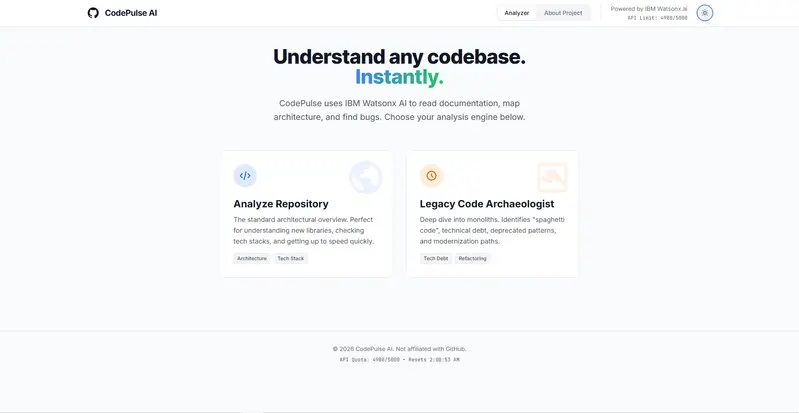
1. Original Landing Page

2. Initial Analyze Repository Interface

3. Initial Legacy Code Analysis Page

4. Original About Page

5. Basic Repository Visualization

6. Initial Loading & Analysis Workflow

After → Revived & Fully Polished Platform

During the GitHub Finish-Up-A-Thon, I completely revived and transformed CodePulse AI into a production-style AI-powered engineering intelligence platform.

The platform now features:

  • Gemini 2.5 Flash integration
  • Blast Radius dependency analysis
  • Interactive repository intelligence
  • Modern SaaS-inspired UI
  • Animated dependency graph previews
  • Security & code quality analysis
  • Improved loading and analysis flows
  • Advanced architecture visualization
  • Responsive developer-focused UX

Major Improvements

AI Stack Migration

One of the biggest upgrades was migrating the entire AI inference layer from IBM Watsonx.ai to Gemini 2.5 Flash.

This migration included:

  • rebuilding the backend proxy layer
  • refactoring request/response handling
  • converting payloads to OpenAI-compatible chat completion format
  • fixing malformed JSON parsing issues
  • redesigning Gemini fallback handling
  • updating environment configuration and model management

UI/UX Redesign

The frontend was completely redesigned into a modern AI SaaS-style experience inspired by:

  • GitHub
  • Linear
  • Vercel
  • Cursor

New additions included:

  • animated dependency graph previews
  • futuristic grid backgrounds
  • improved typography
  • polished loading states
  • responsive layouts
  • glassmorphism-inspired UI
  • dark mode refinement

Blast Radius Analysis

One of the biggest new features was Blast Radius Analysis.

This system:

  • maps repository dependency relationships
  • visualizes affected nodes
  • predicts propagation impact across services
  • helps developers understand change risk before deployment

Repository Intelligence

The platform now provides:

  • architecture diagrams
  • dependency insights
  • security analysis
  • tech stack detection
  • repository exploration
  • AI-generated documentation
  • legacy code archaeology

After Screenshots

1. Redesigned Hero Section

2. Modern AI Repository Dashboard

3. Blast Radius Analysis Visualization

4. Advanced Dependency Mapping

5. Improved Loading & Analysis Flow

6. AI-Powered Repository Intelligence

7. After About Page

Transformation Summary

Before After
Static prototype Production-style AI platform
IBM Watsonx.ai Gemini 2.5 Flash
Minimal UI Modern SaaS experience
Basic repository analysis Advanced repository intelligence
No dependency prediction Blast Radius Analysis
Incomplete UX Fully polished workflows
Static components Animated developer-focused interface
Experimental project Revived engineering intelligence platform

The Comeback Story

CodePulse AI originally began as an unfinished side project focused on AI-assisted repository understanding. While the core idea was strong, the platform was incomplete and lacked a polished user experience.

The original system:

  • used IBM Watsonx.ai for inference
  • had unstable response parsing
  • lacked proper architecture visualization
  • had static UI components
  • had incomplete analysis workflows
  • did not clearly communicate repository impact analysis

During the Finish-Up-A-Thon, I decided to fully revive the project and transform it into a polished developer intelligence platform.

The project evolved from a rough experimental prototype into a fully redesigned engineering intelligence platform capable of:

  • dependency analysis
  • blast radius prediction
  • AI-powered architecture understanding
  • repository exploration
  • security insights
  • modern developer-focused UX

My Experience with GitHub Copilot

GitHub Copilot became my pair programmer throughout the revival process.

I used Copilot extensively for:

  • refactoring React + TypeScript components
  • redesigning Tailwind layouts
  • generating animation logic
  • debugging Gemini integration issues
  • restructuring API payload handling
  • improving loading workflows
  • accelerating UI polishing
  • rebuilding analysis components

Copilot was especially helpful while:

  • migrating from IBM Watsonx.ai to Gemini 2.5 Flash
  • implementing animated dependency graph previews
  • refactoring the backend inference layer
  • improving frontend responsiveness and styling

Instead of generating the entire project automatically, Copilot acted as a collaborative engineering assistant that helped speed up iteration, experimentation, debugging, and polishing.

Tech Stack

Frontend

  • React
  • TypeScript
  • Tailwind CSS
  • Framer Motion
  • Mermaid.js

Backend

  • Node.js
  • Express.js

AI

  • Gemini 2.5 Flash
  • AIML API

Features

  • Repository Analysis
  • Blast Radius Visualization
  • Security Insights
  • Dependency Mapping
  • AI Documentation Generation
  • Legacy Code Archaeology

Transformation Summary

Before After
Static prototype Production-style AI platform
IBM Watsonx.ai Gemini 2.5 Flash
Minimal UI Modern SaaS experience
Basic analysis Advanced repository intelligence
No dependency prediction Blast Radius Analysis
Incomplete UX Fully polished workflows
Simple architecture diagrams Interactive engineering visualization
Experimental project Revived developer platform

What I Learned

This project taught me:

  • how to refactor and revive unfinished software
  • how to migrate AI inference providers
  • how to build production-style developer tooling
  • how to design modern SaaS interfaces
  • how to improve architecture visualization
  • how to work alongside AI-assisted development tools effectively

Most importantly, this challenge helped me finally finish and polish a project that had previously been left incomplete.

Built for the GitHub Finish-Up-A-Thon 🚀