How I Caught and Fixed an N+1 Query in My Django REST API

Every performant API eventually runs into the same silent killer: the N+1 query problem. It doesn’t crash your app. It doesn’t throw errors. It just quietly makes every list endpoint slower as your data grows — and it’s almost invisible until Sentry flags it in production.

Today, Sentry caught one on my /api/blog-posts/ endpoint. Here’s exactly what happened and how I fixed it in three lines of code.

What Is an N+1 Query?

An N+1 query happens when your code fetches a list of N records, then fires an additional query per record to fetch related data — totalling 1 + N database hits instead of a flat 2 or 3.

In Django, this usually happens silently because the ORM is lazy by default. Accessing a related object on a model instance that wasn’t eagerly loaded triggers a fresh SELECT on the spot. With 30 blog posts, that’s 30 silent queries you never wrote.

The Offending Code

The BlogPostViewSet looked clean on the surface:

class BlogPostViewSet(viewsets.ReadOnlyModelViewSet):
    queryset = BlogPost.objects.all()
    serializer_class = BlogPostSerializer
    lookup_field = "uid"

And the serializer:

class BlogPostSerializer(serializers.ModelSerializer):
    tags = BlogTagSerializer(many=True, read_only=True)
    series = BlogSeriesSerializer(read_only=True)
    ...

Spot the problem? BlogPost has two relations:

  • series — a ForeignKey to BlogSeries
  • tags — a ManyToManyField to BlogTag

When DRF serializes a list of 30 posts, it accesses post.series and post.tags on each one. Without eager loading, Django fires two extra queries per post — one to fetch the series, one to fetch the tags. That’s 1 + 60 queries for a 30-post list.

The featured action had the same issue:

@action(detail=False, methods=["get"])
def featured(self, request):
    queryset = BlogPost.objects.filter(date_published__isnull=False).order_by(
        "-date_published",
    )[:3]

A fresh BlogPost.objects call with no eager loading.

The Fix

Django gives me two tools for this:

  • select_related() — for ForeignKey and OneToOne relations. Issues a SQL JOIN and fetches everything in a single query.
  • prefetch_related() — for ManyToMany and reverse FK relations. Issues a second query and caches the results in Python.

The fix:

class BlogPostViewSet(viewsets.ReadOnlyModelViewSet):
    queryset = BlogPost.objects.select_related("series").prefetch_related("tags")
    serializer_class = BlogPostSerializer
    lookup_field = "uid"

    @action(detail=False, methods=["get"])
    def featured(self, request):
        queryset = (
            BlogPost.objects.select_related("series")
            .prefetch_related("tags")
            .filter(date_published__isnull=False)
            .order_by("-date_published")[:3]
        )
        serializer = self.get_serializer(queryset, many=True)
        return Response(serializer.data)

With 30 posts, the list endpoint now costs 3 queries regardless of dataset size:

  1. SELECT * FROM core_blogpost ...
  2. SELECT * FROM core_blogseries WHERE id IN (...)
  3. SELECT * FROM core_blogtag INNER JOIN core_blogpost_tags WHERE blogpost_id IN (...)

The Bonus Fix

While auditing the blog endpoint, I spotted the same pattern in TestimonialViewSet. Its serializer accesses project.title and project.slug, but the queryset had no select_related:

# Before
queryset = Testimonial.objects.all()

# After
queryset = Testimonial.objects.select_related("project")

One extra line, one less N+1.

How to Spot This in Your Own Code

The pattern is always the same — look for any ViewSet or view where:

  1. The queryset has no select_related or prefetch_related
  2. The serializer accesses a related field (source="relation.field", nested serializers, SerializerMethodField that touches obj.relation)

Tools that help catch this before Sentry does:

  • django-debug-toolbar — shows query counts per request in the browser
  • nplusone — raises exceptions in tests when N+1 queries are detected
  • Sentry Performance — catches it in production with query traces

The best time to catch an N+1 is during code review. Any time you write a nested serializer, ask: does the queryset for this view eagerly load this relation?

Takeaway

The Django ORM’s lazy evaluation is a feature, not a bug — but it requires discipline at the queryset layer. A clean-looking viewset with objects.all() is often hiding a query storm one serializer away.

The rule of thumb: every relation accessed in a serializer needs a corresponding select_related or prefetch_related on the queryset. Make it a checklist item on every PR that touches a ViewSet.

How to Start Coding as a Student: A Complete Beginner’s Guide 🚀

Hey everyone! 👋

If you are a student and thinking about stepping into the world of coding, you are in the exact right place. At first, coding can look intimidating with all those complex lines of text, but here is the truth: coding is like a superpower that anyone can learn—no matter your age or background!
In this article, I’m sharing a simple, no-nonsense roadmap to help any student kickstart their programming journey without getting overwhelmed.

🗺️ The Simple Roadmap
Step 1: Build Logic (Scratch): If you are an absolute beginner, start with Scratch (scratch.mit.edu). It uses drag-and-drop blocks to teach you how coding logic works through simple games.

Step 2: Build Websites (HTML & CSS): Want to make websites? Learn HTML (to add text and images) and CSS (to make it look colorful and beautiful).

Step 3: Try Python: If you want to build apps or explore AI, start with Python. It is the easiest language because it reads just like English.

🛠️ Best Free Resources
You don’t need to spend any money! Use these free platforms:

freeCodeCamp.org (Great for interactive coding)

W3Schools (Perfect for quick HTML/CSS notes)

YouTube (Search for “Free HTML/CSS beginner tutorials”)

💡 3 Golden Rules

Don’t Memorize: Coding is about logic, not learning lines by heart. Google is your best friend!

Expect Mistakes: Your code will break, and that is completely normal. Fixing bugs is how we learn.

Be Consistent: Coding for 30 minutes every day is much better than coding for 5 hours once a week.

Storing Kamal secrets in AWS Secrets Manager and deploying to a cheap Hetzner VPS

I ran into a problem with Kamal. My .kamal/secrets file was full of API keys sitting in plaintext on my laptop. Anyone with access could read them all.

TLDR; Use Kamal with AWS Secrets Manager and deploy to a Hetzner VPS. No plaintext secrets, cheap hosting, compliance happy.

The problem

Kamal is great for deploying apps. But by default secrets are in a plaintext file. For SOC 2 and GDPR that does not work. You need a managed store. I went with AWS Secrets Manager.

But then I hit another issue. The kamal secrets fetch --adapter aws_secrets_manager command with --from expects each key to be its own AWS secret. If you store everything as one JSON blob (like I did), you get:

ERROR (RuntimeError): myapp/production/secrets//DEEPGRAM_API_KEY: Secrets Manager can't find the specified secret.

Step 1: Hetzner VPS

Hetzner CAX series starts at around 4 euro a month. I use the CX22 with 2 vCPUs and 4GB RAM. Enough for production.

# On your Hetzner server
apt update && apt install -y docker.io

# Copy your SSH key so Kamal can connect
ssh-copy-id root@your-server-ip

Your config/deploy.yml:

servers:
  web:
    hosts:
      - runtime.yourdomain.com

proxy:
  ssl: true
  hosts:
    - runtime.yourdomain.com
  healthcheck:
    path: /health/ready

registry:
  server: docker.io
  username: your-docker-user
  password:
    - KAMAL_REGISTRY_PASSWORD

You need a Docker Hub account and a personal access token for KAMAL_REGISTRY_PASSWORD.

Step 2: Create the secret in AWS

In the AWS Secrets Manager Console:

  1. Go to Secrets Manager > Store a new secret
  2. Select “Other type of secret”
  3. Switch to plaintext tab and paste your JSON
{
  "DEEPGRAM_API_KEY": "your_deepgram_key",
  "ASSEMBLY_AI_API_KEY": "your_assemblyai_key",
  "REDIS_URL": "redis://:password@your-redis:6379",
  "KAMAL_REGISTRY_PASSWORD": "your_docker_token"
}
  1. Name it myapp/production/secrets
  2. Click Store

Pick a region close to your server. If your Hetzner box is in Germany, use eu-central-1 (Frankfurt). Keeps latency low and GDPR happy.

Step 3: IAM user for your laptop

Your laptop needs permission to read the secret during deploy.

  1. Go to IAM > Users > Create user
  2. Name it kamal-deploy
  3. Uncheck console access (CLI only)
  4. Create a group called secrets-manager with the SecretsManagerReadWrite policy
  5. Add an inline policy for batch reading:
{
  "Version": "2012-10-17",
  "Statement": [
    {
      "Effect": "Allow",
      "Action": [
        "secretsmanager:GetSecretValue",
        "secretsmanager:DescribeSecret",
        "secretsmanager:BatchGetSecretValue",
        "secretsmanager:ListSecrets"
      ],
      "Resource": "*"
    }
  ]
}
  1. Add your user to the group

IAM policies can take a minute to propagate. If it fails at first, wait 30 seconds and try again.

Step 4: Configure AWS CLI

aws configure
# AWS Access Key ID: paste from IAM user
# AWS Secret Access Key: paste
# Default region name: eu-central-1
# Default output format: json

Test it:

aws secretsmanager get-secret-value --secret-id myapp/production/secrets --query SecretString --output text | head -c 50

You should see the start of your JSON.

Step 5: Format your .kamal/secrets file

This is where I got stuck. The --from flag wants one AWS secret per key. Having 20 separate secrets is annoying. Check the Kamal secrets docs for more on this.

Instead I use the AWS CLI with Python extraction. Each line is self contained:

# AWS Secrets Manager: myapp/production/secrets (eu-central-1)
DEEPGRAM_API_KEY=$(python3 -c "import json,sys; print(json.loads(sys.argv[1])['DEEPGRAM_API_KEY'])" "$(aws secretsmanager get-secret-value --secret-id myapp/production/secrets --query SecretString --output text)")
ASSEMBLY_AI_API_KEY=$(python3 -c "import json,sys; print(json.loads(sys.argv[1])['ASSEMBLY_AI_API_KEY'])" "$(aws secretsmanager get-secret-value --secret-id myapp/production/secrets --query SecretString --output text)")
REDIS_URL=$(python3 -c "import json,sys; print(json.loads(sys.argv[1])['REDIS_URL'])" "$(aws secretsmanager get-secret-value --secret-id myapp/production/secrets --query SecretString --output text)")
KAMAL_REGISTRY_PASSWORD=$(python3 -c "import json,sys; print(json.loads(sys.argv[1])['KAMAL_REGISTRY_PASSWORD'])" "$(aws secretsmanager get-secret-value --secret-id myapp/production/secrets --query SecretString --output text)")

Each line fetches the full JSON and extracts one key. Kamal evaluates each line in its own subshell so there are no shared variables between lines. This works.

You can also use jq if you prefer:

DEEPGRAM_API_KEY=$(aws secretsmanager get-secret-value --secret-id myapp/production/secrets --query SecretString --output text | jq -r '.DEEPGRAM_API_KEY')

Step 6: Deploy

kamal deploy

Kamal fetches secrets from AWS during deploy and injects them into your container. No plaintext file ever touches the server.

Production and staging

I use a different AWS secret per environment. Both pull from AWS no plaintext anywhere.

# .kamal/secrets  (used by kamal deploy)
DEEPGRAM_API_KEY=$(python3 -c "import json,sys; print(json.loads(sys.argv[1])['DEEPGRAM_API_KEY'])" "$(aws secretsmanager get-secret-value --secret-id myapp/production/secrets --query SecretString --output text)")
KAMAL_REGISTRY_PASSWORD=$(python3 -c "import json,sys; print(json.loads(sys.argv[1])['KAMAL_REGISTRY_PASSWORD'])" "$(aws secretsmanager get-secret-value --secret-id myapp/production/secrets --query SecretString --output text)")

# .kamal/secrets.staging  (used by kamal deploy -d staging)
DEEPGRAM_API_KEY=$(python3 -c "import json,sys; print(json.loads(sys.argv[1])['DEEPGRAM_API_KEY'])" "$(aws secretsmanager get-secret-value --secret-id myapp/staging/secrets --query SecretString --output text)")
KAMAL_REGISTRY_PASSWORD=$(python3 -c "import json,sys; print(json.loads(sys.argv[1])['KAMAL_REGISTRY_PASSWORD'])" "$(aws secretsmanager get-secret-value --secret-id myapp/staging/secrets --query SecretString --output text)")

Only the secret name changes between files. myapp/production/secrets for production, myapp/staging/secrets for staging. Run kamal deploy -d staging and Kamal reads from the staging file.

Both secrets live in AWS. No staging credentials in plaintext either. This matters for SOC 2 because auditors check every environment.

Done

No more secrets in plaintext. SOC 2 and GDPR requirements met. Hetzner bill stays under 5 euro a month.

Big thanks to the AWS docs team, the Kamal maintainers, and Hetzner for keeping hosting affordable. Hope this saves you the same headaches I ran into. Now back to building.

What Are Buffers?

Buffers are temporary memory spaces used to hold data while it is being moved from one place to another.

Think of it like eating rice.

You cannot move the entire plate of rice into your stomach at once.
So you use a spoon.

The spoon temporarily holds a small piece of rice,
moves it,
Then it gets filled again.

In computers, buffers work similarly.

Instead of moving huge amounts of data all at once, computers usually move data in smaller chunks.

A buffer temporarily stores those chunks while data is being:

  • copied
  • read
  • written
  • uploaded
  • downloaded
  • streamed

For example:

  • while reading a file
  • while streaming a video
  • while receiving internet packets
  • while copying data between memory and disk

Buffers help data move smoothly and efficiently.

What Is a Buffer Technically?

<Buffer 4C A1 33 00 00 ...>

A buffer is a block of raw binary data stored in memory.

You can think of it as a list of very small memory units called bytes.

Each item inside a buffer:

  • has exactly 8 bits (1 byte)
  • stores a small piece of data
  • can be read, changed, copied, or written

For example:

4C A1 33 00

Each pair represents one byte of data written in **hexadecimal **format.

Why and What Is Hexadecimal?

We will learn more about hexadecimal later, but for now, here is the basic idea.
Computers internally work with binary numbers:

01001100 01001100 01001100 01001100

But binary is difficult for humans to read and understand quickly.

Imagine looking at thousands of bytes written only with 0s and 1s.
It becomes confusing very fast.

So programmers use hexadecimal instead.

Hexadecimal is simply a shorter and cleaner way to represent binary data.

For example, instead of writing:

01001100

we can write:

4C

Both represent the same data.

Simple Mental Model

Think of a buffer like this:

[ byte ][ byte ][ byte ][ byte ]

Each box:

  • contains 8 bits
  • stores a tiny piece of data
  • together forms larger information

That is the core idea behind buffers.

Build AI Agents with Hot Dev

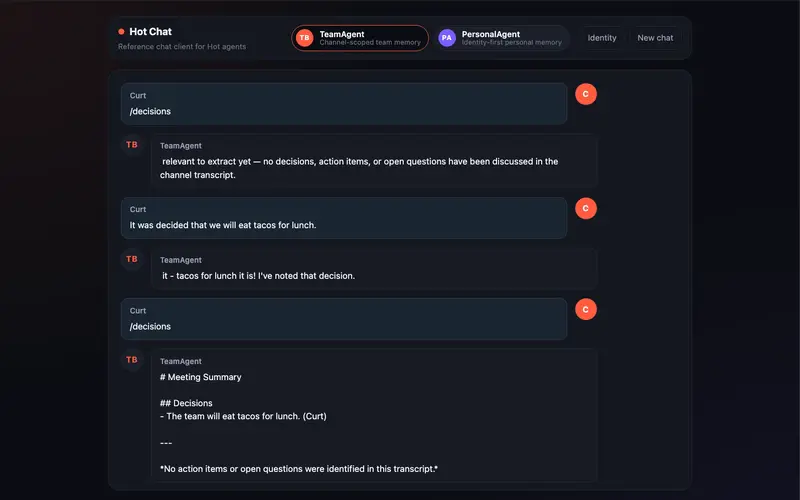
The Hot Chat web UI showing a streaming reply from the Team Mode agent with the Personal/Team mode toggle visible in the toolbar

Learn how to build AI chat agents with two kinds of memory: one that follows a user across devices, and one shared by everyone in a channel.

Hot Chat is a web chat demo you can clone and start in about 15 minutes, with two AI agents side by side: a Personal Mode agent whose memory is keyed to the user, and a Team Mode agent whose memory is keyed to the channel.

The UI is a Next.js + TypeScript app that talks to Hot through @hot-dev/sdk. The agent layer is built on hot.dev/hot-ai-agent, a reusable Hot package for transports, commands, runtime stores, rendering, streaming, and MCP helpers. Hot Dev itself is open source under Apache 2.0, so everything you see in this post runs on code you can read.

Try It

Before running the demo, install Hot if you don’t already have the hot CLI.

git clone https://github.com/hot-dev/hot-demos
cd hot-demos/hot-chat
hot dev --open                  # terminal 1: both agents
cp .env.example .env            # terminal 2: the UI
# Hot App -> Service Keys -> New Key; paste it into HOT_API_KEY.
# Then add your ANTHROPIC_API_KEY (https://console.anthropic.com/) to .env.
npm install && npm run dev

Open http://localhost:3000. The toolbar switches between the two agents live, no restart needed.

Set ANTHROPIC_API_KEY in .env to get the real, streamed, memory-grounded replies the demo is built around. Without it the UI still loads, but assistant replies fall back to a stub that just says the LLM is disabled. The harness sits on hot-ai, so you can wire a different provider in your own app.

The full walkthrough is at hot.dev/docs/demos/hot-chat.

Two Agents, One Project

Hot Chat ships two agents in one Hot project. They look nearly identical on the surface: same chat UI, same slash commands, same streaming replies.

The difference is how each one scopes memory.

Personal Mode is identity-first. Whatever you tell the agent follows you across sessions, tabs, and devices. Type /remember I prefer launch updates that start with blockers, close the tab, come back tomorrow on a different device, ask /recall, and the same notes are still there.

This is the pattern for assistants, journaling apps, per-user copilots, and anything where memory belongs to the person rather than the conversation.

Team Mode is session-first. Memory is keyed to the channel, so two people chatting in the same room share one view, and two channels stay independent. Type “we decided to ship docs before launch”, then “CI is the only blocker”, then /ask what is blocking launch?, and the reply cites the matching records with attribution.

This is the pattern for team chat bots, support inboxes, and shared workspaces.

Concept Team Mode Personal Mode
Session the channel or thread a scratch context per person
Identity the person who posted the durable memory owner
Memory scoped to the session scoped to the user

The Hot Chat web UI showing a streaming reply from the Team Mode agent with the Personal/Team mode toggle visible in the toolbar

Hot Chat, mid-conversation. The toolbar switches between Personal and Team mode live.

Inside the UI

The Hot Chat UI is intentionally generic. It looks like a chat product, not a framework demo. That’s because the experience is the point:

  • Quick-prompt chips help you explore each mode without learning a syntax first. Try Recall preferences, Daily brief, Decisions, or Ask the team.
  • Streaming replies render as the agent generates them. Slash-command replies stream too, identically to LLM responses, so the UI doesn’t have to know which path produced the message.
  • File attachments let you drag in a small notes.md file or screenshot. The agent stores the file name and type as metadata and could be extended to parse contents.
  • Identity controls show the exact session_id and user_id the agent receives, in the same format a Slack or Telegram adapter would generate.
  • Agent Graph in the Hot Dev App shows each slash command as its own typed event handler, so you can see the agent structure without digging through a central dispatch function.

The Hot Dev Agent Graph view for the PersonalAgent demo showing each slash command as its own event handler node connected to the streaming reply outputs

One event handler per command, no central dispatch.

What hot-ai-agent Brings

If you’ve built an AI chat agent before, you’ve probably written some version of this stack:

  • a slash-command parser
  • a way to thread LLM calls through retrieval-augmented memory
  • a streaming reply mechanism
  • per-agent stores for state and stats
  • per-request session and identity bindings so tools know who’s talking

Most chat agents end up reinventing these pieces.

hot-ai-agent extracts that layer. Concretely, it gives you:

  • Typed transport messages: a single IncomingMessage shape that adapters for web, Slack, Telegram, or anything else can translate into. The agent never branches on transport.
  • Slash-command parsing: /ask@MyBot what's up? becomes {name: "ask", arg: "what's up?"}, with the Telegram-style @MyBot suffix stripped.
  • The memory-grounded chat turn: the canonical recall -> persist user -> bind request -> stream -> persist assistant lifecycle in one function call. The order matters; getting it wrong can cause the user’s fresh message to contaminate their own retrieval.
  • Stable streaming events: every agent emits <agent>:reply:start, :delta, and :end events at a stable, agent-scoped label.
  • Per-request session binding: when an LLM tool runs mid-turn, the resolved session and identity are bound to the current agent request.
  • Per-agent stores and a session registry: each agent gets state, stats, errors, and a notification ledger. Scheduled jobs can fan out per session with error isolation.
  • MCP plumbing: expose any agent function as an MCP tool with one annotation, so Claude Desktop, Cursor, and other MCP clients can call into the agent directly.

What it deliberately doesn’t include: transport vendor packages. No Slack, Telegram, or Discord packages are baked in. Those live in the application and translate to the neutral types, which keeps the harness portable and the dependency tree small.

Under the Hood, in One Snippet

When all the harness pieces are in place, an entire chat-style event handler in Hot looks like this:

remember-message
meta {
    agent: PersonalAgent,
    on-event: "personal-agent:remember",
}
fn (event) {
    d        event.data
    sender   identity-from-data(d)
    session  session-from-data(d, sender)
    input    base-input(d, session, sender, Str(or(d.text, "")))
    ::chat-turn/run-chat-turn(turn-cfg, input)
}

That’s the whole handler. Resolve who’s talking, package up the input, and hand off to run-chat-turn.

RAG, persistence, ordering, streaming, request binding, tool dispatch, and error handling sit behind that one call.

Adding a new slash command in your own agent follows the same pattern: one more function, one more on-event annotation.

Where to Go Next

Clone Hot Chat and try swapping the LLM provider, adding a slash command, or wiring a second adapter on top of the same agent. Everything below is open source and free to read.

The Client Onboarding Checklist That Prevents 90% of Project Problems

Most freelance project problems are visible before the project starts.

The wrong clients, unclear scope, missing access credentials, the stakeholder who was not in the initial conversation – all of these create problems later. Most could be caught in the first week with a proper onboarding process.

Before work starts

Signed contract. No exceptions. Nothing starts without one.

Deposit paid. If your terms include a deposit, payment clears before work begins.

Kickoff call scheduled. Not to start work – to confirm alignment.

The kickoff call agenda

Five things to cover:

Who is the final decision-maker? Not who you have been talking to – who has final authority on design decisions, feature priorities, and delivery acceptance. Get this confirmed explicitly.

What does success look like? Ask them to describe the project when it is done and they are happy. Their answer tells you if expectations match scope.

What are the non-negotiables? Specific deadlines? Technologies they cannot use? Things previous developers did that they definitely do not want repeated?

How do they prefer to communicate? Async email, Slack, scheduled calls? Settle this early.

What could make this project harder than expected? Ask directly. Clients often know about complications – internal approvals, data issues, unreliable third-party dependencies – that they forgot to mention.

Post-kickoff: the onboarding document

Send a one-page summary: what we agreed the project is, key milestones, what I need from you and when, my communication schedule, how to reach me.

This confirms alignment and gives both sides a reference if memory differs later.

The access checklist

Before starting technical work, confirm you have:

  • All logins and credentials needed
  • Codebase access if working on existing code
  • Staging/development environment access
  • Design files, brand guidelines, or content if in scope

Discovering on day three that you lack critical access delays projects and frustrates clients.

The one thing that prevents most problems

Most freelance project problems come from mismatched expectations that existed from the beginning and were never surfaced.

The onboarding process surfaces them early, when they are easy to address, rather than late, when they create conflict.

Two hours at the start saves ten hours of conflict management later.

The Freelance Command Center includes a complete client onboarding template and checklist. EUR 17.

Scalable Treasure Hunts Are a Myth, But We Almost Made One

The Problem We Were Actually Solving

As it turns out, we weren’t really solving the problem of scaling our server infrastructure, but rather the problem of our own internal architecture. Our team had designed the system to be modular, with various components communicating with each other over a complex network of message queues and HTTP requests. It was an attempt to apply the microservices pattern to a very specific problem, but ultimately, it just wasn’t working out as planned. The more we tried to scale, the more our performance metrics started to slip. We saw our average 95th percentile latency creep up to 400ms, and our CPU utilization on the web server started to top out at 80%.

What We Tried First (And Why It Failed)

Our first instinct was to try and optimize the database queries on our server. We knew that the database was a major bottleneck, so we went in and started tweaking query plans, indexes, and caching strategies. We even went so far as to rewrite some of the queries from scratch, but it didn’t really make a dent. Our latency started to come down, but only by a few milliseconds, and our CPU utilization kept creeping up. It was clear that the database was just the tip of the iceberg, and that our real problem lay deeper in the system.

The Architecture Decision

It was then that we took a step back and re-evaluated our architecture. We realized that our modular system was actually a hindrance to performance, rather than a help. We were creating unnecessary overhead with all the inter-component communication, and our system was starting to resemble a distributed monolith. We decided to take a different approach – we chose to use a single-threaded, in-memory cache to store our game state, and then use a message queue to handle updates asynchronously. It was a much simpler design, but it turned out to be the key to our performance problem.

What The Numbers Said After

After implementing the new design, we saw a huge improvement in performance. Our average 95th percentile latency dropped to 50ms, and our CPU utilization on the web server came down to 30%. We were able to handle thousands of concurrent users with ease, and our system became much more responsive. We also saw a significant reduction in our allocation count, which was a major pain point for us. Our application was no longer constantly thrashing the CPU and memory, and we were able to remove a bunch of unnecessary caching and queuing code.

What I Would Do Differently

In hindsight, I would have taken a more radical approach to our system design from the start. We were trying to reinvent the wheel with our modular system, when in fact, a simpler design would have been much more effective. I would have also focused on performance testing much earlier in the development cycle, rather than waiting until the last minute. Finally, I would have been more careful about our choice of programming language and runtime. We chose to use Python, which, while a great language, was not the best choice for a system that needed to be highly concurrent. We ended up constantly fighting memory safety issues and performance bottlenecks, which made our life much harder than it needed to be.

Gemini 3.5 Flash Has a 1M Token Context Window. Here’s What You Can Actually Build With It.

This is a submission for the Google I/O Writing Challenge

“1 million token context window” sits in every I/O recap summary. Then people move on.

It sounds like a spec-sheet number — impressive in the abstract, like a car rated for 700 horsepower. Sure. But what road are you actually driving on?

I want to make it concrete. Gemini 3.5 Flash shipped GA at Google I/O 2026. Here’s what 1M context actually unlocks, with working code and one real experiment I ran.

What Shipped

Gemini 3.5 Flash is the first generally available model in the 3.5 series. GA on day one — no preview suffix, stable, ready for production.

Feature Value
Context window 1,000,000 tokens
Max output 65,000 tokens
Thinking Built-in
Speed ~4x faster than frontier models
Pricing $1.50 / 1M input · $9 / 1M output

The benchmark story: 3.5 Flash outperforms Gemini 3.1 Pro across almost all benchmarks, at 4x the speed. That’s the classic Flash bet — you trade some ceiling on niche hard tasks for speed and cost everywhere else.

In my testing: requests that took 8–10 seconds on 3.1 Pro land in 2–3 seconds on 3.5 Flash. At scale, that’s the difference between an interactive tool and a batch job.

Get Started in 3 Minutes

pip install google-genai

Grab a free API key from AI Studio — no billing required to test.

from google import genai

client = genai.Client(api_key="YOUR_API_KEY")

response = client.models.generate_content(
    model="gemini-3.5-flash",
    contents="What's the most underrated pattern in async Python?",
)

print(response.text)

That’s the baseline. Now the part that matters.

What 1M Tokens Actually Lets You Do

One million tokens is roughly 750,000 words. That’s:

  • The entire source code of a medium-sized web app
  • Six months of Slack export from a busy engineering channel
  • A 300-page legal agreement plus all its referenced attachments
  • A full year of support tickets

Previously, reasoning over a full codebase meant chunking it, embedding it, retrieving relevant pieces, and hoping retrieval didn’t miss the thing that mattered.

With 1M context, you just send it. One call. The model sees everything simultaneously.

Bold opinion: Most “RAG pipeline” complexity is a workaround for insufficient context window. 1M tokens doesn’t eliminate RAG entirely, but it eliminates a huge class of retrieval problems for the applications most developers are actually building.

Tutorial: Whole-Codebase Code Review

Here’s a real use case: feed your entire project to Gemini 3.5 Flash and get a structured security review.

import os
from pathlib import Path
from google import genai

client = genai.Client(api_key=os.environ["GEMINI_API_KEY"])

def load_codebase(root: str, extensions: list[str] = [".py", ".ts", ".js"]) -> str:
    parts = []
    for path in sorted(Path(root).rglob("*")):
        if path.suffix in extensions and ".git" not in path.parts:
            parts.append(f"nn### FILE: {path}n")
            parts.append(path.read_text(errors="ignore"))
    return "".join(parts)

codebase = load_codebase("./src")

response = client.models.generate_content(
    model="gemini-3.5-flash",
    contents=f"""You are a security-focused code reviewer.

Review this entire codebase for:
1. SQL injection vulnerabilities
2. Unvalidated user input in system calls
3. Hardcoded secrets or credentials
4. Insecure direct object references
5. Missing authentication checks

For each issue: file path, severity (critical/high/medium/low), what's wrong, suggested fix.

Codebase:
{codebase}""",
)

print(response.text)

One API call. No chunking, no retrieval pipeline, no missed cross-file context.

The model sees api/routes.py and middleware/auth.py simultaneously — it’ll catch a vulnerability that’s only exploitable because a check is missing in auth.py, which chunk-based retrieval would likely miss.

I Tried It: Security Review on UXRay

I ran this on my own project — UXRay, a ~3,000-line Next.js + TypeScript app.

The whole codebase fit in a single call with room to spare. Gemini 3.5 Flash returned:

  • 2 high-severity issues: missing rate limiting on the Playwright screenshot endpoint; base64 image data not sanitized before passing to the subprocess
  • 1 medium: API key readable from client-side bundle under certain Next.js config
  • 3 informational: minor input validation gaps, non-exhaustive error handling

The rate-limiting issue was real and I hadn’t caught it. The client-side key issue was a valid config warning specific to my setup.

Total time: 14 seconds. For a codebase security review I’d normally spend an hour on.

Thinking Mode

Gemini 3.5 Flash has built-in thinking — the model reasons through a problem before producing its answer.

from google import genai
from google.genai import types

client = genai.Client(api_key=os.environ["GEMINI_API_KEY"])

response = client.models.generate_content(
    model="gemini-3.5-flash",
    contents="Design a database schema for a multi-tenant SaaS with row-level security.",
    config=types.GenerateContentConfig(
        thinking_config=types.ThinkingConfig(
            thinking_budget=8192
        )
    ),
)

print(response.text)

The Migration Gotcha Nobody Mentions

If you’re coming from gemini-3-flash-preview, there’s a silent behavior change.

The preview model’s thinking defaulted to high. The GA model defaults to medium. Migrate without setting thinking_budget explicitly and the model quietly uses fewer thinking tokens — faster and cheaper, but less thorough on complex tasks.

Set it explicitly:

# Equivalent to old default (high)
thinking_config=types.ThinkingConfig(thinking_budget=16384)

# Faster/cheaper (new GA default)
thinking_config=types.ThinkingConfig(thinking_budget=4096)

Don’t leave this implicit in production. You will notice the output quality difference on anything that requires multi-step reasoning.

Structured Output (Machine-Readable Results)

The API supports constrained JSON output via response schema. The model outputs valid JSON matching your spec — no parsing heuristics, no regex, no retries.

import json
from google import genai
from google.genai import types

schema = {
    "type": "object",
    "properties": {
        "summary": {"type": "string"},
        "issues": {
            "type": "array",
            "items": {
                "type": "object",
                "properties": {
                    "file": {"type": "string"},
                    "severity": {
                        "type": "string",
                        "enum": ["critical", "high", "medium", "low"]
                    },
                    "description": {"type": "string"},
                    "fix": {"type": "string"},
                },
                "required": ["file", "severity", "description", "fix"]
            }
        },
        "risk_score": {"type": "integer", "minimum": 0, "maximum": 100}
    },
    "required": ["summary", "issues", "risk_score"]
}

response = client.models.generate_content(
    model="gemini-3.5-flash",
    contents=f"Security review:nn{codebase}",
    config=types.GenerateContentConfig(
        response_mime_type="application/json",
        response_schema=schema,
    ),
)

result = json.loads(response.text)
print(f"Risk score: {result['risk_score']}/100")
for issue in result["issues"]:
    print(f"[{issue['severity'].upper()}] {issue['file']}: {issue['description']}")

Validate with Zod, Pydantic, or any schema library and you can render the output directly in a UI without post-processing.

What You Can Actually Build Now

The 1M context + structured output + thinking combination makes a category of applications practical that weren’t before:

Whole-codebase refactoring advisor. Ask for a prioritized list of refactors with cross-file impact analysis. No chunking.

Full contract analysis. A 300-page agreement fits easily. Ask for all clauses that limit liability, conflict with your agreements, or require notice periods — across the entire document at once.

Support ticket patterns. Six months of tickets in one prompt. “What are the top 5 root causes of customer friction?” across all of them.

End-to-end PR review. Send the full diff and the codebase it applies to. The model evaluates whether the change breaks invariants elsewhere, not just whether the diff is internally correct.

Bold opinion: The PR review use case alone justifies integrating Gemini 3.5 Flash into CI. A model that can see the full codebase context when reviewing a diff will catch things that diff-only review structurally cannot — and at 14 seconds, it’s fast enough to be a non-blocking CI step.

Get the API Key

AI Studio → sign in → API Keys → Create. Free tier, no billing required to test.

Model ID: gemini-3.5-flash. No suffix, no preview. That’s the GA signal.

Gemini 3.5 Flash docs at ai.google.dev. Quickstart at Google AI for Developers.

Tags: googleio gemini ai python tutorial