
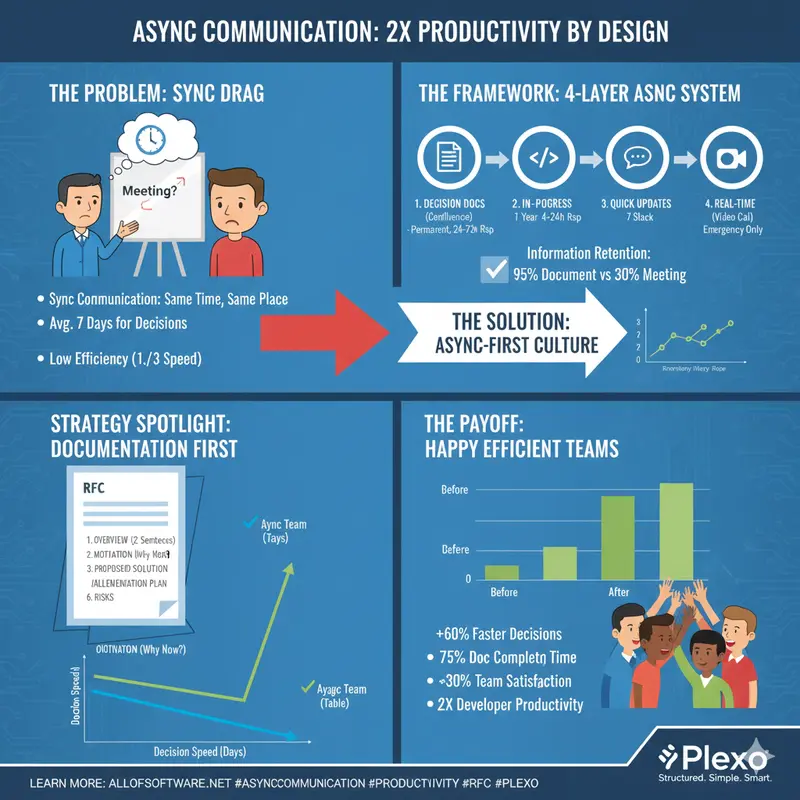
“Should we solve this in a meeting?”
Before asking this question, think again.
Synchronous communication (meetings): Everyone talks at the same time, same place
Async communication (documents): Each person participates at their own time, their own pace
Productivity difference:
- Meeting-centric teams: Average 7 days to decision
- Async-centric teams: Average 2-3 days to decision
Efficiency increase: 2-3x
At first, meetings seemed faster,
But actually scheduling everyone takes a week.
With async, everyone can participate at their own time, so it’s much faster.
This article covers how to systematically build async communication.
1. Principles of Async Communication
1.1 Core Principles
Principle 1: Documentation First
Sync: Meeting → Unintended decisions → Poor records
Async: Write document → Collect feedback → Perfect records
Principle 2: Capturable
Meeting: What was said vs what's remembered differs
Document: Recorded in clear text
Principle 3: Searchable
Meeting: "Who said this?" → Can't find it
Document: Found immediately via search
1.2 Building Async System
4-Layer Async System:
- Decision documents (Layer 1)
- Tool: Confluence
- Purpose: Record all important decisions
- Storage: Permanent
- Work in progress (Layer 2)
- Tool: GitHub / Linear
- Purpose: Task progress, comments
- Storage: 1 year after project ends
- Quick updates (Layer 3)
- Tool: Slack / Teams
- Purpose: Immediate communication
- Storage: 7 days
-
Real-time (Layer 4)
- Tool: Video call
- Purpose: Urgent problem resolution only
- Storage: Records only
Information retention rate:
- Conversation: 70% lost (after 48 hours)
- Meeting notes: 40% lost (after 1 week)
- Documentation: 90% retained (permanently referenceable)
- Searchable documents: 95% retained (found via search)
Productivity impact (10-person team, monthly):
- Time saved finding information: 100 hours
- Eliminated duplicate explanations: 50 hours
- Reduced context switching: 75 hours
- Total saved: 225 hours (about 28 days)
2. How to Write Decision Documents
2.1 RFC (Request For Comments) Template
# RFC: Microservices Architecture Migration

## 1. Overview (2 sentences)

We're migrating our monolithic architecture to microservices.
This will increase deployment speed 3x and reduce failure impact.

## 2. Motivation (Why now?)

- Current deployment time: 4 hours (entire team must wait)
- Full system impact when failures occur
- Bottleneck for team expansion

## 3. Proposed Solution

- Current: Monolith
- Proposed: Microservices (3-5 services as macro)

## 4. Alternative Review

| Option             | Pros         | Cons         | Cost |
| ------------------ | ------------ | ------------ | ---- |
| Keep Monolith      | Simple ops   | Hard to scale | Low  |
| Microservices      | High scalability | Complex ops | High |
| Modular Monolith   | Balanced     | Learning curve | Medium |

**Recommendation**: Microservices (high growth expected)

## 5. Implementation Plan

- Phase 1: Infrastructure prep (2 weeks)
- Phase 2: Migrate first microservice (4 weeks)
- Phase 3: Migrate remaining services (8 weeks)

## 6. Risks and Mitigation

| Risk        | Impact | Mitigation      |
| ----------- | ------ | --------------- |
| Deployment failure | High | Blue-green deployment |
| Performance degradation | High | Load testing |
| Team learning curve | Medium | Training program |

## 7. Metrics

- Success metric: Deployment time < 30 min
- Monitoring: Inter-service latency < 100ms
- Failure criteria: Increased failure frequency

## Approval Process

- [ ] Tech team review (by Mon)
- [ ] PM review (by Tue)
- [ ] Executive approval (by Wed)

## Feedback Period

This RFC collects feedback for 5 days (Tue-Sat).
2.2 Decision Record Template
# ADR-001: Select PostgreSQL as Database

## Status: Approved (2025-01-20)

## Problem

Which database should we use?

- Performance: Need high throughput
- Cost: Limited budget
- Team capability: SQL experience available

## Options Considered

### Option 1: PostgreSQL

- Pros: Open source, high stability, low cost
- Cons: Complex horizontal scaling

### Option 2: MongoDB

- Pros: Easy horizontal scaling
- Cons: High cost (cloud), difficult schema management

### Option 3: DynamoDB

- Pros: Fully managed, automatic horizontal scaling
- Cons: High cost, many query constraints

## Decision

**We choose PostgreSQL.**

### Reasons

1. Cost: $5k/year vs MongoDB $15k vs DynamoDB $20k
2. Team capability: Rich SQL experience
3. Performance: Sufficient for expected throughput over next 3 years
4. Horizontal scaling: Read replicas sufficient

## Impact

- Development: Familiar tech → Fast development
- Operations: Increased management responsibility (mitigated by using cloud RDS)
- Cost: $5k saved per year

## Rollback Plan

If need to change to MongoDB:

- Migration cost: $50k
- Migration period: 3 weeks
- Trigger: Exceed throughput (e.g., 100,000 requests/sec)

## Review Schedule

Re-review after 6 months (2025-07-20)
3. Collecting Async Feedback
3.1 Effective Feedback Collection
RFC Feedback Process:
- Awareness phase (24 hours): All stakeholders notified, Slack announcement
- Review phase (3 days): Detailed review and questions, document comments
- Consolidation phase (1 day): Author consolidates feedback, updates document
- Decision phase (1 day): PM makes final decision, approves document
Feedback quality criteria:
- Low complexity: 3-5 feedback items = appropriate, 6+ = sufficient
- High complexity: 6-10 feedback items = appropriate, 11+ = sufficient
Participation activation:
- Request opinions from quiet participants
- Provide simple form (pro/con/opinion)
- Thank all feedback
- Share changes made from feedback
- Increase transparency with public comments
3.2 Writing Feedback Request Messages
Good example:
Please provide feedback on this technology selection RFC.
Especially looking for feedback from these perspectives:

1. Dev team: Implementation difficulty, required tech training
2. Ops team: Operational complexity, monitoring approach
3. PM: Schedule impact, cost
4. Security: Security impact

Feedback submission deadline: Thursday 17:00
Bad example:
Please give feedback.
4. Utilizing Async Tools
4.1 Optimal Use by Tool
Major async tools:
- Confluence: RFC, design docs, architecture decisions (permanent storage, excellent search, 24-72 hour response)
- GitHub/GitLab: Code review, technical decisions, issues (permanent storage, excellent search, 4-24 hour response)
- Google Docs: Draft writing, collaboration, quick decisions (1 year storage, good search, 1-8 hour response)
- Slack: Quick questions, announcements, urgent items (7 day storage, average search, within 1 hour response)
Tool selection by scenario:
- Architecture decision: Confluence (permanent record)
- Code review: GitHub Pull Request
- Quick design feedback: Google Docs
- Urgent blocker: Slack thread
- Policy decision: Confluence + GitHub issue
5. Meeting Elimination Strategy
5.1 Meeting → Async Transition
Before (Sync):
Mon-Fri: 15 meetings/week per team
Time: 20 hours/week
Efficiency: 30% (3 day delay)

After (Async):
Mon-Fri: RFC-based decisions
Time: 5 hours/week (only urgent sync)
Efficiency: 85% (decision within 24 hours)

Effect:
- Time: 75% saved
- Efficiency: 180% improvement (3x faster)
- Documentation: 100% vs 30%
5.2 Transition Process
Week 1-2: Introduce "Async-First" policy
- All decisions via document-based RFC
- Meetings only for "urgent" or "complex discussion"
- Train all team members

Week 3-4: Pilot operation
- Convert some meetings to async
- Identify issues and improve

Week 5+: Company-wide expansion
- Async culture established
6. Challenges of Async Communication
6.1 Potential Problems and Solutions
Major challenges and solutions:
- Lack of urgency
- Problem: Important things don’t get prioritized
- Solution: Set SLA (urgent: 2 hours, high: 24 hours, normal: 72 hours)
- Communication gap
- Problem: If someone misses, information mismatch
- Solution: Record all decisions in wiki, monthly audit
- Timezone issues
- Problem: Global teams always have someone waiting
- Solution: Async first, weekly sync meeting, timezone rotation
-
Relationship building
- Problem: Hard to form bonds async
- Solution: Monthly company meeting (1 hour, social purpose only)
Async-First Policy:
- Default communication: Async (document-based)
- Sync exceptions: Crisis situations, sensitive topics, complex discussions
- Guidelines: Set response SLA, permanently record all decisions, default to public
7. Measurement and Improvement
Async communication effectiveness measurement:
- Decision speed: 7 days → 2-3 days (60-70% improvement)
- Documentation completeness: 40% → 95% (137% improvement)
- Meeting time: 20 hours/week → 5 hours (75% reduction)
- Team satisfaction: 6.2/10 → 8.1/10 (30% improvement)
Key Summary
By introducing async communication:
- Decisions 60% faster
- Documentation 95% complete
- Meeting time 75% reduced
- Team satisfaction 30% improved
Achieving 2x productivity = 2x developer capability
Start today:
- Create RFC template
- Set up Confluence
- Write first RFC
- Use AI to auto-generate WBS drafts — team members review async instead of planning meetings
- Train team
Small changes make a big difference.
Need async-friendly project management with AI-powered task breakdown? Check out Plexo.