From Abandoned Prototype to Smart AI System: Reviving Trafiq AI with GitHub Copilot

Trafiq AI Dashboard

This is a submission for the GitHub Finish-Up-A-Thon Challenge

I Revived My Abandoned AI Traffic Project Using GitHub Copilot — And It Became Better Than I Imagined

What I Built

Trafiq AI is a smart AI-powered traffic management concept focused on improving how future smart cities analyze and manage traffic systems.

The idea originally started during an innovation-focused project where I wanted to explore how AI could help:

  • detect traffic congestion,
  • optimize routes,
  • analyze traffic flow,
  • and improve smart transportation systems.

At the beginning, Trafiq AI was mostly a rough prototype with incomplete ideas, unfinished UI screens, and limited functionality.

But instead of letting the project stay abandoned, I decided to bring it back and completely rethink the experience.

This challenge became the perfect reason to finally finish what I started.

Demo

Core Features

  • AI-powered traffic analysis
  • Smart route optimization concepts
  • Traffic heatmap visualization
  • Predictive traffic insights
  • Futuristic dashboard UI
  • Smart city inspired interface

Project Screenshots

Trafiq AI Dashboard

Trafiq AI Workspace

Vision

The long-term vision behind Trafiq AI is to explore how AI systems can support:

  • smarter transportation,
  • intelligent city planning,
  • and future smart city ecosystems.

The Comeback Story

Like many hackathon-style projects, Trafiq AI started with excitement but eventually got pushed aside.

The biggest problems were:

  • incomplete implementation,
  • lack of polish,
  • unfinished UI,
  • and limited time during development.

At one point, the project became just another unfinished idea sitting in my folders.

But revisiting the project later felt completely different.

Instead of simply fixing bugs, I focused on transforming the project into something more realistic and visually polished.

Here’s what changed during the revival process:

Before

  • Basic prototype
  • Unfinished dashboard
  • Rough UI design
  • Limited traffic visualization
  • Incomplete project structure

After

  • Futuristic smart-city inspired interface
  • Improved dashboard experience
  • Better visual presentation
  • Cleaner structure and organization
  • Expanded AI-driven concepts and workflows

One thing I realized during this process is that unfinished projects often still contain strong ideas.

Sometimes they just need more time, patience, and better tools.

My Experience with GitHub Copilot

GitHub Copilot genuinely helped speed up the rebuilding process.

While working on Trafiq AI, Copilot helped me with:

  • code suggestions,
  • debugging support,
  • UI improvements,
  • faster implementation,
  • and organizing repetitive logic.

What I liked most was how it reduced development friction during experimentation.

Instead of getting stuck repeatedly searching for small syntax fixes or boilerplate code, I could focus more on improving the actual project experience and exploring ideas faster.

As someone still learning and building projects in the AI space, that productivity boost felt extremely valuable.

What I Learned

Reviving an abandoned project taught me something important:

A project doesn’t need to start perfectly to become meaningful.

Many student projects fail not because the idea is bad, but because time, polish, and consistency become difficult during fast-paced development.

This challenge pushed me to revisit an unfinished idea and turn it into something I’m genuinely proud of.

And honestly, seeing an old prototype evolve into a much more polished AI concept felt incredibly satisfying.

Final Thoughts

AI and smart systems are changing how we imagine future cities, automation, and real-world problem solving.

Trafiq AI started as a simple experimental idea.

But rebuilding it with better tools, improved design thinking, and support from GitHub Copilot showed me how much unfinished projects can still evolve.

This challenge wasn’t just about finishing code.

It was about finishing something I once believed had potential.

And I’m really glad I came back to it.

Tags

devchallenge #githubchallenge #github #ai

From Abandoned Prototype to Smart AI System: Reviving Trafiq AI with GitHub Copilot

Trafiq AI Dashboard

This is a submission for the GitHub Finish-Up-A-Thon Challenge

I Revived My Abandoned AI Traffic Project Using GitHub Copilot — And It Became Better Than I Imagined

What I Built

Trafiq AI is a smart AI-powered traffic management concept focused on improving how future smart cities analyze and manage traffic systems.

The idea originally started during an innovation-focused project where I wanted to explore how AI could help:

  • detect traffic congestion,
  • optimize routes,
  • analyze traffic flow,
  • and improve smart transportation systems.

At the beginning, Trafiq AI was mostly a rough prototype with incomplete ideas, unfinished UI screens, and limited functionality.

But instead of letting the project stay abandoned, I decided to bring it back and completely rethink the experience.

This challenge became the perfect reason to finally finish what I started.

Demo

Core Features

  • AI-powered traffic analysis
  • Smart route optimization concepts
  • Traffic heatmap visualization
  • Predictive traffic insights
  • Futuristic dashboard UI
  • Smart city inspired interface

Project Screenshots

Trafiq AI Dashboard

Trafiq AI Workspace

Vision

The long-term vision behind Trafiq AI is to explore how AI systems can support:

  • smarter transportation,
  • intelligent city planning,
  • and future smart city ecosystems.

The Comeback Story

Like many hackathon-style projects, Trafiq AI started with excitement but eventually got pushed aside.

The biggest problems were:

  • incomplete implementation,
  • lack of polish,
  • unfinished UI,
  • and limited time during development.

At one point, the project became just another unfinished idea sitting in my folders.

But revisiting the project later felt completely different.

Instead of simply fixing bugs, I focused on transforming the project into something more realistic and visually polished.

Here’s what changed during the revival process:

Before

  • Basic prototype
  • Unfinished dashboard
  • Rough UI design
  • Limited traffic visualization
  • Incomplete project structure

After

  • Futuristic smart-city inspired interface
  • Improved dashboard experience
  • Better visual presentation
  • Cleaner structure and organization
  • Expanded AI-driven concepts and workflows

One thing I realized during this process is that unfinished projects often still contain strong ideas.

Sometimes they just need more time, patience, and better tools.

My Experience with GitHub Copilot

GitHub Copilot genuinely helped speed up the rebuilding process.

While working on Trafiq AI, Copilot helped me with:

  • code suggestions,
  • debugging support,
  • UI improvements,
  • faster implementation,
  • and organizing repetitive logic.

What I liked most was how it reduced development friction during experimentation.

Instead of getting stuck repeatedly searching for small syntax fixes or boilerplate code, I could focus more on improving the actual project experience and exploring ideas faster.

As someone still learning and building projects in the AI space, that productivity boost felt extremely valuable.

What I Learned

Reviving an abandoned project taught me something important:

A project doesn’t need to start perfectly to become meaningful.

Many student projects fail not because the idea is bad, but because time, polish, and consistency become difficult during fast-paced development.

This challenge pushed me to revisit an unfinished idea and turn it into something I’m genuinely proud of.

And honestly, seeing an old prototype evolve into a much more polished AI concept felt incredibly satisfying.

Final Thoughts

AI and smart systems are changing how we imagine future cities, automation, and real-world problem solving.

Trafiq AI started as a simple experimental idea.

But rebuilding it with better tools, improved design thinking, and support from GitHub Copilot showed me how much unfinished projects can still evolve.

This challenge wasn’t just about finishing code.

It was about finishing something I once believed had potential.

And I’m really glad I came back to it.

Tags

devchallenge #githubchallenge #github #ai

Why Country/State/City Pickers Are Weirdly Hard

Country state city picker

Every time I see this on a wireframe, I lie to myself.

“Yeah, that’s easy.”

Three dropdowns. Country → State → City.

Then three days disappear.

Country state city picker

It starts innocent

Select a country, load states, select a state, load cities.

Then: Singapore has no states. Some countries call them provinces. Some APIs return empty arrays. A handful aren’t in the dataset at all depending on which source you’re pulling from.

Product wants search because nobody scrolls 195 countries on mobile. Then keyboard nav. Loading states. Error handling for when the city call fails mid-form. Caching so you’re not hammering the API on every keystroke.

None of it is hard. It just keeps accumulating. By the third project you’re copy-pasting code from your last one and hoping nothing changed. By the fifth you’re a little angry.

The data is the actual problem

Country and city names feel stable until you work with them. Turkey officially became Türkiye in 2022. Cities get renamed. The Philippines has over 1,600 municipalities and that number moves. Some datasets recognize Kosovo. Others don’t.

Most npm packages I tried were one of two things: a component sitting on a JSON file nobody had touched in two years, or solid current data with no UI layer at all.

Five rebuilds in, I stopped pretending this was handled.

What I built

I built react-country-state-city-picker.

Cascading logic, search, loading states, countries without states, keyboard nav, caching, dark/light mode. There’s a single <CountryStateCityPicker> if you want the whole thing wired up, individual pickers if you only need one level, and headless hooks if you want your own UI. No dependencies outside React 18.

I wasn’t trying to build something clever. I wanted a picker I could install and not think about again.

Quick start

npm install react-country-state-city-picker
import { CountryStateCityPicker } from 'react-country-state-city-picker'

function ShippingForm() {
  return (
    <CountryStateCityPicker
      onCountryChange={(country) => console.log(country)}
      onStateChange={(state) => console.log(state)}
      onCityChange={(city) => console.log(city)}
    />
  )
}

That’s the basic setup. Individual pickers and custom render props are there if you need them.

Try it

MIT licensed, on GitHub: react-country-state-city-picker

If you’ve rebuilt this before, you know what it’s worth.

Originally published at shankulkarni.com

Node.js 22 LTS — EOL Date, Support Timeline, and What Comes Next

Node.js 22 became Active LTS in October 2024. That sounds recent. It isn’t.

Active LTS means the clock is already running. Node.js 22 reaches End of Life on April 30, 2027 — less than two years from now. And if the pattern from Node 16, 18, and 20 holds, a significant chunk of production environments will still be running it six months after that date.

This article covers the full Node.js 22 support timeline, how it fits into the broader release schedule, what the EOL Risk Score looks like today versus in 2027, and what your team should be planning now.

The Node.js 22 LTS Timeline

Phase Start End
Current (odd release) April 2024 October 2024
Active LTS October 2024 October 2026
Maintenance LTS October 2026 April 30, 2027
End of Life April 30, 2027 —

Node.js follows a predictable release cadence: even-numbered versions become LTS, odd-numbered versions don’t. Node.js 22 is even, so it gets the full LTS treatment — Active LTS for two years, then Maintenance for six months, then EOL.

The Maintenance phase is the one most teams miss. After October 2026, Node.js 22 only receives critical bug fixes and security patches — no new features, no non-critical fixes. If you’re still on Node 22 in early 2027, you’re already in a degraded support window before you even hit EOL.

Where Node.js 22 Fits in the Full Release Schedule

Here’s the full picture as of May 2026:

Version Status EOL Date EOL Risk Score
Node.js 14 EOL April 30, 2023 95 Critical
Node.js 16 EOL September 11, 2023 90 Critical
Node.js 18 EOL April 30, 2025 85 Critical
Node.js 20 EOL April 30, 2026 76 Critical
Node.js 22 Active LTS April 30, 2027 50 Medium
Node.js 24 Current April 30, 2028 30 Low

Node.js 20 just hit EOL on April 30, 2026 — less than a month ago. If your team is running Node 20 in production today, you’re already in the same position teams were in with Node 18 a year ago.

Node.js 22’s current EOL Risk Score is 50 Medium — it’s supported, but the attack surface score (30/30) is already baked in because Node.js is a high-exposure runtime regardless of support status. That score climbs to Critical the moment it hits EOL in April 2027.

What the Score Looks Like Today vs. April 2027

The EOL Risk Score™ on endoflife.ai breaks down like this for Node.js 22 today:

Factor Score Max Notes
EOL Recency 0 40 Currently supported — zero penalty
Attack Surface 30 30 High-exposure runtime, always maxed
CISA KEV Exposure 20 20 Node ecosystem has known exploited vulns
Extended Support 0 10 No extended support available yet
Total 50 100 Medium

The day Node.js 22 hits EOL on April 30, 2027, the Recency score jumps from 0 to 40. Total score: 90 Critical. Nothing about your infrastructure changes — just the date.

That’s the EOL cliff. Teams that plan migrations 6-12 months in advance avoid it. Teams that don’t end up running Critical-rated software in production while scrambling to upgrade.

The Pattern: What History Tells Us

Node.js 18 hit EOL on April 30, 2025. Based on download and deployment data, a significant portion of Node.js production workloads were still on Node 18 six months later. The same pattern played out with Node 16 and Node 14 before it.

Why does this keep happening?

  • Upgrade friction is real. Dependency trees, native modules, and CI/CD pipeline compatibility all need testing.
  • EOL dates feel abstract. April 2027 sounds far away in May 2026.
  • Prioritization is hard. “It still works” wins most sprint planning arguments.

The teams that handle this well aren’t faster — they just start earlier. If you’re reading this in May 2026, you have 23 months before Node 22 EOL. That’s comfortable. If you’re reading this in January 2027, you have 3 months. That’s a fire drill.

Node.js 22 Key Features Worth Knowing

Before you start planning the migration to Node 24, know what you’re on:

  • V8 12.4 — improved performance, better WebAssembly support
  • Native test runner stabilized — node:test is production-ready
  • require() for ES modules — experimental but significant for ecosystem compatibility
  • WebSocket client — built-in, no ws dependency needed for basic use cases
  • Maglev compiler — faster startup times, better JIT performance

Node.js 22 is a genuinely good release. That’s exactly why it’ll still be running in production in 2028 at companies that didn’t plan ahead.

What to Do Now

If you’re on Node 18 or 20: You’re already past EOL or just hit it. This is urgent. Check your EOL Risk Score at endoflife.ai/nodejs/18 or endoflife.ai/nodejs/20.

If you’re on Node 22: You have runway. Use it. Schedule the Node 24 migration for Q1 2027 at the latest — that gives you a 3-month buffer before EOL and keeps you out of the Maintenance-only window.

If you’re on Node 24: You’re current. Node 24 EOL is April 2028. Check back in 18 months.

Scan your full stack: Node version is one data point. The underlying OS, runtime dependencies, and framework versions all have their own EOL dates. Use the Stack Scanner at endoflife.ai to get the full picture.

Check Your Node.js Version Score

Every Node.js version has a dedicated score card on endoflife.ai:

EOL Risk Score™ is a proprietary methodology developed by endoflife.ai. Scores are calculated at build time from four factors: EOL Recency, Attack Surface, CISA KEV Exposure, and Extended Support Availability.

Part of The EOL Intelligence Report series on DEV.to.

The 7-Layer Memory Architecture Behind Modern AI Agents

ai memory

How do you make an AI agent actually remember?

ai memory

It is the question that inevitably surfaces once an AI system moves out of prototyping and into long-running production. Why does it forget a core constraint after a week? Why does it re-introduce itself every morning? Why does it pick the wrong tool even though it was corrected three days ago?
At Sistava, where you can hire autonomous AI employees, we had to solve this problem to survive. We run a workforce of around 1,000 AI employees in production, operating continuously across live environments for over two months. At this scale, standard context strategies fail. These systems don’t get a polite session reset; they face a massive real-world hurdle: facts change over time.
If a user utilizes Gmail today and switches to Outlook next month, an agent needs to track both. It has to know which one is current, exactly when the switch happened, and it cannot act like the old truth is still valid. Standard vector database similarity scores do not understand chronological decay or truth overrides. Mix old and new context, and the agent confidently fabricates or forgets the one detail that mattered.
After extensive runtime experience scaling this workforce, the obvious answer - pick a vector store, dump text chunks in, and hope for the best - completely broke. Memory in a long-running agent isn’t a single database. It requires at least seven distinct layers running in parallel across multiple database types.

The Architectural Split (The CoALA Framework)
The academic literature has already recognized these limitations. The seminal CoALA paper (Princeton, 2023) formalized the episodic, semantic, and procedural split from cognitive science for language model agents. It outlines modular components: working memory as a short-term scratchpad, plus long-term episodic for experiences, semantic for facts, and procedural for skills.
In a production environment, each of these layers requires its own write rules, its own lifecycle, and its own read path. They cannot run as a loose stack; they must be isolated so they do not contaminate one another.

  1. Working Memory
    This is the active, per-turn scratchpad holding the immediate plan-so-far, the raw tool output that just came back, or transient chain-of-thought reasoning. It lives entirely within the LLM’s native context window or as an in-memory variable in the runtime environment.
    The Production Lesson: Do not let working memory leak. Transient scratchwork must never accidentally flush into long-term storage, or the agent will begin writing unverified thoughts into its historical knowledge base. Enforce a hard wall - working memory has no persistent backing store. It lives, it dies, it is gone.

  2. Conversation Memory
    This tracks the immediate message history so the agent doesn’t have to re-derive the active thread context on every turn. Most modern agent frameworks ship a checkpointer that auto-loads thread history from a Postgres backend on invocation.
    The Production Lesson: Run a summarizer middleware that triggers when the live conversation crosses a strict token threshold. It compresses older turns into a single structural system message while keeping the recent tail intact, maintaining a dense, cost-efficient context window.

  3. Episodic Memory
    A time-indexed log of past execution loops, historical runs, and specifically, the failures (“Last Tuesday the webhook timed out, so I routed through the fallback queue”). It provides chronological continuity.
    The Production Lesson: A vector store alone fails here because similarity scoring doesn’t understand time. Store raw transcripts alongside LLM-generated execution summaries, keyed explicitly by thread_id and timestamp. Use a background cron job to truncate older episodes to summaries only, rather than forcing the agent to handle eviction at runtime.

sistava.com memory inspection4. Semantic Memory
This stores slow-changing, deterministic facts about the user, the business, or integrated tools (“The core platform is called Atlas”, “The manager prefers brief markdown reports”). It is edited in place, never blindly appended.
The Production Lesson: Split this layer into two distinct substrates: a human-editable markdown file (the “Sovereign Notebook”) and an LLM-extracted graph. If they disagree, the notebook explicitly wins. This gives operators a clear vector to intervene; if an extracted fact is noisy, a manual entry in the notebook out-votes the graph noise on equal footing.

  1. Knowledge Graph
    While semantic memory holds raw facts, the knowledge graph maps the structural edges between entities - who did what, which event caused what, or which entity is a duplicate of another.
    A vector store treats text chunks like isolated islands; a graph database (such as Neo4j, Memgraph, or KuzuDB) connects them. It allows an agent to walk contextually from a specific customer entity straight to the exact email thread where a pricing tier was modified without re-reading thousands of irrelevant chunks.
    AI Employee knowledge graph at sistava.com

Handling Changing Realities: Temporal Edges
The non-obvious requirement of the graph layer is temporal awareness. To handle shifting user preferences or infrastructure changes over months of runtime, you must stop deleting or overwriting data when state changes.
Instead, every extracted fact in the semantic and graph layers needs a valid_at and invalid_at timestamp:
(User) -[USES_TOOL {valid_at: “2024-01-01”, invalid_at: “2026-02-15”}]-> (Gmail)
(User) -[USES_TOOL {valid_at: “2026-02-16”, invalid_at: null}]–> (Outlook)
When today’s session contradicts yesterday’s state, the ingestion pipeline invalidates the old edge instead of erasing it. This preserves a clean, immutable audit trail, allowing the LLM to logically reason about when a preference shifted or an infrastructure stack was updated.
The Build vs. Buy Lesson: Do not write this temporal logic yourself. Utilize open-source libraries that sit on top of your graph DB to handle the LLM-driven extraction, deduplication, and contradiction detection. Writing relationship-inference engines from scratch can easily burn six months of development time.

  1. Procedural Memory
    Procedural memory stores execution mechanics and behavioral habits, not world facts. It dictates how an agent performs tasks (“When checking a raw CSV dataset, first validate header consistency”).
    This data lives in structured skill files (typically markdown documents) that the agent loads on demand based on task routing. Some are explicitly authored by engineers; others are written by the agent itself during asynchronous self-reflection steps.
    The Production Lesson: Keep semantic and procedural data separated. A fact like “The client uses Slack” is semantic and belongs in the notebook. A rule like “When notifying via a webhook, format payload fields as snake_case” is procedural and belongs in a skill file.

  2. Checkpoints
    Operating underneath all other layers is a highly serializable, low-latency snapshot of the exact execution state of an agent workflow. This is not thread history; it is the active node in the graph, the pending tool payloads, and the unwritten output stream.
    It is the difference between a background container crashing and losing a forty-minute execution loop, or surviving a pod restart and picking up cleanly at minute thirty-three. Utilizing a durable execution engine like Temporal gives you deterministic checkpointing at every activity boundary out of the box.

Infrastructure Matrix & Preventing Contamination
To maintain performance, these layers require separate storage shapes, read patterns, and write triggers:
LayerStorage ShapeWrite TriggerRead PatternWorkingIn-memory scratchpadPer-turn executionNative context window injectionConversationAppend-only log + summarizerEvery incoming messageAuto-loaded on invocationEpisodicTime-indexed transcript + JSON summariesPost-message background workerRecency-weighted semantic retrievalSemantic (Notebook)Single editable Markdown fileExplicit agent tool writesFull text injected to promptSemantic (Facts)Graph DB (Neo4j class)Auto-extracted post-messageEntity-anchored sub-graph matchingKnowledge GraphGraph DB with temporal propertiesUnified extraction loop with factsContextual edge-walking between nodesProceduralMarkdown skill filesHuman authorship or reflectionDynamically loaded based on taskCheckpointsKV Store / Postgres / Workflow engineEvery single execution stepInstantly restored on worker restart
Preventing Contamination
Naming the layers is straightforward; wiring them without cross-contamination is where production pipelines fail.
Episodic leaking into Semantic: If every line of a historical brainstorming session gets extracted as a hard “fact,” the agent will interpret a transient hypothetical idea as absolute truth. Enforce strict LLM confidence thresholds or run your fact extraction pipelines on summarized episodes rather than raw chat logs.
Conversation leaking into the Graph: Active conversation is full of throwaway syntax and short pleasantries. Ingesting every message verbatim fills a graph database with garbage nodes. Enforce length-gated ingestion filters to skip processing short, transactional messages.

Managing Upstream LLM Costs
An advanced knowledge graph ingestion pipeline requires between five to nine discrete LLM calls per message (handling entity extraction, graph deduplication, relationship inference, contradiction testing, and entity summary updates), alongside multiple embedding calls. Multiplied across thousands of active conversations running concurrently, background memory costs can quickly eclipse primary agent execution costs.
To keep this sustainable at scale, bake in kill switches and per-tenant gates from day one. Every layer running unattended in the background must have a configuration-level flag or a feature toggle. When an upstream model update or unexpected schema change causes an extraction loop to degrade or spin out of control, you need a way to stop the financial bleeding instantly without triggering an emergency production redeployment.
The Rebuild Blueprint
If you are starting over building an agent memory infrastructure today, this is the recommended development order:
Map the Concerns First: Do not select an orchestration framework based on hype. Map how your system will handle these seven distinct concerns before writing application logic.
Postgres for Foundations: Use Postgres for conversation history and step-level checkpointing. Boring, ACID-compliant storage is exactly what you want here.
Path-Routed KV for Filesystems: Implement a simple key-value store for notebooks and skill files, allowing the agent to interact with its procedural knowledge using clean, standard filesystem tool calls.
Native Graph + Temporal Constraints: Deploy a native graph database (Neo4j, Memgraph, or KuzuDB) paired with an off-the-shelf library that manages temporal constraints natively.
Tight Vector Tooling: Use a highly optimized vector store (pgvector, Qdrant, or Weaviate) specifically to index static external knowledge documents like Notion workspaces, Slack history, or uploaded manuals.

Ultimately, separating transient reasoning from immutable history and structured relational facts is what transforms a fragile chatbot into a reliable system. By treating memory as a multi-layered infrastructure concern, you build an environment where an agent’s capability doesn’t degrade over time , it compounds.
For more details continue reading at https://sistava.com/en/insights/ai-agent-memory.
sistava.com knowledge ingestionBuilding Agent Memory Yourself?
The seven layers, the wiring, and the cost ceilings are a lot to get right on the first run.
If you want this exact architecture adapted to your tech stack, check out our support options at Sista AI. If you would rather talk engineer-to-engineer, I take a few of these architectural deep dives personally. You can reach me directly at zalt.me.

sistava knowledge base

I Imagined Hermes Agent Running an Entire Smart City — And It Changed How I See AI

Trafiq AI Workspace

This is a submission for the Hermes Agent Challenge: Write About Hermes Agent

I Imagined Hermes Agent Running an Entire Smart City — And That Changed How I See AI

Most people still think of AI as a chatbot.

But while exploring Hermes Agent, I realized something much bigger:

We are entering an era where AI systems won’t just respond.
They’ll reason, plan, analyze, and take action.

As a Generative AI student who loves building real-world projects, this idea instantly fascinated me.

And it completely changed how I started thinking about one of my own concepts:
Trafiq AI.

Trafiq AI Workspace

From Chatbots to Autonomous Systems

For the last few years, most AI projects have followed a simple pattern:

Input → Response.

But Hermes Agent feels different.

Instead of behaving like a traditional assistant, it introduces something far more powerful:

  • planning,
  • tool usage,
  • reasoning,
  • and multi-step execution.

That shift may sound technical.

But honestly?

It changes everything.

Because once AI systems can reason through problems step-by-step, they stop feeling like simple software tools and start behaving more like intelligent systems.

The Moment Trafiq AI Started Making Sense

Recently, I worked on a concept called Trafiq AI — an AI-driven smart traffic system focused on:

  • congestion analysis,
  • route optimization,
  • predictive traffic monitoring,
  • and intelligent transportation insights.

At first, I imagined it as a dashboard.

But after exploring Hermes Agent, I started imagining something much more advanced.

What if the system could actually think through traffic problems?

What if an AI agent could:

  • monitor live congestion,
  • detect unusual traffic patterns,
  • prioritize emergency vehicles,
  • reroute traffic dynamically,
  • and generate real-time recommendations automatically?

That’s when I realized:

Agentic AI systems may become the operating layer behind future smart cities.

And honestly, that idea feels insane in the best possible way.

Why Hermes Agent Feels Important

The biggest thing that impressed me about Hermes Agent is accessibility.

Usually, advanced AI systems feel locked behind massive infrastructure and enterprise ecosystems.

But open-source agentic systems change that dynamic completely.

Now students and independent developers can experiment with:

  • autonomous workflows,
  • AI research systems,
  • intelligent assistants,
  • automation pipelines,
  • and decision-making agents

without needing huge resources.

That democratization matters a lot.

Because innovation becomes faster when more people can build.

AI Is Quietly Entering a New Phase

I think we are slowly moving beyond the “AI chatbot era.”

The next phase feels more like:

  • AI systems coordinating tasks,
  • using tools intelligently,
  • reasoning through workflows,
  • and collaborating with humans.

That’s a much bigger shift than most people realize.

And platforms like Hermes Agent are giving developers an early look at that future.

What Excites Me as a Student Developer

As someone passionate about Generative AI, hackathons, and building practical systems, this future feels incredibly motivating.

A few years ago, building intelligent multi-step systems like this would have sounded unrealistic for students.

Now it’s becoming possible with open ecosystems and modern AI tooling.

That’s powerful.

Because the next breakthrough idea might not come from a giant company.

It could come from:

  • a student,
  • a small developer team,
  • or someone experimenting late at night with open-source AI agents.

Honestly, that possibility is what excites me most.

Final Thoughts

Hermes Agent didn’t just make me think about better AI tools.

It made me think about a future where AI systems actively help run complex environments, assist decision-making, and solve real-world problems dynamically.

From smart kitchens to intelligent traffic systems like Trafiq AI, the future of AI feels less about simple conversations and more about intelligent action.

And after exploring agentic systems, one thing feels clear:

We are only at the beginning of what autonomous AI can become.

Tags

hermesagentchallenge #devchallenge #agents #ai

One backend, four products: why we bet on platform-per-brand

by Rashed

We shipped an auth bandaid at 2am. Cookies wouldn’t flow between platform.ginilab.com and our gateway, which was running under a different registrable domain. Browsers blocked them, correctly. The bandaid that unblocked the demo was a 5-minute bearer token held in a Zustand store on the frontend, attached by hand to every request. It worked.

Within 24 hours we’d shipped four PRs of cookie-domain workarounds. Then someone asked the obvious question: “why isn’t api.ginilab.com just another hostname on the same gateway?” It was. We were deep into a problem we’d solved in a single DNS record.

That bug — cookie-domain mismatch in a multi-brand platform — is the one-paragraph version of why this post exists.

One caveat before we go further. v3 is in staging. It’s not yet processing live payments. 300+ restaurants run on our legacy PHP/MySQL stack today, and the cohort migration hasn’t started. What follows is the architecture we bet on and the pain we hit getting here, not a victory lap. If you want a “we scaled to a billion requests” story, this isn’t it. If you want an honest mid-migration account from a small team, read on.

What “platform-per-brand” actually means

Ginilab is one backend platform that runs four products. Tomafood is restaurant ordering, with 300+ restaurants live on the legacy stack and the full rewrite to v3 in progress. CloudPOS is a POS for non-food retail. iSchool is school management. Ecommerce is generic ecommerce. Tomafood is the full rewrite. The other three consume shared services via REST or SDK. They aren’t separate codebases. They aren’t separate backends. They’re different products mounted on the same platform.

This is unusual. Most SaaS teams either build one product and stay there, or build separate platforms per product when product two arrives. The shared-platform-across-products shape is the third path, and it has a tax: every architectural decision has to assume more than one consumer, more than one brand, more than one domain. The tax shows up early and never goes away.

We took the tax on purpose. We knew CloudPOS and iSchool were coming. Without that, this would have been overengineering.

[INSERT DIAGRAM 1 HERE — architecture sketch: four products on top, shared multi-hostname gateway in the middle, shared services below keyed by business_id + app_id, Tomafood-only restaurant-service off to the side.]

We rejected the obvious answer twice

The obvious answer when a second product appears is to fork. Take the codebase that works for product one, copy it, change the domain, run a second backend. Engineers know how to do this. It feels safe.

We rejected it twice. The first time was when CloudPOS came online and the temptation was to fork Tomafood’s auth service and run it as a second backend behind the POS product. The second time was when iSchool was scoped and the temptation flipped: extract microservices per product, one stack per vertical. Both options were wrong for the same underlying reason. A customer who orders on Tomafood and later signs up for CloudPOS should be the same identity. Forking the auth service means reconciling those identities later. Per-product microservices means reconciling them four times.

The version that doesn’t require reconciliation is one auth service, multi-tenant by design, with every shared service carrying both who the business is and which product they’re using.

The design rule that makes it work

Every shared service in the platform — auth, addresses, payments, notifications, gateway — carries two identifiers on every query:

  • business_id is the specific business (UUID).
  • app_id is which product they’re using: tomafood, cloudpos, ischool, and so on.

Not restaurant_id. There is no restaurant_id column anywhere in a shared service. restaurant_id is a Tomafood-only concept that lives only in the Tomafood product service.

The pair flows through JWT claims and is enforced at the repository layer. We say this in the CLAUDE.md at the root of the repo about as bluntly as we can:

Shared services NEVER use restaurant_id — always business_id + app_id.
Repository enforces WHERE business_id = ? on every query.
JWT claims include businessId + appId.

In practice that means a row in auth_db.users doesn’t know what a restaurant is. It knows it belongs to a business, and the business runs on an app. A row in restaurant_db.recipes does know what a restaurant is, because restaurant_db belongs to Tomafood and restaurant_id is meaningful there.

The boundary is consistent. Shared services see businesses. The Tomafood product service sees restaurants. That sentence took us a long time to write down, and longer to enforce.

[INSERT DIAGRAM 2 HERE — decision tree: shared service? then business_id + app_id. restaurant-service? then restaurant_id is fine. Neither? then you’re in the wrong file.]

The multi-brand pain, made concrete

The cookie story from the opener is what happens when “multi-brand” stops being an abstract design rule and becomes a Tuesday. Each restaurant on Tomafood can run on its own white-label domain — their brand, their registrable domain. The platform has its own brand. The gateway has to accept cookies from all of them.

The first version of the cookie-domain helper was a security hole. It checked host.includes('ginilab.com') to decide whether to set the cookie’s domain attribute. A lookalike host like ginilab.com.evil.example would have passed that check. The second version checks suffix-with-leading-dot:

// packages/shared/src/cookies/pick-domain.ts
export function pickCookieDomain(
  origin: string | undefined
): string | undefined {
  if (!origin) return undefined;
  const host = new URL(origin).hostname;
  if (host.endsWith('.ginilab.com')) return '.ginilab.com';
  // ... plus one branch per brand registrable domain
  // Lookalike-domain defence: must end with the LEADING dot,
  // not just contain the string.
  return undefined;
}

A handful of lines. They exist because we have more than one brand on one platform. If we’d had one brand, this would have been a hardcoded constant. If we’d had four separate backends, each one would have hardcoded its own constant, and the bug would live in four places.

This is the smallest, ugliest example of the platform-per-brand tax. There are larger ones. They all have the same shape: a thing that would be a constant in a single-brand world becomes a function in a multi-brand one. The function is the cost.

What we picked, what we rejected, why

We picked one backend platform, multi-product, multi-brand. Shared services keyed by business_id + app_id. The Tomafood-only product service keeps restaurant_id. JWT carries both identifiers. The same gateway is exposed under per-brand hostnames so cookies flow.

We rejected one codebase per product — four backends, four auth services, four databases. This is the standard SaaS path and most teams’ default. We rejected it because the products share customers and the reconciliation cost compounds. A user who shops on Ecommerce and orders on Tomafood and whose kid is on iSchool is one human. Four backends would turn that human into four accounts with four passwords and four address books, held together by sync code. We would be writing and maintaining that sync code for years.

We rejected microservices-per-product from day one. Per-vertical stacks, one platform-org per product. We rejected this because we’re a small team and the operational surface scales with services rather than users. Splitting before a second consumer exists for any given surface is premature. Our restaurant-service today is a deliberate monolith — it contains menu, orders, kitchen, tables, drivers, reservations, and reviews in one deployable. We will split a surface out the moment a second consumer (CloudPOS, iSchool) needs that surface, and not before.

We gave up the freedom to ship a product-specific schema change without thinking about other products. Every shared schema change has to consider all current and plausible future consumers. That slows down week-to-week work. The bet is that it speeds us up over the lifespan of the platform.

What we got is more boring than it sounds: one auth service, one identity model, one set of secrets to rotate, and a single place to fix every helper.

The takeaway

Platform-per-brand is a bet on product-multiplication. We made it because we knew CloudPOS and iSchool were coming. If you only ever ship one product, this is pure overhead. Every shared-service decision costs more than it would in a single-product codebase, and you get none of the payoff. If you’ll ship two, the difference is one team versus four. If you’ll ship four, there is no version of this where fork-and-clone stays survivable.

Two questions worth sitting with before betting the same way. Do you know what product two looks like? Does it share customers with product one? If both answers are yes, the platform shape pays off. If either is no, it’s overhead.

We’ll come back to specific pieces of this in later posts — the idempotency middleware on money paths, the multi-zone CDN purge, the Valkey vs Redis pricing fight, the strategic monolith. Each is its own story. This post is the foundation. Every later decision in the series only makes sense because the platform shape was already chosen.

AI’s tech debt is invisible — even to AI. I solved it at the architecture layer.

TL;DR — AI repeats your patterns badly, ignores existing services, and forgets every cross-session lesson you taught it. This isn’t laziness — it’s a new kind of tech debt: invisible, systemic, and architectural. Project memory hints don’t scale. Bigger context windows don’t help. The fix is structural: pin a graph projection of your codebase to every commit, let AI read it before writing, surface “graph stale” prompts when source drifts. Real commit receipts from my own OSS project aming-claw inline. Architects, change my mind in the comments.

What is AI tech debt?

Let me define this precisely, because it’s a different beast from the tech debt you already know.

Dimension Traditional tech debt AI tech debt
Who creates it Engineers (knowingly) AI (unknowingly)
Awareness Conscious tradeoff AI doesn’t know it’s accruing
Fix lifecycle Fix once, done Every new session repeats it
Visibility git log shows it Invisible across sessions
Scale Team-bounded Systemic, AI-generated

The core asymmetry: the more your team uses AI for coding, the more invisible debt accrues — and you have no tool that sees it.

5 symptoms (diagnose yourself)

Run this checklist against your team:

  • ❌ AI re-implemented a service that already exists
  • ❌ AI shipped code using a pattern completely inconsistent with everything around it
  • ❌ AI didn’t see the implementation sitting in the next file over
  • ❌ Every new session repeats the same mistakes you corrected last time
  • ❌ AI treats a familiar codebase as if it were brand new

Three or more? You’re accruing AI tech debt. The bigger your team and the more AI you use, the faster it compounds.

A real case study: my toolboxclient stateService

I’m the maintainer of toolboxclient (open-source cross-platform AI agent runtime, 274+ stars). I asked AI to add a stateService.

The directory server/services/ already contained, in clear sight:

TOOLBOXCLIENT/server/services/
├── fingerPrintService.js
├── memoryService.js
├── providerModelService.js
├── proxyService.js
├── taskService.js
├── toolServiceManager.js
├── walletService.js
└── webSocketService.js

Roughly a dozen services, all sharing the same HTTP pattern.

What AI shipped (commit 68487cc, 2026-03-19):

// AI's version: WebSocket-based StateClient with Proxy
class StateClient {
  constructor(agentName) {
    // 🚨 WebSocket, not HTTP — inconsistent with every other service in the folder
    this.ws = new WebSocket(...)
    this._data = {}
    this.state = this._createProxy()
  }

  _createProxy() {
    // Proxy traps to broadcast via WebSocket
    return new Proxy(this._data, { ... })
  }
}

It used WebSocket instead of HTTP. It used a Proxy-based intercept-and-broadcast pattern unlike anything else in the codebase. It built a parallel architecture next to an established one.

This wasn’t a code bug. It was a pattern bug. AI literally couldn’t see the existing services.

The first fix: project memory

My first instinct: add a hint to project memory.

use existing HTTP services, don't add WebSocket

AI refactored cleanly (commit bbdf82c, 2026-03-21):

feat: stateService Phase A+B — HTTP CRUD + SSE broadcast

Phase A: /api/state/* routes (read, write, session CRUD, language pref)
Phase B: SSE subscribe endpoint with topic filtering + EventBus broadcast

74/74 tests pass. No breaking changes — additive only.

WebSocket gone. HTTP CRUD + SSE matching the existing pattern. Clean fix.

For about ten seconds, I thought I’d solved it.

Why project memory hints don’t scale

Then I realized something uncomfortable:

This catch only worked because I noticed.

The next AI session would start with zero memory of this lesson.
Every context window starts as a blank slate.

This is the systemic nature of AI tech debt:

  • AI can’t see existing patterns when it writes
  • I see it → I fix it once → the fix doesn’t propagate to future sessions
  • Manual project memory maintenance puts the work back on me, not AI
  • This doesn’t scale — and the failure mode is silent

The first insight

I stopped trying to fix prompts and started looking at the structural problem:

AI agents don’t need bigger context windows.

They need a persistent structural record of the project that survives across sessions.

Context windows are short-term memory. What’s missing is long-term, project-level memory — something any AI session can read before writing.

This is the insight that turned into aming-claw.

Building aming-claw (and falling into the next trap)

The idea: give every AI session a queryable graph of the project. Files, modules, functions, patterns — all of it, machine-readable, persistent.

  • Scan the codebase → build a graph of all entities and relations
  • Expose it through an MCP server that any agent can query
  • AI reads the graph before writing
  • Graph persists across sessions

I built it. It worked. Then it broke — at a higher layer.

I had implemented the graph with:

  • Mutable nodes — agents could edit graph state directly
  • A patch pipeline — 5-stage mutation flow (propose → validate → review → apply → snapshot)
  • A graph editor UI — humans could also edit the graph

Within a few weeks, the graph drifted from the actual code.

Why? Because I had created a second source of truth:

  • The real source of truth was source code
  • But I also let the graph be directly mutated
  • The two sources inevitably diverged

Same trap. Higher layer.

The real architectural insight

After hitting the same trap twice, the answer crystallized:

The graph is something you edit.

The graph is a projection of the commit.

In concrete terms:

Every commit can correspond to one graph

git commit (modifies source / hints / config)
     ↓
system detects: HEAD ≠ graph's bound commit
     ↓ ⚠️ "graph stale" prompt
user decides when to reconcile
     ↓ user-triggered
fixed_algorithm(source + hints + config)
     ↓
new graph snapshot ←→ new commit hash

4 key invariants

# Invariant What it guarantees
1 Fixed algorithm Same input → same graph (deterministic, no randomness)
2 1:1 binding Every commit hash maps to exactly one graph snapshot
3 User-triggered Reconciliation is explicit, not a background git hook
4 Stale prompt System surfaces drift in dashboard / CLI; user triggers when ready

Why not a git hook?

A reasonable question: why not auto-rebuild the graph on every commit via a git hook?

Three reasons I deliberately didn’t:

  1. Reconciliation is expensive (full codebase scan + algorithm)
  2. Surprise auto-builds destabilize state — user should control when state changes
  3. Batching commits before a single reconcile is often what users want

The system shows a graph stale indicator in dashboard and CLI. Users reconcile when they’re ready. This is a deliberate design choice, not a limitation.

How modification and rollback work

Operation Implementation
Modify the graph Modify source / hints / config → trigger reconcile
Roll back the graph git revert → trigger reconcile
Verify consistency Same commit → same graph (replayable)

Logic lives in code. The graph is a read-only projection.

How this solves AI tech debt

Returning to the original problem: AI repeats patterns badly because it can’t see the codebase.

The architectural fix:

  1. Every AI session starts by querying the graph (via MCP)
  2. The graph records the full structure — files, functions, modules, patterns
  3. AI sees, for example, existing HTTP service pattern in server/services/
  4. AI reuses the pattern instead of shipping a parallel WebSocket implementation
  5. After AI makes changes → user commits → system flags graph as stale → user reconciles → next session sees updated patterns

Cross-session knowledge transfer happens through the graph, not the prompt.

This is what “solved at the architecture layer” means: it’s not a smarter prompt, it’s a different topology of state.

Coming up: the algorithm itself

This post covered why the projection model works. The next post covers how the algorithm builds the graph:

  • in-degree=0 entry detection
  • DFS 3-color marking
  • Tarjan SCC for cyclic clusters
  • 6-signal layer scoring
  • Cross-language fact pipeline (Python + TypeScript)

Follow me here to catch the next one.

Change my mind

I claim this architectural pattern solves AI tech debt: every commit corresponds to one graph + user-triggered reconcile + stale-state prompt.

Your turn. Two architectural choices:

  • Treat project state as a single source of truth, commit-bound
  • Or maintain a separate memory store that AI writes to

Which is more robust? Which scales better? Where would you attack my approach?

Calibrated invitation: I want senior engineers and AI infra people to push back with specifics. “What about X?” or “Have you considered Y?” lands better than “this won’t work.” If you’ve shipped something adjacent, tell me — I want to compare designs.

NovelPilot: A Novel Writing Agent Powered by Gemma 4

This is a submission for the Gemma 4 Challenge: Build with Gemma 4

Most AI story generators work like this:

prompt in → wall of text out

That is useful, but it does not feel like a real writing process.

When people write fiction, they do not only generate paragraphs. They plan the premise, design characters, build the world, structure the plot, manage foreshadowing, write scenes, edit style, check continuity, and prepare the final piece for readers.

So I built NovelPilot.

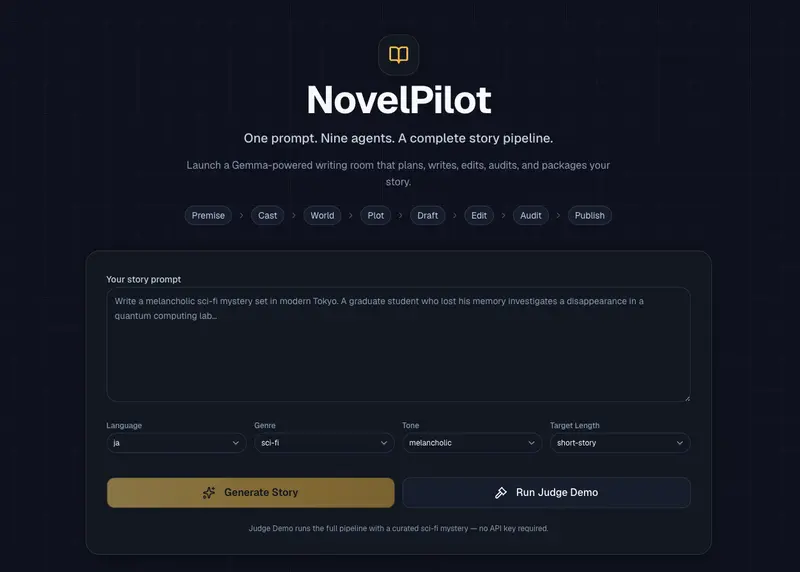
NovelPilot is a Gemma 4-powered AI writing room that turns one prompt into a complete story creation pipeline.

One prompt goes in.

Nine agents start working.

A finished story comes out.

What I built

NovelPilot is a web app that helps users create short fiction through a structured multi-agent workflow.

The user starts with a simple prompt, such as:

Write a melancholic sci-fi mystery set in modern Tokyo. A graduate student who lost his memory investigates a disappearance in a quantum computing lab.

Then NovelPilot launches a sequence of specialized AI agents:

  1. Premise Architect
  2. Character Director
  3. World Builder
  4. Plot Strategist
  5. Chapter Architect
  6. Prose Writer
  7. Style Editor
  8. Continuity Detective
  9. Publisher Agent

Each agent performs a specific part of the writing process.

The result is not just a generated story. It is a full creative package:

  • Story concept
  • Character profiles
  • Worldbuilding notes
  • Plot structure
  • Chapter outline
  • Chapter 1 draft
  • Style editor report
  • Foreshadowing tracker
  • Continuity detective report
  • Title ideas
  • Publication summary
  • Browser reading mode
  • Polished PDF export

NovelPilot is designed to demonstrate Gemma 4 as a multi-agent creative reasoning engine, not just a text completion model.

Demo

Live demo: https://novelpilot.vercel.app

How to try it:

  1. Open the live demo.
  2. Click Run Judge Demo.
  3. Watch the nine-agent pipeline complete.
  4. Read the finished novel in the browser.
  5. Review the Foreshadowing Tracker and Continuity Detective.
  6. Download the final story as a polished PDF.

The Judge Demo works without an API key, so reviewers can test the full experience immediately.

For live generation, NovelPilot supports Gemma 4 through a provider abstraction, with OpenRouter as the recommended provider.

Sample prompt and output

Here is the sample prompt I used to test NovelPilot.

The protagonist is Ren Kanzaki, a 24-year-old graduate student working in a quantum computing laboratory. A few days ago, he lost part of his memory. He cannot remember what he was researching, why his professor suddenly disappeared, or why his own name appears in an old experimental log.

The story begins on a rainy night in Tokyo. Ren enters the university research building after midnight and finds an old experiment log hidden inside a locked drawer. On the final page, he sees the sentence:

“Ren Kanzaki will be removed from the observation target as of today.”

The story should focus on quiet tension, memory gaps, emotional unease, and the unsettling atmosphere of the laboratory. Avoid flashy action. Let the mystery emerge through scenery, silence, dialogue, and small contradictions.

Main theme:
If memories disappear, can a person still remain the same self?

Main characters:
- Ren Kanzaki: A graduate student who lost part of his memory. Calm and intelligent, but emotionally repressed.
- Mio Shiraishi: Ren’s labmate. She knows something about Ren’s memory loss but refuses to tell him the truth.
- Professor Kuon: The missing professor. He was researching quantum memory transfer.
- Associate Professor Kurosaki: The person currently managing the laboratory. He seems helpful, but some of his statements contradict the records.

Tone:
Intellectual, quiet, melancholic, slightly literary, and mysterious.
  • Language: en
  • Genre: sci-fi
  • Tone: melancholic
  • Target Length: short-story

I also exported the generated story as a polished PDF.

Sample output PDF: Download the generated novel PDF

This PDF was generated directly from NovelPilot’s finished reader view.

Code

GitHub repo: https://github.com/dorakingx/novelpilot

Tech stack:

  • Next.js App Router
  • TypeScript
  • Tailwind CSS
  • shadcn/ui-style components
  • Gemma 4 provider abstraction
  • OpenRouter-compatible live mode
  • Mock mode for the zero-setup judge demo
  • Browser-based polished PDF export
  • Vercel deployment

The app has two main modes:

Mode Purpose
Demo / Mock Mode Lets judges try the full workflow without an API key
Live Mode Uses Gemma 4 through the configured provider

The provider layer is intentionally isolated in lib/gemma.ts, so the model provider can be changed without rewriting the app.

How I used Gemma 4

Gemma 4 is the reasoning engine behind the multi-agent writing pipeline.

NovelPilot uses Gemma 4 for:

  • structured story concept generation
  • character design
  • worldbuilding
  • plot planning
  • chapter outlining
  • prose drafting
  • style editing
  • foreshadowing tracking
  • continuity auditing
  • publisher copy generation

Each agent receives the accumulated story bible and previous structured outputs.

This means Gemma 4 is not just generating paragraphs. It acts as the structural memory and reasoning layer for the whole novel creation process.

The important design decision was to make every agent return structured data whenever possible. That allows the UI to render the model output as real product features: timelines, cards, reports, trackers, reader views, and exports.

Why I chose this Gemma 4 model

For the live version, NovelPilot is designed to use a Gemma 4 model through OpenRouter.

I chose this approach because the app needs strong reasoning and structured generation across multiple steps. The model must follow JSON schemas, preserve context from earlier agents, and reason about story structure, character consistency, and foreshadowing.

NovelPilot focuses especially on:

  • long-context creative reasoning
  • structured JSON generation
  • story memory across multiple steps
  • continuity checking
  • literary planning and drafting

Gemma 4 is a good fit because the project is not only asking the model to write a paragraph. It asks the model to behave as a coordinated writing room.

What makes NovelPilot different

Most AI writing tools generate text.

NovelPilot generates a writing process.

The user does not only receive a draft. They see how the story is built:

Prompt
  ↓
Premise
  ↓
Characters
  ↓
World
  ↓
Plot
  ↓
Chapter outline
  ↓
Draft
  ↓
Style edit
  ↓
Continuity audit
  ↓
Publisher package
  ↓
Reader view
  ↓
PDF export

This makes the output easier to inspect, revise, and trust.

Key feature: Foreshadowing Tracker

One of my favorite parts is the Foreshadowing Tracker.

Instead of only writing a draft, NovelPilot tracks story threads like this:

{
  "item": "The cracked silver watch",
  "introducedIn": "Chapter 1",
  "status": "unresolved",
  "suggestedPayoff": "It reveals the exact time the protagonist's memory was overwritten.",
  "payoffChapter": "Chapter 3",
  "emotionalPurpose": "Connects guilt, identity, and lost time."
}

This makes the output more useful for writers.

It also shows why a structured model workflow matters. The app is not only asking Gemma 4 to write prose. It is asking Gemma 4 to reason about narrative structure.

Key feature: Continuity Detective

The Continuity Detective checks the generated story for structural problems.

It returns issues with:

  • category
  • severity
  • evidence
  • suggested fix

Example structure:

{
  "category": "foreshadowing",
  "severity": "high",
  "issue": "The experiment log is introduced as important but has no planned payoff.",
  "evidence": "The log appears in Chapter 1 and is referenced in the outline, but no chapter resolves its origin.",
  "suggestedFix": "Reveal in the final chapter that the log was written by an earlier version of the protagonist."
}

This was important to me because many AI writing tools can generate plausible fiction, but fewer tools help the user understand whether the story actually holds together.

Final reader experience

After all agents finish, NovelPilot automatically transitions into a Completed Novel Reader.

The user can read the finished story directly in the browser.

They can also go back to the Agent Workspace to inspect:

  • agent outputs
  • story bible
  • foreshadowing tracker
  • continuity report
  • publisher package

The final reader is not a one-way screen. Users can freely move between the production workflow and the finished novel.

PDF export

I also added polished PDF export.

Instead of relying on the browser’s default print layout, NovelPilot generates a designed A4-style manuscript PDF.

The PDF includes:

  • cover page
  • novel title
  • metadata
  • chapter title
  • formatted manuscript body
  • optional story notes

This makes the app feel closer to a complete writing product, not just a demo.

UI/UX design

I wanted the app to feel like an AI creative studio.

The flow has three stages:

1. Prompt Launcher

The first screen is focused.

The user only sees:

  • prompt input
  • language
  • genre
  • tone
  • target length
  • Generate Story
  • Run Judge Demo

This keeps the experience simple.

2. Agent Workspace

After generation starts, the app transitions into the agent workspace.

This screen shows:

  • active agent timeline
  • story bible
  • foreshadowing tracker
  • manuscript preview
  • continuity detective
  • export tools

3. Completed Novel Reader

When all agents finish, the app opens the final reading screen.

The user can read the story, download a PDF, or go back to review the agent outputs.

Technical architecture

The core architecture is simple:

app/page.tsx
  Main app phase control:
  launcher → workspace → reader

lib/useStoryProject.ts
  Client-side orchestration of the pipeline

app/api/generate-agent/route.ts
  Runs one agent per request

lib/gemma.ts
  Provider abstraction for Gemma 4 / OpenRouter / mock mode

lib/prompts.ts
  Prompt templates for each writing agent

lib/agents.ts
  Merges structured agent outputs into the Story Bible

lib/types.ts
  Shared TypeScript types

components/
  Prompt launcher, agent workspace, reader, trackers, reports, export panels

The app uses a state-first architecture because this is a hackathon project. I intentionally avoided authentication, databases, and user accounts so the core experience stays fast and easy to judge.

Agent workflow

Here is the high-level pipeline:

User Prompt
  ↓
Premise Architect
  ↓
Character Director
  ↓
World Builder
  ↓
Plot Strategist
  ↓
Chapter Architect
  ↓
Prose Writer
  ↓
Style Editor
  ↓
Continuity Detective
  ↓
Publisher Agent
  ↓
Completed Novel Reader + PDF Export

Each step builds on the previous one.

For example, the Character Director does not work from the original prompt alone. It receives the premise and theme created by the Premise Architect.

The Plot Strategist receives the concept, characters, and worldbuilding.

The Continuity Detective receives the story bible, chapter outline, draft, and previous reports.

This makes the app feel like an actual production pipeline rather than a single model call.

What I learned

The biggest lesson was that structured outputs are more powerful than plain prose outputs for creative tools.

A single prose response is hard to inspect.

But structured outputs can become:

  • timelines
  • cards
  • story bibles
  • trackers
  • reports
  • reader views
  • exports

I also learned that judge experience matters.

That is why I added Run Judge Demo. Reviewers can experience the full product without configuring an API key.

Another lesson was that a creative AI product should not end at “generation complete.” It should end with something the user can actually consume. That is why I added the final reader and PDF export.

Challenges

The biggest challenge was balancing autonomy and control.

If the app is too automatic, it feels like the user has no creative role.

If the app asks for too much input, it stops feeling agentic.

So I designed NovelPilot around this principle:

The AI agents do the heavy lifting, but the user can always review, regenerate, edit, read, and export.

Another challenge was making the final output feel complete. The Completed Novel Reader and PDF export helped turn the generated draft into something closer to a finished product.

What’s next

I would like to add:

  • full multi-chapter generation
  • persistent projects
  • local storage
  • streaming agent output
  • genre-specific prompt packs
  • vertical Japanese reading mode
  • richer PDF themes
  • user-editable story bible
  • side-by-side draft revision

Final thoughts

NovelPilot is my attempt to make AI fiction generation feel less like a chatbot and more like a writing room.

The core idea is simple:

One prompt. Nine agents. A complete story pipeline.

Gemma 4 is the reasoning engine behind the process. It plans, writes, edits, tracks foreshadowing, checks continuity, and packages the final story.

That is what makes NovelPilot more than a story generator.

It is an AI-powered novel production studio.