Read Replicas Lie About Consistency. 4 Sync Modes Behind the Lie.

Database Playbook: Choosing the Right Store for Every System You Build

Your read replica is lying to you, and “eventual consistency” is the lie’s polite name. The user clicks Pay, the API returns 200, the next page reads the order from a replica, and the row isn’t there yet. Support gets the ticket. You blame “replication lag” like it’s weather.

It isn’t weather. It’s a config choice, and most Postgres clusters are running the default.

The lie, in one paragraph

A read-after-write that returns stale data is a contract violation. The user gave you a write, you accepted it, you confirmed it, and then you served them old data on the next request. There’s no philosophical defence of that. “We’re eventually consistent” is what you say to the postmortem doc when you didn’t pick a stronger guarantee at config time.

Postgres gives you five settings on a single knob called synchronous_commit, and they buy completely different guarantees at completely different costs. Only one of them prevents a read replica from serving stale rows. Most teams run a global default of on and have never typed the other four values into a session.

The 4 (well, 5) sync modes, ranked by guarantee

synchronous_commit has five legal values. Ranked from “fire and forget” to “wait until the replica has the row visible to queries”:

  1. off: primary returns commit before fsync to its own WAL. A primary crash inside the next few hundred milliseconds loses the transaction. Don’t ship this unless you really mean it.
  2. local: primary returns commit after its own WAL fsync. Replica state is irrelevant. This is the value when no synchronous_standby_names is set.
  3. on (the default) / remote_write: primary waits for the synchronous standby to receive the WAL into its kernel. Not flushed to disk. Not replayed. A replica OS crash before flush can still lose it.
  4. remote_flush: primary waits for the synchronous standby to fsync the WAL to its disk. The replica can survive a crash and still have the record. But it hasn’t been replayed yet, so a SELECT on that replica won’t see the row.
  5. remote_apply: primary waits for the synchronous standby to apply the WAL, actually replaying it into the database. A SELECT on that replica will see the row immediately after the COMMIT returns.

The first four are about durability. Only the last one is about read-after-write consistency on the replica. That’s the whole point of this post: if you want the replica to never serve stale data, remote_apply is the only setting that gives you that.

Everything else is theatre.

What each mode guarantees vs costs

A rough latency table from a 3-node Postgres 16 cluster in one AWS region (us-east-1, gp3, c6i.large), measured with pgbench -c 16 -j 4 -T 60 -N. Treat numbers as order-of-magnitude, not benchmarks:

Mode Survives primary crash? Survives replica crash? Replica reads after-write? p99 commit latency
off no no no ~0.4 ms
local yes no no ~1.2 ms
on / remote_write yes no no ~2.0 ms
remote_flush yes yes no ~3.5 ms
remote_apply yes yes yes ~6.0 ms

The spread between off and remote_apply is roughly 15x. Across a region (say a standby in Frankfurt and a primary in Dublin, ~25 ms RTT) the same table shifts: remote_apply becomes 50-60 ms per commit. That’s not a footnote. That’s a product decision.

Most teams who default to on and assume “we’re durable” are running with the replica can crash and lose the record setting. That’s fine for a lot of workloads. It is not fine for payment intent records or permission grants.

Synchronous standbys and the quorum trick

synchronous_commit interacts with one other setting: synchronous_standby_names. Without that one set, none of the remote_* modes do anything. There’s nobody to wait for, so the primary degrades silently to local.

The naive form names a single standby:

synchronous_standby_names = 'replica-fra-1'

The problem with naming one standby is obvious. If replica-fra-1 is down or partitioned, your primary blocks on every write until it comes back. You traded read-staleness for write-availability, and you didn’t get a discount.

The fix is quorum commit. Postgres 10+ supports:

synchronous_standby_names = 'ANY 2 (replica-fra-1, replica-fra-2, replica-fra-3)'

Read this as: “wait until any 2 of these 3 standbys acknowledge.” If replica-fra-1 is down, the other two ack and the commit goes through. You stay durable across two replicas, you stay available as long as two are healthy, and you pay the latency of the second-fastest standby instead of one specific one.

There’s a FIRST n (...) form too (strict priority order), but ANY n is the one to reach for. It’s the cluster equivalent of a Raft quorum without the consensus protocol.

Per-transaction synchronous_commit: the feature nobody uses

Most teams miss this: synchronous_commit is a session/transaction-scoped GUC. You don’t have to run the cluster on one global setting. You can pick the right guarantee per write.

Run the cluster at on (cheap default, ~2 ms commits, replicas may lag a beat). Then, for the specific writes that need read-after-write consistency, escalate inside the transaction:

# checkout flow: must be visible on read replica
# before the redirect to the confirmation page
async def confirm_payment(order_id: str, intent_id: str) -> Order:
    async with db.transaction() as tx:
        # this transaction only, not the whole connection
        await tx.execute(
            "SET LOCAL synchronous_commit = 'remote_apply'"
        )

        await tx.execute(
            """
            UPDATE orders
               SET status = 'paid',
                   stripe_intent_id = $1,
                   paid_at = NOW()
             WHERE id = $2
               AND status = 'awaiting_payment'
            """,
            intent_id,
            order_id,
        )

        # the row visible on every replica before COMMIT returns
        order = await tx.fetchrow(
            "SELECT * FROM orders WHERE id = $1",
            order_id,
        )

    # safe to redirect. confirmation page reads
    # from a replica and will see status='paid'
    return Order.from_row(order)

SET LOCAL is the keyword that matters. It scopes the change to the current transaction. The connection goes back to the cluster default after COMMIT. You don’t have to remember to reset it. You don’t poison the next query on the same pooled connection.

Now the rest of your traffic (view counts, click events, “user toggled dark mode”) runs at cheap on. The one write where stale reads break the product runs at remote_apply and pays 6 ms instead of 2. You bought consistency where it mattered. You didn’t pay for it everywhere else.

The same trick applies the other direction. If you have a hot write path that you genuinely don’t care about durability for (say a last_seen_at timestamp updated on every API call), drop it to local or off for that one statement:

BEGIN;
SET LOCAL synchronous_commit = 'off';
UPDATE users SET last_seen_at = NOW() WHERE id = $1;
COMMIT;

The cluster keeps its strong default, and this one statement gets to be fast and slightly lossy on purpose.

The failure mode you’ll hit first

A synchronous primary with no healthy standby hangs every write. This is not a bug. This is the literal definition of synchronous replication: the primary refuses to acknowledge a commit until its synchronous partner agrees, and if there’s no synchronous partner, there’s no agreement, so there’s no acknowledgement.

You see it as:

  • New connections succeed.
  • SELECT queries succeed.
  • INSERT, UPDATE, DELETE, COMMIT block forever.
  • Your APM dashboard goes red on write p99.

Operators look at the primary and say “Postgres is up, it’s healthy, what’s the problem.” The problem is that synchronous_standby_names = 'replica-fra-1' is set, replica-fra-1 is the only listed standby, it’s down, and Postgres is doing exactly what you asked. The mitigations:

  • Use the quorum form (ANY n (...)). Survives any single standby loss.
  • Set up monitoring on pg_stat_replication.sync_state so you find out before users do.
  • For non-critical workloads, accept the on default and don’t promise read-after-write consistency on a replica at all.

Don’t fix it by editing synchronous_standby_names to an empty string during the incident, by the way. That degrades the cluster to async behind your back, and the runbook tomorrow won’t remember why.

Verifying which mode is actually active

Two queries to know. First, what does the primary think the setting is:

SHOW synchronous_commit;
SHOW synchronous_standby_names;

Second, what’s the live replication state. Which standbys exist, which are sync, which are async, where are they in WAL:

SELECT
    application_name,
    client_addr,
    state,
    sync_state,
    sync_priority,
    pg_wal_lsn_diff(sent_lsn, write_lsn)   AS write_lag_bytes,
    pg_wal_lsn_diff(sent_lsn, flush_lsn)   AS flush_lag_bytes,
    pg_wal_lsn_diff(sent_lsn, replay_lsn)  AS replay_lag_bytes,
    write_lag,
    flush_lag,
    replay_lag
FROM pg_stat_replication
ORDER BY sync_priority;

sync_state is the column to stare at:

  • sync: a synchronous standby. Primary waits on it.
  • quorum: part of an ANY n quorum. Primary waits on enough of the group.
  • potential: listed in synchronous_standby_names but not currently chosen as sync.
  • async: purely asynchronous. Primary never waits on it.

The three lag columns tell you where each replica is: write_lag is the gap until the standby received the WAL, flush_lag until it fsynced, replay_lag until it applied. replay_lag is the one users feel when they read from a replica.

Alert on replay_lag > 1 second on any standby you serve user reads from. That’s not a “warn at 30 minutes” metric. That’s a contract.

A decision tree, per write

For each write your service does, ask in order:

  1. Can a stale read on a replica break a user-visible contract? Checkout confirmation, permission grant, “your account is now verified”, yes. Use remote_apply, per-transaction with SET LOCAL.
  2. Must this survive a primary crash plus a replica crash? Audit log, payment intent, idempotency key, yes. At least remote_flush. Probably also remote_apply if it’s followed by a replica read.
  3. Must this survive a primary crash but a lost replica is acceptable? Most application data. on is fine.
  4. Is durability negotiable for throughput? Last-seen timestamps, view counts, ephemeral session bumps. Use local or off, per-statement with SET LOCAL.

The trap is question 1. Teams skip it because the default of on sounds durable, and they conflate “durable on primary” with “visible on replica.” Those are different guarantees on different machines, separated by however much WAL is in flight.

If a checkout-flow read-after-write returns stale because your replica hadn’t applied yet, no amount of “the write was durable on the primary” gets you off the hook with the user staring at an empty cart. remote_apply is the answer. Use it where it matters, leave it off everywhere else, and stop blaming the weather.

If this was useful

If picking the right durability and consistency settings per write is the kind of thing you want a full chapter on (not just Postgres, but Mongo write concerns, Cassandra tunables, Redis persistence modes, and the same trade-off shape across each), that’s exactly what the Database Playbook is built around. Each store gets its own chapter on consistency knobs, what they cost, and which writes deserve the expensive setting.

Database Playbook: Choosing the Right Store for Every System You Build

Reviving My Coding Project with GitHub Copilot

This is a submission for the GitHub Finish-Up-A-Thon Challenge

What I Built

मैंने एक ऐसा कोडिंग प्रोजेक्ट चुना जिसे मैंने कुछ समय पहले शुरू किया था, लेकिन समय की कमी और कुछ तकनीकी समस्याओं के कारण वह अधूरा रह गया था। इस चैलेंज के ज़रिए मैंने उसे वापस पूरा करने का फैसला किया। यह प्रोजेक्ट मेरे लिए एक बेहतरीन लर्निंग एक्सपीरियंस रहा है।

Demo

आप मेरे प्रोजेक्ट का कोड यहाँ देख सकते हैं:

The Comeback Story

यह प्रोजेक्ट काफी समय से मेरे सिस्टम में अधूरा पड़ा था क्योंकि मुझे कोड को ऑप्टिमाइज़ करने और बग्स को फिक्स करने में दिक्कत आ रही थी।

इस चैलेंज के दौरान, मैंने GitHub Copilot का इस्तेमाल किया। इसने मेरी निम्नलिखित तरीकों से मदद की:

  1. क्विक बग फिक्सिंग: कोड में जहाँ भी एरर थे, कॉकपायलट ने उन्हें तुरंत पहचान कर सही करने के सुझाव दिए।
  2. स्मार्ट ऑटो-कंप्लीट: अधूरे फंक्शन्स को पूरा करने के लिए इसने बहुत ही सटीक कोड सजेस्ट किया, जिससे मेरा काफी समय बचा।
  3. कोड रिफैक्टरिंग: पुराने लिखे कोड को और बेहतर और साफ-सुथरा बनाने में मदद की।

GitHub Copilot के साथ काम करने का अनुभव कमाल का था, इसने मेरे अधूरे प्रोजेक्ट को बहुत ही कम समय में पूरा करने में एक सच्चे को-पायलट की भूमिका निभाई!

I Tried Gemini 3.5 Flash After Google I/O 2026 – Here is What I Found :))

So Google I/O 2026 happened and honestly I was not expecting this much. Like every year I sit and watch the keynote thinking “okay this time it will be boring” but no, they surprised me again. <3

This time the big thing is Gemini 3.5 Flash and also a new model called Gemini Omni. I spent some time playing with Gemini 3.5 Flash after the announcement and wanted to share my honest first look kind of thing.

What Even is Gemini 3.5 Flash?

So basically Google is saying Gemini 3.5 Flash is their smartest Flash model till now. The Flash series was always the fast and cheap one, right? But this time they are saying it is also crossing 3.1 Pro in benchmarks for coding and agentic tasks. And it is 4x faster than other frontier models in output tokens per second.

That is a big claim. So I tried it.

The speed part is actually true, I can say that much. It feels noticeably snappy. Like when you are doing back and forth with it , asking follow ups, correcting it , it does not make you wait much.

How to Get Started With It

If you want to try yourself, it is quite simple actually.

Step 1 : Go to Google AI Studio

Just open aistudio.google.com. You need a Google account, that is it. No waiting list or anything like that for Flash.

Step 2 : Select the Model

On the top there is a model dropdown. Select gemini-3.5-flash. It is available from today itself, they said it in the keynote.

Step 3 : Try a Prompt

Start with something simple. I tried giving it a small React component to write and then asked it to add error handling also. It did both in one shot, which was nice.

Step 4 : Try it via API also

If you want to use it in your own project, the Gemini API supports it now. Here is a basic example:

import google.generativeai as genai

genai.configure(api_key="YOUR_API_KEY")

model = genai.GenerativeModel("gemini-3.5-flash")
response = model.generate_content("Explain async await in Python in simple words")

print(response.text)

Very straightforward. You can get the API key from AI Studio itself, there is a button called “Get API key” in the left sidebar.

What I Actually Liked

The coding part is genuinely better. I gave it a messy function with some bugs and asked it to fix and also explain what was wrong. It found three issues I had not even noticed. Previous Flash models used to miss the subtle ones.

It understands context well. In a long conversation it does not forget what you said earlier. I was testing a multi-step debugging scenario and it remembered the original code I shared even after 6-7 messages.

Speed is actually fast. I know I said this already but seriously, for something this capable it is very fast. Other frontier models you can feel the thinking pause. This one is much snappier.

What I Did Not Like So Much

Honestly the output length can be a bit much sometimes. You ask a simple question and it gives you a full essay. I had to keep saying “give shorter answer” which is a little annoying.

Also Gemini 3.5 Pro is apparently coming next month, not today. So right now Flash is the best available in the 3.5 series. Pro would probably be more powerful for complex reasoning tasks.

What About Gemini Omni?

This one is different category. Gemini Omni is not just text , it takes image, audio, video, and text as input and can output video. Yes, video output. I have not tested it fully yet because access is more limited, but the demo they showed at the keynote was quite impressive. It is more of a creation model.

For regular developer work Gemini 3.5 Flash is the one to focus on right now.

Should You Try It?

Yes, just go try it. It is free to use in AI Studio for basic usage. The API has some free tier also. If you are building anything with AI :- agents, coding tools, chatbots , Gemini 3.5 Flash is now genuinely a strong option, not just a cheap fallback.

The agentic stuff Google is building around it with Antigravity platform is also interesting but that is a separate topic altogether. Maybe next post.

For now, just open AI Studio and play around. That is the best way to see for yourself.

Zero-Cost AI in VS Code

Zero-Cost AI: Accessing Premium Models in VS Code Without API Keys

How I built a VS Code extension that gives you free access to Qwen-Max and DeepSeek models using only your existing web account — no billing, no tokens, no limits.

🎯 The Problem with Modern AI Tools

The state of AI development has become expensive:

  • API keys needed for every provider
  • Per-token pricing that adds up quickly
  • Rate limits blocking your workflow
  • Multiple subscriptions to different services
  • Browser sessions constantly expiring

Premium AI services charge significant monthly fees:

  • ChatGPT Plus: $20/month
  • Claude Pro: $20/month
  • Gemini Advanced: $20/month

That’s over $600/year for basic access! And you still need separate accounts for each service.

What if there was another way?

💡 The Solution: Browser-Based Authentication

I developed AI Free VSCode — an open-source extension that leverages your existing free tier accounts from AI providers through browser automation.

Key Innovation

Instead of requiring API keys (which often have strict rate limits), the extension:

  1. Uses Playwright to automate a real Chromium browser session
  2. Stores authentication cookies locally
  3. Makes requests through the official web APIs
  4. Gives you full access to the same free tier available on their websites

Result?

✅ Zero cost – uses existing free accounts

✅ No API keys – just sign in once

✅ Higher limits – same as browsing the website

✅ Native integration – works directly in Copilot Chat

✅ Agent mode – full tool calling support

🏗 Architecture Overview

Extension Structure

ai-free-vscode/
├── src/
│   ├── extension.mjs          # Entry point & commands
│   ├── lmProvider.mjs         # Unified LM provider interface
│   ├── deepseek/
│   │   ├── auth.mjs           # Browser login with Playwright
│   │   ├── client.mjs         # API client implementation
│   │   ├── provider.mjs       # Model logic & session management
│   │   └── config.mjs         # Configuration constants
│   ├── qwen/
│   │   ├── auth.mjs           # Qwen authentication
│   │   ├── client.mjs         # Qwen API client
│   │   └── provider.mjs       # Qwen model implementation
│   ├── utils/
│   │   ├── logger.mjs         # Debug logging
│   │   ├── rateLimiter.mjs    # Rate limiting protection
│   │   ├── responseValidator.mjs
│   │   └── tokenValidator.mjs
│   └── promptUtils.mjs        # Message formatting
├── package.json               # Extension manifest
└── README.md                  # Documentation

Core Components

1. Authentication Flow

The extension registers commands for users to authenticate:

context.subscriptions.push(
  vscode.commands.registerCommand("deepseek.login", async () => {
    await clearProfileSession(); // Clear old session
    const result = await loginAndSaveAuth(); // New login via Playwright
    auth.cookieHeader = result.cookieHeader;
    auth.token = result.token;
  }),
);

Process:

  • Opens Chromium browser via Playwright
  • User signs into provider normally
  • Session cookies captured and stored locally
  • Cookies used for subsequent API requests

2. Unified Provider Interface

All models are unified under a single vendor namespace:

class AiFreeVscodeChatModelProvider {
  async provideLanguageModelChatResponse(
    model,
    messages,
    options,
    progress,
    token,
  ) {
    // Convert VS Code messages to API format
    const convertedMessages = convertMessages(messages);
    const tools = convertToolSchemas(options?.tools);
    const prompt = messagesToPrompt(convertedMessages, tools);

    // Route to appropriate provider
    switch (model.family) {
      case "deepseek":
        await deepseekComplete({ modelId, prompt, auth, onText, signal });
        break;
      case "qwen":
        await qwenComplete({
          modelId,
          prompt,
          auth,
          onText,
          onThinking,
          signal,
        });
        break;
    }
  }
}

Process:

  • Routes VS Code chat requests to appropriate provider
  • Handles both DeepSeek and Qwen models
  • Converts messages to API format
  • Manages streaming responses

3. Smart Session Management

Maintains conversation continuity with session caching:

const sessionIdCache = new Map();

async function runComplete({
  modelId,
  prompt,
  auth,
  threadKey,
  messagesCount,
}) {
  // Start fresh session for first message in thread
  if (messagesCount === 1) {
    sessionIdCache.delete(threadKey);
  }

  // Try cached session first (for conversation continuity)
  const cachedSessionId = sessionIdCache.get(threadKey);
  if (cachedSessionId) {
    const ok = await attempt(cachedSessionId);
    if (ok) return; // Success!
  }

  // Retry with new session
  const sessionId = await client.createSession({ signal });
  sessionIdCache.set(threadKey, sessionId);
  await attempt(sessionId);
}

🔧 Installation & Setup

Step 1: Install the Extension

Download the latest .vsix file from Releases and install via VS Code Extensions panel.

Or develop locally:

git clone https://github.com/AppsGanin/ai-free-vscode
cd ai-free-vscode
npm install  # installs dependencies + Playwright Chromium

Press F5 to launch in Extension Development Host.

Step 2: Sign In to Provider

  1. Open Command Palette (Cmd+Shift+P / Ctrl+Shift+P)
  2. Run “AI Free VSCode: DeepSeek: Sign In (Playwright)”
  3. A browser window opens automatically
  4. Log in to your account normally
  5. Window closes when session is saved

Repeat for Qwen or other supported providers.

Step 3: Start Chatting

  • Open Copilot Chat panel (⌘+L)
  • Select your preferred model from dropdown
  • Start asking questions!

🚀 Supported Models

Model ID Max Tokens Use Case
DeepSeek V4 deepseek-default 8K output General purpose
DeepSeek V4 Expert deepseek-expert 8K output Complex reasoning
Qwen2.5-Max qwen-max – Powerful tasks
Qwen3.6-Plus qwen-plus 1M context Long documents
Qwen3-Max qwen3-max – Flagship quality
Qwen3-Coder qwen-coder 1M context Code generation
Qwen3.5-Flash qwen-flash – Fastest responses

All models support tool calling for Agent mode operations like:

  • File reading/writing
  • Terminal execution
  • Multi-step debugging
  • Code refactoring

🛠 Technical Deep Dive

How Messages Are Processed

1. Message Conversion

VS Code messages are converted to API-compatible format:

function convertMessages(messages) {
  return messages
    .map((msg) => {
      const role = msg.role === "assistant" ? "assistant" : "user";

      // Handle text content
      const content = msg.content
        .map((part) =>
          part instanceof LanguageModelTextPart ? part.value : "",
        )
        .join("");

      // Extract tool calls from assistant
      const toolCalls = msg.content
        .filter((p) => p instanceof LanguageModelToolCallPart)
        .map((p) => ({
          id: p.callId,
          type: "function",
          function: { name: p.name, arguments: JSON.stringify(p.input) },
        }));

      // Generate separate "tool" messages for results
      const toolResults = msg.content
        .filter((p) => p instanceof LanguageModelToolResultPart)
        .map((p) => ({
          role: "tool",
          tool_call_id: p.callId,
          content: p.content.value,
        }));

      return [
        ...toolResults,
        { role, content, tool_calls: toolCalls.length ? toolCalls : undefined },
      ];
    })
    .flat();
}

2. Tool Call Detection

The system detects markdown fences indicating tool calls:

const TOOL_FENCES = ["```tool_call", "ntool_calln{", "tool_calln{"];

function findFence(str) {
  let best = -1;
  for (const fence of TOOL_FENCES) {
    const idx = str.indexOf(fence);
    if (idx !== -1 && (best === -1 || idx < best)) best = idx;
  }
  return best;
}

// Stream processing
streamBuf += text;
const idx = findFence(streamBuf);
if (idx !== -1) {
  // Emit text before fence, suppress tool call block
  flushStream(streamBuf.slice(0, idx));
  streamBuf = "";
  inToolCall = true;
}

This prevents raw tool call blocks from appearing in the chat UI while still executing them properly.

3. Thinking Mode Support

For models with explicit reasoning phases:

let thinkingStarted = false;
let thinkingText = "";

const onThinking = async (text) => {
  thinkingText += text;
  thinkingStarted = true;
};

// When content starts, emit thinking as collapsible block
if (thinkingStarted) {
  progress.report(new LanguageModelThinkingPart(thinkingText, "thinking-0"));
}

VS Code displays this as a native collapsible “💭 Thinking” section above responses.

🔐 Security & Privacy

What Happens to Your Data?

✅ Cookies stored locally – Only your machine, encrypted by OS
✅ No cloud storage – We never transmit your credentials
✅ Session isolation – Each provider maintains separate sessions
✅ No telemetry – No usage statistics sent anywhere

Error Handling

try {
  await client.complete({ ... });
} catch (e) {
  // Graceful handling of various errors
  if (e.isNotSignedIn) {
    showErrorMessage("Please sign in first");
  } else if (e.isAuthError) {
    // Cookie expired - force re-login
    clearProfileSession();
    throw e;
  } else if (isBizError(e)) {
    // Business logic error with formatted message
    progress.report(new TextPart(formatBizError(e.bizCode, e.bizMsg)));
  }
}

⚠️ Limitations & Caveats

Important Considerations

  1. Terms of Service – Automating browser sessions may violate provider ToS
  2. Account Risk – Your account could be restricted (use at your own risk)
  3. Stability – Providers can change APIs without notice
  4. Single Session – Only one active user session at a time
  5. No Enterprise Support – Not suitable for corporate compliance requirements

Mitigation Strategies

  • Use separate accounts from main email
  • Don’t abuse the service (reasonable usage only)
  • Keep extension updated for API changes
  • Maintain backups of important code/settings

🚀 Real-World Use Cases

Scenario 1: Code Review Assistant

# Ask about potential bugs
User: "Review this Python function for memory leaks:"
[User pastes code]

Assistant: Analyzes code structure, identifies resource leaks,
suggests fixes with explanations

Scenario 2: Database Query Optimization

-- Paste slow query
EXPLAIN SELECT * FROM users WHERE created_at > NOW() - INTERVAL '7 days';

Assistant: Suggests indexing strategies, query rewriting,
and alternative approaches

Scenario 3: Full Stack Debugging

  1. Identify error in terminal
  2. Ask assistant to analyze stack trace
  3. Get root cause explanation
  4. Receive fix suggestion with code example
  5. Apply fix directly in editor

🤝 Contributing

This is an open-source hobby project built by enthusiasts, for enthusiasts.

Ways to contribute:

  1. Fix bugs – See open issues
  2. Add new models – Implement additional AI providers
  3. Improve docs – Clarify setup instructions
  4. Enhance UX – Better error messages, UI improvements
  5. Write tests – Increase coverage for edge cases

Getting started:

git clone https://github.com/AppsGanin/ai-free-vscode
cd ai-free-vscode
npm install
# Edit code, press F5 to test

Contributions welcome! PRs are always appreciated.

📝 Legal Disclaimer

This extension is unofficial and not affiliated with any AI provider.

  • Use at your own risk – Automating web sessions may violate ToS
  • No guarantees – May stop working if providers change APIs
  • No liability – Authors not responsible for consequences

Always review Terms of Service before use.

🎯 Conclusion

AI Free VSCode demonstrates that you don’t need expensive API keys or multiple subscriptions to access premium AI capabilities. By leveraging browser automation and existing free tiers, we’ve created a solution that:

  • 💰 Costs nothing – literally $0 monthly subscription
  • 🚀 Works instantly – one-time sign-in, perpetual access
  • 🔒 Respects privacy – all data stays local
  • 🛠️ Integrates seamlessly – native VS Code experience

Whether you’re a student learning to code, a indie developer building your startup, or just someone who wants powerful AI tools without breaking the bank – this extension removes financial barriers and puts cutting-edge technology in your hands.

Ready to try it?

👉 Download the extension

⭐ Star the repo if it helps your workflow

📣 Share with fellow developers

Let’s democratize AI access together! 🚀

Blueprints Might Be More Important Than Frameworks

The longer I work on software systems, the less I think most people actually want frameworks.

What they really want is outcomes.

They want:

  • a business
  • a storefront
  • a booking system
  • a restaurant platform
  • a creator ecosystem
  • a course platform
  • a membership site
  • an operational workflow

But somewhere along the way, the software industry started treating infrastructure assembly like the product itself.

Developers spend enormous amounts of time stitching together:

  • frameworks
  • authentication
  • databases
  • deployment pipelines
  • admin systems
  • permissions
  • integrations
  • analytics
  • workflows
  • infrastructure

before they can even begin solving the actual business problem.

And honestly, I think that model is starting to show its age.

Most Businesses Don’t Need “Another Stack”

A local pizzeria owner usually does not wake up thinking:

“I really hope my ordering platform uses the perfect frontend framework.”

They care about:

  • taking orders
  • tracking deliveries
  • managing inventory
  • customer retention
  • loyalty systems
  • reliability
  • operational simplicity

The business problem is operational.

Not technological.

But modern software development often forces people to reconstruct the operational layer from scratch every time they build something.

That’s one reason I became increasingly interested in blueprint-driven systems.

What I Mean by “Blueprints”

When I say blueprint, I don’t mean:

  • a template
  • a starter kit
  • a theme

I mean:

a pre-architected operational system.

Something that already understands:

  • workflows
  • permissions
  • business states
  • infrastructure patterns
  • scaling concerns
  • operational requirements
  • deployment structure
  • integrations
  • lifecycle management

For example:

A pizzeria blueprint might already understand:

  • ordering flows
  • “making” status
  • “baking” status
  • “out for delivery” status
  • inventory management
  • driver systems
  • customer notifications
  • analytics
  • payment workflows

Not just page layouts.

Operational behavior.

Frameworks Usually Start Too Low in the Stack

Most frameworks start by helping developers build components and routes.

That’s useful.

But eventually I started wondering:

“Why are we rebuilding the operational layer every time?”

Because many industries already have recognizable patterns.

Restaurants have patterns.

Creator businesses have patterns.

Churches have patterns.

Retail stores have patterns.

Course platforms have patterns.

Print-on-demand businesses have patterns.

Yet software teams repeatedly reconstruct these systems from scratch around generic tooling.

That creates enormous duplication across the industry.

Businesses Are Really Collections of Flows

One thing that changed my thinking significantly was realizing that businesses are mostly operational pipelines.

Orders move through states.

Content moves through states.

Customers move through states.

Products move through states.

Teams move through states.

Infrastructure moves through states.

Once you see that, software architecture starts looking very different.

You stop thinking:

“How do we build pages?”

And start thinking:

“How do we model operational movement?”

That’s where blueprint thinking becomes powerful.

Blueprints Create Higher-Level Abstraction

One thing I think the industry is slowly moving toward is higher-order operational abstraction.

Not:

  • “generate a button”
  • “generate a CRUD app”

But:

  • “generate a business system”
  • “generate an operational workflow”
  • “generate a scalable runtime”
  • “generate infrastructure-aware applications”

That’s a completely different level of abstraction.

And honestly, I think it’s where AI becomes genuinely useful long-term.

Not replacing architecture.

Accelerating structured architecture.

This Is Part of Why I Built WebEngine Around Systems

A lot of these ideas heavily influenced how I think about:

  • WebEngine
  • KiwiPress
  • Nectarine
  • GrapeVine
  • Citrode

The goal was never:

“make another framework.”

It was:

“create repeatable operational ecosystems.”

Systems where businesses can focus more on:

  • execution
  • products
  • customers
  • workflows
  • creativity

instead of rebuilding infrastructure repeatedly.

The Infrastructure Layer Is Becoming the Product

One thing I think modern software increasingly proves is this:

The operational layer often matters more than the UI layer.

Because eventually businesses care deeply about:

  • reliability
  • scaling
  • deployment
  • portability
  • integrations
  • observability
  • lifecycle management

That’s why I think engines, platforms, and blueprint systems are becoming increasingly important.

Not because frontend no longer matters.

But because operational complexity keeps increasing.

AI Makes Blueprint Thinking Even More Important

Ironically, I think AI strengthens the case for blueprints dramatically.

Because AI can generate implementation quickly.

But implementation without structure creates chaos.

Blueprints provide:

  • boundaries
  • architecture
  • contracts
  • operational patterns
  • predictable flows
  • maintainable systems

In other words:
they give generated systems shape.

And I think that’s going to matter enormously moving forward.

I Think Developers Are Becoming Operational Architects

One thing I’ve noticed is that modern development increasingly requires developers to think beyond code itself.

Today developers often need to understand:

  • infrastructure
  • deployment
  • scaling
  • observability
  • security
  • workflows
  • operations
  • business logic
  • lifecycle management

That’s much closer to systems architecture than traditional app development.

And I think blueprint-driven ecosystems fit naturally into that evolution.

The Future Might Be More Composable

I don’t think the future is:

“one giant platform that controls everything.”

I actually think the future may become more composable.

Where:

  • engines provide runtimes
  • blueprints provide operational systems
  • adapters provide interoperability
  • contracts provide predictability
  • infrastructure remains portable

That’s a much healthier ecosystem than locking businesses into isolated black boxes.

Final Thoughts

Frameworks changed software development dramatically.

And they still matter.

But increasingly, I think the industry’s bigger challenge is no longer:

“How do we build applications?”

It’s:

“How do we build sustainable operational systems?”

Because most people aren’t trying to build frameworks.

They’re trying to build businesses.

And businesses need more than components and routes.

They need blueprints.

AI CareCompanion – Offline Health Assistant

AI CareCompanion Demo

Offline-first AI health companion powered by Google’s Gemma 4 4B running entirely on-device. Multi-agent specialist routing, drug lookup, symptom triage, nearby doctor search, and Firebase-backed cloud sync — all in a single React Native app for Android and iOS.

YouTube Video

AI CareCompanion Demo

Screenshots

Splash Screen

Splash Screen

Sign In

Sign In

Model Download

Model Download

Home Dashboard

Home

Lab Report Analysis

Lab Report Analysis

AI Response

AI Response

Skin Lesion Analysis

Skin Lesion Analysis

Hindi Language Support

Hindi Language

Chat Reports

Chat Reports

Generated Report

Generated Report

PDF Patient Summary

PDF Patient Summary

PDF Clinical Report

PDF Clinical Report

Health Insights

Health Insights

Insight Detail

Insight Detail

Navigation Menu

Navigation Menu

Drug Search

Drug Search

Drug Detail

Drug Detail

Affordable Alternatives

Affordable Alternatives

Nearby Doctors

Find Nearby

On-Device AI

On-Device AI

System Architecture

High-Level Design (HLD)

High Level Design

Data flow between the Mobile Client, AI Orchestrator, Inference Engines, and SQLite/Firebase Data Layer.

Low-Level Design (LLD)

Low Level Design

The 5-step sequence flow of a user query being routed and processed by the AI Orchestrator and Specialists.

Features

On-Device AI — No Internet Required

  • Gemma 4 4B (IQ2_M) runs fully on-device via llama.rn (GGUF format)
  • ~1.5 GB model, ~2 GB RAM — works offline after one-time download
  • Zero data sent to external servers during inference
  • Cloud AI (Gemini) used as fallback when online

Multi-Agent Specialist System

  • 46 specialist agents — each with domain-specific system prompts and tool access
  • Central orchestrator auto-detects intent and routes to the right specialist(s)
  • Up to 3 agents collaborate on complex multi-system queries
  • Real-time routing info (agent name + response time) shown in every message
# Agent Specialty Image Support
1 Triage Assistant Orchestrator — intent detection & routing ✓
2 General Health Specialist General Practice
3 Child Health Specialist Paediatrics
4 Chronic Care Specialist Internal Medicine
5 Heart Health Specialist Cardiology
6 Skin Care Specialist Dermatology ✓
7 Brain & Nerve Specialist Neurology
8 Digestive Health Specialist Gastroenterology
9 Lung & Breathing Specialist Pulmonology
10 Kidney Specialist Nephrology
11 Hormone Specialist Endocrinology
12 Infection Specialist Infectious Disease
13 Women’s Health Specialist Obstetrics & Gynecology
14 Bone & Muscle Specialist Orthopaedics
15 Eye Care Specialist Ophthalmology
16 Ear, Nose & Throat Specialist ENT
17 Mental Health Specialist Psychiatry
18 Dental Care Specialist Dentistry
19 Urinary Tract Specialist Urology
20 Blood Specialist Haematology
21 Joint & Immune Specialist Rheumatology
22 Allergy Specialist Allergy & Immunology
23 Newborn Care Specialist Neonatology
24 Senior Health Specialist Geriatrics
25 Emergency Care Specialist Emergency Medicine
26 Nutrition & Diet Specialist Nutrition & Dietetics
27 Medication Specialist Pharmacy
28 Radiology & Imaging Specialist Radiology ✓
29 Sports Medicine Specialist Sports Medicine
30 Sleep Medicine Specialist Sleep Medicine
31 Palliative & Hospice Care Specialist Palliative Care
32 Rehabilitation Specialist Physiatry / Rehab Medicine
33 Genetics & Genomics Specialist Genetics
34 Pain Management Specialist Pain Management
35 Toxicology & Poisoning Specialist Toxicology
36 Travel Medicine Specialist Travel Medicine
37 Adolescent Medicine Specialist Adolescent Medicine
38 Reproductive & Fertility Specialist Fertility
39 Vascular Medicine Specialist Vascular Medicine
40 Transplant Medicine Specialist Transplant Medicine
41 Clinical Pathology Specialist Pathology
42 Integrative Medicine Specialist Integrative Medicine
43 Addiction Medicine Specialist Addiction Medicine
44 Occupational Medicine Specialist Occupational Medicine
45 Lifestyle Medicine Specialist Lifestyle Medicine
46 Preventive Medicine Specialist Preventive Medicine

Health Tools

  • Drug Info — Search 1mg medicine database (name, dosage, warnings, interactions)
  • Affordable Alternatives — Find cheaper generic substitutes with price comparison
  • First Aid Guide — Step-by-step emergency guidance
  • Find Nearby Doctors — Location-based doctor and hospital search
  • Image Analysis — Analyze wound, rash, or medical images via camera/gallery
  • Health Metrics — Track vitals (BP, glucose, weight) over time
  • Medication Reminders — Local notifications for medication schedules
  • Chat Reports — Export conversation summaries as PDF

Privacy & Sync

  • All AI inference runs on-device — no health data leaves your phone
  • SQLite local database for all chats, profiles, and history
  • Firebase Firestore optional cloud sync with incremental pull + outbox pattern
  • Biometric authentication (fingerprint/face) for app lock

UI/UX

  • Light and Dark mode
  • Markdown rendering in AI responses
  • Animated splash screen
  • Search history across drug lookups and AI queries

Tech Stack

Layer Technology
Framework React Native 0.76 (TypeScript)
On-Device AI llama.rn — Gemma 4 4B IQ2_M GGUF
Cloud AI Google Gemini (online fallback)
Auth Firebase Auth (Email/Password + email verification)
Local DB SQLite via react-native-sqlite-storage
Cloud Sync Firebase Firestore
Navigation React Navigation v7
Biometrics react-native-biometrics

Setup

Prerequisites

  • Node.js >= 18
  • React Native CLI
  • Android Studio (API 33+) or Xcode 15+
  • Firebase project with Auth and Firestore enabled

1. Clone and install

git clone https://github.com/narender-rk10/AI-CareCompanion-Offline-Health-By-Gemma.git
cd AI-CareCompanion-Offline-Health-By-Gemma
npm install

2. iOS pods

cd ios && pod install && cd ..

3. Firebase configuration

  1. Create a project at console.firebase.google.com
  2. Enable Authentication → Email/Password
  3. Enable Firestore Database
  4. Download google-services.json → place in android/app/
  5. Download GoogleService-Info.plist → add to Xcode project

4. Environment variables

cp .env.example .env

Then fill in .env:

# Gemini API key — https://aistudio.google.com/app/apikey
GEMINI_API_KEY=your_gemini_api_key_here

# Google Sign-In Web Client ID (Firebase Console → Auth → Google → Web SDK config)
GOOGLE_WEB_CLIENT_ID=your_google_web_client_id.apps.googleusercontent.com

# Direct GGUF download URL for Gemma 4 4B (~1.5 GB)
MODEL_DOWNLOAD_URL=https://huggingface.co/your-org/model/resolve/main/model.gguf

Firebase credentials go in android/app/google-services.json and ios/GoogleService-Info.plist — not in .env.

5. Run

# Android
npm run android

# iOS
npm run ios

6. Download the AI model

On first launch, the app will prompt you to download Gemma 4 4B (~1.5 GB). Requires a stable Wi-Fi connection and ~3 GB free storage. After download the model runs fully offline.

Project Structure

src/
├── components/          # Reusable UI components
│   ├── ui/              # AppButton, AppInput, AppCard, ScreenHeader
│   ├── ChatBubble.tsx
│   ├── BiometricGate.tsx
│   ├── MarkdownText.tsx
│   └── SyncStatusBar.tsx
├── screens/             # All app screens
│   ├── ChatScreen.tsx               # Main AI chat
│   ├── HomeScreen.tsx               # Dashboard
│   ├── DrugInfoScreen.tsx           # Medicine search
│   ├── AffordableAlternativesScreen.tsx
│   ├── FirstAidGuideScreen.tsx
│   ├── FindNearbyDoctorScreen.tsx
│   ├── ImageAnalysisScreen.tsx
│   ├── AgentSelectorScreen.tsx
│   ├── ChatReportsScreen.tsx
│   ├── SettingsScreen.tsx
│   └── ...
├── services/            # Business logic
│   ├── LlmService.ts              # Gemini cloud AI
│   ├── LocalLlmService.ts         # llama.rn on-device AI
│   ├── AgentService.ts            # Multi-agent orchestration
│   ├── ModelManager.ts            # Model download & lifecycle
│   ├── DatabaseService.ts         # SQLite wrapper
│   ├── FirebaseService.ts         # Auth + Firestore sync
│   ├── DrugInfoService.ts         # 1mg medicine DB
│   └── PlaceSearchService.ts      # Nearby doctor search
├── context/
│   └── HealthProfileContext.tsx   # Global health profile state
├── navigation/
│   └── AppNavigator.tsx           # Auth flow + tab navigation
└── theme/                         # Colors, typography, dark mode

Demo Prompts

"I have chest pain and shortness of breath"
"What is the dosage for metformin 500mg?"
"My child has had a fever for 3 days"
"Find a cardiologist near me"
"What are affordable alternatives to Crocin?"
"Analyze this rash on my arm" (attach photo)

Privacy

  • AI inference is 100% on-device when using the offline model
  • Health profile and chat history stored only in local SQLite by default
  • Firebase sync is opt-in — no data uploaded without user action
  • Biometric lock prevents unauthorized access

License

Copyright (c) 2026 Narender Keswani. All Rights Reserved.

This project is proprietary software. You may view the source code for personal reference, but you may not copy, distribute, modify, or use it commercially without explicit written permission.

See LICENSE for full terms.

Built for people who need reliable health guidance anywhere — with or without internet.

Long-Context Models Killed RAG. Except for the 6 Cases Where They Made It Worse.

RAG Pocket Guide: Retrieval, Chunking, and Reranking Patterns for Production

Your PM saw the Gemini 2M context demo. They came back asking the obvious question: “why are we still chunking documents when the whole thing fits in the prompt?” You don’t have a clean answer, because half the answer is “cost” and they think cost will fall, and half the answer is “accuracy” and you haven’t measured it.

This post is the second half. The needle-in-a-haystack benchmark vendors stopped putting in their landing pages is public. Accuracy on retrieval-flavored queries degrades past 60k tokens on every model that claims a million-token window. There are six query shapes where stuffing the whole corpus into context loses on quality before it loses on price. There are also three where long-context genuinely wins, and pretending otherwise makes you look like the engineer who still uses XML for new APIs.

The two numbers that ended the debate

Take a corpus of 500k tokens: a mid-sized SaaS product’s help docs, or the last two years of a single team’s design docs. A query needs to consult roughly 4k tokens of it.

Here’s the math on a single query, using April 2026 list prices for the three frontier models. Long-context means the full 500k corpus in the prompt. Retrieval means a vector search returning ~4k tokens of relevant chunks.

Model Input price ($/MTok) Long-context cost Retrieval cost Multiplier
GPT-4.1 $2.00 $1.00 $0.008 125x
Claude Sonnet 4.5 $3.00 $1.50 $0.012 125x
Gemini 2.5 Pro (>200k) $2.50 $1.25 $0.010 125x

A factor of 125 per query. At 10k queries a day, the long-context bill is $12,500 and the retrieval bill is $100. Prompt caching narrows this by maybe 5-10x in the best case where every query hits the same prefix, which most production traffic doesn’t.

Tail latency is the second number, and it’s the one nobody puts in the slide deck. TTFT (time-to-first-token) on a 500k-token prompt sits between 8 and 25 seconds on most frontier endpoints. Retrieval with a hot vector index returns in 50-150ms and the LLM call on 4k tokens streams first token in under a second. Your p95 latency budget for a chat surface is 2 seconds. Long-context blows that budget before the model has finished tokenizing.

So the answer to “what does long-context cost” is: 125x more money, 10-25x worse latency, and we haven’t talked about quality yet.

The needle-in-a-haystack chart vendors stopped showing

In 2024, every long-context release shipped with a green-and-red heatmap: needle-in-a-haystack across context depth and position. The heatmaps were almost entirely green. By late 2025, the heatmaps stopped appearing in release posts. The benchmarks still exist. They just don’t look as good once the task gets harder than “find this one sentence I planted.”

The public RULER benchmark from NVIDIA (and successors like LongBench v2) tests retrieval-style tasks at varying context lengths: multi-key needle retrieval, variable tracking, aggregation, multi-hop reasoning. Across every tested model with a 1M-token window, accuracy on multi-hop and aggregation tasks drops sharply somewhere between 32k and 128k tokens, depending on the model. Single-needle stays high; the harder you make the task, the earlier the cliff.

The shape of the cliff is the point. Single fact at known position: stays near 100% out past 500k. Multi-fact reasoning where the model has to compose evidence from three locations: drops below 60% by 64k on most models tested. That’s the regime your real RAG queries live in.

Case 1: Multi-hop reasoning across distant chunks

A user asks: “Did the contract amendment from March change the SLA penalty for the API tier we’re on?” To answer, the model has to find the original SLA section, find the amendment, identify the API tier the user is on (probably from a separate doc), and reason about whether the amendment touched that tier.

Three retrievals, one reasoning step. With retrieval, you fetch the three relevant chunks (maybe with multi-query expansion) and the model sees them adjacent. With long-context, the model has to find all three by attention alone, in the middle of 200 other contract sections that look superficially similar. The model picks the most prominent one, the one closest to where its attention happens to land, and gives a confident wrong answer.

The fix isn’t a smarter prompt. The fix is putting the three relevant chunks in front of the model and nothing else.

Case 2: Contradictory sources in the corpus

Your knowledge base has the new policy doc from Q4 and the old policy doc from Q1, both still present because nobody cleaned up. A user asks about the policy. Long-context blends. The model reads both, and the response is a hedge: “the policy is X, although in some cases it may be Y.” That’s a hallucination disguised as nuance.

Retrieval lets you do something long-context can’t: rank by freshness, dedupe by source, and pass the model one canonical chunk. The retriever takes a side. The model then writes a clean answer because it only sees one version. If you want to surface the conflict to the user, you do it as a separate “see also” panel, not as a smeared sentence inside a confident-sounding paragraph.

Case 3: Recency-sensitive answers

“What’s our current refund policy?” The corpus has every version of the policy from the last four years. Long-context reads all of them and weights by frequency or position, neither of which correlates with truth. The 2022 version is mentioned twice as often because it stuck around longest. The model leans on it.

Metadata filtering is a retrieval primitive. WHERE doc_type = 'policy' AND status = 'current' ORDER BY updated_at DESC LIMIT 1. There’s no equivalent inside a single transformer forward pass. The model can’t filter its own context; you have to filter for it. Long-context advocates will tell you “just put the date in the system prompt.” That works for one document. With a corpus, you’re back to retrieval, you just spelled it weirdly.

Case 4: Needle past the 60k mark

This is where the RULER chart bites. Take the same question that gets 95% accuracy at 4k tokens and ask it at 256k tokens. Accuracy drops to 60-70% on the best frontier models. At 1M, the floor is lower still. The needle is the same. The haystack got bigger and the model got less reliable.

A team I talked to recently ran their own version of this with internal docs. They put a single line into a 400k-token tech-spec dump: “The retry budget for the billing webhook is 5 attempts.” They asked the model 50 different paraphrases of “how many retries does the billing webhook get.” On a fresh prompt each time, accuracy was 42%. The same question against the same chunk pulled by a retriever scored 96%. The model wasn’t dumber on the smaller prompt. It just stopped having to find the line.

Case 5: Span-grounded citation requirements

Compliance asks: “show me which sentence from which document the model based that claim on.” Long-context can quote. It cannot reliably tell you where it quoted from. Ask “which doc and which page” and the model confabulates plausible-looking page numbers because nothing in the input forced it to track provenance.

Retrieval gives you provenance for free. Every chunk has doc_id, page, offset, bbox. The model writes its answer, your post-processing layer attaches the source span to each cited claim, and the audit log has something a regulator can trace. With long-context, you’re either re-running retrieval on the model’s output to back-fill citations (you’d have built RAG to begin with) or you’re shipping an “AI tool with citations we made up.” Don’t ship that.

Case 6: Structured table lookups inside PDFs

A user asks: “what was net revenue in Q3 2024?” The answer is one cell in a financial statement PDF. Long-context reads the PDF as a token stream and the table layout gets mangled. Numbers in adjacent columns get attributed to the wrong row. The model returns a plausible figure that’s off by one column.

The fix is layout-aware extraction during ingestion: detect the table, convert each row to a structured record, embed the records with their column headers as context, retrieve the right row. The retrieval step doesn’t even need to be vector-based. A SQL filter on extracted records beats both vector search and long-context for this query shape.

The 3 cases where long-context actually wins

Retrieval isn’t the answer to everything. Three shapes flip the other way.

Single-document summarization. “Summarize this 300-page contract.” There’s no retrieval to do. The user has already retrieved by handing you one document. Chunking and reassembling a summary loses cross-section coherence that the model gets for free when it sees the whole thing.

Conversational follow-ups over a fixed working set. User uploads three documents and asks 20 questions over the next 10 minutes. Re-running retrieval per turn adds latency and risks fetching different chunks on similar questions (inconsistency the user notices). Pin the working set in context, cache the prefix, answer fast and consistent.

Exploratory “read this whole thing and tell me what’s surprising.” The query has no concrete target. Retrieval needs a query vector; “what’s interesting” doesn’t make one. Long-context, even with degraded mid-context recall, will surface more than a retriever guessing at relevance.

A decision rule you can paste into your design doc

For each query type your product handles, walk this in order. Stop at the first yes.

Does the query specify a target like a fact, a number, a person, or a section? If yes, retrieve. The model finds targets faster when you’ve already narrowed the haystack.

Does it require composing evidence from multiple distant places? If yes, retrieve, and consider multi-query or decomposition before retrieval. Long-context smears multi-hop reasoning past 60k.

Does the corpus have duplicates, contradictions, or versioning? If yes, retrieve and dedupe at the retriever. The model can’t take sides; the retriever can.

Does the answer need provenance, a citation a regulator or auditor will check? If yes, retrieve. Provenance is a retrieval artifact, not a generation artifact.

Is the working set one document the user already chose, and they’re asking many questions over a short session? If yes, long-context with prefix caching.

Is the request exploratory with no concrete target? If yes, long-context. Retrieval needs a query.

Default: retrieve. Long-context is the special case, not the new normal. The 125x cost gap and the mid-context accuracy cliff aren’t going away just because the window keeps growing.

Which of the six cases hit you hardest in production, and did you fix it with better retrieval or a different model? Drop the war story in the comments.

If this was useful

This is the kind of mental model the RAG Pocket Guide sits on: query shape first, retrieval pattern second. The book walks through chunking, hybrid search, reranking, and the eval methodology you’d need to make the table at the top of this post for your own corpus instead of trusting mine. If your team is having the “do we still need RAG” conversation, the chapters on query routing and recall-vs-precision tradeoffs are the ones to read first.

RAG Pocket Guide: Retrieval, Chunking, and Reranking Patterns for Production

I Built a Neural Network Engine in C# That Runs in Your Browser – No ONNX Runtime, No JavaScript Bridge, No Native Binaries

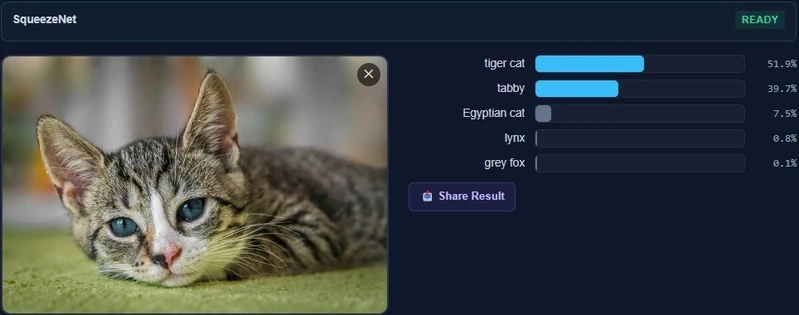
SqueezeNet classifying a cat photo in the browser

Eight months ago, the creator of ILGPU told me that supporting Blazor WebAssembly as a backend would be too difficult.

Today I shipped SpawnDev.ILGPU.ML 4.0.0-preview.4 to NuGet. It runs neural networks in your browser, on your laptop, and on your server – from a single C# codebase. Six backends: WebGPU, WebGL, WebAssembly, CUDA, OpenCL, and CPU. No ONNX Runtime. No JavaScript bridge. No native binaries to install. Just C# that gets transpiled to whatever shader language the target needs.

This article is about how that happened, what works today, and an honest ask for the help that would let me keep going at full speed.

What works today, in your browser, right now

The library ships five inference pipelines that have been validated end-to-end on every backend. Each of these images is a screenshot from the live demo at lostbeard.github.io/SpawnDev.ILGPU.ML – the model output rendered directly from a GPU buffer to an HTML <canvas> via the library’s ICanvasRenderer. No PNG encoding step, no base64 data URL, no host readback of pixel data.

Image classification – SqueezeNet 1.1

SqueezeNet classifying a cat photo in the browser

Drop in an image, get top-K labels and confidences. The ONNX file is loaded from HuggingFace’s CDN, cached in the browser’s OPFS for subsequent visits, parsed into a graph, and dispatched to whatever backend the page is running on. No server. No upload. The image never leaves the device.

Monocular depth estimation – Depth Anything V2 Small (95MB)

Depth Anything V2 producing a depth map of a house from a single photo

A 95MB model. Streams the weights one tensor at a time so it doesn’t blow up the WASM heap. Output is upscaled back to the source image’s exact aspect ratio via a GPU bilinear resize kernel, then run through a piecewise-linear colormap kernel (plasma / viridis / inferno / grayscale) – palette switch is one accelerator dispatch, no re-inference.

Neural style transfer – Mosaic

Style transfer applying a mosaic look to a cat photo

The classic Gatys-style transfer model, running entirely client-side. The result is rendered straight to a <canvas> via the library’s GPU-direct renderer.

Background removal – RMBG-1.4

Background removal cleanly extracting a person from a brick-wall background

Salient-object segmentation in the browser. The mask is computed on the accelerator, applied to the source image’s alpha channel on the accelerator, and composited (transparent / white / blur background options) without any CPU loop ever touching pixel data.

3x super-resolution – ESPCN (tile-based)

Super-resolution tripling the resolution of a tree sunset photo in full color

This one was a serious refactor. The published ESPCN model takes a fixed 224×224 luminance input – a naive implementation would shrink the source to 224×224, super-res it, and call it done (lossy and grayscale). My pipeline now tiles the source into overlapping 224×224 patches, runs each through the model, accumulates them into a destination luminance plane on the accelerator with weighted averaging in the overlap regions, then combines the result with bilinear-upsampled Cb/Cr from the original RGBA. Full source resolution, full color, source aspect ratio preserved.

How it works – C# in, GPU shaders out

The library is built on top of SpawnDev.ILGPU, my fork of ILGPU that adds three browser GPU backends to the existing CUDA / OpenCL / CPU ones.

ILGPU transpiles .NET CIL into GPU shader code. The browser backends I added compile that CIL into:

  • WGSL (WebGPU Shading Language) – the modern GPU compute path. Texture copies straight to canvas.
  • GLSL (OpenGL Shading Language) – using WebGL2 Transform Feedback for compute. Works on every browser back to ~2017.
  • WebAssembly binary – SIMD + threads, with multi-worker dispatch via SharedArrayBuffer.

A kernel like this:

private static void DoubleKernel(Index1D idx,
    TensorView<float> input, TensorView<float> output)
{
    int w = idx % input.D3;
    int h = (idx / input.D3) % input.D2;
    int c = (idx / (input.D3 * input.D2)) % input.D1;
    int n = idx / (input.D3 * input.D2 * input.D1);
    output.Set4D(n, c, h, w, input.Get4D(n, c, h, w) * 2f);
}

…becomes a WGSL compute shader in WebGPU, a GLSL vertex/fragment shader using Transform Feedback in WebGL, a Wasm function dispatched across web workers, a PTX kernel on CUDA, an OpenCL kernel on AMD/Intel desktop, or a parallel-for on the CPU. One C# function, six target backends. Picked at runtime.

The TensorView<float> parameter is a blittable struct that ILGPU packs into the kernel’s parameter buffer alongside the standard Index1D thread coordinate. Its D0..D3 fields carry the tensor shape inline – the kernel reads dimensions from the struct rather than taking H and W as separate scalar parameters. This matters because shape-management was previously the noisiest, error-prone part of kernel authoring.

The Tensor API

This week’s release shipped a Transformers.js / ONNX-Runtime style API surface in idiomatic C#:

using var session = await InferenceSession.CreateFromFileAsync(
    accelerator, http, "models/squeezenet/model.onnx");

// Allocate the input as an OwnedTensor - wraps a fresh GPU buffer.
using var input = OwnedTensor<float>.FromHost(
    accelerator, pixels, new[] { 1, 3, 224, 224 });

// Transformers.js-style call. Outputs come back as an OwnedTensorMap<float> -
// each output tensor lives in its own freshly-allocated GPU buffer, independent
// of the session's internal pool. The `using` disposes every output in one go.
using var outputs = await session.RunOwnedAsync(new Dictionary<string, Tensor<float>>
{
    [session.InputNames[0]] = input,
});

var logits = outputs[session.OutputNames[0]];   // OwnedTensor<float>
var hostLogits = await logits.ToHostAsync();    // copy back to CPU only when needed

There are three tensor types, mirroring the split ILGPU itself uses between MemoryBuffer<T> (host-side, lifetime-managing class) and ArrayView<T> (kernel-passable struct):

  • Tensor<T> – host-side, generic over T : unmanaged. Zero-copy reshape / slice / sub-tensor.
  • OwnedTensor<T> – IDisposable, owns a MemoryBuffer1D<T>. What pipelines return. Implicit conversions to Tensor<T> and TensorView<T> mean you never have to type .AsTensor or .View at a call site.
  • TensorView<T> – blittable struct, passes directly into ILGPU kernels.

This is the same conceptual API as Transformers.js and ONNX Runtime – the same patterns work, the same mental model carries over – implemented in a language with real type-safe generics and deterministic disposal.

Why I’m doing this

Half of the answer is technical curiosity. The other half is that the current ML-in-the-browser landscape is dominated by ONNX Runtime Web, which has a fundamental WebGPU device-sharing bug that’s been ignored for six months (microsoft/onnxruntime#26107). That bug is a wall for anyone trying to ship more than one model in a single browser session. It pushed me from “I wonder if I could do this” to “I’m doing this.”

The deeper motivation: when neural networks run on the user’s device, the user’s data stays on the user’s device. No upload to your servers. No “we promise we won’t train on your data.” No data plane at all. The user runs the model on their hardware against their data, period.

That’s what the SpawnDev stack is for. Blazor WebAssembly + WebGPU + the ML library + WebRTC peer-to-peer model delivery via SpawnDev.WebTorrent. A Progressive Web App stack where the entire AI workload lives in the user’s browser, the model weights arrive over BitTorrent from other users running the same app, and nothing ever touches a centralized server. That’s the destination. The library this article is announcing is one foundational layer.

Where I am with funding – and what I need

I built this library on a $20/month budget.

I am one person. I have a small crew that helps when budget allows. When the budget allows it, peak output across the entire SpawnDev stack (six libraries, hundreds of operators, multiple test suites, the WebRTC + WebTorrent + BlazorJS stack underneath) looks like 410 commits in a single day. When it doesn’t, work slows to whatever evenings I can spare around a full-time job.

I’m asking for $200/month total in GitHub Sponsorships to put the full crew back on the ship.

That’s the gap between this preview and the next ten:

  • Every remaining operator family migrated to the new Tensor API
  • The 11 other inference pipelines verified end-to-end on every backend
  • FP16 attention + Flash Attention on WebGPU
  • Llama and Phi-4 LLM inference in the browser
  • Full text-to-image diffusion through SD-Turbo
  • TripoSR single-image-to-3D
  • Peer-to-peer distributed compute through SpawnDev.WebTorrent

It is all in flight. The bottleneck is hours, not ideas.

Try it, break it, file bugs

The library is on NuGet:

dotnet add package SpawnDev.ILGPU.ML --prerelease

The source is at github.com/LostBeard/SpawnDev.ILGPU.ML. The live demos at lostbeard.github.io/SpawnDev.ILGPU.ML run entirely in your browser – the page itself is served from GitHub Pages, but the inference happens on your GPU and your data never leaves your machine.

If you’re a .NET developer who’s looked at the browser ML space and thought “I want this but I can’t bring myself to write JavaScript,” this is for you. If you’re a Blazor developer who needs ML and couldn’t make ONNX Runtime Web behave, this is for you. If you’ve been waiting for someone to prove Blazor WebAssembly can be a serious AI runtime, this is the proof.

Try the demos. File issues from your own models. Star the repo if you want to see this continue.

And if you can sponsor: github.com/sponsors/LostBeard. $5/month is a vote of confidence. $200/month total puts the crew back at warp speed.

🖖🚀

An In-Depth Overview of the Apache Iceberg 1.11.0 Release

Apache Iceberg 1.11.0 release overview diagram showing Security, Catalog, Storage, and Engine pillars

Apache Iceberg 1.11.0 was officially released on May 19, 2026, marking a major milestone in the evolution of open data lakehouse architectures. While minor point releases often focus on small bug fixes and dependency bumps, this release introduces fundamental structural changes. The community has completed major initiatives to improve security, extend file format capabilities, and optimize query planning overhead.

This release represents a convergence of two development focuses. First, it introduces structural changes to the core metadata specification to support advanced security features and lay the groundwork for future format revisions. Second, it stabilizes several feature sets in the Iceberg format specification, moving them from experimental status to fully stable defaults.

This post analyzes the most critical improvements in the Apache Iceberg 1.11.0 release. We will examine the specific GitHub pull requests, explain the underlying mechanics of each feature, and review what these changes mean for data engineers and platform architects.

Apache Iceberg 1.11.0 release overview diagram showing Security, Catalog, Storage, and Engine pillars

Manifest List Encryption (PR #7770, #15813)

Security in open data lakehouses has historically focused on encrypting the actual data files stored in object storage. While file-level encryption prevents unauthorized users from reading raw Parquet or ORC data, the table metadata has remained exposed. In a default setup, anyone with read access to the storage bucket could inspect the metadata JSON, manifest lists, and manifest files.

These metadata files contain sensitive structural details. An attacker scanning an unencrypted manifest list can extract file paths, column names, partitions, partition bounds, and exact null value counts. In highly regulated industries such as healthcare or financial services, this structural exposure constitutes a major data leak.

To resolve this vulnerability, PR #7770, introduced by @ggershinsky, adds native encryption for manifest lists. This change works alongside follow-up improvements in PR #15813. Manifest lists can now be encrypted using the Galois/Counter Mode (GCM) stream cipher.

Metadata JSON (Contains encryption state references)
       │
       ▼
Manifest List (Encrypted via GCM Stream Cipher) ◄── Decrypted in-memory during planning
       │
       ▼
Manifest Files (Point to encrypted Parquet data files)

The table encryption configuration can be defined during table creation or updated via table properties:

The table encryption configuration can be defined during table creation or updated via table properties:

When a query engine plans a scan against an encrypted table, it performs the following sequence:

  1. The client queries the catalog to fetch the table metadata.
  2. The catalog returns the metadata location along with the required decryption keys.
  3. The query engine reads the encrypted manifest list from object storage.
  4. Using the catalog keys, the engine decrypts the manifest list in-memory.
  5. The engine processes the decrypted partitions and statistics to prune manifest files.

This approach ensures that the manifest list is never written to disk in plain text. It implements a model of envelope encryption: each metadata file is encrypted with a unique data encryption key (DEK), and these DEKs are encrypted using the table’s master key managed by the Key Management Service (KMS). Even if an attacker gains raw access to the storage bucket, they find only encrypted bytes, protecting both the table contents and its structural metadata.

Manifest list encryption sequence showing key exchange and decryption query planning

Pluggable File Format API and V4 Spec Foundations (PR #15049)

Historically, Apache Iceberg hardcoded its support for data file formats. The core library contained format-specific code paths for Parquet, ORC, and Avro. If you wanted to query or write a table, the engine executed internal code blocks tailored to those exact structures.

This hardcoded design created a major bottleneck for format innovation. If a team wanted to test a next-generation format, they had to modify the core engine codebase, extending complex switch statements and format-dependent utilities.

PR #15049, introduced by @anoopj, restructures this architecture. It introduces a pluggable File Format API that decouples Iceberg core metadata management from physical storage layouts.

┌────────────────────────────────────────────────────────┐
│                  Iceberg Core Engine                   │
└───────────────────────────┬────────────────────────────┘
                            │
                            ▼
┌────────────────────────────────────────────────────────┐
│            File Format API Interface Layer             │
└──────┬────────────┬─────────────┬─────────────┬────────┘
       │            │             │             │
       ▼            ▼             ▼             ▼
  ┌─────────┐  ┌─────────┐   ┌─────────┐   ┌─────────┐
  │ Parquet │  │   ORC   │   │ Vortex  │   │  Lance  │
  └─────────┘  └─────────┘   └─────────┘   └─────────┘

The File Format API provides a clean plugin interface. A file format is defined as a plugin that implements standard reader and writer interfaces. Iceberg core negotiates table transactions, schemas, and partition specs, while delegating the physical file access to the registered plugin.

This decoupling makes it practical to support next-generation formats:

  • Vortex: A general-purpose, modular format designed as a successor to Parquet. It is optimized for high-performance analytics, utilizing fixed-width columns with bitmap masks for nulls. This enables Single Instruction Multiple Data (SIMD) filtering directly on memory-mapped files without CPU decompression cycles. The community is actively using the new API to build a Vortex-backed Iceberg plugin.
  • Lance: A layout built for machine learning and AI workloads. It is optimized for high-dimensional vector search and random access to nested embeddings, implementing index structures such as Inverted File with Product Quantization (IVF-PQ) directly in the file format to enable fast query planning.
  • Nimble: A format optimized for wide tables containing thousands of feature columns. Nimble prioritizes fast decoding over high compression ratios, opting for lightweight run-length and bit-packing compression schemes. This reduces the CPU overhead of ML training loops that consume millions of rows per second.

Additionally, PR #15049 introduces the foundational Java interfaces and types for the upcoming V4 manifest specification. These changes prepare Iceberg for format-agnostic manifest storage, ensuring the metadata layer can scale to tables with millions of files without hitting Java memory overhead limits.

Pluggable File Format API architecture decoupling Iceberg core from format plugins

REST Client Protocols and Extended Headers (PR #12194)

The REST Catalog protocol has become the standard interface for managing Iceberg tables across multiple processing engines. It isolates clients from catalog catalog details and provides a unified API for schema management, snapshot commits, and credential vending.

However, as deployments scale inside large enterprises, catalogs need to process custom client context. For example, a platform team might want to track which business unit submitted a query, pass custom security tokens, or inject correlation IDs for distributed tracing. In previous versions, the standard RESTClient did not allow clients to send custom HTTP headers.

PR #12194, written by @gaborkaszab, solves this constraint by extending header support inside the RESTClient implementations.

┌────────────────────────────────┐
│      Iceberg REST Client       │
│  (Spark, Flink, Trino, etc.)   │
└───────────────┬────────────────┘
                │
                │  POST /v1/namespaces/db/tables/events
                │  Custom-Headers:
                │    - X-Trace-Id: trace-98421
                │    - X-Tenant-Id: finance-billing
                │
                ▼
┌────────────────────────────────┐
│      REST Catalog Server       │
│  (Parses headers for auditing)  │
└────────────────────────────────┘

With this update, client engines can configure and inject custom headers into every REST call. The client-server handshake follows this sequence:

  1. The client initializes the REST catalog using the properties map.
  2. The client specifies static custom headers using the prefix header.custom.:
   header.custom.X-Tenant-Id=finance-billing
   header.custom.X-Trace-Id=system-trace-99
  1. During request execution, the RESTClient intercepts the HTTP call and injects these custom headers.
  2. The REST catalog server processes the headers to apply dynamic authorization, audit logging, or request routing.

This change enables the following capabilities:

  • Auditing and Governance: Engines can pass tenant identifiers or user profiles in the HTTP headers, allowing the REST catalog server to log catalog operations with full user context.
  • Distributed Tracing: Tracing headers such as W3C Trace Context can propagate from client engines through the catalog server, providing end-to-end trace visibility for query planning operations.
  • Dynamic Authorization: Clients can send custom authorization tokens that the REST catalog server evaluates dynamically to enforce fine-grained access control.

The properties are configured during catalog initialization using the standard configuration map, making it simple to roll out headers across existing query platforms.

Extended header propagation between Iceberg client and REST Catalog server

Overwrite-Aware Table Registration (PR #15525)

In multi-tenant data platforms, multiple engines frequently access and modify the same table metadata. When registering a new table or importing an existing table state into the catalog, concurrency conflicts can occur.

If two separate processes attempt to register or overwrite a table reference at the same location simultaneously, a naive catalog might register the second request, silently overwriting the first. This creates data inconsistencies where the catalog points to an outdated or incorrect metadata.json file.

PR #15525, written by @sririshindra, adds overwrite-aware table registration to the catalog API.

Writer 1: Commits events_v1 ────► [Catalog Table Pointer] ◄──── Writer 2: Commits events_v2
                                            │
                                            ├────────► If conflict: Catalog rejects Writer 2
                                            └────────► Prevents silent metadata overwrites

This implementation leverages Optimistic Concurrency Control (OCC) at the catalog level. The conflict resolution sequence proceeds as follows:

  1. Writer A and Writer B both read the current table state pointing to snapshot v1.
  2. Writer A writes new data files, generating metadata version metadata_v2.json.
  3. Writer B writes new data files in parallel, generating metadata version metadata_v3.json.
  4. Writer A calls the catalog’s /v1/namespaces/db/tables/events/register endpoint, stating that the expected base location is metadata_v1.json.
  5. The catalog verifies the base matches, registers the new pointer to metadata_v2.json, and updates the table version.
  6. Writer B attempts to register its state, listing metadata_v1.json as its expected base.
  7. The catalog detects that the current pointer is now metadata_v2.json.
  8. The catalog rejects Writer B’s request, returning a HTTP 409 Conflict. Writer B must re-read the updated table state, resolve any overlapping partition commits, and retry the registration.

This validation ensures that table registration is safe and prevents silent metadata overwrites in highly active environments.

Flowchart of table registration verifying catalog overwrite state and rejecting transaction on conflicts

Deletion Vector Pruning in Snapshot Validation (PR #15653)

One of the major highlights of the V3 format specification is the stabilization of deletion vectors. Deletion vectors improve row-level delete performance by replacing positional delete files with Roaring bitmaps. Instead of writing a new delete file for every minor update, the engine updates a binary bitmap linked directly to the data file.

These deletion bitmaps are stored in the Puffin file format. You can inspect active deletion vector locations using metadata system tables:

SELECT file_path, pos, row_position, deletion_vector
FROM TABLE(table_files('my_catalog.schema.events'));

However, as tables grow to hold millions of data files, validating these deletion vectors during query planning can introduce latency. During scan planning, the query engine must ensure that the deletion vectors linked in the metadata are valid and match the corresponding data files.

In earlier versions, this validation was executed across the entire table snapshot during plan initialization. If you had a 50 TB table and queried a single day, the planner still spent time validating deletion vectors for the entire table.

PR #15653, introduced by @anoopj, optimizes this process. It adds manifest partition pruning to deletion vector validation inside the MergingSnapshotProducer.

Query Filter: WHERE event_date = '2026-05-23'
       │
       ▼
Partition Pruning Step
       │
       ├─► Skip Partition '2026-05-22' ──► Skip Deletion Vector Validation
       │
       └─► Read Partition '2026-05-23'  ──► Run Deletion Vector Validation

With this change, the query planner matches the query filter predicates against partition bounds before executing deletion vector checks. If a partition is pruned out, the engine skips validating the deletion vectors for the files in that partition. This change reduces planning CPU cycles and improves scan startup times for partitioned tables.

For a detailed look at how hidden partitioning helps the query engine perform partition pruning and reduce metadata scan sizes, read the Apache Iceberg Hidden Partitioning Post.

Diagram showing deletion vector validation pruning skipping skipped partitions during planning

Scheduled Credential Lifecycle Refresh (PR #15678, #15732, #15696)

To security-harden data lakehouses, platforms avoid using long-lived storage credentials. Instead, query engines authenticate using temporary tokens vended by the REST catalog or cloud identity providers. These credentials typically have short lifespans, often expiring after one hour.

This security model creates issues for long-running operations. If a massive query runs for 90 minutes, or a streaming Flink sink runs continuously, the temporary credentials expire mid-job. When the client attempts to write new files or fetch manifests after the expiration window, the storage client throws an authentication exception, failing the job.

The 1.11.0 release resolves this lifecycle problem. PR #15678 (by @danielcweeks) and PR #15732 (by @nastra) add scheduled refresh threads to the S3FileIO client. A parallel change in PR #15696 (by @nastra) implements the same capability for GCSFileIO.

Query Thread (Reads/Writes Data)
       │
       ├───────► Token Expiration Approaching (e.g. at 50 minutes)
       │
Background Refresh Thread
       │
       ├───────► Send Request to Catalog ──► Fetch New Credentials
       │
       └───────► Update S3FileIO/GCSFileIO Credentials In-Memory
       │
Query Thread (Continues without interruption)

The credential refresh system runs a background daemon thread that tracks token expiration times. The lifecycle is controlled by the following properties:

The credential refresh system runs a background daemon thread that tracks token expiration times

Before the active credential expires, the background thread automatically polls the catalog’s /v1/tokens endpoint for refreshed tokens and updates the file system client in-memory. The main query and write threads continue to run without interruption, eliminating query failures caused by expired credentials.

Sequence flow showing background thread updating AWS/GCS storage client credentials before expiration

Spark Streaming Triggers and Z-Ordering (PR #13824, #15706)

Apache Spark remains the primary engine for heavy write workloads and batch compaction in Iceberg tables. Version 1.11.0 includes several updates to improve Spark streaming and layout optimization.

Trigger.AvailableNow Support (PR #13824, #14026)

PR #13824, introduced by @alexprosak, adds support for the AvailableNow trigger in Spark Structured Streaming. This change was also backported to Spark 4.0, 3.5, and 3.4 in PR #14026.

Continuous Trigger:
[Read Batch 1] -> [Write] -> [Wait] -> [Read Batch 2] -> [Write] -> (Runs indefinitely)

AvailableNow Trigger:
[Scan All Available Data] -> [Process Batch 1] -> [Process Batch 2] -> [Write All] -> [Graceful Shutdown]

In Spark streaming, the default trigger runs continuously in the background, consuming resources even when no new files are arriving. The alternative Once trigger processes only a single batch and shuts down, which can leave data unprocessed if a large backlog has accumulated.

The AvailableNow trigger combines the benefits of both approaches. It scans the source for all available data, splits the workload into consecutive micro-batches, processes them all in a single run, and then shuts down the streaming context. This is configured in PySpark as follows:

# Configure Trigger.AvailableNow with Iceberg source and sink
query = spark.readStream 
    .format("iceberg") 
    .load("prod_catalog.db.events") 
    .writeStream 
    .format("iceberg") 
    .trigger(availableNow=True) 
    .option("checkpointLocation", "/mnt/checkpoints/events") 
    .toTable("prod_catalog.db.events_compacted")

This trigger configuration allows data platforms to run streaming ingestion pipelines as scheduled cron jobs, reducing cluster idle time.

Z-Order Column Collision Validation (PR #15706)

PR #15706, introduced by @YanivZalach, addresses a failure mode during Z-order layout optimization. Spark uses the internal column name ICEZVALUE during Z-order sorting. If a user table already contained a column named ICEZVALUE, the compaction process failed or generated incorrect sort orders.

The update adds strict schema validation that checks for column name collisions before running Z-order compactions, preventing data corruption.

Comparison of continuous micro-batch streaming vs Spark AvailableNow trigger batches

Flink Post-Commit Maintenance and Branch Compaction (PR #15566, #15672, #14148)

Apache Flink is the standard engine for real-time streaming ingestion into Iceberg tables. Streaming ingestion has different write characteristics than batch ingestion, often writing many small files at high frequency. Iceberg 1.11.0 adds features to manage these files directly within Flink pipelines.

Flink Post-Commit Maintenance (PR #15566, #15667)

PR #15566, written by @mxm, adds support for arbitrary post-commit maintenance tasks inside the Flink IcebergSink builder. This is also backported to active Flink branches in PR #15667.

During streaming ingestion, Flink commits data to the Iceberg table at every checkpoint. These frequent commits generate a large number of small manifest files. With the new post-commit interface, you can attach background maintenance tasks directly to the sink:

// Configure Flink sink with post-commit compaction
IcebergSink.forRowData(dataStream, tableLoader)
    .table(icebergTable)
    .tableLoader(tableLoader)
    .writeParallelism(4)
    .distributionMode(DistributionMode.HASH)
    .postCommitMaintenance(
        PostCommitMaintenance.builder()
            .optimizeDataFiles(true)
            .rewriteManifests(true)
            .build()
    )
    .append();

After a commit succeeds, Flink runs compaction and manifest cleaning tasks in the background, keeping the table structure optimized without requiring external scheduler jobs.

Flink Stream Ingestion
       │
       ▼
[Commit Data File (Checkpoint)]
       │
       ├───────► Post-Commit Trigger
       │
       ▼
[Background Maintenance Action (RewriteDataFiles / Compaction)]

Flink Branch Compaction Support (PR #15672, #15690)

PR #15672, also written by @mxm, adds branch support to the Flink RewriteDataFiles action.

Historically, Flink’s background compaction actions could only run on the table’s main branch. In modern architectures, engines often ingest experimental data or staging runs into separate table branches. Flink can now run file compaction directly on these non-main branches, keeping staging and experiment branches organized before they are merged back.

Flink Metadata Columns (PR #14148)

PR #14148, introduced by @Guosmilesmile, exposes metadata columns to Flink readers.

Flink applications can now read the _row_id and _last_updated_sequence_number system columns. This is useful for CDC (Change Data Capture) reconciliation pipelines that need to track the exact ingestion sequence of rows.

Flink data sink writing data and executing post-commit branch compaction on experimental branch

JSON to Variant Mapping and Spec Cleanups (PR #13137, #14045)

The Variant type is a key part of the Iceberg V3 specification, designed to store semi-structured data using a binary representation that supports predicate pushdown. Iceberg 1.11.0 refines this integration across multiple engines.

Variant Type Validation (PR #13137, #14081)

PR #13137 (by @manirajv06) and PR #14081 (by @geruh) add schema validation and filtering rules for the Variant type in Parquet metrics.

These updates ensure that Parquet file readers can extract column-level statistics from nested variant structures. This allows the query engine to prune files based on nested variant fields, improving query performance.

Trino Variant Type Mapping

In parallel, query engine connectors are adopting these changes. Trino now maps its native JSON type to Iceberg’s Variant type in V3 tables. This means you can write JSON data from Trino and query it with predicate pushdown, avoiding the performance penalties of plain string JSON.

Positional Deletes with Row Data Deprecated (PR #14045)

PR #14045, written by @pvary, deprecates positional delete files that embed row data.

In Iceberg V2, positional delete files could store the actual deleted row data alongside the file path and row offset. While this design saved a join step during reads, it duplicated data in the delete files, increasing storage costs and metadata complexity.

The community has deprecated this option in favor of Deletion Vectors, simplifying the V3 read path.

Table Upgrade Path and Connector Compatibility

All V3 features: manifest list encryption, deletion vectors, Variant types, geospatial types, and nanosecond timestamps: require upgrading your tables to format version 3.

Existing V2 Table
       │
       ├───────► Run: ALTER TABLE events SET TBLPROPERTIES ('format-version' = '3')
       │
Upgraded V3 Table
       │
       ├───────► New writes use Deletion Vectors and Variant type
       └───────► Existing data files are left untouched (no rewrite required)

The upgrade is a metadata-only operation executed using SQL:

-- Upgrade an existing table to Iceberg V3 format version
ALTER TABLE my_catalog.schema.events
SET TBLPROPERTIES ('format-version' = '3');

This operation updates the format-version pointer in the table’s metadata JSON. It does not rewrite your existing data files, which remain in place and continue to be readable.

New writes to the table will adopt V3 features automatically. For example, subsequent update or delete statements will write deletion vectors instead of positional delete files.

Lifecycle Status Updates

Before planning your migration to V3, review the engine compatibility changes in Iceberg 1.11.0:

  • Java 11 Support Dropped: Iceberg 1.11.0 drops support for Java 11. Core libraries and engine connectors now require Java 17 or Java 21.
  • Spark 3.4 Support Deprecated: Support for Spark 3.4 is deprecated. Teams should migrate to Spark 3.5 or Spark 4.0+.
  • Flink 1.19 Support Removed: Flink 1.19 is no longer supported. The release adds support for Flink 2.1.0.

Make sure all query engines and toolchains in your lakehouse deployment support Iceberg V3 and Java 17 before upgrading production tables.

For more on managing query performance optimizations and table format versions inside Dremio, refer to the Dremio Autonomous Performance Blog.

Table upgrade timeline showing migration SQL and deprecated connector support list

Conclusion

Apache Iceberg 1.11.0 is a significant release for the project. It moves beyond incremental enhancements to deliver major architectural updates.

The unified File Format API restructures how Iceberg interacts with physical storage formats. This change makes it easier to integrate next-generation codecs designed for AI and high-performance workloads.

At the same time, the stabilization of V3 features provides a production-ready path for deletion vectors, Variant data, geospatial types, and nanosecond precision. These features help organizations optimize query performance and reduce operational overhead.

If you are running Iceberg V2 tables in production, evaluate your workloads to identify tables that will benefit from a V3 upgrade. In particular, tables with active update patterns or large JSON columns will see immediate performance gains.

Build Your Data Lakehouse Expertise

If you are designing, building, or managing modern data platforms, staying ahead of formatting specifications is critical. To deepen your understanding of these technologies, consider reading:

  • “Architecting an Apache Iceberg Lakehouse”: An architectural guide to designing open lakehouse platforms, managing catalog architectures, and optimizing table layouts.
  • Other Data Lakehouse Publications: Practical books covering hidden partitioning, schema evolution, and query acceleration engines.

Find these books and other lakehouse learning resources at books.alexmerced.com.

To query your Iceberg V3 tables with automatic file layout optimization, background compaction, and zero infrastructure management, start a free trial of Dremio Cloud at dremio.com/get-started.

Your Agent Just Called the Same Tool 47 Times. Here’s the 20-Line Detector.

AI Agents Pocket Guide: Patterns for Building Autonomous Systems with LLMs

The $47K loop

A LangChain user burned roughly $47,000 in a single weekend because their agent looped on one tool call. The story made the rounds on Twitter and HN in 2023, and the shape of the failure has not changed. The agent called the same retrieval tool, with the same arguments, over and over, while the framework happily fed every result back into the next prompt and billed each round.
Ten seconds with the trace and you’d see it. Forty-seven spans in a row, same tool_name, same args payload, different timestamps. No human writes that. No model wants to write that. But put a tool-using agent in front of a fuzzy question with a slightly-broken tool and it’ll grind on the same call until something kills it.

The thing that should have killed it is twenty lines of Python. It doesn’t live in the agent. It lives in the trace pipeline, so it survives framework swaps, model upgrades, and the next refactor your team does at 4pm on a Friday.

Why max_iterations is the wrong knob

The advice you get on the first page of Google is “set max_iterations=10“. This is wrong for the same reason a speed limit on a residential street is wrong for a highway. It punishes legitimate work.

Consider two agents running in the same product.

Agent A is a deep research assistant. It pulls a PDF, runs a search, summarizes, follows three citations, runs three more searches, dedupes the findings, and writes a memo. Eighty tool calls, all different, all useful. The user paid for that depth.

Agent B is a question-answerer with a flaky vector index. On query #1 it calls search_docs(query="refund policy"). The result is empty because of a stale embedding. The agent reasons “I should try again” and calls search_docs(query="refund policy") a second time. Then a third. By step 7 it has called the exact same tool with the exact same arguments seven times in a row.

A depth limit at 10 cuts off Agent A before it finishes and lets Agent B burn six iterations before it trips. You want the opposite: Agent A running as long as it’s making progress, Agent B dying at iteration 4. Repetition is the signal, not depth.

The detector in 20 lines

Here it is. A sliding-window counter keyed on (tool_name, args_hash). Push every tool invocation. If any key shows up threshold times in the last window calls, raise.

from collections import deque, Counter
from dataclasses import dataclass, field
import hashlib
import json


class LoopDetected(Exception):
    pass


@dataclass
class LoopDetector:
    window: int = 10
    threshold: int = 4
    _calls: deque = field(default_factory=deque)

    def observe(self, tool_name: str, args: dict) -> None:
        key = (tool_name, _args_hash(args))
        self._calls.append(key)
        if len(self._calls) > self.window:
            self._calls.popleft()
        counts = Counter(self._calls)
        most_common_key, hits = counts.most_common(1)[0]
        if hits >= self.threshold:
            raise LoopDetected(
                f"{most_common_key[0]} called {hits}x "
                f"in last {len(self._calls)} steps"
            )


def _args_hash(args: dict) -> str:
    canonical = json.dumps(_canonicalize(args), sort_keys=True)
    return hashlib.sha256(canonical.encode()).hexdigest()[:16]


_VOLATILE_KEYS = {
    "timestamp", "request_id", "trace_id", "span_id",
    "nonce", "now", "_ts", "correlation_id",
}


def _canonicalize(value):
    # strip keys that change every call but don't change intent
    if isinstance(value, dict):
        return {
            k: _canonicalize(v)
            for k, v in value.items()
            if k not in _VOLATILE_KEYS
        }
    if isinstance(value, list):
        return [_canonicalize(v) for v in value]
    return value

That’s the whole detector. Twenty-ish lines depending on how you count the imports. Drop it in, call observe() after every tool invocation, catch LoopDetected, do something useful.

The hash is truncated to 16 hex chars. Collisions don’t matter here. A false positive (two distinct calls hashing the same) costs you nothing because the loop wasn’t real and the next legitimate call breaks the pattern. A false negative (a real loop slipping through because the hash collided) is statistically irrelevant at 16 hex chars over a 10-call window.

Where to put it

You have three options, ranked from worst to best.

Inside the agent loop. You import LoopDetector into your agent runner and call observe() after each tool call. Easy. Also brittle. The day you swap LangChain for LangGraph, or move from one framework to another mid-quarter, the detector goes with the old code. You also have to remember to instrument every new agent. The third agent your team ships in a hurry won’t have it.

Framework callback. LangChain has BaseCallbackHandler, LangGraph has node hooks, OpenAI’s Agents SDK has lifecycle events. You write one callback that calls observe(). Better than inline. Still framework-specific. Still dies when you swap.

OTel span exporter. This is where it belongs. Your traces already flow through an exporter. Add a SpanProcessor that watches for tool-call spans and runs the detector on them. Framework-agnostic. Cannot be forgotten. Catches every agent in your fleet whether it was shipped today or last quarter.

The placement looks like this:

from opentelemetry.sdk.trace import SpanProcessor
from opentelemetry.sdk.trace.export import (
    BatchSpanProcessor,
)
from collections import defaultdict


class LoopDetectingProcessor(SpanProcessor):
    def __init__(self, inner: SpanProcessor):
        self.inner = inner
        # one detector per trace_id
        self._detectors = defaultdict(LoopDetector)

    def on_start(self, span, parent_context=None):
        self.inner.on_start(span, parent_context)

    def on_end(self, span) -> None:
        # GenAI semconv name for a tool invocation
        if span.name == "execute_tool":
            attrs = span.attributes or {}
            tool_name = attrs.get(
                "gen_ai.tool.name", "unknown"
            )
            # tool args often live under gen_ai.tool.call.arguments
            raw_args = attrs.get(
                "gen_ai.tool.call.arguments", "{}"
            )
            try:
                args = json.loads(raw_args)
            except (TypeError, ValueError):
                args = {"_raw": str(raw_args)}

            trace_id = format(span.context.trace_id, "032x")
            detector = self._detectors[trace_id]
            try:
                detector.observe(tool_name, args)
            except LoopDetected as exc:
                span.set_attribute("loop.detected", True)
                span.set_attribute("loop.reason", str(exc))
                # signal the agent runtime via your own channel:
                # Redis pub/sub, a kill flag in DB, etc.
        self.inner.on_end(span)

    def shutdown(self):
        self.inner.shutdown()

    def force_flush(self, timeout_millis=30000):
        return self.inner.force_flush(timeout_millis)

You wrap your existing exporter and register it on the tracer provider. The detector now sees every tool span from every agent your platform runs. The attribute names follow the OpenTelemetry GenAI semantic conventions (gen_ai.tool.name, gen_ai.tool.call.arguments), so this code works with anything that emits those spans.

Tuning window and threshold

Defaults that hold up in practice: window=10, threshold=4.

The reasoning. A well-behaved ReAct agent revisiting a tool because the first result was unclear will hit it twice, maybe three times with slightly different arguments. Four identical calls in ten steps means it’s not exploring. It’s stuck. Pushing threshold to 3 catches loops one step earlier but flags some legitimate retries. Pushing it to 5 lets one extra wasted call through per loop, which at GPT-4-class token rates is real money.

If your agents have exponential backoff baked in (call, wait, call again, wait longer), widen the window to 15-20 and keep threshold at 4. The backoff stretches the repetition over more steps, so a wider window catches it without being trigger-happy on legitimate retries.

If your tool catalog is small (3-5 tools) and the agent legitimately revisits one tool a lot, like read_file in a coding agent or search_web in a research agent, key on (tool_name, args_hash) not just tool_name. The args hash is what separates “called search_web 8 times with 8 different queries” (fine) from “called search_web 8 times with the same query” (broken).

What to do on detection

Three options, in increasing order of how much you trust your agent.

Killswitch. Default. Raise an exception, log the loop, return a structured error to the caller. Cheap and safe. The user retries.

Downgrade with a prompt. Inject a system message: “You have called search_docs four times with the same arguments. The tool is returning the same result. Try a different approach or stop and report what you’ve found.” The model usually breaks out. Sometimes it doesn’t, and then the killswitch fires on the next observation.

Page on-call. For agents where loops mean a real outage (say, an internal autonomous tool with no user retry) wire LoopDetected to PagerDuty. Rare, but for the agents that should never loop, the page is the right shape.

Start with the killswitch. Move to downgrade-with-prompt only after you have data on which loops are recoverable.

Two edge cases that bite

Non-deterministic args. The hash will diverge on every call if your tool args include a timestamp, a request ID, or a nonce. The canonicalizer above strips a known set of volatile keys (timestamp, request_id, trace_id, span_id, nonce, now, _ts, correlation_id) before hashing. Add to that set when you hit a new volatile field in your own tool schemas. The agent that smuggles created_at: <now> into its args is the agent whose loop you’ll never catch otherwise.

Streaming tool calls. Some frameworks emit partial spans while a tool call is still running. Filter to spans with a gen_ai.tool.call.id and ignore any where the call is still streaming. Otherwise you’ll count one slow tool call as multiple observations and false-positive yourself.

Where this fits in your stack

The detector is one of three runtime guards every production agent should have.

Token budget. A hard cap on cumulative input + output tokens per agent invocation. Catches the “the prompt grew to 200K tokens” failure mode that loop detection misses.

Loop detector. The thing in this post. Catches stuck repetition.

Goal-completion verifier. A separate small LLM call at the end that checks “did this agent actually do what the user asked, or did it produce confident-sounding output that misses the point?” Catches the “ran for 30 steps, produced garbage” failure that the first two miss.

Run all three in the trace pipeline, not inside the agent. The agent is the unreliable part. The pipeline is where the guards go.

What’s the worst agent loop you’ve shipped to production? Drop the trace in the comments. I want to know if anyone has beaten 47.

If this was useful

The runtime guard triad (token budget, loop detector, goal verifier) is one of the patterns in AI Agents Pocket Guide: Patterns for Building Autonomous Systems with LLMs. The book covers the rest of the production checklist: tool catalog discipline, sub-agent boundaries, replay and drift detection, and the trace-layer instrumentation that makes all of it observable. If you’re shipping agents and want the patterns laid out in one place, that’s the book.

AI Agents Pocket Guide: Patterns for Building Autonomous Systems with LLMs