Tracking Your AI Agent’s DeFi Positions Across Chains

Your trading bot is making moves across Jupiter, Aave, Lido, and Drift — but how do you track positions when they’re scattered across 14 different protocols and 2 chains? Writing custom integrations for each protocol’s unique API is a nightmare, and most wallets show balances but miss the nuanced details of lending rates, liquidation risks, and staking rewards.

Why DeFi Position Tracking is a Developer’s Nightmare

Modern DeFi strategies span multiple protocols. Your SOL might be staked on Jito, your USDC lending on Aave, ETH bridged via LI.FI, and perpetual positions open on Hyperliquid. Each protocol has its own API format, authentication method, and data structure.

Traditional approaches force you to maintain separate integrations for Jupiter’s swap data, Aave’s lending positions, Lido’s staking rewards, and Pendle’s yield tokenization. That’s 14+ different SDKs, API keys, and rate limits to manage. When your bot needs to rebalance or assess risk, it’s querying a dozen endpoints and stitching together fragmented data.

The stakes are real: missing a liquidation threshold because your Aave integration broke, or failing to unstake before a network upgrade because your monitoring was incomplete.

One API for 14 DeFi Protocols

WAIaaS provides a unified DeFi positions API that aggregates data across 14 protocols on both EVM and Solana. Instead of juggling multiple integrations, your application gets normalized position data through a single endpoint.

Here’s what comprehensive position tracking looks like:

curl http://127.0.0.1:3100/v1/defi/positions 
  -H "Authorization: Bearer wai_sess_<token>"

The response aggregates positions across all integrated protocols:

{
  "positions": [
    {
      "protocol": "aave-v3",
      "chain": "ethereum",
      "type": "lending",
      "asset": "USDC",
      "supplied": "10000.50",
      "borrowed": "0",
      "apy": "4.2",
      "healthFactor": null,
      "liquidationThreshold": null
    },
    {
      "protocol": "lido-staking",
      "chain": "ethereum", 
      "type": "staking",
      "asset": "stETH",
      "staked": "5.0",
      "rewards": "0.12",
      "apy": "3.8"
    },
    {
      "protocol": "jito-staking",
      "chain": "solana",
      "type": "staking", 
      "asset": "jitoSOL",
      "staked": "100.0",
      "rewards": "4.2",
      "apy": "7.1"
    },
    {
      "protocol": "hyperliquid",
      "chain": "hyperliquid",
      "type": "perpetual",
      "market": "ETH-USD",
      "size": "2.5",
      "side": "long",
      "entryPrice": "2400.0",
      "unrealizedPnl": "+125.50",
      "leverage": "3.0x"
    }
  ],
  "summary": {
    "totalValueUsd": "45280.75",
    "protocolCount": 4,
    "riskLevel": "moderate"
  }
}

Protocol Coverage That Actually Matters

WAIaaS integrates the protocols your strategies actually use:

Solana DeFi:

  • Jupiter — DEX aggregation and swapping
  • Drift — Perpetual futures and spot trading
  • Jito — Liquid staking with MEV rewards

EVM DeFi:

  • Aave V3 — Lending and borrowing with health factors
  • Lido — ETH liquid staking (stETH)
  • Pendle — Yield tokenization and trading

Cross-chain:

  • LI.FI — Bridge aggregation across 20+ chains
  • Across — Fast optimistic bridging

Trading:

  • Hyperliquid — On-chain perps with sub-accounts
  • Polymarket — Prediction market positions

Each protocol integration provides normalized data while preserving protocol-specific details like Aave’s health factors, Hyperliquid’s leverage ratios, and Pendle’s yield components.

Executable Actions, Not Just Data

Beyond position tracking, WAIaaS lets you execute actions across all integrated protocols using the same session authentication:

# Swap on Jupiter
curl -X POST http://127.0.0.1:3100/v1/actions/jupiter-swap/swap 
  -H "Authorization: Bearer wai_sess_<token>" 
  -H "Content-Type: application/json" 
  -d '{
    "inputMint": "So11111111111111111111111111111111111111112",
    "outputMint": "EPjFWdd5AufqSSqeM2qN1xzybapC8G4wEGGkZwyTDt1v", 
    "amount": "1000000000"
  }'
# Supply to Aave V3
curl -X POST http://127.0.0.1:3100/v1/actions/aave-v3/supply 
  -H "Authorization: Bearer wai_sess_<token>" 
  -H "Content-Type: application/json" 
  -d '{
    "asset": "0xA0b86a33E6464C9C68ce1b36B9F41bf691Ed7566",
    "amount": "1000000000",
    "onBehalfOf": "<wallet-address>"
  }'
# Open Hyperliquid perp position  
curl -X POST http://127.0.0.1:3100/v1/actions/hyperliquid/place-order 
  -H "Authorization: Bearer wai_sess_<token>" 
  -H "Content-Type: application/json" 
  -d '{
    "coin": "ETH",
    "sz": "1.5",
    "px": "2500.0",
    "side": "B",
    "orderType": {"limit": {}}
  }'

The same session token works across all protocols. No API key juggling, no protocol-specific authentication flows.

Risk Monitoring with Policy Engine

DeFi strategies need guardrails. WAIaaS includes a policy engine with 21 policy types specifically designed for DeFi risk management:

# Create lending LTV limit policy
curl -X POST http://127.0.0.1:3100/v1/policies 
  -H "X-Master-Password: <password>" 
  -H "Content-Type: application/json" 
  -d '{
    "walletId": "<uuid>",
    "type": "LENDING_LTV_LIMIT", 
    "rules": {
      "maxLtv": 0.75,
      "protocols": ["aave-v3"],
      "emergencyLtv": 0.85
    }
  }'
# Restrict perpetual leverage
curl -X POST http://127.0.0.1:3100/v1/policies 
  -H "X-Master-Password: <password>" 
  -H "Content-Type: application/json" 
  -d '{
    "walletId": "<uuid>",
    "type": "PERP_MAX_LEVERAGE",
    "rules": {
      "maxLeverage": 5.0,
      "protocols": ["hyperliquid", "drift"]
    }
  }'

When your bot tries to execute a trade that would exceed risk limits, the transaction gets automatically blocked or delayed for manual approval.

Quick Start: Deploy and Connect

Get a unified DeFi API running in under 5 minutes:

  1. Start WAIaaS with Docker:
git clone https://github.com/minhoyoo-iotrust/WAIaaS.git
cd WAIaaS  
docker compose up -d
  1. Create wallets and sessions:
npm install -g @waiaas/cli
waiaas quickset --mode mainnet  # Creates EVM + Solana wallets
  1. Query DeFi positions:
curl http://127.0.0.1:3100/v1/defi/positions 
  -H "Authorization: Bearer $(cat ~/.waiaas/sessions/mainnet-trading.token)"
  1. Execute your first cross-protocol strategy:
# Bridge USDC from Ethereum to Solana
curl -X POST http://127.0.0.1:3100/v1/actions/lifi/bridge 
  -H "Authorization: Bearer <token>" 
  -d '{"fromChain": "ethereum", "toChain": "solana", "token": "USDC", "amount": "1000"}'

# Then swap for SOL on Jupiter  
curl -X POST http://127.0.0.1:3100/v1/actions/jupiter-swap/swap 
  -H "Authorization: Bearer <token>" 
  -d '{"inputMint": "USDC", "outputMint": "SOL", "amount": "1000"}'
  1. Set up risk policies before you scale:
waiaas quickset --policies  # Creates sensible DeFi risk defaults

What’s Next

Your trading strategies no longer need separate integrations for each DeFi protocol. With 39 REST API endpoints, 14 DeFi protocol integrations, and a 7-stage transaction pipeline with policy enforcement, you can focus on alpha generation instead of API maintenance.

Check out the complete integration at GitHub or explore the interactive API documentation at waiaas.ai.


It’s not about AI token costs. It’s about prototyping.

It’s not about the spending of AI tokens, it’s about the potential of prototyping.

I like to build things in my free time.

Not necessarily products. Not necessarily monetization ideas. Just things I want to exist, things that benefit myself, or maybe others.

And I use AI a lot for it.

Because it’s no longer about writing the best possible code upfront.
It’s about having a prototype ready, fast, in some kind of MVP state. Then iterating.

Building with AI + your own vision

I recently redid my website for my weekend projects:

iCeGaming.org

I have to say, when you combine your own visual idea with AI, it gets really close to what you actually had in mind.

This is not a promotional post.
It’s more about showcasing how empowered we are now to just… build.

Small note though:

Yes, humans are still accountable for the code.

I don’t expect AI to write production-ready systems. Not without iteration, validation, and actually understanding what’s going on.

What I’ve been building

I’ve always had multiple projects going on. Games, tools, apps… always something upcoming.

🎮 Games

Main idea:

playable in the browser
no login
no tracking
just open and play

I care more about the experience than anything else.

I started with Warlocks, inspired by the Warcraft 3 days.
Pure chaos: pushing, dodging fireballs, shrinking safe zone.

Once I hit stable 60 FPS, I kept pushing:

bigger maps
more players
more interaction

Then came something inspired by Pudge Wars-style gameplay:

Mortar Mayhem
16 players, 8v8, blind mortar shots across the map, fog-of-war feeling, upgrades based on performance.

Then:

Pirate Ships deathmatch, 9 players, real-time aiming and prediction
Tank Blitz, same idea, but with powerups, turret alignment, charged shots affecting accuracy

At some point it became a pattern:

Boats. Tanks. Submarines. Planes. Bicycles.
Characters with bows. Pistols on horses. Whatever.

The constraint is always the same:

60 FPS in the browser.

🛠️ Tools

These usually come from real needs.

llm-schema-guard:
Strict schema validation + enforcing correct shapes + observability
commerce-orchestrator-api:
Moving towards agentic commerce, a layer in front of backend systems so agents don’t integrate directly with everything

Apex-Edge:
One problem I’ve seen everywhere:
What happens when the internet goes down? Or AWS/GCP?
Retail just… stops.
Idea:
local hub per store or region
process transactions locally
sync later
don’t push all complexity into POS devices

📱 Apps

Sometimes it’s just solving annoyances.

the-fuse
I was streaming and didn’t always have people to play with → so I built something to match creators for collaborations

what-i-paid
I got tired of not tracking prices across stores
→ take a picture of a receipt
→ AI extracts everything
→ track, manage, share
Free, simple, low friction.

And a lot more…

There are a lot of other ideas in progress.

Some go more into AI:

local assistants
multi-device control
something like a lightweight “brain” coordinating things

Some go bigger into games.

What I learned

Adapt to AI and iterate fast.

That’s it.

Prototyping is cheap now.

You don’t need to sit on ideas for weeks anymore. You can build something in hours or days, see if it works, and move on or improve it.

Just don’t forget:

If you ship it, you own it.

AI doesn’t change that.
(Quick note: I only linked the hub page because this isn’t a promo post. I just wanted to share the mindset and the joy of building fast with AI. The more we all build and iterate, the better it gets for everyone.)

Building Zero-Touch Parametric Insurance for Gig Workers – What Phase 2 Taught Us About AI, Fraud, and UX

India has over 12 million gig delivery workers. When it rains too hard,
they stop earning. No insurance covers this. We are building one.

This is what we learned building RiskShield-Gig in Phase 2 of
Guidewire DEVTrails 2026.

What Is RiskShield-Gig?

A parametric insurance platform that pays gig delivery workers
automatically when external disruptions hit their zone – rain, floods,
curfews. No claim form. No waiting. The payout arrives before the
worker even knows a claim was processed.

Workers pay a weekly premium (₹20-₹40 based on zone risk). When a
trigger fires, money hits their UPI wallet in minutes.

GitHub logo

Mekala-Sanjith3
/
RiskShield-Gig

AI-powered parametric insurance platform for gig delivery workers. Automatically detects disruptions (rain, floods, curfews) and pays out income loss to Swiggy/Zomato partners instantly – no claims, no forms, no waiting.

RiskShield-Gig 🛡️

AI-Powered Parametric Insurance for Gig Delivery Workers

License: MIT
Guidewire DEVTrails

Guidewire DEVTrails 2026 | Team: Prime AutoBots

📌 The Problem

India has over 12 million gig delivery workers. Most of them earn between ₹10,000 and ₹15,000 a month – roughly ₹600 to ₹800 a day – working for platforms like Swiggy and Zomato. When a heavy rainstorm hits, when a city-wide curfew is announced, or when flooding shuts down entire zones, these workers simply stop earning. There is no compensation. No claim to file. No safety net.

A worker in Hyderabad during the 2024 monsoon season could lose 8 to 10 working days. That is anywhere between ₹4,800 and ₹8,000 gone – with no recourse. Traditional insurance products do not address this. They are too expensive, too complex, and built for a workforce that earns a salary, not a daily wage.

RiskShield-Gig exists to close that gap.

💡 Proposed Solution

RiskShield-Gig…

What We Shipped in Phase 2

1. Worker Registration and AI Risk Profiling

Onboarding collects phone number, Aadhaar ID, delivery platform ID,
and UPI handle. The moment a worker registers, our Random Forest model
scores their zone using:

  • Historical rainfall and flood data
  • Average AQI over the past 6 months
  • Delivery activity density in their area

This produces a weekly premium tier – Low (₹20), Medium (₹30),
or High (₹40).

The key decision: hyper-local pricing over city-level pricing.
A worker in Kondapur and a worker in LB Nagar face completely different
flood risks even though both are in Hyderabad. City-level pricing
overcharges one and undercharges the other.

2. Dynamic Premium Calculation

The model recalculates premiums weekly as new data comes in. Workers
in zones with a clean week see their score nudge down. Zones that had
disruptions nudge up. Premiums are capped at 5% of average weekly
income to stay affordable.

3. Automated Parametric Triggers

We integrated 4 live triggers:

Trigger Threshold API
Heavy rainfall Above 50mm/hr OpenWeatherMap
Severe pollution AQI above 350 OpenAQ
Flood alert Red alert issued IMD mock
Curfew Zone shutdown confirmed Government mock

When any trigger fires in an active subscriber’s zone — the claim
pipeline starts. Automatically. The worker does nothing.

4. Claims Management

Policy creation is fully automated. Workers never “apply” for coverage.
The system creates and manages their policy from the moment they
subscribe.

Workers can view:

  • Active coverage period (Monday to Sunday)
  • Which triggers are active in their zone right now
  • Full payout history

The Hardest Problem: GPS Spoofing

The biggest challenge was not building the happy path. It was
protecting against organized fraud rings using GPS spoofing apps to
fake their location inside a disruption zone while sitting safely at home.

A syndicate of 500 workers doing this simultaneously can drain a
liquidity pool in hours.

Our solution: GPS accounts for less than 20% of the fraud risk score.

The remaining weight comes from signals a spoofer cannot easily fake:

  • Movement patterns – real bike speed vs static position
  • Device sensors – accelerometer confirms physical motion
  • Cell tower triangulation – cross-validated against GPS coordinates
  • Platform activity – active orders vs zero activity during claim
  • Crowd intelligence – are all nearby workers behaving consistently?

We use Isolation Forest for anomaly detection to catch:

  • Sudden location jumps (5km+ in under 1 minute)
  • Synchronized claim spikes from the same geo-cluster
  • First-time accounts claiming only during major disruption events

The Fairness Problem

A genuine worker in heavy rain has poor GPS signal and slow network
connectivity – which looks identical to spoofing on the surface.

Binary approve/reject would hurt honest workers. We designed a
tiered response instead:

Fraud Score Response
0 – 40 Instant payout, no action needed
41 – 70 OTP + selfie (60 seconds)
71 – 100 Manual review with one-tap appeal

Workers with long clean claim histories get extra trust weight. A worker
with 12 months of clean claims is treated very differently from an
account created 3 days ago.

What We Learned

Parametric insurance lives or dies on its fraud layer. Automated
payouts without robust validation is just a money tap. Fraud
architecture is not a feature – it is the foundation.

Design for zero patience. Every extra step is a drop-off for this
user base. Onboarding under 3 minutes. Zero worker action for claims.
If it is not instant, it does not work.

Weekly pricing builds trust. Workers who see a small predictable
₹20–₹40 deduction every Monday stay subscribed far longer than those
asked for a monthly lump sum.

What Is Next

Phase 3 focuses on advanced GPS spoofing defense in production,
instant payouts via Razorpay test mode, and intelligent dashboards
for workers and insurers.

Final DemoJam at DevSummit 2026 is the goal.

Team Prime AutoBots – Guidewire DEVTrails 2026

GitHub: https://github.com/Mekala-Sanjith3/RiskShield-Gig

Microsoft Launches Azure Copilot Migration Agent to Accelerate Cloud Migration Planning

Microsoft has launched the Azure Copilot Migration Agent, an AI assistant built into the Azure portal that automates migration planning, agentless VMware discovery, and landing zone creation. Despite being billed as generally available, the agent is in public preview and cannot execute migrations. Replication and cutover remain manual tasks in Azure Migrate.

By Steef-Jan Wiggers

Samsun'da jandarma altyapısı yeni projelerle güçlendirildi

Samsun’da, jandarma teşkilatına yönelik 2023-2025 döneminde çeşitli yatırım ve projelerin hayata geçirildiği, yeni hizmet binaları ve karakolların açıldığı açıklandı. Ayrıca, operasyonal kabiliyetin artırılması için yeni araçlar ve ekipmanlar alınmakta.

İçişleri Bakanlığı, “İller Arası Radar ve Kontrol Noktası” haritasını devreye aldı

İçişleri Bakanlığı,

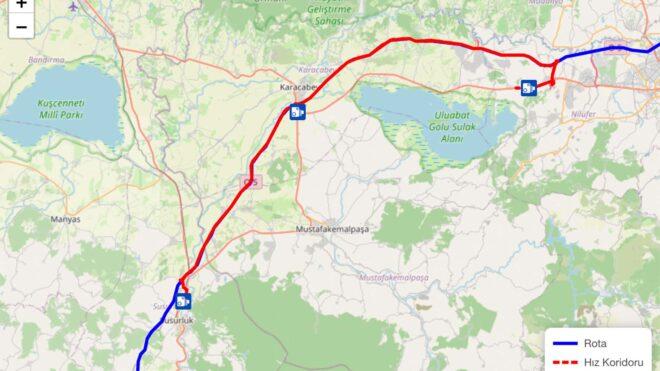
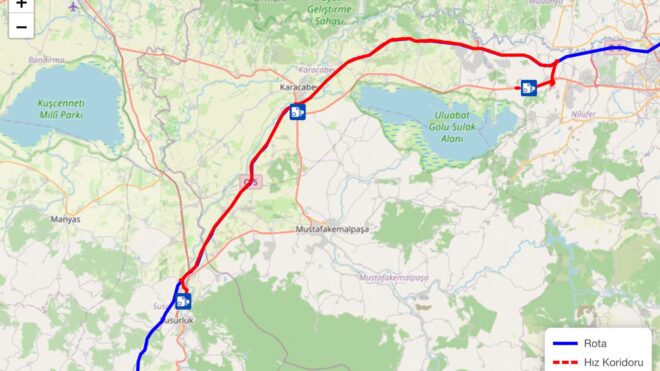
İçişleri Bakanlığı, "İller Arası Radar ve Kontrol Noktası" haritasını devreye aldıTürkiye Cumhuriyeti İçişleri Bakanlığı, internet sitesine eklediği “İller Arası Radar ve Kontrol Noktası Uygulama Sayıları” sistemiyle sürücülerin seçtikleri güzergahlar üzerindeki radarları, hız koridorlarını ve kontrol noktalarını görmesine imkan tanımaya başladı. Resmi olarak, “Güzergahınızdaki hız koridoru, radar ve kontrol noktalarının sayısını görüntüleyin. Paylaşılan veriler; seçilen güzergah üzerindeki Polis ve Jandarma birimlerimizin yürüttüğü trafik uygulamalarını kapsamakta olup 30 dakikada bir yenilenmektedir.” açıklamasının yapıldığı sistem, özellikle ilk defa kullanılacak rotalar için oldukça faydalı olabilir.

İçişleri Bakanlığı, “İller Arası Radar ve Kontrol Noktası” haritasını devreye aldı yazısı ilk olarak Teknoloji haberleri – LOG üzerinde yayınlandı.

MCP in Production: Routing LLM Tool Calls Through an API Gateway

MCP in Production: Routing LLM Tool Calls Through an API Gateway

Your LLM can now call tools. But who controls which tools it can call, how often, and with what credentials?

Model Context Protocol (MCP) gives LLMs a standard way to discover and invoke external tools — databases, APIs, file systems, anything you expose as a tool server. The protocol is clean and simple: JSON-RPC 2.0 over HTTP.

But “clean and simple” doesn’t mean “production-ready.” The moment you have multiple MCP servers, multiple LLM clients, and real users, you need the same infrastructure you’d need for any API: authentication, authorization, rate limiting, load balancing, failover, and observability.

That’s what an API gateway does. So we built one for MCP.

The Problem

Here’s a typical MCP setup:

LLM Client → MCP Server A (database queries)
LLM Client → MCP Server B (email sending)
LLM Client → MCP Server C (code execution)

This works fine on a developer’s laptop. In production, you need answers to:

  • Who is allowed to call which tools? An intern’s AI assistant shouldn’t have access to the production database tool.
  • How do you enforce rate limits? An LLM in a retry loop can hammer a tool server with thousands of requests per minute.
  • What happens when a tool server goes down? Your LLM client gets a connection error and the user sees a failure.
  • How do you add a new tool server? Reconfigure every client? Redeploy?
  • Where are the logs? When the CEO asks why the AI sent 400 emails, you need an answer.

These aren’t hypothetical problems. They’re the same problems every API faces at scale, and they have the same solution: put a gateway in front.

Architecture

CAPI’s MCP Gateway runs as a dedicated Undertow server (default port 8383) alongside CAPI’s existing REST, WebSocket, and gRPC gateways. All MCP traffic flows through a single endpoint:

POST /mcp

Every request is a JSON-RPC 2.0 message. The gateway understands four methods:

Method Purpose
initialize Create a session, get capabilities
tools/list Discover all available tools
tools/call Invoke a specific tool
ping Health check

The gateway isn’t a proxy that blindly forwards bytes. It understands the MCP protocol: it parses JSON-RPC, validates sessions, resolves tool names to backend services, enforces policies, and routes the call to the right server.

                         ┌─────────────────────────────────┐
                         │         CAPI MCP Gateway        │
                         │           POST /mcp             │
  LLM Clients ─────────► │                                 │
                         │  ┌──────────┐  ┌──────────────┐ │
                         │  │ Sessions │  │ Tool Registry│ │
                         │  └──────────┘  └──────────────┘ │
                         │  ┌──────────┐  ┌──────────────┐ │
                         │  │  OAuth2  │  │  OPA Policy  │ │
                         │  └──────────┘  └──────────────┘ │
                         │  ┌──────────┐  ┌──────────────┐ │
                         │  │Throttling│  │Load Balancer │ │
                         │  └──────────┘  └──────────────┘ │
                         └──────┬──────────┬──────────┬────┘
                                │          │          │
                                ▼          ▼          ▼
                           MCP Server  MCP Server  REST API
                           (native)    (native)    (wrapped)

Zero-Config Tool Discovery

Here’s where it gets interesting. CAPI uses HashiCorp Consul for service discovery. You register your MCP tools as Consul service metadata — no gateway reconfiguration needed.

A service with MCP tools registers like this:

{
  "Name": "order-service",
  "Tags": ["capi"],
  "Meta": {
    "mcp-enabled": "true",
    "mcp-toolPrefix": "orders",
    "mcp-tools": "search,create,cancel",
    "mcp-tools-search-description": "Search orders by customer ID, date range, or status",
    "mcp-tools-search-inputSchema": "{"type":"object","properties":{"customerId":{"type":"string"},"status":{"type":"string","enum":["pending","shipped","delivered"]}},"required":["customerId"]}",
    "mcp-tools-create-description": "Create a new order",
    "mcp-tools-create-inputSchema": "{"type":"object","properties":{"customerId":{"type":"string"},"items":{"type":"array"}},"required":["customerId","items"]}",
    "mcp-tools-cancel-description": "Cancel an existing order by ID",
    "mcp-tools-cancel-inputSchema": "{"type":"object","properties":{"orderId":{"type":"string"}},"required":["orderId"]}"
  }
}

The gateway’s McpToolRegistry polls the Consul service cache and builds a unified tool catalog. When an LLM client calls tools/list, it gets every tool from every registered service:

{
  "jsonrpc": "2.0",
  "result": {
    "tools": [
      {
        "name": "orders_search",
        "description": "Search orders by customer ID, date range, or status",
        "inputSchema": { ... }
      },
      {
        "name": "orders_create",
        "description": "Create a new order",
        "inputSchema": { ... }
      },
      {
        "name": "email_send",
        "description": "Send an email to a recipient",
        "inputSchema": { ... }
      }
    ]
  },
  "id": 1
}

Deploy a new service with mcp-enabled: true in Consul, and its tools appear in the catalog automatically. Remove the service, and they disappear. No gateway restart required.

Two Flavors of Backend

The gateway supports two types of tool backends:

REST APIs (default): Your existing REST services. The gateway translates tools/call into an HTTP request to the service. You expose tools via Consul metadata without touching your service code.

Native MCP servers: Backends that speak the MCP protocol natively (mcp-type: server). The gateway initializes a session with the backend, discovers its tools via tools/list, and forwards tools/call requests directly. This is useful when you already have MCP servers and want to aggregate them behind a single gateway.

# REST backend — gateway translates tool calls to HTTP
mcp-type: rest        # (default)

# Native MCP backend — gateway proxies JSON-RPC
mcp-type: server

For native MCP backends, the gateway handles session lifecycle with each backend independently — your LLM client maintains a single session with the gateway, while the gateway maintains separate sessions with each backend server.

Authentication: OAuth2 at the Gate

When OAuth2 is enabled, the initialize call requires a valid Bearer token:

POST /mcp
Authorization: Bearer eyJhbGciOiJSUzI1NiIs...

{
  "jsonrpc": "2.0",
  "method": "initialize",
  "id": 1
}

The gateway validates the token against your OIDC provider (Keycloak, Auth0, Okta — anything with a JWKS endpoint). If valid, it creates a session bound to the client’s identity:

{
  "jsonrpc": "2.0",
  "result": {
    "protocolVersion": "2025-03-26",
    "capabilities": { "tools": { "listChanged": true } },
    "serverInfo": { "name": "CAPI MCP Gateway", "version": "4.3.0" }
  },
  "id": 1
}

The response includes a Mcp-Session-Id header. All subsequent requests must include this header. Sessions expire after a configurable TTL (default: 30 minutes), with a sliding window — active sessions stay alive.

Authorization: OPA for Fine-Grained Policy

Authentication tells you who the caller is. Authorization tells you what they’re allowed to do. CAPI delegates authorization to Open Policy Agent (OPA).

Each service can define an OPA policy via Consul metadata. When a tools/call request arrives, the gateway sends the caller’s token to OPA along with the service’s policy. OPA returns allow or deny.

This means you can write policies like:

# Only users with "admin" role can call order cancellation tools
default allow = false

allow {
    input.token.realm_access.roles[_] == "admin"
    input.service.category == "orders"
}

# Data team can query but not mutate
allow {
    input.token.realm_access.roles[_] == "data-analyst"
    input.service.category == "orders"
    not endswith(input.tool.name, "_create")
    not endswith(input.tool.name, "_cancel")
}

If the policy denies the request, the LLM gets a JSON-RPC error:

{
  "jsonrpc": "2.0",
  "error": {
    "code": -32000,
    "message": "Access denied by policy"
  },
  "id": 3
}

This is critical. Without gateway-level authorization, every tool server needs its own auth logic, and you’re one misconfiguration away from an LLM accessing something it shouldn’t.

Load Balancing and Failover

Tool backends can run on multiple instances. The gateway’s McpBackendLoadBalancer distributes calls with round-robin rotation and a circuit breaker:

  1. Get all healthy instances of the target service from Consul
  2. Rotate through them round-robin
  3. If an instance fails, mark it as circuit-broken for 30 seconds (configurable)
  4. Circuit-broken instances are deprioritized but not removed — they’re tried last as a fallback
  5. For synchronous tool calls, the gateway tries each instance in order until one succeeds
tools/call "orders_search"
  ├─ Try instance-1 (healthy) → 503 → mark circuit-broken
  ├─ Try instance-2 (healthy) → 200 ✓ return result
  └─ instance-3 (circuit-broken, not tried)

Your LLM client sees a single reliable endpoint. Backend failures are invisible.

Streaming with SSE

Some tools produce output incrementally — think code generation, log tailing, or long-running queries. The gateway supports streaming via Server-Sent Events.

Mark a tool as streaming in Consul metadata:

{
  "mcp-streaming": "generate,tail_logs"
}

When the client sends Accept: text/event-stream, the gateway streams the backend response line by line:

HTTP/1.1 200 OK
Content-Type: text/event-stream
Cache-Control: no-cache

data: {"jsonrpc":"2.0","result":{"content":[{"type":"text","text":"Processing..."}]},"id":3}

data: {"jsonrpc":"2.0","result":{"content":[{"type":"text","text":"Found 42 results"}]},"id":3}

data: {"jsonrpc":"2.0","result":{"content":[{"type":"text","text":"Done."}]},"id":3}

Distributed Sessions with Hazelcast

In a single-instance deployment, sessions live in an in-memory cache (cache2k). But if you’re running multiple gateway instances — say, behind a Kubernetes service — sessions need to be shared.

When Hazelcast is enabled, HazelcastMcpSessionStore distributes sessions across all gateway instances with automatic TTL-based expiration. A client can initialize on one gateway pod and tools/call on another.

# Single instance — sessions in memory
capi.throttle.enabled: false  → LocalMcpSessionStore (cache2k)

# Multi-instance — sessions distributed
capi.throttle.enabled: true   → HazelcastMcpSessionStore (IMap)

Configuration

The MCP Gateway is opt-in. Enable it with a few properties:

capi:
  mcp:
    enabled: true
    port: 8383
    sessionTtl: 1800000              # 30 min
    toolCallTimeout: 30000           # 30 sec per tool call
    circuitBreakerCooldownMs: 30000  # 30 sec circuit breaker

That’s it. Tool discovery, authentication, authorization, load balancing, and session management are all inherited from CAPI’s existing infrastructure.

What It Looks Like End to End

Here’s a complete flow — an LLM assistant looking up a customer’s orders:

# 1. Initialize session (with OAuth2 token)
curl -X POST https://gateway.example.com:8383/mcp 
  -H "Authorization: Bearer $TOKEN" 
  -H "Content-Type: application/json" 
  -d '{"jsonrpc":"2.0","method":"initialize","id":1}'

# Response includes Mcp-Session-Id header
# Mcp-Session-Id: a1b2c3d4-e5f6-7890-abcd-ef1234567890

# 2. Discover available tools
curl -X POST https://gateway.example.com:8383/mcp 
  -H "Mcp-Session-Id: a1b2c3d4-e5f6-7890-abcd-ef1234567890" 
  -H "Content-Type: application/json" 
  -d '{"jsonrpc":"2.0","method":"tools/list","id":2}'

# 3. Call a tool
curl -X POST https://gateway.example.com:8383/mcp 
  -H "Mcp-Session-Id: a1b2c3d4-e5f6-7890-abcd-ef1234567890" 
  -H "Content-Type: application/json" 
  -d '{
    "jsonrpc": "2.0",
    "method": "tools/call",
    "params": {
      "name": "orders_search",
      "arguments": { "customerId": "C-1234", "status": "pending" }
    },
    "id": 3
  }'

Why Not Just Use a Regular API Gateway?

You could put Kong or Envoy in front of your MCP servers. But a generic HTTP proxy doesn’t understand MCP:

  • Tool-level routing — A regular gateway routes by URL path. MCP routes by tool name inside the JSON-RPC body. You’d need custom Lua/Wasm plugins to parse every request.
  • Tool-level authorization — OPA policies that understand which tool is being called, not just which endpoint.
  • Unified tool catalog — tools/list aggregates tools from all backends. A reverse proxy can’t do this.
  • Session management — MCP sessions with TTL, sliding expiration, and distributed storage. Not just HTTP cookies.
  • Protocol translation — Exposing REST APIs as MCP tools without modifying the backend service.

A generic gateway can proxy MCP traffic. An MCP gateway understands it.

Try It

CAPI is open source: github.com/surisoft-io/capi-core

The MCP Gateway ships alongside CAPI’s REST, WebSocket, gRPC, and Admin gateways in a single 39MB jar. If you’re already running Consul, you can have MCP tool routing in production in under an hour.

# docker-compose.yml — minimal setup
services:
  consul:
    image: hashicorp/consul:latest
    ports: ["8500:8500"]

  capi:
    image: surisoft/capi:latest
    environment:
      CAPI_MCP_ENABLED: "true"
      CAPI_CONSUL_HOST: consul
    ports:
      - "8380:8380"   # REST gateway
      - "8383:8383"   # MCP gateway
      - "8381:8381"   # Admin API
    depends_on: [consul]

CAPI is built by Rodrigo and runs in production at government scale on EKS and VM clusters. If you’re building LLM infrastructure and want to talk about MCP in production, open an issue or reach out.