RTX 60 serisi ekran kartları geliyor: İlk bilgiler paylaşıldı
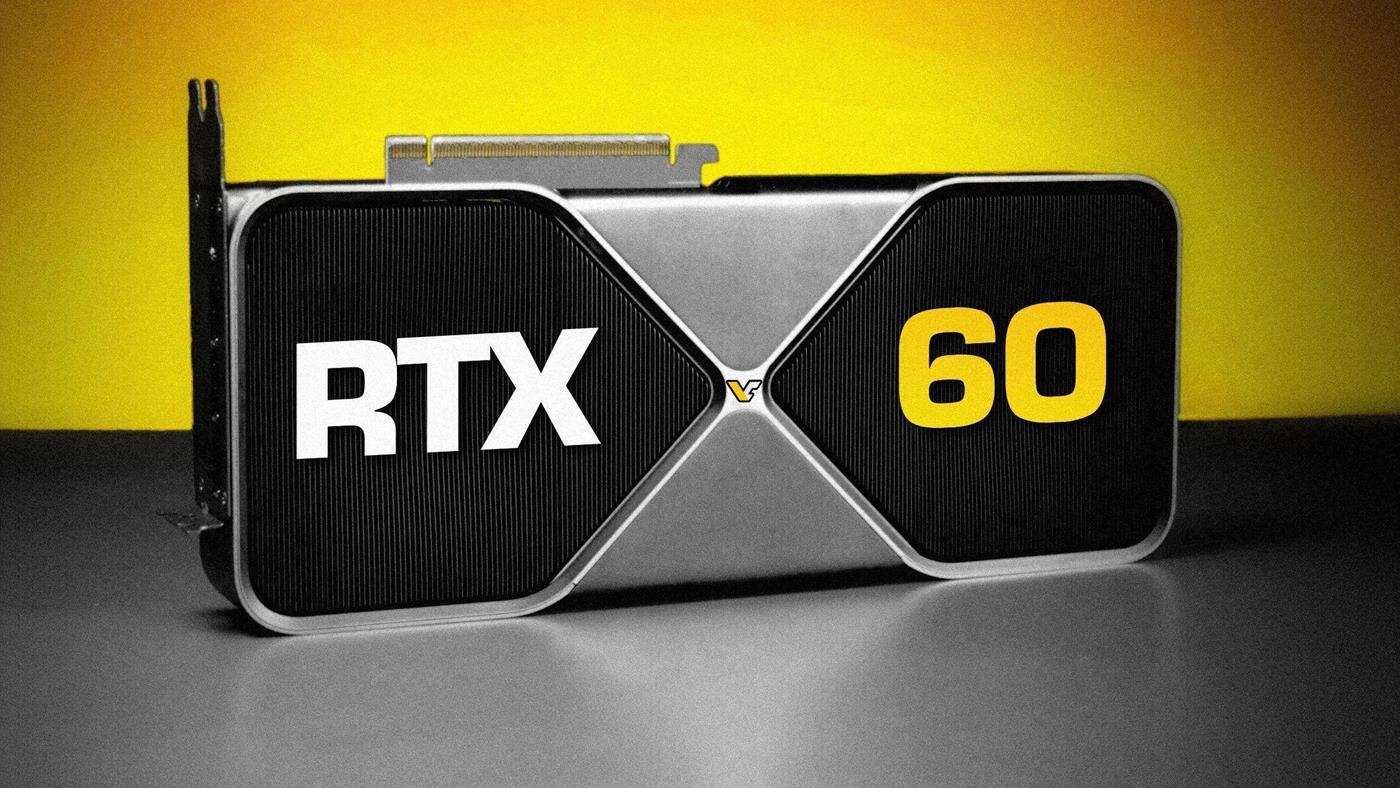
 Nvidia’nın RTX 60 serisi için ilk detaylar ortaya çıktı. Rubin mimarisiyle gelecek yeni GPU’lar, özellikle ray tracing ve yapay zekâ performansında büyük artış sunacak.
 Nvidia’nın RTX 60 serisi için ilk detaylar ortaya çıktı. Rubin mimarisiyle gelecek yeni GPU’lar, özellikle ray tracing ve yapay zekâ performansında büyük artış sunacak.

 Covid-19’un BA.3.2 varyantı 30’dan fazla ülkeye yayıldı. Dünya Sağlık Örgütü bu varyantı “izlenmesi gereken varyant” sınıfına aldı. BA.3.2 Cicada varyantı nedir? Pandemi geri gelir mi?
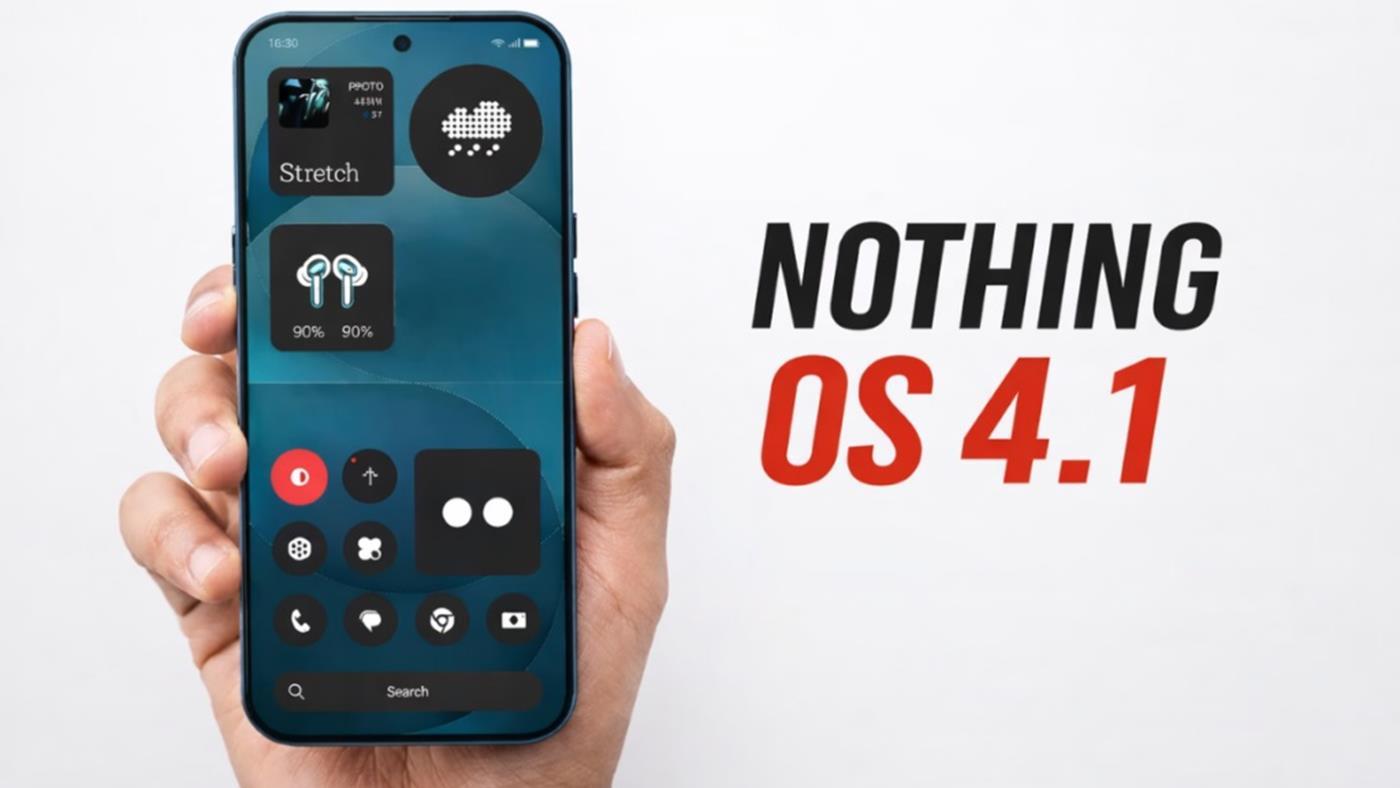
 Nothing, Android 17 öncesi Nothing OS 4.1 güncellemesini hazırlıyor. Yeni sürüm, yapay zekâ özellikleri ve arayüz iyileştirmeleriyle birlikte birçok modele gelecek.

 Intel’in Arrow Lake Refresh işlemcileri satışa çıkmadan zamlandı. Core Ultra 7 270K Plus ve 250K Plus modelleri, önerilen fiyatların üzerine çıktı. İşte detaylar…

 Türkiye, elektrik altyapısındaki güçlü hidroelektrik santral kapasitesi nedeniyle elektrik üretiminin yüzde 76’sını yenilenebilir enerji kaynaklarından karşılamayı başardı.

 Çin, savaş senaryolarında dronları çok daha tehlikeli hâle getirebilecek hibrit bir sistem üzerinde çalışıyor. Hibrit dronlar, hem uzun mesafe kat edebiliyor, hem gerektiğinde sessiz uçabiliyor.

 Çin ordusu, kentsel savaşlarda kullanılacak akıllı robot kurt sürülerini tanıttı. Bu dört ayaklı robotlar keşif, lojistik ve saldırı görevlerini bir arada otonom şekilde yürütebiliyor.
Your Hyperliquid perpetual bot spotted the perfect setup — funding rates are paying 50% APR while spot is trading at a discount. But by the time you’ve manually signed into three different platforms, connected wallets, and navigated UIs, the opportunity is gone. Professional traders need infrastructure that executes as fast as they think.
Why Trading Infrastructure Matters
Every millisecond counts in crypto trading. Whether you’re running statistical arbitrage between Jupiter and centralized exchanges, or managing a complex delta-neutral strategy across perpetual futures and spot markets, your wallet infrastructure can make or break your edge. Manual wallet management, fragmented APIs, and missing risk controls turn profitable opportunities into costly delays.
The best traders automate everything — not just strategy logic, but the entire execution pipeline from signal generation to settlement confirmation. You need wallet infrastructure that speaks your language: REST APIs, policy engines, and multi-protocol access through a single interface.
Professional Trading Infrastructure with WAIaaS
WAIaaS provides the wallet infrastructure that serious trading operations require. Instead of managing multiple wallet connections and signing flows, your bot gets one REST API that spans 14 DeFi protocols across Solana and EVM chains — including Hyperliquid perpetuals, Jupiter swaps, and cross-chain bridges.
Hyperliquid Integration: Perps, Spot, and Sub-Accounts
Hyperliquid’s unified API covers perpetual futures, spot trading, and sub-account management. Through WAIaaS, your trading bot can execute complex strategies without dealing with wallet connection hassles:
# Open a 10x long position on ETH perpetual
curl -X POST http://127.0.0.1:3100/v1/actions/hyperliquid/place-order
  -H "Content-Type: application/json"
  -H "Authorization: Bearer wai_sess_<token>"
  -d '{
    "coin": "ETH",
    "is_buy": true,
    "sz": "1.0",
    "limit_px": "3500",
    "order_type": {"limit": {"tif": "Gtc"}},
    "reduce_only": false
  }'
Sub-accounts let you compartmentalize strategies while maintaining unified reporting:
# Create sub-account for delta-neutral strategy
curl -X POST http://127.0.0.1:3100/v1/actions/hyperliquid/create-sub-account
  -H "Content-Type: application/json"
  -H "Authorization: Bearer wai_sess_<token>"
  -d '{
    "name": "delta-neutral-arb"
  }'
Multi-Protocol Trading Through One API
Professional strategies often span multiple venues. A typical delta-neutral play might involve shorting perpetuals on Hyperliquid while longing spot on Jupiter. WAIaaS handles the complexity:
# Step 1: Short ETH perp on Hyperliquid
curl -X POST http://127.0.0.1:3100/v1/actions/hyperliquid/place-order
  -H "Authorization: Bearer wai_sess_<token>"
  -d '{
    "coin": "ETH",
    "is_buy": false,
    "sz": "2.0",
    "limit_px": "3500"
  }'

# Step 2: Buy ETH spot via Jupiter swap
curl -X POST http://127.0.0.1:3100/v1/actions/jupiter-swap/swap
  -H "Authorization: Bearer wai_sess_<token>"
  -d '{
    "inputMint": "EPjFWdd5AufqSSqeM2qN1xzybapC8G4wEGGkZwyTDt1v",
    "outputMint": "7vfCXTUXx5WJV5JADk17DUJ4ksgau7utNKj4b963voxs",
    "amount": "7000000000"
  }'
Gas Conditional Execution
Gas costs can destroy trading profits, especially for high-frequency strategies. WAIaaS includes gas conditional execution — transactions only execute when gas prices meet your thresholds:
# Only execute when gas < 50 gwei
curl -X POST http://127.0.0.1:3100/v1/transactions/send
  -H "Authorization: Bearer wai_sess_<token>"
  -d '{
    "type": "TRANSFER",
    "to": "0x742d35cc1cf",
    "amount": "0.1",
    "gasCondition": {
      "maxGasPrice": "50000000000"
    }
  }'
Your arbitrage bot queues transactions during high gas periods and executes automatically when conditions improve.
Risk Controls for Trading Bots
Automated trading requires automated risk management. WAIaaS’s policy engine provides 21 policy types including position size limits, leverage caps, and spending controls:
# Set max leverage for perpetual trading
curl -X POST http://127.0.0.1:3100/v1/policies
  -H "X-Master-Password: my-secret-password"
  -d '{
    "type": "PERP_MAX_LEVERAGE",
    "rules": {
      "max_leverage": 10,
      "markets": ["ETH", "BTC"]
    }
  }'
Position size limits prevent a single trade from risking the entire portfolio:
# Cap position sizes by market
curl -X POST http://127.0.0.1:3100/v1/policies
  -H "X-Master-Password: my-secret-password"
  -d '{
    "type": "PERP_MAX_POSITION_USD",
    "rules": {
      "max_position_usd": 50000,
      "per_market_limits": {
        "ETH": 25000,
        "BTC": 25000
      }
    }
  }'
Real-Time Portfolio Monitoring
Trading bots need continuous position monitoring. WAIaaS tracks DeFi positions across all 14 integrated protocols:
# Get unified portfolio view
curl http://127.0.0.1:3100/v1/defi/positions
  -H "Authorization: Bearer wai_sess_<token>"
This returns positions from Hyperliquid, Jupiter, Kamino, Drift, and other protocols in a standardized format. Your monitoring dashboard gets one API call instead of integrating with each protocol separately.
Cross-Chain Arbitrage Infrastructure
Inter-chain arbitrage requires reliable bridging. WAIaaS integrates LI.FI and Across protocols for seamless asset movement:
# Bridge USDC from Ethereum to Solana for Jupiter trading
curl -X POST http://127.0.0.1:3100/v1/actions/lifi/bridge
  -H "Authorization: Bearer wai_sess_<token>"
  -d '{
    "fromChain": "ethereum",
    "toChain": "solana",
    "fromToken": "0xA0b86a33E6441",
    "toToken": "EPjFWdd5AufqSSqeM2qN1xzybapC8G4wEGGkZwyTDt1v",
    "amount": "1000000000"
  }'
Your arbitrage bot can now capture opportunities across chains without manual intervention.
Quick Start: Deploy a Trading Bot
Here’s how to get trading infrastructure running in under 10 minutes:
1. Start WAIaaS with Docker
git clone https://github.com/minhoyoo-iotrust/WAIaaS.git
cd WAIaaS
docker compose up -d
2. Create wallets for your strategies
npm install -g @waiaas/cli
waiaas quickset --mode mainnet  # Creates Ethereum + Solana wallets
3. Set up risk policies
# Create spending limits and position caps
curl -X POST http://127.0.0.1:3100/v1/policies
  -H "X-Master-Password: <password>"
  -d '{
    "type": "SPENDING_LIMIT",
    "rules": {
      "instant_max_usd": 1000,
      "daily_limit_usd": 50000
    }
  }'
4. Install the SDK in your trading bot
npm install @waiaas/sdk
5. Connect your bot and start trading
import { WAIaaSClient } from '@waiaas/sdk';

const client = new WAIaaSClient({
  baseUrl: 'http://127.0.0.1:3100',
  sessionToken: process.env.WAIAAS_SESSION_TOKEN,
});

// Your bot can now execute across 14 DeFi protocols
const balance = await client.getBalance();
const positions = await client.getDeFiPositions();
What’s Next
You now have professional-grade wallet infrastructure that scales with your trading operation. The complete WAIaaS documentation covers advanced topics like batch transactions, dry-run simulation, and integration with AI trading frameworks.
Ready to build? Get the code at GitHub or learn more at waiaas.ai.
The problem
AI agents choose between tools based on one thing: the quality of their descriptions.
Research shows 97% of MCP tool descriptions have quality defects (arXiv 2602.14878), and optimized tools get selected 3.6x more often (arXiv 2602.18914).
Most MCP developers don’t know their tool definitions are broken until an agent silently ignores them.
What I built
ToolRank scores MCP tool definitions across 4 dimensions:
It’s like Lighthouse, but for MCP tools.
GitHub Action — score on every PR
Today I published ToolRank Score on GitHub Marketplace.
Add this to your repo:
name: ToolRank Score
on:
  pull_request:
    paths: ['**/*.json']

permissions:
  pull-requests: write

jobs:
  score:
    runs-on: ubuntu-latest
    steps:
      - uses: actions/checkout@v4
      - uses: imhiroki/toolrank-action@v1
On every PR that touches tool definitions, you get a comment like:
🟣
mcp.json— 95/100 (Dominant, top 3%)
Tool Score F C P E search_web95 25 33 23 14 Top issues:
search_web: No usage context — Add ‘Use this when…’ (+5pt)Scored by ToolRank v1.0.0
You can also set a minimum score and fail PRs that don’t meet it:
- uses: imhiroki/toolrank-action@v1
  with:
    min-score: 70
    fail-on-low: true
REST API
If you want to integrate scoring into your own workflow:
curl -X POST https://mcp.toolrank.dev/api/score
  -H "Content-Type: application/json"
  -d '{"tools": [{"name": "search", "description": "Searches things"}]}'
Returns score, level, percentile, dimensions, and specific fix suggestions.
Ecosystem data
We scan 4,000+ MCP servers daily from Smithery and the Official MCP Registry. Some findings:
Check where your server ranks: toolrank.dev/ranking
What’s next
The scoring engine is fully open source. Star it if this is useful.
Try it
I’m building ToolRank as the quality standard for the MCP ecosystem. If you’re building MCP tools, I’d love to hear what you think.
Introduction
A common question developers ask when learning Go is: “Why goroutines when threads already work?” Take Java, for example—each client request is executed on an OS thread. Simple, straightforward, and battle-tested. So why did Go introduce this additional abstraction?
The answer lies in scalability and efficiency. While OS threads are powerful, they’re also heavyweight—creating thousands of them can overwhelm a system. Goroutines, on the other hand, are lightweight and managed by Go’s runtime, allowing you to spawn millions without breaking a sweat. But this raises another question: how does Go efficiently map thousands of goroutines onto a limited number of OS threads?
This is where Go’s ingenious GMP scheduling model comes into play.
The Challenge: Mapping Goroutines to Threads
OS threads are maintained by the operating system, which means the OS only knows about threads, not goroutines. Therefore, a goroutine must be mapped onto a thread to execute. This implies M:N mapping. At any given time, one thread handles one goroutine.
But how should this mapping occur? Let’s explore two approaches and their problems:
Approach 1: A Single Global Queue
Idea: A single global queue where threads push and pull goroutines concurrently.
Problem: This creates lock contention on the global queue. Each thread must acquire a lock, push or pull a goroutine, and then release the lock. Under high goroutine throughput, every thread is constantly fighting over the same queue. Each thread has to:
Approach 2: A Local Queue Per Thread
Idea: Give each thread its own local queue, eliminating contention on a shared structure.
Problem: Two issues arise. First, if a goroutine makes a blocking system call, the OS blocks that thread — all goroutines waiting behind it are now stuck, even though the CPU is free. Second, load becomes unbalanced: one thread’s queue may hold 100 goroutines while another’s is empty, and there is no rebalancing mechanism.
The Solution: The GMP Scheduling Model
The Go developers devised an elegant solution called the GMP scheduling model, which cleverly avoids these bottlenecks. The model consists of three key components:
The Three Components:
Important: There is still a global run queue in the GMP model, but it’s not the primary queue. It is used as a secondary queue.
What is a Processor (P)?
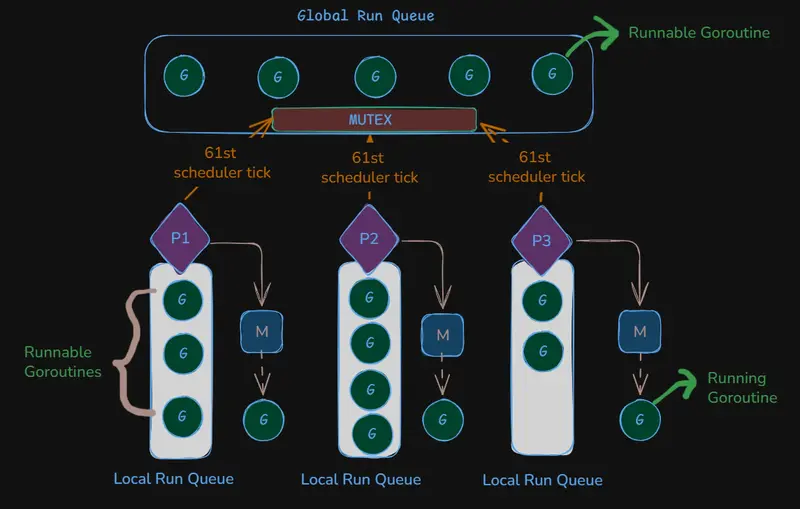
Instead of assigning queues directly to threads, Go uses distributed run queues owned by Ps. Each P maintains its own local run queue that holds multiple goroutines. Think of P as a scheduling context that bridges goroutines and threads.
Key relationships:
Understanding GOMAXPROCS: Tuning the Engine’s Parallelism
When are Goroutines and Threads Created?
Here’s the crucial insight: P controls parallelism. The number of Ps determines:
The GOMAXPROCS Setting
GOMAXPROCS determines the number of Ps in your program, and it can be manually configured.
Example scenario:
What happens:
The problem: With only 2 CPU cores but 4 threads, the OS must perform context switching between threads at the kernel level, which is relatively expensive.
Best practice: Set GOMAXPROCS = number of CPU cores (this is also the default in modern Go).
Thread Management: Creation, Parking, and Reuse
The scheduler doesn’t always create new threads. Here’s how Go optimizes thread management:
Scenario 1: Blocking System Call
When a goroutine makes a blocking system call:
Scenario 2: Subsequent Blocking Call
When another goroutine makes a blocking system call:
This parking and reusing strategy significantly reduces the overhead of thread management.
Scheduling Goroutines:
Scheduling loop:
When P needs to assign a G to the attached M, runtime runs this loop:

a. Every 61st goroutine — check global queue first — If a goroutine is found in the global queue, run it. If empty, proceed to b.
b. Check local queue — The P checks its own local queue. If a goroutine is found, run it. If empty, proceed to c.
c. Check global queue — Checked when local queue is empty (skipped if already checked in step a). If a goroutine is found, run it. If empty, proceed to d.
d. Work Stealing — Steals up to half the goroutines from another P. The runtime visits all Ps in a random order and stops when it finds a victim with stealable goroutines.
e. Checks the network poller – Runtime checks if any I/O bound goroutine is ready to resume.
Cooperative Scheduling:
Go was primarily designed for backend systems that rely heavily on channels, function calls, and I/O. These naturally act as yield points where the scheduler can switch goroutines:
This is Cooperative Scheduling, happening entirely within the Go runtime.
The Problem: CPU-Bound Goroutines
A goroutine with no yield points — such as a tight infinite loop — will never cooperate:
func monopoly() {
    for {
        x++ // no function calls, no channel operation — never yields
    }
}
Before Go 1.14, this goroutine would monopolize its P indefinitely, starving every other goroutine in the same local queue.
Preemptive Scheduling (Go 1.14+)
Go 1.14 introduced signal-based preemption as a fallback for CPU-bound goroutines.
The mechanism is driven by sysmon — a background thread that runs without a P, continuously monitoring the scheduler. When sysmon detects a goroutine has been running for approximately 10ms without yielding:
Timer-based preemption only kicks in for goroutines that never reach a yield point.
Key Takeaways
Distributed Scheduling: Per-P local queues eliminate global lock contention, allowing threads to pick work independently.
Thread Efficiency: Threads (Ms) are parked and reused rather than destroyed, significantly reducing creation overhead.
P Handoff: During blocking syscalls, the P detaches from the blocked M and attaches to a new or parked M to keep other goroutines moving.
Work Stealing: Idle Ps automatically balance the load by stealing half the tasks from a randomly selected P.
Starvation Prevention: The 61-tick rule ensures the global queue is periodically prioritized so no goroutine is left behind.
Hybrid Scheduling: Combines Cooperative yielding at natural code points (I/O, channels) with Signal-based preemption (via sysmon and SIGURG) for long-running CPU tasks.
This design allows Go programs to efficiently manage millions of goroutines with only a handful of OS threads, giving you the simplicity of synchronous code with the performance of asynchronous systems.