Screenshots Are Not Browser State

Screenshots Are Not Browser State

A coding agent that only sees screenshots is debugging theater.

Screenshots show what broke. They do not show why it broke.

The useful loop is real browser state: console errors, network requests, performance traces, DOM state, storage, cookies, session context, and the exact page the user is stuck on.

That distinction moved from niche to obvious today. Chrome for Developers announced that Chrome DevTools for agents is stable: coding agents can use Chrome DevTools MCP to test web apps in Chrome and inspect console logs, network requests, performance traces, and Lighthouse reports.

That is the right direction. Agents do not need prettier screenshots. They need runtime evidence.

Screenshots show symptoms

A screenshot can tell an agent that a checkout button is disabled.

It cannot reliably tell the agent:

  • which request failed;
  • whether the API returned 401, 403, 429, or 500;
  • whether a CSP rule blocked a script;
  • whether hydration failed;
  • whether a feature flag changed the DOM;
  • whether local storage is stale;
  • whether the user is in the wrong workspace;
  • whether the bug only happens behind a logged-in account.

HTML snapshots have a similar problem. They are useful, but they are still partial. They miss runtime behavior, timing, auth state, network edges, and the browser’s actual execution context.

A developer would open DevTools. A useful coding agent should be able to do the same.

The real browser loop

A real browser loop gives an agent evidence it can act on:

  • Console: stack traces, warnings, failed hydration, client-side errors.
  • Network: request payloads, response codes, headers, redirects, CORS failures.
  • Performance: long tasks, layout shifts, slow resources, Lighthouse reports.
  • DOM and accessibility state: what the page actually rendered, not what the template promised.
  • Cookies and storage: auth state, workspace IDs, stale tokens, feature flags.
  • Session context: the logged-in page where the user actually hit the problem.

This is why Chrome DevTools MCP matters. It turns the browser from a picture into an evidence source.

The same pattern is showing up elsewhere too. Developers are building tools that let coding agents drive real Chrome, inspect multi-tab sessions, and return structured results that agents can parse. Browser panes inside agent workspaces are becoming more than previews; they are becoming review surfaces, collaboration surfaces, and handoff surfaces.

The direction is clear: browser work is becoming part of the agent runtime.

Machine-readable browser evidence

The next step is not just “let the agent see Chrome.” It is letting the agent receive browser evidence in a form it can use.

A screenshot forces the model to infer. A structured browser result lets the agent reason.

For example, a browser run can return:

  • the action attempted;
  • the URL and frame where it ran;
  • console errors observed;
  • network failures observed;
  • performance warnings;
  • resulting DOM or accessibility state;
  • whether the intended after-state appeared.

That matters because agents are iterative. The output of one browser step becomes the input to the next coding step. If the browser result is only an image, the agent is guessing. If the browser result is structured evidence, the agent can repair, rerun, and verify.

This is the practical meaning of “screenshots are not browser state.”

Logged-in Chrome changes the problem

For local development, real browser evidence is mostly about debugging.

But real browser work does not stop at local development.

Many useful tasks happen behind login:

  • update a billing setting;
  • check a support inbox;
  • publish a CMS post;
  • verify a CRM record;
  • upload a file to a client portal;
  • refund an order;
  • change an ad campaign;
  • inspect a production dashboard.

At that point, the browser is no longer just an inspection surface. It is authority.

A signed-in Chrome session contains cookies, SaaS access, internal tools, live customer data, and the ability to change state. If an agent can operate that session, it is not merely “using a browser.” It is acting through delegated authority.

That is a different product boundary.

Prompts are not permissions

A prompt that says “be careful” is not a permission system.

A delay before deletion is not a permission system.

A log after the fact is not a permission system.

For signed-in browser workflows, the control layer needs to be explicit:

  • which browser session is exposed;
  • what sites or workspaces are in scope;
  • which actions are read-only;
  • which writes require approval;
  • where the approval line sits;
  • what receipt proves what changed;
  • how access can be revoked.

The approval line is important. It is the point where browser-agent memory stops being notes and becomes a control surface.

Before the line, the agent can gather evidence: page state, previous failures, current auth boundary, intended action.

At the line, a human or policy gate decides whether the agent may write.

After the line, the system needs a receipt.

Receipts are not logs

Logs are useful for debugging a run.

Receipts are useful for trusting delegated work.

A browser-action receipt should answer questions a team can check later:

  • who or what agent acted;
  • which browser session and account context were used;
  • what authority was delegated;
  • why the action was allowed;
  • what data moved;
  • what changed on the page;
  • what after-state proves the change landed;
  • what can be rolled back or revoked.

That is different from “the agent clicked a button.”

It is also different from a screenshot. A screenshot may show the final page. A receipt should preserve the authority, decision, action, and evidence trail around the change.

This is where real browser loops and delegated browser authority meet.

Where BrowserMan fits

Chrome DevTools MCP is a strong answer for local coding loops. It gives agents runtime browser evidence: console, network, performance, Lighthouse, and the real page.

BrowserMan’s lane is adjacent.

BrowserMan gives agents controlled access to a user’s real Chrome session. The agent can run anywhere, while the signed-in browser stays on the user’s device. Cookies stay local. Access can be scoped, gated, audited, approved, and revoked.

The useful framing is not “more browser control.”

It is controlled delegation of real browser authority.

Local dev loop:

Can the agent inspect and fix what is happening in Chrome?

Delegated browser workflow:

Can the agent use the right signed-in session, within the right scope, with approval before risky writes and receipts after changes?

Both matter. They solve different parts of the same shift: agents are moving from text into real browser work.

The browser is becoming an agent runtime

The browser is not just a viewport anymore.

For coding agents, it is an evidence source.

For workflow agents, it is an action surface.

For signed-in work, it is an authority surface.

That means the next generation of browser-agent tooling should not be judged only by whether the agent can click through a page. It should be judged by whether the system can preserve the state, authority, approval, and proof around the work.

Screenshots are not enough.

Real browser state is the evidence.

Logged-in browser state is the authority.

And delegated authority needs approval lines and receipts.

40% of Agentic AI Projects Will Be Cancelled by 2027. Governance Frameworks Won’t Save Them.

Gartner’s prediction isn’t about bad models. It’s about a missing infrastructure layer.

Gartner predicts that more than 40% of agentic AI projects will be cancelled by 2027. The reason given: cost, weak ROI, and poor governance.
Most teams hear “poor governance” and reach for a framework. They write policies. They set up review committees. They document acceptable outputs. They file compliance reports.
None of this prevents the failure mode that’s actually killing projects.

The Failure Mode Nobody Talks About
Here’s what a typical agentic AI failure looks like in production:
The pipeline runs. The output looks reasonable. No exceptions are thrown. No alerts fire.
Three steps earlier, an agent received state that didn’t meet the conditions for that step. It ran anyway. It produced output that looked plausible but was built on invalid foundations. Two steps later, another agent acted on that output. By the time the final result surfaces, the error is untraceable.
This isn’t a governance failure in the policy sense. The policies existed. The model was aligned. The guardrails were in place.
It’s an enforcement failure. Nobody checked whether the state was valid before the agent got control.

What Governance Frameworks Actually Cover
Most AI governance frameworks operate at two levels:
Design-time governance: policies about what the system is allowed to do, data handling requirements, human oversight requirements, documentation standards.
Output-time governance: guardrails on what the model returns, content filtering, output validation.
Both are necessary. Neither is sufficient.
There’s a third level that frameworks consistently miss: runtime enforcement at stage boundaries — checking whether the state entering each agent step is valid, and whether the action the agent is about to take is permitted given current runtime context.
Design-time governance says: “agents should not process data from restricted jurisdictions.”
Output-time governance says: “flag outputs that reference restricted jurisdictions.”
Runtime enforcement says: “before this agent runs, verify that jurisdiction is not restricted. If it is — block the action, preserve state, write an audit entry.”
The first two are policy. The third is enforcement. Policy without enforcement is documentation.

Why Projects Get Cancelled
The 40% cancellation rate isn’t happening because organizations lack policies. Most organizations that reach the agentic AI stage have governance policies in place.
Projects get cancelled for three concrete reasons:

  1. Failures are invisible until they’re catastrophic.
    Agent pipelines fail silently. Shared mutable state passes through multiple LLM calls, and each call can degrade that state in ways that look like normal output. By the time the failure is visible, it has propagated through the system. Reconstruction is expensive or impossible.
  2. Replay without idempotency is dangerous.
    When a pipeline fails mid-run, teams face a choice: restart from the beginning and risk re-executing side effects (duplicate API calls, double charges, repeated writes), or investigate manually. Neither is acceptable at scale.
  3. Audit trails don’t prove enforcement.
    Regulators and compliance teams increasingly ask not just “what did the system do” but “can you prove the system was constrained before it acted.” Logging outputs answers the first question. It doesn’t answer the second.

The Missing Layer
The infrastructure that would prevent these failures exists in traditional software. It just hasn’t been applied to agent pipelines.
Pre-conditions: before an agent step runs, verify that the state meets required conditions. If it doesn’t — reject the step, preserve state, write a structured failure event with full context.
Policy gates: before the LLM call, evaluate whether the action is permitted given current runtime context. Not after the output — before the call. If jurisdiction is restricted, the model never runs. No tokens consumed. No side effects.
Checkpoints: after each stage completes, write the state to a checkpoint. If the pipeline fails mid-run, replay from the last checkpoint. Steps already completed are skipped via idempotency keys — no double execution.
Structured audit trail: not just logs of what the model returned, but records of what conditions were true when each step ran, which policies evaluated, and whether they passed or failed.

What This Looks Like in Practice
A pipeline with enforcement built in behaves differently when something goes wrong:

[intake] ✓ pre: observation_present
[intake] ✓ post: normalized
[taxonomy] ✓ pre: normalized
[taxonomy] ✕ post: species_identified → ContractViolation
→ state preserved at failure point
→ DLQ entry written
stage: taxonomy
predicate: species_identified
context: { ...full state snapshot... }
→ replay available from: taxonomy

The failure is caught at the exact point it occurs. The state is preserved. The audit entry contains everything needed for diagnosis. Replay from the failure point doesn’t re-execute completed steps.
Compare this to the standard failure mode: exception in production, stack trace in logs, restart from the beginning, hope the side effects don’t cause problems.

Governance Frameworks Are Necessary But Not Sufficient
This isn’t an argument against governance frameworks. EU AI Act compliance, internal audit requirements, responsible AI policies — all of these matter and all of them are necessary.
The argument is that governance frameworks operate at the wrong layer to prevent the failure mode that’s causing the 40% cancellation rate.
Policy documents don’t run before agent steps. Review committees don’t evaluate runtime state. Compliance reports don’t prevent invalid state from entering a pipeline.
The teams that will not be in the 40% aren’t the ones with the most comprehensive governance policies. They’re the ones that built enforcement into the pipeline itself — pre-conditions, policy gates, checkpoints, structured audit trails — as first-class primitives, not afterthoughts.
Governance tells you what’s allowed.
Enforcement ensures only what’s allowed actually happens.
The gap between those two things is where the 40% lives.

If you’re building agentic AI pipelines and thinking about the enforcement layer, DEED is a runtime contract engine for Python agent pipelines: pre/post conditions, policy gates, checkpoint/replay. Zero dependencies. Python 3.10+.
github.com/Deadly-Reiter/deed · pip install deed-runtime

I Didn’t Launch a Software Studio. I Took a Position. (TLDR)

I wrote a longer post on my blog about why I started Lucky S Software right now: I Didn’t Launch a Software Studio. I Took a Position.. That version has the reasoning together with the personal side of the decision.

This is the short version. Ten reasons, one sentence each, no founder story.

  1. So much is shifting at once — AI, robotics, biotech, new interfaces — that the real question isn’t what gets built, it’s who ends up with the advantage when the dust settles, and that’s not a question I wanted to answer from the sidelines.
  2. I have the technical background to stay comfortably employed for years, and that’s exactly the trap a lot of capable people are walking into right now — mistaking delay for safety.
  3. Most software companies updated their vocabulary but not their structure, so “we use AI” usually still means too many meetings, split accountability, and human-heavy workflows that just mention AI more often.
  4. In a slow market, a title feels like protection; in a fast one, it traps you, and the better move is building enough agency to reposition when you need to.
  5. “We’re building a SaaS” no longer carries automatic credibility, which is healthy news, because the better question — is this actually defensible, or just easier to launch than it used to be — is finally being asked first.
  6. Thousands of real businesses are running on outdated systems that were never economically worth rebuilding, and AI-assisted development quietly changed that math: work that used to take months now fits into weeks.
  7. One operator with enough range and the right tools can now ship what used to take a small team — not as elegantly, but often well enough to make the old org chart look slow and expensive.
  8. Big software companies built their economics around headcount, so staying competitive now requires them to shrink, while a new studio starts small on purpose — one model has to unwind itself, the other never built the problem.
  9. AI workflows, memory, and agents are eating the context-switching overhead that used to force teams to grow, so the number of people needed to maintain meaningful software output is dropping.
  10. Most people can already feel the change but don’t want to admit what it implies, so they wait — and waiting for emotional certainty is usually just a polite way of being late.
    ## Closing

A leaner, sharper kind of software company is being built right now, and the longer I watched, the clearer it got that watching was the expensive choice.

If any of this landed, the full essay — including why I personally chose to take a position instead of wait — is on luckys.dev.

The Hidden Cost of Developer Tools: Why I Built My Own Free Alternative

Every developer has a collection of bookmarks. JSON formatters, Base64 encoders, hash generators, regex testers – the list goes on. We visit these sites multiple times a day, copy-paste our data, get the result, and move on.
But have you ever stopped to think about what’s actually happening behind the scenes?
The Problem with Most Developer Tools
Last month, I was debugging an API response. I needed to format some JSON quickly. I opened a popular online formatter, pasted my data, and… was greeted with a full-screen ad. After closing it, I found the tool. But wait – there was another popup asking me to sign up for “premium features.”
This pattern repeats across dozens of developer tool websites:

  • Intrusive ads that slow down your workflow
  • Signup walls for basic functionality
  • Tracking scripts that follow you around the web
  • Inconsistent UIs that make you relearn the interface each time
    The Real Cost
    Let’s do some quick math. If you use 5 different tool websites daily, and each one wastes 30 seconds on ads and navigation, that’s:
  • 2.5 minutes per day
  • 12.5 minutes per week
  • ~10 hours per year
    That’s more than a full workday lost to tool-switching overhead.
    Why I Built My Own
    I decided to build a single platform with all the tools I use regularly. The requirements were simple:
  • No ads
  • No signup
  • No tracking
  • Consistent interface
  • Fast loading
    The result was a collection of 90+ developer tools, all running client-side in the browser.
    Technical Decisions
    Vue.js 3 + TypeScript: I chose Vue because of its reactivity system and TypeScript support. The Composition API makes it easy to organize tool logic.
    Vite Build Tool: Fast hot module replacement during development, optimized production builds.
    Cloudflare Pages: Free hosting with global CDN. The site loads in under 1 second worldwide.
    Client-side Processing: All tools run in the browser. No data is sent to any server. This was non-negotiable for privacy.
    The SEO Challenge
    Building the tools was the easy part. Making them discoverable was harder.
    Developer tool sites face a unique SEO challenge: each tool is essentially a separate product with its own search intent. “JSON formatter” and “hash generator” are completely different queries, but they’re on the same website.
    Solution: Each tool gets its own page with:
  • Unique title and meta description
  • Dedicated H1 heading
  • Tool-specific structured data (JSON-LD)
  • Internal links to related tools
    Results After 3 Months
  • 93 tool pages indexed by Google
  • 500+ daily organic visitors
  • Top 10 rankings for long-tail keywords
  • Zero ad revenue (intentional)
    Lessons Learned
  • Free tools attract users, but content keeps them – Tools alone don’t build loyalty. Tutorials and guides do.
  • SEO for tool sites is different – Each tool needs its own SEO strategy, not just the homepage.
  • Performance matters more than features – A fast, simple tool beats a slow, feature-rich one every time.
  • Open source builds trust – Making the code available on GitHub builds credibility.
    Try It Yourself
    The tools are available at agentsaitools.com. No signup, no ads, no tracking. Just tools that work.
    What developer tools do you use daily? I’d love to hear about your workflow in the comments.

My 6-year-old asks 400 questions a day. So I built him a Gemma 4 AI tutor.

This is a submission for the Gemma 4 Challenge: Build with Gemma 4

My 6-year-old asks me four hundred questions a day — about clouds, his shadow, whether ants have birthdays. I love it, but I can’t always stop what I’m doing, and the usual fallbacks (Google, YouTube, a generic chatbot) are either too dense, too distracting, or too unsafe to hand a small child. Curio Kid is the app I built so my son can keep asking — and actually get warm, kid-friendly answers — without me worrying about what he sees next.

What I Built

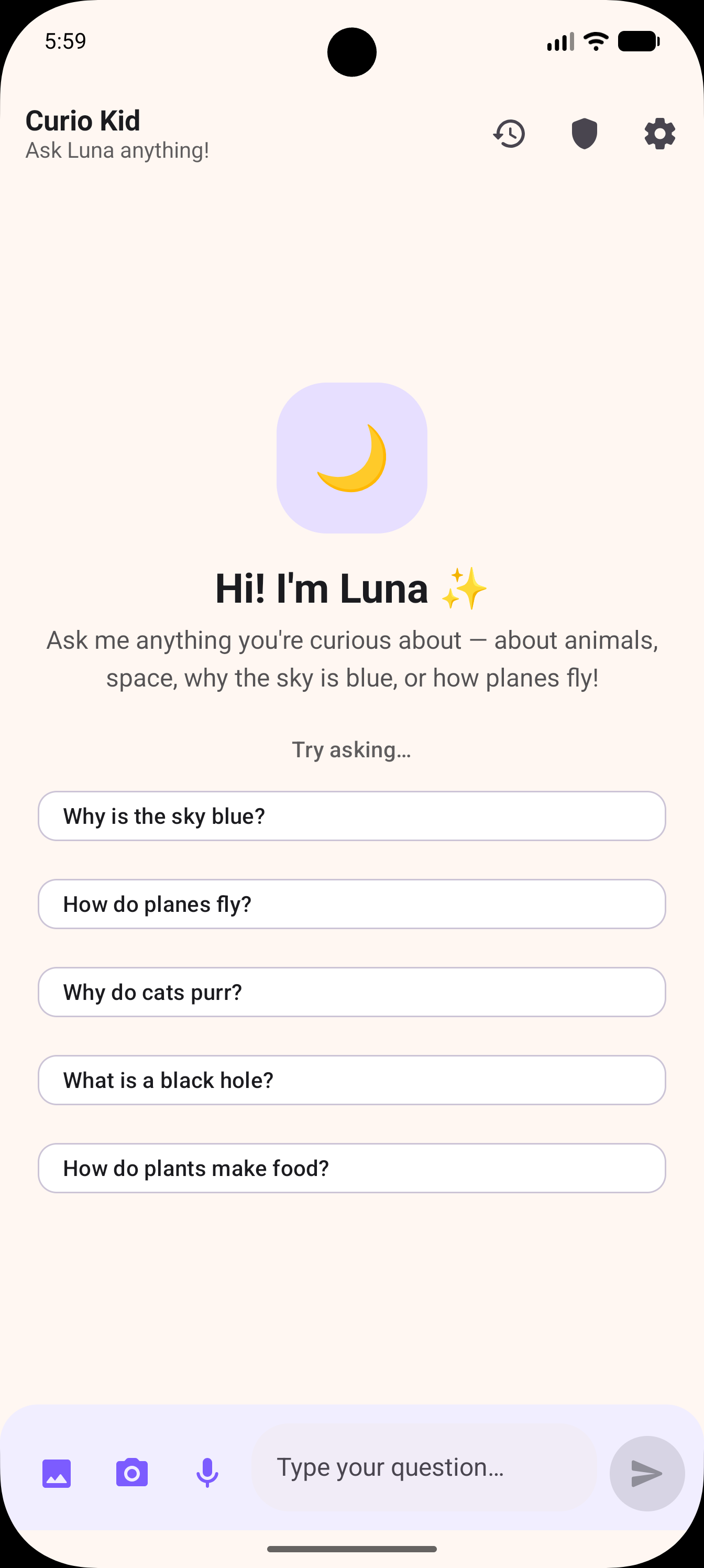
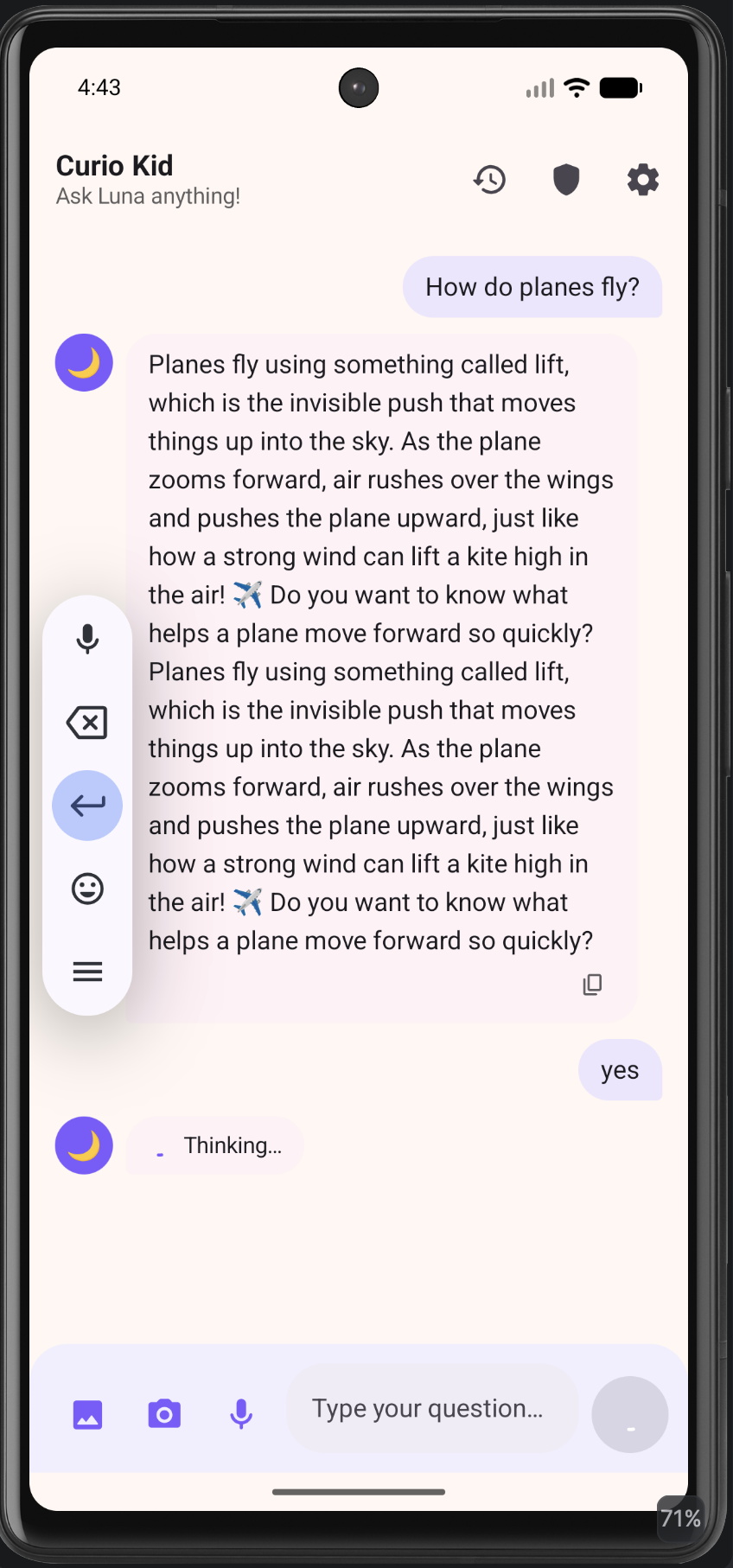
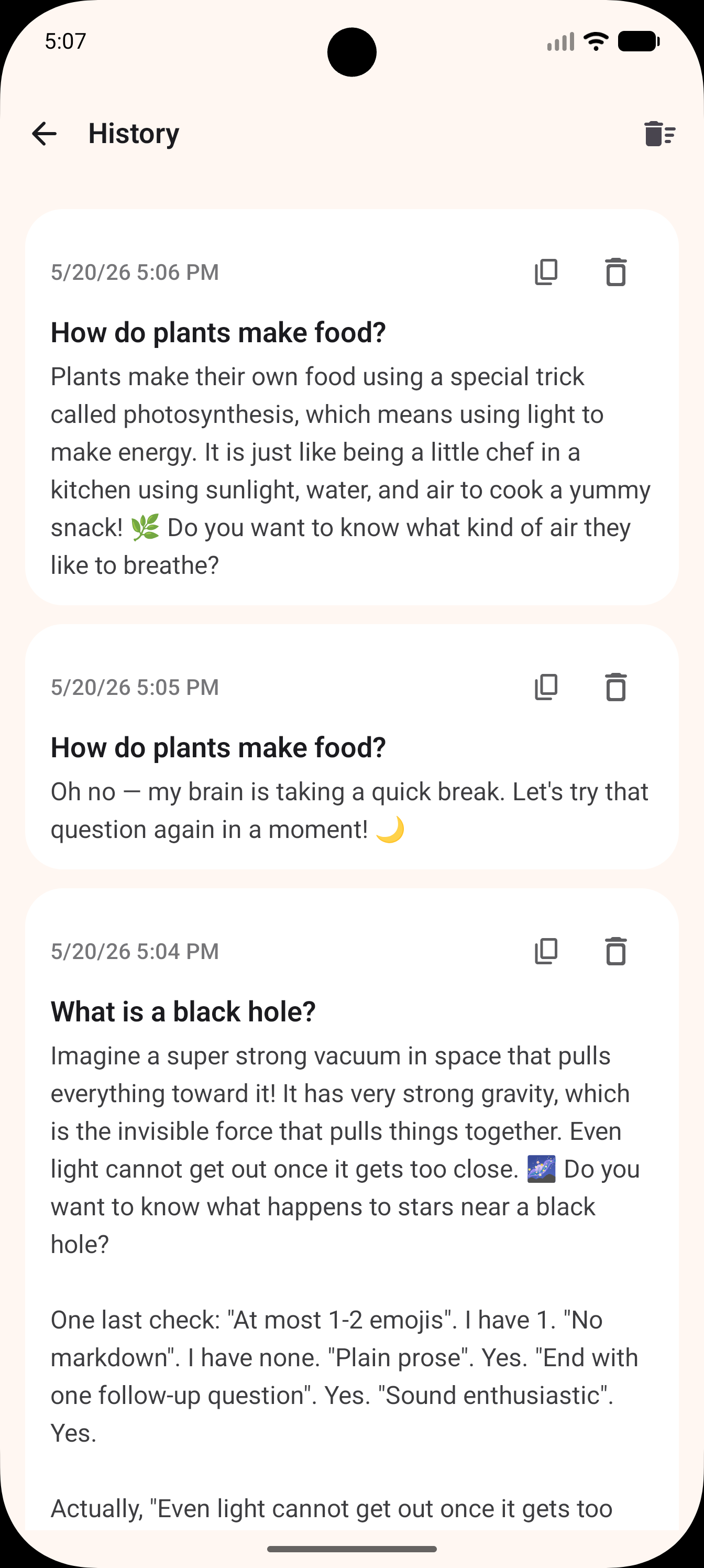
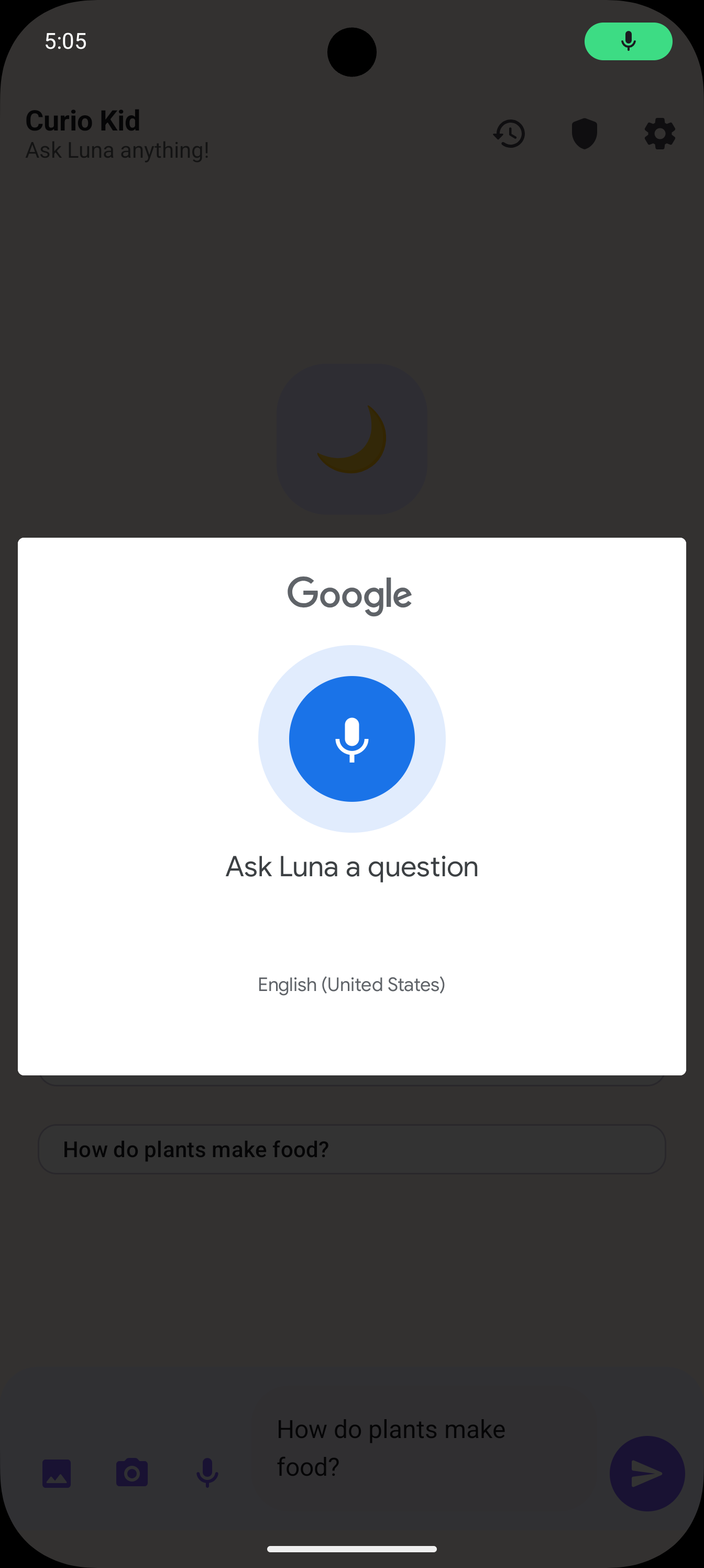
Curio Kid is a kid-safe Android app where a child asks anything — by typing, snapping a photo, attaching an image, or just talking — and gets a warm, age-appropriate answer from Luna, an AI tutor powered by Gemma 4. Answers are short on purpose: 2–5 sentences, an everyday analogy (Lego, swings, fruit), and a follow-up question to keep the curiosity loop running.

Designing it for my own kid forced some opinionated choices:

  • He can’t reliably read or type yet, but he can talk and point a camera. Voice and camera are first-class inputs, not afterthoughts.
  • He will absolutely test the safety rails. Kids ask wild things (“what happens if I drink poison?”, “why do people fight in wars?”) — Luna has to handle them gracefully every single time.
  • I want to know what he’s curious about, not spy on him. Hence the Curiosity Digest — a daily themed summary, not a chat log.

What makes it more than “yet another chatbot wrapper”:

  • Multimodal input — text, gallery image, live camera, on-device speech-to-text.
  • Safety as a hard requirement — locked-down system prompt + Gemini safety thresholds pinned to LOW_AND_ABOVE across harassment, hate, sexually explicit, and dangerous content; unsafe topics get a fixed redirect to “a trusted adult.”
  • Parent Dashboard — PIN-gated, with a one-tap Curiosity Digest: themes, highlights with quotes, dinner-table conversation starters, and an “anything to flag?” section.
  • Privacy-first — API key + PIN in EncryptedSharedPreferences (AES-256); question history in a local Room DB, excluded from cloud backup; the only network call is to the model endpoint with the user’s own key.
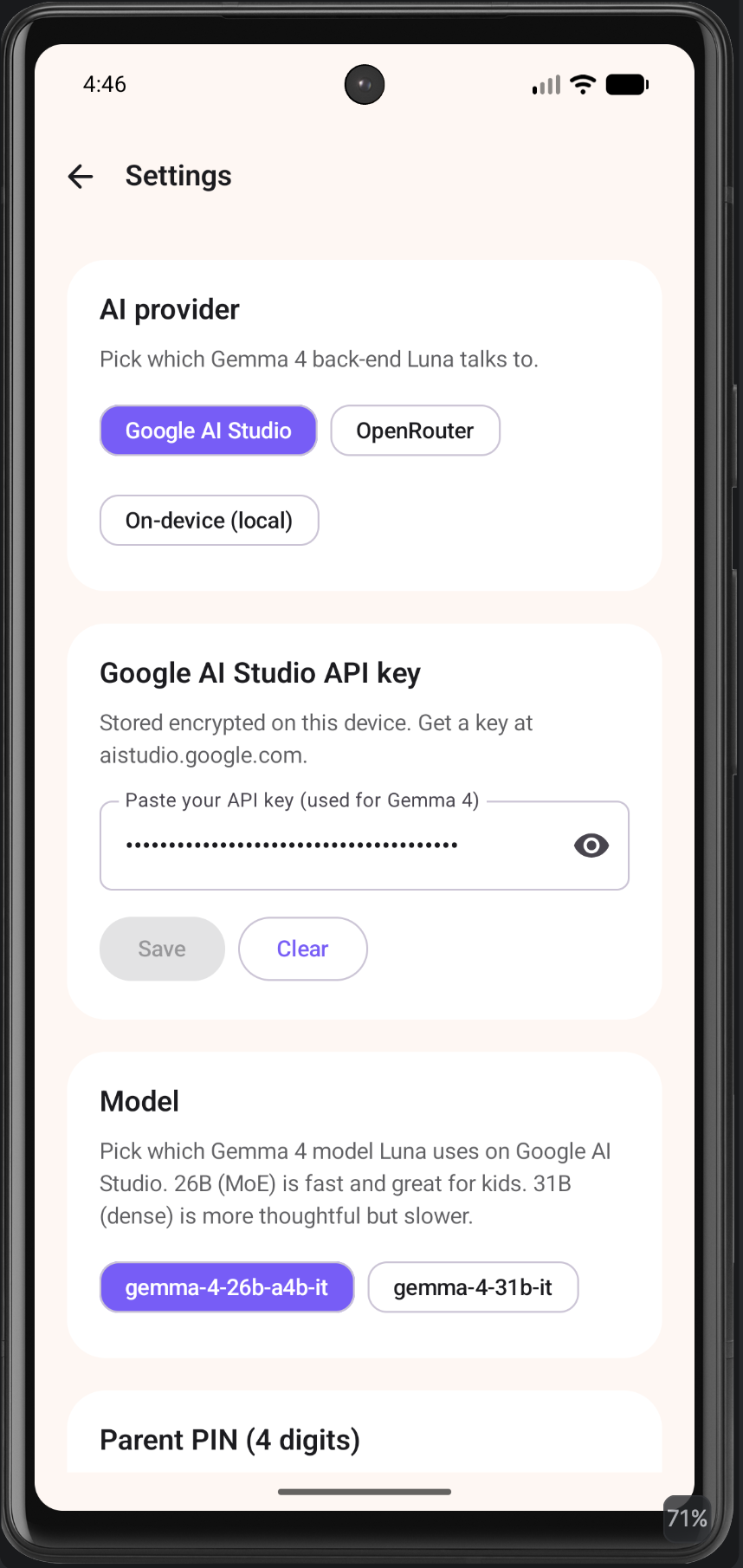
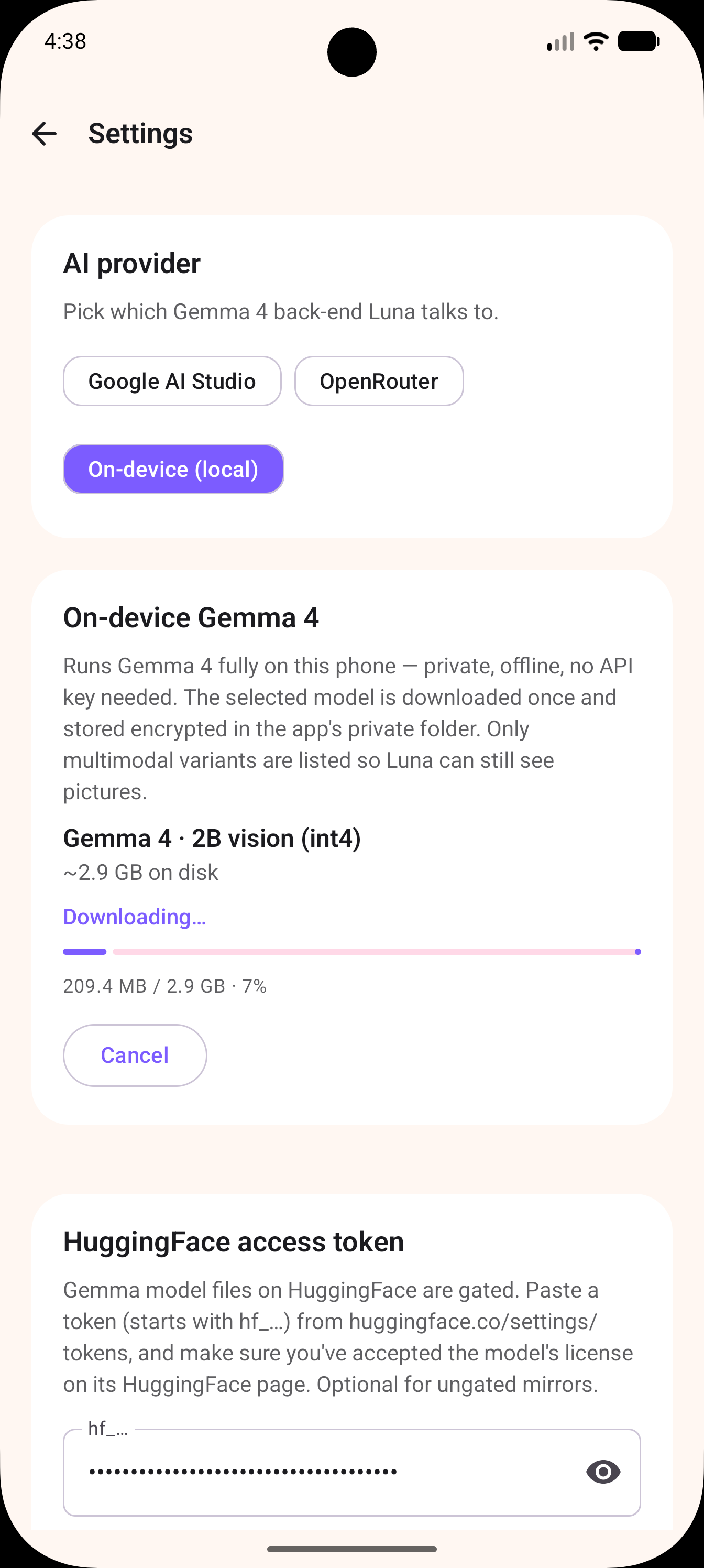
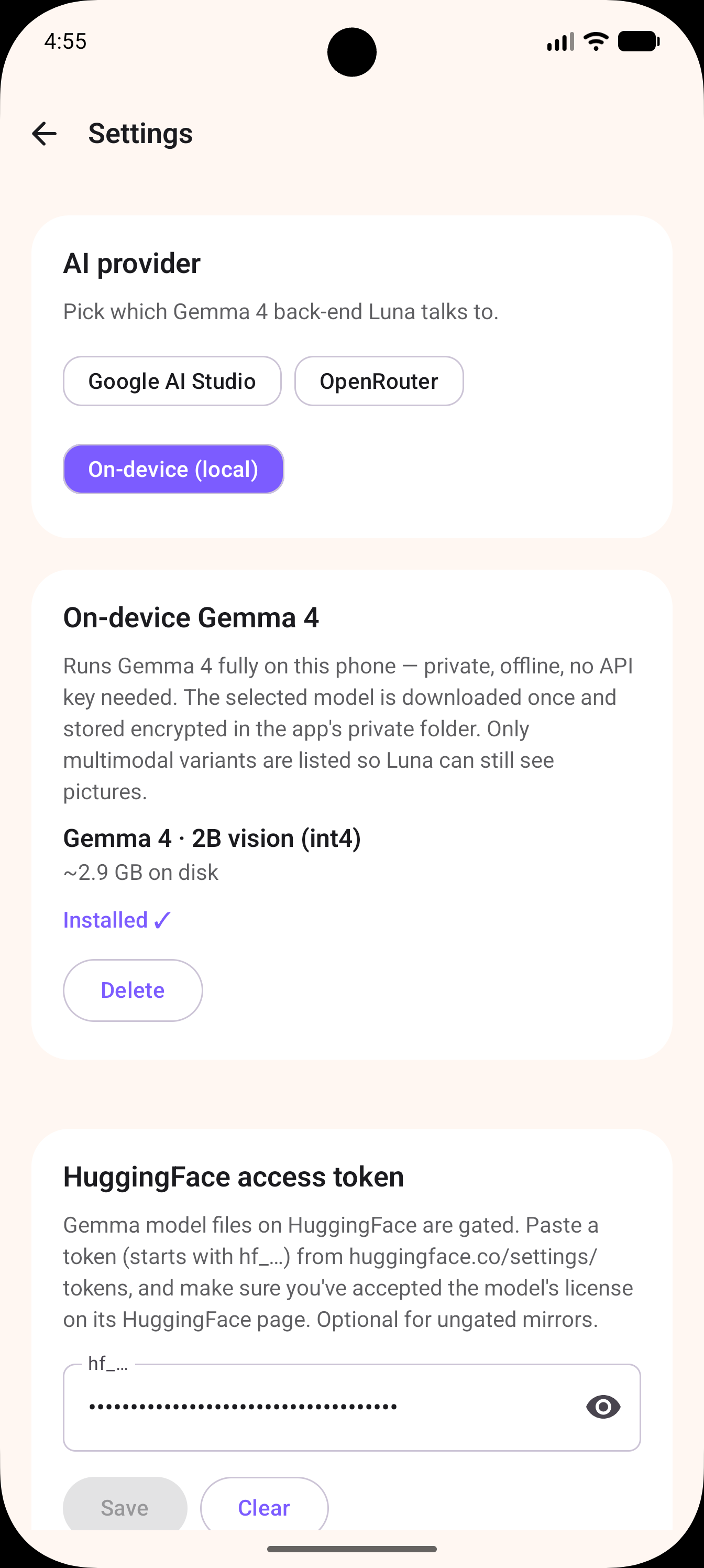
  • Three interchangeable Gemma 4 back-ends — not every family phone can host a multi-gigabyte model on-device, so Google AI Studio (default, free tier, multimodal), OpenRouter, and a scaffolded on-device path are all swappable from Settings.
  • Output cleaning — Gemma 4 sometimes thinks out loud (“Final Polish:”, “Let me revise…”); a post-processor strips those leaks so the child only sees the final answer.

Demo

https://raw.githubusercontent.com/sann3/curio-kid/main/demo/Home.png
https://raw.githubusercontent.com/sann3/curio-kid/main/demo/1i.png
https://raw.githubusercontent.com/sann3/curio-kid/main/demo/2i.png
https://raw.githubusercontent.com/sann3/curio-kid/main/demo/3i.png
https://raw.githubusercontent.com/sann3/curio-kid/main/demo/4i.png
https://raw.githubusercontent.com/sann3/curio-kid/main/demo/5i.png
https://raw.githubusercontent.com/sann3/curio-kid/main/demo/6i.png

https://raw.githubusercontent.com/sann3/curio-kid/main/demo/final.mp4

Code

GitHub: github.com/sann3/curio-kid.

How I Used Gemma 4

Curio Kid exposes two Gemma 4 variants in the model picker, and the choice is intentional.

gemma-4-26b-a4b-it — 26B Mixture-of-Experts (default)

The daily driver. A kid-facing chat app needs three things at once: multimodal, fast first-token latency, and smart enough to teach. MoE hits all three — only a slice of experts fires per token, so latency feels ~4B-class while depth stays 26B-class. In practice:

  • A child holding up a beetle to the camera gets an answer in a couple of seconds, not ten.
  • Streaming starts almost instantly, so chat bubbles fill in live (and incidentally dodge the Gemini SDK’s hard-coded 80s socket timeout — Curio Kid uses generateContentStream for exactly this reason).
  • The 256K context window means the whole day’s history fits into a single Curiosity Digest call — no RAG, no summarisation tricks.
  • Same model handles “Why is the sky blue?” and a photo of a moth.

Dense is overkill for “explain photosynthesis in three sentences”; E2B/E4B don’t yet match 31B-class reasoning on the harder “why” questions kids love. MoE is the right middle.

gemma-4-31b-it — 31B Dense (optional “thinker” mode)

For genuinely hard questions (“Why do mirrors flip left-and-right but not up-and-down?”). Slower and pricier per call, but noticeably better on multi-step or counterintuitive reasoning. Same persona, same safety, same UI — just a heavier brain when the curiosity warrants it.

Why not E2B / E4B by default?

On-device is fully wired up via MediaPipe LLM Inference — Settings → On-device downloads a vision-capable Gemma 4 .task (resumable, sha256-checked, metered-network aware) and runs it through a process-wide LlmInference singleton with addImage for the camera path. But cloud stays the default because:

  1. Not every phone can run Gemma 4 locally. Multi-GB models need RAM and storage the hand-me-down tablet a kid actually uses doesn’t have. Gating first launch behind “Pixel 8 Pro + 1.6 GB cellular download” defeats the point.
  2. Quality > offline for a six-year-old. Being told “the moon is made of cheese” by an under-cooked tiny model is worse than waiting two seconds over Wi-Fi.

So Google AI Studio is the zero-friction default, OpenRouter is the alt-cloud, and on-device is one Settings tap away for capable phones — same LlmBackend interface, same prompts, same cleaner.

Where Gemma 4 actually does the work

  1. The chat. Multimodal (image + history + question) → kid-friendly paragraph. The system prompt is strict (2–5 sentences, analogies, ≤2 emojis, one follow-up, no markdown) and Gemma 4 follows it remarkably well.
  2. Safety reasoning. Instead of a blocklist, Luna reasons about whether a topic is age-appropriate and produces a fixed redirect line — Gemma 4 is instruction-faithful enough to honour a “ONLY reply with this exact sentence” clause while still engaging naturally with the 99% of fine questions.
  3. The Curiosity Digest. Day’s transcript → structured markdown summary (themes / highlights / conversation starters / flags) in one shot — long-context + structured-output, no orchestration framework.

Bits I had to engineer around Gemma 4’s quirks

  • Chain-of-thought leakage. Gemma 4 occasionally emits “Final Polish:” / “Self-Correction:” / “Let me rewrite…” before its real answer. cleanLunaReply (LunaAI.kt) detects anchors, drops planning paragraphs, and strips markdown emphasis — without nuking legit phrases like “Let me think of a fun example!”.
  • MAX_TOKENS stops. The Gemini SDK throws ResponseStoppedException instead of returning partial text; I catch it on both one-shot and streaming paths and surface what already arrived.
  • 80s socket timeout. Hard-coded in the Kotlin SDK with no RequestOptions override. Streaming resets the read timer per chunk, so slow first-byte doesn’t kill the request.
  • Friendly errors. One friendlyError() mapper turns every 4xx/5xx/safety/quota/network failure into one short, kid-readable sentence (“Wow, so many questions today! Let’s wait a minute and try again.”), while logging the raw exception to a debug ring buffer.

Gemma 4 unlocked something I couldn’t have shipped a year ago: a multimodal, instruction-faithful, locally-routable model smart enough to teach a six-year-old about black holes, safe enough to hand to that six-year-old, and efficient enough to be the default tier of a free app.

Thanks to the DEV team and Google for the challenge!

Samsung Galaxy S27 Pro için yeni detaylar paylaşıldı

Samsung Galaxy S27 Pro

Samsung Galaxy S27 Pro2027’nin başında pazara sunulacak Samsung Galaxy S27 serisinde “Galaxy S27, Galaxy S27+, Galaxy S27 Pro ve Galaxy S27 Ultra” modellerinin yer alması bekleniyor. Son bilgilere göre amiral gemisi serisinin yeni üyesi olacak Galaxy S27 Pro, 6,47 inç boyutunda 120 Hz OLED ekranla donatılacak. Eğer bu bilgi doğruysa Galaxy S27 Plus’tan biraz daha küçük olacak cihaz, aktarıldığı kadarıyla Galaxy S27 Ultra’dan farklı olarak gövdeye entegre “S Pen” kalem ile gelmeyecek. Galaxy S26 serisiyle kullanıma sunulan “Privacy Display” özelliğinin eksik edilmeyeceği model, arkasında Galaxy S27 Ultra ile benzer şekilde 200 megapiksellik geniş açı, 50 megapiksellik ultra geniş açı ve 50 megapiksellik 5x telefoto kameraları bir araya getirebilir.

Samsung Galaxy S27 Pro için yeni detaylar paylaşıldı yazısı ilk olarak Teknoloji haberleri – LOG üzerinde yayınlandı.

#Input #form #button #img

Hello Dev Community! 👋

This is officially Day 2 of my web development journey (as part of my MERN stack goal). After successfully laying down the foundational skeleton yesterday, today was about refinement and expansion.

🧠 Key Learnings From Day 2

1. The Trap of Absolute Image Paths

Yesterday, I added my first image, but I used an Absolute Path (pointing directly to a specific folder on my computer’s drive). A fellow developer politely pointed out that while this works for me, it will fail for everyone else once the site is deployed.

I learned about Relative Paths, which define the image’s location relative to the HTML file. It makes the codebase portable.

My Fix Today:
I took control of my asset organization! I moved the image into a dedicated assets folder within my project structure and updated my <img> tag:


html
<img src="D:My Code BaseQuaid e Azam.jpg" alt="Quaid">

<img src="assets/Quaid e Azam.jpg" alt="Quaid">

Chatbots GPT pour l’e-commerce : comment les équipes françaises passent des interfaces aux systèmes de commerce

Gorgias home page

La plupart des équipes e-commerce n’ont pas commencé avec une stratégie chatbot. Elles ont commencé avec un problème de capacité : les tickets de support augmentaient plus vite que les équipes ne pouvaient recruter, tandis que les clients n’étaient plus prêts à attendre 24 heures pour obtenir une réponse comme « vérifiez votre lien de suivi ».
Les chatbots ont d’abord résolu ce problème. Ils ont pris en charge les FAQ, réduit les questions répétitives après achat et permis de garder les files de support sous contrôle.
Ce modèle fonctionnait tant que les chatbots restaient en dehors du système de commerce.
Il cesse de fonctionner lorsque la boutique elle-même devient conversationnelle.
Dans l’e-commerce français, en particulier chez les marques basées sur Shopify, les systèmes GPT sont aujourd’hui évalués très différemment d’il y a deux ans. La question n’est plus de savoir si un chatbot peut répondre aux clients. La vraie question est de savoir s’il peut fonctionner de manière fiable au sein d’une stack e-commerce en temps réel, où l’inventaire, les données produit, les commandes et l’intention client doivent rester synchronisés.
Ce n’est plus un problème d’interface. C’est un problème d’intégration système.
Et c’est cette différence qui sépare les déploiements capables de durer de ceux qui sont discrètement abandonnés après quelques mois.

Pourquoi les interfaces e-commerce deviennent conversationnelles

Trois pressions se sont accumulées dans les opérations e-commerce depuis plusieurs années, et ensemble elles rendent les interfaces conversationnelles de plus en plus pertinentes.
La première est la complexité des catalogues. La plupart des boutiques en ligne gèrent désormais des variantes multiples, des bundles et des conditions de stock qui changent constamment. À cette échelle, la navigation par filtres atteint ses limites pour les clients qui savent ce qu’ils veulent sans pouvoir le relier à une catégorie précise. Un client qui cherche des chaussures de trail pour pieds larges, adaptées surtout aux descentes et autour de 120 euros, ne va pas forcément trouver cela avec des menus déroulants. Un système GPT connecté au catalogue peut interpréter cette demande directement.
La deuxième pression est le coût de la perte d’un visiteur. L’acquisition payante est devenue suffisamment chère pour que les marques ne puissent plus compenser une mauvaise conversion avec davantage de trafic. Lorsqu’un client hésite au moment de l’achat, entre deux produits similaires ou sur une question de taille, cette hésitation représente désormais un coût réel.
La troisième pression vient des habitudes créées par des outils comme ChatGPT. Les utilisateurs se sont habitués à décrire une situation et obtenir une réponse précise, plutôt qu’une simple page de résultats. Cette attente ne disparaît pas lorsqu’ils arrivent sur une boutique en ligne.
Le résultat est que davantage de clients prennent leurs décisions d’achat en décrivant ce dont ils ont besoin plutôt qu’en naviguant dans une hiérarchie de catégories. Les systèmes GPT sont introduits pour interpréter ces demandes et les relier aux données du catalogue assez rapidement pour maintenir l’achat en mouvement.

Comment les chatbots GPT fonctionnent dans les systèmes e-commerce et pourquoi beaucoup échouent en production

Dans des environnements de production, les chatbots GPT ne fonctionnent pas comme des systèmes conversationnels ouverts. Leur fiabilité dépend directement de leur niveau d’intégration avec l’infrastructure e-commerce.
Les déploiements les plus stables utilisent des architectures basées sur la récupération d’informations. Au lieu de générer des réponses à partir de connaissances générales du modèle, le chatbot récupère des informations depuis des sources structurées comme les catalogues produits, les systèmes d’inventaire, les centres d’aide et les plateformes de gestion des commandes.
Cela est essentiel, car dans l’e-commerce, des réponses incorrectes représentent un risque opérationnel réel. Une mauvaise information sur les prix, la disponibilité des stocks ou les politiques de retour affecte directement la confiance des clients, les remboursements et le volume de tickets support.
C’est pourquoi la plupart des systèmes en production reposent sur le RAG, ou Retrieval-Augmented Generation, où les réponses sont ancrées dans des données vérifiées de la boutique plutôt que dans une génération libre.
Lorsque cet ancrage manque, les échecs apparaissent rapidement.
Le problème le plus fréquent est une intégration faible avec les systèmes e-commerce. Sans accès en temps réel à l’inventaire, aux prix ou au statut des commandes, le chatbot fournit des réponses qui ne correspondent plus aux conditions réelles de la boutique.
Un autre problème est le manque de contrôle du périmètre. Lorsque les chatbots répondent au-delà des données auxquelles ils sont reliés, ils dérivent vers des réponses génériques qui ne correspondent plus à la logique opérationnelle du commerce.
Le troisième problème est la fragmentation des systèmes. Lorsqu’un chatbot est déconnecté du checkout, du CRM ou des outils support, il devient une interface isolée plutôt qu’un composant opérationnel du système e-commerce.
Les déploiements réussis sont généralement définis moins par les capacités du modèle que par la qualité de l’architecture système, la fiabilité des données et la profondeur des intégrations.

Où les chatbots GPT changent réellement la performance des boutiques

L’impact se concentre principalement sur trois domaines, et ils ne produisent pas tous les mêmes résultats.
Le support après achat est généralement le premier domaine où les équipes constatent des gains. Suivi de commande, ouverture de retour, statut de remboursement : les réponses existent déjà dans les systèmes connectés. Automatiser ces demandes à grande échelle réduit les délais de résolution et permet aux agents humains de se concentrer sur les cas qui nécessitent réellement une intervention.
L’accompagnement avant achat est plus difficile à mesurer. Les clients abandonnent rarement uniquement à cause du prix. Ils abandonnent parce qu’ils hésitent : mauvaise taille, compatibilité incertaine, deux produits similaires sans différence évidente. Un chatbot capable de résoudre cette incertitude immédiatement, sans renvoyer le client vers un PDF ou une catégorie contenant 90 produits, réduit ce décrochage. L’impact exact reste difficile à isoler car le design des pages, les prix et le contenu produit influencent aussi ce moment.
La découverte produit dans les grands catalogues est la partie la plus lente à montrer un impact mesurable. La navigation par filtres fonctionne mal lorsque les clients décrivent leurs besoins en langage naturel au lieu de sélectionner des critères précis. Les systèmes GPT peuvent combler cet écart, mais l’effet sur la conversion apparaît progressivement et reste plus difficile à attribuer directement au chatbot.
Dans les trois cas, le principe reste le même : le client décrit ce qu’il recherche, et le système le relie à ce que la boutique propose réellement.

Meilleures plateformes de chatbots GPT pour les équipes e-commerce en France

Les plateformes ci-dessous sont sélectionnées selon leur fonctionnement réel dans des environnements e-commerce, et non selon leur marketing. L’analyse se concentre sur l’intégration avec Shopify ou des systèmes similaires, l’utilisation de données de boutique en temps réel comme les produits et les commandes, les limites observées en production et l’évolution des coûts à mesure que les équipes grandissent.

1. Gorgias

Gorgias home page

Gorgias est un helpdesk natif Shopify avec des fonctionnalités IA intégrées aux workflows de support. Il connecte les conversations clients aux données de la boutique comme les commandes, les statuts de livraison et les remboursements.

Point fort

Sa valeur vient du fait qu’il est construit autour des actions, et pas uniquement des réponses. Il peut récupérer les détails d’une commande, mettre à jour des informations de livraison, traiter des remboursements et router automatiquement les tickets sans quitter le helpdesk. L’IA fonctionne dans des règles structurées, ce qui la rend plus cohérente et contrôlable pour les demandes à fort volume comme le suivi de commande, les retours et les problèmes de livraison.

Idéal pour

Les marques DTC sur Shopify avec un volume élevé de support après achat, notamment celles qui gèrent beaucoup de demandes liées au suivi, aux remboursements et aux retours. Adapté aux équipes qui ont besoin d’automatisations capables d’agir directement dans Shopify et pas seulement de générer des réponses.

2. YourGPT

YourGPT Home page

YourGPT est une plateforme no-code permettant de créer des chatbots GPT personnalisés entraînés sur les données de la boutique, les FAQ et des workflows définis. Elle cible les équipes qui souhaitent déployer rapidement un chatbot personnalisé sans dépendre d’un développeur.

Point fort

YourGPT permet de déployer rapidement des agents IA pour les questions produit, l’assistance à l’achat et l’automatisation basique du support. La plateforme peut être entraînée sur le contenu de la boutique et des documents internes, mais la qualité des résultats dépend fortement de la structure et de la qualité des données. Elle est surtout utilisée comme couche légère d’interaction client plutôt que comme outil d’automatisation opérationnelle profonde.

Idéal pour

Les petites et moyennes marques e-commerce qui souhaitent construire une expérience chatbot personnalisée sans équipe technique interne. Adapté à la découverte produit, à la réduction des FAQ répétitives et aux premières étapes d’automatisation avant qu’une solution plus robuste ne devienne nécessaire.

3. Zendesk AI

Zendesk AI home page

Zendesk AI s’intègre dans l’infrastructure de support plus large de Zendesk. La plateforme est pensée pour des opérations de support structurées impliquant plusieurs équipes plutôt que pour un simple chatbot autonome.

Point fort

Sa valeur réside dans le contrôle. L’IA gère le routage, les résumés de tickets et l’assistance aux agents dans un environnement gouverné plutôt que de résoudre les demandes de manière totalement autonome. Elle prend en charge les interactions multicanales via email, chat et réseaux sociaux, tout en supportant des règles d’escalade complexes entre régions et départements. Pour les organisations ayant des exigences de conformité et de suivi SLA, cette structure est essentielle.

Idéal pour

Les grandes marques opérant un support client multi-régions avec des contraintes de conformité et des workflows d’escalade formels. Pour les petites opérations Shopify, la complexité de la plateforme dépasse souvent les bénéfices apportés par l’IA.

4. Intercom

Intercom Home page

Intercom Fin AI est un système conversationnel construit sur la plateforme de messagerie d’Intercom. Il résout les demandes clients à partir de bases de connaissances structurées et de centres d’aide.

Point fort

La plateforme fonctionne bien pour les questions basées sur la documentation lorsque celle-ci est complète et à jour. Le système répond en temps réel sans transformer chaque conversation en ticket support, ce qui convient aux parcours d’onboarding, aux questions avant achat et aux demandes produit ayant des réponses clairement documentées. Les performances chutent cependant lorsque la documentation est incomplète ou mal maintenue.

Idéal pour

Les marques e-commerce premium qui misent sur l’expérience client avant achat et l’auto-assistance. Particulièrement pertinent pour les équipes qui disposent déjà d’une documentation structurée et souhaitent accélérer la résolution sans augmenter les effectifs support.

5. Tidio

Tidio home page

Tidio est une plateforme légère de live chat et d’automatisation destinée aux petites boutiques e-commerce. Son IA Lyro gère les demandes courantes à partir du contenu de la boutique, des FAQ et des centres d’aide.

Point fort

La plateforme se connecte directement à Shopify, prend en charge les vérifications de statut de commande et les questions produit basiques grâce à des workflows préconfigurés, sans nécessiter d’équipe technique. Elle couvre les demandes qui représentent la majorité du volume pour les petites boutiques. Ses limites apparaissent lorsque la complexité du catalogue ou le volume de support augmente.

Idéal pour

Les petites boutiques Shopify et les marques en croissance qui souhaitent mettre en place rapidement une automatisation simple sans charge technique importante. Une solution pertinente avant de passer à une plateforme plus intégrée.

6. Certainly

Certainly

Certainly est conçu pour l’automatisation e-commerce multicanale plutôt que pour un simple widget de chat sur site web. La plateforme gère les interactions clients sur le web, WhatsApp, Instagram et d’autres canaux de messagerie à partir d’un système centralisé.

Point fort

Sa principale différence réside dans la gestion multicanale. La plateforme conserve le contexte des conversations à travers plusieurs surfaces simultanément et prend en charge aussi bien les échanges liés au support que ceux liés à la vente. Cela devient particulièrement pertinent pour les marques françaises où WhatsApp prend une place croissante dans le service client.

Idéal pour

Les marques e-commerce qui gèrent leurs ventes et leur support sur plusieurs plateformes de messagerie. Adapté aux équipes ayant besoin d’une automatisation cohérente entre WhatsApp, Instagram et le chat du site web.

7. eesel AI

eesel AI home page

eesel AI est une couche de récupération d’informations qui s’ajoute aux helpdesks existants au lieu de les remplacer. La plateforme se connecte à Shopify, aux outils support et aux bases de connaissances internes afin de générer des réponses basées sur des données réelles et des interactions historiques.

Point fort

eesel AI améliore la précision des réponses en s’appuyant sur des sources structurées comme les données Shopify, les centres d’aide et les anciens tickets support. La plateforme peut également effectuer certaines actions via des intégrations, comme récupérer des informations de commande ou mettre à jour des champs de tickets. Elle est généralement utilisée comme amélioration d’un helpdesk existant plutôt que comme remplacement complet.

Idéal pour

Les équipes disposant déjà d’un système support établi et cherchant à améliorer la précision des réponses IA sans changer toute leur infrastructure. Particulièrement adapté aux environnements où les mauvaises réponses représentent le principal problème.

Comment choisir le bon chatbot GPT pour l’e-commerce

Choisir un chatbot GPT pour l’e-commerce n’est pas un exercice de comparaison de fonctionnalités. C’est une évaluation de la manière dont le système va se comporter dans un environnement e-commerce réel lorsque tout ne se déroule pas parfaitement.
La première dimension est l’ancrage des données. Le système doit être connecté aux catalogues produits en temps réel, aux stocks actuels et aux véritables données de commande. Pas à des données mises en cache. Pas à un document de politique datant du trimestre précédent. Sans cette connexion, la précision se dégrade rapidement.
La deuxième dimension est la profondeur d’intégration. Un chatbot séparé du checkout, du CRM et des systèmes support finit toujours par créer plus de travail qu’il n’en supprime. Les conversations perdent leur contexte lors des transferts, les agents relisent des informations déjà collectées et l’automatisation ajoute finalement une étape supplémentaire.
La troisième dimension est le contrôle. Les équipes doivent définir clairement ce que le système peut gérer seul, quand il doit transférer à un humain et ce qu’il doit faire lorsqu’il ne connaît pas la réponse. Sans ces règles, le système remplit les zones d’incertitude avec des réponses confiantes mais potentiellement incorrectes.
La quatrième dimension est la conformité réglementaire. En France et en Europe, le RGPD influence l’architecture du système dès le départ. Résidence des données, durée de conservation, accords de traitement et consentement utilisateur affectent directement les plateformes pouvant être utilisées. Plusieurs outils de cette catégorie transfèrent par défaut les données conversationnelles vers des infrastructures américaines, ce qui nécessite des accords spécifiques pour rester conformes aux exigences européennes.
La cinquième dimension est la cohérence multicanale. Les interactions clients ne passent plus uniquement par le chat d’un site web. Elles arrivent aussi par email, WhatsApp, Instagram et parfois par la voix. Un système capable de fonctionner de manière cohérente sur plusieurs canaux apporte plus de valeur qu’un outil limité à une seule interface.
Une plateforme qui échoue sur ces dimensions peut sembler convaincante dans une démonstration. Les limites apparaissent une fois en production.

Conclusion

Les chatbots GPT dans l’e-commerce ne sont plus des outils isolés placés à la périphérie des opérations. Ceux qui fonctionnent durablement sont intégrés directement dans l’infrastructure e-commerce, entre la manière dont les clients décrivent leurs besoins et la manière dont les systèmes de la boutique enregistrent et servent ces demandes.
Leur efficacité ne vient pas de la qualité de leur conversation. Elle dépend de leur connexion aux données produit, aux systèmes d’inventaire et aux workflows opérationnels, ainsi que de la clarté avec laquelle les équipes définissent ce que le système peut gérer seul et ce qu’il ne doit pas traiter.
Dans les contextes français et européens, cette réalité est renforcée par les contraintes réglementaires, les spécificités linguistiques et les canaux de communication réellement utilisés par les clients français, autant d’éléments qui influencent le choix et le déploiement des plateformes.
Les déploiements qui durent sont ceux où le chatbot fonctionne comme une extension du système e-commerce. Ceux qui disparaissent sont ceux qui ont été traités comme une simple interface posée au-dessus de l’infrastructure existante.

Google I/O 2026 Made the Search Box Feel Like an Agent Layer

This is a submission for the Google I/O Writing Challenge

Google I/O 2026 Made the Search Box Feel Like an Agent Layer

A few weeks ago, after Google Cloud NEXT ’26, I wrote that the agentic shift was already rewriting how we build software.

At Google I/O 2026, that same idea clicked again — but from a different angle. This time, it was not mainly about cloud infrastructure, enterprise workflows, or multi-agent orchestration platforms. It was not only about a new Gemini model, a redesigned app, or another polished demo of AI doing something impressive on stage.

It was the search box.

That sounds almost too simple, but I think that is exactly why it matters. For more than 25 years, the Google search box has been one of the most stable interfaces in computing: type a few words, get a list of links, open pages, and do the work yourself.

At I/O 2026, that familiar box started to look like something else.

Not just an input field. Not just a gateway to links. But a place where users can express intent, attach context, generate interfaces, start agents, monitor information, and continue tasks over time.

Google Cloud NEXT made agents feel like infrastructure.

Google I/O made them feel like the interface.

And honestly, that might be the bigger shift.

From Agent Infrastructure to Everyday Interface

What stood out to me at Google Cloud NEXT was that AI was no longer presented as just a smarter API call. It was becoming a layer that could operate across tools, keep context, coordinate work, and continue over time. As a developer, that changed how I looked at software.

Instead of thinking only in endpoints, requests, and responses, we suddenly had to think about responsibilities, permissions, state, handoffs, and behavior. The system was no longer just reacting to input. It was starting to act, coordinate, and evolve.

But at NEXT, that shift still felt mostly like something happening inside platforms: cloud tools, enterprise workflows, agent orchestration systems, internal automation, and developer environments.

Google I/O 2026 made that same idea feel much closer to everyday users.

Search, Gemini, Gmail, Chrome, Android, AI Studio, developer tools, and even the browser itself are becoming surfaces where agentic behavior can show up. That is a different kind of shift, because it moves agents from the backend of software into the place where people already begin their digital lives.

If Search can start tasks, generate custom interfaces, monitor information, reason over personal context, and connect into tools, then Search is no longer just a page of results.

It starts to look like a task layer.

The Search Box Is No Longer Just a Search Box

For a long time, the search box trained us to compress what we wanted into keywords.

We did not write full thoughts. We did not attach messy context. We did not explain our situation in detail. We learned to search in fragments:

  • best laptop 2026
  • weather Berlin
  • React form validation
  • cheap flights Tokyo
  • coffee machine red eco friendly

That was the rhythm of search. You compressed your intent into the shortest useful phrase, Google returned links, and then you did the real work yourself.

The new direction feels different.

The search box is becoming more like a command surface: a place where a user can bring a longer question, a document, an image, a video, a browser tab, or a more complex goal. Instead of only returning links, the system can answer, visualize, summarize, compare, generate a custom UI, or hand work off to an agent.

That is subtle, but huge.

Because once the interface can understand long-running intent, accept different kinds of context, generate interactive results, and let agents continue work over time, it becomes less like a search engine and more like a lightweight operating layer above the web.

Not an operating system in the classic sense.

But an operating layer for intent.

The user expresses what they want, and the system figures out what information, tools, apps, or agents are needed to move forward.

Source: Google — “What’s New in Search”

What stood out to me in that Search session was not only the AI answer layer. It was the way Search is being redesigned around longer questions, richer context, follow-up behavior, generated interfaces, and tasks that can continue beyond a single query.

That is the part that makes it feel less like a search feature and more like an agent interface.

This Did Not Start in 2026

What makes this shift even more interesting is that it did not come out of nowhere.

Back in 2023, Google introduced the Search Generative Experience. At that point, the idea was still relatively easy to understand: AI could summarize answers directly inside Search and let users ask follow-up questions. That was already a major change, but it still felt like search with an AI layer on top.

You typed a question. Google generated an answer. Links still sat nearby as supporting sources.

The risk was already visible back then: if Google starts summarizing more of the web directly, users may rely more on Google itself instead of visiting the sources behind the answer. It raised questions about publishers, source visibility, hallucinations, ads, and how much trust people should place in an AI-generated answer.

But in 2026, the direction feels bigger than summarization.

The search box is not just becoming a place where AI writes answers. It is becoming a place where users can bring files, images, videos, browser tabs, and long-running intent. That moves Search from answering questions toward operating on tasks.

And that changes the meaning of Search.

From Keywords to Intent

The old search box asked users to compress intent into keywords.

The new one asks them to express intent more fully — and then lets AI systems decide what should happen next.

That is a massive change in interface design. The user is no longer only searching for a page. They may be starting a workflow, asking for a comparison, generating a custom UI, creating a tracker, delegating a task, or asking an agent to keep watching something in the background.

That means the search box is no longer just an input field.

It becomes a boundary between human intent and machine action.

And boundaries like that need careful design.

This is where the shift becomes more serious. A search query used to be relatively low-risk. If the result was bad, you clicked something else. But once search becomes a place where agents can act, monitor, remember, and coordinate across tools, the design problem becomes much deeper.

The question is no longer only:

Did Search find the right information?

It becomes:

Did the system understand the intent correctly?

Did it use the right context?

Did it act within the right permissions?

Can the user understand what happened?

That is a very different product problem.

Developers Are Not Just Building Apps for Humans Anymore

This is where the developer impact gets interesting.

For a long time, we built software mainly for human users. We designed buttons, forms, APIs, pages, dashboards, onboarding flows, and settings screens. Even when we built APIs, we usually imagined another deterministic system calling them.

In an agentic environment, that changes.

We also need to build software that agents can understand and operate reliably. That means the structure of software matters in a new way. An app is no longer only judged by how it looks to a human. It may also be judged by how clearly it exposes actions, state, permissions, and consequences to an AI system trying to help the user.

Can an agent understand what actions are possible?

Can it tell the difference between previewing an action and executing it?

Can it call the right tool safely?

Can it recover if something goes wrong?

Can it explain what it did?

Can it respect permissions?

Can it operate without accidentally crossing a boundary?

This is not only a UX problem.

It is an architecture problem.

WebMCP Feels Like a Signal

One announcement that stood out to me was WebMCP.

The idea of exposing structured tools on the web so browser-based agents can execute tasks more reliably feels like a clear signal of where things are going. The web was built for humans clicking around, reading pages, filling forms, and interpreting visual layouts.

Agents can technically click around too, but that is fragile.

They can misread layouts, click the wrong thing, hallucinate state, or fail when the UI changes. A human can often recover from a confusing interface. An agent might confidently do the wrong thing.

Structured tools change that. They give agents a more reliable way to interact with web apps, and that means developers may need to think about a new layer of web compatibility.

Not just:

  • Does this page work in Chrome?
  • Does it pass accessibility checks?
  • Is it responsive?

But also:

  • Can an agent understand this?
  • Are actions clearly exposed?
  • Are permissions explicit?
  • Can the system explain what happened?
  • Can dangerous actions be separated from harmless ones?

That could become a real design constraint.

And honestly, it probably should.

AI Studio and Antigravity Show the Other Side

The developer tooling side is just as important.

Google’s announcements around AI Studio, Antigravity, managed agents, Android CLI, and Chrome DevTools for agents point to a future where agents are not only using software. They are helping build it.

That creates a strange loop.

Agents help developers build apps. Those apps expose tools and structured interfaces. Other agents then use those apps. Over time, the developer is no longer just building a product for a person sitting in front of a screen.

They are building part of an agent ecosystem.

That means good software design becomes more than clean code and nice UI. It becomes about making systems legible, controllable, observable, and safe for both humans and agents.

This also changes what “developer experience” means. It is not only about documentation, SDKs, and nice error messages anymore. It may also be about whether an agent can understand your system well enough to extend it, debug it, test it, or operate it safely.

The Old Problems Did Not Go Away

This is where my thinking connects back to my previous post.

The same problems are still there.

Context is still the bottleneck. Memory still changes the nature of the system. Governance is still not optional. Debugging is still becoming more about decisions than code.

But at I/O, those problems moved closer to the user.

If a cloud agent makes a wrong decision in a controlled enterprise workflow, that is already serious. But if a personal agent acts across Gmail, Calendar, Search, shopping, documents, browser tabs, and third-party tools, the trust problem becomes much more personal.

The question is no longer only:

Can the model do the task?

The question becomes:

Should it?

With which data?

Under which permissions?

With what audit trail?

And how does the user stay in control?

That is the part I think developers should pay close attention to. The more agentic systems become, the less useful it is to think only in terms of prompts and outputs. The real challenge moves into the surrounding system: context, permissions, memory, identity, traces, and recovery.

The Trust Layer Becomes the Real Platform

This is probably my biggest takeaway from Google I/O 2026.

The next platform layer is not just the model.

It is not just the agent runtime.

It is trust.

Identity, permissions, memory boundaries, audit logs, sandboxing, confirmation flows, data minimization, and clear user control will matter more and more. Because the more useful agents become, the more dangerous vague authority becomes.

A chatbot that gives a bad answer is annoying.

An agent that takes the wrong action is a different problem.

And an always-on agent with access to personal context, tools, files, money, and communication channels is not something we can treat like a normal app feature.

That needs a different level of design.

It also needs a different level of humility. Autonomy is not automatically good. More access is not automatically better. A system that can do more is only useful if the user can understand it, constrain it, correct it, and trust it.

Where Most Teams Are Still Thinking Too Small

A lot of teams still treat AI as something they add to an existing product.

A chat window. A summarization button. A smarter search field. A content generator. Those things are useful, but they are not the full shift.

The bigger change is that software itself is becoming more agentic.

It acts over time. It coordinates tools. It remembers. It makes decisions. It generates interfaces. It can be delegated tasks. It can operate across products.

That means the UI is no longer the whole product. Sometimes the product is the behavior behind the UI. Sometimes the user may never touch the UI directly at all.

This is where I think many teams will underestimate the change. They will ask, “Where should we add AI?”

But the better question might be:

What parts of our system are safe, structured, and understandable enough for an agent to operate?

That question leads to very different design decisions.

What Developers Should Pay Attention To

After I/O, I think developers should pay attention to a few things.

First, make your systems understandable to agents. If agents are going to operate software, vague interfaces and hidden side effects become a bigger problem.

Second, treat permissions as product design, not just security configuration. Users need to understand what an agent can do, not only what data it can read.

Third, build for observability. If an agent acts, there should be a trace of what it saw, what it decided, what tool it used, and what happened after.

Fourth, think carefully about memory. Memory makes agents useful, but it also makes systems harder to debug and harder to trust if it is not transparent.

And finally, do not confuse autonomy with usefulness. The best agent is not always the one that does the most. Sometimes the best agent is the one that knows when to ask, when to stop, and when to hand control back to the human.

Final Thought

Google I/O 2026 did not just show better AI features.

It showed a different interface model.

Not software that waits for clicks, but software that understands intent, coordinates tools, generates interfaces, and keeps working over time.

At NEXT, agents looked like infrastructure.

At I/O, they started looking like the interface.

That is a big deal.

Because the future may not be:

AI inside every app.

It may be:

Agents operating across every app.

And if that is where things are going, developers have a new responsibility. We are not just designing screens anymore. We are designing behavior, trust, and control in systems that can act.


Google Engineers Can’t Create Public Cloud Storage Buckets. Not Because They’re Smarter. Because the Option Doesn’t Exist.

Misconfiguration isn’t a personnel failing. It’s a structural property of platforms that PERMIT unsafe constructs. Google, Spotify, Netflix, and Shopify solved this by removing the unsafe constructs from the developer surface entirely. 95-99% reduction in misconfiguration incidents. Most organizations can’t build that platform. Here’s the alternative — and why the two approaches are complementary, not competing.

Google’s internal infrastructure doesn’t have publicly exposed storage buckets. Not because Google engineers are more careful. Because the construct “public bucket” doesn’t exist in their developer surface. A Google engineer deploying an internal service writes a one-line service declaration. The platform synthesizes everything — network policy, RBAC, TLS certificates, monitoring, secrets management. The developer never sees the configuration knobs that would produce a misconfiguration.

The misconfiguration doesn’t happen because it CAN’T happen. The unsafe construct isn’t guarded against. It’s ABSENT.

This is the upstream approach to misconfiguration — and it’s been independently adopted by Google, Spotify (Backstage + Golden Paths), Shopify (Polaris), and Netflix (Paved Road + Spinnaker). Each reports 95-99% reductions in misconfiguration incidents.

Most organizations can’t build this. Here’s why — and what to do instead.

The reframe: misconfiguration is structural, not personal

The industry frames misconfiguration as a KNOWLEDGE problem:

"The engineer didn't know the right configuration"
    → Fix: more training
    → Fix: better documentation  
    → Fix: security champions
    → Fix: mandatory reviews

Each fix addresses the engineer. Each assumes the PERSON is the variable. Train them better. Document more clearly. Review more thoroughly.

The structural reframe:

"The platform PERMITS the unsafe configuration"
    → Fix: remove the unsafe configuration from the platform's vocabulary

This fix addresses the PLATFORM, not the engineer. The engineer’s knowledge doesn’t matter because the unsafe construct doesn’t exist in the surface they interact with. A developer who doesn’t know that publicly exposed storage is dangerous can’t create it — not because they learned it’s dangerous, but because the option literally isn’t available.

Three implications:

Personnel interventions don’t work at scale. Training addresses one engineer at a time. The next hire resets to baseline. Turnover regenerates the problem. The structural property persists regardless of who’s on the team.

Process interventions are insufficient. Code reviews catch SOME misconfigurations. The reviewer must notice the unsafe construct among hundreds of lines of IaC. The review is human-speed; deployments are machine-speed. The process can’t keep pace.

Structural interventions work. Redesign the developer surface so unsafe constructs are unexpressible. The misconfigurations disappear because they have no expressive form. Not hard to create. IMPOSSIBLE to express.

What the upstream platform looks like

A developer using the upstream platform:

Developer writes:     "Deploy service: order-processor, tier: production"

Platform synthesizes:
    ✓ Namespace with correct labels + Pod Security Admission
    ✓ NetworkPolicy: default-deny + exact required egress
    ✓ RBAC: least-privilege ServiceAccount derived from tier
    ✓ SPIFFE identity automatically issued and mounted
    ✓ Secrets from Vault with automatic rotation
    ✓ OpenTelemetry auto-injected
    ✓ Immutable root filesystem, read-only containers, drop-all capabilities

The developer’s input: one line. The platform’s output: a complete, production-ready, secure-by-construction service. The developer never sees NetworkPolicy YAML. Never writes RBAC rules. Never configures TLS. Never manages secrets.

The platform’s vocabulary is BOUNDED to pre-approved safe forms (golden templates). The developer can’t request a public endpoint without going through an explicit, reviewed approval path. The unsafe construct isn’t in the default vocabulary.

Four architectural properties:

Property What it means
Synthesis from intent Developer declares WHAT; platform produces HOW
Golden templates only Platform vocabulary is bounded to pre-approved forms
Continuous audit Templates are continuously updated as threats evolve
No bypass mechanism The platform has no ability to create unsafe configurations

The fourth property is the most distinctive: physically impossible to deploy publicly exposed storage or an overpermissive role because those constructs DON’T EXIST in the allowed schema.

Who has built this — and what they achieved

Organization Platform Result
Google (2015+) Borg + internal IDP Near-zero misconfiguration incidents in internal services
Spotify Backstage + Golden Paths High developer satisfaction + uniform safety properties
Shopify Polaris Standardized safe defaults across all services
Netflix Paved Road + Spinnaker Reduced incident rate; safety via template compliance

Four independent organizations. Same pattern. Same results. The convergence is empirical evidence the approach works.

Why most organizations can’t do this

Despite the evidence, most organizations do NOT build upstream platforms:

Building an Internal Developer Platform requires:
    ✗ A dedicated platform team (5-20+ engineers)
    ✗ Multi-year staffing commitment
    ✗ Deep integration with cloud vendor APIs
    ✗ Continuous maintenance as cloud features evolve
    ✗ Organizational authority to mandate platform adoption
    ✗ Budget for a system that doesn't ship customer features

The investment pays off AFTER years of operation. Most organizations need safety NOW with the team they HAVE. The upstream approach is available but not accessible.

This creates a structural gap: the approach that WORKS (upstream platform) is inaccessible to the organizations that NEED it most (teams without platform-engineering capacity).

The downstream alternative

The downstream approach addresses the gap. Instead of preventing unsafe constructs from being EXPRESSED, it catches them before they reach PRODUCTION:

Upstream (Internal Developer Platform):
    Developer intent → Platform synthesizes safe config → Production
    Unsafe constructs never expressible

Downstream (Invariant evaluation):
    Developer writes IaC → Evaluation catches unsafe state → Block before production
    Unsafe constructs expressible but caught before deploy
Property Upstream platform Downstream evaluation
Where it operates Authoring (before IaC exists) Evaluation (after IaC, before deploy)
What it changes The expression vocabulary The state evaluation
Who absorbs complexity Platform team (5-20+ engineers) Catalog authors (1-3 engineers)
Adoption cost Multi-year IDP build Single binary integration in CI
Coverage All configs through platform All configs through CI/CD
Bypass risk Very low (must bypass platform) Moderate (can bypass CI/CD)
Safety level 95-99% reduction Substantial reduction within catalog coverage
Time to adopt Months to years Hours to days

The upstream approach has HIGHER safety but HIGHER cost. The downstream approach has LOWER safety (bypassable, coverage-bounded) but DRAMATICALLY lower cost (adoptable by any team with CI/CD).

The choice matrix

Organization profile Recommended approach
Has platform team, multi-year budget Upstream IDP (Google-style)
No platform team, but mature CI/CD Downstream (invariant evaluation)
Both available Hybrid: upstream for new services, downstream for legacy
Highly regulated, zero bypass tolerance Upstream (with explicit override paths)
High velocity, needs safety NOW Downstream (adoptable in hours)

Most organizations are in the SECOND row: no platform team, but mature CI/CD. The downstream approach is their accessible path to safety properties the upstream approach would provide if they could build it.

The THIRD row (hybrid) is increasingly common. Large organizations build upstream platforms for new services AND use downstream evaluation for legacy services that don’t yet flow through the platform. The two approaches are complementary — each covers what the other misses.

What the downstream approach catches that upstream can’t

Upstream platforms are powerful but bounded:

What upstream platforms miss:
    ✗ Legacy services not on the platform (migration takes years)
    ✗ Emergency bypass / break-glass operations
    ✗ Cloud provider API changes that introduce new unsafe defaults
    ✗ Platform template bugs (the template itself is misconfigured)
    ✗ Cross-service compound risks (the template is safe per-service; the combination isn't)

The downstream approach catches ALL of these — because it evaluates ACTUAL STATE (snapshots) against invariants (catalog), regardless of how the state was produced. A legacy service that never touched the platform? Evaluated. A break-glass console change? Caught in the next post-deploy snapshot. A template bug? The invariant catches what the template missed. A compound risk across services? Chain controls evaluate cross-asset conditions.

The downstream approach is the SAFETY NET under the upstream platform. Even organizations with full IDPs benefit from a downstream evaluation layer that catches what slips past the platform.

The convergence trajectory

The industry is moving toward upstream platforms:

Period Dominant approach
2010-2015 Pure permissive: developers write everything
2015-2020 Scanners + reviews: catch misconfigurations after deployment
2020-2025 Policy-as-code: declared rules at PR time
2025-2030 Internal platforms: synthesize safe configs (selected organizations)
2030+ Ubiquitous platforms: most organizations adopt some form of IDP

As the trajectory progresses, the downstream approach’s role evolves:

Today: Primary safety mechanism for organizations without platforms (most organizations).

2030+: Complementary safety mechanism for organizations WITH platforms — catching legacy, bypass, template bugs, and compound risks the platform doesn’t cover.

The future role isn’t diminished. It’s SPECIALIZED. Even in a fully-platformed world, the downstream evaluation layer provides defense-in-depth that the platform alone can’t.

The honest comparison

The downstream approach does NOT claim upstream-level safety:

Metric Upstream (IDP) Downstream (invariant evaluation)
Misconfiguration reduction 95-99% (documented by Google, Spotify, etc.) Substantial — bounded by catalog coverage and CI/CD integration
Bypass resistance Very high (must bypass the platform) Moderate (can bypass CI/CD; caught by post-deploy snapshots)
Time to value Months to years Hours to days
Team required Platform team (5-20+) One person can start
Coverage of legacy Low (legacy not on platform) High (evaluates any state snapshot)
Cost $1M-10M+/year in platform team Open source + operator’s existing CI

The downstream approach trades SAFETY CEILING for ACCESSIBILITY. The safety ceiling is lower (bypassable, coverage-bounded). The accessibility is incomparably higher (any team, any CI pipeline, any cloud provider, today).

For 90% of organizations — the ones that will never build a Google-scale IDP — the accessible option is the only option. And the accessible option with 2,650 invariants evaluated before every deploy is DRAMATICALLY safer than the current state of no evaluation at all.

For your organization

If you have a platform team: Build the upstream IDP. The evidence supports 95-99% reduction. Add downstream evaluation as defense-in-depth for legacy, bypass, and compound risks.

If you don’t have a platform team: Adopt downstream evaluation. Single binary in CI. 2,650 controls evaluating every deploy. Achievable this week, not next year.

If you’re building toward a platform: Start with downstream evaluation NOW while building the platform. The catalog you develop during downstream evaluation INFORMS the golden templates you’ll build for the platform. The two investments compound.

Google engineers can’t create publicly exposed storage buckets because the option doesn’t exist in their surface. Your engineers can — because your surface permits it. The upstream fix removes the option. The downstream fix catches it before production. Both work. One takes years and a platform team. The other takes a binary and an afternoon. Start with what you can do today.

The downstream alternative — 2,650 invariants evaluated against actual cloud state, catching what upstream platforms miss, accessible to any team with CI/CD — is Stave, an open-source Risk Reasoner. Single binary. No platform team required. Defense-in-depth for teams building toward upstream, primary safety for teams that aren’t. Try it: bash examples/demo-ai-security/run.sh