Yapay Zeka
İran İHA üretimine beklenenden hızlı yeniden başladı
Automechanika İstanbul 2026: Sektörün Bayramı Başladı
TÜBİTAK Bilim Fuarı Hınıs’ta Açıldı
OpenAI, eylül ayında gerçekleşmesi beklenen halka arz için başvuruda bulunmaya hazırlanıyor
SpaceX halka arz için resmen başvurdu: Elon Musk tarihin ilk trilyoneri olabilir
SpaceX’in dev halka arz başvurusu Elon Musk’ı tarihin ilk trilyonerine dönüştürebilir. Şirketin milyarlarca dolarlık zararına rağmen devasa uzay ve yapay zeka hedefleri dikkat çekiyor.Benzersiz özelliklere sahip yerli navigasyon geliyor: Şerit bilgisi de sunacak
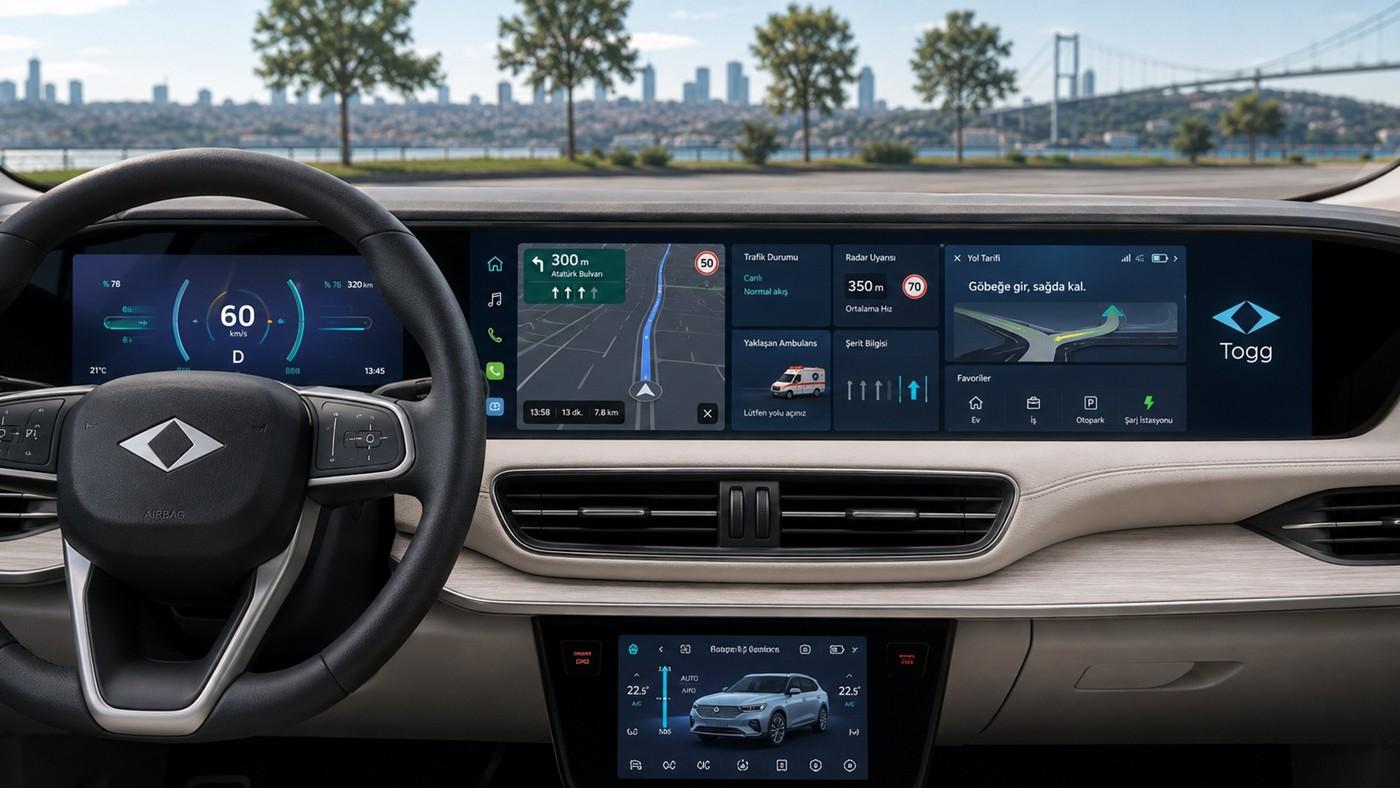
Türkiye’nin yerli navigasyon projesinde yeni detaylar ortaya çıktı. Yapay zeka destekli sistem şerit bilgisi, radar uyarısı, ambulans bildirimi ve Türkçe odaklı yönlendirmeler sunacak.He-Man filmi Masters of the Universe, son fragmanıyla nostalji dozunu artırıyor
He-Man yeni bir filmle sinemalara dönüyor. 5 Haziran’da vizyona girecek Masters of the Universe filmi için tanıtım çalışmalarını sürdüren Amazon MGM, filmden son bir fragman daha paylaştı.Understanding AI Code Fast: A 60-Second Habit for Institutional Memory
Hello, I’m Shrijith Venkatramana. I’m building git-lrc, an AI code reviewer that runs on every commit. Star Us to help devs discover the project. Do give it a try and share your feedback for improving the product.
If you prefer watching a video version of this article, check out:
Introduction
We are all participating in the agent era. New methodologies, ideas, experiments, and approaches are being discovered by engineers, professionals, and enthusiasts all over the world.
So many new things are happening in AI, and I am particularly interested in software engineering and its future, not the way it exists today, but the way it is evolving.
This article explores that question through the lens of Understanding AI Code Fast: A 60-Second Habit for Institutional Memory.
Many people think the details do not matter. Many others think they do. There is a lot of debate around this, so I want to present my perspective and a few approaches that teams may be able to adopt and benefit from.
Do We Need to Read AI-Generated Code?
The foundational question is simple: does one need to read AI-generated code or not?
Right now, many people claim that you may not need to read it at all. A common comparison is assembly language: once C arrived, most developers no longer needed to read assembly for everyday work.
But that comparison is tricky. We prompt LLM agents, and LLM agents produce code. Yet from the code alone, I cannot derive the prompts that generated it.
I may use a one-line prompt or a ten-line prompt, and they may generate different things. The same model may also generate different things across different invocations.
Production Systems and Responsibility
For anything that has a running production version and many users depending on it, uptime matters.
It could be school software, marketing software, ERP software, or anything else. That makes this a serious question: what happens if something is wrong, who takes responsibility, and how do we recover?
Agents may help us solve these issues as well, but what if the issue is slightly bigger?
What if the agent makes a wrong architectural decision?
What if it uses a reward hacking mechanism to solve the issue rather than solving it correctly?
What if a shallow approach was taken to implement a new feature?
Those questions naturally follow.
The Two Failure Modes of AI-Assisted Programming
In my opinion, there are two major failure modes here, and I call them the common traps of absolutes in AI-assisted programming.
Before getting into the details, it is worth mentioning something from Sunny Mishra.
In a public post, he proposed an interesting idea. He has been an engineering manager for nearly a decade.
Why not have a bot that checks engineers’ Git commits, creates daily and weekly reports, identifies where help is needed, and provides automatic updates?
In other words, get an agent to read all this information and report it back to the team.
The loop being proposed looks like this:
Prompt → Code → Summary → Back to the team.
I call this an awareness loop.
He recognized that large amounts of code are being generated and many things are happening very quickly, so people need help understanding how things are getting implemented.
Awareness is required.
He did not say, “Read every line.” He said awareness is required.
Reading Every Line vs Reading Nothing
My view is that reading every line of code is no longer necessary in many situations because LLMs are genuinely good at many things.
They are trustworthy for a large number of products that we typically deal with, and that is great.
Suppose there is some UI code. Why should I check every detail if a button click simply triggers a modal? The agent can handle that. The same applies to tasks like configuring logs.
As long as the prompt is written properly, the agent can do many of these tasks effectively.
So I do not think reading everything is required anymore.
But there are also people arguing the opposite extreme: “Do not read anything.” Stay entirely at the abstraction layer. Never go down into the implementation details.
I think that is also dangerous.
The Amazon “Dive Deep” Principle
This is where an Amazon principle is useful.
Amazon is famous for its leadership principles, and one of them is Dive Deep.
At Amazon, leadership principles apply to everyone, from a new joiner to a senior executive.
The principle says:
Leaders operate at all levels, stay connected to the details, audit frequently, and are skeptical when metrics and anecdotes differ. No task is beneath them.
You could be a VP managing hundreds of people, and you are still expected to understand what is happening underneath.
You may operate at a high abstraction layer most of the time, but you still go down regularly, audit systems, inspect details, and remain skeptical.
I believe this principle exists because polished dashboards are often insufficient.
Right now, with tools like Claude Code, people are generating HTML reports and summaries automatically.
But is the report sufficient? What is happening underneath? Should we not check occasionally and develop some intuitive understanding of the systems we depend on?
Awareness Culture vs Slumber Culture
At the end of the day, I think organizations fall into two broad categories: an awareness culture or a slumber culture.
Do you want your people to stay alert and proactive, or do you want them to ignore the details completely?
And remember: code review is not really about code alone.
When a team performs code review, it is building institutional memory.
The team is gradually understanding how the system works. It is extremely important that at least a few people understand what a subsystem is doing.
If nobody understands how anything works, then what happens when things go wrong and the agents are not capable enough to solve the issue?
Auditing and intuitive understanding must evolve alongside agentic development.
Both should progress together.
Understanding should grow while automation also grows.
That way, responsibility can be taken, risk can be signed off, and somebody knows enough about the system to deal with failures when they occur.
And failures always occur.
Outages happen.
Customers get impacted.
Architectural mistakes happen. Security problems happen. Performance issues happen.
This is serious work.
At the end of the day, all of this understanding is about maintaining a grip on the system and, therefore, on your future.
Without that grip, your future becomes uncertain.
That is the essence of the Amazon principle: dive deep, audit frequently, and keep checking.
A dashboard may look good, but does it actually match reality underneath?
You have to verify that continuously.
Git-lrc and the 60-Second Review Habit
This brings me to a tool I am working on.
It provides a deck-style summary system called git-lrc.
When you do a Git commit, it generates a slide-style review.
It takes roughly 30 to 40 seconds to go through and inspect the code.
So after git add and git commit, this summary appears locally.
It gives a concise explanation of what is happening in the codebase, along with the actual code itself.
The code is not hidden.
The issues in the code are not hidden either.
An engineer may do this five or ten times a day, and over a month they may perform hundreds of these micro-reviews.
This allows people to stay connected to what is happening underneath the system without having to read every line manually.
git-lrc highlights what is relevant, what may be important, and what deserves attention.
It provides a very fast summary, so there is minimal time waste while still giving assurance and confidence that nothing strange is happening.
It also reduces the burden on senior engineers because reviews happen incrementally, commit by commit.
As a result, institutional memory gets built continuously.
Understanding accumulates over time.
People can vouch for their own changes more confidently.
You move quickly while still remaining relatively safe.
That is the system we are building.
We believe this roughly 60-second review habit can help reduce outages while improving institutional memory.
Closing
That is the core idea I wanted to highlight.
I recommend checking out hexmos.com/git-lrc and trying it out.
Installation instructions are available, and there is also a free version.
So give it a try.
*AI agents write code fast. They also silently remove logic, change behavior, and introduce bugs — without telling you. You often find out in production.
git-lrc fixes this. It hooks into git commit and reviews every diff before it lands. 60-second setup. Completely free.*
Any feedback or contributors are welcome! It’s online, source-available, and ready for anyone to use.

HexmosTech
/
git-lrc
Free, Micro AI Code Reviews That Run on Commit
| 🇩🇰 Dansk | 🇪🇸 Español | 🇮🇷 Farsi | 🇫🇮 Suomi | 🇯🇵 日本語 | 🇳🇴 Norsk | 🇵🇹 Português | 🇷🇺 Русский | 🇦🇱 Shqip | 🇨🇳 中文 |
git-lrc
Free, Micro AI Code Reviews That Run on Commit
AI agents write code fast. They also silently remove logic, change behavior, and introduce bugs — without telling you. You often find out in production.
git-lrc fixes this. It hooks into git commit and reviews every diff before it lands. 60-second setup. Completely free.
See It In Action
See git-lrc catch serious security issues such as leaked credentials, expensive cloud
operations, and sensitive material in log statements
git-lrc-intro-60s.mp4
Why
- 🤖 AI agents silently break things. Code removed. Logic changed. Edge cases gone. You won’t notice until production.
- 🔍 Catch it before it ships. AI-powered inline comments show you exactly what changed and what looks wrong.
- 🔁 Build a…

Building a Real-Time Camera Classifier
Ever wonder how modern interactive displays in malls identify objects, like glasses or accessories, in real-time? These systems rely on computer vision models to classify live video input into predefined categories. This paper outlines the architecture and implementation of a custom camera-based object classifier.
Usage of Camera Classifier
Camera classifiers are instrumental in scenarios where automated visual identification is required without human intervention. Common use cases include:
Retail Analytics: Identifying products or accessories a customer is trying on.
Security & Surveillance: Detecting specific items or prohibited objects.
Human-Computer Interaction: Enabling gesture or item-based control interfaces.
Quality Control: Automatically sorting objects on an assembly line based on visual appearance.
Famous Examples of Camera Classifiers
Google Lens: A sophisticated classifier that identifies objects, plants, and text in real-time.
Self-Driving Car Vision Systems: Used to classify road signs, pedestrians, and other vehicles to ensure safe navigation.
Smart Home Appliances: Cameras on refrigerators or ovens that identify food items to suggest recipes.
Prerequisites
To ensure this code executes correctly and avoids common runtime exceptions, please verify the following requirements before running the script:
-
Hardware: A functional webcam must be physically connected to your system and recognized by your operating system.
-
System Permissions:
- macOS/Linux: If you are running this code via a terminal or an IDE (such as VS Code or PyCharm), ensure that the application has been granted explicit Camera Access in your system settings.
- Common Troubleshooting: If you encounter a PermissionError or an OSError: [Errno 16] Device or resource busy, it is typically because the webcam is already being utilized by another application (e.g., Zoom, Microsoft Teams, or a browser tab). Please close all other applications that may be accessing the camera and try again.
Note: If you are working within a virtual environment or a containerized system (like Docker), ensure that the device path (e.g., /dev/video0) is correctly mapped and accessible to the environment.
Implementation
Step 1: Environment Setup
To build this project, you need the necessary libraries for image processing, GUI creation, and deep learning. Install them using the following command in terminal:
pip install opencv-python tensorflow pillow numpy
Project Directory Structure
Use the following structure for your dataset so that tf.keras.utils.image_dataset_from_directory can automatically infer the labels from the folder names:
/your_project_folder
├── 1/
│ ├── frame1.jpg
│ └── frame2.jpg
├── 2/
│ ├── frame1.jpg
│ └── frame2.jpg
├── camera.py
├── model.py
└── app.py
Step 2: Creating the Camera Module (camera.py)
The camera.py file serves as the interface between your physical hardware and the software. Below is the implementation broken down by function to ensure you understand how video data is handled.
Sub-Step 2.1: Initialization (__init__)
This function initializes the connection to your webcam. It attempts to open the default camera (index 0) and captures the video feed dimensions, which are necessary for setting the GUI canvas size later.
Sub-Step 2.2: Clean Shutdown (__del__)
This is a destructor method. It ensures that the camera hardware is properly released when the Camera object is destroyed or the application is closed, preventing the camera from remaining “busy” or locked.
Sub-Step 2.3: Frame Acquisition (get_frame)
This is the core functional unit. It captures an individual image frame from the video stream and converts the color space from BGR (OpenCV default) to RGB (required for display and processing).
Implementation Code
import cv2 as cv
class Camera:
# Sub-Step 2.1: Initialize the hardware connection
def __init__(self):
self.camera = cv.VideoCapture(0)
if not self.camera.isOpened():
raise ValueError('Unable to open camera.')
# Fetching properties for GUI scaling
self.width = self.camera.get(cv.CAP_PROP_FRAME_WIDTH)
self.height = self.camera.get(cv.CAP_PROP_FRAME_HEIGHT)
# Sub-Step 2.2: Ensure proper resource release
def __del__(self):
if self.camera.isOpened():
self.camera.release()
# Sub-Step 2.3: Process and return the current frame
def get_frame(self):
if self.camera.isOpened():
ret, frame = self.camera.read()
if ret:
# Convert BGR to RGB for standard image processing
return (ret, cv.cvtColor(frame, cv.COLOR_BGR2RGB))
else:
return (ret, None)
else:
return None
Step 3: Creating the Model Module (model.py)
The model.py file acts as the intelligence core of your application. It manages data ingestion, neural network architecture, and the lifecycle of your classifier (training, saving, and inference).
Sub-Step 3.1:
Data Preparation (load_data)This function reads your images from disk. It creates a tf.data.Dataset, applies a normalization layer (scaling pixel values to a $[0, 1]$ range), and splits the data into training and validation sets.
#### Sub-Step 3.2:
Architecture Design (create_model)Here, we define a Convolutional Neural Network (CNN). We use Conv2D layers to extract visual features and MaxPooling2D to reduce dimensionality, ending with a Dense layer to output the final classification probability.
Sub-Step 3.3:
Training Procedure (train)This function invokes the data loader and model creator. It executes the training process over multiple epochs, saving the final trained weights to a file so you don’t have to retrain every time you open the app.
Sub-Step 3.4:
Loading and Inference (load_trained_model & predict)load_trained_model checks for existing files to resume work. predict processes a raw frame by resizing and reshaping it to match the neural network’s expected input format, then returns the class index.
Implementation Code
import tensorflow as tf
from tensorflow.keras import layers, models
import os
import numpy as np
# Global configurations
Image_size = (64, 64)
Batch_size = 16
MODEL_PATH = 'Camera_classifier.keras'
DATA_DIR = r"YOUR_PATH_HERE" # Update this to your local directory
# Sub-Step 3.1: Load and normalize images
def load_data():
train_ds = tf.keras.utils.image_dataset_from_directory(
DATA_DIR, image_size=Image_size, batch_size=Batch_size, color_mode="grayscale"
)
# Scale pixel values
normalization_layer = layers.Rescaling(1./255)
train_ds = train_ds.map(lambda x, y: (normalization_layer(x), y))
val_size = int(len(train_ds) * 0.2)
val_ds = train_ds.take(val_size)
train_ds = train_ds.skip(val_size)
return train_ds.prefetch(tf.data.AUTOTUNE), val_ds.prefetch(tf.data.AUTOTUNE)
# Sub-Step 3.2: Define CNN structure
def create_model():
model = models.Sequential([
layers.Conv2D(32, (3, 3), activation='relu', input_shape=(64, 64, 1)),
layers.MaxPooling2D(2, 2),
layers.Conv2D(64, (3, 3), activation='relu'),
layers.MaxPooling2D(2, 2),
layers.Flatten(),
layers.Dense(64, activation='relu'),
layers.Dense(2, activation='softmax')
])
model.compile(optimizer='adam', loss='sparse_categorical_crossentropy', metrics=['accuracy'])
return model
# Sub-Step 3.3: Train and Save
def train():
train_ds, val_ds = load_data()
model = create_model()
model.fit(train_ds, epochs=10, validation_data=val_ds)
model.save(MODEL_PATH)
return model
# Sub-Step 3.4: Helper functions for loading and prediction
def load_trained_model():
return tf.keras.models.load_model(MODEL_PATH) if os.path.exists(MODEL_PATH) else None
def predict(frame, model):
img = tf.image.resize(frame, Image_size)
img = np.expand_dims(img, axis=[0, -1]) / 255.0 # Reshape and normalize
return np.argmax(model.predict(img), axis=1)[0]
Step 4: Creating the Application Interface (app.py)
The app.py file serves as the command center. It integrates the Camera module for data acquisition and the model module for intelligence, presenting them through a Graphical User Interface (GUI) built with tkinter.
Sub-Step 4.1: Setup and Initialization (__init__)
This function initializes the window, sets up the camera and model instances, and prompts the user for class names. It also kicks off the update loop to keep the UI responsive.
Sub-Step 4.2: Building the GUI (init_gui)
This defines the layout. It creates the canvas for video display and populates the window with buttons to capture training data, train the model, trigger predictions, and reset the environment.
Sub-Step 4.3: Data Collection (save_for_class)
When a button is clicked, this function pulls a frame from the camera and saves it into the corresponding folder (/1 or /2). This is how you generate your training dataset.
Sub-Step 4.4: Model Management & Reset (train_model & reset)
train_model calls the training routine from model.py. The reset function purges existing image files and resets counters, allowing you to start a new classification task from scratch.
Sub-Step 4.5: The Runtime Loop (update)
This is the heartbeat of the app. It runs every 15ms, refreshing the canvas with the latest camera frame and, if enabled, automatically running the prediction model to display the current class.
Implementation Code
import tkinter as tk
from tkinter import simpledialog
import cv2 as cv
import os
import PIL.Image, PIL.ImageTk
import Camera, model
class App:
# Sub-Step 4.1: Initialize App state
def __init__(self, window=tk.Tk(), window_title="Camera Classifier"):
self.window = window
self.window.title(window_title)
self.counters = [1, 1]
self.auto_predict = False
self.camera = Camera.Camera()
self.model = model.load_trained_model()
self.classname_one = simpledialog.askstring("Class 1", "Enter name:")
self.classname_two = simpledialog.askstring("Class 2", "Enter name:")
self.init_gui()
self.update()
self.window.mainloop()
# Sub-Step 4.2: Construct the UI layout
def init_gui(self):
self.canvas = tk.Canvas(self.window, width=self.camera.width, height=self.camera.height)
self.canvas.pack()
tk.Button(self.window, text="Toggle Auto", command=self.auto_predict_toggle).pack()
tk.Button(self.window, text=self.classname_one, command=lambda: self.save_for_class(1)).pack()
tk.Button(self.window, text=self.classname_two, command=lambda: self.save_for_class(2)).pack()
tk.Button(self.window, text="Train Model", command=self.train_model).pack()
self.class_label = tk.Label(self.window, text="CLASS", font=("Arial", 20))
self.class_label.pack()
# Sub-Step 4.3: Save frames for training
def save_for_class(self, class_num):
ret, frame = self.camera.get_frame()
if not os.path.exists(str(class_num)): os.mkdir(str(class_num))
cv.imwrite(f'{class_num}/frame{self.counters[class_num-1]}.jpg', cv.cvtColor(frame, cv.COLOR_RGB2BGR))
self.counters[class_num-1] += 1
# Sub-Step 4.4: Train and Reset functionality
def train_model(self): self.model = model.train()
def reset(self):
for d in ['1', '2']:
for f in os.listdir(d): os.unlink(os.path.join(d, f))
self.counters = [1, 1]
# Sub-Step 4.5: Main UI refresh loop
def update(self):
ret, frame = self.camera.get_frame()
if ret:
self.photo = PIL.ImageTk.PhotoImage(image=PIL.Image.fromarray(frame))
self.canvas.create_image(0, 0, image=self.photo, anchor=tk.NW)
if self.auto_predict and self.model:
class_idx = model.predict(cv.cvtColor(frame, cv.COLOR_RGB2GRAY), self.model)
name = self.classname_one if class_idx == 0 else self.classname_two
self.class_label.config(text=f"CLASS: {name}")
self.window.after(15, self.update)
if __name__ == "__main__": App()
Watchout Section
-
Path Alignment: Ensure the DATA_DIR in model.py matches the absolute location where your training folders (1 and 2) are stored.
-
Directory Structure: The image dataset must be organized in folders labeled 1 and 2 for tf.keras.utils.image_dataset_from_directory to function correctly.
-
Consistency: Always retrain the model after adding significant new training data to ensure the saved .keras file remains accurate.
Wrap Up
You have now built a functional, real-time image classifier! By bridging hardware capture with deep learning, you can expand this prototype into sophisticated computer vision applications. Keep experimenting with different model architectures or by increasing the number of classes to see how the system performs!
What specific application or object category are you planning to train your model to identify first?