Translating an entire multilingual site shouldn’t mean re-prompting an LLM for every file
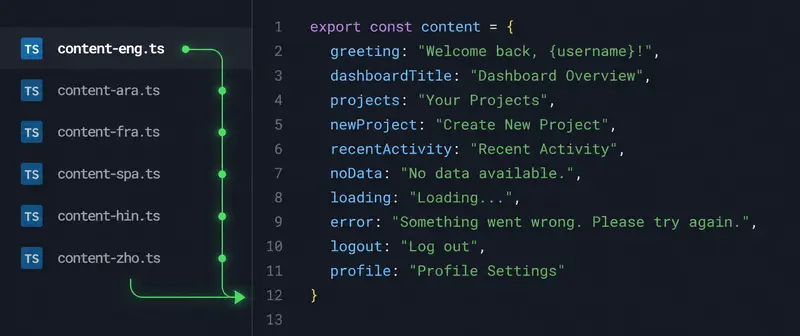
A dark code editor showing a file tree where content-eng.ts branches into <br>
language files content-ara.ts, content-fra.ts, content-spa.ts and others, <br>
next to a code snippet containing a username placeholder.

A dark code editor showing a file tree where content-eng.ts branches into <br>
language files content-ara.ts, content-fra.ts, content-spa.ts and others, <br>
next to a code snippet containing a username placeholder.

If you have ever built a multilingual site, you have probably hit this wall. You build the whole thing in one language first, usually English, and only then do you turn to translation. And that second half of the job is far more tedious than it has any right to be.

This post is about a specific, annoying corner of localization work: translating structured content files and code, and why the usual “just paste it into an LLM” approach quietly wastes a lot of your time.

The setup most of us end up with

A common pattern for a multilingual site is a content directory with one file per language. Something like:

src/content/
  content-eng.ts
  content-ara.ts
  content-fra.ts
  content-spa.ts
  content-hin.ts
  content-zho.ts

You write the whole site against the default language file, content-eng.ts, get everything working, and then the translation phase begins. Each of those other files has to end up as a faithful translation of the English one, with the exact same structure: same keys, same nesting, same TypeScript types, same interpolation placeholders. Only the human-readable string values should change.

On paper this is simple. In practice it is death by a thousand repetitions.

Why the “just use an LLM” answer gets old fast

LLMs are genuinely good at this kind of translation. They understand that welcomeMessage: "Welcome back, {username}" should become welcomeMessage: "Bienvenido de nuevo, {username}" and that the placeholder must stay untouched. They preserve structure, they handle context, they get the tone right.

The problem is not capability. The problem is the workflow around it.

Every time you open a new chat to translate a file, you are re-establishing the same context from scratch:

  • “Keep all the keys and structure identical.”
  • “Do not translate the placeholders like {username} or {count}.”
  • “Leave URLs, code identifiers, and technical terms alone.”
  • “Return valid TypeScript, not markdown, not commentary.”
  • “Translate into Arabic.” (then French, then Spanish, then…)

You paste the file, you wait, you copy the result back, you check it compiles, you move to the next language, and you do the entire dance again. For one site with six languages, that is the same prompt repeated five times. For multiple sites, or every time you update the source content, it multiplies. New tab, same prompts, same copy-paste, same verification. It is the definition of redundant work, and “the AI is doing it” does not make the process any less repetitive.

What you actually want

Step back and the requirement is clear. You want to:

  1. Hand over the source file once.
  2. Specify the target languages once.
  3. Get back one correctly-structured, translated file per language.
  4. Have placeholders, keys, and code left exactly as they were.

In other words, you want the LLM’s translation ability without re-typing the instructions for every file and every language.

Treating code and content files as translatable documents

This is the angle that made me look at the problem differently. A content-eng.ts file is, in a sense, just a document to be translated, with strict rules about what may change and what may not. The same is true for a lot of code: comments, user-facing strings, and documentation should be translated, while syntax, identifiers, and structure must be preserved exactly.

LLM-based translation is well suited to this because it works from a large context window rather than chopping the input into isolated sentences. It can see the whole file at once, understand that a {username} token is a placeholder and not a word to translate, and keep the surrounding structure intact.

This is the part of DocTranslating that is genuinely useful for developers. Alongside the usual document formats, its Gemini engine handles code files, things like .ts, .js, .py, and others, translating the human-readable parts while leaving the code itself alone. You give it the file and the target languages, and you get back translated files without re-stating the rules each time. It also supports translating one file into multiple target languages in a single pass, which is exactly the “one source, many outputs” shape this problem has.

It will not replace a careful review of locale files for a production app, and it should not. But for the bulk grunt-work of getting from one language to many, it removes the part that makes the job feel like punishment: the repetition.

A few honest caveats

A couple of things worth being straight about, because localization has sharp edges.

LLM translation is per-file context, not whole-project context. If a term needs to be translated consistently across many files, you still need to enforce that yourself, for example by giving the same terminology instruction or by keeping a glossary. The model does not magically remember decisions from a file it translated an hour ago.

And for right-to-left languages like Arabic, translation of the strings is the easy part; making sure your UI actually renders RTL correctly is a separate front-end concern that no translation tool solves for you.

The takeaway

The interesting shift here is conceptual. Once you start treating your content files and code as documents to be translated under strict structural rules, the redundant per-file, per-language prompting disappears. The LLM was never the bottleneck. The workflow around it was.

If your localization process currently looks like opening a fresh tab for every file and re-typing the same instructions, that is the part worth fixing first.

I built a Vite plugin that uses AI to author Playwright tests, then gets out of the way

I’ve been skeptical of AI testing tools for a while, but not for the reasons most people are.

My problem isn’t that AI can’t drive a browser. It clearly can. My problem is what happens after.

Every tool I tried made the same implicit trade: the AI stays in the loop at runtime. Your “test” is really a prompt that gets re-evaluated every time CI runs. The model drifts, the response changes slightly, your test starts flaking — and you have no idea why because there’s no diff to look at. You just have vibes and a red build.

I kept thinking: I don’t want AI to run my tests. I want AI to write them.

The thing Playwright Codegen almost got right

Playwright’s built-in codegen is underrated. You record your actions, it spits out a .spec.ts file, and that file is yours forever. No model, no API key, no ongoing cost. Just code.

The problem is it records mechanically. It doesn’t think. It’ll happily record click('[data-testid="btn-3"]') instead of getByRole('button', { name: 'Sign in' }). It can’t handle conditional flows. It doesn’t know what you’re actually trying to verify.

What I wanted was: Playwright Codegen, but the thing doing the recording understands what it’s looking at.

Connecting to the browser I’m already using

The first real decision was how to connect to the browser.

Every AI browser tool I’d seen launches its own headless Chromium. Clean, isolated, reproducible. Also completely useless for how I actually develop.

When I’m debugging a login flow at 11pm, I’m already logged in. I have three tabs open. I have the React DevTools panel where I need it. I have the page in exactly the state that’s causing the problem. Launching a fresh browser throws all of that away.

So I went the other direction: connect to the Chrome that’s already running, over CDP. connectOverCDP, find the tab whose URL matches the dev server, and work from there.

This turned out to matter more than I expected. The agent has access to real auth state. It can operate the page in the actual condition you’d be testing. It’s not pretending to be a user — it’s operating as one.

The sandbox problem

Giving an AI agent access to your browser is a little terrifying if you think about it too hard.

I spent more time on the sandbox than on anything else. The agent only gets one tool: the Playwright MCP server. Bash, Write, Read, WebFetch — all explicitly denied. The only write path is the spec file that gets emitted when you click Save. There’s also a hard --max-budget-usd ceiling per session.

The mental model I settled on: the agent is a very capable intern who’s allowed to operate the browser and nothing else. They can’t touch the filesystem. They can’t make network calls. They definitely can’t run shell commands.

A typical 5-step session comes out around $0.10.

The thing I didn’t plan for

I didn’t intend for “no new API key” to be a feature. It just fell out of the architecture.

Hover doesn’t bundle any AI runtime. It scans PATH for whatever coding-agent CLI you already have — claude, codex, cursor-agent. If you have Claude Code installed, that’s your agent. Nothing to configure.

The first time someone tried it and said “wait, I don’t have to set anything up?” I realized this was more important than I’d thought. Most developers I know have at least one agent CLI already installed. The friction of yet another API key, yet another account, is small but real — and apparently enough to make people bounce.

What actually comes out the other side

Add one line to vite.config.ts:

import { hover } from '@hyperyond/vite-plugin'

export default defineConfig({
  plugins: [react(), hover()],
})

Start your dev server. A floating widget appears in your dev page. Type what you want to verify:

“Log in as the test user, add two items to the cart, and check out”

The agent drives your actual Chrome. When it looks right, click Save. You get this:

import { test, expect } from '@playwright/test'

/**
 * Steps:
 * 1. Navigate to the login page
 * 2. Fill in username and password
 * 3. Click Sign in
 * 4. Add two items to cart
 * 5. Complete checkout
 *
 * Expected: Order confirmation page shows "Thank you"
 */
test('checkout flow', async ({ page }) => {
  await page.goto('http://localhost:5173/')
  await page.getByLabel('Username').fill('testuser')
  await page.getByLabel('Password').fill('password123')
  await page.getByRole('button', { name: 'Sign in' }).click()
  // ...
  await expect(page.getByText('Thank you')).toBeVisible()
})

No imports from Hover. No runtime dependency on anything I built. Run it with npx playwright test on a machine that’s never heard of Hover.

That’s the whole point. The agent authors the test. Then it’s done. The artifact is yours.

Where it gets interesting: a 50-field form

The demo that convinced me this approach actually works is a realistic brokerage account registration form — ~50 fields, conditional reveals, multi-select chips, file upload, compliance acknowledgements.

The agent handled most of it unprompted. It did get stopped by three required radio groups the form’s own validator caught. Hover surfaces a card explaining why it paused — the human flips those three radios and re-runs.

I think that’s actually the right split: agent handles what it can see and reason about, human handles the judgment calls.

One session, three outputs

When a session goes well, the Save dropdown gives you three options:

📜 Save as spec → __vibe_tests__/login-flow.spec.ts
Standard Playwright. Runs in CI. No agent required.

💾 Save as Skill → .claude/skills/login-flow/SKILL.md
Next time you say “execute login-flow” in the widget, it replays the same steps. Useful for skipping repetitive setup while building a different part of the app.

📋 Save as Jira case → __vibe_tests__/login-flow.case.csv
Xray-compatible CSV. Drag it into Jira, it becomes a real Manual Test issue — assignable, linkable to a story. No copy-pasting steps from a code editor into a ticket ever again.

What I’d do differently

The CDP setup is friction I haven’t solved. You have to launch Chrome in debug mode manually before starting. It’s one command, but it’s one command people forget.

Same-origin navigation occasionally kills the widget mid-session. It auto-resumes on reload, but still annoying. This is the thing I most want to fix next.

The project is called Hover. Apache-2.0, works with any Vite app.

👉 github.com/Hyperyond/Hover

If you’ve run into the same frustration with AI-in-the-loop testing, I’d be curious whether this framing resonates — or whether I’m solving the wrong problem entirely.

Project: Restaurant Delivery CRUD

If you follow my blog, you noticed that in these past 4 months I focused mainly on my Sushi Project development. Now I can say that we have the first version of the application, obviously, a lot room for improvement but one of the main goals has been reached: “find my motivation for self learning again”.

Here is the git of this project and in this post I will describe some challenges, key takeaways and insights.

The project consisted of creating a small CRUD (Create, read, update and delete) application for keep data on customer, orders and products for a Sushi Delivery family business. It was interesting to understanding the table structure of a CRUD given that I work mainly with ERP systems and their integration for analysis. As I developed the other side, I started to better understand the integration of systems like SAP S/4, M365 etc.

The first challenge of the project was to keep costs as low as possible. The company was a truly family business, therefore investing in classic Public Cloud services, such as Azure or AWS, was not an option. Also, it could lead to unexpected expenses that we could not afford. For that reason we decided to use NEON Database for storage and DigitalOcean for Cloud.

NEON Database has a free option that allows create 100 projects, 100 CU-hrs/month, 0.5 of storage per project and size ups to 2 CU/8 RAM. This sounds a great opportunity to make tests and take risks without the pressure of investment and fast results. Meanwhile, the DigitalOcean, provided a $200,00 credits for the first 5 months, and the VM investment started by $4/month. After these 5 months of on and offs, restarts and many errors, the total investment to build the first version was $4,32.

The other technologies as Ubuntu, GitHub etc were opensource.

The second challenge of developing a frontend from scratch. As a Data Engineer, frontend was not my strength, so the learning curve of understanding ports and web application was slow but steady. For this step, I worked with Claude AI. I created the wireframes, what we call in marketing as mockups, in DrawIO and added in a folder, then with Claude Code’s support, I guide it to develop the HTML files from my FrontEnd while I focus in the BackEnd using Python and Flask. Working up with AI’s helped me a lot to focus in the things that I was really interest and actually build logical and critical thinking from the project development. The key here was: not only ask the AI support for development, but be critical about what is being doing in each file and not accept changes without understand the reason of it.

I would say, like learning math and physics, getting the final results is easy but you need to understand how and why this result is correct. Maybe that’s why Halliday and Resnick has all the answers by the end of the book.

After all these points, my last takeaways was something that my experience in marketing supported and I genuinely miss it as consultant. The chance of work within the Sushi Delivery business, in their kitchen and see the struggles in real life of taking orders, organizing the orders in the most busy days make possible to visualize the bottlenecks of the manual system and really feel where are the parts that I need to automate in order to create the application. Something similar is described in the book “The Phoenix Project: A Novel About IT, DevOps, and Helping Your Business Win”. The feeling of going to the power plant (as in the book), kitchen (as in this project) and visualize how the processes can be transferred to the technological world is a total deal break to improve the results.

Now, I am aware that there is a huge room for improvement. From UX and UI, but also regarding the Infrastructure and CI/CD. Therefore, the next step will work along the final user and improve the details to support better their business.

Sources:
Git Project
The Phoenix Project Book