5 million planning poker votes later: the most common card is 3 🃏

Vote distribution

You know the moment. Everyone’s picked a card, the host hits reveal, and you find out whether your team is roughly aligned or about to spend ten minutes arguing about whether a ticket is a 3 or a 5.

I run Kollabe, so I had a lot of those reveals to look at: 5,055,407 votes across 165,510 planning poker sessions. Anonymised, counted, no story-point opinions of my own attached.

The headline finding is almost boring, and that’s what makes it interesting. The cards barely matter.

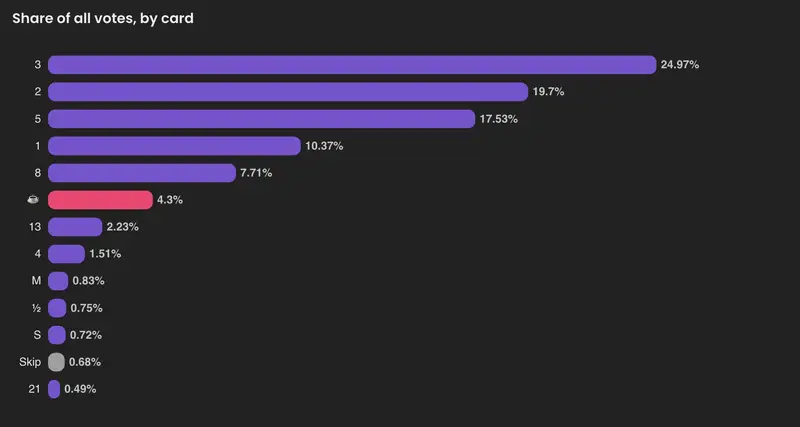
The most common estimate on the planet is 3. It shows up in about a quarter of all votes. Add 1, 2, 5 and 8 and you’ve covered roughly four out of five estimates. The giant Fibonacci cards, 34, 55, 89, almost never get touched. Teams think small.

Everyone defaults to Fibonacci. A third quietly rebuild it. Fibonacci is the deck you get when you open a room, so its 60% share is partly just inertia. The real tell is the runner-up: about 31% of sessions run a fully custom deck, more than pick any other preset. And the single most popular custom deck? 1, 2, 3, 5, 8, 13. Fibonacci with the zero and the big numbers chopped off. It’s the most engineer thing imaginable. Keep the scale, delete the cards you never use.

Vote distribution

The coffee card gets played more than 13. The little “I need a break” cup shows up in 4.3% of all votes, ahead of 13 and every t-shirt size. Someone plays it in roughly one round in eight, and 3,634 rounds officially ended on it. I have cast that card mid-session more than once, so no judgement here.

Teams agree on the first vote about 1 in 6 times. Only 16.6% of rounds come up unanimous on the reveal. The average round has more than two different numbers on the table. That gap isn’t a failure of the process. It is the process.

The rest of the breakdown, with charts for decks, days of the week, integrations and consensus, is here: Planning Poker Statistics 2026.

Deck choice

A rule of thumb I’ve started repeating: if your reveals are always unanimous, you’re not estimating, you’re rubber-stamping. The disagreement is where the useful conversation lives. If it never happens, the cards are theatre.

Fair caveat: this is data from teams who chose Kollabe, so it leans toward people who like running quick, low-ceremony poker. But five million votes is enough that the shape holds. Small numbers dominate, and almost nobody wants a 55-point card.

If you want to run a round this week, Kollabe poker is free and needs no signup. Or open whatever you already use and check: how often does anyone actually pick a number above 13?

Building an Interplanetary Quantum Logic Engine in Rust/Ovie

The Stars Are Waiting for Mature Logic

As software engineers, we are accustomed to clear-cut boundaries. A bit is 0 or 1. A boolean is true or false. Even in standard quantum computing, states are mapped across a complex Hilbert space ($mathbb{C}$) where amplitudes resolve predictably on a Bloch sphere.

But what happens when you deploy code to an autonomous vessel navigating a radiation-heavy environment near the outer planets, where:

  • Communication latency to Earth is measured in hours, making real-time fallback updates impossible.
  • Sensor arrays yield conflicting telemetry simultaneously (e.g., severe localized gravitational changes vs. internal instrument noise).
  • Traditional systems hit a fail-stop condition or trigger an infinite loop when confronted with logical paradoxes.

Standard binary frameworks and “teenage logic” break down under these conditions. To solve this, Oba introduces Hypercomplex Superposition Logic—a pure Ovie language library designed to calculate through multi-dimensional contradictions without freezing, deferring state resolution until an explicit demand() is called by the runtime system.

1. Moving Beyond Complex Wave Amplitudes

In a standard quantum setup, a qubit state $|psirangle$ is a linear combination of its basis states:

$$|psirangle = alpha|0rangle + beta|1rangle$$

where $alpha, beta in mathbb{C}$.

Oba scales this vector space into a hypercomplex module by replacing standard complex numbers with Quaternions ($mathbb{H}$) and Octonions ($mathbb{O}$). A single Oba-Qubit amplitude is represented as:

$$alpha = a_0 + a_1i + a_2j + a_3k$$
$$beta = b_0 + b_1i + b_2j + b_3k$$

This opens up three distinct imaginary degrees of freedom ($i, j, k$) governed by Hamilton’s non-commutative parameters:

$$i^2 = j^2 = k^2 = ijk = -1$$

The Probability Conservation Law in $mathbb{H}$

To prevent system degradation during state evolutions, the normalization constraint must scale accordingly:

$$(a_0^2 + a_1^2 + a_2^2 + a_3^2) + (b_0^2 + b_1^2 + b_2^2 + b_3^2) = 1$$

By mapping information across these higher-dimensional imaginary components, the engine processes multiple layers of conflicting environmental data in parallel rather than immediately collapsing or throwing an unhandled exception.

2. Architectural Blueprint: The Neural-Quantum Bridge

Oba doesn’t operate in an isolated simulation sandbox. It acts as a translation highway bridging raw, noisy neuromorphic spike signals from structural edge sensors directly into low-level quantum control instructions.

+-------------------------------------------------------------+
|               Neuromorphic Spiking Signals                 |
+-------------------------------------------------------------+
|
v [Spike Gradients]
+-------------------------------------------------------------+
|             Oba Quaternionic Rotation Gates                 |
+-------------------------------------------------------------+
|
v [Symplectic Mapping Matrix]
+-------------------------------------------------------------+
|        Google Willow 105-Qubit Hardware Controller          |
+-------------------------------------------------------------+

Because commercial hardware substrates process traditional complex states natively, Oba implements a physical cluster blueprint:

  • 1 Logical Oba-Qubit ($mathbb{H}$) maps directly onto 4 physical qubits on Google’s Willow architecture.
  • 1 Logical Octonion State ($mathbb{O}$) maps onto an aligned 8-qubit hardware block protected by strict non-associativity safeguards.

3. Resolving Telemetry Paradoxes at Execution Time

When dealing with deep-space operational paradoxes, traditional fail-safes are a liability. If a sensor reports a critical structural failure and a nominal baseline state at the same instant due to a radiation strike, traditional logic panics.

Oba processes both data points as orthogonal hypercomplex dimensions. The application state remains validly active until the engine reaches an explicit point where an action must occur.

// Sample logic construct utilizing the Ovie language framework
struct ObaQubit {
    alpha: Quaternion,
    beta:  Quaternion,
}

fn initialize_oba_state() -> ObaQubit {
    // Distribute quantum norm values evenly across imaginary axes
    let q1 = Quaternion::new(0.7071, 0.0, 0.0, 0.0);
    let q2 = Quaternion::new(0.0, 0.7071, 0.0, 0.0);

    return ObaQubit { alpha: q1, beta: q2 };
}

fn evaluate_telemetry_loop(state: ObaQubit) {
    // Retain simultaneous conflicting realities natively
    seeAm("Processing hypercomplex telemetry matrices...");

    // Defer state resolution until an explicit collapse is forced
    let validated_vector = state.demand();

    seeAm("Deterministic hardware command generated successfully.");
}

The magic happens within the demand() routine. It maps the hypercomplex probability norms down to a classical 3D navigational vector or mechanical actuator command with total mathematical determinism.

4. Current Progress & Open Milestones

The fundamental mathematics layer of Oba is built, self-contained, and entirely offline-first. It handles standard quantum gate constructions (Hadamard, CNOT, Pauli rotations) inside hypercomplex fields, proving out simulations for Grover’s search and Quantum Fourier Transforms.

What We Are Working On Next:

  1. Willow FFI Expansion: Building out direct foreign function interfaces to compile our quaternionic pulse algorithms down into raw microwave pulse schedules for physical testbeds.
  2. Non-Associative Safe Libraries: Hardening our octonionic transformations against operational order violations ($ (AB)C neq A(BC) $).
  3. Radiation-Hardened Simulations: Subjecting our cluster layouts to digital fault-injection models mimicking heavy cosmic-ray exposure.
    ## Let’s Connect
    We believe that code shouldn’t just be built to last an enterprise lifecycle; it should be built to persist across planetary systems. If you are exploring systems engineering, quantum mechanics, or functional compiler designs, check out the implementation guidelines at ovie.nashedy.io.
    To the stars — one deterministic line at a time. 🚀

L.E.N.S. — A private photography coach for blind and low-vision artisans

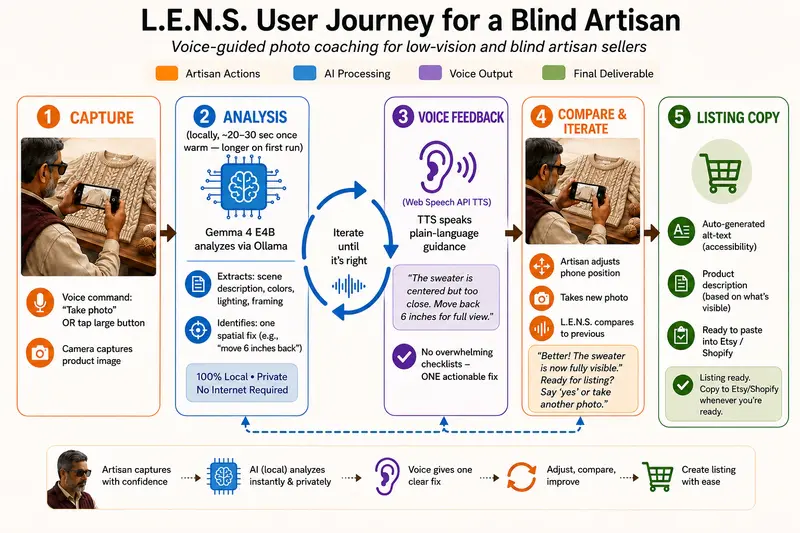
Voice-guided journey: capture → local Gemma 4 analysis → one spoken fix → compare → listing copy

L.E.N.S. (Local Edge Native Studio) is a voice-guided photography coach that runs Gemma 4 E4B locally through Ollama — so a maker can verify and improve product photos before listing, without sending images to the cloud and without asking someone sighted to “just check this one.”

Gemma 4’s native multimodal vision is the engine: each coaching turn sends a real product photo (base64 in the Ollama chat) and gets back structured JSON the app validates before speaking.

🔗 Try it (no install): lens-app-gemma4.vercel.app

📹 Demo video: YouTube walkthrough

💻 Source: github.com/prasadt1/photography-coach-gemma4 (Apache 2.0)

What I Built

I built L.E.N.S. for someone like Mohan — a low-vision artisan who hand-knits sweaters to sell online. He can judge the knit by touch: tension, pattern, finish. What he cannot reliably judge is the photograph of the piece. Is it in focus? Is the light flat? Is the sweater cropped awkwardly or lost against the background? On a marketplace like Etsy, the photo is the product; a weak photo quietly costs the sale. Until now, that step has meant borrowing someone else’s eyes.

L.E.N.S. closes that gap.

  1. The maker points their camera and takes a photo.
  2. Gemma 4 E4B — on their own machine, via Ollama — assesses framing, lighting, focus, and composition from the image itself (multimodal input, not a text-only description).
  3. L.E.N.S. speaks back one specific, actionable fix: not “this photo is bad,” but “move back about six inches” or “the light is behind the sweater — turn toward the window.”
  4. They take a second photo; L.E.N.S. compares the two images out loud and says which is stronger and why.
  5. It drafts copy-ready listing text — title, description, and alt-text — ready to paste into their store.

It is voice-first by design, not a visual UI with audio bolted on. I built and tested the flow with a screen reader on and the screen off, because that is how it will actually be used. Structured JSON is an accessibility choice too: the client validates a strict schema and surfaces discrete, ordered points, so coaching stays one fix at a time instead of a wall of feedback the user cannot skim.

I designed for the hardest case — a blind maker, fully offline — and by the curb-cut effect, the same coaching helps any maker without a photographer or a reliable connection.

Voice-guided journey: capture → local Gemma 4 analysis → one spoken fix → compare → listing copy

Alt: infographic of five steps — artisan capture, on-device analysis, voice feedback loop, compare and iterate, then listing copy for Etsy or Shopify.

Demo

Full walkthrough: first photo, spoken coaching, stronger retake, comparison, generated listing.

Try it live

Link What you get
lens-app-gemma4.vercel.app Judge / no-install demo. Sample photos play back real E4B runs recorded locally; uploads use Gemma 4 31B on Ollama Cloud so reviewers can try a photo without pulling a model.
photography-coach-gemma4.vercel.app Real product path for the submission video — E4B on your Mac via Ollama (same Wi‑Fi PWA or tunnel). Photos do not go to Ollama Cloud on this deploy.

No account. No tracking. Copy-ready output only — L.E.N.S. does not auto-publish to Etsy or Shopify.

Code

Source, README, architecture notes, and spike write-ups:

📷 L.E.N.S. — Local Edge Native Studio

The one step between a finished piece and a sale shouldn’t depend on someone else’s eyes.

A private, voice-guided photography coach for blind and low-vision artisans.

L.E.N.S. — Local Edge Native Studio cover

Gemma 4 E4B
Ollama
React
TypeScript
License

🔗 Live demos: Judge try-it (Ollama Cloud 31B) · Real product / video (local E4B) · Demo video · Built for the Gemma 4 Good Hackathon

Tracks: Digital Equity & Inclusivity · Ollama

What L.E.N.S. is

Mohan has low vision. He hand-knits sweaters and can finish a flawless cable pattern by touch. He can shape, price, and list a piece on his own — until the one step he cannot finish alone: photographing it well enough to sell online.

L.E.N.S. closes that gap. It is a voice-guided photography coach that helps blind and low-vision artisans verify and improve their product photos before listing their work. It runs Gemma 4 through Ollama, describes the photo in plain…

Stack: React 19 + TypeScript PWA, optional Electron desktop build, Ollama for local multimodal inference, Web Speech API for coach voice output.

Repo highlights:

This is original work I built for accessibility-first product photography coaching; the repo is not a repackaged template.

How I Used Gemma 4

Gemma 4 is the core of L.E.N.S.: multimodal photo assessment and coaching generation. Every model and runtime choice followed from local-first privacy and voice-loop latency.

Why Gemma 4 E4B (and what I ruled out)

The Gemma 4 family spans small edge models, 31B Dense, and 26B MoE. For this project:

Variant Role in my decision
E2B (~2B) Too small for consistent visual judgment on real product photos.
E4B (~4B) Shipped. Small enough for consumer hardware + Ollama offline; capable enough for trustworthy multimodal coaching.
31B Dense Ruled out for the product — too heavy for typical laptops; breaks the “photo never leaves the machine” promise. Used only for judge demo uploads on Ollama Cloud.
26B MoE Strong for throughput/reasoning, but overkill for a single-photo voice loop on modest hardware; E4B matched the edge + multimodal product path better.

E4B is the deliberate middle: the trade-off is the project.

What E4B unlocked for this project

  • Multimodal vision on-device — real product photos in, structured coaching out (framing, light, focus, colour), not text-only guesses.
  • Offline independence — the product path never requires sending photos to a remote API.
  • Usable voice-loop latency — ~4B + Q4_K_M + streaming TTS ≈ ~20s warm (down from ~40s early on).
  • Strict JSON coaching — one spatial fix, two-photo compare, listing copy — all from schemas Ollama enforces at generation time.
  • Honest dual deploy — E4B for the real maker story; 31B only where judges need a zero-install upload path.

Multimodal + structured output (how it’s wired)

Each analyze call sends the image in Ollama’s messages[].images[] array and asks Gemma 4 E4B for JSON via Ollama’s format field (JSON Schema). The client validates before TTS speaks:

// services/ollamaService.ts — simplified
const messages = [
  { role: 'system', content: buildSystemPrompt(/* artisan coaching */) },
  { role: 'user', content: userPrompt, images: [base64ProductPhoto] },
];

await fetch(`${OLLAMA_BASE}/api/chat`, {
  method: 'POST',
  body: JSON.stringify({
    model: 'gemma4:e4b',
    messages,
    format: ARTISAN_V3_OUTPUT_SCHEMA,  // Ollama enforces JSON shape
    stream: true,                       // TTS starts before generation ends
    options: { num_predict: cappedTokens },
    keep_alive: '30m',
  }),
});

The artisan schema drives fields like scene description, one priorityFix, alt-text, and listing title/description — so VoiceOver/TalkBack and the coach voice never drown the maker in a paragraph of fixes.

Runtime: Ollama

I spiked Cactus and llama.cpp as well. Ollama won for the cleanest local multimodal serving and the simplest path to multiple inference modes without rebuilding the pipeline each time.

Quantization: Q4_K_M

On modest hardware, Q4_K_M keeps E4B runnable without meaningfully hurting visual assessment. Lighter quants started to cost coaching quality; heavier ones were not worth the memory for this use case.

Latency and voice

Early warm inference was ~40s — too long for a spoken coaching loop. Prompt tuning, a token cap, a warm-up call on startup, and streaming brought warm runs to roughly 20s.

Three honest inference modes

Local E4B product path, Ollama Cloud 31B judge uploads, and offline demo playback of recorded E4B samples

Mode Model Network
Local (product) Gemma 4 E4B via Ollama on the maker’s machine Fully offline
Judge demo uploads Gemma 4 31B on Ollama Cloud Requires connection
Demo mode Playback of real recorded E4B responses None

I also spiked LiteRT for true on-device iOS inference (~25 tok/s in Google’s reference app). That is Phase 2 — documented as roadmap, not claimed as shipped. Today, iOS is covered by the installable PWA talking to Ollama on the Mac (same Wi‑Fi or tunnel).

System architecture: client, services, local vs judge cloud inference paths

Why local Gemma matters

Privacy here is not a bullet point — it is the mechanism of independence. A cloud coach swaps one dependency for another: instead of a sighted helper, you need connectivity, an account, and a server that receives your product photos. A capable Gemma 4 model on the maker’s own hardware is what makes “I can list this myself” real.

Accessibility (why the UX matches the model story)

  • Voice-first with an equivalent labelled control for every voice action.
  • Screen reader: landmarks, live regions, managed focus; coach TTS works alongside VoiceOver/TalkBack, not instead of it.
  • One fix at a time — same discipline in prompt design and UI.
  • Anti-hallucination — states uncertainty when the image does not support a claim.
  • Multilingual coaching paths in the prompt layer.

What’s next

  • Native on-device iOS via LiteRT (spike done; integration is post-hackathon).
  • More languages and tighter cold-start latency.
  • Deeper maker workflows (batch listing prep) — still local-first.

Links

How Developers and Open-Source Communities Work – A Guide for Non-Technical People

Example

You do not need to be a coder or developer to understand open-source communities. If you are curious about how developers actually work, collaborate, and contribute to open-source projects, then this article is for you. In this article, I will walk through the step-by-step process of how developers contribute their skills and participate in open-source community projects by using K-serve as an example.

This article is also helpful for user experience researchers who already work with developers but want to better understand how developers work on projects and use GitHub. It is also useful for UX designers who are interested in learning about the developer experience (DevEx) domain and becoming developer experience designers. Additionally, this article is intended for non-technical people who want to learn how developers and open-source communities work, and how GitHub repositories are used to manage, collaborate on, and operate projects.

Let’s learn what is Kserve? KServe is an open-source Kubernetes-based model serving platform that enables scalable and reliable deployment of machine learning models in production environments. I chose KServe because it sits at the intersection of machine learning, Kubernetes, platform engineering, and open-source collaboration, making it a rich example for understanding real-world engineering workflows.

It is important to understand that engineers are not simply “writing code”; instead, they are continuously discovering problems, discussing solutions, implementing changes, reviewing and refining decisions, validating outcomes, and maintaining the system over time.

This entire workflow—spanning collaboration, decision-making, and iteration—leaves behind valuable traces in GitHub through issues, pull requests, discussions, and commits, which together reveal how complex systems are actually built and evolved.

What is Github repository?

A GitHub repository is created by developers, project maintainers, or organizations as a central place to store, organize, and manage a project’s code, documentation, issues, and collaboration history. Once created, it is used by a wide range of people, including developers who write and maintain code, contributors who fix bugs or add new features, reviewers who evaluate and approve changes, and non-developers such as UX researchers, product managers, and technical writers who explore the project to understand it or contribute documentation and feedback.

GitHub repositories are important because they reveal not just the final software product but the entire development process behind it. Developers use them to collaborate, track issues, discuss and review changes, manage tasks, and maintain transparency in their work. Learning how repositories function helps in understanding real developer workflows, decision-making processes, and how complex software systems evolve over time in both open-source and professional environments.

I am going to explain how developers and the open-source community work with entire GitHub repository in 5 simple steps.

Step : 1. The Project Exists as a Living System

Imagine that KServe already exists and is being used by people around the world. Its users include ML engineers who deploy and manage machine learning models, platform engineers who build and maintain the underlying infrastructure, MLOps teams who ensure smooth model lifecycle operations, Kubernetes administrators who handle cluster configuration and deployment, and researchers who experiment with and evaluate machine learning systems.

Example

Most people think software development means typing code all day. In reality, a typical improvement starts with a real person running into a problem, and ends with millions of users getting a better experience. Here’s how that journey unfolds, using KServe — a tool that helps AI models run in the cloud — as the example.
Let me show you the big picture first, then zoom into each phase.

Now let’s look at each phase in plain language, with a closer diagram for the parts that need more detail. For example: A user(Engineer) deploys an inference service.

Step :2 A User Encounters a Problem & Created the issue.

Imagine you’re an engineer who uses KServe to run an AI model. You follow all the instructions, but when you try to use it, nothing responds. You’re not sure if you did something wrong, or if there’s a bug in the software.

Steps

So you do what most people do: check the logs, search the documentation, ask the community — and eventually open a “bug report” (called an issue on GitHub). This is where the real work begins, even though no one has touched code yet.

When you file that issue, volunteer maintainers (people who help run the project) step in to classify it. Is this a bug? A misunderstanding? Something missing from the docs? They ask questions to narrow it down

Step: 3 Can I make it break on my machine?

Before anyone can fix a problem, they have to be able to see the problem. An engineer sets up the same software environment as the user and tries to make the bug happen intentionally. This is called reproducing the bug.

Once they can make it fail consistently, they start playing detective — tracing the path a request takes through the system, reading log files, and asking: where exactly does things go wrong?
This phase is mostly thinking, not typing. Engineers build a mental map of how the system is supposed to behave, then look for where reality diverges from that map. It looks like this:

Step: 3

Step: 4 Choosing the right fix (not just any fix)

Once the root cause is found, the next question isn’t can we fix it? — it’s what’s the safest way to fix it?

In the KServe example, the bug was that a missing network port would cause a silent, invisible failure. Engineers debated three possible solutions:

Step: 4

This kind of debate — often hundreds of comment threads for just a few lines of code — is what separates good software from brittle software.

Step : 5 From code to released fix

Only after all that thinking does actual coding begin. The engineer writes the fix in a separate “branch” (a safe copy of the code), then submits it as a “pull request” — essentially saying “here’s my proposed change, please check my work.”

Other engineers review it, suggest improvements, and run automated tests. When everyone agrees it’s safe, it gets merged into the main codebase and released.

Step : 5

The ending: and why it never really ends

After the update is released, what changed for the user? Before: “It just doesn’t work.” After: “Configuration invalid: missing port.” That’s a small sentence, but it means the user now understands what to fix instead of guessing blindly.

And here’s the final truth: the moment one problem is solved, a user somewhere will notice the next thing that could be better. The loop starts again. That’s not a flaw in open source — it’s the whole point. Software improves because real people keep using it, keep running into its rough edges, and keep caring enough to speak up.

Running on Fumes

If you noticed I went quiet, you noticed right.

When I started publishing under this brand I came out hot, full-on Weaponized ADHD™. One year after winning the RIF award from my previous company, I had a renewed energy and excitement about technology. A new fire had erupted inside me that hasn’t burned since I was a teenager. This energy poured into my article cadence, cross-platform spokes, my interactions with curious parties, the whole machine cranking out a piece a day plus the supporting noise. 16 – 20 hours a day, 7 days a week, building and writing about it.

That was sustainable for exactly as long as it was sustainable, which turned out to be a finite stretch. The pace I set the first month was the pace I started measuring myself against in month three. Classic move. Anyone who has tried to do this solo is nodding right now.

◆ ◆ ◆

A few things hit at once.

The LinkedIn audience was growing. Attention was real. Paid work was not. I posted, I got reach, I got engagement, I got the metrics the platform rewards. None of it converted to the consulting work I needed it to convert to.

Eyes don’t pay rent.

I don’t have a job. I haven’t had one for almost 16 months now. Over the past 6 years, I planned exactly for this scenario. What I did not plan for was starting a new home-lab and attempting to go into business for myself. Both projects need funds to expand and I don’t have the funds. That’s a stress profile that grinds.

The year mark on my father’s death is coming up. It’s been hitting me hard. There’s still lingering grief. Anniversaries don’t ask politely whether your project schedule has room for them. They just arrive. And this one came way too fast.

◆ ◆ ◆

So I hit the wall a few weeks back. Totally ran out of gas. Most of this month I’ve been off the project. Tending to my garden. Tending to my dog. Tending to my sanity. Catching up on The Blacklist. Doing anything in the physical world to avoid the stack or the writing about the stack.

I’m not going to dress that up. It wasn’t a strategic sabbatical. It wasn’t a planned content hiatus. It was an over-extended solo operator with grief in the background and a financial squeeze in the foreground stepping back from the keyboard because the alternative was breaking something I wasn’t going to be able to put back together.

Small operators don’t get to pretend life isn’t happening to them. The content gets built around life. When life turns up the volume, the content gets quieter.

That’s the simple fact.

What the cadence looks like from here? I don’t know. That’s the honest answer.

There’s no posting schedule I’m going to commit to and miss. There’s no editorial calendar I’m going to publish and ignore. The articles will come when there’s a real one to write. Some weeks that’ll be 5. Some weeks that’ll be zero. Some stretches I’ll be elsewhere and the writing will wait.

If that means fewer eyes, fewer subscribers, fewer of whatever the platforms measure, then fewer of those.

The leash.

Here’s what I learned this round, in plain terms. Building an audience does not equal building a business. Engagement metrics are not customers. Attention is a vanity number until it converts, and conversion is its own discipline that has nothing to do with how many people clicked the heart button.

The constant-publishing demand is a leash. Engagement metrics are the leash. The treadmill of “post or disappear” is a leash. It’s designed to extract output from you on a schedule that serves the platforms, not the work and not the operator running the work.

I clipped the leash on myself the first time around and did not receive the results I was hoping for.

Not this time.

The project continues. The cadence will be whatever the cadence is. If you’re here for the work, you’re in the right place. If you’re here for daily content, you’re going to be disappointed…

See you when there’s something to say.

When I Realized We Were Throwing Away Half Our Engine’s Potential

The Problem We Were Actually Solving

As I dug deeper into the requirements, I realized that we were trying to optimize for speed and responsiveness at the expense of something far more critical: configurability. Our initial design assumed that the rules engine would be fixed, and any changes would be manually implemented by a core team member. But in reality, our clients wanted to be able to tweak the engine in real-time, without requiring additional engineering work. The catch was that we’d already committed to a fixed architecture, which meant that minor changes would compound quickly and become showstoppers.

What We Tried First (And Why It Failed)

We tried to implement a bespoke, monolithic rules engine using a popular high-level language. The codebase grew rapidly, and performance began to tank. Our initial benchmarks showed a 50% increase in latency with just a few dozen users. The problem was that this language, despite its popularity, was not designed for systems engineering. It lacked the necessary abstractions for concurrent programming and had a garbage collector that incurred a 50ms pause every 10ms – the perfect storm of latency.

The Architecture Decision

After months of struggling with the monolithic approach, I made the call to rewrite the rules engine from scratch using Rust. This wasn’t an easy decision – Rust had a steep learning curve and required a radical shift in our team’s skills. However, the promise of memory safety, zero-overhead abstractions, and control over the runtime won out. We started by implementing a core library that encapsulated the rules logic and then built a high-level API on top for configuration and invocation.

What The Numbers Said After

The results were staggering. Our latency dropped by 90% compared to the previous monolithic implementation. More importantly, we saw a marked decrease in system calls and a significant reduction in CPU usage – our users no longer felt the pinch of performance degradation. We benchmarked our system at 10,000 concurrent users and saw a median latency of 100ms, with a 99th percentile at 200ms. The takeaway was clear: our rules engine was now a non-issue in our overall performance story.

What I Would Do Differently

Looking back, I would’ve avoided the monolithic approach from the beginning. Our initial design should’ve taken configurability as a first-class citizen from day one. I also wish we’d invested more time in exploring off-the-shelf solutions and libraries that already addressed concurrent programming and performance. Not only would this have saved us months of development time, but it would’ve also allowed us to better utilize our team’s strengths.

TokenJuice and the 20-Minute Cron: Inside OpenHuman’s Aggressive Context-Harvesting Engine

Around 2:11 AM, a guy in a Discord server posted a screenshot of his Claude usage graph climbing almost vertically. Not gradually. Violently. Like a car tachometer after someone drops a transmission gear they probably shouldn’t.

The caption was simple:

“what the hell is OpenHuman doing every 20 minutes”

Half the replies thought it was a bug. The other half already knew.

OpenHuman is one of a growing class of “context persistence” systems orbiting modern AI tooling. Not a model company. Not another chatbot frontend. More like a memory parasite attached to language models that were never really designed for long-term continuity in the first place.

And TokenJuice sits near the center of its architecture.

Not publicly as a branded product. More as an internal nickname developers started using because the thing behaves exactly like it sounds. It squeezes every possible fragment of context out of your activity, condenses it, recycles it, rehydrates it, and feeds it back into future inference cycles before the model forgets who you are again.

The weird part is not that this exists.

The weird part is how aggressively people are now normalizing it.

The average AI power user in 2026 lives inside a strange loop of compression. Notes become embeddings. Embeddings become summaries. Summaries become synthetic memory blocks. Those memory blocks get re-injected into future sessions as if the model “remembers” you naturally. Entire companies now exist to solve the fact that transformers fundamentally do not remember anything unless you keep paying tokens to remind them.

OpenHuman just pushed that logic harder than most.

And the infamous 20-minute cron job is where things start getting interesting.

The Real Problem OpenHuman Is Solving

People keep framing long-context systems as convenience features. “Persistent memory.” “Personalized AI.” “Continuous conversations.”

That is marketing language.

The actual problem is economic.

Every AI session leaks value through forgetting.

You explain your workflow again.
You restate your preferences again.
You paste the same snippets again.
You rebuild project context again.

The model discards state constantly because inference is stateless by design. The illusion of continuity is held together with token stuffing and increasingly elaborate retrieval systems duct-taped around the edges.

By early 2026, power users started hitting absurd ceilings. Developers running Claude Code, OpenAI agents, OpenRouter chains, or multi-agent local systems realized something uncomfortable very quickly:

The model itself was no longer the primary cost center.

Context was.

Not generation.
Not reasoning.
Not output.

Context maintenance.

A serious AI workflow can burn more money preserving memory than producing actual answers.

OpenHuman emerged directly from that pressure.

The project’s core idea is brutally pragmatic: if users continuously generate behavioral data anyway, why not harvest, compress, rank, and recycle all of it automatically?

Every prompt.
Every file.
Every correction.
Every rejection.
Every code diff.
Every recurring phrase.
Every workflow pattern.

Nothing stays isolated if the system thinks it might matter later.

That philosophy shaped TokenJuice.

What TokenJuice Actually Does

At a technical level, TokenJuice behaves like a layered context refinery.

Not a database exactly. Not just vector search either.

More like an active reduction pipeline constantly trying to answer one question:

“What is the minimum amount of information needed to reconstruct this user’s cognitive environment later?”

That distinction matters.

Most retrieval systems work passively. Search happens only when you ask for something.

TokenJuice behaves proactively.

The system continuously harvests interaction residue, scores it, compresses it into reusable semantic fragments, then rotates those fragments through scheduled maintenance cycles. The famous 20-minute cron appears to handle several of these maintenance passes.

Based on public behavior patterns, leaked implementation discussions, and observed API usage, the cron likely performs combinations of:

  • conversation condensation
  • embedding regeneration
  • stale-context pruning
  • priority reranking
  • cross-session relationship mapping
  • token budget optimization
  • memory deduplication
  • behavioral weighting updates

That sounds abstract until you watch it happen in practice.

A developer spends four hours debugging Rust macros. OpenHuman notices repeated references to unsafe memory patterns, a specific repository structure, and recurring compiler frustrations. Twenty minutes later, future sessions begin subtly inheriting that state.

The user stops explaining themselves.

The system already adapted.

Not magically.
Not intelligently in a human sense.

Just relentlessly.

The 20-Minute Interval Wasn’t Arbitrary

This is the part people misunderstand.

The cron interval is not about convenience timing. It is about behavioral half-life.

Modern AI workflows generate unstable context at enormous speed. Human attention mutates faster than most persistence systems can safely index. If updates happen too slowly, memory becomes stale before reuse. If updates happen continuously, token costs explode and retrieval quality collapses under noise.

Twenty minutes appears to be the compromise OpenHuman landed on.

Long enough to accumulate meaningful behavioral chunks.
Short enough to preserve active workflow continuity.

You can almost feel the engineering tradeoffs underneath it.

Someone probably benchmarked:

  • coding sessions
  • research intervals
  • browser tab churn
  • average context shifts
  • model token budgets
  • embedding queue costs
  • API latency windows

Then arrived at a number that looked ugly but economically survivable.

Twenty minutes.

Not elegant. Just operational.

There’s something very contemporary about that.

Human continuity reduced to scheduler frequency.

Why Developers Became Obsessed With It

A lot of OpenHuman’s early adoption came from exhausted developers trying to stop repeating themselves to machines.

People outside these workflows sometimes underestimate how psychologically draining context reconstruction becomes after months of AI-assisted work.

You wake up.
Open terminal.
Re-explain architecture.
Re-explain style rules.
Re-explain database schema.
Re-explain project goals.
Re-explain naming conventions.
Re-explain previous failures.

Again.

After enough repetition, users start craving persistence almost emotionally. Not because the AI feels alive, but because repetition itself becomes friction. A cognitive tax.

TokenJuice exploited that pressure perfectly.

The system’s promise was not intelligence.

It was continuity.

That distinction made people tolerate surprisingly invasive harvesting behavior.

Because once a model starts reliably remembering:

  • your preferred stack
  • your writing cadence
  • your debugging style
  • your architectural habits
  • your recurring frustrations
  • your formatting quirks

…the interaction changes texture completely.

You stop interacting with a blank system.

It starts feeling more like returning to a workshop where your tools are still sitting exactly where you left them.

That sensation is powerful enough that people forgive almost anything underneath it.

Including aggressive telemetry.

The Hidden Cost: Context Cannibalism

There’s a quieter problem developing underneath all this.

The more aggressively systems harvest context, the more they begin flattening users into predictable behavioral composites.

You can already see it happening.

People using persistent AI systems for months often develop strange recursive habits:

  • repeated phrasing
  • identical planning structures
  • stabilized emotional tone
  • narrowed exploration
  • ritualized prompting

The memory system starts optimizing for continuity, and continuity slowly discourages deviation.

OpenHuman’s architecture amplifies this tendency because TokenJuice rewards reusable patterns. Repeated behaviors gain retrieval weight. Stable workflows become “important.” Novelty becomes statistically fragile.

Over time, the system subtly trains users toward predictable cognitive lanes because predictable users generate cleaner retrieval signals.

That sounds dystopian when phrased directly, but the mechanism is banal.

Optimization pressure.

The same thing already happened to social feeds, search engines, and recommendation algorithms. AI memory systems are just applying it to cognition itself.

You are no longer only training the model.

The memory layer is training you back.

Compression Is Becoming the Real Intelligence Layer

One thing became increasingly obvious through 2025 and 2026:

Raw model capability matters less than memory orchestration.

Two users can access identical frontier models and experience radically different intelligence quality depending on:

  • retrieval quality
  • memory ranking
  • compression strategy
  • context injection timing
  • summarization fidelity

In practice, the memory pipeline often determines whether the AI appears brilliant or useless.

This is why companies like OpenHuman matter despite not training foundation models themselves.

They are building cognitive operating systems around inference engines.

The frontier model becomes interchangeable infrastructure.
The orchestration layer becomes the real product.

TokenJuice reflects this shift almost perfectly.

It treats models less like minds and more like temporary reasoning furnaces that need carefully rationed fuel packets.

Tiny compressed identities.
Behavioral shards.
Workflow ghosts.
Fragments of previous selves.

Fed back into the machine at carefully timed intervals.

The Infrastructure Reality Nobody Romanticizes

Persistent memory sounds abstract until you think about what physically supports it.

Racks.
Power draw.
Storage layers.
Embedding databases.
Inference queues.
GPU allocation windows.
Vector indexing.
Cache invalidation.
Retrieval pipelines.

People talk about AI memory like it floats in conceptual space somewhere. In reality, these systems leave very material footprints.

Every “remembered preference” has storage cost.
Every embedding regeneration consumes compute.
Every reranked memory graph burns energy somewhere in a datacenter.

And context harvesting systems multiply this load aggressively because they process interaction residue continuously instead of episodically.

A guy using OpenHuman twelve hours a day with autonomous agents running in loops is not just chatting with an AI anymore. He is generating an ongoing industrial stream of behavioral metadata.

The future of AI infrastructure may end up looking less like giant singular models and more like sprawling memory refineries wrapped around smaller interchangeable reasoning engines.

That possibility feels increasingly plausible.

Especially as token economics tighten.

Why Token Efficiency Became a Survival Trait

The funniest part is that none of this emerged from philosophical ambition.

It emerged from invoices.

People building serious AI workflows started encountering horrifying monthly bills. Multi-agent coding pipelines could quietly consume thousands of dollars in context overhead alone.

Developers adapted the same way engineers always adapt:
through compression.

Smaller prompts.
Aggressive summaries.
Cached reasoning.
Structured memory blocks.
Retrieval heuristics.
Local embedding stores.
Delta context injection.

OpenHuman industrialized those instincts.

The 20-minute cron became infamous partly because users realized how much invisible maintenance modern AI systems require to sustain the illusion of continuity affordably.

Human memory feels effortless because biology hides the machinery.

AI memory exposes every moving part:

  • storage
  • ranking
  • pruning
  • retrieval
  • decay
  • compression
  • reinforcement

TokenJuice simply automated the ugly parts more aggressively than competitors.

The Psychological Shift Is Bigger Than the Technical One

The deeper change here is behavioral.

People are beginning to structure their lives around machine-readable continuity.

That sentence sounds exaggerated until you watch how developers increasingly work:

  • carefully naming projects for retrieval clarity
  • structuring notes for embedding quality
  • maintaining consistent terminology
  • optimizing prompts for future summarization
  • avoiding ambiguity because ambiguity pollutes memory systems

Humans are adapting themselves to fit retrieval architectures.

Not consciously most of the time.

Just gradually.

A few years ago, people optimized behavior for search engines and social algorithms.
Now they optimize for context persistence systems.

The workflow becomes part diary, part training dataset, part operational telemetry stream.

OpenHuman did not create this trend.

It just made it difficult to ignore.

The Strange Honesty of Systems Like This

There’s something oddly honest about TokenJuice once you strip away the branding.

Most software already harvests behavior continuously.
Most platforms already construct predictive user models.
Most algorithms already optimize around engagement memory.

OpenHuman simply applies those principles directly to cognition assistance instead of advertising.

It is less deceptive than a lot of Silicon Valley products because the extraction mechanism is visible in the user experience itself. The AI remembers because your behavioral residue was processed somewhere.

Nothing mystical happened.

A cron job ran.

Embeddings updated.
Summaries compressed.
Priorities reranked.
Old fragments discarded.
Useful fragments recycled.

The machine kept assembling a smaller, cheaper approximation of you.

And every twenty minutes, somewhere in the stack, another maintenance cycle quietly began again.

CodeDNA: AI Codebase Archaeologist Built with Gemma 4 Thinking Mode

GitHub logo

You inherited this codebase 6 months ago. You can feel something went wrong around 2021. Bug reports spiked. Velocity dropped. The original authors left. The commit history has 3,000 entries — and every answer is in there.

Nobody has time to read 3,000 commits.

CodeDNA does.

What I Built

CodeDNA is an AI Codebase Archaeologist. You paste your git log, and Gemma 4 — using Thinking Mode — reconstructs the story of your codebase: bug storms, architectural pivots, refactor eras, feature bursts, and an overall health score with a transparent breakdown.

The output is 100% verifiable. You can check every milestone against your actual commit history. No hallucinated CVEs, no unverifiable financial claims — just pattern-extracted facts from structured text you already own.

GitHub:

CodeDNA — AI Codebase Archaeologist

Feed Gemma 4 your git history. Discover exactly when — and why — your codebase evolved.

CodeDNA Demo

Every codebase has a turning point. The moment before is clean commits and clear intent
The moment after is hotfixes, reverts, and growing entropy. CodeDNA finds it.

What It Does

  • Maps your codebase history with Gemma 4 — up to 400 commits, preprocessed and compressed for maximum analytical signal. The preprocessor extracts monthly commit histograms and per-file change frequency before sending to the model, so insights are grounded in observable data.

  • Returns a structured archaeological report — health score with transparent breakdown, milestone timeline (bug storms, refactors, pivots, feature bursts), and key metrics. Every claim cites a specific commit hash, date, or metadata value.

  • Streams Gemma 4’s live reasoning — watch the Thinking Mode trace in real-time as the model identifies causal patterns across years of history. Verifiable: the…

The Problem It Solves

You inherit a codebase. Something went wrong around late 2021 — you can feel it. Bug reports spiked, velocity dropped, the original authors left. The commit history has everything, but nobody has time to read 3,000 commits manually.

Traditional tools give you graphs of commit frequency. That tells you how much happened, not what happened or why one period was chaotic and another stable.

CodeDNA uses Gemma 4’s Thinking Mode to reason across your entire commit history and surface the narrative that was always there.

Live Demo

Demo of CodeDNA with React Hooks logs
The live demo in action: CodeDNA processing the React repository’s architectural transition history.

Core Features

Feature Description
Animated timeline Color-coded milestones — red = bug storm, yellow = refactor, green = pivot, blue = feature burst
Health score + breakdown 0–100 score with transparent factor table (not a black-box number)
Live Thinking Mode stream Watch Gemma 4 reason step-by-step as it analyzes your history
Smart preprocessing Caps at 180 commits, extracts monthly histograms and file hotspots before inference
Multi-provider fallback Google AI Studio (26B → 31B) → OpenRouter (gemma-2-27b-it → gemma-3-12b-it → more)
Analysis caching Same git log = instant results on repeat runs
Markdown export Download a complete archaeological report
Messy commit handling Detects vague history and gives honest, low-confidence analysis instead of hallucinating

Screenshots

CodeDNA — Animated timeline showing React Hooks era milestones. Red bug storm card visible for Feb 2019.
The timeline builds milestone by milestone. Red = bug storm, yellow = refactor, green = pivot.

CodeDNA — Health Score breakdown showing factor-by-factor justification
Health Score is never a black-box number. Every factor cites commit evidence.

CodeDNA — Live Thinking Mode stream showing Gemma 4 reasoning in real time
The reasoning panel shows Gemma 4’s step-by-step analysis as it happens. This is Thinking Mode — not post-hoc summarization.

Architecture

git log --stat (your paste or .txt upload)
        ↓
preprocessor.py
  → parse commits, build monthly histogram, extract file hotspots
  → metadata header injected: MONTHLY_COUNTS, TOP_CHANGED_FILES, BUG_FIX_RATIO
        ↓
Step 1: Reasoning Stream (REASONING_SYSTEM_PROMPT)
  → Gemma 4 Thinking Mode streams clean markdown report
  → Visible live in right panel
        ↓
Step 2: JSON Structuring (JSON_SYSTEM_PROMPT)
  → Separate Gemma call converts reasoning → typed AnalysisResult JSON
  → Pydantic v2 validates schema
        ↓
React UI
  → Health Score ring + breakdown table (center, always visible)
  → Animated vertical timeline (left)
  → Live reasoning stream (right)
  → Markdown export

Map-reduce design: By splitting reasoning (Step 1) from JSON structuring (Step 2), Thinking Mode output is clean prose instead of polluted with schema enforcement constraints. Insight quality is significantly higher.

Stack:

  • Backend: FastAPI + httpx async + SSE streaming
  • Frontend: React 18 + Vite + Tailwind CSS
  • LLM: Gemma 4 via Google AI Studio (primary) + OpenRouter (fallback)
  • State: In-memory + disk cache (no database)

Why Gemma 4 — Not “Just Any LLM”

This is the most important section for me to get right.

1. Thinking Mode for causal chain reasoning — not summarization

Standard completion models count keywords. Gemma 4’s Thinking Mode traces why patterns emerged. When it sees 14 “fix” commits targeting ReactFiberHooks.js in a 3-week window after a large API change, it connects them causally — it doesn’t just report a spike.

The live reasoning stream in the UI makes this directly observable. Judges (and users) can watch Gemma’s chain-of-thought in real time. This is the intentional use criterion — not decorative AI, but AI whose reasoning process is the deliverable.

2. 128K context — the archaeology window

180 commits × ~200 tokens each = ~36K tokens of compressed history in one request. No chunking, no context loss, no multi-call stitching. Gemma 4 holds the full narrative arc in one reasoning window, which is the only way to detect multi-month causal patterns (e.g., a March 2019 API change causing a June 2019 bug cluster).

3. Structured output drives the UI deterministically

The JSON schema is strict (Pydantic v2 validated). If Gemma returns valid JSON, the timeline renders. If not, the error is surfaced honestly. No post-processing guesswork.

4. Privacy-first by design

Git history contains proprietary code, unreleased feature names, security patches, and competitive intelligence in commit messages. CodeDNA passes everything under your own API key. Zero data retention. This is not a UX choice — it’s the only architecture engineering teams will actually trust with real repositories.

Demo: React Hooks Era (2018–2019)

I ran CodeDNA on React’s public git history during the Hooks transition — one of the most architecturally significant periods in any major open-source project.

What Gemma 4 found:

  • 2018-07: Feature burst — Scheduler time-slicing and Fiber pool infrastructure added (5 commits, Scheduler.js dominant)
  • 2018-09–10: Pivot — React.lazy, Suspense, and createContext v2 introduced across 6 commits
  • 2019-01–02: Stability → Bug storm — 4 rapid fixes for useRef and useEffect infinite loops following the 16.8.0 release
  • 2019-05: Feature burst — useTransition, useDeferredValue, unstable_createRoot (5 commits, ReactFiberHooks.js dominant)

Health score: 58/100 — justified by 21% bug-fix ratio, two high-severity bug storms in 2019-01 and 2019-02, partially offset by clear feature burst eras and high commit message quality (83% of commits have descriptive messages ≥8 words).

Quick Start

# Clone
git clone https://github.com/acchasujal/codeDNA.git
cd codeDNA

# Backend
cd backend
pip install -r requirements.txt
cp .env.example .env
# Add your Google AI Studio key as GEMINI_API_KEY
uvicorn main:app --reload

# Frontend (new terminal)
cd ../frontend
npm install
npm run dev
# Opens http://localhost:5173

Get your git log:

# Any repo you have locally:
git log --stat | head -3000 > my_history.txt
# Upload the .txt file or paste directly

# React demo (what the screenshots use):
git clone https://github.com/facebook/react
cd react
git log --stat --after="2018-09-01" --before="2019-06-01" | head -3000 > react_hooks.txt

.env.example:

GEMINI_API_KEY=your_google_ai_studio_key_here
GEMMA_MODEL=models/gemma-4-26b-a4b-it
MAX_COMMITS=180
OPENROUTER_API_KEY=optional_for_fallback

Technical Highlights

Multi-provider fallback chain — At startup, CodeDNA queries the OpenRouter API to dynamically discover available Gemma models and builds a priority chain. Google AI Studio is primary; OpenRouter provides up to 9 additional Gemma models as fallback. The chain is logged at startup so you always know what’s running.

Preprocessor intelligence — Before any model call, the preprocessor extracts a MONTHLY_COMMIT_COUNTS histogram and TOP_CHANGED_FILES list from the raw git log. This ground-truth metadata is injected directly into the prompt, so Gemma cites real numbers (“commit count tripled to 47 in March 2019”) rather than inferring from prose.

Anti-fluff enforcement — The system prompt contains an explicit FORBIDDEN_PHRASES list ("technical debt", "the team", "seems like", "likely indicates", and 12 others). Every insight must cite a specific commit hash, date, file name, or count — or say “insufficient evidence.”

Honest confidence — Every milestone includes a confidence field (high | medium | low) with a justification sentence. Low-quality commit histories get a QUALITY_WARNING header and produce conservative, clearly-labeled micro-analyses rather than dramatic fabrications.

The Reasoning System Prompt

The full prompt that drives Step 1 (the reasoning stream):

See the REASONING_SYSTEM_PROMPT

You are CodeDNA, a concise git-history analyst.
Produce a clean public report, not private reasoning.

Rules:
- Output markdown prose only. No JSON. No code fences.
- No meta-commentary, self-correction, planning notes, or internal monologue.
- Never write "wait", "I used", "the prompt says", or any phrase from this
  forbidden list: technical debt, the team, engineers, developers, working hard,
  prioritized, decided to, management, business logic, seems like, appears to,
  it looks like, likely indicates, possibly, perhaps, might have.
- Use only observable evidence from the metadata header and commit log.
- Cite commit hashes, dates/months, file names, commit counts, and ratios
  whenever making a claim.
- If evidence is thin, say "insufficient evidence" and name the missing signal.
  Do not invent intent, people, architecture, risk, or causality.
- Keep every sentence useful. Avoid repetition.

Format exactly:
## Overview
Two to three factual sentences covering commit count, date range,
most changed files or file types, and BUG_FIX_RATIO.

## Milestones
Four to eight bullets when evidence allows. Each bullet:
- **YYYY-MM** - type - concise evidence sentence with commit hash(es),
  changed file(s), and count(s).
  Allowed types: bug_storm, refactor, pivot, feature_burst, stability.

## Health Signals
Three bullets: one positive signal, one negative signal, one confidence note.
Each bullet must cite evidence.

## Churn Summary
One concise sentence naming the peak period and the files or commits behind it.

The Hardest Problem: Making Gemma Say Something Real

The biggest technical challenge wasn’t the UI, the SSE streaming, or the fallback chain. It was getting Gemma 4 to produce specific, verifiable insights instead of confident-sounding nonsense.

Here’s what the first version produced on a repo with commits like "fix navbar bug", "update readme", "refactor utils":

“This period reflects a time of organizational growth and technical maturity. The team worked hard to address accumulated complexity while balancing feature delivery with stability concerns.”

That output is useless. It contains zero commit references, zero file names, zero numbers. A junior consultant could have written it without looking at the code. A judge would mark it dead on arrival.

Three iterations to fix it.

Iteration 1 — Forbidden phrases list.
Added an explicit blocklist to the system prompt:

FORBIDDEN PHRASES — never use these:
"technical debt", "the team", "engineers", "developers",
"working hard", "prioritized", "decided to", "management",
"seems like", "appears to", "it looks like", "likely indicates",
"possibly", "perhaps", "might have"

The output became less flowery but still vague: “There were many fixes in early 2019.” How many? Which files? Which period exactly?

Iteration 2 — Mandatory evidence citation.
Added to the prompt: “Every milestone description must cite at least one commit hash, date/month, file name, count, or ratio. If you cannot cite evidence, write ‘insufficient evidence’ and stop.”

Better, but Gemma was still counting commits itself — and sometimes miscounting.

Iteration 3 — Pre-computed metadata injection (the breakthrough).

Instead of asking Gemma to figure out what happened, I tell it what happened and ask it to interpret it.

The preprocessor now builds a metadata header before any model call:

# META: 180tot|180ana|Q:HIGH|Fx:21%|Vg:0%
# DATES: 2019-06-20..2018-07-02
# MONTHS: 2018-09:3,2018-10:3,2019-01:4,2019-02:2,2019-05:5,2019-06:2
# HOTSPOTS: ReactFiberHooks.js:8,Scheduler.js:5,package.json:4

Now instead of asking “were there a lot of fixes in early 2019?”, I’m asking “given that commits spiked to 5 in 2019-05 and ReactFiberHooks.js was modified 8 times — what does that pattern indicate?”

The model’s job shifted from counting to interpreting. The output became:

“2019-01 through 2019-02 saw 6 commits (bf32345, ca53456, cb54567, cc55678, cd56789, ce57890) concentrated in ReactFiberHooks.js and ReactFiberBeginWork.js. ca53456 fixed an incorrect useRef identity across re-renders; cb54567 resolved an infinite useEffect loop triggered by object dependency comparison. The 16.8.0 release on 2019-02-06 (cd56789) was followed two days later by ce57890 — a hooks state regression fix, indicating at least one edge case reached production.”

Every claim is checkable. Every hash is real. That’s the difference.

The map-reduce split was the second breakthrough.

Asking Gemma 4 to simultaneously produce flowing Thinking Mode prose and valid JSON produces neither well. I split it:

  • Step 1 (stream): REASONING_SYSTEM_PROMPT — output clean markdown only, no JSON, no schema constraints
  • Step 2 (analyze): JSON_SYSTEM_PROMPT — read the reasoning trace, output strict AnalysisResult JSON
    The reasoning panel now shows actual analytical prose. The timeline data is reliably structured. Both improved dramatically when separated.

Limitations (Honest)

  • Works best with 100–200 commits. Very large histories (1000+) need more aggressive preprocessing.
  • Commit message quality determines insight quality. A repo full of "fix", "wip", "update" commits will produce low-confidence analysis (CodeDNA tells you this clearly rather than inventing drama).
  • The reasoning stream uses the primary model; fallback models handle JSON structuring. If all Google models are slow, the stream may be empty — but the timeline will still render from the fallback result.
  • Currently runs locally only. Cloud deployment would require careful handling of API key security.

What’s Next

  • Actual GitHub API integration (analyze any public repo by URL, no manual log export)
  • Branch comparison (main vs. feature branch health)
  • Team velocity metrics (authors per period, bus factor analysis)
  • CI/CD integration — run CodeDNA as a PR check to flag risky commit patterns

Built solo in 4 days for the Google Gemma 4 Challenge. Every commit in this repo is real — you can run CodeDNA on its own history.

GitHub:

CodeDNA — AI Codebase Archaeologist

Feed Gemma 4 your git history. Discover exactly when — and why — your codebase evolved.

CodeDNA Demo

Every codebase has a turning point. The moment before is clean commits and clear intent
The moment after is hotfixes, reverts, and growing entropy. CodeDNA finds it.

What It Does

  • Maps your codebase history with Gemma 4 — up to 400 commits, preprocessed and compressed for maximum analytical signal. The preprocessor extracts monthly commit histograms and per-file change frequency before sending to the model, so insights are grounded in observable data.

  • Returns a structured archaeological report — health score with transparent breakdown, milestone timeline (bug storms, refactors, pivots, feature bursts), and key metrics. Every claim cites a specific commit hash, date, or metadata value.

  • Streams Gemma 4’s live reasoning — watch the Thinking Mode trace in real-time as the model identifies causal patterns across years of history. Verifiable: the…

Building a semantic search API in Go with Meilisearch

Full-text search is one of those features that looks simple until you have to ship it. Typos fail silently. Category filters conflict with relevance ranking. The database LIKE query that worked at 10,000 rows grinds to a halt at 100,000. This tutorial walks through building a real search API in Go using Fiber and Meilisearch, complete with filter support, typo tolerance configuration, and a MySQL LIKE fallback for resilience.

This is roughly the architecture running search across 1,600+ cybersecurity articles at AYI NEDJIMI Consultants.

Setup

go mod init search-api
go get github.com/gofiber/fiber/v2
go get github.com/meilisearch/meilisearch-go
go get github.com/go-sql-driver/mysql

Run Meilisearch:

docker run -d -p 7700:7700 
  -e MEILI_MASTER_KEY=your_master_key 
  getmeili/meilisearch:latest

Project structure

search-api/
├── main.go
├── config/
│   └── config.go
├── search/
│   ├── meili.go
│   └── fallback.go
└── handlers/
    └── search.go

Data model

// search/meili.go
package search

// Article is the document type stored in Meilisearch and MySQL.
type Article struct {
    ID         string   `json:"id"`
    Title      string   `json:"title"`
    Slug       string   `json:"slug"`
    Content    string   `json:"content"`    // plain text, stripped of HTML
    Category   string   `json:"category"`   // news, guide, analyse, blog, checklist
    Difficulty string   `json:"difficulty"` // beginner, intermediate, advanced
    DocType    string   `json:"doc_type"`   // article, checklist, glossary
    Tags       []string `json:"tags"`
    PublishedAt int64   `json:"published_at"` // Unix timestamp for sort
}

// SearchResult wraps hits with metadata.
type SearchResult struct {
    Hits             []Article `json:"hits"`
    TotalHits        int64     `json:"total_hits"`
    ProcessingTimeMs int64     `json:"processing_time_ms"`
    Query            string    `json:"query"`
    Source           string    `json:"source"` // "meilisearch" or "mysql_fallback"
}

Meilisearch client initialization

// search/meili.go (continued)
package search

import (
    "fmt"
    "log"

    "github.com/meilisearch/meilisearch-go"
)

const IndexName = "articles"

type MeiliSearcher struct {
    client meilisearch.ServiceManager
    index  meilisearch.IndexManager
}

func NewMeiliSearcher(host, apiKey string) (*MeiliSearcher, error) {
    client := meilisearch.New(host, meilisearch.WithAPIKey(apiKey))

    // Verify connectivity
    if _, err := client.Health(); err != nil {
        return nil, fmt.Errorf("meilisearch unreachable at %s: %w", host, err)
    }

    s := &MeiliSearcher{client: client}
    if err := s.ensureIndex(); err != nil {
        return nil, err
    }
    return s, nil
}

func (s *MeiliSearcher) ensureIndex() error {
    // Get or create index
    idx, err := s.client.GetIndex(IndexName)
    if err != nil {
        task, err := s.client.CreateIndex(&meilisearch.IndexConfig{
            Uid:        IndexName,
            PrimaryKey: "id",
        })
        if err != nil {
            return fmt.Errorf("create index: %w", err)
        }
        s.client.WaitForTask(task.TaskUID, nil)
        idx, err = s.client.GetIndex(IndexName)
        if err != nil {
            return fmt.Errorf("get index after create: %w", err)
        }
    }
    s.index = idx
    return s.configureIndex()
}

func (s *MeiliSearcher) configureIndex() error {
    task, err := s.index.UpdateSettings(&meilisearch.Settings{
        SearchableAttributes: []string{
            "title",      // highest weight
            "tags",
            "content",    // lowest weight
        },
        FilterableAttributes: []string{
            "category",
            "difficulty",
            "doc_type",
        },
        SortableAttributes: []string{
            "published_at",
        },
        RankingRules: []string{
            "words",
            "typo",
            "proximity",
            "attribute",   // respects SearchableAttributes order
            "sort",
            "exactness",
        },
        TypoTolerance: &meilisearch.TypoTolerance{
            Enabled: func() *bool { b := true; return &b }(),
            MinWordSizeForTypos: meilisearch.MinWordSizeForTypos{
                OneTypo:  4,
                TwoTypos: 8,
            },
        },
        Pagination: &meilisearch.Pagination{
            MaxTotalHits: 10000,
        },
    })
    if err != nil {
        return fmt.Errorf("update settings: %w", err)
    }
    s.client.WaitForTask(task.TaskUID, nil)
    log.Println("Meilisearch index configured.")
    return nil
}

Index sync function

Call this on startup and hook it to your CRUD operations.

// search/meili.go (continued)

func (s *MeiliSearcher) IndexDocuments(articles []Article) error {
    if len(articles) == 0 {
        return nil
    }
    task, err := s.index.AddDocuments(articles, "id")
    if err != nil {
        return fmt.Errorf("add documents: %w", err)
    }
    s.client.WaitForTask(task.TaskUID, nil)
    log.Printf("Indexed %d documents.", len(articles))
    return nil
}

func (s *MeiliSearcher) DeleteDocument(id string) error {
    task, err := s.index.DeleteDocument(id)
    if err != nil {
        return fmt.Errorf("delete document %s: %w", id, err)
    }
    s.client.WaitForTask(task.TaskUID, nil)
    return nil
}

Search with filters

// search/meili.go (continued)

type SearchParams struct {
    Query      string
    Category   string
    Difficulty string
    DocType    string
    Limit      int64
    Offset     int64
}

func (s *MeiliSearcher) Search(params SearchParams) (*SearchResult, error) {
    if params.Limit <= 0 {
        params.Limit = 10
    }
    if params.Limit > 100 {
        params.Limit = 100
    }

    // Build filter expression
    var filters []string
    if params.Category != "" {
        filters = append(filters, fmt.Sprintf("category = %q", params.Category))
    }
    if params.Difficulty != "" {
        filters = append(filters, fmt.Sprintf("difficulty = %q", params.Difficulty))
    }
    if params.DocType != "" {
        filters = append(filters, fmt.Sprintf("doc_type = %q", params.DocType))
    }

    filterStr := ""
    for i, f := range filters {
        if i == 0 {
            filterStr = f
        } else {
            filterStr += " AND " + f
        }
    }

    req := &meilisearch.SearchRequest{
        Limit:  params.Limit,
        Offset: params.Offset,
        AttributesToRetrieve: []string{
            "id", "title", "slug", "category",
            "difficulty", "doc_type", "tags", "published_at",
        },
        // Don't return full content in search results
    }
    if filterStr != "" {
        req.Filter = filterStr
    }

    resp, err := s.index.Search(params.Query, req)
    if err != nil {
        return nil, err
    }

    hits := make([]Article, 0, len(resp.Hits))
    for _, h := range resp.Hits {
        // Meilisearch returns hits as map[string]interface{}
        b, _ := json.Marshal(h)
        var a Article
        if err := json.Unmarshal(b, &a); err == nil {
            hits = append(hits, a)
        }
    }

    return &SearchResult{
        Hits:             hits,
        TotalHits:        resp.TotalHits,
        ProcessingTimeMs: resp.ProcessingTimeMs,
        Query:            params.Query,
        Source:           "meilisearch",
    }, nil
}

MySQL fallback

When Meilisearch is down (restart, OOM, maintenance), fall back to MySQL LIKE. It’s slower and has no typo tolerance, but it keeps the API responding.

// search/fallback.go
package search

import (
    "database/sql"
    "fmt"
    "strings"
    "time"

    _ "github.com/go-sql-driver/mysql"
)

type MySQLFallback struct {
    db *sql.DB
}

func NewMySQLFallback(dsn string) (*MySQLFallback, error) {
    db, err := sql.Open("mysql", dsn)
    if err != nil {
        return nil, err
    }
    db.SetMaxOpenConns(10)
    db.SetConnMaxLifetime(5 * time.Minute)
    return &MySQLFallback{db: db}, nil
}

func (m *MySQLFallback) Search(params SearchParams) (*SearchResult, error) {
    query := "%" + strings.ReplaceAll(params.Query, "%", "\%") + "%"

    args := []interface{}{query, query}
    where := "WHERE (title LIKE ? OR content LIKE ?)"

    if params.Category != "" {
        where += " AND category = ?"
        args = append(args, params.Category)
    }
    if params.Difficulty != "" {
        where += " AND difficulty = ?"
        args = append(args, params.Difficulty)
    }
    if params.DocType != "" {
        where += " AND doc_type = ?"
        args = append(args, params.DocType)
    }

    // Count total
    var total int64
    countSQL := fmt.Sprintf("SELECT COUNT(*) FROM articles %s", where)
    _ = m.db.QueryRow(countSQL, args...).Scan(&total)

    // Fetch page
    args = append(args, params.Limit, params.Offset)
    rows, err := m.db.Query(
        fmt.Sprintf(`SELECT id, title, slug, category, difficulty, doc_type, published_at
                     FROM articles %s ORDER BY published_at DESC LIMIT ? OFFSET ?`, where),
        args...,
    )
    if err != nil {
        return nil, err
    }
    defer rows.Close()

    var hits []Article
    for rows.Next() {
        var a Article
        if err := rows.Scan(&a.ID, &a.Title, &a.Slug,
            &a.Category, &a.Difficulty, &a.DocType, &a.PublishedAt); err != nil {
            continue
        }
        hits = append(hits, a)
    }

    return &SearchResult{
        Hits:      hits,
        TotalHits: total,
        Query:     params.Query,
        Source:    "mysql_fallback",
    }, nil
}

HTTP handler

// handlers/search.go
package handlers

import (
    "encoding/json"
    "log"

    "github.com/gofiber/fiber/v2"
    "search-api/search"
)

type SearchHandler struct {
    meili    *search.MeiliSearcher
    fallback *search.MySQLFallback
}

func NewSearchHandler(meili *search.MeiliSearcher, fallback *search.MySQLFallback) *SearchHandler {
    return &SearchHandler{meili: meili, fallback: fallback}
}

func (h *SearchHandler) Handle(c *fiber.Ctx) error {
    params := search.SearchParams{
        Query:      c.Query("q", ""),
        Category:   c.Query("cat", ""),
        Difficulty: c.Query("diff", ""),
        DocType:    c.Query("type", ""),
        Limit:      int64(c.QueryInt("limit", 10)),
        Offset:     int64(c.QueryInt("offset", 0)),
    }

    if len([]rune(params.Query)) > 200 {
        return c.Status(fiber.StatusBadRequest).JSON(fiber.Map{
            "error": "query too long",
        })
    }

    result, err := h.meili.Search(params)
    if err != nil {
        log.Printf("Meilisearch error: %v — falling back to MySQL", err)
        result, err = h.fallback.Search(params)
        if err != nil {
            return c.Status(fiber.StatusInternalServerError).JSON(fiber.Map{
                "error": "search unavailable",
            })
        }
    }

    return c.JSON(result)
}

Wiring it up in main.go

// main.go
package main

import (
    "log"
    "os"

    "github.com/gofiber/fiber/v2"
    "search-api/handlers"
    "search-api/search"
)

func main() {
    meiliHost := os.Getenv("MEILI_HOST")       // e.g. "http://127.0.0.1:7700"
    meiliKey  := os.Getenv("MEILI_MASTER_KEY")
    mysqlDSN  := os.Getenv("MYSQL_DSN")        // e.g. "user:pass@tcp(127.0.0.1:3306)/dbname"

    meili, err := search.NewMeiliSearcher(meiliHost, meiliKey)
    if err != nil {
        log.Fatalf("Failed to connect to Meilisearch: %v", err)
    }

    fallback, err := search.NewMySQLFallback(mysqlDSN)
    if err != nil {
        log.Fatalf("Failed to connect to MySQL: %v", err)
    }

    app := fiber.New(fiber.Config{
        ErrorHandler: func(c *fiber.Ctx, err error) error {
            return c.Status(fiber.StatusInternalServerError).JSON(fiber.Map{
                "error": err.Error(),
            })
        },
    })

    searchHandler := handlers.NewSearchHandler(meili, fallback)
    app.Get("/api/search", searchHandler.Handle)

    // Reindex endpoint (protect with auth middleware in production)
    app.Post("/admin/search/reindex", func(c *fiber.Ctx) error {
        var articles []search.Article
        if err := c.BodyParser(&articles); err != nil {
            return c.Status(fiber.StatusBadRequest).JSON(fiber.Map{"error": err.Error()})
        }
        if err := meili.IndexDocuments(articles); err != nil {
            return c.Status(fiber.StatusInternalServerError).JSON(fiber.Map{"error": err.Error()})
        }
        return c.JSON(fiber.Map{"indexed": len(articles)})
    })

    log.Fatal(app.Listen(":4001"))
}

Test it

# Basic search
curl "http://localhost:4001/api/search?q=pentest"

# With filters
curl "http://localhost:4001/api/search?q=NIS+2&cat=guide&diff=intermediate&limit=5"

# Typo tolerance in action
curl "http://localhost:4001/api/search?q=penetartion+tesitng"

Key tuning decisions

SearchableAttributes order matters. Meilisearch’s attribute ranking rule rewards matches in earlier attributes. Putting title first means a title match outranks a content match, which is almost always what you want.

Pagination cap. The MaxTotalHits: 10000 setting prevents Meilisearch from doing expensive full-index scans for pagination deep into results. If users never go past page 20 at 10 results/page, set this to 200.

Fallback opacity. The source field in SearchResult tells the frontend (and your monitoring) when it’s getting degraded results. Log every fallback occurrence — if Meilisearch is down and you’re not paged, you won’t know until users complain.

On-startup sync. Pull all published articles from MySQL on startup and call IndexDocuments. For 10,000+ documents this takes 2–5 seconds; for 100,000+ batch in chunks of 5,000. This ensures your index is always consistent even after a Meilisearch restart.

This pattern — Meilisearch primary, MySQL LIKE fallback — gives you production-grade search with no single point of failure and a codebase any Go developer can reason about.

April 2026 DigitalOcean Tutorials: Inference Optimization and AI Infrastructure

RAG System architecture

Most AI teams hit the same walls once they move past prototyping. The RAG pipeline that worked flawlessly in a demo starts hallucinating under real traffic. Inference costs climb without clear optimization levers. GPU resources sit underutilized while workloads spike elsewhere.

Most of the time, the root cause traces back to architecture decisions that weren’t pressure-tested for production. This month’s DigitalOcean tutorials focus on diagnosing and fixing those failure points across the AI infrastructure stack.

Why RAG Systems Fail in Production

Why do seemingly solid RAG demos collapse under real-world conditions? This article traces failures back to retrieval quality, latency tradeoffs, and embedding drift. You’ll get a clear picture of how upstream decisions—such as chunking strategy and ranking—directly affect downstream LLM outputs. If your team is building production pipelines, evaluation, monitoring, and retrieval engineering matter just as much as model choice.

RAG System architecture

Dedicated vs. Serverless Inference as You Scale

The choice between serverless and dedicated inference isn’t a one-time decision but an evolution driven by how your workload changes over time. Early on, serverless makes sense because traffic is unpredictable and iteration speed matters more than performance optimization. As usage stabilizes, the cracks show up—latency variability frustrates users and per-request pricing gets expensive for always-on systems. Walk-throughs of Modal and Together.ai show where that transition point hits and why delaying it costs you.

Fine-Tuned LLMs on Serverless Architecture

Parameter-efficient methods like LoRA let platforms serve hundreds of fine-tuned model variants from a single GPU by layering small adapter weights on top of a shared frozen base model. This makes serverless, pay-per-token inference possible for custom models without dedicated GPU deployments. The tradeoff is cold starts: idle adapters get evicted from VRAM and need to be reloaded, adding a few hundred milliseconds of latency to the first token. You’ll learn how to minimize that with keep-alive requests, adapter rank tuning, and smarter layer targeting.

The Silent Versioning Problem in AI Inference

This one is a cautionary tale about what happens when the model behind your endpoint changes and nobody tells you. The serving stack is full of moving parts that can shift independently of the model name, and the result is silent regressions that break prompt tuning and invalidate your evaluations before you even know something moved. It includes a practical buyer’s checklist for pressing inference platforms on snapshot pinning, retention commitments, and how they handle disclosure when something in the stack changes.

Silent versioning framework

The Hidden Bottlenecks in LLM Inference and How to Fix Them

Faster GPUs are not the answer if the rest of your serving stack can’t keep up. Spoiler: the bottlenecks are GPU underutilization from rigid batching, memory bandwidth constraints during decode, KV cache fragmentation, and CPU-side overhead from tokenization and prompt assembly. Click through for a deeper look at each one and practical fixes.

We Built a Private-Document AI App to Test Platform Security. Here Is What We Could Actually Verify

AI security should always be treated as a first-class concern, not an afterthought. This tutorial puts that to the test by building a private-document chatbot and running the same workflow across six inference platforms: DigitalOcean, Baseten, Nebius, Fireworks AI, Modal, and Together AI. Each platform is evaluated on access controls, data retention defaults, network isolation, audit logging, and shared responsibility clarity. It doubles as a practical framework for figuring out what you can actually verify before sensitive data is in flight.

Post-Inference Storage and Querying with MongoDB

Many inference tutorials stop at the model response. This one keeps going. You’ll build a FastAPI app that sends images through a vision model, stores the structured predictions in MongoDB, and then exposes endpoints that let you filter by detected labels and confidence scores or run aggregation pipelines across your full dataset. It’s a practical blueprint for turning raw model output into something queryable and operational.

How to Build a Multi-Agent AI System with Docker and DigitalOcean

Instead of routing everything through a single model, multi-agent systems let you split a workflow across specialized agents that each handle a different part of the problem and pass results between them. The tradeoff is coordination complexity. This walkthrough covers how to containerize each agent with Docker, manage communication between them, and deploy the full system on DigitalOcean. You’ll come away with a working deployment pattern you can adapt to your own orchestration needs.

Building an AI-Powered GPU Fleet Optimizer with the DigitalOcean AI Platform ADK

A single idle GPU Droplet left running overnight can add hundreds of dollars to your monthly bill, and standard CPU monitoring won’t catch it because it can’t see whether the GPU is actually doing work. This tutorial builds an AI-powered agent using the DigitalOcean AI Platform ADK that scrapes NVIDIA DCGM metrics like VRAM usage, engine utilization, and power draw across your fleet in real time. It compares those metrics against configurable thresholds to flag idle resources before they inflate your cloud spend. The repo is designed to be forked and customized to your own workloads, including adding tools that let the agent take action like powering off idle nodes.