

The Box Ticked While You Read This: LinkedIn, AI Training, and the Switch You Did Not Flip
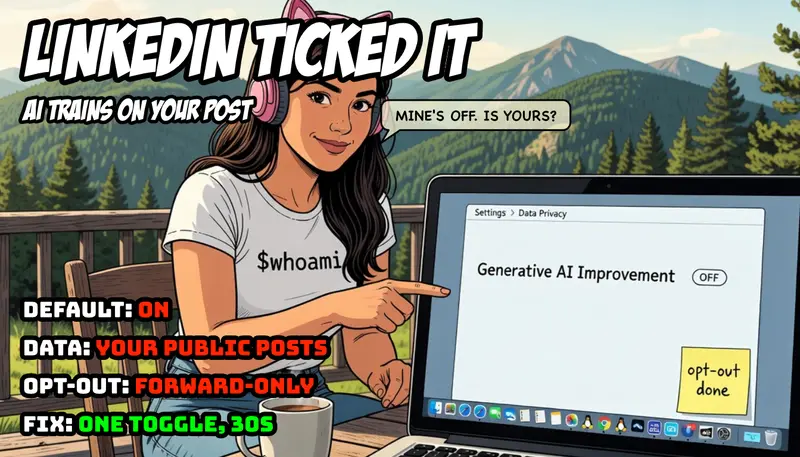

Not in the Brief, Episode 04
You are, in all likelihood, reading this on LinkedIn. Somewhere in your account settings sits a switch labelled “Data for Generative AI Improvement”. For most members it is on. Almost none of them turned it on. This is the fourth episode of Not in the Brief, a series about the things software does that were never in the brief: the features that arrive switched on, the clauses that appear in an update, the defaults that assume your consent because you did not object to a notice you never saw. The aim is not outrage. It is awareness: what was added, how it works, and how you check and change it on your own account.
The Feature
The setting permits LinkedIn to use your data to train generative AI models. Two kinds of model, in fact: LinkedIn’s own, and those of its affiliate, Microsoft, which owns LinkedIn and runs the Azure OpenAI service the platform draws on. The data in scope is your profile information and the content you post publicly: your posts, your articles, your comments. LinkedIn states that private messages are not used. That distinction matters, and it is worth stating plainly so the rest of this piece is not misread: this is about your public content, the part of LinkedIn you intended to be seen, becoming training material. It is not about your inbox.
The Introduction
The chronology is the interesting part, because it is where the brief and the execution part company.
On 18 September 2024, an updated LinkedIn privacy policy took effect. With it, the “Data for Generative AI Improvement” toggle appeared in members’ settings, already enabled. The mechanism was opt-out: your data would be used unless you went and said no. On the same day, 404 Media reported that LinkedIn had begun using member data for AI training before its terms of service had been updated to disclose it. Asked about the gap, the company said it would update the terms “shortly”. A brief, one observes, is conventionally agreed before the work begins, not retrofitted to it afterwards.
Europe and the UK were, briefly, an exception. On 20 September 2024, the UK’s Information Commissioner’s Office issued a statement welcoming that LinkedIn had paused the processing. LinkedIn confirmed it was “not enabling training for generative AI on member data from the European Economic Area, Switzerland, and the United Kingdom, and will not provide the setting to members in those regions until further notice”. For a little over a year, “until further notice” held.
Then the notice came. On 3 November 2025, LinkedIn began using data from members in the EU, the EEA, Switzerland, the UK, Canada and Hong Kong to train its content-generating AI models, having announced the change some weeks earlier. The legal basis it relies on for this is “legitimate interest”, a lawful ground under the GDPR that does not require prior consent, only that the interest be balanced against the member’s rights and that an objection (the opt-out) be offered. So the switch that did not exist in Europe in 2024 exists everywhere now. Wherever you are reading this, it is in your settings, and it arrived pre-flipped.
The Mechanics
Three mechanical details determine what this actually means for you.
First, the direction. The setting is on by default. You are enrolled by inaction. To leave, you must act; to stay, you need only never look. This is the defining property of an opt-out, and it is why opt-outs and opt-ins produce wildly different participation rates from identical populations: the default is the decision, for everyone who does not make one.
Second, the scope. “Legitimate interest” is a legitimate legal basis; it is not a synonym for wrongdoing. But it is, in plain terms, the ground that lets an organisation process your data because it has decided the processing is justified, subject to your right to object. It is the courteous phrasing for “we may, unless you tell us not to”. The GDPR requires that the objection be easy and that it be honoured. It does not require that anyone phone you first.
Third, and most important, the opt-out is forward-only. Switching the toggle off stops your data being used for training from that point onward. It does not retract what has already been used. For members in the regions switched on this November, that means the public content you posted before the cut-off is already within scope, opt-out or not. You can close the gate, but the herd that was already through it does not come back. This is not a quirk of LinkedIn; it is the nature of training data. A model does not forget a sentence because you later asked it to.
The Risk
It is worth being precise about what the risk is and is not, because the temptation in this genre is to reach for the language of surveillance, and that language would be wrong here.
This is not a breach. Nothing was stolen. The content used is content you chose to make public, and the controlling setting is documented and reachable in three clicks. If the story were “LinkedIn read your private messages”, that would be a different and far graver piece. It did not, and this is not.
The risk is about consent and expectation, which is the entire remit of this series. A member who posts publicly on a professional network has a reasonable mental model of what that means: my words are visible, searchable, quotable by humans. The model most members do not hold, because nobody asked them to form it, is: my words are training data for a commercial model owned by my platform and its parent. The opt-out is documented. The announcement, for most members, was a footnote in a policy update they did not read, because almost nobody reads them, because they are written to be agreed rather than understood.
Here is the judgment, and it is a judgment about architecture and process, not about motive: default-on with a quiet notice is not a leak, and it is not a conspiracy. It is a design choice. It treats the absence of objection as the presence of consent, and it places the entire burden of awareness on the member. That is a legitimate strategy and a defensible one in law. It is also, precisely, a thing that was not in the brief. You joined a professional network. You did not, in any meaningful sense, agree to seed a model. The brief did not change. The execution did.
How to See It
The whole point of this series is that you can check, in under a minute, and then decide for yourself. On the web:
- Click your photo, top right, then Settings & Privacy.
- Open Data Privacy.
- Find Data for Generative AI Improvement (on mobile it sits under the same Data Privacy heading).
- Read which way it points. If it is on and you would rather it were not, switch it off.
That is the entire procedure. Two notes on what the switch does and does not do. It governs both LinkedIn’s own training and the sharing of your data to Microsoft for model training, so it is one toggle for both. And it is forward-only, as above: turning it off protects what you post next, not what you posted before. There is a separate, more laborious route for objecting to or requesting deletion of past processing, via LinkedIn’s data-access and objection forms, if you wish to pursue it; the toggle alone does not do that.
A Note on the Other Side of the Stack
There is a quiet structural lesson underneath this one, and it is the same lesson this series keeps arriving at from different doors. The reason a default could be set for you is that you are a guest on a platform whose defaults are not yours to set. On infrastructure you run yourself, the question “what is being trained on my data” has a different and duller answer: whatever you configured, which is nothing you did not choose. A FreeBSD box in your own cupboard does not enrol you in anything overnight; its defaults change when you change them, and the changelog is the commit you can read. That is not an argument that everyone should self-host their professional identity, which would be absurd. It is only an observation that the convenience of a managed platform and the authority over its defaults are sold as a single package, and the second half of that package is the half nobody reads. The price of not running the stack is that someone else sets the switches, and occasionally ticks one on your behalf.
Coda
None of this requires villains. It requires only a default, a quiet notice, and a population that, reasonably, does not read privacy policies for entertainment. The setting is lawful, the opt-out is real, and the content involved is content you published on purpose. The single thing missing was the asking.
So this is the asking, in reverse. If you have never looked, you do not know which way your own switch points. The looking takes thirty seconds and costs nothing. The only deadline that matters already passed, quietly, for everything you posted before it. The looking simply has to begin, ideally before the next policy updates “shortly”.
Read the full article on vivianvoss.net →
By Vivian Voss, System Architect and Software Developer. Follow me on LinkedIn for daily technical writing.

 20. yaşa özel iPhone modeli (iPhone 19 Pro, iPhone 20 ya da iPhone 20 Pro olarak isimlendirilebilir) için sızıntılar üzerinden bir konsept hazırlandı. 2027’de tanıtılacak telefon, uzun süredir gündemde olan iddiaya göre çerçevesiz görüntü oluşturacak “dört kenardan kavisli ekranla” tasarlanıyor ve Face ID’ye güç veren sensörleri doğrudan ekranın altına alacağı öne sürülüyor. Asher Dipprey tarafından FPT için hazırlanan konsept cihaz da şimdiden büyük merak uyandıran dört kenardan kavisli iPhone’un nasıl görünebileceğini karşımıza getiriyor. iPhone X’teki gövde yapısının kullanıldığı konseptte iki farklı arka kameraya yer veriliyor. Arkasındaki cam bölüm de kavisli tasarlanan konsept, selfie kamerasını da ekranın altına alıyor. Apple’ın da bunu düşündüğü ancak görüntü kalitesinde kayıp yaşanması halinde selfie kamerasını bir ekran deliğine koymayı planladığı söyleniyor.
 Nintendo, Switch 2 fiyatlarına gelen zamma rağmen talebin güçlü kalacağını düşünüyor. Şirketin üretim hedefini 20 milyon adede çıkardığı ortaya çıktı. İşte detaylar…