
What Is a Frontend Developer Roadmap and Why You Need One
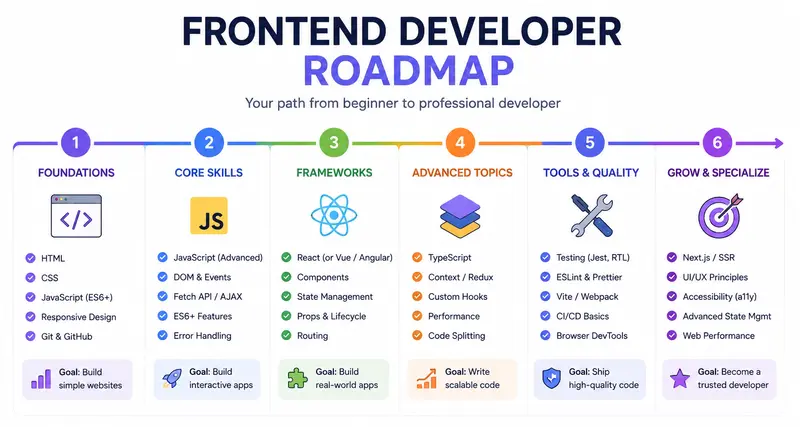
Every year, thousands of people decide to become frontend developers. They open YouTube, type “learn HTML,” and dive in with genuine enthusiasm. A few weeks later, many of them are stuck – not because frontend development is too hard, but because they have no clear direction. They learned CSS before understanding the browser, jumped into React before mastering JavaScript, and now they feel like they’re building a house without a foundation.

This is exactly the problem a frontend developer roadmap solves.
A roadmap is not a rigid curriculum handed down from above. It is a structured, visual overview of the skills, tools, and concepts you need to learn – in a logical order – to become a competent frontend developer. Whether you’re exploring a front end developer roadmap understanding the underlying concept is what separates developers who grow steadily from those who spin their wheels for months.

What “Learning Without a Roadmap” Actually Looks Like?

Most beginners don’t realize they’re learning chaotically. It feels productive – you’re watching tutorials, reading articles, trying things out. But without a structured sequence, a few problems quietly accumulate:
You learn isolated tools without understanding how they connect. You spend weeks on CSS animations before solidifying your understanding of the box model. You pick up React because everyone talks about it, then discover your JavaScript fundamentals are too weak to understand what the framework is actually doing. You hit a wall and start over – repeatedly.

This pattern has a name in educational psychology: it’s sometimes called “tutorial hell.” You consume content without building mental models, so nothing truly sticks. The information doesn’t compound – it just piles up. The root cause is an absence of sequencing. Learning is not just about content; it’s about the order of content. A concept learned out of order creates confusion instead of clarity.

Why Does the Brain Need a Framework Before It Can Fill It In?

Cognitive science consistently shows that new information is retained far more effectively when it can be attached to an existing mental structure. When you learn JavaScript without first understanding what the browser does with code, you’re forcing your brain to memorize floating facts with no anchor.

A frontend developer roadmap provides that anchor. It says: here is the territory you need to cover. Here is roughly what order makes sense. Here is where you are right now. That last point – knowing where you are – is one of the most underrated benefits of a roadmap. Progress tracking is a powerful motivator, and it’s nearly impossible without a map.

For anyone building a junior frontend developer roadmap, this principle is especially important. Juniors are not expected to know everything. They are expected to know a coherent, connected set of fundamentals, applied consistently. A roadmap helps define exactly what that coherent set looks like.

The frontend developer roadmap 2026 doesn’t look radically different from what it looked like three years ago at its core: HTML, CSS, JavaScript, Git, a framework, some tooling, and the professional habits (testing, accessibility, performance) that distinguish a junior developer ready to be hired from someone who can build things but not in a team.

What has changed is the surrounding ecosystem, the tooling landscape, and employer expectations – which is exactly why revisiting and updating your roadmap periodically matters. If you’re just starting out, don’t try to learn everything at once. Get a roadmap, commit to a sequence, build something after every major section, and keep moving forward. That’s the approach that works.

FAQ

1. What is a frontend developer roadmap and how is it different from a curriculum?
A frontend developer roadmap is a visual or structured guide that outlines the full range of skills, technologies, and concepts a frontend developer needs – typically organized by learning sequence and priority. The key difference between a roadmap and a curriculum is flexibility and scope. A roadmap, by contrast, is more like a map of the territory. It shows you what exists, suggests a logical path through it, and leaves room for you to choose your own resources and pace.

A good roadmap doesn’t tell you exactly what video to watch next; it tells you that before learning React, you should have strong JavaScript fundamentals, and gives you the freedom to build those fundamentals however suits you best.

2. Is a front end developer roadmap for beginners different from one for experienced developers?
Yes, significantly – and understanding the difference can save you a lot of time and frustration. A front end developer roadmap for beginners prioritizes foundational knowledge in a specific sequence: the browser and internet basics first, then HTML, then CSS, then JavaScript, then version control, and only after that, frameworks like React. Everything in the beginner path is about building strong mental models before adding complexity.

An intermediate or experienced developer roadmap, by contrast, assumes those foundations exist and focuses on depth, specialization, and professional-grade topics: state management patterns, performance optimization, testing strategies, accessibility compliance at scale, CI/CD workflows, and architectural decisions.

Google shipped three Gemini “Flash” models. Picking the wrong one could 6 your AI bill

This is a submission for the Google I/O 2026 Writing Challenge

Google shipped three Gemini “Flash” models. Picking the wrong one could 6× your AI bill.

I opened Google AI Studio right after the Google I/O 2026 keynote to try the new model everyone was talking about — and got hit with a small wave of confusion. I went looking for “the new Flash model” and found three of them sitting in the same dropdown, names so similar I had to read them twice:

  • Gemini 3.5 Flash
  • Gemini 3.1 Flash Lite
  • Gemini 3 Flash Preview

Three different version numbers. All called “Flash.” And when I read their price tags, I found something the keynote didn’t dwell on: the gap between the cheapest and the priciest is 6×. Pick the wrong one for your workload and you don’t get a slightly bigger bill — you get a 6× bigger bill, for tasks that didn’t need it.

Here’s the lineup decoded with real numbers, the 6× trap explained, and a decision guide for which “Flash” you should actually reach for.

💡 [Screenshot spot: the AI Studio “Model selection” panel showing all three Flash models stacked together — your proof and hero image.]

The three Flash models, decoded

Pricing is per 1 million tokens, from Google’s official Gemini API pricing:

Model Built for Input Output Released
Gemini 3.1 Flash Lite 🆕 High-volume, translation, simple data processing $0.25 $1.50 May 7, 2026
Gemini 3 Flash Preview Speed + frontier intelligence; keeps Computer Use $0.50 $3.00 Dec 17, 2025
Gemini 3.5 Flash 🆕 Frontier agentic + coding $1.50 $9.00 May 19, 2026 (I/O day)

Read that again and the naming makes no sense as a guide: the highest number (3.5) is the most expensive and newest, “Lite” (3.1) is the cheap workhorse, and the lowest number (3) is actually the oldest of the three — a December 2025 preview that’s somehow priced in the middle. Only two of them (3.5 Flash and 3.1 Flash Lite) are the genuinely new I/O-era models. The version number tells you nothing about recency or price — you have to read every card.

The 6× trap, in plain terms

Compare the two ends. Gemini 3.5 Flash costs 6× more than 3.1 Flash Lite on both input and output. And output is where it bites, because most AI apps generate far more tokens than they consume — every reply, every summary, every generated line of code is output you pay $9.00 vs $1.50 for.

Run the math on a modest chatbot producing 50M output tokens a month:

  • 3.5 Flash: 50M × $9.00/1M = $450/month
  • 3.1 Flash Lite: 50M × $1.50/1M = $75/month

Same volume. $375/month — $4,500/year — purely from which “Flash” you clicked. If your tasks are translation, classification, or simple extraction, you’re paying 6× for “frontier coding intelligence” you never use.

But “cheaper” isn’t always “right” — the benchmarks

Lite isn’t just a price cut; it’s a different capability tier. Google’s published numbers (3.1 Flash Lite, 3.5 Flash):

  • 3.1 Flash Lite — LMArena Elo ~1432, GPQA Diamond 86.9%. Genuinely strong for the price, but tuned for throughput.
  • 3.5 Flash — SWE-Bench Pro 55.1%, Terminal-Bench 2.1 76.2%. Built to hold up across long, multi-step agentic and coding tasks where one wrong step compounds.

So the real question isn’t “which is cheaper” — it’s “does my task actually need the frontier coding model, or am I overpaying for headroom I don’t use?”

Which Flash should you actually use?

The decision guide the model picker should have come with:

Use Gemini 3.1 Flash Lite (the $0.25/$1.50 one) for: classification, tagging, extraction, translation, simple summaries — high-volume work with a clear right answer. At 6× cheaper, this is most production traffic.

Use Gemini 3.5 Flash (the $1.50/$9.00 one) for: real agentic workflows and code generation where quality compounds and a wrong early step ruins everything downstream. Pay for it when the output is high-value — and only after you’ve tested that Lite isn’t good enough.

Use Gemini 3 Flash Preview (the $0.50/$3.00 one) when: you need Computer Use — controlling a browser/UI. Notably, 3.5 Flash dropped Computer Use, so for that specific capability Google says stick with 3 Flash Preview (details). Just remember “Preview” can change or disappear.

The meta-rule: default to Lite, upgrade only when you can prove you need to. Most teams will do the opposite — grab the highest version number, ship it, and quietly overpay 6× forever.

Two cost levers nobody mentioned

The price-per-token is only half the bill. Two settings move it a lot:

1. Caching is a 10× input discount. Gemini 3.5 Flash’s cached input is $0.15 vs $1.50 — ten times cheaper. If your prompts share a big fixed chunk (a system prompt, a document, a schema), caching it slashes input cost. Most people never turn it on.

2. The “Thinking level” dial controls how hard — and how expensively — the model reasons. Gemini 3.x replaces the old token-budget setting with a thinkingLevel of minimal / low / medium / high (docs). More thinking = better on hard problems, but more time and more tokens. The defaults differ by model — 3.5 Flash defaults to medium, Flash Lite to minimal — and Google notes that routing the bulk of your calls to low/minimal thinking can cut spend 50–70%. So your bill isn’t just which model; it’s how hard you let it think. Match the effort to the task.

Two details worth knowing before you ship

  • The free tier is real but capped. All three have a rate-limited free tier, plus 5,000 free Google Search grounding prompts per month (then ~$14 per 1,000). Great for prototyping; watch the grounding cap.
  • Their knowledge cutoff is January 2025 — about 16 months before they launched. Every Flash card in AI Studio lists a Jan 2025 cutoff, which means these May-2026 models don’t know about anything from 2025–2026 out of the box — including I/O 2026 itself. For anything current, flip on Grounding with Google Search (5,000 free prompts/month, then ~$14 per 1,000). A new model is not the same as an up-to-date one.

The takeaway

Google’s I/O 2026 story was “Gemini Flash is fast, smart, and cheap.” The truth in the model picker is more useful: there isn’t one Flash, there are several, and the difference between them is a 6× cost swing hiding behind nearly identical names — before you even touch caching or the thinking dial.

That’s not a complaint. Having a $0.25 workhorse and a frontier coding model in the same family is genuinely great. It just means the most important decision you’ll make isn’t “should I use Gemini” — it’s “which Flash, with what thinking level, for this task.” Get that right and you get frontier AI at workhorse prices. Get it wrong and you pay frontier prices for workhorse work.

Open AI Studio, put the three Flash cards side by side, and match each of your app’s tasks to the cheapest model that can actually do it. Five minutes — and it can cut your AI bill by more than 6×.

Pricing, model details, and the thinking-level defaults are from Google’s official Gemini API docs and AI Studio during the I/O 2026 window (Gemini 3.5 Flash GA’d May 19, 2026); verify current numbers before relying on them, as they change. Master announcement list: “100 things we announced at Google I/O 2026”. I drafted this with AI assistance and verified every number against Google’s docs and AI Studio myself — the analysis and screenshots are mine.

Building an MCP server so Claude can query my SaaS analytics directly

Last week I shipped a Model Context Protocol (MCP) server for my analytics SaaS. Now Claude Desktop, Cursor, and any MCP compatible client can query traffic, revenue, and funnel data directly.

This is a walkthrough of how I built it, what worked, and a couple of patterns that surprised me.

What MCP is, briefly

MCP is a protocol that lets AI clients invoke tools and read resources from external servers. Think of it as REST for LLM tool calling, with a stable schema and discovery.

Server skeleton

import { Server } from '@modelcontextprotocol/sdk/server/index.js'
import { StdioServerTransport } from '@modelcontextprotocol/sdk/server/stdio.js'

const server = new Server({
  name: 'zenovay',
  version: '1.0.0',
}, {
  capabilities: {
    tools: {},
    resources: {}
  }
})

Defining tools

server.setRequestHandler('tools/list', async () => ({
  tools: [
    {
      name: 'get_traffic',
      description: 'Get pageview and visitor counts for a site over a date range',
      inputSchema: {
        type: 'object',
        properties: {
          site: { type: 'string' },
          from: { type: 'string' },
          to: { type: 'string' }
        },
        required: ['site', 'from', 'to']
      }
    }
  ]
}))

The pattern that surprised me: structured returns

Way better than raw JSON: return a short natural language summary plus the data. Claude uses the summary for its response and the JSON for follow up questions.

What I did not expect

Users started asking Claude to do things I had not built dashboards for:

  • “Compare my paid traffic conversion rate this week vs last week”
  • “Which 5 pages had the biggest week over week drop in pageviews”
  • “Summarize what changed in my funnel completion rate over the last 30 days”

Claude does this by chaining multiple tool calls. I did not need to build any of those views. The tools are atomic, Claude composes.

This is the part I think is genuinely new about MCP. The interface is the LLM, the backend is just well shaped tools.

Install

npm install -g @zenovay/mcp then add to your Claude Desktop config.

Site: zenovay.com

Open source MCP server work happening here too? Curious what patterns others have found.

Valerio

Building an MCP server so Claude can query my SaaS analytics directly

Last week I shipped a Model Context Protocol (MCP) server for my analytics SaaS. Now Claude Desktop, Cursor, and any MCP compatible client can query traffic, revenue, and funnel data directly.

This is a walkthrough of how I built it, what worked, and a couple of patterns that surprised me.

What MCP is, briefly

MCP is a protocol that lets AI clients invoke tools and read resources from external servers. Think of it as REST for LLM tool calling, with a stable schema and discovery.

Server skeleton

import { Server } from '@modelcontextprotocol/sdk/server/index.js'
import { StdioServerTransport } from '@modelcontextprotocol/sdk/server/stdio.js'

const server = new Server({
  name: 'zenovay',
  version: '1.0.0',
}, {
  capabilities: {
    tools: {},
    resources: {}
  }
})

Defining tools

server.setRequestHandler('tools/list', async () => ({
  tools: [
    {
      name: 'get_traffic',
      description: 'Get pageview and visitor counts for a site over a date range',
      inputSchema: {
        type: 'object',
        properties: {
          site: { type: 'string' },
          from: { type: 'string' },
          to: { type: 'string' }
        },
        required: ['site', 'from', 'to']
      }
    }
  ]
}))

The pattern that surprised me: structured returns

Way better than raw JSON: return a short natural language summary plus the data. Claude uses the summary for its response and the JSON for follow up questions.

What I did not expect

Users started asking Claude to do things I had not built dashboards for:

  • “Compare my paid traffic conversion rate this week vs last week”
  • “Which 5 pages had the biggest week over week drop in pageviews”
  • “Summarize what changed in my funnel completion rate over the last 30 days”

Claude does this by chaining multiple tool calls. I did not need to build any of those views. The tools are atomic, Claude composes.

This is the part I think is genuinely new about MCP. The interface is the LLM, the backend is just well shaped tools.

Install

npm install -g @zenovay/mcp then add to your Claude Desktop config.

Site: zenovay.com

Open source MCP server work happening here too? Curious what patterns others have found.

Valerio

Google I/O 2026 and the Rise of the AI Ecosystem

Google I/O 2026: The Year AI Became Truly Developer-First

Every year, Google I/O gives us a glimpse into where technology is heading. But this year felt different.

Google I/O 2026 wasn’t just about flashy demos or incremental updates — it felt like a major shift toward making AI genuinely usable for developers, creators, and everyday builders. From Gemini integrations to Firebase AI tooling and Flutter improvements, the announcements painted a clear picture: Google wants AI to become part of every workflow, not just a standalone feature.

After following the keynotes and diving into the sessions, one theme stood out to me:

The barrier between an idea and a working product is shrinking faster than ever.

And honestly, that’s both exciting and a little overwhelming.

The Biggest Takeaway: AI Is Becoming Infrastructure

The most impressive part of this year’s announcements wasn’t a single model or product release. It was how deeply AI is now integrated into Google’s ecosystem.

During the Google Keynote and the “What’s New in Google AI” session, it became obvious that Google is no longer treating AI as an experiment. AI is now infrastructure.

Instead of asking developers to “add AI,” Google is embedding intelligence directly into:

  • Android development
  • Search experiences
  • Firebase workflows
  • Cloud tooling
  • Flutter applications
  • Productivity tools

That changes how we think about software development entirely.

We’re moving from:

  • Writing every feature manually

To:

  • Orchestrating systems that can reason, generate, and adapt.

Firebase + AI Was the Most Practical Announcement

Out of everything announced, the Firebase updates were probably the most exciting for me as a developer.

Not because they were flashy.

Because they were immediately useful.

The new AI-powered Firebase workflows seem focused on solving real development bottlenecks:

  • Faster backend setup
  • Smarter debugging
  • Automated app flows
  • Better AI integrations without huge infrastructure complexity

For indie developers and small teams, this matters a lot.

One of the hardest parts of building modern applications is no longer just coding — it’s managing scale, integrations, authentication, analytics, AI APIs, deployment pipelines, and user experience all at once.

Firebase is evolving into something much bigger than a backend service.

It’s becoming an AI-assisted development platform.

And that’s a huge shift.

Flutter Quietly Had One of the Best Sessions

The “What’s New in Flutter” session didn’t generate the same hype as the AI announcements, but I think it deserves more attention.

Flutter continues to mature into one of the most efficient cross-platform frameworks available today. What stood out this year was Google’s focus on:

  • Performance improvements
  • Better tooling
  • Faster iteration cycles
  • Stronger AI-assisted workflows for UI development

The interesting part is how AI and Flutter now complement each other.

AI can accelerate:

  • UI generation
  • Component scaffolding
  • Documentation
  • Testing
  • State management suggestions

But Flutter still gives developers control over the final experience.

That balance matters.

A lot of AI-generated software today still feels generic. Flutter remains one of the best tools for developers who want productivity without sacrificing creativity.

AI Coding Assistants Are Entering a New Phase

Another thing I noticed across multiple sessions was the evolution of AI coding tools.

Last year, AI assistants mostly helped autocomplete code.

This year, the focus shifted toward:

  • Multi-step reasoning
  • Context-aware workflows
  • Architecture suggestions
  • End-to-end development assistance

That’s a massive leap.

We’re quickly approaching a world where developers spend less time writing boilerplate and more time:

  • Designing systems
  • Reviewing logic
  • Shaping product experiences
  • Making architectural decisions

Ironically, AI may make human creativity even more valuable.

Because when everyone can generate code quickly, the real differentiator becomes:

  • Product thinking
  • User empathy
  • Taste
  • Problem selection

The Most Underrated Shift: Developer Accessibility

One thing I think people are underestimating is how much easier entry into software development is becoming.

A few years ago, building an AI-powered application required:

  • ML expertise
  • Infrastructure knowledge
  • GPU access
  • Large engineering budgets

Now?
A solo developer can prototype surprisingly advanced applications using Google’s ecosystem.

That democratization is probably more important than any single feature announcement.

The next generation of builders won’t need permission, massive teams, or huge funding rounds to create impactful products.

That changes innovation itself.

My Biggest Question After I/O 2026

As exciting as everything looks, I still have one major question:

How do we prevent AI-assisted development from making software feel identical?

When tools generate interfaces, code structures, and workflows automatically, there’s a risk that creativity becomes standardized.

The challenge for developers moving forward won’t just be learning AI tools.

It’ll be learning how to use them without losing originality.

The best developers in the AI era may not be the people who automate everything.

They may be the people who know where human judgment still matters most.

Final Thoughts

Google I/O 2026 felt less like a product showcase and more like a preview of a new development era.

The biggest innovation wasn’t one model, framework, or API.

It was the growing idea that software creation itself is changing.

Developers are transitioning from:

  • Writing every system manually

To:

  • Collaborating with intelligent tools.

And while the technology is impressive, the real opportunity lies in what people choose to build with it.

That’s the part I’m most excited about.

Because the future of development won’t belong to AI alone.

It’ll belong to developers who learn how to work alongside it creatively.

Building an MCP server so Claude can query my SaaS analytics directly

Last week I shipped a Model Context Protocol (MCP) server for my analytics SaaS. Now Claude Desktop, Cursor, and any MCP compatible client can query traffic, revenue, and funnel data directly.

This is a walkthrough of how I built it, what worked, and a couple of patterns that surprised me.

What MCP is, briefly

MCP is a protocol that lets AI clients invoke tools and read resources from external servers. Think of it as REST for LLM tool calling, with a stable schema and discovery.

Server skeleton

import { Server } from '@modelcontextprotocol/sdk/server/index.js'
import { StdioServerTransport } from '@modelcontextprotocol/sdk/server/stdio.js'

const server = new Server({
  name: 'zenovay',
  version: '1.0.0',
}, {
  capabilities: {
    tools: {},
    resources: {}
  }
})

Defining tools

server.setRequestHandler('tools/list', async () => ({
  tools: [
    {
      name: 'get_traffic',
      description: 'Get pageview and visitor counts for a site over a date range',
      inputSchema: {
        type: 'object',
        properties: {
          site: { type: 'string' },
          from: { type: 'string' },
          to: { type: 'string' }
        },
        required: ['site', 'from', 'to']
      }
    }
  ]
}))

The pattern that surprised me: structured returns

Way better than raw JSON: return a short natural language summary plus the data. Claude uses the summary for its response and the JSON for follow up questions.

What I did not expect

Users started asking Claude to do things I had not built dashboards for:

  • “Compare my paid traffic conversion rate this week vs last week”
  • “Which 5 pages had the biggest week over week drop in pageviews”
  • “Summarize what changed in my funnel completion rate over the last 30 days”

Claude does this by chaining multiple tool calls. I did not need to build any of those views. The tools are atomic, Claude composes.

This is the part I think is genuinely new about MCP. The interface is the LLM, the backend is just well shaped tools.

Install

npm install -g @zenovay/mcp then add to your Claude Desktop config.

Site: zenovay.com

Open source MCP server work happening here too? Curious what patterns others have found.

Valerio

Google I/O 2026 and the Rise of the AI Ecosystem

Google I/O 2026: The Year AI Became Truly Developer-First

Every year, Google I/O gives us a glimpse into where technology is heading. But this year felt different.

Google I/O 2026 wasn’t just about flashy demos or incremental updates — it felt like a major shift toward making AI genuinely usable for developers, creators, and everyday builders. From Gemini integrations to Firebase AI tooling and Flutter improvements, the announcements painted a clear picture: Google wants AI to become part of every workflow, not just a standalone feature.

After following the keynotes and diving into the sessions, one theme stood out to me:

The barrier between an idea and a working product is shrinking faster than ever.

And honestly, that’s both exciting and a little overwhelming.

The Biggest Takeaway: AI Is Becoming Infrastructure

The most impressive part of this year’s announcements wasn’t a single model or product release. It was how deeply AI is now integrated into Google’s ecosystem.

During the Google Keynote and the “What’s New in Google AI” session, it became obvious that Google is no longer treating AI as an experiment. AI is now infrastructure.

Instead of asking developers to “add AI,” Google is embedding intelligence directly into:

  • Android development
  • Search experiences
  • Firebase workflows
  • Cloud tooling
  • Flutter applications
  • Productivity tools

That changes how we think about software development entirely.

We’re moving from:

  • Writing every feature manually

To:

  • Orchestrating systems that can reason, generate, and adapt.

Firebase + AI Was the Most Practical Announcement

Out of everything announced, the Firebase updates were probably the most exciting for me as a developer.

Not because they were flashy.

Because they were immediately useful.

The new AI-powered Firebase workflows seem focused on solving real development bottlenecks:

  • Faster backend setup
  • Smarter debugging
  • Automated app flows
  • Better AI integrations without huge infrastructure complexity

For indie developers and small teams, this matters a lot.

One of the hardest parts of building modern applications is no longer just coding — it’s managing scale, integrations, authentication, analytics, AI APIs, deployment pipelines, and user experience all at once.

Firebase is evolving into something much bigger than a backend service.

It’s becoming an AI-assisted development platform.

And that’s a huge shift.

Flutter Quietly Had One of the Best Sessions

The “What’s New in Flutter” session didn’t generate the same hype as the AI announcements, but I think it deserves more attention.

Flutter continues to mature into one of the most efficient cross-platform frameworks available today. What stood out this year was Google’s focus on:

  • Performance improvements
  • Better tooling
  • Faster iteration cycles
  • Stronger AI-assisted workflows for UI development

The interesting part is how AI and Flutter now complement each other.

AI can accelerate:

  • UI generation
  • Component scaffolding
  • Documentation
  • Testing
  • State management suggestions

But Flutter still gives developers control over the final experience.

That balance matters.

A lot of AI-generated software today still feels generic. Flutter remains one of the best tools for developers who want productivity without sacrificing creativity.

AI Coding Assistants Are Entering a New Phase

Another thing I noticed across multiple sessions was the evolution of AI coding tools.

Last year, AI assistants mostly helped autocomplete code.

This year, the focus shifted toward:

  • Multi-step reasoning
  • Context-aware workflows
  • Architecture suggestions
  • End-to-end development assistance

That’s a massive leap.

We’re quickly approaching a world where developers spend less time writing boilerplate and more time:

  • Designing systems
  • Reviewing logic
  • Shaping product experiences
  • Making architectural decisions

Ironically, AI may make human creativity even more valuable.

Because when everyone can generate code quickly, the real differentiator becomes:

  • Product thinking
  • User empathy
  • Taste
  • Problem selection

The Most Underrated Shift: Developer Accessibility

One thing I think people are underestimating is how much easier entry into software development is becoming.

A few years ago, building an AI-powered application required:

  • ML expertise
  • Infrastructure knowledge
  • GPU access
  • Large engineering budgets

Now?
A solo developer can prototype surprisingly advanced applications using Google’s ecosystem.

That democratization is probably more important than any single feature announcement.

The next generation of builders won’t need permission, massive teams, or huge funding rounds to create impactful products.

That changes innovation itself.

My Biggest Question After I/O 2026

As exciting as everything looks, I still have one major question:

How do we prevent AI-assisted development from making software feel identical?

When tools generate interfaces, code structures, and workflows automatically, there’s a risk that creativity becomes standardized.

The challenge for developers moving forward won’t just be learning AI tools.

It’ll be learning how to use them without losing originality.

The best developers in the AI era may not be the people who automate everything.

They may be the people who know where human judgment still matters most.

Final Thoughts

Google I/O 2026 felt less like a product showcase and more like a preview of a new development era.

The biggest innovation wasn’t one model, framework, or API.

It was the growing idea that software creation itself is changing.

Developers are transitioning from:

  • Writing every system manually

To:

  • Collaborating with intelligent tools.

And while the technology is impressive, the real opportunity lies in what people choose to build with it.

That’s the part I’m most excited about.

Because the future of development won’t belong to AI alone.

It’ll belong to developers who learn how to work alongside it creatively.

Building an MCP server so Claude can query my SaaS analytics directly

Last week I shipped a Model Context Protocol (MCP) server for my analytics SaaS. Now Claude Desktop, Cursor, and any MCP compatible client can query traffic, revenue, and funnel data directly.

This is a walkthrough of how I built it, what worked, and a couple of patterns that surprised me.

What MCP is, briefly

MCP is a protocol that lets AI clients invoke tools and read resources from external servers. Think of it as REST for LLM tool calling, with a stable schema and discovery.

Server skeleton

import { Server } from '@modelcontextprotocol/sdk/server/index.js'
import { StdioServerTransport } from '@modelcontextprotocol/sdk/server/stdio.js'

const server = new Server({
  name: 'zenovay',
  version: '1.0.0',
}, {
  capabilities: {
    tools: {},
    resources: {}
  }
})

Defining tools

server.setRequestHandler('tools/list', async () => ({
  tools: [
    {
      name: 'get_traffic',
      description: 'Get pageview and visitor counts for a site over a date range',
      inputSchema: {
        type: 'object',
        properties: {
          site: { type: 'string' },
          from: { type: 'string' },
          to: { type: 'string' }
        },
        required: ['site', 'from', 'to']
      }
    }
  ]
}))

The pattern that surprised me: structured returns

Way better than raw JSON: return a short natural language summary plus the data. Claude uses the summary for its response and the JSON for follow up questions.

What I did not expect

Users started asking Claude to do things I had not built dashboards for:

  • “Compare my paid traffic conversion rate this week vs last week”
  • “Which 5 pages had the biggest week over week drop in pageviews”
  • “Summarize what changed in my funnel completion rate over the last 30 days”

Claude does this by chaining multiple tool calls. I did not need to build any of those views. The tools are atomic, Claude composes.

This is the part I think is genuinely new about MCP. The interface is the LLM, the backend is just well shaped tools.

Install

npm install -g @zenovay/mcp then add to your Claude Desktop config.

Site: zenovay.com

Open source MCP server work happening here too? Curious what patterns others have found.

Valerio

Google I/O 2026 and the Rise of the AI Ecosystem

Google I/O 2026: The Year AI Became Truly Developer-First

Every year, Google I/O gives us a glimpse into where technology is heading. But this year felt different.

Google I/O 2026 wasn’t just about flashy demos or incremental updates — it felt like a major shift toward making AI genuinely usable for developers, creators, and everyday builders. From Gemini integrations to Firebase AI tooling and Flutter improvements, the announcements painted a clear picture: Google wants AI to become part of every workflow, not just a standalone feature.

After following the keynotes and diving into the sessions, one theme stood out to me:

The barrier between an idea and a working product is shrinking faster than ever.

And honestly, that’s both exciting and a little overwhelming.

The Biggest Takeaway: AI Is Becoming Infrastructure

The most impressive part of this year’s announcements wasn’t a single model or product release. It was how deeply AI is now integrated into Google’s ecosystem.

During the Google Keynote and the “What’s New in Google AI” session, it became obvious that Google is no longer treating AI as an experiment. AI is now infrastructure.

Instead of asking developers to “add AI,” Google is embedding intelligence directly into:

  • Android development
  • Search experiences
  • Firebase workflows
  • Cloud tooling
  • Flutter applications
  • Productivity tools

That changes how we think about software development entirely.

We’re moving from:

  • Writing every feature manually

To:

  • Orchestrating systems that can reason, generate, and adapt.

Firebase + AI Was the Most Practical Announcement

Out of everything announced, the Firebase updates were probably the most exciting for me as a developer.

Not because they were flashy.

Because they were immediately useful.

The new AI-powered Firebase workflows seem focused on solving real development bottlenecks:

  • Faster backend setup
  • Smarter debugging
  • Automated app flows
  • Better AI integrations without huge infrastructure complexity

For indie developers and small teams, this matters a lot.

One of the hardest parts of building modern applications is no longer just coding — it’s managing scale, integrations, authentication, analytics, AI APIs, deployment pipelines, and user experience all at once.

Firebase is evolving into something much bigger than a backend service.

It’s becoming an AI-assisted development platform.

And that’s a huge shift.

Flutter Quietly Had One of the Best Sessions

The “What’s New in Flutter” session didn’t generate the same hype as the AI announcements, but I think it deserves more attention.

Flutter continues to mature into one of the most efficient cross-platform frameworks available today. What stood out this year was Google’s focus on:

  • Performance improvements
  • Better tooling
  • Faster iteration cycles
  • Stronger AI-assisted workflows for UI development

The interesting part is how AI and Flutter now complement each other.

AI can accelerate:

  • UI generation
  • Component scaffolding
  • Documentation
  • Testing
  • State management suggestions

But Flutter still gives developers control over the final experience.

That balance matters.

A lot of AI-generated software today still feels generic. Flutter remains one of the best tools for developers who want productivity without sacrificing creativity.

AI Coding Assistants Are Entering a New Phase

Another thing I noticed across multiple sessions was the evolution of AI coding tools.

Last year, AI assistants mostly helped autocomplete code.

This year, the focus shifted toward:

  • Multi-step reasoning
  • Context-aware workflows
  • Architecture suggestions
  • End-to-end development assistance

That’s a massive leap.

We’re quickly approaching a world where developers spend less time writing boilerplate and more time:

  • Designing systems
  • Reviewing logic
  • Shaping product experiences
  • Making architectural decisions

Ironically, AI may make human creativity even more valuable.

Because when everyone can generate code quickly, the real differentiator becomes:

  • Product thinking
  • User empathy
  • Taste
  • Problem selection

The Most Underrated Shift: Developer Accessibility

One thing I think people are underestimating is how much easier entry into software development is becoming.

A few years ago, building an AI-powered application required:

  • ML expertise
  • Infrastructure knowledge
  • GPU access
  • Large engineering budgets

Now?
A solo developer can prototype surprisingly advanced applications using Google’s ecosystem.

That democratization is probably more important than any single feature announcement.

The next generation of builders won’t need permission, massive teams, or huge funding rounds to create impactful products.

That changes innovation itself.

My Biggest Question After I/O 2026

As exciting as everything looks, I still have one major question:

How do we prevent AI-assisted development from making software feel identical?

When tools generate interfaces, code structures, and workflows automatically, there’s a risk that creativity becomes standardized.

The challenge for developers moving forward won’t just be learning AI tools.

It’ll be learning how to use them without losing originality.

The best developers in the AI era may not be the people who automate everything.

They may be the people who know where human judgment still matters most.

Final Thoughts

Google I/O 2026 felt less like a product showcase and more like a preview of a new development era.

The biggest innovation wasn’t one model, framework, or API.

It was the growing idea that software creation itself is changing.

Developers are transitioning from:

  • Writing every system manually

To:

  • Collaborating with intelligent tools.

And while the technology is impressive, the real opportunity lies in what people choose to build with it.

That’s the part I’m most excited about.

Because the future of development won’t belong to AI alone.

It’ll belong to developers who learn how to work alongside it creatively.

How do you verify GitHub contributions without trusting self-reported skills?

I’ve been thinking about a problem that doesn’t get talked about enough in hiring: the gap between what someone claims about their work on linkedin and what they actually did.

Anyone can list “open source contributor” on their resume. Anyone can paste a GitHub repo URL in a portfolio. But without looking at the actual commit history and contributor data — you have no idea if that person wrote 80% of the codebase or merged one typo fix three years ago.

So I started building a system to verify this properly. Here’s what I learned — without giving away the methodology we use, because honestly, the moment you publish your exact algorithm, people optimize for it rather than actually doing the work.

The naive approach fails immediately

The first instinct is to just check if the person’s GitHub handle appears in the contributor list. Simple, right?

Not quite. Three problems come up immediately.

People have multiple GitHub accounts. Work account, personal account, old account from college. A developer might have significant contributions spread across two or three handles. Checking one handle misses the full picture.

Contribution depth varies wildly. Being listed as a contributor could mean 2,000 commits or 1 commit. The contributor list alone doesn’t tell you which. You need actual commit counts per author to understand the depth of contribution.

Public repos can be submitted by anyone. I can submit any famous open source repo to a portfolio system and imply I contributed to it. Without verifying my actual handle against the contributor data, the system has no way to know if I wrote the core architecture or just starred the repo.

What actually works — the principles

I’m not going to share the exact scoring formula. But I can share the principles that make verification meaningful.

Verify account ownership first

Before you can verify contributions, you need to verify identity. The only reliable way to confirm someone owns a GitHub account is OAuth. When someone authenticates via GitHub OAuth, you get a cryptographic proof of ownership — not a claim.

This is the identity anchor. Every contribution check runs against verified handles only. No claims accepted.

Handle the multi-account reality honestly

Developers legitimately use multiple GitHub accounts. A good verification system needs to support this — each additional account verified through its own OAuth flow.

The critical constraint: one GitHub account should only be linkable to one professional identity. Otherwise the whole system can be gamed by linking someone else’s high-signal account to your profile.

This requires exclusive handle claiming. First claim wins. If a handle is already associated with another profile — it’s blocked. No exceptions.

Contribution depth matters more than presence

There’s a meaningful difference between someone who authored 40% of a codebase and someone who fixed a typo. Both show up in the contributor list. Only one actually shaped the project.

The verification system needs to reflect this distinction. Not all verified contributions are equal. Depth matters. History matters. Consistency over time matters more than a spike of activity.

Unverified doesn’t mean worthless — but it means discounted

Not everything can be verified through OAuth. Public repos, old contributions, work done under inaccessible accounts — these are real but can’t be fully verified.

The right approach isn’t to ignore unverified sources. It’s to discount them heavily and label them clearly. A user should always know what’s verified and what isn’t. A recruiter should always be able to see the difference at a glance.

Transparency about what can and can’t be verified is more credible than pretending everything is confirmed.

Gaming prevention is architectural, not cosmetic

If your verification system can be gamed by submitting famous repos you didn’t write, it’s not a verification system — it’s a vanity metric generator.

The aggregation rules matter as much as the scoring rules. How multiple sources combine, how unverified sources interact with verified ones, how the system handles edge cases — these decisions determine whether the final score means anything.

We’ve spent a lot of time on this. The details stay internal.

What this doesn’t solve

No verification system is perfect. Worth being honest about the limitations.

Commit squashing — some teams squash all PRs into single commits before merging. A developer who wrote 40 separate commits might appear as 1 in the contributor list.

Pair programming — code written together often gets committed under one person’s handle. The other person’s contribution is invisible to the API.

Private repos — everything above works for public repos. Private repos require broader OAuth scope, which is a bigger ask for users.

Old accounts — significant contributions under an account you no longer have access to can’t be verified without OAuth on that account.

These are real limitations. A verification badge isn’t a guarantee — it’s evidence. The weight of that evidence depends on the depth and breadth of verified sources.

Why this matters now

LinkedIn profiles are self-reported claims. AI writes perfect ones in 30 seconds. Endorsements come from people who’ve never seen your code. The entire professional identity system is built on statements that cost nothing to make and nothing to fabricate.

GitHub commits are different. A three-year commit history with consistent cadence, real collaborators, and downstream ecosystem impact — that can’t be generated by a chatbot. That’s real signal.

The question is how to surface that signal in a way that’s portable, shareable, and resistant to gaming. That’s the problem worth solving.

Where this is heading

I’ve been building this verification logic into a larger system called Warrant — a proof-of-work portfolio that computes verified scores from GitHub signals rather than letting engineers describe their own skills.

The exact methodology stays opaque — intentionally. The moment you publish the formula, people optimize for the formula instead of doing real work. We’d rather be the PageRank of professional identity than the ATS keyword game.

If you’re an engineer curious to see what your verified GitHub signals look like, you can try it at warrant-plum.vercel.app. Free, currently in beta, no credit card.

If you’ve thought hard about contribution verification — I’d genuinely like to hear what edge cases you ran into. The ones I listed above are the ones keeping me up at night.