Deploying Ansible AWX on Kubernetes Using Helm

In this blog, I’m going to walk you through how I deployed Ansible AWX on a Kubernetes cluster using Helm. This was one of the most hands-on projects I’ve worked on — it involves setting up the K8s cluster from scratch, installing the container runtime, deploying Helm, and finally getting AWX up and running. I also hit a few real errors along the way, so I’ll share exactly how I fixed them.
It was one of those projects that looks simple on paper but turns into a chain of small problems once you actually start doing it.
Here’s the overall flow I followed:
The goal was pretty straightforward:

  • Set up a Kubernetes cluster on Ubuntu 22.04
  • Install containerd
  • Get Helm working
  • Deploy AWX using the AWX Operator
  • Fix whatever broke along the way (this part took the longest 😅)

Setting Up the Kubernetes Cluster on Ubuntu 22.04
Before anything else, I want to quickly explain the two types of nodes in a K8s cluster since this matters for the setup:
Master Node — manages the control plane, API calls, pods, services, and everything else in the cluster.
Worker Node — runs the actual containers. Pods can spread across multiple worker nodes for better resource management.
Step 1 — Update and Upgrade (All Nodes)
I started by logging in as root and running updates on all nodes:

hostnamectl set-hostname siri-awx-01 # run on master node
hostnamectl set-hostname siri-awx-02 # run on worker node
exec bash

apt update
apt upgrade

Step 2 — Disable Swap
swapoff -a
sed -i ‘/ swap / s/^(.)$/#1/g’ /etc/fstab
**Step 3 — Load Kernel Modules
*
tee /etc/modules-load.d/containerd.conf <<EOF
overlay
br_netfilter
EOF

modprobe overlay
modprobe br_netfilter

Step 4 — Configure Kernel Parameters
tee /etc/sysctl.d/kubernetes.conf <<EOF
net.bridge.bridge-nf-call-ip6tables = 1
net.bridge.bridge-nf-call-iptables = 1
net.ipv4.ip_forward = 1
EOF

sysctl –system

Installing Containerd Runtime (All Nodes)
apt install -y curl gnupg2 software-properties-common apt-transport-https ca-certificates

curl -fsSL https://download.docker.com/linux/ubuntu/gpg | sudo gpg –dearmour -o /etc/apt/trusted.gpg.d/docker.gpg

add-apt-repository “deb [arch=amd64] https://download.docker.com/linux/ubuntu $(lsb_release -cs) stable”

apt update
apt install -y containerd.io

containerd config default | sudo tee /etc/containerd/config.toml >/dev/null 2>&1
sed -i ‘s/SystemdCgroup = false/SystemdCgroup = true/g’ /etc/containerd/config.toml

systemctl restart containerd
systemctl enable containerd

Installing Kubernetes Components (All Nodes)
sudo apt-get install -y apt-transport-https ca-certificates curl gpg

curl -fsSL https://pkgs.k8s.io/core:/stable:/v1.30/deb/Release.key | sudo gpg –dearmor -o /etc/apt/keyrings/kubernetes-apt-keyring.gpg

echo ‘deb [signed-by=/etc/apt/keyrings/kubernetes-apt-keyring.gpg] https://pkgs.k8s.io/core:/stable:/v1.30/deb/ /’ | sudo tee /etc/apt/sources.list.d/kubernetes.list

sudo apt-get update
sudo apt-get install -y kubelet kubeadm kubectl
sudo apt-mark hold kubelet kubeadm kubectl

Initialising the Cluster (Master Node — siri-awx-01 Only)

systemctl enable kubelet && systemctl start kubelet
kubeadm init

$:mkdir -p $HOME/.kube
$:cp -i /etc/kubernetes/admin.conf $HOME/.kube/config
$:chown $(id -u):$(id -g) $HOME/.kube/config

Tip: If you forget to save the kubeadm join output, regenerate it with:
bashkubeadm token create –print-join-command

$kubectl get nodes

Join Worker Node (siri-awx-02)
Run this on siri-awx-02 (use your actual token from kubeadm init output):

kubeadm join 192.168.237.144:6443 –token uhkvxh.mjp6aiyhy18vaxh0
–discovery-token-ca-cert-hash sha256:c0200907cc68957eea6d9cc4ad314282fb58ac92bceef2416e8212040441f130

Install Calico Network Plugin (siri-awx-01 Only)

curl https://raw.githubusercontent.com/projectcalico/calico/v3.28.0/manifests/calico.yaml -O
kubectl apply -f calico.yaml
kubectl get nodes
kubectl get pods -n kube-system

Installing Helm

curl -fsSL -o get_helm.sh https://raw.githubusercontent.com/helm/helm/main/scripts/get-helm-3
chmod 700 get_helm.sh
./get_helm.sh

Deploying Ansible AWX Using Helm

helm install ansible-awx-operator awx-operator/awx-operator -n awx –create-namespace
kubectl get pods -n awx

Setting Up Storage — StorageClass, PV and PVC
local-storage-class.yaml

apiVersion: storage.k8s.io/v1
kind: StorageClass
metadata:
name: local-storage
namespace: awx
provisioner: kubernetes.io/no-provisioner
volumeBindingMode: WaitForFirstConsumer

kubectl create -f local-storage-class.yaml
kubectl get sc -n awx

pv.yaml
apiVersion: v1
kind: PersistentVolume
metadata:
name: postgres-pv
namespace: awx
spec:
capacity:
storage: 10Gi
volumeMode: Filesystem
accessModes:

  • ReadWriteOnce
    persistentVolumeReclaimPolicy: Delete
    storageClassName: local-storage
    local:
    path: /mnt/storage # Mount point should available on worker node
    nodeAffinity:
    required:
    nodeSelectorTerms:

    • matchExpressions:
      • key: kubernetes.io/hostname
        operator: In
        values:

        • siri-awx-02 # worker node hostname

pvc.yaml
apiVersion: v1
kind: PersistentVolumeClaim
metadata:
name: postgres-13-ansible-awx-postgres-13-0
namespace: awx
spec:
storageClassName: local-storage
accessModes:
– ReadWriteOnce
resources:
requests:
storage: 2Gi

kubectl apply -f pv.yaml
kubectl create -f pvc.yaml
kubectl get pv,pvc -n awx

Deploying AWX

kubectl create -f ansible-awx.yaml

kubectl logs -f deployments/awx-operator-controller-manager -c awx-manager -n awx

Accessing the AWX Web Interface

kubectl expose deployment ansible-awx-web –name ansible-awx-web-svc –type NodePort -n awx
kubectl get svc ansible-awx-web-svc -n awx

Get admin password

kubectl get secret ansible-awx-admin-password -o jsonpath=”{.data.password}” -n awx | base64 –decode ; echo

AWX is now accessible at http://: — in my case port 32418. Log in with username admin and the decoded password.

Errors I Hit and How I Fixed Them
Error 1 — Node Taint Issue (Pods Stuck in Pending)

Warning FailedScheduling 2m37s default-scheduler

0/1 nodes are available: 1 node(s) had untolerated taint
{node.kubernetes.io/not-ready: }

First, check the actual taint on your node:
kubectl describe node siri-awx-01 | grep Taints

Taints: node.kubernetes.io/not-ready:NoSchedule

Remove it

kubectl taint nodes siri-awx-01 node.kubernetes.io/not-ready:NoSchedule-

node/siri-awx-01 untainted

After removing the correct taint, pods started coming up properly.

Error 2 — ImagePullSecret Error
FailedToRetrieveImagePullSecret Unable to retrieve some image pull secrets
(redhat-operators-pull-secret); attempting to pull the image may not succeed.

Debug with:
bashkubectl logs awx-operator-controller-manager-6586fccbdd-xtdvj -n awx
kubectl get events -n awx

Fix — edit the deployment and comment out the imagePullSecrets section:

kubectl edit deployment awx-operator-controller-manager -n awx
Kubernetes automatically picks up the changes. No manual restart needed.
Accessing the AWX Web Interface
kubectl expose deployment ansible-awx-web –name ansible-awx-web-svc –type NodePort -n awx
kubectl get svc ansible-awx-web-svc -n awx

Get admin password

kubectl get secret ansible-awx-admin-password -o jsonpath=”{.data.password}” -n awx | base64 –decode ; echo

AWX is now accessible at http://: — in my case port 32418. Log in with username admin and the decoded password.

Final Verification
Once logged in, I ran a demo playbook to make sure everything was wired up correctly. Seeing that first successful job run in the AWX UI after all of this setup was genuinely satisfying.

This wasn’t a smooth “follow steps → done” kind of project.

It was more like:

set up cluster → something breaks
fix networking → something else breaks
fix storage → something else breaks again
finally get AWX running → feels like victory

But I did learn a lot about how Kubernetes actually behaves when things aren’t ideal.

If you’re doing this yourself and hit weird issues, you’re probably not alone—most of the fixes I found were pieced together from random threads and trial-and-error.

Still worth it though.

  • happy to help!
    — Sireesha

Knowledge Base Software: Improving Information Management for Businesses

Knowledge base software has become an essential tool for businesses that want to organize information, improve customer support, and increase workplace productivity. In today’s digital environment, companies handle large amounts of data and documentation every day. Without a proper system, managing this information can become difficult and time-consuming.

Knowledge base software helps businesses store, manage, and share information in a centralized platform. It allows employees and customers to access accurate information quickly, reducing confusion and improving efficiency. From customer service teams to internal company operations, knowledge base software plays a major role in streamlining communication and enhancing business performance.

What Is Knowledge Base Software?

Knowledge base software is a digital platform designed to collect, organize, and distribute information within an organization. It acts as a centralized repository where businesses can store articles, guides, FAQs, tutorials, policies, and technical documentation.

The primary purpose of knowledge base software is to make information easily accessible. Employees can use it to find internal resources, while customers can access self-service support materials without contacting customer service representatives.

Modern knowledge base software often includes artificial intelligence and analytical intelligence features that improve search functionality and content recommendations. These advanced technologies help users find relevant information faster and improve the overall user experience.

Importance of Knowledge Base Software

Businesses rely on knowledge base software to improve operational efficiency and customer satisfaction. When information is organized properly, employees spend less time searching for answers and more time focusing on important tasks.

Knowledge base software also improves collaboration across departments. Teams can share updates, training materials, and company guidelines in one centralized system. This reduces communication gaps and ensures everyone has access to accurate and updated information.

For customer support, knowledge base software allows businesses to provide instant answers through self-service portals. Customers can solve common issues independently, reducing support tickets and improving response times.

How Knowledge Base Software Works

Knowledge base software works by collecting and organizing information into searchable categories and articles. Businesses can create content related to products, services, troubleshooting, training, and internal procedures.

Users can search the platform using keywords or browse categories to find relevant information. Many modern systems use analytical intelligence to improve search accuracy by understanding user intent and recommending related content.

Cloud-based knowledge base software allows businesses to access information from anywhere, making remote collaboration easier. Companies can also update content in real time to ensure users always receive accurate information.

Benefits of Knowledge Base Software

One of the biggest benefits of knowledge base software is improved productivity. Employees no longer need to spend hours searching for files or asking colleagues for information. A centralized knowledge system saves time and increases workplace efficiency.

Customer satisfaction also improves significantly with knowledge base software. Self-service support portals allow customers to find solutions quickly without waiting for customer service assistance. This creates a smoother customer experience and increases trust in the brand.

Knowledge base software also reduces operational costs. By minimizing repetitive support requests, businesses can lower customer support expenses and improve resource management. Automated content organization and AI-powered search features further enhance efficiency.

Another major advantage is better knowledge retention. Important business information remains stored securely even when employees leave the organization. This helps companies preserve expertise and maintain consistent workflows.

Role of Artificial Intelligence in Knowledge Base Software

Artificial intelligence is transforming the capabilities of knowledge base software. AI-powered systems can automatically categorize content, recommend articles, and improve search results based on user behavior.

Analytical intelligence helps businesses understand which content users access most frequently and identify information gaps. These insights allow organizations to improve documentation and create more valuable resources.

AI chatbots integrated with knowledge base software can provide instant responses to customer questions by retrieving relevant information from the database. This improves customer support efficiency and reduces response times.

Knowledge Base Software for Customer Support

Customer service teams heavily rely on knowledge base software to deliver faster and more accurate support. Customers often prefer solving issues independently rather than waiting for assistance from support agents.

A well-structured knowledge base provides step-by-step guides, troubleshooting instructions, and frequently asked questions that help customers resolve common issues quickly. This improves customer satisfaction while reducing the workload on support teams.

Knowledge base software also ensures consistency in customer communication. Support agents can access the same updated information, reducing the chances of incorrect responses or misunderstandings.

Internal Knowledge Management

Knowledge base software is not only useful for customers but also for internal business operations. Companies use internal knowledge bases to store employee handbooks, training materials, policies, and workflow documentation.

This centralized system simplifies onboarding for new employees by providing easy access to important resources. Teams can collaborate more effectively when information is readily available and organized.

Internal knowledge management also supports remote work environments by allowing employees to access company resources from different locations. This flexibility improves communication and operational efficiency.

Choosing the Right Knowledge Base Software

Selecting the right knowledge base software depends on the specific needs of the business. Companies should consider factors such as ease of use, customization options, integration capabilities, and scalability.

A good knowledge base software solution should offer advanced search functionality, secure data management, and mobile accessibility. AI-powered features and analytical intelligence tools can provide additional value by improving content management and user experience.

Businesses should also evaluate customer support and software reliability before making a decision. A scalable solution ensures the platform can grow alongside the organization’s needs.

Future of Knowledge Base Software

The future of knowledge base software is closely connected to advancements in artificial intelligence and automation. Businesses are increasingly adopting intelligent systems that provide personalized content recommendations and predictive search capabilities.

Analytical intelligence will continue to improve content optimization and user engagement by analyzing customer behavior and information usage patterns. AI-powered automation will simplify content updates and reduce manual management tasks.

Voice search and conversational AI are also expected to become more common in knowledge base software. These technologies will make information retrieval faster and more user-friendly for both employees and customers.

Conclusion

Knowledge base software has become a vital solution for businesses looking to improve information management, customer support, and workplace productivity. By organizing data in a centralized system, companies can streamline operations and provide faster access to important information.

The integration of artificial intelligence and analytical intelligence is making knowledge base software smarter and more efficient. Businesses that invest in advanced knowledge management solutions can improve collaboration, reduce costs, and deliver better customer experiences.

As digital transformation continues to evolve, knowledge base software will remain an important tool for organizations seeking long-term growth and operational success.

Azure Blob Storage for Beginners: Private Access, SAS Tokens & Cost Savings Explained

In this beginner walkthrough based on the Microsoft Learn guided exercise we configure a private Azure Blob Storage account for internal company documents.

Imagine your company stores HR files, contracts, or financial reports. You need them available 24/7, protected from public access, and cost-efficient to store long-term. That’s exactly what this guide sets up.

What we will build:
•A private storage account with GRS redundancy
•A restricted blob container for internal documents
•A time-limited SAS token for partner access
•Automated lifecycle rules to move blobs to Cool tier after 30 days
•Cross-account object replication for public website backup

Overview
The solution uses a single private storage account containing two blob containers: one for internal documents and one named ‘backup’ that receives replicated content from the public website storage account.

In the portal, search for and select Storage accounts.
Select + Create.

Select the Resource group created in the previous lab.

Set the Storage account name to private. Add an identifier to the name to ensure the name is unique. Tip : Storage account names must be 3–24 characters, all lowercase, no spaces or special characters. Try something like privatecompany2025. Azure will tell you if it’s already taken.

Select Review, and then Create the storage account.

Wait for the storage account to deploy, and then select Go to resource.

Configure the appropriate level of redundancy.

In the storage account, in the Data management section, select the Redundancy blade.
Ensure Geo-redundant storage (GRS) is selected.
Refresh the page.

What is GRS? Geo-Redundant Storage automatically copies your data to a second Azure region. So if a data center goes down, your files are still safe and accessible.

Review the primary and secondary location information.
Save your changes.

In the storage account, in the Data storage section, select the Containers blade. Select + Container.
Ensure the name of the container is private.
Ensure the Public access level is Private (no anonymous access).

Why Private? Setting the container to Private means no one can view or download files using just a URL. They need a key or a special token. This is what keeps internal company files away from the public internet. As you have time, review the Advanced settings, but take the defaults. Select Create.

For testing, upload a file to the private container. The type of file doesn’t matter. A small image or text file is a good choice. Test to ensure the file isn’t publically accessible.

Select the container.
Select Upload.
Browse to files and select a file.
Upload the file.
Select the uploaded file.
On the Overview tab, copy the URL.
Paste the URL into a new browser tab.

Verify the file doesn’t display and you receive an error. You should see a ResourceNotFound or 403 (Forbidden) error, this is correct! It confirms your container is properly locked down.

What is a SAS Token? A Shared Access Signature is like a temporary visitor badge. Instead of giving your partner your account password, you generate a special link that expires after a set time and only allows the permissions you choose (e.g., read-only). Once it expires, the link stops working automatically.

An external partner requires read and write access to the file for at least the next 24 hours. Configure and test a shared access signature (SAS).

Select your uploaded blob file and move to the Generate SAS tab- Select Generate SAS token and URL. Copy the SAS URL immediately. Azure will not show it again once you close this panel.Treat it like a password; don’t share it publicly. In the Permissions drop-down, ensure the partner has only Read permissions.Verify the Start and expiry date/time is for the next 24 hours or time requested.

Copy the Blob SAS URL to a new browser tab.
Verify you can access the file. If you have uploaded an image file it will display in the browser as you have seen in the screenshot. Other file types will be downloaded.

Configure storage access tiers and content replication.

To save on costs, after 30 days, move blobs from the hot tier to the cool tier. Hot vs Cool Storage: Azure charges you based on how often data is accessed. Hot tier is for files you access frequently, faster but pricier. Cool tier is for files you rarely touch — slower but cheaper. Lifecycle rules automate the switch so you don’t have to do it manually.

Return to the storage account.
In the Overview section, notice the Default access tier is set to Hot. In the Data management section, select the Lifecycle management blade. Select Add rule.Set the Rule name to movetocool.
Set the Rule scope to Apply rule to all blobs in the storage account.
Select Next.Ensure Last modified is selected.Set More than (days ago) to 30.In the drop-down select Move to cool storage.

As you have time, review other lifecycle options in the drop-down.
Add the rule.The public website files need to be backed up to another storage account.

In your storage account, create a new container called backup. Use the default values. Refer back to Lab 02a we did if you need detailed instructions.

Navigate to your publicwebsite storage account. This storage account was created in the previous exercise. If you don’t already have a public storage account, create one using the same steps in Step 1 above, and name it publicwebsite. Create a container inside it called public and upload any file to it.

In the Data management section, select the Object replication blade. Select Create replication rules.
Set the Destination storage account to the private storage account.
Set the Source container to public and the Destination container to backup. Once done you can click create.

That’s it — we’ve successfully concluded that the necessary steps needed to create a redundant storage account.

Great work! Here is what you have built:

Feature What It Does

GRS Storage Account – Keeps data safe across regions.
Private Container – Blocks public internet access.
SAS Token Grants time -limited partner access Lifecycle
Rule – Saves cost by moving old data to Cool tier Object Replication Auto – backs up your public website files.

Next steps: When you have time you could Explore Azure RBAC(https://learn.microsoft.com/en-us/azure/role-based-access-control/overview) to control who in your team can manage storage, or try Azure Key Vault to manage SAS keys securely.

I did truly appreciate any insights or additions that could help enhance this article!

GBase 8a Backup and Restore Guide: Full and Incremental Backups with gbackup

GBase 8a stores massive analytical datasets across many nodes. If hardware fails, someone drops a table, or an upgrade goes wrong, a solid backup strategy is your only lifeline. This guide covers the official gbackup tool for full and incremental backups, plus mysqldump for finer-grained tasks.

gbackup vs. mysqldump

Aspect gbackup mysqldump
Type Physical backup Logical backup
Speed Fast (copies data files) Slow (generates SQL statements)
Restore speed Fast Slow (re‑executes every statement)
Granularity Database / cluster Database, table
Cross‑platform Weaker Strong (standard SQL)
Best for Full disaster recovery, large volumes Table migration, cross‑platform exports

For production, gbackup is the primary tool. mysqldump fills the gaps when you need per‑table exports.

Full Backup with gbackup

Before You Start

# Verify all nodes are healthy
gcadmin showall

# Ensure the backup directory has enough space (1.5× data size recommended)
df -h /backup/gbase

Run a Full Backup

# Basic full backup
gbackup 
  --backup-dir=/backup/gbase/full_20240601 
  --backup-type=full 
  --user=gbase --password=your_password 
  --host=coordinator_ip --port=5258

# Compressed full backup (saves 30%–50% storage)
gbackup 
  --backup-dir=/backup/gbase/full_20240601 
  --backup-type=full --compress 
  --user=gbase --password=your_password 
  --host=coordinator_ip --port=5258

Verify the Backup

ls -lh /backup/gbase/full_20240601/
cat /backup/gbase/full_20240601/backup.log | tail -20
# Look for "backup completed successfully"

Incremental Backups with gbackup

Incremental backups capture only changes since the last backup, so they’re fast and compact.

gbackup 
  --backup-dir=/backup/gbase/incr_20240602 
  --backup-type=incremental 
  --incremental-basedir=/backup/gbase/full_20240601 
  --user=gbase --password=your_password 
  --host=coordinator_ip --port=5258

Recommended cadence: Full on Sunday, incrementals Monday–Saturday, new full next Sunday. At worst, you lose one day of data.

Restoring from Backups

Full Restore

# Stop the database first
gcadmin stop

grestore 
  --backup-dir=/backup/gbase/full_20240601 
  --user=gbase --password=your_password 
  --host=coordinator_ip --port=5258

gcadmin start

Full + Incremental Restore

Restore the full backup, then apply each incremental in sequence. The last incremental omits --apply-log-only to finalize the consistent state.

# Restore full backup (don't commit yet)
grestore --backup-dir=/backup/gbase/full_20240601 --apply-log-only 
  --user=gbase --password=your_password

# Apply first incremental
grestore --backup-dir=/backup/gbase/incr_20240602 --apply-log-only 
  --incremental-dir=/backup/gbase/incr_20240602

# Apply last incremental (no --apply-log-only)
grestore --backup-dir=/backup/gbase/full_20240601 
  --incremental-dir=/backup/gbase/incr_20240603

gcadmin start

mysqldump for Fine-Grained Tasks

# Export a single database
mysqldump -h coordinator_ip -P 5258 -u gbase -p 
  --databases sales_db > /backup/sales_db_20240601.sql

# Export a single table
mysqldump -h coordinator_ip -P 5258 -u gbase -p 
  sales_db orders > /backup/orders_20240601.sql

# Import back
mysql -h coordinator_ip -P 5258 -u gbase -p sales_db < /backup/orders_20240601.sql

Automating with Cron

#!/bin/bash
DATE=$(date +%Y%m%d)
BACKUP_BASE=/backup/gbase
COORD_IP=192.168.1.10

DAY_OF_WEEK=$(date +%u)
if [ "$DAY_OF_WEEK" -eq 7 ]; then
  BACKUP_DIR=$BACKUP_BASE/full_$DATE
  gbackup --backup-dir=$BACKUP_DIR --backup-type=full --compress 
    --user=gbase --password=your_password --host=$COORD_IP --port=5258
else
  LAST_FULL=$(ls -dt $BACKUP_BASE/full_* | head -1)
  BACKUP_DIR=$BACKUP_BASE/incr_$DATE
  gbackup --backup-dir=$BACKUP_DIR --backup-type=incremental 
    --incremental-basedir=$LAST_FULL --compress 
    --user=gbase --password=your_password --host=$COORD_IP --port=5258
fi

# Remove backups older than 30 days
find $BACKUP_BASE -maxdepth 1 -mtime +30 -exec rm -rf {} ;

Add to crontab: 0 2 * * * /bin/bash /usr/local/scripts/gbase_backup.sh

Backup Readiness Checklist

  • Does the backup log end with “completed successfully”?
  • Is the backup file size similar to the previous run?
  • Perform a restore drill at least once a month.
  • Are backups stored off‑site?
  • Does the retention policy meet compliance requirements?

A backup is only as good as your ability to restore it. Run a full restore drill every quarter — when a crisis hits, you’ll be glad you did. Protecting your gbase database with a solid backup routine is one of the most important investments a DBA can make.

Welcome to the Distributed Systems World — The Challenges Nobody Warned You About

title: “Welcome to the Distributed Systems World — The Challenges Nobody Warned You About”
published: false
description: A friendly tour of the six big headaches that come with distributed systems, with small .NET examples.
tags: distributedsystems, dotnet, architecture, beginners
series: Fundamentals of Distributed Systems
cover_image:


You wrote your first ASP.NET MVC app. Controller, service, a SQL database — beautiful. It runs on your laptop, it runs on one server, life is good.

Then somebody says the word “microservices” in a meeting and suddenly there’s talk of replication and CAP theorems and consensus algorithms named after Greek philosophers. Cool, cool, cool. Everyone is nodding. You are also nodding.

This series is for that moment. We’re going to walk through the world of distributed systems together — slowly, with pictures, with small bits of .NET code, and without pretending any of it is obvious. By the end you’ll actually know what those words mean, and more importantly, you’ll know why they exist.

This first article is the lay of the land: what a distributed system even is, and the six big challenges that show up the moment you have more than one machine.

Let’s go.

So… what is a distributed system?

The textbook definition is annoying, so here’s the human one:

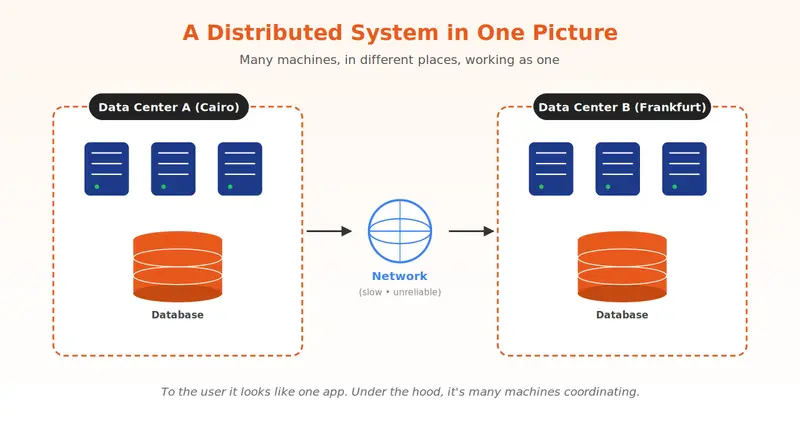
A distributed system is a bunch of computers that work together so that, to the user, they look like one computer.

That’s it. That’s the whole idea.

Think about what happens when you order food on an app. You tap a button. Two hundred milliseconds later you see “Order placed.”

In that 200 ms, this happened behind the scenes:

  • A load balancer picked one of dozens of identical web servers to handle your tap
  • Your request hit a payments service that might literally be in another country
  • The order got written to a database that’s split across many machines
  • A message landed in a queue telling the restaurant’s screen to start beeping
  • A cache somewhere updated so the next person sees the right available stock

A whole little conversation between machines. You saw one button. They had a committee meeting.

That conversation — coordinating many independent machines to behave like one trustworthy system — is the entire field of distributed systems. And it is genuinely hard.

Why don’t we just… not?

Fair question. One machine is way simpler. So why does anyone leave?

Three reasons:

1. Scale. One machine has a ceiling. Best CPU, max RAM, fastest disk — there’s still a top. The moment your traffic punches through it, your only move is more machines.

2. Availability. Single machines die. Hardware fails, kernels panic, somebody trips on a power cable. If your whole app lives on one box, your whole app dies with it. With many, the survivors keep serving.

3. Geography. Light is fast but not infinite. A user in Tokyo hitting a server in Virginia waits roughly 150 ms just for the round trip — before the server does any work. To feel “instant” worldwide, you need machines close to people.

So we go distributed. And in exchange we inherit every problem in the rest of this article. Distribution is not free. You’re trading simplicity for capability.

Now, the challenges.

Challenge 1: The network is a liar


Inside one process, when you call a method, it works. The CPU doesn’t “lose” your function call. Methods don’t sometimes arrive twice. Life is sane.

The network is not sane.

The moment your code talks to another machine, your message can be:

  • Lost — never arrives, no error, no nothing
  • Delayed — arrives five seconds after you gave up waiting
  • Duplicated — the same request lands twice (and your “charge the credit card” endpoint runs twice 🙃)
  • Out of order — request #2 arrives before request #1

There’s a famous thought experiment called the Two Generals Problem: two generals on opposite hills need to attack at the same time. They send messengers through enemy territory. The brutal twist: there is mathematically no way for both to be 100% sure the other one got the message. Not “hard.” Actually impossible.

That’s the network. Every cross-machine call lives with that uncertainty.

Here’s what this looks like in practice. The bad version we’ve all written:

// Pretending the network is reliable. It isn't.
var result = await _httpClient.GetAsync("/api/orders/42");
var order = await result.Content.ReadFromJsonAsync<Order>();

The version that respects reality:

try
{
    using var cts = new CancellationTokenSource(TimeSpan.FromSeconds(3));
    var result = await _httpClient.GetAsync("/api/orders/42", cts.Token);
    result.EnsureSuccessStatusCode();
    return await result.Content.ReadFromJsonAsync<Order>();
}
catch (TaskCanceledException)   { /* timed out — now what? retry? fail? */ }
catch (HttpRequestException)    { /* the connection died — same question */ }

Notice the comments. The catch blocks aren’t really about logging — they’re about decisions. Do I retry? How many times? If I retry a “charge card” call, am I charging twice?

We’ll spend a whole article on this later — timeouts, retries with backoff, idempotency keys, circuit breakers. The toolbox for living with a lying network.

For now, the takeaway is just: the network will betray you. Code defensively.

Challenge 2: Many copies, one truth

Okay, so now you’ve got many machines holding your data. That’s great — if one dies, the others still have it. But it creates a new problem nobody warned you about.

If I write X = 5 to machine A, and you read X from machine B before A has told B about the change, what do you see?

The old value? The new one? An error? Pick one and you have to live with the consequences.

The standard solution is a pattern called leader-follower replication, and underneath it sits a family of algorithms called consensus — Paxos, Raft, Zab. Different names, same vibe:

  1. One node is elected the leader. Everybody agrees on who it is.
  2. All writes go through the leader. No exceptions.
  3. The leader writes the change to its own log, then ships it to all followers.
  4. The leader waits until the majority of followers say “yep, got it.”
  5. Then it commits and tells the client “done.”

That “majority” rule is the magic. It’s called a quorum, and it guarantees that two conflicting decisions can never both win — even when some machines crash, even when the network is being weird.

The cool part? You’re already using this. You just don’t think about it:

  • SQL Server Always On availability groups → leader-follower
  • PostgreSQL streaming replication → leader-follower
  • MongoDB replica sets → leader-follower
  • Kafka ISR (in-sync replicas) → leader-follower-ish

Same picture, different sticker.

Challenge 3: How do you grow?


Traffic doubles. Then doubles again. You have two moves:

Scale up (vertical) — make the machine bigger. More CPU, more RAM, faster disk. Your code doesn’t change at all. Easy.

The downside? There’s a biggest machine on Earth, and you can hit it. Also, no matter how huge it is, it’s still one machine. When it dies, everything goes with it.

Scale out (horizontal) — add more machines and split the work across them. Growth is basically unlimited. One dies? The others shrug and keep going.

The downside? Now your code has to handle coordination. State, sessions, locks, ordering — all the things that were free on one machine now need real engineering.

For an ASP.NET MVC app, scaling out usually means three things:

Web tier: run many copies of your app behind a load balancer. Easy if your controllers are stateless. The classic gotcha is in-memory session — works perfectly with one server, breaks horribly with two. The fix:

// Program.cs — sessions that survive across many instances
builder.Services.AddStackExchangeRedisCache(o =>
{
    o.Configuration = builder.Configuration.GetConnectionString("Redis");
});
builder.Services.AddSession();
// Now any web server can serve any user, any time.

Service tier: break the monolith into smaller services that scale independently. Maybe payments needs 10× the instances and search needs 2×. You can’t do that when they’re all one app.

Data tier: read replicas for read-heavy workloads, and partitioning for write-heavy ones — which is the next challenge.

Challenge 4: When the load isn’t fair


So your data outgrew one machine. You split it across many — this is called partitioning (or sharding, same thing). A router decides which machine handles which request, usually by hashing some key like userId.

Beautiful. In theory.

In practice, here’s what happens. You shard your users across three partitions. Then one influencer with 50 million followers does a livestream. Every request involving that user — their profile, their feed, their comments, their everything — slams partition #2. Partition #1 is bored. Partition #3 is napping. Partition #2 is on fire.

This is the hot partition problem, and it’s one of the most common ways distributed systems fail in production. Not because the total load is too high. Because the load is uneven.

How do you fix it? A few moves:

  • Pick a high-cardinality key. userId is great. country is terrible (good luck when one country has 90% of your traffic).
  • Hash the key. Don’t shard by userId directly — shard by hash(userId). The hash spreads things out evenly.
  • Split the hot keys. For known whales, write their data across sub-partitions (userId#1, userId#2, …). This is called write-sharding.
  • Put a cache in front. Hot reads never even hit the database.

We’ll dedicate a whole article to this — consistent hashing, range vs. hash sharding, the nightmare joy of rebalancing data while the system is still serving traffic. It’s a deep topic.

Challenge 5: Testing this stuff is genuinely brutal

A bug in a regular app is a bug. A bug in a distributed system is a bug that:

  • Only shows up under load
  • Only on machine #17
  • Only after it’s been running for 11 days
  • Only when the network adds 200 ms of latency
  • At 3 AM
  • During a holiday

This is why people obsess over the testing pyramid:

  • Many unit tests at the bottom. Fast, pure logic, no I/O. xUnit or NUnit. They run in milliseconds. They catch the dumb stuff before it leaves your laptop.
  • Some integration tests in the middle. Your code talking to a real database, a real cache, a real queue. Slower, more useful.
  • A few end-to-end tests at the top. The whole system, real browser, real network. Playwright is the go-to. Slow, expensive, but they catch the things nothing else can.

The ratio matters. 70/20/10 is a healthy default. Flip it (lots of E2E, few units) and your build takes 45 minutes and everyone gives up on running tests.

A really clean trick in .NET is TestContainers — it spins up actual SQL Server, Redis, Kafka, whatever, in Docker, just for your test run:

var db = new MsSqlBuilder()
    .WithImage("mcr.microsoft.com/mssql/server:2022-latest")
    .Build();

await db.StartAsync();
// Run integration tests against a *real* SQL Server.
// When tests finish, the container disappears.

No more “works on my machine because I have SQL Server installed but Jenkins doesn’t.”

And beyond normal tests, distributed systems need chaos testing — deliberately killing nodes, dropping packets, freezing clocks. Netflix made this famous with Chaos Monkey. We’ll cover it in the resilience article.

Challenge 6: Shipping is half the job

Here’s the thing nobody tells you when you start: writing the code is maybe half the work. The other half is keeping it running 24/7 across all those machines.

You need three things working together:

A CI/CD pipeline. Every commit gets built, tested, packaged into a container, and deployed automatically. GitHub Actions, Azure DevOps, GitLab CI — pick one. The rule is: humans are not allowed to SSH into production and “just fix it.” That way lies madness.

Observability — the three pillars. When something breaks in production at 2 AM, you need to know what broke and why, fast:

  • Logs — what happened. Use Serilog with structured JSON output, not Console.WriteLine.
  • Metrics — numbers over time. CPU, requests per second, error rate, p95 latency. Prometheus, Datadog, Application Insights.
  • Traces — one user request followed across every service it touched. OpenTelemetry is the standard.

The OpenTelemetry setup is honestly absurd how easy it is:

// Program.cs — distributed tracing in three lines
builder.Services.AddOpenTelemetry()
    .WithTracing(t => t
        .AddAspNetCoreInstrumentation()
        .AddHttpClientInstrumentation()
        .AddSqlClientInstrumentation()
        .AddOtlpExporter());

Now every request through your MVC app produces a trace that shows every outgoing HTTP call and SQL query, with timings. When someone complains “the page is slow,” you stop guessing and start looking.

Alerting and on-call. Metrics are useless if nobody’s watching. You set thresholds, route alerts to Slack / PagerDuty / Opsgenie, and someone is on call to respond. This is honestly more of a culture problem than a tech problem, but we’ll get into it.

Quick recap

Six challenges. None of them go away. All of them are solvable.

# Challenge In one sentence
1 Unreliable network Messages can be lost, delayed, duplicated, or reordered.
2 Replication & consensus Many copies of the data have to agree on what’s true.
3 Scalability Bigger box is easy but limited; more boxes is unlimited but hard.
4 Partitioning & hot spots Splitting data only works if the traffic splits evenly too.
5 Testing Bugs hide in timing and failure. Use the pyramid.
6 Operations & observability You can’t fix what you can’t see.

The honest summary: distributed systems aren’t magic, they’re just a long list of trade-offs. Once you see the trade-offs clearly, the technology choices start making sense.

What’s next

Next article we dig into communication between services — synchronous (REST, gRPC) vs. asynchronous (queues and events). When to use which, and we’ll build a small ASP.NET MVC app that uses both.

After that: data and storage, the CAP theorem (without the confusing diagrams), resilience patterns, and observability in depth.

If something in this article felt fuzzy — good. That means we have something to dig into. Drop a comment with the challenge you want explored first and I’ll bump it up the queue.

See you in part 2. 👋

Follow the series for more — every article = simple language, lots of diagrams, small .NET examples.





I built a free debugger because Next.js 16 ‘use cache’ was completely invisible during development

I spent an afternoon debugging a component that kept re-fetching on every single request.

It had 'use cache' right there in the code. I was confident it was working. It wasn’t.

The problem was placement. 'use cache' was on the wrapper function, not inside the actual data function. That one mistake makes Next.js ignore the directive entirely. No error, no warning, nothing in the terminal. Just a function running on every request when it should have been cached.

Another time I wrote this in a Server Action during a Next.js 16 migration:

revalidateTag('products')

It compiled. It deployed. Pages stopped reflecting mutations. Calling revalidateTag without a second argument is a TypeScript error in Next.js 16, but the runtime fell back to legacy behaviour silently. I only caught it when users started reporting stale data.

Next.js 16’s new caching model is genuinely great. But during development it is a complete black box. You add the directive, you assume it works, and you only find out otherwise when something breaks in production.

So I built a small dev-only toolkit to make it visible.

What it catches

1. Silent cache misses

If a function runs more than once with identical arguments, you see this immediately:

[cache-debug] ⚠  POSSIBLE CACHE MISS - RE-EXECUTION WITH SAME ARGS
  fn:   getProductById
  args: ["prod-123"]
  This function ran 2 times with identical args.
  If you expect caching: check 'use cache' is inside this function, not the wrapper.

That warning would have saved me that entire afternoon.

2. Dynamic holes from short cacheLife

cacheLife('seconds') silently excludes a component from the PPR static shell. It becomes fully dynamic. No warning anywhere, just a slower page that you cannot explain.

[cache-debug] ⚡ DYNAMIC HOLE WARNING
  fn:       getLivePrice
  cacheLife 'seconds' is short-lived (< 5 minutes or revalidate: 0).
  Next.js 16 automatically EXCLUDES this from the PPR static shell.
  This function will run at request time, it is NOT prerendered.
  Fix: Use 'minutes' or longer if you want it in the static shell.

3. Missing cacheTag

A cached function with no cacheTag() can only expire by time. You cannot revalidate it on demand. Easy to miss when moving fast, painful to discover later.

[cache-debug] 🏷  MISSING cacheTag WARNING
  fn:   getProductById
  No cacheTag() found. This function cannot be invalidated on demand.
  It will only expire when cacheLife runs out.
  Fix: Add cacheTag('your-tag') inside the function.

4. Deprecated revalidateTag

In Next.js 16, revalidateTag('tag') without a second argument is a TypeScript error. The logInvalidation helper catches it before your CI does:

[cache-debug] ✗  DEPRECATED revalidateTag - MISSING SECOND ARG
  tag:     products
  revalidateTag('products') without a profile is deprecated in Next.js 16.
  Fix: revalidateTag('products', 'max')

5. updateTag outside a Server Action

Calling updateTag outside a Server Action throws at runtime. The toolkit catches it at dev time before it reaches production.

6. Repeated fetches

detectRepeatedFetch surfaces the same URL being hit multiple times in one render. Usually means a cache layer is missing entirely.

How to use it

Step 1: Enable in .env.local

CACHE_DEBUG=true

Do not add this to .env.production. The NODE_ENV guard already ensures it is off in production, but keeping env files clean is good practice.

Step 2: Wrap your cached functions

The 'use cache' directive must stay inside the original function. withCacheDebug is a regular wrapper and cannot be a cache boundary. If you put 'use cache' on the wrapper, the instrumentation gets cached instead of the data function, which is exactly the mistake the POSSIBLE CACHE MISS warning is designed to catch.

import { cacheLife, cacheTag } from "next/cache";
import { withCacheDebug } from "@/lib/cache-debug";

async function _getProductById(id: string) {
  "use cache";
  cacheLife("hours");
  cacheTag(`product-${id}`, "products");
  return db.query("SELECT * FROM products WHERE id = $1", [id]);
}

export const getProductById = withCacheDebug(_getProductById, {
  name: "getProductById",
  cacheLife: "hours",
  tags: ["product-{id}", "products"],
});

const product = await getProductById("prod-123");

Zero API change. The exported function works exactly the same everywhere you already call it.

Step 3: Log invalidation calls in Server Actions

"use server";
import { revalidateTag, updateTag } from "next/cache";
import { logInvalidation } from "@/lib/cache-debug";

export async function updateProductPrice(id: string, newPrice: number) {
  await db.query("UPDATE products SET price = $1 WHERE id = $2", [newPrice, id]);

  logInvalidation("updateTag", `product-${id}`, {
    isServerAction: true,
    context: "admin price update",
  });
  updateTag(`product-${id}`);

  logInvalidation("revalidateTag", "products", {
    profile: "max",
    isServerAction: true,
    context: "admin price update",
  });
  revalidateTag("products", "max");
}

Honest limitations

  • Process-scoped. Execution maps reset on cold start. In serverless environments each invocation may be a fresh process, so you will only see re-execution data within the same warm instance. For local dev with a long-running server it works exactly as intended.
  • Best-effort concurrency. Under concurrent rendering with identical args, both calls may log FIRST RUN rather than a miss. Detection does not affect correctness.
  • Cannot inspect Next.js internals. The debugger counts executions to detect likely misses. It cannot read Next.js’s internal cache store directly.

None of these affect production because the tool is not present there.

At a glance

What it detects Without this tool
FIRST RUN / CACHE MISS / NEW KEY Not visible
Dynamic hole from short cacheLife Not visible
Missing cacheTag Not visible
Deprecated revalidateTag TypeScript error, easy to miss
updateTag outside Server Action Runtime throw
Repeated fetches in one render Not visible

Zero external dependencies. TypeScript 5.0+ with strict mode. Next.js 16 only — updateTag does not exist in Next.js 15. Double-gated on NODE_ENV === 'development' AND CACHE_DEBUG=true so nothing ships to production. No overhead, no bundle impact.

Get it

Free forever, one .tsx file: shubhra.dev/snippets/nextjs-use-cache-debugger

If you want the production enforcement layer that pairs with this — type-safe tag registry, safeRevalidate that blocks the deprecated single-arg call at compile time, serverActionInvalidate that enforces the correct invalidation order — that is the Cache Pro Kit.

If you are new to the Next.js 16 caching model and want to understand what 'use cache', cacheLife, and cacheTag are actually doing before using this toolkit, the practical migration guide covers the full picture. There is also a 15-question quiz if you want to test your understanding.

If you are in the middle of a Next.js 16 caching migration and something is behaving unexpectedly, this will make it visible. What has been the most frustrating or confusing part of the new caching model for you?

Why your Stripe webhook might be silently dropping events (and how to find out)

If you process Stripe subscriptions and have never opened Workbench → Webhooks → Event deliveries (or the older Developers → Webhooks → Attempts view), there’s a chance you have failed deliveries from the last 30 days you don’t know about. This is worth checking, so let’s go through what to look for.

How Stripe delivers events

When a customer’s payment fails, Stripe sends a POST to your webhook endpoint with an invoice.payment_failed event. Here’s what happens next:

  • Your endpoint should quickly return a 2xx response. Stripe doesn’t publish an exact timeout in seconds, but the docs say “quickly return 2xx prior to any complex logic”.
  • If you time out, return non-2xx, or the endpoint is unreachable, Stripe marks the attempt as failed. Any non-2xx triggers retries, including 4xx — a common myth is that Stripe only retries on 5xx, but the docs say “if your endpoint previously replied with a non-2xx status code”.
  • Retries happen with exponential backoff. In live mode, for up to 3 days. In sandbox/test mode, 3 attempts over a few hours. Stripe doesn’t publish the exact retry schedule in the docs, but in practice it works out to roughly 16 attempts across those 3 days (first retry within an hour, then ~12 hours, then daily). You can see the next scheduled retry per event in the Event deliveries tab.
  • After ~3 days of continuous failures, Stripe disables your endpoint automatically and emails you. After disabling, new events are not delivered to that endpoint at all until you re-enable it. This is the single biggest source of “tiny drops” turning into “we lost a whole week of payment_failed events” — the retries didn’t just expire, the endpoint went dark.
  • If all retries fail across the 3-day window (but the endpoint is still active), the event is not lost: you can manually resend it within 30 days via Stripe CLI, or within 15 days via Dashboard.

The catch: “not lost” only works if you know the event came in and was failed. If you don’t check Event deliveries regularly, you find out about misses when a customer messages “why did you charge me, I cancelled a month ago” or when a monthly churn audit shows a hole in your MRR.

What actually causes events to get lost

Something I underestimated at first: Stripe retries for 3 days. That means a short 30-second deploy window on its own won’t cause loss. Stripe will try again in an hour, in a few hours, the next day. You have a huge window to get the endpoint back up.

Real losses come from persistent problems that outlast the retry window — or worse, problems that get the endpoint auto-disabled. Here they are:

1. Endpoint persistently broken. Most common in my experience. For example, you rotated the Stripe webhook secret on your app side but didn’t update it in the Stripe Dashboard. Every event arrives, signature verify fails, you return 400. Over 3 days, all retry attempts fail the same way, then Stripe disables the endpoint. After that, new events stop coming entirely. If you’re not looking at Event deliveries, you don’t find out until someone complains.

2. Firewall blocking Stripe IPs. Cloudflare WAF, AWS security groups, corporate firewalls — any of them can start dropping legitimate Stripe requests after a rules change. Stripe sends requests from a pool of IP addresses that changes over time. If you accidentally whitelisted only the old set, new IPs start receiving 403, and you don’t see it. Stripe itself recommends against relying on IP allowlisting alone for this reason, and pairs it with signature verification.

3. Endpoint URL changed. You moved from /api/webhook to /v2/webhook or switched domains, but didn’t update the URL in Stripe Dashboard. All events go to the old URL, get 404, retry for 3 days, endpoint gets disabled. I’ve watched a teammate ship this exact change on a Friday afternoon and find out on Monday.

4. Endpoint disabled or deleted at the moment of retry. If your endpoint is disabled or deleted when Stripe attempts a retry, that specific event is dropped. The nuance: if you disable and then re-enable the endpoint before the next retry attempt, future retries continue normally. The real risk is being disabled across the entire retry window — for example, you manually disabled an endpoint to fix something and forgot to turn it back on.

5. Sustained DB connection pool exhaustion. Not a one-minute spike, but constant load where the handler regularly waits for a DB connection longer than Stripe’s timeout. If that happens for more than 3 days, events drop and the endpoint gets auto-disabled. Short-term exhaustion is usually covered by retry.

Short deploy windows and one-off OOM kills rarely cause loss precisely because the retry window is long. The dangerous ones are persistent problems your health checks don’t catch — especially the ones that escalate into auto-disable.

How to check how much you’re losing

Workbench → Webhooks → pick a specific endpoint → Event deliveries tab. (If you’re still on the older Developers Dashboard, it’s Developers → Webhooks → your endpoint → Attempts. Stripe is migrating everyone to Workbench, but both still work.) You’ll see recent delivery attempts with success/failed status and response codes.

What to look for:

  • failed status over the last 30 days
  • Grouped by event type — which events fail more often
  • Time pattern — are fails clustered during deploy windows?
  • Any “endpoint disabled” notification emails sitting in your inbox that you ignored

Next, compare against your own log of received webhooks. If you’re not logging each webhook receipt separately, start now. Minimal middleware:

app.post('/webhook/stripe', (req, res) => {
  console.log('webhook received', {
    event_id: req.body.id,
    event_type: req.body.type,
    livemode: req.body.livemode,
    received_at: new Date().toISOString()
  })
  // ... handler
})

A week later, compare event counts in Stripe Dashboard vs your log. The diff is your drop rate. If it’s zero, great. If it’s non-zero, you now have a concrete number and a list of specific event_ids that got dropped, and you can dig into why.

What to do to stop losing events

The main pattern: ACK fast, process async. Your webhook handler should do the minimum work and return 200 immediately. Heavy processing goes into a background queue.

app.post('/webhook/stripe', async (req, res) => {
  // 1. verify signature
  const event = stripe.webhooks.constructEvent(
    req.rawBody,
    req.headers['stripe-signature'],
    process.env.STRIPE_WEBHOOK_SECRET
  )

  // 2. persist for idempotency (event.id is the right key — Stripe
  //    explicitly recommends "logging the event IDs you've processed"
  //    to guard against duplicates from retries and manual resends)
  await db.insert(stripe_events).values({
    id: event.id,
    type: event.type,
    payload: event,
    received_at: new Date()
  }).onConflictDoNothing()

  // 3. enqueue and respond immediately
  await queue.add('process-stripe-event', { event_id: event.id })

  res.status(200).send('ok')
})

What this gives you:

  • The handler returns 200 in milliseconds
  • Even if downstream processing falls over in the queue, the event is in your DB
  • Using event.id as the idempotency key lets you safely replay

Replay missed events. If you find failed events in the Dashboard, two ways to resend them:

  • Dashboard: open a specific event → Resend button. Available for 15 days after the event is created.
  • Stripe CLI: stripe events resend <event_id> --webhook-endpoint=<endpoint_id>. Available for 30 days after the event is created.

Important nuance from the Stripe docs: a manual resend does not cancel the automatic Stripe retry cycle. So your endpoint may receive the same event twice, once from Stripe’s retry, once from your manual resend. That’s why an idempotency check on event.id is mandatory.

Reconcile via the Events API. Stripe itself recommends not relying solely on webhook delivery for critical data, and has a dedicated guide for this called Process undelivered webhook events. The pattern: periodically call the List Events API filtered by event type and time window, and compare against what your DB has. For example, to find invoice.payment_failed events in a window:

GET /v1/events?type=invoice.payment_failed&created[gte]=<unix_ts>&created[lt]=<unix_ts>

This is more reliable than hoping every webhook made it through. For a production billing system, running this nightly as a safety net is cheap insurance.

Email notifications about failures. Stripe already sends these automatically when your endpoint is failing or gets disabled — you don’t need to enable anything. What you do need to check:

  • That those emails are going to a human who actually reads them (Settings → Team and Security)
  • That they’re not silently routed to spam
  • That the recipient knows what to do when one arrives

I’ve seen teams where the webhook-failure emails were going to a shared noreply@ inbox no one had opened in 8 months.

Optional: independent alerting. On top of Stripe’s emails, you can:

  • Run a third-party health check (UptimeRobot, Better Stack) on the webhook URL itself for response time.
  • Push your own webhook-received metric to Datadog/Grafana and alert when failed_attempts > N in a window.

The point

invoice.payment_failed events matter more than most of your GitHub PRs and Jira issues, yet they usually get the least monitoring. Open Stripe Dashboard now and look at Event deliveries for the last 30 days. If there are failed records you’ve never seen, you have a gap in your data worth closing.

The short version: check your Event deliveries tab, make sure your handler is ACK-fast with async processing and idempotency on event.id, and run a nightly reconcile against the List Events API for the events that matter most. That closes 90% of the nastiest cases where events go silent.

P.S. I’m building a small Telegram bot called devpinger that delivers engineering alerts to one chat — GitHub PRs, CI failures, Jira issues already work; Stripe webhook failures and Sentry alerts are next. MIT, in case it’s useful.