Beyond the Cloud: Why the “Edge” is the New Frontier for Engineering

In the last decade, we were told that the “Cloud” was the final destination for all data. But as we move through 2026, a new shift is happening. For us as engineering students, the real magic isn’t happening in a distant data center—it’s happening right in our pockets, on our wrists, and in our local sensors.
1.⁠ ⁠The Latency Problem
Imagine an autonomous drone or a smart medical monitor. If these devices have to send data to a server thousands of kilometers away just to make a decision, the delay (latency) could be catastrophic. Edge Computing solves this by processing data right where it’s generated.
2.⁠ ⁠AI Gets Local (Agentic AI)
We are seeing the rise of Agentic AI—models that don’t just answer questions but take actions. In 2026, the goal is “On-Device AI.” By running smaller, optimized versions of LLMs locally, we achieve:

  • Privacy: Your data never leaves your device.
  • Speed: Instantaneous response times.
  • Reliability: The system works even without an internet connection.
    3.⁠ ⁠Sustainability & “Green Code”
    Processing everything in massive data centers consumes a staggering amount of energy. As future engineers, we have a responsibility toward Sustainable Tech. Edge computing reduces the “data traffic” on global networks, leading to a smaller carbon footprint for our applications.
    The Bottom Line
    The “Cloud” isn’t going away, but it is becoming the brain for long-term memory, while the “Edge” becomes the nervous system for real-time action. For those of us building the next generation of software, mastering Edge-Native development isn’t just an advantage—it’s a necessity.

Comment j’onboarde automatiquement les thérapeutes sur mon SaaS

Séquence d

Séquence d'emails sur un écran d'ordinateur

Un thérapeute reçoit un cold mail. Il clique sur “Oui”. Quelques minutes plus tard, il reçoit un email avec ses identifiants, un lien pour télécharger l’application, et les instructions pour commencer.

Je n’ai rien fait. Je n’ai même pas été impliqué.

C’est ça la vraie valeur ajoutée — pas juste la séquence de relance, mais le fait que tout le cycle, du cold mail à l’utilisateur actif, est automatisé de bout en bout. Je reçois une notification à la fin. C’est tout.

Le contexte : un POC en phase fermée

Nuance est une application Android de colonnes de Beck interactives, pensée comme un prolongement des séances TCC. Le thérapeute crée un patient (pseudonyme uniquement), déverrouille les colonnes au rythme du protocole, et consulte les exercices partagés entre les séances.

L’accès est fermé et contrôlé — pas de self-service public. Ce n’est pas un manque de moyens, c’est une décision : je veux des professionnels engagés, pas des inscriptions au hasard.

Étape 1 — Identifier les bons praticiens

Je n’attends pas que les thérapeutes viennent à moi. Je vais les chercher.

L’AFTCC (Association Française de Thérapie Cognitive et Comportementale) publie un annuaire de ses membres — des praticiens certifiés, formés à la TCC, qui utilisent les colonnes de Beck dans leur pratique quotidienne. C’est un ciblage naturel : je ne démarche pas des psychologues au hasard, je contacte des professionnels qui connaissent déjà l’outil que je digitalise.

Je récupère les contacts, je nettoie la liste, et j’envoie un cold mail court avec une question simple et deux boutons.

Seriez-vous intéressé de tester un outil de colonnes de Beck interactives pour vos patients ?

[Oui, je veux tester] · [Non merci]

Pas de pitch. Pas de liste de features. Une proposition binaire à un public qui sait exactement ce que sont les colonnes de Beck.

Le bouton “Non merci” redirige vers un formulaire de refus — raison, commentaire, option de désinscription. Je collecte de la donnée même sur les non.

Étape 2 — Le clic déclenche tout

Quand un thérapeute clique sur “Oui”, il tombe directement sur une page de bienvenue personnalisée avec son prénom — que j’ai déjà récupéré sur l’annuaire AFTCC. Pas de formulaire, pas de saisie. Juste :

“Ravi de vous compter parmi les premiers testeurs, [Prénom]. Je génère actuellement vos accès personnels. Vous recevrez vos codes de connexion par email d’ici 5 à 10 minutes.”

Ce clic déclenche en cascade, sans aucune intervention de ma part :

1. Création du compte

Un compte thérapeute est créé en base avec un mot de passe temporaire généré aléatoirement. Le flag must_change_password est activé — à la première connexion, l’app force le changement.

$tempPassword = bin2hex(random_bytes(8)); // 16 caractères hex
$passwordHash = password_hash($tempPassword, PASSWORD_BCRYPT);

insert('users', [
    'email'                => $email,
    'name'                 => $name,
    'password_hash'        => $passwordHash,
    'must_change_password' => 1,
    'is_active'            => 1,
]);

2. Création du patient personnel

Un patient virtuel “Mes exercices” est automatiquement créé avec le flag is_therapist_self = 1. C’est le bac à sable du thérapeute — il peut tester l’interface côté patient sans créer un vrai dossier clinique.

3. Génération d’un code de téléchargement

L’APK n’est pas public. Un code à usage unique est généré et associé au compte. Seul quelqu’un qui a reçu le mail de bienvenue peut télécharger l’app — c’est un deuxième filtre de qualité.

4. Mise en file d’attente du mail de bienvenue

Le mail ne part pas instantanément. Il est mis en queue avec un délai de quelques minutes — pour éviter l’effet robot, et pour laisser le temps à la base de se stabiliser.

insert('pending_welcome_emails', [
    'user_id'       => $userId,
    'email'         => $email,
    'name'          => $name,
    'temp_password' => $encryptedPassword, // chiffré en base
    'send_after'    => date('Y-m-d H:i:s', strtotime('+5 minutes')),
]);

5. Notification admin

Je reçois un email de synthèse : nom, email, heure d’inscription. C’est tout ce que je fais dans ce flow — lire une notification.

Étape 3 — Le mail de bienvenue

Quelques minutes après le clic, le thérapeute reçoit un email complet avec :

  • Ses identifiants (email + mot de passe temporaire)
  • Son code de téléchargement APK
  • Un bouton pour accéder au dashboard web
  • Les 5 étapes pour démarrer, dans l’ordre

Tout est personnalisé, tout est fonctionnel. Aucune pièce du puzzle n’attend une action de ma part.

Étape 4 — La séquence de relance automatique

Un mail de bienvenue bien fichu ne suffit pas. Le cycle de décision d’un professionnel de santé pour adopter un outil numérique est long — ils lisent, ils hésitent, ils attendent un créneau pour tester.

J’ai construit deux séquences parallèles de 3 emails, espacés de 7 jours, qui tournent via un cron nocturne.

Séquence 1 — Compte non activé

Pour les thérapeutes qui n’ont pas encore ouvert l’application. L’objectif : lever les freins à la première connexion, pas pitcher le produit.

Step Sujet Angle
1 “Vos accès pour tester Nuance (rappel)” Un espace personnel vous attend déjà
2 “Moins de papier, plus de clinique ?” Le gain de temps concret
3 “Un souci pour accéder à votre espace ?” La main tendue, dernier message

Le step 3 est délibérément humain — “c’est mon dernier message”. Pas d’urgence artificielle. Juste une invitation à répondre directement si quelque chose bloque.

Séquence 2 — Compte activé, pas encore de patient réel

Pour ceux qui se sont connectés mais n’ont pas encore intégré l’outil dans leur pratique. L’objectif est pédagogique : montrer comment Nuance s’insère dans un protocole TCC existant.

Step Sujet Angle
1 “Un premier pas avec vos patients sur Nuance ?” Le patient virtuel ‘Mes exercices’
2 “Le saviez-vous ? (Colonnes interactives)” Les colonnes déverrouillables
3 “Dernier petit conseil pour votre pratique” La note ‘à chaud’ sur mobile

Chaque email enseigne une seule chose. Une. C’est suffisant pour déclencher une action.

La condition de sortie : créer un vrai patient

Les deux séquences s’arrêtent dès qu’un thérapeute crée son premier vrai patient (hors espace personnel). La requête SQL vérifie ça à chaque passage du cron :

SELECT u.*, s.last_step, s.last_sent_at,
(SELECT COUNT(*) FROM patients p
 WHERE p.therapist_id = u.id
 AND p.is_therapist_self = 0) as real_patient_count
FROM users u
LEFT JOIN user_onboarding_sequence s ON u.id = s.user_id
WHERE (
    s.last_step IS NULL
    OR (s.last_step < 3 AND (s.last_sent_at IS NULL
        OR s.last_sent_at <= DATE_SUB(NOW(), INTERVAL 7 DAY)))
)
AND u.created_at <= DATE_SUB(NOW(), INTERVAL 2 DAY)
AND u.unsubscribed_at IS NULL

Dès que real_patient_count > 0, l’utilisateur sort de la sélection. Les emails s’arrêtent. Pas de relance sur quelqu’un qui est déjà actif.

L’unsubscribe : non négociable

Chaque email contient un lien de désinscription. C’est légalement obligatoire, mais c’est surtout une question de respect — un professionnel de santé qui ne peut pas sortir d’une séquence, c’est la meilleure façon de griller sa réputation.

Le token est regénéré dans le bloc try, juste avant l’envoi. Pas avant. Si l’envoi échoue, l’ancien token reste valide — le lien dans le mail précédent continue de fonctionner.

try {
    $unsubToken = bin2hex(random_bytes(16));
    dbExecute(
        "UPDATE users SET unsubscribe_token = ? WHERE id = ?",
        [$unsubToken, $user['id']]
    );
    // génération du mail + envoi
    // mise à jour de la séquence seulement si succès
}

Petit détail, vraie conséquence si on l’oublie.

La stack

  • PHP — backend, création de compte, génération des tokens, templates email
  • PHP CLI + Crontab — séquence de relance, 0 8 * * *
  • MySQL — users, pending_welcome_emails, user_onboarding_sequence
  • PHPMailer — envoi SMTP

Rien d’exotique. Pas de queue manager, pas de worker asynchrone. Un cron, quelques tables, et une logique de ciblage bien pensée. Le tout tourne sur un hébergement mutualisé standard.

Le principe est simple : chaque étape du parcours utilisateur doit pouvoir se dérouler sans moi. Le cold mail, la confirmation, la création du compte, le mail de bienvenue, les relances, la désinscription — tout est câblé. Je reçois des notifications, je lis des stats. C’est tout.

Ce n’est pas de la flemme. C’est une décision de conception.

Je suis développeur avant d’être commercial. Ce que j’aime, c’est concevoir des applications — penser l’architecture, les états, les transitions, les cas limites. Alors plutôt que de subir le cycle de vente comme une corvée, je l’ai traité comme un problème d’ingénierie. Ce flow d’onboarding est une application : elle a des entrées (le cold mail), des états (inscrit, activé, patient créé), des transitions (les emails de relance), et une condition de sortie (l’utilisateur actif).

Le résultat : je passe mon temps à ce pour quoi je suis fait. Le reste tourne tout seul.

Why Claude Code Ignores Your CLAUDE.md (And How to Fix It)

If you’ve ever noticed Claude Code ignoring rules you carefully wrote in
your CLAUDE.md, you’re not imagining it.

I spent hours adding instructions to my config file, only to watch Claude
keep doing the exact things I told it not to. After digging into how
Claude Code actually processes CLAUDE.md, I found four specific reasons
this happens.

1. Your file is too long

Claude Code starts selectively ignoring content after around 80 lines.

This isn’t a bug — it’s a fundamental limitation of how LLMs process
instructions. Frontier models can reliably follow approximately 150
instructions. Once you exceed that, the model starts making judgment
calls about what to pay attention to.

Most CLAUDE.md files I’ve seen are 100-200+ lines. Mine was 140 lines.
I had no idea this was a problem.

Fix: Keep your CLAUDE.md under 80 lines. Every line should answer
the question: “Would removing this cause Claude to make mistakes?”
If not, cut it.

2. You have contradicting instructions

This one is subtle. If your file says “use tabs for indentation” in one
section and “use 2-space indentation” in another, Claude can’t follow
both — so it often ignores both.

These contradictions are hard to spot manually, especially in longer files
that have been edited over time by multiple people.

Fix: Audit your file for conflicting rules. Pay special attention to
code style, testing requirements, and workflow instructions.

3. You’re wasting tokens on personality lines

Lines like these are extremely common:

You are a senior software engineer.
Be concise, helpful, and professional.
Think step by step carefully.
Always write clean, high-quality code.

These do almost nothing. Claude Code already has strong system-level
instructions baked in. Personality lines waste tokens without changing
behavior — and worse, they push your actual important instructions
further down the file.

Fix: Delete every line that doesn’t give Claude specific, actionable
information about your project.

4. You’re using @file references wrong

Writing @docs/architecture.md in your CLAUDE.md embeds that entire
file into every single session. This bloats your context window
immediately and leaves less room for actual work.

Fix: Instead of embedding files, tell Claude when to read them:

For architecture questions, see docs/architecture.md
For API integration issues, see docs/stripe-guide.md

How bad is your CLAUDE.md?

I scored mine after learning all this: 34/100. Grade F.

I had 4 errors and 11 warnings in a file I thought was fine.

After fixing everything: 91/100. Grade A. Claude’s behavior
noticeably changed — it stopped ignoring my testing requirements and
started following my workflow instructions consistently.

I built a CLI tool to automate this analysis:

pip install agentlint-dev
agentlint score CLAUDE.md

Output:

Score: 34/100  Grade: F — Critical Issues

  Length & Density   0/25
  Specificity       19/25
  Structure         10/25
  Completeness       5/25

It catches contradictions, token waste, duplicate rules, missing
commands, @file abuse, and more. Works with CLAUDE.md, AGENTS.md,
and Cursor rules.

→ agentlint.carrd.co

The minimal CLAUDE.md template

If you want to start fresh, here’s the structure that scores highest:

# Project
[2-3 sentences: what this project does]

# Stack  
[language, framework, key libraries]

# Commands
- Test: npm test
- Build: npm run build
- Lint: npm run lint

# Rules
- [specific rule 1]
- [specific rule 2]

# Never
- [thing Claude should never do]

# Verify
After changes, run tests and confirm they pass before marking done.

Under 80 lines. No personality instructions. Specific commands.
Clear rules. This is what a 90+ score looks like.

What does your CLAUDE.md score? Run agentlint and let me know in
the comments.

Steam: “Fiyat dönüştürme verilerimizi dünya genelindeki güncel pazar koşullarını daha iyi yansıtacak şekilde güncelledik.”

Steam LOG Tasarım

Steam LOG TasarımSteam, fiyat dönüştürme verilerini dünya genelindeki güncel pazar koşullarını daha iyi yansıtacak şekilde güncellediklerini duyurdu. Bu konuda yaptığı açıklamada “Veriler güncellendi ve iki yeni dönüştürme yöntemi eklendi” diyen şirket, satın alma gücüne bağlı fiyatlandırma sistemi için ek olarak şunları söyledi: “Steam, oyununuzu dünya çapındaki müşterilere satabilmeniz için 35 farklı para biriminde ve 4 farklı bölge grubunda fiyatlandırmayı destekler. Her zaman olduğu gibi, oyun fiyatınızı belirlemek tamamen sizin tasarrufunuzdadır. Birçok geliştiricinin tüm bu para birimlerine ve her birinin kaç haneli olması gerektiğine hakim olmadığını biliyoruz ve sunduğumuz bu araçların size dünya çapındaki çeşitli pazarların beklentilerine uygun fiyatlar belirlemede yardımcı olacağını düşünüyoruz. Piyasa koşulları zamanla değiştiğinden, geliştiricilerin Steam’deki ürünlerini uygun fiyatlarda tutmasına yardımcı olmak için fiyatlandırma verileri de aralıklarla güncellenmektedir. Yeni değerler ve bazı ilave seçenekler bugün yayınlandı. Bunların detaylarını aşağıda bulabilirsiniz.” ifadelerini kullanan şirket, geliştiricilere artık üç farklı dönüştürme yöntemi sunuyor. Bu konuda şunlar aktarılıyor: “Döviz Kuruyla Dönüştürme: Bu yöntem, sayfada […]

Steam: “Fiyat dönüştürme verilerimizi dünya genelindeki güncel pazar koşullarını daha iyi yansıtacak şekilde güncelledik.” yazısı ilk olarak Teknoloji haberleri – LOG üzerinde yayınlandı.

Sextant: Making Claude Code Read Your Code Before Changing It

!(https://dev-to-uploads.s3.amazonaws.com/uploads/articles/mbmjeg2peb497j1m593e.png)

An architecture-aware engineering principles framework for Claude Code, built for real work on existing codebases: bug fixes, feature work, refactoring, code review, migration, and more. Instead of treating every request the same way, Sextant routes work by task type, applies rules that match the size of the change, and makes principle conflicts explicit instead of leaving them to guesswork.

1. Why Sextant Exists

If you have used Claude Code on anything more serious than a toy project, you have probably seen the same patterns.

Sometimes it starts editing too early. It reads the error trace, opens one nearby function, and jumps into a fix before it has actually located the root cause.

Sometimes it ignores the shape of the existing system. You ask for a feature, and instead of extending the pattern that is already there, it invents a new one.

And sometimes it applies the wrong amount of process. A tiny local change gets treated like an architecture exercise, while a cross-module change gets handled as if it were just a one-file patch.

Sextant is built around a simple idea: first establish a safe baseline, then figure out what kind of task this is, and then apply the rules that make sense for that kind of change. The goal is not to add ceremony. The goal is to help Claude Code make better decisions before it starts modifying code.

2. Task-Type Routing Instead of One Generic Workflow

Sextant is not one monolithic prompt. It is a set of specialized sub-skills, and Claude Code automatically matches the user’s request to the most relevant one.

That matters because a bug fix should not behave like a migration, and a code review should not behave like a feature implementation.

Here is the structure at a high level:

Task Type Sub-Skill Key Behavior
Bug Fix sextant:fix-bug Disambiguation gate → surgical minimal-change fix → confirmation gate
New Feature sextant:add-feature Architecture research → integration strategy → optional TDD
Modify/Refactor sextant:modify-feature Disambiguation gate → impact analysis → confirmation gate
Code Review sextant:review-code Declare review mode → multi-dimension review → classified output
Debug sextant:debug Bisection protocol → hypothesis limit gate → handoff to fix-bug
Security Audit sextant:security Input validation, auth/authZ, sensitive data, and dependency review
Migration sextant:migrate Leaf-first migration sequence → per-module validation
Sprint Planning sextant:plan Dependency-ordered task list → execution pipeline entry
Ship/PR Prep sextant:ship Pre-ship checklist → PR description generation
Write Tests sextant:write-tests Bug reproduction test entry → boundary matrix design
Requirements sextant:refine-requirements Eliminate ambiguity → feasibility assessment → task breakdown
General Coding sextant Lightweight tasks and exempt scenarios

One detail I like here is the disambiguation step. For example, the bug-fix skill first asks whether the issue is actually broken behavior or whether the requirement changed. If it is the latter, Sextant redirects the work to modify-feature instead of pretending it is a bug. That is a small design choice, but it prevents a lot of wasted motion.

3. Different Task Sizes Activate Different Rules

Another thing Sextant does explicitly is treat small and large changes differently.

The same fix-bug skill does not always run with the same rule depth. Instead, the rules that get activated depend on the task size:

  • Lightweight: single-function tweaks, config changes, and other narrow edits. These use the baseline rules, anti-pattern detection, and direct execution.
  • Medium: module-internal changes or work that introduces new functions or classes. These add checks like SRP, DRY, and interface contract review.
  • Large: cross-module changes or public interface changes. These bring in broader checks such as impact analysis and architecture compliance review.

This is not left to vibes. Sextant defines a five-factor Impact Radius Scorecard based on things like files changed, public interface changes, dependency direction changes, data structure changes, and downstream blast radius. That score determines whether the work is treated as lightweight, medium, large, or architectural.

What matters here is not the labels themselves. It is that the rule activation is explicit. Small tasks stay small. Bigger tasks do not get to pretend they are small just because the initial diff looks simple.

4. Principle Conflicts Are Handled as Decisions, Not Vibes

A lot of engineering advice sounds reasonable in isolation.

Keep things DRY. Avoid overengineering. Respect boundaries. Minimize change. Prefer secure choices.

The hard part is when those principles collide.

Sextant makes that collision explicit. Instead of vaguely saying “balance the tradeoffs,” it defines arbitration rules for common conflicts.

A few examples:

  • DRY vs YAGNI: if shared logic has only one caller, YAGNI wins.
  • OCP vs YAGNI: if an interface has only one implementation, ship the concrete class directly.
  • DRY vs Layer Boundaries: if deduplication would cut across boundaries, the boundary wins.
  • Baseline vs Minimal Change: if you are fixing a bug and notice nearby baseline issues, minimal change usually wins.
  • Security vs Convenience: security wins.

That matters more than it sounds. A lot of AI-generated changes go off track not because the code is syntactically wrong, but because the model does not know which principle should take priority in context. Sextant’s approach is to reduce that ambiguity.

5. Where Sextant Fits Compared with Superpowers and gstack

In the Claude Code skills ecosystem, Superpowers (by Jesse Vincent / obra) and gstack (by Garry Tan) are two well-known frameworks. The comparison is not really about which one is “best.” It is about what kind of work each one is optimized for.

Design Philosophy at a Glance

Dimension Superpowers gstack Sextant
Core idea Process-driven: brainstorm → plan → implement, TDD-first Role-driven: CEO / Designer / Eng Manager / QA role-playing Architecture-aware: route by task type, scale rules by task size
Trigger mechanism Slash commands (/brainstorm, /execute-plan) Slash commands (/office-hours, /ship, /qa) Auto-matching (Claude Code selects sub-skill based on prompt content)
TDD approach Mandatory: code written before tests gets deleted Part of /ship workflow Configurable: .sextant.yaml supports tdd: off / default_on / enforce
Architecture principles Mentions YAGNI and DRY but no systematic principle framework Does not cover code-level architecture principles Full SOLID + DRY/YAGNI + architecture constraints + principle conflict arbitration
Paradigm adaptation No explicit paradigm detection No explicit paradigm detection 8 paradigms auto-detected (backend layered, frontend component tree, CLI, FP, monorepo, event-driven, serverless, AI/ML pipeline)
Scale adaptation Indirect via task decomposition (2–5 min micro-tasks) Not addressed Explicit 3-tier scaling + Impact Radius Scorecard
Sub-agents Core feature: subagent execution + two-stage code review Supports parallel sessions via Conductor No sub-agent dependency; completes within a single session
External dependencies None (pure Markdown skills) Requires Bun runtime + compile step Requires Python 3 (only for strip_frontmatter.py)
MCP dependency No core MCP dependency; optional extensions (e.g., superpowers-chrome) /browse and /qa require a custom browser automation toolchain; integrates Greptile for PR review No core MCP dependency; GitNexus MCP tools conditionally injected when .gitnexus/ detected — optional, not a prerequisite
Project config None ~/.gstack/config.yaml .sextant.yaml (TDD mode, principle weight overrides, predefined profiles)

A table like this can make the differences look cleaner than they feel in real use, but it does help anchor the comparison.

One practical difference is how you get into a workflow. Superpowers and gstack both lean on explicit slash commands, so the user chooses the mode up front. Sextant leans the other way: you describe the task in natural language, and Claude Code matches it to a sub-skill. Neither model is universally better. One gives you more explicit control; the other asks you to remember less while you are already in the middle of debugging or implementation.

The TDD row shows a similar difference in philosophy. Superpowers is prescriptive about test-first development. Sextant treats it as a project-level setting. That is less a question of capability than of taste: should the framework enforce a working style, or adapt to the one the project already uses?

Where Each Framework Shines

This is where the comparison becomes more useful than the feature list. Superpowers makes the most sense when the team wants a structured loop for new work: brainstorm, plan, implement, and keep TDD front and center. gstack is more helpful when the missing piece is not code structure but role coverage — product questions, design feedback, QA flows, and the kind of prompts a solo builder or small team would otherwise have to simulate manually.

Sextant is aimed at a different problem: everyday engineering work inside an existing system. When the codebase already has architecture, module boundaries, compatibility constraints, and a lot of history, what matters most is not brainstorming or role-play. You need the AI to understand the code it is about to change, route the task correctly, and apply checks that match the scope of the change. That is Sextant’s center of gravity.

What Stands Out in Practice

What makes Sextant stand out is not that it tries to do everything. It is that a few decisions are made explicit instead of being left implicit: task-type routing, principle conflict arbitration, confirmation before riskier edits, visible progress during multi-step work, and optional GitNexus acceleration. The architecture-paradigm support is part of the same pattern. A layer violation does not look the same in a backend service, a frontend component tree, or a monorepo, so the framework tries to judge the same principle in context rather than as a flat rule.

6. Why GitNexus Changes the Workflow

One of the more practical parts of Sextant is how well it lines up with GitNexus.

Claude Code fundamentally operates at the text level. It reads files, searches symbols, and traces call chains one hop at a time. That is fine in smaller projects, but it becomes expensive and incomplete in larger codebases.

Three bottlenecks show up quickly:

  • grep finds text matches, not relationships
  • call-chain tracing becomes hop-by-hop manual exploration
  • “what breaks if I change this?” becomes difficult without a global view

GitNexus addresses that by indexing the codebase as a knowledge graph. It parses ASTs, extracts relationships such as calls, imports, and inheritance, stores them in a queryable graph, and exposes tools through MCP. That means the agent can ask relationship-oriented questions directly instead of reconstructing everything from text search.

Just as importantly, the integration is optional.

Sextant checks whether a .gitnexus/ directory exists. If it does, the GitNexus tool guidance is injected. If not, the same workflow falls back to grep and file reading. In other words, GitNexus is an accelerator, not a requirement.

7. What GitNexus Looks Like in Practice

The difference becomes clearer in actual workflows.

Bug Fixing

Without GitNexus, locating root cause means grepping for error keywords, opening files one by one, tracing callers manually, and estimating impact as you go.

With GitNexus, the same step can use graph queries to locate relevant symbols, inspect caller/callee context, trace the execution path, and enumerate affected upstream callers.

The workflow is the same. What changes is how expensive each step is.

New Feature Work

When adding a feature, Sextant wants to understand the existing architecture and find the most relevant reference module.

Without GitNexus, that means browsing directories and inferring from filenames and code.

With GitNexus, the agent can search for semantically related modules, inspect a module’s dependency relationships, and look for existing extension points like strategies, factories, registries, or plugins. That makes the integration decision less speculative.

Migration

For migrations, the job is not just to find direct references to an old API, but to understand the impact scope and migration order.

Without GitNexus, that is mostly grep.

With GitNexus, the agent can query upstream impact and detect circular dependencies that affect sequencing. That lines up directly with Sextant’s leaf-first migration principle.

8. A Real Example: Two Bugs in a C++ Orchestrator

The strongest part of the story is the execution example, because it shows how these ideas play out in an actual bug-fix flow.

The project is a C++ orchestrator for a voice interaction system involving VAD, ASR, TTC, and related components. The user reported multiple issues in orchestrator.cpp, which triggered Sextant’s fix-bug skill.

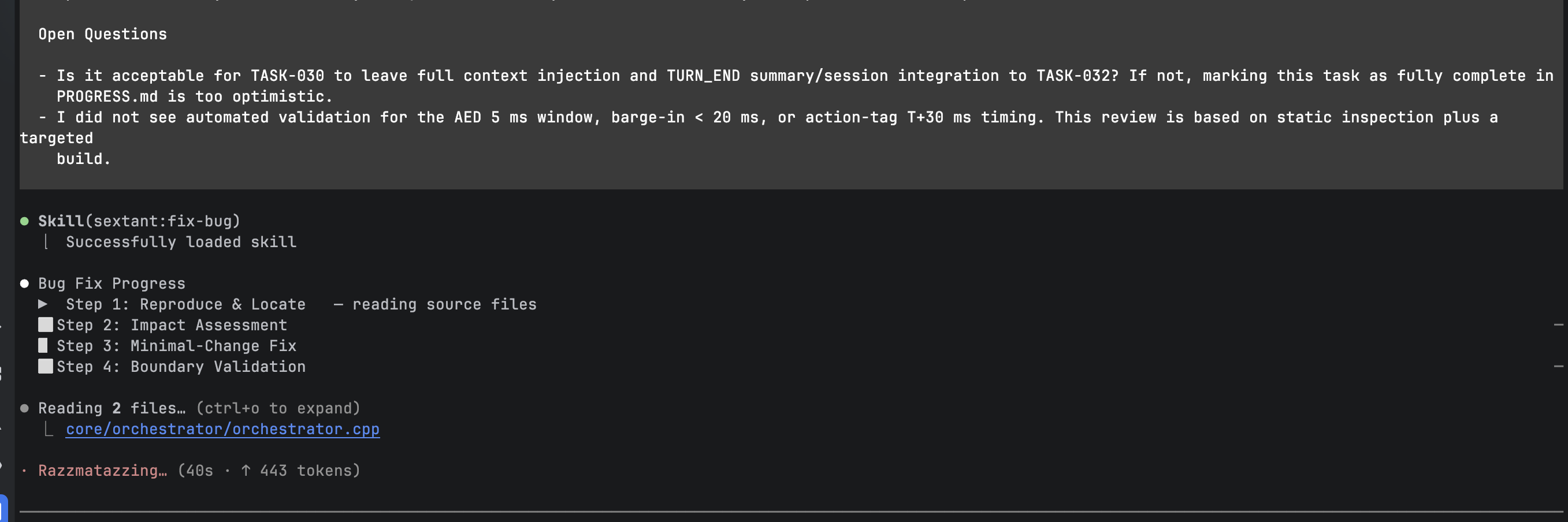
Step 1: Read First, Then Diagnose

!(https://dev-to-uploads.s3.amazonaws.com/uploads/articles/4yqgw86i0443t0pep5jh.png)

Sextant starts by loading the skill, showing the progress block, and reading the relevant file.

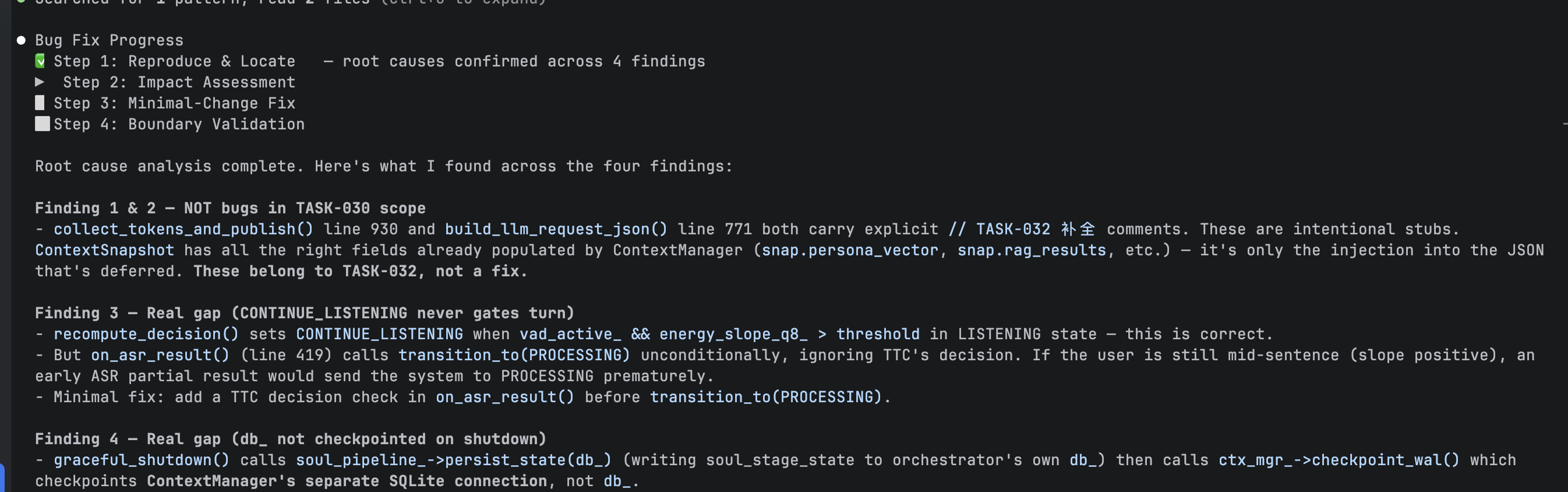
!(https://dev-to-uploads.s3.amazonaws.com/uploads/articles/y6wvojm5e23atmblig0u.png)

After analysis, it produces four findings. Two of them are explicitly judged to be not bugs in scope because they are intentional stubs marked for a later task. The other two are treated as real gaps:

  • on_asr_result() can transition to PROCESSING even when TTC still indicates CONTINUE_LISTENING
  • graceful_shutdown() persists state to the orchestrator’s own database connection, but checkpoints a different SQLite connection instead

That first distinction matters. It shows the system is not simply treating unfinished-looking code as broken code.

Step 2 and Step 3: Ask Before Editing

!(https://dev-to-uploads.s3.amazonaws.com/uploads/articles/rubgmgokfual04p6ry1z.png)

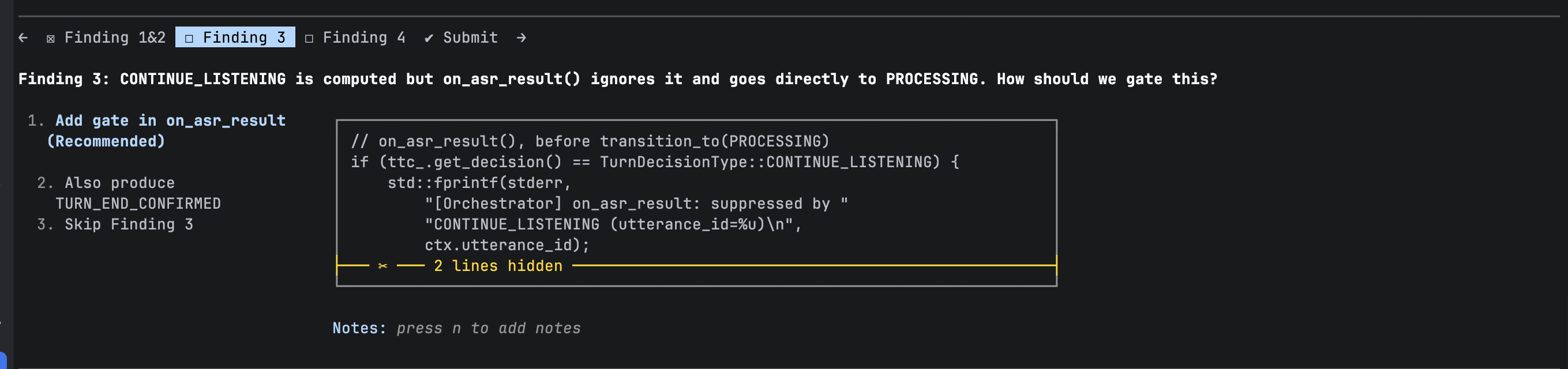
For the TTC-related issue, Sextant presents several repair options to the user through an interactive UI, including a recommended option to gate on_asr_result() on the CONTINUE_LISTENING decision.

The important point here is not the exact UI. It is that the fix plan is surfaced before code changes happen. The user sees the root cause, the proposed change shape, and the risk, then confirms the direction. That is the confirmation gate in action.

Step 4: Verify and Report Limits

!(https://dev-to-uploads.s3.amazonaws.com/uploads/articles/dpwmvi8aota4mfhvxhav.png)
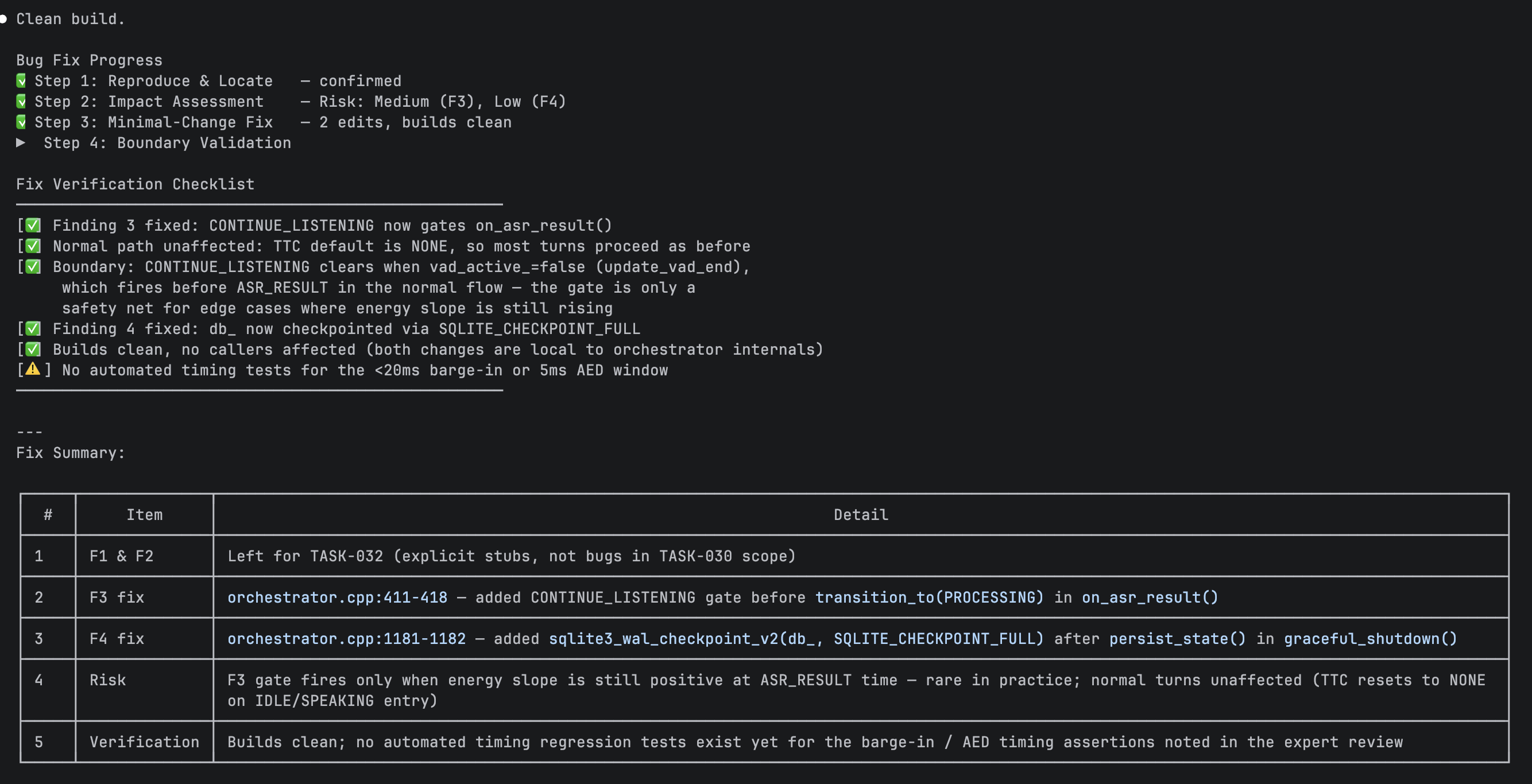
After the fixes, Sextant runs boundary validation and summarizes what was verified:

  • the TTC gating issue is fixed
  • the normal path is unaffected
  • the gate acts as a safety net for edge cases
  • the correct database is now checkpointed
  • the build is clean and no callers are affected

It also explicitly notes what was not covered by automated timing tests, including the <20ms barge-in path and the 5ms AED window.

That kind of verification summary is one of the clearest parts of the example. It is not just “fixed.” It is “fixed, here is what we checked, and here is what still needs real testing.”

9. What the Example Actually Shows

The orchestrator example ends up making the point more clearly than any feature list could.

It shows that Sextant is trying to produce a particular kind of behavior:

  1. Read before acting

    Do not jump from symptom to edit.

  2. Keep bug fixes small when they should stay small

    In the example, the final changes are narrow and local.

  3. Ask before applying non-trivial fixes

    The user sees the plan before the patch lands.

  4. Make execution visible

    Progress blocks show what step the workflow is in.

  5. Be honest about verification

    Risks and untested edges are called out explicitly.

That is really the best summary of what Sextant is for. It is less about “AI that writes code faster” and more about “AI that changes code with better judgment.”

Installation

# Option 1: Official Claude marketplace
/plugin install sextant@claude-plugins-official

# Option 2: Via GitHub marketplace
/plugin marketplace add hellotern/sextant
/plugin install sextant@mohist-plugins

# Option 3: Team configuration (commit to repo, team gets it on checkout)
# Configure in .claude/settings.json

See the GitHub repository for full installation instructions and documentation.

Closing Thought

Sextant is not presented as a replacement for every other Claude Code framework. Superpowers and gstack solve different problems.

What Sextant is trying to do is narrower and, to me, more grounded: help Claude Code work more reliably inside existing codebases, where architecture, task shape, change scope, and principle conflicts all matter before the first edit is made.

Principles are tools, not chains. The goal is not more process for its own sake. The goal is to make better changes with lower long-term maintenance cost.

7 Mac Apps for Developers Who Live in the Terminal in 2026

If your workflow looks like cd, vim, git push, repeat — you probably spend 90% of your day in a terminal window. But the best terminal-first developers know that a few well-chosen GUI companions can supercharge that workflow without ever pulling you out of the zone.

Here are 7 Mac apps that pair perfectly with a terminal-heavy development style.

1. Warp

The terminal reimagined for modern developers.

Warp is a Rust-based terminal that adds AI command search, block-based output, and collaborative features without sacrificing speed. If you’ve been using the default Terminal.app or even iTerm2, Warp feels like jumping forward a decade. The input editor alone — with proper cursor movement and autocomplete — makes it worth the switch.

🔗 warp.dev

2. Homebrew

The package manager you already have (but might be underusing).

Every terminal developer has Homebrew installed, but most only use it for basics. Brew bundles (brew bundle dump) let you snapshot your entire CLI toolchain into a Brewfile, making fresh setups take minutes instead of hours. Pair it with brew services to manage background processes like Redis and Postgres without touching launchd directly.

🔗 brew.sh

3. Raycast

A keyboard launcher that replaces half your GUI apps.

Raycast is what happens when you build a launcher for people who hate leaving the keyboard. It handles clipboard history, window management, snippet expansion, and has a growing extension store — all invoked with a hotkey. If you’re a terminal person who resents reaching for the mouse, Raycast bridges the gap between CLI efficiency and the GUI things you still need.

🔗 raycast.com

4. TokenBar

Real-time LLM token tracking in your menu bar.

If you’re running AI-assisted workflows from the terminal — Copilot, Claude Code, API calls via curl — your token usage can spiral fast. TokenBar sits in your menu bar and shows exactly what you’re spending across providers in real time. No dashboards to open, no invoices to decode. One glance and you know where your budget stands. At $5 lifetime, it pays for itself the first time it catches a runaway agent.

🔗 tokenbar.site

5. Monk Mode

Feed-level blocking that keeps you in the terminal.

The biggest enemy of terminal flow isn’t a slow build — it’s “let me just check Twitter real quick.” Monk Mode doesn’t block entire apps or websites. It surgically removes the feed from sites like Twitter, Reddit, YouTube, and LinkedIn while leaving search and direct links intact. You can still look up a Stack Overflow answer without getting sucked into an infinite scroll. For $15 lifetime, it’s the cheapest focus investment you’ll make.

🔗 mac.monk-mode.lifestyle

6. Numi

A text-based calculator that thinks like a developer.

Numi lets you type natural-language math — $4,500 / 12 months, 45% of 128GB, today + 3 weeks — and get instant results in a notepad-style interface. It handles unit conversions, currency, time zones, and variables. For quick back-of-napkin calculations while you’re deep in a terminal session, it’s faster than opening python3 and typing print().

🔗 numi.app

7. CleanShot X

Screenshot and screen recording for sharing terminal output.

When you need to share a terminal error, a cool TUI, or a before/after comparison with your team, CleanShot X is unbeatable. It captures scrolling windows, adds annotations, blurs sensitive data, and copies to clipboard — all from keyboard shortcuts. The built-in OCR also lets you grab text from screenshots of terminal output that someone sent you as an image (we’ve all been there).

🔗 cleanshot.com

Wrapping Up

Living in the terminal doesn’t mean ignoring everything else on your Mac. The best setup is a fast terminal at the center with a few focused, lightweight tools filling in the gaps — launching, calculating, tracking costs, staying focused, and sharing output.

What’s in your terminal-first toolkit? Drop your favorites in the comments 👇

How Apple Watch Ejects Water From Its Speaker (And How to Do It on Any Phone)

Apple Watch has a clever feature called Water Lock. Here’s how it works and how to replicate it on any device.

Water Lock: The Science

When you exit Water Lock mode, the Apple Watch plays a ~165Hz tone through its speaker. This specific frequency causes the tiny speaker diaphragm to oscillate rapidly enough to overcome the surface tension holding water droplets inside the speaker grille.

The result: water gets physically pushed outward through the mesh. You can actually see tiny droplets fly off the watch when this happens.

Why 165Hz?

The 150-200Hz range is the sweet spot because:

  • The wavelength matches typical speaker grille cavity dimensions
  • It creates optimal diaphragm displacement
  • The oscillation is fast enough to break water surface tension
  • But gentle enough not to damage the speaker

Replicating This on Any Phone

The same physics applies to any speaker. A free web tool at fixspeaker.com implements a 30-second frequency sweep from 150-200Hz.

Steps:

  1. Open fixspeaker.com
  2. Turn volume to maximum
  3. Press Eject Water
  4. Hold the device with speaker facing down
  5. Repeat 2-3 times

The Web Audio API Behind It

const ctx = new AudioContext();
const osc = ctx.createOscillator();
osc.type = 'sine';

// Sweep through the effective frequency range
osc.frequency.setValueAtTime(150, ctx.currentTime);
osc.frequency.linearRampToValueAtTime(200, ctx.currentTime + 30);

osc.connect(ctx.destination);
osc.start();
setTimeout(() => osc.stop(), 30000);

The key insight is using a sweep rather than a fixed tone. Different speaker sizes resonate at slightly different frequencies within the 150-200Hz range, so sweeping ensures you hit the optimal frequency for any device.

Results

Tested across iPhone 15, Pixel 8, Samsung S24, MacBook Air:

  • Submersion recovery: 1-2 cycles
  • Rain/splash: 1 cycle
  • Steam/humidity: 2-3 cycles

The next time someone tells you to put your wet phone in rice, show them this instead.

THREE.JS ELEGANCE: INTERACTIVE FLOWER SHADER VOL. 03

Elegance: Interactive Flower Shader

A sophisticated, interactive visual experience blending high-end editorial design with advanced WebGL techniques. This project features a 3D-distorted floral gallery element powered by Three.js and custom GLSL Shaders.

Three.js #GLSL #Shaders

What Temporal Can’t Do: Human Approval Mid-Workflow

Temporal is excellent at durable execution. I’m not here to argue otherwise.

But try adding a human approval step to a Temporal workflow. Something like: agent validates a database migration, then an SRE needs to approve before it runs.

What This Looks Like in Temporal

@workflow.defn
class ApprovalWorkflow:
    def __init__(self):
        self.approved = None

    @workflow.run
    async def run(self, change):
        result = await workflow.execute_activity(
            validate_change, change,
            start_to_close_timeout=timedelta(minutes=5)
        )

        # Wait for human signal
        await workflow.wait_condition(
            lambda: self.approved is not None
        )

        if not self.approved:
            return {"status": "rejected"}

        return await workflow.execute_activity(
            apply_change, change,
            start_to_close_timeout=timedelta(minutes=10)
        )

    @workflow.signal
    async def approval_signal(self, approved: bool):
        self.approved = approved

This is the workflow. Now you need:

  1. A notification service – Temporal doesn’t notify humans. You build email/Slack integration.
  2. A UI or API for the human to send the signal back to Temporal.
  3. Reminder logic – if the human doesn’t respond in 30 minutes, send another notification. Temporal doesn’t do this.
  4. Escalation – if person A doesn’t respond in 2 hours, notify person B. You build this.
  5. A Temporal cluster – deploy, operate, monitor. Or pay for Temporal Cloud.
  6. Determinism constraints – no random(), no datetime.now(), no network calls in workflow code. Every developer on the team needs to learn this.

The workflow is 20 lines. The infrastructure around it is 200.

What This Looks Like Without Temporal

from axme import AxmeClient, AxmeClientConfig

client = AxmeClient(AxmeClientConfig(api_key=os.environ["AXME_API_KEY"]))

intent_id = client.send_intent({
    "intent_type": "intent.infra.change_approval.v1",
    "to_agent": "agent://myorg/production/infra-validator",
    "payload": {
        "change_type": "database_migration",
        "target": "prod-postgres-main",
        "migration": "add_index_users_email",
    },
})
result = client.wait_for(intent_id)

Four lines. The platform handles:

  • Durable execution (state in PostgreSQL)
  • Human approval gate (built-in, not bolted on)
  • Reminders (configurable: 5 min, 30 min, custom)
  • Escalation (person A -> person B -> team)
  • Timeout (graceful, with fallback action)
  • Notification (CLI, email, Slack)
  • Audit trail (who approved, when, with what context)
  • No determinism constraints
  • No cluster to operate

Side-by-Side

Temporal AXME
Lines of code 80+ 4
Human approval Build it (signals + UI + notifications) Built-in
Reminders Build it Built-in
Determinism constraints Required None
Infrastructure Cluster (self-hosted or Cloud) Managed API
Setup time Days Minutes
Escalation Build it Built-in

When to Use Which

Use Temporal when:

  • You have complex, long-running workflows with many branches and compensation logic
  • You have a platform team that can operate a Temporal cluster
  • Determinism constraints are acceptable for your team
  • Human approval is a small part of a larger workflow

Use AXME when:

  • You need human approval gates in otherwise simple workflows
  • You don’t want to operate infrastructure
  • Your team doesn’t want to learn determinism constraints
  • You need built-in reminders, escalation, and structured approval types
  • You need it working in minutes, not days

They’re not competing for the same use cases. Temporal is a workflow engine. AXME is a coordination layer with human approval built in.

Try It

Working example – agent validates an infrastructure change, workflow pauses for SRE approval, completes after human decision:

github.com/AxmeAI/durable-execution-with-human-approval

Python, TypeScript, and Go implementations included.

Built with AXME – durable execution with human approval built in. Alpha – feedback welcome.

Wrapping Up Ekehi: The Code, The Team, and What I Am Taking With Me

Ekehi, meaning “sunrise” or “discovery”, is an open-source business resource platform built for women entrepreneurs in Nigeria and across Africa. The problem it solves is real: funding exists, grants exist, credit schemes and training programmes exist, but finding them is genuinely hard, especially if you are not already connected to the right people. Ekehi puts all of that in one place. A searchable, filterable directory of funding opportunities, credit products, and training resources, built mobile-first for the women who need it most.

The platform is live at ekehi.netlify.app and the full codebase is open source. Built by 15 people across four sprints. See it here: Ekehi on GitHub

This is my final sprint entry. Four weeks, three previous articles, and a lot of lessons.

The Product and Why It Exists

Ekehi is a business intelligence platform designed to bridge the gap between women entrepreneurs and limited access to capital, professional networks, and visibility. It serves as a searchable, filterable hub that connects women-led SMEs with active grants, credit schemes, and growth training, all in one place.

The stack the team was assigned to build with is Vanilla HTML, CSS, and JavaScript on the frontend with Node.js and Express.js on the backend and Supabase handling the database and authentication. For many of the women this platform serves, mobile is the primary device and connectivity is not always reliable. Every technical decision on this project sits inside that context.

The choice of purple as a primary colour was intentional. By aligning with the global identity of International Women’s Day, the platform signals immediate trust and dignity to the women it is built for.

The Journey So Far

I published articles covering my work in each sprint. Here is the quick version:

Sprint 1 — Built the Mission section on the landing page. The technical challenge was positioning four decorative SVG petal icons around the eyebrow label using absolute positioning rather than flexbox, which kept them from disrupting the layout flow.

Sprint 2 — Built the filter section on the Opportunities page. This was the most layered task I worked on across the whole sprint. ES module imports, a shared component system, CSS scoping, JavaScript wiring, and a filter state object all in one task.

Sprint 3 — Refactored the What We Offer section into a two-column interactive layout with CSS Grid and JavaScript click handlers for item activation.

Each of those sprints has a full write-up. This article covers Sprint 4 and wraps up the full journey.

What I Shipped This Week

My final task was building the guide detail page at client/resources/guides/detail/. This is the reading page that renders a single guide’s full content when a user navigates from the resources page.

The HTML Structure

Before writing any CSS or JavaScript, the HTML structure came first. The page has two main areas: a sidebar on the left and an article on the right. The semantic element choices were deliberate:

<main class="container">
  <div class="guide">
    <aside class="guide__sidebar">
      <a href="/resources/" class="guide__back">← Go back</a>
      <nav class="guide__toc" aria-label="Table of contents">
        <div id="toc-root"></div>
      </nav>
    </aside>
    <article class="guide__content">
      <h1 class="guide__title" id="guide-title"></h1>
      <div class="guide__body" id="guide-body"></div>
    </article>
  </div>
</main>

<aside> is the correct semantic tag for secondary content that supports the main content. <nav> inside the sidebar is correct because the table of contents is navigation within the page. <article> is correct for the main content because a guide is a self-contained piece of long-form content that makes sense on its own.

The id="toc-root" and id="guide-body" divs are empty mounting points. JavaScript fills them with content at runtime.

The Layout

The two-column layout uses CSS Grid with 250px 1fr rather than 1fr 1fr:

.guide {
  display: grid;
  grid-template-columns: 250px 1fr;
  gap: var(--space-16);
  padding-block: var(--space-10);
  align-items: start;
}

The sidebar has a predictable fixed width since it just holds a list of links. The content area should take all the remaining space since it holds long-form article text. Equal columns would waste space on the sidebar and squish the content. align-items: start keeps the sidebar from stretching to match the full height of the article.

The sidebar is sticky so it stays visible as the user scrolls through the long content without moving with the page.

The Routing

There is no API endpoint for guides yet so the page uses hardcoded dummy data. The routing reads a guideId from the URL using URLSearchParams:

const params = new URLSearchParams(window.location.search);
const guideId = params.get("guideId");

A URL like /resources/guides/detail/index.html?guideId=1 gives guideId the value "1". The guides object is keyed with string keys to match. If the guideId is missing or does not match anything in the data, the page shows a friendly error state instead of breaking.

The Collapsible Table of Contents

The issue specifically required a collapsible table of contents. Each section heading is a button that toggles its sub-items open and closed using aria-expanded:

headingBtn.addEventListener("click", () => {
  const isExpanded = headingBtn.getAttribute("aria-expanded") === "true";
  headingBtn.setAttribute("aria-expanded", String(!isExpanded));
  itemList.style.display = isExpanded ? "none" : "flex";
});

aria-expanded tells screen readers whether the section is open or closed so keyboard and assistive technology users know the state of the TOC without having to guess.

The TOC items are <button> elements rather than <span> elements. This came up as a PR review comment from GitHub Copilot. Spans are not keyboard focusable by default which means keyboard users could not interact with the TOC. Buttons are focusable natively and behave correctly without any extra work.

The active item gets a tilde prefix through CSS alone with no extra JavaScript needed:

.guide__toc-item--active::before {
  content: "~ ";
}

Responsive Behaviour

On mobile the table of contents is hidden entirely and the layout collapses to a single column. The decision to hide rather than collapse the TOC was deliberate. On a small screen a long list of navigation links before the article content creates friction. The reader just wants to get to the content. The Go back link stays visible since it sits outside the TOC as a sibling element, not inside it.

Full Sprint Retrospective

What went well was the tooling and the structure. GitHub Issues, ClickUp, and the branching strategy kept the project moving even when things got messy. Having clear acceptance criteria on every issue meant you always knew what done looked like. The team leads showing up and keeping momentum going made the difference in weeks where things could have stalled.

What surprised me was how much communication, or the lack of it, can affect a whole team. People not showing up to tasks, going quiet when help is needed, and being unwilling to step outside their assigned role even when the whole team might suffer for it. That was hard to watch and harder to manage. Leadership also surprised me. It is not something you prepare for. You just have to stand up and take the lead even when others are not following, and figure it out as you go.

What I would do differently is take up more responsibility earlier. I held back in some areas where I could have stepped in and I think the team would have benefited if I had been more proactive from the start. I would also push harder on communication from week one rather than trying to manage the gaps later.

What I am most proud of is the filter section on the Opportunities page from Sprint 2. It was the most layered task I worked on across the whole sprint. ES module imports, a shared component system, CSS scoping, JavaScript wiring, and a filter state object all in one task. Working through a conflict between what the issue specified and what the codebase actually supported at the time, methodically rather than panicking, was a personal win for me.

Key Technical Lessons

CSS Grid vs Flexbox. I went into this project knowing Flexbox but not really knowing when to reach for Grid. By the end I understood it clearly. Flexbox for one-dimensional layouts, Grid for two-dimensional ones. Every two-column layout I built across the sprint used Grid because both columns needed to be aware of each other vertically.

Working within a design system. Every value traces back to a CSS custom property. No hardcoded colours or values. This discipline took getting used to but I understand now why it matters. Consistency across a codebase with 15 contributors would fall apart without it.

CSS scoping. When a component renders its own HTML at runtime through JavaScript, you cannot add classes to its internal elements directly in your HTML. You scope your styles through a parent BEM class you control. This keeps your overrides contained to your section and leaves the shared component untouched everywhere else.

Semantic HTML is not optional. Choosing the right HTML element matters. <aside> for sidebar content, <nav> for navigation lists, <article> for self-contained content, <button> for anything interactive. These choices affect accessibility, screen reader behaviour, and keyboard navigation.

Reading someone else’s code before touching it. Refactoring the What We Offer section in Sprint 3 taught me to slow down before writing anything. Read first, understand the structure, then make changes. Jumping in too quickly causes more problems than it solves.

Git as a collaboration tool. Forking, upstream syncing, pull requests, merge conflicts, ES module imports. I came into this project as a beginner and the git workflow alone taught me more than I expected. One merged PR on a real open source project teaches you more than ten personal projects built alone.

What Is Next

I plan to strengthen my JavaScript fundamentals properly before moving on. After that, TypeScript is the next step. I also want to start learning how to integrate data structures and algorithms into writing better, more efficient code. This sprint showed me that knowing how to write code is one thing. Writing code that is clean, scalable, and makes sense to someone else is entirely another.

Meet The Team

Frontend Track
Marionbraide — [email protected]
Osezele Iboi — [email protected]
Esther Orieji — [email protected]
Iyobosa — [email protected]
Oluchi Okwuosa — [email protected]
Victor Okoukoni — [email protected]
Florence Onwuegbuzie — [email protected]
Fatihat — [email protected]

UI/UX Track
Michael Babjide Boluwatife
Fisayo Rotibi
Osuji Wisdom

Mobile Track
Gabriel Abubakar — Contributing as QA
Jesse Nwaokolo — Contributing to frontend

Backend Track
Olusegun Adeleke
Sodiq Semiu

TEE Foundation | Tabi Project | International Women’s Day Initiative | March 2026