
Argo CD and AWS CodeConnections: The Upside, the Redeploy Pain, and How I Fixed It

Argo CD and AWS CodeConnections: The Upside, the Redeploy Pain, and How I Fixed It

I run Argo CD on Amazon EKS using the managed Argo CD capability and AWS CodeConnections for Git. CodeConnections has been a clear win for day-to-day operations. Then I had to recreate the connection (new resource, new identity in the URL). Every Application went to Sync: Unknown until I updated URLs in two places—Git and the live cluster—and fixed ApplicationSets so they stopped writing the old URL back. This article leads with why I still choose CodeConnections, then what breaks on redeploy, then what I did when it inevitably happened, in that order.

1. Why CodeConnections is worth it for Argo CD on EKS

No SSH keys or personal tokens in the cluster. Argo pulls Git using IAM: the capability role is allowed to use the connection (UseConnection, GetConnection). You are not copying PATs into Secrets or rotating leaked keys because someone printed kubectl get secret.

One connection, many repos. The HTTPS URL includes your account, region, a connection UUID, and then owner/repo. Same connection, different path segment for each repository. Setup details and Terraform patterns are in Argo CD on EKS: Git repo access with AWS CodeConnections and Terraform.

Fits how enterprises already govern access. Connections are AWS resources; approval and auditing live next to the rest of your cloud controls.

That does not mean zero tradeoffs. Managed Argo CD often applies one Git credential broadly (for example every github.com fetch through Kustomize can inherit it). If that bites you, vendoring or URL strategy fixes it—see Why Your Kustomize Remote Bases Break on Managed Argo CD (and How to Fix It). The tradeoff this article focuses on is different: replacing the connection.

2. What actually hurts when you update or redeploy the connection

The Git URL Argo uses is not abstract. It embeds a connection UUID in the path. A new connection is a new UUID. Anything that still points at the old path keeps asking AWS to authorize the wrong resource, so repo fetch fails and sync never reconciles.

Pain point one — Git only is not enough. Your GitOps repo is the source of truth, but Kubernetes already has Application and ApplicationSet objects applied yesterday. Their spec.source.repoURL (and generator URLs on sets) stay on the old string until something updates them. Pushing Git does not retroactively patch those CRs.

Pain point two — ApplicationSets fight you. Many sets declare repoURL twice: on the git generator and again on the template. If you patch child Applications but leave the set on the old URL, the controller reconciles and puts the old URL back on the apps.

Pain point three — Terraform layout. If CodeConnections and the EKS cluster share one tangled module and state, recreating the connection can feel like you are planning half the platform when you only wanted a new Git pipe. I now prefer the connection (and its IAM attachment) in something standalone, with outputs the cluster stack consumes—so the next rotation is a smaller blast radius.

What this is not. If Argo shows forbidden listing some API group (for example heavy CRD surfaces from controllers like ACK), that is usually cluster RBAC / EKS access policies for the Argo identity, not the CodeConnections URL. Fix that on its own; do not confuse it with a UUID swap.

Do not mass-delete Applications to “fix” a bad URL. Workloads may still be fine; you risk prune tearing down real resources. Fix the URLs.

3. Prerequisites

  • kubectl against the cluster, with permission to read and patch applications and applicationsets in the Argo CD namespace (below I use argocd, the usual default)
  • Rights to commit and push every Git repo that hardcodes the CodeConnections URL
  • The new clone URL or at least the new UUID from the AWS Console or Terraform output

4. If it happens to you: what worked for me

These steps assume you already know the old and new connection UUID (search your shell history, Terraform state, or an old Application YAML). The host pattern is documented in the CodeConnections and EKS guides linked at the end.

Step A — Fix Git first, everywhere

Search across all repos that participate in GitOps—not only the “main” infra repo:

rg 'codeconnections.' --glob '*.yaml' --glob '*.yml' --glob '*.tf' --glob '*.md'

Update bootstrap Application manifests, every ApplicationSet generator and template repoURL, any child Application checked in with a literal URL, and docs or scripts that build repository secrets. Commit and push.

Step B — Patch Applications in the cluster

Still in a broken state, the cluster cannot always sync from Git, so you patch live objects once. Set shell variables to your real values (namespace if not argocd, old UUID, new UUID):

NS=argocd
OLD_UUID=aaaaaaaa-bbbb-cccc-dddd-eeeeeeeeeeee
NEW_UUID=ffffffff-eeee-dddd-cccc-bbbbbbbbbbbb

List apps whose single spec.source.repoURL still contains the old UUID:

kubectl get applications -n "$NS" -o json | jq -r --arg u "$OLD_UUID" 
  '.items[] | select(.spec.source.repoURL // "" | contains($u)) | .metadata.name'

For each name, the safest approach is to take the existing URL from the object and swap the UUID in the shell, then merge-patch:

app=my-app
oldurl=$(kubectl get application "$app" -n "$NS" -o jsonpath='{.spec.source.repoURL}')
newurl="${oldurl//$OLD_UUID/$NEW_UUID}"
kubectl patch application "$app" -n "$NS" --type merge -p "{"spec":{"source":{"repoURL":"$newurl"}}}"

If you use spec.sources (multi-source), repeat the idea per entry that points at CodeConnections.

Step C — Patch ApplicationSets (do not skip this)

Confirm the old UUID still appears on spec (ignore status for a moment):

kubectl get applicationsets -n "$NS" -o yaml | rg "$OLD_UUID"

To replace the UUID everywhere under each set’s JSON (review before you run this in production—I exported one set first and eyeballed it):

for name in $(kubectl get applicationsets -n "$NS" -o json | jq -r --arg u "$OLD_UUID" 
  '.items[] | select(.. | strings? | contains($u)) | .metadata.name' | sort -u); do
  kubectl get applicationset "$name" -n "$NS" -o json | 
    jq --arg o "$OLD_UUID" --arg n "$NEW_UUID" 
    'del(.status) | walk(if type == "string" then gsub($o; $n) else . end)' | 
    kubectl replace -f -
done

The walk replaces every occurrence of the old UUID string in that JSON. Pick a UUID substring unique to the connection so you do not hit unrelated fields.

Step D — Refresh and converge

Hard refresh apps in the UI or CLI, then let GitOps catch up. If Git still cannot be fetched until one app is fixed, patch your bootstrap Application (the one that applies the rest of the tree) to the new URL first, then repeat the rest—classic chicken-and-egg.

5. Troubleshooting

Application stuck deleting

kubectl patch application my-app -n argocd -p '{"metadata":{"finalizers":null}}' --type=merge

I deleted an app and it came back

An ApplicationSet owns it (ownerReferences). Fix the set and Git; deleting the app alone will not stick.

6. References
Dokku Has a Free API: Your Own Heroku on a $5 VPS

Heroku charges $25/mo for one hobby dyno. Dokku gives you unlimited apps on a $5 VPS with the same git push workflow.

What Is Dokku?

Dokku is the smallest PaaS implementation you’ve ever seen. It’s an open-source Heroku alternative that runs on any Linux server.

# Install on your VPS (Ubuntu)
wget -NP . https://dokku.com/install/v0.34.x/bootstrap.sh
sudo DOKKU_TAG=v0.34.8 bash bootstrap.sh

The Heroku Workflow

# On your server
dokku apps:create my-app

# On your local machine
git remote add dokku [email protected]:my-app
git push dokku main

That’s it. Dokku detects your language (Node, Python, Go, Ruby, etc.), builds it, and deploys it. Same buildpacks as Heroku.

Configuration

# Environment variables
dokku config:set my-app DATABASE_URL=postgres://...
dokku config:set my-app SECRET_KEY=my-secret

# Domains
dokku domains:add my-app myapp.com
dokku domains:add my-app www.myapp.com

# SSL (automatic Let's Encrypt)
dokku letsencrypt:enable my-app

# Scale
dokku ps:scale my-app web=2 worker=1

# Databases
dokku postgres:create mydb
dokku postgres:link mydb my-app
# DATABASE_URL is automatically set

Plugins for Everything

# PostgreSQL
dokku plugin:install https://github.com/dokku/dokku-postgres.git

# Redis
dokku plugin:install https://github.com/dokku/dokku-redis.git

# MySQL
dokku plugin:install https://github.com/dokku/dokku-mysql.git

# Let's Encrypt
dokku plugin:install https://github.com/dokku/dokku-letsencrypt.git

Cost Comparison

Setup Monthly Cost Apps
Heroku $25/app 1
Dokku on DigitalOcean $5 total Unlimited
Dokku on Hetzner $4 total Unlimited
Railway $5/app 1

A $5 VPS with 1GB RAM can run 3-5 small web apps with databases. A $12 VPS with 2GB handles 10+.

Why Dokku

  • git push deploy — same workflow as Heroku
  • $5/month — unlimited apps on one server
  • SSL — automatic Let’s Encrypt
  • Docker support — deploy Dockerfiles too
  • Zero lock-in — standard Linux server, standard Docker

Building deployment infrastructure? Check out my developer tools or email [email protected].

Exploring Wagtail’s Starter Kit

The first thing I wanted to focus on when I started to explore the Wagtail Starter kit was: how well is the starter kit able to help out someone building a real website for the first time?

To understand this, I set up the Wagtail starter kit locally and began studying how its pages, content blocks and templates were organized.

One of the first things I noticed was that Wagtail’s page-based structure is powerful but it takes a little time to understand. Wagtail treats content as different page types, each with its own role. That means understanding the site structure is just as important as understanding the code.

As I explored the starter, I began mapping out the purpose of the main page types like-

Home page → landing page of the site
Standard page → generic content like About
Form page → pages like Contact

This helped me see that one of Wagtail’s biggest strengths is structured content. Once the page hierarchy is clear, the editing experience becomes much more easier.

To understand the starter more deeply, I adapted it into a beginner-friendly blog structure. I explored improvements such as-

  • clearer page relationships between listing pages and article pages
  • support for article cover images and inline content images
  • a more understandable blog-style page hierarchy

This made me realize that the biggest improvements to a starter kit are not always “big features.” Often, they are small usability improvements that reduce confusion and help new users feel confident.

My biggest learning after exploring the Wagtail starter kit is this-

A good starter should not just run, it should also teach the most important aspects.

This is what makes starter kits essential, especially for beginners.

Exploring the Wagtail starter kit gave me a much better understanding of how Wagtail balances developer flexibility with editor experience and it also gave me a clearer direction for what I would like to improve further.

Mojo Has a Free API: Python Syntax With C++ Performance

What if Python was 68,000x faster? Not a typo. Mojo achieves C/C++ performance with Python syntax.

What Is Mojo?

Mojo is a programming language that’s a superset of Python — your existing Python code runs in Mojo — but adds systems programming features that make it as fast as C.

# This is valid Mojo AND valid Python
def hello():
    print("Hello from Mojo!")

# But Mojo adds performance features
fn fast_hello():
    print("Hello from fast Mojo!")

def works like Python (dynamic). fn is Mojo-specific (static, fast).

The Performance

# Mojo struct with SIMD operations
struct Matrix:
    var data: DTypePointer[DType.float64]
    var rows: Int
    var cols: Int

    fn __init__(inout self, rows: Int, cols: Int):
        self.rows = rows
        self.cols = cols
        self.data = DTypePointer[DType.float64].alloc(rows * cols)

    fn matmul(self, other: Matrix) -> Matrix:
        var result = Matrix(self.rows, other.cols)
        @parameter
        fn calc_row(i: Int):
            for j in range(other.cols):
                var sum: Float64 = 0
                @parameter
                fn dot[simd_width: Int](k: Int):
                    sum += (self.data.load<a href="i * self.cols + k">width=simd_width</a> *
                            other.data.load<a href="k * other.cols + j">width=simd_width</a>).reduce_add()
                vectorize[dot, simdwidthof[DType.float64]()](self.cols)
                result.data.store(i * other.cols + j, sum)
        parallelize[calc_row](self.rows)
        return result

Auto-vectorization + parallelization in a Python-like language. This runs at C speed.

Python Compatibility

# Import any Python library
from python import Python

def use_numpy():
    np = Python.import_module("numpy")
    arr = np.array([1, 2, 3, 4, 5])
    print(np.mean(arr))  # Works!

    plt = Python.import_module("matplotlib.pyplot")
    plt.plot(arr)
    plt.show()

All of PyPI works. NumPy, Pandas, TensorFlow, PyTorch — import and use them.

Why Mojo

  • 68,000x faster than Python on compute-intensive tasks
  • Python superset — existing Python code runs as-is
  • AI-first — designed for ML workloads (from Modular, the company behind MLIR)
  • Systems features — ownership, SIMD, manual memory management when needed
  • GPU programming — write GPU kernels in Mojo syntax

Building high-performance AI systems? Check out my developer tools or email [email protected].

29 Signals Your iPhone Already Knows About Your Stress

We built Respiro because of a question: what if your phone could notice you’re stressed before you do?

Turns out, it can. Without a smartwatch. Without asking you to check in. Just by listening to the signals your phone already collects.

The 29 Signals

Your iPhone generates data constantly. Most apps ignore it. We don’t.

Here’s what we read:

From motion sensors (accelerometer + gyroscope):

  • How steady your hands are when holding your phone
  • Your walking pattern changes (stressed people walk differently)
  • How much you fidget while sitting
  • Sudden posture shifts

From usage patterns:

  • Screen unlock frequency (stress = checking phone more)
  • App switching speed (scattered attention = elevated stress)
  • Typing speed and error rate
  • Time between notifications and responses

From health data (with permission):

  • Heart rate variability (HRV) — the gold standard for stress
  • Resting heart rate trends
  • Sleep stages and interruptions
  • Respiratory rate during sleep
  • Blood oxygen patterns

From context:

  • Calendar density (6 back-to-back meetings = predictive stress)
  • Time of day patterns (your stress has a weekly calendar)
  • Screen time duration
  • Location transitions (commute patterns)

From environmental signals:

  • Ambient noise levels
  • Light conditions
  • Weather changes (barometric pressure affects mood)

Why 29 Signals Instead of 1?

A single metric lies. Heart rate spikes when you climb stairs, not just when you’re stressed. HRV drops when you’re dehydrated.

But when your typing speed increases AND your screen unlocks jump AND your calendar is packed AND your HRV dropped — that’s a pattern. That’s stress.

We use on-device ML to weigh these signals together. No data leaves your phone. No cloud processing. Your stress data stays yours.

What Happens When Stress Is Detected

This is where most apps would say “take a deep breath.” We do something different.

We match the intervention to the moment:

  • 30 seconds free? → Physiological sigh (Stanford RCT, n=111: beat meditation for anxiety reduction)
  • 5 minutes between meetings? → Coherent breathing at 0.1 Hz (172 studies, significant HRV improvement)
  • Can’t close your eyes in public? → Subtle hand tension release
  • Full panic mode? → Emergency protocol: cold sensation focus + forced exhale

The intervention library has 34 practices across breathing, body, mind, and emergency categories. Each backed by peer-reviewed research.

The Counterintuitive Finding

When we tested this internally, the most common reaction was: “I didn’t know I was stressed.”

Not “this breathing exercise is great.” Not “cool app.”

Just: “I thought that’s how Tuesdays feel.”

Turns out, chronic stress becomes invisible. Your baseline shifts so gradually that exhaustion feels normal. The value isn’t the breathing exercise — it’s the awareness that you needed one.

The Technical Bet

We’re betting that passive detection beats active check-ins. Every wellness app asks you “how do you feel?” — and every user lies or forgets or stops opening the app after week 2.

Respiro never asks. It watches the signals, does the math on-device, and shows up with the right practice at the right moment. 30 seconds, not 30 minutes.

If you’re curious about the technical architecture or want to try it yourself — it’s free to download on iOS.

What We Learned Building This

  1. Consistency > technique > duration. A 2026 UCSF study (n=1,458) confirmed: daily 5-min practice outperforms sporadic 20-min sessions across ALL modalities. The best breathing exercise is the one you actually do.

  2. Cyclic sighing wins. Stanford tracked 111 people. 5 minutes of cyclic sighing daily beat mindfulness meditation on every anxiety measure (Balban et al., Cell Reports Medicine, 2023).

  3. On-device ML is non-negotiable. Users who heard “your stress data goes to the cloud” said no. Every single one. Privacy isn’t a feature — it’s a prerequisite.

  4. The phone knows more than the wearable. Apple Watch gives you heart rate. Your phone gives you behavior patterns. Behavior changes before biology does — you check your phone more before your heart rate rises.

Respiro detects stress from your phone’s sensors — no wearable needed. Try it free.

Web Scraping API Pricing Compared: Cut Costs 90%

The Real Cost of Web Scraping at Scale

Most engineering teams overspend on web scraping by 5-10x because they use the same infrastructure for every request. Scraping a static HTML documentation page shouldn’t cost the same as extracting data from a JavaScript-heavy e-commerce site with Cloudflare protection.

The solution: tiered scraping architecture. By matching request complexity to infrastructure level, teams routinely cut scraping costs by 80-90% while maintaining or improving success rates.

This post breaks down scraping API pricing models, shows how tiered systems work, and provides production-ready code for implementing cost-optimized scraping pipelines.

How Scraping API Pricing Actually Works

Scraping APIs charge based on infrastructure cost per request. Understanding these tiers is critical for cost optimization:

T1 — Basic HTTP Requests

  • No JavaScript execution
  • Standard headers and cookies
  • Cost: ~$0.001-0.003 per request
  • Use case: Static HTML, documentation sites, simple blogs

T2 — Enhanced HTTP

  • Custom headers, cookies, user agents
  • Basic anti-detection
  • Cost: ~$0.003-0.005 per request
  • Use case: Sites with basic bot detection

T3 — Headless Browser

  • Full JavaScript execution (Playwright/Puppeteer)
  • Browser fingerprint rotation
  • Cost: ~$0.01-0.02 per request
  • Use case: SPAs, dynamic content, infinite scroll

T4 — Advanced Anti-Bot

  • All T3 features plus
  • Advanced fingerprint spoofing
  • Behavioral automation
  • Cost: ~$0.02-0.04 per request
  • Use case: Cloudflare, PerimeterX, DataDome

T5 — CAPTCHA Solving

  • All T4 features plus
  • Human CAPTCHA solving
  • Cost: ~$0.05-0.10 per request
  • Use case: Sites with hCaptcha, reCAPTCHA challenges

The cost difference between T1 and T5 is 50-100x. Using T5 for every request when 70% of your targets only need T1 is financial waste.

Pricing Model Comparison

Most scraping services use one of three pricing models. Here’s how they compare for production workloads:

Model Cost at 10K req/mo Cost at 100K req/mo Best For
Flat Rate $99/mo $499/mo Predictable, low-volume
Pay-Per-Success $50-300 $500-3000 Variable success rates
Tiered Usage $30-80 $200-600 Mixed complexity targets

Flat Rate Plans charge a fixed monthly fee for a request quota. Simple to budget, but you pay the same rate regardless of target complexity. Often includes overage charges that spike unexpectedly.

Pay-Per-Success charges only for successful extractions. Transparent, but success rate definitions vary. A 95% success rate means you’re paying for 5% failures indirectly through higher per-request pricing.

Tiered Usage (like AlterLab’s pricing) charges based on infrastructure tier used. This is where significant savings happen—you control which tier each request uses, optimizing for cost per target.

For teams scraping 50+ different domains with varying complexity, tiered pricing typically costs 60-90% less than flat-rate alternatives.

Implementing Tiered Scraping in Production

The key to cost optimization is automatic tier escalation: start with the cheapest tier, escalate only when needed. Here’s a production-ready implementation:

“`python title=”tiered_scraper.py” {4-8,15-18}

from typing import Optional

client = alterlab.Client(
api_key=”YOUR_API_KEY”,
auto_escalate=True # Auto-escalate on failure
)

def scrape_with_tier_optimization(url: str, min_tier: int = 1) -> dict:
“””
Scrape URL starting at minimum tier, escalate only if needed.
Reduces costs by 70-90% compared to always using T5.
“””
response = client.scrape(
url=url,
min_tier=min_tier, # Start at T1 for static sites
max_tier=5, # Escalate up to T5 if needed
formats=[“json”]
)

return {
    "url": url,
    "tier_used": response.tier,
    "cost": response.cost,
    "success": response.success,
    "data": response.data
}

Example: Scrape 100 mixed-complexity sites

urls = [
“https://docs.python.org/3/library/“, # T1 sufficient
“https://www.amazon.com/dp/B08N5WRWNW“, # T4 required
“https://github.com/trending“, # T2-3 needed
]

results = [scrape_with_tier_optimization(url) for url in urls]
total_cost = sum(r[“cost”] for r in results)
print(f”Total cost: ${total_cost:.4f} for {len(results)} requests”)


The `min_tier` parameter is critical. Setting `min_tier=1` tells the API to attempt T1 first, escalating only on failure. For known complex sites, set `min_tier=4` to skip wasted T1-T3 attempts.

For JavaScript-heavy sites, use the [Python SDK](https://alterlab.io/web-scraping-api-python) which handles tier selection automatically based on response analysis.

## Cost Comparison: Before and After Tiered Architecture

Let's compare actual costs for a realistic scraping workload: 10,000 requests/month across mixed-complexity targets.

**Scenario: E-commerce Price Monitoring**
- 40% static product pages (T1 sufficient)
- 35% JavaScript-rendered prices (T3 required)
- 20% moderate anti-bot (T4 required)
- 5% CAPTCHA-protected (T5 required)

<div data-infographic="stats">
  <div data-stat data-value="$450" data-label="Flat Rate Cost"></div>
  <div data-stat data-value="$87" data-label="Tiered Cost"></div>
  <div data-stat data-value="81%" data-label="Cost Reduction"></div>
  <div data-stat data-value="99.2%" data-label="Success Rate"></div>
</div>

**Flat Rate (Always T5):**


```plaintext
10,000 requests × $0.045 (avg T5) = $450/month

Tiered Architecture:

4,000 × $0.002 (T1)  = $8.00
3,500 × $0.015 (T3)  = $52.50
2,000 × $0.030 (T4)  = $60.00
500   × $0.080 (T5)  = $40.00
─────────────────────────────────
Total:               $160.50/month

With Auto-Escalation Optimization:
Smart tier selection (starting low, escalating only on failure) typically reduces the T4/T5 portion by 40-50% because many sites that appear complex actually respond to simpler requests.

Optimized Total: ~$87/month (81% savings vs flat rate)

The quickstart guide shows how to configure auto-escalation in under 5 minutes.

Node.js Implementation for High-Volume Pipelines

For teams running scraping jobs in Node.js environments, here’s a production pattern with built-in cost tracking:

“`javascript title=”scraper-pipeline.js” {5-9,22-26}

const client = new AlterLabClient({
apiKey: process.env.ALTERLAB_API_KEY,
autoEscalate: true,
maxRetries: 3,
onTierEscalation: (from, to, url) => {
console.log(Escalated T${from} → T${to} for ${url});
}
});

async function scrapeWithCostTracking(urls) {
const results = await Promise.all(
urls.map(async (url) => {
const response = await client.scrape(url, {
minTier: 1,
formats: [‘json’],
timeout: 30000
});

  return {
    url,
    tier: response.tier,
    cost: response.cost,
    success: response.success,
    timestamp: new Date().toISOString()
  };
})

);

const totalCost = results.reduce((sum, r) => sum + r.cost, 0);
const tierDistribution = results.reduce((acc, r) => {
acc[T${r.tier}] = (acc[T${r.tier}] || 0) + 1;
return acc;
}, {});

return {
results,
summary: {
totalRequests: results.length,
totalCost: totalCost.toFixed(4),
avgCostPerRequest: (totalCost / results.length).toFixed(6),
tierDistribution
}
};
}

// Usage
const urls = [
‘https://example-shop.com/product/123‘,
‘https://competitor-site.com/pricing‘,
];

scrapeWithCostTracking(urls).then(({ summary }) => {
console.log(Cost: $${summary.totalCost} for ${summary.totalRequests} requests);
console.log(‘Tier distribution:’, summary.tierDistribution);
});


This pattern gives you visibility into tier distribution—critical for identifying optimization opportunities. If 80% of requests escalate to T4+, your `min_tier` defaults may be too conservative.

## When to Use Each Tier: Decision Framework

Use this decision tree to set appropriate `min_tier` values for your targets:

<div data-infographic="steps">
  <div data-step data-number="1" data-title="Static HTML?" data-description="View source → HTML present? Use T1"></div>
  <div data-step data-number="2" data-title="JavaScript Required?" data-description="Empty HTML, dynamic content? Use T3"></div>
  <div data-step data-number="3" data-title="Cloudflare Detected?" data-description="Challenge page? Use T4"></div>
  <div data-step data-number="4" data-title="CAPTCHA Present?" data-description="hCaptcha/reCAPTCHA? Use T5"></div>
</div>

**Quick Tier Selection Guide:**

| Target Type | Recommended min_tier | Why |
|-------------|---------------------|-----|
| Documentation sites | 1 | Static HTML, no JS |
| News articles | 1-2 | Mostly static, some lazy load |
| E-commerce product pages | 3-4 | JS rendering, anti-bot common |
| Social media profiles | 4-5 | Heavy anti-bot, login walls |
| Government sites | 1-2 | Usually simple, occasional CAPTCHA |
| Job boards | 2-3 | Mix of static and dynamic |
| Real estate listings | 3-4 | Images, maps, dynamic pricing |

Test new targets with `min_tier=1` first. Log the tier that succeeds, then set that as your baseline for future scrapes. The [API reference](https://alterlab.io/docs) documents all tier-specific parameters.

## Monitoring and Alerting for Cost Optimization

Cost optimization requires visibility. Set up monitoring to catch tier escalation spikes:


```python title="cost_monitor.py" {8-14}

from datetime import datetime, timedelta

client = alterlab.Client(api_key="YOUR_API_KEY")

def analyze_tier_distribution(hours: int = 24) -> dict:
    """Analyze tier distribution over time window."""
    cutoff = datetime.now() - timedelta(hours=hours)

    # Query your scrape logs (implementation depends on your storage)
    scrapes = get_scrapes_since(cutoff)

    tier_counts = {}
    tier_costs = {}

    for scrape in scrapes:
        tier = f"T{scrape.tier}"
        tier_counts[tier] = tier_counts.get(tier, 0) + 1
        tier_costs[tier] = tier_costs.get(tier, 0) + scrape.cost

    total_cost = sum(tier_costs.values())

    return {
        "period_hours": hours,
        "total_requests": len(scrapes),
        "total_cost": total_cost,
        "tier_distribution": tier_counts,
        "cost_by_tier": tier_costs,
        "avg_cost_per_request": total_cost / len(scrapes) if scrapes else 0
    }

# Alert if T5 usage exceeds 10%
def check_tier_alerts():
    analysis = analyze_tier_distribution(hours=1)
    t5_ratio = analysis["tier_distribution"].get("T5", 0) / analysis["total_requests"]

    if t5_ratio > 0.10:
        send_alert(f"T5 usage spike: {t5_ratio:.1%} in last hour")

Set up alerts for:

  • T5 usage > 10% of requests (indicates potential blocking)
  • Average cost per request increasing > 20% week-over-week
  • Success rate dropping below 95% for any tier

Common Cost Optimization Mistakes

Mistake 1: Always Using Headless Browsers
Running every request through Playwright when 60% of targets are static HTML wastes 50-70% of your budget. Start with T1, escalate on failure.

Mistake 2: Not Caching Results
Re-scraping unchanged pages burns budget. Implement ETag-based caching or use monitoring features that only return data when pages change.

Mistake 3: Ignoring Retry Logic
Transient failures happen. Blind retries at the same tier waste money. Implement exponential backoff with tier escalation on repeated failures.

Mistake 4: No Target Classification
Treating all URLs the same ignores known patterns. Classify targets by domain, set appropriate min_tier per domain, and track success rates.

Takeaway

Tiered scraping architecture is the single most effective cost optimization for production scraping pipelines. Key points:

  1. Match tier to complexity — T1 for static sites, T5 only when necessary
  2. Auto-escalate on failure — Start cheap, escalate only when needed
  3. Monitor tier distribution — Alert on unusual T4/T5 spikes
  4. Cache aggressively — Don’t re-scrape unchanged pages
  5. Classify targets — Set min_tier per domain based on historical data

Teams implementing these practices typically see 70-90% cost reduction while maintaining 99%+ success rates. The FAQ covers common implementation questions.

For more technical deep-dives, check out the AlterLab blog for posts on anti-bot bypass strategies and large-scale data extraction patterns.

Structured Logging in Go with slog for Observability and Alerting

Logs are a debugging interface you can still use when the system is on fire.
The problem is that plain text logs age poorly: as soon as you need filtering,
aggregation, and alerting, you start parsing sentences.

Structured logging is the antidote.
It turns every log line into a small event with stable fields, so tools can search and aggregate reliably.
For how logs connect to metrics, dashboards, and alerting in the wider stack, see the Observability: Monitoring, Metrics, Prometheus & Grafana Guide.

What structured logging is and why it scales

Structured logging is logging where a record is not just a string, but a
message plus typed key value attributes. The idea is boring in the best way:
once logs are machine-readable, an incident stops being a grep contest.

A quick comparison:

Plain text (human-first, tool-hostile)

failed to charge card user=42 amount=19.99 ms=842 err=timeout

Structured (tool-first, still readable)

{"msg":"failed to charge card","user_id":42,"amount":19.99,"duration_ms":842,"error":"timeout"}

In production, it helps to think of logs as an event stream emitted by the
process, while routing and storage live outside the application. That mental
model pushes you toward writing one event per line and keeping events easy to
ship and re-process.

Slog in Go as a shared logging front end

Go has had the classic log package since forever, but modern services need
levels and fields. The log/slog package (Go 1.21 and later) brings structured
logging into the standard library and formalises a common shape for log
records: time, level, message, and attributes.
For a compact language and command refresher alongside this guide, see the Go Cheatsheet.

The key parts of the model are:

Record

A record is what happened. In slog terms, it contains time, level, message,
and a set of attributes. You create records via methods like Info and Error,
or via Log when you want to supply the level explicitly.

Attributes

Attributes are the key value pairs that make logs queryable. If you log the
same concept under three different keys (user, userId, uid), you get three
different datasets. Consistent keys are where the real value hides.

Handler

A handler is how records become bytes. The built-in TextHandler writes
key=value output, while JSONHandler writes line-delimited JSON. Handlers are
also where redaction, key renaming, and output routing tend to happen.

One under-rated feature is that slog can sit in front of existing code. When
you set a default slog logger, top-level slog functions use it, and the classic
log package can be redirected to it too. That makes incremental migration
possible.

Groups

Groups solve the “every subsystem uses id” problem. You can group a set of
attributes for a request (request.method, request.path) or namespace an entire
subsystem with WithGroup so keys do not collide.

A production shaped slog setup

The following setup hits the usual goals.
The examples use a small logx package; for where packages like that usually live in a real module, see Go Project Structure: Practices & Patterns.

  • one JSON event per line
  • logs written to stdout for collection
  • stable service metadata attached once
  • context-aware logging for request and trace IDs
  • central redaction for sensitive keys
package logx

import (
    "log/slog"
    "os"
)

var level slog.LevelVar // defaults to INFO

func New() *slog.Logger {
    opts := &slog.HandlerOptions{
        Level:     &level, // can be changed at runtime
        AddSource: true,   // include file and line when available
        ReplaceAttr: func(groups []string, a slog.Attr) slog.Attr {
            // Centralised redaction: consistent and hard to bypass by accident.
            switch a.Key {
            case "password", "token", "authorization", "api_key":
                return slog.String(a.Key, "[redacted]")
            }
            return a
        },
    }

    h := slog.NewJSONHandler(os.Stdout, opts)

    return slog.New(h).With(
        "service", os.Getenv("SERVICE_NAME"),
        "env", os.Getenv("ENV"),
        "version", os.Getenv("VERSION"),
    )
}

func SetLevel(l slog.Level) { level.Set(l) }

A tiny detail with large consequences: the built-in JSON handler uses standard
keys (time, level, msg, source). When your log backend expects a different
schema, ReplaceAttr is the pressure-release valve that lets you normalise keys
without rewriting call sites.

Schema matters more than the logger

Most “structured logging” failures are schema failures.

Essential fields that keep paying rent

Every log backend will store a timestamp, level, and message. In practice, a
useful application schema often adds a small set of stable fields:

  • service, env, version
  • component (or subsystem)
  • event (a stable name for the thing that happened)
  • request_id (when a request exists)
  • trace_id and span_id (when tracing exists)
  • error (string) and error_kind (stable bucket)

Notice the pattern: these fields answer operational questions, not developer
curiosity.

Semantic conventions are a cheap consistency hack

If you already use OpenTelemetry, its semantic conventions provide a standard
vocabulary for attributes across telemetry signals. Even if you do not export
logs via OpenTelemetry, borrowing attribute names reduces the “what did we call
this field in service B” tax.

High cardinality and why logs get expensive

High cardinality means “too many unique values”. It is fine inside a JSON
payload, but it becomes painful when a backend treats some fields as indexed
labels or stream keys. User IDs, IP addresses, random request tokens, and full
URLs tend to explode combinations.

The practical outcome is simple: keep labels and index keys boring (service,
environment, region), and keep high-cardinality fields inside the structured
payload for filtering at query time.

Correlation with request IDs and traces

Correlation is the point where logs stop being just text and start behaving
like telemetry.

Request ID as the lowest-friction correlation key

A request ID is the simplest bridge between an incoming request and everything
that happens because of it. It tends to work even without distributed tracing,
and it is still useful when traces are sampled.

A common pattern is to attach a per-request logger to the context:

package logx

import (
    "context"
    "log/slog"
)

type ctxKey struct{}

func WithLogger(ctx context.Context, l *slog.Logger) context.Context {
    return context.WithValue(ctx, ctxKey{}, l)
}

func FromContext(ctx context.Context) *slog.Logger {
    if l, ok := ctx.Value(ctxKey{}).(*slog.Logger); ok && l != nil {
        return l
    }
    return slog.Default()
}

Trace correlation with W3C Trace Context and OpenTelemetry

W3C Trace Context defines a standard way to propagate trace identity (for HTTP,
via traceparent and tracestate). OpenTelemetry builds on that so trace IDs and
span IDs can be extracted from context.

This middleware example logs both request_id and trace identifiers when
available:

package middleware

import (
    "crypto/rand"
    "encoding/hex"
    "net/http"

    "go.opentelemetry.io/otel/trace"
    "log/slog"

    "example.com/project/logx"
)

func requestID() string {
    var b [16]byte
    _, _ = rand.Read(b[:])
    return hex.EncodeToString(b[:])
}

func WithRequestLogger(base *slog.Logger) func(http.Handler) http.Handler {
    return func(next http.Handler) http.Handler {
        return http.HandlerFunc(func(w http.ResponseWriter, r *http.Request) {
            rid := r.Header.Get("X-Request-Id")
            if rid == "" {
                rid = requestID()
            }

            l := base.With(
                "request_id", rid,
                "method", r.Method,
                "path", r.URL.Path,
            )

            if sc := trace.SpanContextFromContext(r.Context()); sc.IsValid() {
                l = l.With(
                    "trace_id", sc.TraceID().String(),
                    "span_id", sc.SpanID().String(),
                )
            }

            ctx := logx.WithLogger(r.Context(), l)
            next.ServeHTTP(w, r.WithContext(ctx))
        })
    }
}

Once correlation fields exist, the log line becomes an index into other data.
The difference in a live incident is not subtle.

Turning structured logs into monitoring and alerting signals

Logs are great at answering “what happened”. Alerting is usually about “how
often and how bad”.

A practical approach is to treat certain log events as counters:

  • event=payment_failed
  • event=db_timeout
  • event=cache_miss

Many platforms can derive log-based metrics by counting matching records over a
window. Structured logs make that count resilient, because it is based on a
field value rather than a brittle text match.
When you are ready to visualise and explore those signals, Install and Use Grafana on Ubuntu: Complete Guide walks through a full Grafana setup you can point at common log and metrics backends.

This is also where log levels start to matter. Debug logs are often valuable,
but they are also where cost and noise hides. Using a dynamic level (LevelVar)
lets the system stay quiet by default, while still allowing targeted detail
when needed.

Closing thoughts

Structured logging in Go is no longer a library debate. The interesting part is
whether your log records are consistent, correlatable, and affordable to store.

When your logs carry stable fields like event, request_id, and trace_id, they
stop being “strings someone wrote” and start being a dataset you can operate.

Notes

The Go team introduced log/slog in Go 1.21 and emphasised that structured logs
use key-value pairs so they can be parsed, filtered, searched, and analysed
reliably, and also noted the motivation of providing a common framework shared
across the ecosystem.

The log/slog package documentation defines the record model (time, level,
message, key-value pairs) and the built-in handlers (TextHandler for key=value
and JSONHandler for line-delimited JSON), and documents SetDefault integration
with the classic log package.

For distributed correlation, the W3C Trace Context specification standardises
traceparent and tracestate propagation, and OpenTelemetry specifies that its
SpanContext conforms to W3C Trace Context and exposes TraceId and SpanId,
making log-trace correlation straightforward when a span is present.

For log storage cost and performance, Grafana Loki documentation strongly
recommends bounded, static labels and warns about high cardinality labels
creating too many streams and a huge index, which is directly relevant when
deciding what becomes a label vs what stays as an unindexed JSON field.

OBSIDIAN Neural — quand l’IA devient un instrument de scène

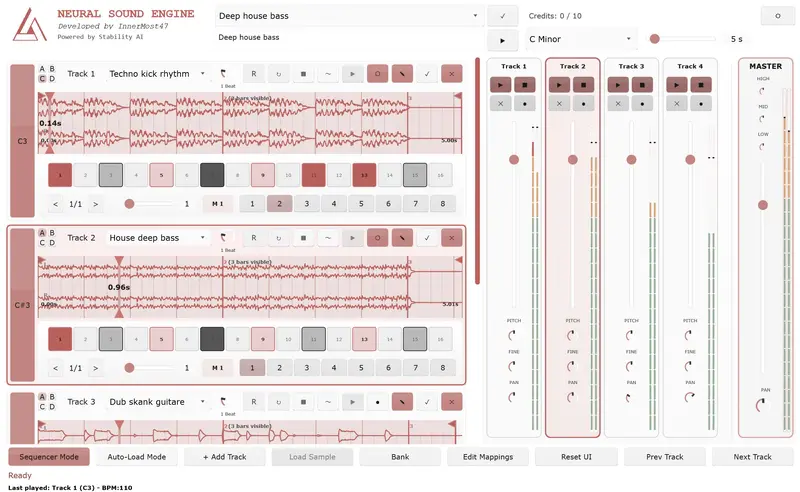
OBSIDIAN Neural — interface du plugin VST3

OBSIDIAN Neural — interface du plugin VST3

La plupart des outils d’IA musicale fonctionnent de la même façon : tu quittes ton DAW, tu génères quelque chose sur une interface web, tu télécharges un fichier, tu l’importe. Le flux créatif s’arrête. Tu reviens dans un autre état d’esprit.

OBSIDIAN Neural ne fonctionne pas comme ça.

C’est un plugin VST3/AU open source qui génère de l’audio par IA en temps réel, directement dans votre DAW, synchronisé à votre tempo, pendant que vous jouez. L’IA n’est pas un outil externe — elle devient un instrument à part entière.

Ce que fait le plugin

Vous tapez une description — “dark techno kick”, “ambient pad with reverb”, “808 bass with distortion” — et le plugin génère un loop audio correspondant, calé sur le tempo de votre projet. Pas de sortie de DAW, pas de glisser-déposer, pas d’attente.

L’architecture centrale :

8 pistes indépendantes, chacune avec 4 pages (A/B/C/D) et 8 séquences par page — soit 256 patterns au total pour des sets live complexes. Les changements de pages sont quantifiés aux mesures pour des transitions sans accroc.

Déclenchement MIDI sur les notes C3-B3 — vous mappez vos pads, votre pédale, votre contrôleur, et vous générez en arrière-plan sans interrompre la lecture.

Synchronisation tempo automatique via SoundTouch/Librosa — le loop généré est automatiquement étiré pour correspondre au BPM de votre projet.

Beat Repeat quantifié — 10 presets de subdivision (de 4 mesures à 1/128), mode aléatoire pour des textures glitch évolutives, tout mappable en MIDI.

Draw-to-Audio — vous dessinez sur un canvas 512×512, un VLM (Vision Language Model) interprète le dessin en description musicale, puis génère le son correspondant. Lignes angulaires → synth staccato agressif. Courbes douces → pad fluide. C’est expérimental, et c’est mon concept préféré du plugin.

Ce que le plugin ne fait PAS

C’est important de le dire clairement : OBSIDIAN Neural n’est pas un générateur de chansons comme Suno ou Udio.

  • Pas de chanson complète en un clic
  • Pas de paroles ni de voix
  • Pas d’arrangement automatique

C’est un sampler intelligent : vous construisez votre morceau loop par loop, vous composez, vous arrangez. L’IA génère le matériau brut — vous restez le musicien.

Trois modes d’utilisation

Cloud API (recommandé pour débuter)
Zéro setup. Vous téléchargez le VST, vous récupérez une clé API sur obsidian-neural.com, vous configurez le plugin. Essai 7 jours gratuit sans carte bancaire.

Server URL : https://api.obsidian-neural.com
API Key    : votre clé

Tarifs : Free (10 crédits) · Base 5,99€/mois · Starter 14,99€/mois · Pro 29,99€/mois

Serveur auto-hébergé + GPU
Pour ceux qui veulent la confidentialité totale et les générations illimitées. Nécessite un GPU NVIDIA (CUDA) ou Apple Silicon (Metal) et un environnement Python.

git clone https://github.com/innermost47/ai-dj.git
cd ai-dj
./install-mac.sh  # ou install-win.bat / install-lnx.sh

Modèles locaux offline (Windows)
Sans GPU, sans serveur, sans internet. 16 Go de RAM minimum. Générations fixes à 10 secondes.

Le contrôleur mobile

Un projet parallèle : une app Flutter Android/iOS qui transforme votre téléphone ou tablette en surface de contrôle MIDI dédiée pour OBSIDIAN Neural.

→ github.com/innermost47/obsidian-neural-controller

8 cartes de slots scrollables, faders de volume, knobs de pan, pitch, beat repeat, 8 patterns de séquenceur par slot. Feedback MIDI bidirectionnel — l’app reflète l’état réel du VST en temps réel. Connexion USB automatique, zéro configuration.

Reconnaissance académique et presse

En septembre 2025, j’ai présenté un Late Breaking Demo Paper à l’AES AIMLA 2025 (Audio Engineering Society International Conference on Artificial Intelligence and Machine Learning for Audio) à la Queen Mary University de Londres.

→ Lire le paper complet

Depuis le lancement en juin 2025, le plugin a été couvert par 12 publications dans 8 pays :

Pays Publication
🇺🇸 USA Synthtopia, Bedroom Producers Blog, Audio Plugin Guy
🇨🇳 Chine MIDIFAN (×2), Sohu.com
🇫🇷 France Audiofanzine
🇳🇱 Pays-Bas Rekkerd
🇪🇸 Espagne FutureMusic España
🇰🇷 Corée du Sud S1 Forum
🇯🇵 Japon DTM Plugin Sale

“Too many AI projects focus on the things AI can save you from doing rather than how AI can help you get better at what you do.”
— James Nugent, Bedroom Producers Blog

“I’ve cycled through almost every AI music tool on the market, but Obsidian is the first one that actually feels like a real production tool rather than a novelty.”
— Moteka, Electronic Music Producer

Sous le capot

L’architecture technique pour les curieux :

  • LLM local : Gemma-3-4B-IT (GGUF via Unsloth) sur CPU — transforme vos mots-clés en prompts optimisés pour la génération audio, en tenant compte du tempo, de la tonalité et de l’historique de génération
  • Génération audio : Stable Audio Open (Stability AI) — samples de 4 à 30 secondes
  • Synchronisation tempo : SoundTouch + Librosa — time-stretching automatique
  • Plugin : JUCE/C++, VST3 + AU (macOS), MIDI Learn complet
  • Controller : Flutter, flutter_midi_command, feedback bidirectionnel Ch.2

Télécharger et contribuer

Le projet est entièrement open source sous licence AGPL-3.0.

→ GitHub — OBSIDIAN Neural
→ GitHub — Mobile Controller
→ obsidian-neural.com — documentation, API, pricing

4 200+ téléchargements · 191 étoiles GitHub · 19 forks · Windows · macOS · Linux

Si vous utilisez le plugin, partagez vos créations — je suis le seul à poster des vidéos OBSIDIAN pour l’instant. Montrez-moi comment vous l’utilisez.

SQL Injection in Cursor-Generated Code: What Gets Missed

TL;DR

  • Cursor and most AI editors generate SQL queries with user input interpolated directly into template literals
  • This is CWE-89 SQL injection — parameterized queries fix it completely in about ten seconds
  • Automated SAST catches this before it ships; most AI-generated codebases don’t run any

I’ve been reviewing codebases built mostly with Cursor and Claude Code for a few months. The SQL injection pattern keeps showing up. Not the obvious string concatenation from old PHP tutorials. The modern version. Template literals.

Ask Cursor to write a basic filter route and it generates something that looks clean, passes all your tests, runs perfectly in development, and doesn’t trip any warnings. The problem only surfaces when someone sends a crafted input to a production endpoint.

The Vulnerable Pattern (CWE-89)

Here’s what gets generated for a basic user filter endpoint:

app.get('/api/users', async (req, res) => {
  const { filter } = req.query;
  const result = await db.query(
    `SELECT * FROM users WHERE name = '${filter}'`
  );
  res.json(result.rows);
});

This is SQL injection. The string interpolation puts filter directly into the query. Send ' OR '1'='1 as the filter value and you get every row in the table. The ${filter} part isn’t special syntax the database understands. It’s string concatenation happening before the query even reaches the database.

This pattern is CWE-89. It’s been in the OWASP Top 10 for over a decade. It just looks different now because backtick strings replaced concatenation operators, making it less visually obvious than the old "SELECT * FROM users WHERE name = '" + filter + "'".

Why AI Editors Keep Writing This

The training data is the answer. These models learned from millions of code examples, a significant portion of which use string interpolation for database queries. Tutorials from 2014 to 2018. Stack Overflow answers written before parameterized queries were the default. GitHub repos that work perfectly and were never audited.

The model learned that template literals work. Because they do. The code runs. Tests pass. Nothing flags it in development. There’s no feedback mechanism that would teach the model this specific pattern is dangerous.

There’s also a subtlety here: the code is structurally correct. The async/await pattern is right. The route handler shape is right. The variable names are reasonable. Only the query construction is wrong, and that wrong part is exactly one line.

The Fix

Parameterized queries. Every modern database driver supports them.

app.get('/api/users', async (req, res) => {
  const { filter } = req.query;
  const result = await db.query(
    'SELECT * FROM users WHERE name = $1',
    [filter]
  );
  res.json(result.rows);
});

The query string and the user data are now separate arguments. The pg driver handles all escaping. $1 is a placeholder, not a string interpolation point. For mysql2, use ? instead. For Sequelize or Prisma, use the ORM’s query builder methods rather than raw SQL strings and this whole class of problem disappears.

The fix takes about ten seconds once you know what to look for. A codebase-wide search for db.query calls where the first argument contains a backtick will surface most instances quickly.

I’ve been using SafeWeave to catch this automatically. It hooks into Cursor and Claude Code as an MCP server and runs Semgrep with SQL injection detection rules as part of its scan. A pre-commit hook with semgrep --config p/sql-injection also works if you want something lighter. The pattern is well-documented enough that automated detection is reliable. The important thing is catching it before it ships, not during an incident review.