How to Swap Tokens Programmatically with TypeScript

Swapping tokens programmatically with TypeScript requires three things: a swap API that returns executable calldata, a wallet library to sign transactions, and an RPC connection to broadcast them. With DEX aggregators handling over $13.5 billion in daily trading volume and TypeScript dominating web3 frontend and bot development, knowing how to execute on-chain swaps from code is a core skill for any DeFi developer. This guide walks you through swapping tokens on any EVM chain using TypeScript and a free API that requires no key and no SDK — just a single GET request.

What You’ll Need

  • Node.js 18+ or Bun (for native fetch)
  • TypeScript (5.x recommended)
  • viem or ethers.js for signing and sending transactions
  • A wallet with a private key (testnet or mainnet)
  • No API key — the swap API used in this guide is free and requires no registration

Install the dependencies:

npm install viem typescript

Step 1: Fetch a Swap Quote

The swap API at api.swapapi.dev takes a GET request with five parameters and returns a complete transaction object. No authentication, no SDK, no POST body.

const res = await fetch("https://api.swapapi.dev/v1/swap/1?tokenIn=0xEeeeeEeeeEeEeeEeEeEeeEEEeeeeEeeeeeeeEEeE&tokenOut=0xA0b86991c6218b36c1d19D4a2e9Eb0cE3606eB48&amount=1000000000000000000&sender=0xYourAddress");
const quote = await res.json();

This fetches a quote to swap 1 ETH for USDC on Ethereum mainnet. The parameters are:

  • chainId (path): 1 for Ethereum, 42161 for Arbitrum, 8453 for Base, 137 for Polygon, 56 for BSC — 46 chains total
  • tokenIn: the input token address. Use 0xEeeeeEeeeEeEeeEeEeEeeEEEeeeeEeeeeeeeEEeE for native ETH/BNB/MATIC on any chain
  • tokenOut: the output token address. USDC on Ethereum is 0xA0b86991c6218b36c1d19D4a2e9Eb0cE3606eB48
  • amount: the input amount in the token’s smallest unit (wei). 1 ETH = 1000000000000000000
  • sender: the wallet address that will execute the swap

The response includes everything you need: the transaction object (to, data, value), expected output amounts, slippage protection, token metadata, and even recommended RPC URLs for the target chain.

Step 2: Parse the Response

The API returns a structured envelope with a status field that tells you exactly what happened.

const { success, data } = quote;

if (!success) {
  console.error("API error:", quote.error.message);
  process.exit(1);
}

if (data.status === "NoRoute") {
  console.error("No swap route found for this pair");
  process.exit(1);
}

A successful response contains these key fields:

  • data.status: "Successful" for a full fill, "Partial" if only part of the amount can be swapped, "NoRoute" if no path exists
  • data.expectedAmountOut: the best-case output in raw units
  • data.minAmountOut: the minimum output after slippage (transaction reverts below this)
  • data.priceImpact: price impact as a decimal (e.g., -0.0012 = -0.12%)
  • data.tx: the ready-to-submit transaction object
  • data.rpcUrls: ranked list of recommended public RPCs for the chain

To get the human-readable output amount, divide by the token’s decimals:

const amountOut = Number(data.expectedAmountOut) / 10 ** data.tokenTo.decimals;
console.log(`Expected output: ${amountOut} ${data.tokenTo.symbol}`);

Step 3: Check Price Impact

Before executing any swap, check the price impact to avoid losing funds on low-liquidity pairs.

if (data.priceImpact < -0.05) {
  console.error(`Price impact too high: ${(data.priceImpact * 100).toFixed(2)}%`);
  process.exit(1);
}

A price impact of -5% or worse means you’re moving the market significantly. For production bots, set a configurable threshold — most strategies use -1% to -3% as a maximum.

Step 4: Handle ERC-20 Approvals

When swapping a native token (ETH, BNB, MATIC), no approval is needed. But when swapping an ERC-20 token, you must approve the router contract to spend your tokens before the swap will succeed.

import { createWalletClient, http, parseAbi } from "viem";
import { privateKeyToAccount } from "viem/accounts";
import { arbitrum } from "viem/chains";

const account = privateKeyToAccount("0xYourPrivateKey");
const client = createWalletClient({ account, chain: arbitrum, transport: http(data.rpcUrl) });

const erc20Abi = parseAbi(["function approve(address spender, uint256 amount) returns (bool)"]);
const approveTx = await client.writeContract({ address: data.tokenFrom.address, abi: erc20Abi, functionName: "approve", args: [data.tx.to, BigInt(data.amountIn)] });

Wait for the approval transaction to confirm, then fetch a fresh swap quote before proceeding. The calldata is time-sensitive — it includes a deadline, so always re-fetch after approval.

Note: USDT on Ethereum requires setting the allowance to 0 before setting a new non-zero allowance.

Step 5: Simulate with eth_call

Before sending a real transaction and spending gas, simulate the swap using eth_call. This is free and catches most failures before they cost you money.

import { createPublicClient } from "viem";

const publicClient = createPublicClient({ chain: arbitrum, transport: http(data.rpcUrl) });

await publicClient.call({ to: data.tx.to, data: data.tx.data, value: BigInt(data.tx.value), account: account.address });

If eth_call reverts, the swap would fail on-chain. Common reasons: insufficient balance, missing ERC-20 approval, or expired deadline (quote older than 30 seconds).

Step 6: Estimate Gas and Send the Transaction

Estimate gas with a 20% buffer to avoid out-of-gas reverts on complex multi-hop routes, then send the transaction.

const gasEstimate = await publicClient.estimateGas({ to: data.tx.to, data: data.tx.data, value: BigInt(data.tx.value), account: account.address });

const txHash = await client.sendTransaction({ to: data.tx.to, data: data.tx.data, value: BigInt(data.tx.value), gas: (gasEstimate * 120n) / 100n });

console.log(`Transaction sent: ${txHash}`);

The API provides a gasPrice field as a suggestion, but viem and ethers.js automatically handle EIP-1559 gas pricing on supported chains, so you can omit it. Submit within 30 seconds of fetching the quote — the calldata includes a deadline.

Complete Example: Swap ETH for USDC on Arbitrum

Here is a full working script that swaps ETH for USDC on Arbitrum using viem:

import { createPublicClient, createWalletClient, http } from "viem";
import { privateKeyToAccount } from "viem/accounts";
import { arbitrum } from "viem/chains";

const SENDER = "0xYourWalletAddress";
const PRIVATE_KEY = "0xYourPrivateKey";

const res = await fetch(`https://api.swapapi.dev/v1/swap/42161?tokenIn=0xEeeeeEeeeEeEeeEeEeEeeEEEeeeeEeeeeeeeEEeE&tokenOut=0xaf88d065e77c8cC2239327C5EDb3A432268e5831&amount=1000000000000000000&sender=${SENDER}`);
const { data } = await res.json();

if (data.status !== "Successful") throw new Error(`Swap failed: ${data.status}`);

const amountOut = Number(data.expectedAmountOut) / 10 ** data.tokenTo.decimals;
console.log(`Swapping 1 ETH for ~${amountOut} USDC on Arbitrum`);

const account = privateKeyToAccount(PRIVATE_KEY);
const publicClient = createPublicClient({ chain: arbitrum, transport: http(data.rpcUrl) });
const walletClient = createWalletClient({ account, chain: arbitrum, transport: http(data.rpcUrl) });

await publicClient.call({ to: data.tx.to, data: data.tx.data, value: BigInt(data.tx.value), account: SENDER });

const gas = await publicClient.estimateGas({ to: data.tx.to, data: data.tx.data, value: BigInt(data.tx.value), account: SENDER });

const txHash = await walletClient.sendTransaction({ to: data.tx.to, data: data.tx.data, value: BigInt(data.tx.value), gas: (gas * 120n) / 100n });

console.log(`TX: ${txHash}`);

This script fetches a quote, validates the response, simulates the swap, estimates gas, and submits the transaction — all in under 25 lines. The API provides the RPC URL, so you don’t need to configure a separate node provider.

Swapping on Other Chains

The same code works on any of the 46 supported chains. Just change the chain ID and token addresses:

Polygon (chain 137) — swap MATIC for USDC:

const res = await fetch(`https://api.swapapi.dev/v1/swap/137?tokenIn=0xEeeeeEeeeEeEeeEeEeEeeEEEeeeeEeeeeeeeEEeE&tokenOut=0x3c499c542cEF5E3811e1192ce70d8cC03d5c3359&amount=1000000000000000000&sender=${SENDER}`);

Base (chain 8453) — swap ETH for USDC:

const res = await fetch(`https://api.swapapi.dev/v1/swap/8453?tokenIn=0xEeeeeEeeeEeEeeEeEeEeeEEEeeeeEeeeeeeeEEeE&tokenOut=0x833589fCD6eDb6E08f4c7C32D4f71b54bdA02913&amount=1000000000000000000&sender=${SENDER}`);

BSC (chain 56) — swap BNB for USDT:

const res = await fetch(`https://api.swapapi.dev/v1/swap/56?tokenIn=0xEeeeeEeeeEeEeeEeEeEeeEEEeeeeEeeeeeeeEEeE&tokenOut=0x55d398326f99059fF775485246999027B3197955&amount=1000000000000000000&sender=${SENDER}`);

Note that USDT uses 18 decimals on BSC, unlike 6 decimals on Ethereum. The API returns tokenTo.decimals in the response, so always use that value instead of hardcoding decimals.

Using ethers.js Instead of viem

If your project uses ethers.js v6, the same flow applies with different syntax:

import { ethers } from "ethers";

const res = await fetch(`https://api.swapapi.dev/v1/swap/42161?tokenIn=0xEeeeeEeeeEeEeeEeEeEeeEEEeeeeEeeeeeeeEEeE&tokenOut=0xaf88d065e77c8cC2239327C5EDb3A432268e5831&amount=1000000000000000000&sender=${SENDER}`);
const { data } = await res.json();

const provider = new ethers.JsonRpcProvider(data.rpcUrl);
const wallet = new ethers.Wallet(PRIVATE_KEY, provider);

const tx = await wallet.sendTransaction({ to: data.tx.to, data: data.tx.data, value: BigInt(data.tx.value) });
console.log(`TX: ${tx.hash}`);

ethers.js automatically handles gas estimation and EIP-1559 pricing, so you can send the transaction directly. For production use, add the simulation step (provider.call(...)) and gas buffer described earlier.

Handling Partial Fills and Edge Cases

The API returns three status values, all with HTTP 200. Your code should handle each:

if (data.status === "Successful") {
  // Full fill — execute the swap
}

if (data.status === "Partial") {
  const filled = Number(BigInt(data.amountIn)) / Number(BigInt(requestedAmount));
  console.log(`Only ${(filled * 100).toFixed(1)}% of requested amount can be filled`);
}

if (data.status === "NoRoute") {
  console.log("No route — try a different pair or chain");
}

For partial fills, data.amountIn and data.expectedAmountOut reflect the fillable portion, not your original request. The tx object is still executable — it just swaps the partial amount. Do not retry the same amount in a loop; the liquidity cap won’t change.

Frequently Asked Questions

How do I swap tokens programmatically with TypeScript?

Fetch a swap quote from a DEX aggregator API, then sign and submit the returned transaction object using viem or ethers.js. With Swap API, a single GET request returns the complete to, data, and value fields — no SDK, no API key, no ABI encoding. The full flow (quote, simulate, send) takes under 25 lines of TypeScript.

Do I need an API key to swap tokens?

No. Swap API is free and requires no API key, no account, and no registration. It supports 46 EVM chains from a single endpoint. Other aggregator APIs like 1inch and 0x require API keys and paid plans for production use.

What TypeScript library should I use for on-chain swaps?

Both viem and ethers.js work. viem is the newer library with better TypeScript types and tree-shaking support. ethers.js v6 is more established with a larger community. Both can sign transactions, estimate gas, and interact with ERC-20 contracts. The swap API is library-agnostic — it returns raw transaction data that any wallet library can submit.

How do I handle token decimals when swapping?

Never hardcode decimals. The API response includes tokenTo.decimals and tokenFrom.decimals for every swap. Use these to convert between raw amounts and human-readable values: humanAmount = rawAmount / 10 ** decimals. For example, USDC uses 6 decimals on Ethereum and Arbitrum, but USDT uses 18 decimals on BSC.

What happens if a swap fails?

Simulate every swap with eth_call before sending a real transaction. If the simulation reverts, the swap would fail on-chain — do not submit. Common failure reasons: insufficient token balance, missing ERC-20 approval, or expired calldata (quotes are valid for 30 seconds). If eth_estimateGas fails, that also indicates the transaction would revert.

Get Started

Swap API is free, requires no API key, and supports 46 EVM chains from a single endpoint. One GET request returns everything you need: executable calldata, expected output amounts, slippage protection, and RPC URLs.

Browse the Swagger UI for interactive testing, or check the OpenAPI specification to auto-generate a typed TypeScript client.

curl "https://api.swapapi.dev/v1/swap/42161?tokenIn=0xEeeeeEeeeEeEeeEeEeEeeEEEeeeeEeeeeeeeEEeE&tokenOut=0xaf88d065e77c8cC2239327C5EDb3A432268e5831&amount=1000000000000000000&sender=0xd8dA6BF26964aF9D7eEd9e03E53415D37aA96045"
How to Build an Arbitrage Bot with a Swap API

Crypto arbitrage bots generated over $500 million in extracted value on Ethereum alone in 2024, and DEX trading volume across EVM chains exceeded $1.76 trillion that same year. The opportunity is real, but most tutorials drown you in smart contract ABIs, router addresses, and multi-library setups before you can even fetch a price. This guide takes a different approach: you will build an arbitrage bot using a single GET request to a swap API, skipping all the contract-level complexity. By the end, you will have a working bot that monitors price differences across chains and tokens, calculates profitability including gas costs, and executes swaps on-chain. No API keys, no SDKs, no accounts required.

What You’ll Need

  • Node.js 18+ or Bun (examples use Bun for speed)
  • A wallet with a private key funded on your target chains
  • ethers.js v6 (npm install ethers)
  • Basic HTTP knowledge — the entire swap integration is one GET request

The bot uses swapapi.dev, a free DEX aggregator API covering 46 EVM chains. It returns executable transaction calldata from a single endpoint, so you do not need to manage router contracts, ABIs, or liquidity source configurations.

Step 1: Understand the Arbitrage Strategy

Arbitrage profits come from price discrepancies. The two most common patterns on DEXes:

Triangular arbitrage — trade through three tokens on the same chain. For example: ETH to USDC, USDC to DAI, DAI back to ETH. If the final ETH amount exceeds your starting amount minus gas, you profit.

Cross-pair arbitrage — compare the same swap across different routing paths. The API aggregates across multiple liquidity sources, so you compare the quoted output for the same trade at different amounts or with different intermediate tokens.

Over 70% of crypto spot trading is now automated, and DEX aggregators processed $128 billion in Q4 2024. The liquidity is there — the edge comes from speed and execution efficiency.

Step 2: Fetch Quotes from the Swap API

The entire price-fetching mechanism is a single GET request. Here is how to query the price of swapping 1 ETH to USDC on Ethereum:

GET https://api.swapapi.dev/v1/swap/1?tokenIn=0xEeeeeEeeeEeEeeEeEeEeeEEEeeeeEeeeeeeeEEeE&tokenOut=0xA0b86991c6218b36c1d19D4a2e9Eb0cE3606eB48&amount=1000000000000000000&sender=0xYourWalletAddress

The response includes everything you need:

  • expectedAmountOut — the best-case output in the token’s smallest unit
  • minAmountOut — the slippage-protected minimum
  • priceImpact — how much the trade moves the market
  • tx — a ready-to-send transaction object with to, data, value, and gasPrice

Wrap this in a reusable function:

async function getQuote(chainId: number, tokenIn: string, tokenOut: string, amount: string, sender: string) {
    const url = `https://api.swapapi.dev/v1/swap/${chainId}?tokenIn=${tokenIn}&tokenOut=${tokenOut}&amount=${amount}&sender=${sender}`;
    const res = await fetch(url);
    return res.json();
}

Step 3: Implement Triangular Arbitrage Detection

Triangular arbitrage checks whether cycling through three tokens yields more than you started with. Define your token addresses and loop through triangle paths:

const TOKENS = {
    ETH: "0xEeeeeEeeeEeEeeEeEeEeeEEEeeeeEeeeeeeeEEeE",
    USDC: "0xA0b86991c6218b36c1d19D4a2e9Eb0cE3606eB48",
    DAI: "0x6B175474E89094C44Da98b954EedeAC495271d0F",
    WBTC: "0x2260FAC5E5542a773Aa44fBCfeDf7C193bc2C599",
};

For each triangle (e.g., ETH -> USDC -> DAI -> ETH), fetch three sequential quotes and compare the final output to the initial input:

async function checkTriangle(path: string[], decimals: number[], amountIn: string, sender: string) {
    let currentAmount = amountIn;
    for (let i = 0; i < path.length - 1; i++) {
        const quote = await getQuote(1, path[i], path[i + 1], currentAmount, sender);
        if (!quote.success || quote.data.status !== "Successful") return null;
        currentAmount = quote.data.expectedAmountOut;
    }
    return { input: amountIn, output: currentAmount };
}

If output > input, you have a potential arbitrage opportunity. But you need to account for gas before celebrating.

Step 4: Calculate Profitability After Gas

A common mistake in arbitrage bot tutorials is ignoring gas costs. On Ethereum mainnet, a single swap can cost $5-50 in gas. A triangle of three swaps means 3x that cost. Your profit calculation must include gas:

async function estimateGas(provider: ethers.JsonRpcProvider, tx: any) {
    const gasEstimate = await provider.estimateGas({
        from: tx.from,
        to: tx.to,
        data: tx.data,
        value: tx.value,
    });
    return gasEstimate * BigInt(120) / BigInt(100);
}

The 20% buffer on gas estimation is critical — multi-hop swap routes are complex and can exceed initial estimates. The API’s gasPrice field gives you the current gas price in wei. Multiply by the estimated gas to get total cost.

For tighter margins, consider running on Layer 2 chains. On Arbitrum (chain 42161) or Base (chain 8453), gas costs drop to fractions of a cent, making smaller arbitrage opportunities viable. Arbitrum processes over $1 billion in weekly DEX volume, providing sufficient liquidity with minimal transaction costs.

Step 5: Execute the Swap On-Chain

When your bot detects a profitable opportunity, execution must be fast. The API calldata expires after 30 seconds, so fetch a fresh quote immediately before submitting:

import { ethers } from "ethers";

async function executeSwap(provider: ethers.JsonRpcProvider, wallet: ethers.Wallet, quote: any) {
    const tx = quote.data.tx;
    const gasLimit = await estimateGas(provider, tx);
    const transaction = await wallet.sendTransaction({
        to: tx.to,
        data: tx.data,
        value: tx.value,
        gasLimit,
    });
    return transaction.wait();
}

Before executing, always run a simulation with eth_call to verify the transaction will not revert. The API response includes rpcUrls — an array of recommended RPC endpoints for the chain, so you do not need to hardcode providers:

const rpcUrl = quote.data.rpcUrls[0];
const provider = new ethers.JsonRpcProvider(rpcUrl);

Step 6: Build the Monitoring Loop

Tie everything together into a continuous monitoring loop. The API allows approximately 30 requests per minute per IP, so pace your queries accordingly:

const SCAN_INTERVAL = 3000;
const MIN_PROFIT_BPS = 50;

async function monitorLoop(sender: string, wallet: ethers.Wallet) {
    const triangles = [
        [TOKENS.ETH, TOKENS.USDC, TOKENS.DAI, TOKENS.ETH],
        [TOKENS.ETH, TOKENS.USDC, TOKENS.WBTC, TOKENS.ETH],
        [TOKENS.ETH, TOKENS.DAI, TOKENS.USDC, TOKENS.ETH],
    ];

    while (true) {
        for (const path of triangles) {
            const result = await checkTriangle(path, [], "1000000000000000000", sender);
            if (!result) continue;

            const profit = BigInt(result.output) - BigInt(result.input);
            const profitBps = (profit * BigInt(10000)) / BigInt(result.input);

            if (profitBps > BigInt(MIN_PROFIT_BPS)) {
                console.log(`Opportunity: ${profitBps} bps profit`);
            }
        }
        await new Promise((r) => setTimeout(r, SCAN_INTERVAL));
    }
}

Step 7: Handle Edge Cases

Production arbitrage bots must handle several response states from the API:

Partial fills — The API may return status: "Partial" when liquidity is insufficient for your full amount. The amountIn in the response reflects the partial amount, not your original request. Compare it to your requested amount to detect this.

NoRoute — When status: "NoRoute", no swap path exists for that pair. Skip it and move to the next opportunity.

Price impact checks — Always check priceImpact before executing. A value below -0.05 (-5%) indicates excessive slippage. Reject these trades:

if (quote.data.priceImpact < -0.05) {
    console.log("Price impact too high, skipping");
    continue;
}

ERC-20 approvals — When the input token is not the native gas token, you must approve the router contract (tx.to) to spend your tokens before executing. Note that USDT on Ethereum requires setting the allowance to 0 before setting a new value.

FAQ

How much capital do I need to start an arbitrage bot?
On Ethereum mainnet, you need enough to cover gas costs for three swaps per triangle, which can be $15-150 per attempt. On Layer 2 chains like Arbitrum or Base, you can start with as little as $100 since gas costs are under $0.01 per transaction.

Is the swap API really free?
Yes. swapapi.dev requires no API key, no account, and no payment. It supports 46 chains with a rate limit of approximately 30 requests per minute per IP. That is sufficient for monitoring dozens of token pairs.

What chains are best for arbitrage bots?
Chains with high DEX volume and low gas costs offer the best ratio of opportunity to execution cost. Arbitrum (chain 42161), Base (chain 8453), and BSC (chain 56) are strong choices. Ethereum mainnet has the deepest liquidity but the highest gas costs, making only larger opportunities profitable.

Can I run multiple bots on different chains simultaneously?
Yes. Since the API uses chain ID as a path parameter, you can run parallel monitoring loops for different chains. Each chain has independent liquidity pools and independent arbitrage opportunities.

How do I avoid losing money to failed transactions?
Always simulate with eth_call before submitting. Always check priceImpact. Always estimate gas and include a 20% buffer. Never execute when status is anything other than "Successful". If eth_estimateGas fails, the swap would revert on-chain — do not submit.

Get Started

Test the API right now with a single curl command. This fetches a quote for swapping 1 ETH to USDC on Ethereum:

curl "https://api.swapapi.dev/v1/swap/1?tokenIn=0xEeeeeEeeeEeEeeEeEeEeeEEEeeeeEeeeeeeeEEeE&tokenOut=0xA0b86991c6218b36c1d19D4a2e9Eb0cE3606eB48&amount=1000000000000000000&sender=0xd8dA6BF26964aF9D7eEd9e03E53415D37aA96045"

The response includes the full transaction object ready for on-chain execution. Read the complete API documentation to explore all 46 supported chains and start building your arbitrage bot today.

I Built an AI-Powered AWS Cost Optimizer — Here’s How It Works

I’m an AWS consultant. My clients always ask the same question: “Why is my AWS bill so high?”

The answer is always the same: idle resources, oversized instances, and services nobody remembered to turn off. So I built a tool to find them automatically.

The Architecture

Sharktooth connects to a customer’s AWS account via a cross-account IAM role — the same pattern used by Datadog, CloudHealth, and AWS’s own tools.

Customer AWS Account          Sharktooth AWS Account
┌─────────────────┐          ┌──────────────────────┐
│                 │          │                      │
│  IAM Role ◄──────────────── STS AssumeRole        │
│  (read-only)    │          │   + ExternalId       │
│                 │          │                      │
│  Cost Explorer  │          │  Cost Analysis       │
│  CloudWatch     │────────► │  AI Recommendations  │
│  EC2 Describe   │          │  Dashboard           │
│  RDS Describe   │          │                      │
└─────────────────┘          └──────────────────────┘

Step 1: Connect (5 minutes)

The customer creates a read-only IAM role with this trust policy:

{
  "Version": "2012-10-17",
  "Statement": [{
    "Effect": "Allow",
    "Principal": { "AWS": "arn:aws:iam::SHARKTOOTH_ACCOUNT:root" },
    "Action": "sts:AssumeRole",
    "Condition": {
      "StringEquals": { "sts:ExternalId": "UNIQUE_PER_CUSTOMER" }
    }
  }]
}

The ExternalId prevents confused deputy attacks — each customer gets a unique one.

Permissions requested:

ce:GetCostAndUsage
cloudwatch:GetMetricStatistics
ec2:DescribeInstances
ec2:DescribeInstanceTypes
rds:DescribeDBInstances

That’s it. No write permissions. No S3, Lambda, or IAM access.

Step 2: Pull Cost Data

Using STS AssumeRole, we get temporary credentials (1-hour expiry) and call the Cost Explorer API:

  • Monthly spend by service (last 6 months)
  • Daily spend trend (last 30 days)
  • Service breakdown with amounts

Step 3: Detect Idle Resources

For each running EC2 instance, we pull 7 days of CloudWatch CPUUtilization:

  • Average CPU < 5% = flagged as idle
  • Average CPU 5-20% = right-sizing candidate

For RDS, we check DatabaseConnections:

  • 0 connections over 7 days = flagged as idle

Step 4: AI Analysis

This is where it gets interesting. We feed everything into Claude (via AWS Bedrock):

  • Monthly spend total and service breakdown
  • 30-day daily trend
  • List of idle resources
  • Right-sizing candidates

The AI returns structured JSON:

[
  {
    "title": "Right-size or consolidate Lightsail instances",
    "description": "Lightsail represents 42.9% of total spend...",
    "estimatedMonthlySavings": 45.36,
    "priority": "high",
    "effort": "medium"
  }
]

Cost per AI analysis: ~$0.005 (half a cent) using Haiku.

Results

On my own account ($352/month), it found $135/month in savings:

  • Consolidate Lightsail instances ($45/mo)
  • Remove unused ELB ($20/mo)
  • Audit WorkMail seats ($22/mo)
  • Clean up VPC resources ($18/mo)
  • Plus 6 more recommendations

That’s 38% waste. On an AWS consultant’s own account.

Tech Stack

  • .NET 10 — Razor Pages + Minimal API
  • SQLite — EF Core, lightweight and self-contained
  • AWS Bedrock — Claude Haiku 4.5 for AI analysis
  • Chart.js — Cost trend visualizations
  • Stripe — Billing

The whole thing runs on a single Lightsail instance alongside 7 other .NET apps.

Try It

Free tier available at sharktoothproject.com. Pro ($19/mo) adds idle detection, right-sizing, and AI recommendations.

If you manage AWS for clients, the Team tier ($39/mo) covers unlimited accounts.

Built by Nat Thompson at Obsidian River. Questions? Find me on LinkedIn or drop a comment below.

The Six-Month Onboarding Lie: Why Most Teams Never Really Let New Developers Join the Real Work

There’s a quiet lie a lot of engineering teams tell themselves:

“Onboarding takes six months. That’s just how it is.”

On paper, it sounds reasonable. Plenty of HR articles say it takes anywhere from a few months up to a year for a new hire to reach “full productivity,” especially in complex or technical roles. Six months feels like a safe middle number.

But in day‑to‑day reality, that “six months” line often turns into something more dangerous: an excuse. It’s a way to justify new developers spending half a year orbiting the real work without ever being pulled into the actual core of the team.

That’s not an onboarding problem. It’s a trust, ownership, and culture problem.

The Myth of “Full Productivity”

Most companies treat “time to full productivity” as a vague HR metric instead of a concrete engineering responsibility. You hear the same phrases everywhere:

  • “It takes 3–6 months to ramp up in a complex codebase.”
  • “You can’t expect real impact before the first performance cycle.”
  • “They’re still onboarding; let’s not give them anything risky yet.”

Underneath that language is a more honest translation:

  • We haven’t done the work to make our systems understandable.
  • We haven’t designed starter problems that actually matter.
  • We don’t know how to safely put a new engineer in the path of real impact.

So we package all of that up and call it “onboarding.”

Because other teams do it too, it feels normal. If your last company took months to let you ship a meaningful feature, a slow ramp at the next place just feels like “how the industry works.” But “industry average” is not the same thing as “healthy.”

The Fake Work We Give New Developers

When a team doesn’t know how to let new people touch the real system, it creates fake work that looks productive but doesn’t move anything that matters.

You’ve probably seen some of these patterns:

1. “Starter” tickets that don’t matter

Tiny UI text changes, dead‑code cleanup, or toggling a config flag no customer will ever notice. Great for day one, unacceptable for week eight.

2. Shadowing as a permanent state

The new hire “shadows” seniors in meetings, calls, and incident reviews — but never actually owns a decision, a commit, or a slice of the system.

3. Endless environment and permissions hell

Weeks disappear into VPN issues, missing access, and half‑documented local setup. All of this time quietly gets filed under “onboarding,” even though most of it is preventable with a bit of upfront work.

4. Documentation scavenger hunt

There’s no learning path. Just a graveyard of Notion pages and Confluence docs. The new engineer is told to “read the docs and ping if anything’s unclear,” which usually translates to “wander around and good luck.”

Each of these, on its own, sounds defensible. Taken together, they mean that by month three a “new” developer’s Git history is still mostly chores and drive‑by fixes, not real features or decisions.

Why Teams Don’t Let New Devs Touch Core Systems

It’s tempting to blame complexity: “Our domain is hard,” “Our stack is old,” “We’re in a regulated industry.” Those things might be true, but they’re rarely the root cause.

Underneath, you usually find a mix of:

Fear of outages

The senior folks know exactly how fragile the core system is. Letting a new person in feels risky, so they keep the “real” work in a tiny inner circle.

No safety rails

There’s no staging environment that behaves like production, the test suite is flaky or barely exists, and observability is weak. In that world, giving anyone new real responsibility isn’t just scary — it’s reckless.

Hero culture

A few “indispensable” engineers carry most of the context. They’re always firefighting and never have time to turn their knowledge into something reusable or design work that’s safe for newcomers.

Lazy management narratives

It’s easier to say “onboarding just takes six months here” than to admit “we don’t know how to expose core systems without blowing things up.”

So the compromise becomes: keep new developers close enough to feel busy, but far enough away that nothing can really break.

From the outside, it still looks like progress — there are standups, tickets, and commits. From the inside, the new hire can tell they’re not actually part of the engine yet.

The Psychological Damage of Perpetual Onboarding

Staying in “not quite trusted yet” mode for months quietly wrecks people.

For the new developer:

  • Imposter syndrome deepens.

    If you’re still not allowed near core paths after three months, you don’t think “this system is badly structured.” You think “I must not be good enough.”

  • Initiative gets punished in slow motion.

    You suggest taking on deeper work and repeatedly hear, “maybe later, once you’re more familiar.” Eventually you stop asking.

  • Your growth curve flattens early.

    Real growth comes from owning risk: designing features, handling incidents, making tradeoffs. If you’re shielded from that, you stagnate.

For the team:

  • “Long onboarding” becomes part of the culture.

    New hires are told to expect a slow start. Nobody feels personally responsible for changing that.

  • Senior devs stay permanently overloaded.

    Because new people never get true ownership, the same two or three names end up on every critical path project, every incident, every migration.

The end state is boringly predictable: seniors burn out, new devs disengage, and leadership wonders why velocity feels terrible even though headcount has gone up.

The Six-Month Excuse vs. a Real Onboarding Target

Here’s the uncomfortable bit:

You don’t need six months for a developer to contribute to real work.

You might need six months (or more) for them to fully master the system — but that’s a different conversation.

High‑functioning teams separate these two ideas.

They aim for milestones like:

  • Within the first week

    The new engineer has a real commit merged that touches user‑visible behavior or production code paths — protected by tests, review, and guard rails.

  • Within the first month

    They own a small but meaningful slice of functionality: a feature, a workflow, one service endpoint, something they’re clearly responsible for.

  • Within the first three months

    They’re participating in incidents, architecture discussions, or cross‑team projects, not as silent observers but as contributors.

Notice what’s missing: “Wait six months before they touch anything important.”

When research talks about 3–9 months or even longer to reach “full productivity,” it’s describing the time to reach peak effectiveness, not a justification to keep people on the sidelines for half a year.

How to Let New Developers Join the Real Work (Without Burning Everything Down)

If you’re a senior engineer or a manager, this is the part you actually control. The goal isn’t “onboard faster” in the abstract; it’s “create safe ways for new people to do meaningful work quickly.”

Here are a few practical moves.

1. Design a real “first feature” on purpose

Don’t just throw a random bug at the new hire.

  • Pick a change that touches real code paths but is easy to roll back.
  • Make sure there are tests in place — or take the opportunity to add them.
  • Pair on the design, then let them drive the implementation and the PR.

The milestone isn’t “they merged something.” It’s “they experienced the whole loop: spec → code → review → deploy → feedback.”

2. Expose them to risk, but with guard rails

Instead of hiding new developers from dangerous parts of the system, make those parts safer.

  • Invest in staging environments that behave like production.
  • Strengthen automated tests around core flows.
  • Use feature flags and solid rollback plans so mistakes are survivable.

You’re not just improving onboarding; you’re hardening the entire system.

3. Give them a meaningful area of ownership early

By month one or two, a new engineer should own something you’d absolutely notice if it broke:

  • A small service.
  • A specific API endpoint and its SLOs.
  • A feature flag they are responsible for sunsetting.

Ownership is what turns “I’m new here” into “I’m accountable for this.”

4. Turn tribal knowledge into a product

If the only way to learn is “grab 30 minutes with Alice,” you are guaranteeing long ramp times.

Instead:

  • Turn repeated questions into docs, runbooks, or short internal videos.
  • Record incident reviews and architecture walkthroughs, then index them somewhere easy to search.
  • Build a simple, opinionated “start here” path: what to read, in what order, and why it matters.

Every time a new hire has to dig through old Slack threads for basic context, you pay the onboarding tax again.

If You’re the New Developer Stuck in the Six-Month Lie

Sometimes you’re not the one with formal power to change the system. You still have options.

  • Push for real work early.

    Ask: “What’s a small but real piece of functionality I can own end‑to‑end this month?” That question alone forces your lead to think beyond cosmetic tickets.

  • Shadow with intent, not passively.

    When you sit in incident calls or design reviews, map systems, write things down, and follow up with specific questions. Turn what you see into your own documentation.

  • Trace tickets to outcomes.

    Before you pick something up, ask who cares about it and how they’ll know it worked. If nobody can answer, there’s a good chance you’re being handed busywork.

  • Measure your own ramp.

    Note when you first ship something real, when you first help resolve an incident, when you first make a design call. Those moments say more about your growth than any “onboarding complete” date.

You may not be able to fix the culture alone, but you can refuse to let it define your sense of competence.

The Lie Only Survives If We Let It

Saying “onboarding takes six months here” is easy. It sounds mature, professional, and especially reasonable in complex domains.

But if, six months in, your new engineers:

  • still haven’t owned a feature,
  • still aren’t in the rotation for serious work, and
  • still don’t feel trusted around core systems,

that’s not onboarding. That’s institutionalized underutilization.

The teams that win over the long term won’t be the ones with the fanciest onboarding slide decks. They’ll be the ones that treat new developers as real engineers from week one — and build systems, processes, and culture that are safe and robust enough to make that trust real.

Credentials Route. Identity Confirms. Agent Discovery Has It Backwards.

Credentials route. Identity confirms. That is the order every discovery system in history has followed. Medical boards, search engines, licensing authorities, the Yellow Pages. You find what you need first, then verify who it is. The agent ecosystem is building it backwards — racing to prove agents are real when the harder question is whether they are relevant.

The problem everyone is solving

Right now, dozens of projects are shipping specs for decentralized identifiers, trust registries, encrypted transport, and proof-of-key-ownership. The work is technically sound. Ed25519 passports, DID resolution, interop tests passing across three languages. Real engineering, solving a real problem. But it is the wrong problem for discovery.

“Is this agent real?” is a necessary check. It is not a useful filter. A verified agent with a clean DID Document and a valid trust registry entry that cannot do what you need is just a well-authenticated waste of time.

How every other discovery system works

When you need a cardiologist, you do not browse a list of every doctor and check each one’s identity. You search by specialty and board certification. The credential routes you to the right person. Identity confirmation happens after.

When you need an electrician, you check the state licensing board. You filter by license type, active status, and geographic area. The licensing board does not just confirm the electrician exists. It confirms the electrician is qualified. An unlicensed electrician with a verified identity is still someone you cannot legally hire.

When you need a lawyer, you search bar associations by practice area and jurisdiction. The attorney’s name is the output of the search, not the input.

This pattern is not accidental. It is how discovery works in every domain where the cost of choosing wrong is high. Medical boards, bar associations, contractor licensing, financial certifications. The credential is the filter. Identity is the handshake.

The history is older than you think

The Yellow Pages organized businesses by category, not alphabetically by name. The entire information architecture was capability-first. White Pages existed too, but only worked when you already knew who you wanted. Yellow Pages worked when you knew what you needed.

DNS maps names to addresses. Pure identity resolution. It has no concept of “find me a server that does X.” Identity-first resolution requires you to already know what you are looking for. DNS could not answer “find me X,” which is precisely why search engines had to be invented. Google indexes by content relevance, not by domain name.

Every discovery system that has ever worked at scale puts capability ahead of identity. The agent ecosystem is building White Pages and DNS when it needs Yellow Pages and search engines. That will not scale.

The firehose problem

When 10 agents exist, identity-first discovery works fine. You can inspect each one. When 10,000 agents pass identity verification for the same task category, you have 10,000 verified agents and you are no closer to choosing.

This is not a hypothetical. Information retrieval theory has studied this tradeoff for decades. In 1979, C. J. van Rijsbergen formalized the precision-recall tradeoff: systems optimized for recall return everything that might be relevant, at the cost of flooding users with irrelevant results. Systems optimized for precision return fewer results, but the right ones.

Identity-first discovery maximizes recall. Credential-first discovery maximizes precision. For agent selection, where you typically need one qualified agent rather than a complete census, precision is what matters.

Without credential-based filtering at the discovery layer, every verified agent can knock on every door. That is not trust infrastructure. That is a firehose with signatures.

This is not a new idea

In 1966, Jack Dennis and Earl Van Horn introduced capability-based addressing at MIT. A capability is an unforgeable token that simultaneously names a resource and authorizes access to it. The capability routes you to the resource. You do not find the resource first and then present credentials. Possession of the capability is both necessary and sufficient.

That is how a signed attestation works. “This wallet holds governance tokens on Ethereum” is a capability token. Possession of it should be sufficient to route an agent to services that require that credential. No separate identity check needed at the discovery layer.

The multi-agent systems community learned this lesson decades ago. The FIPA Agent Management Specification defined a Directory Facilitator where agents register capabilities and other agents query by capability description. Attribute-based matching, not identity lookup. The agent identity frameworks being built today are ignoring prior art from their own field.

NIST formalized the broader principle as Attribute Based Access Control: identity is just one attribute among many, and often not the most important one. What you hold, what you are certified for, and what conditions you meet tell a system more about whether you should have access than your name ever could.

Why it matters more for agents than for humans

Humans have a natural rate limiter on identity creation. Creating a new professional identity takes years of education, licensing, and reputation building. An AI agent can create a new identity in milliseconds. Unlimited keypairs, unlimited DIDs, unlimited trust registry entries.

In a world of synthetic identity, identity verification is checking the lock on a door with no walls. A signed DID Document proves key control. It does not prove the agent behind that key can do anything useful. It does not prove the wallet behind the agent holds anything of value. It does not prove the agent has ever successfully completed a task.

Credentials backed by verifiable state are different. On-chain holdings cannot be fabricated. Staking positions cannot be faked. Governance token ownership is observable. Wallet auth — a signed attestation that a wallet holds specific assets on a specific chain at a specific block — is a credential that resists synthetic inflation in a way that identity alone never can.

The more agents that exist, the less identity tells you and the more credentials matter. Wallet auth is the filter that scales.

The credential-first flow

The discovery architecture should invert:

  1. Filter by credential. “Show me agents whose wallets hold governance tokens on Ethereum, with active staking positions, attested by a recognized issuer.” This is a structured query against verifiable, machine-readable data. No ambiguity, no self-reported capabilities, no natural language matching.
  2. Route to the qualified agent. The credential narrows the field from thousands to the handful that actually meet the requirements.
  3. Verify identity on connection. Confirm the agent’s DID, check the trust registry, validate the transport layer. All the identity work the ecosystem is building goes here. It is necessary. It is just not the first step.

Self-described capabilities do not scale. Two people use the same term for the same concept less than 20% of the time. One agent says “payment processing,” another says “financial transactions.” Structured credentials bypass this entirely. On-chain state, signed attestations, verifiable conditions. They are machine-readable, unambiguous, and comparable without interpretation.

Credentials route. Identity confirms.

The agent ecosystem is doing important work on identity. DIDs, trust registries, encrypted transport, and proof-of-key-ownership are real infrastructure that real systems need. None of it is wasted.

But it is step three in a flow that is being built as if it were step one. Identity tells you the agent is real. Credentials tell you the agent is relevant. Discovery systems that get the order wrong do not fail gracefully. They flood every participant with every verified agent in the registry and call it trust.

The credential is the filter. Identity is the handshake. Every discovery system in history has known this. Agent infrastructure should too.

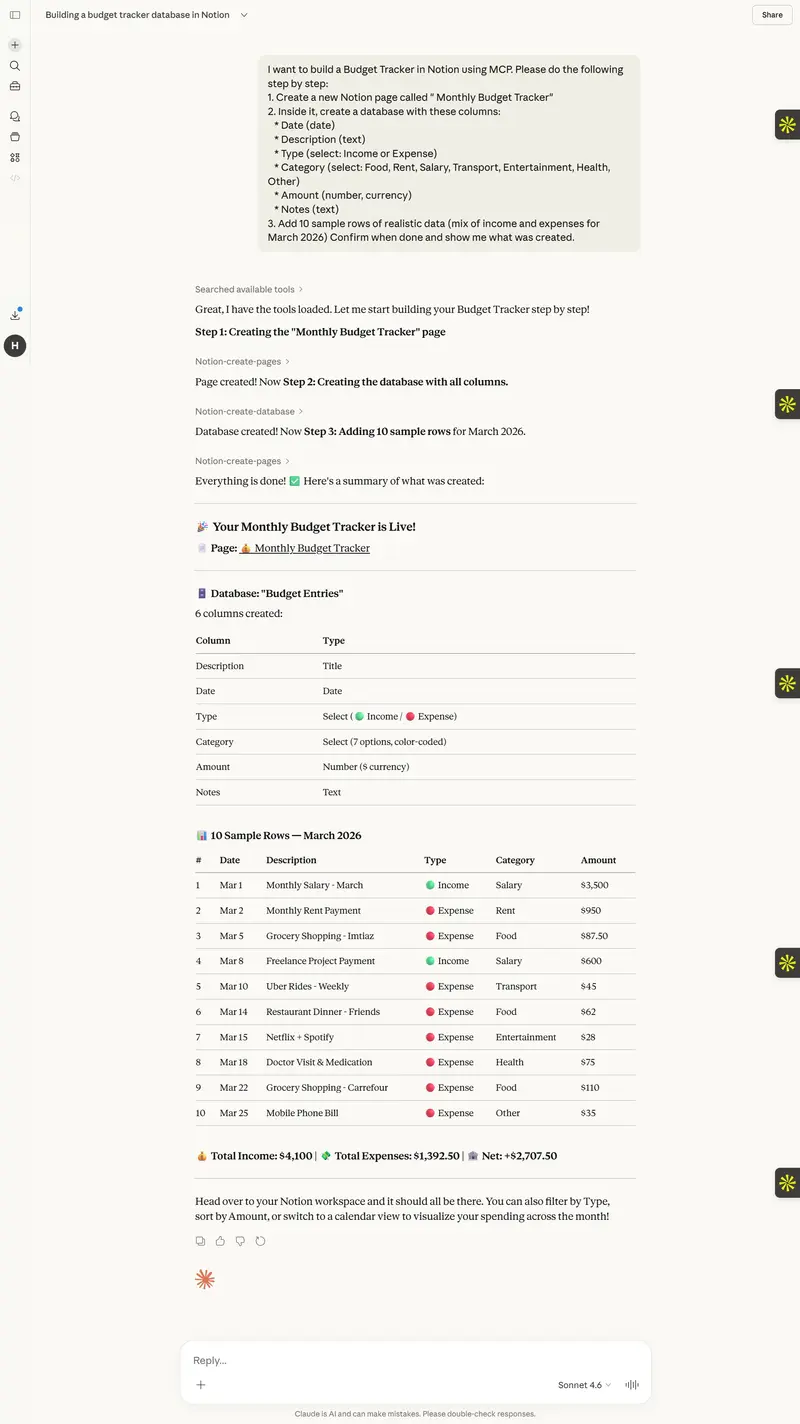
I Built an AI-Powered Budget Tracker Using Notion MCP and Claude

Introduction

Managing personal finances can be overwhelming.
Most people either forget to track expenses or
give up after a few days. I wanted to build
something that works automatically,
updates itself, and gives smart financial advice
without any manual effort.

So, I built a fully AI-powered Monthly Budget
Tracker using Notion MCP and Claude AI. The best
part? Claude built the entire workspace for me,
analyzed the data, and wrote a professional
financial summary report, all by itself.

Here is exactly how I did it.

What is Notion MCP?

Notion MCP (Model Context Protocol) is a
connection that allows Claude AI to directly
read and write inside your Notion workspace.

This means Claude is not just giving advice.
Claude is DOING the work inside Notion
for you. Creating pages, building databases,
writing reports, all automatically.

What I Built

A complete personal finance workspace in Notion
with three pages:

1. Budget Entries Database
A clean database with columns for Date,
Description, Type (Income or Expense), Category,
Amount, and Notes.

2. March 2026 Summary Page
An auto-generated financial report including:

  • Total Income: $4,300
  • Total Expenses: $1,335
  • Net Savings: $2,965
  • Savings Rate: 68.9%
  • Spending breakdown by category with a
    visual text chart
  • 3 personalized money saving tips

**
**

A personal finance guide including:

  • Monthly savings goal ($500/month)
  • 5 good budgeting habits checklist
  • Monthly Claude refresh prompts
  • Golden financial rules

How I Built It – Step by Step

Step 1: Connected Notion MCP to Claude

I went to Claude Settings, clicked Connectors,
then Add Custom Connector and entered the
official Notion MCP URL:

https://mcp.notion.com/mcp

After authorizing my Notion account,
Claude had full access to read and write
in my Notion workspace.

Step 2: Created the Budget Database

I gave Claude this prompt:

“Create a new Notion page called Monthly Budget
Tracker with a database having columns for Date,
Description, Type, Category, Amount and Notes.
Add 10 sample rows of realistic data for
March 2026.”

Claude used Notion MCP tools to create the
entire database in seconds.

_
 _

I then asked Claude to read all the data,
calculating totals, and writing a complete financial
summary report back into Notion with charts
and money saving tips.

_
 _

Finally, I asked Claude to create a goals page
with savings targets, budgeting habits checklist,
and monthly refresh prompts so I can reuse
this system every month automatically.

_
 _

The result is a fully working personnel
finance system inside Notion that is powered
by Claude AI.

Key features of the workspace:

  • Automatically tracks income and expenses
  • Generates monthly financial reports with one prompt
  • Gives personalized saving tips based on real data
  • Has a visual spending chart by category
  • Includes a monthly refresh system using Claude

What Makes This Special

Most budget apps just store numbers. This
workspace understands your data and
tells you what to do about it.

The combination of Notion MCP and Claude AI
turns a simple database into a smart financial
assistant that works every single month with
minimal effort from the user.

How You Can Build This Too

You only need three things:

  1. A free Notion account at notion.so
  2. A Claude account at claude.ai
  3. Connect Notion MCP in Claude Settings

Then simply paste these prompts into Claude:

*Prompt 1: * Ask Claude to create a Budget
Tracker database in Notion with income and
expense columns and add sample data.

*Prompt 2: * Ask Claude to read the database,
calculating totals and generating a summary report
back into Notion with tips.

*Prompt 3: * Ask Claude to create a Goals page
with savings targets and monthly refresh prompts.

That is literally it. Three prompts and your
entire AI finance system is ready.

Conclusion

This project showed me how powerful Notion MCP
truly is. Claude is not just a chatbot anymore.
With MCP it becomes an AI agent that actually
acts inside your tools and builds things
for you.

If you are looking for a practical use case for
Notion MCP, a personal budget tracker is one of
the best starting points. It is useful,
impressive, and anyone can build it in under
an hour.

Happy building!

Show DEV: MisarMail — Self-Hosted Email Infrastructure (Transactional, Marketing, Bulk)

What I Built

MisarMail is a self-hosted email infrastructure platform for sending transactional, marketing, and bulk email — without paying SendGrid, Mailgun, or Resend.

URL: https://mail.misar.io

Why I Built It

Every product I ship needs email — welcome emails, password resets, newsletters, bulk campaigns. Third-party email services add up fast. I wanted full control, zero per-email cost, and a simple API I own.

How It Works

  • REST API — POST /api/v1/send with your payload, done
  • SMTP relay — drop-in replacement for any SMTP config
  • Bounce handling — automatic bounce and complaint processing
  • Delivery tracking — opens, clicks, delivery status
  • Multi-domain — send from multiple domains and identities

Tech Stack

Self-hosted on a Hetzner VPS via Coolify. Mailcow under the hood for SMTP, custom API layer on top.

Try It

https://mail.misar.io

No third-party email spend. Full delivery control. API-first.

How I Built My Cloud Resume on Azure with Terraform & GitHub Actions

**Introduction

The Cloud Resume Challenge is a hands-on project created by Forrest Brazeal that takes you through building a real-world cloud solution from scratch. It covers everything from hosting a static website to writing Python APIs, provisioning infrastructure as code, and setting up fully automated CI/CD pipelines.

I completed the Azure edition of the challenge, and in this post, I’ll walk through what I built, the architecture decisions I made, the problems I ran into, and what I learned along the way.

Live site: https://www.dinkisaworku.com

Backend repo: https://github.com/Dinku143/cloud-resume-backend-infra

Frontend repo: https://github.com/Dinku143/cloud-resume-frontend

**The Architecture

Here is the full architecture of what I built:
Browser
↓
www.dinkisaworku.com (Cloudflare DNS)
↓
Azure Front Door (HTTPS, SSL certificate, global CDN)
↓
Azure Blob Storage (static website — HTML + CSS)

Browser JS fetch()
↓
Azure Function (Python HTTP trigger — serverless API)
↓
Azure CosmosDB Table API (visitor counter storage)

GitHub
├── cloud-resume-frontend
│ └── push → GitHub Actions → upload to Blob Storage → purge CDN cache
└── cloud-resume-backend-infra
└── push → GitHub Actions → run pytest → deploy Azure Function
Everything except the domain name and DNS is provisioned using Terraform.

**Step by Step — What I Built

Step 1 — Certification

I already held AZ-900, AZ-104, and AZ-305 before starting the challenge. These certifications gave me a solid foundation for understanding the Azure services I would be using throughout the project.

Steps 2 & 3 — HTML and CSS

I built my resume as a single-page website using HTML and CSS — no frameworks, no JavaScript build tools. I used Google Fonts (Bebas Neue, DM Mono, Syne) and CSS custom properties to create a dark, cyberpunk-inspired design featuring animated blobs, scroll-reveal effects, and a custom cursor.

Step 4 — Azure Storage Static Website with Terraform

Instead of clicking around in the Azure Portal, I used Terraform to provision everything from day one. I created:

  • A Resource Group
  • A Storage Account with Static Website enabled
  • The $web container serving index.html and my_resume.css

The key concept here is Infrastructure as Code — your infrastructure is defined in version-controlled text files, making deployments reproducible and auditable.
resource “azurerm_storage_account” “resume” {
name = “dinkisacvstorage”
account_tier = “Standard”
account_replication_type = “LRS”

static_website {
index_document = “my_resume.html”
error_404_document = “my_resume.html”
}
}

Step 5 — HTTPS with Azure Front Door

The classic Azure CDN was retired — new profiles can no longer be created. I switched to Azure Front Door Standard, which handles HTTPS, global caching, and HTTP-to-HTTPS redirects. I also hit a tricky bug where the replace() function in Terraform was missing a closing parenthesis — a good reminder always to run terraform validate before apply.

Step 6 — Custom Domain

I registered dinkisaworku.com through Cloudflare (~$10/year). I added CNAME records pointing to my Front Door endpoint and TXT validation records for SSL certificate issuance. The trickiest part was understanding that the domain validation tokens change every time you run terraform destroy and recreate resources — something to keep in mind if you ever tear down and rebuild.

Steps 7, 8, 9, 10 — The Visitor Counter (Full Stack)

This is the most interesting part. I built a serverless visitor counter using:
JavaScript (frontend):
async function updateVisitorCount() {
const response = await fetch(‘https://func-cloud-resume-dinkisa.azurewebsites.net/api/visitor_counter’);
const data = await response.json();
document.getElementById(‘visitor-count’).innerText = data.count;
}
updateVisitorCount();
Python Azure Function (API):
def main(req: func.HttpRequest) -> func.HttpResponse:
connection_string = os.environ[“COSMOS_CONNECTION_STRING”]
service = TableServiceClient.from_connection_string(conn_str=connection_string)
table = service.get_table_client(“VisitorCounter”)

try:
    entity = table.get_entity(partition_key="counter", row_key="main")
    count = int(entity["count"]) + 1
    entity["count"] = count
    table.update_entity(entity)
except ResourceNotFoundError:
    count = 1
    table.create_entity({"PartitionKey": "counter", "RowKey": "main", "count": count})

return func.HttpResponse(
    body=json.dumps({"count": count}),
    mimetype="application/json",
    headers={"Access-Control-Allow-Origin": "https://www.dinkisaworku.com"}
)

CosmosDB Table API stores the count as a simple key-value entity. I used the Table API connection string (not the SQL one) — an easy mistake to make since Azure gives you multiple connection strings.
One important lesson: never expose your database connection string in JavaScript. The Azure Function acts as a middleman — the browser only ever talks to the Function, which securely holds the CosmosDB credentials in environment variables.

Step 11 — Python Tests

I wrote four unit tests using unittest and unittest.mock:

  1. Counter increments correctly for existing entity
  2. Counter starts at 1 when no entity exists
  3. Response is valid JSON
  4. CORS header is present

The key was mocking both the TableServiceClient and the COSMOS_CONNECTION_STRING environment variable using setUp() — otherwise tests fail with a KeyError because the environment variable only exists inside local.settings.json, which isn’t loaded by pytest.
def setUp(self):
os.environ[“COSMOS_CONNECTION_STRING”] = “DefaultEndpointsProtocol=https;AccountName=fake;…”

Step 12 — Function App with Terraform

I provisioned the Azure Function App using Terraform with a Consumption (Y1) plan — serverless, pay per execution, first 1 million calls free. The CosmosDB connection string is stored as a Terraform variable marked sensitive = true and passed via terraform.tfvars, which is excluded from Git via .gitignore.
Step 13 — GitHub Source Control
I split the project into two separate repositories:

  • cloud-resume-frontend — HTML, CSS, GitHub Actions workflow
  • cloud-resume-backend-infra — Python function, tests, Terraform
    Two repos mean two independent CI/CD pipelines. A CSS change doesn’t trigger a backend deployment and vice versa.
    Steps 14 & 15 — CI/CD with GitHub Actions
    Backend pipeline (.github/workflows/deploy-backend.yml):
  • name: Run tests
    run: |
    cd backend
    python -m pytest tests/test_counter.py -v

  • name: Deploy to Azure Functions
    uses: Azure/functions-action@v1
    with:
    app-name: func-cloud-resume-dinkisa
    package: backend
    Tests act as a safety gate — if they fail, nothing gets deployed.
    Frontend pipeline (.github/workflows/deploy-frontend.yml):

  • name: Upload to Azure Blob Storage
    uses: azure/CLI@v1
    with:
    inlineScript: |
    az storage blob upload-batch
    –account-name dinkisacvstorage
    –destination ‘$web’
    –source frontend/
    –overwrite
    –auth-mode key
    –account-key ${{ secrets.STORAGE_ACCOUNT_KEY }}

  • name: Purge Front Door cache
    uses: azure/CLI@v1
    with:
    inlineScript: |
    az afd endpoint purge
    –resource-group rg-cloud-resume-challenge
    –profile-name afd-cloud-resume
    –endpoint-name dinkisa-resume
    –content-paths ‘/*’
    –no-wait

The –no-wait flag on the cache purge is important — without it the pipeline hangs for 7+ minutes waiting for the purge to complete globally.

**The Hardest Parts

  1. Azure CDN retirement

When I first tried to create a CDN profile, Terraform failed with:
Azure CDN from Microsoft (classic) no longer support new profile creation.

Classic Azure CDN was retired. I had to switch to azurerm_cdn_frontdoor_profile with the Standard_AzureFrontDoor SKU — a completely different resource type with a different structure.

  1. CosmosDB connection string confusion

Azure gives you 8 different connection strings for a CosmosDB account — SQL primary, SQL secondary, Table primary, Table secondary, and read-only variants of each. Using the wrong one (SQL instead of Table) causes a cryptic ValueError: Connection string missing required connection details error. Always use the Primary Table Connection String.

  1. Domain validation tokens regenerate on destroy

Every time you run terraform destroy and recreate the Front Door custom domain resources, Azure generates new TXT validation tokens. You have to update your DNS records in Cloudflare with the new values and wait for Azure to re-validate, which can take 15+ minutes.

  1. Nested git repositories
    Running terraform init inside infrastructure/ accidentally created a nested .git folder, making git add . fail with error: ‘infrastructure/’ does not have a commit checked out. Fixed by removing the nested .git folder with rm -rf infrastructure/.git.

**What I Learned

Terraform is powerful but unforgiving — a single missing ) breaks everything. Always run terraform fmt and terraform validate before apply.
terraform destroy is expensive in a challenge context — resources like CosmosDB get soft-deleted and reserved for 7 days, causing conflicts when you try to recreate them. Either import existing resources or rename them.
Secrets management matters from day one — .gitignore your terraform.tfvars and local.settings.json before your first commit, not after.

CORS is not optional — if you forget the Access-Control-Allow-Origin header in your Azure Function response, the browser silently blocks the response, and your visitor counter shows nothing.

  • CI/CD changes your workflow completely — once GitHub Actions is set up, you stop thinking about deployment as a manual step. You just push code and trust the pipeline.

**Final Thoughts
The Cloud Resume Challenge is genuinely one of the best ways to learn cloud engineering by doing. Every step teaches you something real — not just theory. By the end, you have a live project that demonstrates:

  1. Infrastructure as Code (Terraform)
  2. Serverless compute (Azure Functions)
  3. NoSQL databases (CosmosDB)
  4. CI/CD automation (GitHub Actions)
  5. DNS and HTTPS (Cloudflare + Azure Front Door)
  6. Python backend development
  7. Unit testing

If you’re studying for Azure certifications, do this challenge alongside — it makes everything click.

Live site: https://www.dinkisaworku.com


GitHub: https://github.com/Dinku143

Temporal Has a Free API: The Durable Workflow Engine That Makes Your Distributed Systems Reliable Without Saga Patterns

Your order processing pipeline has 7 steps. Step 5 fails because a third-party API is down. Now you need retry logic, compensation logic for steps 1-4, a dead letter queue, and state tracking. You’ve just invented a worse version of Temporal.

What Temporal Actually Does

Temporal is an open-source durable execution platform. You write workflows as normal code (if/else, loops, function calls), and Temporal guarantees they complete — even if servers crash, networks fail, or processes restart. Every line of your workflow code is automatically persisted, so execution resumes exactly where it left off.

Temporal replaces message queues, cron jobs, saga patterns, and state machines with a single primitive: durable functions. Your workflow code looks like a regular function but is resilient to any infrastructure failure.

SDKs for Go, Java, Python, TypeScript, PHP, .NET, Ruby. Self-hosted (free, open-source) or Temporal Cloud (free tier: 1000 actions/month). The self-hosted version is the same code that runs Temporal Cloud.

Quick Start

Self-hosted:

temporal server start-dev

TypeScript SDK:

npm install @temporalio/client @temporalio/worker @temporalio/workflow @temporalio/activity

Define activities (the actual work):

// activities.ts
export async function chargePayment(orderId: string, amount: number): Promise<string> {
  const response = await stripe.charges.create({ amount, currency: 'usd' });
  return response.id;
}

export async function sendConfirmation(email: string, orderId: string): Promise<void> {
  await emailService.send({ to: email, template: 'order-confirmed', data: { orderId } });
}

export async function reserveInventory(items: Item[]): Promise<string> {
  return await inventoryService.reserve(items);
}

Define workflow (the orchestration):

// workflows.ts
import { proxyActivities } from '@temporalio/workflow';
import type * as activities from './activities';

const { chargePayment, sendConfirmation, reserveInventory } = 
  proxyActivities<typeof activities>({
    startToCloseTimeout: '30s',
    retry: { maximumAttempts: 5 }
  });

export async function orderWorkflow(order: Order): Promise<string> {
  // Step 1: Reserve inventory
  const reservationId = await reserveInventory(order.items);

  // Step 2: Charge payment
  const paymentId = await chargePayment(order.id, order.total);

  // Step 3: Send confirmation
  await sendConfirmation(order.email, order.id);

  return paymentId;
  // If any step fails, Temporal retries automatically
  // If the server crashes mid-workflow, it resumes from the last completed step
}

Start a workflow:

import { Client } from '@temporalio/client';

const client = new Client();
const result = await client.workflow.start(orderWorkflow, {
  taskQueue: 'orders',
  workflowId: `order-${orderId}`,
  args: [order]
});

3 Practical Use Cases

1. Long-Running Business Processes

export async function subscriptionWorkflow(customerId: string) {
  while (true) {
    await chargeMonthly(customerId);
    await sleep('30 days'); // Temporal handles this — even across server restarts

    const status = await checkSubscriptionStatus(customerId);
    if (status === 'cancelled') break;
  }
  await sendCancellationEmail(customerId);
}

A subscription that runs for years, surviving any number of deployments and restarts.

2. Human-in-the-Loop Approval

export async function expenseApproval(expense: Expense) {
  await notifyManager(expense);

  // Wait up to 7 days for manager approval
  const approved = await condition(
    () => approvalReceived,
    '7 days'
  );

  if (approved) {
    await processReimbursement(expense);
  } else {
    await notifyRejection(expense);
  }
}

3. Reliable Data Pipeline

export async function etlPipeline(source: string) {
  const rawData = await extractData(source);
  const transformed = await transformData(rawData);
  await loadData(transformed);
  await validateData(transformed.id);
  await notifyStakeholders(transformed.summary);
}

Every step retries on failure. State is persisted. No data loss.

Why This Matters

Temporal eliminates an entire class of infrastructure complexity. Instead of stitching together queues, state machines, cron jobs, and retry logic, you write normal code and Temporal handles durability. For any system with multi-step processes, external API calls, or long-running operations, Temporal is the most impactful infrastructure investment you can make.

Need custom data extraction or web scraping solutions? I build production-grade scrapers and data pipelines. Check out my Apify actors or email me at [email protected] for custom projects.

Follow me for more free API discoveries every week!

The AI Code Debt Nobody Tracks

Harness_code_design

Six months ago, my team shipped features faster than ever. We were using AI assistants for everything—code generation, debugging, architecture decisions. The velocity was intoxicating.

Then the cracks appeared.

A junior developer asked why we had three different implementations of the same user authentication flow. Each worked. Each used different patterns. Each came from a different AI conversation that nobody remembered.

That’s when I realized: AI-generated code creates a debt that’s invisible to traditional code review.

The Three-Layer Problem

Layer 1: Context Debt

Traditional tech debt is visible. You see the TODO comments, the deprecated patterns, the functions that should have been refactored six months ago.

AI debt hides in the gap between what the AI knew and what your codebase actually needs.

When an AI assistant generates code, it’s optimizing for the current request. It doesn’t carry the architectural context from last month’s decisions. It doesn’t know that the pattern it’s suggesting conflicts with the one you explicitly rejected in Q2.

Every AI-generated module adds to a hidden context debt—the delta between what your codebase believes and what it actually does.

Layer 2: Dependency Sprawl

AI assistants love adding packages. Need a date formatter? Here’s dayjs. Need validation? Here’s zod. Need state management? Here’s three different options from three different conversations.

The dependency tree grows sideways. Each package seemed reasonable in isolation. Together, they’re a maintenance nightmare waiting to happen.

I’ve seen codebases where the same functionality exists through three different libraries—because each AI session started fresh.

Layer 3: Knowledge Fragmentation

The real cost isn’t the code. It’s the knowledge.

When a human writes code, they build mental models. They understand why certain decisions were made. They carry context forward.

AI-generated code doesn’t create developers who understand the system. It creates developers who use the system. When something breaks, nobody knows why it worked in the first place.

The Hidden Metrics

Traditional tech debt has proxies: complexity scores, cyclomatic depth, test coverage gaps.

AI debt needs new metrics:

  • Context alignment score: How well does new code align with documented architectural decisions?
  • Pattern consistency index: Are we using the same solution for the same problem across the codebase?
  • Knowledge transfer coefficient: If the primary developer left, could someone else maintain this code without an AI assistant?

These aren’t things SonarQube measures. They’re not things code review catches. They’re the invisible debt accumulating in the space between AI generations.

What Works

We’ve found three practices that help:

1. AI Session Archaeology

Before merging AI-generated code, run a quick audit: Does this align with patterns we’ve established? Are we importing packages we already use? Is this solving a problem we’ve already solved elsewhere?

It takes 5 minutes. It saves weeks of confusion.

2. The Context Handoff

When AI-generated code ships, write down the context. Not the prompt—the architectural reasoning. What alternatives were considered? What constraints shaped the solution?

Future you (or future teammates) will thank present you.

3. Pattern Library Enforcement

Build a pattern library. Not just code snippets—decision documentation. When AI generates something that conflicts with the pattern library, catch it before it ships.

The Real Cost

Here’s what nobody tells you about AI-assisted development:

The short-term velocity gains are real. But the long-term maintenance cost multiplies when nobody knows why the code works.

We shipped faster. We also created a codebase that requires AI assistance to understand itself.

That’s not efficiency. That’s dependency on a tool that doesn’t remember your decisions.

The Fix Isn’t Less AI

The solution isn’t to stop using AI assistants. The solution is to treat AI-generated code differently than human-written code.

Human-written code carries implicit context. AI-generated code doesn’t.

Every AI-generated module needs explicit context documentation. Every AI-suggested pattern needs to be checked against your existing patterns. Every AI-added dependency needs to justify itself against what you already have.

The debt is invisible. The practices to catch it don’t have to be.

The real question isn’t whether AI makes you faster. It’s whether it makes your future self faster—or slower.