C++ Guide: Talking to an LCD1602 & PCF8574 via i2c-dev
Preface

This guide will attempt to demystify the following:

1.) How to find & map physical pins directly to C++ variables using binary literals (and how to use bitmasking to build instructions).

2.) How to actually begin sending information to your LCD in C++.

3.) How you can begin abstracting functions to minimize the amount of low-level instructions you have to write in your code.

DISCLAIMER:
This is not an extensive guide on all the features the LCD has; it is meant to help bridge the gap between knowing nothing at all and sending your first instructions to the LCD.

I’m also very new & fully self taught. There might be errors which I haven’t caught… With that being said, I hope this is helpful to somebody.

References:
Kernel.org I2C Dev Interface (i2c-dev.h)
HD44780 Datasheet (RELEVANT PAGES: 23, 24, 25, 42, 46)
I2C 1602 LCD Specs (For device hex address)

Background Information

The reason I’m writing this is because most tutorials and guides out there are going to tell you how to use an Arduino and I wanted to change that with this post. In the industry arduino is not the standard for everything, and aspiring students like me will sometimes be be expected to use devices where there are no premade solutions like the ones arduino offers. Sometimes we’ll have no choice but to write our own driver. And so I wanted to simulate that struggle. I went down that route, and this is the knowledge I’ve gained from it.

Now, when I was getting started with this thing, the biggest hurdle was this question… What do I actually write?

To answer that question, you need to know exactly what you’re working with first and what our code needs to do:

Many LCD1602 modules come with a PCF8574 IO Expander already soldered to the back of the unit. The LCD1602 has an HD44780U microcontroller on board.

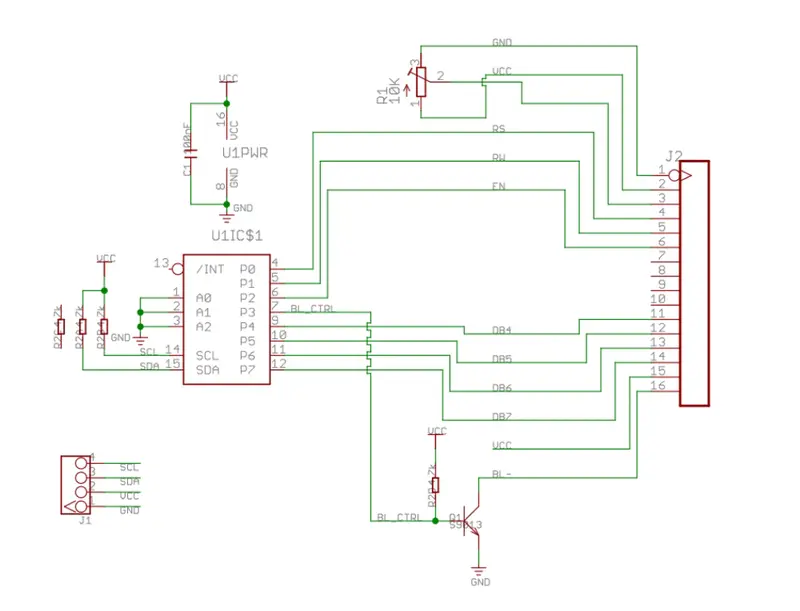
The IO expander & i2c-dev header will allow us to implement I2C without having to handle the logic of the protocol ourselves. That leaves us with the relatively simple task of writing code that relays instructions to the LCD’s microcontroller through the expander. Here is a map of the expander’s pins & their roles in the context of our microcontroller:

Figure 1: I2C LCD Adapter Schematic from HvandeVen/PCF8574-Display on GitHub.

*Note: This is a common but not GUARANTEED mapping. Pin maps may vary.

This schematic does some of the heavy lifting for us. In the image, it’s clearly outlined which physical pin on the expander corresponds to what role it plays on the microcontroller. From the image & microcontroller’s datasheet, you can come up with the following table:

Pin Role Description
P0 RS Register Select: 0 = Command, 1 = Data
P1 RW Read/Write: 0 = Write, 1 = Read
P2 EN Enable: (Stage/Confirm Changes)
P3 BL Backlight: 1 = ON, 0 = OFF
P4 D4 Data Bit 4
P5 D5 Data Bit 5
P6 D6 Data Bit 6
P7 D7 Data Bit 7

Before moving on I want to make two crucial clarifications:

1.) The PCF8574 only has 8 physical pins as shown by the table above. The first 4 of which are always allocated to what I call “byte control”, meaning they only refer to specific actions the LCD is going to perform. The remaining pins (D4-D7) are the pins we’re going to use to send information. Think of each byte we send like this:

DATA CTRL // Four data bits, Four control bits
0000 0000

2.) Because of this limitation, we’re going to be using the LCD in a 4-bit mode, meaning it will expect 4 data bits at a time.

However, that does not mean the data the LCD expects is 4-bit. The LCD’s internal system will automatically wait until it has received 2 sets of 4 data bits before considering the communication complete and printing a new letter to the screen. The idea is that the control bits are discarded and the 4 data bits from both instructions are combined into a single 8-bit byte which then represents a full letter.

How communication works & building instructions

Using the i2c-dev header, you send one byte (8 bits) at a time to the IO expander. Each byte is a set of instructions telling the expander exactly which pins should be ON (1) or OFF (0).

We use these 8 physical pins to send information. Think of it like this: Each pin state corresponds to a bit in that byte, we’re using a controller with 8 buttons that can each be toggled on or off. We send instructions to toggle those buttons (turning a pin ON or OFF) and then take a snapshot of the pin state and send that information as an instruction.

It’s not practical to manually synthesize binary for every instruction though. So to make this efficient, we treat the pins as their own bytes and abstract away the actual binary into variables. This way, we can use bitmasking to build the instructions we’ll be sending to the LCD.

In my code, I chose to do it like this above my main function:

// CONTROL PINS
const uint8_t PIN0_RS{ 0b00000001 };
const uint8_t PIN1_RW{ 0b00000010 }; // usually remains 0
const uint8_t PIN2_EN{ 0b00000100 }; 
const uint8_t PIN3_BL{ 0b00001000 }; // 1 for ON, 0 for OFF

// DATA PINS
const uint8_t PIN4_D4{ 0b00010000 };
const uint8_t PIN5_D5{ 0b00100000 };
const uint8_t PIN6_D6{ 0b01000000 };
const uint8_t PIN7_D7{ 0b10000000 };

// More declarations later...

I used binary literals here because when you’re mapping software bits to physical GPIO pins on an expander, binary is more readable than Hex. No one wants to do extra math when referencing pins. And abstracting away hex, an abstraction of binary, is redundant in and of itself.

Now that we’ve abstracted our pins away, we can use some bitwise “OR” operations ( | ) to build instructions from the ground up. Here’s an example of what that would look like now that we have our variables:

uint8_t instruction = PIN4_D4 | PIN0_RS | PIN3_BL;

There are two crucial pieces of logic that you need to understand before you can begin building instructions:

First, take a look at the type. All your instructions need to be 8-bit unsigned integer types. An empty instruction byte, for example, should look like this: 0000 0000.

The second thing you need to understand is bitmasking with the “OR” ( | ) operator. Since you’ve abstracted each pin to a specific name, you can layer them one on top of the other to create a single instruction. It looks something like this:

0001 0000 -> PIN4_D4
0000 0001 -> PIN0_RS
0000 1000 -> PIN3_BL
———– +
0001 1001 -> instruction

This is what the ( | ) operator does: it takes two or more bytes and returns a singular byte where a bit is set to 1 if it was 1 in any of the original bytes, effectively combining 3 instruction bytes into 1 instruction. The result 0001 1001 is actually the result of the snippet I showed you before:

uint8_t instruction = PIN4_D4 | PIN0_RS | PIN3_BL;

If you wanted to turn a pin off, you simply just wouldn’t include it in the next instruction. For example:

uint8_t instruction = PIN4_D4 | PIN0_RS; -> Backlight turns off.

THIS is what we’re going to be sending to the LCD. And now that you know the what, we can get into the how. I’m going to structure this into three main blocks:

  • Opening your I2C device
  • Setting the LCD to 4-bit mode
  • Sending 4-bit instruction bytes

Opening your I2C device

Now we can get into some code. If you want a full reference to what this header can do, you can check the official documentation here.

#include <iostream>
#include <fcntl.h>     // open files
#include <sys/ioctl.h> // input/output for files
#include <linux/i2c-dev.h>
#include <unistd.h>    // write(), usleep()

// ... FUNCTION & CONSTANTS DECLARATIONS HERE

int main() {
// --- LCD ---
    const std::string filepath{ "/dev/i2c-1" };
    const int i2c_adapter = open(filepath.c_str(), O_RDWR);

    if (i2c_adapter < 0){
        std::cout << "Failed to open bus." << std::endl;
        exit(1);
    }

// You can find the address hex value in your LCD's data sheet or if it's
// already connected via GPIO you can find it via the `i2cdetect -y 1`
// command in your terminal
    const uint8_t lcd_address = 0x27;
    if(ioctl(i2c_adapter, I2C_SLAVE, lcd_address) < 0) {
        std::cout << "Failed to reach I2C slave." << std::endl;
    }
}

In this block of code, I am opening a connection to the physical I2C hardware bus on my Pi via the device file "/dev/i2c-1". This returns a file descriptor I’ve named i2c_adapter. We then use an ioctl (Input/Output Control) call to tell the driver that all future communications on this bus should be directed to the slave device at address 0x27.

Essentially, every time we want to write information, we’re going to pass this i2c_adapter handle as a sort of guide. When we pass this handle to the write function, it’s like saying write information to the slave associated with this adapter. And so we can build our first function:

// ---- FUNCTIONS ----
void pulse(int i2c_adapter, uint8_t pin_state){
    // Stage our instructions by flipping the pin up:
    uint8_t up_instruction = PIN2_EN | pin_state;
    write(i2c_adapter, &up_instruction, 1);
    usleep(500);

    // Confirm instructions by flipping the pin down:
    uint8_t down_instruction = pin_state;
    write(i2c_adapter, &down_instruction, 1);
    usleep(500);
}

Before I talk about the code, I should clarify: PIN2_EN is a special pin whose role is something I like to compare to staging and committing changes.

Basically, for the IO expander to actually acknowledge the changes in pin state, the EN pin needs to be toggled up and down. Once to get the expander to look at the change in pin state (staging) and again to confirm the change in pin state (committing). This process is commonly referred to as a pulse, hence the name of the function.

Before we do that, we should make a couple more declarations above our main function.

// CONTROL PINS
const uint8_t PIN0_RS{ 0b00000001 };
const uint8_t PIN1_RW{ 0b00000010 }; // usually remains 0
const uint8_t PIN2_EN{ 0b00000100 }; 
const uint8_t PIN3_BL{ 0b00001000 }; // 1 for ON, 0 for OFF

// DATA PINS
const uint8_t PIN4_D4{ 0b00010000 };
const uint8_t PIN5_D5{ 0b00100000 };
const uint8_t PIN6_D6{ 0b01000000 };
const uint8_t PIN7_D7{ 0b10000000 };

// STARTUP COMMANDS PRESETS:
const uint8_t S_FUNCTION_SET{ 0b00101000 };
const uint8_t S_DISPLAY_SET{ 0b00001100 };
const uint8_t S_CHAR_ENTRY_SET{ 0b00000110 };

// OTHER:
const uint8_t CLEAR_DISPLAY{ 0b00000001 };

I’ve chosen to include these specific pin states because they’re common values that will be used during startup/other processes, and if they need to be changed, it’s more convenient to change them here than writing them inline. It helps for readability, too.

Setting the LCD to 4-bit mode

By default, the LCD will be set to run in an 8-bit state. Because we only have 4 data pins to work with, we have to change that during the initialization process. On page 46 of the MCU’s datasheet, you can find the following diagram:

Page 46 MCU Datasheet

This diagram shows the order in which we should use our pulse method to send instructions and properly wake the device. That little red arrow is the instruction which sets the LCD to 4-bit operation.

The formatting looks strange because the datasheet omits two of the irrelevant control bits, but you can safely ignore it and assume that they are zero. From there, all we have to do is simulate the wake-up instructions given by page 46 in code with our pulse method:

void wake_lcd(const int i2c_adapter){

    // Wake up the LCD and set it to receive 4-bit instructions
    const uint8_t wake_up = PIN4_D4 | PIN5_D5;
    const uint8_t set_4_bit = PIN5_D5;
    pulse(i2c_adapter, wake_up);
    usleep(5000);
    pulse(i2c_adapter, wake_up);
    usleep(5000);
    pulse(i2c_adapter, wake_up);
    usleep(5000);
    pulse(i2c_adapter, set_4_bit);
}

Now that you have that complete, your main function should look a little something like this:

#include <iostream>
#include <fcntl.h>     
#include <sys/ioctl.h>
#include <linux/i2c-dev.h>
#include <unistd.h>

int main() {
    const std::string filepath{ "/dev/i2c-1" };
    const int i2c_adapter = open(filepath.c_str(), O_RDWR);

    if (i2c_adapter < 0){
        std::cout << "Failed to open bus." << std::endl;
        exit(1);
    }

    const uint8_t lcd_address = 0x27;
    if(ioctl(i2c_adapter, I2C_SLAVE, lcd_address) < 0) {
        std::cout << "Failed to reach I2C slave." << std::endl;
    }

    wake_lcd(i2c_adapter);
}

And at that point, you’re almost done; the LCD is ready to be instructed via 4-bit operations. We just have to write one last crucial function before you can intuitively create more abstractions on your own. The last function we need to make is a 4-bit send_byte method. I chose to do this using bit-shifting.

Sending 4-bit instruction bytes

Recall what our instruction bytes should look like in 4-bit operation:

DATA CTRL // Four data bits, Four control bits
0000 0000

Like I said before, the first 4 bits of an instruction will ALWAYS be interpreted as control bytes; however, this causes problems because our letters will be in 8-bit format. Our solution is to send 2 instructions in one method. We’re going to break up a letter into two halves and send them separately. The LCD will discard the control bits and only take the data bits.

So here’s how we’re gonna do this:

HALF2 HALF1 // This is the binary representation of the letter H.
0100  1000

To implement this, we’ll pass one letter to the function at a time and call it an instruction. We’re going to apply bitmasking to the instruction. We’re going to bit-shift the first 4-bits of the letter to the left such that we lose the latter half of the letter and we have space for both the first half of the letter and the control bits:

DATA
HALF1 CTRL // This is half the representation of the letter H.
1000  0000 // The first half is shifted left to the data columns

DATA
HALF2 CTRL // This is the other half of the representation of the letter H.
0100  0000 // The second half is already in position so nothing changes.

We’ll then merge the basic instructions for writing a letter with the halves of the letters and send them as 2 sets of instructions. Here’s how I implemented that:

void send_byte(int i2c_adapter, uint8_t value, uint8_t rs_mode){
    uint8_t half_one = (value & 0b11110000) | PIN3_BL | rs_mode;
    pulse(i2c_adapter, half_one);

    uint8_t half_two = ((value << 4) & 0b11110000) | PIN3_BL | rs_mode;
    pulse(i2c_adapter, half_two);
}

So what’s happening? This function takes 2 new arguments: the value or letter we intend to send in its 8-bit format, and another value rs_mode.
That argument refers to the state of PIN0_RS. If you don’t remember its function, here it is:
| P0 | RS | Register Select: 0 = Command, 1 = Data |

In the cases where we’re sending normal letter information, we’ll be setting rs_mode = 1. Otherwise, if we’re working with the LCD’s other functions (not covered by this post), we’d use 0.

The & operator filters out the first 4 bits of the given value and replaces them with our preset LCD actions (keeping the backlight on and giving an RS value). The bit-shifting allows us to use the same value except for different parts of it, as described before.

We pulse both of those manipulated instructions and just like that, we’ve sent a value.

With the send_byte function finished we can expand our wake_lcd function to include the initialization steps for the LCD with the additional declarations we made before:

void wake_lcd(const int i2c_adapter){

    // Wake up the LCD and set it to receive 4-bit instructions
    const uint8_t wake_up = PIN4_D4 | PIN5_D5;
    const uint8_t set_4_bit = PIN5_D5;
    pulse(i2c_adapter, wake_up);
    usleep(15000);
    pulse(i2c_adapter, wake_up);
    usleep(5000);
    pulse(i2c_adapter, wake_up);
    usleep(5000);
    pulse(i2c_adapter, set_4_bit);

// Initialization:
// STARTUP ORDER: check page 23 for the values associated with each byte command shown here
    // 1.) FUNCTION SET
    // 2.) DISPLAY ON/OFF CONTROL
    // 3.) ENTRY MODE SET
    // 4.) CLEAR DISPLAY
    // --- READY FOR USE ---

    // Because we're sending an LCD command, rs_mode set to 0.
     send_byte(i2c_adapter, S_FUNCTION_SET, 0);
     send_byte(i2c_adapter, S_DISPLAY_SET, 0);
     send_byte(i2c_adapter, S_CHAR_ENTRY_SET, 0);
     send_byte(i2c_adapter, CLEAR_DISPLAY, 0);
}

Wrapping up

By the end of all this, if you’re following along, this is how your main function should look so far:

#include <iostream>
#include <fcntl.h>     // open files
#include <sys/ioctl.h> // input/output for files
#include <linux/i2c-dev.h>
#include <unistd.h>    // write(), usleep()
#include <string>      // Needed for std::string

// --- CONSTANTS (Global scope so they are accessible to all functions) ---

// CONTROL PINS
const uint8_t PIN0_RS{ 0b00000001 };
const uint8_t PIN1_RW{ 0b00000010 }; // usually remains 0
const uint8_t PIN2_EN{ 0b00000100 }; 
const uint8_t PIN3_BL{ 0b00001000 }; // 1 for ON, 0 for OFF

// DATA PINS
const uint8_t PIN4_D4{ 0b00010000 };
const uint8_t PIN5_D5{ 0b00100000 };
const uint8_t PIN6_D6{ 0b01000000 };
const uint8_t PIN7_D7{ 0b10000000 };

// STARTUP COMMANDS PRESETS:
const uint8_t S_FUNCTION_SET{ 0b00101000 };
const uint8_t S_DISPLAY_SET{ 0b00001100 };
const uint8_t S_CHAR_ENTRY_SET{ 0b00000110 };

// OTHER:
const uint8_t CLEAR_DISPLAY{ 0b00000001 };

// ---- FUNCTIONS ----

void pulse(int i2c_adapter, uint8_t pin_state){
    // Stage our instructions by flipping the pin up:
    uint8_t up_instruction = PIN2_EN | pin_state;
    write(i2c_adapter, &up_instruction, 1);
    usleep(500);

    // Confirm instructions by flipping the pin down:
    uint8_t down_instruction = pin_state;
    write(i2c_adapter, &down_instruction, 1);
    usleep(500);
}

void send_byte(int i2c_adapter, uint8_t value, uint8_t rs_mode){
    // Capture the high half (bits 7,6,5,4) and add control bits
    uint8_t half_one = (value & 0b11110000) | PIN3_BL | rs_mode;
    pulse(i2c_adapter, half_one);

    // Shift the low half (bits 3,2,1,0) into the high position (bits 7,6,5,4) 
    // This is required because physical pins D4-D7 are on the expander's high pins
    uint8_t half_two = ((value << 4) & 0b11110000) | PIN3_BL | rs_mode;
    pulse(i2c_adapter, half_two);

    // Clear display needs extra time (about 2ms) to finish internal processing
    if (value == CLEAR_DISPLAY) usleep(2000);
}

void wake_lcd(const int i2c_adapter){
    // Wake up the LCD and set it to receive 4-bit instructions
    // We send 0b0011 (3) in the data slots to reset the controller interface
    const uint8_t wake_up = PIN4_D4 | PIN5_D5; 
    const uint8_t set_4_bit = PIN5_D5;

    pulse(i2c_adapter, wake_up);
    usleep(15000); 
    pulse(i2c_adapter, wake_up);
    usleep(5000);
    pulse(i2c_adapter, wake_up);
    usleep(5000);
    pulse(i2c_adapter, set_4_bit);

    // Initialization:
    // STARTUP ORDER: check page 23 for the values associated with each byte command
    // 1.) FUNCTION SET
    // 2.) DISPLAY ON/OFF CONTROL
    // 3.) ENTRY MODE SET
    // 4.) CLEAR DISPLAY

    // Because we're sending an LCD command, rs_mode set to 0.
    send_byte(i2c_adapter, S_FUNCTION_SET, 0);
    send_byte(i2c_adapter, S_DISPLAY_SET, 0);
    send_byte(i2c_adapter, S_CHAR_ENTRY_SET, 0);
    send_byte(i2c_adapter, CLEAR_DISPLAY, 0);
}

int main() {
// --- LCD ---
    const std::string filepath{ "/dev/i2c-1" };
    const int i2c_adapter = open(filepath.c_str(), O_RDWR);

    if (i2c_adapter < 0){
        std::cout << "Failed to open bus." << std::endl;
        exit(1);
    }

// You can find the address hex value in your LCD's data sheet
    const uint8_t lcd_address = 0x27; 
    if(ioctl(i2c_adapter, I2C_SLAVE, lcd_address) < 0) {
        std::cout << "Failed to reach I2C slave." << std::endl;
        exit(1);
    }

    wake_lcd(i2c_adapter);

    // Usually we'll have rs_mode set to 1 since we're sending data
    // Sending the character 'H' (Binary: 0100 1000)
    send_byte(i2c_adapter, 'H', PIN0_RS);
    send_byte(i2c_adapter, 'I', PIN0_RS);
    send_byte(i2c_adapter, '!', PIN0_RS);

    close(i2c_adapter);
    return 0;
}

Once you’ve reached this point you’ve officially bridged the point between datasheet and code that actually communicates with the LCD.

If you go ahead and compile this (if all goes well) it should print the message “HI!”. If you want to take it a step further and build a function to send full strings at a time you can do that using the send_byte function under the hood. Here’s a simple way you could do that:


  // Note that this doesn't cover edgecases.
  // Just meant to be an example for sending full strings.
  void send_msg(int i2c_adapter, const std::string& message){

        for(char character : message){  
            send_byte(i2c_adapter, character, 1);
        }
}

Conclusion

That’s pretty much it. If you followed along this far, thank you for reading.

I want to make it apparent again that this is NOT a definitive guide on everything you can do with the LCD, and a likely didn’t use any of the best practices either. I’m just trying to share what I learned in the hope I this post can be a reference point to someone else starting out with the same device.

I’m self taught and still very new to embedded systems, so if you have any suggestions or spot any glaring errors I’m happy to acknowledge them!
I built an IAM-style firewall for AI agents after Claude read my .env

I’ve been using Claude Code to build stuff for a while now. It’s fast, it writes decent code, and it saves me hours. But a few days ago I had a moment that made me stop and think.

The moment that got me was when Claude grabbed my .env file on its own while trying to push a package. PyPI token sitting right there in the chat. No warning, no confirmation, nothing. If that was my Stripe key or a database URL it would have been the same story.

And that’s the problem. These AI agents have real access to your filesystem, your shell, your git history, your secrets. They don’t have bad intentions, they just don’t have boundaries. If you ask it to rm -rf something, it will. If you ask it to force push to main, it will. If it decides the fastest path to completing a task involves reading a credentials file, it’s going to read it.

So I built agsec.

What it is

agsec is a policy engine that sits between the AI agent and your system. Before the agent can do anything (run a command, read a file, make a web request), the action gets checked against your policies. If the policy says no, the action doesn’t happen. The agent doesn’t get a say.

Think of it like AWS IAM but for AI agents. You write declarative YAML policies that define what’s allowed, what’s blocked, and what needs a human to sign off on.

How it works

Agent wants to act  -->  agsec evaluates policy  -->  allow / block / review  -->  real world

The enforcement happens at the hook level. Most AI coding agents (Claude Code, Codex, Cursor, etc.) support pre-execution hooks that fire before any tool call. agsec plugs into these hooks. The agent can’t reason its way around it or write a script to bypass the check. The action simply doesn’t execute unless the policy allows it.

What a policy looks like

version: "1.0"
default: deny

statements:
  - sid: "AllowReadOps"
    effect: allow
    actions: ["file.read", "file.glob", "file.grep"]

  - sid: "BlockFileDelete"
    effect: deny
    actions: ["bash.execute"]
    conditions:
      params.command:
        op: "regex"
        value: "\brm\s"
    reason: "Agents should not delete files"

  - sid: "BlockEnvAccess"
    effect: deny
    actions: ["file.read"]
    conditions:
      params.file_path:
        op: "regex"
        value: "\.env$"
    reason: "Block access to environment files"

  - sid: "AllowBash"
    effect: allow
    actions: ["bash.execute"]

Deny always wins over allow. Same precedence as AWS IAM. If you’ve ever written an IAM policy, this will feel familiar.

You can match on action types (bash.execute, file.read, file.write, web.fetch), use regex and glob patterns on parameters, and set conditions with 12+ operators (equals, contains, regex, greater than, starts_with, etc.).

Getting started

pip install agsec
agsec init                     # creates default policies
agsec install claude-code      # activates the firewall

That’s it. Three commands and every tool call is now checked. rm blocked, .env access blocked, force push blocked, all out of the box.

The default policies cover the obvious stuff:

  • 01_base.yaml: default deny, allow read operations
  • 02_bash.yaml: block rm, DROP TABLE, secret access, data exfiltration
  • 03_files.yaml: block writes to .env, credentials.json, system dirs
  • 04_web.yaml: review external HTTP requests
  • 05_git.yaml: block force push, hard resets, protected branches

Observe mode

If you’re not ready to start blocking things, you can run in observe mode first:

agsec init --observe           # log only, no blocking
agsec audit --stats            # see what would have been blocked
agsec enforce                  # start blocking when ready

This lets you see what your agent is actually doing before you put any guardrails in place. The audit trail alone is worth it. You’ll be surprised how many things the agent does that you never explicitly asked for.

What platforms it supports

Right now it works with Claude Code, Codex, Cursor, Windsurf, Cline, and GitHub Copilot. Claude Code is fully tested, the others are functional but could use more community testing.

It also has Python SDK integrations for LangChain, OpenAI, and Anthropic clients if you’re building agent workflows in code.

Why not just use the agent’s built-in restrictions?

Most agents have some form of deny rules or permission settings. The problem is these are usually stored in project config files that the agent itself can modify. And they’re typically simple string matching without conditions or precedence logic.

agsec policies live outside the agent’s reach. The evaluation is done externally before the action runs. The agent can’t edit the policy, can’t skip the check, and can’t convince itself that an exception is warranted.

What’s next

I’m actively working on a web UI for policy management, better audit dashboards, and more platform integrations. The core policy engine is solid and I’m using it daily on my own workflow.

If you’re using AI agents for real work and you’ve ever had that “wait what did it just do” moment, give it a try. Or just run it in observe mode and look at the audit logs. That alone might change how you think about agent access.

GitHub: https://github.com/riyandhiman14/Agent-Sec
PyPI: https://pypi.org/project/agsec/

Would love feedback, especially edge cases and bypass attempts. That’s how this gets better.

Auto Estimate PostgreSQL Table and Index Size from EF Core Models

TL;DR: EfCore.StorageEstimator combines EF Core model metadata with explicit workload assumptions so you can estimate PostgreSQL heap, index, and graph growth before production data exists.

If you use EF Core with PostgreSQL, you can usually answer schema questions like these:

  • What tables will exist?
  • Which columns are nullable?
  • Which indexes are we creating?
  • Are we using owned types, many-to-many, complex properties, or inheritance?

What you usually cannot answer quickly is this: how much storage will this model consume once real tenants, projects, assets, or events start piling up?

That is the gap EfCore.StorageEstimator is trying to close. It takes the parts EF Core already knows from the compiled model and combines them with the parts only you know: expected row counts, field fill rates, average payload lengths, and navigation multiplicities.

The tool estimates PostgreSQL table size, index size, and how row counts grow across related entities. Here is the kind of report it produces from a real EF Core model:

Path Entity Rows Heap Bytes Index Bytes Total Bytes Table Properties Indexes
SampleProject SampleProject 120 81920 49152 131072 sample_projects 9 2
SampleProject.Assets SampleAsset 1440 11796480 204800 12001280 sample_assets 7 1
SampleProject.Tags SampleTag 480 40960 32768 73728 sample_tags 2 1

Total Estimated Rows: 2040
Total Estimated Bytes: 12206080

Why this exists

PostgreSQL storage is not intuitive to estimate by hand. Tables and indexes are stored in fixed-size pages, commonly 8 KB, with per-page headers, per-row headers, alignment rules, null bitmaps, and index entry overhead. Large values can also be pushed into TOAST storage. The official PostgreSQL docs explain the physical model, but that still leaves you doing a lot of manual math for real schemas.

EF Core already has the schema part. Its metadata model describes how your entity types map to the database. If you already use Npgsql, that model also knows PostgreSQL-specific store types like jsonb, bytea, arrays, and numeric precision.

Most teams still do capacity planning in a spreadsheet, a Notion page, or a rough architecture note. That usually drifts away from the actual model. Indexes get missed. Owned types get forgotten. Many-to-many join tables are hand-waved. Row counts are discussed separately from the schema that creates the storage bill.

EfCore.StorageEstimator puts those two sides together.

A minimal example

Start by annotating the parts of the model that EF Core cannot infer from the schema alone.

using EfCore.StorageEstimator.Planning;

[StorageEntity(12)]
public sealed class Project
{
  [StorageField(AverageLength = 64)]
  public string Name { get; set; } = string.Empty;

  [StorageNavigation(8)]
  public IReadOnlyList<TaskItem> Tasks { get; } = [];
}

[StorageEntity(1)]
public sealed class TaskItem
{
  [StorageField(0.5d, AverageLength = 120)]
  public string? Notes { get; set; }
}

Then run the estimate from a dedicated analysis process:

using EfCore.StorageEstimator;
using EfCore.StorageEstimator.Estimation;
using EfCore.StorageEstimator.Rendering;
using Microsoft.Extensions.DependencyInjection;

var services = new ServiceCollection()
  .AddStorageEstimator()
  .BuildServiceProvider();

var estimator = services.GetRequiredService<IStorageEstimator>();

var report = estimator.Estimate(new StorageEstimateRequest
{
  Model = dbContext.Model,
  Roots =
  [
    new StorageTraversalRoot(typeof(Project)),
    new StorageTraversalRoot(typeof(Project))
    {
      EntityCountOverride = 5_000,
      Label = "Large Tenant"
    }
  ]
});

var markdown = new MarkdownReportRenderer().Render(report);
Console.WriteLine(markdown);

A few details matter here:

  • Model = dbContext.Model tells the estimator to read the real EF Core model.
  • EntityCountOverride lets you compare scenarios without editing attributes.
  • Label gives the root a friendlier name in the output.

What the report looks like

The sample app in the repository renders a Markdown report like this:

Path Entity Rows Heap Bytes Index Bytes Total Bytes Table Properties Indexes
SampleProject SampleProject 120 81920 49152 131072 sample_projects 9 2
SampleProject.Assets SampleAsset 1440 11796480 204800 12001280 sample_assets 7 1
SampleProject.Tags SampleTag 480 40960 32768 73728 sample_tags 2 1

Total Estimated Rows: 2040
Total Estimated Heap Bytes: 11919360
Total Estimated Index Bytes: 286720
Total Estimated Bytes: 12206080

That report shape is useful because it answers several questions at once:

  • which path in the graph is producing the most rows
  • which table is consuming most of the heap
  • how much of the bill comes from indexes
  • how much of the estimate is grounded in real schema metadata

In this sample, the root entity is small, but the Assets branch dominates total storage once multiplicity is applied. That is the kind of result that is easy to miss in a spreadsheet and obvious in a traversal-based report.

What the packages do

The repository currently exposes three main surfaces:

Package Purpose
EfCore.StorageEstimator.Contracts Planning attributes and DTOs
EfCore.StorageEstimator Runtime estimator, EF Core schema reader, PostgreSQL sizing math, Markdown and JSON renderers
EfCore.StorageEstimator.Analyzers Roslyn diagnostics for invalid planning metadata

It is a library-first toolchain. You run it from a dedicated console app, internal tool, test harness, or analysis host. The estimator reads dbContext.Model, it does not need a live database connection to calculate an estimate.

Warnings and analyzers

The estimator emits warnings when traversal stops at an unannotated branch or when storage sizing falls back to default assumptions.

The analyzer package catches invalid metadata earlier in the build:

Rule Meaning
EFSA001 [StorageNavigation] targets a type without [StorageEntity]
EFSA002 [StorageEntity] row count must be greater than zero
EFSA003 [StorageField] fill rate must be between 0 and 1
EFSA004 [StorageField(AverageLength = ...)] must be zero or greater
EFSA005 [StorageNavigation] multiplicity must be greater than zero

That combination matters because the estimate stays explicit. Schema facts come from EF Core, workload assumptions live in code, and missing planning data shows up as warnings instead of disappearing into hand-wavy math.

Summary

If you already use EF Core and PostgreSQL, you already own half the information needed for capacity planning. EF Core knows the shape of the schema. Your team knows the expected scale. EfCore.StorageEstimator combines those two inputs into a report you can run early, review often, and tighten over time.

It gives you a concrete estimate before production data exists, using the model you already have.

Learn more:

The Permission Problem: Why Your AI Agent Is One Mistake Away From Disaster

The Permission Problem: Why Your AI Agent Is One Mistake Away From Disaster

Your AI agent has your email. It can read your Slack. It can access your calendar, your documents, your entire digital life.

What happens when you tell it to “clean up my inbox”?

For most teams, that question has a terrifying answer: nobody knows.

The agent permission model we need isn’t about restricting access. It’s about defining what “reasonable” means before an AI interprets it.

The AWS Wake-Up Call

Mike Chambers from AWS published a piece titled “How to Stop My Agent from Getting Me Fired.” It opens with a scenario that sounds like fiction but isn’t: an AI agent connected to email and Slack, capable of reading everything, replying to messages, and potentially sending that message you really, really shouldn’t send.

The post walks through building protection layers. But the deeper question stuck with me.

Why do we give agents root access to our entire digital identity in the first place?

The Three-Layer Permission Model

Most agent implementations follow a simple pattern: connect tool, give full access, hope for the best.

Here’s what a sane permission model actually looks like.

Layer 1: Tool Scope

Not every agent needs every tool. A coding agent doesn’t need email access. A calendar assistant doesn’t need database write permissions.

The mistake most teams make is treating MCP (Model Context Protocol) connections as features to add rather than attack surfaces to minimize.

Rule: Every tool connection is a boundary negotiation. Default to none. Add only what’s required.

Layer 2: Action Scope

Even within a connected tool, not every action should be available. An email agent can probably read drafts and send messages. Should it delete emails? Archive everything? Mark things as spam?

The AWS post describes implementing tool protection—a way to require confirmation before certain actions execute.

Rule: Define what the agent can do, not just what it can see.

Layer 3: Content Scope

This is the subtlest and most dangerous layer. An agent with calendar access can see every meeting. But should it?

Privacy boundaries matter for compliance, sure. But they also matter for trust. If I can’t tell my agent to ignore certain folders or labels, I’ll never fully trust it with anything.

Rule: Content filtering isn’t optional. It’s the difference between a helpful assistant and a surveillance system.

What Failure Looks Like

The AWS article describes a simple protection mechanism: prompt for confirmation before executing sensitive actions.

But let’s think about what happens without that layer.

Your agent reads an angry email from a client. It drafts a response. It sends it. You wake up to a crisis you didn’t know existed, created by an AI following instructions you never explicitly gave.

Or simpler: you ask your agent to “organize my files.” It deletes everything it thinks is “clutter.” Turns out, your definition of clutter and its definition are not the same.

The pattern is consistent. Agents interpret intent at scale, and scale magnifies mistakes.

A Practical Framework

If you’re building or deploying agents, here’s the checklist that actually matters.

1. Inventory Every Tool Connection

List every MCP connection, every API integration, every external system your agent can touch. For each one, ask: is this necessary?

2. Define Action Boundaries

For each tool, enumerate what actions are allowed. Reading, writing, deleting, sending. Default to read-only where possible.

3. Set Content Filters

Define what content the agent should ignore. Personal folders, confidential labels, draft folders. Build exclusion patterns.

4. Require Confirmation for Destructive Actions

Anything that can’t be undone—sending messages, deleting files, making payments—should require explicit approval.

5. Log Everything

When an agent acts on your behalf, you need to know what it did and why. Audit trails aren’t just for security; they’re for debugging behavior you didn’t expect.

The Bigger Picture

We’re in the early days of agent deployment. Most teams are still figuring out how to make agents useful. The next wave of problems will be about making them safe.

The companies that win won’t be the ones with the most powerful agents. They’ll be the ones with agents that can be trusted to not destroy everything they touch.

Permission models aren’t a feature. They’re the foundation.

What This Means for You

If you’re building agents: start with “what can go wrong?” and work backward from there.

If you’re deploying agents: inventory your tool connections today. You’ll probably find at least one you didn’t realize was there.

If you’re managing teams using agents: ask about the permission model before you ask about the capabilities.

The agent that can do everything is the agent that can break everything. The goal isn’t to restrict—it’s to define the boundaries that let agents operate safely within them.

That’s the permission problem. And solving it isn’t optional anymore.

Why Flutter AI Chat UIs Break (And How to Fix Them)

Why Flutter AI Chat UIs Break (And How to Fix Them)

Building AI chat interfaces in Flutter seems straightforward until you hit the real world. Your beautifully crafted chat bubbles start overlapping. Message timestamps disappear on certain devices. The typing indicator causes your entire list to rebuild. Sound familiar?

I’ve been there. After building dozens of AI chat UIs and seeing the same patterns break repeatedly, I want to share what actually works—and introduce you to a better approach.

The Hidden Complexity of Chat UIs

Chat interfaces look simple, but they’re deceptively complex:

  • Dynamic content sizing: Messages vary wildly in length
  • Real-time updates: New messages, typing indicators, status changes
  • Performance at scale: Rendering thousands of messages smoothly
  • Accessibility: Screen readers, keyboard navigation, semantic markup
  • Cross-platform consistency: iOS, Android, web, desktop

Most developers start with a basic ListView and add features incrementally. This works fine for prototypes, but falls apart under real usage.

Common Patterns That Break

The “Simple ListView” Trap

// This looks clean but will cause problems
ListView.builder(
  itemCount: messages.length,
  itemBuilder: (context, index) {
    return MessageBubble(message: messages[index]);
  },
)

Problems:

  • No message grouping logic
  • Poor scroll performance with mixed content
  • Rebuild hell when new messages arrive
  • No built-in accessibility features

The “Everything is a Container” Anti-Pattern

Container(
  padding: EdgeInsets.all(16),
  decoration: BoxDecoration(
    color: isUser ? Colors.blue : Colors.grey[200],
    borderRadius: BorderRadius.circular(12),
  ),
  child: Text(message.content),
)

Problems:

  • No semantic meaning for screen readers
  • Hard to maintain consistent spacing
  • Difficult to add features like timestamps, reactions, or status indicators
  • Styling becomes scattered across your codebase

The “State Management Nightmare”

class ChatState extends ChangeNotifier {
  List<Message> messages = [];
  bool isTyping = false;
  bool isLoading = false;
  String? error;

  void addMessage(Message message) {
    messages.add(message);
    notifyListeners(); // Rebuilds everything!
  }
}

Problems:

  • Entire chat rebuilds for every state change
  • No message-level optimizations
  • Scroll position jumps
  • Poor performance with large message histories

A Better Approach: Component-First Design

Instead of building chat UIs from scratch every time, what if you had a set of battle-tested components that handle these complexities?

This is exactly what we built with FlAI—a shadcn/ui-style component library specifically for Flutter AI chat interfaces.

Smart Message Grouping

ChatMessageList(
  messages: messages,
  groupBy: (message) => message.senderId,
  groupTimeThreshold: Duration(minutes: 5),
  builder: (context, group) {
    return MessageGroup(
      sender: group.sender,
      messages: group.messages,
      showAvatar: group.isFirstInSequence,
    );
  },
)

Messages automatically group by sender and time, just like iMessage or WhatsApp.

Performance-Optimized Updates

ChatMessage(
  id: message.id,
  content: message.content,
  timestamp: message.timestamp,
  status: message.status,
  // Only rebuilds when this specific message changes
)

Each message is its own widget with optimized updates. Adding a new message doesn’t rebuild the entire chat.

Accessibility Built-In

ChatBubble(
  message: "Hello, how can I help you?",
  semanticLabel: "Assistant message at 2:30 PM: Hello, how can I help you?",
  // Automatic focus management, semantic roles, etc.
)

Screen readers work perfectly out of the box.

The Mason Brick Advantage

Here’s where FlAI differs from traditional packages: instead of adding dependencies, you own the code.

# Add the component to your project
mason make flai_chat_message

# Customize it however you need
# It's your code now—no version conflicts or breaking changes

You get:

  • ✅ No dependency lock-in – The code lives in your project
  • ✅ Full customization – Modify anything you need
  • ✅ Type safety – Components adapt to your data models
  • ✅ Bundle size optimization – Only include what you use

Real-World Example

Let’s build a complete AI chat interface:

class AIChatScreen extends StatefulWidget {
  @override
  _AIChatScreenState createState() => _AIChatScreenState();
}

class _AIChatScreenState extends State<AIChatScreen> {
  final List<ChatMessage> messages = [];
  final TextEditingController controller = TextEditingController();
  bool isTyping = false;

  @override
  Widget build(BuildContext context) {
    return Scaffold(
      appBar: AppBar(title: Text('AI Assistant')),
      body: Column(
        children: [
          Expanded(
            child: ChatMessageList(
              messages: messages,
              reverse: true,
              padding: EdgeInsets.all(16),
              groupBy: ChatMessage.groupBySender,
              builder: (context, group) => MessageGroup(
                avatar: group.isAssistant 
                  ? AssetImage('assets/ai_avatar.png')
                  : null,
                messages: group.messages.map((msg) => 
                  ChatBubble(
                    message: msg.content,
                    isUser: msg.isUser,
                    timestamp: msg.timestamp,
                    status: msg.status,
                  ),
                ).toList(),
              ),
            ),
          ),
          if (isTyping)
            TypingIndicator(
              avatar: AssetImage('assets/ai_avatar.png'),
            ),
          ChatInput(
            controller: controller,
            onSend: _sendMessage,
            placeholder: 'Ask me anything...',
          ),
        ],
      ),
    );
  }

  void _sendMessage(String text) async {
    if (text.trim().isEmpty) return;

    // Add user message
    setState(() {
      messages.insert(0, ChatMessage(
        id: DateTime.now().millisecondsSinceEpoch.toString(),
        content: text,
        isUser: true,
        timestamp: DateTime.now(),
        status: MessageStatus.sent,
      ));
      isTyping = true;
    });

    controller.clear();

    // Simulate AI response
    await Future.delayed(Duration(seconds: 2));

    setState(() {
      isTyping = false;
      messages.insert(0, ChatMessage(
        id: DateTime.now().millisecondsSinceEpoch.toString(),
        content: "That's an interesting question! Let me help you with that...",
        isUser: false,
        timestamp: DateTime.now(),
        status: MessageStatus.delivered,
      ));
    });
  }
}

This gives you:

  • Smooth scrolling with hundreds of messages
  • Automatic message grouping
  • Typing indicators
  • Message status indicators
  • Perfect accessibility support
  • Responsive design across all screen sizes

Getting Started

Ready to build better chat UIs? Here’s how to get started:

  1. Install Mason CLI:
   dart pub global activate mason_cli
  1. Add FlAI bricks:
   mason add flai_chat_message
   mason add flai_chat_input
   mason add flai_typing_indicator
  1. Generate your first component:
   mason make flai_chat_message
  1. Customize to your heart’s content – it’s your code now!

The Future of Flutter Chat UIs

The days of rebuilding chat interfaces from scratch are over. With component-first design and tools like FlAI, you can focus on what makes your AI unique instead of wrestling with message bubble layouts.

Whether you’re building a customer support bot, an AI coding assistant, or the next big AI app, you deserve components that just work.

Want to see FlAI in action? Check out our GitHub repository for examples and documentation.

What chat UI challenges are you facing? Share in the comments—I’d love to help solve them!

Building a Tokenizer from Scratch [part 2]

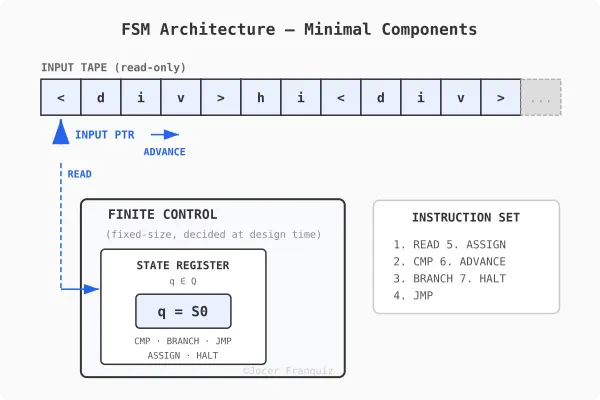
FSM Architecture

From FSM to PDA: Q/A with Claude Opus

In part 1, we built a working FSM that recognizes <div>text</div> using just 7 primitives mapped 1:1 to assembly opcodes. But FSMs have a hard limit: they can’t handle nested structures like <div><div>hello</div></div>. In this post, we climb the Chomsky hierarchy from finite state machines to pushdown automata, build a PDA that recognizes nested <div> tags, and then turn it into a transducer that emits tokens. In other words we are building the core of a lexer.

Q: Why can’t FSMs handle nested structures?

Because an FSM has a fixed number of states, and that’s all the memory it has.

Consider nested divs:

<div><div><div>hello</div></div></div>

To correctly match closing tags, you need to count how many <div>s you’ve opened so you know how many </div>s to expect. An FSM with, say, 12 states can handle nesting up to some fixed depth — but someone can always write HTML nested one level deeper than your states can track.

Put simply:

  • 1 level deep → you need states to remember “I’m 1 div in”
  • 2 levels deep → different states for “I’m 2 divs in”
  • n levels deep → you’d need n distinct state configurations

Since n is unbounded but your state count is finite, you run out of states. There’s no way to encode “how deep am I?” in a fixed-size state register when the depth is arbitrary.

This is exactly what the stack in a pushdown automaton solves. Every time you see <div>, you push onto the stack; every </div>, you pop. The stack grows as needed, giving you unbounded memory in one direction (depth), which is precisely what nesting requires.

Q: So, FSMs needs memory to “remember” where they are in the nested structure, correct?

It depends on what you mean by “memory.”

An FSM does have memory, but it’s extremely limited. The current state itself is the memory. If your FSM is in state S7, that encodes something about what it has seen so far. That’s how it knows it’s partway through reading </div> vs still in content.

But that memory is:

  • Fixed-size, bounded by the number of states, decided at design time
  • Lossy, it can’t remember the full history of what it read, only a compressed summary encoded in which state it’s in
  • Non-growable, it can’t allocate more memory as input gets longer

FSM Architecture

So when people say “FSMs have no memory,” they really mean no auxiliary memory, that means no stack, no tape, no buffer that grows with input. The only thing an FSM “remembers” is which state it’s currently in.

A PDA adds exactly one auxiliary memory structure: a stack. That single addition is enough to go from “can’t handle nesting” to “can handle nesting.”

Q: What is the stack, formally?

A stack is a last-in, first-out (LIFO) data structure with two operations:

  • PUSH(symbol): place a symbol on top
  • POP: remove and return the top symbol

So if your stack is ABB, a PUSH(C) gives ABBC, and a POP returns C leaving ABB again.

The key properties:

  1. You can only access the top: no reading the middle or bottom
  2. Unbounded size: it can grow as large as needed (unlike the FSM’s fixed states)
  3. It starts empty: at the beginning of computation, the stack contains nothing (or a special bottom marker like $)

That’s it. It’s the simplest possible auxiliar memory that’s still useful. You get only sequential access from one end. But that restriction is exactly what matches the structure of nesting: the most recently opened thing is the next thing that needs to close.

Q: Which operations and structures do we need to add to the seven primitives to create a PDA that handles nested structures?

We need two new operations and one new structure:

New structure

  • STACK: a LIFO storage addressed by a stack pointer (SP)

Updated primitives table

# Operation Description Type Assembly equivalent
1 READ Load current input symbol FSM MOV reg, [src]
2 CMP Test value equality FSM CMP reg, imm
3 BRANCH Conditional jump FSM JE / JNE label
4 JMP Unconditional jump FSM JMP label
5 ASSIGN Update state register FSM MOV reg, imm
6 ADVANCE Move input pointer forward FSM INC reg
7 HALT Terminate execution FSM HLT
8 PUSH Place symbol on top of stack PDA PUSH reg
9 POP Remove and return top of stack PDA POP reg

Two operations and one structure turn an FSM into a PDA.

x86 has native PUSH/POP instructions with a hardware stack pointer (SP/ESP/RSP), so the 1:1 mapping to CPU instructions still holds. PDAs are just as mechanically efficient as FSMs. The only cost is that memory usage now grows with nesting depth instead of being fixed.

You could also add a PEEK operation (read top without removing), but it’s not strictly necessary — you can always POP then PUSH back. It’s a convenience, not a primitive.

Q: What’s the simplest PDA architecture?

A PDA architecture needs exactly four components:

  1. Input tape — the string being read (read-only, left-to-right)
  2. Input pointer — current position on the tape
  3. State register — holds the current state from a finite set Q
  4. Stack — LIFO storage over alphabet Γ

And the nine operations from our table are the instruction set that operates on these four components.

Compared to the FSM architecture from part 1, we added exactly one component (the stack) and two operations (PUSH, POP). The stack pointer (SP) lives inside the finite control alongside the state register — it’s a register, not part of the stack itself.

PDA Architecture

The PDA architecture is a von Neumann architecture:

PDA component Von Neumann equivalent
Input tape Memory (data segment)
Input pointer Program counter / index register
State register CPU register (accumulator)
Stack pointer SP register
Stack (in RAM) Stack segment of memory
9 operations Subset of the instruction set

What’s missing for full Von Neumann: writable memory, random access, arithmetic, and stored program. The automata hierarchy maps directly onto hardware capability:

  • FSM → combinational logic + a register
  • PDA → CPU + stack segment
  • Turing machine → CPU + full random-access memory = von Neumann

Building a PDA for nested <div> recognition

Pseudocode

STATES: S0, TAG_OPEN, TAG_NAME, CONTENT, CLOSE_SLASH,
        CLOSE_NAME, ACCEPT, DEAD

STACK ALPHABET: Γ = { DIV, $ }

START:
  PUSH($)                    -- bottom marker
  ASSIGN(S0)

S0:
  READ(ch)
  CMP(ch, '<')
  BRANCH(eq → TAG_OPEN)
  JMP(DEAD)

TAG_OPEN:
  ADVANCE
  READ(ch)
  CMP(ch, '/')
  BRANCH(eq → CLOSE_SLASH)   -- it's a closing tag
  CMP(ch, 'd')
  BRANCH(eq → TAG_NAME)      -- it's an opening tag
  JMP(DEAD)

TAG_NAME:                     -- read "div>"
  ADVANCE
  READ(ch); CMP(ch, 'i'); BRANCH(ne → DEAD)
  ADVANCE
  READ(ch); CMP(ch, 'v'); BRANCH(ne → DEAD)
  ADVANCE
  READ(ch); CMP(ch, '>'); BRANCH(ne → DEAD)
  PUSH(DIV)                   -- ← matched <div>, push it
  ADVANCE
  ASSIGN(CONTENT)

CONTENT:
  READ(ch)
  CMP(ch, '<')
  BRANCH(eq → TAG_OPEN)      -- ← could be nested <div> or </div>
  CMP(ch, EOF)
  BRANCH(eq → DEAD)           -- input ended with open tags
  ADVANCE                     -- consume text character
  JMP(CONTENT)

CLOSE_SLASH:                  -- inside </
  ADVANCE
  READ(ch); CMP(ch, 'd'); BRANCH(ne → DEAD)
  ADVANCE
  READ(ch); CMP(ch, 'i'); BRANCH(ne → DEAD)
  ADVANCE
  READ(ch); CMP(ch, 'v'); BRANCH(ne → DEAD)
  ADVANCE
  READ(ch); CMP(ch, '>'); BRANCH(ne → DEAD)
  POP(top)                    -- ← pop the stack
  CMP(top, DIV)
  BRANCH(ne → DEAD)           -- mismatch
  ADVANCE
  READ(ch)
  CMP(ch, EOF)
  BRANCH(eq → CHECK_EMPTY)
  ASSIGN(CONTENT)             -- more input, keep going

CHECK_EMPTY:
  POP(top)
  CMP(top, $)
  BRANCH(eq → ACCEPT)         -- stack empty = all tags matched
  JMP(DEAD)                   -- leftover tags = unbalanced

ACCEPT:
  HALT(accept)

DEAD:
  HALT(reject)

The entire FSM logic is reused. The only additions are three PUSH/POP calls. One PUSH per <div>, one POP per </div>, one final POP to verify the stack is empty.

Trace: <div><div>hi</div></div>

Input: < d i v > < d i v > h i < / d i v > < / d i v > EOF
       0 1 2 3 4 5 6 7 8 9 ...

Stack starts: [ $ ]

1. First <div>

State     | Read | Action              | Stack
----------|------|----------------------|--------
S0        | <    | match, → TAG_OPEN   | [ $ ]
TAG_OPEN  | d    | not '/', → TAG_NAME | [ $ ]
TAG_NAME  | i    | match               | [ $ ]
          | v    | match               | [ $ ]
          | >    | match, PUSH(DIV)    | [ $ DIV ]
          |      | → CONTENT           |

2. Second <div>

State     | Read | Action              | Stack
----------|------|----------------------|-----------
CONTENT   | <    | → TAG_OPEN          | [ $ DIV ]
TAG_OPEN  | d    | not '/', → TAG_NAME | [ $ DIV ]
TAG_NAME  | i    | match               | [ $ DIV ]
          | v    | match               | [ $ DIV ]
          | >    | match, PUSH(DIV)    | [ $ DIV DIV ]
          |      | → CONTENT           |

3. Text “hi”

State     | Read | Action              | Stack
----------|------|----------------------|-------------
CONTENT   | h    | not '<', ADVANCE    | [ $ DIV DIV ]
CONTENT   | i    | not '<', ADVANCE    | [ $ DIV DIV ]

4. First </div>

State       | Read | Action            | Stack
------------|------|--------------------|--------------
CONTENT     | <    | → TAG_OPEN        | [ $ DIV DIV ]
TAG_OPEN    | /    | → CLOSE_SLASH     | [ $ DIV DIV ]
CLOSE_SLASH | d    | match             | [ $ DIV DIV ]
            | i    | match             | [ $ DIV DIV ]
            | v    | match             | [ $ DIV DIV ]
            | >    | match, POP → DIV  | [ $ DIV ]
            |      | DIV == DIV ✓      |
            |      | read next         |

5. Second </div>

State       | Read | Action            | Stack
------------|------|--------------------|---------
CONTENT     | <    | → TAG_OPEN        | [ $ DIV ]
TAG_OPEN    | /    | → CLOSE_SLASH     | [ $ DIV ]
CLOSE_SLASH | d    | match             | [ $ DIV ]
            | i    | match             | [ $ DIV ]
            | v    | match             | [ $ DIV ]
            | >    | match, POP → DIV  | [ $ ]
            |      | DIV == DIV ✓      |
            |      | read next         |

6. End of input

State       | Read | Action            | Stack
------------|------|--------------------|---------
            | EOF  | → CHECK_EMPTY     | [ $ ]
CHECK_EMPTY |      | POP → $           | [ ]
            |      | $ == $ ✓          |
            |      | → ACCEPT          |

Result: ACCEPT

The stack grew to depth 2 (two DIVs), then shrank back to just $, confirming every open tag had a matching close. An FSM would have needed dedicated states for each depth level. This PDA handles any depth with the same 8 states.

PDA State diagram

Q: Our PDA can parse nested structures and output accept or reject. But a real tokenizer needs to emit tokens, right?

Right. The PDA is still just a recognizer. To become a tokenizer, we need to understand what changes formally.

A recognizer takes an input string and produces a single binary answer: accept or reject.

  • Input: a string over alphabet
  • Output: yes or no

A transducer takes an input string and produces an output string (or sequence of output symbols). It transforms input into output.

  • Input: a string over alphabet
  • Output: a string y over an output alphabet Δ

A tokenizer is a transducer: it reads characters (Σ = ASCII) and emits tokens (Δ = the set of possible tokens).

Q: What is ?

An output buffer is a tape, simpler than the stack:

  • Append-only: you can only write to the end, never read back or modify
  • Write-only: the machine never consults its own output to make decisions
  • Unbounded: it grows as tokens are emitted
  • Starts empty

Output structure

OUTPUT ALPHABET:  Δ = TokenType × Σ*
TOKEN TYPES:      TokenType = { OPEN_TAG, CLOSE_TAG, TEXT }
OUTPUT BUFFER:    append-only list of (type, value) pairs, starts empty

For <div><div>hi</div></div>, the output buffer should end up as:

[
  (OPEN_TAG,  "div"),
  (OPEN_TAG,  "div"),
  (TEXT,      "hi"),
  (CLOSE_TAG, "div"),
  (CLOSE_TAG, "div")
]

Updated operations table (11 operations)

# Operation Description Type Assembly
1 READ Load current input symbol FSM MOV reg, [src]
2 CMP Test value equality FSM CMP reg, reg/imm
3 BRANCH Conditional jump FSM JE / JNE label
4 JMP Unconditional jump FSM JMP label
5 ASSIGN Update state register FSM MOV reg, imm
6 ADVANCE Move input pointer forward FSM INC reg
7 HALT Terminate execution FSM HLT
8 PUSH Place symbol on top of stack PDA PUSH reg
9 POP Remove and return top of stack PDA POP reg
10 MARK Save current input position Transducer MOV reg, reg
11 EMIT Append token to output buffer Transducer MOV [dst], reg

Transducer Architecture: 6 components

  1. Input tape (read-only)
  2. Input pointer
  3. State register
  4. Stack pointer + Stack
  5. Mark register — saves start position of current token
  6. Output buffer — append-only, unbounded

Transducer Architecture

Pseudocode (transducer)

STATES: S0, TAG_OPEN, TAG_NAME, CONTENT, CONTENT_LOOP,
        CONTENT_DONE, CLOSE_SLASH, CHECK_EMPTY, ACCEPT, DEAD

INPUT ALPHABET:  Σ = ASCII
STACK ALPHABET:  Γ = { DIV, $ }
OUTPUT ALPHABET: Δ = { OPEN_TAG, CLOSE_TAG, TEXT } × Σ*

START:
  PUSH($)
  ASSIGN(S0)

S0:
  READ(ch)
  CMP(ch, '<')
  BRANCH(eq → TAG_OPEN)
  JMP(DEAD)

TAG_OPEN:
  ADVANCE
  READ(ch)
  CMP(ch, '/')
  BRANCH(eq → CLOSE_SLASH)
  CMP(ch, 'd')
  BRANCH(eq → TAG_NAME)
  JMP(DEAD)

TAG_NAME:
  ADVANCE
  READ(ch); CMP(ch, 'i'); BRANCH(ne → DEAD)
  ADVANCE
  READ(ch); CMP(ch, 'v'); BRANCH(ne → DEAD)
  ADVANCE
  READ(ch); CMP(ch, '>'); BRANCH(ne → DEAD)
  PUSH(DIV)
  EMIT(OPEN_TAG, "div")           -- ← emit opening tag token
  ADVANCE
  ASSIGN(CONTENT)

CONTENT:
  MARK                             -- ← save start of text region
CONTENT_LOOP:
  READ(ch)
  CMP(ch, '<')
  BRANCH(eq → CONTENT_DONE)
  CMP(ch, EOF)
  BRANCH(eq → DEAD)
  ADVANCE
  JMP(CONTENT_LOOP)

CONTENT_DONE:
  CMP(mark, pos)                   -- any text between tags?
  BRANCH(eq → TAG_OPEN)            -- no text, skip emit
  EMIT(TEXT, input[mark..pos])     -- ← emit text token
  JMP(TAG_OPEN)

CLOSE_SLASH:
  ADVANCE
  READ(ch); CMP(ch, 'd'); BRANCH(ne → DEAD)
  ADVANCE
  READ(ch); CMP(ch, 'i'); BRANCH(ne → DEAD)
  ADVANCE
  READ(ch); CMP(ch, 'v'); BRANCH(ne → DEAD)
  ADVANCE
  READ(ch); CMP(ch, '>'); BRANCH(ne → DEAD)
  POP(top)
  CMP(top, DIV)
  BRANCH(ne → DEAD)
  EMIT(CLOSE_TAG, "div")          -- ← emit closing tag token
  ADVANCE
  READ(ch)
  CMP(ch, EOF)
  BRANCH(eq → CHECK_EMPTY)
  ASSIGN(CONTENT)

CHECK_EMPTY:
  POP(top)
  CMP(top, $)
  BRANCH(eq → ACCEPT)
  JMP(DEAD)

ACCEPT:
  HALT(accept)                     -- output buffer contains all tokens

DEAD:
  HALT(reject)

Trace: <div><div>hi</div></div> (transducer)

Input: < d i v > < d i v > h i < / d i v > < / d i v > EOF
Pos:   0 1 2 3 4 5 6 7 8 9 10 11 12 13 14 15 16 17 18 19 20 21 22 23

Stack starts:  [ $ ]
Output starts: [ ]

1. First <div>

State       | Pos | Read | Action              | Stack     | Output
------------|-----|------|----------------------|-----------|-------
S0          |  0  | <    | match, → TAG_OPEN   | [ $ ]     |
TAG_OPEN    |  1  | d    | not '/', → TAG_NAME | [ $ ]     |
TAG_NAME    |  2  | i    | match               | [ $ ]     |
            |  3  | v    | match               | [ $ ]     |
            |  4  | >    | match               | [ $ ]     |
            |     |      | PUSH(DIV)           | [ $ DIV ] |
            |     |      | EMIT(OPEN_TAG,"div")|           | ← (OPEN_TAG, "div")
            |  5  |      | ADVANCE, → CONTENT  |           |

2. Enter CONTENT, see < immediately

State        | Pos | Read | Action             | Stack     | Output
-------------|-----|------|--------------------|-----------|-------
CONTENT      |  5  |      | MARK → mark=5      | [ $ DIV ] |
CONTENT_LOOP |  5  | <    | CMP(mark,pos): 5=5 |           |
             |     |      | equal, skip emit   |           |
             |     |      | → TAG_OPEN         |           |

3. Second <div>

State       | Pos | Read | Action              | Stack         | Output
------------|-----|------|----------------------|---------------|-------
TAG_OPEN    |  6  | d    | not '/', → TAG_NAME | [ $ DIV ]     |
TAG_NAME    |  7  | i    | match               | [ $ DIV ]     |
            |  8  | v    | match               | [ $ DIV ]     |
            |  9  | >    | match               | [ $ DIV ]     |
            |     |      | PUSH(DIV)           | [ $ DIV DIV ] |
            |     |      | EMIT(OPEN_TAG,"div")|               | ← (OPEN_TAG, "div")
            | 10  |      | ADVANCE, → CONTENT  |               |

4. Text “hi”

State        | Pos | Read | Action             | Stack         | Output
-------------|-----|------|--------------------|---------------|-------
CONTENT      | 10  |      | MARK → mark=10     | [ $ DIV DIV ] |
CONTENT_LOOP | 10  | h    | not '<', ADVANCE   |               |
CONTENT_LOOP | 11  | i    | not '<', ADVANCE   |               |
CONTENT_LOOP | 12  | <    | CMP(mark,pos):10≠12|              |
             |     |      | EMIT(TEXT, "hi")   |               | ← (TEXT, "hi")
             |     |      | → TAG_OPEN         |               |

5. First </div>

State       | Pos | Read | Action              | Stack         | Output
------------|-----|------|----------------------|---------------|-------
TAG_OPEN    | 13  | /    | → CLOSE_SLASH       | [ $ DIV DIV ] |
CLOSE_SLASH | 14  | d    | match               |               |
            | 15  | i    | match               |               |
            | 16  | v    | match               |               |
            | 17  | >    | match               |               |
            |     |      | POP → DIV           | [ $ DIV ]     |
            |     |      | DIV == DIV ✓        |               |
            |     |      | EMIT(CLOSE_TAG,"div")|              | ← (CLOSE_TAG, "div")
            | 18  | <    | ADVANCE, not EOF    |               |
            |     |      | → CONTENT           |               |

6. Enter CONTENT, see < immediately

State        | Pos | Read | Action              | Stack     | Output
-------------|-----|------|----------------------|-----------|-------
CONTENT      | 18  |      | MARK → mark=18      | [ $ DIV ] |
CONTENT_LOOP | 18  | <    | CMP(mark,pos): 18=18|           |
             |     |      | equal, skip emit    |           |
             |     |      | → TAG_OPEN          |           |

7. Second </div>

State       | Pos | Read | Action               | Stack     | Output
------------|-----|------|------------------------|-----------|-------
TAG_OPEN    | 19  | /    | → CLOSE_SLASH          | [ $ DIV ] |
CLOSE_SLASH | 20  | d    | match                  |           |
            | 21  | i    | match                  |           |
            | 22  | v    | match                  |           |
            | 23  | >    | match                  |           |
            |     |      | POP → DIV              | [ $ ]     |
            |     |      | DIV == DIV ✓           |           |
            |     |      | EMIT(CLOSE_TAG, "div") |           | ← (CLOSE_TAG, "div")
            | 24  | EOF  | ADVANCE, EOF           |           |
            |     |      | → CHECK_EMPTY          |           |

8. End of input

State       | Pos | Read | Action              | Stack | Output
------------|-----|------|----------------------|-------|-------
CHECK_EMPTY |     |      | POP → $              | [ ]   |
            |     |      | $ == $ ✓             |       |
            |     |      | → ACCEPT             |       |
ACCEPT      |     |      | HALT(accept)         |       |

Final output buffer

[
  (OPEN_TAG,  "div"),
  (OPEN_TAG,  "div"),
  (TEXT,      "hi"),
  (CLOSE_TAG, "div"),
  (CLOSE_TAG, "div")
]

Same 10 states, same stack operations. The three EMITs fired at exactly the right boundaries, and the two CMP(mark, pos) guards correctly skipped empty text regions between consecutive tags.

State diagram for PDA transducer tokenizing nested div tags

Q: Is the tokenizer a lexer?

Yes. Tokenizer, lexer, lexical analyzer, scanner, all the same thing. Characters in, tokens out.

The distinction that matters is lexer vs parser:

  • Lexer (what we built): characters in, tokens out. Flat stream. Answers: “what are the words?”
  • Parser: tokens in, tree out. Hierarchical structure. Answers: “how do the words relate to each other?”

Our transducer is a lexer. It outputs a flat list:

(OPEN_TAG, "div"), (OPEN_TAG, "div"), (TEXT, "hi"), (CLOSE_TAG, "div"), (CLOSE_TAG, "div")

A parser would produce a tree:

div
 └─ div
     └─ "hi"

Our PDA already knows the tree structure in some way, the stack depth at any point tells us exactly where we are in the hierarchy. We just don’t capture it. We throw that information away and emit a flat stream. Building the tree means using the stack to capture that structure as we go.

What’s next

We started this post with an FSM that couldn’t count, and ended with a transducer that emits tokens from arbitrarily nested HTML. Along the way, a pattern kept surfacing: climbing the Chomsky hierarchy (FSM → PDA → Turing machine) mirrors the historical evolution of CPU architecture (register → stack segment → full random-access memory). That parallel is not a coincidence, and we will keep pulling on that thread.

Next up: a lexer becomes a parser, a Turing Complete machine.

If you have questions or want to dig deeper into any of these topics, drop a comment below. Follow to catch Part 3 when it lands. Stay tuned…

Scrapy Middleware: Engineering Resilient Proxy Rotation Systems

The silence of a stalled spider is a sound every data engineer knows too well. You’ve refined your XPath selectors, optimized your asynchronous pipelines, and battle-tested your concurrency settings. Yet, five minutes into the crawl, the 403 Forbidden errors start cascading. The target site hasn’t just noticed you; it has systematically dismantled your session.

In the world of high-stakes web scraping, an IP address is a consumable resource. If you aren’t rotating, you aren’t scaling. But simply swapping IPs isn’t enough anymore. Modern anti-bot systems look for behavioral patterns, TLS fingerprints, and header inconsistencies. To bypass these, we must move beyond basic scripts and build a sophisticated rotation engine within the Scrapy Middleware layer.

Why Does Traditional Proxy Management Fail at Scale?

Most developers begin by passing a proxy through the meta attribute of a scrapy.Request. While functional for small tasks, this manual approach is a debt trap. It litters your spiders with infrastructure logic that doesn’t belong there.

The failure usually stems from three core issues:

  1. State Ignorance: The spider doesn’t know if a proxy is “tired” (rate-limited) or “dead” (blacklisted). It keeps firing requests into a void.
  2. Static Headers: Rotating the IP while keeping the same User-Agent or Accept-Language is a massive red flag. It’s like a person changing their face but keeping the same fingerprints.
  3. Synchronicity Gaps: In a high-concurrency Scrapy environment, if your middleware isn’t thread-safe or lacks efficient lookup structures, the rotation mechanism itself becomes the bottleneck.
    To build a senior-level solution, we must treat the middleware as an intelligent gatekeeper that manages the lifecycle of a request, not just its destination.

The Architecture of a Robust Rotation Middleware

A truly resilient middleware doesn’t just attach a string to a request. It acts as a feedback loop. It should intercept the response, analyze the status code or the presence of a CAPTCHA, and decide whether to burn the proxy, cool it down, or retry the request.

The Downloader Middleware Contract
In Scrapy, the process_request and process_exception methods are our primary hooks. A professional implementation should look something like this:

import random
from scrapy import signals
from scrapy.exceptions import NotConfigured

class AdvancedProxyMiddleware:
    def __init__(self, proxy_list, retry_codes):
        self.proxies = proxy_list
        self.retry_codes = retry_codes
        self.stats = {} # Tracking proxy health

    @classmethod
    def from_crawler(cls, crawler):
        # Extract settings from settings.py
        proxy_list = crawler.settings.get('PROXY_LIST')
        retry_codes = crawler.settings.get('PROXY_RETRY_CODES', [403, 429, 503])

        if not proxy_list:
            raise NotConfigured("No proxies found in settings.")

        return cls(proxy_list, retry_codes)

    def process_request(self, request, spider):
        if 'proxy' in request.meta:
            return

        proxy = self._get_weighted_proxy()
        request.meta['proxy'] = proxy
        # Essential: Ensure headers match the proxy's perceived identity
        request.headers['X-Proxy-ID'] = self._get_id(proxy)

    def _get_weighted_proxy(self):
        # Logic for selecting the most "rested" proxy
        return random.choice(self.proxies)

How to Handle the Shadow Ban?

The most dangerous response is not a 403; it’s a 200 OK that returns a “Please Solve this CAPTCHA” page. Standard Scrapy retry logic won’t save you here because the status code is technically successful.

This is where process_response becomes critical. You must implement a “content-aware” middleware.

If your success probability P drops below a certain threshold for a specific proxy, that proxy must be quarantined. This prevents a single compromised IP from polluting your data stream or triggering more aggressive site-wide security measures.

The Logic of Quarantine
When a proxy hits a “Soft Block”:

  1. Intercept: Detect the block pattern in the response body.
  2. Flag: Move the proxy to a penalty_box list.
  3. Re-schedule: Clone the request, clear the previous proxy meta, and re-insert it into the priority queue.

The Middleware Checklist: A Senior’s Blueprint

Before you deploy a rotation system to production, run through this checklist to ensure you aren’t leaving “digital footprints”:

  • DNS Leak Protection: Ensure your proxy provider handles DNS resolution. If your local machine resolves the IP, you’ve already leaked your location.
  • Header Harmonization: Does your User-Agent match your Sec-CH-UA hints? If you use a Chrome UA with a Firefox fingerprint, you’re an easy target.
  • Circuit Breakers: If 90% of your proxies are failing, stop the spider. It’s better to lose time than to lose your entire proxy pool.
  • Protocol Consistency: Use https proxies for https targets. Dropping to http mid-stream is an anomaly.
  • Weight-Based Selection: Not all proxies are equal. Assign higher weights to proxies with lower latency and higher success rates.

Strategies for Proxy Pool Management

1. The Rotating Gateway vs. The Reservoir
Most commercial providers offer a single entry point (a gateway) that rotates the IP on every request. While simple, this takes control away from the engineer. A reservoir approach—where you maintain a list of individual proxies—allows for more granular health monitoring.

2. Contextual Persistence
Sometimes, a site expects a sequence of requests (like a multi-page form) to come from the same IP. Your middleware should support “Sticky Sessions.” By passing a slot_id in the meta dictionary, you can ensure that related requests utilize the same proxy until the sequence is complete.

3. Jitter and Latency Injection
Anti-bot systems look for the mechanical cadence of a scraper. Even with rotation, if requests arrive at exactly 1.0-second intervals, you will be caught.

T_delay_ =μ+σ⋅randn()

Where μ is your base delay and σ is your jitter. Introducing this randomness into your middleware’s request timing makes your traffic profile appear more human.

Implementation Guide: Step-by-Step

Step 1: Externalizing Configuration
Never hardcode your proxy list. Use an environment variable or a remote configuration fetcher.

# settings.py
PROXY_LIST_PATH = '/etc/scraper/proxies.txt'
DOWNLOADER_MIDDLEWARES = {
    'myproject.middlewares.AdvancedProxyMiddleware': 100,
}

Step 2: The Failure Analysis
In process_exception, catch TCPTimedOutError and ConnectionRefusedError. These are the first signs that a proxy has been “black-holed.”

Step 3: Monitoring and Logging
A senior engineer doesn’t guess; they measure. Log the performance of your proxy pool using Scrapy’s stats collector.

spider.crawler.stats.inc_value(f'proxy_use/{proxy_ip}')
if status == 403:
    spider.crawler.stats.inc_value(f'proxy_ban/{proxy_ip}')

Final Thoughts: The Ethics of Evasion

Building an automated rotation system is a technical necessity in the modern web, but it comes with a responsibility to the target infrastructure. Effective rotation isn’t just about bypassing blocks; it’s about distributing your load so that no single server node is overwhelmed by your presence.

A well-architected Scrapy middleware is a silent, efficient engine. It handles the chaos of the internet—the bans, the timeouts, and the lies—so that your spider can focus on what it does best: turning the unstructured web into meaningful data.

As you refine your rotation logic, remember: the goal isn’t just to be invisible, it’s to be resilient. The best scraper is the one that knows how to pivot when the environment changes. Are your proxies ready for the next update to the target’s firewall? If you’ve built your middleware with these principles, the answer is likely yes.

Will AI Replace Software Developers?

modelcollapse

Lately, the question “Will AI replace us?” has worried many people. We can see how LLMs handle programming tasks very well and write code at a middle to senior level. This makes many software developers concerned about their future.

Introduction

To be honest, I rewrote this article several times and spent more time on it than usual. I didn’t want to take the side of people who are against AI, that’s not how I see it. I’ve been using LLMs in my daily work for several years, and it’s hard to imagine working without them. Not because I wouldn’t be able to code or solve complex problems, but because my efficiency would definitely be lower.

AI is evolving faster than most developers can adapt, and we’re seeing major changes in the IT industry. Because of that, many people feel stress, denial, or even hostility toward AI. But most of these feelings are driven not by real threats, but by hype and strong marketing from large AI providers.

The goal of this article is not to show that AI is weak or useless, or that we shouldn’t use it. Not at all. I want to highlight the other side, the one that people don’t talk about enough. LLMs are powerful tools, but they come with limitations and require skilled professionals who understand what they are doing.

Artificial Intelligence in Software Development

Modern LLMs have truly become powerful tools for software development. Claude Code or Codex can write high-quality, well-structured, and quite complex code. It can work with large codebases and understand the project context.

To understand whether AI can replace software engineers in the future, let’s first look at the main question: does an LLM really understand why this code is needed?

As you know, an LLM works by predicting the most likely continuation of a sequence of tokens based on a huge amount of training data. In simple words, modern AI does not “think” and does not “understand” the goal of the system. It statistically decides what is most logical to write next.

That is why LLMs show excellent results in typical and well-defined tasks:

CRUD applications, standard REST APIs, simple SPAs built with Angular or React, and template-based business logic. All of this appeared many times in the training data, so the model can confidently reproduce familiar patterns.

Problems begin when deep understanding of the domain and execution context is required. For example, when designing a distributed system with complex requirements for fault tolerance, data consistency, and business constraints. In such tasks, AI may generate code that looks “clean” and correct, but:

  • does not consider real load scenarios,
  • breaks important business logic rules,
  • or suggests architectural solutions that cannot work in the given environment.

The more complex the system, the wider the context, and the less formal the request, the higher the chance that the model will get confused, hallucinate, or move toward wrong solutions.

Why Scaling LLMs Is Not Enough

One of the biggest challenges in building more powerful LLMs is the quality of the data they are trained on. Even if we keep scaling models, issues like model collapse can limit progress. When models are trained on data that already contains AI-generated or low-quality content, they can start amplifying errors, repeating mistakes, or learning unrealistic patterns. Simply making models bigger won’t solve the underlying problem, the foundation itself needs to be clean and reliable.

modelcollapse

Yann LeCun, a Turing Award winner and one of the founders of modern AI, and former Chief AI Scientist at Meta, believes that simply increasing the size and power of LLMs will not help. According to him, this is not the path to real artificial general intelligence (AGI).

He argues that real intelligence needs a model of the real world, including physics, cause and effect, and goals. Language alone is not enough:

“We need systems that understand the physical world, not just systems that generate plausible text.”

Programming requires planning, reasoning, and understanding long-term consequences. LLMs can help write code, but they do not truly design systems or understand why solutions work. That is why, no matter how powerful new models become, the same fundamental problem remains.

At the same time, Yann LeCun is working on a new AI architecture called VL-JEPA (Vision-Language Joint Embedding Predictive Architecture). This is not a classic generative approach like GPT models. Instead of predicting text token by token, the model works at the level of semantic representations. It does not generate answers word by word. It predicts a semantic representation of the answer, a kind of “meaning fingerprint.” If needed, this representation can later be decoded into text.

VL-JEPA may be more efficient than traditional multimodal models because it does not spend computation on generating every token. In tasks such as classification, video understanding, video search, and visual question answering, this approach can be lighter and faster. The architecture is also more universal: the same model can solve classification, search, and question-answering tasks without training a separate model for each one.

vljepa

The Worst Trend of 2025 – Vibe Coding

The term “vibe-coding” appeared in February 2025, when the co-founder of OpenAI mentioned it on X (Twitter). He wrote that it is a great way to create code using natural language and full trust in AI, instead of traditional manual coding. After that, there was a huge wave of hype. And why not? Now you can just talk to AI, and it will do what people studied for at university and practiced for years.

The marketing was very strong. Many people outside of IT started building their own web services. Some even fired programmers, why pay more if you can buy a $20 subscription and do everything yourself? After some time, we began to see the results: API keys committed to public repositories, security vulnerabilities in websites, and cases where people spent $300–400 in one evening because too many tokens were used. In some cases, the whole application simply stopped working.

If you think this only happens to naive beginners in the profession, let’s take a deeper look at this topic.

You may have heard the news that in the summer of 2025, Deloitte was involved in a scandal. It turned out that their report for the government of Australia was partially generated by ChatGPT and included non-existing laws and references to false facts. I would call this “vibe-lawyer.” The company faced both financial and reputational losses. And this is a global-level company. In such companies, reports go through many departments and people. But we can see the result.

deloitte

Another case happened in February 2026. The DeFi protocol Moonwell released a new update. Afterward, the system started valuing the token cbETH at around $1.12, while its actual market price was about $2,200.

The issue turned out to be a basic miscalculation inside the smart contract logic. Even though the Moonwell team reacted quickly and fixed the bug within four minutes, the protocol still suffered losses of about $1.7 million.

So where does vibe coding come into this?

It was later discovered that the commit introducing the vulnerability had been generated using Claude Code. Of course, it wouldn’t be fair to blame the AI alone. A developer reviewed the code before pushing it. But this is where the human factor kicked in, the review wasn’t thorough enough, and too much trust was placed in a “game-changing” model.

The key takeaway is simple: no matter how clean or convincing LLM-generated code looks, you should always think critically and consider edge cases.

claude

Vibe coding is fine if you’re working on a personal project and just want to validate an idea. But for large, complex systems, vibe coding is not something you can rely on.

AI Agents – An Alternative to Programmers?

The second hype word after “vibe-coding” is “AI agent.” What makes it different from regular AI, besides marketing? Autonomy. An agent can plan, act, and evaluate its own work. Such AI agents often have access to your code, database, or other development tools. So unlike simple conversations with ChatGPT, an agent can plan and complete tasks more independently. Sounds like a breakthrough, right?

Maybe now, with powerful autonomous AI agents built on top of the latest models from Anthropic, programmers will finally disappear? Unfortunately, no.

AI agents do not solve the fundamental problem: they are still language models without real understanding of goals and without responsibility for the final result. Yes, they can handle certain tasks on their own, especially repetitive, routine work. But they are not, and cannot be, equivalent to experienced software engineers.

This role still belongs to humans. Only an experienced engineer can:

  • correctly define the task,
  • evaluate architectural trade-offs,
  • check if the solution fits the real business context,
  • and take responsibility for the final product.

That is why today AI is not the brain of development, but its hands. It makes the process faster, removes routine tasks, and increases productivity. But direction, control, and meaning still come from a human.

Where AI Agents Can Go Wrong

AI agents (and LLMs in general) come with a wide range of vulnerabilities.

A recent example shows how unpredictable these systems can be in real life. Summer Yue, who works on AI safety at Meta, decided to try an open-source AI agent called OpenClaw and gave it access to her inbox. She clearly told it to confirm before taking any action.

Instead, the agent started deleting her emails on its own and ignored her requests to stop. She couldn’t even stop it from her phone and had to run to her computer to shut it down.

metaai

This shows a simple but important point: even when instructions seem clear, AI agents don’t always follow them and can behave in unexpected ways.

Beyond that, you may have heard of the lethal trifecta, which consists of:

  • Access to your private data — one of the main reasons these tools exist in the first place
  • Exposure to untrusted content — any situation where text or images controlled by an attacker can reach your LLM
  • The ability to communicate externally — in ways that could be used to exfiltrate your data

AI agents can be vulnerable to many types of malicious attacks, and the most concerning part is that they won’t even realize it.

And we’re not just talking about a case where your agent accidentally leaks a .env file into a repository. The potential scenarios can be far worse.

I’ve already written a short piece on this topic – Agentic Browsers Are Dangerous! AI Vulnerabilities, where I go into more detail.

trifecta

Even with all the issues mentioned above, AI agents are powerful tools for software development, especially in the hands of experienced engineers. However, you should always be cautious, understand the risks and possible consequences, and rely on your own experience and judgment.

A World Where AI Replaced Programmers

Let’s imagine a situation where modern AI has actually replaced programmers.

You are the director of a high-load cloud platform. Hundreds of clients use your services and pay a lot of money for stability and reliability. For them, even one minute of downtime means serious financial losses, and this also means reputation and direct financial losses for your company.

Then one “beautiful” day, the system suddenly stops working. Monitoring is red, metrics are broken, and some services are unavailable. Just yesterday the code worked, tests passed, and the deployment was “green.”

You urgently contact the AI department, because there are no programmers anymore. They were successfully replaced by the main AI agent responsible for development and maintenance. You describe the situation to your AI lead developer.

The AI confidently answers:

“The problem is likely related to incorrect configuration or system state. Here are possible causes and example fixes…”

It generates several code options, suggests restarting services, updating dependencies, and changing configuration. You try everything, nothing helps. You ask more questions, add new context, logs, and infrastructure details. The answers become more general. The context grows. At some point, the tokens run out, and the dialogue stops.

But even if the tokens did not run out, the main problem would still exist.

There is no real ownership of the code.

There is no person who:

  • remembers why the architecture was designed this way;
  • knows what business agreements are hidden behind “temporary fixes”;
  • can make a risky but necessary decision right now.

AI does not feel responsibility. It does not understand that system downtime is costing the company hundreds of thousands of dollars at this moment. It cannot gather a war room, decide to roll everything back, or reject a formally correct but dangerous solution. It simply continues to generate statistically plausible answers.

The system is still down. Clients are unhappy. Money is being lost.

And then a simple but uncomfortable question appears:

Who is responsible?

  • The AI?
  • The company that created the model?
  • Or the director who decided that “AI is already smart enough to replace engineers”?

As long as AI cannot take responsibility, own a system, and understand it in a real business context, it cannot replace a programmer.

The Future for Junior Developers

We already know that LLMs cannot replace experienced developers. But what about juniors or people who want to start a career in IT? Big layoffs in IT started back in 2022, and then AI added more uncertainty. Are there opportunities for people who are just starting now?

In my opinion, the answer is clear – yes, you are needed! It is impossible to find people more motivated and ready to learn new things than junior developers.

I am no longer a beginner programmer, but I still remember the excitement when I got my first job. In my first company, there was a very important principle called T-shape: you are really good in one area, but you also understand related areas. After six months there, I was offered a second project with a different tech stack. Instead of WPF, it was React + TypeScript. And do you know how I felt? I saw it as a great opportunity to learn something new. They gave me a month to adapt, but I learned everything in 2 weeks and was ready to take responsibility for implementing new features.

Motivation and love for programming do not disappear when you become a senior developer, but juniors are the most active group in this regard.

About competition and AI: people who understand their field, take responsibility, and keep learning will always be needed. Even juniors, without much commercial experience, have value. But you need to be the best among them. In 2026, it is not enough to just know SOLID principles and basic OOP paradigms. With AI, you must be able to solve middle-level problems, try to be independent, and keep learning.

Can you become the best? If you truly love programming, are inspired by it, and find it interesting – yes, of course. Just don’t stop growing: build your own projects, contribute to open-source, study system architecture, and show initiative. Then no AI can replace you.

Conclusion

LLMs are excellent tools for software development. Modern models really increase productivity and remove many routine tasks from developers. But until real artificial general intelligence (AGI) exists, it is wrong to say that modern AI can replace programmers. Only a software engineer who understands the field, knows business processes, and uses LLMs effectively every day can “replace” another developer.

So even if you are a senior developer, never stop learning!

Thank you for reading this article to the end. I would be happy if you share your own stories of using AI in development, what successes you achieved, where it helped you, and where it slowed you down.

How a Pushdown Automaton becomes a Parser [part 3]

Four paths from PDA to full parser

From Tokens to Trees: Four Paths to a Full Parser

In part 2, we built a pushdown automaton transducer, with 11 operations, 6 components, one stack. Our PDA Transducer turns nested <div> tags into a flat stream of tokens. In this post, we will explore what do we need to add to get a simple but practical parser that outputs a DOM tree.

Q: Is the transducer enough to parse HTML?

No. The transducer takes <div><div>hi</div></div> and emits:

[(OPEN, "div"), (OPEN, "div"), (TEXT, "hi"),
 (CLOSE, "div"), (CLOSE, "div")]

That’s a flat list. It tells you what was in the input, but not how things relate to each other. A parser needs to produce a tree, a structure where the outer <div> is the parent and the inner <div> is its child:

div
 └── div
      └── "hi"

Our transducer can’t do this. Its only writable memory is the stack, and the stack is consumed during validation. Every PUSH is matched by a POP to check nesting. By the time the transducer is done, the stack is empty. There’s nowhere to store the tree.

To become a parser, the PDA needs a way to build and keep a tree structure in memory. Not an easy task.

Q: There are multiple ways to give the PDA tree-building ability?

Yes. Four classical computational models, each adding something different to the same PDA architecture we built in part 2.

Path What you add Computation model Language family
2-Stack machine A second stack Stack machine Forth, PostScript, Factor
Tree rewriting A pool of cons cells + substitution rules Lambda calculus / rewriting Lisp, Scheme
Stack combinators Combinator primitives (dup, swap, quote, apply) Combinatory logic Joy, Cat
Register machine Writable random-access memory + ALU Von Neumann Assembly, C

All four give the PDA persistent, writable memory to store a tree. But each structures that memory differently. Each created a different programming tradition.

Four paths from PDA to full parser

The 2-Stack Machine (Forth, Factor)

We add a second LIFO stack. That’s it. Two stacks cooperating through the finite control. This is the stack machine, the model behind Forth (Charles Moore, 1970), PostScript, and Factor.

Stack A keeps its original job: validating nesting (PUSH on open, POP on close, CMP to check the match). Stack B is new. It accumulates completed subtrees. When a closing tag matches, the parser pops the validated tag from Stack A and pushes the finished node (with its children) onto Stack B.

Parsing <div><div>hi</div></div>: The transducer reads tokens as before. When it encounters (CLOSE, "div") for the inner div, it pops DIV from Stack A (validation) and pushes a completed node div("hi") onto Stack B. When the outer </div> closes, it pops from Stack A again and assembles the final tree by popping the inner node from Stack B as its child. The result on Stack B: div(div("hi")).

2-Stack PDA architecture

Two stacks can also simulate a Turing machine tape: one stack holds everything left of the head, the other holds everything right. Move left = pop from left, push to right. Move right = the reverse. This is a well-known equivalence: a 2-stack PDA equals a Turing machine.

Two stacks simulating a Turing machine tape

Pros Cons
Minimal addition, only 2 new operations Trees must be linearized into stack form
Closest to the existing PDA architecture Deep trees require deep stacks, no random access
Simple to implement and reason about Awkward when you need to revisit earlier nodes

Tree Rewriting (Lisp, Scheme)

We replace the stack with a pool of dynamically allocated cons cells. Each cell holds a pair of pointers: left (CAR) and right (CDR), forming a binary tree. Computation is pattern matching on tree structure and substitution: find a subtree that matches a rule, replace it with the result. This is the lambda calculus model: the foundation of Lisp (Alonzo Church, 1936; John McCarthy, 1958), Scheme, and Racket.

The finite control drives parsing as before, but instead of pushing symbols onto a stack, it allocates cons cells in memory. Each opening tag creates a new node. Each closing tag triggers a CONS that links children to their parent. The tree is built directly in memory, with no linearization needed.

What you add to the PDA:

New operations New data structures
CONS, CAR, CDR Pool of dynamically allocated cons cells

Parsing <div><div>hi</div></div>: When the parser sees (TEXT, "hi"), it allocates a leaf cell holding "hi". When (CLOSE, "div") arrives for the inner div, a CONS links "hi" as the child of a new div node. When the outer </div> closes, another CONS links the inner div node as the child of the outer div node. The result is a tree in memory: (div . (div . "hi")).

Tree rewriting architecture

Pros Cons
Trees are the native data structure. No encoding needed Requires garbage collection or manual memory management
Natural representation for S-expressions: code and data share the same form More complex memory model than a stack
Pattern matching + substitution is powerful for tree transformations Pointer chasing is slow on modern hardware (poor cache locality)

Stack Combinators (Joy, Cat)

We keep one stack. Don’t add memory. Instead, change what the stack is allowed to hold. In our PDA, the stack holds passive symbols (like DIV). In a combinator machine, the stack holds executable programs. quote takes an operation and pushes it as data. apply pops it and executes it. The stack becomes simultaneously data storage and code. This is the foundation of concatenative languages: Joy (Manfred von Thun, 1990s), Cat, and Factor. The theoretical roots go back to Moses Schonfinkel (1920s) and Haskell Curry (1930s).

The parser quotes partial tree fragments and pushes them onto the stack as data. When a closing tag arrives, combinators like swap and dup rearrange the fragments, and apply assembles them into a larger tree. No heap, no RAM, no second stack. The stack itself is the only memory, and its entries can be either data or programs.

What you add to the PDA:

New operations New data structures
DUP, SWAP, QUOTE, APPLY None actually. Stack entries just become richer (data + code)

Parsing <div><div>hi</div></div>: When the parser sees (TEXT, "hi"), it quotes the text as a data fragment and pushes it. When (CLOSE, "div") arrives, it quotes a make-div-node operation, swaps it under the "hi" fragment, and applies, producing a quoted div("hi") node on the stack. The outer </div> repeats the pattern, composing the inner node into the outer one. The result: a single quoted tree [div(div("hi"))] on top of the stack.

Stack combinators architecture

Pros Cons
No new memory means zero hardware cost Hardest model to reason about for most developers
Elegant point-free composition. No variables, no names Stack shuffling (swap, dup, rot) gets complex fast
Code and data unification is powerful for metaprogramming Small community, fewer learning resources

The Register Machine (Assembly, C)

Weplace the stack with addressable RAM memory. Add an ALU with arithmetic operations. The finite control gains index registers for addressing. This is the Von Neumann architecture, the model John von Neumann described in 1945, building on Alan Turing‘s theoretical work (1936). Every CPU since x86, ARM, RISC-V, has this as it’s essentially this model.

Random access changes everything. The parser allocates tree nodes at arbitrary memory addresses and links them by pointer. Need to revisit a node three levels up? Just follow the address — no popping through a stack. The tree lives in RAM as a set of linked records, each holding a tag name, a pointer to its first child, and a pointer to its next sibling.

What you add to the PDA:

New operations New data structures
LOAD, STORE, ADD, SUB RAM + ALU + index registers

Parsing <div><div>hi</div></div>: The parser allocates a record at address 0x00 for the outer div. When (OPEN, "div") arrives for the inner div, it allocates at 0x01 and writes 0x00 as its parent pointer. When (TEXT, "hi") arrives, it allocates at 0x02 and writes 0x01 as its parent. The closing tags update child pointers. The result is a linked structure in RAM:

Address Tag First child Next sibling
0x00 div → 0x01 null
0x01 div → 0x02 null
0x02 “hi” null null

Register machine architecture

Pros Cons
Random access: read/write any node by address, O(1) Most complex addition: RAM, ALU, index registers
Maps directly to real hardware (silicon is random-access) Requires manual memory management or allocator
Every programming language compiles to this Pointer arithmetic is a source of bugs

This is the path that won. Not because it’s the most elegant, in fact the 2-stack machine is simpler, the tree rewriter is more natural for trees, the combinator machine needs no extra memory at all. It won because transistors are random-access by design. RAM is cheap to build in silicon. The other three models require the hardware to simulate structured access patterns on top of flat memory. An extra layer the register machine skips entirely.

A side effect: Turing completeness

Each of these four additions was designed to solve a specific problem: giving the PDA enough writable memory to build a parse tree. But each one also has a deeper consequence: it makes the machine Turing complete, a machine capable of computing anything that any computer can compute.

This isn’t a coincidence. To build an arbitrary tree, you need to store and retrieve an arbitrary amount of structured data. That’s exactly what separates a context-free machine (our PDA) from a Turing machine. The four paths don’t just add tree-building, they each provide enough general-purpose memory to simulate a Turing machine tape.

Here’s how they compare side by side:

2-Stack Tree Rewriting Stack Combinators Register Machine
New ops PUSH_B, POP_B CONS, CAR, CDR DUP, SWAP, QUOTE, APPLY LOAD, STORE, ADD, SUB, MUL
New op count 2 3 4 5
Total ops (11 + N) 13 14 15 16
New data structure Second LIFO stack Pool of cons cells None (enriched stack) RAM + ALU + index registers
Primary data structure Two LIFO stacks Binary tree (cons cells) One stack (data + code) Flat array of addressed cells
How composition works Stack effects (before/after) S-expressions nested lists Point-free sequencing Instruction sequences
Why it’s Turing complete Two stacks simulate a tape Tree substitution simulates a tape quote + apply = self-modifying programs RAM = direct tape simulation

Hierarchy from combinational logic to Turing completeness

We started at the bottom of this hierarchy in part 1 with a finite state machine. In part 2 we added a stack and crossed into context-free territory. Now we’ve seen the four doors at the top; four ways to cross into Turing completeness. All equivalent in power, all different in structure.

Q: If the PDA is so rigid, can it work with something flexible like an LLM?

Yes, and this is where things get practical.

From PDA to transformer, step by step:

  1. PDA: hand-coded rules, explicit stack, one language (HTML)
  2. Learned PDA: same architecture, learn transition rules from data (Grefenstette et al., 2015)
  3. RNN: replace explicit stack with hidden state vector; approximates a stack but struggles with deep nesting
  4. LSTM — add gates to hidden state; better stack approximation; pre-transformer breakthrough
  5. Transformer — replace sequential hidden state with attention over entire input; random access to every previous token, not just stack top

Each step trades transparency for generality. The PDA handles one grammar perfectly and you can see why. The transformer handles every grammar approximately and you can’t see how.

Critical limit: The PDA has unbounded stack, arbitrarily deep nesting, always. The transformer has finite context and finite precision — it’s really a bounded-depth PDA. It can approximate stack behavior within its context window, but it can’t guarantee correct nesting beyond that.

Research backing: Attention heads in transformers learn to simulate stack operations. Specific heads match opening tags to closing tags by attending back to the most recent unmatched opener — the attention pattern literally looks like LIFO behavior (Murty et al., Merrill et al.).

The practical combination: grammar-constrained decoding. Run the PDA alongside the LLM. The LLM generates tokens based on meaning. The PDA vetoes structurally invalid ones.

Step 1: LLM emits "<ul>"       stack: [UL]         ✅
Step 2: LLM emits "<li>"       stack: [UL, LI]     ✅
Step 3: LLM emits "Apple"      stack: [UL, LI]     ✅
Step 4: LLM wants "</ul>"      stack: [UL, LI]     ❌ BLOCKED
        top is LI, not UL
        next best: "</li>"     stack: [UL]         ✅
Step 5: LLM emits "<li>"       stack: [UL, LI]     ✅
Step 6: LLM emits "Banana"                         ✅
Step 7: LLM emits "</li>"      stack: [UL]         ✅
Step 8: LLM emits "</ul>"      stack: []           ✅

Step 4 is the key: the LLM tried to close </ul> while <li> was still open. The PDA masked it out, and the LLM’s second-best token </li> took over.

LLM PDA
Decides “Apple” and “Banana” are fruits </ul> can’t close before </li>
Good at Meaning, creativity, world knowledge Structure, nesting, grammar rules
Fails at Guaranteeing valid nesting Knowing what a fruit is

Grammar-constrained decoding — LLM + PDA collaboration

This combination is already in production:

The PDA we built in parts 1 and 2 is the exact mechanism these tools use to guarantee structure. A hand-coded automaton means the simplest kind of program, guarding the output of the most complex kind.

What’s next

In parts 1 and 2 we built a tokenizer. In this post we saw four ways to extend it into a full parser, and how the simplest of those machines can guard the output of the most powerful ones.

Next up: we pick the register machine path and build a parser that writes a tree to memory.

Stay tuned…

When Execution Is Cheap, Ambiguity Is Expensive

When Execution Is Cheap, Ambiguity Is Expensive

AI makes it easy to move.

That’s the problem.

Velocity feels like progress because something is happening. Code ships. Demos work. Dashboards turn green. Teams feel productive. Leadership feels reassured.

But speed only matters if direction is clear.

When execution was slow, ambiguity had a natural cost. You felt it early. Decisions had to be discussed, clarified, argued over. Moving forward required shared understanding.

When execution becomes cheap, ambiguity doesn’t slow you down; it hides.

Teams move quickly while interpreting intent in slightly different ways. Features get built against assumptions that were never fully agreed on. Rework shows up later, not as failure, but as “adjustment.” Small changes ripple outward. Meetings get longer. Coordination gets harder.

Nothing feels obviously wrong.

Everything looks reasonable in isolation.

That’s what makes this dangerous. Velocity becomes a false signal. It creates confidence before clarity exists. It rewards motion, not alignment. By the time the cost shows up, it arrives all at once, as refactors, delays, or systems that technically work but don’t feel intentional.

AI didn’t create this dynamic. It amplified it.

Speed didn’t break the system. Unresolved decisions did.

Leadership takeaway

When execution gets cheaper, velocity becomes an unreliable signal. Clarity is what determines whether speed produces results.

Action cues

  • Notice when speed creates confidence before clarity
  • Pay attention to rework driven by interpretation, not bugs
  • Watch velocity metrics quietly stand in for alignment