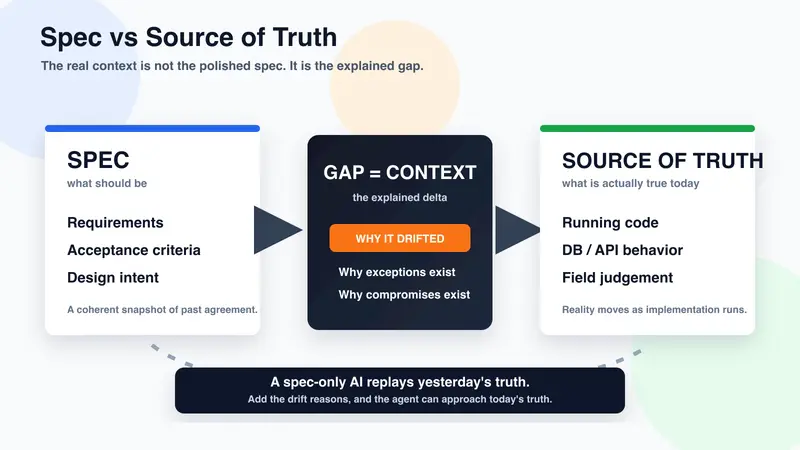
Don’t build an AI that replays yesterday’s spec — the gap between spec and source of truth is the real context

Spec vs Source of Truth: the gap is the context

📌 The full version (with interactive SVG figures, the drift curve, the five-whys hub, the document-vs-context split, and the Harness concentric layers) is hosted on my blog:

👉 https://okikusan-public.pages.dev/context-is-the-gap.en

This dev.to post is the condensed version. The visualisations live on the original.

Introduction

More and more often, an AI agent’s accuracy is decided by its context, not its prompting.

But “context” here is not a polished spec. What really moves the needle is the gap between the spec and the source of truth, and the reasons behind the drift.

An AI fed only the spec replays “past truth.” Feed it the drift reasons too, and it approaches “today’s truth.” The blind spot of Spec-Driven Development and the real core of Harness Engineering, laid out.

TL;DR

  • The frontier of AI-agent accuracy has shifted: model → prompt → context
  • If you mistake “context” for a polished spec, the AI just replays “past truth” — specs drift further from the Source of Truth (running code, ops, field judgement) the longer time passes
  • What actually works is the reasons for the drift. Five whys — why the spec was changed, why an exception was allowed, why the implementation compromised, why the issue went the way it did, why the review came out that way — decide the quality of the AI’s output
  • Documents are polished; context is accumulated. Put the spec at the core of the Harness, and layer the drift reasons around it

Spec vs Source of Truth — the gap is inevitable

The spec describes what should be. A snapshot of agreement at a moment, internally coherent, neatly polished.

As implementation and operations evolve, the actual “truth” drifts elsewhere:

  • The running code — hard-coded values, exception handlers, commented-out branches
  • The DB schema and the live data — migration history, unexpected records, exceptional values
  • The actual API behaviour — undocumented responses, unofficial endpoints
  • Customer-side operating decisions — approval routes never written down, tacit exceptions
  • Field judgement — choices an operator made on the spot

These are the Source of Truth (SoT). The spec inevitably drifts away from the SoT over time. This is not laziness — it’s structural.

The problem is not that the gap exists. It’s that the gap is never explained.

Spec vs Source of Truth: the gap is the context

An AI fed only the spec replays “past truth”

Typical failures:

  • “The spec says X is correct, but the code shows Y.” → The AI trusts the spec, returns X, and drifts from reality
  • “The spec has no exception handling, so edge cases can be ignored.” → Operationally impossible — a misjudgement
  • “I implemented per the latest API docs.” → The unofficial operating rules get missed

This is not the AI’s fault. The context you fed it is frozen at a point in time, and the AI is faithful to that point. The cleaner the spec, the more confidently the AI quotes “past truth.”

Reverse-engineering alone is not enough either. Code reveals “what is implemented and how,” but never “why it became that.”

Five whys to accumulate — that’s strong context

Five whys to accumulate as context

# What to keep Where it lives
01 Why was the spec changed? Change log / meeting notes / Slack
02 Why was the exception allowed? Ops decision log / case-by-case memos
03 Why was the implementation compromised? Code comments / PR comments
04 Why was the issue argued this way? Issues / discussion
05 Why did the review come out this way? PR review comments

Keeping these “whys” is exactly the Externalisation step in Nonaka’s SECI model. The twist: you’re externalising the process, not the conclusion. That’s how judgement patterns become reproducible in other contexts.

Documents are polished; context is accumulated

Documents Context
Target Humans / clients AI agents
Nature Coherence, consistency, polish Judgement material, contradictions, wobbles
Examples Proposals / final specs / articles / manuals Issues / PR reviews / ops notes / failure logs / rough notes
Verb Polish Accumulate

Tolerating contradiction is the core. If you treat context as a “thinking process,” contradictions are natural. Human judgement wobbles constantly; organisational decisions get overwritten. Whether you can keep that without sanding it down decides whether your AI agent can reproduce “your kind of judgement.”

Spec at the core of the Harness; drift reasons on the outer rings

Harness layers: spec at the core, drift reasons outside

Agent = Model + Harness (Karpathy framing). SDD alone is not enough — you need to design the SDD outer rings.

“Issue Driven Development (IDD)” pairs well with this. SDD = the spec is the truth. IDD = the drift reasons are the truth. Let them coexist.

Good AI = how much it lowers verification load

In May 2026, on the Linux kernel 7.1 RC4 release, Linus Torvalds publicly declared the security mailing list “almost entirely unmanageable” due to the flood of AI-generated vulnerability reports1. What was a stream of 2-3 reports per week two years ago has ballooned to 5-10 reports per day.

Linus himself does not dismiss AI in security work — he asks researchers to “understand the code and contribute a patch,” not just the alert. That’s a miniature of AI-agent operations in general. The value of an AI is not output volume — it is how much it lowers the human’s verification, correction, and review load.

A spec-only AI mass-produces plausible-looking output. It reads right, but it’s drifted from the SoT and a human has to check every line to use it — the textbook case of “Slop” (low-quality, generic, templated AI output). Only the AI fed the drift reasons becomes the kind that actually lowers human verification load.

Conclusion — accumulate, don’t polish

What sharpens an AI agent is no longer the model or the prompt. It is whether you can accumulate the gap between spec and Source of Truth, and the reasons for the drift.

  • Polish documents (for humans / clients)
  • Accumulate context (for AI agents — keep the contradictions and wobbles)
  • Spec at the core of the Harness; layer “why it diverged” on the outside

Many organisations pour energy into “polishing the spec” because of the SDD boom. But the real differentiation lies elsewhere: not in polishing the spec, but in accumulating the gap with the SoT. To stop building AIs that replay “past truth,” stop polishing — start accumulating.

📌 Full version with interactive SVGs: https://okikusan-public.pages.dev/context-is-the-gap.en

  • FIG.0 — THE GAP (spec vs SoT drift curve)
  • FIG.1 — SPEC-ONLY VS SPEC + GAP (two AIs)
  • FIG.2 — FIVE WHYS (the accumulating hub)
  • FIG.3 — DOCUMENTS VS CONTEXT (polish vs accumulate)
  • FIG.4 — HARNESS LAYERS (spec at the core, drift reasons on the outside)

If this resonates, a 🦄 / ❤️ / 💬 helps a lot. Feedback welcome.

Related posts on my blog

  1. The Register (2026-05-18): Linus Torvalds says AI-powered bug hunters have made Linux security mailing list ‘almost entirely unmanageable’ / Tom’s Hardware (2026-05-18): Linus Torvalds says flood of duplicate AI-generated vulnerability reports… ↩

Why Most AI Writing Tools Quietly Fail

I spent a session this week tearing apart one of our own systems, and the post-mortem turned into a thesis I keep coming back to:

Most AI writing tools are optimized for transformation, not preservation.

Our adapter looked correct on the surface. You write a post, click “Auto Adapt,” and out come Twitter, LinkedIn, and Threads versions. Short. Clean. Under the character limit. Technically successful.

Semantically wrong.

I noticed it when I fed the adapter a post about real before-and-after SEO scores from our portfolio. The original had four specific score deltas, three domain names, Core Web Vitals data, and a thesis about why HTML-parsing audit tools miss what real-browser ones catch. Evidence-heavy.

The adapter compressed all of it into:

“Every one jumped.”
That line bothered me. Not because it was inaccurate. Because it erased the proof. The post still had the same shape (problem, explanation, CTA) but it no longer had the thing that made it persuasive.

The adapter was doing exactly what I’d asked it to do.

The optimization target was wrong
The engineering was fine: parallel async adaptation, platform-specific character limits, fallback truncation, taxonomy-aware prompting, safe failure behavior. All clean.

The prompt was the problem. It said:

“Rewrite this for Twitter.”
Sounds harmless. Unpack what “rewrite” actually permits:

summarize
restructure
merge claims
drop specifics
abstract upward
replace evidence with implication
optimize for engagement over fidelity
The system was behaving correctly. The philosophy was wrong.

The shift
The whole architecture moved around one sentence:

The author’s wording, length, and specifics are correct unless they
violate a rule.

That sentence flips the model’s role. Most AI writing tools assume the model should act like the creator. But creators don’t want replacement. They want assistance with distribution friction: formatting, platform constraints, length caps, pacing, thread splitting.

Become a Medium member
The moment the AI starts “improving” the substance, trust collapses. Because now the creator has to audit the AI instead of using it.

What actually changed
The model became a copy editor, not a writer. The instruction shifted from “rewrite this post” to “make the smallest possible change necessary.” The model can fix formatting, remove forbidden phrases, adjust syntax, handle structural constraints. It is no longer authorized to rewrite hooks, invent framing, replace evidence, or compress meaning.

Preservation became enforced, not requested. Before the model runs, the system extracts protected facts: numbers, score deltas, URLs, domains, quoted text, structured evidence blocks, CTAs. After generation, a validator checks that those facts survived. If they didn’t, the output is rejected and the system falls back to deterministic trimming.

That distinction is the actual breakthrough. A prompt saying “please preserve the numbers” is not a guarantee. LLMs are not deterministic semantic compressors. They abstract naturally. So you don’t ask the model to preserve facts. You verify it afterward and reject when it didn’t.

The fallback became deterministic. Earlier versions had instructions like “drop the weakest sentence.” That sounds rigorous until you implement it. Weakest according to what? Without an explicit scoring policy, “deterministic fallback” is just another hidden heuristic.

The new fallback ranks sentences using weighted signals: protected fact presence, forbidden phrases, adjective density, duplication, position, CTA detection, sentence length. Same input, same scoring, same output. No hidden model mood swings.

What it looks like in practice
Three before/after pairs from the rebuild:

Original: “axiondeep.com 91→96, axiondeepdigital.com 94→96, made4founders.com 90→97. Mobile Core Web Vitals all in the Good range.”
Old adapter: “Every one jumped.”
New adapter: “axiondeep.com 91→96. axiondeepdigital.com 94→96. made4founders.com 90→97. All Mobile CWV: Good.”

Original: “We audited 292 small business websites. 96.9% failed Core Web Vitals on mobile.”
Old adapter: “Most websites are slow.”
New adapter: “Audited 292 small business sites. 96.9% failed mobile CWV.”

Original: “I’d actually like to hear it if the audit missed the mark for you.”
Old adapter: “Send feedback.”
New adapter: Unchanged. The line is short enough and structurally fine.

The third example is the point. Most posts need fewer changes than the model wants to make.

What I haven’t solved
The hardest case is the emotionally critical weak sentence. Example:

“My dad would’ve loved this.”
There is no deterministic rule that recognizes why that sentence matters. An LLM cannot reliably infer it either. Structurally it’s removable. Compression-friendly. Emotionally, it might carry the entire post.

I did not find a clean answer. The system flags short sentences as candidates for removal but errs toward keeping anything that doesn’t match a forbidden pattern. The cost is occasionally bloated drafts. The benefit is never silently destroying the line that mattered most.

That was the trade I was willing to make. Engineering systems become dangerous when they pretend uncertainty doesn’t exist.

The real product was the feedback loop
The most strategic decision wasn’t in the adapter at all. It was capturing final_published_text after the user edits and posts.

That single field turns the adapter from a static feature into a measurable editorial system. We can now observe what users reverted, what they preserved, where they distrusted the AI, how aggressively they edited, which transformations survived. Most AI writing tools optimize against assumptions. This one will optimize against observed correction behavior.

The telemetry probably matters more than the adapter itself.

If you’re building anything in the AI writing space and you’ve fought the same problem, I’d genuinely like to compare notes. The hard part isn’t the model. It’s deciding what the model is allowed to optimize for.

— Joshua R. Gutierrez

Computing Moon Phase in 150 Lines of JavaScript — Julian Date, Synodic Month, and SVG Terminator

moon-phase UI: large waxing crescent SVG rendered top-left. To the right, info table with phase name

“Wait, what phase is the moon in tonight?” — that question deserves a 150-line answer, not a Google search. The math is small: convert the date to Julian Date, divide the days since a reference new moon by the synodic month (29.530588853 days), take the fractional part. The interesting bit is drawing it: the moon’s terminator (the line between lit and dark) is an elliptical arc when projected to a plane, which means the whole moon glyph can be expressed as two SVG arc commands. Here’s how.

moon-phase UI: large waxing crescent SVG rendered top-left. To the right, info table with phase name

🌐 Demo: https://sen.ltd/portfolio/moon-phase/
📦 GitHub: https://github.com/sen-ltd/moon-phase

Architecture: pure module + DOM glue

The whole pure-math layer is one file:

import { moonPhase, terminatorPath, nextFullMoon } from "./phase.js";

const info = moonPhase(new Date());
// → { phase: 0.1141, age: 3.4, illumination: 0.123, name: "三日月", waxing: true }

const svgPath = terminatorPath(info.phase, 100);
// → "M 0 -100 A 100 100 0 0 1 0 100 A 80.9 100 0 0 0 0 -100 Z"

No DOM access in phase.js, which means node --test can run every test without jsdom. The UI script just imports the pure functions and writes the path string into an SVG element.

Julian Date: the astronomer’s serial day number

Astronomical math hates the Gregorian calendar (variable month lengths, leap years, leap seconds…). Astronomers count time by Julian Date (JD) instead: a continuous count of days starting at noon UT on January 1, 4713 BC. One day = 1.0, time-of-day is the fractional part.

Convert Unix milliseconds to JD with one constant:

export const UNIX_EPOCH_JD = 2440587.5;       // JD of 1970-01-01 00:00 UTC
export const MS_PER_DAY = 86400000;

export function dateToJulian(date) {
  if (!(date instanceof Date) || Number.isNaN(date.getTime())) return null;
  return date.getTime() / MS_PER_DAY + UNIX_EPOCH_JD;
}

Why the .5? Julian Days start at noon, not midnight (so that astronomers’ single observing nights don’t cross a day boundary). Midnight UT is half a day past JD noon → +0.5.

Pin it:

test("dateToJulian matches the unix epoch as JD 2440587.5", () => {
  assert.equal(dateToJulian(new Date("1970-01-01T00:00:00Z")), 2440587.5);
});

Phase = (JD − reference new moon) / synodic month mod 1

The synodic month — new moon to new moon — averages 29.530588853 days.

For a reference new moon, the convention is JD 2451550.1 (2000-01-06 14:24 UTC). NASA’s ephemeris confirms a new moon at that instant.

export const SYNODIC_MONTH = 29.530588853;
export const REFERENCE_NEW_MOON_JD = 2451550.1;

export function moonPhase(date) {
  const jd = dateToJulian(date);
  const daysSinceRef = jd - REFERENCE_NEW_MOON_JD;
  let phase = (daysSinceRef / SYNODIC_MONTH) % 1;
  if (phase < 0) phase += 1;
  // ...
}

phase ∈ [0, 1) where 0 = new, 0.25 = first quarter, 0.5 = full, 0.75 = last quarter.

The negative-modulo gotcha

JavaScript’s % is truncated modulo, not mathematical modulo. If the dividend is negative, the result is negative:

-3 % 10   // → -3 in JS  (Python would say 7)

For dates before the reference new moon (early 2000), daysSinceRef is negative and so is the phase. The if (phase < 0) phase += 1 normalises it. Test the round-trip both forward and backward:

test("moonPhase at the reference new moon JD gives phase ≈ 0", () => {
  const d = julianToDate(REFERENCE_NEW_MOON_JD);
  const info = moonPhase(d);
  assert.ok(info.phase < 0.001 || info.phase > 0.999);
});

test("moonPhase one synodic month after the reference is again ~new", () => {
  const d = julianToDate(REFERENCE_NEW_MOON_JD + SYNODIC_MONTH);
  const info = moonPhase(d);
  assert.ok(info.phase < 0.001 || info.phase > 0.999);
});

Illumination = (1 − cos(2π × phase)) / 2

The lit fraction of the moon as seen from Earth is a linear transform of the cosine of the phase angle:

const illumination = (1 - Math.cos(2 * Math.PI * phase)) / 2;
phase cos(2π × phase) illumination
0 (new) 1 0
0.25 (first quarter) 0 0.5
0.5 (full) -1 1
0.75 (last quarter) 0 0.5

First quarter and last quarter are indistinguishable from illumination alone. The waxing flag (phase < 0.5) is the other axis.

The terminator is an elliptical arc — two SVG arcs draw the entire lit area

This is the bit I found cute. The terminator — the boundary between the lit and dark sides of the moon — is a great circle on the lunar surface. Projected onto the plane of view, it becomes an ellipse. So the lit portion of the moon disc can be decomposed as:

  1. A half-circle outer arc (the lit edge of the moon)
  2. A half-ellipse inner arc (the terminator)

With semi-minor axis r × |cos(2π × phase)|:

export function terminatorPath(phase, radius) {
  if (phase < 0.001 || phase > 0.999) return "";              // new moon: nothing lit
  if (Math.abs(phase - 0.5) < 0.001) return circlePath(radius); // full moon: whole disc

  const cosPhase = Math.cos(2 * Math.PI * phase);
  const minor = Math.abs(cosPhase) * radius;
  const r = radius;
  const waxing = phase < 0.5;

  const outerSweep = waxing ? 1 : 0;
  const innerSweep = cosPhase < 0 ? 1 : 0;

  return [
    `M 0 ${-r}`,
    `A ${r} ${r} 0 0 ${outerSweep} 0 ${r}`,
    `A ${minor} ${r} 0 0 ${innerSweep} 0 ${-r}`,
    "Z",
  ].join(" ");
}

SVG arc sweep flag, demystified

A rx ry x-axis-rotation large-arc-flag sweep-flag x y. The sweep flag is the gotcha:

  • 0 — arc traced counter-clockwise from start to end
  • 1 — arc traced clockwise from start to end

For a half-circle from (0, -r) (top) to (0, r) (bottom):

  • waxing (lit on the right) → clockwise → sweep flag 1
  • waning (lit on the left) → counter-clockwise → sweep flag 0

Why cosPhase’s sign tells you the inner sweep

The inner half-ellipse needs to either bulge into the lit side (crescent — terminator carves the lit area down to a sliver) or bulge into the dark side (gibbous — terminator pushes the lit area beyond half the disc).

cos(2π × phase) flips sign at exactly the right moments:

  • phase ∈ (0, 0.25) — waxing crescent — cos > 0 — ellipse on the lit side
  • phase ∈ (0.25, 0.5) — waxing gibbous — cos < 0 — ellipse bulges into dark
  • phase ∈ (0.5, 0.75) — waning gibbous — cos < 0 — ellipse bulges into dark
  • phase ∈ (0.75, 1) — waning crescent — cos > 0 — ellipse on the lit side

So innerSweep = cosPhase < 0 ? 1 : 0 covers all four cases in one line. Pin it:

test("terminatorPath gibbous bulges into dark side (sweep flag 1 on inner arc)", () => {
  const path = terminatorPath(0.4, 100);   // waxing gibbous
  const arcs = path.match(/A [^A]+/g);
  assert.equal(arcs.length, 2);
  assert.ok(arcs[1].includes("0 0 1 0"));   // inner arc sweep flag = 1
});

Next new/full moon: closed-form, no binary search

“When’s the next full moon?” — the naive solution loops day-by-day looking for |phase - 0.5| < ε. But phase is a linear function of JD, so just invert it:

phase(jd) = ((jd - REF) / S) mod 1

jd at the next phase = target:
  REF + (target + k) × S   for the smallest integer k where this > startJd
export function nextPhase(date, target) {
  const startJd = dateToJulian(date);
  const offset = (startJd - REFERENCE_NEW_MOON_JD) / SYNODIC_MONTH;
  const k = Math.ceil(offset - target);
  const jd = REFERENCE_NEW_MOON_JD + (target + k) * SYNODIC_MONTH;
  return julianToDate(jd);
}

offset is “how many synodic months past the reference, including fractional position”. Math.ceil(offset - target) picks the smallest integer k such that target + k > offset, i.e., the next time the phase wraps around to target.

Verify by checking that consecutive new moons are exactly one synodic month apart:

test("consecutive new moons are ~SYNODIC_MONTH days apart", () => {
  const first = nextNewMoon(new Date("2024-01-01T00:00:00Z"));
  const second = nextNewMoon(new Date(first.getTime() + 86400000));  // skip past first
  const diff = (second - first) / 86400000;
  assert.ok(Math.abs(diff - SYNODIC_MONTH) < 0.01);
});

Phase-name binning with a 1/16 offset

Mapping phase ∈ [0, 1) to one of 8 phase names (new, waxing crescent, first quarter, …) needs each canonical phase to land in the centre of its bin, not at a bin edge. Offset by 1/16:

const idx = Math.floor((p + 1 / 16) * 8) % 8;

phase = 0 (new) → (0 + 1/16) × 8 = 0.5 → floor → 0. phase = 0.25 (first quarter) → (0.25 + 1/16) × 8 = 2.5 → 2. Etc. Bin boundaries fall at 1/16, 3/16, 5/16, ..., equidistant from the canonical phases.

test("phaseName maps canonical phases to expected labels", () => {
  assert.equal(phaseName(0),    "新月");          // new
  assert.equal(phaseName(0.25), "上弦の月");     // first quarter
  assert.equal(phaseName(0.5),  "満月");          // full
  assert.equal(phaseName(0.75), "下弦の月");     // last quarter
});

test("phaseName handles wrap-around", () => {
  assert.equal(phaseName(1.0),   "新月");
  assert.equal(phaseName(-0.25), "下弦の月");
});

On accuracy — this is mean-phase, not true-phase

SYNODIC_MONTH = 29.530588853 is a mean value. The actual lunar month varies by about ±7 hours due to Earth’s elliptical orbit (faster at perihelion) and the moon’s orbital perturbations.

What that means for the code:

  • Casual use (“what phase is the moon in tonight?”) — accurate enough
  • Exact new/full moon times — off by up to ±12 hours
  • Astronomical-grade work — use ELP-2000/82 or similar (hundreds of periodic terms)

This trade-off is called out in the README. For 150 lines, ±12 hours is the right amount of accuracy.

TL;DR

  • Julian Date decouples astronomy from calendar arithmetic. JD = unix_ms / 86400000 + 2440587.5.
  • Phase = ((JD - REF_NEW_MOON_JD) / SYNODIC_MONTH) mod 1. Watch JS’s negative-modulo behaviour.
  • Illumination = (1 - cos(2π × phase)) / 2. Symmetric around full — track waxing/waning separately.
  • The terminator projects to an ellipse. The whole lit disc is two SVG arcs: a half-circle + a half-ellipse, with sweep flags determined by (waxing, cosPhase sign).
  • Next full/new moon has a closed-form. No bisection needed since phase is linear in JD.
  • Mean synodic month → ±12-hour accuracy for transition times. For sub-minute precision, switch to ELP-2000.

Source: https://github.com/sen-ltd/moon-phase — MIT, ~150 lines of JS + 30 unit tests, zero runtime dependencies, no build step.

🛠 Built by SEN LLC as part of an ongoing series of small, focused developer tools. Browse the full portfolio for more.

Did you know Docker images of Node.js running on Alpine Linux are “unofficial”?

Table of Contents

  • What does it mean by Docker images of Node.js running on Alpine Linux are “unofficial”
  • Why does the Node.js team deliver Alpine Linux images as official without properly testing them?
  • Since Alpine Linux images are “unofficial”, should I stop using them in production environments?
  • References

Yes, you heard it right!

DOCKER IMAGES OF NODE.JS RUNNING ON ALPINE LINUX ARE “UNOFFICIAL”!

At least, this is how the Node.js team refers to them when it comes to support!

The reason? They don’t actively test Alpine Linux builds! At least not in their CI/CD environments! This is because Alpine Linux builds are in experimental status!

At this point, you may be asking: Why does the Node.js team deliver Alpine Linux images as official without properly testing them?

To be honest, I may not have all the answers on this matter, because, though I use Node.js in my day-to-day, I’m not involved in the development of Node.js (not on a deep level, at least). Although I’m here to bring you a bit of information on this matter while trying to answer some questions you may have on the subject.

What does it mean by Docker images of Node.js running on Alpine Linux are “unofficial”?

As I said before, the Node.js team doesn’t actively test Node.js builds in Alpine Linux environments (at least not in their CI/CD environments). Therefore, the support they can provide for running Node.js applications on Alpine Linux is highly limited.

Why does the Node.js team deliver Alpine Linux images as “official” without properly testing them?

Apart from the fact that the build and delivery process of Docker images of Node.js running on Alpine Linux is made through the same CI/CD workflows that , I can only guess they do it because Alpine Linux is widely used by applications used in production environments due to its small size and resource usage.

Since Alpine Linux images are “unofficial”, should I stop using them in production environments?

Not at all. At least, I don’t think so. Especially because the Node.js team is looking for some people from the community to help to solve issues related to running Node.js on Alpine Linux.

If you are interested in helping the Node.js team to actively find and solve issues running Node.js on Alpine Linux, I personally encourage you to get to the issue talking on this matter and show them your interest in helping them!

References

fz 2.0.0 NEXUS — package manager, BLAKE3 cache, and cross-compilation for C/ASM

Yesterday I shipped 1.9.0. Got a solid mix of hate and genuinely useful feedback. Didn’t sleep. Took all of it personally. Built 2.0.0 instead.

No point dragging it out — here’s everything I promised, shipped right now.

What’s new

⚡ BLAKE3 file hashing — 7x faster cache

Dropped SHA256. Switched to BLAKE3 across the board.

File size Before After
10 MB 58 ms 8.7 ms

Package verification from the catalog uses BLAKE3 too.

📦 Package manager — fz pm

The big one. Dependency management for C/ASM projects that doesn’t make you want to quit programming.

fz pm add <repository>
fz pm remove <package>
fz pm update
fz pm list
fz pm search <query>
fz pm install
fz pm catalog

Dependencies live in .fz.yaml. Removal cleans up empty parent directories automatically. Backed by a community-driven JSON package catalog.

🔌 Shared library support

New flags: -shared, -cc-flag, -ld-flag. Build .so and .dylib targets without wiring things up by hand.

🎯 Cross-compilation

fz -target arm-linux-gnueabihf
fz -target riscv64-linux-gnu
fz -target x86_64-w64-mingw32

ARM, RISC-V, x86_64, i386. Compiler, assembler, and linker are selected automatically for the target triple.

🗂 Static libraries

fz -type static -lib mylib

Builds .a archives from object files via ar.

🧠 LSP support

fz -compile-commands

Generates compile_commands.json for clangd and any compatible LSP client. Autocomplete and go-to-definition, no manual config.

Improvements & fixes

  • Parallel builds with -j N
  • Linker scripts and text section address: -T, -Ttext
  • Fixed object file name collisions (hello.asm vs hello.s)
  • All golangci-lint warnings resolved: errcheck, govet, ineffassign
  • Context and timeouts for all network and git operations
  • Test coverage: utils 84%, linker 60%, assembler 60%, builder 56%

Install

go install github.com/forgezero-cli/ForgeZero/cmd/fz@latest

Links

Solo project. All issues and PRs read personally. If something’s broken or missing — tell me, I’ll probably fix it overnight.

AI Tools Need Contracts, Not Prompts

The executable as the interface agents can discover, verify, and trust

An AI agent can read your README, scan your tests, inspect your source tree, and
infer a plausible architecture. Then it can still break your tool by renaming a
flag, weakening an exit condition, or “simplifying” JSON output another script
depends on.

The failure is not always that the model misunderstood the code. Often the
failure is simpler: the contract was not executable.

For AI-assisted engineering, a CLI is no longer just a human interface. It is
the narrowest place where intent, behavior, and verification can meet. It is the
surface an agent can run, observe, validate, and compose.

That is the premise behind entropyx.

entropyx is a local-first Rust CLI for codebase forensics. It scans a git
repository and emits a typed summary of temporal, structural, authorship, and
semantic signals. It can tell you which files absorb change, which ones carry
coupling stress, which public APIs drifted without tests, and which events in
the repository explain the pattern.

But the important idea is not the specific metric set. The important idea is the
shape of the interface.

The executable is the contract.

Not a prompt. Not a dashboard. Not a model-specific integration layer. The
binary exposes what it can do, what it accepts, what it emits, and how to ask
for evidence. Humans can run it. CI can run it. An AI assistant can run it. All
three see the same contract surface.

This is the design pattern: make the tool legible to agents by making the
interface more explicit, not more magical.

The Failure Mode

Many developer tools have implicit contracts.

The README says one thing. --help says another. The tests exercise internal
functions, but not the CLI behavior downstream tools depend on. The JSON output
looks stable until a field is renamed. A command returns text that is easy for a
person to read but brittle for a machine to parse. A failure exits with 0
because a human would notice the error line on stderr.

Humans compensate for this with context. They remember the old behavior. They
know which fields are load-bearing. They know that “pretty output” is not the
automation path. They know which flags are part of the public contract even if
the code does not say so.

Agents do not get that memory for free.

They can infer. They can search. They can run tests. But if the contract lives
in prose, convention, and tribal knowledge, an agent will eventually step on it.
It may even make a locally reasonable change that passes the test suite while
breaking the actual interface.

That is the operational problem AI-first tooling has to solve.

The answer is not more prompt text explaining how to behave. The answer is a
contract surface the agent can execute.

The Reframe: CLI As Protocol

The command line is often treated as a wrapper around the real product. For
AI-first tools, that is backwards.

The CLI is the protocol.

It has named commands, explicit inputs, observable outputs, exit codes, and a
natural place for versioning. It runs locally. It composes with files, pipes, CI
jobs, scripts, and terminals. It is already the interface most coding agents can
operate.

That makes it a good contract boundary.

The point is not that every product should be only a CLI. The point is that if a
tool claims to support AI-assisted engineering, it should expose a surface that
agents can discover and verify without guessing.

For entropyx, that surface is intentionally small:

entropyx describe
entropyx schema
entropyx scan /path/to/repo
entropyx explain /path/to/repo file:<blob-prefix>
entropyx calibrate --summary summary.json --labels labels.json

The core agent loop is the first four commands. calibrate is the offline
weight-fitting path: take a prior summary, join it with labeled file scores, fit
new weights, and feed those weights back into a later scan.

Five commands are enough because the commands are not just verbs. They are the
contract anatomy.

The Contract Anatomy

An AI-first executable needs more than --help.

--help is optimized for a person who already knows what kind of thing they are
running. An agent needs a machine-readable answer to a different set of
questions:

  • What is this executable?
  • What can it do?
  • What inputs does it accept?
  • What output shapes does it produce?
  • What invariants does it promise?
  • How expensive is this operation likely to be?
  • How do I drill from a summary into evidence?

In entropyx, describe answers the first set of questions:

entropyx describe

It emits the protocol root as JSON: name, version, contract version, purpose,
capabilities, input types, output formats, cost model, and invariants.

schema answers the shape question:

entropyx schema > tq1-schema.json

It emits the JSON Schema for the tq1 summary envelope. The schema $id is tied
to the protocol contract version, so a breaking output change is not invisible.

scan answers the evidence question:

entropyx scan /path/to/repo > summary.json

It walks local git history and emits a dense repository summary.

explain answers the drill-down question:

entropyx explain /path/to/repo file:<blob-prefix>
entropyx explain /path/to/repo commit:<sha>
entropyx explain /path/to/repo range:<base>..<head>

The summary currently mints file:<blob-prefix> handles for HEAD blobs.
explain also accepts commit:<sha> and range:<base>..<head> address forms,
which lets an agent ask for commit or release-window evidence without relying on
a prior summary entry.

That distinction matters. A contract should say exactly which identifiers it
emits and which identifiers it accepts.

What The Contract Looks Like

The most important output path is not prose. It is tq1, a typed JSON envelope.

A simplified summary looks like this:

{
  "schema": {"name": "tq1", "version": "0.1.0"},
  "dict": {
    "files": ["src/lib.rs"],
    "authors": ["[email protected]"],
    "metrics": [
      "change_density",
      "author_entropy",
      "temporal_volatility",
      "coupling_stress",
      "blame_youth",
      "semantic_drift",
      "test_cooevolution",
      "composite"
    ]
  },
  "files": [
    {
      "file": 0,
      "values": [0.4, 0.2, 0.1, 0.7, 0.3, 0.6, 0.5, 0.43],
      "lineage_confidence": 1.0,
      "signal_class": "api_drift"
    }
  ],
  "events": [],
  "handles": {
    "file:abc123def456": {
      "kind": "file",
      "file": 0,
      "blob_prefix": "abc123def456"
    }
  },
  "enrichments": {"pull_requests": {}}
}

This is not pretty terminal output that an agent has to reverse-engineer. It is
the protocol.

The dictionary pins the string tables. The metric column order is explicit. The
file rows are dense. Events are typed. Handles are keyed by their canonical
string form. Optional enrichments live in a sidecar.

That design gives an agent a stable path:

  1. Read the schema and contract version.
  2. Decode the dictionaries.
  3. Rank or filter file rows.
  4. Inspect typed events.
  5. Ask explain for evidence by address.

The final answer can be prose. The instrument should emit structure.

Entropyx As The Case Study

entropyx measures seven axes for each file:

  • D_n: change density
  • H_a: author dispersion
  • V_t: temporal volatility
  • C_s: coupling stress
  • B_y: blame youth
  • S_n: semantic drift
  • T_c: test co-evolution

The composite score is useful, but it is not the contract by itself. Every score
decomposes into the axes that produced it.

That is the difference between a measurement and an opinion. If a file scores
high because coupling stress is high, the assistant should say that. If the
score is driven by semantic drift without test co-evolution, that is a different
claim. If author dispersion is rising on a hot file, that is an ownership
problem, not a generic risk label.

The rule-based signal taxonomy is also part of the protocol:

  • incident_aftershock
  • coupled_amplifier
  • refactor_convergence
  • api_drift
  • ownership_fragmentation
  • frozen_neglect

And the event stream has five variants:

  • rename
  • hotspot
  • incident_aftershock
  • ownership_split
  • api_drift

These are not generated explanations. They are typed outputs. An assistant can
use them, cite them, filter them, and ask for the evidence behind them.

That is the central division of labor:

  • The executable measures.
  • The protocol preserves structure.
  • The assistant chooses what to inspect.
  • The assistant explains the evidence to the user.

Determinism Is Agent UX

Determinism is not just a testing preference. It is user experience for agents.

If the same command on the same repository produces different results, the
assistant has to reason about the measurement system instead of the codebase.
Did the repository change? Did the tool change? Did a clock, random seed,
network call, parallel reduction, or model update move the result?

entropyx keeps the core scan deterministic for the same repo state, entropyx
version, flags, and local inputs.

That means:

  • no wall-clock reads in the core measurement layer
  • deterministic floating-point reductions
  • stable interning across serialization round trips
  • local git history as the source of truth
  • no ML scoring in the deterministic physics layer
  • versioned protocol contracts

Optional GitHub enrichment is deliberately separate. It can attach pull request
metadata to event commit SHAs, but that remote sidecar is not the foundation of
the local measurement.

This separation is important. A deterministic core can be cached, diffed,
tested, signed, and reproduced. Remote enrichment can add context without
turning the core finding into a network-dependent claim.

For a human, this makes the output auditable. For an agent, it makes the output
safe to build on.

Evidence Before Interpretation

An AI assistant is good at interpretation. That does not mean the tool should
ask the assistant to invent the evidence.

entropyx starts with the repository. Commits, diffs, authorship, renames, blame
snapshots, public API deltas, test co-change, and co-change graphs become the
measurement layer. The assistant does not need to infer the whole history from
raw git log output before it can answer a question.

The result is a smaller and more reliable loop.

Instead of:

  1. Read the README.
  2. Guess which git commands to run.
  3. Inspect a pile of diffs.
  4. Infer which files matter.
  5. Hope the answer is grounded.

The assistant can:

  1. Run entropyx describe.
  2. Run entropyx scan.
  3. Inspect the typed summary.
  4. Ask entropyx explain for the few addresses that matter.
  5. Write an answer tied to concrete evidence.

This is not about replacing engineering judgment. It is about giving judgment a
better input.

The same pattern applies beyond codebase forensics. Test selection, dependency
analysis, migration planning, security review, release risk, documentation
drift, and compliance evidence all benefit from the same contract shape:
summarize the domain, expose typed findings, and let the agent fetch proof.

Handles Make The Protocol Navigable

Handle-addressable evidence is the most important part of the pattern.

A summary should be compact enough to read as a map. It should not dump the
entire warehouse into the agent’s context. But a summary without drill-down is
just another report.

Handles bridge that gap.

A handle is a stable, user-facing pointer from a finding to evidence that can be
retrieved on demand. In entropyx, file handles are content-addressed by blob
prefix. Commit and range address forms let explain resolve git objects and
release windows directly.

That gives the assistant a clean workflow:

  • read the map
  • choose the region
  • fetch the evidence
  • cite the address
  • repeat only where needed

This matters because context is expensive, even when the context window is
large. A tool that emits everything at once forces the assistant to pay for
everything before it knows what matters. A handle-driven protocol lets the
assistant spend attention where the evidence points.

It also helps humans. A reviewer can take the same handle, run the same command,
and inspect the same evidence. The handle becomes a shared reference, not an
opaque explanation generated in a chat transcript.

Honest Absence

AI systems are vulnerable to confident falsehoods. Tools should not make that
worse.

entropyx is designed to return explicit absence when it cannot measure
something. If a language backend is unknown, semantic drift contributes zero for
that file. That zero means “unmeasured by this axis,” not “stable.” If optional
GitHub enrichment is missing, the pull request sidecar is empty. If a handle
cannot be resolved, the command fails cleanly.

This is less flashy than a tool that always has an answer. It is more useful.

An AI-first instrument should not try to sound intelligent. It should be precise
about what it knows, where the measurement came from, and where the evidence
stops.

The assistant can then say, “the scan did not measure semantic drift for this
file type,” rather than treating silence as safety.

The Tradeoff

Executable contracts are less flexible than informal interfaces.

That is a feature.

If a JSON field is part of the protocol, changing it should feel like changing
an API. If an exit code communicates failure, weakening it should break a test.
If a schema version is pinned to a contract version, a breaking change should be
visible to consumers. If a command emits handles, the accepted handle forms
should be documented and tested.

This creates friction. It should.

AI agents need stable edges. CI needs stable edges. Human operators need stable
edges during incidents. A tool that changes shape casually forces every consumer
to rediscover the boundary.

The lesson is not that a CLI can never evolve. It is that the evolution should
be explicit. Version the contract. Preserve compatibility where possible. Break
it deliberately when necessary.

The Blueprint

The entropyx pattern generalizes to other AI-first developer tools.

Start with a small executable surface:

tool describe
tool schema
tool scan <target>
tool explain <target> <address>

Add domain-specific commands only when they have a clear role, as calibrate
does for entropyx.

Then make the contract explicit:

  • describe exposes capabilities, inputs, outputs, costs, and invariants.
  • schema exposes machine-readable output shapes.
  • scan produces a dense typed map of the target domain.
  • explain resolves stable addresses into evidence.
  • exit codes are commitments, not decoration.
  • structured output is the automation path.
  • prose is for humans and final answers.
  • optional network enrichment is sidecar data, not the measurement core.
  • absence is explicit.
  • breaking changes bump the contract.

This is the difference between a prompt-shaped tool and a contract-shaped tool.

A prompt-shaped tool relies on instructions around the tool. A contract-shaped
tool exposes behavior the agent can run and verify.

What Changes Next

The next generation of developer tools will not be judged only by how well
humans can read their documentation. They will also be judged by how reliably
agents can discover, run, validate, and compose their behavior.

That changes what a CLI is.

It is not the wrapper around the product.

It is the contract boundary.

If the contract lives only in prose, an agent can misunderstand it. If it lives
only in internal tests, the agent may never see it. If it lives in the
executable surface, the agent can run it.

That is the standard AI-first developer tools should meet: not documented
intent, but executable commitment.

entropyx is one concrete implementation of that idea. It measures codebase
history, emits a typed protocol, preserves deterministic local evidence, and
lets an assistant drill from summary to proof.

The broader pattern is the part worth carrying forward.

Build tools the agent can call. Make them describe themselves. Give them
schemas. Give them stable addresses. Make the core deterministic. Keep evidence
local when you can. Tell the truth when you cannot measure something.

The code already knows more than the incident room usually remembers.

The tool’s job is to read it back in a form both humans and agents can trust.

Attribution and Disclosure

Written by Don / copyleftdev from the entropyx project.

This article was drafted and edited with AI assistance, then reviewed against
the entropyx source and DEV’s current publishing guidance before submission.

How we recovered tfstate after force-unlock raced a CI apply

The engineer pinged us at 4:48 pm on a Thursday. They had been trying to push a small IAM change to staging, terraform apply had failed with Error acquiring the state lock, and they did what most of us have done at least once: they ran terraform force-unlock with the ID from the error message and re-ran apply. The apply went through. Ten minutes later a teammate on a different branch ran terraform plan and the plan output wanted to destroy and recreate 38 resources that were sitting healthy in AWS, returning 200s, serving traffic. By the time we joined the bridge, the original engineer was halfway convinced they needed to let Terraform rebuild the whole staging environment. They did not. The cloud was fine. The state file was the thing that was broken.

Problem signals:

  • terraform plan shows -/+ destroy and recreate for resources nobody touched and that are healthy in the cloud
  • Teammates see Error: state snapshot was created by Terraform v1.5.7, which is newer than current v1.5.4
  • S3 bucket versioning shows two or three tfstate writes inside a 60 to 90 second window
  • The DynamoDB lock table is empty but the state file timestamps do not line up with anyone’s apply log
  • Someone on the team ran terraform force-unlock in the last hour

A stale lock from a dead CI job

What the engineer thought it was

The first wrong model was reasonable. The engineer saw Error acquiring the state lock, looked at the lock ID, did not recognize it, and assumed it was a leftover from a CI job that had crashed earlier in the week. They had seen stale locks before. The fix last time was force-unlock. So they ran it again.

What they did not check was whether the lock holder was actually still alive. The CI job that held the lock was a scheduled terraform plan cycle running on a 15-minute cadence, and that particular run was on the slow side because the workspace had grown to about 600 resources. It was not stuck. It was just working. The force-unlock removed the lock entry from DynamoDB while the CI process was still very much holding an in-memory version of the state file, mid-refresh. Two writers, no coordination.

When the engineer’s apply finished, it wrote its version of the state to S3. About forty seconds later, the CI run finished its refresh and wrote its version of the state to S3 on top of that. Two non-linear writes, each thinking it had the latest state, each clobbering parts of the other. S3 versioning preserved both, but the live state pointer was pointing at a Frankenstein.

Three S3 versions in 90 seconds, and a plan that wanted to destroy healthy infrastructure

The moment the real cause became visible

We pulled the S3 object versions for the state file first. That is the single most useful command in a Terraform state incident, and most teams do not run it until someone external suggests it.

aws s3api list-object-versions 
  --bucket acme-tfstate-staging 
  --prefix env/staging/terraform.tfstate 
  --query 'Versions[?LastModified>=`2024-01-18T16:45:00Z`].[VersionId,LastModified,Size]' 
  --output table

# Output (abridged):
# VersionId                          LastModified               Size
# 9f3aV2.JqL...                      2024-01-18T16:51:12Z       412847
# 8h2nB1.KpM...                      2024-01-18T16:50:31Z       408992
# 7g1mA0.LoN...                      2024-01-18T16:49:48Z       411203
# 6f0lZ9.MnO...                      2024-01-18T16:42:15Z       411198   <-- last known good

Three writes inside 84 seconds. The 16:42 version was the last clean write before the collision.

Three writes in 84 seconds was the smoking gun. A healthy workspace writes state once per apply, and the next write is usually hours away. Three writes that close together meant at least two processes had been racing. We cross-checked against the CI logs and the engineer’s shell history and confirmed: the CI plan cycle had been refreshing state from 16:49:48 onwards, the engineer’s force-unlock landed at 16:50:18, the engineer’s apply wrote state at 16:50:31, and the CI refresh wrote its stale view back at 16:51:12. The 16:51 write was the one Terraform was now reading, and it had been built from a refresh that started before half the engineer’s changes existed.

That explained the plan output. The state Terraform was reading said the resources had attributes that did not match reality. Plan diffed state against the cloud, saw the mismatch, and proposed the only thing it knows how to propose: destroy and recreate. The cloud was correct. The state was lying. If we had let the apply run, we would have taken a healthy staging environment offline for somewhere between 40 minutes and two hours to rebuild things that did not need rebuilding.

Restore the pre-collision state version, then import only what actually drifted

How we worked through it

The recovery had two parts and an order that mattered. First, replace the corrupted live state with the last clean S3 version. Second, figure out which resources genuinely changed during the collision window and re-import only those. Skipping the second step is how teams end up with the same incident a week later, because real changes from the engineer’s apply have been silently rolled back.

Before touching anything we pulled a local backup of the current (broken) state. If our restore went wrong, we wanted a way back.

# 1. Backup the current broken state to local disk
aws s3api get-object 
  --bucket acme-tfstate-staging 
  --key env/staging/terraform.tfstate 
  ./tfstate.broken.$(date +%s).json

# 2. Restore the last known good version in place
aws s3api copy-object 
  --bucket acme-tfstate-staging 
  --key env/staging/terraform.tfstate 
  --copy-source 'acme-tfstate-staging/env/staging/terraform.tfstate?versionId=6f0lZ9.MnO...' 
  --metadata-directive REPLACE

# 3. Confirm the active version is now the restored one
aws s3api head-object 
  --bucket acme-tfstate-staging 
  --key env/staging/terraform.tfstate 
  --query 'VersionId'

The copy-object call writes the old version as a new current version. Do not delete versions; you want the audit trail intact.

With the state restored, we ran terraform plan. The output was much shorter, around six resources, and they were the ones the engineer had actually changed in their apply. That was the divergence window: changes that had been made for real in AWS but that the restored state did not know about. Each of those needed a terraform import to reattach the live resource to the state. We did them one at a time, ran plan between each, and watched the diff shrink.

# Example: the engineer had created a new IAM role during their apply.
# The restored state predates it, but the role exists in AWS.

terraform import 
  module.platform.aws_iam_role.svc_runner 
  acme-staging-svc-runner

# After each import, re-run plan and confirm the resource is no longer in the diff.
terraform plan -out=/tmp/plan.out

# Repeat for each resource genuinely changed during the divergence window:
# - 1 IAM role
# - 1 IAM role policy attachment
# - 2 security group rules
# - 1 SSM parameter
# - 1 Lambda permission

Import surgically. Do not bulk-import; you want a clean plan after each step so you can spot collateral damage.

After the sixth import, terraform plan returned No changes. That was the success signal. The state matched the cloud, the engineer’s intended changes were preserved, and nothing healthy had been destroyed. Total time on the bridge from first page to clean plan was 2 hours 40 minutes. About 45 minutes of that was the investigation; the rest was careful, slow imports with verification between each one.

flowchart TD
  A[terraform plan shows mass destroy/recreate] --> B{Are the resources actually broken in cloud?}
  B -- No, healthy --> C[State file is the problem, not cloud]
  B -- Yes, broken --> Z[Different incident; investigate cloud-side]
  C --> D[list-object-versions on tfstate]
  D --> E{Multiple writes in short window?}
  E -- Yes --> F[Identify last clean version pre-collision]
  E -- No --> Y[Investigate other corruption causes]
  F --> G[Backup current broken state locally]
  G --> H[copy-object to restore clean version]
  H --> I[terraform plan: short diff = divergence window]
  I --> J[terraform import each drifted resource]
  J --> K{Plan empty?}
  K -- No --> J
  K -- Yes --> L[Recovery complete; write postmortem]

Decision flow we use for any state-collision incident. The first branch matters most: confirm the cloud is healthy before touching state.

Diagram renders at the canonical version.

Two tempting shortcuts that would have made it worse

What we tried that we will not try again

Two shortcuts came up on the bridge that we ruled out. They are worth naming because both of them sound reasonable when you are tired.

  • 1. Let terraform apply rebuild everything, The plan was already there. Just type yes. This would have caused 30 to 90 minutes of staging downtime for resources that did not need rebuilding, broken any data-layer resources with state of their own, and lost the audit trail of what had actually changed.
  • 2. terraform refresh to fix the state, Refresh updates state from the live infrastructure for known resources. It does not learn about resources the state has forgotten, and it cannot undo a structurally corrupted state. Refresh on a Frankenstein state can deepen the damage by writing the merged view back as the new truth.

We have written about the broader pattern in the Terraform state recovery playbook, specifically the rule we now apply on every state incident: the state file is the suspect until proven otherwise. Cloud is healthy until you have evidence it is not. That ordering keeps you from running destructive applies under time pressure.

A pre-apply lock check that prints the holder’s age

What we changed afterwards

The team made two changes the week after the incident. Both are small. Both have already paid for themselves.

The first change is a pre-apply wrapper script that reads the DynamoDB lock table before terraform apply runs. If a lock exists, the script prints the lock holder, when the lock was acquired, and how long ago that was. If the lock is younger than the workspace’s typical apply duration plus a safety margin, the script refuses to run and tells the engineer to wait. If the lock is genuinely old (older than any plausible live process), the script still does not force-unlock automatically; it prints the exact force-unlock command and makes the engineer paste it. The friction is the point.

#!/usr/bin/env bash
# pre-apply-lock-check.sh
set -euo pipefail

WORKSPACE="${1:?workspace name required}"
LOCK_TABLE="acme-tfstate-locks"
MAX_PLAUSIBLE_APPLY_SECONDS=1800  # 30 minutes

LOCK_ITEM=$(aws dynamodb get-item 
  --table-name "$LOCK_TABLE" 
  --key "{"LockID":{"S":"acme-tfstate-staging/env/${WORKSPACE}/terraform.tfstate-md5"}}" 
  --output json 2>/dev/null || echo '{}')

if [[ "$(echo "$LOCK_ITEM" | jq -r '.Item // empty')" == "" ]]; then
  echo "No lock. Safe to proceed."
  exit 0
fi

HOLDER=$(echo "$LOCK_ITEM" | jq -r '.Item.Info.S' | jq -r '.Who + " @ " + .Operation')
CREATED=$(echo "$LOCK_ITEM" | jq -r '.Item.Info.S' | jq -r '.Created')
AGE=$(( $(date +%s) - $(date -d "$CREATED" +%s) ))

echo "Lock present."
echo "  Holder:  $HOLDER"
echo "  Created: $CREATED"
echo "  Age:     ${AGE}s"

if (( AGE < MAX_PLAUSIBLE_APPLY_SECONDS )); then
  echo
  echo "REFUSING TO PROCEED. Lock is younger than max plausible apply duration."
  echo "Wait for the current holder to finish, or confirm out-of-band that it is dead."
  exit 1
fi

echo
echo "Lock is older than ${MAX_PLAUSIBLE_APPLY_SECONDS}s. It may be stale."
echo "To force-unlock, run manually (do NOT automate this):"
echo "  terraform force-unlock $(echo "$LOCK_ITEM" | jq -r '.Item.Info.S' | jq -r '.ID')"
exit 2

We run this from CI and from a pre-apply git hook on engineer laptops. Same script, same rules, both places.

The second change is operational. The team’s runbook now says: if you ever run force-unlock, page the on-call channel immediately with the lock ID and the reason. That single message would have caught this incident before it became one. The CI job would have replied within seconds that it was still running, and the engineer would have known to wait the eight minutes instead of clobbering the state.

We have stopped recommending that teams treat force-unlock as a routine command. It is a recovery command. It belongs in the same mental category as DROP TABLE: technically available, occasionally necessary, never the first thing you reach for. The TTL on the lock is generous on purpose. Wait it out, or confirm the holder is dead. Those are the only two paths.

When the state file is the suspect and the clock is running

If you are looking at a destroy plan you do not trust

The hard part of state-collision incidents is not the recovery commands. The commands are mechanical once you know the shape of the problem. The hard part is the 20 minutes before that, when an apply plan is sitting in your terminal showing 30+ destroys, someone senior is asking on Slack whether you can just run it, and you have to decide whether the cloud is broken or the state is. Get that wrong under pressure and you cause the outage you were trying to prevent.

We run these recovery engagements every week. The force-unlock-collision pattern has shown up four times this quarter alone, in three different shapes: a CI plan racing an engineer apply (this one), two engineers applying simultaneously after a Slack misunderstanding, and a long-running import operation that an engineer killed because they thought it had hung. The recovery shape is the same. The diagnostic discipline of confirming the cloud is healthy before touching state is the same. The thing that changes is which version of state is the right one to restore to, and that takes practice to spot quickly.

If you are staring at a terraform plan that wants to destroy resources you know are healthy, do not run apply. Book an infrastructure review with our team and we will be on a bridge with you the same day to work through the state restore and the surgical imports. We have done this enough times that we can usually have you back to an empty plan inside three hours.

Originally published at https://infraforge.agency/insights/terraform-force-unlock-state-divergence-recovery/.

If your team is dealing with similar infrastructure debt, we offer infrastructure reviews and recovery engagements — see /review.

Your Outlier Detection is Lying to You

Why DBSCAN breaks in high dimensions and what to do instead

You tuned epsilon to 1.5 because it felt reasonable. Here is what that decision actually means. On a dataset with 16 features, shifting epsilon from 1.0 to 2.0 changes your outlier rate from 60.31% to 2.35%. Same data. Same algorithm. One decimal point of difference. These are not numbers from a toy dataset: they come from a decade of real Australian weather records, 145,000 observations, 16 continuous meteorological variables.

If someone asked you to justify eps=1.5 in a production review, what would you say?

The Setup

The dataset is the Australian weather observations from the Bureau of Meteorology, publicly available on Kaggle. It contains daily measurements from 49 stations across the country: temperature, rainfall, wind speed, pressure, humidity. Real data, messy data, with missing values and a distribution that does not care about your assumptions.

The preprocessing is standard. Select numerical columns, impute missing values with the column median, and scale everything with StandardScaler. Sixteen features survive the selection.

import pandas as pd
import numpy as np
from sklearn.preprocessing import StandardScaler
from sklearn.impute import SimpleImputer

df = pd.read_csv("weatherAUS.csv")

num_cols = df.select_dtypes(include=[np.number]).columns.tolist()
imputer = SimpleImputer(strategy='median')
df_num_imputed = pd.DataFrame(
    imputer.fit_transform(df[num_cols]), columns=num_cols
)

scaler = StandardScaler()
df_scaled = scaler.fit_transform(df_num_imputed)

print(f"Total rows: {len(df_scaled)} | Dimensions: {len(num_cols)}")
# Total rows: 145460 | Dimensions: 16

Nothing unusual so far. This is the pipeline you have probably written a dozen times. The problem starts at the next step.

Why DBSCAN Cannot Handle This

DBSCAN defines a point as an outlier if no other point falls within a radius of epsilon in the feature space. The logic is intuitive in two or three dimensions. In sixteen dimensions it stops making geometric sense.

The reason is the curse of dimensionality. As dimensions increase Euclidean distances between points concentrate. The ratio between the maximum and minimum distance across all point pairs converges toward one. In practice this means that in a high-dimensional space all points start to look roughly equidistant from each other. The notion of a dense neighborhood that DBSCAN relies on becomes increasingly difficult to define and the choice of epsilon loses its geometric interpretation.

from sklearn.cluster import DBSCAN

eps_values = [1.0, 1.5, 2.0]
outlier_counts = []

for eps in eps_values:
    dbscan = DBSCAN(eps=eps, min_samples=4, n_jobs=-1)
    labels = dbscan.fit_predict(df_scaled)
    n_outliers = np.sum(labels == -1)
    pct = (n_outliers / len(df_scaled)) * 100
    outlier_counts.append(pct)
    print(f"DBSCAN eps={eps}: {n_outliers} outlier ({pct:.2f}%)")

# Output:
# DBSCAN eps=1.0: 87720 outlier (60.31%)
# DBSCAN eps=1.5: 18166 outlier (12.49%)
# DBSCAN eps=2.0:  3423 outlier  (2.35%)

That is the structural problem. You are not making a calibration decision. You are making an arbitrary choice that determines whether your pipeline discards 87,000 rows or 3,400 rows and you have no principled way to defend either number.

The Paradigm Shift: Isolation Over Distance

Isolation Forest does not use distances. It builds an ensemble of random decision trees and for each tree it randomly selects a feature and a split value within the feature range. A point is considered anomalous if it gets isolated near the root of the tree, meaning very few splits were needed to separate it from the rest of the data.

This matters because anomalies are by definition rare and different. A truly anomalous point sits in a sparse region of the feature space and is easy to isolate with just a few random cuts. A normal point lives in a dense cluster and requires many cuts to separate. The algorithm exploits this structural property without ever computing a distance.

The practical consequence is that Isolation Forest does not suffer from the concentration of distances that kills DBSCAN in high dimensions. Each split operates on a single feature so the geometric complexity does not scale with the number of dimensions in the same catastrophic way.

from sklearn.ensemble import IsolationForest

# For meteorological data, ~5% of anomalous events is a reasonable estimate
# based on domain knowledge. This is not a magic number: it is a claim
# you can argue in front of a domain expert.
CONTAMINATION = 0.05

iso = IsolationForest(contamination=CONTAMINATION, random_state=42, n_jobs=-1)
iso.fit(df_scaled)

anomaly_scores = iso.decision_function(df_scaled)
predictions = iso.predict(df_scaled)

df['Anomaly_Score'] = anomaly_scores
df['Is_Anomaly'] = (predictions == -1)

Notice what changed conceptually. With DBSCAN you were choosing a geometric radius with no interpretable meaning in 16 dimensions. With Isolation Forest you are choosing a contamination rate, a domain assumption you can state explicitly. You can argue that you expect approximately 5 percent of these observations to be genuine meteorological anomalies. That is a claim you can bring to a domain expert or a code reviewer. An epsilon of 1.5 is not.

The Sensitivity Problem Has Not Disappeared

Here is something that deserves honesty. Isolation Forest does not eliminate parameter sensitivity. It relocates it to a space where the sensitivity is at least interpretable.

print("--- Threshold sensitivity in Isolation Forest ---")
for threshold in [-0.10, -0.05, 0.00, 0.05]:
    n = np.sum(anomaly_scores < threshold)
    print(f"  Threshold {threshold:+.2f}: {n} outlier ({(n/len(df))*100:.2f}%)")

# Output:
#   Threshold -0.10:   123 outlier (0.08%)
#   Threshold -0.05:  1405 outlier (0.97%)
#   Threshold +0.00:  7273 outlier (5.00%)
#   Threshold +0.05: 28844 outlier (19.83%)

The range from 123 to 28,844 outliers is still dramatic. The difference from the DBSCAN case is that each of these thresholds maps to a falsifiable claim about the data. Cutting at a threshold of 0.00 corresponds to your 5 percent contamination assumption. Cutting at a lower threshold means you only want to remove the most extreme fractions of a percent. You can debate those percentages with domain knowledge. You cannot debate what a geometric radius means in a 16-dimensional standardized feature space because it does not mean anything you can explain to another human being.

What the Algorithm Actually Found

The real test of an unsupervised method with no ground truth is whether its outputs make sense to a domain expert. Look at the top anomalies Isolation Forest flagged.

cols_to_show = ['Date', 'Location', 'Rainfall', 'MaxTemp', 'WindGustSpeed', 'Anomaly_Score']
top_5 = df.sort_values('Anomaly_Score').head(5)
print(top_5[cols_to_show].to_string(index=False))

# Output:
#       Date  Location  Rainfall  MaxTemp  WindGustSpeed  Anomaly_Score
# 2011-02-15    Darwin     132.6     24.8           98.0      -0.154950
# 2015-12-24    Darwin     122.8     27.0           80.0      -0.151782
# 2014-01-01   Woomera       0.0     46.8           74.0      -0.151524
# 2011-02-16    Darwin     367.6     25.6           83.0      -0.143283
# 2009-12-12    Darwin     141.2     26.1           94.0      -0.135914

Darwin in February 2011 is not a statistical artifact. That is Cyclone Carlos, which produced record-breaking precipitation across the Northern Territory, with Darwin International Airport recording its highest 24-hour rainfall total in history. Woomera with 46.8 degrees Celsius and wind gusts of 74 km/h is a documented extreme heat event in one of Australia’s most arid regions.

The algorithm did not know any of this. It learned the typical joint distribution across 16 variables and flagged the points that were hardest to explain given that distribution. The fact that those points correspond to historically documented extreme events is as close to external validation as you can get without labeled ground truth.

iso_outliers = np.sum(df['Is_Anomaly'])
print(f"DBSCAN (eps=1.5)          -> {dbscan_outliers} outlier ({(dbscan_outliers/len(df))*100:.2f}%)")
print(f"Isolation Forest (c=0.05) -> {iso_outliers} outlier ({(iso_outliers/len(df))*100:.2f}%)")

# Output:
# DBSCAN (eps=1.5)          -> 18166 outlier (12.49%)
# Isolation Forest (c=0.05) ->  7273 outlier  (5.00%)

The two methods disagree by roughly 11,000 rows on the same dataset. Without ground truth labels you cannot say with certainty which one is right. What you can say is which one gives you a number you can stand behind in front of another human being.

Every anomaly detection method requires a human to make a threshold decision. DBSCAN forces you to make that decision in a geometric space that loses interpretability as dimensions grow. Isolation Forest forces you to make it in the space of contamination rates, which is a domain question with a domain answer.

In production you will always be asked to justify your choices. The question is whether you want to justify a geometric radius in a 16-dimensional standardized space or whether you want to justify what proportion of your data you believe to be genuinely anomalous.

One of those conversations is possible. The other is not.

I built a self-hosted Linux fleet manager with no database and zero pip dependencies

I manage a small fleet of Linux servers and got tired of the options:
Ansible is great but not a dashboard. Grafana + Prometheus is powerful
but heavy. Checkmk and Zabbix are overkill for a handful of machines.
So I built my own.

What is RemotePower?

RemotePower is a self-hosted control plane for Linux servers. One small
Python agent per host, one nginx + CGI server, flat JSON storage. No
database, no framework, no pip dependencies — pure Python stdlib.

The agent heartbeats every 60 seconds. The dashboard auto-refreshes.
Everything just works.

What it does

  • Remote command execution — run commands, reboot, shutdown,
    Wake-on-LAN. Batch across devices. Cron scheduling. Command library
    and allowlist. Browser SSH via xterm.js.
  • CVE scanning — OSV.dev backed, real CVSS v3.1 scoring,
    per-CVE ignore list
  • Patch management — pending updates across the fleet, one-click
    upgrade, update history, patch alerts via webhook
  • Configuration drift detection — hash critical files, baseline
    diffing, drift_detected webhook
  • Proxmox VE integration — manage QEMU VMs and LXC containers,
    create and rollback snapshots, no SDK needed
  • Container awareness — Docker, Podman, Kubernetes
  • Custom monitoring scripts — write any bash check server-side,
    assign it to devices, get fleet-wide pass/fail every 5 minutes.
    Exit 0 = OK, anything else = FAIL. No SSH needed.
  • Monitoring and alerts — ping, TCP, HTTP probes, TLS/DNS expiry,
    17 webhook event types (Discord, Slack, ntfy, Gotify)
  • AI assistant — optional LLM integration (Ollama, Anthropic,
    OpenAI). Triage CVEs, prioritise patches, generate monitoring
    scripts. Disabled by default, no cloud calls unless you choose one.
  • MCP server — lets any MCP-capable AI client query fleet state

The architecture

[ agent (Python) ] –heartbeat–> [ nginx + CGI ] –> [ flat JSON ]

Push-based. Agents reach out — the server never needs inbound access
to your hosts. The agent is a single Python file with no dependencies
beyond the standard library.

The server is the same — pure Python CGI behind nginx. Atomic file
writes throughout. The entire thing runs on a Raspberry Pi.

Why no database?

For a small-to-medium fleet, a database is overhead without benefit.
Flat JSON files are:

  • Easy to back up (one file, one command)
  • Easy to inspect (cat devices.json)
  • Easy to version control
  • Fast enough for hundreds of devices

The backup export is a single ZIP. Restore is extracting it.

Why no pip dependencies?

Every dependency is a supply chain risk, a version conflict waiting
to happen, and something that breaks on the next distro upgrade.
Python’s stdlib covers everything RemotePower needs: HTTP, JSON,
cryptography (hmac, hashlib), subprocess, threading, logging.

The agent deploys as a single file copy. No virtualenv, no pip install,
no Docker required.

Custom monitoring scripts

The newest feature and probably the most useful for day-to-day ops.

You write a bash script on the server — anything you want. Check if
nginx is responding, verify a backup file is fresh, test a database
port. Assign it to any set of devices. The agent runs it every 5
minutes and reports back.

#!/bin/bash
curl -sf --max-time 10 http://localhost/ > /dev/null
echo "HTTP OK"

Exit 0 = OK. Anything else = FAIL. Edge-triggered webhooks fire on
status changes — once when it breaks, once when it recovers. No alert
fatigue.

The UI has an AI generate button — describe the check in plain English,
get a bash script back, review it, save it.

Try the demo

https://demoremote.tvipper.com

Username: demo / Password: demo

Get it

https://github.com/tyxak/remotepower

Clone, point nginx at server/, enrol a host:

git clone https://github.com/tyxak/remotepower
./client/remotepower-agent enroll

Happy to answer questions about the architecture, the no-dependency
approach, or any of the features. And if you self-host your own
servers, I’d love to know what you’d want to see next.

DevOps Dash: practice incident response on your phone

Production is green. Your coffee is hot. Then the pager goes off.

DevOps Dash is a mobile on-call simulation built for anyone who has ever stared at an alert and thought: “Where do I even start?” Instead of reading about incident response, you run through it—alert by alert, log by log, fix by fix.

What it feels like

You step into the role of the on-call engineer. An incident lands. The clock is running. A money lost counter ticks up while you work. Your job is the same rhythm many teams know in real life:

  1. Alert — understand what’s firing and how bad it is
  2. Investigate — dig through logs, metrics-style signals, and war-room chatter
  3. Diagnose — pick the root cause that actually matches the evidence
  4. Fix — apply the right remediation before things get worse

Get it right and you contain the blast radius. Get it wrong and the outage escalates. Lives, streaks, and your score reflect how you handled the heat.

Why it’s worth a look

Realistic incident flavors

Scenarios touch the kind of pain teams see in the wild: database deadlocks, memory pressure, Kafka lag, API failures, and more—not abstract trivia.

Investigation, not guessing

You’re encouraged to read, compare clues, and reason before you commit to a diagnosis. That mirrors how good on-call work actually happens.

Difficulty that grows with you

Start at a manageable level and unlock harder shifts as you show you can finish with lives to spare.

Daily shift challenge

One run per day keeps the habit light: show up, clear a fresh incident, keep your streak alive.

Practice by stack

Want to focus on SQL, HTTP/APIs, observability, or a mixed bag? Pick practice areas on the home screen and tailor the shift to what you’re learning or refreshing.

Progress stays on your device

No account required for the core loop. High scores, unlocks, and history live locally—handy for a quick drill on the commute or between meetings.

Who it’s for

  • People on call who want to stay quick when alerts fire
  • Developers who work on live apps and want safer practice
  • Students learning what happens when production breaks
  • Anyone curious about DevOps and incident response—no job title required

You don’t need years of experience. If you can read an alert and follow clues, you can play. Short sessions fit a break, a commute, or a quiet evening when you want to learn without sitting at a desk.

If you’ve ever wished you could rehearse a outage without risking a real one, this is that rehearsal—packaged as a short session you can finish on a phone.

Try it

Android (Google Play)

https://play.google.com/store/apps/details?id=com.devopsdash.app

iPhone (App Store)

https://apps.apple.com/pk/app/devops-dash/id6768331111

If you give it a spin, a review on the store helps others discover it—and comments here with your favorite scenario type (DB, messaging, APIs, etc.) are always welcome.

Stay calm. Read the logs. Save the day.