
Building an A2A Simulator to Debug Agent-to-Agent Communication
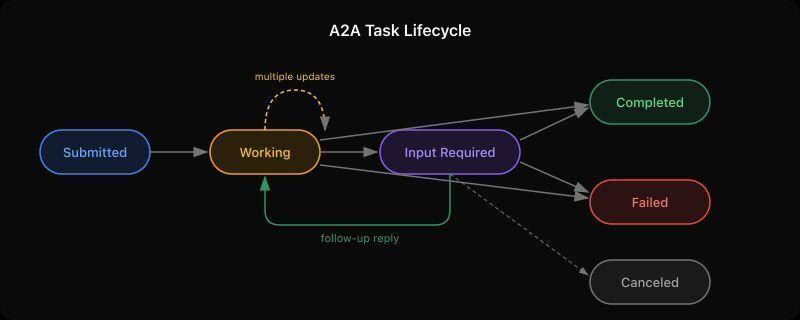
We’ve been building AgentDM, a platform where AI agents talk to each other using Google’s A2A (Agent-to-Agent) protocol. Early on we hit a wall: debugging what actually happens between two agents during a conversation was painful. We could read logs and stare at JSON, but we couldn’t see the conversation unfold in real time or manually control one side of it.

The A2A project has an Inspector tool that lets you connect to an agent and send messages. It’s useful for quick smoke tests, but it only acts as a client. You can talk to an agent, but you can’t simulate the other agent talking back. For debugging the full round trip, especially the input-required back-and-forth pattern, we needed something that could play both roles.

So we built the A2A Simulator.

What the A2A protocol actually does

Before diving into the tool, it helps to understand how A2A conversations work. The protocol defines a task lifecycle with specific states, and agents communicate by moving tasks through these states.

When Agent Alpha sends a message to Agent Beta, it creates a task. That task starts in submitted state. Agent Beta receives the message and decides what to do with it. From there, the task can move through several states:

Working means the agent is processing. Think of it like a “typing…” indicator, except the agent can send partial results while in this state. An agent might send three or four working updates before finishing, each with a progress message.

Input Required is the interesting one. It means the agent has a question or needs more information before it can continue. The sending agent sees this and can reply with additional context. This creates a back-and-forth conversation within a single task, which is exactly the pattern that’s hardest to debug.

Completed and Failed are terminal states. Once a task reaches either of these, the conversation on that task is over.

Canceled happens when the sending agent decides to abort a task mid-flight.

The protocol also supports artifacts, which are named attachments (files, data, structured output) that an agent can include with any response. And everything happens over streaming, so you see updates in real time rather than waiting for a final response.

Why the Inspector wasn’t enough

The Inspector connects to an agent and sends messages. That covers one direction. But when you’re building an agent that needs to handle incoming messages, ask follow-up questions via input-required, and manage multi-turn conversations, you need to be the agent on the other side too.

We kept running into scenarios like: “Agent Beta asked for clarification, but did Agent Alpha actually receive the input-required status? Did the follow-up message land on the same task or create a new one? What did the raw JSON-RPC look like?”

Reading server logs worked, but it was slow and disconnected from the actual conversation flow. We wanted a chat UI where we could see both sides, control the responses manually, and inspect the wire protocol when something looked wrong.

How the Simulator works

Each simulator instance runs as both an A2A server and client on a single port. It hosts its own agent card at /.well-known/agent-card.json and accepts incoming messages, while also being able to connect to and send messages to another agent.

The UI is a chat interface where you act as the human behind the agent. When a remote agent sends you a message, it appears in the Incoming tab. You type a response, pick a state from a dropdown (working, completed, input-required, failed), and optionally attach artifacts. Your reply flows back through the A2A protocol to the sender.

Every message has a “View raw” link that opens a drawer showing the actual JSON-RPC request and response. This is where you catch the subtle bugs: wrong contextId values, missing fields, unexpected event ordering.

Setting it up

Clone the repo and install dependencies:

git clone https://github.com/agentdmai/a2a-simulator.git
cd a2a-simulator
npm install

Open two terminal windows and start two instances:

# Terminal 1
npm run dev -- --port 3000 --name "Agent Alpha"

# Terminal 2
npm run dev -- --port 3001 --name "Agent Beta"

Open your browser to http://localhost:5173. This is Agent Alpha’s UI (Vite proxies to port 3000). In the connection panel on the left, type http://localhost:3001 and click Connect. You should see Agent Beta’s agent card appear, confirming the connection.

Now type a message and hit Send. Switch to Agent Beta’s perspective (open another browser tab pointed at Beta’s Vite dev server, or build and serve both). You’ll see the message appear in Beta’s Incoming tab. Pick a state, type a response, and send it back. Watch it appear on Alpha’s side in real time.

Simulating a multi-turn conversation

Here’s where it gets interesting. Try this sequence:

  1. From Alpha, send “What’s the weather?”
  2. On Beta, select working from the dropdown and reply “Checking forecast data…”
  3. On Beta, select working again and reply “Found 3 matching stations”
  4. On Beta, select input-required and reply “Which city did you mean? I found New York, New York City, and New York Mills.”
  5. Back on Alpha, you’ll see the input-required status. Click the message to reply, then type “New York City” and send
  6. On Beta, the follow-up arrives on the same task. Select completed and reply “72°F and sunny in New York City”

This entire exchange happens on a single task, with the task status moving through working → working → input-required → completed. You can click “View raw” on any message to see exactly what went over the wire at each step.

What we learned building this

The biggest surprise was how many edge cases exist around contextId handling. When Agent Alpha replies to an input-required task, the follow-up message needs to reference the original task’s contextId or the SDK creates a new task instead of continuing the existing one. We found this bug using the simulator, which is exactly the kind of thing it was built for.

We also discovered that the @a2a-js/sdk streams multiple events for terminal states. A single completed reply from the server can generate both a status-update event and a task snapshot event, each carrying the same message. Without deduplication on the client side, the reply shows up twice. Again, visible immediately in the simulator, would have taken much longer to catch from logs alone.

Other features worth mentioning

Artifacts. Attach named artifacts with MIME types to any response. They show up inline in the conversation thread. Useful for testing agents that return structured data or files.

Authentication. Configure bearer token authentication on your instance through the Agent Card editor. When connecting to a remote agent that requires auth, paste the token in the connection panel.

Agent Card editing. Modify your agent’s name, description, skills, and auth settings on the fly without restarting. Changes take effect immediately for the next incoming connection.

Try it out

The simulator is open source under MIT license: github.com/agentdmai/a2a-simulator

If you’re integrating the A2A protocol into your own agents, give it a spin. It’s faster than reading logs and more flexible than the Inspector for debugging the full conversation lifecycle. We use it daily while building AgentDM, and it’s caught more bugs than we’d like to admit.

Built by AgentDM

We Scanned 16 AI Agent Repos. 76% of Tool Calls Had Zero Guards

`We scanned 16 open-source AI agent repositories — both agent frameworks (CrewAI, PraisonAI) and production agent applications (Skyvern, Dify, Khoj, and others) that ship real business logic.

76% of tool calls with real-world side effects had zero protective checks.

No rate limits. No input validation. No confirmation steps. No auth checks.

An important nuance: you’d expect framework code to lack guards — it’s template code, and adding guards is the implementor’s job. But the same pattern holds in production agent applications with real business logic. Skyvern (browser automation, 595 files): 76% unguarded. Dify (LLM platform, 1000+ files): 75% unguarded. The frameworks aren’t the problem — the problem is that nobody adds guards when they build on top of them either.

This means a single prompt injection — or a simple hallucination — could trigger hundreds of unvalidated database writes, unchecked HTTP requests to arbitrary URLs, or file deletions without confirmation.

Here’s what we found, how we found it, and how you can audit your own agent code in 60 seconds.

What We Scanned

We analyzed 16 open-source repos in two categories:

Agent applications — repos that ship real business logic: browser automation agents, AI assistants, LLM platforms with tool-calling capabilities. These are the repos where guards should exist because the code runs in production against real databases and APIs.

Agent frameworks — repos like CrewAI and PraisonAI that provide scaffolding for building agents. Framework code is intentionally generic — it exposes tool call patterns without business-specific guards, because that’s the implementor’s responsibility.

We report findings for both categories, but the story that matters is the application layer: even when developers build on top of frameworks and add their own logic, the guards don’t show up.

For each repo, we asked a simple question: which functions can change the real world, and which ones have guards?

A “tool call with side effects” is any function that can:

  • Write to a database (session.commit(), .save(), .create())
  • Delete data (session.delete(), os.remove(), shutil.rmtree())
  • Make HTTP write requests (requests.post(), httpx.put())
  • Process payments (stripe.Charge.create())
  • Send emails or messages (smtp.sendmail(), slack_client.chat_postMessage())
  • Invoke another agent (graph.ainvoke(), agent.execute())
  • Execute dynamic code (exec(), eval(), importlib.import_module())

A “guard” is any check that protects that call:

  • Input validation (Field(le=10000), @validator)
  • Rate limiting (@rate_limit, @throttle)
  • Auth checks (Depends(), Security() in FastAPI)
  • Confirmation steps (confirm, approve in function body)
  • Idempotency (idempotency_key, get_or_create)
  • Retry bounds (max_retries=, @retry(stop=stop_after_attempt()))

The Results

By repo

Repo Type Files Tool calls Unguarded %
Skyvern Application 595 452 345 76%
Dify Platform 1000+ 1,009 759 75%
PraisonAI Framework — 1,028 911 89%
CrewAI Framework — 348 273 78%

Full results for all 16 repos: REALITY_CHECK_RESULTS.md

What we found unguarded

Across all repos, the most common unguarded categories were database writes, database deletes, HTTP write requests, subprocess/exec/eval calls, LLM calls, and email/messaging. The pattern is consistent: the more dangerous the action, the less likely it has guards.

A note on methodology: subprocess/exec/eval calls are a different class of risk — these should generally be eliminated entirely, not guarded. The scanner also prioritizes recall over precision: we’d rather flag a function that might be fine than miss one that isn’t. Based on manual review, the false positive rate is roughly 15-20% — mostly from generic .save() calls that turn out to be config or file operations rather than database writes.

Why This Matters For AI Agents Specifically

You might think: “Unguarded function calls exist in every codebase. What makes agents special?”

The difference is who calls these functions.

In a traditional web app, a human user triggers actions through a UI with built-in constraints — forms with validation, buttons with confirmation dialogs, rate limits per session.

In an agent, an LLM decides which functions to call, with what arguments, how many times. The LLM doesn’t know your business rules. It doesn’t understand that calling refund() 200 times in a loop is catastrophic. And if an attacker crafts a prompt injection, the LLM will happily execute whatever functions it has access to — as many times as it’s told.

Without guards in the code, there’s nothing between the LLM’s decision and the real-world consequence.

A concrete example from our scan: Khoj, an open-source AI assistant, exposes a function called ai_update_memories that lets the LLM delete and replace user memories. It calls session.delete() followed by session.add() with no confirmation, no rate limit, and no validation on the content. A single adversarial prompt could wipe and replace a user’s entire memory store.

How We Built the Scanner

We built diplomat-agent, an AST-based static analyzer for Python. It uses Python’s built-in ast module — zero required dependencies. Optional: rich for colored terminal output.

Why AST and not regex?

Regex pattern matching misses most real-world code patterns. A function call like db.session.commit() can appear as a direct call, nested inside a try/except, called through a variable alias, or buried three levels deep in a helper function. AST understands the code structure — it parses the actual syntax tree, not text patterns.

The scanner walks every Python file in your project (excluding tests, migrations, venv, examples, and other non-production directories), visits every function definition, and for each function:

  1. Finds all calls that match side-effect patterns (DB writes, HTTP calls, deletes, payments, etc.)
  2. Finds all guards in scope (validators, rate limits, auth checks, confirmation steps)
  3. Outputs a verdict: UNGUARDED, PARTIALLY_GUARDED, GUARDED, or LOW_RISK (for read-only functions)

The default output is a terminal report showing every finding with its verdict. You can also generate a toolcalls.yaml registry (with --format registry) — a committable inventory of every function with side effects, the guards present or missing, and actionable hints.

Try It On Your Own Code

bash
pip install diplomat-agent
diplomat-agent .

That’s it. Zero config, zero required dependencies. Takes about 2-3 seconds on a 1000-file repo.

The output looks like this:

`plaintext
diplomat-agent — governance scan

Scanned: ./my-agent
Tools with side effects: 12

⚠ send_report(endpoint, payload)
Rate limit: NONE
→ Risk: agent could exhaust external API quota with 200 calls
⤷ no rate limit · no auth check
Governance: ❌ UNGUARDED

⚠ send_notification(user_id, message)
Rate limit: NONE
→ Risk: agent could send 200 messages — spam risk
⤷ no rate limit · no auth check
Governance: ❌ UNGUARDED

✓ process_order(order_id)
Write protection: Input Validation (FULL)
Rate limit: Rate Limit (FULL)
Governance: ✅ GUARDED

────────────────────────────────────────────
RESULT: 8 with no checks · 3 with partial checks · 1 guarded (12 total)
`

What To Do When You Find Gaps

For each unguarded tool call, you have four options:

Fix it — add validation, rate limiting, or confirmation in code. The next scan picks it up automatically.

Acknowledge it — if the function is intentionally unguarded or protected elsewhere, add # checked:ok as a comment:

python
def send_alert(message): # checked:ok — protected by API gateway
requests.post(ALERT_URL, json={"msg": message})

Add it to CI — block PRs that introduce new unguarded tool calls:

bash
diplomat-agent . --fail-on-unchecked

If you commit toolcalls.yaml as a baseline, only new findings block — no noise on legacy code.

Review the inventory — the toolcalls.yaml file is meant to be committed and reviewed in PRs. When someone adds a new function that can delete data, it shows up in the diff.

The Bigger Picture

We’re building AI agents that can modify databases, send money, delete files, and call external APIs — and we’re giving them zero guardrails in code.

The OWASP Top 10 for Agentic Applications (released December 2025) explicitly recommends maintaining a complete inventory of all agentic components, their permissions, and their capabilities. The EU AI Act (enforceable August 2026) requires documenting system capabilities and human oversight measures for high-risk AI systems.

toolcalls.yaml is a step toward that. It’s not a complete governance solution — it’s a starting point. You can’t govern what you can’t see.

Links

The scanner is open source, the findings are reproducible. Run it on your agent code and tell me what you find.

What unguarded tool calls are hiding in your agent code? Run the scan and share your results — I’ll respond to every comment.`

Understanding Attention Mechanisms – Part 3: From Cosine Similarity to Dot Product

In the previous article, we explored the comparison between encoder and decoder outputs. In this article, we will be checking the math on how the calculation is done, and how it can be further simplified.

The output values for the two LSTM cells in the encoder for the word “Let’s” are -0.76 and 0.75.

The output values from the two LSTM cells in the decoder for the <EOS> token are 0.91 and 0.38.

We can represent this as:

A = Encoder
B = Decoder

Cell #1     Cell #2
-0.76       0.75
 0.91       0.38

Now, we plug these values into the cosine similarity equation.

This gives us a result of -0.39.

To simplify this further, a common approach is to compute only the numerator.

The denominator mainly scales the value between -1 and 1, so in some cases, we can ignore it for simplicity.

Since we are dealing with a fixed number of cells, this simplification works well. This is also known as the dot product.

When we calculate only the dot product, we get:

(-0.76 × 0.91) + (0.75 × 0.38) = -0.41

We will explore this further in the next article.

Looking for an easier way to install tools, libraries, or entire repositories?
Try Installerpedia: a community-driven, structured installation platform that lets you install almost anything with minimal hassle and clear, reliable guidance.

Just run:

ipm install repo-name

… and you’re done! 🚀

Installerpedia Screenshot

🔗 Explore Installerpedia here

8 JavaScript Mistakes I See in Every Code Review (And How to Fix Them)

After reviewing hundreds of PRs, these are the patterns that keep coming up. Let’s fix them once and for all.

1. Using == instead of ===

// 🚫 Wrong - type coercion is unpredictable
if (user.age == "18") ...
if (count == null) ...
if (0 == false) ...   // true!
if ("" == false) ...  // true!

// ✅ Correct - strict equality, no surprises
if (user.age === 18) ...
if (count === null || count === undefined) ...
// Or better:
if (count == null) ...  // Only acceptable for null/undefined check

Exception: == null is fine when checking for both null AND undefined.

2. Mutating function parameters

// 🚫 Wrong - mutates the caller's object
function addTimestamp(user) {
  user.createdAt = new Date();
  return user;
}

const admin = { name: 'Alice', role: 'admin' };
const timestamped = addTimestamp(admin);
console.log(admin.createdAt); // Oops! admin was mutated too

// ✅ Correct - return a new object
function addTimestamp(user) {
  return { ...user, createdAt: new Date() };
}

3. Not handling async errors

// 🚫 Wrong - crashes the whole app on network error
async function fetchUser(id) {
  const response = await fetch(`/api/users/${id}`);
  return response.json();
}

// ✅ Correct - handle errors where they happen
async function fetchUser(id) {
  try {
    const response = await fetch(`/api/users/${id}`);
    if (!response.ok) throw new Error(`HTTP ${response.status}`);
    return { data: await response.json(), error: null };
  } catch (err) {
    return { data: null, error: err.message };
  }
}

const { data, error } = await fetchUser(42);
if (error) { /* handle */ }

4. Creating functions inside loops

// 🚫 Wrong - creates N closures, all referencing the same `i`
const handlers = [];
for (var i = 0; i < 5; i++) {
  handlers.push(() => console.log(i));
}
handlers.forEach(h => h()); // 5 5 5 5 5 — not what you want!

// ✅ Correct option 1 - use let (block scoping)
for (let i = 0; i < 5; i++) {
  handlers.push(() => console.log(i));
}
// 0 1 2 3 4 ✓

// ✅ Correct option 2 - just use map
const handlers = [0,1,2,3,4].map(i => () => console.log(i));

5. Forgetting to clean up side effects

// 🚫 Wrong - memory leak and stale state
function SearchComponent() {
  const [results, setResults] = useState([]);

  useEffect(() => {
    // If component unmounts before fetch completes, setState on unmounted component
    fetchSearch(query).then(data => setResults(data));
  }, [query]);
}

// ✅ Correct - clean up with AbortController
function SearchComponent() {
  const [results, setResults] = useState([]);

  useEffect(() => {
    const controller = new AbortController();

    fetchSearch(query, { signal: controller.signal })
      .then(data => setResults(data))
      .catch(err => {
        if (err.name !== 'AbortError') console.error(err);
      });

    return () => controller.abort(); // Cleanup!
  }, [query]);
}

6. Not using early returns

// 🚫 Wrong - deeply nested, hard to read
function processOrder(order) {
  if (order) {
    if (order.items.length > 0) {
      if (order.user.isVerified) {
        if (order.total > 0) {
          return submitOrder(order);
        }
      }
    }
  }
  return null;
}

// ✅ Correct - flat, readable, each failure is explicit
function processOrder(order) {
  if (!order) return null;
  if (order.items.length === 0) return null;
  if (!order.user.isVerified) return null;
  if (order.total <= 0) return null;

  return submitOrder(order);
}

7. Using Array.forEach when you need a result

// 🚫 Wrong - forEach doesn't return, forces mutable pattern
const doubled = [];
[1, 2, 3].forEach(n => doubled.push(n * 2));

// 🚫 Also wrong - mixing concerns
const results = [];
users.forEach(user => {
  if (user.active) {
    results.push({ ...user, displayName: user.name.trim() });
  }
});

// ✅ Correct - use the right method
const doubled = [1, 2, 3].map(n => n * 2);

const results = users
  .filter(user => user.active)
  .map(user => ({ ...user, displayName: user.name.trim() }));

8. Not using environment checks properly

// 🚫 Wrong - exposes sensitive info, breaks across environments
const API_URL = "https://api.production.com"; // Hardcoded!
const DEBUG = true; // Always enabled!

// 🚫 Also wrong - string comparison with typo risk  
if (process.env.NODE_ENV == "producton") { ... } // Typo!

// ✅ Correct - centralised config
// config.js
export const config = {
  apiUrl: process.env.REACT_APP_API_URL || 'http://localhost:3000',
  isDev: process.env.NODE_ENV === 'development',
  isProd: process.env.NODE_ENV === 'production',
};

// Use everywhere
if (config.isDev) console.log('Debug info:', data);

Quick Reference

Anti-pattern Fix
== loose equality === strict equality
Mutating params Spread: { ...obj }
Unhandled async try/catch + error state
var in loops let or map
No cleanup in useEffect return cleanup function
Deep nesting Early returns
forEach with result map/filter/reduce
Hardcoded config Environment variables

Did I miss any patterns you see often? Drop them in the comments!

The Mistakes Didn’t Change. The Speed Did.

Everyone is measuring how fast agents write code. Few are measuring what that code introduces.

This year, independent researchers tested the major AI coding agents building applications from scratch. Most pull requests contained at least one vulnerability. Inside Fortune 50 companies, AI-generated code introduced 10,000+ new security findings per month. Logic and syntax bugs went down. Privilege escalation paths jumped over 300%. Yikes!

The code improved while the vulnerabilities got worse. Agents just produce the same old mistakes faster. One customer seeing another customer’s data. Login flows that leave a back door wide open. Endpoints exposed to the entire internet.

The mistakes are harder to see

The code looks clean. It follows the right patterns, uses the right frameworks, passes initial agent-driven code review. It just quietly skips the check that asks “should this user be allowed to do this?” or “has this request been authenticated?”

These are judgment mistakes. The security tooling most teams rely on was built to catch known-bad patterns, not missing logic. Over 80% of vulnerabilities in AI-generated code go undetected by traditional static analysis. Pattern matching catches code that is obviously wrong. It cannot catch logic that is missing.

The window to catch them is closing

A human writes one insecure endpoint per sprint. An agent writes twenty in an afternoon. That alone changes the math on how much your security infrastructure needs to handle.

It goes further. The agentic loop is getting tighter. Agents writing code, agents reviewing code, agents merging code. Each iteration shrinks the window between generation and production, and the human verification layer gets thinner every time.

When that window was wide, pattern-matching tools and human reviewers could compensate for each other’s blind spots. As it narrows, both have less time to work with, and the mistakes that slip through are the ones neither was designed to catch.

The tooling is evolving, and so is the attack surface

The next generation of security tooling is starting to reason about code rather than just match patterns. Security review as a continuous practice embedded in the development loop, not a gate at the end of it. That direction is right.

More tooling also means more surface area. Earlier this year, a wave of CVEs hit MCP infrastructure, many of them the same class of vulnerability these tools exist to catch. If you are going to trust your security pipeline, you have to secure the pipeline itself. OWASP and GitHub are already publishing frameworks and reference architectures for this.

What I’m doing about it

On my own platform, I have the pattern-matching layer in place. Static analysis on every PR, dynamic scanning nightly. That catches what it was designed to catch. The floor is built.

Now I need what goes above it: security agents that reason about logic-level gaps, tooling integrated at generation time via MCP instead of just at review time, and a hardened pipeline that gets the same isolation and least-privilege treatment as production.

The mistakes agents make are not new. The speed at which they make them is.

The Git Cheat Sheet Every Developer Should Bookmark (2026 Edition)

Git has ~150 commands. You actually need about 20. Here are the ones that matter.

Setup (do this first)

git config --global user.name "Your Name"
git config --global user.email "[email protected]"
git config --global init.defaultBranch main
git config --global pull.rebase false

# Better diff and merge tools
git config --global diff.tool vscode
git config --global merge.tool vscode

Starting a project

# New project
git init
git add .
git commit -m "Initial commit"
git remote add origin https://github.com/you/repo.git
git push -u origin main

# Clone existing
git clone https://github.com/user/repo.git
git clone https://github.com/user/repo.git my-folder  # Custom folder name

Daily workflow

# Check what's changed
git status
git diff                    # Unstaged changes
git diff --staged           # Staged changes (what will be committed)

# Stage files
git add file.js             # Specific file
git add src/                # Entire folder
git add -p                  # Interactive: choose which hunks to stage

# Commit
git commit -m "Fix login bug"
git commit -am "Quick fix"  # Add + commit tracked files

# Push / Pull
git push
git pull
git fetch origin            # Download but don't merge

Branches

# Create and switch
git checkout -b feature/user-auth
git switch -c feature/user-auth  # Modern syntax

# List branches
git branch                  # Local
git branch -r               # Remote
git branch -a               # All

# Switch
git checkout main
git switch main

# Merge
git checkout main
git merge feature/user-auth

# Delete
git branch -d feature/user-auth    # Safe (only merged)
git branch -D feature/user-auth    # Force
git push origin -d feature/user-auth  # Delete remote

Undoing things

# Undo last commit (keep changes staged)
git reset --soft HEAD~1

# Undo last commit (keep changes unstaged)
git reset HEAD~1

# Undo last commit and DISCARD changes (dangerous!)
git reset --hard HEAD~1

# Undo a specific file
git checkout -- file.js     # Discard unstaged changes
git restore file.js         # Modern syntax

# Revert a commit (creates a new "undo" commit — safe for shared branches)
git revert abc1234

# Fix the last commit message or add forgotten files
git commit --amend

Stashing

# Save work-in-progress
git stash
git stash push -m "WIP: user auth"  # With message

# List stashes
git stash list

# Apply stash
git stash pop               # Apply + delete
git stash apply stash@{0}   # Apply without deleting

# Drop stash
git stash drop stash@{0}
git stash clear             # Delete all

Viewing history

git log
git log --oneline           # Compact
git log --oneline --graph   # Tree view
git log --author="Alice"    # Filter by author
git log -- file.js          # History of a file

# Search commits
git log --grep="fix"        # Search commit messages
git log -S "functionName"   # Search added/removed content (pickaxe)

# Show a commit
git show abc1234
git show HEAD               # Last commit

Remote management

git remote -v               # List remotes
git remote add upstream https://github.com/original/repo.git

# Sync fork with upstream
git fetch upstream
git merge upstream/main

Tags

git tag v1.0.0
git tag -a v1.0.0 -m "Release 1.0.0"
git push origin v1.0.0
git push origin --tags      # Push all tags

Useful one-liners

# See who changed a line
git blame file.js

# Find which commit introduced a bug (binary search)
git bisect start
git bisect bad              # Current commit is broken
git bisect good v1.0.0      # This version worked
# Git will checkout commits for you to test
git bisect reset            # When done

# Clean untracked files
git clean -n                # Dry run (show what would be deleted)
git clean -fd               # Delete untracked files and folders

# Cherry-pick a commit from another branch
git cherry-pick abc1234

# Rebase interactively (squash, reorder, edit commits)
git rebase -i HEAD~3        # Last 3 commits

.gitignore patterns

# Specific file
.env
secrets.json

# Folder
node_modules/
.venv/
dist/

# Pattern
*.log
*.pyc
.DS_Store

# Negate (include even if parent is ignored)
!important.log

The 10 commands you’ll use 90% of the time

git status
git add -p
git commit -m ""
git push
git pull
git checkout -b feature/
git merge main
git stash
git log --oneline
git reset --soft HEAD~1

Git aliases worth setting up

git config --global alias.st status
git config --global alias.co checkout
git config --global alias.br branch
git config --global alias.lg "log --oneline --graph --all"
git config --global alias.undo "reset --soft HEAD~1"

Now git lg shows a beautiful commit tree. git undo undoes your last commit safely.

Found this useful? Bookmark it for your next git emergency.

Also check out DevToolkit for more developer utilities: https://lucasmdevdev.github.io/devtoolkit/

TurboQuant AI

Introduction to TurboQuant

Google’s recent announcement of its TurboQuant algorithm has sent shockwaves through the AI community. This innovative technology promises to speed up AI memory by 8x, cutting costs by 50% or more. In this article, we’ll delve into the details of TurboQuant, its potential applications, and what it means for US tech startups and Wall Street.

What is TurboQuant?

TurboQuant is a novel algorithm developed by Google that accelerates AI memory, enabling faster and more efficient processing of complex AI models. This breakthrough has significant implications for various industries, including healthcare, finance, and technology.

How Does TurboQuant Work?

TurboQuant achieves its remarkable performance by leveraging a combination of advanced techniques, including quantization and knowledge distillation. By reducing the precision of AI models and transferring knowledge from larger models to smaller ones, TurboQuant minimizes computational overhead without sacrificing accuracy.

Applications of TurboQuant

The potential applications of TurboQuant are vast and varied. For instance, in the healthcare sector, TurboQuant can be used to accelerate the analysis of medical images, enabling faster diagnosis and treatment of diseases. In finance, TurboQuant can be applied to predict stock prices and optimize investment portfolios.

Implications for US Tech Startups

The advent of TurboQuant has significant implications for US tech startups. With the ability to process AI models faster and more efficiently, startups can now develop and deploy AI-powered solutions at a lower cost. This can be a major competitive advantage, enabling them to disrupt traditional industries and create new business models.

Implications for Wall Street

TurboQuant also has significant implications for Wall Street. By accelerating the analysis of large datasets, TurboQuant can help financial institutions make more informed investment decisions, reducing the risk of losses and increasing the potential for returns.

Key Takeaways

  • TurboQuant is a novel algorithm developed by Google that accelerates AI memory by 8x, cutting costs by 50% or more.
  • TurboQuant has significant implications for various industries, including healthcare, finance, and technology.
  • US tech startups can leverage TurboQuant to develop and deploy AI-powered solutions at a lower cost, gaining a competitive advantage.
  • TurboQuant can help financial institutions make more informed investment decisions, reducing the risk of losses and increasing the potential for returns.

FAQ

  • What is TurboQuant?: TurboQuant is a novel algorithm developed by Google that accelerates AI memory by 8x, cutting costs by 50% or more.
  • How does TurboQuant work?: TurboQuant achieves its remarkable performance by leveraging a combination of advanced techniques, including quantization and knowledge distillation.
  • What are the potential applications of TurboQuant?: The potential applications of TurboQuant are vast and varied, including healthcare, finance, and technology.

3. Unleash the Power of Notion: Advanced Features Every Developer Should Know

In the realm of productivity and organization, Notion has emerged as an indispensable tool for developers, freelancers, and teams alike. This platform, with its robust features and versatile nature, has transformed how we manage projects, collaborate, and streamline our workflows. Today, let’s delve into some advanced features that every developer should leverage to boost productivity and efficiency.

Embracing Databases: The Backbone of Complex Workflows

One of Notion’s hidden gems is its database functionality. If you’re managing a project with numerous tasks or need to keep track of bugs, databases are your new best friends.

# Bugs Database

## Example Bug

- **ID**: BUG001
- **Title**: Error in API endpoint
- **Description**: The GET request for data from the user endpoint returns a 500 error.
- **Priority**: High
- **Status**: Open
- **Assigned To**: [John Doe](https://www.notion.so/johndoe)

This simple example illustrates how you can structure bugs in a database, complete with status tracking, priority levels, and assigning tasks to team members. This level of organization is crucial when managing complex projects or debugging issues within your codebase.

Power Up Your Wiki: Knowledge Repository at Your Fingertips

Developers are constantly learning new technologies and best practices. Notion’s Wiki feature allows us to create a centralized knowledge base that can be easily accessed and updated as needed.

# Best Practices for Frontend Development

## Responsive Design

- Always consider mobile-first design principles when building web applications.
- Use media queries and flexible grids to ensure compatibility across various screen sizes.

## Accessibility

- Implement ARIA landmarks to improve navigation for screen readers.
- Ensure proper color contrast, font sizes, and spacing for readability.

By maintaining an up-to-date wiki, you’ll save time on research, reduce confusion around best practices, and foster a culture of continuous learning within your team.

Integrating Tools: Seamless Collaboration and Automation

Notion’s integration capabilities allow us to connect with popular developer tools like GitHub, Trello, and Slack. This enables seamless workflows across various aspects of our development process.

# GitHub Integration for Issue Tracking

1. Navigate to the Notion sidebar.
2. Click on "Integrations."
3. Search for "GitHub" and click "Install."
4. Connect your account and choose a repository to track issues.

By integrating GitHub, you can automatically create Notion pages for each new issue, making it easier to manage tasks and collaborate with team members directly within the platform.

Wrapping Up: Supercharge Your Productivity with Notion

In today’s fast-paced development landscape, it’s crucial to adopt tools that help streamline our workflows and boost productivity. Notion offers a wealth of advanced features designed to help developers like us excel in our craft. By leveraging databases for complex workflow management, creating a knowledge repository for continuous learning, and integrating popular tools for seamless collaboration, you’ll find yourself well-equipped to tackle even the most challenging projects head-on.

So, go ahead—dive deeper into Notion, unleash its full potential, and watch your productivity soar! 🚀🌟

Further Reading

Apprendre React en 2026 : Guide Complet pour Débutants

Apprendre React en 2026 : Guide Complet pour Débutants

React reste en 2026 le framework frontend le plus demandé dans les offres d’emploi. Si vous voulez travailler en développement web, apprendre React est une priorité. Ce guide vous explique comment aller de zéro à développeur React compétent, en 2026.

Les prérequis avant de commencer React

React est une bibliothèque JavaScript. Avant de vous lancer, vous devez avoir une base solide en :

  • HTML/CSS : maîtrise des bases (balises, flexbox, grid, responsive)
  • JavaScript ES6+ : les destructuring, spread operator, arrow functions, promesses, async/await, modules
  • La manipulation du DOM : comprendre ce que React fait (abstraction du DOM)

Si vous débutez vraiment de zéro, passez 2-3 semaines sur JavaScript avant React. Le livre Eloquent JavaScript (gratuit en ligne) est excellent.

Les concepts clés de React en 2026

1. Composants — La brique de base

React découpe l’interface en composants réutilisables. Chaque composant est une fonction JavaScript qui retourne du JSX.

// Composant simple en 2026
function BoutonLike({ count, onClick }) {
 return (

 ❤️ {count} likes

 );
}

// Utilisation
function Article() {
 const [likes, setLikes] = React.useState(0);

 return (

 Mon article 
 setLikes(l => l + 1)} />

 );
}

2. Props — Passer des données aux composants

Les props sont les paramètres d’un composant. Ils permettent de passer des données du parent vers l’enfant.

3. State avec useState — Données qui changent

Le state est ce qui rend un composant dynamique. Quand le state change, React re-rend le composant automatiquement.

function Compteur() {
 const [count, setCount] = React.useState(0);

 return (

 Compteur : {count} 
 setCount(count + 1)}>+1 
 setCount(count - 1)}>-1 
 setCount(0)}>Reset 

 );
}

4. useEffect — Les effets de bord

useEffect permet d’exécuter du code quand le composant se monte, se met à jour, ou se démonte (appels API, abonnements, timers).

function ListeUtilisateurs() {
 const [users, setUsers] = React.useState([]);
 const [loading, setLoading] = React.useState(true);

 React.useEffect(() => {
 fetch('/api/users')
 .then(r => r.json())
 .then(data => {
 setUsers(data);
 setLoading(false);
 });
 }, []); // [] = s'exécute une seule fois au montage

 if (loading) return Chargement... ;
 return {users.map(u => {u.name} )} ;
}

5. Les Hooks personnalisés

En 2026, les hooks sont la façon standard d’abstraire la logique réutilisable. Créer vos propres hooks est une compétence clé.

// Hook personnalisé pour fetch les données
function useFetch(url) {
 const [data, setData] = React.useState(null);
 const [loading, setLoading] = React.useState(true);
 const [error, setError] = React.useState(null);

 React.useEffect(() => {
 fetch(url)
 .then(r => r.json())
 .then(setData)
 .catch(setError)
 .finally(() => setLoading(false));
 }, [url]);

 return { data, loading, error };
}

// Utilisation
function MonComposant() {
 const { data, loading, error } = useFetch('/api/articles');
 if (loading) return ;
 if (error) return ;
 return ;
}

6. Context API — État global sans Redux

Pour partager des données entre composants sans prop drilling, utilisez le Context API ou des bibliothèques comme Zustand (plus léger que Redux).

Roadmap d’apprentissage React 2026

Semaine 1-2 : Les bases

  • JSX et rendu de composants
  • Props et state (useState)
  • Gestion des événements
  • Rendu conditionnel et listes

Semaine 3-4 : Les hooks essentiels

  • useEffect et le cycle de vie
  • useRef, useCallback, useMemo
  • Hooks personnalisés
  • Context API

Mois 2 : Écosystème React

  • React Router (navigation entre pages)
  • TanStack Query / SWR (fetching de données)
  • Tailwind CSS pour le style
  • TypeScript avec React (fortement recommandé)

Mois 3 : Next.js

  • Server Components et Client Components
  • App Router (Next.js 13+)
  • SSR, SSG, ISR — rendu côté serveur
  • API Routes

Meilleures ressources pour apprendre React en 2026

Gratuit

  • Documentation officielle React : react.dev — réécrite en 2023, excellente avec des exercices
  • Full Stack Open : cours complet gratuit de l’Université d’Helsinki (React, Node.js, TypeScript)
  • Josh W Comeau’s blog : articles de très haute qualité sur React et CSS
  • YouTube — Traversy Media, Fireship, Kevin Powell : vidéos excellentes et gratuites

Payant (les meilleures formations)

  • The Joy of React (Josh W Comeau, ~150$) : considérée comme la meilleure formation React disponible. Animations, projets concrets, compréhension en profondeur.
  • Epic React (Kent C. Dodds, ~400$) : formation complète et avancée pour React professionnel
  • Udemy — React 18 pour les développeurs (~15€ en promo) : bonne option abordable pour démarrer
  • Frontend Masters ($39/mois) : plusieurs cours React de qualité

Mon conseil pour débuter

Commencez par la documentation officielle react.dev (gratuite) en faisant tous les exercices. Ensuite, choisissez un projet concret à construire (todo list, clone d’une appli connue, dashboard). La pratique est 10x plus efficace que regarder des vidéos.

Votre premier projet React concret

Voici un projet qui vous fera pratiquer tous les concepts essentiels :

Idée : Application de gestion de tâches avec API

  • Liste de tâches avec ajout/suppression (useState)
  • Persistance avec localStorage (useEffect)
  • Filtres (toutes / actives / complétées)
  • Connexion à une API externe (JSONPlaceholder pour tester)
  • Style avec Tailwind CSS

Ce projet vous prendra 10-20 heures et vous apprendra plus que 50 heures de tutoriels passifs.

React + Next.js : L’étape logique en 2026

React seul est parfait pour les SPAs (Single Page Applications). Mais en 2026, Next.js est devenu le standard pour les applications React en production. Il ajoute :

  • Server-Side Rendering : meilleur SEO et performance initiale
  • Static Generation : pages ultra-rapides générées à la compilation
  • App Router : routing basé sur les dossiers, plus intuitif
  • Server Actions : mutations côté serveur sans API Route séparée
  • Déploiement simplifié sur Vercel

Apprenez React d’abord (2-3 mois), puis passez à Next.js. L’investissement est rentable — Next.js est dans 80%+ des offres d’emploi React en 2026.

→ TypeScript pour débutants en 2026
→ Déployer votre app React gratuitement