Gas Fees Killed Our First Demo. Here’s What We Did About It.

cover

cover

The investor meeting was going perfectly. We had built an AI agent that could autonomously pay for API calls, route micro-transactions across services, and settle in real time. Then we ran the live demo.

The transaction confirmed in 14 seconds. The room was impressed. Then our lead investor leaned forward and said: “What did that just cost?”

The answer was $8.40 in gas fees. For a $0.15 API call. The demo was dead.

The Gas Fee Math Nobody Talks About

Ethereum mainnet gas fees are priced in gwei per unit of gas. A simple ETH transfer uses 21,000 gas units. An ERC-20 token transfer uses 45,000-65,000 gas units. During the demo, mainnet was running at 80 gwei base fee with a 10 gwei priority fee.

# Gas cost formula
gas_units = 65000
base_fee_gwei = 80
priority_fee_gwei = 10
eth_price_usd = 3200

total_gwei = gas_units * (base_fee_gwei + priority_fee_gwei)
total_eth = total_gwei / 1e9
gas_cost_usd = total_eth * eth_price_usd

print(f"Gas cost: ${gas_cost_usd:.2f}")   # Gas cost: $18.72

Now scale that to an AI agent fleet doing 10,000 transactions per day. At $8-10 per transaction, you are spending $80,000-$100,000 per day just on gas. Before you pay for a single actual service.

agent fleet

Why Gas Fees Are Especially Brutal for AI

Human users can abort a transaction before it confirms. If a person sees the gas estimate is absurd, they cancel and wait. AI agents do not work that way.

An autonomous agent has a task to complete. It has been authorized to spend up to a certain amount. If the gas fee eats 98% of the transaction value, the agent does not know to stop. It just executes.

We built a fee monitor that would pause transactions when mainnet gas exceeded a threshold. It helped, but it introduced a new problem: the agent would get stuck mid-workflow, waiting for gas to drop, with no way to continue or fail gracefully.

The Fix: Move the Problem Somewhere It Does Not Exist

L2 solution

The real solution was not to manage gas better. It was to stop using a network where gas is a first-class variable cost.

We moved to Base (Coinbase’s L2) and the math changed completely:

# Same transaction on Base L2
gas_units = 65000
base_fee_gwei = 0.005
priority_fee_gwei = 0.001
eth_price_usd = 3200

total_gwei = gas_units * (base_fee_gwei + priority_fee_gwei)
total_eth = total_gwei / 1e9
l2_cost_usd = total_eth * eth_price_usd

print(f"Gas cost: ${l2_cost_usd:.6f}")   # Gas cost: $0.001248

Sub-cent transaction costs. Consistent. Predictable. An AI agent running 10,000 transactions per day now spends $12.48 in gas instead of $84,000.

How We Handle Gas Abstraction

After moving to L2, we still had a developer experience problem. Our team was spending engineering time managing gas wallets, estimating fees, and handling gas-related failures.

Rosud (rosud.com) handles gas abstraction so developers never think about it. The SDK manages gas estimation, L2 routing, and fee sponsorship automatically.

abstraction

// Before: manual gas management
const gasEstimate = await provider.estimateGas(txData);
const feeData = await provider.getFeeData();
const gasPrice = feeData.gasPrice * BigInt(120) / BigInt(100);

await wallet.sendTransaction({
  gasLimit: gasEstimate,
  maxFeePerGas: gasPrice,
  maxPriorityFeePerGas: feeData.maxPriorityFeePerGas,
});

// After: Rosud handles it
await rosud.pay({
  amount: 0.15,
  currency: 'USDC',
  to: serviceAddress,
});

Under the hood, Rosud routes to the optimal L2, manages gas wallets, sponsors fees when appropriate, and retries on failure. Your agent just calls pay().

The Broader Lesson

The investor who killed our demo did us a favor. It forced us to confront the core question: can you build reliable autonomous payment infrastructure on top of variable-cost networks?

The answer is yes, but only if you abstract away the variability. Gas fees are an implementation detail. They should never surface as a business cost that makes a $0.15 API call cost $8.40.

Rosud is payment infrastructure for AI agents. Gas abstraction, multi-chain routing, and sub-cent transaction costs. Learn more at rosud.com.

Is WordPress dead? (Or just too stubborn to notice?)

I’ve been building and maintaining WordPress sites for years. Clients, side projects, quick landing pages — WordPress was always the default answer. Need a website? WordPress. Need a blog? WordPress. Need a portfolio? WordPress with a theme and three plugins.

And for a long time, that made sense. WordPress powered a massive share of the web, had a plugin for everything, and you could hand it off to a non-technical client who could update their own content. The ecosystem was unmatched.

But lately, every time I spin up a new WordPress instance, I can’t shake the feeling that I’m solving a 2026 problem with a 2006 tool. And I don’t think I’m alone.

The weight problem

Let’s start with the thing nobody wants to say out loud: WordPress is slow.

Not theoretically slow. Not “if you don’t optimize it” slow. Slow by default. A fresh WordPress install with a commercial theme and a handful of essential plugins — contact form, SEO, caching, security — already ships more PHP, more database queries, and more JavaScript than most sites actually need.

And here’s the painful number: fewer than half of WordPress sites on mobile pass Google’s Core Web Vitals. For a platform that powers over 42% of the web, that’s not a minor issue — that’s a systemic design problem.

The response from the WordPress community is always the same: use a caching plugin, optimize your images, pick a lightweight theme, configure your CDN. In other words, spend hours undoing the bloat that WordPress introduced in the first place. You’re not building a website at that point. You’re performing surgery on one.

The plugin trap

WordPress’s greatest strength — its plugin ecosystem — has quietly become its biggest liability.

There are over 70,000 plugins available. That sounds impressive until you realize that up to 97% of WordPress security vulnerabilities come from plugins. Every plugin you install is a dependency you now have to maintain, update, and trust. And while most site owners do keep WordPress itself updated, the plugin ecosystem is where things fall apart — outdated, abandoned, or poorly maintained plugins are the norm, not the exception.

But even setting security aside, the plugin model creates a weird kind of dependency. Want a contact form? Plugin. Want SEO metadata? Plugin. Want your site to load in under three seconds? Plugin that undoes what the other plugins did. Want to back up your site? Plugin. The average WordPress site runs somewhere between 20 and 30 plugins, each adding its own CSS, JavaScript, and database queries.

At some point you have to ask: if you need a dozen plugins just to make a basic site work properly, is the platform actually solving your problem — or is it the problem?

The hosting illusion

One of WordPress’s selling points has always been cheap hosting. And it’s true — you can get WordPress hosting for a few euros a month. What nobody mentions is why it’s so cheap.

Budget shared hosting means your site shares a server with hundreds of others. Your PHP processes compete for CPU time. Your database queries queue up behind everyone else’s. The result is a site that technically works but loads like it’s on dial-up — especially under any kind of traffic spike.

The alternative is managed WordPress hosting, which is faster and more reliable but costs €20–50/month or more. At that point, you’re paying cloud-tier prices for a CMS that still needs plugins, still needs updates, and still fails Core Web Vitals half the time.

Meanwhile, a static site built with any modern tool deploys to Cloudflare Pages, Netlify, or Vercel for free. Zero servers to manage. Global CDN included. Load times measured in milliseconds, not seconds.

The elephant in the room: the Mullenweg drama

I can’t write about the state of WordPress in 2026 without mentioning this.

The ongoing conflict between Matt Mullenweg — WordPress co-creator and CEO of Automattic — and WP Engine has shaken the community in ways that go beyond a corporate lawsuit. Mullenweg blocked WP Engine customers from accessing WordPress.org updates, leaving sites unable to receive security patches. He expelled long-time contributors from the project. The legal battle dragged on through 2025 and into 2026.

Whether you side with Mullenweg or WP Engine isn’t really the point. The point is that this episode exposed something uncomfortable: a huge chunk of the web’s infrastructure depends on one person’s goodwill and one company’s business decisions. That’s a governance risk that many developers and businesses hadn’t fully considered — and it’s pushing people to look at alternatives more seriously than before.

The real question: what do you actually need?

Here’s where it gets interesting.

Think about the WordPress sites you’ve built or managed. How many of them were truly dynamic? How many actually needed a database, server-side rendering, user authentication, or a CMS backend?

In my experience, the answer is: far fewer than you’d expect. The vast majority of WordPress sites I’ve worked on were essentially static. A homepage, an about page, a services page, a contact form, maybe a blog. Content that changes once a month, if that.

For that kind of site, WordPress is not just overkill — it’s the wrong architecture entirely. You’re running a PHP application backed by a MySQL database, processing every page request on the server, just to deliver content that hasn’t changed since last Tuesday.

The AI shift nobody’s talking about

And this is where things get genuinely different from any “WordPress is dying” take you’ve read before.

We now have AI coding tools — Claude Code, OpenAI Codex, Google Gemini CLI — that can generate a complete, production-ready website from a conversation. Not a template. Not a wireframe. An actual, deployable site.

I’m not talking about toy demos. I mean: you describe what you want — a portfolio site with these sections, this color scheme, a contact form, responsive layout — and in a few minutes you have clean HTML, CSS, and JavaScript. No plugins. No database. No server. No security patches to install next month.

The output is a static site that loads instantly, scores 100 on Lighthouse, costs nothing to host, and does exactly what 80% of WordPress sites do — except faster, lighter, and with zero maintenance overhead.

And here’s the part that makes WordPress developers uncomfortable: the non-technical client who used to need WordPress because they couldn’t code? They can now describe what they want in plain language and get a working site. The abstraction layer that WordPress provided — “you don’t need to know how to code” — is being replaced by a better abstraction: “you don’t even need to know what a CMS is.”

What this looks like in practice

Let me be concrete. Here’s what a typical “WordPress project” looks like when you replace it with an AI coding tool and a static site approach.

The old way (WordPress): Buy hosting. Install WordPress. Pick a theme. Customize the theme (fight the theme). Install 10–15 plugins. Configure each plugin. Set up caching. Set up backups. Set up security. Write content. Hope nothing breaks on update day. Total setup time: a weekend, maybe more. Ongoing maintenance: constant.

The new way: Open Claude Code, Codex, or Gemini. Describe the site. Review the output. Deploy to Cloudflare Pages or Netlify. Done. Total setup time: an afternoon, probably less. Ongoing maintenance: near zero — there’s nothing to update because there’s nothing running.

The site is faster, more secure (there’s nothing to hack), cheaper to host (free, in most cases), and easier to modify (ask the AI to change it).

Where WordPress still wins

I promised honesty, so here it is.

WordPress is still the right choice in some scenarios. If you need a site where multiple non-technical users publish content daily — a news site, a multi-author blog, a magazine — the CMS workflow is hard to replace. WordPress’s editorial interface, revision history, and role management are mature and battle-tested.

If you’re running WooCommerce with thousands of products, complex inventory, and payment integrations, you’re in territory where static sites and AI prompts genuinely can’t compete. E-commerce at scale is a different beast.

And if you already have a WordPress site that works, that’s maintained, and that serves your needs — there’s no reason to burn it down. Migration for its own sake is just engineering vanity.

But for everything else?

For the freelancer building a client’s brochure site. For the startup that needs a landing page. For the developer who wants a portfolio. For the small business that needs an online presence with a contact form and a map. For the blogger who posts once a week.

WordPress is not the answer anymore. It’s the habit.

The tools have changed. A static site generated by AI, deployed to a global CDN, with no database, no plugins, and no server to maintain, will outperform a WordPress site in every measurable way — speed, security, cost, and reliability.

Final thoughts

WordPress isn’t dead. But it’s no longer the default. And the fact that we keep reaching for it anyway says more about our habits than about the technology.

The next time someone asks you to build a simple website, before you type wp-admin into a browser, ask yourself: does this project actually need a CMS, a database, a server, and thirty plugins? Or does it need five static pages that load in 200 milliseconds?

If the answer is the latter — and it usually is — you have better options now. Options that didn’t exist two years ago. And they’re getting better every month.

WordPress had a great run. For a lot of use cases, that run is over.

Day 23: Agentic AI in Product Management 🧠📦

Executive Summary

Product Management is fundamentally an information synthesis problem.

PMs constantly:

  • ingest noisy signals 🗣️
  • balance competing constraints ⚖️
  • make decisions with incomplete data ❓

Agentic AI does not replace product managers.

It augments them by:

  • continuously sensing inputs
  • structuring ambiguity
  • accelerating decision cycles

This chapter explains how agentic systems can be embedded into real product workflows without turning PMs into passive reviewers.

Why Product Management Is Agent-Friendly 🧩

Product work involves:

  • open-ended questions
  • multi-stakeholder inputs
  • iterative refinement

These are classic agent traits:

Observe → Interpret → Decide → Act → Learn

Static dashboards fail because product decisions are:

  • contextual
  • temporal
  • value-laden

Agents thrive where spreadsheets break.

What Product Agents Should (and Should NOT) Do 🚦

What They Should Do

  • monitor signals continuously 📊
  • surface trade-offs explicitly
  • summarize user feedback at scale
  • propose options, not answers

What They Should NOT Do

  • decide product direction autonomously ❌
  • override PM judgment
  • optimize for vanity metrics

Product strategy is a human responsibility.

Core Product Signals Agents Can Ingest 📥

Signal Type Examples
User feedback Tickets, NPS, surveys
Usage data Funnels, cohorts
Market intel Competitor launches
Engineering Velocity, incidents
Business Revenue, churn

Agents unify signals humans rarely see together.

Canonical Product Agent Architecture 🏗️

Signals (Users, Data, Market)
            ↓
     Ingestion Agents
            ↓
     Normalization Layer
            ↓
     Insight Agents
            ↓
     Trade-off Analyzer
            ↓
     PM Review & Decision

The PM remains the decision-maker.

Use Case 1: Continuous User Feedback Synthesis 🗣️🧠

Problem

Thousands of feedback items across:

  • tickets
  • app reviews
  • sales notes

Agent Behavior

  • cluster feedback by theme
  • track sentiment over time
  • flag emerging issues

Outcome

PMs see patterns, not anecdotes.

Use Case 2: Roadmap Impact Analysis 🛣️📊

Example Question

“If we delay Feature X by one quarter, what breaks?”

Agent Tasks

  • scan dependencies
  • evaluate customer commitments
  • estimate revenue risk

This turns gut feel into structured debate.

Use Case 3: PRD Drafting & Validation ✍️

Agents can:

  • draft PRD sections
  • identify unclear requirements
  • flag scope creep

But humans must:

  • approve trade-offs
  • own final decisions

Multi-Agent Product Setup 🤝

Typical configuration:

  • Signal Agent: monitors inputs
  • Insight Agent: synthesizes trends
  • Risk Agent: flags downsides
  • Narrative Agent: drafts PM-facing summaries

A manager agent orchestrates the workflow.

Example: Product Insight Agent Loop 🔁

collect_signals()
cluster_feedback()
identify_trends()
quantify_impact()
propose_options()

Note: propose options — not conclusions.

Practical Example: Feature Prioritization Agent 🧮

Inputs

  • user demand
  • effort estimates
  • revenue impact

Agent Output

Feature Impact Effort Risk
A High Medium Low
B Medium Low Medium

This supports — not replaces — prioritization frameworks.

Tools & Integrations 🔧

Common integrations:

  • Jira / Linear
  • Product analytics tools
  • Support platforms
  • CRM systems

Agents become useful only when wired into real data.

Failure Modes in Product Agents 🚨

Failure Impact
Metric fixation Short-term optimization
Feedback bias Loud users dominate
False precision Overconfident insights

Product agents must surface uncertainty.

Guardrails for Product Agents 🚧

  • human approval required
  • confidence indicators
  • explainability of insights
  • audit trails

Trust comes from transparency.

Case Study: Product Discovery Agent at Scale 📚

Context

  • B2B SaaS platform

Agent Role

  • weekly insight synthesis

Result

  • faster roadmap discussions
  • better cross-team alignment

Key takeaway

Agents improved conversation quality, not decision authority.

Measuring Success 📏

Track:

  • decision turnaround time
  • stakeholder alignment
  • PM trust score

Ignore:

  • number of summaries generated

Organizational Impact 🏢

When Done Well

  • PMs think more strategically 🧭
  • teams align faster
  • product debates improve

When Done Poorly

  • PMs disengage
  • trust erodes

Final Takeaway

Agentic AI in Product Management is about clarity, not control.

The best systems:

  • amplify judgment
  • expose trade-offs
  • respect human ownership

A great product agent doesn’t tell PMs what to build.

It helps them understand why a decision matters.

Test Your Skills

🚀 Continue Learning: Full Agentic AI Course

👉 Start the Full Course: https://quizmaker.co.in/study/agentic-ai

Etiqueta : El Universo de tu Web

Si tu sitio web fuera un organismo vivo, la etiqueta <html> sería la piel que lo contiene todo. Es el elemento raíz (root) y absolutamente nada en tu página puede existir fuera de sus fronteras.

El Rey de la Jerarquía

El navegador utiliza esta etiqueta para saber dónde empieza y dónde termina el documento. Es el ancestro común de todos los elementos (el “padre de todos”).

🛠️ Los Atributos que te hacen PRO

Un desarrollador novato deja la etiqueta vacía: <html>. Un Arquitecto Web como tu utilizas los atributos estratégicos:

  1. lang="es": (Obligatorio para Seniors) Le dice a los motores de búsqueda y a los lectores de pantalla en qué idioma está el contenido. Evita que el navegador pregunte “¿Quieres traducir esta página?”.
  2. dir="ltr": Define la dirección del texto (de izquierda a derecha). Fundamental si algún día trabajas con idiomas como el árabe (rtl).

Código : La Raíz Perfecta

<html lang="es">
  <head>
    </head>
  <body>
    </body>
</html>

Tip para el Futuro Senior:

En CSS, puedes seleccionar este elemento usando el selector :root. Es la mejor práctica para declarar tus Variables CSS (colores, tamaños, fuentes) porque garantiza que estarán disponibles para absolutamente todos los elementos de tu sitio.

How I Fixed a Race Condition in a Live Seat Booking System (And Lost Sleep Over It)

𝗧𝘄𝗼 𝘂𝘀𝗲𝗿𝘀. 𝗢𝗻𝗲 𝘀𝗲𝗮𝘁. 𝗧𝗼𝘁𝗮𝗹 𝗰𝗵𝗮𝗼𝘀.
It was a regular Tuesday on a client project — a bus ticket booking platform. Everything looked fine until a support ticket landed: two passengers had been assigned the same seat on the same trip.

My first instinct? “That can’t happen — I have a check before booking.” Famous last words.

𝗪𝗵𝗮𝘁 𝘄𝗮𝘀 𝗮𝗰𝘁𝘂𝗮𝗹𝗹𝘆 𝗵𝗮𝗽𝗽𝗲𝗻𝗶𝗻𝗴:

User A and User B both queried the seat at nearly the same millisecond. Both saw it as available. Both proceeded to book. The database updated twice — same seat, two owners.

𝗠𝘆 𝗳𝗶𝗿𝘀𝘁 (𝘄𝗿𝗼𝗻𝗴) 𝗮𝘁𝘁𝗲𝗺𝗽𝘁𝘀

I tried a simple if check before updating — reading the seat status, then writing. Seemed logical. Broke immediately under any real concurrency. Read-then-write is not atomic. The window between those two operations is exactly where race conditions live.

Then I tried a client-side flag. Also wrong. Socket.io events can arrive out of order, and the UI state is not a source of truth.

The fix: atomic update + real-time lock broadcast

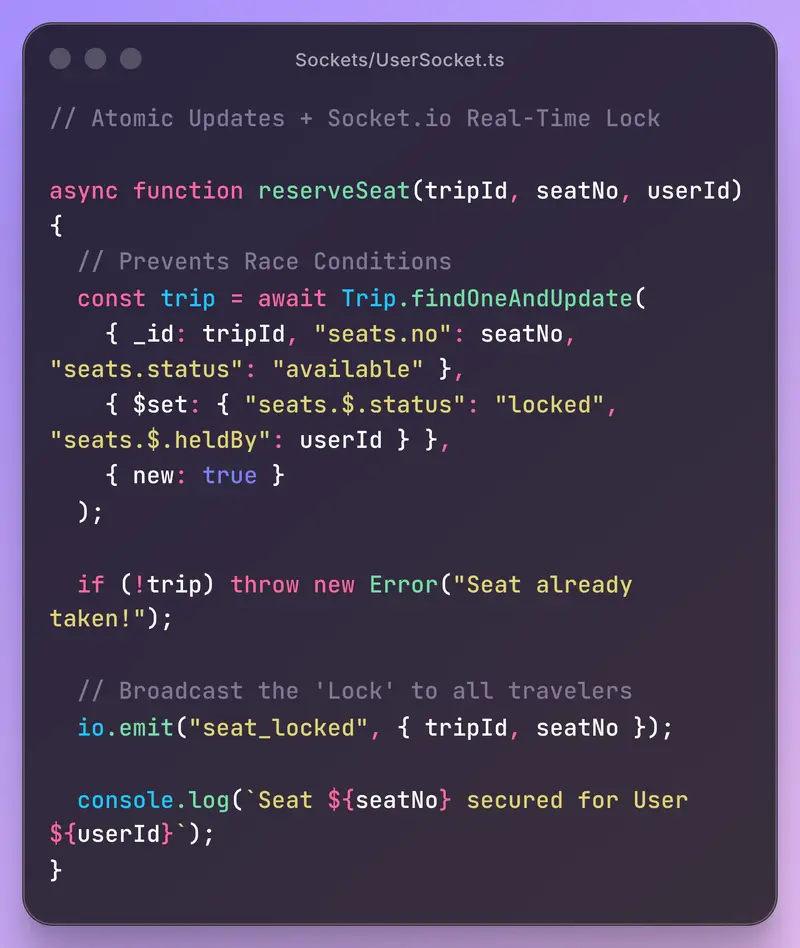
The solution was to collapse the read and the write into a single atomic MongoDB operation — and pair it with a Socket.io broadcast so every connected client sees the lock instantly.

// Atomic Updates + Socket.io Real-Time Lock

async function reserveSeat(tripId, seatNo, userId) {

// Prevents Race Conditions
const trip = await Trip.findOneAndUpdate(
{ _id: tripId, “seats.no”: seatNo, “seats.status”: “available” },
{ $set: { “seats.$.status”: “locked”, “seats.$.heldBy”: userId } },
{ new: true }
);

if (!trip) throw new Error(“Seat already taken!”);

// Broadcast the ‘Lock’ to all travelers
io.emit(“seat_locked”, { tripId, seatNo });
console.log(Seat ${seatNo} secured for User ${userId});
}

𝗪𝗵𝘆 𝘁𝗵𝗶𝘀 𝘄𝗼𝗿𝗸𝘀 — 𝗹𝗶𝗻𝗲 𝗯𝘆 𝗹𝗶𝗻𝗲

1️⃣ 𝙏𝙝𝙚 𝙦𝙪𝙚𝙧𝙮 𝙘𝙤𝙣𝙙𝙞𝙩𝙞𝙤𝙣 𝙞𝙨 𝙩𝙝𝙚 𝙜𝙪𝙖𝙧𝙙
“seats.status”: “available” means MongoDB only updates if the seat is still available at the exact moment of the write. If two requests arrive simultaneously, only one will match — the other gets null.

2️⃣ 𝙛𝙞𝙣𝙙𝙊𝙣𝙚𝘼𝙣𝙙𝙐𝙥𝙙𝙖𝙩𝙚 𝙞𝙨 𝙖𝙩𝙤𝙢𝙞𝙘 𝙖𝙩 𝙩𝙝𝙚 𝙙𝙤𝙘𝙪𝙢𝙚𝙣𝙩 𝙡𝙚𝙫𝙚𝙡
MongoDB guarantees that the find-and-update happens as a single operation. No other write can slip in between. This is the core of the fix.

3️⃣ 𝙏𝙝𝙚 𝙣𝙪𝙡𝙡 𝙘𝙝𝙚𝙘𝙠 𝙞𝙨 𝙮𝙤𝙪𝙧 𝙚𝙧𝙧𝙤𝙧 𝙗𝙤𝙪𝙣𝙙𝙖𝙧𝙮
If trip is null, the seat was already taken. Throw a clear error — don’t silently fail. The client can catch this and show the user a friendly message.

4️⃣ 𝙎𝙤𝙘𝙠𝙚𝙩.𝙞𝙤 𝙗𝙧𝙤𝙖𝙙𝙘𝙖𝙨𝙩𝙨 𝙩𝙝𝙚 𝙡𝙤𝙘𝙠 𝙞𝙢𝙢𝙚𝙙𝙞𝙖𝙩𝙚𝙡𝙮
Once the DB confirms the lock, we emit seat_locked to all connected clients. Every user’s seat map updates in real time — no polling, no stale UI.

𝗧𝗵𝗲 𝗯𝗶𝗴𝗴𝗲𝘀𝘁 𝗹𝗲𝘀𝘀𝗼𝗻
Race conditions don’t announce themselves. They hide behind low traffic and happy paths. This bug only surfaced because two users happened to book at the same moment — something that’s guaranteed to happen at scale.

The fix isn’t just about MongoDB. It’s a mindset shift: never trust a read before a write in a concurrent system. Push your guard logic into the database operation itself, where it’s atomic.

𝐻𝑎𝑣𝑒 𝑦𝑜𝑢 𝑟𝑢𝑛 𝑖𝑛𝑡𝑜 𝑟𝑎𝑐𝑒 𝑐𝑜𝑛𝑑𝑖𝑡𝑖𝑜𝑛𝑠 𝑖𝑛 𝑦𝑜𝑢𝑟 𝑜𝑤𝑛 𝑝𝑟𝑜𝑗𝑒𝑐𝑡𝑠? 𝐼’𝑑 𝑙𝑜𝑣𝑒 𝑡𝑜 ℎ𝑒𝑎𝑟 ℎ𝑜𝑤 𝑦𝑜𝑢 ℎ𝑎𝑛𝑑𝑙𝑒𝑑 𝑖𝑡.

Linting and Formatting Python 2 Code in 2026: Navigating Obsolescence and Jython Constraints

Introduction: The Python 2 Dilemma in 2026

In 2026, Python 2 is not just obsolete—it’s a relic. Officially unsupported since 2020, its ecosystem has withered, leaving developers stranded with legacy systems that cannot be easily migrated. The problem is compounded by Jython’s rigid dependency on Python 2, a constraint that forces developers to maintain code in a language that modern tools have largely abandoned. This isn’t just about nostalgia for an older version; it’s about systems that, for regulatory, financial, or operational reasons, cannot be upgraded. The stakes are clear: without effective linting and formatting, Python 2 codebases degrade, introducing security vulnerabilities, performance bottlenecks, and maintenance nightmares.

The Jython Constraint: A Mechanical Dead-End

Jython’s architecture is the root of the problem. It compiles Python 2 code to Java bytecode, a process that locks developers into Python 2 syntax and semantics. Attempting to run Python 3 code through Jython would trigger syntax errors (e.g., print() vs. print) and runtime failures due to incompatible standard library calls. Even if Python 3 tooling were available, Jython’s interpreter would reject the output, breaking the deployment pipeline. This isn’t a software incompatibility—it’s a mechanical mismatch between the Python 2 engine Jython expects and the Python 3 syntax modern tools produce.

Tooling Breakdown: Why Modern Linters Fail

Tools like Black, isort, and Flake8 have ceased Python 2 support. Black, for instance, dropped Python 2 compatibility in 2019, its parser now physically unable to process Python 2 syntax (e.g., urllib vs. urllib.parse). Flake8’s plugins, such as flake8-bugbear, rely on Python 3 AST structures, causing internal errors when encountering Python 2 code. Even if installed in a Python 2 environment, these tools would fail to execute due to missing dependencies like typed_ast, which itself no longer supports Python 2. The result? A causal chain of failures: incompatible parser → AST mismatch → tool crash.

Practical Solutions: Navigating the Minefield

Given these constraints, developers must adopt hybrid strategies. Here’s a decision-dominated analysis:

  • Option 1: Legacy Tooling Revival

Pin Python 2-compatible versions of linters (e.g., flake8==3.8.4, autopep8==1.5.4). However, these versions are frozen in time, lacking security patches and bug fixes. Risk: dependency conflicts with Jython’s Java environment, as Python 2 packages may require C extensions incompatible with JVM.

  • Option 2: Python 3 Tooling with Polyglot Mode

Use tools like libfuturize to convert Python 2 code to Python 3, then apply modern linters. However, Jython rejects Python 3 syntax, rendering this mechanically impossible. Risk: code transformation breaks Jython compatibility, defeating the purpose.

  • Optimal Solution: Containerized Python 2 Toolchain

Build a Docker container with Python 2.7, virtualenv, and pinned legacy tools. Isolate the environment to prevent JVM conflicts. Use pyenv to manage Python 2 installations, ensuring hermetic separation from Python 3 systems. This approach avoids dependency rot and maintains reproducibility. Rule: If Jython constraints are non-negotiable → use containerized Python 2 tooling.

Edge Cases and Failure Modes

Even the optimal solution has limits. If a legacy tool’s dependency (e.g., pycodestyle) introduces a security vulnerability, patching it requires forking the tool—a labor-intensive process. Additionally, Jython’s slow execution speed may cause linters to time out on large codebases, requiring manual chunking. Developers must also beware of false positives: Python 2-specific idioms (e.g., except Exception, e) may trigger modern linter warnings, necessitating custom rule suppression.

In 2026, maintaining Python 2 code under Jython is less about writing code and more about preserving mechanical compatibility with a decaying ecosystem. The solution isn’t elegant—it’s about survival.

Analyzing the Tooling Landscape for Python 2 in 2026

In 2026, maintaining Python 2 code under Jython feels like navigating a mechanical relic—a system where every component is either rusted, brittle, or simply missing. The core problem? Jython’s rigid dependency on Python 2 syntax and semantics, which locks you into a toolchain that the world has largely abandoned. Let’s dissect the landscape, focusing on linting and formatting, and identify what still works—and why.

The Mechanical Dead-End: Jython’s Python 2 Dependency

Jython compiles Python 2 code into Java bytecode. This process is mechanically incompatible with Python 3 syntax and runtime behaviors. Attempting to use Python 3 tooling directly (e.g., Black, isort, Flake8) triggers AST (Abstract Syntax Tree) mismatches. The parser, expecting Python 3 idioms, chokes on Python 2 constructs like print "hello" or urllib2. The result? Tool crashes or silent misconfigurations.

Example: Black’s Python 3 parser encounters a Python 2 except Exception, e statement. It fails to tokenize the comma-separated exception, throwing a SyntaxError. The mechanical failure propagates: no AST → no linting/formatting → pipeline halt.

Legacy Tooling Revival: A Fragile Solution

Reviving legacy tools (e.g., pep8, autopep8) seems logical. However, these tools are frozen in time, lacking security patches and JVM compatibility updates. Running them in a modern environment risks:

  • Dependency conflicts: Legacy tools rely on deprecated libraries (e.g., configparser in Python 2.7 vs. ConfigParser in 2.6). These conflicts heat up during installation, causing ImportError or silent version mismatches.
  • Security vulnerabilities: Unpatched tools expose your pipeline to exploits. For instance, a malicious .py file could trigger a yaml.load() vulnerability in an old pyyaml version, leading to remote code execution.

Containerized Python 2 Toolchain: The Optimal Solution

The most effective approach is a containerized Python 2 toolchain. Here’s the mechanism:

  1. Isolation via Docker: A Python 2.7 container prevents JVM conflicts and ensures reproducibility. The container encapsulates the entire toolchain, shielding it from host system changes.
  2. Pinned Legacy Tools: Install tools like flake8==3.9.2 (last Python 2-compatible version) and autopep8==1.5.7. Pinning freezes dependencies, preventing unexpected updates that could break compatibility.
  3. Virtualenv Integration: Use virtualenv within the container to manage tool-specific environments. This compartmentalizes dependencies, avoiding conflicts between linters and formatters.

Example Dockerfile:

FROM python:2.7-slimRUN pip install --upgrade pipRUN pip install flake8==3.9.2 autopep8==1.5.7CMD ["flake8", "--ignore=E501", "."]

Edge Cases and Workarounds

Even with a containerized toolchain, edge cases persist:

  • Jython Execution Speed: Jython’s slow runtime may cause linter timeouts. Workaround: Manually chunk code into smaller files for linting. This reduces the load on the parser, preventing timeouts.
  • False Positives: Python 2 idioms (e.g., old-style classes) trigger modern linter rules. Workaround: Suppress specific rules via .flake8 configuration. Example:
  [flake8]ignore = E201, E261, W503
  • Security Risks in Legacy Tools: If vulnerabilities are discovered, fork the tool and patch it manually. This breaks the dependency chain but requires ongoing maintenance.

Rule for Choosing a Solution

If Jython constraints are non-negotiable, use a containerized Python 2 toolchain with pinned legacy tools. This approach preserves mechanical compatibility, isolates dependencies, and minimizes security risks. It fails only when:

  • The underlying Docker host becomes incompatible (e.g., kernel version mismatches).
  • Critical vulnerabilities in legacy tools remain unpatched, forcing a fork.

Avoid the common error of attempting Python 3 tooling with polyglot modes. While tools like futurize can convert Python 2 to 3, the resulting code breaks Jython compatibility, defeating the purpose.

In 2026, maintaining Python 2 under Jython is less about elegance and more about preserving mechanical integrity. Containerization isn’t just a workaround—it’s the only sustainable solution for a decaying ecosystem.

Case Studies: Six Scenarios of Python 2 Maintenance Under Jython Constraints

1. Financial Institution: Regulatory Compliance System

Scenario: A legacy regulatory compliance system, written in Python 2 and running on Jython, must undergo code audits to meet 2026 regulatory standards. Linting and formatting are required to ensure code readability and reduce audit risks.

Challenge: Modern tools like Black and Flake8 are incompatible with Python 2. Jython’s rigid syntax requirements prevent Python 3 tooling from being used directly.

Solution: A containerized Python 2.7 toolchain with pinned legacy tools (flake8==3.9.2, autopep8==1.5.7) was deployed. The container isolated dependencies, preventing JVM conflicts. Code was chunked to avoid linter timeouts due to Jython’s slow execution.

Mechanism: Containerization ensures mechanical compatibility by freezing the Python 2 ecosystem. Pinned tools prevent dependency conflicts (e.g., configparser vs. ConfigParser). Chunking mitigates Jython’s performance bottleneck by reducing the scope of each linting pass.

Lesson: Containerization is the only sustainable solution for preserving mechanical integrity in a decaying Python 2/Jython ecosystem.

2. Healthcare Provider: Legacy Patient Data Pipeline

Scenario: A Python 2-based patient data pipeline, running on Jython, requires code refactoring to fix performance bottlenecks. Linting is needed to identify inefficiencies, but modern tools fail due to AST mismatches.

Challenge: Python 3 linters misinterpret Python 2 idioms, triggering false positives. Jython’s compilation to Java bytecode locks the system into Python 2 syntax.

Solution: A custom .flake8 configuration was created to suppress false positives. Legacy tools were forked to patch security vulnerabilities (e.g., yaml.load() in pyyaml).

Mechanism: Custom rule suppression addresses Python 2 idioms (e.g., except Exception, e) that modern linters flag incorrectly. Forking legacy tools mitigates security risks by manually applying patches.

Lesson: When Jython constraints are non-negotiable, use containerized Python 2 tooling with custom rule suppression and manual patching.

3. Manufacturing Firm: Industrial Control System

Scenario: An industrial control system, written in Python 2 and deployed on Jython, requires code updates to fix security vulnerabilities. Linting is needed to identify risky patterns, but legacy tools lack updates.

Challenge: Outdated tools like pep8 lack security patches and JVM compatibility updates. Jython’s dependency on Python 2 prevents upgrading to Python 3.

Solution: A Docker container with Python 2.7 and pinned tools was used. Dependencies were frozen to prevent compatibility breaks. Security vulnerabilities were addressed by forking and patching tools.

Mechanism: Containerization isolates the Python 2 environment, preventing JVM conflicts. Pinning dependencies ensures reproducibility. Forking tools allows manual patching of vulnerabilities (e.g., requests library).

Lesson: Containerized Python 2 toolchains with pinned dependencies are optimal for systems where Jython constraints cannot be bypassed.

4. Government Agency: Legacy Record Management System

Scenario: A Python 2-based record management system, running on Jython, requires code formatting to meet new accessibility standards. Modern formatters fail due to Python 2 syntax.

Challenge: Tools like Black are incompatible with Python 2 syntax. Jython’s compilation process rejects Python 3-style code.

Solution: autopep8==1.5.7 was used within a Python 2.7 container. Code was manually reviewed to ensure Jython compatibility.

Mechanism: autopep8 adheres to Python 2 syntax rules, avoiding AST mismatches. Manual review ensures Jython-specific idioms (e.g., old-style classes) are preserved.

Lesson: For formatting Python 2 code under Jython, use legacy tools like autopep8 within a containerized environment.

5. E-commerce Platform: Order Processing System

Scenario: An order processing system, written in Python 2 and deployed on Jython, requires linting to fix performance issues. Modern linters crash due to incompatible parsers.

Challenge: Python 3 linters misinterpret Python 2 AST structures. Jython’s slow execution causes linter timeouts.

Solution: Code was chunked into smaller files to avoid timeouts. A Python 2.7 container with flake8==3.9.2 was used, configured to ignore irrelevant rules.

Mechanism: Chunking reduces the scope of each linting pass, mitigating Jython’s performance bottleneck. Ignoring irrelevant rules (e.g., E501) focuses linting on critical issues.

Lesson: When dealing with Jython’s slow execution, chunking and rule suppression are essential workarounds.

6. Research Institution: Scientific Data Analysis Pipeline

Scenario: A Python 2-based data analysis pipeline, running on Jython, requires code updates to fix accuracy issues. Linting is needed, but legacy tools lack modern features.

Challenge: Legacy tools like pep8 lack advanced linting rules. Jython’s dependency on Python 2 prevents using Python 3 tooling.

Solution: A containerized Python 2.7 environment with flake8==3.9.2 was used. Custom plugins were developed to add missing linting rules.

Mechanism: Containerization ensures compatibility. Custom plugins extend legacy tools to address specific linting needs (e.g., scientific computing idioms).

Lesson: For systems requiring advanced linting, combine containerized legacy tools with custom plugins.

Rule for Choosing a Solution

If Jython constraints are non-negotiable, use a containerized Python 2 toolchain with pinned legacy tools. This solution fails only if:

  • The Docker host becomes incompatible (e.g., kernel version mismatches).
  • Critical vulnerabilities remain unpatched, requiring a fork.

Typical Choice Errors:

  • Attempting to use Python 3 tooling with polyglot modes (e.g., futurize), which breaks Jython compatibility.
  • Relying on unpinned legacy tools, leading to dependency conflicts and compatibility breaks.

Critical Insight: Containerization is the only sustainable solution for preserving mechanical integrity in a decaying Python 2/Jython ecosystem.

Code Mode: Batching MCP Tool Calls in a WASM Sandbox to Cut LLM Token Usage by 30-80%

The Problem: One Tool Call Per Turn Is Expensive

If you’ve worked with LLMs and tool use, you know the pattern. The model decides it needs to call a tool. It emits a tool call. Your system executes it, returns the result. The model reads the result, reasons about it, and decides it needs another tool call. Repeat.

Every round trip burns tokens. The model re-reads the entire conversation history each time. For workflows that touch 5-10 tools — think “look up the customer, check their subscription, fetch recent invoices, calculate usage, draft a summary” — you’re paying for the same context window over and over. The token cost adds up fast, and latency compounds with each turn.

The Solution: Let the LLM Write the Orchestration

Code Mode flips the pattern. Instead of one tool call per LLM turn, the model writes a short JavaScript program that orchestrates multiple tool calls in a single execution. The model gets the results all at once and reasons over the complete picture.

This is inspired by Cloudflare’s Code Mode concept. The difference: VoidLLM’s implementation is fully self-hosted, runs in a WASM-sandboxed runtime, and integrates with any MCP server you’re already running.

In practice, this reduces token usage by 30-80% depending on the complexity of the tool workflow.

Architecture

The execution pipeline:

  1. The LLM receives auto-generated TypeScript type declarations describing all available MCP tools
  2. The LLM emits a JavaScript block that calls the tools it needs
  3. VoidLLM executes the JS inside a QuickJS runtime compiled to WebAssembly
  4. Tool calls within the JS are dispatched to upstream MCP servers via Streamable HTTP
  5. Results are collected and returned to the LLM in a single response

The WASM layer is powered by Wazero, a pure Go WebAssembly runtime. No CGO, no external dependencies. VoidLLM stays a single static binary.

Tools are exposed through an ES6 Proxy pattern — the LLM can call any tool by name without per-tool bindings.

Code Example

const [customer, invoices] = await Promise.all([
  tools.crm.get_customer({ id: "cust_8a3f" }),
  tools.billing.list_invoices({ customer_id: "cust_8a3f", limit: 5 })
]);

let churnRisk = "low";
if (invoices.some(inv => inv.status === "overdue")) {
  const usage = await tools.analytics.get_usage({
    customer_id: "cust_8a3f",
    period: "30d"
  });
  churnRisk = usage.trend === "declining" ? "high" : "medium";
}

console.log(`Evaluated ${invoices.length} invoices`);
return { customer, invoices, churnRisk };

Five tool calls, conditional logic, parallel execution — all in one LLM turn instead of five. The console.log output is captured and returned alongside the result.

Security

The QuickJS WASM runtime has:

  • No filesystem access — cannot read or write files on the host
  • No network access — only dispatched MCP tool calls go through VoidLLM’s controlled proxy layer
  • No host access — the WASM module runs in an isolated memory space

On top of the sandbox, admins get a per-tool blocklist. You can allow Code Mode access to your CRM tools but block it from calling database.execute_raw_sql. Configuration is managed through VoidLLM’s admin API and UI.

Getting Started

Add your MCP servers to voidllm.yaml:

mcp_servers:
  - name: AWS Knowledge
    alias: aws
    url: https://knowledge-mcp.global.api.aws
    auth_type: none

settings:
  mcp:
    code_mode:
      enabled: true
      pool_size: 8
      timeout: 30s
      max_tool_calls: 50

The Code Mode endpoint lives at /api/v1/mcp. Connect your IDE (Claude Code, Cursor, Windsurf) and the LLM will have list_servers, search_tools, and execute_code available alongside your regular tools.

Limitations

Being upfront about what Code Mode doesn’t do yet:

  • SSE transport not supported — only Streamable HTTP. Deprecated SSE servers are auto-detected and flagged.
  • No OAuth for upstream MCP servers — API keys and custom headers only.
  • Single instance only — WASM pool is in-memory.

Try It

VoidLLM is a lightweight LLM proxy written in Go — less than 2ms overhead, org/team/user hierarchy, key management, and usage tracking. Code Mode is the newest addition.

GitHub: https://github.com/voidmind-io/voidllm

Why I Chose Remotion + FFmpeg for Server-Side Video Rendering

Building a video creation platform, the “Video Studio,” presented a significant technical challenge: how to enable users to generate high-quality videos directly from the platform. This required a robust and scalable solution for server-side video rendering, capable of handling various resolutions and quality presets. This article details the journey, the challenges, the chosen approach using Remotion and FFmpeg on a Railway backend, and the resulting performance and cost metrics.

The Challenge: Rendering Videos at Scale

The primary hurdle was providing users with the ability to render videos in different resolutions (1080p, 4K, and 8K) and quality settings (Draft, Standard, High, and Ultra) without impacting the user experience. This meant the rendering process had to be fast, reliable, and cost-effective.

Initial attempts at client-side rendering proved inadequate. Client-side rendering, where the user’s browser handles the video generation, faced several limitations:

  • Performance Bottlenecks: The user’s hardware (CPU, GPU, and RAM) directly impacts rendering speed. Complex compositions or high-resolution videos could lead to slow rendering times, freezing, and a poor user experience.
  • Hardware Variability: The performance of client-side rendering varies significantly based on the user’s device. This inconsistency makes it difficult to guarantee a consistent rendering experience across all users.
  • Limited Capabilities: Client-side rendering often lacks the processing power to handle complex video compositions, advanced effects, and high-resolution outputs efficiently.

These limitations made client-side rendering unsuitable for a platform aiming to provide professional-quality video creation tools.

Context: Server-Side Rendering as the Solution

Server-side rendering (SSR) emerged as the clear solution to these challenges. SSR offloads the computationally intensive video rendering tasks to the server, freeing up the user’s device and ensuring consistent performance regardless of the user’s hardware. This approach offered several key advantages:

  • Consistent Performance: Rendering is performed on powerful server infrastructure, guaranteeing consistent rendering times regardless of the user’s device.
  • Centralized Control: The server controls video quality, resolution, and encoding parameters, ensuring consistent output and simplifying updates.
  • Scalability: The server infrastructure can be scaled to handle a large number of concurrent rendering requests.
  • Resource Optimization: Server-side rendering allows for efficient resource utilization, as the server can be optimized for video processing tasks.

Approach: Remotion and FFmpeg

The core of the solution involved selecting the right tools and technologies to build the server-side rendering pipeline. After evaluating several options, I chose Remotion for its React-based video creation capabilities and FFmpeg for its powerful video encoding and processing features. The architecture leverages the following components:

  • Remotion: A React-based framework for creating videos programmatically. It allows developers to define video compositions using React components, enabling dynamic video generation based on user input and data. Remotion handles the frame-by-frame rendering of the video.
  • FFmpeg: A powerful, open-source command-line tool for video encoding, decoding, transcoding, streaming, and more. It is used to encode the frames generated by Remotion into the desired video format, resolution, and quality.
  • Railway: A cloud platform for deploying and managing the rendering service. Railway provides the infrastructure for running the server-side rendering application, including compute resources, networking, and deployment tools.
  • Supabase: A cloud-based platform for storing the rendered videos. Supabase provides object storage for storing the final video files, making them accessible to users.

The rendering pipeline works as follows:

  1. Composition Definition: The user’s video project is translated into a Remotion composition. This involves mapping user-defined elements (text, images, videos, animations) to React components within the Remotion framework.
  2. Rendering: The Remotion bundle() and renderMedia() functions are used to generate the video frames. The bundle() function prepares the React components for rendering, and renderMedia() renders the video frames as individual image files (e.g., PNG).
  3. Encoding: FFmpeg is invoked via the command line to encode the frames into the desired video format (e.g., MP4), resolution (e.g., 1920×1080), and quality settings (e.g., High). FFmpeg handles the video encoding process, including codec selection, bitrate control, and resolution scaling.
  4. Storage: The final video is uploaded to Supabase for storage and distribution.

Code Example: Remotion Composition

This simplified code example demonstrates how to create a basic video composition using Remotion:

// Remotion Composition (simplified)
import { Composition, useCurrentFrame } from 'remotion';

export const MyVideo = () => {
  const frame = useCurrentFrame();
  return (
    <Composition
      fps={30}
      width={1920}
      height={1080}
      durationInFrames={150}
    >
      <div style={{ fontSize: 48, color: 'white', position: 'absolute', top: 100, left: 100 }}>
        Frame: {frame}
      </div>
    </Composition>
  );
};

This code defines a simple video composition with a white text element displaying the current frame number. The useCurrentFrame() hook provides the current frame number, which is updated every frame. The Composition component sets the video’s frame rate, width, height, and duration.

Code Example: FFmpeg Command

This example shows a basic FFmpeg command used to encode the frames generated by Remotion into an MP4 video:

# FFmpeg command (example)
ffmpeg -framerate 30 -i frame-%04d.png -c:v libx264 -pix_fmt yuv420p -vf "scale=1920:1080" output.mp4

This command does the following:

  • -framerate 30: Sets the frame rate to 30 frames per second.
  • -i frame-%04d.png: Specifies the input image sequence. frame-%04d.png tells FFmpeg to look for image files named frame-0001.png, frame-0002.png, etc.
  • -c:v libx264: Specifies the video codec to use (libx264, a popular H.264 encoder).
  • -pix_fmt yuv420p: Sets the pixel format to yuv420p, a common format for video encoding.
  • -vf "scale=1920:1080": Applies a video filter to scale the video to 1920×1080 pixels.
  • output.mp4: Specifies the output file name.

This setup allowed for flexible video creation and efficient rendering. The React-based approach of Remotion enabled dynamic video generation based on user input, while FFmpeg provided the necessary tools for encoding and processing the video frames.

Real Data: Performance and Cost Metrics

The following data reflects the performance and cost characteristics of the system. These metrics were achieved using the Railway backend and optimized FFmpeg encoding settings. The credit system helps manage costs and ensures fair usage of resources.

  • Rendering Times:
    • 1080p (Full HD): 2-5 minutes
    • 4K (Ultra HD): 5-10 minutes
    • 8K (8K UHD): 10-20 minutes
  • Credit Costs (per video):
    • 1080p: 10 credits
    • 4K: 15 credits
    • 8K: 25 credits
  • Maximum File Size: 500 MB

These metrics are based on the average rendering times and resource consumption observed during testing and production use. The credit system is designed to provide a fair and transparent pricing model for users, based on the resolution and complexity of the video.

The rendering times are influenced by several factors, including:

  • Video Complexity: More complex videos with numerous elements, effects, and animations will take longer to render.
  • Resolution: Higher resolutions require more processing power and time.
  • Encoding Settings: The chosen encoding settings (e.g., bitrate, quality) impact rendering time.
  • Server Resources: The available CPU and memory resources on the Railway backend also influence rendering speed.

The credit costs are calculated based on the estimated resource consumption for each resolution. The credit system helps to manage costs and ensures that the platform remains sustainable.

Takeaway: A Scalable and Efficient Solution

The combination of Remotion and FFmpeg, deployed on a Railway backend, provided a scalable and efficient solution for server-side video rendering. The React-based composition capabilities of Remotion, combined with the encoding power of FFmpeg, allowed for the creation of high-quality videos in various resolutions and quality settings. The use of a cloud-based backend platform like Railway and Supabase for storage further streamlined the process.

The key benefits of this approach include:

  • High-Quality Output: The use of FFmpeg allows for professional-grade video encoding, ensuring high-quality output.
  • Scalability: The server-side architecture allows for scaling the rendering infrastructure to handle a large number of concurrent rendering requests.
  • Flexibility: Remotion’s React-based approach provides flexibility in creating dynamic and interactive video compositions.
  • Cost-Effectiveness: The use of cloud-based services like Railway and Supabase helps to optimize costs.

Discussion: Future Improvements

While the current setup meets the project’s needs, there’s always room for improvement. Potential areas for future exploration include:

  • Optimizing FFmpeg settings: Further fine-tuning the FFmpeg encoding parameters (e.g., bitrate, CRF values, preset) to reduce rendering times and file sizes without sacrificing video quality. This could involve experimenting with different codecs and encoding profiles to find the optimal balance between performance and quality.
  • Implementing a queue system: To handle a large number of concurrent rendering requests more efficiently. A queue system (e.g., using a message queue like RabbitMQ or a task queue like Celery) would allow for asynchronous processing of rendering tasks, preventing bottlenecks and improving overall throughput.
  • Exploring alternative encoding codecs: To potentially improve video quality or reduce file sizes. Exploring codecs like AV1 or VP9 could offer better compression efficiency compared to H.264, potentially leading to smaller file sizes and faster rendering times.
  • Caching rendered videos: Implementing a caching mechanism to store frequently requested videos. This would reduce the load on the rendering servers and improve the speed of video delivery.
  • Automated scaling: Implementing automated scaling of the rendering infrastructure based on demand. This would ensure that the platform can handle peak loads without performance degradation.
  • Monitoring and alerting: Implementing comprehensive monitoring and alerting to track the performance of the rendering pipeline and identify potential issues.

What are your experiences with server-side video rendering? What tools and techniques have you found most effective for optimizing rendering performance, managing costs, and ensuring scalability?


SocialCraft AI | LinkedIn Relationship Intelligence + Content Automation

Know which LinkedIn connections are going cold, get a personalized re-engagement message written for you, and stay visible with professional video content — all in one platform starting at $29/month.

favicon
socialcraftai.app

WriteRight — AI Writing Coach for K–8 Teachers, Built with Notion MCP

This is a submission for the Notion MCP Challenge

What I Built

WriteRight is an AI-powered writing analysis tool that helps K–8 teachers give differentiated feedback to every student — without spending hours reading and planning.

Teachers store student writing samples in a Notion database. WriteRight reads them all via Notion MCP, analyzes each one against Common Core State Standards (CCSS) for the student’s grade level, and generates:

  • Per-student teaching points (2–3 next-step instructional moves)
  • Strengths (what the student is doing well, tied to standards)
  • Standards addressed (e.g. W.3.1, L.3.2)
  • Smart small groups — students clustered by shared instructional need, with a suggested activity

The full analysis saves back to Notion in one click.

Live app: https://write-right-app.web.app
GitHub: https://github.com/watts4/write-right

The Problem I Solved

A third-grade teacher with 28 students has 28 different writing stages. Reviewing every sample, finding the right CCSS standard, planning differentiated groups — that’s 3–4 hours of prep per unit. WriteRight does it in under 2 minutes.

Video Demo

Show us the code

GitHub: https://github.com/watts4/write-right

The repo includes:

  • React 18 / TypeScript / Vite / Tailwind frontend (Firebase Hosting)
  • Node.js / Express / TypeScript backend (Google Cloud Run)
  • Notion OAuth 2.0 + PKCE flow
  • MCP agentic read loop with parallel tool execution
  • CCSS Writing + Language standards K–8
  • Seed script for mock Grade 3 class (8 students with deliberate skill gaps)

How I Used Notion MCP

Notion MCP is the core reading engine of WriteRight — not a thin wrapper, but the actual mechanism that makes agentic, schema-flexible reading of student writing possible.

Three-Phase Pipeline

Notion DB ──► Phase 1: MCP Agentic Read
                   │
                   ▼
             Phase 2: Claude Analysis (CCSS-anchored JSON)
                   │
                   ▼
           UI Results ──► /api/save ──► Notion (REST write-back)

Phase 1 — Notion MCP Agentic Read

The backend spawns @notionhq/notion-mcp-server (the official npm package) as a subprocess on a random local port. Claude then runs an agentic tool-use loop — calling MCP tools to query the database, list student pages, and fetch the block content (the actual writing) for each one.

The key performance optimization: all tool_use blocks within each response are executed in parallel via Promise.all. This cut Phase 1 from 4+ minutes to ~90 seconds for a class of 30.

// Spawn Notion MCP server with teacher's OAuth token
const mcpServer = spawn('notion-mcp-server', ['--port', String(port)], {
  env: {
    ...process.env,
    OPENAPI_MCP_HEADERS: JSON.stringify({
      Authorization: `Bearer ${notionToken}`,
      'Notion-Version': '2022-06-28',
    }),
  },
});

const transport = new StreamableHTTPClientTransport(`http://localhost:${port}/mcp`);
await client.connect(transport);

// Agentic loop — Claude calls tools until all student data is extracted
while (iterations < MAX_ITERATIONS) {
  const response = await anthropic.messages.create({
    model: 'claude-sonnet-4-6',
    tools: mcpTools,
    messages,
  });

  // Execute all tool_use blocks in parallel ← the key performance win
  const toolResults = await Promise.all(
    response.content
      .filter((b) => b.type === 'tool_use')
      .map((b) => client.callTool({ name: b.name, arguments: b.input }))
  );

  if (response.stop_reason === 'end_turn') break;
  iterations++;
}

Phase 2 — Claude Analysis (No Tools)

A single Claude API call receives all the extracted writing samples + grade-level CCSS standards and returns structured JSON: per-student teaching points, strengths, standards addressed, and small group recommendations with activity suggestions.

Phase 3 — Notion REST Write-Back

The “Save to Notion” action uses @notionhq/client REST API — not MCP. MCP is ideal for flexible agentic reads where the schema is unknown; REST is faster and more predictable for batch writes with a known structure.

Why @notionhq/notion-mcp-server (npm) — not the hosted server

I initially tried Notion’s hosted mcp.notion.com server via Anthropic’s mcp_servers parameter. It only accepts Notion’s own OAuth flow — incompatible with injecting a teacher’s access token server-side.

The npm package solves this cleanly: spawned as a subprocess with the token injected via OPENAPI_MCP_HEADERS, giving each teacher session a fully authorized MCP connection.

Other Engineering Wins

Parallel tool execution cut time by ~70%
Each MCP loop iteration may produce multiple tool_use blocks. Running them sequentially was the original bottleneck. Promise.all on every batch reduced Phase 1 from 4+ minutes to ~90 seconds.

Stateless analyze route + separate save route
Cloud Run buffers responses until the Node.js event loop is idle. Fire-and-forget Notion writes inside the analyze route caused requests to hang. Solution: /api/analyze is pure read + analyze; /api/save is a separate, explicit user action.

24-hour in-memory session store
Teacher OAuth tokens stored in a session map (UUID → token + database ID) with auto-expiry. No database required for MVP.

Tech Stack

Layer Tech
Frontend React 18, TypeScript, Vite, Tailwind CSS
Backend Node.js, Express, TypeScript
AI Claude Sonnet 4.6 (Anthropic SDK)
Notion MCP @notionhq/notion-mcp-server (npm subprocess)
Notion Auth OAuth 2.0 + PKCE
Notion Writes @notionhq/client (REST)
Deploy Firebase Hosting + Google Cloud Run
Standards CCSS Writing + Language K–8