How I organize 26 microservices on one GPU without losing my ADHD mind

I have ADHD. I also run 26 microservices on a single RTX 4070.

These two facts fight each other constantly.

The Problem

Every ADHD developer knows this cycle:

  1. Start exciting new project
  2. Hyperfocus for 6 hours
  3. Ship something half-finished
  4. Context switch to next shiny thing
  5. Forget what you built yesterday

I had 60+ projects in various states of “almost done.”

The Fix: Structured Missions

I stopped reading documentation. Instead, I built follow-along missions where each step bypasses the executive function gate.

Not “learn about Docker networking.” But “run this one command and see if port 5027 responds.”

The 7 Builds That Stuck

  1. CDP Browser Automation — one Python script, one WebSocket connection
  2. Local AI Mesh — multiple Ollama models coordinating on one machine
  3. ComfyUI + Ollama on 8GB VRAM — image gen AND language models without crashing
  4. Web-to-APK in 10 Minutes — any web tool becomes an Android app
  5. AI Manga Pipeline — story beats to assembled pages, all local
  6. Self-Hosted Stack — tools that survive vendor churn
  7. Orchestration Patterns — cron jobs, health checks, daemons

Why This Works for ADHD

Each build is:

  • Time-boxed: 45-90 minutes
  • Dopamine-rewarding: output immediately
  • Externalized: no planning in your head
  • Completable: starts and finishes in one session
  • Stackable: each feeds the next

The Architecture That Emerged

After all 7, I had 26 microservices running. Not because I planned them. Because each mission built one thing, and they naturally connected.

That’s the ADHD advantage: we don’t plan cathedrals. We stack interesting bricks. Sometimes a cathedral appears.

The full set of 7 missions with configs and video walkthroughs: AI Creator’s Toolkit

Questions welcome.

Everyone Claims Self-Evolving AI — Here’s What’s Missing

A new breed of AI tools calls itself “self-evolving.” The pitch is appealing: use the system, and it gets smarter over time. No manual retraining, no stale indexes, no maintenance overhead. Knowledge accumulates automatically.

But look under the hood, and a pattern emerges. What most tools call “self-evolving” is actually self-caching — storing past results, broadening match criteria through usage, and serving cached answers when similar queries arrive. It’s a useful optimization. It is not evolution.

The distinction matters more than it sounds.

What Evolution Requires

Biological evolution — the real kind, not the marketing kind — requires three ingredients:

  1. Variation: multiple candidates exist for the same functional role
  2. Selection: a fitness function evaluates candidates against objective criteria
  3. Differential reproduction: winners propagate, losers are displaced

Remove any one of these, and you don’t have evolution. You have something else — growth, adaptation, learning, caching — but not evolution.

In a protocol designed for genuine software evolution, knowledge units (called Knowledge Genes) follow this pattern:

Property Cache-Based “Evolution” Selection-Based Evolution
Multiple candidates for same role No — one cluster per semantic region Yes — multiple genes compete in the same domain
Fitness evaluation Self-assessed confidence score External evaluation via quantitative fitness function
Displacement of inferior units Never — clusters persist indefinitely Automatic — low-fitness genes lose ranking and usage
Cross-agent sharing Local only Horizontal propagation to other agents
Quality guarantee None beyond initial LLM synthesis Continuous competitive pressure

The deepest difference: a cache optimizes for speed. Evolution optimizes for quality through competition.

A cache says: “I answered this before, here’s the saved result.” Evolution says: “Three modules can answer this — which one produces the best outcome under competitive evaluation?”

The Honest Frame

This isn’t about any specific project being bad. Tools that cache intelligently solve real problems — faster responses, lower costs, better user experience for repeated queries. That engineering is valuable.

The issue is with the framing. When you call caching “self-evolving,” you’re claiming a property your system doesn’t have. Evolution implies that the system gets better, not just bigger. Better requires competition. Competition requires multiple candidates. And displacement of losers requires selection pressure that most “self-evolving” systems never implement.

If your system only accumulates and never eliminates, it’s a growing database — not an evolving one.

“Evolution is not the accumulation of everything. It’s the elimination of almost everything, preserving only what survives competition.”

The next time you evaluate an “evolving” AI system, ask three questions:

  1. Can two modules compete for the same functional role?
  2. Is there a quantitative fitness function that wasn’t written by the module itself?
  3. Does the winner automatically displace the loser?

If the answer to all three is yes, you might have evolution. If not, you have a cache with good marketing.

npm install -g @rotifer/playground
rotifer arena status

Links:

What Is Multi-Agent Orchestration? A Technical Guide for 2026

What Is Multi-Agent Orchestration? A Technical Guide for 2026

Multi-agent orchestration is the coordination and management of multiple AI agents working together as a unified system to achieve complex goals. Unlike single-agent systems, multi-agent architectures enable specialized agents to collaborate, share context, and solve problems that would be difficult for any single model to handle alone. This approach has become essential for sophisticated AI applications that require diverse skills, persistent memory, and tool manipulation.

Key Mechanisms of Multi-Agent Orchestration

The core of multi-agent orchestration lies in how agents coordinate their activities. Modern orchestration frameworks implement several critical coordination mechanisms.

Planning and Task Decomposition

An effective multi-agent system begins with structured planning, typically handled by a designated leader agent. The planning phase involves:

  1. Objective analysis: Breaking down the high-level goal into concrete deliverables.
  2. Task allocation: Assigning specialized subtasks to the most appropriate agents.
  3. Dependency mapping: Creating an execution graph showing which tasks depend on others.
  4. Resource estimation: Determining the token budget and tools needed for completion.
# Simplified example of multi-agent plan generation in AitherOS
def generate_structured_plan(objective, agents):
    leader_agent = find_leader_agent(agents)

    # Leader breaks down the task into a structured execution plan
    plan = leader_agent.submit(
        message=f"Break down this objective into subtasks: {objective}",
        output_format="json"
    )

    # Plan contains subtasks, agent assignments, and dependencies
    return plan.subtasks

Execution Models: Sequential, Parallel, and Hybrid

Multi-agent orchestrators implement different execution models depending on the task structure.

Sequential execution chains agents together, with each agent’s output becoming input for the next agent. This approach works well for linear workflows with clear handoff points.

Parallel execution runs multiple agents simultaneously on independent subtasks, then combines their outputs. This approach maximizes throughput but requires careful synchronization.

Hybrid execution—the most common pattern in advanced frameworks—combines both approaches by running independent tasks in parallel while maintaining sequential execution where dependencies exist.

// Simplified example of hybrid execution scheduling
async function executeHybridPlan(plan) {
  const completedTasks = new Set();
  const results = {};

  while (!allTasksComplete(plan, completedTasks)) {
    // Find tasks whose dependencies are all satisfied
    const readyTasks = plan.filter(task => 
      !completedTasks.has(task.id) && 
      task.dependencies.every(dep => completedTasks.has(dep))
    );

    // Execute ready tasks in parallel
    const taskResults = await Promise.all(
      readyTasks.map(task => executeAgentTask(task))
    );

    // Record results and mark tasks complete
    taskResults.forEach(result => {
      results[result.taskId] = result.output;
      completedTasks.add(result.taskId);
    });
  }

  return results;
}

Context Sharing and Memory Management

For agents to work together effectively, they need shared context. Advanced orchestration systems implement:

  1. Handoff context: Passing outputs from completed tasks to dependent tasks.
  2. Conversation memory: Maintaining a limited window of recent agent messages.
  3. Long-term memory: Using vector databases to store and retrieve knowledge across executions.
# Example of context building in a multi-agent system
def build_context_for_agent(agent_id, subtask, plan, execution_history):
    # Get outputs from tasks this agent depends on
    dependent_outputs = [
        task.output for task in plan 
        if task.status == "completed" and task.id in subtask.depends_on
    ]

    # Get recent conversation history (sliding window)
    recent_messages = execution_history.get_recent_messages(limit=20)

    # Retrieve relevant long-term memory using vector similarity
    relevant_memory = vector_db.query(
        query=subtask.description,
        collection=f"agent_{agent_id}_memory",
        limit=3
    )

    # Combine all context elements
    return {
        "handoff_context": dependent_outputs,
        "conversation_history": recent_messages,
        "long_term_memory": relevant_memory
    }

Planning vs. Execution in Multi-Agent Systems

The distinction between planning and execution phases is crucial in sophisticated orchestration systems.

The Planning Phase

During planning, agents engage in a collaborative process to determine the best approach to the objective. This typically involves:

  1. A structured discussion where each specialist contributes their perspective.
  2. A synthesis by a leader agent who produces a formal execution plan.
  3. Human approval of the plan before proceeding to execution.
  4. Adaptation to feedback if the plan is rejected.

The planning phase is critical because it enables agents to align on strategy before committing resources to execution. This reduces wasted computation and improves overall quality.

The Execution Phase

The execution phase follows a structured plan with these common elements:

  1. Subtask execution: Each agent works on assigned tasks in dependency order.
  2. Synchronization points: The orchestrator ensures dependencies are respected.
  3. Intermediate outputs: Results from each subtask are preserved for final synthesis.
  4. Progress tracking: The system monitors token usage, step count, and completion status.
# Simplified execution loop implementation
def run_execution_loop(execution_plan, agents, objective):
    while not all_subtasks_done(execution_plan):
        # Find subtasks that are ready to run (dependencies satisfied)
        ready_subtasks = find_ready_subtasks(execution_plan)

        for subtask in ready_subtasks:
            agent = agents[subtask.agent_id]

            # Build context from dependencies and conversation history
            context = build_agent_context(subtask, execution_plan, conversation_history)

            # Execute the subtask
            result = agent.execute(
                objective=objective,
                subtask=subtask.description,
                context=context
            )

            # Record the result
            subtask.status = "completed"
            subtask.output = result.output

            # Notify dependent tasks that this one is complete
            notify_dependent_tasks(subtask.id, execution_plan)

    # Final synthesis of all outputs
    return synthesize_results(execution_plan)

Peer Consultation in Multi-Agent Systems

A key advancement in modern multi-agent orchestration is the ability for agents to consult peers mid-task. This allows specialized knowledge to be shared without requiring a full context switch or a new execution round.

How Peer Consultation Works

  1. An agent identifies a knowledge gap during task execution.
  2. The agent signals the orchestrator with a specific question and target peer.
  3. The orchestrator pauses the current task and dispatches the question.
  4. The peer agent responds within its domain of expertise.
  5. The original agent continues with its task, incorporating the peer’s answer.
// Example implementation of peer consultation
async function handlePeerConsultation(execution_id, agent, peer_name, question) {
  // Find the peer agent by name
  const peer = agents.find(a => a.name === peer_name);
  if (!peer) {
    return `Error: Peer "${peer_name}" not found`;
  }

  // Format the consultation prompt
  const consultPrompt = `
    Your teammate ${agent.name} is mid-task and needs your expertise.

    Question: ${question}

    Provide a concise, helpful response within your area of expertise.
  `;

  // Get the peer's response
  const response = await peer.submit(consultPrompt);

  // Log the consultation for transparency
  logConsultation(execution_id, agent.name, peer_name, question, response);

  return response;
}

Human-in-the-Loop Orchestration

All sophisticated multi-agent systems incorporate human oversight and intervention capabilities.

Key Human-in-the-Loop Interfaces

  1. Strategy approval: Humans review and approve the proposed plan before execution.
  2. Mid-execution intervention: Operators can inject guidance messages at any point.
  3. Execution halting: The ability to pause a running execution while preserving state.
  4. Error resolution: Humans can help when agents encounter blockers or need clarification.
  5. Quality assessment: Human review of final outputs against acceptance criteria.
# Example of human intervention handling
def inject_human_intervention(execution_id, message):
    # Find the active execution
    execution = active_executions.get(execution_id)
    if not execution:
        raise Exception(f"Execution {execution_id} not found or not running")

    # Add the message to the execution's intervention channel
    execution.intervention_channel.put(message)

    # Log the intervention
    log_event(
        execution_id=execution_id,
        event_type="human_intervention",
        details={"message": message}
    )

    # If the message explicitly requests halting, trigger halt
    if "halt" in message.lower() or "stop" in message.lower():
        halt_execution(execution_id, reason="Halted by human operator")

Real-World Use Cases for Multi-Agent Orchestration

Multi-agent systems excel in domains requiring diverse skills, complex reasoning, and persistent memory.

Research and Intelligence

Research teams composed of multiple agents can distribute work efficiently:

  • Research agent: Gathers information from the web and databases.
  • Analysis agent: Evaluates and synthesizes findings.
  • Writer agent: Produces coherent reports from the analysis.
  • Fact-checker agent: Verifies claims and sources.

These systems maintain a shared knowledge base across research projects, building institutional memory that improves over time.

Software Development

Multi-agent systems are increasingly used for collaborative software development:

  • Architect agent: Designs high-level system components.
  • Developer agent: Implements specific features or modules.
  • Tester agent: Writes and executes test cases.
  • Documentation agent: Produces technical documentation.
# Example multi-agent software development workflow
async def develop_feature(feature_spec):
    # Initialize the workspace
    workspace = Workspace(feature_spec.repo)

    # Planning phase with architect agent
    design_doc = await architect_agent.design_feature(feature_spec)

    # Implementation phase with developer agent
    implementation = await developer_agent.implement_feature(
        design_doc, 
        workspace
    )

    # Testing phase with testing agent
    test_results = await test_agent.test_implementation(
        implementation,
        workspace
    )

    # Documentation with documentation agent
    docs = await documentation_agent.document_feature(
        design_doc,
        implementation
    )

    return {
        "implementation": implementation,
        "test_results": test_results,
        "documentation": docs
    }

Content Creation

Multi-agent systems enable end-to-end content production:

  • Strategist agent: Plans content campaigns and targets.
  • Writer agent: Produces written content.
  • Editor agent: Refines and improves the writing.
  • Media agent: Generates images and visual assets.

Open Source Multi-Agent Orchestration Frameworks

Several robust open-source frameworks now exist for building multi-agent systems.

AitherOS

AitherOS is a self-hosted platform for building autonomous multi-agent teams. It provides a complete system with a UI, database, tool layer, credential vault, and event bus.

Key features:

  • Structured planning and execution phases
  • Peer consultation protocol for agent-to-agent interaction
  • Long-term memory using pgvector for RAG across executions
  • Human-in-the-loop controls with intervention and approval gates
  • Model Context Protocol (MCP) for tool usage
  • Kanban board for autonomous task management
# Self-hosting AitherOS
git clone https://github.com/AitherLabs/AitherOS.git /opt/AitherOS
cd /opt/AitherOS

# Setup environment and build
cp .env.example .env
# Configure DATABASE_URL, REDIS_URL, LLM_API_KEY, etc.

cd backend && go build -o bin/aitherd ./cmd/aitherd/
cd ../frontend && npm install && npm run build

AutoGen

Microsoft AutoGen is a Python framework focusing on conversational agents. It excels at creating agent networks that communicate through message passing.

Key features:

  • Flexible agent definitions with customizable system prompts
  • Conversational interfaces between agents
  • Support for different LLM backends
  • Code execution capabilities for programming tasks
# Basic AutoGen multi-agent setup
from autogen import AssistantAgent, UserProxyAgent

# Create a coder agent
assistant = AssistantAgent(
    name="assistant",
    llm_config={"model": "gpt-4"}
)

# Create a user proxy agent that can execute code
user_proxy = UserProxyAgent(
    name="user_proxy",
    human_input_mode="NEVER",
    code_execution_config={"work_dir": "coding"}
)

# Start the conversation
user_proxy.initiate_chat(
    assistant,
    message="Write a Python script to analyze stock data from a CSV file."
)

CrewAI

CrewAI focuses on creating “crews” of specialized agents that work together on tasks. It’s designed to be intuitive for developers new to multi-agent systems.

Key features:

  • Role-based agent design with tasks and processes
  • Sequential and parallel execution modes
  • Built-in tool usage
  • Memory management across agent interactions
# Basic CrewAI multi-agent setup
from crewai import Agent, Task, Crew

# Define specialized agents
researcher = Agent(
    role="Researcher",
    goal="Find accurate information",
    backstory="You are an expert at gathering information",
    verbose=True
)

writer = Agent(
    role="Writer",
    goal="Create engaging content",
    backstory="You are a skilled writer who creates clear, concise content",
    verbose=True
)

# Define tasks
research_task = Task(
    description="Research the latest AI advancements",
    agent=researcher
)

writing_task = Task(
    description="Write an article based on the research",
    agent=writer,
    context=[research_task]  # This task depends on research_task
)

# Create and run the crew
crew = Crew(
    agents=[researcher, writer],
    tasks=[research_task, writing_task]
)

result = crew.kickoff()

LangGraph

LangGraph by LangChain provides a graph-based approach to orchestrating agent workflows. It excels at creating complex, non-linear agent interactions.

Key features:

  • Graph-based workflow definition
  • State management across agent interactions
  • Conditional branching based on agent outputs
  • Integration with the broader LangChain ecosystem
# Basic LangGraph multi-agent workflow
from langchain_core.messages import HumanMessage
from langgraph.graph import StateGraph, END

# Define node functions for different agents
def researcher_node(state):
    # Researcher agent processes the current state
    messages = state["messages"]
    # (Implementation details...)
    return {"messages": messages + [researcher_response]}

def analyst_node(state):
    # Analyst agent processes the research results
    messages = state["messages"]
    # (Implementation details...)
    return {"messages": messages + [analyst_response]}

def writer_node(state):
    # Writer agent produces final content
    messages = state["messages"]
    # (Implementation details...)
    return {"messages": messages + [writer_response]}

# Create a graph connecting the agents
workflow = StateGraph({"messages": []})

# Add nodes
workflow.add_node("researcher", researcher_node)
workflow.add_node("analyst", analyst_node)
workflow.add_node("writer", writer_node)

# Add edges
workflow.add_edge("researcher", "analyst")
workflow.add_edge("analyst", "writer")
workflow.add_edge("writer", END)

# Compile and run the graph
app = workflow.compile()
result = app.invoke({"messages": [HumanMessage(content="Research AI orchestration")]})

The Future of Multi-Agent Orchestration

As we move through 2026, multi-agent orchestration continues to evolve in several key directions.

Autonomous Agent Teams

Systems are moving beyond simple coordination to true autonomy, with agent teams that:

  1. Identify their own tasks and objectives.
  2. Recruit specialized agents as needed.
  3. Manage their own resource allocation.
  4. Learn collectively from past executions.

Improved Inter-Agent Communication

Next-generation protocols enable more sophisticated agent interactions:

  1. Structured debate for complex decision-making.
  2. Fine-grained knowledge sharing with attribution.
  3. Specialized communication channels for different information types.
  4. Emergent team-specific shorthand and protocols.

Human-Agent Collaboration

The boundary between human and agent teams continues to blur:

  1. Seamless handoff between human and agent work.
  2. Agents that better understand human intent and preferences.
  3. Explanation interfaces that make agent reasoning transparent.
  4. Incremental approval flows for sensitive decisions.

Conclusion

Multi-agent orchestration represents the next frontier in AI system design, enabling complex tasks to be addressed through structured collaboration between specialized agents. Whether you’re developing research systems, software automation, or creative workflows, the orchestration layer is what transforms individual AI capabilities into cohesive, effective teams.

By understanding the core mechanisms of planning, execution, peer consultation, and human oversight, developers can create systems that exceed the capabilities of even the most advanced single-agent approaches.

Ready to build your own multi-agent system?

Why I Built an SVG Animation Tool That Ships Zero JavaScript

landing page

I’m Hari, a software developer from India, and I want to tell you about a problem that kept annoying me until I finally did something about it.

The problem

Every few weeks, I’d be working on a landing page or a product site and need a simple SVG animation. A sliding icon. A fading shape. A logo that draws itself in.

And every time, the solution looked something like this:

npm install gsap
# or
npm install lottie-web

GSAP is 100KB+. Lottie is 239KB. That’s a lot of JavaScript just to move a rectangle from point A to point B.

Here’s the thing — browsers already know how to do this. CSS @keyframes can animate SVG elements beautifully. It’s a native feature. Zero dependencies. Zero runtime. It just works.

But writing keyframe CSS by hand for SVG elements? That’s painful. You’re tweaking translate() values blindly, refreshing the browser, adjusting, refreshing again. It’s slow, tedious, and error-prone.

I wanted something in between — the simplicity of CSS animations with a visual editor that doesn’t ship any JavaScript to end users.

So I built CSSVG

landing page

CSSVG is a visual editor for SVG + CSS keyframe animations. The workflow is dead simple:

  1. Paste your SVG or build shapes on the canvas
  2. Drag elements on a timeline to set keyframes
  3. Export clean SVG + CSS files

editor page

That’s it. The output is readable, minimal code you can paste into any project — React, Vue, plain HTML, whatever.

export dialog

No wrapper divs. No data attributes. No runtime classes. Just SVG and CSS.

Why not just use GSAP or Lottie?

They’re great tools. Seriously. But they’re overkill for most of what I was doing.

Tool Runtime Size Requires
GSAP 100KB+ JS JS runtime on every page load
Lottie 239KB JS After Effects + Bodymovin
CSS Animations 0KB Writing keyframes by hand
CSSVG 0KB Visual editor, exports clean code

If you’re building complex, physics-based, interactive animations — use GSAP. It’s built for that.

But if you need a hover effect, a loading animation, or a subtle entrance transition on SVG elements, you don’t need to ship a JavaScript library to every user who visits your page.

What CSSVG does well

  • Visual canvas editor — move, resize, and arrange SVG elements directly. No hand-editing coordinates.
  • Timeline-based keyframes — drag elements across a 2-second timeline. CSSVG generates the CSS automatically.
  • Clean, readable output — no minification tricks, no opaque JSON blobs. You can read and modify the exported code.
  • Zero runtime — your users download nothing extra. The browser handles everything.

What it doesn’t do (yet)

I want to be upfront about the limitations:

  • No custom easing curves (currently linear only)
  • Timeline is fixed at 2 seconds
  • No path morphing or complex path animations
  • No direct After Effects import

These are on the roadmap. But I wanted to ship something useful first rather than wait for perfection.

Try it

The editor is free to use: cssvg.com/editor

If you’ve ever spent 30 minutes tweaking translateX values by hand, give it a try. It takes about 60 seconds to go from a blank canvas to an exported animation.

I’d love to hear your feedback — what’s missing, what’s broken, what would make this actually useful for your workflow.

Find me on X: @cssvg_

Built solo, out of frustration, from India.

My Next Step in AI: Studying for the AWS Generative AI Developer Professional Certification

Why now?

Over the past year, I’ve had the chance to build and experiment with several AI-based applications through hackathons, side projects and other hands-on exploration.

That work gave me practical exposure to a lot of exciting subtopics such as: semantic/hybrid search, retrieval (RAG) workflows, LLM-powered applications and different real-world use cases for AI systems. I learned a lot by building and honestly, that has always been one of my favorite ways to learn. For me, knowledge expansion has always been a pipeline of Learn -> Build -> Refine -> Encounter problems -> Repeat.

Now I’d like to formalize and combine this AI knowledge with my existing AWS cloud experience and that’s why I’m starting my AWS Generative AI Developer Professional certification journey.

Background

My background is in cloud, software, and systems/solution architecture, while my recent work has pulled me further into the AI side of things. This certification feels like it’d help me bridge Cloud and AI worlds.

What do I hope to gain?

  • A more structured understanding of generative AI specifically on AWS. I’d been leveraging different stacks which are not AWS-based. For example my prompts are stored as either string templates in codebases or builder-pattern classes, as opposed to a cloud-based prompt management tool with versioning such as AWS Bedrock Prompt Management. My vector database is typically either pinecone, chromadb or postgres/pgvector hosted locally or on Supabase.
  • Stronger fundamentals around designing and deploying production-minded AI systems.
  • A clearer view of best practices, tradeoffs and filling in AI architecture pattern gaps.
  • Turn my scattered self-taught AI experience into something more deliberate and focused

What else?

I’m hoping to use this as an opportunity to write more openly about what I’m learning. In the past, I’d learn in the dark and would have regrets about not documenting my thoughts in more detail. I want to document my progress, epiphanies, and struggles so I’m starting out this journey with this post as the start of a small #devjournal series to do that.

I’ll write about what I study, what stands out, what surprises me and where I find gaps between theory and practice. Hopefully, this will help me reflect more clearly about what I learn and also be useful to others who are trying to bridge cloud engineering/development and modern AI development.

Select Queries from DVD Rental database

  1. Film titles and rental rates (Aliased)
   SELECT title AS "Movie Title", rental_rate AS "Rate" 
   FROM film;

  1. Customer names and emails (Aliased)
   SELECT first_name AS "First Name", last_name AS "Last Name", email 
   FROM customer;

  1. Films sorted by rental rate (DESC) and title (ASC)
   SELECT * FROM film 
   ORDER BY rental_rate DESC, title ASC;

  1. Actor names sorted by last name, then first name
   SELECT first_name, last_name 
   FROM actor 
   ORDER BY last_name, first_name;

  1. Unique replacement costs
   SELECT DISTINCT replacement_cost 
   FROM film;

  1. Film title and length (Aliased)
   SELECT title, length AS "Duration (min)" 
   FROM film;

  1. Customer names and active status (Aliased)
   SELECT first_name, last_name, active AS "Is Active" 
   FROM customer;

  1. Film categories sorted alphabetically
   SELECT name FROM category 
   ORDER BY name ASC;

  1. Films by length (DESC)
   SELECT title, length 
   FROM film 
   ORDER BY length DESC;

  1. Actor names sorted by first name (DESC)

    SELECT first_name, last_name 
    FROM actor 
    ORDER BY first_name DESC;
    

  1. Unique ratings

    SELECT DISTINCT rating 
    FROM film;
    

  1. Unique rental durations

    SELECT DISTINCT rental_duration 
    FROM film;
    

  1. First unique customer ID based on active status

    SELECT MIN(customer_id) AS customer_id, active 
    FROM customer 
    GROUP BY active 
    ORDER BY customer_id;
    

  1. Earliest rental date for each customer

    SELECT customer_id, MIN(rental_date) AS rental_date 
    FROM rental 
    GROUP BY customer_id 
    ORDER BY customer_id;
    

  1. 10 shortest films

    SELECT title, length 
    FROM film 
    ORDER BY length ASC 
    LIMIT 10;
    

  1. Top 5 customers with highest IDs

    SELECT first_name, last_name 
    FROM customer 
    ORDER BY customer_id DESC 
    LIMIT 5;
    

  1. Unique store IDs from inventory

    SELECT DISTINCT store_id 
    FROM inventory;
    

  1. Unique replacement costs (Sorted ASC)

    SELECT DISTINCT replacement_cost 
    FROM film 
    ORDER BY replacement_cost ASC;
    

  1. First rental date for each store

    SELECT store_id, MIN(rental_date) AS rental_date 
    FROM rental 
    JOIN inventory ON rental.inventory_id = inventory.inventory_id
    GROUP BY store_id 
    ORDER BY store_id;
    

  1. Unique film ratings sorted alphabetically

    SELECT DISTINCT rating 
    FROM film 
    ORDER BY rating ASC;
    

  1. Films by rating (ASC) and length (DESC)

    SELECT * FROM film 
    ORDER BY rating ASC, length DESC;
    

  1. Actor names (Last Name ASC, First Name DESC)

    SELECT first_name, last_name 
    FROM actor 
    ORDER BY last_name ASC, first_name DESC;
    

  1. Films by replacement cost (ASC) and rental rate (DESC)

    SELECT * FROM film 
    ORDER BY replacement_cost ASC, rental_rate DESC;
    

  1. Customer names (Last Name ASC, First Name DESC)

    SELECT first_name, last_name 
    FROM customer 
    ORDER BY last_name ASC, first_name DESC;
    

  1. Rentals (Customer ID ASC, Rental Date DESC)

    SELECT * FROM rental 
    ORDER BY customer_id ASC, rental_date DESC;
    

  1. Films (Rental Duration ASC, Title DESC)

    SELECT * FROM film 
    ORDER BY rental_duration ASC, title DESC;
    

NUMBERING ISSUE IS THERE I ENTERED CORRECT BUT IT IS NOT CHANGING

Share of Voice in AI Search: Why Your Competitors Are Getting Cited in ChatGPT and Perplexity (And You Aren’t)

Share of Voice in AI Search: Why Your Competitors Are Getting Cited in ChatGPT and Perplexity (And You Aren’t)

Your competitors are showing up in ChatGPT responses, Perplexity answers, and Claude citations. Your brand isn’t. This isn’t random—it’s a measurable gap in AI search share of voice that’s costing you visibility as AI engines handle 30%+ of search queries and rising.

AI search engines prioritize cited sources from authoritative domains with clear topical expertise. Perplexity and ChatGPT increasingly include inline citations, making source attribution visible to users and creating a new brand visibility channel beyond traditional search results. The brands getting cited consistently aren’t luckier—they’ve built the structured content assets and authority signals that AI retrieval systems reward.

This guide breaks down how AI engines select sources, what content formats they prioritize, and how to measure your AI search share of voice.

How AI Search Engines Actually Select Sources

AI search engines don’t “rank” pages like Google—they retrieve and synthesize. When you ask Perplexity a question, it doesn’t return ten blue links. It identifies relevant sources, extracts specific claims, and generates an answer with inline citations. This fundamental difference changes everything about optimization.

Retrieval-Augmented Generation (RAG) Explained

AI engines use RAG systems: they search their index for relevant content, extract information from those sources, then generate responses citing where each piece of information came from. Your goal isn’t to rank first—it’s to become a retrieval source worth citing.

According to OpenAI’s research on retrieval systems, AI models weight sources based on:

  • Topical relevance: Does the content directly address the query?
  • Information density: Can specific claims be easily extracted?
  • Authority signals: Does the domain demonstrate expertise in this topic?
  • Structural clarity: Is the content organized for machine reading?

Perplexity’s official documentation confirms they prioritize sources that “provide comprehensive, accurate information directly answering the user’s question” while favoring domains with established topical authority.

Why Traditional SEO Tactics Fail in AI Search

Traditional SEO optimizes for keywords, backlinks, and click-through rates. AI search optimization requires different inputs:

Traditional SEO AI Search Optimization
Target keyword rankings Target citation inclusion
Optimize for crawlers Optimize for information extraction
Build backlink profiles Build topical authority clusters
Track position metrics Track citation frequency and query inclusion

Your existing SEO strategy won’t automatically translate to AI search visibility. The content formats, structural elements, and authority signals that drive AI citations differ significantly from what drives Google rankings.

Content Formats That Drive AI Citations

Structured content formats perform significantly better in AI retrieval. These formats provide clear, extractable information that AI models can easily reference and cite.

1. FAQ Pages and Q&A Content

AI engines train on question-answer pairs. FAQ pages with explicit questions and direct answers are primed for retrieval.

Effective structure:

  • Questions as H2 headers
  • Direct answers in first paragraph (no fluff)
  • Bulleted supporting details
  • Concrete examples and data points

Example: Instead of “Project Management Software Features,” use “How Does Project Management Software Handle Resource Allocation?” with a direct answer explaining specific allocation mechanisms.

2. How-To Guides with Step Sequences

Process-oriented content gets cited when users ask “how to” questions. The key is explicit numbering and clear dependencies between steps.

Best practices:

  • Numbered steps (not bullets) for sequential actions
  • Prerequisites clearly stated
  • Tool/requirements lists
  • Troubleshooting sections

AI engines extract and cite specific steps when relevant. Ambiguous prose gets skipped.

3. Comparison Pages

“X vs Y” queries dominate AI search. Comparison pages that objectively break down differences across consistent dimensions become go-to sources.

Required structure:

  • Comparison table with consistent criteria
  • Feature-by-feature analysis
  • Use case recommendations
  • Pricing/contextual differences

4. Glossary and Definition Content

AI engines frequently cite definitions and explanations of technical concepts. Build comprehensive glossaries with:

  • Clear, concise definitions (1-2 sentences)
  • Context and examples
  • Related concepts linked
  • Citations to primary sources

Track your AI search visibility and citation performance with Texta analytics

Building Topical Authority for AI Search

AI engines evaluate authority differently than Google. They prioritize demonstrated expertise within specific topics rather than overall domain authority.

Cluster Content Around Core Topics

Build content clusters covering topics comprehensively. Each cluster should include:

  • Pillar page: Broad overview covering all subtopics
  • Cluster content: Deep dives into specific aspects
  • Supporting content: Definitions, examples, FAQs

When AI engines crawl your domain, they recognize patterns of comprehensive coverage. This signals expertise, increasing citation likelihood across all queries in that topic area.

First-Mover Advantage in Emerging Categories

Brands that establish topical authority early in high-volume AI query categories tend to maintain citation leadership as AI engines refine their source selection algorithms. Monitor emerging AI search trends in your industry and create foundational content before competitors saturate the topic.

Signal Trust Through Brand Co-Occurrences

AI engines use brand mentions and contextual proximity as authority signals. When your brand appears alongside recognized experts in authoritative publications, AI systems associate your domain with trustworthy information.

Tactics:

  • Contribute expert quotes to industry publications
  • Engage in podcast interviews and roundups
  • Build relationships with analysts and researchers
  • Target mentions in third-party review sites

Technical Foundations for AI Search Visibility

Technical SEO fundamentals remain critical for AI discovery. Unlike Google’s sophisticated rendering, many AI crawlers struggle with JavaScript-heavy sites, making clean HTML and structured data essential.

Critical Technical Requirements

1. Crawlability and Site Architecture

  • Clean HTML content accessible without JavaScript rendering
  • XML sitemaps submitted to major AI engines
  • Logical URL structure and internal linking
  • Fast page load speeds

2. Structured Data Markup

  • Schema.org markup for articles, FAQs, how-to guides
  • Organization schema with entity descriptions
  • Author attribution with clear expertise indicators
  • Publication dates and last-updated timestamps

3. Content Structure

  • Semantic HTML (proper heading hierarchy)
  • Descriptive title tags and meta descriptions
  • Clear paragraph structure and section breaks
  • Alt text for images and captions for context

Common Technical Pitfalls

  • JavaScript-heavy SPAs: AI crawlers often miss content rendered client-side
  • Infinite scroll pagination: Content beyond initial load may not be indexed
  • Thin content walls: Gated content or paywalls block AI access
  • Orphaned pages: Content without internal links appears less authoritative

Learn how to structure your content for AI retrieval with Texta’s onboarding guide

Measuring AI Search Share of Voice

AI search share of voice requires different measurement than traditional SEO. Metrics should track citation frequency, query inclusion rate, and positioning within AI responses rather than keyword rankings.

Key Metrics to Track

Citation Frequency: How often your domain appears as a cited source across AI engines for queries in your category. Track weekly to identify content performance trends.

Query Inclusion Rate: Percentage of relevant queries where your brand appears in AI responses. Compare against competitors to assess relative performance.

Citation Position: Whether you’re cited as a primary source (early in response, multiple citations) or secondary source (single citation, supporting claim). Primary citations drive stronger brand association.

Brand Mention Volume: Unlinked mentions of your brand in AI responses, even without formal citations. These still contribute to brand visibility.

How to Track AI Search Performance

Manual Monitoring: Run category-relevant queries through ChatGPT, Perplexity, and Claude weekly. Document which sources appear and note patterns in citation types.

Automated Tools: Emerging platforms track AI search mentions and citations programmatically. These tools provide scalable monitoring but vary in coverage accuracy.

Competitive Benchmarking: Identify which competitors consistently appear in AI responses. Analyze their content structure, topic coverage, and technical implementation to identify gaps in your strategy.

Get started with AI search optimization using Texta’s comprehensive platform

Common Objections (And Why They’re Wrong)

“AI search traffic is too small to justify investment”

AI search is projected to handle 30%+ of search queries by 2026. Early investment builds citation authority that compounds as adoption grows, similar to early Google SEO advantages. AI citations also drive brand credibility beyond direct traffic—being cited in ChatGPT responses signals authority to prospects researching solutions.

“We can’t control whether AI engines cite our content”

True, but you can optimize the factors AI engines use for source selection: topical authority, content structure, and technical accessibility. Focus on the inputs within your control rather than the unpredictable output. Brands consistently cited in AI responses aren’t lucky—they’ve built systematic advantages in content quality and authority signaling.

“Our existing SEO strategy should cover AI search”

Traditional SEO targets keyword rankings and click-throughs. AI search requires optimizing for citation inclusion, meaning question-focused content, clear claim structure, and authoritative context signals that differ from standard SEO best practices. You need distinct tactics and measurement frameworks.

“AI search is just a trend that will fade”

AI search represents a fundamental shift in information retrieval, with Google, Microsoft, and OpenAI all investing heavily. The trend is toward AI-generated answers rather than algorithmic ranked results, making AI citation a persistent channel. Early adopters build citation advantages that compound over time.

Action Plan: Getting Started with AI Search Optimization

Week 1: Audit and Baseline

  1. Run 20-30 category-relevant queries through ChatGPT, Perplexity, and Claude
  2. Document which sources appear and note content patterns
  3. Identify competitors consistently cited in your space
  4. Audit your own content for AI-friendliness (structure, clarity, technical accessibility)

Week 2-4: Content Optimization

  1. Rewrite top 10 priority pages in question-answer format
  2. Add FAQ sections to pillar pages
  3. Implement schema markup (FAQ, HowTo, Article)
  4. Fix technical barriers (JavaScript rendering, sitemap issues)

Month 2: Authority Building

  1. Build content clusters around 2-3 core topics
  2. Pursue guest contributions and expert quotes
  3. Create comparison pages for major competitors
  4. Develop glossary content for key concepts

Month 3: Measurement and Iteration

  1. Implement citation tracking system
  2. Analyze which content types earn most citations
  3. Double down on high-performing formats
  4. Expand successful clusters to adjacent topics

Try Texta

AI search share of voice represents a new zero-click discovery channel where traditional SEO tactics fail. Brands that build topical authority and structured content assets now will capture citation advantages that compound as AI search adoption grows.

Texta helps you identify AI search opportunities, structure content for retrieval optimization, and track your citation performance across ChatGPT, Perplexity, and Claude. Get started with Texta today to build your AI search visibility before competitors cement their citation advantages.

Multi‑Model AI Chat Platforms: Why Comparing AI Models in One Workspace Is Becoming Essential

One AI model rarely gives the best answer every time. Developers, researchers, and analysts increasingly test the same prompt across several models to compare reasoning, creativity, and accuracy. That workflow has created a new category of tools called multi‑model AI chat platforms. Instead of switching between separate apps for GPT‑5, Claude, Gemini, or open models like Llama, platforms such as The Multi‑Model AI Lab allow users to send a single prompt and see responses side by side. The result is faster experimentation, better outputs, and a clearer understanding of how different AI systems behave.

What a Multi‑Model AI Chat Platform Actually Does

A multi‑model AI chat platform is a workspace that connects several large language models in one interface. Instead of interacting with a single chatbot, users send prompts to multiple AI systems simultaneously and compare the responses.

Large language models are a core technology behind modern conversational AI. Research on natural language processing explains that these models are trained on massive text datasets to generate human‑like language and perform tasks such as summarization, translation, and reasoning (Khurana et al., 2022). Because each model is trained differently and optimized for different tasks, their answers often vary significantly.

That variation is exactly why multi‑model platforms exist. Instead of guessing which AI will perform best, users can compare them instantly.

A multi‑model workflow reduces the risk of relying on a single AI output, which can sometimes sound confident even when it is incorrect.

The concept mirrors ideas from other technology systems where multiple models coexist. For example, a multi‑model database supports several data models inside a single backend rather than forcing developers to choose just one structure. The same philosophy now applies to AI chat tools: combine capabilities instead of committing to a single approach.

Typical Workflow Inside a Multi‑Model AI Chat Tool

Most platforms follow a similar pattern:

Enter a prompt once.
Select several AI models.
Send the prompt to all models simultaneously.
Compare the results side by side.
refine the prompt or choose the best answer.
For example, using The Multi‑Model AI Lab, a user can send a prompt to dozens of models at the same time and watch responses stream in real time. Instead of opening multiple browser tabs, everything appears in a single dashboard.

Why Teams Are Moving Toward Multi‑Model AI Workflows

AI tools are improving quickly, but no single model consistently dominates across all tasks. One model may excel at coding, another at reasoning, and another at creative writing.

Research on generative conversational AI highlights both the opportunities and risks of relying on AI systems, including issues with reliability and output quality across contexts (Dwivedi, Kshetri, Hughes, 2023). Multi‑model platforms address this challenge by letting users evaluate several outputs before choosing one.

Key Advantages of Comparing Multiple AI Models

Better answer quality: comparing outputs helps identify the most accurate or useful response.
Reduced hallucination risk: conflicting answers can signal when a model might be wrong.
Task optimization: some models perform better at code generation, while others excel at reasoning or summarization.
Faster experimentation: developers test prompt variations across multiple systems instantly.
Cost efficiency: one platform subscription can replace several individual AI tools.
When several models agree on a result, confidence in the output increases. When they disagree, it signals that deeper verification may be needed.

How Side‑by‑Side Model Comparison Improves AI Evaluation

Running models side by side is not just convenient. It changes how people evaluate AI systems.

Over‑the‑shoulder view of developer comparing multiple AI responses in side‑by‑side chat panels

Developers often measure outputs across several criteria: reasoning depth, speed, factual accuracy, and style. Viewing these differences in real time reveals patterns that are hard to notice when switching between separate tools.

Example: Comparing Outputs Across Popular AI Models

Different AI models often produce distinct responses to the same question.

Typical Differences When Running the Same Prompt

Model Type Typical Strength Example Use Case
Frontier proprietary models strong reasoning and broad knowledge research summaries, analysis
Open models such as Llama customizable and flexible experimentation, local deployment
Specialized reasoning models structured problem solving math, coding tasks
Multimodal models image and text understanding file analysis, visual prompts
Llama, a family of large language models released by Meta AI starting in 2023, is widely used for experimentation and open research environments.

Side‑by‑side platforms make these differences obvious. Instead of reading one answer and moving on, you see multiple interpretations instantly.

Core Features That Define Modern Multi‑Model AI Platforms

Early AI comparison tools only displayed multiple chat outputs. By 2026, the category has expanded with features designed for serious research and productivity.

Capabilities Users Expect in 2026

Simultaneous model responses so outputs appear in parallel.
File uploads for analysis including PDFs, spreadsheets, and images.
Prompt reuse and editing for quick iteration.
Image generation across models.
Model routing where the system sends tasks to the most suitable AI.
Platforms like The Multi‑Model AI Lab combine these capabilities in one workspace. Instead of juggling APIs, users interact with many models through a single chat interface.

Table: Common Capabilities in Multi‑Model AI Platforms

Feature Why It Matters
Side‑by‑side model comparison Enables fast evaluation of AI responses
Real‑time streaming outputs Lets users observe reasoning or generation speed
File and document analysis Allows AI to process reports, datasets, or research papers
Multi‑modal generation Supports text, images, and other media
Unified subscription Avoids managing several separate AI accounts
Who Benefits Most From Multi‑Model AI Platforms

Although anyone can use them, certain groups gain the most value from multi‑model systems.

Collaborative workspace with creators and developers using laptops to compare AI model outputs

Developers and AI Researchers

Developers test prompts across different models to see how architecture differences affect results. Comparing reasoning chains, formatting, and coding accuracy helps teams choose the right model for production tasks.

Product Managers and Analysts

Product teams often analyze documents, research reports, or datasets. Running the same file through multiple models can reveal different insights or summaries.

Using a unified platform such as The Multi‑Model AI Lab platform also avoids the friction of switching between tools while evaluating outputs.

Content Creators and Writers

Creative professionals frequently compare tone and style across models. One AI might produce structured outlines while another writes more engaging prose.

Running several responses at once speeds up ideation and helps identify stronger angles for articles, scripts, or marketing copy.

Common Misconceptions About Multi‑Model AI Tools

Some users assume multi‑model platforms are only useful for AI researchers. That is not accurate. They also solve everyday workflow problems for general users.

Myth: One Model Is Always the Best Choice

AI models evolve quickly. The model that performs best today may not dominate next year. Multi‑model platforms keep users flexible by allowing instant switching and comparison.

Myth: Using Multiple AI Systems Is Complicated

Modern tools hide the complexity behind a single interface. For example, The Multi‑Model AI Lab allows users to interact with dozens of models without API keys or manual configuration.

This simplicity is one reason the category has gained attention among power users who want fast experimentation without engineering overhead.

Where Multi‑Model AI Platforms Are Heading Next

The next phase of AI tools focuses less on single models and more on coordination between many models. Several trends are emerging.

AI Systems That Collaborate Instead of Compete

Future platforms may route different parts of a task to different models automatically. One model could generate a draft, another verify facts, and another optimize formatting.

This layered workflow resembles distributed computing systems where specialized components perform separate roles.

Model Benchmarking Built Into Everyday Tools

Expect more built‑in evaluation features, such as:

automated response scoring
reasoning trace comparisons
dataset testing across models
prompt performance analytics
These tools will turn AI chat platforms into practical research environments rather than simple chat apps.

Conclusion

AI models keep improving, but the idea that one system can handle every task perfectly is fading. Comparing outputs from several models is becoming the smarter workflow for developers, researchers, and power users who want more reliable results.

Multi‑model AI chat platforms simplify that process by placing dozens of models inside a single interface. Instead of switching between tools, you can test prompts, analyze files, and evaluate outputs instantly.

If you want to experiment with this workflow yourself, try The Multi‑Model AI Lab. Running the same prompt across multiple frontier AI models side by side quickly shows how different systems reason, write, and analyze information. That comparison often reveals insights a single model would miss.

How to Build AI Agents That Actually Work in 2026 AUTO TEST

Everyone is building AI agents in 2026. Most of them are terrible.

I have spent the last year building, testing, and breaking AI agents across dozens of use cases — from research assistants to code generators to automated customer support pipelines. Along the way, I watched countless projects fail spectacularly, including several of my own.

The pattern is always the same: a developer gets excited about a demo, spins up a quick prototype, shows it to stakeholders, and then spends six months trying to make it reliable enough for production. The demo-to-production gap for AI agents is wider than almost any other technology I have worked with.

This article is the guide I wish I had when I started. A practical, no-hype framework for building AI agents that actually work — not just in demos, but in the real world where users do unexpected things and uptime matters.

Why Most AI Agents Fail

Before we build anything, let us understand the failure modes. After analyzing dozens of failed agent projects (mine and others), I have identified four recurring patterns.

Failure Mode 1: Over-Engineering from Day One

The most common mistake is starting with a complex multi-agent orchestration system when a single well-prompted LLM call would do the job. I see teams building elaborate frameworks with 15 different agent types before they have even validated that the core task works.

The fix: Start with the simplest possible implementation. A single LLM call with good instructions. Only add complexity when you can prove it is necessary.

Failure Mode 2: Poor Prompt Design

Many developers treat prompts as an afterthought — a quick instruction tacked onto the beginning of a context window. But prompt design is the single most important factor in agent reliability. A well-designed prompt with a mediocre model will outperform a poorly-designed prompt with a frontier model almost every time.

Failure Mode 3: Wrong Architecture for the Task

Not every task needs an agent. If you can solve the problem with a simple chain of LLM calls (input → process → output), do that. Agents add autonomy, which adds unpredictability. That unpredictability is only worth it when the task genuinely requires adaptive decision-making.

Failure Mode 4: No Evaluation Framework

If you cannot measure whether your agent is working, you cannot improve it. Most teams skip evaluation entirely and rely on vibes — “it seems to work pretty well.” That is how you ship agents that fail 30% of the time and nobody notices until users start complaining.

The PTME Framework: Plan, Tools, Memory, Evaluation

Here is the framework I use for every agent project. It is not fancy, but it works.

Step 1: Plan — Define the Agent’s Decision Space

Before writing any code, answer these questions:

  1. What decisions does the agent need to make? List every point where the agent chooses between actions.
  2. What information does it need to make each decision? This determines your context strategy.
  3. What are the failure modes for each decision? This shapes your error handling.
  4. What should happen when the agent is uncertain? This determines your fallback strategy.

Write this down. Literally. I keep a one-page “Agent Decision Map” for every agent I build.

Agent: Research Assistant
Decisions:
  1. Which sources to search → Needs: user query, available tools
  2. Whether results are relevant → Needs: user query, search results
  3. When to stop searching → Needs: result quality threshold, max iterations
  4. How to synthesize findings → Needs: all collected results, output format
Failure modes:
  - No relevant results found → Ask user to refine query
  - Contradictory sources → Present both with confidence scores
  - Token limit approaching → Summarize and present partial results

Step 2: Tools — Give the Agent Capabilities

Tools are functions your agent can call to interact with the world. The quality of your tools determines the ceil

[Gemini] Building a LINE E-commerce Chatbot That Can “Tell Stories from Images”

image-20260225234804185

image-20260225234804185

image-20260225234701217

Reference articles:

Background

I believe many people have used the combination of LINE Bot + Function Calling. When a user asks “What clothes did I buy last month?”, the Bot calls the database query function, retrieves the order data, and then Gemini answers based on that JSON:

Traditional process designed by developers:

User: "Help me see the jacket I bought before"
Bot: [Call get_order_history()]
Function returns: {"product_name": "Brown pilot jacket", "order_date": "2026-01-15", ...}
Gemini: "You bought a brown pilot jacket on January 15th for NT$1,890."

The answer is completely correct, but it always feels like something is missing—the user is talking about “that jacket,” and Gemini is just restating the text in the JSON, with no way to “confirm” what the jacket looks like. If there happen to be three jackets in the database, the AI can’t even determine which one is the one the user remembers.

AI can read text, but it can’t see pictures—this limitation has always been a blind spot in the traditional Function Calling architecture.

Google Chrome 2026-02-26 10.34.51

Google Chrome 2026-02-26 10.34.58

This problem was truly solved only after Gemini introduced Multimodal Function Response.

What is Multimodal Function Response?

The traditional Function Calling process is as follows:

[User message] → Gemini → [function_call] → [Execute function] → [Return JSON] → Gemini → [Text answer]

Multimodal Function Response changes that middle step. The function can not only return JSON, but also include images (JPEG/PNG/WebP) or documents (PDF) in the same response:

Google Chrome 2026-02-25 23.04.28

[User message] → Gemini → [function_call] → [Execute function] → [Return JSON + image bytes] → Gemini → [Text answer that has seen the image]

When Gemini generates the next round of answers, it can “see” both the structured data and the image returned by the function, thereby generating richer and more accurate responses.

The official currently supported media formats:

Category Supported formats
Image image/jpeg, image/png, image/webp
Document application/pdf, text/plain

The application scenarios for this feature are very broad: e-commerce customer service (identifying product images), medical consultation (analyzing PDF inspection reports), design review (giving suggestions based on screenshots)… almost all scenarios that require “functions to return visual data for AI analysis” are applicable.

Project Goal

This time, I used Multimodal Function Response to create a LINE e-commerce customer service robot, demonstrating the following scenario:

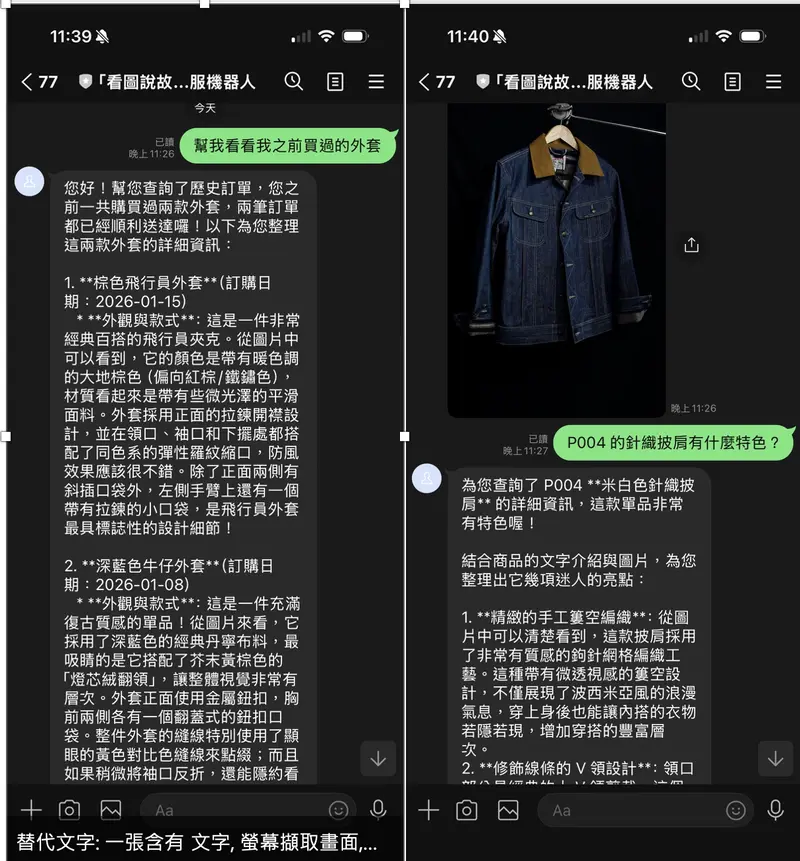
User: “Help me see the jacket I bought before” Bot (traditional): “You bought a brown pilot jacket.” Bot (Multimodal): “From the photo, you can see that this is a brown pilot jacket, made of lightweight nylon, with metal zipper pockets on the sides. This is your January 15th order ORD-2026-0115, for a total of NT$1,890, and it has been delivered.” + Product photo

The difference is obvious: Gemini really “saw” the jacket, rather than just restating the text in the database.

Architecture Design

Why not use Google ADK?

Originally, this repo used Google ADK (Agent Development Kit) to manage the Agent. The Runner and Agent of ADK encapsulated the entire process of Function Calling, which was very convenient.

But Multimodal Function Response requires manually including image bytes in the parts of the function response, and ADK completely encapsulates this layer, so it can’t be intervened.

So this time, I directly used google.genai.Client to implement the iterative cycle of function calls myself:

# Old architecture (ADK)
runner = Runner(agent=root_agent, ...)
async for event in runner.run_async(...):
    ... # ADK handles all function calls for you, but you can't control the response content

# New architecture (directly use google.genai)
response = await client.aio.models.generate_content(
    model=model,
    contents=contents,
    config=types.GenerateContentConfig(tools=ECOMMERCE_TOOLS),
)
# Handle function calls yourself, include images yourself

Overall architecture

LINE User
    │
    ▼ POST /
FastAPI Webhook Handler
    │
    ▼
EcommerceAgent.process_message(text, line_user_id)
    │
    ├─ ① Call Gemini (with conversation history)
    │
    ├─ ② Gemini decides to call a tool → function_call
    │
    ├─ ③ _execute_tool()
    │ ├─ Execute query function (search_products / get_order_history / get_product_details)
    │ └─ Read real product photos in the img/ directory (Unsplash JPEG)
    │
    ├─ ④ Construct Multimodal Function Response
    │ └─ FunctionResponsePart(inline_data=FunctionResponseBlob(data=image_bytes))
    │
    ├─ ⑤ Call Gemini again (Gemini sees the image + data)
    │
    └─ ⑥ Return (ai_text, image_bytes)
    │
    ▼
LINE Reply:
  TextSendMessage(text=ai_text)
  ImageSendMessage(url=BOT_HOST_URL/images/{uuid}) ← FastAPI /images endpoint provides

How to get product images?

This demo uses real Unsplash clothing photography photos. Each of the five products corresponds to an actual photo of the item, stored in the img/ directory. The reading logic is very simple:

def generate_product_image(product: dict) -> bytes:
    """Read the product image and return JPEG bytes."""
    with open(product["image_path"], "rb") as f:
        return f.read()

Each product in PRODUCTS_DB has an image_path field pointing to the corresponding image file:

Product ID Name Image
P001 Brown pilot jacket tobias-tullius-…-unsplash.jpg
P002 White cotton university T mediamodifier-…-unsplash.jpg
P003 Dark blue denim jacket caio-coelho-…-unsplash.jpg
P004 Beige knitted shawl milada-vigerova-…-unsplash.jpg
P005 Light blue simple T-shirt cristofer-maximilian-…-unsplash.jpg

The image bytes read have two uses:

  1. As FunctionResponseBlob to include for Gemini analysis—real photos allow Gemini to describe the actual fabric texture and tailoring details
  2. Temporarily stored in the image_cache dict, provided to the LINE Bot for display through the FastAPI /images/{uuid} endpoint

Detailed explanation of the core code

Step 1: Define tools (FunctionDeclaration)

from google.genai import types

ECOMMERCE_TOOLS = [
    types.Tool(function_declarations=[
        types.FunctionDeclaration(
            name="get_order_history",
            description="Query the current user's order history",
            parameters=types.Schema(
                type=types.Type.OBJECT,
                properties={
                    "time_range": types.Schema(
                        type=types.Type.STRING,
                        description="Time range: all / last_month / last_3_months",
                        enum=["all", "last_month", "last_3_months"],
                    ),
                },
                required=[],
            ),
        ),
        # ... search_products, get_product_details
    ])
]

Step 2: Function call cycle (up to 5 iterations)

async def process_message(self, text: str, line_user_id: str):
    contents = self._get_history(line_user_id) + [
        types.Content(role="user", parts=[types.Part(text=text)])
    ]

    for _iteration in range(5): # Up to 5 times, to prevent infinite loops
        response = await self._client.aio.models.generate_content(
            model=self._model,
            contents=contents,
            config=types.GenerateContentConfig(
                system_instruction=_SYSTEM_INSTRUCTION,
                tools=ECOMMERCE_TOOLS,
            ),
        )

        model_content = response.candidates[0].content
        contents.append(model_content)

        # Find all function_call parts
        fc_parts = [p for p in model_content.parts if p.function_call and p.function_call.name]

        if not fc_parts:
            # No function call → final text response
            final_text = "".join(p.text for p in model_content.parts if p.text)
            break

        # Has function call → execute tool, include image
        tool_parts = []
        for fc_part in fc_parts:
            result_dict, image_bytes = _execute_tool(
                fc_part.function_call.name,
                dict(fc_part.function_call.args),
                line_user_id,
            )
            tool_parts.append(
                self._build_multimodal_response(fc_part.function_call.name, result_dict, image_bytes)
            )

        contents.append(types.Content(role="tool", parts=tool_parts))

Step 3: Construct Multimodal Function Response (the most critical step)

def _build_multimodal_response(self, func_name, result_dict, image_bytes):
    multimodal_parts = []

    if image_bytes:
        # ⚠️ Note: Use FunctionResponseBlob here, not types.Blob!
        multimodal_parts.append(
            types.FunctionResponsePart(
                inline_data=types.FunctionResponseBlob(
                    mime_type="image/jpeg",
                    data=image_bytes, # raw bytes, SDK handles base64 internally
                )
            )
        )

    return types.Part.from_function_response(
        name=func_name,
        response=result_dict, # Structured JSON data
        parts=multimodal_parts or None, # ← Image is here! Gemini can "see" it after receiving it
    )

Gemini will receive both result_dict (order JSON) and image_bytes (product image) in the next generate_content call, and the generated answer can therefore describe the visual content of the image.

Step 4: LINE Bot simultaneously returns text + image

# main.py

ai_text, image_bytes = await ecommerce_agent.process_message(msg_text, line_user_id)

reply_messages = [TextSendMessage(text=ai_text)]

if image_bytes:
    image_id = str(uuid.uuid4())
    image_cache[image_id] = image_bytes # Temporary storage
    image_url = f"{BOT_HOST_URL}/images/{image_id}" # FastAPI provides service
    reply_messages.append(
        ImageSendMessage(
            original_content_url=image_url,
            preview_image_url=image_url,
        )
    )

await get_line_bot_api().reply_message(event.reply_token, reply_messages)

LINE Bot’s reply_message supports returning multiple messages at once (up to 5), so text and images can be sent simultaneously.

Potholes

❌ Pitfall 1: FunctionResponseBlob is not Blob

The most common pitfall: When constructing multimodal image parts, you cannot use types.Blob, you must use types.FunctionResponseBlob:

# ❌ Error (will TypeError)
types.FunctionResponsePart(
    inline_data=types.Blob(mime_type="image/jpeg", data=image_bytes)
)

# ✅ Correct
types.FunctionResponsePart(
    inline_data=types.FunctionResponseBlob(mime_type="image/jpeg", data=image_bytes)
)

Although both have mime_type and data fields, the inline_data field type of FunctionResponsePart is FunctionResponseBlob, and Pydantic validation will directly reject Blob. You can confirm this with python -c "from google.genai import types; print(types.FunctionResponsePart.model_fields)".

❌ Pitfall 2: aiohttp.ClientSession cannot be created at the module level

The original code directly created aiohttp.ClientSession() at the module level:

# ❌ Old method: module level
session = aiohttp.ClientSession() # Will warn or error if there is no running event loop
async_http_client = AiohttpAsyncHttpClient(session)

When importing main.py in pytest tests, because there is no running event loop, RuntimeError: no running event loop will appear. The solution is to change to lazy initialization, and create it only when it is actually needed for the first time:

# ✅ New method: lazy init
_line_bot_api = None

def get_line_bot_api():
    global _line_bot_api
    if _line_bot_api is None:
        session = aiohttp.ClientSession() # Called within the async route handler, guaranteeing an event loop
        _line_bot_api = AsyncLineBotApi(channel_access_token, AiohttpAsyncHttpClient(session))
    return _line_bot_api

❌ Pitfall 3: LINE Bot needs HTTPS URL to send images

Gemini receives raw bytes, but LINE Bot’s ImageSendMessage requires a publicly accessible HTTPS URL.

The solution is to add a /images/{image_id} endpoint in FastAPI, temporarily store the read image bytes in the image_cache dict, and LINE gets the image through this endpoint:

@app.get("/images/{image_id}")
async def serve_image(image_id: str):
    image_bytes = image_cache.get(image_id)
    if image_bytes is None:
        raise HTTPException(status_code=404, detail="Image not found")
    return Response(content=image_bytes, media_type="image/jpeg")

Use ngrok to expose port 8000 for local development, and use the service URL directly after Cloud Run deployment.

Demo Display

Mock database (default data for demo)

The system has 5 built-in products (all with real Unsplash photos), and each LINE user automatically binds two demo orders when querying orders for the first time:

Order number Date Product
ORD-2026-0115 2026-01-15 P001 Brown pilot jacket
ORD-2026-0108 2026-01-08 P003 Dark blue denim jacket

Scenario 1: “Help me see the jacket I bought before”

User sends: "Help me see the jacket I bought before"

[Gemini → function_call]
  get_order_history(time_range="all")

[_execute_tool execution]
  - get_order_history() returns two orders (P001, P003)
  - Read img/tobias-tullius-...-unsplash.jpg → Brown pilot jacket real photo bytes

[Multimodal Function Response]
  Part.from_function_response(
    name="get_order_history",
    response={"orders": [...], "order_count": 2},
    parts=[FunctionResponsePart(inline_data=FunctionResponseBlob(data=<photo>))]
  )

[Gemini responds after seeing the real photo]
  "From the photo, you can see that this is a brown pilot jacket, made of lightweight nylon with
   a glossy feel, and a metal zipper pocket on the left sleeve. This is your January 15, 2026
   order ORD-2026-0115, for a total of NT$1,890, status: delivered."

LINE displays: [Text] + [Brown pilot jacket real photo]

Scenario 2: “Are there any dark blue jackets?”

[Gemini → function_call]
  search_products(description="dark blue jacket", color="dark blue")

[Gemini sees the real photo of the P003 dark blue denim jacket]
  "Yes! This dark blue denim jacket (P003) in the photo features a retro stitching design,
   a lapel with metal buttons, and a very complete garment feel, priced at NT$1,490, with 8 in stock."

Scenario 3: “What are the features of the P004 knitted shawl?”

[Gemini → function_call]
  get_product_details(product_id="P004")

[Gemini sees the real photo of the beige knitted shawl]
  "The photo shows a beige handmade crochet shawl, with a V-neck design and tassels at the bottom,
   you can see the light lace-like mesh weave, elegant texture, priced at NT$1,290."

Traditional Function Response vs Multimodal Function Response

Traditional Multimodal
Function return Pure JSON JSON + image/PDF bytes
Gemini perception Text data Text + visual content
Answer quality “You bought a brown pilot jacket” “You can see the nylon texture in the photo, with a zipper pocket on the left sleeve…”
API difference Part.from_function_response(name, response) Part.from_function_response(name, response, parts=[...])
Applicable scenarios Pure text data queries Scenarios that require visual recognition/confirmation

Analysis and Outlook

This implementation gave me a new understanding of Gemini’s Function Calling capabilities.

The problem that Multimodal Function Response truly solves is to allow AI agents to bring in visual information in the action of “calling an external system” itself, instead of first checking text and then uploading images separately. This will be an important basic capability in areas highly related to visuals, such as e-commerce, medicine, and design.

However, there are still a few limitations worth noting:

  1. Image URLs cannot be used directly: Gemini’s FunctionResponseBlob requires raw bytes, and URLs cannot be filled in directly (this is different from bringing images directly in the prompt). If the image is originally a URL, you need to download it with requests.get() to bytes before passing it in.

  2. No display_name can also be used: The official documentation examples have display_name and $ref JSON reference, but in actual testing in google-genai 1.49.0, it can also work normally without filling in display_name, and Gemini can still see and analyze the image.

  3. Model limitations: The official mark supports the Gemini 3 series, but gemini-2.0-flash can also handle it normally in actual testing, and the API structure is the same.

There are many directions that can be extended in the future: let users send their own product photos for the Bot to compare, include PDF catalogs in the function response for Gemini to read directly, or let the Bot analyze the report images converted from DICOM in medical scenarios… As long as visual data can be obtained from external systems, Multimodal Function Response can make the AI’s answers more in-depth.

Summary

The focus of this LINE Bot implementation is only one sentence: Let the function response carry the image, and Gemini’s answer will be upgraded from “restating data” to “telling a story based on the picture”.

The core API is just these few lines, but it takes a lot of details to get the whole process working:

# The complete way for Gemini to see the image returned by the function
types.Part.from_function_response(
    name="get_order_history",
    response={"orders": [...]},
    parts=[
        types.FunctionResponsePart(
            inline_data=types.FunctionResponseBlob( # ← Not types.Blob!
                mime_type="image/jpeg",
                data=image_bytes,
            )
        )
    ],
)

The complete code is on GitHub, feel free to clone and play with it.

See you next time!