Stop Googling for Symbols: How I Built a Lightning-Fast Unicode Search Tool

How many times a week do you find yourself opening a new browser tab and searching for ’em dash copy paste’, ‘copyright symbol’, or ‘shrug text emoji’? If you’re anything like me, the answer is ‘far too often.’

It is a tiny friction point in the daily workflow of a developer, designer, or technical writer, but that friction compounds over time. You inevitably land on a website heavily cluttered with display ads, wait for the page to finish rendering, carefully highlight the tiny character on screen, and hit Ctrl+C. Or worse, you try to memorize complex Alt codes that you forget by the following Tuesday.

There had to be a more straightforward, less annoying way to handle special characters without breaking my flow state. That is exactly why I decided to build SymbolHub.

Why I Built It

I wanted a single, reliably fast, no-nonsense interface where I could search by name, category, or alias, click exactly once, and have the character immediately on my clipboard. No pop-ups, no layout shifts, just instant access to the massive library of Unicode characters. SymbolHub was born out of a desire to scratch my own itch and create a practical utility for anyone who frequently works with text formatting, UI design, or coding.

The Tech Stack

To ensure the application felt genuinely instant, I opted for a very lightweight technical approach. The frontend is built primarily with vanilla HTML, CSS, and modern JavaScript. I specifically avoided heavy JavaScript frameworks to keep the initial load time as close to zero as possible.

The character data itself is compiled into a highly optimized JSON file. To prevent unnecessary network requests on subsequent visits, the data is cached locally using the browser’s Cache API. Hosting is handled via a static CDN for minimal latency globally.

Technical Challenges

The most significant hurdle was the search functionality. The Unicode standard is incredibly expansive. Simply iterating through tens of thousands of characters and their metadata on every keystroke in the browser’s main thread was going to cause noticeable UI jank.

To solve this, I had to implement a custom indexing solution. By pre-computing search tokens for character names and categories, I reduced the search space. I also utilized a Web Worker to offload the string matching and sorting processes from the main UI thread. This ensures the search input field remains buttery smooth and responsive, even when filtering through thousands of emojis and obscure technical symbols.

Another fascinating challenge was handling JavaScript’s internal representation of characters. Emojis and certain complex symbols often use surrogate pairs—meaning they take up two or more code units. Ensuring that the copy-to-clipboard functionality grabbed the entire visual character rather than splitting a surrogate pair required careful handling of string iteration and the modern Clipboard API.

Lessons Learned

Building SymbolHub heavily reinforced the value of performance profiling early in a project’s lifecycle. What seems perfectly fast with a test dataset of a few hundred items can quickly degrade when you introduce the full, unadulterated Unicode table.

I also learned a great deal about efficient DOM manipulation. Instead of trying to render thousands of DOM nodes at once, which would freeze the browser, I implemented a virtualization technique using the Intersection Observer API. The app only renders the symbol cards that are currently visible within your viewport, swapping them out as you scroll.

Try It Out

If you are tired of doing the context-switching ‘search-and-copy’ dance every time you need a special character, I invite you to give it a spin. You can search, browse, and copy instantly at SymbolHub. It is completely free to use and designed to stay out of your way.

Small tools that solve tiny, recurring annoyances are often the most satisfying to build and use. SymbolHub has already saved me countless context switches this month. Let me know what you think in the comments, or if there is a specific obscure category of symbols you would like me to prioritize adding to the search index!

Exploring Feature Distributions from Pedestrian Trajectories

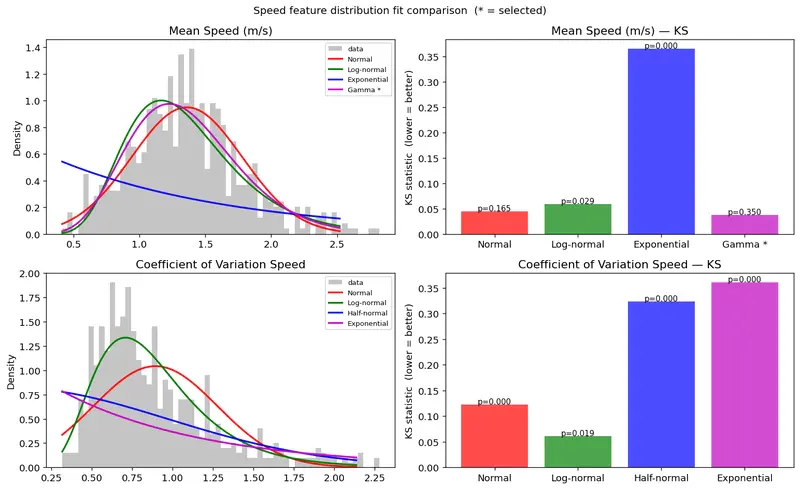
Speed feature distribution fit comparison

Motivation

In this article, I explore the statistical distributions of features extracted from pedestrian trajectories. Although the tracking accuracy still has room for improvement, analyzing the distributions of speed and related features allows me to characterize average pedestrian behavior from real video data. I have recently been studying information geometry, and I want to investigate how pedestrian behavior changes across locations by modeling it as probability distributions. By constructing a statistical manifold from these distributions across multiple locations, I aim to capture differences between pedestrian populations that conventional clustering methods such as k-means — which rely on Euclidean distance — cannot detect.

Note

I use AI assistance to draft and polish the English, but the analysis, interpretation, and core ideas are my own. Learning to write technical English is itself part of this project.

Introduction

In Article 1, I detected pedestrians in video footage and visualized their trajectories. In Article 2, I projected those trajectories onto a map using homography. Known limitations remain — detection accuracy and calibration point selection for the homography transform — but these are out of scope for this article and will be addressed in a future iteration. In this article, I analyze the speed and behavioral distributions of the detected pedestrians.

The data used in this analysis was collected at the Shinjuku pedestrian zone (歩行者天国) in Tokyo.

Feature Extraction

Each pedestrian trajectory stores a timestamp, pixel coordinates within the video frame, and the height of the detected bounding box. From a fixed camera, this is sufficient to measure speed, acceleration, dwell time, and several behavioral indicators.

Pixel to Meter Conversion

All trajectory measurements are initially in pixel units. To convert to real-world distances, I used the bounding box height as a depth proxy. For each track at each frame, the average bounding box height between consecutive frames is computed and used to derive a scale factor based on the assumed average human height of 1.7 m:

scale [m/px] = H_REAL / avg_bbox_height_px
real_dist [m] = pixel_dist [px] × scale

This approach effectively performs implicit monocular depth estimation using the known height of a pedestrian as a reference object.

Speed

Per-step real-world speed was computed by dividing the depth-normalized displacement between frames by the elapsed time. For each track, I extracted:

  • real_speed_mean: mean walking speed
  • real_speed_cv: coefficient of variation (std / mean), which normalizes variability relative to the mean and indicates how much a single trajectory fluctuates in pace

Acceleration

Acceleration was computed as the finite difference of per-step speed divided by elapsed time. I extracted the mean of signed acceleration (real_accel_mean). Since acceleration can be positive or negative, the signed mean captures whether there is a net directional bias across the trajectory.

I also computed decel_ratio — the fraction of acceleration steps where the value is negative (i.e., the pedestrian is decelerating). A value near 0.5 indicates balanced acceleration and deceleration (typical steady walking); values above 0.5 indicate dominant braking behavior. While real_accel_abs_mean captures the intensity of speed change, decel_ratio captures its frequency, making them complementary indicators.

Speed Skewness

For each trajectory, I computed the skewness of the per-step speed distribution (speed_skew). A value near zero indicates a symmetric speed profile — steady walking. A negative value indicates the presence of a slow phase within the trajectory (hesitation or stopping). A positive value indicates a fast phase (e.g., hurrying after a pause). This captures the temporal asymmetry of the speed profile in a single scalar, which mean and variance alone cannot express.

Stop Ratio

I computed stop_ratio as the fraction of steps where real-world speed falls below 0.3 m/s. A higher stop ratio indicates that the pedestrian spent more time engaging with the environment — reading a sign, looking at a shop window, or reacting to a stimulus.

Path Straightness

real_straightness is the ratio of the depth-normalized displacement from start to end point to the total real path length (range: 0–1). Values near 1 indicate a nearly straight trajectory; values near 0 indicate winding, reversal, or wandering. Both displacement and total path length are depth-normalized using the bounding box height at the respective trajectory points, correcting for the variation in pixel scale with camera distance.

Dwell Time

duration_sec is the observation duration of each track, computed as the number of frames from first to last detection multiplied by the frame interval.

Distribution Analysis

I plotted the frequency distribution of each feature across all tracks and fitted candidate probability distributions using the Kolmogorov-Smirnov (KS) test.

The KS statistic D measures the maximum difference between the empirical CDF of the data and the theoretical CDF of a candidate distribution. A smaller D indicates a better fit. The corresponding p-value represents the probability of observing a deviation as large as D by chance under the null hypothesis; a higher p-value indicates a better fit. When comparing multiple candidate distributions, I selected the one with the smallest KS statistic (breaking ties by p-value).

Candidates were assigned based on the support of each feature:

  • Positive-valued: Normal, Log-normal, Half-normal, Gamma, Exponential
  • Bounded [0, 1]: Beta, Uniform, Normal, Log-normal
  • Full real line: Normal, Laplace, t(df=5), Cauchy
Feature Unit Mean Std Best Distribution KS p-value Accept (p>0.05)
real_speed_mean m/s 1.360 0.420 Gamma 0.037 0.350 ✓
real_speed_cv — 0.894 0.383 Log-normal 0.061 0.019 ✗
real_accel_mean m/s² 0.026 5.362 Cauchy 0.034 0.474 ✓
stop_ratio — 0.085 0.089 Beta 0.118 0.000 ✗
speed_skew — 2.460 1.866 Gamma 0.031 0.591 ✓
real_straightness — 0.484 0.268 Beta 0.031 0.466 ✓
decel_ratio — 0.499 0.054 Normal 0.067 0.008 ✗
duration_sec s 3.910 3.076 Gamma 0.045 0.161 ✓

Results

The eight features selected for downstream analysis and their associated distribution families are as follows:

Feature Best Distribution Accept (p>0.05) Rationale
real_speed_mean Gamma ✓ Best fit for walking speed distribution
real_speed_cv Log-normal ✗ Lowest KS among all candidates; captures individual variation in pace
real_accel_mean Cauchy ✓ Lowest KS; heavy tails reflect rare but strong braking and surging events
stop_ratio Beta ✗ Lowest KS; bounded in [0,1]; sensitive indicator for behavioral intervention
speed_skew Gamma ✓ Lowest KS; captures temporal asymmetry in the speed profile
real_straightness Beta ✓ Lowest KS; bounded in [0,1]; captures path linearity
decel_ratio Normal ✗ Lowest KS; captures deceleration frequency
duration_sec Gamma ✓ Best fit for observation duration

For features where the KS test was rejected (p < 0.05), I adopted the distribution with the lowest KS statistic as the working approximation. The reasoning is described in the Discussion.

Interpretation

real_speed_mean

Speed feature distribution fit comparison

Why this distribution?
Speed is non-negative and right-skewed: most pedestrians walk at a typical pace, with a tail of faster walkers. The Gamma distribution naturally accommodates a lower bound at zero and a right tail, making it a better fit than the Normal distribution, which would assign probability mass to negative values.

What the data reveals
The analysis reveals that the mean walking speed is 1.36 m/s, consistent with typical pedestrian speeds in a busy shopping district like Shinjuku. Speeds above 2.5 m/s are present but rare, representing pedestrians in a hurry.

real_speed_cv

Why this distribution?
The coefficient of variation is a positive quantity representing normalized speed variability within a trajectory. In a dense urban environment like Shinjuku, pedestrians frequently adjust pace due to crowds, direction changes, and window shopping. Tracking ID switches — where the system reassigns an ID between two different individuals — can also cause artificial speed jumps. Both effects contribute to a right-skewed distribution with a heavy tail, which the Log-normal distribution captures well.

What the data reveals
The mean CV of 0.89 indicates that most pedestrians show substantial within-trajectory speed variation. This is expected given the high foot traffic and the current limitations of the CentroidTracker-based tracking system.

real_accel_mean

Acceleration feature distribution comparison. Under plot is outliers removed for ease viewing.

Why this distribution?
Signed mean acceleration can be positive or negative, so a bell-shaped distribution centered near zero is expected. In a pedestrian zone without traffic signals, pedestrians are not forced to stop — sharp decelerations more likely reflect voluntary behavior such as entering a shop or looking at a sign. The Cauchy distribution captures the same bell shape as the Normal but with much heavier tails, consistent with the occasional extreme acceleration events observed.

What the data reveals
The distribution is centered very close to zero (mean = 0.026 m/s²), confirming that pedestrians neither systematically accelerate nor decelerate over their trajectories. The heavy Cauchy tails reflect rare but strong braking or surging events.

stop_ratio

Stop Ratio distribution fit comparison

Why this distribution?
stop_ratio is bounded in [0, 1] and represents the fraction of steps below a speed threshold within a trajectory. The Beta distribution is the natural choice for proportions on this interval.

What the data reveals
The distribution peaks near zero and 0.05, indicating that most pedestrians rarely drop below 0.3 m/s. However, the long right tail — reaching up to approximately 0.4 — confirms that a meaningful minority paused significantly, likely engaging with shop displays or other environmental stimuli.

real_straightness

Path Straightness distribution fit comparison

Why this distribution?
real_straightness is bounded in [0, 1], making the Beta distribution the natural candidate. In a shopping district, pedestrians follow moderately direct paths but with meaningful deviation — neither hugging a straight line nor wandering randomly. This intermediate behavior, away from both boundary extremes, is well captured by a Beta distribution with parameters that place probability mass in the interior of [0, 1].

What the data reveals
The distribution is spread across the interior of [0, 1] with a mean of 0.48, indicating that pedestrians follow paths that are neither fully straight nor fully winding. This intermediate behavior is consistent with movement through a busy shopping district, where pedestrians maintain a general direction but frequently deviate in response to storefronts, crowds, and signage.

speed_skew

Speed Skew disrtibution fit comparison

Why this distribution?
Per-step speed is non-negative, so the within-trajectory speed distribution has a natural floor at zero. This floor creates an inherent right skew in the speed profile, which means speed_skew is almost always positive (98.4% of tracks in this dataset). The Gamma distribution, which is defined for positive values and flexible in shape, fits this behavior well.

What the data reveals
The mean speed_skew is 2.47 (std = 2.03), indicating that most pedestrians have a few brief high-speed moments within an otherwise slower trajectory. This is consistent with occasional surges in pace — stepping around another person, crossing a gap in the crowd — embedded in otherwise steady walking.

decel_ratio

Decel Ratio distribution fit comparison

Why this distribution?
decel_ratio measures the fraction of steps where acceleration is negative. For steady walking, this should be close to 0.5 — alternating acceleration and deceleration in roughly equal measure. The Normal distribution centered near 0.5 captures this well.

What the data reveals
The mean is 0.499, confirming that pedestrians in this dataset decelerate and accelerate in nearly equal proportions. There is no systematic braking bias in baseline behavior — an important reference for detecting shifts caused by an intervention in Article 12 and 13.

duration_sec

Track Duration distribution fit comparison

Why this distribution?
Observation duration is positive and right-skewed: most pedestrians cross the field of view in a few seconds, but some linger, pause, or follow longer paths. The Gamma distribution accommodates the peak at short durations and the heavy right tail.

What the data reveals
The median duration is approximately 2 seconds, consistent with pedestrians walking through the frame. The right tail extends to around 14 seconds. One limitation of this approach is that the maximum observed duration is relatively short — it is likely that some pedestrians who stopped for longer had their track IDs reassigned by the tracker, truncating their trajectories.

Discussion

KS Test Sensitivity at Large Sample Sizes

The Kolmogorov-Smirnov test becomes increasingly sensitive as sample size grows. With n ≈ 600, even small deviations from a theoretical distribution are detectable, leading to rejection even when the visual fit is clearly reasonable. The KS statistic D measures the maximum gap between empirical and theoretical CDFs; a small D is evidence of good fit regardless of whether the test is formally rejected. For this reason, I adopted the distribution with the smallest D as the working approximation for all features, including those where the null hypothesis was rejected.

Feature Correlation and Implications for Manifold Construction

The correlation matrix reveals that speed_skew and real_speed_cv are strongly correlated (r = 0.77). Highly correlated features introduce redundant dimensions into the statistical manifold, which may affect the geometry of the parameter space in Article 4. Both features are retained for now, and their effect on the manifold structure will be examined in that article.

The Cauchy Distribution and Fisher Information

The Cauchy distribution for real_accel_mean is a physically meaningful result: it reflects the occasional extreme acceleration events — sudden stops at a shop entrance, abrupt lane changes — that occur against a background of smooth walking. However, the Cauchy distribution has no defined mean or variance. Its Fisher information metric is defined only through the scale parameter γ, so in Article 4, the treatment of the location parameter μ in the manifold construction will require careful consideration.

Limitations of the Data Collection Method

One limitation of this approach is that the CentroidTracker used for pedestrian tracking is prone to ID switching when pedestrians cross paths. This produces artificial velocity jumps in some trajectories and likely inflates the values of real_speed_cv and speed_skew. Improving tracking accuracy — for example by switching to a re-identification-based tracker — would reduce this artifact.

A second limitation is that the depth normalization via bbox_height assumes full-body visibility. For occluded or partially cropped pedestrians, the scale factor may be unreliable.

Toward Detecting Behavioral Change

The eight distribution families established here define the coordinate system of the statistical manifold in Article 4. In future articles (Articles 12 and 13), I will investigate how the parameters of these distributions shift when a standing demonstration is present. A systematic shift in Beta parameters for stop_ratio, or a change in the Cauchy scale parameter for real_accel_mean, would provide a quantitative signature of behavioral disruption.

Conclusion

In this article, I extracted eight features from pedestrian trajectories obtained from video footage and fitted probability distributions to each feature using the KS test. The analysis reveals that mean walking speed, speed skewness, and dwell time follow Gamma distributions; speed variability follows a Log-normal distribution; signed mean acceleration follows a Cauchy distribution; stop ratio and path straightness follow Beta distributions; and deceleration ratio follows a Normal distribution. These eight features and their associated distribution families form the coordinate parameterization of the statistical manifold to be constructed in Article 4.

In the next article

In the next article, I will apply this parameterization schema to pedestrian trajectory data collected at multiple stations along the Yamanote Line. Each location will be represented as a point on a statistical manifold, where coordinates are the estimated parameters of the eight distributions identified here. Using the Fisher information metric and e/m geodesics, I will compute distances between locations in a way that reflects genuine differences in pedestrian behavior — differences that Euclidean distance in raw feature space cannot capture.

Guide to when there will be layoffs where you work

I’ve been cruising through this industry long enough to understand the obvious and definitive signs of upcoming layoffs, from both an IC and middle management perspective.

First, and I want this to come across very meaningfully, they are often organized by one or two people with minimal information about who they are laying off in a sorted manner.

I want to dive in a little bit more here and then quickly begin the guide. Your personal manager likely found out the day of, or the week of, at the earliest. They are impacted, even if they remain. In terms of why the chose you, it can range. From truly deserving, but more often than not, you fell midway through an arbitrarily ordered list. Such as how many tickets or points this quarter, how many mentions of gratitude, or a review of your performance without any context from the person you reported to.

HR is given a template conversation to execute, it’s never personal. I would not target your frustration towards them. It’s a very draining job.

Now the guide.

—

I’m sure we’ve all been there. The inflated performance metrics, displayed in all their glory across a tackily formatted slide for all to aw at. Now, do you ever catch a self affirming reconstruction of why that particular metric although not great, is nothing to worry about? In the industry, some would call this talent retention, others would call it foreboding.

If you’re in a small to medium sized start up, and you hear that kind of metric waffling, a medium are smaller non profitable start up that is already tightening the belt on performance, that is your queue to start your search. The chance of not having some form of layoff with the next one to two quarters is below 5%. In all my years I’ve never seen a sinking ship begin to fly.

This is the real life equivalent of a smaller guy puffing out his chest, he’s going to get a whooping, but for a few seconds in his head he feels invincible. Same here, I wouldn’t bet on that company anymore than I’d risk my money on inflated lungs guy.

So here’s the thing, any real unicorn company, not some pump and dump, or pump and sell for parts grows way faster than your 10 year mountain mess. The unicorns that exist today, and realistically only unicorn start ups and finite businesses make it, had rapid growth in their first two years. They were like rockets, and you just watched a dud give a speech. I’m not impressed.

They over hire and under fire, like you’all spin up resources in your elastic infra of choice. More rantings on the over inflated, under needed value of elastic to come in another write up.

That boring power point, is your 1-2 quarter new job take off strip. Use it or lose it.

Here come the week of or near term signs and what you do to protect yourself in the event you voluntarily decided to risk it. Managers have feeling like regular humans, they WILL behave differently once they know you’re on the block. This is your 11th hour notice to back up what you need. I recommend all or some of this list if not more

  • download all your performance reports
  • download pay stubs
  • screenshot any positive attributions of your work

These all yours to keep, DO NOT steal from your shit company. Let them keep their coal.

HR will typically block off their calendar in a strategic pattern the day lay offs will happen. Usually a long full day block in case employees don’t show up. They are trying to ambush you after all. This given HR the freedom to adjust ad hoc as needed.If you see a bunch of small meetings on your calendar, especially one that overlaps your strangely out of place sync with your boss, you’re on the block and so archive and send your self your data, and prepare for any research that will help accomplish whatever you set out to do in that meeting.

You CAN negotiate severance. Use your prep time to figure out what your demands are.

If you’re on the list, BE PROFESSIONAL. Do not warn others you figured it out, or that they are being laid off too. It’s too late to make a difference, unless you want to harm yourself and your personal leverage.

Also please remember, the failing start up your worked means nothing to the industry or you in the long term, your colleagues are your future friends, allies in the field and key players in finding you a new role. Make sure to set them up for success as much as possible without disclosing too much before you part.

Never let a job or company define who you are, your worth or any future thought you have about yourself. CEOs running financially draining companies, are doing poorly for their own failures, their lack of humanity and skill is a them problem.

Cheers.

Stop Guessing.

Most organizations have the tools. They have the certifications. They have the right intentions. What’s missing is the structure to make it all work together.

Work gets dropped because no one owns it. Problems fester because no one’s measuring. Projects drift because the plan was a slide deck nobody opened after kickoff. People show up to status meetings, say what sounds good, and leave with no more clarity than when they walked in.

It’s not a people problem. It’s a visibility problem.

The Tools Are There. Nobody’s Using Them.

Every organization has a project management methodology. A lot of people have the certification to prove it. PMBOK on the shelf. PMP after the name. Risk registers, RACI charts, communication plans — built during the course, forgotten after the exam.

The deliverables get produced. The plans get filed. And then the team goes back to running on Slack threads, tribal knowledge, and whoever is loudest in the room.

That’s not project management. That’s project paperwork.

Real project management is a working document, not a submission. A RACI that people actually reference when accountability gets fuzzy. A risk log that gets opened when something smells wrong, not after it explodes. A schedule that reflects reality and gets updated when reality changes.

The tools work. The structure and discipline to keep using them after the kickoff meeting is what most teams skip.

Data Isn’t a Dashboard. It’s a Decision.

The same pattern shows up with data. Metrics get built, reports get scheduled, dashboards get shared. And then nobody looks at them until something goes wrong — and even then, the question is usually “who do we blame” not “what do we fix.”

Data’s job is to tell you something is broken before it becomes a crisis. To show you where effort is going versus where results are coming from. To cut through the noise of everyone’s competing narratives about how things are going.

That only works if someone is actually looking, asking the right questions, and willing to act on what they find. Measurement without follow-through is just overhead.

Collaboration Means Working Together, Not Checking In

Status meetings where everyone reports what they did last week are not collaboration. They are performance. The project exists on a shared stage for fifteen to forty-five minutes and then everyone goes back to their silos.

Real collaboration means the plan is a shared object — visible, current, and owned across the team. It means problems get raised before they become blockers. It means fierce accountability, with owners who stand behind their team..

When project management and data are treated as team infrastructure instead of afterthoughts, something shifts. Work becomes legible. Decisions get made faster. Problems surface early, when they’re still cheap to fix.

The Gap Is Execution

Strategy is easy. Everyone has a vision. The gap is almost always between what was decided and what actually happened — and that gap lives in the space where structured execution should be.

Three things close it:

  • A plan that stays alive — owned, updated, and used as a decision-making tool, not a kickoff artifact
  • Data that drives action — metrics tied to outcomes, reviewed consistently, and connected to what changes next
  • Accountability that’s structural — built into the process so it doesn’t depend on one person chasing everyone else

This isn’t complicated. It’s just discipline. And discipline, applied consistently, is what separates teams that execute from teams that are always almost there.

I Built an MCP Security Audit System with mcp-scan and Notion MCP

This is a submission for the Notion MCP Challenge

What I Built

Every AI developer using Claude Desktop, Cursor, VS Code, Windsurf, or any MCP-enabled tool has MCP servers running on their machine. These servers have direct access to your filesystem, your API keys, and your network. Most people have never audited them.

I built MCP Security Command Center: a workflow that scans all your MCP server configurations using mcp-scan, then automatically populates a structured security dashboard in Notion via Notion MCP. Every finding becomes a tracked database entry. Every server gets a status. You get a living audit trail that updates on every scan.

Running this on my own machine found 3 HIGH and 9 MEDIUM severity findings across 10 MCP servers. This included a server with both filesystem and network access (classic exfiltration vector) and an unverified package source. None of this was visible before.

The workflow:

  1. npx mcp-scan@latest --json scans all AI tool configs automatically (Claude Desktop, Cursor, VS Code, Gemini CLI, and 12 more)
  2. The JSON output gets piped into a push script that calls Notion MCP tools
  3. Notion MCP creates a database entry for each finding: server name, severity, finding type, affected AI tool, fix recommendation
  4. A summary page tracks overall security posture over time

The result is a Notion workspace that serves as your MCP security command center. Filter by severity, sort by date, assign findings to track remediation, share audit results with your team.

Video Demo

The terminal output below shows the live workflow. A screen recording is in the GitHub repo README.

Running the full pipeline:

# Scan all MCP configs and push findings to Notion
npx mcp-scan@latest --json | node notion-integration/push-to-notion.js

Output:

Scanning 10 MCP servers...
  + thynkq-router (Claude Code): 2 findings pushed to Notion
  + vercel (Claude Code): 2 findings pushed to Notion
  + playwright (Claude Code): 1 finding pushed to Notion
  + vercel (Gemini CLI): 1 finding pushed to Notion
  + playwright (Gemini CLI): 1 finding pushed to Notion
  + sequentialthinking (Claude Code): 1 finding pushed to Notion
  + 4 more servers scanned, 0 findings

Done: 8 created, 0 updated, 4 clean servers skipped.
Total findings tracked in Notion: 8

Show us the code

GitHub repo: github.com/rodolfboctor/mcp-scan

The Notion MCP integration lives in notion-integration/push-to-notion.js:

import { Client } from "@notionhq/client";

const SEVERITY_COLORS = {
  CRITICAL: "red",
  HIGH:     "orange",
  MEDIUM:   "yellow",
  LOW:      "blue",
  INFO:     "gray",
};

async function main() {
  const notion = new Client({ auth: process.env.NOTION_API_KEY });
  const databaseId = process.env.NOTION_DATABASE_ID;

  let raw = "";
  for await (const chunk of process.stdin) raw += chunk;
  const { results } = JSON.parse(raw);

  for (const server of results) {
    const { serverName, toolName, configPath, findings = [] } = server;
    for (const finding of findings) {
      const { id, severity, description, fixRecommendation } = finding;

      const existing = await notion.databases.query({
        database_id: databaseId,
        filter: {
          and: [
            { property: "Server", rich_text: { equals: serverName } },
            { property: "Finding ID", rich_text: { equals: id } },
            { property: "AI Tool", rich_text: { equals: toolName } },
          ],
        },
      });

      const props = {
        Name: { title: [{ text: { content: serverName + ": " + id } }] },
        Server: { rich_text: [{ text: { content: serverName } }] },
        "AI Tool": { rich_text: [{ text: { content: toolName } }] },
        Severity: { select: { name: severity, color: SEVERITY_COLORS[severity] || "default" } },
        "Finding ID": { rich_text: [{ text: { content: id } }] },
        "Config Path": { rich_text: [{ text: { content: configPath || "" } }] },
        "Fix": { rich_text: [{ text: { content: fixRecommendation || "See mcp-scan docs" } }] },
        "Scan Date": { date: { start: new Date().toISOString() } },
      };

      if (existing.results.length > 0) {
        await notion.pages.update({ page_id: existing.results[0].id, properties: props });
      } else {
        await notion.pages.create({
          parent: { database_id: databaseId },
          properties: { ...props, Status: { select: { name: "Open" } } },
        });
      }
    }
  }
}

main().catch(console.error);

Configure Notion MCP in .mcp.json:

{
  "mcpServers": {
    "notion": {
      "command": "npx",
      "args": ["-y", "@notionhq/notion-mcp-server"],
      "env": {
        "OPENAPI_MCP_HEADERS": "{"Authorization": "Bearer YOUR_NOTION_TOKEN"}"
      }
    }
  }
}

With this config, ask Claude:

“Run mcp-scan, then use Notion MCP to create a security database. Each row: server name, severity, finding description, affected AI tool, config path, fix recommendation.”

Claude runs both tools and populates Notion automatically.

How I Used Notion MCP

Notion MCP is the core of what makes this workflow useful instead of just informational.

mcp-scan generates great security data. The problem is that JSON in a terminal is ephemeral. You look at it once, close the terminal, and forget. Security work requires tracking, assignment, and follow-through. That is where Notion MCP comes in.

The Notion MCP server exposes tools for creating pages, querying databases, and updating properties. In this workflow it does three things:

1. Structured persistence. Each finding gets its own Notion page with typed properties: severity as a color-coded select, server name, affected AI tool, config path, fix recommendation, and scan date. Queryable and filterable in ways a text file never could be.

2. Idempotent updates. Running the scan twice does not create duplicate entries. The push script queries for existing findings by server + finding ID + tool name before writing. Run it daily, the database stays clean.

3. Remediation tracking. Each finding starts with Status: Open. Your team changes it to In Progress or Fixed as work happens. The next scan does not overwrite status fields that already have values.

The workflow becomes a closed loop: scan, review in Notion, fix, rescan, mark fixed. Same pattern security teams use for CVE tracking, applied to MCP servers.

For teams using Notion as their primary workspace, MCP security findings live alongside your project docs, backlog, and runbooks. Not in a separate tool nobody checks.

Stack:

  • mcp-scan – open-source MCP security scanner (MIT)
  • Notion MCP – official Notion MCP server
  • Node.js – push script bridge

Try it:

npx mcp-scan@latest --json | node notion-integration/push-to-notion.js

Arrêtons de deviner.

La plupart des organisations ont les outils. Elles ont les certifications. Elles ont les bonnes intentions. Ce qui manque, c’est la structure pour tout faire fonctionner ensemble.

Le travail échappe parce que personne n’en est responsable. Les problèmes s’enveniment parce que personne ne mesure. Les projets dérivent parce que le plan était une présentation que personne n’a rouverte après le coup d’envoi. On arrive aux réunions de suivi, on dit ce qui sonne bien, et on repart sans plus de clarté qu’à l’arrivée.

Ce n’est pas un problème de personnes. C’est un problème de visibilité.

Les outils existent. Personne ne les utilise.

Chaque organisation a une méthodologie de gestion de projet. Beaucoup de gens ont la certification pour le prouver. Le PMBOK sur l’étagère. Le PMP après le nom. Registres de risques, matrices RACI, plans de communication — construits pendant la formation, oubliés après l’examen.

Les livrables sont produits. Les plans sont classés. Et ensuite, l’équipe reprend ses habitudes : fils Slack, connaissances informelles, et celui qui parle le plus fort dans la salle.

Ce n’est pas de la gestion de projet. C’est de la paperasse de projet.

La vraie gestion de projet, c’est un document vivant, pas une soumission. Une RACI qu’on consulte vraiment quand l’imputabilité devient floue. Un registre de risques qu’on ouvre quand quelque chose sent mauvais, pas après l’explosion. Un échéancier qui reflète la réalité et qui se met à jour quand la réalité change.

Les outils fonctionnent. La structure et la discipline pour continuer à les utiliser après la réunion de lancement, c’est ce que la plupart des équipes abandonnent.

Les données ne sont pas un tableau de bord. Ce sont des décisions.

Le même schéma se répète avec les données. Les métriques sont créées, les rapports sont planifiés, les tableaux de bord sont partagés. Et ensuite, personne ne les regarde jusqu’à ce que quelque chose déraille — et même là, la question est souvent “qui blâmer” plutôt que “quoi corriger.”

Le rôle des données, c’est de signaler qu’un problème existe avant qu’il devienne une crise. De montrer où les efforts vont par rapport à là où viennent les résultats. De couper à travers le bruit des récits contradictoires sur comment les choses se passent.

Ça ne fonctionne que si quelqu’un regarde vraiment, pose les bonnes questions, et est prêt à agir sur ce qu’il trouve. La mesure sans suivi, c’est juste du surcoût.

Collaborer, c’est travailler ensemble, pas faire un rapport.

Les réunions de statut où chacun rapporte ce qu’il a fait la semaine dernière ne sont pas de la collaboration. C’est de la mise en scène. Le projet existe sur une scène partagée pendant quinze à quarante-cinq minutes, puis tout le monde retourne dans son silo.

La vraie collaboration, c’est un plan qui est un objet partagé — visible, à jour, et assumé par toute l’équipe. C’est que les problèmes remontent avant de devenir des blocages. C’est une imputabilité franche, avec des responsables qui se tiennent derrière leur équipe.

Quand la gestion de projet et les données sont traitées comme une infrastructure d’équipe plutôt que comme des réflexions après coup, quelque chose change. Le travail devient lisible. Les décisions se prennent plus vite. Les problèmes remontent tôt, quand ils sont encore peu coûteux à régler.

L’écart, c’est l’exécution.

La stratégie, c’est facile. Tout le monde a une vision. L’écart se trouve presque toujours entre ce qui a été décidé et ce qui s’est réellement passé — et cet écart vit là où une exécution structurée devrait être.

Trois choses le comblent :

  • Un plan qui reste vivant — assumé, mis à jour, et utilisé comme outil de décision, pas comme artefact de lancement
  • Des données qui déclenchent l’action — des métriques liées aux résultats, révisées régulièrement, connectées à ce qui change ensuite
  • Une imputabilité structurelle — intégrée au processus pour ne pas dépendre d’une seule personne qui court après tout le monde

Ce n’est pas compliqué. C’est juste de la discipline. Et la discipline, appliquée de façon constante, c’est ce qui sépare les équipes qui exécutent de celles qui sont toujours presque là.

I found Leetcode for System Design, and it’s Awesome

I Found Codemia.io, Leetcode for System Design Interview, and It

I Found Codemia.io, Leetcode for System Design Interview, and It's Awesome

credit- codemia.io

Hello Devs, if you’re preparing for software engineering interviews, particularly MAANG, then you already know that Data Structures & Algorithms (DSA) and System Design are two key areas where you will be tested rigorously.

While LeetCode is the go-to platform for DSA, system design has always been a challenge.

While there are many websites and platforms to prepare for System Design Interviews like ByteByteGo, DesignGurus.io, Exponent, Educative, and Udemy, there is nothing like LeetCode. 

These are great resources to learn fundamentals, go through case studies, and understand the theory part of the System design, but LeetCode-style practice is one thing that is missing – until now. 

I recently found Codemia.io, and I must say, it feels like the LeetCode for System Design.

If you’ve struggled with structuring your system design answers, getting real feedback, or knowing whether your approach is correct, Codemia.io is a game-changer.

They not just have the biggest collection of System Design and OOP Design problems for practice, they also have a free System design course called Tackling System Design Interview Problems, which is a great free resource to learn essential System Design concepts.

It’s a short course with 2 hours of content, but powerful and also has quizzes to test your skills. Here are all the key System design topics you can learn on this free course:

I found Leetcode for System Design and it's Awesome

Now, let’s check out how Codemia.io can help you to prepare better for your System design and OOP Design interview, and why I think it’s like Leetcode for System design.

Most system design resources today are long, text-heavy articles or expensive courses. The problem?

  1. No hands-on practice – Reading about system design isn’t enough; you need to actively design solutions.
  2. No structured progression — Unlike DSA, where problems are categorized by difficulty, system design prep often feels random and overwhelming.
  3. No evaluation or expert feedback — You don’t just need an answer; you need to know why one design is better than another.

This is where Codemia.io changes the game.

I found Codemia.io, Leetcode for System Design and it's Awesome

Instead of just giving you theory-heavy content, Codemia.io provides an interactive, structured, and guided approach to system design. Here’s what I loved:

1. Real-World System Design Problems

Codemia.io has over 120+ system design problems, each with a structured approach similar to how LeetCode presents DSA problems.

For example, consider the classic “Design a URL Shortening Service” problem.

You start with:
1. Functional and Non-Functional Requirements
2. Capacity Estimation
3. Database Schema and API Design
4. High-Level & Low-Level Design

It guides you step by step so you don’t feel lost.

Bonus: You also get access to a drawing board where you can sketch your architecture, just like in a real system design interview.

And most importantly, they also share expert solutions for most of the problems to see how an expert should answer that question. For example, here is the solution of how to design a URL shortening service, and it’s also available for free

I found Leetcode for Software Design and it's Awesome

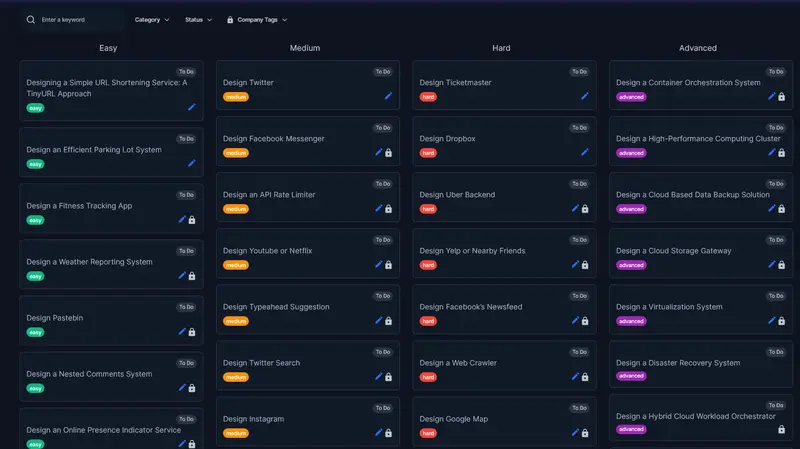
2. Difficulty-Based Categorization

Just like LeetCode, both System design and object-oriented design problems are categorized as:

  • Easy — Foundational concepts like Load Balancing, Caching, Message Queues
  • Medium — Scenarios like Rate Limiting, Search Autocomplete, Real-Time Chat Systems
  • Hard — Complex designs like Distributed Databases, Cloud Storage, and Microservices Architecture

Each problem also includes company tags so you can focus on what’s asked at FAANG and other top tech companies. For example, this how to design Twitter problem is a medium-scale problem, which you can see to get some experience. It’s also free.

I found LeetCode for Software Architect and its Awesome

3. AI-Powered Hints & Evaluations

One of the best features is AI-assisted guidance. You get to chat with the coach — the AI agent that will help you with the question and solution.

1. If you get stuck, AI provides hints — just like LeetCode’s hint system.

2. If you submit a design proposal, AI evaluates it against industry best practices.

3. You get automated feedback on scalability, fault tolerance, and efficiency.

This bridges the gap between self-learning and expert mentorship.

I found Leetcode for Coding Interview and it's Awesome

Beyond System Design: Object-Oriented Design & AI Interviews

Codemia.io goes beyond just system design. It also covers Object-Oriented Design (OOD) Questions. If you don’t know, Object-Oriented Design is a common low-level design (LLD) round at FAANG.

Here are OOP problems you can solve on codemia.io to get some practice:

  • Classic problems like Parking Lot, ATM Machine, and Hotel Booking System
  • Step-by-step UML diagrams and class structure explanations
  • Comparison of different design patterns

If you struggle with OOD interviews, this is a goldmine.

Here is also all the OOP design problems available on Codemia.io

Is Codemia.io good place to learn System Design

Now, let’s see how codemia.io compares with other popular resources we have used in the past to prepare for System Design interview, notably DesignGurus.io, whose Grokking the System Design Interview course is also one of my favorites, and Educative.io, whose modern System design course is also a great resource.

You can see that codemia.io has the highest number of practice problems, 120+ and growing. No other platform has that many questions, which is also a big plus point of this platform, and that’s why I called it “Leetcode of System Design”.

The second important point is an expert-written solution, also known as an editorial solution on this website. There are more than 80+ such solutions, which are a great resource to compare your solution, learn from them, and also find how to answer such questions.

What point to mention, what should you discuss, tradeoffs, and so much more.

Another plus point of codemia.io is that it has object-oriented programming questions, which are not available in other courses, though DesignGurus.io has Grokking the Object Oriented Design Interview course, which you can use for OOP design practice, but again, when it comes to numbers, codemia.io wins.

So far, we have compared the content, but if we talk about the platform, codemia.io has been especially designed for online practice, particularly for design questions.

It comes with Interactive learning tools, interactive feedback and evaluation, a chatbot, and a great design tool for drawing. No other platform supports so many features that are essential to master system design.

Then there is community, and you can also see the solutions of other folks to learn from them. I love this feature as it allows me to see what other folks are thinking and how they solve that problem. This comparative analysis has helped me a lot to learn key system design concepts.

Overall, I think codemia.io is a great platform to prepare for System design and OOP design interviews. You may find courses, but it’s hard to find a platform like this.

I highly recommend it for anyone preparing for System Design and Tech interviews. And, if you want to join now, you can also use the discount code PROMOTION20 to get 20% off now.

Here is the link — 20% OFf on Codemia.io

Codemia.io discount code

Final words

If you’re preparing for FAANG system design interviews, Codemia.io is a must-try. It solves the biggest problems in system design prep:

  • Structured learning path (instead of random articles)
  • Real-world hands-on practice (instead of just reading)
  • Expert evaluation & AI feedback (so you know what to improve)
  • Mock interviews to simulate real conditions

I’m still exploring Codemia.io, but what I’ve seen so far is truly impressive.

If you’ve tried it, let me know what you liked or didn’t like.

Thanks for reading this article so far. If you like this article, then please share it with your friends and colleagues. If you have any questions, feel free to ask in the comments.

P. S. – They are also offering 20% discount now, and you can get access for just $59 for one year, the original price is $120 so you have a chance to save $60 and also learn System design better.

Going Towards Nothing (But Still Applying Anyway)

Applying off-campus, especially in this job market, has been a greater battle for the past couple of years. As AI ATS and other “AI methods” have entered application filtering, it is even harder for employers to notice good employees with good skill sets. HR who put random skill sets they hear from their technical colleagues lead to job descriptions like “we need db, machine learning, UI/UX designing, in a nutshell, everything,” and all for a 12-hour unpaid intern.

Desperation and Its Impact on Mental Health

The “12-hour unpaid intern where you do literally everything” sounds cruel from a sane point of view, but students and freshers still apply to them, thanks to desperation.

Peer pressure, placement panic, news about layoffs, and a tough job market for freshers all cause individuals to doubt their potential. This can lead to a spiral of low self-esteem and self-doubt about their abilities, preventing them from thinking clearly and leading to anxiety attacks and breakdown episodes.

The thought of “I know this internship is terrible” yet still applying for it can really disturb your peace of mind. It feels like you’re heading towards failure, making you more vulnerable and desperate.

The Art of Writing Unrealistic JDs

HRs… I don’t know what they’re doing half the time. And most startups and mid-size companies that don’t have a proper hiring workflow just let HR handle the JDs. And oh boy, the descriptions are wild — “Node, API, REST API, React, Vue.js, Angular” — all for an entry-level or intern role for UI/UX designing. BRUH.

And this leads students and freshers to juggle skill sets half their life, trying to tick every box, and in the process they don’t specialize in a single skill — basically ending up learning none properly at the end of the day.

HRs should actually sit down and have a proper talk with their tech colleagues and ask them “even if the market is sad right now what skills a fresher really needs to have”, and then write the JD based on that.

The market is bad, sure. But that doesn’t mean students should turn into “do everything” machines just to survive it.

Unrealistic expectations from companies shouldn’t become unrealistic pressure on ourselves.

Notion Brain

Notion Brain 🧠 — Visualize Your Thoughts in a 3D Cosmic Universe

This is a submission for the Notion MCP Challenge

What I Built

Notion Brain is a high-performance 3D Knowledge Graph explorer designed to turn your static Notion database into a living, breathing digital “brain.” It visualizes every page as a node in a celestial system, mapping relationships and grouping content into thematic clusters based on internal page-to-page mentions.

Unlike standard linear search, Notion Brain allows you to literally “fly” through your workspace, identify forgotten connections between distant concepts, and interact with an AI-driven summary layer without ever leaving the 3D environment.

Video Demo

WATCH THE LIVE DEMO HERE

Show us the code

The project is built with a FastAPI backend and a React-Three-Fiber frontend, fully optimized for Vercel deployment and low-latency interaction.

👉 GitHub Repository: https://github.com/Snehadas2005/Notion-Brain

How I Used Notion MCP

I integrated the Notion SDK into an asynchronous Python backend to act as the “nervous system” of the application, bridging the gap between raw data and 3D visualization.

  1. Relational Edge Discovery: Using the Notion integration secret, my backend performs a deep scan of the workspace to identify child_page references and page_mentions across blocks. This data is then converted into a graph of nodes and edges.
  2. Multithreaded Block Retrieval: To keep the interface fluid, I implemented a ThreadPoolExecutor that fetches block content in parallel across multiple sub-pages.
  3. AI Oracle Summary Layer: Once a node is targeted, the backend fetches the raw content, parses it into customized Markdown, and passes it to Google Gemini (1.5 Flash). This provides a structural summary (Overview, Key Points, Category) directly inside the 3D HUD, making massive docs instantly readable.

🎨 Design & Tech Stack

The application uses a Brutalist / Manga-inspired aesthetic to create a focused, high-contrast atmosphere:

  • 3D Space: Built with @react-three/fiber and @react-three/drei.
  • Animations: Orchestrated with Framer Motion and GSAP.
  • Backend: FastAPI with httpx for non-blocking AI requests.
  • Deployment: Fully serverless mono-repo deployment on Vercel.

Developed by: Sneha Das

Good luck to everyone in the challenge! 🚀

AI Study Planner — Groq AI + Notion MCP

This is a submission for the Notion MCP Challenge

What I Built

I built an AI Study Planner that generates personalized day-by-day study schedules using Groq AI and automatically syncs them to Notion via Notion MCP.

Students enter:

  • 📖 Exam name (e.g. JEE Mains, GATE, MBA)
  • 📅 Number of study days
  • ⏰ Hours available per day
  • 🗓 Exam date

The AI (Groq LLaMA 3.3) generates a smart topic-by-topic study plan and pushes it directly into a Notion database — creating structured entries with Task, Date, Exam Date, Hours, and Subject columns filled automatically.

Video Demo

Show us the code

GitHub: https://github.com/sarveshm555/ai-study-planner

1. User fills the form

const res = await fetch("http://localhost:5000/add-task", {
  method: "POST",
  body: JSON.stringify({ subject, days, hours, examDate })
});

2. Groq AI generates the study plan

const aiResponse = await groq.chat.completions.create({
  model: "llama-3.3-70b-versatile",
  messages: [{
    role: "user",
    content: `Create a ${days}-day study plan for ${subject}. 
    Return ONLY a JSON array with day, topic, description.`
  }]
});

3. Notion MCP creates pages automatically

await notion.pages.create({
  parent: { database_id: DATABASE_ID },
  properties: {
    Task: { title: [{ text: { content: `Day ${item.day}: ${item.topic}` } }] },
    Date: { date: { start: taskDate } },
    "Exam Date": { date: { start: examDate } },
    Hours: { number: parseInt(hours) },
    Subject: { rich_text: [{ text: { content: subject } }] }
  }
});

How I Used Notion MCP

Notion MCP is the core output layer of this project:

  1. ✅ Connects to Notion workspace database
  2. ✅ Creates structured pages for each study day
  3. ✅ Fills Task, Date, Exam Date, Hours, Subject columns
  4. ✅ Adds AI-generated descriptions inside each page
  5. ✅ Everything happens automatically — zero manual work!

Tech Stack

Tool Purpose
Groq AI (LLaMA 3.3) Generate smart study topics
Notion MCP Auto-sync plans to Notion
Node.js + Express Backend server
HTML/CSS/JS Beautiful dark UI

What I Learned

  • How to integrate Notion MCP with AI workflows
  • How to structure AI prompts to return clean JSON
  • How to build a full-stack AI automation tool

👨‍💻 Team Details

Solo Submission

Built with ❤️ from India 🇮🇳