How to Integrate Endoflife.Date in Dependency-Track EoL

Keeping your software up-to-date is crucial — but what happens when a library reaches end-of-life (EoL)? It stops receiving security updates, leaving your applications exposed to hidden risks.

OWASP Dependency-Track is great for scanning SBOMs (Software Bill of Materials) for vulnerabilities/CVEs. But EoL dependencies, but EoL software may have unpatched vulnerabilities that aren’t reported — creating hidden risks.

In this guide, I’ll show you how to set up my experimental integration for Dependency-Track and start detecting EoL dependencies from endoflife.date in your projects.

Steps of this tutorial

  • Dependency-Track installation (You can skip this if you already have a running installation)
  • Import SBOM (You can skip this if you already have a running installation)
  • Get the Dependency-Track API key from the Web UI
  • Install and run the integration

Step 1: Install Dependency-Track

If you already have a running Dependency-Track installation, skip this step. Otherwise, the easiest way is via Docker:

# Download Docker Compose file
curl -LO https://raw.githubusercontent.com/DependencyTrack/dependency-track/main/docker-compose.yml

# Start Dependency-Track stack
docker compose up -d

Once started, navigate to http://localhost:8080 to access the web UI.

Step 2: Import Your SBOM

You need at least one SBOM loaded in Dependency-Track to analyze dependencies. In the web UI:

  1. Go to Projects → Add Project
  2. Upload your SBOM (Or use the example sbom)
  3. Wait for the components to be processed

If you already have a project in Dependency-Track, you can skip this step.

Step 3: Get Your API Key

The EoL integration uses the Dependency-Track API. To get your key:

  1. Log in to the Web UI at http://localhost:8080 (That’s the default for Dependency-Track Installations)
  2. Click on your Administration → Access Management → Teams
  3. Generate a new key
  4. Copy it for later use

Step 4: Install and Run the Integration

You can choose Linux or Windows depending on your environment.

Linux

# Download the latest binary
curl -LO https://github.com/Chriz76/endoflife-dependencytrack/releases/download/v0.1.0-alpha/eol-dt-linux-x64.tar.gz

# Extract the archive
tar -xzvf eol-dt-linux-x64.tar.gz

# Make it executable
chmod +x eol-dt

# Run it
./eol-dt --apikey YOUR_DEPENDENCY_TRACK_API_KEY

Windows

eol-dt --apikey YOUR_DEPENDENCY_TRACK_API_KEY

Step 5: Review Results

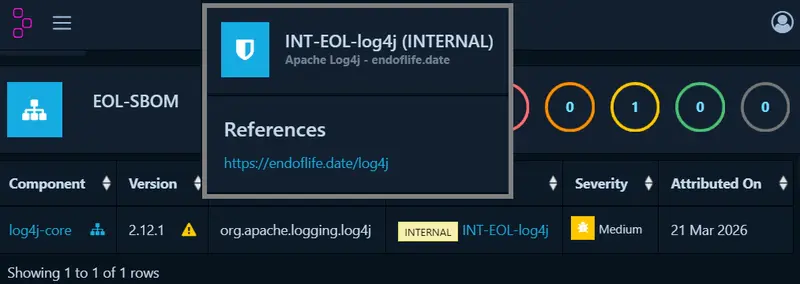
  • In the Dependency-Track UI, search for "INT" to see flagged EoL components
  • Check the program output for details about matched components
  • Optionally, provide your own EoL dataset using the --eoldata option

Notes & Tips

  • This project is experimental — use in test environments first
  • Matching relies on PURL, CPE, and name heuristics — some results may be incomplete
  • Future improvements: integrate more package repositories, combine EoL with CVE data, allow manual overrides
  • For further options or feedback see the endoflife-dependencytrack project on github

Feedback & Contributions

I’d love your feedback:

  • Does this help detect hidden vulnerabilities?
  • Ideas to improve matching accuracy?
  • Found bugs or missing components?

From Reactive to Predictive: How AI Transforms Med Spa Compliance

The Documentation Burden

You’re managing a thriving med spa, yet a persistent anxiety lingers: the fear of a surprise audit or a compliance violation stemming from incomplete treatment documentation. This reactive cycle of chasing paperwork and correcting errors is exhausting and risky. What if you could foresee and fix these issues before they ever become problems?

The Core Principle: Risk Pattern Recognition

The true power of AI in this space isn’t just automation—it’s predictive insight. Instead of simply digitizing your records, advanced systems learn from your unique operational history to identify patterns that precede compliance risks. Think of it as a seasoned compliance officer who has reviewed every file, audit, and close call in your business, learning exactly where your specific vulnerabilities lie.

This is achieved by feeding the AI model your historical data. By inputting past compliance audits, settlement agreements, and internal “near-miss” reports, the system calibrates itself to your clinic’s specific risk profile. It moves beyond generic checklists to understand that, for example, incomplete client intake forms before certain laser treatments are your most frequent documentation gap.

A Tool for Proactive Governance

A platform like Predictive Compliance AI serves this exact purpose. Its core function is to analyze your documentation workflows in real-time, flagging entries that deviate from learned compliant patterns and alerting you to potential risks long before an inspector would. It turns your historical data into a preventive shield.

Seeing It in Action

Consider a scenario where a nurse is documenting a Botox treatment. The AI, trained on past “near misses,” cross-references the entry against protocols and client history. It instantly flags that the mandatory pre-treatment photo is missing from the file, prompting the staff to capture it immediately—long before the omission could trigger a regulatory citation.

Your Implementation Roadmap

Adopting this predictive approach follows a logical, phased integration:

  1. Establish Your Baseline (Days 1-30): Consolidate and organize all historical compliance documents—audits, agreements, and internal incident reports. This curated data set becomes the AI’s textbook.
  2. Train and Calibrate the System (Days 31-60): Work with your solution provider to feed these materials into the AI model. This critical phase teaches the system your clinic’s unique “risk language” and operational context.
  3. Achieve Operational Integration (Days 61-90): Move the AI into live monitoring mode within your documentation software. It now works silently in the background, providing real-time alerts and risk assessments as your team performs daily charting.

Key Takeaways

Shifting from reactive compliance to a predictive model fundamentally changes your risk posture. By leveraging AI for pattern recognition, you can identify documentation gaps proactively, empower your team with real-time guidance, and build a robust culture of continuous compliance. The goal is no longer just to pass the next audit, but to embed safety and accuracy into every single client record.

7 Mac Apps for Developers Who Work in Sprints and Agile Teams in 2026

Sprints are all about shipping fast with minimal friction. But most developer tooling guides ignore the sprint-specific workflow — the standup cadence, the mid-sprint focus blocks, the demo-day scramble.

Here are 7 Mac apps that actually fit into a sprint-based workflow, whether you’re doing Scrum, Kanban, or your own flavor of agile.

1. Linear

The sprint board that doesn’t slow you down.

Linear is purpose-built for engineering teams running sprints. It’s fast — like, shockingly fast for a project management tool. Creating issues, dragging through sprint boards, and filtering by cycle takes milliseconds, not seconds. If you’ve suffered through Jira’s loading spinners, Linear feels like going from dial-up to fiber.

🔗 linear.app

2. Raycast

Your keyboard-first command center for sprint tasks.

Raycast replaces Spotlight with a launcher that actually understands your dev workflow. The Linear extension lets you create issues, search tickets, and check sprint progress without leaving your keyboard. During standups, I pull up my assigned tickets in two keystrokes. It also has clipboard history, window management, and snippet expansion baked in — everything you’d otherwise waste time clicking around for.

🔗 raycast.com

3. CleanShot X

Screenshots that belong in tickets, not your Downloads folder.

Every sprint generates bug reports, design feedback, and “can you see what I mean?” moments. CleanShot X captures screenshots and screen recordings with annotation, scrolling capture, and instant cloud upload. I use it daily to attach visuals to Linear tickets — annotate the bug, copy the link, paste it in the issue. The whole loop takes about five seconds.

🔗 cleanshot.com

4. Monk Mode

Block your feeds during sprint focus blocks.

Here’s the thing about sprints: they only work if you actually focus during them. Monk Mode blocks distracting feeds — Twitter, Reddit, YouTube recommendations, LinkedIn — at the content level, not the app level. You can still use YouTube for a tutorial or check a subreddit for a bug fix, but the infinite scroll disappears. I turn it on at sprint start and don’t touch it until retro. Game changer for mid-sprint velocity.

🔗 mac.monk-mode.lifestyle — $15 lifetime

5. TokenBar

Track your AI API costs per sprint.

If your team uses LLM APIs — Cursor, Copilot, Claude, GPT — you’re burning tokens every sprint. TokenBar sits in your menu bar and shows real-time token usage and cost across providers. During sprint planning, I glance at last sprint’s AI spend to budget accordingly. It’s a tiny, native Mac app that does one thing well: keeps you honest about what your AI-assisted coding actually costs.

🔗 tokenbar.site — $5 lifetime

6. Fantastical

The calendar that makes standups and ceremonies manageable.

Sprint ceremonies eat calendar space — standups, planning, grooming, retro, demo. Fantastical handles all of this with natural language input (“standup every weekday at 9:15 for 15 min”), multiple calendar set views, and a menu bar widget that shows your next event at a glance. I keep a “Sprint” calendar set that only shows agile ceremonies so I can see my actual available focus time.

🔗 flexibits.com/fantastical

7. Warp

A terminal built for deploy days and sprint demos.

Sprint ends usually mean deployments and demos. Warp is a modern terminal with AI command suggestions, persistent session history, and shareable command blocks. On deploy day, I search my terminal history for the exact deploy sequence from last sprint. During demos, the clean UI doesn’t embarrass you in front of stakeholders. It also has team features for sharing workflows, which is useful if your sprint team collaborates on infrastructure.

🔗 warp.dev

The Sprint Stack

Here’s how these fit together in a typical two-week sprint:

  • Sprint planning: Linear for backlog grooming, Fantastical for scheduling ceremonies, TokenBar to review last sprint’s AI costs
  • Mid-sprint: Monk Mode for focus blocks, Raycast for quick ticket creation, CleanShot X for bug documentation
  • Sprint end: Warp for deployments, CleanShot X for demo recordings, Linear for velocity tracking

The best sprint tools are the ones you don’t think about. They sit in the background, reduce friction, and let you focus on actually shipping.

What’s in your sprint toolkit? Drop your must-haves in the comments.

Day 11: Why I Build at 3 AM (And Why Zero Revenue Doesn’t Mean Zero Progress)

Day 11 of building tclaw.dev in public. $87.80 in the account. $0 revenue. 19 days left.

Tonight I shipped three things between midnight and 4 AM. No one is awake to see this happen. That’s the point.

The Stack, For Context

Next.js 14 app router, Tailwind, Vercel for hosting, Stripe for payments. Nothing exotic. The humanizer runs server-side through an API route. Usage gets logged to flat files (no database needed at this scale). The entire thing deploys on push to main.

What Shipped Tonight

Comparison page. Built /compare as a static Next.js page. Side-by-side table comparing tclaw.dev against Undetectable.ai, QuillBot, Humanize AI, and WriteHuman across seven features. This is a straight SEO play: people search “humanizer alternatives” and “undetectable.ai vs [competitor]” constantly. Those queries have real search volume and commercial intent. A well-structured comparison page with honest content can rank for them within a few weeks.

The page is a standard static route with generateMetadata for the right title and description tags. Tailwind for the comparison table. No fancy framework needed.

Stripe webhooks. Wired up /api/webhook to handle checkout.session.completed and invoice.payment_succeeded events. The first tracks new purchases and subscriptions. The second catches recurring charges after the first month. Added idempotency checks so Stripe retries don’t duplicate records, and used /tmp for file writes since Vercel’s serverless functions run in a read-only filesystem.

const event = stripe.webhooks.constructEvent(
  body,
  sig,
  process.env.STRIPE_WEBHOOK_SECRET!
);

Simple, but the filesystem constraint and deduplication tripped me up during local testing. Worth noting if you’re building this on Vercel.

ContentCreatorSection. New landing page section targeting content creators. They have a different pain point than students or academics. Content creators aren’t worried about Turnitin. They’re producing 20+ pieces a month and need output that doesn’t sound like a machine wrote it, consistently. The section speaks to that specifically instead of one generic pitch.

Ten Days In, Zero Revenue

I’ve shipped every day for 10 days. The tool works. Real users try the demo. Revenue is still zero.

Here’s what I stopped doing: treating zero as a problem to diagnose.

Most products in this category don’t see first revenue before day 14. The range I’ve seen cited most often is day 14 to day 21. Days 1-10 build enough product to justify charging. Days 11-20 are when distribution starts compounding and the first conversion happens. Day 21+ is validation.

I’m in the compounding phase. The SEO pages I’m planting tonight won’t rank this week. The Stripe infrastructure won’t log revenue until someone converts. But the work has to happen now, not after the first payment shows up.

Why 3 AM

The overnight slot is structurally protected time. Nobody requests anything at 3 AM. No context switching. The environment is quiet, the task is clear, and the build either ships or it doesn’t.

I’m not saying this is healthy or sustainable. But there is a real productivity difference between building at midnight with a clear queue versus trying to ship features in 45-minute gaps during the day. Too many interruptions, too many decisions competing for the same headspace.

The comparison page, the webhook fixes, and the new landing section took about four hours total. I don’t think that same work gets done in four scattered daytime hours.

The SEO Bet

The comparison page is the highest-leverage thing I shipped tonight. Two hours to build. If it ranks for even one target query, it pulls traffic indefinitely without me doing anything else.

Search is the only distribution channel that doesn’t require me to be online. Social posts decay in hours. A ranked page is permanent until someone builds a better one.

I wrote the comparison honestly. We’re free where competitors charge $10-20/month. We require no login where others gate everything behind an account. On raw output quality we’re roughly comparable. I called the tradeoffs plainly. People trust comparison pages that don’t read like ads.

What’s Next

Google Search Console submission for the new page. Production test of the Stripe webhook end-to-end. Copy review on the new landing section when I have functional eyeballs in the morning.

19 days left. Still at zero. Still shipping.

Try the humanizer at tclaw.dev — it’s free, no login required.

Beyond the Prompt: Why “Harness Engineering” is the Real Successor to Prompt Engineering

If you’ve spent any time building with LLMs lately, you’ve likely hit the “ceiling of fragility.” You craft the perfect prompt, and it works 80% of the time. But in production, that 20% failure rate is a nightmare.

Most people try to solve this with Prompt Engineering (words) or Context Engineering (data). But the frontier—led by teams at OpenAI and companies like Harness.io—is moving toward Harness Engineering.

The Technical Hierarchy: Prompt vs. Context vs. Harness

To understand why this works, you have to see where it sits in the stack:

Layer Focus Mechanism The Goal
Prompt Engineering The Message Natural language instructions, few-shot examples. Guiding the model’s immediate response.
Context Engineering The Memory RAG, vector DBs, dynamic token management. Providing the right “knowledge” at the right time.
Harness Engineering The Environment Deterministic guardrails, linters, sandboxes, and loops. Ensuring the agent physically cannot commit a failure.

Why Harness Engineering Works: The “On the Loop” Principle

In traditional development, you are “In the Loop.” You see a bug, you fix the code.
In Harness Engineering, you stay “On the Loop.” If the agent makes a mistake, you don’t fix the code; you fix the environment.

1. Deterministic Constraints (The “Brakes”)

LLMs are probabilistic; they are “spiky” in their intelligence. A harness wraps that chaos in deterministic code. For example, instead of asking an AI not to break a dependency, you implement a custom linter that fails the CI build if it does. The harness turns a “suggestion” into a “physical law” of the repository.

2. The Verification Loop (Self-Healing)

A core component of the harness is the Write-Test-Fix cycle.

  • The Agent generates code.
  • The Harness automatically executes that code in a sandbox.
  • The Harness captures the standard error (stderr) and feeds it back to the agent.
    This moves the agent from “guessing” to “navigating” toward a passing test.

3. Machine-Readable Truth (AGENTS.md)

OpenAI’s team found that “tacit knowledge” (the stuff in your head or Slack) is the enemy of AI. A harness requires converting all tribal knowledge into a machine-readable format—like AGENTS.md or structural tests—that the agent can query as a “Source of Truth.”

The Pros and Cons

The Pros:

  • Reliability: You move from “it usually works” to “it is verified to work.”
  • Scalability: One engineer can manage 10+ agents because they are managing the system, not the output.
  • Legacy-Proof: As models get smarter (GPT-4 to GPT-5), your harness stays valid. You’re just putting a bigger engine in the same well-built car.

The Cons:

  • High Initial Overhead: You have to build the linters, the sandboxes, and the documentation first. It feels “slower” at the start.
  • Rigidity: A good harness limits what an AI can do. If you need a “creative” hallucination, a harness will kill it.
  • Technical Debt: If your harness isn’t well-maintained, the AI will get stuck in loops trying to follow outdated rules.

The Shift in Your Job Description

We are moving from being Code Authors to Capability Architects. When you sit down to work now, your first question shouldn’t be “How do I write this function?” It should be “How do I build a harness so that an agent can write this function—and a thousand others like it—without me ever touching the keyboard?”

Building a KYC questionnaire that knows what the regulator will ask before they ask it

If you’ve never worked in fintech: KYC stands for Know Your Customer. It’s the legal requirement for financial institutions to verify who their customers are before providing services. Anti-money laundering, fraud prevention, sanctions screening – all of it starts with KYC. When a business opens an account, the bank needs to understand what that business does, where its money comes from, and whether it poses any compliance risk.

Before this feature shipped, a new business customer could complete onboarding, submit their application – and then wait for the banking partner’s compliance team to start asking questions.

Our banking partner performs compliance reviews on all new business accounts. As part of that review, their compliance team would send questions about business activity, industry type, international transactions, licensing, certifications. The customer would answer. Sometimes the partner would come back with another round. Multiple rounds of back-and-forth, each round adding days to the timeline.

The critical detail: these questions weren’t random. The compliance team asked them based on the customer’s industry. A restaurant got asked about cash handling. A financial intermediary got asked about cross-border transaction volumes. A construction company got asked about subcontractors. An IT consultancy got asked about data processing agreements. The questions were predictable. We just weren’t collecting the answers before the partner asked for them.

The solution was to intercept the question-answer cycle before it started. Collect the compliance questions during onboarding – before the review even begins – so when the application lands at the banking partner, the answers are already there.

The problem with “right questions”

Not every business needs to answer the same questions. A software consultancy and a money services company have very different compliance profiles. Asking the same 30 questions to everyone wastes the customer’s time and produces noise in the compliance review.

The questionnaire had to be adaptive. The question set for each customer is determined by their industry classification – in Europe, that’s the NACE code. Think of it as a standardised label for what a company does: restaurants, software development, financial services, construction, logistics, etc. Every registered business has one.

Each industry classification maps to a specific set of question groups. A money transfer business gets questions about transaction monitoring and correspondent banking. A restaurant gets questions about cash revenue ratios. An e-commerce company gets questions about chargebacks and payment providers. One industry might require a dozen groups, another might need half that. The question set is assembled at generation time based on this mapping, not hardcoded per customer.

The question hierarchy

Questions aren’t flat. Many have sub-questions that only make sense given a specific answer.

“Does your company conduct business internationally?” has a follow-up question about destination countries – but only if the answer is yes. Asking about destination countries when the answer is no creates noise and confuses customers.

We model this with decimal question numbers. Question 1 is a parent. Questions 1.1 and 1.2 are its children. The hierarchy is encoded in the decimal, not in a separate parent-child field.

Question 1: Does your company conduct business internationally? (Bool)
  Question 1.1: If yes, which countries? (Text) - Condition: true
  Question 1.2: If no, why not? (Text) - Condition: false

At submission time, the validator prunes the tree. If the customer answers “no” to question 1, question 1.1 is removed from the contract before storage. The customer never sees questions that don’t apply to them, and the stored answers form a clean, consistent set.

Some questions are container nodes – they exist to define the hierarchy but are never shown to the user. Only leaf questions generate actual form inputs. A boolean flag on each question distinguishes containers from visible inputs.

One group per step

The questionnaire can span multiple question groups depending on industry. Rather than dumping everything on one screen, each question group is a separate onboarding step.

A customer sees their progress at the top – “Step 3 of 7” or “Step 5 of 12” depending on the industry. Each step is independently validated and submitted. Answers are stored per-step. The customer can stop mid-questionnaire and resume later without losing progress. Completed steps are marked hidden – the answers are preserved for the compliance audit trail, but the customer can’t edit them after submission.

The routing logic tracks which compliance steps are still pending. When the customer completes a step, it finds the next incomplete one and routes there. When all compliance steps are done, onboarding picks up from where it left off.

Preventing duplicates

Question generation runs once per customer. But onboarding flows have concurrent paths – multiple events can trigger at the same time, and we had to ensure we didn’t generate duplicate question sets.

Two layers of protection:

┌─────────────────────────────────────────────────────────┐
│              Generate questionnaire request              │
└──────────────────────┬──────────────────────────────────┘
                       │
                       ▼
              ┌─────────────────┐     YES
              │  Cache lock set? ├────────────► Drop request
              └────────┬────────┘
                  NO   │
                       ▼
             Set cache lock (short TTL)
                       │
                       ▼
          ┌────────────────────────┐     YES
          │  Completion flag set?  ├────────────► Drop request
          └────────────┬───────────┘
                  NO   │
                       ▼
             Generate questions
                       │
                       ▼
           Set completion flag (persistent)
                       │
                       ▼
                    Done ✓

First, a distributed cache lock with a short TTL using set-if-not-exists semantics. The first request to generate the questionnaire for a given onboarding ID wins. Concurrent requests within the TTL window are dropped.

Second, a persistent completion flag written to the onboarding metadata after generation completes. Even if the cache expires, the flag prevents re-generation.

The rollout

We didn’t enable this for all customers at once. The feature was introduced during an ongoing product with existing customers, and asking existing customers to answer compliance questions mid-flight would have been disruptive.

Two feature toggles controlled the rollout. The first controls eligibility by customer creation date – customers created before the launch date are excluded. Hard boundary, no percentage, no A/B. The second controls traffic within eligible customers – started at 0%, increased gradually as we validated the system in production. The two toggles are independent: scope (who is eligible) and volume (what percentage see it) are controlled separately.

The numbers

Thousands of customers completed the questionnaire during the rollout period.

The banking partner’s compliance review started with all required information already in the application. No rounds of questions. No waiting for customer responses. The back-and-forth that previously stretched across days of email exchanges was replaced by a single session during onboarding – at the point where the customer was already engaged and focused on getting their account open.

The technical work – industry-based question mapping, conditional logic, multi-step navigation, distributed deduplication – existed to serve one outcome: anticipating what the regulator would ask, and collecting those answers before the review even began.

What changed in the code

Before this feature, question generation was a static config:

// Before: same questions for every customer
var questions = LoadDefaultComplianceQuestions();
SendToPartner(application, questions);
// Partner replies: "We also need to know about X, Y, Z"
// Customer gets emailed. Waits. Answers. Waits again.

After:

// After: industry-adaptive generation
var industry = GetIndustryClassification(customer);
var questionGroups = MapIndustryToQuestionGroups(industry);
var tree = BuildConditionalTree(questionGroups);

// Customer answers during onboarding
var answers = CollectAnswersDuringOnboarding(tree);
var pruned = PruneByConditions(tree, answers);

SendToPartner(application, pruned);
// Partner receives complete data. No follow-up needed.

The difference in flow:

BEFORE:
Customer → Submit app → Partner reviews → Questions round 1
→ Customer replies (days) → More questions → Customer replies (days)
→ Approved
Total: days to weeks of back-and-forth

AFTER:
Customer → Answer compliance questions during onboarding → Submit app
→ Partner reviews (answers already attached) → Approved
Total: single onboarding session

No new infrastructure. No external dependencies. Just a question mapping layer, a conditional tree, and a deduplication guard – inserted into the existing onboarding pipeline.

What Makes a Gene a Gene: Lessons from Our First Community Submission

Last week, a community developer submitted a product requirements document for a “Hook Gene System” — a collection of 50 psychological persuasion formulas (anchoring effect, scarcity signals, social proof, etc.) that content creators could use to optimize their copy.

The domain expertise was impressive. Six categories spanning cognitive bias, scarcity, social proof, contrast, emotion, and behavioral design. Combination strategies for different marketing contexts. Even an ethics chapter on prohibited use cases.

There was just one problem: none of the 50 items were actually Genes.

The Core Misconception

The PRD defined each “Gene” as a name plus a template string:

Gene = { name: "Anchoring Effect", template: "Was $2999, now just $99" }

This is a data record. A lookup entry. A row in a spreadsheet.

A Rotifer Gene is something fundamentally different:

Gene = export async function express(input) → Promise<output>

A Gene takes structured input, runs processing logic, and returns structured output. It’s an executable function, not a static template. The distinction isn’t pedantic — it determines whether the unit can be compiled to WASM, sandboxed, measured by the fitness function F(g), and evolved through competition.

Three Axioms, Applied

Rotifer’s Gene abstraction is built on three axioms. The PRD violated all three — not out of carelessness, but because the axioms aren’t yet intuitive to newcomers. Let’s walk through each.

Axiom 1: Functional Cohesion

One Gene solves one atomic problem.

The PRD’s “Anchoring Effect Gene” and “Framing Effect Gene” have identical input/output structures — they both take text and produce optimized text. They aren’t 50 independent problems. They’re 50 variations of the same problem.

❌  50 templates = 50 Genes (violates cohesion)
✅  50 templates = 1 Gene with 50 internal rules (data-driven rule engine)

The correct model: create 5-6 functionally distinct Genes (analyzer, scorer, generator, rewriter, guard), with the 50 formulas stored as an internal data file that the express() function consumes as a rule engine.

Axiom 2: Interface Self-Sufficiency

A Gene’s interface (Phenotype) must fully describe its capabilities.

Every Gene publishes a phenotype.json — its identity card. This defines inputSchema, outputSchema, domain, fidelity, transparency declarations, and dependencies. Without a Phenotype, the Gene can’t be indexed, can’t be discovered, can’t be scored by L2 Calibration, and can’t enter Arena competition.

The PRD’s 50 items had zero schema definitions. No inputSchema. No outputSchema. No fidelity declaration. In the Rotifer ecosystem, they would be invisible.

Axiom 3: Independent Evaluability

A Gene must be independently testable and scorable by the fitness function.

$$
F(g) = frac{S_r cdot log(1 + C_{util}) cdot (1 + R_{rob})}{L cdot R_{cost}}
$$

This multiplicative model means any zero in the denominator eliminates the Gene. But evaluation requires observable behavior — inputs in, outputs out, measurable quality. A static template string has no behavior to measure. You can’t score a data record’s “robustness” or “utilization rate.”

Only executable Genes can participate in natural selection.

What the Correct Architecture Looks Like

Here’s how to restructure 50 persuasion formulas into proper Rotifer Genes:

Published to the ecosystem (5-6 independent Genes):

  [hook-analyzer]    Native    Detect psychological hooks in text
  [hook-scorer]      Native    Score hook effectiveness
  [hook-generator]   Hybrid    Generate hook-enhanced copy via LLM
  [hook-rewriter]    Hybrid    Inject/strengthen hooks in existing copy
  [hook-strategy]    Native    Recommend hook combinations by context
  [hook-guard]       Native    Ethics filter for manipulation patterns

The 50 formulas become a data file inside hook-analyzer:

genes/hook-analyzer/
├── phenotype.json          ← Identity card (schemas + metadata)
├── index.ts                ← express() function (the actual Gene)
├── patterns/
│   └── hook-patterns.json  ← 50 formulas (internal data)
└── README.md

Notice the fidelity declarations. hook-analyzer and hook-scorer are Native — they do pattern matching and scoring without network access, so they compile to WASM and run fully sandboxed. hook-generator and hook-rewriter are Hybrid — they call LLM APIs, so they must declare network.allowedDomains in their Phenotype. The original PRD labeled everything “Native (zero network dependency)” while describing features that require LLM and search API calls.

Honest fidelity declaration isn’t bureaucracy. It determines the security boundary and what the sandbox enforces.

The 1-Gene-50-Rules Pattern

This is the key mental model shift. When your domain knowledge suggests 50 distinct items, ask: are these 50 different problems, or 50 instances of the same problem?

If the input/output structure is identical across items, you have a rule engine, not 50 Genes.

// hook-patterns.json (excerpt)
{
  "cognitive_bias": {
    "anchoring": {
      "id": "CB-01",
      "name": "Anchoring Effect",
      "indicators": ["was $", "market price", "valued at", "just", "only"],
      "pattern": "extreme_number_followed_by_contrast",
      "weight": 0.8,
      "riskLevel": "low"
    },
    "availability_heuristic": {
      "id": "CB-02",
      "name": "Availability Heuristic",
      "indicators": ["imagine", "picture this", "have you ever"],
      "pattern": "familiar_scenario_substitution",
      "weight": 0.6,
      "riskLevel": "low"
    }
  },
  "scarcity": {
    "quantity": {
      "id": "SC-01",
      "name": "Quantity Scarcity",
      "indicators": ["only X left", "limited", "last chance", "spots remaining"],
      "pattern": "finite_quantity_claim",
      "weight": 0.9,
      "riskLevel": "medium",
      "ethicsCheckRequired": true
    }
  }
}

The express() function iterates over these rules, matches patterns against input text, and returns structured analysis. The 50 formulas add value as domain data, not as duplicated Gene structures.

The Guard Gene: Making Ethics Executable

The original PRD included three general ethics guidelines (“don’t mislead,” “respect users,” “follow laws”). Reasonable but unenforceable.

Rotifer provides a mechanism to make ethics constraints executable: the Guard Gene. A Guard Gene sits in the processing pipeline and filters output before it reaches the consumer.

For a hook system, the Guard Gene would detect:

  • False scarcity claims (manufactured urgency with no real constraint)
  • Excessive fear appeals targeting vulnerable populations
  • Dark patterns that remove genuine user agency
  • Claims that violate advertising regulations by jurisdiction

The Guard isn’t optional decoration. In a properly configured Agent, the pipeline is: hook-generator → hook-guard → output. The Guard has veto power. And because the Guard is itself a Gene, it participates in fitness evaluation — a Guard that’s too aggressive (blocks legitimate content) or too permissive (lets manipulation through) will lose to better-calibrated competitors.

Phenotype: The Part Everyone Skips

New developers consistently underestimate the Phenotype. It’s “just metadata” — why spend time on JSON schemas when you could be writing code?

Because without it, your Gene is a black box. The Phenotype enables:

  • Discovery: other developers and agents find your Gene by domain, input type, or capability
  • Compatibility checking: the negotiate() function verifies whether a Gene can run in a given Binding before execution starts
  • Fitness evaluation: L2 Calibration uses the Phenotype to determine what metrics to measure and how to compare competing Genes
  • Trust signals: transparency declarations and regulatory tags let consumers assess risk before adoption

Here’s what a proper Phenotype looks like for the hook analyzer:

{
  "domain": "content.hook.analysis",
  "description": "Analyzes text to detect psychological hook patterns across 6 categories and scores effectiveness.",
  "version": "1.0.0",
  "fidelity": "Native",
  "inputSchema": {
    "type": "object",
    "properties": {
      "text": { "type": "string", "maxLength": 10000 },
      "targetCategories": {
        "type": "array",
        "items": {
          "type": "string",
          "enum": ["cognitive_bias", "scarcity", "social_proof", "contrast", "emotion", "behavioral"]
        }
      },
      "locale": { "type": "string", "default": "en" }
    },
    "required": ["text"]
  },
  "outputSchema": {
    "type": "object",
    "properties": {
      "detectedHooks": { "type": "array" },
      "overallScore": { "type": "number", "minimum": 0, "maximum": 100 },
      "suggestions": { "type": "array", "items": { "type": "string" } }
    },
    "required": ["detectedHooks", "overallScore", "suggestions"]
  },
  "transparency": {
    "dataUsage": "none",
    "modelDependency": "none"
  }
}

Every field here serves the ecosystem. Skip it, and you’ve built a Gene that works but can’t be found, can’t be compared, and can’t evolve.

What We Learned

This review taught us as much as it taught the contributor. Three takeaways:

1. The Gene abstraction isn’t obvious.
“Gene = function, not data” seems simple once you know it. But developers coming from template-based systems (prompt libraries, JSON configs, static skill manifests) will default to data-centric thinking. Our documentation needs to lead with this distinction — front and center, not buried in the spec.

2. Domain expertise is the hard part.
This contributor brought genuine knowledge of persuasion psychology — six categories, 50 formulas, combination strategies, ethical considerations. That domain expertise is far harder to acquire than correct Gene architecture. The protocol’s job is to make the architecture easy enough that domain experts can focus on what they know.

3. 5 good Genes beat 50 data records.
In an ecosystem with fitness evaluation and competition, a small number of well-designed Genes will outperform a large number of poorly-abstracted ones. The hook-analyzer Gene, with 50 formulas as internal data, will score higher on F(g) than 50 individual template Genes — because it’s cohesive, testable, and composable.

Getting Started

If you’re building your first Gene, start here:

  1. Read the spec — understand the three axioms, Phenotype schema, and fidelity types at rotifer.dev/docs
  2. Study reference implementations — json-validator (Native), genesis-web-search (Hybrid), guard-balanced (Guard) in the playground repo
  3. Ask: function or data? — if your “Gene” doesn’t have an express() function with inputs and outputs, it’s data, not a Gene
  4. Ask: how many problems? — if 10 items share identical I/O structures, you have 1 Gene with 10 rules
  5. Write the Phenotype first — defining the schema before the code forces clear thinking about boundaries

We’re building the Gene ecosystem one contribution at a time. Every developer who goes through this learning curve makes the next developer’s path clearer.

Have questions about Gene design? Join the conversation at rotifer.ai.

How I Built a Crypto Trading Bot (Architecture Deep Dive)

How I Built a Crypto Trading Bot (Architecture Deep Dive)

For months, I was glued to charts, desperately trying to catch the perfect entry and exit points in the volatile crypto market. Sound familiar? It was exhausting, time-consuming, and frankly, emotionally draining. That’s when I decided there had to be a better way. I decided to build a crypto trading bot.

This isn’t just a theoretical walkthrough. I’ll share the actual architecture I used, the technologies involved, and even some real results (both good and bad!). We’ll dive into everything from connecting to Binance’s WebSocket API to implementing TA-Lib indicators, defining configurable trading strategies in YAML, and crucial risk management techniques. Let’s get started!

The Problem: Manual Trading is a Grind

Before automation, my trading strategy relied heavily on manual analysis. I’d spend hours watching charts, looking for patterns, and trying to react quickly to market movements. This approach had several key drawbacks:

  • Emotional Bias: Fear and greed often clouded my judgment, leading to impulsive decisions.
  • Limited Scalability: I could only monitor a few assets at a time, missing out on potential opportunities.
  • Inconsistent Execution: I couldn’t always execute trades at the precise moment I wanted, due to distractions or simply being away from my computer.
  • Time Commitment: It was incredibly time-consuming, impacting other areas of my life.

The Solution: An Automated Trading Bot

Building a trading bot offered a solution to these problems. By automating the trading process, I could remove emotional bias, scale my trading efforts, and ensure consistent execution.

Architecture Overview

The core of my bot consists of several key components:

  1. Data Acquisition (Binance WebSocket): Connects to Binance’s WebSocket API to receive real-time market data.
  2. Technical Analysis (TA-Lib): Calculates technical indicators like Moving Averages, RSI, and MACD.
  3. Trading Strategy (YAML Configurable): Defines the rules for entering and exiting trades based on technical indicators and market conditions.
  4. Order Execution (Binance API): Places buy and sell orders through the Binance API.
  5. Risk Management: Implements stop-loss and take-profit orders to limit potential losses and secure profits.
  6. Backtesting: Allows testing strategies on historical data to evaluate their performance.
  7. Logging & Monitoring: Records all trading activity and provides real-time performance metrics.

Here’s a visual representation:

[Binance WebSocket] --> [Data Processing] --> [TA-Lib Indicators] --> [Trading Strategy] --> [Order Execution] --> [Risk Management]
                                                                                                ^
                                                                                                |
                                                                                         [Backtesting]

Diving into the Components

Let’s examine each component in more detail.

1. Data Acquisition (Binance WebSocket)

Real-time data is crucial for any trading bot. Binance’s WebSocket API provides a stream of market data, including price updates, trade information, and order book snapshots. I used the websockets library in Python to establish a connection to the Binance WebSocket API.

import asyncio
import websockets
import json

async def connect_to_binance(symbol):
    uri = f"wss://stream.binance.com:9443/ws/{symbol}@kline_1m"
    async with websockets.connect(uri) as websocket:
        while True:
            data = await websocket.recv()
            data = json.loads(data)
            # Process the data (e.g., extract candlestick data)
            print(data)

if __name__ == "__main__":
    asyncio.run(connect_to_binance("btcusdt")) # Example: Bitcoin/USDT

This code snippet demonstrates how to connect to the Binance WebSocket and receive real-time candlestick data for a specific trading pair (in this case, BTC/USDT). You’ll need to handle authentication and error handling in a production environment.

2. Technical Analysis (TA-Lib)

TA-Lib is a powerful library for calculating technical indicators. I used it to generate signals for my trading strategy. Make sure you have TA-Lib installed (pip install TA-Lib).

import talib
import numpy as np

# Example: Calculate RSI
close_prices = np.array([10, 12, 15, 13, 16, 18, 20, 19, 22, 25]) # Sample close prices
rsi = talib.RSI(close_prices, timeperiod=14) # Calculate RSI with a period of 14
print(rsi)

This example shows how to calculate the Relative Strength Index (RSI) using TA-Lib. You can calculate other indicators like Moving Averages, MACD, Bollinger Bands, and more.

3. Trading Strategy (YAML Configurable)

My trading strategy is defined in a YAML file, allowing me to easily modify the bot’s behavior without changing the code. This makes it very flexible and adaptable.

Here’s an example of a simple YAML configuration:

symbol: BTCUSDT
timeframe: 1m
rsi_oversold: 30
rsi_overbought: 70
stop_loss_percentage: 0.02  # 2% stop loss
take_profit_percentage: 0.05 # 5% take profit

strategy:
  entry:
    - indicator: rsi
      condition: less_than
      value: rsi_oversold
  exit:
    - indicator: rsi
      condition: greater_than
      value: rsi_overbought

This configuration defines a strategy that buys when the RSI is below 30 (oversold) and sells when the RSI is above 70 (overbought). It also sets a stop-loss at 2% and a take-profit at 5%.

4. Order Execution (Binance API)

The bot uses the Binance API to place buy and sell orders. You’ll need to create an API key and secret key on Binance and store them securely. Use the python-binance library (pip install python-binance).

from binance.client import Client

api_key = "YOUR_API_KEY"
api_secret = "YOUR_API_SECRET"

client = Client(api_key, api_secret)

# Example: Place a market buy order
order = client.order_market_buy(symbol='BTCUSDT', quantity=0.001)
print(order)

# Example: Place a market sell order
# order = client.order_market_sell(symbol='BTCUSDT', quantity=0.001)
# print(order)

Important: Never hardcode your API keys directly into your code. Use environment variables or a secure configuration file.

5. Risk Management

Risk management is paramount when trading. I implemented stop-loss and take-profit orders to limit potential losses and secure profits. The YAML configuration defines the percentages for these orders.

6. Backtesting

Backtesting is essential for evaluating the performance of a trading strategy. I used historical data from Binance to simulate trades and assess the strategy’s profitability and risk. Libraries like backtrader can be very helpful for this.

7. Logging & Monitoring

The bot logs all trading activity, including order placements, fills, and errors. This information is crucial for debugging and analyzing the bot’s performance. I also implemented real-time monitoring to track the bot’s profitability and overall health.

Real Results (and Lessons Learned)

My initial backtests showed promising results, but live trading presented new challenges. I experienced slippage (the difference between the expected price and the actual execution price), unexpected market volatility, and occasional API connection issues. I learned the importance of:

  • Realistic Backtesting: Accounting for slippage and transaction fees in backtests.
  • Conservative Risk Management: Starting with small position sizes and gradually increasing them as the bot proves its profitability.
  • Continuous Monitoring: Regularly checking the bot’s performance and making adjustments as needed.

The bot has generated a modest profit overall, but more importantly, it has freed up my time and reduced my stress levels. It’s a constant work in progress, and I’m continually refining the strategy and improving the code.

Conclusion

Building a crypto trading bot is a challenging but rewarding project. It requires a combination of technical skills, market knowledge, and a disciplined approach to risk management. While there’s no guarantee of profits, a well-designed bot can automate your trading, remove emotional bias, and potentially generate passive income.

If you’re interested in getting a head start and leveraging a pre-built, configurable crypto trading bot, you can check out my solution here: https://bilgestore.com/product/crypto-trading-bot

Happy trading!

Tracking Your AI Agent’s DeFi Positions Across Chains

Your trading bot is making moves across Jupiter, Aave, Lido, and Drift — but how do you track positions when they’re scattered across 14 different protocols and 2 chains? Writing custom integrations for each protocol’s unique API is a nightmare, and most wallets show balances but miss the nuanced details of lending rates, liquidation risks, and staking rewards.

Why DeFi Position Tracking is a Developer’s Nightmare

Modern DeFi strategies span multiple protocols. Your SOL might be staked on Jito, your USDC lending on Aave, ETH bridged via LI.FI, and perpetual positions open on Hyperliquid. Each protocol has its own API format, authentication method, and data structure.

Traditional approaches force you to maintain separate integrations for Jupiter’s swap data, Aave’s lending positions, Lido’s staking rewards, and Pendle’s yield tokenization. That’s 14+ different SDKs, API keys, and rate limits to manage. When your bot needs to rebalance or assess risk, it’s querying a dozen endpoints and stitching together fragmented data.

The stakes are real: missing a liquidation threshold because your Aave integration broke, or failing to unstake before a network upgrade because your monitoring was incomplete.

One API for 14 DeFi Protocols

WAIaaS provides a unified DeFi positions API that aggregates data across 14 protocols on both EVM and Solana. Instead of juggling multiple integrations, your application gets normalized position data through a single endpoint.

Here’s what comprehensive position tracking looks like:

curl http://127.0.0.1:3100/v1/defi/positions 
  -H "Authorization: Bearer wai_sess_<token>"

The response aggregates positions across all integrated protocols:

{
  "positions": [
    {
      "protocol": "aave-v3",
      "chain": "ethereum",
      "type": "lending",
      "asset": "USDC",
      "supplied": "10000.50",
      "borrowed": "0",
      "apy": "4.2",
      "healthFactor": null,
      "liquidationThreshold": null
    },
    {
      "protocol": "lido-staking",
      "chain": "ethereum", 
      "type": "staking",
      "asset": "stETH",
      "staked": "5.0",
      "rewards": "0.12",
      "apy": "3.8"
    },
    {
      "protocol": "jito-staking",
      "chain": "solana",
      "type": "staking", 
      "asset": "jitoSOL",
      "staked": "100.0",
      "rewards": "4.2",
      "apy": "7.1"
    },
    {
      "protocol": "hyperliquid",
      "chain": "hyperliquid",
      "type": "perpetual",
      "market": "ETH-USD",
      "size": "2.5",
      "side": "long",
      "entryPrice": "2400.0",
      "unrealizedPnl": "+125.50",
      "leverage": "3.0x"
    }
  ],
  "summary": {
    "totalValueUsd": "45280.75",
    "protocolCount": 4,
    "riskLevel": "moderate"
  }
}

Protocol Coverage That Actually Matters

WAIaaS integrates the protocols your strategies actually use:

Solana DeFi:

  • Jupiter — DEX aggregation and swapping
  • Drift — Perpetual futures and spot trading
  • Jito — Liquid staking with MEV rewards

EVM DeFi:

  • Aave V3 — Lending and borrowing with health factors
  • Lido — ETH liquid staking (stETH)
  • Pendle — Yield tokenization and trading

Cross-chain:

  • LI.FI — Bridge aggregation across 20+ chains
  • Across — Fast optimistic bridging

Trading:

  • Hyperliquid — On-chain perps with sub-accounts
  • Polymarket — Prediction market positions

Each protocol integration provides normalized data while preserving protocol-specific details like Aave’s health factors, Hyperliquid’s leverage ratios, and Pendle’s yield components.

Executable Actions, Not Just Data

Beyond position tracking, WAIaaS lets you execute actions across all integrated protocols using the same session authentication:

# Swap on Jupiter
curl -X POST http://127.0.0.1:3100/v1/actions/jupiter-swap/swap 
  -H "Authorization: Bearer wai_sess_<token>" 
  -H "Content-Type: application/json" 
  -d '{
    "inputMint": "So11111111111111111111111111111111111111112",
    "outputMint": "EPjFWdd5AufqSSqeM2qN1xzybapC8G4wEGGkZwyTDt1v", 
    "amount": "1000000000"
  }'
# Supply to Aave V3
curl -X POST http://127.0.0.1:3100/v1/actions/aave-v3/supply 
  -H "Authorization: Bearer wai_sess_<token>" 
  -H "Content-Type: application/json" 
  -d '{
    "asset": "0xA0b86a33E6464C9C68ce1b36B9F41bf691Ed7566",
    "amount": "1000000000",
    "onBehalfOf": "<wallet-address>"
  }'
# Open Hyperliquid perp position  
curl -X POST http://127.0.0.1:3100/v1/actions/hyperliquid/place-order 
  -H "Authorization: Bearer wai_sess_<token>" 
  -H "Content-Type: application/json" 
  -d '{
    "coin": "ETH",
    "sz": "1.5",
    "px": "2500.0",
    "side": "B",
    "orderType": {"limit": {}}
  }'

The same session token works across all protocols. No API key juggling, no protocol-specific authentication flows.

Risk Monitoring with Policy Engine

DeFi strategies need guardrails. WAIaaS includes a policy engine with 21 policy types specifically designed for DeFi risk management:

# Create lending LTV limit policy
curl -X POST http://127.0.0.1:3100/v1/policies 
  -H "X-Master-Password: <password>" 
  -H "Content-Type: application/json" 
  -d '{
    "walletId": "<uuid>",
    "type": "LENDING_LTV_LIMIT", 
    "rules": {
      "maxLtv": 0.75,
      "protocols": ["aave-v3"],
      "emergencyLtv": 0.85
    }
  }'
# Restrict perpetual leverage
curl -X POST http://127.0.0.1:3100/v1/policies 
  -H "X-Master-Password: <password>" 
  -H "Content-Type: application/json" 
  -d '{
    "walletId": "<uuid>",
    "type": "PERP_MAX_LEVERAGE",
    "rules": {
      "maxLeverage": 5.0,
      "protocols": ["hyperliquid", "drift"]
    }
  }'

When your bot tries to execute a trade that would exceed risk limits, the transaction gets automatically blocked or delayed for manual approval.

Quick Start: Deploy and Connect

Get a unified DeFi API running in under 5 minutes:

  1. Start WAIaaS with Docker:
git clone https://github.com/minhoyoo-iotrust/WAIaaS.git
cd WAIaaS  
docker compose up -d
  1. Create wallets and sessions:
npm install -g @waiaas/cli
waiaas quickset --mode mainnet  # Creates EVM + Solana wallets
  1. Query DeFi positions:
curl http://127.0.0.1:3100/v1/defi/positions 
  -H "Authorization: Bearer $(cat ~/.waiaas/sessions/mainnet-trading.token)"
  1. Execute your first cross-protocol strategy:
# Bridge USDC from Ethereum to Solana
curl -X POST http://127.0.0.1:3100/v1/actions/lifi/bridge 
  -H "Authorization: Bearer <token>" 
  -d '{"fromChain": "ethereum", "toChain": "solana", "token": "USDC", "amount": "1000"}'

# Then swap for SOL on Jupiter  
curl -X POST http://127.0.0.1:3100/v1/actions/jupiter-swap/swap 
  -H "Authorization: Bearer <token>" 
  -d '{"inputMint": "USDC", "outputMint": "SOL", "amount": "1000"}'
  1. Set up risk policies before you scale:
waiaas quickset --policies  # Creates sensible DeFi risk defaults

What’s Next

Your trading strategies no longer need separate integrations for each DeFi protocol. With 39 REST API endpoints, 14 DeFi protocol integrations, and a 7-stage transaction pipeline with policy enforcement, you can focus on alpha generation instead of API maintenance.

Check out the complete integration at GitHub or explore the interactive API documentation at waiaas.ai.