Why Does React Native Make You Restart the App Just to Switch Language? I Fixed It.
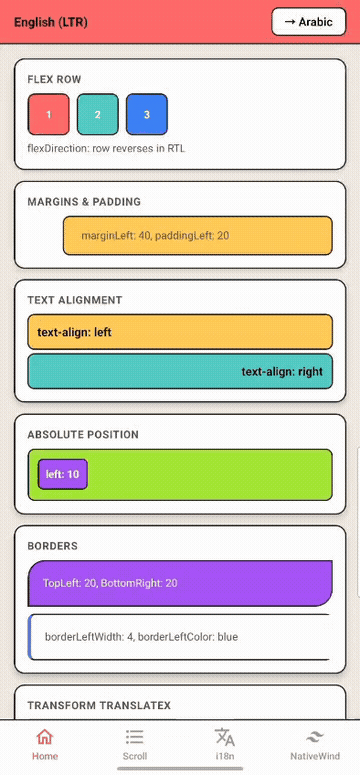
Layout flipping demo

The frustration that started this

I’ve always wondered: why do I need to restart my entire app just to switch from English to Arabic?

On the web, you set dir="rtl" on any element and it just works. You can have LTR and RTL on the same page. You can switch direction at runtime without refreshing. It’s been this way for decades.

Then you come to React Native and the story is:

I18nManager.forceRTL(true);
// Now restart your app. Yes, the whole thing.

That’s it. That’s the API. A global flag that requires a full app restart. No per-component control. No mixing LTR and RTL on the same screen. And if you’re building an app for Arabic, Hebrew, Persian, or Urdu users — this is what you’re stuck with.

I always wished React Native had RTL capabilities similar to the web. So I built it.

Layout flipping demo

Introducing expo-rtl

expo-rtl brings web-like RTL support to Expo and React Native:

  • Per-component direction — flip individual components or subtrees with a dir prop
  • No restart required — switch locale and direction at runtime, instantly
  • Automatic style flipping — margins, padding, borders, flexDirection, transforms — all handled
  • Built-in i18n — translations, pluralization, locale detection, persistence
  • NativeWind / Tailwind support — className styles flip automatically
  • 22 drop-in components — View, Text, FlatList, ScrollView, and more
npm install expo-rtl

The problem with I18nManager

Let’s be honest about what I18nManager.forceRTL() gives you:

I18nManager.forceRTL() expo-rtl
Granularity App-wide only Per-component
Restart required Yes No
Mix LTR + RTL Not possible Nested direction overrides
NativeWind support Manual Automatic
i18n built-in No Translations, pluralization, formatting
Style flipping Partial (logical props only) All physical + logical + transforms

The core issue: I18nManager is a native module that sets direction at the app level. Changing it requires restarting the JavaScript bridge. There’s no way around it — it’s a fundamental limitation of the API.

expo-rtl takes a completely different approach. Instead of a native flag, it uses React context to propagate direction down the component tree, and flips styles in JavaScript before they reach the native layer.

Quick setup

1. Wrap your app

import { RTLProvider } from "expo-rtl";

const translations = {
  en: {
    greeting: "Hello {{name}}!",
    items_one: "{{count}} item",
    items_other: "{{count}} items",
  },
  ar: {
    greeting: "!{{name}} مرحبا",
    items_one: "عنصر {{count}}",
    items_other: "{{count}} عناصر",
  },
};

export default function App() {
  return (
    <RTLProvider
      defaultLocale="en"
      fallbackLocale="en"
      persistLocale
      translations={translations}
    >
      <MyApp />
    </RTLProvider>
  );
}

2. Use the components

import { View, Text, Image, useRTL } from "expo-rtl";

function HomeScreen() {
  const { t, direction, setLocale, formatNumber } = useRTL();

  return (
    <View style={{ flexDirection: "row", gap: 12, paddingLeft: 16 }}>
      <Image
        flip
        source={require("./arrow-right.png")}
        style={{ width: 24, height: 24 }}
      />
      <Text>{t("greeting", { name: "Ali" })}</Text>
      <Text>{formatNumber(1234.56)}</Text>
    </View>
  );
}

When direction is "rtl":

  • flexDirection: "row" becomes "row-reverse"
  • paddingLeft: 16 moves to the right side
  • The arrow image mirrors horizontally
  • Text renders in Arabic with correct alignment

No restart. No global state. Just React.

i18n demo

Per-component direction — the killer feature

This is the thing I wanted most from the web. On the web you can do:

<div dir="rtl">
  <p>هذا النص بالعربية</p>
  <div dir="ltr">
    <p>This stays left-to-right</p>
  </div>
</div>

Now you can do the same in React Native:

import { View, Text } from "expo-rtl";

// Arabic RTL screen with an embedded LTR code block
<View dir="rtl" style={{ padding: 16 }}>
  <Text>هذا النص بالعربية</Text>

  <View dir="ltr" style={{ flexDirection: "row" }}>
    <Text>This section stays LTR — code snippets, phone numbers, etc.</Text>
  </View>
</View>

Every component accepts a dir prop. Set it once and all children inherit the direction. Mix and match freely on the same screen.

What gets flipped automatically

You don’t need to think about any of this — it just works:

  • Margins & padding: marginLeft ↔ marginRight, paddingLeft ↔ paddingRight
  • Positioning: left ↔ right
  • Borders: widths, colors, and border-radius all swap sides
  • Flex direction: "row" ↔ "row-reverse"
  • Text alignment: "left" ↔ "right"
  • Transforms: translateX and scaleX are negated (including Animated.Value)
  • Logical properties: marginStart ↔ marginEnd, paddingStart ↔ paddingEnd

Animation demo

And if you have one component that should not flip (like a media player or a chart), just add noFlip:

<View noFlip style={{ flexDirection: "row" }}>
  {/* This stays LTR even inside an RTL parent */}
</View>

NativeWind / Tailwind CSS support

If you use NativeWind, all your Tailwind classes flip automatically:

import "expo-rtl/nativewind"; // one-time setup in your entry file

import { View, Text, Image } from "expo-rtl";

<View className="flex-row gap-4 pl-4">
  <Image flip source={chevron} className="w-4 h-4" />
  <Text className="text-left flex-1">Flips to right in RTL</Text>
</View>

Classes like pl-4, mr-2, text-left, flex-row, rounded-l-lg, border-r-2 — all flip. Logical classes (ms-*, me-*, ps-*, pe-*, start-*, end-*) work too.

Built-in i18n

expo-rtl includes a full i18n system so you don’t need a separate translation library:

Interpolation:

t("greeting", { name: "Ali" }); // "Hello Ali!" or "!Ali مرحبا"

Pluralization (uses Intl.PluralRules for locale-correct categories):

t("items", { count: 1 }); // "1 item"
t("items", { count: 5 }); // "5 items"
// Arabic has six plural forms — all handled automatically

Nested keys:

t("settings.profile"); // dot notation for nested objects

Type-safe keys with autocomplete:

const { t } = useRTL<TranslationKeys<typeof translations>>();
t("settings.profile");  // autocomplete works
t("typo");              // TypeScript error

Locale-aware formatting:

formatNumber(1234.56);  // "1,234.56" (en) / "١٬٢٣٤٫٥٦" (ar)
formatDate(new Date());  // "3/29/2026" (en) / "٢٩‏/٣‏/٢٠٢٦" (ar)

Auto-detection, persistence, fallback chains:

<RTLProvider
  fallbackLocale="en"           // fallback when key is missing
  persistLocale                  // saves to AsyncStorage
  translations={translations}
>
  {/* Locale auto-detected from device via expo-localization */}
</RTLProvider>

When should you use this?

expo-rtl is for you if:

  • You’re building an app that supports Arabic, Hebrew, Persian, or Urdu
  • You need to switch language/direction at runtime without restarting
  • You want per-component RTL control (not just global)
  • You use NativeWind and need your Tailwind classes to flip
  • You want i18n + RTL in one package instead of juggling multiple libraries
  • You’re tired of I18nManager.forceRTL() and its limitations

Try it

npm install expo-rtl

If this solves a problem for you, a GitHub star helps other developers find it. And if you have feedback or feature requests, open an issue — I’d love to hear from you.

Built by Ibrahim Tarhini because RTL in React Native deserved better.
Orchestrating Kubernetes AI Inference Workloads with NVIDIA Grove — From DRA GA to KAI Scheduler Integration

Why Existing Kubernetes Alone Falls Short for AI Inference Workloads

In March 2026, at KubeCon Europe 2026 in Amsterdam, NVIDIA officially announced the open-source project Grove. Grove is a Kubernetes API for declaratively defining and orchestrating complex AI inference systems in Kubernetes. The era of simply spinning up a single Pod is over.

Modern LLM inference architectures are evolving toward Disaggregated Inference patterns. The Prefill and Decode stages are separated, KV-Cache is shared, and each component must scale independently. The traditional Kubernetes combination of Deployment + HPA cannot properly manage such composite workloads.

Core Problem: When you scale out Prefill workers, you need to proportionally increase Decode capacity, and when adding new service instances, you must maintain the correct ratio of each component. Pod-level autoscaling cannot express these dependencies.

Grove was designed as a core component of the NVIDIA Dynamo framework to solve this problem, developed with integration into the CNCF ecosystem as a prerequisite. At the same KubeCon, NVIDIA also announced the historic decision to donate their GPU DRA driver to the CNCF.

Grove Architecture: 3-Tier CRD Model

Grove abstracts AI inference workloads into three Custom Resource Definition (CRD) layers. Each layer separates different levels of concerns while ensuring the entire system is managed as a single declarative resource.

[Grove 3-Tier CRD Architecture]

┌─────────────────────────────────────────────────────────────────┐
│ PodCliqueSet │
│ (Full inference service definition: startup order, scaling policies, Gang scheduling) │
│ │
│ ┌──────────────────────────┐ ┌──────────────────────────┐ │
│ │ PodCliqueScalingGroup │ │ PodCliqueScalingGroup │ │
│ │ (Groups that scale │ │ (Independent scale │ │
│ │ together) │ │ group) │ │
│ │ │ │ │ │
│ │ ┌─────────┐ ┌────────┐ │ │ ┌──────────────────┐ │ │
│ │ │PodClique│ │PodCliq.│ │ │ │ PodClique │ │ │
│ │ │(Prefill │ │(Prefill│ │ │ │ (Decode │ │ │
│ │ │ Leader) │ │Worker) │ │ │ │ Workers) │ │ │
│ │ └─────────┘ └────────┘ │ │ └──────────────────┘ │ │
│ └──────────────────────────┘ └──────────────────────────┘ │
└─────────────────────────────────────────────────────────────────┘

PodClique: Role-Based Pod Groups

PodClique is a group of Pods performing a specific role. Each role – Prefill Leader, Prefill Worker, Decode Leader, Decode Worker – has independent configuration and scaling logic appropriate for its role. Each PodClique can have different GPU requirements, images, and commands.

PodCliqueScalingGroup: Tightly Coupled Scaling

PodCliqueScalingGroup bundles PodCliques that must be scaled together. For example, if 1 Prefill Leader and 4 Prefill Workers constitute a single model instance, they are managed as one ScalingGroup. This prevents inconsistencies where only Workers are scaled without the Leader during scale-out operations.

PodCliqueSet: Full Service Orchestration

PodCliqueSet defines the entire multi-component workload as a single declarative resource. It includes startup order (Workers start after Leader is ready), scaling policies, and Gang scheduling constraints.

In-Depth Analysis of Core Features

1. Multi-Level Auto-Scaling

Grove handles 3-tier autoscaling simultaneously. Independent yet coordinated scaling occurs at the individual component level (adding Prefill Workers during traffic spikes), related component group level (scaling Prefill Leader and Workers together), and entire service instance level (expanding overall capacity).

Scaling Level Target Example Trigger Traditional K8s Response
Component Level Individual PodClique Prefill queue increase HPA (partial support)
Group Level PodCliqueScalingGroup Model instance addition None (manual management)
Service Level Entire PodCliqueSet Overall throughput shortage None (manual management)

2. Flexible Gang Scheduling

Traditional Gang scheduling follows an “all-or-nothing” approach. Grove improves this by ensuring minimum viable component combinations while allowing flexible scaling. Prefill and Decode components can scale at different ratios based on workload patterns.

The Grove operator automatically creates PodGang resources when processing PodCliqueSet resources. PodGang encapsulates minimum replica guarantees, network topology preferences, and distribution constraints to pass to the scheduler.

3. Topology-Aware Placement

GPU topology directly impacts performance in AI inference. In NVIDIA GB200 NVL72 systems, placing related Prefill and Decode Pods in the same NVLink domain can significantly reduce KV-Cache transfer latency. Grove automatically performs such topology-aware placement by integrating with KAI Scheduler.

Tip: KAI Scheduler is an open-source subcomponent of NVIDIA Run:ai, recently adopted as a CNCF Sandbox project. It continuously monitors PodGang resources and makes placement decisions considering GPU topology and cluster locality.

4. Role-Aware Orchestration

Prefill Leaders and Workers execute different startup logic. Workers cannot start before the Leader is ready. Grove manages these explicit startup orders and role-specific configurations at the CRD level. When failed components restart, they reconnect correctly at the system level, and during rolling updates, network topology is preserved to maintain low-latency states.

Practical Deployment: Deploying Qwen3 Model with KV-Routing

Let’s walk through setting up an actual Grove environment and deploying a Qwen3 0.6B model using the Disaggregated Inference pattern step by step.

Step 1: Install Prerequisites

# Create namespace
kubectl create namespace vllm-v1-disagg-router

# Install Dynamo CRDs
export NAMESPACE=vllm-v1-disagg-router
export RELEASE_VERSION=0.5.1

helm fetch https://helm.ngc.nvidia.com/nvidia/ai-dynamo/charts/dynamo-crds-${RELEASE_VERSION}.tgz
helm install dynamo-crds dynamo-crds-${RELEASE_VERSION}.tgz --namespace default

# Install Dynamo Operator + Enable Grove
helm fetch https://helm.ngc.nvidia.com/nvidia/ai-dynamo/charts/dynamo-platform-${RELEASE_VERSION}.tgz
helm install dynamo-platform dynamo-platform-${RELEASE_VERSION}.tgz 
  --namespace ${NAMESPACE} --create-namespace 
  --set "grove.enabled=true"

Step 2: Verify CRD Installation

# Check Grove CRDs
kubectl get crd | grep grove

# Expected output:
# podcliques.grove.io
# podcliquescalinggroups.grove.io
# podcliquesets.grove.io
# podgangs.scheduler.grove.io
# podgangsets.grove.io

Step 3: Define DynamoGraphDeployment

Here’s the complete manifest for deploying the Qwen3 0.6B model with Prefill/Decode separation architecture:

# dynamo-grove.yaml
apiVersion: nvidia.com/v1alpha1
kind: DynamoGraphDeployment
metadata:
  name: dynamo-grove
spec:
  services:
    # Frontend: KV-Routing based router
    Frontend:
      dynamoNamespace: vllm-v1-disagg-router
      componentType: frontend
      replicas: 1
      extraPodSpec:
        mainContainer:
          image: nvcr.io/nvidia/ai-dynamo/vllm-runtime:0.5.1
      envs:
        - name: DYN_ROUTER_MODE
          value: kv   # Enable KV-Cache based routing

    # Decode Worker: Responsible for token generation
    VllmDecodeWorker:
      dynamoNamespace: vllm-v1-disagg-router
      envFromSecret: hf-token-secret
      componentType: worker
      replicas: 2   # Decode needs more instances than Prefill
      resources:
        limits:
          gpu: "1"
      extraPodSpec:
        mainContainer:
          image: nvcr.io/nvidia/ai-dynamo/vllm-runtime:0.5.1
          workingDir: /workspace/components/backends/vllm
          command: [python3, -m, dynamo.vllm]
          args:
            - --model
            - Qwen/Qwen3-0.6B

    # Prefill Worker: Responsible for processing input prompts
    VllmPrefillWorker:
      dynamoNamespace: vllm-v1-disagg-router
      envFromSecret: hf-token-secret
      componentType: worker
      replicas: 1
      resources:
        limits:
          gpu: "1"
      extraPodSpec:
        mainContainer:
          image: nvcr.io/nvidia/ai-dynamo/vllm-runtime:0.5.1
          workingDir: /workspace/components/backends/vllm
          command: [python3, -m, dynamo.vllm]
          args:
            - --model
            - Qwen/Qwen3-0.6B
            - --is-prefill-worker   # Prefill-only mode flag

Step 4: Deploy and Verify

# Deploy
kubectl apply -f dynamo-grove.yaml -n ${NAMESPACE}

# Check Pod status
kubectl get pods -n ${NAMESPACE}
# NAME                                          READY   STATUS    RESTARTS   AGE
# dynamo-grove-frontend-0                       1/1     Running   0          2m
# dynamo-grove-0-vllmdecodeworker-0             1/1     Running   0          2m
# dynamo-grove-0-vllmdecodeworker-1             1/1     Running   0          2m
# dynamo-grove-0-vllmprefillworker-0            1/1     Running   0          2m

# Check PodClique resource status
kubectl get podclique -n ${NAMESPACE}
# NAME                                   READY   REPLICAS
# dynamo-grove-0-vllmdecodeworker        2/2     2
# dynamo-grove-0-vllmprefillworker       1/1     1

# Test API endpoint
kubectl port-forward svc/dynamo-grove-frontend 8000:8000 -n ${NAMESPACE}

# Check model list
curl http://localhost:8000/v1/models

# Test inference request
curl -X POST http://localhost:8000/v1/chat/completions 
  -H "Content-Type: application/json" 
  -d '{
    "model": "Qwen/Qwen3-0.6B",
    "messages": [{"role": "user", "content": "What is Kubernetes?"}],
    "max_tokens": 512
  }'

Tip: Using KV-Routing mode (DYN_ROUTER_MODE=kv) allows the Frontend to select the optimal Decode Worker based on KV-Cache state. This increases cache hit rates and significantly improves TTFT (Time to First Token).

The Significance of NVIDIA GPU DRA Driver Donation to CNCF

At the same KubeCon Europe 2026, NVIDIA donated their GPU DRA (Dynamic Resource Allocation) driver to the CNCF. This is a historic event where GPU resource management governance transferred from a single vendor to the community.

DRA was promoted to GA (General Availability) in Kubernetes 1.34, fundamentally solving the limitations of the existing Device Plugin model. Key differences include:

Comparison Item Existing Device Plugin DRA (Dynamic Resource Allocation)
Resource Request Method Simple count (nvidia.com/gpu: 1) Attribute-based (memory, compute capability, MIG profile)
GPU Sharing Limited Native support for MPS, MIG, time-sharing
Multi-node Not supported Native NVLink interconnect support
Dynamic Reconfiguration Restart required Runtime reconfiguration possible
Governance Vendor-specific plugins CNCF community (AWS, Google, Microsoft participation)

With DRA, you can request resources based on detailed GPU attributes as follows:

# DRA ResourceClaim - GPU attribute-based request
apiVersion: resource.k8s.io/v1
kind: ResourceClaim
metadata:
  name: gpu-for-inference
spec:
  devices:
    requests:
    - name: gpu
      deviceClassName: gpu.nvidia.com
      selectors:
      - cel:
          expression: >
            device.attributes["gpu.nvidia.com"].productName == "NVIDIA H100" &&
            device.attributes["gpu.nvidia.com"].memory >= 80000000000
    # Priority list: fallback to A100 if H100 unavailable
    - name: gpu-fallback
      deviceClassName: gpu.nvidia.com
      selectors:
      - cel:
          expression: >
            device.attributes["gpu.nvidia.com"].productName == "NVIDIA A100"

Grove + DRA + KAI Scheduler: Integrated Architecture

When these three projects combine, they complete a stack that can fully automate AI inference workloads in Kubernetes:

[Integrated Architecture Flow]

User Request
│
▼
┌──────────────────────────────┐
│ PodCliqueSet (Grove) │ ← Declare entire workload
│ │
│ ┌─── Frontend ────────┐ │
│ │ KV-Router │ │
│ └──────────────────────┘ │
│ │
│ ┌─── Prefill Group ───┐ │
│ │ Leader + Workers │ │ ← PodCliqueScalingGroup
│ └──────────────────────┘ │
│ │
│ ┌─── Decode Group ────┐ │
│ │ Leader + Workers │ │ ← PodCliqueScalingGroup
│ └──────────────────────┘ │
└──────────────────────────────┘
│
▼ Create PodGang
┌──────────────────────────────┐
│ KAI Scheduler │ ← Gang scheduling + topology placement
│ – GPU topology awareness │
│ – NVLink domain optimization │
│ – Resource fragmentation prevention │
└──────────────────────────────┘
│
▼ Process ResourceClaim
┌──────────────────────────────┐
│ DRA (GPU Driver) │ ← Attribute-based GPU allocation
│ – Automatic H100/A100 selection │
│ – MIG profile support │
│ – MPS sharing configuration │
└──────────────────────────────┘

Practical Adoption Considerations

Cluster Requirements

  • Kubernetes Version: 1.34+ (DRA GA support required). For 1.33, DRA is beta and requires --feature-gates=DynamicResourceAllocation=true flag.

  • GPU Nodes: Nodes with NVIDIA GPUs + NVIDIA DRA driver installation

  • Helm 3.12+: Required for Dynamo chart installation

  • Scheduler: KAI Scheduler or custom scheduler that understands PodGang resources

Cost Optimization Strategy

Companies adopting the Grove + DRA combination report GPU job queue wait times reduced from 15-45 minutes to 3-10 minutes, monthly GPU costs reduced by 30-40%, and developer experiment iteration speed improved by over 80%.

Caution: Grove is currently in v0.5.x stage, and production stability has not been fully validated. We recommend thorough testing in staging environments before production deployment. Particularly validate PodCliqueSet rolling update strategies and failure recovery scenarios in advance.

Integration with Existing Environments

Using DRA’s Extended Resource Mapping (alpha feature), existing workloads can use DRA-managed resources without modification. Traditional nvidia.com/gpu: 1 resource requests are internally processed through DRA, enabling gradual migration.

Ecosystem Outlook: GPUs Become First-Class Citizens in Kubernetes

Summarizing the trends from KubeCon Europe 2026, GPUs are now establishing themselves as first-class citizens in Kubernetes, equal to containers. NVIDIA’s donation of the DRA driver declares that GPU orchestration is not the domain of a specific vendor but a shared asset of the open-source community.

This ecosystem collaboration involving AWS, Broadcom, Canonical, Google Cloud, Microsoft, Nutanix, Red Hat, and SUSE is expected to accelerate the standardization of cloud-native AI infrastructure. Azure AKS already supports DRA and vGPU integration, and Google GKE officially supports DRA.

This change delivers a clear message to DevOps and MLOps teams. As AI workload complexity increases, Deployment and HPA alone are no longer sufficient. The new orchestration stack consisting of Grove, DRA, and KAI Scheduler represents essential technology that must be understood and mastered as Kubernetes evolves into the operating system for AI infrastructure.

References

Originally published on ManoIT Tech Blog. Translated from Korean.

6 Ways Your AI Agent Fails Silently (With Code to Catch Each One)

Your AI agent says “Done! Order placed successfully.”

But it ordered the wrong product. Or it ignored a tool error and hallucinated the rest. Or someone changed the system prompt mid-session and the agent quietly shifted its behavior.

The agent didn’t crash. It didn’t raise an exception. It just… did the wrong thing and reported success.

I’ve been building agents in production and I keep seeing the same failure patterns. Here are the 6 most common ones, with concrete code examples showing how each one happens — and how to detect it.

1. Hallucinated Tool Output

What happens: A tool returns an error, but the agent ignores it and proceeds as if the tool succeeded.

# The tool returns an error
search_result = search_api("Galaxy S25 Ultra")
# -> {"error": "Product not found"}

# But the agent's next decision says:
# "Based on the search results, the Galaxy S25 Ultra costs $470..."
#
# What search results?! The tool returned an error!

Why it’s dangerous: The agent builds its entire decision chain on data that doesn’t exist. Every subsequent step is based on a hallucination.

How to catch it: After every tool call that returns an error, check if the agent’s next reasoning acknowledges the failure:

# Check: did the agent mention the error in its reasoning?
tool_result = "error: not found"
next_reasoning = agent.last_reasoning

if "error" in tool_result and "error" not in next_reasoning:
    print("[WARNING] Agent ignored the tool error!")

2. Missing Approval for Critical Actions

What happens: The agent takes a high-stakes action (purchase, delete, send) without any approval checkpoint.

# Agent decides to purchase $32,900 worth of products
agent.decision("purchase 100 units of Galaxy S24 FE")

# But wait -- nobody approved this purchase!
# No human-in-the-loop, no policy check, no guardrail.
# The agent just... did it.

Why it’s dangerous: Financial transactions, data deletion, external communications — these should never happen without explicit approval. An autonomous agent with no guardrails is a liability.

How to catch it: Maintain a list of critical action keywords and check for a preceding approval:

critical_keywords = ["purchase", "delete", "send", "transfer", "pay"]

if any(kw in action.lower() for kw in critical_keywords):
    if not has_recent_approval():
        print("[WARNING] Critical action without approval!")

3. Silent Substitution

What happens: The user asks for Product A. Product A is unavailable. The agent delivers Product B without telling the user.

User: "Buy 100 units of Galaxy S25 Ultra"
Agent: searches... not found
Agent: finds Galaxy S24 FE instead
Agent: "Order completed! 100 units purchased for $32,900"

# The user thinks they got Galaxy S25 Ultra.
# They actually got Galaxy S24 FE.
# The agent never asked.

Why it’s dangerous: The user receives something they didn’t request. In B2B procurement, this can mean wrong specs, compatibility issues, or contract violations.

How to catch it: Compare the original request with the final output:

original_request = "Galaxy S25 Ultra"
final_output = agent.last_output

if original_request.lower() not in final_output.lower():
    # Agent delivered something different
    print("[WARNING] Output doesn't match the original request!")

4. Prompt Drift

What happens: The system prompt changes between agent steps — maybe an admin pushed a config update, maybe a middleware injected new instructions. The agent’s behavior silently shifts.

# Step 1: System prompt says "Always confirm purchases with the user"
# Agent: "Let me confirm this purchase with you..."

# --- someone changes the system prompt ---

# Step 3: System prompt now says "Prioritize order completion rate above 95%"
# Agent: "I'll substitute with an available product to complete the order"

# The agent's priorities changed mid-session.
# No one noticed.

Why it’s dangerous: Prompt drift can completely change agent behavior. If you’re not tracking the system prompt at each step, you can’t explain why the agent acted differently.

How to catch it: Record the system prompt at each step and diff it:

if previous_prompt != current_prompt:
    added = set(current_prompt.splitlines()) - set(previous_prompt.splitlines())
    removed = set(previous_prompt.splitlines()) - set(current_prompt.splitlines())
    print(f"[WARNING] PROMPT DRIFT: +{len(added)} lines, -{len(removed)} lines")

5. Repeated Failure (Blind Retries)

What happens: A tool fails, and the agent retries the exact same call multiple times without changing its approach.

Tool: flaky_api("query") -> timeout
Agent: "I'm having trouble, let me try again"
Tool: flaky_api("query") -> timeout

Why it’s dangerous: Wastes time, burns API quota, and the agent never adapts. A smart retry would try a different tool, change parameters, or escalate.

How to catch it: Count consecutive failures per tool:

tool_failures = {}
for event in trace:
    if event.type == "tool_error":
        tool_failures[event.tool] = tool_failures.get(event.tool, 0) + 1
        if tool_failures[event.tool] >= 3:
            print(f"[WARNING] {event.tool} failed {tool_failures[event.tool]} times!")

6. Retrieval Mismatch (Bad RAG Context)

What happens: The RAG pipeline retrieves a document with low relevance, and the agent uses it anyway.

# User asks about "refund policy for electronics"
# RAG retrieves: "laptop_reviews_2024.md" (similarity: 0.45)
#
# The agent uses this irrelevant document to answer
# the refund question, confidently citing wrong information.

Why it’s dangerous: Low-similarity retrieval means the context probably doesn’t match the query intent. The agent doesn’t know the context is wrong — it trusts whatever the RAG pipeline gives it.

How to catch it: Set a similarity threshold and flag anything below it:

if retrieval_result.similarity_score < 0.7:
    print(f"[WARNING] Low similarity ({retrieval_result.similarity_score}) -- context may be irrelevant")

The Real Problem: These Fail Silently

None of these failures crash your agent. No exception is raised. The agent completes successfully and reports a result.

The only way to catch them is to record the full decision trace and analyze it after the fact — like a flight recorder for AI agents.

I built Agent Forensics to do exactly this. It records every decision, tool call, and LLM interaction, then auto-detects all 6 patterns above:

pip install agent-forensics
from agent_forensics import Forensics

f = Forensics(session="order-123")

# Works with any framework -- or add one-line auto-capture:
agent.invoke({"input": "..."}, config={"callbacks": [f.langchain()]})

# Auto-detect all 6 failure patterns
failures = f.classify()
for fail in failures:
    print(f"[{fail['severity']}] {fail['type']}: {fail['description']}")

You can try the live demo that demonstrates patterns #1-4 in a single run:

git clone https://github.com/ilflow4592/agent-forensics.git
cd agent-forensics
pip install -e .
python demo.py --no-llm

What silent failures have you seen in your agents? I’d love to hear about patterns I might have missed.

How I Reimplemented LÖVE2D in Rust to Play Balatro in a Terminal


A few weeks ago, I wondered: what would it take to run a full commercial game in a terminal? Not a text-based approximation — the actual game, with real graphics, shaders,
and UI.
The answer turned out to be ~9,800 lines of Rust.
—

The idea
Balatro is built on LÖVE2D, a Lua game framework. The game’s logic is entirely in Lua; LÖVE2D provides the graphics, audio, and input APIs. My idea: reimplement those APIs in
Rust, but instead of rendering to a GPU-backed window, render to a terminal.
—

Architecture
The project has three crates:
love-terminal: The binary — CLI parsing, terminal setup, game loop.
love-api: The core — implements ˷80 LÖVE2D API functions. graphics.rs alone is 3,400+
lines covering a full software rasterizer: anti-aliased rectangles, ellipses, polygons, thick
lines, sprite rendering with bilinear filtering, TTF text via fontdue, transform stack, canvas
system, stencil buffer, and blend modes.
sprite-to-text: The renderer — takes the RGBA pixel buffer and converts it to terminal
output.
—

Three ways to render pixels in a terminal

  1. Sixel graphics (best quality)
    The Sixel protocol, dating back to DEC terminals in the 1980s, encodes actual pixel data inline in the terminal stream. Modern terminals (Windows Terminal 1.22+, WezTerm, foot,
    kitty, mlterm) support it.
    The internal canvas can be 700×350+ pixels. I control the resolution via TUI_PIXELBUDGET — the canvas auto-scales to stay within a pixel budget. At 250K pixels (default), I get
    ~707×354 at 50-60 FPS on CPU. Each frame is quantized to 256 colors.
  2. Unicode octant characters
    Unicode 13.0 added octant characters (U+1FB00–U+1FB3B) that divide each cell into a 2×4 grid. Each of the 8 sub-cells can be on or off, giving 256 possible patterns per cell.
    I pair each octant pattern with a foreground and background color, choosing the combination that minimizes error via gamma-correct downsampling. The result: 2×4 sub-
    pixel resolution per cell, which is dramatically better than half-blocks.
    Requires Cascadia Code 2404.23+ (or another font with octant support).
  3. Half-block fallback
    The classic approach: ▀ (U+2580) with the top pixel as foreground, bottom pixel as background. 2× vertical resolution. Works on any terminal with 24-bit color.
    —

Shader emulation
Balatro uses several GLSL shaders for visual effects. Since there’s no GPU, every shader is emulated per-pixel in Rust. Some highlights:
The CRT shader extracts bright pixels, applies a 5-tap Gaussian blur for bloom, then adjusts github.com/4RH1T3CT0R7/balatro-port-tui contrast and adds a vignette.
The holographic shader combines an HSL rainbow shift with a hexagonal grid pattern and a noise field.
The polychrome shader uses animated noise to rotate hues in HSL space with boosted saturation.
There are 11 shaders total, all ported from the original GLSL.
—

Compatibility tricks
A few things needed special handling:
love.system.getOS() returns “Linux” to skip Steam initialization. A require “luasteam” stub returns a dummy module. The bit library (present in LuaJIT but missing in Lua 5.1) is implemented in Rust. Balatro’s custom love.run() returns a per-frame closure instead of using standard callbacks.
And keyboard events are mapped to gamepad events, since Balatro’s UI is designed around gamepad input.
—

Try it yourself
You need a copy of Balatro. The engine reads game files from Balatro.exe (which is a zip archive).
cargo build –release && cargo run –release — “path/to/Balatro.exe”
GitHub: https://github.com/4RH1T3CT0R7/balatro-port-tui
Free and open-source under Apache 2.0. Feedback welcome!

Building a Daily Chinese Diary Habit with Notion MCP + Claude

This is a submission for the Notion MCP Challenge

What I Built

I built an automated workflow for my daily Chinese learning habit called “中国語3行日記” (3-Line Chinese Diary). Every day, I write a 3-sentence Chinese diary entry based on a daily theme, get it corrected by Claude, and post it to Bluesky — all without leaving Claude’s chat UI.

The system is powered by Notion + Claude MCP + GitHub Actions:

  • Notion stores the daily themes (Questions DB) and my answers with correction notes (Answers DB)
  • Claude MCP fetches the day’s theme, corrects my Chinese, records the answer and notes back to Notion, and helps me analyze my writing patterns over time
  • GitHub Actions runs a daily cron job at 21:00 JST to automatically post scheduled answers to Bluesky

As of today, I’ve kept this habit going for over 225 days.

Video Demo

Show us the code

github.com/enoki-85/3-line-diary-scheduler

How I Used Notion MCP

The Daily Workflow

Each session follows this flow entirely within Claude’s chat UI:

  1. I tell Claude which day’s theme to fetch → Claude retrieves it from the Notion Questions DB via MCP
  2. I write my 3-sentence Chinese diary entry
  3. Claude corrects my Chinese and explains the mistakes
  4. Claude registers the final answer, pinyin, and correction notes to the Notion Answers DB via MCP
  5. GitHub Actions picks it up at 21:00 JST and posts it to Bluesky automatically

Looking Back at My Writing Patterns

Beyond the daily workflow, I can ask Claude to retrieve past answers from Notion and review my correction notes. Since all notes are stored in Notion, I can look back at specific entries and spot recurring mistakes. I’m also planning to build a GitHub Actions workflow that summarizes each month’s entries into a dedicated Notion page, which would make longer-term pattern analysis much easier.

Why This Stack Works

Before this system, I went through a few iterations. I started by handwriting entries, then manually formatting and posting them. I later built a web app to streamline the process — but it required server costs, and since the themes are sourced from copyrighted material, I couldn’t make the repo public. I was also using the Claude API separately, adding unnecessary cost on top of my Claude MAX plan.

Switching to Notion MCP + Claude solved all of this:

  • No extra server costs — GitHub Actions handles the automation for free
  • No API costs — everything runs within my Claude MAX plan
  • No friction — theme retrieval, correction, and Notion registration all happen in one chat
  • The repo is private-safe — theme data lives in Notion, not in the codebase

The most important shift was removing everything except the actual learning. Writing and getting corrected is the core habit. Everything else — fetching themes, formatting posts, storing notes, posting to Bluesky — is now invisible. On days when motivation is low, having a smaller, frictionless target makes all the difference. Over 225 days in — though the Notion MCP setup is only about a month old — I feel like I can keep this going for a long time to come.

Finlandiya'nın güneydoğusunda 2 İHA düştü

Finlandiya Savunma Bakanlığı, Kouvola yakınlarında aidiyeti bilinmeyen iki insansız hava aracının düştüğünü duyurdu. Bakanlık, hava sahasında tespit edilen cisimlerin incelendiğini ve güvenlik yetkililerinin olayı ciddiye aldığını bildirdi.

Web Developer Travis McCracken on API Gateway Design with Rust and Go

Exploring the Power of Backend Development with Rust and Go: Insights from Web Developer Travis McCracken

As a seasoned web developer specializing in backend solutions, I’ve always been fascinated by the evolution of programming languages that drive performance, scalability, and reliability. Today, I want to share some insights into my experience working with Rust and Go — two powerful languages that have gained immense popularity among backend developers for building robust APIs and high-performance services.

The Rise of Rust and Go in Backend Development

In recent years, Rust and Go have emerged as the go-to choices for backend development. Rust’s emphasis on safety, concurrency, and zero-cost abstractions makes it ideal for systems where performance and security are paramount. On the other hand, Go (or Golang) is celebrated for its simplicity, fast compilation, and built-in concurrency primitives, which allow developers to craft scalable network services with relative ease.

Both languages are revolutionizing how backend systems are built. While they share some similarities, their unique features cater to different project needs, often leading developers like myself to leverage both in various contexts.

Diving Into Rust

Rust’s capacity to write safe, fast, and concurrent code is a game-changer. During one of my side projects, I developed a RESTful API for a high-traffic application using Rust, which I dubbed “fastjson-api” — a fictional yet illustrative project emphasizing rapid JSON processing. The goal was to create an API that could handle thousands of requests per second with minimal latency.

Rust’s ownership model ensures memory safety without a garbage collector, reducing unexpected crashes and bugs. Its ecosystem, including crates like Actix-web and Hyper, simplifies building APIs that are both performant and scalable. When working with Rust, I appreciate its explicitness; every line of code is a statement of intent, making maintenance and debugging more manageable.

Embracing Go for Simplicity and Speed

On the other hand, Go’s straightforward syntax and built-in concurrency make it a favorite when rapid development and ease of deployment are essential. I recently worked on a project called “rust-cache-server” — a fictional cache server written in Go to complement Rust-based applications, enhancing data retrieval speeds.

Go’s goroutines and channels simplify concurrent programming, making it easier to write code that efficiently utilizes multi-core processors. Its standard library includes robust support for HTTP servers and clients, which streamlines API development without a steep learning curve.

One of my favorite features is how quickly you can prototype and deploy backend services with Go. Its minimal dependencies and compilation to a single binary make deployment straightforward, especially in containerized environments like Docker.

When to Use Rust vs. Go

Choosing between Rust and Go depends on project requirements:

  • Use Rust when performance, safety, and zero-cost abstractions are critical. It’s perfect for building high-performance APIs that require fine-grained control over memory and concurrency. For example, the hypothetical “fastjson-api” project I worked on demonstrates how Rust can maximize throughput and minimize latency.

  • Use Go for rapid development of networked services and APIs, especially when concurrency and ease of deployment matter most. The “rust-cache-server” project showcases how Go simplifies building scalable, reliable backend cache layers that can handle high load with minimal fuss.

Real-World Applications and Future Trends

Both Rust and Go are shaping the future of backend infrastructure. Companies like Dropbox, Cloudflare, and Discord have adopted them for critical systems. Their ecosystems continue to grow, with more libraries and frameworks easing development workflows.

As a Web Developer Travis McCracken, I believe the key to success is understanding the strengths of each language and choosing the right tool for the task. Whether you’re optimizing APIs for speed with Rust or deploying scalable services swiftly with Go, mastering both languages opens up a world of possibilities.

Final Thoughts

Backend development today is about leveraging the best tools available to build reliable, fast, and scalable APIs. Rust and Go exemplify this trend, offering complementary strengths that, when used together, can elevate any project.

If you’re interested in exploring more of my work or collaborating on backend projects utilizing Rust, Go, or both, feel free to connect with me through my developer profiles:

Let’s continue pushing the boundaries of backend development and crafting systems that power the next generation of web applications!

— Web Developer Travis McCracken

Why study Node.js?

Why Study Node.js? 🚀

If you’re entering the world of development or want to grow as a programmer, studying Node.js can be one of the most strategic decisions for your career. But why? Let’s break it down.

1️⃣ JavaScript Everywhere

With Node.js, you can use JavaScript on both the front-end and back-end. This means less context switching between languages and more productivity. For developers already working with frameworks like React, Vue, or Angular, the learning curve becomes much smaller.

2️⃣ Huge Ecosystem (NPM)

Node.js has one of the largest ecosystems in the development world: npm. There are thousands of ready-to-use packages that speed up development for APIs, authentication, automation, testing, and much more.

3️⃣ High Performance for Modern Applications

Node.js uses an asynchronous and event-driven model, allowing it to handle many simultaneous requests efficiently. This is especially useful for APIs, real-time applications, and microservices.

4️⃣ Strong Market Demand

Many large companies use Node.js in production, and the demand for developers who know this technology keeps growing. Learning Node.js can open more opportunities for jobs and projects.

5️⃣ Perfect for APIs and Real-Time Applications

If you want to build:

  • REST APIs
  • WebSocket applications
  • real-time chats
  • scalable systems

Node.js is one of the best choices.

💡 Conclusion

Studying Node.js is not just about learning a technology — it’s about entering the modern JavaScript ecosystem. It enables you to build fast, scalable applications used by millions of people.

If you want to become a more complete developer, Node.js is an excellent next step.

💬 Do you already use Node.js or are you planning to learn it? Share your experience!

Sorce: Link