“TUA Astro Hackathon” etkinliği Samsun'da sona erdi
Türkiye Uzay Ajansı’nın desteğiyle düzenlenen TUA Astro Hackathon’un Samsun etabı, 52 takımdan 256 öğrencinin katılımıyla gerçekleşti. Dereceye giren takımlara ödülleri verildi.

 Mert
Mert 
 Türk Telekom, 2025 yılında 921 adet patent başvurusu yaparak Sanayi ve Teknoloji Bakanlığı verilerine göre 2025’te en çok patent başvurusu yapan şirket oldu.
 Apple’ın Swift programlama dili artık Android’i de destekliyor. Bu, dil veya iş akışı değiştirmeden platformlar arası uygulama geliştirmek isteyenler için önemli bir dönüm noktası oluşturuyor.
Base has become one of the fastest-growing Layer 2 networks since Coinbase launched it in August 2023. With over $11 billion in TVL and monthly DEX volumes regularly exceeding $20 billion, Base is now the second-largest Ethereum L2 by transaction count. For developers building trading bots, wallets, or DeFi dashboards on Base, you need a swap API that returns executable calldata for chain ID 8453. This guide compares the 5 best Base chain swap APIs available in 2026, ranked by developer experience, cost, and multi-chain flexibility.
1. Swap API (swapapi.dev)
Swap API is a free DEX aggregator API that supports Base (chain 8453) alongside 45 other EVM networks. It requires no API key, no registration, and no account creation. You send a single GET request with the chain ID, token addresses, amount, and sender, and receive a complete transaction object ready for on-chain submission.
Here is an ETH-to-USDC swap on Base:
curl "https://api.swapapi.dev/v1/swap/8453?tokenIn=0xEeeeeEeeeEeEeeEeEeEeeEEEeeeeEeeeeeeeEEeE&tokenOut=0x833589fCD6eDb6E08f4c7C32D4f71b54bdA02913&amount=1000000000000000000&sender=0xd8dA6BF26964aF9D7eEd9e03E53415D37aA96045"
The response includes expectedAmountOut, minAmountOut (adjusted for slippage), priceImpact, full token metadata, and a tx object with to, data, and value fields. The API handles partial fills by returning a Partial status with adjusted amounts instead of failing, and returns NoRoute when no liquidity path exists.
Key Base token addresses for Swap API:
0xEeeeeEeeeEeEeeEeEeEeeEEEeeeeEeeeeeeeEEeE
0x4200000000000000000000000000000000000006
0x833589fCD6eDb6E08f4c7C32D4f71b54bdA02913
Swap API also covers every other major EVM chain (Ethereum, Arbitrum, Polygon, BSC, Optimism, Avalanche) plus newer networks like Monad, MegaETH, and Berachain. The OpenAPI spec lets you generate typed clients in any language, and the Swagger UI provides interactive testing.
Best for: Developers who want the fastest Base integration with zero setup cost. Ideal for trading bots, AI agents, and multi-chain applications.
2. 1inch API
1inch is the largest DEX aggregator by market share, routing over 59% of EVM aggregator volume. It added Base support in late 2023 and provides swap, quote, and token approval endpoints for chain 8453.
The 1inch Fusion API routes trades through 400+ liquidity sources and uses its Pathfinder algorithm to split orders across pools for minimal slippage. On Base, it aggregates from major DEXs including Uniswap V3, Aerodrome, and BaseSwap.
curl -H "Authorization: Bearer YOUR_API_KEY" "https://api.1inch.dev/swap/v6.0/8453/swap?src=0xEeee...&dst=0x833589fCD6eDb6E08f4c7C32D4f71b54bdA02913&amount=1000000000000000000&from=0xYourAddress"
The trade-off is that 1inch requires registration, an API key, and adherence to rate limits that vary by pricing tier. The free tier is limited, and production usage typically requires a paid plan. Chain support covers 12 networks total.
Best for: Production applications on Base where routing optimization and deep liquidity are priorities and API key management is acceptable.
3. 0x API (Matcha)
The 0x API powers Matcha and is the swap infrastructure behind dozens of wallets and DeFi frontends. It supports Base alongside Ethereum, Polygon, Arbitrum, Optimism, BSC, and Avalanche. Its RFQ (Request for Quote) system sources liquidity from professional market makers in addition to on-chain pools.
const response = await fetch("https://api.0x.org/swap/v1/quote?buyToken=0x833589fCD6eDb6E08f4c7C32D4f71b54bdA02913&sellToken=ETH&sellAmount=1000000000000000000&chain_id=8453", {
  headers: { "0x-api-key": process.env.ZRX_API_KEY }
});
0x discontinued its free tier in 2024 and now requires an API key with paid plans for production usage. The RFQ system can offer better execution on large trades (over $10,000) by tapping institutional market makers, but adds integration complexity compared to simpler GET-based APIs.
Best for: Applications handling large trades on Base where RFQ liquidity from market makers provides better pricing than on-chain pools alone.
4. OpenOcean
OpenOcean aggregates liquidity across 30+ blockchains, including Base, and differentiates itself by supporting both EVM and non-EVM chains like Solana and Tron. The API is free to use without an API key, with reasonable rate limits.
curl "https://open-api.openocean.finance/v3/8453/swap_quote?inTokenAddress=0xEeee...&outTokenAddress=0x833589fCD6eDb6E08f4c7C32D4f71b54bdA02913&amount=1000000000000000000&gasPrice=0.001&slippage=1&account=0xYourAddress"
OpenOcean routes across 1,000+ liquidity pools and supports cross-chain swaps. The broad chain coverage makes it attractive for multi-ecosystem projects, though routing quality on individual chains like Base may not match more focused aggregators. Documentation is adequate but not as polished as 1inch or 0x.
Best for: Multi-ecosystem projects that need both EVM and non-EVM chain support from a single API provider.
5. LI.FI
LI.FI is a bridge and DEX aggregation protocol that combines cross-chain bridging with same-chain swaps. It supports Base alongside 25+ other chains, aggregating from 30+ DEXs and 20+ bridges. The API is free for standard use.
const response = await fetch("https://li.quest/v1/quote?fromChain=8453&toChain=8453&fromToken=0xEeeeeEeeeEeEeeEeEeEeeEEEeeeeEeeeeeeeEEeE&toToken=0x833589fCD6eDb6E08f4c7C32D4f71b54bdA02913&fromAmount=1000000000000000000&fromAddress=0xYourAddress");
LI.FI’s strength is cross-chain swaps. You can swap ETH on Base to USDC on Arbitrum in a single API call, with the protocol handling the bridge step automatically. For same-chain swaps on Base, the extra abstraction layer adds latency compared to single-chain APIs like Swap API.
Best for: Applications where users frequently bridge assets to or from Base and you want bridge + swap unified in one API call.
Comparison Table
| Feature | Swap API | 1inch | 0x | OpenOcean | LI.FI |
|---|---|---|---|---|---|
| API Key Required | No | Yes | Yes | No | No |
| Base Support | Yes | Yes | Yes | Yes | Yes |
| Total EVM Chains | 46 | 12 | 10 | 30+ | 25+ |
| Free Tier | Unlimited | Limited | No | Yes | Yes |
| Cross-Chain | No | No | No | Yes | Yes |
| Response Format | Single GET | REST | REST | REST | REST + SDK |
| Calldata Returned | Yes | Yes | Yes | Yes | Yes |
Why Base Matters for Swap API Developers
Base processed over 100 million transactions in January 2026, making it one of the most active L2 networks. Its low gas fees (typically under $0.01 per swap) and deep Uniswap V3 and Aerodrome liquidity pools make it an attractive chain for automated trading strategies. The network benefits from Coinbase’s distribution, with direct fiat on-ramps from Coinbase wallets to Base, driving consistent user growth.
For developers, Base’s compatibility with standard Ethereum tooling means any swap API that supports chain ID 8453 works with the same libraries (ethers.js, viem, web3.py) you already use on Ethereum mainnet. The only difference is the chain ID and token contract addresses.
Frequently Asked Questions
What is the best free Base chain swap API?
Swap API is the best free Base chain swap API. It requires no API key, no registration, and supports Base (chain 8453) alongside 45 other EVM chains. A single GET request returns executable swap calldata that can be submitted directly on-chain.
Do I need different token addresses for Base?
Yes. Token contract addresses are chain-specific. USDC on Base (0x833589fCD6eDb6E08f4c7C32D4f71b54bdA02913) is a different contract than USDC on Ethereum (0xA0b86991c6218b36c1d19D4a2e9Eb0cE3606eB48). Always verify addresses before sending transactions. For native ETH, use 0xEeeeeEeeeEeEeeEeEeEeeEEEeeeeEeeeeeeeEEeE on any chain.
How do I swap tokens on Base programmatically?
Use a swap API that supports Base chain ID 8453. With Swap API, send a GET request with your token pair and amount, then submit the returned transaction object using any Ethereum-compatible library. The entire flow takes 3-5 lines of code.
Is Base cheaper than Ethereum for swaps?
Significantly. Base gas fees are typically 100-1000x lower than Ethereum mainnet. A swap that costs $5-50 in gas on Ethereum usually costs less than $0.01 on Base, making it ideal for smaller trades and high-frequency strategies.
Can I do cross-chain swaps from Base?
Swap API is single-chain only, so you would need a bridge for cross-chain transactions. LI.FI and OpenOcean support cross-chain swaps that include Base as a source or destination chain. For same-chain swaps on Base, a dedicated single-chain API like Swap API will return faster results with simpler error handling.
Get Started
Swap API is free, requires no API key, and supports Base chain alongside 45 other EVM networks. Start making swap requests on Base immediately:
curl "https://api.swapapi.dev/v1/swap/8453?tokenIn=0xEeeeeEeeeEeEeeEeEeEeeEEEeeeeEeeeeeeeEEeE&tokenOut=0x833589fCD6eDb6E08f4c7C32D4f71b54bdA02913&amount=1000000000000000000&sender=0xd8dA6BF26964aF9D7eEd9e03E53415D37aA96045"
Explore the full OpenAPI specification to generate typed clients in TypeScript, Python, Rust, or any language. Browse the Swagger UI for interactive testing.
Gas fees are the hidden tax on every token swap. A simple ETH-to-USDC trade on Ethereum mainnet can cost $5-50 in gas depending on network congestion, while the same swap on an L2 like Arbitrum or Base costs under $0.10. For developers building trading bots, DCA tools, or wallet backends, unoptimized gas spending erodes user value on every single transaction. Across the EVM ecosystem, users paid over $1.5 billion in gas fees in 2025 on Ethereum alone. This guide covers 8 practical strategies to reduce gas costs on token swaps, with code examples using real chain data and token addresses.
1. Use L2 and Low-Fee Chains
The single biggest gas optimization is choosing the right chain. Ethereum L1 gas costs are 50-100x higher than L2 rollups for the same swap operation. A token swap that consumes ~150,000 gas units costs dramatically different amounts depending on the network.
| Chain | Chain ID | Avg Gas Price | Swap Cost (USD) |
|---|---|---|---|
| Ethereum | 1 | 15-30 gwei | $5.00 – $15.00 |
| Polygon | 137 | 30-80 gwei | $0.01 – $0.03 |
| Arbitrum | 42161 | 0.1 gwei | $0.03 – $0.10 |
| Base | 8453 | 0.005 gwei | $0.01 – $0.05 |
| Optimism | 10 | 0.004 gwei | $0.01 – $0.05 |
| BSC | 56 | 1-3 gwei | $0.05 – $0.15 |
| Avalanche | 43114 | 25 nAVAX | $0.02 – $0.08 |
If your application supports multiple chains, default users to the cheapest one where the token pair has adequate liquidity. With an API that covers 46 chains, you can query the same endpoint across all networks and let the user choose:
curl "https://api.swapapi.dev/v1/swap/8453?tokenIn=0xEeeeeEeeeEeEeeEeEeEeeEEEeeeeEeeeeeeeEEeE&tokenOut=0x833589fCD6eDb6E08f4c7C32D4f71b54bdA02913&amount=1000000000000000000&sender=0xd8dA6BF26964aF9D7eEd9e03E53415D37aA96045"
That request swaps 1 ETH for USDC on Base (chain 8453) for a fraction of a cent in gas. The same swap on Ethereum mainnet would cost 100x more.
2. Estimate Gas Before Submitting
Never submit a swap transaction without estimating gas first. The eth_estimateGas RPC call tells you exactly how much gas the transaction will consume before you spend anything. This prevents two costly scenarios: overpaying by setting an arbitrarily high gas limit, and losing gas entirely when a transaction reverts.
The swap API returns a gasPrice field and recommended RPCs. Use them to estimate and add a 20% buffer for complex multi-hop routes:
const quote = await fetch("https://api.swapapi.dev/v1/swap/42161?tokenIn=0xEeeeeEeeeEeEeeEeEeEeeEEEeeeeEeeeeeeeEEeE&tokenOut=0xaf88d065e77c8cC2239327C5EDb3A432268e5831&amount=1000000000000000000&sender=0xYOUR_ADDRESS").then(r => r.json());

const gasEstimate = await provider.estimateGas(quote.data.tx);
const gasLimit = Math.ceil(Number(gasEstimate) * 1.2);
If eth_estimateGas fails, the transaction would revert on-chain. Do not submit it. This single check saves users from burning gas on doomed transactions, which is the most wasteful type of gas spending.
3. Use Aggregators for Optimal Routing
DEX aggregators find the best route across hundreds of liquidity pools, often splitting a trade across multiple sources to minimize price impact and total cost. A direct swap on a single pool might execute at a worse price, meaning you need a larger input amount (and more gas) to get the same output.
Aggregator routing also affects gas efficiency directly. A well-optimized route through a single concentrated liquidity pool uses ~150,000 gas, while a poorly routed multi-hop swap through three pools can use 400,000+ gas. The aggregator balances price improvement against gas cost to find the optimal path.
curl "https://api.swapapi.dev/v1/swap/137?tokenIn=0xEeeeeEeeeEeEeeEeEeEeeEEEeeeeEeeeeeeeEEeE&tokenOut=0x3c499c542cEF5E3811e1192ce70d8cC03d5c3359&amount=500000000000000000000&sender=0xd8dA6BF26964aF9D7eEd9e03E53415D37aA96045"
This queries an aggregated swap of 500 POL to USDC on Polygon. The response includes priceImpact so you can verify the routing quality. Reject swaps with priceImpact below -0.05 (-5%) to avoid excessive slippage on low-liquidity pairs.
4. Use EIP-1559 Fee Mechanics
EIP-1559 replaced the blind gas price auction with a base fee plus priority tip model. On EIP-1559 chains (Ethereum, Arbitrum, Base, Optimism, Polygon, and most modern EVMs), using maxFeePerGas and maxPriorityFeePerGas instead of a flat gasPrice prevents overpaying during fee spikes.
The swap API returns a gasPrice field as a legacy gas price suggestion. On EIP-1559 chains, most wallet libraries (ethers.js, viem, web3.py) automatically convert to EIP-1559 parameters when you omit gasPrice from the transaction:
const tx = quote.data.tx;
await wallet.sendTransaction({ to: tx.to, data: tx.data, value: tx.value, gasLimit });
By omitting gasPrice and letting the library handle EIP-1559 fee estimation, you pay only the current base fee plus a small priority tip instead of a potentially inflated legacy gas price. During periods of high congestion followed by a sudden drop, this can save 20-40% on gas.
5. Time Your Swaps for Low Congestion
Gas prices on Ethereum and other EVM chains fluctuate significantly throughout the day. On Ethereum mainnet, gas prices during off-peak hours (weekends, early UTC mornings) can be 2-5x lower than during peak trading activity. L2s show less variation, but L1 data posting costs still fluctuate.
For non-urgent swaps in DCA bots or portfolio rebalancers, implement a gas price threshold. Fetch a quote, check the returned gasPrice, and only execute if it falls below your target:
const quote = await fetch("https://api.swapapi.dev/v1/swap/1?tokenIn=0xEeeeeEeeeEeEeeEeEeEeeEEEeeeeEeeeeeeeEEeE&tokenOut=0xA0b86991c6218b36c1d19D4a2e9Eb0cE3606eB48&amount=1000000000000000000&sender=0xYOUR_ADDRESS").then(r => r.json());

const gasPriceGwei = Number(quote.data.tx.gasPrice) / 1e9;
if (gasPriceGwei > 25) return;
For Ethereum mainnet swaps, targeting gas prices below 15 gwei (common on weekends and late-night UTC) can cut costs by 50% compared to executing during weekday peak hours.
6. Batch Transactions Where Possible
Every Ethereum transaction has a base overhead of 21,000 gas, regardless of what the transaction does. If your application executes multiple swaps in sequence (e.g., rebalancing a portfolio across several tokens), each swap pays that overhead separately.
Batching strategies that reduce per-swap overhead include:
Approval + swap in one flow: Check token allowance before fetching the swap quote. If approval is needed, submit it first and wait for confirmation, then fetch a fresh quote. The swap API calldata is time-sensitive (30-second deadline), so always re-fetch after the approval confirms rather than reusing a stale quote.
Multi-chain parallelism: If rebalancing across chains, fire swap quotes on all chains simultaneously. Each chain’s transaction is independent, so submit them in parallel instead of sequentially. The API supports 46 chains from the same endpoint.
Smart contract batching: For advanced use cases, a custom contract can execute multiple swaps atomically in a single transaction, paying the 21,000 gas overhead only once. This is particularly effective on L2s where the per-transaction overhead is a larger percentage of total cost.
7. Avoid Fee-on-Transfer (Tax) Tokens
Tax tokens (tokens with built-in transfer fees of 1-10%) create hidden gas costs beyond the tax itself. The transfer fee mechanism adds extra storage writes and event emissions to every transfer, increasing gas consumption by 30-80% compared to standard ERC-20 tokens.
Additionally, the swap API cannot account for the transfer tax in expectedAmountOut. The actual received amount will be lower than quoted. This means you may need to set higher maxSlippage to prevent reverts, which further exposes you to unfavorable execution.
When working with tax tokens, set maxSlippage higher to accommodate the fee:
curl "https://api.swapapi.dev/v1/swap/1?tokenIn=0xEeeeeEeeeEeEeeEeEeEeeEEEeeeeEeeeeeeeEEeE&tokenOut=0xA0b86991c6218b36c1d19D4a2e9Eb0cE3606eB48&amount=1000000000000000000&sender=0xd8dA6BF26964aF9D7eEd9e03E53415D37aA96045&maxSlippage=0.1"
Where possible, swap through standard ERC-20 tokens (USDC, USDT, DAI, WETH) as intermediaries to avoid tax token overhead on the routing path.
8. Choose the Right Chain for Each Token Pair
Not all chains price the same token pair equally. Liquidity depth, gas cost, and token decimals all vary by chain. A critical example: USDC and USDT use 6 decimals on most chains but 18 decimals on BSC. Sending the wrong amount value wastes gas on a transaction that either reverts or swaps a dust amount.
Here are the correct stablecoin addresses and decimals across major chains:
| Chain | USDC Decimals | USDT Decimals | Native Token |
|---|---|---|---|
| Ethereum (1) | 6 | 6 | ETH |
| Arbitrum (42161) | 6 | 6 | ETH |
| Base (8453) | 6 | 6 | ETH |
| Polygon (137) | 6 | 6 | POL |
| BSC (56) | 18 | 18 | BNB |
| Optimism (10) | 6 | 6 | ETH |
| Avalanche (43114) | 6 | 6 | AVAX |
Swapping 100 USDC on BSC requires amount=100000000000000000000 (100 * 10^18), while on Ethereum it is amount=100000000 (100 * 10^6). Getting this wrong is a common and costly mistake.
Compare costs across chains before committing to a swap:
curl "https://api.swapapi.dev/v1/swap/56?tokenIn=0xEeeeeEeeeEeEeeEeEeEeeEEEeeeeEeeeeeeeEEeE&tokenOut=0x55d398326f99059fF775485246999027B3197955&amount=1000000000000000000&sender=0xd8dA6BF26964aF9D7eEd9e03E53415D37aA96045"
Frequently Asked Questions
How much can L2s save on gas compared to Ethereum?
L2 rollups like Arbitrum, Base, and Optimism typically reduce swap gas costs by 50-100x compared to Ethereum mainnet. A swap that costs $10 on Ethereum costs $0.05-0.10 on most L2s.
Does using an aggregator cost more gas than a direct DEX swap?
Aggregator contracts have slightly higher base gas overhead than a direct Uniswap-style router call. However, the price improvement from better routing typically more than compensates. For large trades, aggregator routing can save 1-3% on price impact, which far outweighs the extra 20,000-30,000 gas units.
How do I simulate a swap without spending gas?
Use eth_call with the transaction object returned by the API. This executes the swap against the current chain state without submitting a real transaction. If it reverts, the swap would fail on-chain. This is free and is the safest pre-flight check before committing gas.
Why does my swap revert even after gas estimation succeeds?
Swap calldata includes a deadline (typically 30 seconds). If you wait too long between fetching the quote and submitting the transaction, the deadline expires and the transaction reverts. Always re-fetch a fresh quote if more than 30 seconds have passed.
What gas buffer should I add to the estimate?
A 20% buffer (multiply eth_estimateGas result by 1.2) is recommended. Complex multi-hop routes can have variable gas consumption depending on pool state changes between estimation and execution. Unused gas is refunded, so a buffer costs nothing extra.
Get Started
Swap API is free with no API key required. It supports 46 EVM chains from a single endpoint. Fetch a quote, estimate gas, simulate with eth_call, and submit. Every strategy in this guide works with a single GET request:
GET https://api.swapapi.dev/v1/swap/{chainId}?tokenIn={address}&tokenOut={address}&amount={rawAmount}&sender={address}
Read the full API documentation to start integrating gas-optimized swaps into your application.
DEX swap volume crossed $250 billion per month in early 2026, and more of that volume is being routed programmatically through aggregator APIs. But integrating a swap API is not the same as calling a REST endpoint that returns JSON. The response contains raw transaction calldata destined for an on-chain router contract, and every field matters. Mishandle one and your transaction reverts, your user loses gas, or worse — they get a terrible price.
These 7 mistakes show up repeatedly in production codebases. Each one has caused real on-chain losses, and each one is straightforward to fix.
1. Not Checking priceImpact Before Executing
The swap API returns a priceImpact field as a decimal. A value of -0.0012 means -0.12% — a normal cost of trading. A value of -0.15 means -15% — your user is about to lose 15% of their trade to thin liquidity.
Chainalysis estimated that price impact losses exceeded $900 million across DeFi in 2025, largely from automated systems executing swaps without checking this field.
const res = await fetch("https://api.swapapi.dev/v1/swap/1?tokenIn=0xEeeeeEeeeEeEeeEeEeEeeEEEeeeeEeeeeeeeEEeE&tokenOut=0xA0b86991c6218b36c1d19D4a2e9Eb0cE3606eB48&amount=1000000000000000000&sender=0xYourAddress");
const { data } = await res.json();
if (data.priceImpact < -0.05) throw new Error("Price impact too high");
Set a threshold. For most applications, rejecting swaps with priceImpact worse than -5% is a reasonable default. For large trades, tighten it to -1%.
2. Ignoring the Partial Status
A swap API returning HTTP 200 does not mean you got a full fill. The response can have three status values: Successful, Partial, and NoRoute. All three return HTTP 200.
A Partial status means only part of your requested amount can be filled. The amountIn and expectedAmountOut in the response reflect the partial amount, not what you originally asked for. If you blindly execute without checking, you swap less than intended and may leave your application in an inconsistent state.
if (data.status === "NoRoute") throw new Error("No route found");
if (data.status === "Partial") {
    const filled = BigInt(data.amountIn);
    const requested = BigInt("1000000000000000000");
    console.log(`Partial fill: ${(filled * 100n) / requested}%`);
}
When you get a Partial response, you have three options: execute the partial swap as-is, reduce your amount to match and re-request, or try a different token pair. Do not retry the same amount in a loop — the liquidity cap will not change.
3. Hardcoding Gas Limits
Etherscan data shows that roughly 12% of failed transactions on Ethereum in 2025 ran out of gas. Multi-hop swap routes use significantly more gas than simple transfers. A direct ETH-to-USDC swap might use 150,000 gas, while a three-hop route through intermediate pools can exceed 500,000.
The swap API response does not include a gasLimit field — intentionally. Gas requirements vary by route complexity, network congestion, and contract state. You must estimate it yourself.
const gasEstimate = await provider.estimateGas(data.tx);
const gasLimit = (gasEstimate * 120n) / 100n;
Always call eth_estimateGas with the transaction object and add a 20% buffer. If eth_estimateGas fails, the swap would revert on-chain. Do not submit the transaction.
4. Skipping eth_estimateGas and eth_call Pre-flight
This is related to the gas mistake above but goes further. Many developers skip pre-flight simulation entirely and submit the transaction directly. When it reverts, the user pays gas for nothing.
A 2025 Blocknative study found that 8.4% of DEX transactions on Ethereum reverted, costing users over $42 million in wasted gas fees in a single quarter. Most of these reverts were detectable before submission.
The fix is a two-step simulation using eth_estimateGas and eth_call:
const estimate = await provider.estimateGas(data.tx);
const result = await provider.call(data.tx);
eth_estimateGas tells you whether the transaction will run out of gas. eth_call simulates the full execution and catches reverts from insufficient balance, missing approvals, or expired deadlines. Both calls are free — they consume no gas. If either fails, do not submit.
5. Not Handling ERC-20 Approvals
When swapping native ETH, no approval is needed — the value is sent directly with the transaction. But when swapping an ERC-20 token, the sender must first approve the router contract to spend the input tokens. Skip this step and the transaction reverts immediately.
The router address to approve is data.tx.to from the swap response. The amount must be at least amountIn.
const tokenContract = new ethers.Contract(tokenIn, ["function approve(address,uint256)"], signer);
await tokenContract.approve(data.tx.to, data.amountIn);
Two critical details developers miss. First, USDT on Ethereum requires setting the allowance to 0 before setting a new non-zero allowance — a quirk of its contract implementation. Second, you must wait for the approval transaction to be confirmed before fetching a fresh swap quote. The calldata is time-sensitive (30 seconds), so reuse of a stale quote after a slow approval confirmation will cause a revert.
6. Using Stale Calldata Past the Deadline
Swap calldata includes an on-chain deadline, typically 30 seconds from the time the quote was generated. After that window, the router contract rejects the transaction. This is a safety mechanism — prices shift, and executing a stale quote could mean a worse fill.
Research from Flashbots showed that the median Ethereum block time is 12 seconds, meaning a 30-second deadline gives you roughly 2-3 blocks. In practice, if your application fetches a quote, waits for user confirmation in a UI, then submits, you can easily exceed this window.
The fix is simple: fetch the quote as late as possible in your flow.
const freshQuote = await fetch(`https://api.swapapi.dev/v1/swap/1?tokenIn=0xEeeeeEeeeEeEeeEeEeEeeEEEeeeeEeeeeeeeEEeE&tokenOut=0xA0b86991c6218b36c1d19D4a2e9Eb0cE3606eB48&amount=1000000000000000000&sender=0xYourAddress`);
const { data } = await freshQuote.json();
await signer.sendTransaction(data.tx);
If you have a multi-step flow (approval, then swap), fetch a new quote after the approval confirms rather than reusing the original. For automated systems, always re-fetch immediately before submission.
7. Using Wrong Token Decimals for Amount Calculation
This is the most common mistake for developers new to DeFi. Different tokens use different decimal precision. ETH uses 18 decimals, USDC uses 6 on Ethereum, and USDT uses 18 on BSC but 6 on Ethereum. Getting this wrong means you swap 1,000,000x more or less than intended.
The amount parameter in the API expects the raw amount in the token’s smallest unit. To swap 1 ETH, you pass 1000000000000000000 (1 * 10^18). To swap 100 USDC on Ethereum, you pass 100000000 (100 * 10^6).
const decimals = 6;
const humanAmount = 100;
const rawAmount = BigInt(humanAmount) * 10n ** BigInt(decimals);
The swap API response includes tokenFrom.decimals and tokenTo.decimals, so you can always verify. Use these response fields to convert expectedAmountOut back to a human-readable number: divide by 10^decimals.
Mistake vs. Fix: Quick Reference
| Mistake | What Goes Wrong | Fix |
|---|---|---|
| Ignoring priceImpact | User loses 10%+ on thin liquidity | Reject if priceImpact < -0.05 |
| Not checking Partial status | Swap less than intended | Check data.status before executing |
| Hardcoding gas limits | Out-of-gas revert, user pays gas for nothing | eth_estimateGas + 20% buffer |
| Skipping pre-flight simulation | Revert on-chain, wasted gas | eth_estimateGas + eth_call before submit |
| Missing ERC-20 approval | Immediate revert | Approve data.tx.to for amountIn first |
| Stale calldata | Deadline expired, transaction rejected | Re-fetch quote within 30s of submission |
| Wrong decimals | Swap wrong amount by orders of magnitude | Use token’s decimals field for conversion |
FAQ
What slippage should I set for DEX swaps?
The default 0.5% (maxSlippage=0.005) works for most liquid pairs. For low-liquidity or fee-on-transfer tokens, increase to 1-3%. The minAmountOut in the response is calculated as expectedAmountOut * (1 - maxSlippage) — the transaction reverts if the actual output falls below this.
How do I know if a token needs approval?
If tokenIn is the native gas token (0xEeeeeEeeeEeEeeEeEeEeeEEEeeeeEeeeeeeeEEeE), no approval is needed. For any ERC-20 token, check the current allowance with allowance(sender, data.tx.to) on the token contract. If it is less than amountIn, an approval transaction is required.
What do I do when the API returns NoRoute?
NoRoute means no swap path exists for this token pair at the requested amount. Try a smaller amount, a different token pair, or check if the token contract address is correct. Some tokens have very limited liquidity on certain chains.
How do I handle USDT approvals on Ethereum?
USDT’s contract requires setting the allowance to 0 before setting a new non-zero value. Call approve(spender, 0) first, wait for confirmation, then call approve(spender, amount).
Get Started
Swap API is free, requires no API key, and supports 46 EVM chains. A single GET request returns executable swap calldata with price impact, slippage protection, and recommended RPCs included.
curl "https://api.swapapi.dev/v1/swap/1?tokenIn=0xEeeeeEeeeEeEeeEeEeEeeEEEeeeeEeeeeeeeEEeE&tokenOut=0xA0b86991c6218b36c1d19D4a2e9Eb0cE3606eB48&amount=1000000000000000000&sender=0xd8dA6BF26964aF9D7eEd9e03E53415D37aA96045"
Read the full API documentation or explore the OpenAPI spec.
Dollar-cost averaging (DCA) is the practice of investing a fixed amount at regular intervals regardless of price. It is one of the most studied strategies in both traditional and crypto markets. A Vanguard analysis of rolling 10-year periods found that DCA reduced maximum drawdown by 30-40% compared to lump-sum entries. In crypto specifically, a Bitcoin DCA strategy of $100/week from January 2019 through December 2024 turned $31,400 in contributions into approximately $150,000 — a 378% return — despite buying through two major bear markets. According to CoinDCA data, investors who DCA’d through the 2022 crash saw their cost basis drop 45% below the eventual recovery price, turning paper losses into outsized gains. A Bitwise study showed that 83% of investors who attempted to time the crypto market underperformed a simple weekly DCA over any three-year window. Meanwhile, the global crypto trading bot market reached $2.1 billion in 2025, growing at 12% annually as more traders automate execution.
The problem: most DCA tools are custodial platforms that hold your keys, charge 1-2% fees per trade, and support limited tokens. Building your own DCA bot gives you full custody, zero platform fees, and the ability to DCA into any token on any chain.
This guide shows you how to build a non-custodial DCA bot in TypeScript that executes recurring swaps using swapapi.dev — a free API that returns executable swap calldata from a single GET request across 46 EVM chains, with no API key required.
What You’ll Need
Install the dependency:
bun add ethers
Step 1: Configure Your DCA Parameters
Create a file called dca-bot.ts. Start by defining the configuration that controls what your bot buys, how often, and how much.
const CONFIG = {
  chainId: 1,
  tokenIn: "0xEeeeeEeeeEeEeeEeEeEeeEEEeeeeEeeeeeeeEEeE",
  tokenOut: "0xA0b86991c6218b36c1d19D4a2e9Eb0cE3606eB48",
  amountPerSwap: "10000000000000000",
  intervalMs: 24 * 60 * 60 * 1000,
  rpcUrl: "https://cloudflare-eth.com",
  maxSlippage: 0.01,
};
This configuration buys USDC with 0.01 ETH every 24 hours on Ethereum mainnet. The amountPerSwap is in wei (the token’s smallest unit) — 10000000000000000 equals 0.01 ETH.
To DCA on a different chain, change chainId and the token addresses. For example, to DCA into WETH on Arbitrum, set chainId: 42161 and use the Arbitrum WETH address.
Step 2: Fetch a Swap Quote
The core of the bot is a function that calls the swap API to get executable calldata. The API returns a complete transaction object ready to submit on-chain.
async function fetchSwap(sender: string) {
  const url = `https://api.swapapi.dev/v1/swap/${CONFIG.chainId}?tokenIn=${CONFIG.tokenIn}&tokenOut=${CONFIG.tokenOut}&amount=${CONFIG.amountPerSwap}&sender=${sender}&maxSlippage=${CONFIG.maxSlippage}`;
  const res = await fetch(url);
  return res.json();
}
That single GET request returns the swap route, expected output amount, price impact, and a ready-to-execute transaction. No SDK installation, no authentication, no complex multi-step flows.
Step 3: Validate the Response
Before executing any swap, your bot needs to verify the response and check for unfavorable conditions. The API returns three possible statuses: Successful, Partial, and NoRoute.
function validateSwap(data: any): boolean {
  if (data.status === "NoRoute") return false;
  if (data.status === "Partial") return false;
  if (data.priceImpact < -0.05) return false;
  return true;
}
Rejecting swaps with price impact worse than -5% protects your bot from executing during low-liquidity conditions. For a DCA bot, skipping one interval is better than taking a bad fill.
Step 4: Execute the Swap Transaction
With a validated quote, submit the transaction on-chain using ethers.js. The API response includes the complete tx object — your bot just forwards it.
import { ethers } from "ethers";

async function executeSwap(wallet: ethers.Wallet, tx: any) {
  const gasEstimate = await wallet.estimateGas({
    to: tx.to,
    data: tx.data,
    value: tx.value,
  });

  const receipt = await wallet.sendTransaction({
    to: tx.to,
    data: tx.data,
    value: tx.value,
    gasLimit: gasEstimate * 12n / 10n,
  });

  return receipt.wait();
}
The gas estimate is multiplied by 1.2 (using BigInt arithmetic: * 12n / 10n) to add a 20% buffer. This prevents out-of-gas reverts on complex multi-hop routes. The API’s gasPrice field is omitted intentionally — ethers.js automatically uses EIP-1559 pricing on supported chains.
Step 5: Wire Up the DCA Loop
Combine everything into a loop that runs on your configured interval.
async function runDCA() {
  const provider = new ethers.JsonRpcProvider(CONFIG.rpcUrl);
  const wallet = new ethers.Wallet(process.env.PRIVATE_KEY!, provider);
  const sender = wallet.address;

  console.log(`DCA bot started for ${sender}`);

  async function executeCycle() {
    const quote = await fetchSwap(sender);

    if (!quote.success) {
      console.log(`API error: ${quote.error.message}`);
      return;
    }

    if (!validateSwap(quote.data)) {
      console.log(`Skipping: status=${quote.data.status}`);
      return;
    }

    const amountOut = Number(quote.data.expectedAmountOut) / 10 ** quote.data.tokenTo.decimals;
    console.log(`Swapping for ~${amountOut} ${quote.data.tokenTo.symbol}`);

    const receipt = await executeSwap(wallet, quote.data.tx);
    console.log(`TX confirmed: ${receipt.hash}`);
  }

  await executeCycle();
  setInterval(executeCycle, CONFIG.intervalMs);
}

runDCA();
Run the bot with your private key as an environment variable:
PRIVATE_KEY=0xYOUR_KEY bun dca-bot.ts
The bot executes the first swap immediately, then repeats every 24 hours.
Step 6: Add Error Handling and Retries
Production DCA bots need to handle transient failures gracefully. Network issues, RPC downtime, and temporary API unavailability should not crash the bot.
async function executeCycleWithRetry(sender: string, wallet: ethers.Wallet) {
  for (let attempt = 1; attempt <= 3; attempt++) {
    try {
      const quote = await fetchSwap(sender);

      if (!quote.success && quote.error?.code === "RATE_LIMITED") {
        await new Promise((r) => setTimeout(r, 10000 * attempt));
        continue;
      }

      if (!quote.success || !validateSwap(quote.data)) return;

      const receipt = await executeSwap(wallet, quote.data.tx);
      console.log(`TX confirmed: ${receipt.hash}`);
      return;
    } catch (err) {
      console.log(`Attempt ${attempt} failed: ${err}`);
      if (attempt < 3) await new Promise((r) => setTimeout(r, 5000 * attempt));
    }
  }
}
This retry logic handles RATE_LIMITED responses with exponential backoff (10s, 20s, 30s) and catches network errors with a separate backoff (5s, 10s). After three failures, the cycle is skipped — the next interval will try again.
Step 7: Support ERC-20 to ERC-20 DCA
The examples above use native ETH as the input token. If you want to DCA from a stablecoin (e.g., USDC) into ETH or another token, you need to handle ERC-20 approvals first.
async function ensureApproval(wallet: ethers.Wallet, token: string, spender: string, amount: string) {
  const erc20 = new ethers.Contract(token, [
    "function allowance(address,address) view returns (uint256)",
    "function approve(address,uint256) returns (bool)",
  ], wallet);

  const current = await erc20.allowance(wallet.address, spender);
  if (current >= BigInt(amount)) return;

  const tx = await erc20.approve(spender, ethers.MaxUint256);
  await tx.wait();
}
Call ensureApproval before each swap when your tokenIn is not the native gas token. The function checks the current allowance and only sends an approval transaction if needed. Using MaxUint256 for the approval amount means you only need to approve once per token-spender pair.
After approval confirms, fetch a fresh quote before executing — the API’s calldata includes a 30-second deadline, so stale quotes will revert.
Step 8: Deploy and Run Continuously
For a DCA bot, uptime matters. A missed interval is a missed buy. Here are practical deployment options:
Systemd service (Linux VPS): Create a service file that auto-restarts on failure. A $5/month VPS is sufficient.
Cron job approach: Instead of a long-running process, schedule execution via cron. This eliminates memory leaks and process management concerns.
0 9 * * * cd /path/to/bot && PRIVATE_KEY=0xKEY bun dca-bot.ts --once
Add a --once flag to your bot that executes a single cycle and exits. Cron handles the scheduling.
Docker: Containerize the bot for portable deployment across cloud providers.
Adapting for Other Chains
One advantage of building on swapapi.dev is that switching chains requires changing only three values in your config. The API covers 46 EVM chains with the same endpoint format.
To DCA into WETH on Base:
const CONFIG = {
  chainId: 8453,
  tokenIn: "0xEeeeeEeeeEeEeeEeEeEeeEEEeeeeEeeeeeeeEEeE",
  tokenOut: "0x4200000000000000000000000000000000000006",
  amountPerSwap: "10000000000000000",
  intervalMs: 24 * 60 * 60 * 1000,
  rpcUrl: "https://mainnet.base.org",
  maxSlippage: 0.01,
};
The native token address (0xEeee...EeE) works on every chain. Only tokenOut, chainId, and rpcUrl change. The API response even includes recommended RPCs in the rpcUrls field, so you can use those instead of hardcoding one.
FAQ
How much does the swap API cost?
Nothing. swapapi.dev is completely free with no API key required. The rate limit is approximately 30 requests per minute per IP, which is more than enough for a DCA bot running hourly or daily intervals.
Is this bot custodial?
No. Your private key never leaves your machine. The API returns transaction calldata that your local wallet signs and submits. swapapi.dev never has access to your funds.
What happens if the bot misses an interval?
It simply executes on the next interval. DCA’s effectiveness comes from consistency over months and years — missing a single buy has negligible impact on long-term returns.
Can I DCA on multiple chains simultaneously?
Yes. Run multiple instances with different configs, or modify the bot to iterate over an array of chain configurations in each cycle.
How do I handle the USDT approval quirk?
USDT on Ethereum requires setting the allowance to zero before setting a new value. If your tokenIn is USDT on Ethereum, call approve(spender, 0) before approve(spender, MaxUint256).
What if the API returns a Partial status?
The bot’s validation function rejects partial fills. For a DCA bot, this is the safest approach — partial fills indicate low liquidity, and it is better to retry on the next interval when conditions may improve.
Get Started
The complete DCA bot is under 100 lines of TypeScript. Clone the pattern, adjust the config for your target chain and token pair, and deploy. swapapi.dev handles the routing complexity — your bot just needs to call one endpoint and submit the transaction.
Start building at swapapi.dev.
Choosing the right EVM chain for token swaps depends on three things: liquidity depth, transaction costs, and settlement speed. With DEX monthly volume averaging over $400 billion and total DeFi TVL exceeding $190 billion across EVM networks, the landscape has matured well beyond Ethereum mainnet. Layer 2 rollups now handle the majority of daily swap transactions, and newer chains like Base and Sonic are capturing meaningful market share.
This guide ranks the 10 best EVM chains for token swaps based on TVL, DEX volume, and developer accessibility. Each entry includes the chain ID, real token addresses, and a working curl example using swapapi.dev — a free DEX aggregator API that supports 46 EVM chains with no API key required.
Every example below uses a single GET request to api.swapapi.dev and returns executable swap calldata ready to submit on-chain.
1. Ethereum
Ethereum remains the highest-TVL chain in DeFi with over $110 billion locked across protocols. It hosts the deepest liquidity pools for major token pairs, making it the default choice for large swaps where price impact matters most. The trade-off is gas costs — swap transactions typically cost $5-30 depending on network congestion.
Chain ID: 1
Native token: ETH
Key tokens: USDC (0xA0b86991c6218b36c1d19D4a2e9Eb0cE3606eB48, 6 decimals), USDT (0xdAC17F958D2ee523a2206206994597C13D831ec7, 6 decimals), DAI (0x6B175474E89094C44Da98b954EedeAC495271d0F, 18 decimals)
curl "https://api.swapapi.dev/v1/swap/1?tokenIn=0xEeeeeEeeeEeEeeEeEeEeeEEEeeeeEeeeeeeeEEeE&tokenOut=0xA0b86991c6218b36c1d19D4a2e9Eb0cE3606eB48&amount=1000000000000000000&sender=0xd8dA6BF26964aF9D7eEd9e03E53415D37aA96045"
2. Arbitrum
Arbitrum is the largest Layer 2 by TVL with over $16 billion locked. It settles transactions on Ethereum with sub-second confirmation times and gas fees under $0.10. Arbitrum consistently ranks in the top 3 chains by DEX volume, processing over $1 billion in daily swaps during high-activity periods.
Chain ID: 42161
Native token: ETH
Key tokens: USDC (0xaf88d065e77c8cC2239327C5EDb3A432268e5831, 6 decimals), USDT (0xFd086bC7CD5C481DCC9C85ebE478A1C0b69FCbb9, 6 decimals), DAI (0xDA10009cBd5D07dd0CeCc66161FC93D7c9000da1, 18 decimals)
curl "https://api.swapapi.dev/v1/swap/42161?tokenIn=0xEeeeeEeeeEeEeeEeEeEeeEEEeeeeEeeeeeeeEEeE&tokenOut=0xaf88d065e77c8cC2239327C5EDb3A432268e5831&amount=1000000000000000000&sender=0xd8dA6BF26964aF9D7eEd9e03E53415D37aA96045"
3. Base
Base has grown into one of the top 3 EVM chains by DEX volume since launching in 2023. Backed by Coinbase, it benefits from direct fiat on-ramp integrations and a growing ecosystem of consumer-facing dApps. Gas fees are consistently under $0.01, making it ideal for high-frequency swap strategies.
Chain ID: 8453
Native token: ETH
Key tokens: USDC (0x833589fCD6eDb6E08f4c7C32D4f71b54bdA02913, 6 decimals), USDT (0xfde4C96c8593536E31F229EA8f37b2ADa2699bb2, 6 decimals), DAI (0x50c5725949A6F0c72E6C4a641F24049A917DB0Cb, 18 decimals)
curl "https://api.swapapi.dev/v1/swap/8453?tokenIn=0xEeeeeEeeeEeEeeEeEeEeeEEEeeeeEeeeeeeeEEeE&tokenOut=0x833589fCD6eDb6E08f4c7C32D4f71b54bdA02913&amount=1000000000000000000&sender=0xd8dA6BF26964aF9D7eEd9e03E53415D37aA96045"
4. BNB Smart Chain (BSC)
BSC consistently processes $1-3 billion in daily DEX volume and holds over $5 billion in TVL. It is the dominant chain for memecoins and high-frequency retail trading in Asia-Pacific markets. Gas fees are under $0.05.
One critical detail for developers: stablecoins on BSC use 18 decimals, not 6. USDC and USDT are both 18-decimal tokens on BSC, unlike their 6-decimal counterparts on Ethereum. This is the most common integration bug when adding BSC support.
Chain ID: 56
Native token: BNB
Key tokens: USDC (0x8AC76a51cc950d9822D68b83fE1Ad97B32Cd580d, 18 decimals), USDT (0x55d398326f99059fF775485246999027B3197955, 18 decimals), DAI (0x1AF3F329e8BE154074D8769D1FFa4eE058B1DBc3, 18 decimals)
curl "https://api.swapapi.dev/v1/swap/56?tokenIn=0xEeeeeEeeeEeEeeEeEeEeeEEEeeeeEeeeeeeeEEeE&tokenOut=0x55d398326f99059fF775485246999027B3197955&amount=1000000000000000000&sender=0xd8dA6BF26964aF9D7eEd9e03E53415D37aA96045"
5. Polygon
Polygon (formerly Matic) holds over $3 billion in TVL and remains a popular choice for gaming, NFT, and micropayment applications due to sub-cent transaction costs. Its POL token replaced MATIC as the native gas token in 2024.
Chain ID: 137
Native token: POL
Key tokens: USDC (0x3c499c542cEF5E3811e1192ce70d8cC03d5c3359, 6 decimals), USDT (0xc2132D05D31c914a87C6611C10748AEb04B58e8F, 6 decimals), DAI (0x8f3Cf7ad23Cd3CaDbD9735AFf958023239c6A063, 18 decimals)
curl "https://api.swapapi.dev/v1/swap/137?tokenIn=0xEeeeeEeeeEeEeeEeEeEeeEEEeeeeEeeeeeeeEEeE&tokenOut=0x3c499c542cEF5E3811e1192ce70d8cC03d5c3359&amount=1000000000000000000&sender=0xd8dA6BF26964aF9D7eEd9e03E53415D37aA96045"
6. Optimism
Optimism is the second-largest Optimistic Rollup by TVL with over $6 billion locked. As the origin of the OP Stack (which also powers Base, Mode, and other chains), Optimism benefits from a shared ecosystem of tooling and bridged liquidity. Gas fees are comparable to Base at under $0.01.
Chain ID: 10
Native token: ETH
Key tokens: USDC (0x0b2C639c533813f4Aa9D7837CAf62653d097Ff85, 6 decimals), USDT (0x94b008aA00579c1307B0EF2c499aD98a8ce58e58, 6 decimals), DAI (0xDA10009cBd5D07dd0CeCc66161FC93D7c9000da1, 18 decimals)
curl "https://api.swapapi.dev/v1/swap/10?tokenIn=0xEeeeeEeeeEeEeeEeEeEeeEEEeeeeEeeeeeeeEEeE&tokenOut=0x0b2C639c533813f4Aa9D7837CAf62653d097Ff85&amount=1000000000000000000&sender=0xd8dA6BF26964aF9D7eEd9e03E53415D37aA96045"
7. Avalanche
Avalanche holds over $1.5 billion in TVL and differentiates with sub-second finality through its Snowman consensus mechanism. It is popular for institutional DeFi applications and has native integrations with several stablecoin issuers. Gas fees are typically $0.02-0.10.
Chain ID: 43114
Native token: AVAX
Key tokens: USDC (0xB97EF9Ef8734C71904D8002F8b6Bc66Dd9c48a6E, 6 decimals), USDT (0x9702230A8Ea53601f5cD2dc00fDBc13d4dF4A8c7, 6 decimals), DAI (0xd586E7F844cEa2F87f50152665BCbc2C279D8d70, 18 decimals)
curl "https://api.swapapi.dev/v1/swap/43114?tokenIn=0xEeeeeEeeeEeEeeEeEeEeeEEEeeeeEeeeeeeeEEeE&tokenOut=0xB97EF9Ef8734C71904D8002F8b6Bc66Dd9c48a6E&amount=1000000000000000000&sender=0xd8dA6BF26964aF9D7eEd9e03E53415D37aA96045"
8. Sonic
Sonic (the rebranded Fantom) launched in late 2024 with 10,000 TPS throughput and sub-second finality. Its aggressive incentive programs have attracted DeFi protocols rapidly, and the chain has already accumulated meaningful DEX liquidity. Gas fees are negligible.
Chain ID: 146
Native token: S
Key tokens: USDC (0x29219dd400f2Bf60E5a23d13Be72B486D4038894, 6 decimals), USDT (0x6047828dc181963ba44974801ff68e538da5eaf9, 6 decimals)
curl "https://api.swapapi.dev/v1/swap/146?tokenIn=0xEeeeeEeeeEeEeeEeEeEeeEEEeeeeEeeeeeeeEEeE&tokenOut=0x29219dd400f2Bf60E5a23d13Be72B486D4038894&amount=1000000000000000000&sender=0xd8dA6BF26964aF9D7eEd9e03E53415D37aA96045"
9. Linea
Linea is a zkEVM rollup backed by Consensys (the company behind MetaMask). Its direct MetaMask integration gives it a built-in distribution channel of over 30 million wallets. Linea has grown its TVL past $1 billion, with gas fees under $0.05.
Chain ID: 59144
Native token: ETH
Key tokens: USDC (0x176211869cA2b568f2A7D4EE941E073a821EE1ff, 6 decimals), USDT (0xA219439258ca9da29E9Cc4cE5596924745e12B93, 6 decimals), DAI (0x4AF15ec2A0BD43Db75dd04E62FAA3B8EF36b00d5, 18 decimals)
curl "https://api.swapapi.dev/v1/swap/59144?tokenIn=0xEeeeeEeeeEeEeeEeEeEeeEEEeeeeEeeeeeeeEEeE&tokenOut=0x176211869cA2b568f2A7D4EE941E073a821EE1ff&amount=1000000000000000000&sender=0xd8dA6BF26964aF9D7eEd9e03E53415D37aA96045"
10. Berachain
Berachain is the newest chain on this list, launching its mainnet in early 2025. Its Proof of Liquidity consensus mechanism rewards validators for providing DEX liquidity, which creates unusually deep pools relative to the chain’s age. Early TVL growth has been rapid, crossing $2 billion within months of launch.
Chain ID: 80094
Native token: BERA
Key tokens: USDC (0x549943e04f40284185054145c6E4e9568C1D3241, 6 decimals), USDT (0x779Ded0c9e1022225f8e0630b35a9b54bE713736, 6 decimals)
curl "https://api.swapapi.dev/v1/swap/80094?tokenIn=0xEeeeeEeeeEeEeeEeEeEeeEEEeeeeEeeeeeeeEEeE&tokenOut=0x549943e04f40284185054145c6E4e9568C1D3241&amount=1000000000000000000&sender=0xd8dA6BF26964aF9D7eEd9e03E53415D37aA96045"
Comparison Table
| Chain | Chain ID | Native Token | Gas Cost | TVL | USDC Decimals |
|---|---|---|---|---|---|
| Ethereum | 1 | ETH | $5-30 | $110B+ | 6 |
| Arbitrum | 42161 | ETH | <$0.10 | $16B+ | 6 |
| Base | 8453 | ETH | <$0.01 | $10B+ | 6 |
| BSC | 56 | BNB | <$0.05 | $5B+ | 18 |
| Polygon | 137 | POL | <$0.01 | $3B+ | 6 |
| Optimism | 10 | ETH | <$0.01 | $6B+ | 6 |
| Avalanche | 43114 | AVAX | $0.02-0.10 | $1.5B+ | 6 |
| Sonic | 146 | S | <$0.01 | $500M+ | 6 |
| Linea | 59144 | ETH | <$0.05 | $1B+ | 6 |
| Berachain | 80094 | BERA | <$0.01 | $2B+ | 6 |
Frequently Asked Questions
Which EVM chain has the lowest swap fees?
Base, Optimism, and Sonic all offer sub-cent gas fees for token swaps. Base benefits from Ethereum’s security while keeping transaction costs under $0.01, making it the best option for high-frequency swap strategies.
Why does BSC use 18 decimals for USDC and USDT?
The BSC versions of USDC and USDT were deployed with 18 decimals instead of the 6 decimals used on Ethereum, Arbitrum, and most other chains. When constructing swap amounts for BSC, multiply by 10^18 instead of 10^6. This is the most common source of integration bugs when adding multi-chain swap support.
How do I swap tokens on any EVM chain with one API?
Swap API supports 46 EVM chains through a single GET endpoint. Pass the chainId as a path parameter along with tokenIn, tokenOut, amount, and sender to get executable calldata. No API key or registration required.
What is the native token address for EVM swaps?
Use 0xEeeeeEeeeEeEeeEeEeEeeEEEeeeeEeeeeeeeEEeE as the tokenIn or tokenOut address to represent the native gas token (ETH, BNB, AVAX, POL, etc.) on any EVM chain. This convention is supported across all 46 chains on Swap API.
Can I build a trading bot that swaps across multiple chains?
Yes. Since Swap API uses a consistent endpoint format across all chains, you can loop through chain IDs and execute swaps programmatically. The API returns a complete transaction object (to, data, value, gasPrice) that your bot submits on-chain with any wallet library.
Get Started
Swap API is free, requires no API key, and covers 46 EVM chains with a single GET endpoint. Start swapping tokens on any chain listed above in under a minute.
Browse the OpenAPI spec to generate typed clients, or test interactively with the Swagger UI.
curl "https://api.swapapi.dev/v1/swap/42161?tokenIn=0xEeeeeEeeeEeEeeEeEeEeeEEEeeeeEeeeeeeeEEeE&tokenOut=0xaf88d065e77c8cC2239327C5EDb3A432268e5831&amount=1000000000000000000&sender=0xd8dA6BF26964aF9D7eEd9e03E53415D37aA96045"
About a year and a half ago, we were building a proactive AI assistant.
Not just a chatbot, but something that could actually act on your behalf.
It could reply to emails in your tone, move calendar events, organize your inbox, and surface information based on what you actually care about.
The goal was simple:
build something that feels like an extension of how you think.
The part we didn’t expect
To make that work, we started with what most people use today: RAG.
And to be fair – RAG works.
You can go pretty far with chunking, embeddings, and retrieval.
You can build systems that feel smart.
But as the assistant got more complex, something started to break.
Not in an obvious way.
It was more subtle.
The system could retrieve relevant information,
but it didn’t really understand how things were connected.
Everything was based on similarity.
And similarity is not structure.
Building a “brain”
To move forward, we needed something else.
We started building what we internally called a “brain”.
A layer responsible for:
At the beginning, it was just a supporting component for the assistant.
But the deeper we went, the more it became clear:
this was the real problem.
About 7 months ago, we made a decision:
we stopped focusing on the assistant itself
and went all-in on this layer.
That became BrainAPI.
From retrieval to structure
The shift can be summarized like this.
Typical RAG pipeline:
chunk -> embed -> retrieve -> generate
What we moved toward:
ingest -> extract -> connect -> graph -> query
Instead of treating data as independent chunks,
we process it into a structured representation of entities and relationships.
In practice:
Vectors are still useful,
but they are no longer the primary abstraction.
The graph is.
What changes in practice
This changes how you interact with data.
Instead of asking:
“what text is similar to this query?”
You can ask:
Retrieval becomes navigation.
Where this approach helps
We found this particularly useful when:
Some practical use cases:
Exploring “polarities”
One interesting direction we’ve been exploring is something we call polarities.
Instead of returning a single “best” answer,
the system can surface a range of possible solutions around a problem,
based on how concepts relate in the graph.
It’s less about ranking results,
and more about exploring a solution space.
Why this matters
At Lumen Labs (our startup), this direction came from a broader observation.
AI systems today are powerful,
but they are also fragile in how they represent knowledge.
They retrieve well.
They generate well.
But they don’t really ground information in a consistent structure.
And that’s where a lot of issues come from,
especially when accuracy actually matters.
If we want systems that people can rely on,
we need something closer to a structured memory layer.
Open sourcing it
We’ve been using this approach in production for a few B2B use cases,
but never exposed it publicly.
Now we’re opening it up.
Closing thoughts
We don’t think this replaces RAG.
But it feels like RAG is one component of a bigger system,
not the system itself.
After spending the last year and a half building on top of AI systems,
this “memory layer” is the piece that felt missing.
Curious to hear how others are approaching this,
especially if you’ve hit similar limitations with chunk-based retrieval.
Links
In the world of AI orchestration, it’s tempting to use a Large Language Model (LLM) for every step of a workflow. However, as applications scale, the “LLM-first” approach can introduce unnecessary latency, costs, and unpredictability. The Google Agent Development Kit (ADK) provides a powerful alternative: the BaseAgent.
This post explores how to create a custom, programmatic agent—specifically an Email Agent—that handles deterministic tasks while still participating seamlessly in an AI-driven ecosystem.
Why is the Email Agent a Custom Agent?
The agent is 100% deterministic and relies on external APIs to format text and send emails.
It uses the marked library to convert a Markdown string into HTML and the nodemailer library to send mail to an SMTP server.
On the contrary, if I created a LlmAgent, the instruction, tool, and structured output would introduce LLM latency, input, and output tokens.
The Benefits of Programmatic Execution
Using a custom agent instead of an LLM-wrapped prompt offers several critical advantages:
| Agent Type | Llm Agent | Custom Agent |
|---|---|---|
| Latency | Time-intensive (generation delay) | Low-latency (direct execution) |
| Cost | Pay for tokens consumed | Zero cost |
| Determinism | Probabilistic and hallucinate when agent does not follow the instruction or the instruction is unclear | 100% deterministic and does not require AI capabilities |
| Testability | Incorrect result when the model hallucinates | Test results are predictable |
| Integration | Delegate responsibility to tools | Call libraries directly in the class |
Demo Overview
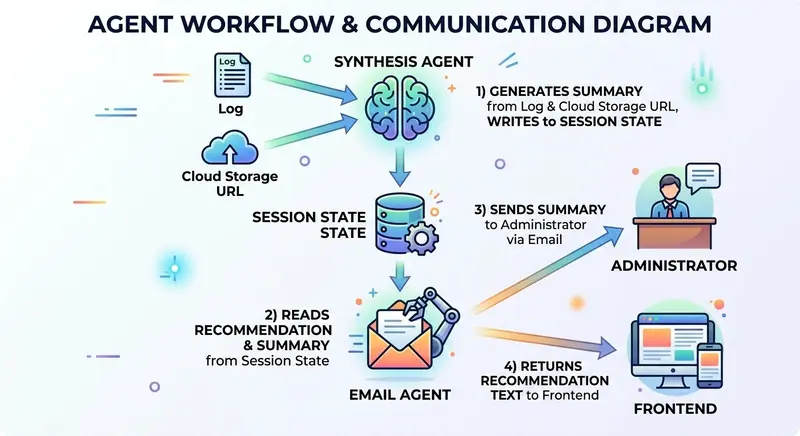
The EmailAgent is the final subagent of the Decision Tree multi-agent system. The Decision Tree agent evaluates the feasibility of applying an agent architecture to a project. It starts with a project description, determines whether an agent architecture should be used, generates a recommendation, returns the recommendation to the client, and sends an email to the administrator as a side effect.
The EmailAgent retrieves the recommendation and summary from the session state, returns the recommendation text to the frontend, and sends both to the administrator’s email address.
The agent does not require an LLM or tool use; therefore, an LlmAgent is overkill. My solution was to use a custom agent to handle email to save time and cost.
Architecture


The project, anti-patterns, decision, recommendation, and synthesis agents are LLM agents. These agents require Gemini to reason and generate text responses.
The Audit Trail, Cloud Storage, and Email agents integrate with external APIs or resources that trigger deterministic actions.
Prerequisites
Requirements
Note: I used Gemini in Vertex AI for authentication due to regional availability. Gemini is blocked in Hong Kong currently, so I used Gemini in Vertex AI instead.
Install npm dependencies
npm i --save-exact @google/adk
npm i --save-dev --save-exact @google/adk-devtools
npm i --save-exact nodemailer
npm i --save-dev --save-exact @types/nodemailer rimraf
npm i --save-exact marked
npm i --save-exact zod
I installed the required dependencies for building ADK agents, converting Markdown string to HTML and sending emails to MailHog in local testing.
Pinned dependencies ensure the versioning is the same in development and production environments for enterprise-level applications.
Environment variables
Copy .env.example to .env and fill in the credentials:
GEMINI_MODEL_NAME="gemini-3-flash-preview"
GOOGLE_CLOUD_PROJECT="<Google Cloud Project ID>"
GOOGLE_CLOUD_LOCATION="global"
GOOGLE_GENAI_USE_VERTEXAI=TRUE

# SMTP Settings (MailHog)
SMTP_HOST="localhost"
SMTP_PORT=1025
SMTP_USER=""
SMTP_PASS=""
SMTP_FROM="[email protected]"
ADMIN_EMAIL="[email protected]"
SMTP_HOST, SMTP_PORT, SMTP_USER, SMTP_PASS, are required to set up MailHog for local email testing.
SMTP_FROM is a from email address that can be any string in local testing.
ADMIN_EMAIL is an administrator email address receiving emails that the EmailAgent sends. It is an environment variable in my use case because it is the only recipient. If another scenario requires sending emails to customers, the environment variable should be removed.
Environment Setup
I pulled the latest version of the MailHog docker image from Docker Hub and started it locally to receive test emails and display them in the Web UI. The docker-compose.yml file contains the setup configuration.
services:
  mailhog:
    image: mailhog/mailhog
    container_name: mailhog
    ports:
      - "1025:1025" # SMTP port
      - "8025:8025" # HTTP (Web UI) port
    restart: always
    networks:
      - decision-tree-agent-network

networks:
  decision-tree-agent-network:
The SMTP port is 1025 and the URL of the Web UI port is http://localhost:8025.
docker compose up -d
Start MailHog in Docker.
ADK Multi-Agent Architecture
process.loadEnvFile();

const model = process.env.GEMINI_MODEL_NAME || '';
if (!model) {
  throw new Error('GEMINI_MODEL_NAME is not set');
}
The model variable specifies the gemini-3-flash-preview model. If model is undefined, an error is thrown.
The demo uses Node 20+, so the process.loadEnvFile() is provided to load variables from the environment file. Otherwise, developers should consider using dotenv to load environment variables.
export const RECOMMENDATION_KEY = 'recommendation';
export const MERGED_RESULTS_KEY = 'mergedResults';
export const PROJECT_DESCRIPTION_KEY = 'project_description';
import { FunctionTool, LlmAgent, SequentialAgent } from '@google/adk';
import { z } from 'zod';
import { initWorkflowAgent } from './init.js';
import {
  MERGED_RESULTS_KEY,
  PROJECT_DESCRIPTION_KEY,
  VALIDATION_ATTEMPTS_KEY,
} from './sub-agents/output-keys.js';

const prepareEvaluationTool = new FunctionTool({
  name: 'prepare_evaluation',
  parameters: z.object({
    description: z.string()
  }),
  execute: async ({ description }, context) => {
    if (!context || !context.state) {
      return { status: 'ERROR', message: 'No session state found.' };
    }

    const state = context.state;

    // Clear all previous evaluation data
    state.set(MERGED_RESULTS_KEY, null);
    state.set(VALIDATION_ATTEMPTS_KEY, 0);

    // Set the new description
    state.set(PROJECT_DESCRIPTION_KEY, description);

    return { status: 'SUCCESS', message: 'State reset and description updated.' };
  },
});

export const SequentialEvaluationAgent = new SequentialAgent({
  name: 'SequentialEvaluationAgent',
  subAgents: initWorkflowAgent(model),
});
prepareEvaluationTool is a tool that reset the variables in the session state before the agent starts the project evaluation.
SequentialEvaluationAgent is a sequential agent that consists of subagents.
export function initWorkflowAgent(model: string) {
  return [
    createMergerAgent(model),
    createEmailAgent(),
  ];
}
The initWorkflowAgent calls createMergerAgent and createEmailAgent factory functions to return the merger agent and the email agent. The merger agent is a LlmAgent because it requires Gemini to generate a summary whereas the email agent is a custom agent that does not require Gemini.
export const rootAgent = new LlmAgent({
  name: 'ProjectEvaluationAgent',
  model,
  instruction: `... instruction...`,
  tools: [prepareEvaluationTool],
  subAgents: [SequentialEvaluationAgent],
});
The rootAgent is an orchestrator that routes the project description to SequentialEvaluationAgent to evaluate.
Email Agent Factory Function
export type SmtpConfig = {
  host: string;
  port: number;
  user?: string;
  pass?: string;
  from: string;
  email: string;
};
export function createEmailAgent(): BaseAgent {
  const email = process.env.ADMIN_EMAIL || '[email protected]';
  const host = process.env.SMTP_HOST || 'localhost';
  const port = parseInt(process.env.SMTP_PORT || '1025');
  const user = process.env.SMTP_USER || '';
  const pass = process.env.SMTP_PASS || '';
  const from = process.env.SMTP_FROM || '[email protected]';

  const smtpConfig: SmtpConfig = {
    host,
    port,
    user,
    pass,
    from,
    email,
  };

  return new EmailAgent(smtpConfig);
}
The createEmailAgent function retrieves the host, port, user, password, sender email, and administrator email from the environment variables to construct an instance of SmtpConfig.
Pass the SmtpConfig object to the constructor of the EmailAgent class to construct a custom agent. Finally, the function returns the email agent to become the last subagent of SequentialEvaluationAgent.
Implementing the Email Agent
Let’s look at the core structure of the EmailAgent.
1. The Class Definition and State
The EmailAgent has a readonly SmtpConfig instance member that is initialized in the constructor. The constructor calls super to initialize its name and description.
class EmailAgent extends BaseAgent {
  readonly smtpConfig: SmtpConfig;

  constructor(smtpConfig: SmtpConfig) {
    super({
      name: 'EmailAgent',
      description: 'Send a recommendation and summary email to the administrator.',
    });

    this.smtpConfig = smtpConfig;
  }
}
2. Accessing the Context
import { z } from 'zod';

export const recommendationSchema = z.object({
  text: z.string(),
});

export type Recommendation = z.infer<typeof recommendationSchema>;

export const mergerSchema = z.object({
  summary: z.string(),
});

export type Merger = z.infer<typeof mergerSchema>;
The text property stores the recommendation of the Recommendation type. Similarly, the summary property of the Merger type stores the summary.
export function getEvaluationContext(context: ReadonlyContext | undefined) {
  if (!context || !context.state) {
    return {
      recommendation: null,
    };
  }

  const state = context.state;
  return {
    recommendation: state.get<Recommendation>(RECOMMENDATION_KEY) ?? null,
  };
}

export function getMergerContext(context: ReadonlyContext | undefined) {
  if (!context || !context.state) {
    return {
      merger: null,
    };
  }

  const state = context.state;
  return {
    merger: state.get<Merger>(MERGED_RESULTS_KEY) ?? null,
  };
}
getEvaluationContext and getMergerContext are helper functions to obtain recommendation and summary from the session state.
3. Implement the Concrete Methods
The EmailAgent extends the BaseAgent and all subclasses must implement two abstract methods: runAsyncImpl and runLiveImpl.
  protected async *runAsyncImpl(context: InvocationContext): AsyncGenerator<Event, void, void> {
    for await (const event of this.runLiveImpl(context)) {
      yield event;
    }
  }
Implement runAsyncImpl by wrapping runLiveImpl. It invokes a for-await loop to iterate this.runLiveImpl(context) and yields each event.
protected async *runLiveImpl(context: InvocationContext): AsyncGenerator<Event, void, void> {
    const readonlyCtx = new ReadonlyContext(context);
    const { merger } = getMergerContext(readonlyCtx);
    const { recommendation } = getEvaluationContext(readonlyCtx);
    const recommendationText = recommendation?.text || 'No recommendation available.';

    const emit = (status: 'success' | 'error', author: string) =>
      createEmailStatusEvent({
        author,
        context,
        status,
        recommendationText,
      });

    if (!merger) {
      yield emit('error', this.name);
      return;
    }

    try {
      const emailContent = `${recommendation?.text || ''}nn## Summarynn${merger.summary}`;
      await sendEmail(this.smtpConfig, 'Project Evaluation Results', emailContent);
      yield emit('success', this.name);
    } catch (e) {
      console.error(e);
      yield emit('error', this.name);
    }
  }
The runLiveImpl method handles three cases: an undefined merger, a successful email dispatch, and an email dispatch failure. When email dispatch is successful, the inner emit arrow function yields a success event. Otherwise, the catch block logs the error and yields an error event.
import { marked } from 'marked';
import nodemailer from 'nodemailer';

export async function sendEmail(smtpConfig: SmtpConfig, subject: string, text: string) {
  const { host, port, user, pass, from, email: to } = smtpConfig;
  const transporter = nodemailer.createTransport({
    host,
    port,
    auth: user && pass ? { user, pass } : undefined,
    secure: false,
  });

  const html = await marked.parse(text);
  const mailOptions = {
    from,
    to,
    subject,
    text,
    html,
  };
  return transporter.sendMail(mailOptions);
}
The sendEmail function uses the nodemailer to create a transporter using the SMTP host, port, user, and password. The marked library parses the Markdown text and converts it to HTML. The transporter has a sendMail method that accepts mail options to send an email to the to email address in both text and html formats.
4. Returning Data in the Output
Next, implement createEmailStatusEvent to return an email status event.
export type EmailStatusOptions = {
  author: string;
  context: InvocationContext;
  status: 'success' | 'error';
  recommendationText: string;
};

export function createEmailStatusEvent(options: EmailStatusOptions): Event {
  return createEvent({
    invocationId: options.context.invocationId,
    author: options.author,
    branch: options.context.branch || '',
    content: {
      role: 'model',
      parts: [
        {
          text: JSON.stringify({
            status: options.status,
            recommendationText: options.recommendationText,
            sessionId: options.context.session.id,
            invocationId: options.context.invocationId,
          }),
        },
      ],
    },
  });
}
The EmailStatusOptions provide the invocation ID, branch, author (the agent name), status, and recommendation text.
The createEmailStatusEvent function reuses the createEvent function to return the invocation ID, branch, author, and a JSON-stringified object consisting of the status, session ID, invocation ID, and recommendation text.
The client can examine the status to determine whether or not to display the recommendation text.
Returning both session and invocation IDs to the client is recommended. The client can reuse the session ID to call the agent in a conversational flow to seek evaluations for additional project descriptions. The invocation ID allows querying an error-tracking service like Datadog to identify the server status.
Testing
Add scripts to package.json to build and start the ADK web interface.
  "scripts": {
    "prebuild": "rimraf dist",
    "build": "npx tsc --project tsconfig.json",
    "web": "npm run build && npx @google/adk-devtools web --host 127.0.0.1 dist/agent.js"
  },
npm run web to start the API server.http://localhost:8000.One of my favorite tech influencers just tweeted about a 'breakthrough in solid-state batteries.' Find which public company they might be referring to, check that company’s recent patent filings to see if it’s true, and then check their stock price to see if the market has already 'priced it in'.

http://localhost:8025 to open the MailHog web UI
Conclusion
Custom agents are essential components of an ADK application. While ADK offers sequential, parallel, loop, and LLM agents, these agents may not meet the requirements in some occasions. BaseAgent is the generic Agent class that enables developers to write their logic and design their agentic workflow.
The takeaway: avoid using an LLM-based agent for tasks that do not require probabilistic reasoning, tool calling, or response generation.
Resources