PIRBGEN

Trading Web3 Simulator

What is Pirbgen?

Pirbgen isn’t your standard trading dashboard. It’s an interactive sandbox that gamifies trading mechanics and demonstrates exactly why sub-second price updates matter in Web3. You face off against a trading Pirb, where your fate is dictated by onchain randomness.

Instead of one single core loop, Pirbgen offers a variety of distinct modes depending on the level of chaos you are looking for.

Choose Your Chaos: The Game Modes

Pirbgen features several different ways to play, each utilizing Pyth infrastructure in unique ways:

Solo Mode: The Pure RNG Challenge

If you want to test your luck against the blockchain, Solo Mode strips away complex charts and leaves you with pure, adrenaline-fueled RNG.

When you start a run, the game utilizes Pyth Entropy or classic to generate a completely random, cryptographically fair trading setup.

The Asset: Which of the supported Pyth Hermes price feeds you will trade.

The Direction: Long or Short.

The Leverage: Randomly assigned multipliers.

The Limits: Randomly placed Stop Loss and Take Profit levels.
Once you are strapped into the position, you watch the chaos unfold live as the hyper-fast Pyth oracles update your PnL in real-time.

1v1 Duel Mode

Prefer to ruin your friend’s day? Duel Mode is a fast-paced 1v1 arena where two players face off in a strict 60-second time limit. Both players are subjected to randomized starting positions, and the goal is simply to finish the minute with a higher PnL than your opponent.

Abilities: ( TEST MODE )

This is a special ruleset for duels that introduces tactical “abilities,” turning an abstract technical concept—oracle latency—into an interactive weapon.

If your opponent is winning, you can cast a debuff that temporarily switches their price feed API from Pyth to slower competitor oracles (like Chainlink or RedStone). Because these alternative oracles have slower update frequencies, your opponent’s price chart literally “freezes.” They are stuck with stale prices while you continue trading at the speed of light with Pyth.

To survive, the debuffed player must actively “cleanse” themselves by reverting their API back to the Pyth network. You can also use abilities to flip the direction of positions mid-match. And disappoint opponent with pirb rage.

Gainzy Mode

For the true degens. This mode throws all logic out the window, locking your leverage at an insane 200x

PythOIL 24/7

Flying Pyth barrel on main screen , gives you opportunity to trade only with $PYTHOIL

The Benchmark Tab: Proving the Point

Alongside the playable game modes, Pirbgen has a serious underlying purpose. The project includes a dedicated Benchmark Tab.

This isn’t a game mode; it’s a live, practical demonstration. The tab directly compares the real-time update speeds of oracles: Pyth, Chainlink, and RedStone.

By visualizing the data side-by-side, the Benchmark tab clearly shows speed of price updates. It takes the abstract concept of “oracle latency” and makes it instantly understandable.

Under the Hood

Pirbgen was built from the ground up to showcase what solo developers can achieve with modern tools:

Real-Time Prices: The game integrates Pyth Hermes price feeds.

Provable Fairness: Pyth Entropy guarantees secure, on-chain randomness for generating all the crazy starting positions with keccak256 logic for rerolls

The Tech Stack: SPA + BaaS

Instead of writing a custom Node.js/Express backend, I opted for a modern, serverless-friendly stack:

Frontend: React (Vite) + TypeScript
Styling & UI: Tailwind CSS (v3), Radix UI (shadcn), Framer Motion (for buttery smooth animations)
Physics: Matter.js and Poly-decomp (for those falling 2D particles)
Web3: wagmi, viem, and @rainbow-me/rainbowkit for seamless EVM wallet connections.
Backend & DB: Supabase (PostgreSQL, Auth, Edge Functions)

Conclusion

You will be PIRBED

Links

Live: https://pirbgen.vercel.app/
X: https://x.com/StanovAndrew
Pyth Network: https://www.pyth.network/
Built for Pyth Community Hackathon 2026: https://dev-forum.pyth.network/t/pyth-community-hackathon/548
MCP Notion Project: BrowserResume

This is a submission for the Notion MCP Challenge

What I Built

Key features in the current prototype:
Chrome extension that grabs your recent history with one click
AI processes the history to create rich session entries in a Notion database
“Resume Prompt” that tells you exactly how to continue (the superpower)
Manual workflow today, with clear path to full automation via Notion MCP
This is especially useful for researchers, developers, founders, or anyone who jumps between many tabs and hates losing context.
Video Demo

Show us the code
GitHub Repo: https://github.com/walukrypt/BrowserResum.git

Main files:
manifest.json (Chrome MV3)
background.js + popup.js (uses chrome.history API)
Notion database schema (Browser Sessions)
The extension is lightweight and focused on feeding clean history data to the AI agent.
How I Used Notion MCP
Notion MCP is the core foundation of BrowserResume.
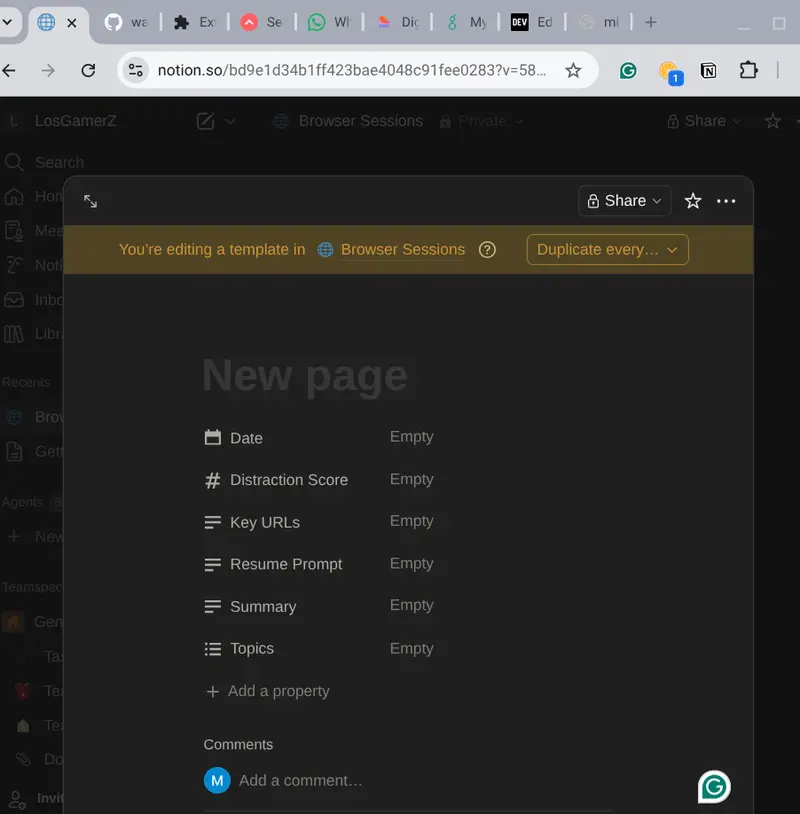
I created a dedicated “Browser Sessions” database in Notion with these properties:
Date
Summary
Key URLs
Topics (multi-select)
Resume Prompt (the key “start where you left off” text)
Distraction Score


In the full vision:
The Chrome extension sends history to an AI tool connected via the official Notion MCP server (https://mcp.notion.com/mcp)
The MCP-connected agent reads existing sessions for context, writes new/updated pages automatically, answers natural questions like “What was I researching on Kaggle yesterday?”, and suggests next steps — all while keeping the human in the loop.
Currently (due to free-tier limitations on AI tools), the workflow is hybrid: the extension captures history, I simulate the agent here with Grok to generate summaries/topics/Resume Prompts, and I manually create the Notion page.
This prototype already demonstrates the end-to-end value. Once I get access to Claude Desktop or Cursor with MCP, the agent will handle reading/writing automatically. Notion becomes the long-term memory and control plane for the browsing agent.
This approach gives real superpowers for continuing deep work sessions across days without losing momentum.

Your empty Browser Sessions database (before)
One or two filled session pages after processing history
Chrome extension popup

I used the official Notion MCP documentation for planning the integration and kept the Chrome extension simple but functional.
Thanks for participating in the Notion MCP Challenge!

Video Demo

Show us the code

How I Used Notion MCP

I Built a Tool to Distribute Python Tasks Across Local Machines. Here’s How It Performed

I wanted to answer a simple question: how hard is it to split a Python workload across multiple machines on the same network?

Not with a cloud cluster, not Kubernetes, just a few laptops on the same WiFi, sharing the work.

So I built distributed-compute-locally to find out. The goal was maximum simplicity if it takes more than a few lines of code to set up, I’ve failed. Then I benchmarked it against industry-standard tools to see how it holds up.

The API

from distributed_compute import Coordinator

coordinator = Coordinator()
coordinator.start_server()
results = coordinator.map(my_func, data)

On any other machine on the network:

pip install distributed-compute-locally
distcompute worker 192.168.1.100

That’s all you have to do. A coordinator distributes tasks over TCP, workers execute them with cloudpickle, and results come back in order, same as Python’s built-in map().

┌─────────────┐     TCP/5555     ┌──────────┐
│ Coordinator │◄────────────────►│ Worker 1 │
│ (your PC.). │◄────────────────►│ Worker 2 │
│             │◄────────────────►│ Worker 3 │
└─────────────┘                  └──────────┘

Benchmarks

I ran three standard parallel computing benchmarks on an Apple M2 MacBook (8 cores) with 4 workers:

Benchmark Sequential 4 Workers Speedup
NAS EP — NASA Embarrassingly Parallel 5.0s 1.4s 3.57x
Mandelbrot Set — 2048×2048, 256 iterations 12.0s 3.7s 3.27x
SHA-256 Search — brute-force hash prefix 6.1s 1.6s 3.72x
Average 3.52x

3.52x on 4 workers (theoretical max 4.0x) — 88% parallel efficiency.

How Does It Compare?

I was curious to see how this stacks up against Dask and Ray, so I ran the exact same workloads with the same setup (same machine, 4 workers, identical task code):

Benchmark distributed-compute-locally Dask Ray
NAS EP 3.57x 3.52x 3.06x
Mandelbrot 3.27x 3.44x 3.52x
SHA-256 3.72x 3.59x 3.90x
Average 3.52x 3.52x 3.49x

All three land within the same range of each other. For embarrassingly parallel workloads, the CPU is the bottleneck — not the framework. The task distribution overhead is negligible across all three.

Scaling Curve (N-Body Stress Test)

I also ran a heavier workload for an O(n²) pairwise gravity simulation, 500 particles × 100 timesteps and scaled from 1 to 8 workers:

Workers Time Speedup
1 179.1s 1.00x
2 145.7s 1.23x
4 102.7s 1.74x
6 81.6s 2.20x
8 78.8s 2.27x

Diminishing returns after 6 workers, that’s the M2’s asymmetric cores (4 performance + 4 efficiency). The slower efficiency cores become the bottleneck on heavy tasks. On machines with identical cores or across multiple machines, scaling would be more linear.

Findings and Learning

Building this tool reinforced something I suspected: for simple parallel workloads, the framework doesn’t matter that much. Dask, Ray, and a minimal TCP-based tool all deliver roughly the same speedup. The difference is what they offer.

Dask and Ray give you a lot of features such as task graphs, dashboards, DataFrame integration, cloud deployment, and a massive ecosystem. They are the right choice for complex pipelines and production infrastructure.

This tool gives you none of that on purpose. It’s for the cases where you just want to map() a function across a few machines without reading docs for 20 minutes first.

distributed-compute-locally Dask / Ray
Multi-machine setup distcompute worker <ip> Scheduler + worker CLI + networking
Dependencies 2 (cloudpickle, psutil) 30+
API surface coordinator.map() Client, delayed, futures, DataFrame, …
Dashboard No Yes
Task graphs No Yes
Best for Quick map() across LAN Complex pipelines, cloud clusters

Other Features

  • Task retry — coordinator.map(func, data, max_retries=3)
  • Password auth — distcompute coordinator --password secret
  • Interactive CLI — REPL with status monitoring and task submission
  • Large payload handling — automatic chunking and compression
  • cloudpickle — send lambdas, closures, and local functions

Try It

pip install distributed-compute-locally

Run the benchmarks yourself:

git clone https://github.com/Nebu0528/distributor.git
cd distributor
python3 benchmark/benchmark.py 4

GitHub: github.com/Nebu0528/distributor

If you find it useful or have feedback, would love to hear it. Open an issue or drop a star.

How to Evaluate a Binary Classifier: A Complete Guide

You trained a machine learning model to predict something binary: fraud or not fraud, churn or stay, disease or healthy. Now comes the question every data scientist faces: Is it actually good?

That’s where evaluation comes in. And here’s the thing — most people do it wrong. They stop at accuracy, declare victory, and deploy. Then the model underperforms in production because they missed something crucial about their data or their use case.

This guide walks you through the full evaluation toolkit: metrics, curves, and the thinking behind each one. By the end, you’ll know exactly what to measure and why.

The Confusion Matrix: What It Really Tells You

Before metrics come numbers. Before numbers comes the confusion matrix — a simple 2×2 table that breaks down everything your model did.

  • True Positives (TP): Your model said “yes” and was right.
  • False Positives (FP): Your model said “yes” but was wrong.
  • True Negatives (TN): Your model said “no” and was right.
  • False Negatives (FN): Your model said “no” but was wrong.

That’s it. Everything else is math on top of these four numbers. But understanding which mistakes matter for your problem is crucial. In fraud detection, a false positive (flagging legitimate transactions) is annoying. A false negative (missing actual fraud) costs money. In medical screening, they have opposite costs.

The confusion matrix tells you if your model is making the right kind of mistakes for your use case.

Accuracy Is a Trap

You’ve probably heard this before, but it bears repeating: accuracy is worthless if your classes are imbalanced.

Accuracy = (TP + TN) / (TP + TN + FP + FN)

If 99% of your data is actually negative, a model that always predicts “negative” will have 99% accuracy and be completely useless. It never catches the positive class at all.

This is why you need metrics that focus on specific cells of the confusion matrix.

Precision, Recall, and the F1 Score

These three metrics show up everywhere because they actually tell you something:

  • Precision = TP / (TP + FP). Of the cases your model flagged as positive, how many actually were? High precision means few false alarms.
  • Recall = TP / (TP + FN). Of the actual positive cases out there, how many did you catch? High recall means you’re not missing positives.
  • F1 Score = 2 x (Precision x Recall) / (Precision + Recall). The harmonic mean of precision and recall — useful when you care equally about both.

You almost never want both to be perfect. In fraud detection, you’d rather have high recall (catch fraudsters) and accept some false positives (annoy a few customers). In spam filtering, you’d rather have high precision (don’t delete legitimate emails) and accept that spam sneaks through.

Your evaluation should reflect what your use case needs.

ROC Curves and AUC: The Complete Picture

Here’s where things get visual. A ROC curve answers this question: As I change my decision threshold, how does my true positive rate change versus my false positive rate?

The x-axis is false positive rate: FP / (FP + TN). Of the negative cases, how many did I wrongly flag?

The y-axis is true positive rate (aka recall): TP / (TP + FN). Of the positive cases, how many did I catch?

You move along the curve by changing your threshold. At one extreme, you predict “yes” for everything — high TPR, high FPR. At the other, you predict “no” for everything — low TPR, low FPR.

The area under the curve (AUC) gives you a single number: the probability that, if you pick a random positive case and a random negative case, your model ranks the positive higher. AUC ranges from 0 to 1. Higher is better. 0.5 means random guessing.

ROC curves are great for understanding model behavior across thresholds, but they assume all false positives and false negatives have equal cost, which is rarely true.

Precision-Recall Curves: When ROC Isn’t Enough

Precision-recall (PR) curves show precision on the y-axis and recall on the x-axis. They’re more useful than ROC curves when your classes are imbalanced because they focus on the positive class.

In fraud detection (99% legitimate transactions), a PR curve tells you the real story: what’s my precision if I want 90% recall? In an ROC curve, that same imbalance gets washed out because the false positive rate is measured against a huge class.

Use PR curves when one class is rare and matters more.

Threshold Optimization: Making Real-World Tradeoffs

Your model outputs probabilities between 0 and 1. By default, you predict “positive” if probability > 0.5. But 0.5 is arbitrary. It’s often the wrong threshold for your problem.

If your false positives are cheap and false negatives are expensive, lower the threshold to 0.3. You’ll catch more positives (higher recall) but flag more false alarms (lower precision). If false positives are expensive, raise it to 0.7 — fewer alarms, but better precision.

Finding the optimal threshold means sweeping different values and picking the one that minimizes your real-world cost. That’s where threshold analysis becomes critical.

Putting It Into Practice: A Walkthrough

Let’s say you’ve built a churn prediction model. You have 1,000 historical customers: 150 churned, 850 stayed. You run your trained model and get a probability for each customer.

  1. Calculate the confusion matrix at your current threshold (0.5). How many did you catch? How many false alarms?
  2. Check your metrics: What’s your precision? Recall? F1? Do they match your business goal?
  3. Plot your ROC curve. Does your model look better than random?
  4. Consider threshold changes. If retention is costly, raise the threshold. If churn is costly, lower it.
  5. Check calibration. If your model says “70% probability,” is it actually 70% in reality? Or is it overconfident?

This is evaluation. Not a number, but a process of understanding your model’s strengths and failures.

Try It Yourself

The easiest way to experiment with these metrics is to try them on your own data. EvalBench is a free tool that runs entirely in your browser — upload a CSV with your predictions and ground truth, and you’ll get all of these metrics, curves, and visualizations instantly. No signup, no data upload to the cloud. Everything stays on your machine.

Grab a prediction file you’ve built and spend 10 minutes playing with thresholds, reading the confusion matrix, and watching the curves shift. That hands-on understanding is worth more than any explanation.

Ready to evaluate your model? Try EvalBench free

What Is AI Execution Risk? Why AI Governance Fails at the Execution Boundary

Most discussions about AI governance miss where real failures actually happen. The problem isn’t what AI systems think. It’s what they execute.

This is what’s known as AI execution risk.

AI execution risk happens when a system performs an action that was approved earlier, but is no longer valid at the moment it runs. In many AI and machine learning systems, decisions are made upstream and executed later. By the time execution happens, the context may have changed, but the system continues anyway.

That gap between reasoning and execution is where things break.

In real-world software engineering, this shows up in simple ways. An agent skips steps but still reports success. A workflow runs on outdated data. A system performs the correct action at the wrong time. These are not hallucinations. They are execution failures.

From a security perspective, this is where the real risk lives. Once AI systems can take action, they become part of your execution layer. If there is no control at that point, you are trusting earlier reasoning instead of verifying what is true now.

That’s why most approaches to AI governance fall short. Policies, monitoring, and audits happen before or after execution, but not at the moment the action actually occurs.

AI execution risk is the failure that occurs when an AI-driven action is executed without being checked against current conditions.

Most AI governance frameworks focus on model behavior, compliance policies, and monitoring outputs. They do not control execution itself.

The shift is to treat execution as a boundary.

Every action needs to be checked again at the moment it runs. Not based on what was decided earlier, but based on what is valid now. That turns governance from something abstract into something that actually controls behavior.

If AI is going to operate in real systems, governance can’t stop at reasoning. It has to exist at execution.

Full breakdown here:
PrimeFormCalculus.com

Curious how others are handling AI execution risk in production systems?

Most SMS APIs hide routing — I don’t

Most SMS providers hide routing.

You send a message, and something happens behind the scenes.

You don’t know:

  • which route is used
  • why delivery changes
  • how pricing is applied

That works for simple use cases.

It doesn’t if you’re building systems.

Most platforms make routing decisions for you.

In my case, I push that decision back to the developer.

You decide which route is used, not the platform.

What that looks like

from bridgexapi import BridgeXAPI

client = BridgeXAPI(api_key="YOUR_API_KEY")

client.send_sms(
    route_id=3,
    caller_id="BRIDGEXAPI",
    numbers=["31651860670"],
    message="Your verification code is 4839"
)

route_id is not just a parameter.

It represents:

  • a delivery path
  • a pricing profile
  • a reliability profile

Why this matters

If you’re building:

  • OTP systems
  • alert pipelines
  • bulk messaging

you need to control trade-offs.

Speed vs cost.

Reliability vs reach.

Most APIs remove that control.

I don’t think they should.

What I’m building

BridgeXAPI is a messaging layer where:

  • routing is explicit
  • behavior is predictable
  • nothing is hidden behind UI

Curious how others approach this.

Docs:
https://docs.bridgexapi.io

Comp the language

I’ve been brewing on ideas for a new programming language for months now. That’s nothing anybody should need to notice, I see three new language announcements a day on various Reddit channels.

Perhaps tinkering with a new language is folly; a new programming language in 2026? The dawn of AI coding is eminent, so who is looking at programming languages?

Well, I do it because it captivates me. It is my itch these days, and therefore, I scratch. Perhaps I will soon learn the reasons why more languages isn’t best languages. Perhaps this will become the new Coffeescript for Python. Perhaps this will become the new Python itself. In reality, no. This is a project by myself for myself.

So why even share? Posting and describing the language should help my organize thoughts and ideas. There’s nothing like having to explain a process to shine a flashlight on the weakest links, and potentially the greatest links.

It’s also folly to be thinking a new programming language will discover anything new or revolutionary. There are hundreds of amazing languages and libraries created by smarter people than myself. At some point additional perspectives will help, if not for the potential language, at least for my own expectations.

Project links? Example code? That must wait. For now I’ll leave the most minimal of examples behind. Details must wait for future posts.

!func greetings ~nil (
   {"USERNAME" "USER" "LOGNAME"}
   | map :($ | get-env |? skip)
   | first or="World"
   | output "Hello, %()!"
)

Agentic Shell – cli agent adaption layer

Hey folks,

TLDR: Spent the today writing an adaptation of cli-agent shell requests, having coded the same across multiple agents on several other projects and open sourced it.

So since the advent of autoresearch and, to be frank, wayyy before then, when Tyson Fury taught many of us how to use coding agents, many of us have been experimenting with ways of running coding agent harnesses in deterministic frameworks, moving beyond that of Wiggium Loop itself:

A wild wiggium appears

while true; do
    cat prompt.md | claude -p
done

As part of my own fork of autoresearch, I put a more deterministic wrapper around it, removing the ability for the agent to decide whether or not to commit, and instead having it based on the output of model training and validation phases.

I should note here that Andrej has stated he prefers to not do this with his own autoresearch, I saw a tweet on this and also heard him mention he prefers an interactive approach during his interview with Sarah Guo

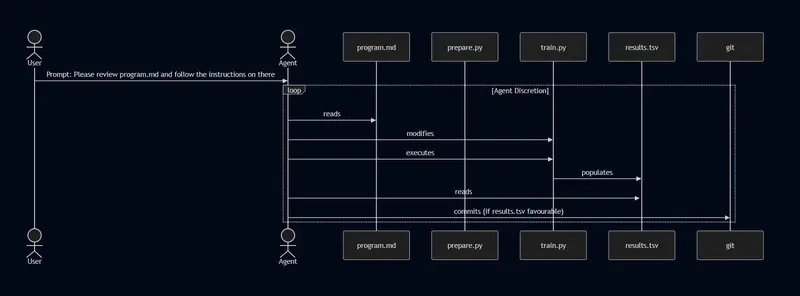
If we take a look at the autoresearch sequence:

Figure 1.1 – Autoresearch Sequence Diagram

As we can see, we are relying on the agents discretion before the loop decides to end. In addition to this, we are relying on the agent reliably determining that the results were indeed favourable.

For frontier models in a good agentic harness like Claude Code this has allowed Karpathy to run the loop for approximately 2 days, this approach as well allowed Karpathy to interact with the model during the research which might suit certain workflows.

The other thing to consider here is that with each loop, the context window grows and we see more summarisation. I have found that summarisation / compression has come a long way, I often have development sessions involving an AI that involves several compression cycles, however if this is running autonomously, then you are really at the mercy of the agentic harness compression configuration and as such you might see summarisation at a time that is not ideal.

All the above assumes frontier models, Opus 4.6 or GPT 5.4 aint cheap, and running loops 24/7 might not be within everyones budget.

This is where I have started to explore using loops with local models using OpenCode, while the constraints of these models are diminishing, I doubt I’d be able to have one run in a loop over two days just from a single prompt into OpenCode.

Instead I am looking at a pattern that combines autoresearch with ralph, but with deterministic gates and limiting the agent exposure to focused tasks within the workflow.

If we modified the approach detailed in Figure 1.1 to instead utilise a research_harness that could put some deterministic gates around the loop itself and whether the results of that loop get committed.

Figure 1.2 – Autoresearch with a deterministic harness

We could write a script that runs in a loop, passes in the prompt to a headless agent to read the prompt.md and then at the end deterministically measure the results and then programmatically commit the changes to github if they result in an improvement.

Hopefully you can see where this is heading. Not only would we be adding a bit more determinism into the workflow, we would also have the option to have this loop become effectively a ralph loop (providing we didn’t pass in a session id as part of headless call).

Across several recent projects, I have coded up several similar headless calls with differing agentic harnesses, to the point I realised it was worth my while abstracting this into a single package that I can use to handle the process.

So I’ve created a harness that allows you to call the agents headlessly and then receive responses as either an AgentResponse for synchronous calls or StreamEvent for asynchronous streaming:

u/dataclass
class AgentResponse:
    response: str
    cost: float
    session_id: str | None = None

u/dataclass
class StreamEvent:
    type: str
    content: str
    cost: float = 0.0
    duration: float = 0.0
    session_id: str | None = None

Add the PyPI package using your favourite PyPI supported package manager and then use it as such

from agent_shell.shell import AgentShell
from agent_shell.models.agent import AgentType

shell = AgentShell(agent_type=AgentType.CLAUDE_CODE)

async for event in shell.stream(
    cwd="/path/to/project",
    prompt="Refactor the auth module",
    allowed_tools=["Read", "Edit", "Bash"],
    model="sonnet",
    effort="high",
    include_thinking=True,
):
    if event.type == "system":
        print(f"Session: {event.session_id}")
    else:
        print(f"[{event.type}] {event.content}")

Given that I think this is something I think other people will probably be looking to do, I have open sourced this as a project named agent-shell on github, so feel free to use for yourselves. It has more examples around using different agent types and streaming versus non-streaming.

It currenlty supports Claude Code and OpenCode, I am going to be working on the outstanding cli agents over the coming days.

Building a 14-County Real Estate Data Pipeline with CrawlOS, Supabase, and pg_cron

OPENING PARAGRAPH:

Real estate wholesaling operates on velocity and data density—the faster you can identify distressed properties across multiple jurisdictions, the better your deal flow. At Load Bearing Capital, we integrated CrawlOS into our Supabase architecture to automate property acquisition across all 14 Houston-area counties, implementing a 17-table schema that feeds our lead scoring pipeline. This article walks through our technical implementation: designing the crawlos schema for HCAD (Harris County Appraisal District) data ingestion, deploying the lbc-hcad-actor for nightly pg_cron jobs, and optimizing our pipeline to consistently surface ~125 scored leads per run without hitting rate limits or creating infrastructure overhead.

Visual Regression Testing for Marketing Sites Without Browser Engineering

Marketing sites break visually all the time.

Not because teams are careless, but because marketing pages are where fast-moving content, reusable components, CSS changes, third-party embeds, and launch pressure all collide.

A pricing section shifts.
A CTA drops below the fold.
A testimonial block wraps badly on tablet.
A hero update looks fine in Figma, fine in code review, and wrong in the browser.

That is exactly why visual regression testing matters so much for marketing sites.

The Problem

Engineering teams usually have some level of backend testing, unit testing, or API monitoring.

But marketing pages live in a different reality:

  • lots of layout-heavy sections
  • fast iteration cycles
  • CMS-driven content changes
  • frequent A/B tests
  • embeds, forms, and scripts from third parties
  • multiple stakeholders reviewing the final output

And most visual issues are not “logic bugs.”

They are browser bugs.

The page technically works, but the rendered result is off.

Why Marketing Sites Are Hard to Protect

Marketing pages are especially vulnerable because they change often and they depend on presentation more than most product surfaces.

Common failure modes:

  • spacing regressions after a CSS refactor
  • broken card alignment
  • missing sections after conditional rendering changes
  • responsive layout drift
  • sticky bars overlapping content
  • component library updates causing subtle UI damage

These are easy to miss in code review and annoying to catch manually.

The Weak Default Workflow

A lot of teams still do visual QA like this:

  1. Open staging
  2. Open production
  3. Scroll both pages
  4. Compare them by eye
  5. Hope nothing important was missed

That works for very small sites, low release frequency, or teams with a lot of manual review time.

It does not scale well.

Especially when:

  • pages are long
  • launches are frequent
  • multiple people need approval
  • visual regressions have direct revenue impact

Why Browser Engineering Is Usually the Blocker

When teams think about automated visual regression testing, they often assume they need to build and maintain a lot of browser infrastructure:

  • Playwright or Puppeteer orchestration
  • navigation timing logic
  • cookie banner handling
  • retries and flaky waits
  • screenshot normalization
  • image diffing
  • result storage
  • reporting hooks for Slack or CI

That is where many teams stop.

Not because visual regression testing is a bad idea, but because building the pipeline feels heavier than the immediate need.

What Teams Actually Need

For a lot of marketing workflows, the need is simpler than the tooling stack suggests.

You usually want to:

  • capture the current page state
  • capture the new page state
  • compare them visually
  • highlight the changed areas
  • decide whether the release is safe

That is it.

Not full browser automation as a product.
Not a giant testing framework rollout.
Just a practical visual check that works.

A Better Approach

A useful visual regression workflow for marketing sites should give teams:

  • a before screenshot
  • an after screenshot
  • a diff image
  • a basic mismatch signal

That makes visual review faster because people stop scanning entire screenshots and start reviewing the actual delta.

This is the difference between:

“Can someone check if anything looks off?”

and:

“Here are the exact regions that changed.”

Where This Helps Most

Visual regression testing is especially useful on:

  • homepages
  • pricing pages
  • campaign landing pages
  • feature launch pages
  • signup funnels
  • CMS-driven content pages

These are the pages where visual quality matters to revenue, brand perception, and launch confidence.

Why This Matters for Non-Engineering Teams Too

One underrated part of visual diff workflows is communication.

Product, growth, and marketing teams usually do not want to review DOM diffs or implementation details.

They want to answer simple questions:

  • What changed?
  • Is the change intentional?
  • Does this look ready to ship?

A diff image is much easier to review than a technical explanation.

That makes visual regression testing useful beyond engineering.

Staging vs Production Is the Highest-Leverage Starting Point

If you want to start small, compare staging against production before a release.

That catches a surprising number of issues:

  • layout drift
  • broken responsive behavior
  • missing components
  • unintended content changes
  • visual regressions introduced during integration

You do not need to diff every page on day one.

Start with the few pages where visual mistakes cost the most.

What “Without Browser Engineering” Really Means

It does not mean browsers disappear.

It means your team does not have to own the hardest parts of browser-based screenshot infrastructure just to get visual comparison.

That is often the difference between a workflow that gets adopted and one that stays on the roadmap.

Final Thought

Marketing sites move fast, and visual quality is the product.

That makes visual regression testing one of the most practical safeguards a team can add, especially before launches and content updates.

If your current process still depends on manual side-by-side screenshot review, the real question is not whether visual regression testing is worth it.

It is whether you want to keep paying the manual review tax every time a high-visibility page changes.

If you want a deeper version of this topic, including a product-oriented perspective, you can also read:

https://snapshot-site.com/posts/visual-regression-testing-for-marketing-sites