Mipaka API Update: 47 Historical Eras, 124 Colonial-Era Place Names, and DRC’s Complete Administrative History

What’s Changed Since Launch

In Part 1, I introduced Mipaka — a free REST API for administrative divisions across 7 East/Central African countries. The focus was the basics: cascading dropdowns, search, filtering, and bulk export.

Since then, the API has grown significantly. Here’s everything new.

By the Numbers

Metric At Launch Now
Divisions 103,194 88,000+
Countries 7 7
Historical eras ~10 47
Historical place names ~60 124
Historical divisions 0 229
Cities with coordinates 0 34 (DRC)

Why did the division count drop? Rwanda’s data was resynced with corrected upstream sources, removing duplicate villages. The data is more accurate now.

47 Historical Eras

Every country now has a complete chain of eras — from pre-colonial kingdoms through colonial occupation to the present day.

GET /api/v1/eras/?country=CD

DRC alone has 7 eras:

Era Period Type
Kingdom of Kongo ~1390–1914 Pre-colonial
Luba Empire ~1585–1889 Pre-colonial
Congo Free State 1885–1908 Colonial (Belgian)
Belgian Congo 1908–1960 Colonial (Belgian)
Republic of the Congo 1960–1964 Independence
Democratic Republic of the Congo (First Republic) 1964–1971 Independence
Republic of Zaire 1971–1997 Independence
Democratic Republic of the Congo 1997–present Current

Uganda has 10 eras — including 8 pre-colonial kingdoms and chiefdoms with their current rulers:

  • Buganda Kingdom (~1300–present) — Kabaka Ronald Muwenda Mutebi II
  • Bunyoro-Kitara Kingdom (~1300–present) — Omukama Solomon Gafabusa Iguru I
  • Kingdom of Toro (~1830–present) — Omukama Oyo Nyimba Kabamba Iguru Rukidi IV
  • Kingdom of Ankole (~1500–1967) — abolished, never restored
  • Busoga Kingdom (~1500–present) — Kyabazinga William Wilberforce Gabula Nadiope IV

Each era carries notes, date ranges, colonial power tracking, and links to the divisions that existed during that period.

124 Historical Place Names

Major cities now have their full naming history — indigenous, colonial, and modern names mapped to specific eras and languages.

Kinshasa through the centuries:

GET /api/v1/divisions/{kinshasa_id}/names/
[
  {
    "name": "Nshasa",
    "language": "Kikongo",
    "name_type": "indigenous",
    "era_name": "Kingdom of Kongo",
    "etymology": "Named after Nshasa village on the riverbank"
  },
  {
    "name": "Léopoldville",
    "language": "French",
    "name_type": "colonial",
    "era_name": "Congo Free State",
    "etymology": "Named after King Leopold II by Henry Morton Stanley (1881)"
  },
  {
    "name": "Kinshasa",
    "language": "Lingala",
    "name_type": "official",
    "era_name": "Democratic Republic of the Congo",
    "etymology": "Restored to indigenous name at independence (1966)"
  }
]

Name coverage by country:

Country Historical Names Examples
DRC 31 Nshasa → Léopoldville → Kinshasa, Stanleyville → Kisangani, Élisabethville → Lubumbashi
Uganda 28 Kasozi k’Empala → Kampala, Bugiri → Port Bell, Entebbe (Luganda: “seat”)
Kenya 21 Enkare Nyirobi → Nairobi, Kisumo/Kisuma → Port Florence → Kisumu
Tanzania 18 Dar es Salaam (Arabic: “Haven of Peace”), Bagamoyo (Swahili: “Lay down your heart”)
Rwanda 14 Nyarugenge → Kigali, Butare → Huye
South Sudan 14 Gondokoro → Juba, Mongalla → colonial river station
Burundi 13 Usumbura → Bujumbura, Kitega → Gitega

229 Historical Divisions

Beyond current administrative boundaries, the API now includes divisions that no longer exist — searchable by country and level:

# Kenya's 8 former provinces (1963–2010)
GET /api/v1/divisions/?country=KE&level=100

# DRC's 11 provinces under Mobutu (1997–2015)
GET /api/v1/divisions/?country=CD&level=100

# South Sudan's 28 states (2015–2020 decree)
GET /api/v1/divisions/?country=SS&level=100

Level 100 is a convention used to separate historical divisions from active administrative data — they won’t appear in standard queries unless you filter explicitly.

What’s available:

Country Historical Divisions What
Kenya 167 8 provinces + 159 districts (1963/1992/2007)
DRC 117 6 eras of provinces and districts (1910–present)
South Sudan 28 28 states from 2015 presidential decree
Rwanda 12 12 prefectures (pre-2006 restructuring)
Tanzania 6 6 regions created between 2002–2016
Uganda 5 5 traditional kingdoms (abolished 1967, restored 1993)

Historical divisions use is_active=false so they don’t pollute standard queries. Filter explicitly to find them.

DRC Deep Data: 325 Records Across 6 Administrative Eras

DRC got the biggest upgrade. The original API had 174 records (provinces + territories). It now has 325 records tracing how the country was divided from Leopold’s 15 districts in 1910 to today’s 26 provinces:

Era Divisions Example
1910 Districts 15 District du Katanga, District de l’Équateur
1933 Provinces 6 Province du Katanga, Province de Léopoldville
1963 Provinces 21 Nord-Katanga, Sud-Kasaï (first post-independence split)
1966 Provinces 9 Shaba (renamed from Katanga under Mobutu)
1997 Provinces 11 Katanga restored, Congo-Kinshasa
Current (2015) 26 + territories Katanga split into Haut-Katanga, Lualaba, Tanganyika, Haut-Lomami

Plus 34 cities with coordinates — the first geo-coded data in the API.

What’s Next

This data enrichment sets the foundation for features coming soon:

  • Coordinates for all countries — DRC is the pilot, on the roadmap expand to Kenya, Uganda, and others
  • GeoJSON boundaries — polygon data for map rendering
  • Population data — census figures tied to divisions

Try It

Try the live explorer at mipaka.dev — pick a country, drill through divisions, and see historical eras in action.

Everything above is also available on RapidAPI with a free tier, and the code is open source on GitHub — MIT licensed.

The historical data is the part of Mipaka I’m most proud of. There’s nothing else like it — a structured, queryable dataset of how African cities and borders have changed across centuries. If you’re a historian, genealogist, or just someone who finds African history fascinating, I’d genuinely love your contributions. The data is open source — PRs welcome.

Links

Coming Next

This is Part 2 of the Mipaka API series. Missed the intro? Start with Part 1: Mipaka: A Free REST API for 100K+ Administrative Divisions Across East Africa.

Next up:

  • Part 3: From Léopoldville to Kinshasa — 500 Years of African Border Changes

Follow me to catch the next one!

Mipaka — every border, one API.
Optimize Performance with Intersection Observer API

Traditional methods for detecting element visibility (like scroll event listeners combined with getBoundingClientRect()) are notoriously inefficient. They force the browser to re-layout the page repeatedly, leading to jank and poor user experience, especially on mobile devices. The Intersection Observer API offers a modern, performant solution to determine when an element enters or exits the viewport, or even intersects with another element. It allows developers to defer loading resources or trigger actions only when necessary, significantly improving web performance. This guide dives into how to effectively leverage Intersection Observer for common use cases like lazy loading and infinite scrolling.

Understanding the Core Concept

At its heart, the Intersection Observer API asynchronously observes changes in the intersection of a target element with an ancestor element or with the document’s viewport (referred to as the “root”). Instead of constantly polling for changes, it only triggers a callback function when the intersection threshold is crossed.

Key concepts:

  • Target: The element you want to observe.
  • Root: The element that is the ancestor of the target, defining the viewport for intersection checking. If null or undefined, the document’s viewport is used.
  • Root Margin: A margin around the root. This value defines how much larger or smaller the root’s bounding box is before calculations. Similar to CSS margin properties (e.g., “10px 20px 30px 40px”).
  • Thresholds: A single number or an array of numbers between 0.0 and 1.0, indicating at what percentage of the target’s visibility the observer’s callback should be executed. A value of 0.0 means the callback will fire as soon as a single pixel of the target element is visible. A value of 1.0 means the callback will fire when all of the target element is visible.

Basic Setup and Observation

Setting up an IntersectionObserver involves instantiating a new observer object and defining its callback function. This callback receives a list of IntersectionObserverEntry objects and the observer instance itself.

// 1. Define the callback function
const handleIntersection = (entries, observer) => {
  entries.forEach(entry => {
    // Each 'entry' describes an intersection change for one observed target
    if (entry.isIntersecting) {
      console.log('Element is now visible:', entry.target);
      // Optional: Stop observing once it's visible if it's a one-time action
      // observer.unobserve(entry.target);
    } else {
      console.log('Element is no longer visible:', entry.target);
    }
    console.log('Intersection ratio:', entry.intersectionRatio);
  });
};

// 2. Create an observer instance
// Options object is optional; defaults to viewport root, no root margin, threshold 0.0
const options = {
  root: null, // Use the document viewport as the root
  rootMargin: '0px', // No margin around the root
  threshold: 0.5 // Trigger when 50% of the target is visible
};

const observer = new IntersectionObserver(handleIntersection, options);

// 3. Select target elements and observe them
const targetElements = document.querySelectorAll('.observe-me');
targetElements.forEach(element => {
  observer.observe(element);
});

This code snippet first defines handleIntersection, a function that will be called whenever a target element’s intersection status changes. It iterates through the entries array, checking entry.isIntersecting to determine if the element has entered or exited the root. Next, options are defined; here, root: null means the browser’s viewport is the reference, and threshold: 0.5 means the callback fires when 50% of the target element becomes visible or invisible. Finally, an IntersectionObserver instance is created, and it starts observing all elements matching the .observe-me selector.

Real-world Use Case: Lazy Loading Images

A common and impactful use case is lazy loading images. Instead of loading all images on page load, which consumes bandwidth and impacts Initial Load time, we can load them only when they are about to enter the viewport.

<!-- Example HTML for lazy loading images -->
<img data-src="image1.jpg" alt="Image 1" class="lazy-image">
<img data-src="image2.jpg" alt="Image 2" class="lazy-image">
<img data-src="image3.jpg" alt="Image 3" class="lazy-image">
<!-- ... many more images ... -->
const lazyLoadImages = (entries, observer) => {
  entries.forEach(entry => {
    if (entry.isIntersecting) {
      const img = entry.target;
      const src = img.getAttribute('data-src');

      if (src) {
        img.setAttribute('src', src); // Set the actual src attribute
        img.removeAttribute('data-src'); // Remove data-src to prevent re-loading
        observer.unobserve(img); // Stop observing once loaded
      }
    }
  });
};

const imgOptions = {
  root: null, // Viewport
  rootMargin: '0px 0px 100px 0px', // Load images 100px before they enter the viewport
  threshold: 0 // As soon as any part is visible
};

const imageObserver = new IntersectionObserver(lazyLoadImages, imgOptions);

const imagesToLoad = document.querySelectorAll('.lazy-image');
imagesToLoad.forEach(image => {
  imageObserver.observe(image);
});

This JavaScript code targets all img elements with the class lazy-image and a data-src attribute. The lazyLoadImages callback checks if an image (entry.target) is isIntersecting. If it is, the data-src value is moved to the src attribute, effectively loading the image. Importantly, observer.unobserve(img) is called immediately after loading to prevent unnecessary future observations. The rootMargin: '0px 0px 100px 0px' in imgOptions pre-loads images when they are 100 pixels below the viewport, ensuring a smoother user experience as they scroll.

Real-world Use Case: Infinite Scrolling

Another powerful application is implementing infinite scrolling, where new content loads automatically as the user approaches the end of a page. This typically involves observing a “sentinel” element placed at the bottom of your content list.

// Assume 'contentContainer' is the parent of your dynamically loaded items
// and 'loadingIndicator' is an element at the bottom, initially hidden, acting as the sentinel.
const contentContainer = document.getElementById('content-list');
const loadingIndicator = document.getElementById('loading-spinner'); // Our sentinel

let page = 1; // Track current page for API requests
let isLoading = false; // Prevent multiple simultaneous loads

const loadMoreContent = async () => {
  if (isLoading) return;
  isLoading = true;
  console.log(`Loading page ${page}...`);

  // Simulate an API call
  try {
    const response = await fetch(`/api/items?page=${page}&limit=10`);
    const newItems = await response.json();

    newItems.forEach(item => {
      const div = document.createElement('div');
      div.textContent = `Item ${item.id} - from page ${item.page}`;
      contentContainer.appendChild(div);
    });

    page++;
  } catch (error) {
    console.error('Failed to load more content:', error);
  } finally {
    isLoading = false;
  }
};

const infiniteScrollObserver = new IntersectionObserver((entries, observer) => {
  entries.forEach(entry => {
    if (entry.isIntersecting && !isLoading) {
      // Sentinel is visible, load more content
      loadMoreContent();
    }
  });
}, {
  root: null, // Viewport
  rootMargin: '0px',
  threshold: 0.1 // Trigger when 10% of the sentinel is visible
});

// Start observing the loading indicator
infiniteScrollObserver.observe(loadingIndicator);

// Initial load (optional, or done via server-side rendering)
// loadMoreContent();

This example shows how to set up infinite scrolling. A loadingIndicator (often a spinner or simple div) acts as a sentinel. When this loadingIndicator enters the viewport (determined by entry.isIntersecting), the loadMoreContent function is triggered. This function simulates fetching new data, appends it to contentContainer, and increments the page counter. A isLoading flag is crucial to prevent multiple loadMoreContent calls while an API request is already in flight. The threshold: 0.1 means the observer fires as soon as 10% of the loadingIndicator is visible, giving enough time for new content to load before the user reaches the very bottom.

Common Mistakes and Gotchas

While powerful, Intersection Observer has its nuances:

  • Not Unobserving: For one-time actions like lazy loading an image, remember to call observer.unobserve(entry.target) after the action is complete. Failing to do so keeps the observer active, potentially triggering the callback multiple times unnecessarily.
  • Misunderstanding intersectionRatio vs. isIntersecting: isIntersecting is a boolean indicating if any part of the target is currently intersecting the root. intersectionRatio gives the percentage (0.0 to 1.0) of the target that is intersecting. For simple visibility checks, isIntersecting is often sufficient and clearer. Use intersectionRatio when you need finer control, e.g., triggering an event only when an element is fully visible (intersectionRatio === 1).
  • Over-optimizing threshold: Providing a large array of threshold values (e.g., [0, 0.1, 0.2, ..., 1.0]) will cause the callback to fire frequently. For many use cases, a single threshold value like 0 (any visibility) or 0.1 (10% visible) is sufficient and more performant.
  • Root Margin vs. Threshold: rootMargin expands or shrinks the root’s bounding box before intersection calculations. This is useful for “pre-loading” or “pre-triggering” actions (like loading images 200px before they reach the viewport). threshold specifies what percentage of the target must be visible within the (potentially adjusted) root. Don’t confuse their roles.
  • Observing Dynamically Added Elements: If you’re adding elements to the DOM after the initial setup (e.g., for infinite scroll), remember to call observer.observe() on these new elements if they also need to be observed. For infinite scroll, typically you only observe the single sentinel element, not all the new items.

Key Takeaways

The Intersection Observer API is a fundamental tool for modern web development, offering a highly performant and efficient way to detect element visibility without blocking the main thread. By offloading intersection checks to the browser’s optimized asynchronous mechanisms, it significantly reduces layout thrashing and improves responsiveness. Its declarative nature simplifies code for common patterns like lazy loading and infinite scrolling, making your applications faster and more user-friendly.

Conclusion

Mastering Intersection Observer is crucial for building high-performance web applications that provide a smooth and engaging user experience. By implementing the techniques discussed, you can dramatically improve your site’s Core Web Vitals, particularly Largest Contentful Paint (LCP) and Cumulative Layout Shift (CLS), by loading resources intelligently. Start integrating Intersection Observer into your projects today and unlock a new level of web performance.

Your AI agent works alone. No plan, no tests, no review. 118,000 developers found a fix.

A single AI coding agent can write code. But give it a big task, and it drifts. It skips tests. It forgets the plan. It says “done” when it is not. This is not a model problem. It is a workflow problem.

Two open-source frameworks on GitHub found the same answer. Split the work across multiple agents. Make them check each other. Force a loop: plan, implement, review, fix. The bigger one has 118,624 stars.

Why splitting the work stops the drift

When one agent does everything, its context grows with every step. After 30 minutes, it loses track of the original plan. After an hour, it invents new requirements that nobody asked for. The failure patterns are predictable. The agent tries to build everything at once and the structure falls apart. It declares “done” halfway through. It marks features complete without writing tests. It leaves the environment in a broken state at the end of a session.

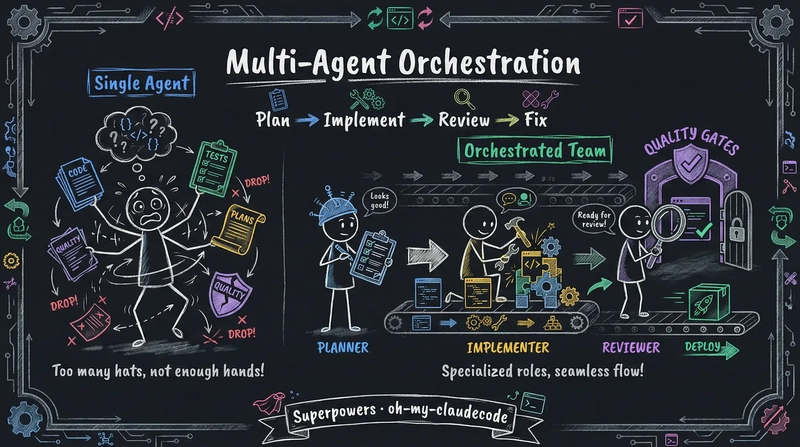
Multi-agent orchestration fixes this by keeping each step small. A planning agent breaks the task into pieces. An implementation agent handles one piece at a time. A review agent checks if the code matches the plan. If it does not, the work goes back to implementation. Each agent starts with a clean, focused context. The drift stops. Superpowers makes this explicit. It requires plans to be “clear enough for a junior engineer with enthusiasm but no sense, no judgment, no project context, and reluctance to test.”

This is not a new idea. It is the same structure as CI/CD pipelines in software development. The difference is that agents now fill the roles that humans used to fill. The handoff between stages is automatic.

Discipline or flexibility. Two frameworks, two designs.

Install Superpowers (118,624 stars) and the agent changes how it works. When it detects you want to build something, it stops. It does not start writing code. It asks what you actually want. After it pulls out the spec from the conversation, it shows the design in short chunks you can read and understand. You approve the design. The agent writes a plan. You say “execute” and sub-agent-driven development starts.

Each task in the plan is 2-5 minutes long. Every task has exact file paths, full code, and verification steps. After each sub-agent finishes a task, a two-stage review runs. Stage one checks if the code matches the spec. Stage two checks code quality. TDD is RED-GREEN-REFACTOR. Code written before a test exists gets deleted. 14 built-in skills enforce this 7-step workflow as “mandatory, not a suggestion.” It works with Claude Code, Cursor, Codex, OpenCode, and Gemini CLI.

oh-my-claudecode (13,996 stars) takes the team approach. Its Team mode runs a staged pipeline: team-plan, team-prd, team-exec, team-verify, team-fix. Since v4.4.0, it can run Claude, Codex, and Gemini at the same time using tmux workers. You can send code reviews to Codex, UI tasks to Gemini, and integration work to Claude in one command:

omc team 2:codex "Review auth module for security issues"
omc team 2:gemini "Redesign UI components for accessibility"
omc team 1:claude "Implement payment flow"

It has 32 specialized agents and routes tasks to Haiku or Opus based on difficulty. You can also run a cross-model PR review in one line:

/ccg Review this PR — architecture (Codex) and UI components (Gemini)

The standout feature is automatic skill learning. When you debug a problem, OMC extracts the fix as a skill file. For example, if you fix an aiohttp proxy crash, it saves this:

# .omc/skills/fix-proxy-crash.md
---
name: Fix Proxy Crash
triggers: ["proxy", "aiohttp", "disconnected"]
source: extracted
---
Wrap the handler at server.py:42 with try/except ClientDisconnectedError...

Next time the same error shows up, this skill gets injected automatically. No manual call needed. When requirements are unclear, /deep-interview "I want to build a task management app" starts Socratic questioning. It finds hidden assumptions and measures clarity on weighted dimensions before any code is written.

Superpowers enforces discipline to ensure quality. oh-my-claudecode offers multi-provider flexibility to widen your options. Both use the same core loop: plan, implement, review, fix.

The model is not the bottleneck. The workflow is.

Harness engineering showed that one agent needs a good environment to work well over time. Multi-agent orchestration goes further. It splits the work across agents and makes them inspect each other. The quality comes from the structure, not from any single model.

Both frameworks arrived at the same core loop: plan, implement, review, fix. The next time your AI agent produces bad code, try adding structure before switching models.

I Built Rosetta: An AI Agent That Turns a Notion Row Into a Personalized Onboarding Experience

Newly Generated Notion Wiki

New hires don’t fail because they’re unqualified. They fail because the context is scattered, the answers are buried, and the first week is chaos.

I’ve seen it happen. Someone joins a team, gets handed a GitHub org invite and a Confluence link from 2021, and is expected to be productive in two weeks. The knowledge exists — it’s just locked inside senior engineers’ heads, old PRs, and READMEs nobody’s updated since the rewrite.

So I built Rosetta.

🤔 What It Does

Rosetta is a CLI-driven onboarding agent. A team lead fills in a row in Notion — name, role, GitHub repos, a few notes — marks it Ready, and walks away. Within minutes, Rosetta has:

  • 🔍 Researched every assigned repository using Claude as the orchestrating agent
  • 📖 Generated a personalized, eight-section onboarding wiki in Notion
  • 🧠 Embedded the wiki (including images from READMEs) using Gemini multimodal embeddings
  • 💬 DMed the new hire in Slack with a link
  • 🔔 DMed the supervisor with a provisioning checklist inferred from the repos
  • 🤖 Spun up a Slack bot the new hire can chat with immediately

No templates. No copy-paste. A wiki that’s actually about their repos and their role.

Newly Generated Notion Wiki

The Code!

GitHub logo

arrrnav
/
rosetta-onboarder

Engineering onboarding agent using Notion MCP, GitHub API, and Claude API

Rosetta Onboarder

Rosetta Logo

Built for the MLH Notion AI Challenge.

Onboarding new engineers is repetitive work. A team lead writes the same wiki every time: here are the repos, here is how to run them, here are the open issues to start with, here is how we review code. The content is different per hire but the structure is always the same — and every piece of it already exists somewhere: in the GitHub README, in the issue tracker, in the PR history.

Rosetta automates this. A team lead fills in a Notion database row, marks it Ready, and walks away. Within minutes a personalized onboarding wiki is live in Notion, embeddings are indexed for RAG, the new hire has a Slack DM with their link, and the supervisor has a provisioning checklist.

Features

  • Agentic wiki generation — Claude researches every assigned GitHub repo on demand (README, structure, issues, PRs, CONTRIBUTING)…

🛠️ The Stack

Layer Technology
Orchestration Anthropic SDK — Claude claude-sonnet-4-6
Notion I/O @notionhq/notion-mcp-server over stdio
GitHub PyGithub — README, structure, issues, PRs
Embeddings Gemini gemini-embedding-2-preview
Vector store numpy cosine similarity (no external DB)
Server FastAPI + Uvicorn
Slack slack-sdk Socket Mode + DM notifications
CLI Typer + Questionary

🏗️ Architecture

New Hire Requests DB (Notion)
        │
        ▼  Status = Ready
   Poller / Webhook
        │
        ▼
   Claude Agent Loop
   ├── fetch_github_metadata
   ├── fetch_github_readme
   ├── fetch_github_structure
   ├── fetch_github_issues
   ├── fetch_github_prs
   ├── fetch_github_contributing
   └── create_notion_wiki  ◄── terminates the loop
        │
        ├── Gemini embeddings (text + images)
        ├── Slack DM → new hire
        └── Slack DM → supervisor (provisioning checklist)

The agent loop is the core of the system. Claude is given seven tools and runs until it calls create_notion_wiki exactly once. It decides what to fetch and in what order — which means it handles repos of wildly different sizes without wasting tokens on the ones that are straightforward.

🧠 The Agent Prompt Strategy

The interesting prompt engineering isn’t making the wiki specific — any LLM will do that with basic instructions. The interesting part is provisioning detection.

When a new hire joins, someone needs to figure out what they need access to: which cloud accounts, which databases, which internal tools, which CI/CD secrets. This normally falls on the team lead or engineering manager to mentally reconstruct from memory. Rosetta does it automatically.

The system prompt instructs Claude to scan the repos for signals even when nothing is explicitly documented:

Infer from: cloud provider configs or deploy scripts (AWS, GCP, Azure),
keys in .env.example or README, Docker/container registry references,
database connection strings or migration files, third-party service
integrations (Stripe, Twilio, SendGrid, etc.), internal tooling references
(Datadog, PagerDuty, Sentry, Vault, Jira, LaunchDarkly, etc.),
VPN or SSH requirements, CI/CD secrets (GitHub Actions, CircleCI, etc.),
GitHub org-level permissions, and any access requirements explicitly
listed in the team documentation context.

The output goes into an access_requirements field on the wiki and gets forwarded to the supervisor as a Slack DM checklist — without anyone having to think about it.

📄 Context Pages

One feature I’m particularly happy with: Context Pages.

The team lead can paste Notion page URLs into the hire’s database row. Before the agent runs, Rosetta fetches those pages’ block content via the REST API and injects it into Claude’s user message. Internal runbooks, ADRs, team norms — all of it becomes part of the wiki without Claude needing any special tools to access it.

# pipeline.py
for ctx_page_id in hire.context_page_ids:
    text = await session.fetch_notion_page_text(ctx_page_id)
    context_pages_text += text + "nn"

# injected into the agent's user message:
"Additional context from team documentation:n{context_pages_text}"

This means the wiki isn’t just built from public GitHub data — it’s built from your team’s actual knowledge base.

🔄 Freshness: Light and Full Refreshes

A wiki is only useful if it’s current. Rosetta runs a background scheduler that wakes every Friday at 17:00:

Week Refresh Type What Happens
Odd ISO weeks Light New issues and recent PRs appended
Even ISO weeks Full Entire wiki regenerated, old page archived

State is persisted to data/scheduler_state.json so restarts don’t double-fire. New hire gets a Slack DM either way.

🖼️ Multimodal RAG

After wiki generation, Rosetta embeds the content using Gemini’s new multimodal gemini-embedding-2-preview model. Architecture diagrams, screenshots, and other images in READMEs are embedded alongside text into the same vector space — so the Slack bot can answer “what does the auth flow look like?” with context that includes visual material.

The vector store is a simple numpy cosine similarity implementation for the demo. For a large-wiki scope, p.

def retrieve(self, query: str, top_k: int = 3) -> list[str]:
    q_vec = self._embed_text(query)
    scores = self._vectors @ q_vec
    top_indices = np.argsort(scores)[::-1][:top_k]
    return [self._chunks[i] for i in top_indices]

💬 The Slack Bot

The moment the wiki is written, the new hire gets a DM with their wiki link. No email chain, no “check your onboarding doc in Drive” — it lands in Slack where they’re already working.

New Hire Rosetta Slack Bot Interaction

From that point on, they can ask the bot anything directly in the DM. It resolves their Slack user ID to their wiki’s vector store, retrieves the top-3 relevant chunks by cosine similarity, and generates an answer with Claude — all running inside the same Socket Mode connection as the FastAPI server. No separate process, no public URL required.

The RAG context includes not just the wiki text but also any images embedded from READMEs — so questions like “how does the auth flow work?” can pull from an architecture diagram the same way they’d pull from a paragraph of prose.

Meanwhile, the supervisor gets their own DM — a provisioning checklist inferred by Claude from the repos, sent automatically so nothing slips through the cracks before the hire’s first day.

Manager's Rosetta Slack Bot Interaction

⚙️ Setup Experience

One thing I wanted to get right: the operator experience. rosetta setup runs an interactive wizard that:

  • Prompts for every required env var with masked previews of existing values
  • Provisions the Notion workspace (top-level page, database, all columns) in one shot
  • Validates the configuration with a doctor check before exiting

Interactive Rosetta CLI Experience

Then rosetta serve starts the FastAPI server, the Slack bot, the poller, and the scheduler as co-located asyncio tasks. One command, everything running.

🪨 What I’d Do Differently

MCP over stdio is finicky.
The @notionhq/notion-mcp-server uses stdio transport, which means a subprocess per session and careful teardown to avoid anyio cancel-scope errors on shutdown. A stable HTTP MCP server would be cleaner.

I wanted to embed the repos themselves.
Right now, RAG is built from the generated wiki content. The richer version would embed the actual repository files and Notion pages directly — giving the Slack bot true codebase-level context rather than a summary of it. The architecture supports it, but the Gemini embedding API costs add up fast during development, and testing a full repo ingestion pipeline as a solo developer isn’t cheap. This is the obvious next step for a production deployment where the cost is justified.

Context pages only go one level deep.
When a team lead attaches a Notion context page, Rosetta fetches its blocks but doesn’t recurse into child pages. A runbook that links to five sub-pages of setup instructions is only partially ingested. Full recursive traversal with depth limits is the right solution — just didn’t make the cut before the demo.

🚀 Try It

rosetta setup gets you from zero to a running onboarding system in about five minutes if you have Notion, GitHub, and Slack tokens ready.

Rosetta removes the biggest barrier to professional growth: getting started.

Faster ramp-up. Less friction. Smarter onboarding.

I Stopped Judging React State Libraries by DX Alone. AI Compatibility Matters Now.

For years, my checklist for choosing a React state library was pretty standard:

  • developer experience
  • TypeScript support
  • performance
  • ecosystem

Now I use one more filter:

How well can an AI coding assistant understand, continue, and refactor the pattern?

That shift changed what I value, and it is one reason I keep coming back to easy-model instead of defaulting to Redux or even today’s more common lightweight choice, Zustand.

The AI Workflow Changed the Rules

The old assumption was simple: humans write the architecture, then humans maintain it.

That is no longer true for a lot of teams.

A more realistic workflow today looks like this:

  • a human defines intent
  • AI scaffolds a feature
  • a human fixes the edge cases
  • AI expands the next iteration

In that loop, architecture becomes communication.

Not just communication between teammates, but communication between humans and models.

If the codebase hides intent behind too many disconnected layers, the AI starts guessing. And when AI starts guessing inside your state layer, things get weird fast.

Redux tends to push that guessing into multiple layers.
Zustand tends to hide it behind a deceptively simple store that keeps absorbing more responsibility over time.

What “AI Compatibility” Actually Means

I do not mean “the model can produce a demo with it.”

Almost every popular library can get a decent hello-world out of an assistant.

Redux can do it.
Zustand can definitely do it.

I mean:

  • can the AI find the right place for new logic?
  • can it extend existing patterns instead of inventing a new one?
  • can it update a feature without scattering logic across files?
  • can it read the business model from the code itself?

That is where I think easy-model is unusually strong.

Why easy-model Is Easier for Models to Continue

easy-model organizes state around model classes:

  • fields hold state
  • methods hold business behavior
  • components consume instances via useModel or useInstance

That creates a very direct map between business intent and code structure.

Here is the kind of code AI tools seem to handle well:

class SearchWorkspaceModel {
  query = '';
  results: SearchResult[] = [];
  filters: string[] = [];
  selectedId: string | null = null;

  setQuery(query: string) {
    this.query = query;
  }

  toggleFilter(filter: string) {
    this.filters = this.filters.includes(filter)
      ? this.filters.filter(item => item !== filter)
      : [...this.filters, filter];
  }

  select(id: string | null) {
    this.selectedId = id;
  }

  @loader.load()
  async search() {
    this.results = await api.search({
      query: this.query,
      filters: this.filters,
    });
  }
}

The business domain is obvious.
The actions are obvious.
The UI dependencies are obvious.

That alone makes AI-generated follow-up changes much more stable.

This Becomes Even More Valuable in AI Products

If you are building:

  • chat UIs
  • agent dashboards
  • retrieval interfaces
  • multi-panel copilots
  • tool-execution consoles

you are dealing with unusually rich frontend state.

Not just “is the modal open,” but:

  • what is currently streaming
  • which tool is running
  • what the session history is
  • which panel shares the same session
  • how retries and logs behave

Those apps benefit from having state and behavior live in the same place.

For example:

class ChatWorkspaceModel {
  messages: Message[] = [];
  draft = '';
  streamingText = '';
  toolCalls: ToolCall[] = [];
  error: string | null = null;

  setDraft(draft: string) {
    this.draft = draft;
  }

  @loader.load(true)
  async send() {
    const content = this.draft.trim();
    if (!content) return;

    this.messages.push({ role: 'user', content });
    this.draft = '';
    this.error = null;

    try {
      const stream = await llm.stream(this.messages);
      for await (const chunk of stream) {
        this.streamingText += chunk;
      }

      this.messages.push({
        role: 'assistant',
        content: this.streamingText,
      });
      this.streamingText = '';
    } catch (error) {
      this.error = 'Send failed';
    }
  }
}

When an assistant sees this, it has far less ambiguity about where the next feature belongs.

The Supporting Pieces Matter Too

What makes easy-model practical is not just the model class pattern, but the utilities around it:

  • instance sharing by arguments is useful for session-based UIs
  • watchers help with logging, analytics, and side effects
  • loading utilities reduce repetitive async state wiring
  • IoC features make service boundaries cleaner in larger apps

That combination makes it a good fit for apps where business logic is not trivial and AI is expected to contribute repeatedly.

That is the gap I increasingly feel between easy-model and Zustand:

  • Zustand wins on minimal entry cost
  • easy-model wins once business behavior, shared instances, async flow, and AI-assisted extension all start compounding

Redux still has its place, but in day-to-day modern React discourse, Zustand is usually the more relevant comparison, and I think easy-model holds up well there.

My New Mental Model

I still care about ergonomics and performance.

But I now treat AI compatibility as a first-class architectural concern.

A state pattern is stronger if:

  • a human can read it quickly
  • an AI can continue it predictably
  • both can locate business intent without hunting through five layers

That is the real reason easy-model stands out to me.

It does not just reduce boilerplate. It reduces ambiguity.

And ambiguity is exactly where AI-assisted codebases start to decay.

Closing

If you are evaluating React state management in an AI-assisted workflow, I would seriously add this question to your shortlist:

Will this pattern still feel coherent after ten rounds of human + AI iteration?

For me, easy-model is one of the few tools that earns a solid “yes” there.

GitHub: https://github.com/ZYF93/easy-model

npm: pnpm add @e7w/easy-model

If you are also thinking about AI compatibility as a real frontend architecture concern, a star on the repo would mean a lot.

ARC-AGI-3 Proves AI Still Can’t Replace Human Judgment – And That’s the Point

Every few months, something drops that cuts through the AI hype and forces the conversation back to reality. This week, that something was ARC-AGI-3.

The results were blunt: every frontier AI model scored below 1%. Every human scored 100%.

Let that sink in for a second. Not some humans. Not specially trained humans. Every single person who attempted it, regardless of background, aced it. Meanwhile, the most powerful AI systems in existence, the same ones passing bar exams and writing production code, nearly completely failed.

If you’ve been building AI systems for any length of time, your gut reaction was probably somewhere between “I told you so” and “okay, but what does this mean for what I’m shipping?” That’s exactly the question worth digging into.

WHAT ARC-AGI-3 ACTUALLY TESTS

ARC-AGI isn’t your typical benchmark, and that’s the point. It’s not about trivia recall, coding ability, or text summarization. It was specifically designed to test abstract reasoning from first principles. The kind of task where you’re shown a small number of examples of a visual pattern transformation and have to figure out the underlying rule from scratch.

No prior knowledge helps. No retrieval helps. You can’t Google your way to the answer. You have to look at the examples, abstract the logic, and apply it to a new case you’ve never seen before.

Humans find this intuitive. We abstract patterns constantly, it’s one of the most fundamental things our brains do. Show a child three examples of a rule they’ve never been taught, and they’ll generalize it. Show a frontier LLM the same examples, and it will confidently give you a wrong answer based on a pattern it half-remembers from training.

That’s not a knowledge gap. That’s a reasoning gap.

THIS ISN’T A SCALE PROBLEM

The predictable response to any AI failure is: “give it more data, more parameters, more compute.” It’s become almost a mantra. But that narrative is getting harder to sustain.

We’ve been scaling aggressively for years. Each new model family came with promises of emergent capabilities and breakthrough reasoning. Some of those promises were real – coding, analysis, writing, structured reasoning have all improved substantially. But ARC-AGI has barely moved despite years of scaling.

LeCun has been arguing this point for a while: next-token prediction has a fundamental ceiling for certain types of reasoning, and throwing more compute at it won’t fix the architecture. His new venture just raised $1 billion to pursue Energy-Based Models as an alternative. Whether EBMs actually work at scale remains to be seen, but the underlying observation is increasingly hard to dismiss.

If the architecture is the constraint, you can’t benchmark-engineer or fine-tune your way out of it. And for engineers building production systems, that has real consequences.

HOW THIS PLAYS OUT IN PRODUCTION

Here’s what happens when teams treat the latest model as a near-complete replacement for human judgment.

The system works beautifully on the easy cases — which is most of the traffic. Speed is good, costs are low. Then edge cases start showing up. And AI failures at the boundary don’t fail quietly. They fail confidently. The model produces an answer that looks perfectly reasonable, stated with full certainty, that happens to be completely wrong in a way that violates a rule it was never taught to reason about from scratch.

These aren’t just wrong answers. They’re wrong answers that pass basic sanity checks. They slip through unless someone who actually understands the domain is paying attention.

That’s the gap ARC-AGI-3 is measuring. Not “can this model do most things well”, it clearly can. But “can it reason to a correct answer when it has never encountered this specific structure before, with no retrieved knowledge to fall back on?” The answer, consistently, is no.

HITL ISN’T A CRUTCH – IT’S AN ARCHITECTURAL DECISION

Human-in-the-Loop has an image problem. In a lot of technical conversations, it gets framed as the fallback you use before the AI is good enough – something you eventually eliminate as the model improves.

ARC-AGI-3 is strong evidence that this framing is wrong. Not all HITL is about compensating for a model that isn’t there yet. Some of it is about designing honestly around what AI systems structurally cannot do.

The question isn’t whether to include humans in the loop. It’s where, how much, and for what. Getting that right is actually a sophisticated engineering problem, and most teams rush past it.

  1. Route the hard cases, not all the cases. Build a reliable routing layer using confidence scoring, uncertainty quantification, or task-specific heuristics to identify inputs where the model is likely to fail and route only those for human review.

  2. Treat every human correction as a training signal. Every override or validation is a labeled data point. Systems that capture this systematically get better over time. Systems that treat human review as a one-way gate leave the most valuable feedback on the table.

  3. Design for graceful degradation, not silent failure. The worst failure mode is confident wrongness. A well-designed system knows when it’s uncertain and triggers a handoff rather than producing a confident bad output.

  4. Be honest about the boundary. There’s a category of task where the model shouldn’t be the final decision-maker, not because the model is bad, but because the task requires novel abstract reasoning. Identifying that boundary honestly is the job.

THE DEEPER TAKEAWAY

ARC-AGI-3 is useful precisely because it forces clarity on a question teams tend to answer optimistically: what can AI actually do, and what is it structurally limited at?

The honest answer in 2026 is that AI systems are genuinely capable and getting better and they have a real ceiling on certain types of abstract reasoning that hasn’t moved despite years of scaling. Both things are true at the same time.

The teams that build the most reliable AI systems aren’t the ones who bet hardest on that ceiling disappearing. They’re the ones who design honestly around it, keeping humans in the loop not because the model is bad, but because they’ve thought carefully about where human judgment is irreplaceable.

Human judgment isn’t going away. The job is to figure out exactly where it matters most, and build accordingly.

Java News Roundup: GraalVM Build Tools, EclipseLink, Spring Milestones, Open Liberty, Quarkus

This week’s Java roundup for March 23rd, 2026, features news highlighting: GA releases of GraalVM Native Build Tools 1.0 and EclipseLink 5.0; the March 2026 edition of Open Liberty; fourth milestone releases of Spring Boot, Spring Modulith and Spring AI; a point release of Quarkus; the first development release of Infinispan; and a maintenance release of GlassFish.

By Michael Redlich

Pantry & Plate: An AI Kitchen Assistant That Actually Knows What’s Expiring Tomorrow

This is a submission for the Notion MCP Challenge

What I Built

I buy in bulk at Costco to save money. The problem: tracking 100+ pantry items, remembering what’s expiring, and figuring out what to cook for a two-person household with different food preferences.

Pantry & Plate is an AI-powered pantry tracker and meal planner that eliminates that cognitive load. It parses grocery receipts using Claude’s vision, tracks expiry dates in Notion, and runs an agentic chat assistant that knows exactly what’s in my kitchen, what needs to be used first, and what my partner won’t eat (mushrooms, shrimp, brussels sprouts).

Here’s what makes it different: when I ask “What can I make tonight?”, the agent doesn’t guess. It queries my actual Notion databases — pantry items with real expiry dates, my household preferences, my planned meals for the week — then reasons over the results before suggesting anything.

The agent might respond: “The Italian sausage expires in four days. How about a quick sausage pasta with the San Marzano tomatoes from your pantry? I’ll add it to your meal agenda.”

That’s not a canned response. The agent read Expiry Date: March 30 from my Notion Pantry database.

Key Features

  • Receipt parsing with human-in-the-loop review: Upload a photo of a Costco receipt. Claude’s vision parses “KS ORG STOCK” into “Kirkland Organic Chicken Stock” (it guesses). You review and correct before saving.
  • Compact pantry view: 100+ items grouped by category, collapsible sections, inline editing, expiry date tracking.
  • 11-tool conversational agent: Query pantry, shopping list, meal history, preferences, kitchen tools, and meal agenda — all via natural language.
  • Shopping list with purchase-to-pantry flow: Check “purchased” → item moves to pantry automatically.
  • Preferences as silent context: The agent knows my partner hates mushrooms. It never narrates this — just excludes them.

Video Demo

Show us the code

https://github.com/Aprattcodes/pantry-tracker

Stack

  • Next.js 15, TypeScript, Tailwind v4, shadcn/ui
  • Anthropic Claude API (vision for OCR, forced tool use for parsing, agentic loops)
  • Notion as the persistent data layer (6 databases)
  • @notionhq/client v2

How I Used Notion MCP

We implemented the MCP tool-use pattern — Claude decides which of 11 tools to call, queries live Notion data, and reasons over results in an agentic loop — using @notionhq/client v2 with integration tokens.

We initially attempted mcp.notion.com but it requires OAuth authentication, which doesn’t fit a server-side web application architecture where the backend needs persistent database access. The agentic pattern is structurally identical to an MCP client-server interaction: tool discovery, tool invocation, result handling, multi-turn reasoning. The transport layer differs, but the intelligence pattern is the same.

The Agentic Loop in Action

Here’s how chatAgent() works:

// 11 tools available to the agent
const CHAT_TOOLS = [
  { name: 'query_pantry', description: 'Get all pantry items with expiry dates' },
  { name: 'query_preferences', description: 'Get household food preferences' },
  { name: 'query_meal_agenda', description: 'Get planned meals for the week' },
  { name: 'suggest_meals', description: 'Generate meal suggestions' },
  { name: 'add_to_meal_agenda', description: 'Add a meal to the weekly plan' },
  { name: 'log_meal', description: 'Log a meal to history' },
  // ... 5 more tools
];

// The loop: Claude calls tools, we execute, Claude reasons over results
while (response.stop_reason === 'tool_use' && iterations < 8) {
  const toolUse = response.content.find(c => c.type === 'tool_use');

  // Execute against real Notion databases
  const result = await executeNotionTool(toolUse.name, toolUse.input);

  // Feed result back to Claude for reasoning
  messages.push({ role: 'user', content: [{ type: 'tool_result', content: result }] });
  response = await anthropic.messages.create({ model, messages, tools: CHAT_TOOLS });
}

When the user says “What can I make tonight?”, Claude decides to:

  1. Call query_preferences → learns one of us hates mushrooms, we both love Mexican food
  2. Call query_pantry → sees Italian sausage expires in four days
  3. Call query_meal_agenda → checks what’s already planned
  4. Call suggest_meals → generates contextual suggestions

The agent makes multiple Notion queries in a single conversational turn, reasoning over real data — not summaries.

Notion as the Data Layer

Six databases power the entire system:

Database Purpose
Pantry Items with category, quantity, expiry date, store
Shopping List Items grouped by store with purchase status
Meals Log Meal history with date, category, effort level
Preferences Likes, hard-passes, cuisine preferences per person
Kitchen Tools Equipment with effort levels (sous vide = High)
Meal Agenda Currently planned meals for the week

The agent can query any of these, cross-reference them, and write back. When I say “Add Italian sausage pasta to my meal plan,” it:

  1. Calls add_to_meal_agenda → writes to Meal Agenda DB
  2. Auto-triggers log_meal → writes to Meals Log DB

Two Notion writes from a single conversational command.

Human-in-the-Loop Receipt Parsing

Costco receipts are cryptic. “KS ORG STOCK” means Kirkland Signature Organic Chicken Stock. We use Claude’s vision with forced tool use to guarantee structured output:

const response = await anthropic.messages.create({
  model: 'claude-sonnet-4-20250514',
  max_tokens: 4096, // Required for 27+ item receipts
  tool_choice: { type: 'tool', name: 'record_pantry_items' },
  // ...
});

The parsed items appear in a review table — original receipt text on the left, Claude’s interpretation on the right. The human corrects mistakes, picks expiry dates, then saves. The review step is critical: Claude makes educated guesses, but a human confirms before anything hits Notion.

Key Technical Decisions

Forced tool use for structured output: tool_choice: { type: "tool", name: "record_pantry_items" } guarantees JSON output. Prompt engineering alone was unreliable for 27+ item receipts.

max_tokens: 4096 for long receipts: Below this threshold, Claude silently truncates. Discovered this the hard way with a Costco run.

Preferences as silent context: Early versions narrated preferences (“I see you don’t like mushrooms…”). Now the agent applies them without explanation — like a real kitchen assistant would.

Store inference from preferences: When the user says “add ground beef to my shopping list,” the agent queries preferences, finds “household buys ground beef at Costco,” and auto-sets store=Costco, quantity=3 lbs.

Purchase-to-pantry flow: Checking “purchased” on a shopping list item creates a pantry entry with the same name/store/quantity. One checkbox replaces a manual two-step process.

Reflections

Building this taught me that the MCP pattern isn’t about the transport layer — it’s about giving an AI agent live data access and the autonomy to query what it needs. Whether that’s via a remote MCP server or a custom tool wrapper around @notionhq/client, the intelligence pattern is the same: tool discovery, invocation, result handling, multi-turn reasoning.

The hardest part wasn’t the agentic loop — it was the UX around it. Making tool calls visible (we show “tool pills” in the chat), handling the max_tokens stop reason gracefully, and ensuring the agent doesn’t narrate its reasoning when it should just act.

Notion as a data layer worked surprisingly well. The real-time queries mean the agent always has accurate state. No stale caches, no sync issues. When I buy groceries and check them off, the next “What can I make?” query sees the updated pantry.

For a two-person household that meal plans around Costco runs and expiring produce, this is the tool I actually wanted to exist.

Built by a developer who got tired of throwing away forgotten produce.

Why Your Next Enterprise Chatbot Should Write Its Own GraphQL Queries

Your chatbot needs to query live business data. Here is why GraphQL maybe preferable or safer, more controllable interface / tools for LLM generated questionnaire.

The Real Question: How Should Your Agent Talk to Your Data?

If you are creating an agentic chatbot, that will need access to tools (APIs/query SOR, and perform other tasks that require coordination), then you have already answered the hard conceptual part. Your agent thinks, selects tools, and assembles responses.

However, there is another issue that is not receiving as much consideration as it should: how should your agent interact with your business data?

An image that can be drawn is that the agent will need to query your sales schema, retrieve customer churn information, and cross-check support tickets. This is three or four calls to tools that will create live queries against your backend. These queries need to be safe, typed, auditable, and constrained, as no human will review them prior to execution.

Most teams will default to using REST endpoints. Some will even consider using agents that write SQL against transactional databases, which I would strongly advise against. I think there is a much better way.

The Architecture Pattern

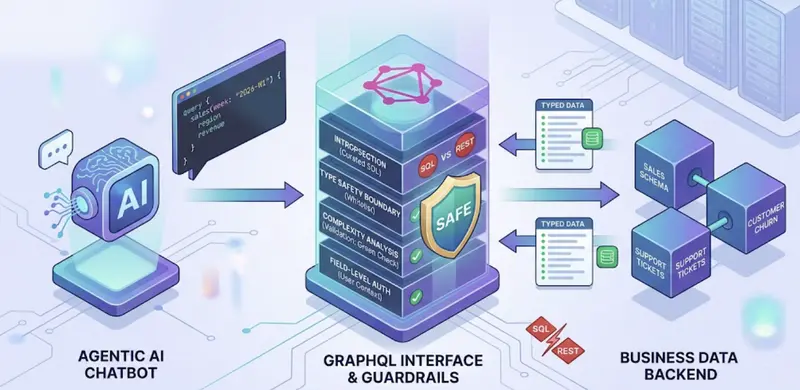
Here is the architecture I continue to come back to. While the interesting piece is not the orchestration piece itself, it is the selection of GraphQL as the data interface between the agent’s tools and the backend.

The data path is the GraphQL tool server, and that is the main way in which the agent is accessing business data. The other tools are just implementing specific operations and do not all share the same backend.

With regards to the orchestration piece, it is simple in the sense that the agent selects the tools, runs them, and continues running them in a loop until it has enough information. However, the interesting part is inside those tool runs, and that is where the agent is constructing GraphQL queries against your backend. This is where the interface selection makes or breaks the system.

Why GraphQL Over SQL or REST?

This is my strongest conviction: for enterprise AAL use cases, GraphQL is a safer default interface than REST for LLM-based queries. SQL is appropriate for analytics, but it should not be used as an interface between an agent and your transactional data.

  • Introspection: Realistically, you expose a curated subset of the schema, or pre-fetch the minified SDL, rather than allowing the agent to freely introspect in production. This ensures the schema remains small enough to be included in the prompt without consuming your context window, while still allowing the agent to discover the data available.
  • Type safety as a security boundary: There is no DROP TABLE in GraphQL. The schema is a whitelist, and bad queries will not reach your data.
  • Reduced hallucination surface: While GraphQL removes an entire category of hallucinations (invalid joins, non-existent tables), there can still be queries for non-existent or improperly used relationships, which is why you’ll still want to use validation layers.
  • Guardrails baked in: Complexity analysis, depth limiting, and field-level authorization are all first-class citizens in the GraphQL toolchain.

This is what an agent-generated query looks like in the real world:

query {
  sales(week: "2026-W1") {
    region
    revenue}
  churnedCustomers(week: "2026-W2") {
    count
    reason  }
}

The agent only requests what it needs. Fewer tokens in the response, less load on your backend.

Let’s look at the alternative of allowing an agent to query your data in SQL against your relational data store. What if the agent’s WHERE clause is not quite right and returns the wrong data? What if the agent forgot to include the LIMIT clause and now your entire table is being scanned? What if the agent’s JOIN is not quite right and locks up your data or slows down every other user of your system? GraphQL is the reverse of this problem. The model only sees what you’ve made available and nothing more.

However, to be fair: GraphQL is not without its own set of problems. N+1 query problems will result if resolvers are not implemented properly. Also, with GraphQL, we are moving the complexity to resolver performance and cost management, especially in the case of queries coming from autonomous agents. For offline analytics queries that involve complex aggregation, SQL against a read-only data warehouse is indeed the correct approach. However, that is a fundamentally different scenario from an agent querying your live application data in real time. At the application level, which is where most enterprise chatbots live, GraphQL is indeed a more controllable and auditable interface. That is a trade-off that is worth making for most of the use cases that I see in the wild.

The Code: Two Key Components

Here are the two components that make this pattern work. Everything else is standard boilerplate, which we’re sure you already have in place. Spring Boot is an excellent choice here. Its type-safe support for GraphQL, its maturity, and its support for Spring AI make it an excellent choice for building agent-facing APIs.

1. MCP Tool Server with Guardrails (Java)

The MCP tool server is essentially a safety wrapper for your GraphQL API. The agent sends in its query, which is then checked by the MCP tool before it is run.

@Service
public class GraphQLQueryTool implements McpTool {

    private final GraphQLClient graphQLClient;
    private final SchemaValidator schemaValidator;
    private final QueryComplexityAnalyzer complexityAnalyzer;
    private static final int MAX_QUERY_DEPTH = 4;
    private static final int MAX_QUERY_COMPLEXITY = 100;
    @Override
    public String name() { return "query_business_data"; }
    @Override
    public ToolResult execute(Map<String, Object> parameters) {
        String query = (String) parameters.get("query");
        // Safety Layer 1: Schema validation
        ValidationResult validation = schemaValidator.validate(query);
        if (!validation.isValid()) {
            return ToolResult.error("Invalid query: " + validation.errors());        }

           // Safety Layer 2: Complexity analysis
        int complexity = complexityAnalyzer.calculate(query);
        if (complexity > MAX_QUERY_COMPLEXITY) {
            return ToolResult.error("Complexity " + complexity
                + " exceeds limit of " + MAX_QUERY_COMPLEXITY);}

                   // Safety Layer 3: Depth limiting
        int depth = complexityAnalyzer.calculateDepth(query);
        if (depth > MAX_QUERY_DEPTH) {
            return ToolResult.error("Depth " + depth
                + " exceeds limit of " + MAX_QUERY_DEPTH);
        }
        GraphQLResponse response = graphQLClient.execute(query);
        return ToolResult.success(response.toJson());
    }
}

Three levels of validation before anything touches your data. This is defense in depth. This is important when the model is actually making decisions and sending queries on its own.

2. Agentic Orchestration with LangGraph (Python)

LangGraph controls the reasoning loop. The model suggests what tools to invoke, the orchestration layer controls and corrects the loop until it has enough information.

from langgraph.graph import StateGraph, END
from langchain_anthropic import ChatAnthropic
def create_agent():
    model = ChatAnthropic(
        model="claude-opus-x",
        max_tokens=4096, temperature=0
    )
    model_with_tools = model.bind_tools([
        graphql_query_tool, customer_data_tool,
        analytics_tool, notification_tool
    ])

    def reasoning_node(state):
        response = model_with_tools.invoke(state["messages"])
        return {"messages": state["messages"] + [response]}

    def tool_execution_node(state):
        last_msg = state["messages"][-1]
        results = [
            ToolMessage(
                content=tool_registry[tc["name"]].invoke(tc["args"]),
                tool_call_id=tc["id"]
            ) for tc in last_msg.tool_calls
        ]
        return {"messages": state["messages"] + results}

    def should_continue(state):
        last_msg = state["messages"][-1]
        if hasattr(last_msg, "tool_calls") and last_msg.tool_calls:
            return "execute_tools"
        return END

    graph = StateGraph(AgentState)
    graph.add_node("reason", reasoning_node)
    graph.add_node("execute_tools", tool_execution_node)
    graph.set_entry_point("reason")
    graph.add_conditional_edges("reason", should_continue)
    graph.add_edge("execute_tools", "reason")
    return graph.compile()

The model offers a plan; it is up to the orchestration layer to constrain, execute, and correct it. There is no need to think through all possible questions or create intricate routing logic.

The Hard-Won Opinions

Guardrails are the product. The hardest part is not making agentic chatbots work; it is making them safe. My personal stack includes schema validation, complexity limits, depth limits, tool call budgets (max 8 per turn), query deduplication to prevent loops, hard timeouts (10s/tool, 60s/turn), read-only by default, and field-level authorization for PCI or sensitive data. One other thing that many teams overlook is that every query executed is executed within the authorization context of the requesting user. The agent should not have greater access rights than it is acting on behalf of. While this is a lot, it is also important to remember that an agent with unfettered rights to your business systems is not something you want.

Transparency is the key to building trust. Users need to see the logic, the generated queries, and the raw data. The answer is black box if it simply says “The answer is…” rather than “I queried the sales data for weeks 12 and 13. I saw that there was a 12% drop in the Northeast. I cross-referenced that with 47 lost enterprise accounts and also looked at the support tickets that came in with billing complaints.” Transparency is what will get the adoption. Without it, the project will fail.

Tool calls can get out of control. Agents will get caught in an infinite loop calling the same tool over and over with slightly different parameters. I’ve seen it happen in one of my prototypes. The agent made 30 nearly identical tool calls in under 15 seconds before timing out. The combination of the budget and the deduplication and the timeout is the bare minimum.

When GraphQL Is Not the Right Fit? THoughts?

The use of GraphQL as the query language against the agent data is not necessarily the correct answer. SQL against the read-only warehouse is the correct answer for the offline analytics query workload with complex aggregations. This is analytics, however, and not the agents querying the live data. When the high-risk write operations are critical in that the outcome is catastrophic if the query is incorrect, approval is the answer regardless of the query language. And in some cases, your backend is simply a good set of REST endpoints with well-defined contracts. In those cases, the cost of switching is likely not worth the benefit. This is particularly true in cases where agents must query many types of entities with differing field sets required. This is true in all of the enterprise cases that I have been involved with.

Where This Is Heading

The tooling is already mature: the current-gen models like Claude Sonnet and GPT-4o have decent native tool usage capabilities, MCP is becoming the de facto standard for tool integration, and GraphQL has been around for nearly a decade now. The orchestration frameworks are in place. What’s lacking is the organizational willingness to put in place a typed and guarded query interface between the agent and the data, rather than just making raw REST calls and crossing our fingers.

The advice I’d give is: **One read-only tool against a non-sensitive data set. Get the reasoning loop right. Make sure stakeholders can see the agent’s output. Then iterate.

Once you have those tools, the real decision is how those tools interact with your data. REST works, and GraphQL offers typed schema definition, introspection, and query constraints. These are much more important when your caller is a model instead of a human.

Is GraphQL the right abstraction layer for LLM-generated queries, or is there a better approach? Drop your thoughts in the comments below.

kwike – Agent-to-Agent Orchestration in the Unix Philosophy

Doc Updater

I’ve been building kwike, an LLM-first tool for composing agentic workflows using Unix primitives – pipes, append-only logs, and event subscriptions instead of SDKs and harnesses.

The primary use case here is agentic workflows for specific repeatable actions. What I often call drudgery. Version upgrades, dependency management, or maintaining documentation.

This isn’t going to run your business or make you the next 50MM in 12hr dude, but it does allow you to get some boring stuff done while you work on the stuff you like. Its a technical solution for technical problems.

LLM First

One of the features kwike focuses on is training an LLM in its use. While it has a CLI that you can use for non-agentic tooling, building a workflow is telling your LLM of choice – in my case, Claude – “You have access to kwike, an agentic workflow orchestration tool. Read kwike --help and kwike docs. I want to build a workflow that looks something like X. Let me know when you are ready to discuss.” Much of what comes next can be constructed without any experience with the tool. It includes debugging tools and static analysis to validate configuration and the workflow DAG.

While setting up a new workflow isn’t immediate, rather complex behavior can be recorded and committed with your projects.

Basics

Doc Updater

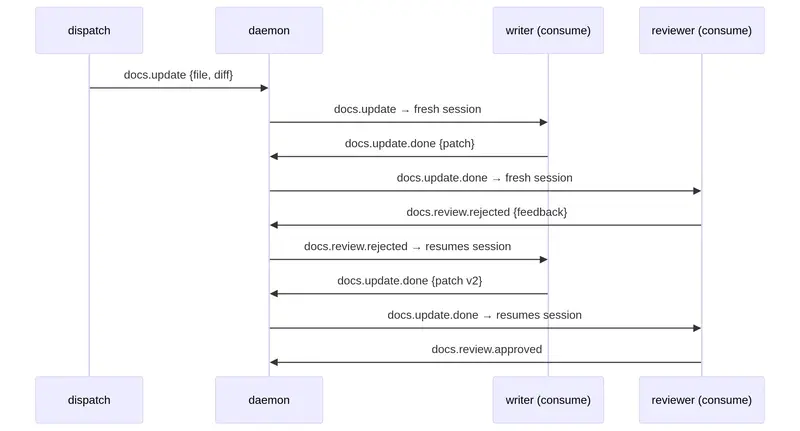
Deep down this is an agent-to-agent communication protocol through event dispatch and subscription. The tool exposes the following primitives:

  • dispatch (emit events to an event store)
  • consume (pull events subscribed to)
  • daemon (event store owner, can mesh across network boundaries)

The consumer watches for one or more messages defining its own partition and maintains its own read cursor. The daemon in this case acts as a mail server, essentially, and new messages are dispatched with the intent of being reactive in nature. Think of it as allowing system events or another LLM’s tool use to spawn a dedicated workflow.

Each workflow step is called a uniform and is assigned to a dedicated consumer process. A uniform is a prompt template passed to the underlying tool the consumer executes. The goal here is to force the LLM to consume and produce a consistent contract so agents and scripts can exchange data. This protocol also provides some guarantee that agentic processes complete their work by requiring a JSON schema which is used to validate the agent output.

In many cases this becomes a context exchange between agents. Reminding working directories or fan-out/fan-in statuses. This context exchange is generally analogous to an email thread. A consumer can subscribe to many sources and can for claude-code force a clean context or continue a session

source: 
  types: 
    - "task.implement" # subscribed events 
    - "task.review.rejected" 
    - "task.review.approved" 

session: 
  fresh_types: [task.implement] # these create new sessions 
  resume_types: [task.review.rejected] # these resume existing sessions 
 # task.review.approved is neither → defaults to fresh

Each tool call or agent can map lifecycle events so the output contract can inform on .done and .failed. When these mappings exist a successful tool or agent completion results in a new event dispatched as a threaded reply. Allowing other consumers to participate in the work with their own uniform defining a task.

Claude-Code Caveat

Much of this has been built around claude-code and there are some limitations towards other agents right now but this is what I have so far. Claude for example as the tool supports session resume which permits retries and replies to maintain a conversationally bound session to speed things up.

Couple Line Example

Here is an example of “watch” which is a convenience function to auto “dispatch” from any command output on an interval. Requires a running kwike daemon.

# watch a git repo, dispatch changes, consume with an agent
kwike watch "git diff --stat HEAD~1" --type repo.change --interval 60s
kwike consume --config ./agents/writer/consumer.yaml

Anyway I have plenty of examples in the repo, https://git.sr.ht/~ninjapanzer/kwike

There is plenty left to do but I would love to hear some feedback on the architecture and assumptions around contract constraints as a mode to make LLMs behave. The crash-only approach, and the message durability that mirrors Kafka but acts more like a newsgroup server and mail clients.