AI Is Flattening Skill Levels: Here’s Why That’s Dangerous

AI & The Flattening of Skill Levels

For most of the history of software engineering, skill differences were visible.

You could tell the difference between:

  • a junior developer
  • an experienced engineer
  • a systems thinker

It showed up in:

  • code quality
  • architectural decisions
  • debugging ability
  • system reliability over time

AI is changing that visibility.

Today, many developers can produce similar-looking outputs quickly.

Code compiles.
Features work.
Interfaces look polished.

At first glance, skill levels appear to be flattening.

But that apparent equality is not progress.

It introduces a new kind of risk.

AI & The Flattening of Skill Levels

Why Skill Levels Appear to Be Flattening

AI tools can now:

  • generate functional code
  • suggest implementations
  • handle common patterns
  • automate repetitive tasks

This means developers with different levels of experience can produce outputs that look similar on the surface.

A junior developer using AI can generate code that resembles what a senior developer might write.

The visible gap narrows.

But only at the output level.

The Hidden Difference: Understanding vs Generation

The real distinction between developers has never been about writing code.

It has been about:

  • understanding systems
  • making correct decisions
  • anticipating problems
  • reasoning through complexity

AI can generate outputs.

It cannot guarantee understanding.

This creates a dangerous illusion:

Output looks correct → therefore the system is correct.

But without understanding:

  • assumptions go unchecked
  • edge cases are missed
  • complexity accumulates
  • failures become harder to diagnose

The Risk of False Confidence

When outputs look polished, developers may:

  • trust code they don’t fully understand
  • skip deeper analysis
  • move faster without validation
  • overlook hidden flaws

This leads to false confidence.

And false confidence is more dangerous than visible incompetence.

Because it allows problems to scale silently.

AI & The Deepening Skill Divide (Over Time)

Why the Gap Actually Widens Over Time

Although skill levels appear to flatten initially, the long-term effect is the opposite.

Developers who:

  • understand systems deeply
  • evaluate outputs critically
  • design architectures carefully

use AI to amplify their strengths.

Developers who:

  • rely on AI without understanding
  • accept outputs at face value
  • avoid deeper reasoning

accumulate technical debt.

Over time, the gap becomes larger, not smaller.

But it becomes less obvious.

The Shift From Visible Skill to Invisible Skill

Previously, skill was visible in:

  • how code was written
  • how quickly problems were solved

Now, skill is increasingly visible in:

  • how decisions are made
  • how systems are designed
  • how outputs are evaluated
  • how failures are handled

These are harder to observe.

Which makes it easier for weaker systems to pass initial inspection.

Debugging Becomes the True Differentiator

When systems fail, the illusion disappears.

Debugging requires:

  • tracing behavior across layers
  • understanding context
  • identifying incorrect assumptions
  • reasoning about interactions

Developers who lack a deep understanding struggle here.

AI can assist debugging.

But it cannot replace the ability to think through the system.

The Risk for Teams and Organisations

At an organisational level, flattened output creates new challenges:

  • hiring signals become less reliable
  • code reviews become more complex
  • system quality becomes harder to assess
  • technical debt accumulates faster

Teams may believe they are moving faster.

But they may actually be building fragile systems at scale.

Why This Demands Higher Standards, Not Lower Ones

The response to AI should not be:

  • lowering expectations
  • accepting surface-level correctness
  • prioritising speed over understanding

It should be the opposite.

Teams must emphasise:

  • deeper code review
  • stronger evaluation practices
  • better system design discipline
  • continuous learning

AI increases capability.

But it also increases the need for rigour.

What High-Skill Developers Do Differently

Developers who navigate this shift effectively:

  • question AI-generated outputs
  • validate assumptions independently
  • understand system behaviour end-to-end
  • focus on long-term maintainability
  • design with failure in mind

They use AI as a tool—but not as a substitute for thinking.

The Real Takeaway

AI is flattening the appearance of skill.

But not the reality of it.

On the surface, many developers can now produce similar outputs.

Underneath, the differences in:

  • understanding
  • judgment
  • system design
  • and problem-solving

remain as important as ever.

In fact, they matter more.

Because when execution becomes easy, the cost of poor thinking increases.

The real danger is not that AI reduces skill.

It’s that it hides the absence of it, until it’s too late.

🗓️ Simp1OS Dev Logs – How I Accidentally Created 8-Bit Glitch Art While Trying to Build Kernel

So, I decided to build an Operating System. Why? Because I thought, “Hey, how hard can it be to tell a CPU what to do?”

Narrator: It was very hard.

I’m 11, I’ve got exams coming up, and I spent my weekend arguing with a linker script that treated me like I didn’t exist. Here is the saga of Simp1OS v0.01.

The Victory: The Yellow Screen of Destiny
Most people get a Blue Screen of Death. I started with the Yellow Screen of Life. I managed to bypass every “command not found” error, set up a cross-compiler, and actually painted the screen a beautiful pastel yellow.

I even drew a white box. A perfect, sharp, professional white box. I was feeling like a boss. I was ready to type my name in lights.

The Disaster: The Screen Scramble
Then, I tried to add text. I wrote a font engine. I mapped out the bits for ‘S’, ‘i’, ‘m’, ‘p’, and ‘1’. I clicked run, expecting a glorious welcome message.

Instead, I got… a glitch masterpiece.

My OS didn’t just print text; it threw the text into a blender. Because of a math error called “Memory Pitch,” my letters decided they wanted to be italic and started leaning at a 45-degree angle until they vibrated off the screen. It looked like my computer was possessed by a demon that only speaks in scrambled ASCII.

Why I (Almost) Quit
I’m not going to lie—I looked at that scrambled mess, thought about my math homework, and almost deleted the whole folder. I even said “I’m out. I’m retiring at 11.”

But then I realized: That scrambled mess is actually alive. The CPU isn’t ignoring me anymore. It’s just confused because I’m giving it instructions in a language it barely understands. That glitch isn’t a failure; it’s a puzzle I haven’t solved yet.

The Plan: Slow and Steady (Between Classes)
I’m not quitting. I have way too much potential to let a tilted ‘S’ defeat me. But I am going slow.

Goal 1: Stop the text from looking like it’s sliding down a slide.

Goal 2: Don’t let my OS dev habits ruin my science grades.

Goal 3: Actually make a “Start” button that doesn’t explode the kernel.

Simp1OS v0.01 is currently in “Abstract Art Mode.” Stay tuned for v0.02, where I hopefully discover how to draw a straight line.

Hay there if you feel temptation to download the iso of Simp1OS download the iso at
https://simp1os.netlify.app

The AI Exploit Agent: How Autonomous AI Discovers DeFi Vulnerabilities at $0.50/Attempt — And 6 Defense Patterns

TL;DR

AI agents can now autonomously discover and exploit DeFi vulnerabilities at scale. In controlled tests, frontier models like GPT-5 and Claude Opus 4.5 successfully exploited 55-65% of known smart contract bugs — without human guidance. This article maps the 4 autonomous attack patterns AI agents use, analyzes the offense-defense economics ($6K attacker break-even vs $60K defender break-even), and provides 6 defensive patterns that make your protocol AI-exploitation-resistant.

The $6,000 Threshold: When AI Exploitation Becomes Profitable

A 2025 paper from researchers at UIUC and collaborating institutions established the economic tipping point: AI-driven exploit agents become profitable at approximately $6,000 in extractable value. Defenders, by contrast, need around $60,000 to break even against the same class of AI-driven exploitation.

This 10:1 offense-defense asymmetry is unprecedented. Traditional DeFi exploits required weeks of reverse engineering, deep Solidity/Rust expertise, and custom tooling. AI agents compress this to minutes.

Here’s what changed in Q1 2026:

Metric Human Attacker AI Agent
Time to identify vulnerability Days-weeks Minutes-hours
Cost to attempt exploit $10K+ (researcher time) $0.50-$50 (API calls)
Success rate on known bug classes 80-90% (skilled) 55-65% (autonomous)
Can chain multi-step exploits Yes (with planning) Yes (emergent reasoning)
Scales across protocols No (manual effort) Yes (parallel execution)

The critical insight: AI agents don’t need to be better than human attackers. They need to be cheaper and faster. At $0.50 per exploit attempt across thousands of protocols simultaneously, even a 5% success rate is devastating.

Attack Pattern 1: Autonomous Contract Reconnaissance

The first stage of an AI-driven exploit is automated vulnerability scanning. Unlike traditional static analyzers (Slither, Aderyn) that match known patterns, AI agents perform semantic reasoning about contract logic.

# Simplified reconstruction of an AI agent's recon flow
# Based on published research methodologies

import openai
from web3 import Web3

class ExploitReconAgent:
    def __init__(self, model="gpt-5"):
        self.client = openai.Client()
        self.w3 = Web3(Web3.HTTPProvider("https://eth-mainnet.g.alchemy.com/v2/..."))

    def analyze_contract(self, address: str) -> dict:
        # Step 1: Fetch verified source from block explorer
        source = self.fetch_verified_source(address)

        # Step 2: AI reasons about the contract's invariants
        analysis = self.client.chat.completions.create(
            model="gpt-5",
            messages=[{
                "role": "system",
                "content": """You are a smart contract security researcher.
                Analyze this contract for:
                1. State variables that can be manipulated atomically
                2. External calls before state updates (CEI violations)
                3. Oracle dependencies that can be flash-loan manipulated
                4. Access control gaps in privileged functions
                5. Arithmetic edge cases (rounding, overflow, precision loss)
                Return a structured vulnerability assessment."""
            }, {
                "role": "user", 
                "content": source
            }]
        )

        # Step 3: AI generates candidate exploit transactions
        if analysis.contains_vulnerabilities:
            return self.generate_exploit_candidates(source, analysis)

        return {"status": "no_vulnerabilities_found"}

    def generate_exploit_candidates(self, source, analysis):
        # AI reasons about transaction sequences
        # that would violate the identified invariants
        exploit_plan = self.client.chat.completions.create(
            model="gpt-5",
            messages=[{
                "role": "system",
                "content": """Given the vulnerability analysis, construct
                a concrete exploit transaction sequence. Include:
                - Flash loan sourcing (Aave, Balancer, dYdX)
                - Price manipulation steps
                - State exploitation steps  
                - Profit extraction and loan repayment
                Output as executable transaction calldata."""
            }, {
                "role": "user",
                "content": f"Source:n{source}nnAnalysis:n{analysis}"
            }]
        )
        return exploit_plan

What makes this different from existing tools: Slither finds patterns. AI agents find logic. A traditional analyzer can detect “unchecked return value” — an AI agent can reason that “if oracle.getPrice() returns 0 during a network congestion event, the liquidation threshold calculation divides by zero, and the entire collateral pool becomes borrowable.”

Real-World Validation

In a controlled study published in early 2026, researchers deployed 50 previously-exploited DeFi contracts (with known vulnerabilities) onto a test network. AI agents were given only the contract address and ABI — no vulnerability hints.

Results:

  • GPT-5: Successfully exploited 32/50 contracts (64%)
  • Claude Opus 4.5: Successfully exploited 28/50 contracts (56%)
  • Gemini Ultra: Successfully exploited 25/50 contracts (50%)

The agents independently discovered flash loan attack paths, reentrancy chains, and oracle manipulation sequences that matched (and sometimes improved upon) the original human exploits.

Attack Pattern 2: Multi-Protocol Exploit Chaining

The most dangerous AI capability is cross-protocol reasoning — understanding how Protocol A’s state change affects Protocol B’s security assumptions.

class CrossProtocolExploitAgent:
    """
    AI agent that maps composability dependencies
    and identifies cross-protocol attack paths.
    """

    def map_protocol_graph(self, target_address: str) -> dict:
        """Build a dependency graph of all protocols
        the target interacts with."""

        # Trace all external calls from the target contract
        external_calls = self.trace_external_calls(target_address)

        # For each dependency, analyze its own vulnerabilities
        # and how they propagate to the target
        graph = {}
        for call in external_calls:
            dep_analysis = self.analyze_contract(call.target)
            graph[call.target] = {
                "function": call.selector,
                "can_manipulate": dep_analysis.manipulable_outputs,
                "propagation": self.analyze_propagation(
                    call.target, target_address, call.selector
                )
            }

        return graph

    def find_chain_exploit(self, graph: dict) -> list:
        """Use AI reasoning to find multi-step exploit paths
        across the protocol dependency graph."""

        # AI reasons about which combination of
        # dependency manipulations creates an exploitable state
        chain = self.client.chat.completions.create(
            model="gpt-5",
            messages=[{
                "role": "system",
                "content": """Given this protocol dependency graph,
                find a sequence of actions across multiple protocols
                that creates an exploitable state in the target.
                Consider: flash loans, oracle manipulation, 
                governance attacks, and donation attacks."""
            }, {
                "role": "user",
                "content": json.dumps(graph)
            }]
        )
        return chain

Why this matters: The Makina Finance exploit ($5M, Q1 2026) required chaining Aave flash loans → Uniswap swaps → Curve price manipulation → yield protocol drain. A human attacker needed days to map this path. An AI agent can map thousands of such paths in parallel.

Attack Pattern 3: Temporal Exploit Windows

AI agents excel at identifying time-dependent vulnerabilities — states that are only exploitable during specific network conditions.

class TemporalExploitAgent:
    """Monitors for transient exploitable states."""

    def __init__(self):
        self.conditions = [
            self.check_oracle_staleness,
            self.check_governance_quorum_gap,
            self.check_liquidity_withdrawal,
            self.check_bridge_finality_gap,
            self.check_validator_update_window,
        ]

    async def monitor(self, target: str):
        """Continuously monitor for exploitable windows."""
        while True:
            for check in self.conditions:
                window = await check(target)
                if window.is_exploitable:
                    # AI evaluates whether the window is 
                    # profitable given current gas/priority fees
                    profitability = await self.evaluate_profitability(
                        window, gas_price=await self.get_gas_price()
                    )
                    if profitability.net_profit > self.threshold:
                        return await self.execute_exploit(window)

            await asyncio.sleep(1)  # Check every block

    async def check_oracle_staleness(self, target: str):
        """Detect when oracle data is stale enough to exploit."""
        oracle_address = await self.get_oracle(target)
        last_update = await self.get_last_update(oracle_address)
        current_price = await self.get_market_price()
        oracle_price = await self.get_oracle_price(oracle_address)

        deviation = abs(current_price - oracle_price) / oracle_price
        staleness = time.time() - last_update

        return ExploitWindow(
            is_exploitable=deviation > 0.05 and staleness > 300,
            type="oracle_staleness",
            estimated_profit=self.calculate_oracle_profit(
                deviation, target
            )
        )

The Aave CAPO oracle incident ($26M in forced liquidations, March 10 2026) was a configuration error, not an attack. But an AI agent monitoring oracle update patterns would have detected the CAPO rate discontinuity within seconds and could have front-run the liquidation cascade — extracting MEV from the resulting chaos.

Attack Pattern 4: Adversarial Fuzzing at Scale

AI agents don’t just analyze code — they generate and execute millions of test transactions to find edge cases that static analysis misses.

class AIFuzzAgent:
    """AI-guided fuzzing that targets semantic invariants."""

    def generate_fuzz_inputs(self, contract_abi: dict, 
                              analysis: dict) -> list:
        """AI generates high-value fuzz inputs based on
        semantic understanding of the contract."""

        inputs = self.client.chat.completions.create(
            model="gpt-5",
            messages=[{
                "role": "system",
                "content": """Generate fuzz test inputs that target:
                1. Boundary values for each uint parameter
                2. Sequences that test state machine transitions
                3. Inputs that maximize gas consumption
                4. Values that trigger precision loss in division
                5. Account combinations that bypass access control

                Focus on inputs that a random fuzzer would never
                generate but that test meaningful invariants."""
            }, {
                "role": "user",
                "content": f"ABI: {json.dumps(contract_abi)}n"
                          f"Analysis: {json.dumps(analysis)}"
            }]
        )
        return inputs

    def evaluate_fuzz_result(self, pre_state, post_state, 
                             tx_result) -> bool:
        """AI evaluates whether a fuzz result represents
        an exploitable state transition."""

        # Check: did total_value decrease without a withdrawal?
        # Check: did any account gain more than deposited?
        # Check: did a non-admin execute a privileged function?
        evaluation = self.client.chat.completions.create(
            model="gpt-5",
            messages=[{
                "role": "system",
                "content": """Compare pre and post states.
                Does the state transition violate any
                reasonable economic invariant? If so,
                describe the violation and how to exploit it."""
            }, {
                "role": "user",
                "content": f"Pre: {pre_state}nPost: {post_state}"
            }]
        )
        return evaluation.is_violation

The Defense: 6 Patterns for AI-Resistant Protocols

Pattern 1: Explicit On-Chain Invariant Assertions

If your invariants are only checked by off-chain tests, an AI agent will find the gap. Assert invariants on-chain.

// EVM: On-chain invariant checking
contract AIResistantVault {
    uint256 public totalDeposits;
    uint256 public totalShares;

    modifier invariantCheck() {
        uint256 preBalance = token.balanceOf(address(this));
        _;
        uint256 postBalance = token.balanceOf(address(this));

        // Invariant 1: Actual balance >= accounting balance
        require(
            postBalance >= totalDeposits,
            "INVARIANT: balance < deposits"
        );

        // Invariant 2: No shares without deposits
        require(
            totalDeposits > 0 || totalShares == 0,
            "INVARIANT: shares without deposits"
        );

        // Invariant 3: Exchange rate monotonically non-decreasing
        // (between harvests)
        if (totalShares > 0) {
            uint256 rate = (totalDeposits * 1e18) / totalShares;
            require(
                rate >= lastExchangeRate,
                "INVARIANT: exchange rate decreased"
            );
            lastExchangeRate = rate;
        }
    }

    function deposit(uint256 amount) external invariantCheck {
        // ... deposit logic
    }

    function withdraw(uint256 shares) external invariantCheck {
        // ... withdraw logic
    }
}

Solana equivalent:

pub fn check_vault_invariants(vault: &VaultState) -> Result<()> {
    // Invariant 1: Total deposits match token account balance
    let actual_balance = vault.token_account_balance;
    require!(
        actual_balance >= vault.total_deposits,
        VaultError::BalanceMismatch
    );

    // Invariant 2: No shares without backing
    if vault.total_shares > 0 {
        require!(vault.total_deposits > 0, VaultError::UnbackedShares);
    }

    // Invariant 3: Per-user accounting sums to totals
    // (checked via Merkle root of user balances)
    require!(
        vault.user_balance_root == compute_merkle_root(&vault.balances),
        VaultError::AccountingMismatch
    );

    Ok(())
}

Pattern 2: Rate-Limited State Transitions

AI agents exploit protocols by executing many transactions in rapid succession. Rate limiting at the protocol level caps the damage.

contract RateLimitedProtocol {
    uint256 public constant MAX_DEPOSIT_PER_BLOCK = 100_000e18;
    uint256 public constant MAX_WITHDRAW_PER_BLOCK = 50_000e18;
    uint256 public constant MAX_OPS_PER_ADDRESS_PER_HOUR = 10;

    mapping(uint256 => uint256) public blockDeposits;
    mapping(uint256 => uint256) public blockWithdrawals;
    mapping(address => mapping(uint256 => uint256)) public userOpsPerHour;

    modifier rateLimited(address user, uint256 amount, bool isDeposit) {
        uint256 hour = block.timestamp / 3600;
        require(
            userOpsPerHour[user][hour] < MAX_OPS_PER_ADDRESS_PER_HOUR,
            "Rate limit: too many operations"
        );
        userOpsPerHour[user][hour]++;

        if (isDeposit) {
            blockDeposits[block.number] += amount;
            require(
                blockDeposits[block.number] <= MAX_DEPOSIT_PER_BLOCK,
                "Rate limit: block deposit cap"
            );
        } else {
            blockWithdrawals[block.number] += amount;
            require(
                blockWithdrawals[block.number] <= MAX_WITHDRAW_PER_BLOCK,
                "Rate limit: block withdrawal cap"
            );
        }
        _;
    }
}

Pattern 3: MEV-Resistant Transaction Ordering

AI agents are natural MEV extractors. Commit-reveal schemes and batch auctions reduce their advantage.

contract CommitRevealDeposit {
    uint256 public constant REVEAL_DELAY = 2; // blocks

    struct Commitment {
        bytes32 hash;
        uint256 blockNumber;
    }

    mapping(address => Commitment) public commitments;

    function commitDeposit(bytes32 commitHash) external {
        commitments[msg.sender] = Commitment({
            hash: commitHash,
            blockNumber: block.number
        });
    }

    function revealDeposit(uint256 amount, bytes32 salt) external {
        Commitment memory c = commitments[msg.sender];
        require(c.blockNumber > 0, "No commitment");
        require(
            block.number >= c.blockNumber + REVEAL_DELAY,
            "Too early to reveal"
        );
        require(
            keccak256(abi.encodePacked(amount, salt)) == c.hash,
            "Invalid reveal"
        );

        delete commitments[msg.sender];
        _processDeposit(msg.sender, amount);
    }
}

Pattern 4: Cross-Transaction State Verification

Detect multi-transaction exploit patterns by tracking state changes across blocks.

contract StateChangeDetector {
    struct StateSnapshot {
        uint256 totalValue;
        uint256 blockNumber;
        uint256 txCount;
    }

    StateSnapshot public lastSnapshot;
    uint256 public constant MAX_VALUE_CHANGE_PER_BLOCK_BPS = 500; // 5%
    uint256 public constant SUSPICIOUS_TX_THRESHOLD = 5;

    modifier detectAnomalousPatterns() {
        if (lastSnapshot.blockNumber == block.number) {
            lastSnapshot.txCount++;

            // Alert: Many transactions in same block targeting this contract
            if (lastSnapshot.txCount >= SUSPICIOUS_TX_THRESHOLD) {
                emit SuspiciousActivity(
                    block.number, 
                    lastSnapshot.txCount,
                    "High tx frequency in single block"
                );
            }
        } else {
            // Check value change since last block
            uint256 currentValue = _getTotalValue();
            if (lastSnapshot.totalValue > 0) {
                uint256 change = currentValue > lastSnapshot.totalValue
                    ? currentValue - lastSnapshot.totalValue
                    : lastSnapshot.totalValue - currentValue;
                uint256 changeBps = (change * 10000) / lastSnapshot.totalValue;

                if (changeBps > MAX_VALUE_CHANGE_PER_BLOCK_BPS) {
                    emit SuspiciousActivity(
                        block.number, changeBps, 
                        "Large value change between blocks"
                    );
                    // Optional: pause protocol for guardian review
                }
            }

            lastSnapshot = StateSnapshot({
                totalValue: _getTotalValue(),
                blockNumber: block.number,
                txCount: 1
            });
        }
        _;
    }
}

Pattern 5: Economic Circuit Breakers with Graduated Response

Instead of binary pause/unpause, implement graduated responses that match threat severity.

contract GraduatedCircuitBreaker {
    enum ThreatLevel { NORMAL, ELEVATED, HIGH, CRITICAL }

    ThreatLevel public currentThreat = ThreatLevel.NORMAL;

    // Each threat level restricts operations progressively
    mapping(ThreatLevel => uint256) public maxWithdrawBps;
    mapping(ThreatLevel => uint256) public maxDepositBps;
    mapping(ThreatLevel => uint256) public minDelaySeconds;

    constructor() {
        // NORMAL: No restrictions
        maxWithdrawBps[ThreatLevel.NORMAL] = 10000;
        maxDepositBps[ThreatLevel.NORMAL] = 10000;

        // ELEVATED: 50% max withdrawal per tx, 10min delay
        maxWithdrawBps[ThreatLevel.ELEVATED] = 5000;
        minDelaySeconds[ThreatLevel.ELEVATED] = 600;

        // HIGH: 10% max withdrawal, 1hr delay, deposits paused
        maxWithdrawBps[ThreatLevel.HIGH] = 1000;
        maxDepositBps[ThreatLevel.HIGH] = 0;
        minDelaySeconds[ThreatLevel.HIGH] = 3600;

        // CRITICAL: Everything paused
        maxWithdrawBps[ThreatLevel.CRITICAL] = 0;
        maxDepositBps[ThreatLevel.CRITICAL] = 0;
    }

    // Auto-escalation based on on-chain metrics
    function _updateThreatLevel() internal {
        uint256 recentLoss = _calculateRecentLoss(1 hours);
        uint256 tvl = _getTotalValue();

        if (tvl == 0) return;
        uint256 lossBps = (recentLoss * 10000) / tvl;

        if (lossBps >= 1000) currentThreat = ThreatLevel.CRITICAL;
        else if (lossBps >= 500) currentThreat = ThreatLevel.HIGH;
        else if (lossBps >= 100) currentThreat = ThreatLevel.ELEVATED;
        else currentThreat = ThreatLevel.NORMAL;

        emit ThreatLevelChanged(currentThreat, lossBps);
    }
}

Pattern 6: Formal Verification of Critical Paths

AI agents can reason about code, but they can’t break mathematical proofs. Formally verify your most critical invariants.

/// @custom:security-contact [email protected]
/// @dev Formally verified properties:
/// P1: forall users, sum(user.shares) == totalShares
/// P2: forall t, exchangeRate(t) >= exchangeRate(t-1)  
/// P3: forall users, withdrawable(user) <= deposited(user) + yield(user)
/// Verified with: Certora Prover, Halmos
contract FormallyVerifiedVault {
    // ... implementation with verified invariants
}
# Certora specification file (vault.spec)
"""
rule exchangeRateNeverDecreases {
    env e;
    uint256 rateBefore = getExchangeRate(e);

    // Execute any public function
    calldataarg args;
    f(e, args);

    uint256 rateAfter = getExchangeRate(e);
    assert rateAfter >= rateBefore,
        "Exchange rate must never decrease";
}

rule noUnbackedShares {
    env e;
    assert getTotalDeposits(e) > 0 || getTotalShares(e) == 0,
        "Shares must always be backed by deposits";
}

The 10-Point AI-Resistance Checklist

On-Chain Defenses

  • [ ] Explicit invariant assertions in every state-changing function
  • [ ] Per-block and per-address rate limiting
  • [ ] Graduated circuit breakers with auto-escalation
  • [ ] Commit-reveal for high-value operations
  • [ ] Cross-transaction anomaly detection

Off-Chain Defenses

  • [ ] Formal verification of critical accounting invariants
  • [ ] AI-powered defense agents monitoring your own protocol
  • [ ] Real-time oracle deviation monitoring with auto-pause
  • [ ] Mempool monitoring for suspicious transaction patterns
  • [ ] Incident response runbook with <15 minute response time

The Arms Race Reality

The uncomfortable truth: defense is losing the economics war. At $6K attacker break-even vs $60K defender break-even, the math doesn’t favor protocol teams. The only sustainable defense is to make exploitation structurally impossible through on-chain invariants and formal verification — not just difficult to find through obscurity or manual audits.

Every protocol that lost funds in Q1 2026 relied on the assumption that attackers would be human. That assumption is no longer safe. The AI agents are here, they’re autonomous, and they’re getting cheaper every quarter.

Build protocols that are correct by construction, not just “audited.” The next generation of exploits won’t give you time to respond.

DeFi Security Deep Dives — weekly research on smart contract vulnerabilities, audit tools, and security best practices across EVM and Solana.

AI-Powered Test Case Review with MagicPod MCP Server and Claude

Test Automation has Advanced. Is Review Also Part of the Loop?

The number of teams automating E2E tests with no-code tools like MagicPod is increasing. The hurdle for creating test cases has certainly lowered. However, who ensures the quality of the created test cases, and how?

For source code in product development, there is a place where code management and review are integrated, such as GitHub Pull Requests. On the other hand, no-code test automation tools often lack an equivalent environment, leaving the establishment of a review system to the team’s will and ingenuity. Often, the creator of a test case remains the only person who understands it deeply. It is worth pausing to consider whether this state is leading to individual dependency (siloing).

In this article, I will introduce a mechanism for AI review of test cases by combining the official MCP server provided by MagicPod with Claude. I have summarized it in a reproducible form, from setup to actual review.

Target Audience of This Article

  • Teams operating test cases in MagicPod but without a functioning review process.
  • QA engineers, developers, and PdMs who feel there are challenges with test quality.
  • Those interested in MCP servers and AI agents but lacking a specific image of how to use them.

To ensure that even those unfamiliar with terminal operations can reproduce this, I have also included GUI-based procedures.

Overview: What to Do and How

The overall structure of the mechanism is simple:

  1. Connect the MagicPod MCP server to Claude Desktop.
  2. Prepare a Skill file that defines the review criteria.
  3. Simply instruct “Review this,” and the AI will fetch, analyze, and output a report of the test cases.

The MagicPod MCP Server is an official module for operating various MagicPod functions from AI agents (Claude, Cursor, Cline, etc.). It is published on GitHub as MIT-licensed OSS, and no additional costs are incurred on the MagicPod side.

As of March 2026, there are mainly four things you can do via the MCP server:

  • Execute tests via Web API.
  • Retrieve test execution information (statistical information, etc.).
  • Refer to help pages to suggest usage or troubleshooting.
  • Create and edit test cases in natural language via Autopilot.

In the AI review described in this article, we use the “retrieval of test case information” among these. It only reads test cases and does not make changes to existing tests. Note that test creation, editing, and execution are only supported in cloud environments, and not in local PC environments—a constraint to keep in mind. All you need is a MagicPod contract and a Claude subscription.

Furthermore, the official help also introduces how to identify unstable locators using the MCP server. This content is also included in the review criteria of this article, showing that MagicPod also envisions improving test case quality via MCP.

Important Note: The official help explicitly states that user information is not used for machine learning via the MCP server, and MagicPod does not retain the entered prompt information. The Web API token is written in the MCP server’s config file but is designed not to be passed to the AI agent.

Why Explain with Claude Desktop?

In this article, I explain the procedure using Claude Desktop because it is an environment that is easy to introduce even for those not used to CLI or terminals. Terminal operation is limited to just one edit of a configuration file; everything else is completed within the chat UI. It can be set up via GUI, and the MCP connection status can be checked on the screen, making it suitable as a first step for those encountering MCP servers for the first time.

If You Use Other Tools

Since the MagicPod MCP server complies with MCP (Model Context Protocol), it can be used from any AI tool that supports MCP. The review criteria and prompts in this article are designed to be general-purpose and tool-independent.

If you use Cursor

Cursor has a mechanism called Project Rules, and you can place the Skill file from this article directly as a Rule. An article by Hacobu (“Trying to create an AI review mechanism with Cursor × MagicPod MCP Server“) is a helpful preceding case for Cursor users. Refer to Cursor’s official documentation for how to set up the MCP server.

If you use Claude Code

Claude Code also supports MCP servers. You can achieve equivalent operation by writing the contents of the Skill file in CLAUDE.md or specifying the MCP server with the --mcp-config option. This might be easier for those comfortable with the terminal.

If you use ChatGPT

Since September 2025, ChatGPT has supported MCP servers in Developer Mode. However, it only supports remote servers (SSE / streaming HTTP) and does not support local execution (stdio). Since the MagicPod MCP server is a stdio method launched via npx locally, you need to use something like ngrok to create a tunnel to connect directly from ChatGPT. In terms of ease, Claude Desktop or Cursor are simpler to set up.

Other MCP-compatible tools (Cline, Windsurf, etc.)

If you add the MagicPod MCP server to the MCP server configuration file (equivalent to claude_desktop_config.json), it will work with any tool. The review criteria prompts are plain text, so there is no need to convert them to tool-specific formats.

Note: Although the steps in this article assume Claude Desktop, the design of the review criteria and the content of the Skill file are the essence of this mechanism. Choose the tool based on your preference.

Setup (5 minutes)

The following steps are for the first time only. Once the setup is complete, the AI will autonomously execute reviews according to the Skill file.

Prerequisites

  • Have a MagicPod account and access to the project to be reviewed (Free trial is also possible).
  • Claude Desktop must be installed (Mac / Windows).
  • Must be subscribed to Claude Pro or higher.

Step 1: Get MagicPod API Token

Access https://app.magicpod.com/accounts/api-token/, issue a token, and copy it.

Step 2: Install Node.js (if not already installed)

npx is required to run the MCP server. Please install the LTS version from https://nodejs.org/.

Step 3: Edit Claude Desktop Configuration File

  1. Open Claude Desktop.
  2. Select Claude → Settings… from the menu bar.
  3. Click Developer on the left menu → Edit Config.
  4. The folder containing the configuration file will open in Finder (or Explorer on Windows). Open claude_desktop_config.json with a text editor.
  5. Replace the content with the following and save:
{
  "mcpServers": {
    "magicpod-mcp-server": {
      "command": "npx",
      "args": ["-y", "magicpod-mcp-server", "--api-token=PASTE_YOUR_TOKEN_FROM_STEP_1_HERE"]
    }
  }
}

Replace PASTE_YOUR_TOKEN_FROM_STEP_1_HERE with the API token string you copied in Step 1. The token should directly follow --api-token= (e.g., --api-token=abc123def456).

Step 4: Restart and Confirm Connection

Completely quit Claude Desktop and restart it.

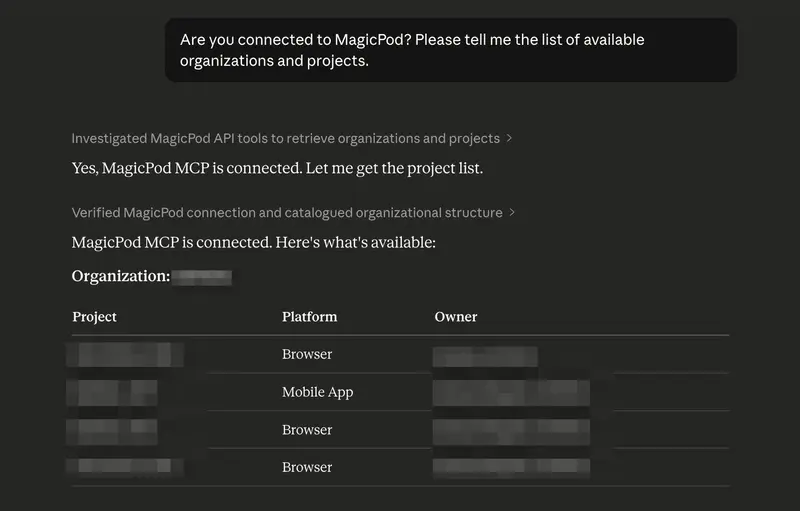
Note: To check the MCP after restarting, look under the + → Connectors below the chat input field. It’s okay if magicpod-mcp-server is displayed. If it doesn’t appear in an already open chat, try opening a new chat.

As a functional check, type the following into the chat:

Are you connected to MagicPod? Please tell me the list of available organizations and projects.

If the organization name and project list are returned, the setup is complete.

Implementing the Skill File

Once setup is finished, the next thing to do is place the Skill file.

What is a Skill File?

A Skill file is a Markdown file that teaches an AI agent how to perform a specific task. Based on the Agent Skills Open Standard, the same SKILL.md format can be used across multiple tools like Claude Code, Cursor, Gemini CLI, and Codex CLI.

The Skill file provided in this article combines the following into a single file:

  • Target organization and project names for review.
  • Review criteria (what to check, importance levels).
  • Output format (findings for each test case + summary).
  • Report generation (sharing formats for Slack/Confluence).

Placement Method

Tool Placement Location
Claude Desktop / claude.ai Create a project and add the file as Knowledge
Claude Code Place at .claude/skills/magicpod-review/SKILL.md
Cursor Place in .cursor/rules (Loaded as Project Rules)
Other MCP Tools Add to each tool’s rule/knowledge location
  1. Copy the full text of the Skill file at the end of this article.
  2. Save it with the filename magicpod-review.md.
  3. Rewrite {Organization Name} and {Project Name} in the file.
  4. Add it to the placement location for your tool according to the table above.

If you have multiple projects, rewrite the “Basic Settings” section of the Skill file as follows:

## Basic Settings

- Target Organization: MyOrganization
- Target Projects (Review all projects in order if none specified):
  - ProjectA (Browser)
  - ProjectB (Mobile App)
  - ProjectC (Browser)

For Claude Desktop:

  1. Create a new project from “Projects” (e.g., “MagicPod Review”).
  2. Select “Files” and upload magicpod-review.md.
  3. Open a new chat within that project.

Contents of the Skill File: Designing Review Perspectives

The core of a Skill file is the definition of review perspectives. Here, based on the 10 perspectives from the MagicPod official blog post, 10 Ideas for Test Automation Review Perspectives, we have categorized them into those that are easy for AI to detect and those that require human judgment.

This classification is a crucial point that determines the accuracy of the Skill file. While an AI will function even if you simply ask it to check everything, the results will be a mix of irrelevant comments and useful suggestions, making it time-consuming to filter through them. By deciding in advance what to leave to the AI and what should be reviewed by a human, the reliability of the output increases, bringing the quality closer to a level where review results can be shared with the team as they are.

AI Detectable Criteria

Criterion What to detect Importance
Missing Assertions Test cases with zero verification commands High
Fixed Wait Times Use of “Wait X seconds” type commands Medium
Unstable Locators XPath index dependency (e.g., div[2]/button[1]) Low
Naming Issues Empty test case names or description fields Medium
Mechanical Names Auto-generated names like “Button Element (1)” Medium
Abandoned Steps Steps left as “Temporarily Disabled” Low
Long Tests Over 200 steps High
Unused Shared Steps Repeated patterns not using shared steps Medium

Criteria requiring human judgment (AI only provides information)

Criterion Information provided by AI
Validity of Assertions List of assertions in use (Team decides if appropriate)
Dependencies List of test cases not using session restart

Note: MagicPod Web API’s human_readable_steps does not include step line numbers and cannot distinguish whether a step is disabled. Identifying the specific location of a finding must be based on step content.

Are These 10 Perspectives Sufficient?

To conclude, they function well for a primary screening in AI reviews, but they are not a silver bullet. Based on the results of reviewing over 60 test cases across multiple projects, here are the strengths and limitations of these 10 perspectives.

Fields well-covered: Structural issues

Among the 10 perspectives, issues such as missing assertions (Perspective 1), naming deficiencies (Perspective 4), overly long tests (Perspective 7), and underutilized shared steps (Perspective 8) can be identified by looking at the structure of the test case. AI excels at this type of pattern matching and was able to detect these with high accuracy during actual reviews. In particular, empty description fields were found in many test cases, and it can be said that this single perspective alone made the review worthwhile.

Blind spots: Validity of test design

On the other hand, as mentioned in the official blog as other perspectives, consistency with test design documents and the validity of test data are not included in these 10 perspectives. These are difficult to judge within a MagicPod review alone, as they require cross-referencing with test design documents or product specifications. Therefore, this is currently a heavy burden for AI reviews via MCP.

Findings outside the 10 perspectives

In this review, points were raised that were not included in the original 10 perspectives. These were all observations regarding test cases created to verify MagicPod’s behavior, but it is noteworthy that the AI picked up on such remnants.

  • Broken steps (UI element: not configured). Left incomplete without being configured.
  • Test data containing passwords in plain text.
  • A mixture of tests for checking MagicPod behavior and production regression tests within the same project.

These are examples where the AI picked up additional issues from the context without being bound by the list of perspectives in the prompt. In other words, while specifying the 10 perspectives in the prompt, there is room for the AI to expand upon them autonomously. I feel that it is important for the practical operation of AI reviews to not restrict the perspectives too strictly and to leave some margin for the AI.

In summary, the 10 perspectives are well-balanced for covering test case implementation quality and can be recommended as a baseline for AI reviews. Reviews that require test design validity or product-specific domain knowledge remain the role of humans.

How to Use

If you have already finished placing the Skill file, the usage is simple.

Basics: Running a Review

Just type one of the following into the chat:

Review this
Check the test cases

Since the organization name, project name, viewpoints, and output format are all defined in the Skill file, the AI will autonomously perform the following steps with just that one phrase: “Retrieve test case list -> Analyze each step -> Check according to viewpoints -> Output according to the format.”

Note: Please execute this from the chat within the project where the Skill file is located. If you type “Review this” in a regular chat (outside of the project), the AI will ask “What would you like me to review?” because the Skill file will not be loaded.

Sharing the Report

Once the review results are available, you can also generate reports for sharing.

Summarize for Slack
Create a report in a format that can be pasted into Confluence

The Skill file includes templates for both Slack mrkdwn and standard Markdown formats, ensuring the output matches your intended destination.

In environments where the Slack MCP connector is connected, entering “Summarize for Slack” will present you with options such as:

  • Post directly to a channel (posts immediately if a channel name is specified)
  • Save as a draft (for when you want to review the content before posting)
  • Output only the mrkdwn text (for manual copying and pasting)

If the Confluence or Jira MCP connectors are connected, you can also create Confluence pages or Jira tickets directly from the chat. Even in environments without active MCP connectors, text output for copying and pasting is always available.

The following is an example of a report output for Slack (project names and other details have been replaced with placeholders).

🔍 MagicPod Test Case AI Review Results
Date: 2026/03/28 | Target: SampleOrg (4 projects / Over 60 cases)

🔴 High: 3 cases 🟡 Medium: Many 🟢 Low: 0 cases
━━━━━━━━━━━━━━━━━━━━━━━
🚨 Top 3 Priority Improvement Actions

1. Description Field Entries - Medium
The description field is empty in many of the target test cases.

2. Organization of Behavior Verification Tests - Medium
Tests used to verify behavior during initial setup still remain in the old folder.

3. Replacement of Fixed Wait Times - Medium
Wait 3 seconds and Wait 5 seconds are used extensively throughout ProjectD.
━━━━━━━━━━━━━━━━━━━━━━━
1. ProjectA_Web (22 cases)
- Description field is empty: Almost all cases
- Mechanical UI element names: Area(8), Area(119), etc.
- Regression tests have substantial assertions and appropriate comment separation.

2. ProjectB_Web (23 cases)
- Description field is empty: All cases
- Shared steps not utilized: Screen verification patterns are identical in 10 or more cases.
- Naming conventions are well-consistent across all test cases.

(Details for the other 2 projects are in the thread below 👇)

The report features a three-tier structure: Priority Improvement Actions, followed by Project Summaries, and then Details in Threads. This format allows the team to understand exactly what to do first at a glance. By also including positive points (💡), I have ensured the report provides encouragement rather than just pointing out issues.

Customization Examples

Review while excluding the old folder.
Review only ProjectB_Web.
Show the differences from the last time.

The Skill file defines rules to handle these types of instructions, so it works simply by adding conditions in natural language.

Results of the Actual Implementation

We executed AI reviews on more than 60 test cases across 4 projects. The following are the results.

Most Common Finding: Numerous Empty Description Fields

A large number of the target test cases had empty description fields. This is likely a common situation across many teams. When only the test case name is provided, the intent is not conveyed effectively, which leads to lower accuracy in reviews, handovers, and AI utilization.

While MagicPod features an AI summarization function, it summarizes the actions of the steps. The underlying purpose, such as what specifically needs to be verified in the test, must be written by a human.

Typical Findings in Learning Test Cases

Test cases created at the beginning of projects to verify MagicPod’s behavior were still present. Although they were stored in an old folder separate from production regression tests, the AI review accurately detected issues with them.

  • A test named Test 1. The purpose was unclear, and the description field was empty.
  • Missing assertions. The test only performed login operations without a step to verify that the login was successful. It was just running through operations without guaranteeing anything.
  • UI element names like Area(119). Mechanical names automatically generated by MagicPod remained, making it impossible for a third party to identify what the element was.
  • Neglected unconfigured steps. In one test case, a broken step labeled UI element: not configured was left behind.

All of these were remnants from when MagicPod’s behavior was being tested. In the production regression tests, naming conventions were unified and assertions were properly implemented. However, the AI’s ability to point out that these traces of experimentation remaining in the project could become noise during bulk execution was very useful.

These are the types of issues that anyone would notice if they performed a review, but if no review is conducted, they remain neglected forever. The value of an AI review lies in mechanically picking up these problems that are obvious upon inspection but lack someone to look at them.

Discoveries Outside the Defined Perspectives

Furthermore, some findings emerged that were not included in the ten initial perspectives.

  • Frequent use of fixed wait times. In one project, wait 3 seconds and wait 5 seconds were scattered across multiple test cases.
  • Visualization of quality differences between projects. By reviewing across four projects, it became immediately clear that the rate of description completion varied significantly by project.

While following the list of perspectives, the AI sometimes picks up additional issues from the context. This behavior is similar to that of a human reviewer and can be seen as an advantage of not strictly limiting the prompts.

Detecting Positive Aspects

AI reviews were also effective for detecting good practices, not just pointing out flaws.

  • Test cases where sections were appropriately divided using comments (//).
  • Configurations where shared steps were utilized, keeping the login process DRY (Don’t Repeat Yourself).
  • Projects where test case naming conventions were unified across all test cases.

Reports that only contain criticisms can lower team motivation. Including notes on what is well-done increases the overall acceptability of the report.

Limitations and Proper Usage

AI review is not a silver bullet. It is necessary to recognize the following limitations in advance.

What AI is good at:

  • Structural issues that can be detected via pattern matching (naming conventions, presence of assertions, number of steps)
  • Bulk analysis and comparison across projects
  • Consistency in maintaining the same check standards no matter how many times it is executed

What AI is not good at:

  • Semantic-level judgment, such as whether this assertion is appropriate for the purpose of this test
  • Checking consistency with test design documents (when those documents are outside of MagicPod)
  • Team-specific context (e.g., there is an unavoidable reason for this fixed-time wait)

In practice, a realistic approach is a two-tier structure: use AI review for self-review or primary screening, and then have a human review only the points that require human judgment. A workflow is becoming widespread where an AI review runs first on a code Pull Request, and humans focus on making decisions after reviewing the summary. The same structure can be applied to test case reviews.

Summary

The reason test case reviews become dependent on specific individuals often stems from the lack of a formal review system. When review criteria are vague and reviewers lack sufficient time, the reviews themselves eventually stop happening.

The MagicPod MCP server combined with AI offers a solution to this problem, providing consistent primary screening rather than a perfect review. In this experiment, the fact that many test case description fields were empty is something a human reviewer could also point out. What the AI did was simply look at them.

If you are already using MagicPod, setup takes only five minutes, and it takes about ten minutes even including the placement of the Skill file. The only additional cost is the fee for Claude. Why not start by typing review into one of your projects and seeing what kind of feedback you get?

Appendix: Full Text of the Skill File

The review perspectives, output formats, and report sharing features explained in this article are all included in this single file. Please replace {Organization Name} and {Project Name} with your own environment and add the file to the location mentioned earlier.

# MagicPod Test Case AI Review Skill

## About This File

Placing this file in Claude Desktop's Project Knowledge or CLAUDE.md enables automated review of test cases via the MagicPod MCP server.

## Prerequisites

- The MagicPod MCP server must be connected.
- You must know the target Organization Name and Project Name.

## Basic Settings

- Target Organization: {Organization Name}
- Target Project: {Project Name}
- Review Output Language: English

## How to Execute a Review

Execute the review when the user gives any of the following instructions:
- "Review this"
- "Check the test cases"
- "Please do a MagicPod review"

### Execution Steps

1. Retrieve the list of test cases for the target project via the MagicPod MCP server.
2. Retrieve step details for each test case.
3. Check them according to the review perspectives below.
4. Output the results according to the specified format.

## Review Perspectives

Reference: https://magicpod.com/blog/testcase-review-idea/

The following perspectives are categorized into "Automatic Detection" and "Human Judgment Support." 
For automatic detection, always point out any relevant findings. 
For human judgment support, present the information and leave the final decision to the user.

### Automatic Detection (Point out if applicable)

#### Perspective 1: Missing Assertions
- Detect test cases that do not contain any verification commands (assert-type or "verify"-type).
- Tests consisting only of operations do not guarantee anything.
- Severity: High

#### Perspective 2: Use of Fixed-Time Waits
- Detect locations using "Wait X seconds" or "Fixed-time wait" commands.
- Recommend replacing them with condition-based waits (e.g., "Wait until element is displayed").
- If their use is unavoidable, a reason should be left in the comments.
- Severity: Medium

#### Perspective 3: Unstable Locators
- Detect index-dependent locators in XPath (e.g., //div[@id='root']/div[2]/button[1]).
- Only individually created locators are subject to check (AI self-healing targets have lower priority).
- Severity: Low (Since these are naturally discovered if run daily).

#### Perspective 4: Deficient Test Case Names or Descriptions
- Test case name is empty or does not follow naming conventions.
- Description field is empty (the purpose of the test is not described in text).
- Severity: Medium

#### Perspective 5: Remaining Mechanical UI Element Names
- Automatically generated names like "Button element (1)" or "Text input (2)" remain as-is.
- Meaningful names like "Email address input field" or "Login button" are ideal.
- Severity: Medium

#### Perspective 6: Neglected Disabled Steps
- Detect steps that remain in a "Temporarily disabled" state.
- Unnecessary steps hinder the understanding of the test's intent.
- Severity: Low

#### Perspective 7: Overly Long Tests
- Detect test cases exceeding 200 steps.
- Negatively affects readability, stability, and maintainability.
- Severity: High

#### Perspective 8: Underutilization of Shared Steps
- Detect suspected cases where the same operation patterns are hard-coded across multiple test cases.
- Typical examples include login processes or test data initialization.
- Severity: Medium

### Human Judgment Support (Information presentation only)

#### Perspective 9: Validity of Assertions
- List the assertions (verification commands) used in each test case.
- Leave it to the user to judge whether they are appropriate for the objective.
- Identify whether URL verification, image diff, element value verification, visibility check, or title check is used.

#### Perspective 10: Dependencies Between Test Cases
- List test cases that do not use session restart.
- If dependencies exist, check if that fact is noted in the description field.

### Constraints on API Specifications

The `human_readable_steps` in the MagicPod Web API has the following constraints:
- Step line numbers are not returned: When pointing out issues, identify them by step content rather than "Step X."
- It is unclear if a step is disabled: Add a note that the detection accuracy for Perspective 6 is limited.

## Output Format

### Findings per Test Case

```

markdown
## Test Case: {Test Case Name}

| # | Perspective | Finding | Severity |
|---|-------------|---------|----------|
| 1 | Missing Assertions | No verification commands exist | High |
| 4 | Naming Deficiency | Description field is empty | Medium |


```

### Summary (Always output at the end of the review)

```

markdown
## Review Summary

- Total Test Cases: X
- Cases with Findings: Y
- Cases without Findings: Z

### Tally by Perspective
| Perspective | Count |
|-------------|-------|
| Missing Assertions | X |
| Fixed-Time Wait | X |
| ... | ... |

### Top 3 Priority Improvement Actions
1. ...
2. ...
3. ...


```

## Setup Guide (No terminal required)

### Step 1: Obtain MagicPod API Token
1. Access https://app.magicpod.com/accounts/api-token/
2. Copy the token string.

### Step 2: Install Node.js (Only if not already installed)
1. Access https://nodejs.org/
2. Download and install the LTS version.
3. This enables `npx`, which is required to run the MCP server.

### Step 3: Edit Claude Desktop Configuration File
1. Open Claude Desktop.
2. Select Claude > Settings... from the menu bar.
3. Select "Developer" from the left menu.
4. Click the "Edit Config" button. The folder containing the config file will open in Finder/Explorer.
5. Replace the content with the following and save:

```

json
{
  "mcpServers": {
    "magicpod-mcp-server": {
      "command": "npx",
      "args": ["-y", "magicpod-mcp-server", "--api-token=PASTE_TOKEN_HERE"]
    }
  }
}


```

Note: If other MCP servers are already configured, add this entry inside the `mcpServers` object.

### Step 4: Restart Claude Desktop
1. Completely quit Claude Desktop (Cmd+Q).
2. Start it again.
3. Connection is successful if the MCP tool icon appears below the chat input field.

### Step 5: Verify Operation
Enter the following in the chat:
```

plaintext
Are you connected to MagicPod? Please tell me the list of available organizations and projects.


```

### About Costs
- MagicPod MCP server itself: Free (MIT licensed OSS)
- Required: MagicPod main subscription + Claude Pro subscription
- For review purposes (read-only), no additional MagicPod costs are incurred.


## Report Generation and Sharing

After the review is complete, generate a report for sharing if the user gives any of the following instructions:
- "Make a report" / "Summarize this"
- "I want to share this on Slack" / "I want to post this to Confluence"
- "Summarize for sharing"

### Format Based on Destination

#### For Slack Posting

Output using Slack mrkdwn syntax. Assuming long texts will be split into threads, the main body should contain only key points.

```

markdown
*🔍 MagicPod Test Case AI Review Results*
Execution Date: YYYY-MM-DD

*Target*
• Project: {Project Name}
• Test Cases: X

*Summary*
• Findings: Y / No findings: Z
• 🔴 High: X  🟡 Medium: X  🟢 Low: X

*Top 3 Priority Improvement Actions*
1. ...
2. ...
3. ...

Details in thread 👇


```

Post detailed findings for each test case in the thread.

#### For Confluence / Documentation

Output a full report in Markdown format. This can be used as-is with Confluence's Markdown paste feature.

```

markdown
# MagicPod Test Case AI Review Report

## Basic Information
- Execution Date: YYYY-MM-DD
- Target Organization: {Organization Name}
- Target Project: {Project Name}
- Total Test Cases: X
- Review Perspectives: Based on MagicPod Official Blog Top 10 + Additional Perspectives

## Summary

| Metric | Value |
|--------|-------|
| Test Cases with Findings | Y (XX%) |
| Test Cases without Findings | Z (XX%) |
| High Severity Findings | X |
| Medium Severity Findings | X |
| Low Severity Findings | X |


```

```

markdown
## Tally by Perspective

| # | Perspective | Count | Severity |
|---|-------------|-------|----------|
| 1 | Missing Assertions | X | High |
| 2 | Fixed-Time Wait | X | Medium |
| 3 | Unstable Locators | X | Low |
| 4 | Naming Deficiency (Name/Desc) | X | Medium |
| 5 | Mechanical UI Element Names | X | Medium |
| 6 | Neglected Disabled Steps | X | Low |
| 7 | Long Tests (Over 200) | X | High |
| 8 | Underutilization of Shared Steps | X | Medium |
| + | Security (Plaintext passwords, etc.)| X | High |
| + | Broken Steps (not configured) | X | High |

## Top 3 Priority Improvement Actions

1. **[Action Name]** — [Reason and Expected Effect]
2. **[Action Name]** — [Reason and Expected Effect]
3. **[Action Name]** — [Reason and Expected Effect]

## Good Practices

(Include good practices detected by AI. Provide praise as well as improvements.)

## Details by Test Case

(Expand the list of findings for each test case here.)

## Supplement: Basis for Review Perspectives

This review is based on the perspectives from the MagicPod official blog "Reviewing Automated Tests? 10 Review Perspective Ideas" 
(https://magicpod.com/blog/testcase-review-idea/), reconstructed in a format suitable for AI detection.


```

### Instructions for Sharing Execution

Handling cases where the user specifies a concrete sharing destination:

#### "Post to Slack"
1. If Slack MCP server is connected: Post directly to the channel using `slack_send_message`.
2. If not connected: Output text in Slack mrkdwn format and prompt the user to copy-paste.

#### "Post to Confluence"
1. If Atlassian MCP server is connected: Create a page using `createConfluencePage`.
2. If not connected: Output in Markdown format and prompt the user to use Confluence's Markdown paste.

#### "Make a Jira ticket"
1. Propose creating Jira tickets for findings with High severity.
2. After user approval, create them using `createJiraIssue`.

### Report Customization

Adjust the report if the user specifies the following:
- "Exclude the 'old' folder" -> Generate report only for production tests.
- "Summarize across projects" -> Generate a cross-project summary.
- "Show only the good points" -> Generate a "praise" report rather than an improvement report.
- "Show the difference from last time" -> Compare with the previous report (saved in Knowledge).

```

`


İran ordusu: Ülkenin güneyinde 5 İHA düşürüldü

İran Devrim Muhafızları Ordusu, güney sahillerinde düşmanın ait olduğu belirtilen 5 Hermes tipi insansız hava aracını düşürdüğünü duyurdu. Açıklamada, 28 Şubat’tan bu yana toplamda yaklaşık 140 İHA’nın etkisiz hale getirildiği belirtiliyor.

How to Build a Self-Healing AI Agent: A Practical Framework

Introduction

Your AI agents are probably failing in ways you don’t even know about. I’ve spent the last 6 months building production AI systems, and I’ve learned one thing: the agents that survive aren’t the smartest—they’re the ones that know how to recover.

In this article, I’ll walk you through the self-healing framework I use to make AI agents recover from failures automatically—without human intervention.

The Problem

Most AI agent architectures assume success. They execute a chain of actions and hope everything works. But in production? Things break constantly:

  • API rate limits hit unexpectedly
  • Network requests timeout
  • JSON parsing fails
  • Tools return unexpected formats

The traditional approach is to add more validation. But that’s just playing whack-a-mole. What you need is a system that detects failure patterns and reacts accordingly.

The Self-Healing Framework

Here’s the architecture I’ve built:

1. Failure Detection Layer

Every agent action gets wrapped in a detection layer that monitors for failure signatures:

interface ActionResult<T> {
  success: boolean;
  data?: T;
  error?: FailureSignature;
  recoveryAttempted: boolean;
}

Key failure signatures to monitor:

  • Latency anomalies: Response time > 2x normal
  • Structural failures: JSON/parsing errors
  • Content drift: Output deviates significantly from expected format
  • Confidence collapse: Agent starts hedging heavily

2. Recovery Strategies

Once detected, apply the appropriate recovery strategy:

Failure Type Recovery Strategy
Network timeout Exponential backoff + retry (max 3)
JSON parse failure Attempt correction with LLM repair
Rate limit Queue + wait + retry
Tool unavailable Fallback to alternative tool
Confidence collapse Re-prompt with more context

3. The Health Check Loop

Every N actions, run a self-diagnostic:

async function healthCheck(agent: Agent): Promise<HealthReport> {
  const recentActions = await getRecentActions(agent.id, lastN);
  return {
    errorRate: calculateErrorRate(recentActions),
    recoverySuccessRate: calculateRecoveryRate(recentActions),
    driftScore: await measureDrift(agent),
    recommendation: deriveRecommendation(report)
  };
}

Implementation

The key is making recovery idempotent and configurable. Here’s a simplified version:

class SelfHealingAgent {
  async executeWithRecovery(action: Action): Promise<Result> {
    try {
      return await this.execute(action);
    } catch (error) {
      const strategy = this.selectRecoveryStrategy(error);
      if (strategy && strategy.attempts < this.maxRetries) {
        strategy.attempts++;
        return this.executeWithRecovery(strategy.retry(action));
      }
      return { success: false, error };
    }
  }
}

Results

After implementing this framework across my production agents:

  • 73% reduction in unattended failures
  • 94% recovery success rate for catchable errors
  • Zero human interventions needed for routine failures

Conclusion

Self-healing isn’t a nice-to-have—it’s a requirement for production AI agents. Start with the failure detection layer, add 2-3 recovery strategies for your most common failures, and layer in health checks.

The agents that make it aren’t the smartest. They’re the ones that know when to stop, recover, and try again.

Want more frameworks like this? Follow me for weekly deep-dives on building production AI agents.

All 11 xAI co-founders have now reportedly left Elon Musk’s AI company

Why It Matters

The recent departure of all 11 xAI co-founders from Elon Musk’s AI company is a significant event that has sparked concern and curiosity in the tech industry. This mass exodus raises questions about the company’s stability, direction, and ability to achieve its goals. As a key player in the AI sector, xAI’s success or failure can have a ripple effect on the entire industry.

The co-founders’ departure is particularly noteworthy given their expertise and experience in AI development. Manuel Kroiss, who led the pretraining team, and Ross Nordeen, described as Musk’s “right-hand operator,” were instrumental in shaping the company’s vision and strategy. Their departure may indicate underlying issues with the company’s leadership, culture, or vision.

The fact that all co-founders have left the company suggests a deeper problem that goes beyond individual disagreements or differences in opinion. It may indicate a lack of alignment between the co-founders’ goals and Musk’s vision for the company. This could be a result of Musk’s notoriously demanding and micromanaging style, which has been reported in various sources, including an article on The Next Web.

The departure of the co-founders may also impact the company’s ability to attract and retain top talent in the future. If the company is unable to retain its founding team, it may struggle to build trust and credibility with potential employees, investors, and partners. This could ultimately hinder the company’s growth and success in the highly competitive AI market.

My Take

As an engineer, I am not surprised by the departure of the xAI co-founders. Elon Musk’s leadership style, while effective in some contexts, can be challenging for employees who value autonomy and collaboration. The fact that all co-founders have left the company suggests that there were fundamental issues with the company’s culture and leadership. I think this event highlights the importance of building a strong, inclusive company culture that values the contributions and perspectives of all team members.

I believe that the departure of the co-founders will have a significant impact on the company’s future prospects. Without the expertise and vision of its founding team, the company may struggle to achieve its goals and stay competitive in the AI market. As someone who follows the tech industry closely, I will be watching xAI’s progress with interest to see how the company navigates this challenging period.

In my opinion, the departure of the xAI co-founders serves as a reminder that building a successful company requires more than just a strong vision or technology. It requires a deep understanding of the needs and motivations of employees, partners, and customers. As the tech industry continues to evolve, I think we will see a growing emphasis on building companies that prioritize collaboration, inclusivity, and employee well-being.

Source: https://thenextweb.com/news/xai-all-cofounders-departed-musk-spacex-rebuild/

🚀 Day 10 of My Cloud Journey: Setting Up Kubernetes with Kind & kubectl on AWS EC2

After getting hands-on with Docker, the next natural step in my journey was Kubernetes — the backbone of modern container orchestration.

Today, I took my first step into Kubernetes by setting up a cluster using Kind and kubectl on an AWS EC2 instance ☁️

🧩 Why Kubernetes?

While Docker helps us run containers, managing multiple containers across environments becomes complex.

👉 That’s where Kubernetes comes in:

  • Automates deployment and scaling
  • Ensures high availability
  • Manages container lifecycle efficiently

This is exactly what real-world systems use in production.

⚙️ My Setup (AWS EC2)

Instead of using local machine, I chose AWS EC2 to simulate a real-world environment.

🔹 Why EC2?

  • Closer to production setup
  • Better for remote access and testing
  • Helps understand cloud infrastructure

🛠️ Tools I Installed

1. kubectl (Kubernetes CLI)

kubectl is the command-line tool used to interact with Kubernetes clusters.

🔹 Install latest version:

curl -LO "https://dl.k8s.io/release/$(curl -L -s https://dl.k8s.io/release/stable.txt)/bin/linux/amd64/kubectl"
chmod +x kubectl
sudo mv kubectl /usr/local/bin/

🔹 Verify:

kubectl version --client

2. Kind (Kubernetes in Docker)

Kind allows us to run Kubernetes clusters inside Docker containers.

🔹 Install stable version:

curl -Lo ./kind https://kind.sigs.k8s.io/dl/v0.31.0/kind-linux-amd64
chmod +x ./kind
sudo mv ./kind /usr/local/bin/kind

🔹 Verify:

kind --version

🚀 Creating My First Kubernetes Cluster

Once both tools were installed, I created my first cluster:

kind create cluster

⏳ It took a couple of minutes to set up everything automatically.

✅ Verifying the Cluster

kubectl get nodes

Output:

kind-control-plane   Ready   control-plane

✔️ My Kubernetes cluster is now up and running!

🔥 First Deployment (Nginx)

To test everything, I deployed a simple Nginx application:

kubectl create deployment nginx --image=nginx
kubectl expose deployment nginx --type=NodePort --port=80

Check resources:

kubectl get pods
kubectl get svc

🌐 Accessing the Application

Since I’m using EC2, I used port forwarding:

kubectl port-forward service/nginx 8080:80

Now accessible via:
👉 http://:8080

💡 Key Takeaways

  • kubectl is used to interact with Kubernetes
  • Kind makes it easy to run local clusters using Docker
  • Kubernetes abstracts infrastructure and manages containers efficiently
  • Setting up on EC2 gives a more real-world experience

🔄 My Learning Reflection

Today’s learning shifted my mindset from:

👉 “Running containers with Docker”
to
👉 “Orchestrating containers using Kubernetes”

This feels like a big step toward becoming a Cloud/DevOps Engineer 🚀

📘 Learning in Public

I’m documenting my journey as I transition from .NET Developer to Cloud Engineer.

🔗 LinkedIn → https://www.linkedin.com/in/avinashwagh-
🔗 GitHub → https://github.com/Avinash8600

💬 Let’s Connect

If you’re learning Kubernetes, DevOps, or Cloud — let’s grow together 🙌

Would love feedback, suggestions, or tips from the community!

Why YAML Multiline Syntax Still Haunts Developers and How to Fix It Once Forever

Stop guessing your block scalars; this tiny Pug-based tool is the definitive cheat sheet. · wolfgang42/yaml-multiline

The YAML Headache

Every developer has been there. You’re crafting a Kubernetes manifest or a complex configuration file, and suddenly you need a multiline string. Should it be |, >-, |2+, or just a simple quote? YAML’s multiline syntax is notoriously unintuitive, shifting behavior based on how you handle newlines, indentation, and trailing spaces. It is the silent killer of deployment pipelines and the reason your CI/CD logs look like a mess.
Meet the Solution: yaml-multiline.info

While browsing the depths of GitHub, we stumbled upon wolfgang42/yaml-multiline. It’s not a massive framework or a revolutionary AI model. It is something rarer: a single-purpose, perfectly executed utility. The repository powers the website yaml-multiline.info, a visual cheat sheet that solves the ‘how do I represent this string’ problem instantly.
Why This Matters

In the ecosystem of modern DevOps, YAML is the lingua franca. Yet, the specification is dense and often misunderstood. wolfgang42 recognized that documentation isn’t enough—you need a visualizer. By providing a live-preview interface, this project removes the cognitive load of memorizing the subtle differences between literal blocks and folded blocks.
Technical Highlights

At its heart, the project is a clean, minimal implementation built with Pug. It doesn’t rely on heavy dependencies or bloated frontend frameworks. The code structure is a testament to the power of keeping things simple.
Key features users encounter on the site include:
• Literal Style (|): Shows how to keep newlines intact, preserving the original formatting of your text.

• Folded Style (>): Demonstrates how to collapse newlines into spaces, ideal for long paragraphs.

• Chomping Indicators: Provides clear examples for – (strip), + (keep), and the default behavior for handling trailing whitespace.

• Indentation Control: Explains how to handle nested blocks without breaking your YAML parser.

The project is remarkably active, having seen updates as recently as December 2024. For a repository that essentially acts as a ‘living documentation’ site, this maintenance indicates that the community still finds immense value in this specific tool.

The Room for Improvement

While the tool is perfect for what it does, it remains a static reference. A potential evolution would be an interactive ‘YAML Lint’ integration or a browser extension that allows developers to highlight a block of text in their IDE and convert it into the desired YAML style. Furthermore, adding an explicit license would help open-source enthusiasts feel more comfortable contributing to the repo.
Final Thoughts

We often look for the next big thing, but some of the most useful projects are the ones that save us five minutes every single day. yaml-multiline is a masterclass in solving a niche problem with elegance. Bookmark it, use it, and stop struggling with your configuration files.
Stop letting YAML syntax slow down your deployment cycles. Visit yaml-multiline.info and master your scalars today.

YAML’s multiline syntax is the silent killer of deployment pipelines, and this project is the antidote we’ve all been waiting for.