How I Built an AI-Powered Portfolio Assistant with Google Gemini
TL;DR: I built an AI assistant into my portfolio at hailamdev.space that can answer questions about my skills, projects, and experience — powered by Google Gemini 2.0. Here’s exactly how I did it.
The Problem
As a Fullstack Developer based in Ho Chi Minh City, Vietnam, I wanted my portfolio to stand out. Traditional portfolios are passive — visitors scroll, look at screenshots, and leave. I wanted something interactive.
What if recruiters and potential clients could ask questions about my experience and get instant, intelligent answers?
The Architecture
User Question → Intent Detection (local) → Gemini API → Structured Response → Rich UI Card
Key Components
-
Intent Detection Layer — Detects common patterns locally before hitting the API
-
System Prompt Engineering — Provides Gemini with full context about my profile, projects, and skills
-
Structured Output — Gemini returns JSON with
answer, highlights, quickFacts, skillsMatrix
-
Rich Response Cards — React components render structured data beautifully
Tech Stack
| Component |
Technology |
| Frontend |
React + CSS (Brutalist theme) |
| AI Model |
Google Gemini 2.0 Flash |
| Hosting |
Vercel |
| Animations |
GSAP + Three.js |
| Analytics |
Google Analytics 4 |
Intent Detection — Saving API Calls
Before calling Gemini, I detect common intents locally:
// chatIntents.js - Local intent detection
export const detectIntent = (message) => {
  const lower = message.toLowerCase();

  if (/cv|resume|download/.test(lower)) return 'cv';
  if (/contact|email|hire/.test(lower)) return 'contact';
  if (/project|portfolio|work/.test(lower)) return 'projects';
  if (/skill|technology|stack/.test(lower)) return 'skills';

  return null; // Falls through to Gemini
};
This handles ~40% of questions without API calls, reducing latency and costs.
Structured Prompt Engineering
The secret sauce is the system prompt. Instead of letting Gemini generate free-form text, I instruct it to return structured JSON:
const systemPrompt = `
You are an AI assistant for Nguyễn Xuân Hải's portfolio.
Always respond in JSON format:
{
  "answer": "Natural language answer",
  "highlights": ["Key point 1", "Key point 2"],
  "quickFacts": [{"label": "Experience", "value": "2+ years"}],
  "skillsMatrix": [{"skill": "React", "level": "advanced", "evidence": "5+ projects"}]
}
`;
This gives me full control over the UI while letting Gemini handle the intelligence.
Features I’m Proud Of
1. Multi-Language Support
The assistant handles both Vietnamese and English seamlessly, detecting language from user input.
2. Job Description Analysis
HR recruiters can upload a JD and the assistant analyzes fit against my profile — showing matching skills, gaps, and recommendations.
3. Slash Commands
Power users can use commands like /cv, /pdf, /clear for quick actions.
4. Response Styles
Users can switch between brief, detailed, and fit modes for different use cases.
Results
Since deployment:
-
Average session duration increased significantly
- Recruiters spend more time interacting vs. just scrolling
- The assistant handles questions I’d normally answer via email
Try It Yourself
Chat with my AI Assistant — ask it anything about my skills, projects, or availability.
Full Portfolio — explore my projects, experience, and 3D animations.
About the Author
Nguyễn Xuân Hải is a Fullstack Developer based in Ho Chi Minh City, Vietnam, specializing in React, .NET Core, Node.js, and AI integration. His commercial projects include Great Link Mai House (B2B real estate platform), English Community Hub (educational platform), and VN Media Hub (CMS platform).
📫 Contact: [email protected] | GitHub | Portfolio



 Ulaştırma ve Altyapı Bakanı Abdulkadir Uraloğlu, dün resmi olarak devreye alınmaya başlanan 5G teknolojisi hakkında yeni açıklamalarda bulundu. “Türkiye’de 32 milyondan fazla 5G uyumlu cihaz bulunuyor, 81 ilde kademeli olarak hizmete aldığımız 5G ile birlikte yaklaşık 21 milyon abone bu teknolojiyle buluştu.” diyen Uraloğlu, “5G, 4.5G’ye kıyasla ultra düşük gecikme süreleri ve yoğun cihaz bağlantısı kapasitesiyle Türkiye’yi dijital dönüşümün merkezine taşıyacaktır. Ulaşımda tam otonom sürüş ve akıllı yol uygulamalarıyla yol güvenliği artacak, trafik daha verimli yönetilecek. Sanayide akıllı fabrikalar, otonom robotlar ve anlık veri analiziyle üretim süreçleri optimize edilecek. Akıllı şehirlerde enerji yönetiminden otopark sistemlerine kadar her alanda yenilikçi çözümler hayat bulacak.” dedi. Uraloğlu, üç operatörün rekabetiyle 16 Ekim 2025’te gerçekleştirdikleri 5G yetkilendirme ihalesi neticesinde 3 milyar 534 milyon dolar gelir elde ettiklerini hatırlattı. 5G yetkilendirme ihalesinde işletmecilere yıllara göre artan şekilde yüzde 60’a varan oranlarda yerli malı belgeli ürün ve yüzde 30’a varan oranlarda milli haberleşme ürünü kullanımı yükümlülüğü […]
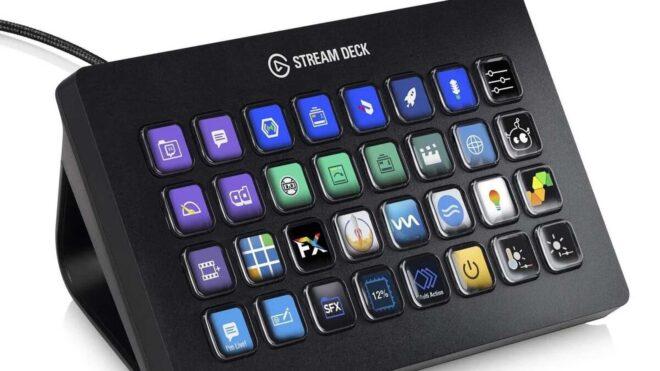
 Elgato tarafından geliştirilen Stream Deck modelleri bugün gönderilen “7.4” kodlu yazılım güncellemesiyle “MCP” desteği kazandı. Bu destek sayesinde Claude ve ChatGPT gibi yapay zeka asistanları, cihazlar için hazırlanan otomasyon eylemlerini/butonlarını bularak etkinleştirebiliyor. Yani butonlara manuel olarak basma gereğini ortadan kaldıran MCP, Anthropic tarafından hazırlandı ve yapay zeka asistanlarının farklı sistemlerdeki verilere (içerik depoları, iş araçları, geliştirme ortamları gibi) kolaylıkla bağlanmasını sağlayan evrensel bir protokol olarak görev yapıyor. Amaç, yapay zeka modellerinin daha anlamlı ve bağlama uygun yanıtlar üretebilmesini sağlamak. Anthropic, yapay zeka modellerinin kendi başlarına güçlü olsalar da veri kaynaklarından kopuk olmaları nedeniyle potansiyellerine kıyasla kısıtlı kaldıklarını; her yeni veri kaynağı için ayrı entegrasyon gerekmesinin ölçeklenebilirliği zorlaştırdığını aktarıyor. MCP, bunu ortadan kaldırarak tek bir açık standart üzerinden daha basit, güvenilir ve yaygın bir çözüm sunuyor.