xAI retired 8 Grok models on May 15 — the slugs still resolve, so your bill and output quality changed silently

On May 15, 2026 at 12:00 PM PT, xAI retired eight model slugs from the Grok API:

  • grok-4-1-fast-reasoning
  • grok-4-1-fast-non-reasoning
  • grok-4-fast-reasoning
  • grok-4-fast-non-reasoning
  • grok-4-0709
  • grok-code-fast-1
  • grok-3
  • grok-imagine-image-pro

Here is the line from xAI’s migration notice that makes this dangerous:

The slugs themselves continue to resolve, so you do not need to change your code to avoid breakage.

That sounds reassuring. It is the opposite of reassuring. “You do not need to change your code” is exactly why most teams didn’t — and a retirement that requires no code change is a retirement that ships no signal. Nothing 404s. No SDK exception. No deploy. The same request you sent on May 14 still returns 200 on May 16. What changed is underneath the slug, and none of the usual alarms are wired to it.

Here is the silent-fail surface we keep seeing on review.

1. grok-code-fast-1 now bills at grok-4.3 rates — and that’s your highest-volume slug

grok-code-fast-1 was xAI’s cheap, fast, coding-optimized model. Its entire reason to exist was running a lot of tokens for a little money — agentic coding loops, refactor passes, repo-wide edits, autocomplete backends. High call volume, low unit price. That’s the slug people deliberately picked because it was cheap.

After May 15, requests to grok-code-fast-1 redirect to grok-4.3, billed at grok-4.3’s rate of $1.25 per 1M input tokens and $2.50 per 1M output tokens — flagship pricing, not the fast-tier pricing you chose. The redirect is the worst possible combination: it lands hardest on the slug with the highest token throughput, and it produces no error, no warning, no changed status code. The first signal is the invoice, and the invoice arrives weeks late.

If you run agentic coding on Grok, this is not a “review next sprint” item. Your cost per run changed on May 15 and your monitoring almost certainly didn’t notice, because cost-per-token isn’t something most teams alert on until finance asks a question.

2. The reasoning slugs are now answering at low effort

The redirect is not a clean one-to-one swap. xAI maps the retired slugs onto grok-4.3 with a reduced reasoning setting:

  • Every retired reasoning slug (grok-4-fast-reasoning, grok-4-1-fast-reasoning) → grok-4.3 with low reasoning effort.
  • Every retired non-reasoning slug → grok-4.3 with none reasoning effort.

If you picked grok-4-fast-reasoning specifically because a task needed the model to think — structured extraction, multi-step tool planning, anything where you traded latency for correctness — you are now getting low effort by default. The model still answers. The answer is still well-formed JSON, still parses, still passes your schema validation. It’s just measurably worse on the hard cases, and there is no field in the response that says “I thought less about this than I used to.” Your eval suite is the only thing that would catch it, and only if you re-ran it after May 15 — which nobody schedules, because nothing told them to.

This is the textbook drift shape: a valid-looking response that is a correct answer to a different question than the one your code thinks it asked.

3. Cost-attribution dashboards now lie

A lot of teams tag spend by the model slug they send: a model dimension on a metrics counter, a column in a usage table, a group-by in the monthly cost rollup. Those dashboards key off the string you sent, not the model that actually ran.

Post-May-15, your dashboard still shows a tidy line item for grok-code-fast-1 at the old unit price in your own math — while xAI bills the account at grok-4.3 rates. Internal cost attribution and the actual bill have silently diverged. Every “cost per feature” or “margin per customer” number that flows from that slug is now wrong, and it will stay wrong until someone reconciles the xAI invoice against the dashboard by hand and notices the totals don’t match.

4. grok-imagine-image-pro is a different image model now

grok-imagine-image-pro redirects to grok-imagine-image-quality. That is a different image model, not a renamed one. Anything downstream that made assumptions about the old model’s output — dimensions, style, latency budget, cost per image, safety-filter behavior — is now feeding a different generator into the same pipeline with no version bump. Image pipelines are especially exposed here because the output “looks fine” to code; only a human comparing before/after notices the model changed.

5. Fallback chains lost their cheap degraded mode

Routers built during past provider incidents tend to look like this:

primary: grok-4.3
fallback:
  - grok-4-fast-non-reasoning   # cheap degraded mode
  - grok-3

The intent was: if the primary is rate-limited or down, drop to a cheaper model and keep serving. After May 15 both fallback entries resolve to grok-4.3. The “cheap degraded mode” is now full-price grok-4.3 — so the exact moment you fail over under load is the exact moment your per-request cost jumps to flagship rates, with no error and no log line saying the cheap path is gone. Incident plus silent cost blowout, stacked.

6. Pinned eval baselines now track a moving target

If you run regression evals against a fixed model slug — standard practice for catching prompt regressions — you have grok-4-fast-reasoning or similar hardcoded in the harness. That pin was the whole point: a stable baseline to diff prompt changes against.

After May 15 the pin resolves to grok-4.3 at low effort. Your “stable baseline” moved. Every prompt-change diff you run against it from now on is measuring two variables at once — your prompt edit and a model swap you didn’t make — and the harness has no idea, because the slug string in the config is unchanged.

What to actually do

The migration itself is small. The detection is the hard part, because there is no schema diff to catch at review time and no error to alert on.

  1. Grep every repo, IaC file, notebook, and prompt config for the retired slugs:
   git grep -nE "grok-(4-1-fast-(reasoning|non-reasoning)|4-fast-(reasoning|non-reasoning)|4-0709|code-fast-1|3|imagine-image-pro)"

Include eval harnesses, fallback/router configs, and cost-attribution code — not just your main call sites. Those three are where this hides.

  1. Pin grok-4.3 explicitly and choose your reasoning effort. Don’t keep riding the redirect. The redirect picks low/none for you; only an explicit grok-4.3 call with an explicit effort level (none/low/medium/high) puts the quality/cost tradeoff back in your hands.

  2. Re-run your evals after switching, and treat any pinned-baseline eval as invalidated as of May 15. Capture a fresh baseline against an explicit model+effort you control.

  3. Reconcile one xAI invoice line by line against your internal cost dashboard. If they don’t match, your attribution is keying off the sent slug and needs to key off actual billed usage.

  4. Add a cost-per-token alert, not just a request-count alert. This entire class of failure is invisible to availability monitoring and visible only to spend monitoring.

The reason this one is worth a sprint and not a backlog ticket: every other model retirement this year threw an error eventually. This one is engineered specifically not to. “Your code keeps working” is the failure mode, not the mitigation.

FlareCanary watches your third-party APIs and SDKs for breaking changes like this one — including model retirements, silent slug redirects, and pricing-tier remaps — and surfaces them before the invoice does. Free tier monitors 5 endpoints.

Why Your Cold Chain Logger’s Data Won’t Survive an Audit — And the Firmware Patterns That Fix It

State machine diagram showing four states NORMAL THRESHOLD_CROSSED IN_EXCURSION and EVENT_FINALIZED with arrows showing transitions in cold chain firmware excursion detection logic

A few months back I sat in on a claim-dispute review for a degraded vaccine shipment. The temperature logger had transmitted readings every 30 minutes for the entire journey. The data looked clean. The shipment arrived ruined. The insurer denied the claim because the audit trail couldn’t prove when the excursion occurred, what else was happening at the time, or whether the device clock had drifted relative to the warehouse system that received the goods.

The hardware was fine. The firmware was wrong.

This post is for the embedded engineers, IoT platform builders, and firmware leads who are about to ship — or have already shipped — a cold chain monitoring device that will eventually become evidence in a regulatory inspection or insurance claim. There are three failure modes that account for the overwhelming majority of audit findings I’ve seen across deployments in 100+ countries, and all three are firmware-layer problems with concrete code patterns to solve them.

What Does Audit-Defensible Telemetry Actually Require?

A regulatory auditor — FDA FSMA 204, EU GDP, WHO TRS 957 — isn’t looking at your dashboard. They’re looking at whether the raw data your device produced can be reassembled into a defensible chain of custody. That means three concrete things at the firmware layer: time you can trust, events not just points, and no silent gaps.

Every record must be timestamped against a source that doesn’t drift, with documented bounds on how much drift is possible. When a threshold gets crossed, the device must produce a bounded event with start, end, peak, duration, and Mean Kinetic Temperature impact — not just a stream of raw readings that downstream systems have to reconstruct. And if connectivity drops, the device must buffer locally, mark the offline period explicitly, and replay with idempotent sequence numbers when it reconnects.

Anything less and your data is evidence the opposing side will use, not evidence you can rely on. The three failure modes below are each a missing pillar of that requirement set.

How Does Clock Drift Break Your Audit Trail?

The single most common audit finding I see. A device’s RTC drifts by 30 seconds per day. After a 60-day shipment, its timestamps are off by 30 minutes relative to the warehouse system. An auditor compares the excursion event at 14:30:00 to the dock manifest showing the truck arrived at 14:58:00 and concludes the chain of custody narrative is broken. Defending the data costs the program weeks of forensic work, and sometimes the claim regardless.

The fix is layered time synchronization. Cellular NITZ is your primary source — most LTE-M and NB-IoT carriers expose it on attach. GNSS time-fixing is your fallback when there’s a satellite lock. The internal RTC is the last resort, and any reading sourced only from RTC drift should be tagged with the drift bound so an auditor sees the uncertainty explicitly rather than discovering it during a deposition.

typedef enum {
    TIME_SRC_NITZ   = 0,
    TIME_SRC_GNSS   = 1,
    TIME_SRC_RTC    = 2,
} time_source_t;

typedef struct {
    uint64_t       timestamp_utc_ms;
    time_source_t  source;
    uint32_t       drift_bound_ms;
} timestamped_t;

timestamped_t get_authoritative_time(void) {
    timestamped_t t;
    if (cellular_nitz_available()) {
        t.timestamp_utc_ms = cellular_get_nitz_ms();
        t.source = TIME_SRC_NITZ;
        t.drift_bound_ms = 0;
        rtc_sync_to(t.timestamp_utc_ms);
        return t;
    }
    if (gnss_has_fix()) {
        t.timestamp_utc_ms = gnss_get_utc_ms();
        t.source = TIME_SRC_GNSS;
        t.drift_bound_ms = 0;
        rtc_sync_to(t.timestamp_utc_ms);
        return t;
    }
    t.timestamp_utc_ms = rtc_now_ms();
    t.source = TIME_SRC_RTC;
    t.drift_bound_ms = rtc_drift_since_last_sync_ms();
    return t;
}

Every record carries its time source. If an auditor flags a timestamp that came from drifting RTC, you produce the drift bound and explain it. If it came from NITZ or GNSS, you have an authoritative anchor and the conversation moves on.

Why Do Raw Points Fail Where Bounded Events Pass?

State machine diagram showing four states NORMAL THRESHOLD_CROSSED IN_EXCURSION and EVENT_FINALIZED with arrows showing transitions in cold chain firmware excursion detection logic

Most cold chain devices emit a stream of temperature readings every N minutes. When a reading crosses a threshold, they emit an alert. The reading goes into the cloud. The alert goes into the dashboard. Auditors then have to reassemble what happened from raw points — and reassembly is where every claim dispute I’ve ever seen starts to wobble.

EU GDP and WHO TRS 957 both expect bounded excursion events — when did it start, when did it end, what was peak deviation, what was cumulative duration above threshold, and was Mean Kinetic Temperature preserved? That’s a state machine in firmware, not a comparator in the cloud.

typedef enum {
    EXC_NORMAL = 0,
    EXC_THRESHOLD_CROSSED,
    EXC_IN_EXCURSION,
    EXC_EVENT_FINALIZED,
} excursion_state_t;

typedef struct {
    excursion_state_t  state;
    uint64_t           start_ts_ms;
    uint64_t           end_ts_ms;
    float              threshold_c;
    float              peak_value_c;
    float              cumulative_sum_c_seconds;
    char               event_id[16];
} excursion_event_t;

void excursion_update(excursion_event_t *evt, float reading_c, uint64_t ts_ms) {
    bool over = reading_c > evt->threshold_c;
    switch (evt->state) {
        case EXC_NORMAL:
            if (over) {
                evt->state = EXC_THRESHOLD_CROSSED;
                evt->start_ts_ms = ts_ms;
                evt->peak_value_c = reading_c;
                ulid_generate(evt->event_id);
            }
            break;
        case EXC_THRESHOLD_CROSSED:
        case EXC_IN_EXCURSION:
            if (over) {
                evt->state = EXC_IN_EXCURSION;
                if (reading_c > evt->peak_value_c) evt->peak_value_c = reading_c;
                evt->cumulative_sum_c_seconds +=
                    (reading_c - evt->threshold_c) * SAMPLE_INTERVAL_SECONDS;
            } else {
                evt->state = EXC_EVENT_FINALIZED;
                evt->end_ts_ms = ts_ms;
                emit_excursion_event(evt);
                memset(evt, 0, sizeof(*evt));
            }
            break;
        default: break;
    }
}

When emit_excursion_event fires, it produces a complete record an auditor can drop directly into a compliance report. Reconstruction is no longer the cloud’s problem. The device emits the answer at the moment it has all the context, which is the only moment it ever truly does.

How Do You Stop Silent Connectivity Gaps From Wrecking the Record?

A device passes through a metal-shielded warehouse for four hours. Cellular drops out. The firmware quietly buffers locally — but when connectivity returns, it pushes the readings as if they had been transmitted in real time, with no marker indicating they came from the offline period. The dashboard looks continuous. The audit trail has a hidden four-hour gap that an investigator can trivially detect by comparing transmission timestamps to reading timestamps.

The fix is sequence numbers and idempotent replay. Every reading gets a monotonically increasing sequence number assigned at sample time, not transmit time. The cloud side keeps a high-water mark per device and ignores any sequence number it has already processed. The replay is safe to retry indefinitely, and the offline window appears in the audit log as a contiguous range of sequence numbers with sample timestamps inside the offline window — fully traceable.

typedef struct {
    uint64_t  sequence;
    uint64_t  timestamp_utc_ms;
    char      event_id[16];
    uint8_t   payload[PAYLOAD_MAX];
    uint8_t   retries;
    bool      acked;
} telemetry_record_t;

static uint64_t g_next_sequence = 0;

void telemetry_buffer_sample(const sensor_reading_t *r) {
    telemetry_record_t rec = {
        .sequence         = ++g_next_sequence,
        .timestamp_utc_ms = r->ts.timestamp_utc_ms,
    };
    ulid_generate(rec.event_id);
    encode_payload(&rec.payload, r);
    nvm_queue_push(&rec);
}

void telemetry_flush(void) {
    while (nvm_queue_has_pending() && cellular_is_up()) {
        telemetry_record_t rec = nvm_queue_peek();
        int rc = cellular_post_record(&rec);
        if (rc == HTTP_OK || rc == HTTP_CONFLICT_DUPLICATE) {
            nvm_queue_pop();
        } else {
            rec.retries++;
            if (rec.retries > MAX_RETRIES) {
                log_record_failed(&rec);
                nvm_queue_pop();
            }
            break;
        }
    }
}

The cloud receiver only needs to check the high-water mark before inserting:

def ingest_record(device_id, record):
    high_water = redis.get(f"hw:{device_id}") or 0
    if record["sequence"] <= int(high_water):
        return 409
    insert_into_audit_log(device_id, record)
    redis.set(f"hw:{device_id}", record["sequence"])
    return 200

Now a four-hour offline period appears in the audit log as a contiguous range of sequence numbers with sample timestamps from the offline window — auditable, explicit, defensible. The same logic survives power cycles when the queue lives in non-volatile memory, and a malicious actor cannot rewrite the sequence without invalidating downstream signatures.

What Should Every Sample Record Actually Look Like?

Putting the three patterns together, every sample your firmware emits should look something like this on the wire — explicit time source attribution, an immutable sequence number, a calibration reference, a firmware fingerprint, and a cryptographic signature. Each of those fields exists to close one specific audit hole, and an auditor reading the schema can reverse-engineer the design intent without asking you.

{
  "device_id": "GPT29-AB123",
  "sequence": 482190,
  "sample_ts": "2026-05-19T14:30:00Z",
  "time_source": "NITZ",
  "time_drift_bound_ms": 0,
  "samples": {
    "temperature_c": 4.2,
    "humidity_rh": 38,
    "light_lux": 0,
    "shock_g": 0.2,
    "tilt_deg": 8
  },
  "calibration_id": "cal_2026Q1_NIST",
  "firmware_sha256": "a7c4...e9b1",
  "signature": "ed25519:7f3a..."
}

Five sensors, one synchronized timestamp with its source attribution, a calibration reference, a firmware fingerprint, and a signature. A regulator can audit any individual record back to a calibrated sensor, a known firmware build, and a synchronized time anchor. For comparison, a temperature-only logger transmitting basic readings is producing data. The schema above is producing evidence.

What Does This Pattern Actually Enable?

Once your firmware emits this shape of record, the audit story writes itself. Continuity is enforced by sequence numbers. Calibration is traceable. Events are bounded. Time is authoritative. Multi-sensor context provides the causal evidence for root cause analysis when a shipment fails. Signing locks down tamper resistance, so a defense team can’t claim the timestamps were rewritten between the device and the storage layer.

I’ve built variations of this pattern into Eelink’s GPT29 cold chain monitor — six sensors in a single enclosure, each sampling independently, each record signed and sequenced. The firmware-level work is mostly in the state machine and the buffer-replay layer; the cryptographic signing is incidental once you have a key in secure storage. The hardest part isn’t any individual piece. It’s committing to the full architecture before the procurement team asks for evidence and the answer has to already exist on the wire.

What Approach Have You Taken on Your Own Deployment?

If you’ve built or deployed cold chain telemetry that’s been through an actual regulatory or insurance audit, I’d love to hear what failed and what worked. The patterns above are field-tested across thousands of devices, but every deployment surfaces edge cases — clock-synchronization races on first cellular attach, sequence-counter resets after firmware updates, sensor calibration drift between annual recalibrations, and the awkward moment when a partial event survives a watchdog reset. Drop a comment with what you’ve seen, especially the ones you had to learn the hard way.

If you’re at the architecture-decision stage and want to compare notes, I read every message at appleko.io/contact.

This article was written with AI assistance for research and drafting. The firmware patterns, code, and field observations are based on real deployments I’ve worked on.

When Models Eat the World: Supply Chain Quality for AI-Dependent Systems

When your code quality is decided by a third party’s model whose behavior can change without notice, where does your quality system stand?

A Quality Risk You’re Probably Ignoring

In February 2026, a SaaS company’s customer satisfaction dashboard dropped 12% overnight. No deployment, no code changes, no config changes — everything looked normal.

The engineering team spent three days tracing the issue. The culprit was an unannounced inference optimization on OpenAI’s side that adjusted GPT-4o’s top-logit sampling parameters. The model’s responses became more “direct” — it stopped doing polite clarifications before answering. Users perceived the bot as “colder” and gave worse ratings.

No version number. No changelog. No announcement. Your “dependency” changed its behavior while you were sleeping, and you didn’t know until users complained.

This isn’t a bug — it’s the fundamental dilemma of AI-era quality management. Your code quality went from “something you write” to “something the model decides,” but you have zero tools to lock down that decision-maker’s behavior.

Your Choices Are an Illusion

The market appears to have multiple model providers. But expand the dependency chain:

Your Agent
  ├→ Model API (Anthropic / OpenAI / DeepSeek)
  │     ├→ Inference infrastructure (GPU clusters)
  │     │     ├→ Cloud provider (AWS / GCP / Azure)
  │     │     └→ GPU vendor (NVIDIA)
  │     │           └→ Manufacturing (TSMC)
  │     └→ Base model weights (training data + algorithms)
  └→ Tool APIs (Stripe / Notion / GitHub)

Every layer converges rather than diversifies. When Anthropic goes down, it might not be Anthropic’s fault — it could be a GCP region’s GPU cluster having issues. DeepSeek might be running identical H100s.

In traditional software, a dependency bug follows this path:

Find bug → Search GitHub issues → Wait for patch → pip install --upgrade

An AI model defect follows this path:

Find special characters trigger infinite loops → Confirm it's a tokenizer bug
  → File a support ticket with the provider
    → Reply: "Known issue, working on a fix"
      → Wait (maybe a week, maybe three months)
        → Meanwhile, you build your own temporary defense layer

The fundamental difference: You can fork a library and fix it yourself. You can’t fork a model.

There Are Bugs You Can’t Fix

We hit this ourselves on the Hermes project: DeepSeek V4’s tokenizer enters an infinite loop when processing certain Unicode sequences — specifically U+200D (Zero Width Joiner), commonly found in emoji compound sequences. This isn’t API configuration — it’s a fundamental model tokenizer defect that reproduces identically whether running locally or via API.

Here are the categories of unfixable bugs:

Type Consequence What You Can Do
Tokenizer defect Special chars trigger infinite loops Input sanitization (partial mitigation)
Alignment drift Model suddenly becomes overly cautious or aggressive System prompt tweaks (no guarantees)
Quantization loss Accuracy drops in specific scenarios after optimization Request version pinning (may not be available)
Function calling drift Tool call behavior changes between model updates Add cross-validation layers
Long-context degradation Accuracy drops toward the end of long documents Chunking, accept quality loss

Some you can patch at the input/output layer. Most you simply wait for upstream to fix.

API as Critical Infrastructure Without Infrastructure-Grade SLAs

Compare cloud providers vs. model API service commitments:

Dimension AWS EC2 Model APIs (Industry Norm)
Availability commitment 99.99% 99.9%+, but low compensation
Behavior changes Version co-existence (V1/V2) No version pinning, silent changes
Outage compensation Up to 100% monthly fee Usually credits, very low multiples
Feature deprecation 12-month advance notice No explicit commitment
Known defect disclosure CVE database Community discovers them

The problem isn’t “model API SLAs are bad.” It’s that the level of dependency is far higher than cloud infrastructure, while the service commitment is far lower.

On AWS, you can deploy multi-AZ to hedge against single-AZ failure. There is no “multi-model-provider” deployment for AI — each model’s prompts are custom-tuned, and the behavioral migration cost far exceeds cross-AZ migration.

Four Architectural Defense Layers

Since upstream is outside your control, the only option is building defense layers on your side.

Layer 1: Model Abstraction Layer

Instead of: app → OpenAI
Do: app → Gateway → {OpenAI, Anthropic, DeepSeek, Local}

Not “fallback when primary fails” — but request-level model selection by strategy:

  • Simple tasks → DeepSeek (cost-efficient daily reasoning)
  • Code generation → Claude Sonnet (quality-critical)
  • High-value requests → Parallel send to two models, compare results

The key isn’t having multiple options — it’s that all options share the same prompt templates and output validation logic, so switching costs approach zero.

Layer 2: Output Validation Layer

Model output must pass validation before flowing downstream:

Model output → Format check → Schema validation → Semantic plausibility check
             → Loop detection (auto-truncate/retry on stuck behavior)
             → Anomaly content filtering (invisible Unicode, etc.)
             → Diff from previous output (detect silent behavior changes)
             ↓
          If validation fails → auto-fallback

This isn’t traditional JSON Schema validation — it’s validating semantic correctness, not just structural compliance.

Layer 3: Continuous Benchmarking

Don’t trust vendor benchmarks. Run them on your real data and tasks:

Weekly automation:
  1. Sample 100 real requests from production (anonymized)
  2. Send to all candidate models
  3. Score using LLM-as-judge or human eval
  4. Track trend lines
  5. Two consecutive weeks of decline → auto-alert

This pipeline lets you know about silent quality degradation within 3 days, not after three weeks of user complaints.

Layer 4: Local Escape Hatch (The Floor)

We run LM Studio locally on a consumer-grade machine (AMD HX370 / 96GB) with Gemma 4 deployed as a fallback:

Local inference node:
  Hardware: HX370 + 96GB RAM (consumer)
  Service: LM Studio API
  Models: Gemma 4 E4B (daily fallback)
          Gemma 4 26B a4b (complex reasoning backup)
  Integration: Auto failover via provider abstraction

When the API is down, latency spikes, output is anomalous, or quota is exhausted — the system switches to local inference automatically. No code changes needed. Quality degrades, but the system doesn’t halt.

Scenarios where this has triggered:

Trigger Symptom Local Model Response
API timeout 3 consecutive request failures ✅ Available, lower quality
Latency spike Response > 30 seconds ✅ Stable delay (~5s/request)
Output anomaly Empty response / infinite loop ✅ Normal output
Quota exhausted 402/429 errors ✅ Unaffected
Network outage Can’t reach remote endpoint ✅ Fully offline

Local model limitations are real:

  • ❌ Can’t run complex agent orchestration (multi-step + tool calling)
  • ❌ Weak multimodal capability (image tasks unavailable in degraded mode)
  • ❌ Quantization loss is unpredictable (4-bit on consumer hardware has variable quality impact)

The escape hatch isn’t about being “as good” — it’s about being “available.” When the API is down for 4 hours and you ran 3 hours 45 minutes of work on local inference — the work was lower quality, but the business didn’t stop.

Risk Due Diligence Checklist

When evaluating model API providers, score against these 20 criteria across 5 dimensions.

A. Core Capabilities (30 pts)

# Criteria Scoring
1 Availability SLA 99.9%=1, 99.99%=5
2 SLA compensation Credits only=1, 50%+ monthly fee=5
3 Outage record (6mo) 2+ major=1, 0=5
4 Multi-region deployment Single region=1, auto cross-region=5
5 API versioning None=1, V1/V2 coexistence=5
6 Latency P99 >5s=1, <2s=5

B. Change Management (20 pts)

# Criteria Scoring
7 Behavior change notice None=1, advance + diff=5
8 Model freeze capability None=1, stable/edge channels=5
9 Deprecation cycle No notice=1, 90+ days=5
10 Price stability (6mo) 2+ changes=1, unchanged=5

C. Transparency (20 pts)

# Criteria Scoring
11 Status page quality None=1, real-time + RCAs=5
12 Known defect disclosure None=1, public bug tracker=5
13 Model card completeness Marketing only=1, includes known limits=5
14 Independent security audit None=1, annual public report=5

D. Replaceability (15 pts)

# Criteria Scoring
15 API compatibility Proprietary=1, fully OpenAI-compatible=5
16 Data portability No export=1, bulk API export=5
17 Model weights available Closed=1, fully open-source=5

E. Community & Ecosystem (15 pts)

# Criteria Scoring
18 Documentation quality Outdated=1, complete + migration guides=5
19 Community activity Unmaintained=1, official staff active=5
20 Enterprise support Community only=1, dedicated TAM=5
90-100 → Primary dependency candidate
70-89  → Needs backup plan
60-69  → Non-critical scenarios only
<60    → Not recommended as core dependency

Even the highest-scoring provider shouldn’t be your only one. Choose the top two, split traffic between them, and ensure each can handle full load in a failover scenario.

What Should Be in Your Contract

If your company is procuring model API on a B2B basis, these clauses are worth negotiating:

Behavior Change Notice — At least 30 days written notice before model updates, with before/after comparison samples. You have the right to test the change and request a delay if it causes significant impact.

Critical Defect Disclosure — Provider must disclose known critical defects on a public status page within 48 hours. If unfixed after 14 days, you can terminate the affected service with a prorated refund.

Service Degradation SLA — Not just “total outage” counts. P95 response time >3x baseline, error rate >5%, or effective output rate <95% all qualify as degradation events chargeable against SLA.

Price Protection — 30 days notice for price changes. Increases >15% trigger a no-penalty termination right.

What Regulation Can and Can’t Do

Current AI regulation (EU AI Act, China’s Generative AI rules, US Executive Orders) focuses on harmful content, deepfakes, data privacy, and algorithmic bias. All important — but none addresses your biggest pain point: API as critical infrastructure without infrastructure-grade accountability.

Worthwhile regulatory directions:

  1. Mandatory known-defect disclosure — A CVE-like database for model defects
  2. Infrastructure designation for high-risk use — Healthcare, finance, critical systems need infrastructure-grade SLAs
  3. Change notice mandates — Behavioral and pricing changes need legal minimum notice periods

Watch out for regulatory backfire: High compliance costs entrench the incumbents. When DeepSeek and Mistral can’t afford the legal overhead, you get fewer choices, not more.

What You Can Do This Week

Short-term (this week):

  • ✅ Verify your architecture supports multi-model switching
  • ✅ Add input/output defenses (character filtering, format validation, loop detection)

Medium-term (1-3 months):

  • ✅ Map your real dependency chain (you’re probably using more than you think)
  • ✅ Set up weekly automated model benchmarking on your real tasks
  • ✅ Evaluate the cost/benefit of a local escape hatch

Long-term:

  • ✅ Stay multi-model — never let yourself be in a “we can’t switch” position
  • ✅ Keep investing in local inference — not to replace APIs, but to give your business a floor

The core contradiction is simple:
Your dependency on models is far stronger than traditional software dependencies, but model behavior is far less controllable.

This isn’t a problem that “pick a more reliable provider” can solve. Every layer converges, and choice is compressed at every step. The effective strategy isn’t pursuing “risk elimination” (it can’t be eliminated) — it’s awareness, hedging, and a floor.

There’s no “set and forget.” No “rely on one vendor.” No “they’ll fix it for us.” This is a risk surface that needs active management. Acknowledge it, then build the defense layers.

I Built a Fully Automated YouTube Channel That Uploads Every Day – Without Touching It

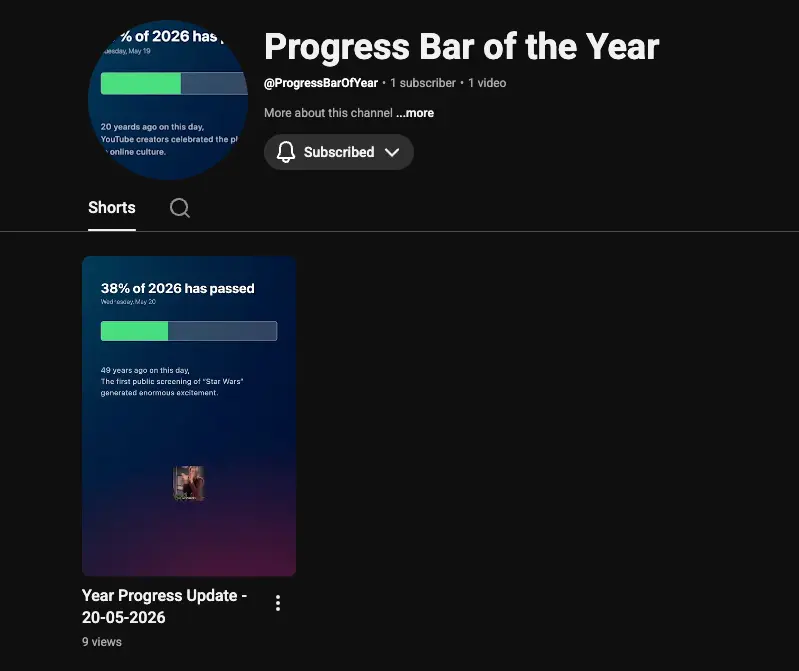
YouTube channel preview

Every morning, a video goes live on my YouTube channel. I didn’t film it. I didn’t edit it. My computer did all of it while I slept.

Here’s the story of how I built Progress Bar of the Year – a fully automated YouTube Shorts channel that posts a daily update on how much of the current year has passed – and the surprisingly elegant tech stack behind it.
YouTube channel preview

The Idea: Simple, But Strangely Satisfying

The premise couldn’t be simpler: every day, a short video goes up showing what percentage of the year has elapsed, paired with a fun historical fact about something that happened on this same day in a previous year.

That’s it.

But there’s something almost meditative about watching the year tick forward – and something genuinely cool about a channel that runs itself. No burnout, no filming schedule, no editor. Just code, running quietly on a small computer in the corner.

The Tech Stack at a Glance

Layer Tool
Core logic JavaScript / TypeScript
Historical facts Google Gemini API
Video generation Remotion
Upload YouTube Data API v3
Automation Bash + crontab

Let’s break down each piece.

Step 1: The Math – How Much of the Year Has Passed?

What it does: Calculates today’s date, the total days in the current year, and the percentage of the year that’s gone by.

How it works: This is pure JavaScript – no libraries needed. The logic boils down to three things:

const now = new Date();
const startOfYear = new Date(now.getFullYear(), 0, 1);
const endOfYear = new Date(now.getFullYear() + 1, 0, 1);

const elapsed = now - startOfYear;
const total = endOfYear - startOfYear;
const percentage = ((elapsed / total) * 100).toFixed(2);

It also accounts for leap years automatically, since endOfYear - startOfYear will naturally be 366 days in a leap year.

Why this approach: JavaScript’s Date object handles all the heavy lifting. There’s no edge case to manually code – the language figures out whether it’s February 28th or 29th, whether we’re in a leap year, all of it. Simple and bulletproof.

Output: A number like 38.21 – meaning 38.21% of 2026 has already passed.

Step 2: The History Hook – Google Gemini API

What it does: Fetches a genuinely interesting historical event that happened on this exact calendar day in a previous year.

Why AI instead of a static database? A hardcoded database of historical facts would work – but it would be finite, brittle, and boring to maintain. The Gemini API gives us:

  • An effectively unlimited and varied set of historical facts
  • Natural language output ready to display on screen
  • The ability to request facts in a specific format or tone

How it works: A prompt is sent to the Gemini API each day with the current month and day, asking for a notable historical event:

const prompt = `
  Give me one interesting historical event that happened on ${month} ${day} 
  in any previous year. Keep it to 1-2 sentences. Be specific with the year.
`;

const response = await gemini.generateContent(prompt);
const fact = response.text();

The API returns something like: “49 years ago on this day, the first public screening of Star Wars generated enormous excitement among audiences who had never seen anything like it.”

Why this matters for the channel: It transforms what could be a dry statistics update into something actually worth watching. Every video has a little historical surprise baked in. It gives viewers a reason to come back — not just for the percentage, but for the story of the day.

Step 3: Video Generation – Remotion

What it does: Takes the percentage and the historical fact and renders them into a polished, animated MP4 video – entirely in code.

What is Remotion? Remotion is a framework that lets you write videos using React. Instead of opening Premiere Pro or After Effects, you define your video as a React component. Animations, timing, transitions – all written in TypeScript. Then you render it to an actual video file using Node.js.

Why Remotion over other tools?

  • Full programmatic control – Every pixel, every animation, every timing decision is in code. No manual steps, no GUI.
  • Consistent output – The same code produces the same visual style every single day, automatically.
  • React-based – If you already know React, you’re immediately productive.
  • High quality – Remotion renders frame-by-frame at whatever resolution and framerate you specify. The output is a proper video file, not a screen recording.

What the video looks like: A dark, minimal design with:

  • The year progress percentage in large type
  • A smooth animated progress bar filling to the correct point
  • Today’s date
  • The historical fact rendered as clean text below
  • A short looping background animation for visual polish

The entire VideoTemplate.tsx component is just a React component with Remotion’s <AbsoluteFill>, <spring>, and timing hooks to drive the animation.

export const VideoTemplate: React.FC<VideoProps> = ({ percentage, fact, date }) => {
  const frame = useCurrentFrame();
  const { fps } = useVideoConfig();

  const progress = spring({ frame, fps, config: { damping: 200 } });

  return (
    <AbsoluteFill style={{ background: '#0f0f1a' }}>
      <ProgressBar width={progress * percentage} />
      <PercentageText value={percentage} />
      <HistoricalFact text={fact} />
    </AbsoluteFill>
  );
};

Once the component is ready, rendering is a single CLI command (or programmatic call):

npx remotion render VideoTemplate out/video.mp4

Step 4: Uploading to YouTube – YouTube Data API v3

What it does: Takes the rendered MP4 and automatically uploads it to the YouTube channel with a title, description, and the correct Shorts formatting – no human involvement.

How the YouTube Data API works: Google provides an official API for interacting with YouTube programmatically. After a one-time OAuth2 authentication setup (where you grant your app permission to upload to your channel), you can upload videos, set metadata, manage playlists, and more – all from code.

The upload flow:

const youtube = google.youtube({ version: 'v3', auth: oauth2Client });

await youtube.videos.insert({
  part: ['snippet', 'status'],
  requestBody: {
    snippet: {
      title: `Year Progress Update - ${formattedDate}`,
      description: `${percentage}% of ${year} has passed.nn${historicalFact}`,
      tags: ['yearProgress', 'motivation', 'history'],
      categoryId: '22',
    },
    status: {
      privacyStatus: 'public',
    },
  },
  media: {
    body: fs.createReadStream('out/video.mp4'),
  },
});

Making it a YouTube Short: YouTube Shorts are simply vertical videos (9:16 aspect ratio) under 60 seconds. Remotion renders the video at 1080×1920, and that’s all YouTube needs to classify it as a Short – no special API flag required.

The token refresh problem: OAuth2 tokens expire. To keep the automation running forever without manually re-authenticating, the app stores refresh tokens in tokens.json and automatically refreshes the access token before each upload. This is the kind of detail that separates a weekend project from something that actually keeps running for months.

Step 5: The Bash Script – Gluing It All Together

What it does: run-daily.sh is the conductor. It runs once a day and orchestrates the entire pipeline end-to-end.

Why a bash script? The core logic is in Node.js/TypeScript, but crontab (which triggers the daily run) works at the OS level. A bash script acts as the perfect bridge – it can set up the environment, invoke Node, handle errors, and maintain a log.

What the script does, step by step:

#!/bin/bash

PROJECT_DIR="/Users/mdshuvo/yearlyprogress"
STATE_FILE="$PROJECT_DIR/last-upload-date.txt"
LOG_FILE="$PROJECT_DIR/log.txt"

TODAY=$(date +%Y-%m-%d)

# Read the last run date
if [ -f "$STATE_FILE" ]; then
  LAST_RUN=$(cat "$STATE_FILE")
else
  LAST_RUN=""
fi

# Skip if already ran today
if [ "$LAST_RUN" = "$TODAY" ]; then
  exit 0
fi

cd "$PROJECT_DIR" || exit 1

# Run the main script, append output to log
/Users/mdshuvo/.nvm/versions/node/... >> "$LOG_FILE" 2>&1

# Trim the log to keep only the last 2000 lines
if [ -f "$LOG_FILE" ]; then
  tail -n 2000 "$LOG_FILE" > "$LOG_FILE.tmp" && mv "$LOG_FILE.tmp" "$LOG_FILE"
fi

Key design decisions:

  • Idempotency – The state file check ensures the script never accidentally uploads twice on the same day, even if crontab triggers it multiple times.
  • Logging – All output is appended to log.txt for easy debugging if something goes wrong.
  • Log trimming – The log is kept to 2,000 lines so it doesn’t grow forever and fill up the disk.
  • nvm path – The full path to the Node binary is specified, because crontab runs in a minimal environment that doesn’t load your shell’s .bashrc or .zshrc. This is a classic gotcha that trips up many automation projects.

Step 6: The Crontab – Set It and Forget It

What it does: Tells my computer(Mac mini) to run run-daily.sh automatically at a set time every day.

What is crontab? It’s a Unix job scheduler built into macOS and Linux. You define a schedule using a simple syntax, point it at a script, and the OS handles the rest – forever, or until you delete the entry.

The crontab entry:

0 9 * * * /Users/mdshuvo/yearlyprogress/run-daily.sh

This runs the script at 9:00 AM every day. The five fields represent: minute, hour, day of month, month, day of week. Five stars with the first two set means “every day at 9:00.”

The result: Every morning at 9 AM, without any human action, computer runs the script, generates the video, and uploads it to YouTube. By the time most people are having their morning coffee, the day’s video is live.

What Makes This Project Special

Beyond the individual pieces, what’s interesting here is how each layer is chosen for a specific reason:

  • JavaScript for logic – Universal, fast to write, perfect for date manipulation and API calls.
  • Gemini for content – Turns a static metric into a story worth watching.
  • Remotion for video – Treats video like software, making it reproducible and automatable.
  • YouTube Data API for distribution – The last mile, handled entirely in code.
  • Bash for orchestration – Lightweight, reliable, and plays perfectly with crontab.
  • crontab for scheduling – The simplest possible scheduler, built into the OS.

No overengineering. No cloud infrastructure to manage. No monthly bills for a complex pipeline. Just a small computer, some clever code, and a crontab entry.

What’s Next?

A few directions this project could grow:

  • Multiple languages – Generate the same video in Bengali, Spanish, French, etc. to reach broader audiences.
  • Milestone alerts – Special videos at 25%, 50%, 75%, and 99% with more elaborate animations.
  • Thumbnail generation – Use a canvas library or Puppeteer to auto-generate custom thumbnails.
  • Analytics tracking – Pull view counts back from the YouTube API and log the growth over time.
  • Multi-channel – Clone the pipeline for a “Day of the Year” or “Days Until New Year” variant.

Try It Yourself

All the core tools used are free or have generous free tiers:

If you want to watch the year tick away one percentage point at a time, the channel is live at youtube.com/@ProgressOfYear. A new video drops every morning.

Built with JavaScript, Remotion, Gemini

🚀 Building BUCHI: A Secure Self-Healing AI Kernel inside Termux

Hello Developers & Security Researchers,

मैंने टर्मक्स (Termux) के भीतर सुरक्षित रूप से लोकल और शेल ऑपरेशन्स को ऑटोमेट करने के लिए एक एडवांस एआई एजेंट कर्नल विकसित किया है – BUCHI Framework। यह Groq API (LLaMA 3.3 70B) के साथ पूरी सुरक्षा के साथ इंटीग्रेटेड है।

🔥 क्या इसे खास बनाता है?

  • 🔒 कर्नल लेवल लॉकिंग: यह बिना ‘एक्टिवेशन सेंटेंस’ और स्ट्रिंग कॉन्सटेनेशन चैलेंज को पास किए अनलॉक नहीं होता।
  • 🛡️ शेल इंजेक्शन से सुरक्षा: सुरक्षा को ध्यान में रखते हुए यह केवल विशिष्ट व्हाइटलिस्टेड कमांड्स (जैसे pkg, apt, ls, cd) को ही अनुमति देता है।
  • 🔧 सेल्फ-हीलिंग कर्नल: यदि टर्मक्स में कोई पैकेज गायब है, तो यह बैकएंड में उसे खुद डिटेक्ट करके इंस्टॉल कर लेता है।

मैं चाहता हूँ कि आप इसके सुरक्षा ढांचे और कोड आर्किटेक्चर को रिव्यू करें!

🔗 गिटहब पर कोड देखें: https://github.com/ck9405051-bot/Termux-BUCHI-AI

प्रोजेक्ट पसंद आए तो गिटहब पर ⭐ (Star) ज़रूर दें!

Your AI Memory Workspace

I just published a demo of Memonia.

I’ve been working on it for a while to solve a problem I constantly face with AI tools: every session starts from zero and all project context gets lost.

So I built a system that enables real continuity of work with Claude Code, Codex, Ollama, and others:

• persistent project memory

• task tracking

• session reports

• technical decisions log

• bug history tracking

• automatic context generation to instantly resume work

The goal is to work with AI like a real technical teammate that actually remembers the project over time.

I would really appreciate technical feedback and criticism.

LinkedIn post: https://www.linkedin.com/posts/peter-atati-81007736b_ia-llm-claudeai-activity-7462722742765871105-tvzb?utm_source=social_share_send&utm_medium=member_desktop_web&rcm=ACoAAFurGswBfx6Mi0-sPIHB7LYG8R2RXPLK8QA

Why your Anthropic prompt caching probably isn’t working (and the npm package I built to fix it)

I’m a solo developer with about five years of experience, mostly outside AI. The last few months I’ve been getting serious about it — reading docs, building small things with Claude, learning how it differs from the web APIs I’m used to.

While I was setting up Anthropic prompt caching for a project, I got stuck on a question I couldn’t easily answer: how do I know it’s actually working? The docs explained the cache_control API and the 90% discount on cached tokens. But the only way to verify a call had hit the cache was to manually parse cache_read_input_tokens from the response usage on every request. Nobody seems to do this.

That gap turned into my first published npm package, prompt-cache-optimizer. This post is what I learned about the four ways prompt caching silently fails, and what the package does to catch them.

What prompt caching is supposed to do

When you call messages.create with a long, stable prefix (system prompt, tool definitions, retrieved documents), Anthropic lets you mark a cache_control breakpoint. On the first call, that prefix gets written to the cache at ~1.25x the normal input rate. On any subsequent call within the cache TTL, the cached tokens are read back at 10% of the input rate.

That’s a 90% discount on whatever portion of your prompt is stable. For a chatbot that re-sends a 10K-token system prompt every turn, this is the difference between a $5K monthly bill and a $500 one.
The math is incredible. The execution is finicky.

The four ways prompt caching silently fails

  1. Misplaced breakpoints
    cache_control markers cache everything before them in the request. Put the breakpoint in the wrong place and you cache the wrong things. Worse, the call still succeeds — Anthropic happily processes it, you get a normal response, you just paid full price.

  2. Prefix drift across calls
    The cache only hits if the cacheable prefix is byte-identical to what was cached. If you reorder your tools array between calls, or shuffle retrieved documents, or insert a timestamp anywhere in your system prompt — the prefix is different, cache misses, you pay full price.

Worse, you also pay the 1.25x write cost to cache the new (now-different) prefix, which expires in 5 minutes if nothing else hits it. So you’re paying more than you would without caching at all.

  1. TTL expiration
    Anthropic recently dropped the default cache TTL from 1 hour to 5 minutes. A lot of setups that “had caching working” started silently regressing — calls that came in 6 minutes apart instead of 4 minutes started missing the cache. Nobody got an error. The bill just went up.

  2. No measurement
    The only way to verify any of the above is to parse cache_read_input_tokens and cache_creation_input_tokens from every single response, compute a hit rate, and compare against an expected baseline. Nobody does this. Most teams “set up caching” once, watch the first response come back with high cached tokens, and assume it works forever.

The wrapper I built
I shipped a small TypeScript package called prompt-cache-optimizer that fixes the measurement problem and warns about the other three.

It’s a drop-in wrapper for @anthropic-ai/sdk. Use it exactly like the SDK:

import { CachedAnthropic, placeBreakpoints } from "prompt-cache-optimizer";

const client = new CachedAnthropic({
  apiKey: process.env.ANTHROPIC_API_KEY!,
  warnIfHitRateBelow: 0.6,
});

const { system, messages } = placeBreakpoints({
  system: longSystemPrompt,
  messages: conversation,
  strategy: "after-system",
});

const response = await client.messages.create({
  model: "claude-sonnet-4-6",
  max_tokens: 1024,
  system,
  messages,
});

console.log(response.cacheInfo);
// {
//   hit: true,
//   cachedTokens: 8420,
//   uncachedTokens: 312,
//   cacheWriteTokens: 0,
//   dollarsSaved: 0.024,
//   dollarsSpent: 0.001
// }

Every response gets a cacheInfo field with the parsed numbers. The client also tracks aggregate stats:

console.log(client.stats());
// {
//   totalCalls: 142,
//   cacheHits: 124,
//   hitRate: 0.873,
//   totalCachedTokens: 1_240_000,
//   dollarsSaved: 3.72,
//   dollarsSpent: 1.41,
// }

And when something looks wrong, it emits passive warnings instead of throwing:

  • cache-write-without-read → your cacheable prefix changed call-over-call (the silent failure mode)
  • low-hit-rate → rolling cache hit rate dropped below your threshold
  • no-cache-control-found → you forgot to mark anything cacheable
  • unknown-model → pricing unknown, dollar accounting skipped

Route them anywhere you like:

new CachedAnthropic({
  apiKey,
  onWarning: (event) => logger.warn(event),
});

Real numbers
The included example processes 5 questions reusing a large system prompt. Here’s the actual output:

Five calls. The first writes to cache (cost: a tiny bit more than uncached). Calls 2-5 each hit the cache.

  • 80% hit rate (4 hits, 1 miss — the first call always misses since that’s when the cache gets written)
  • $0.017 saved on $0.020 spent
  • Same workload without caching would have cost $0.037 — a 46% reduction

At higher call volumes the proportions get even better. A chatbot answering 1000 questions/day with a 10K-token system prompt easily hits 70%+ cost reductions.

How big the install is
The package is ~50KB unpacked, has zero runtime dependencies, and treats @anthropic-ai/sdk as a peer dependency. It does not phone home, store payloads, or require an account.

Roadmap
v0.1 is intentionally focused on measurement and explicit helpers. Coming up:

  • v0.2 — auto-placement of cache_control breakpoints based on observed prompt stability (no more manual placeBreakpoints())
  • v0.3 — safe message/tool reordering to maximize the stable prefix
  • v0.4 — OpenAI and Gemini prompt caching support
  • v1.0 — persistent stats adapter, middleware mode

Try it

npm install prompt-cache-optimizer @anthropic-ai/sdk

If you find it useful, a GitHub star is the single biggest signal that helps other developers find it. If it saves you real money on your Anthropic bill, I’d love to hear about it — file an issue or DM me.

Türkiye ilk kez kıtalararası füze hedefini açıkladı

Milli Savunma Bakanlığı, Yıldırımhan füzesini tanıtarak Türkiye’nin ilk kıtalararası balistik füze (ICBM) geliştirme hedefini duyurdu. Uzmanlar, 6.000 km menzilli füzenin savunma ihtiyaçlarını aştığını ve küresel güç mesajı verdiğini belirtiyor.

What Does Vue 3 reactive() Compile to in React with VuReact?

VuReact compiles Vue 3 code into standard, maintainable React code. This time, the focus is on two of Vue’s most common reactive APIs: reactive() and shallowReactive().

If you write them in Vue, what does the resulting React code actually look like?

Before the Examples

To keep the article focused, these examples follow two small conventions:

  1. All Vue and React snippets show only the core logic, with component wrappers and unrelated setup omitted.
  2. The article assumes you are already familiar with the API shape and core behavior of Vue 3 reactive and shallowReactive.

Compilation Mapping

Vue reactive() -> React useReactive()

reactive() is one of the most common entry points into Vue 3 reactivity. It wraps objects and arrays in a reactive proxy so property changes can drive view updates.

Here is the most basic example:

  • Vue
<script setup>
import { reactive } from 'vue';

const state = reactive({
  count: 0,
  title: 'VuReact',
});
</script>
  • Compiled React
import { useReactive } from '@vureact/runtime-core';

// Compiled into a Hook that mirrors Vue reactive behavior
const state = useReactive({
  count: 0,
  title: 'VuReact',
});

This is the core mapping: Vue reactive() becomes the React Hook useReactive().

VuReact’s useReactive is the runtime adapter for reactive. You can think of it as the React-side equivalent of Vue’s object reactivity model, preserving familiar behavior such as reactive property updates, direct nested property access, and smooth integration with React component rendering.

TypeScript Types Are Preserved

VuReact also keeps type information intact, which matters a lot in real-world TypeScript codebases.

  • Vue
<script lang="ts" setup>
import { reactive } from 'vue';

interface User {
  id: number;
  name: string;
}

const state = reactive<{
  loading: boolean;
  users: User[];
  config: Record<string, any>;
}>({
  loading: false,
  users: [],
  config: { theme: 'dark' },
});
</script>
  • Compiled React
import { useReactive } from '@vureact/runtime-core';

interface User {
  id: number;
  name: string;
}

const state = useReactive<{
  loading: boolean;
  users: User[];
  config: Record<string, any>;
}>({
  loading: false,
  users: [],
  config: { theme: 'dark' },
});

There is no need to rework the types by hand. VuReact carries the original annotations forward so the generated React code keeps the same type safety and editor experience.

Vue shallowReactive() -> React useShallowReactive()

shallowReactive() creates a shallow reactive object in Vue 3. It is useful when you only want to observe changes at the top level, rather than deeply tracking every nested property.

  • Vue
<script setup>
import { shallowReactive } from 'vue';

const state = shallowReactive({
  nested: { count: 0 },
});
</script>
  • Compiled React
import { useShallowReactive } from '@vureact/runtime-core';

const state = useShallowReactive({
  nested: { count: 0 },
});

This follows the same idea as reactive(): Vue shallowReactive() is compiled into useShallowReactive().

VuReact’s useShallowReactive is the runtime adapter for shallowReactive. In other words, only top-level reference changes are tracked, while nested mutations do not trigger updates. That makes it a practical fit for large objects, third-party data, or performance-sensitive structures where deep tracking would be unnecessary.

Deleting the 8.4GB Python Sidecar: Pure Go + CUDA with `CGO_ENABLED=0`

TL;DR: I built gocudrv so Go services can talk directly to NVIDIA GPUs — no cgo, no CUDA toolkit, no bloated Python dependencies. One static binary.

Last month I was reviewing a production AI service. The core business logic was clean, efficient Go (15MB binary), but GPU access was routed through a Python sidecar.

The results were painful:

  • 8.4GB Docker images — bloated with unused CUDA toolkits and PyTorch dependencies
  • 4-minute cold starts during autoscaling
  • Extra serialization + network hops between Go → Python → GPU

We had accepted this because “GPUs belong to Python.” I decided to challenge that assumption.

The Impossible Build: CGO_ENABLED=0

Most Go developers assume you need cgo for CUDA. Instead, I used the CUDA Driver API (already present wherever an NVIDIA driver is installed) together with purego to bypass the C compiler entirely.

// internal/platform/platform_linux.go
func LibraryCandidates() []string {
    return []string{
        "libcuda.so.1",
        "/usr/lib/x86_64-linux-gnu/libcuda.so.1",
        "/usr/lib/wsl/lib/libcuda.so.1", // Works seamlessly in WSL2
    }
}

gocudrv loads libcuda.so at runtime. Standard go build works — even when building on a Mac targeting Linux.

The Receipts: Size & Build Comparison

Metric Python Sidecar Approach gocudrv (Pure Go)
Artifact Size ~8,400 MB 2.4 MB
Build Time 5–10 minutes (Docker) < 2 seconds
External Dependencies Python + PyTorch + CUDA Toolkit NVIDIA Driver only
Deployment Simplicity Multiple processes + networking Single static binary

Low-Level Kernel Performance (10M element vector add on RTX 4070 Ti)

For a simple vector addition (~114 MB data):

  • H→D Copy: 19.3 ms
  • Kernel Launch: 3.4 ms
  • D→H Copy: 25.6 ms
  • Total GPU Pipeline: 48.3 ms

These numbers represent the raw GPU work. In the previous Python sidecar setup, we also paid extra for:

  • JSON/Protobuf serialization
  • Local network socket transfer (Go → Python)
  • Python interpreter + PyTorch overhead

The real win is not necessarily beating PyTorch on micro-benchmarks, but removing the entire sidecar layer and its operational complexity.

Beyond a Simple Wrapper

Pure Go doesn’t mean slow. I focused on asynchronous overlap from the beginning to hide PCIe transfer latency:

stream, _ := ctx.NewStream()

// Start DMA transfer — returns immediately
err := buf.CopyFromHostAsync(ctx, stream, hostBuffer)

// Go can do useful work while the GPU is computing
// ...

// Synchronize only when needed
err = stream.Synchronize(ctx)

Why This Matters in 2026

AI is shifting from research demos to critical infrastructure. Go excels at stability, concurrency, observability, and operational predictability — exactly what production model serving demands.

Removing the Python sidecar gives you:

  • Dramatically smaller images and faster deploys.
  • Much better cold start times.
  • Single language and single binary (much simpler observability and debugging).
  • No GIL, better P99 tail latencies.

Current State (Honest)

gocudrv is still early and experimental. Core functionality works today (device management, memory management, PTX loading, streams, async copies), but it is not yet ready for complex high-performance inference serving.

I’m actively working on CUDA Graphs, Events & Timing, and multi-GPU support.

If you’re a Go engineer tired of carrying heavy Python AI runtimes in production, I’d love your feedback and contributions.

→ link