iOS 18 yüklü tüm iPhone’lara kritik güvenlik güncellemesi

 Apple iOS 18 yüklü iPhone’lara acil güncelleme gönderdi. Yeni iOS 18.7.7 sürümü, DarkSword olarak bilinen yeni güvenlik açığı zincirinin giderek yaygınlaştığı zamanda geldi.

 Mert
Apple iOS 18 yüklü iPhone’lara acil güncelleme gönderdi. Yeni iOS 18.7.7 sürümü, DarkSword olarak bilinen yeni güvenlik açığı zincirinin giderek yaygınlaştığı zamanda geldi.

 Çinli araştırmacılar, Mach 6’nın üzerine çıkabilen yeni bir hava soluyan motor geliştirdi. Tek sistemle tüm uçuş sürecini kapsayan bu teknoloji, hipersonik yarışta dengeleri değiştirebilir.

 Michelin’in yeni lastikleri Primacy 5 Energy ve Pilot Sport 5 Energy tanıtıldı. Yeni teknoloji sayesinde elektrikli araçlarda menzil yüzde 10’a kadar artabiliyor.
Every traveler knows the frantic ritual: fifteen open tabs, clearing browser cookies in a desperate attempt to outsmart “dynamic pricing,” and the soul-crushing moment a fare jumps by $200 while you’re entering your credit card details. From the outside, the travel industry’s pricing looks like chaos. From the inside, it is a high-frequency battle of algorithms.
For developers and data analysts, the challenge isn’t just seeing these prices—it’s capturing them at scale. Monitoring Skyscanner and Aviasales (JetRadar) is the “Final Boss” of web scraping. These platforms aren’t just websites; they are massive aggregators of aggregators, protected by sophisticated anti-bot shields and complex asynchronous data flows.
If you want to build a reliable price monitor, you have to move beyond simple requests. Here is the senior-level blueprint for architecting a resilient flight data pipeline.
Why is Flight Data the Hardest Nut to Crack?
In most e-commerce scraping, you deal with a static SKU and a price. In flight monitoring, the “product” is a multi-dimensional matrix. A single seat’s price is influenced by:
When you scrape Skyscanner or Aviasales, you aren’t just hitting one server. You are tapping into a stream that triggers hundreds of subprocesses. This is why standard BeautifulSoup approaches fail within minutes.
How Do Aggregators Protect Their Data?
Skyscanner and Aviasales employ defensive stacks that make standard scrapers look like toys. Understanding the “why” behind your blocks is the first step to bypassing them.
1. The TLS Fingerprinting Trap
Anti-bot solutions like Akamai (used by Skyscanner) or Cloudflare don’t just look at your IP. They look at your TLS Handshake. If you use a standard Python requests library, your cipher suites look like a bot. Real browsers have specific, messy handshake patterns. If they don’t match, you are issued a 403 Forbidden before your request even hits the application layer.
2. Behavioral Heuristics
A human doesn’t search for “London to Tokyo” 500 times in 2 minutes across different dates. Aggregators track session consistency. If your “user” is switching between currencies and regions with the speed of light, the session is flagged.
3. The Shadow DOM and Dynamic Loading
The “Price” on these sites is rarely in the initial HTML source. It is fetched via XHR/Fetch calls after the page loads. Often, the values are obfuscated or hidden within localized JSON objects that require a JavaScript engine to render.
The Architectural Framework: “The Resilient Scraper”
To build a professional-grade monitor, you need a three-tier architecture. Thinking of it as a single script is the quickest way to technical debt.
Tier 1: The Proxy Mesh
Do not use “cheap” datacenter proxies. They are blacklisted by ASN ranges. For flight scraping, you need Residential Proxies with sticky sessions.
Why? You need to maintain the same IP for the duration of a search “session” (from search input to price results) to mimic human behavior.
Tier 2: The Browser Context Manager
Forget headless Chrome in its default state. Tools like Playwright or Puppeteer must be augmented with “stealth” plugins to mask properties like navigator.webdriver and chrome.app.
Tier 3: The Data Normalization Engine
Aviasales and Skyscanner return data in vastly different formats. Your engine must map these into a unified schema:
Price_final = Price_base + Taxes + Fees_estimated
Step-by-Step Guide: Building Your Monitor
If you are starting today, follow this progression to avoid hitting a wall.
Step 1: Endpoint Discovery (The “API First” Rule)
Before you try to parse HTML, open the Network Tab in your DevTools. Both Aviasales and Skyscanner rely on internal APIs.
/apis/v1/prices. Attempting to hit these endpoints directly without the correct headers (Referer, Origin, and Cookies) will fail. Step 2: Handling the “Waiting” State
Flight searches are asynchronous. When you send a request, the server returns a “Session ID” and an incomplete list of flights. You must poll the results.
# Conceptual polling logic
import time
import random

while progress < 100:
    response = session.get(polling_url)
    data = response.json()
    progress = data.get('status')
    update_dashboard(data.get('itineraries'))
    time.sleep(random.uniform(2, 5))
Insight: Failing to simulate the polling behavior is a primary signal to anti-bots that you are a script.
Step 3: Solving the Fingerprint Challenge
Use a library like curl_cffi in Python. It allows you to impersonate the TLS/JA3 fingerprint of a real browser (like Chrome 120) even when making low-level HTTP requests. This is significantly faster than a full browser and more stealthy than requests.
Step 4: Data Deduplication
Aggregators often show the same flight via different OTAs.
Airline + FlightNumber + DepartureTime). Framework for Scale: The “Scrape-Observe-Adjust” Cycle
| Component | Strategy | Senior Insight |
|---|---|---|
| Concurrency | Distributed Workers | Don’t scale vertically; use Celery or Temporal to distribute tasks across different regions. |
| Error Handling | Exponential Backoff | If you hit a 429 (Too Many Requests), don’t just retry. The wait time should be T = 2ⁿ × jitter. |
| Validation | Schema Enforcement | Flight data is messy. Use Pydantic to ensure the price is always a float and the currency is ISO-compliant. |
Beyond the Basics: What Newbies Miss
The “Geo-Pricing” Arbitrage
Prices for the same flight differ based on the IP location. A flight from New York to Paris might be cheaper when “searched” from a Polish IP than a US IP. A senior scraping architect builds a “Geo-Switcher” into their monitor to find the absolute floor of a price.
Detecting “Price Error” Fares
High-level monitors don’t just look for cheap tickets; they look for anomalies. If the historical average for a route is $800 and it drops to $150, your system should trigger an immediate alert. This requires a time-series database like InfluxDB or ClickHouse to store historical price points.
Final Thoughts: The Ethics and Evolution of Scraping
Building a monitor for Skyscanner and Aviasales is a game of cat and mouse. You are operating in a space where the targets have billion-dollar incentives to keep you out.
However, the value of this data is immense. Whether you’re building a travel startup, a personal alert system, or a market analysis tool, the key is respecting the infrastructure. High-frequency scraping without caching is not just “noisy”—it’s inefficient. A senior engineer knows that the best scraper is the one that makes the fewest requests to get the most information.
The question isn’t just “How do I parse this?” but “How do I build a system that remains invisible while providing undeniable value?”

*
I have a confession to make.
I spent three hours debugging a Zod schema on a Friday night. Not because the validation was complex. Not because the business logic was tricky.
Because the backend team renamed avatar to avatar_url in a deeply nested object. And I missed it.
Three hours. For a single field name change.
If you work with TypeScript and APIs, you know the drill. You have:
Three versions of the same data shape. All have to stay in sync.
And when something changes, you get to play detective. Scrolling through JSON responses, comparing field names, updating schemas, hoping you didn’t miss anything.
The Breaking Point
I was maintaining a project with around 40 API endpoints. Each one returning nested objects, arrays, optional fields, nullable values.
Every time the backend team deployed, I’d open my editor and do the same dance:
I made the same mistakes over and over:
❌ Forgetting to mark a field as optional
❌ Missing that an ID changed from string to number
❌ Not handling null values properly
❌ Typing avatar instead of avatar_url
The bugs would show up in production. Users would get validation errors for fields that existed. Forms would fail because of fields that were actually optional.
I was spending more time fixing schema bugs than building features.
The Idea
I started wondering: Why am I writing these manually?
The JSON response is right there. The schema is just a structured version of that same data. Couldn’t something automate this?
So I built a tool that does exactly that.
How it works:
You paste a JSON response. The tool looks at the actual data and figures out:
Then it generates a Zod schema.
Not a perfect schema. But a correct, working schema that you can use immediately.
What It Actually Saves You
Here’s what a typical API response looks like in my project:
{
  "status": "success",
  "code": 200,
  "data": {
    "items": [
      {
        "id": "550e8400-e29b-41d4-a716-446655440000",
        "title": "Something important",
        "createdAt": "2024-03-15T10:30:00Z",
        "metadata": {
          "views": 1234,
          "tags": ["featured", "popular"],
          "expires": null
        }
      }
    ],
    "pagination": {
      "page": 1,
      "limit": 20,
      "total": 150,
      "hasNext": true
    }
  }
}
Writing the schema for this manually would take me about 10 minutes. That’s if I don’t make any mistakes.
`
🧠 What It Caught Automatically
One of the coolest parts of using this tool was noticing the details it picked up without any effort:
id
createdAt
expires
tags
Would I have caught all that manually?
Maybe.
But I definitely would’ve spent time checking each field.
⚡ The Unexpected Benefit
The tool did something I didn’t expect.
When the generated schema didn’t match my expectations, I started investigating the data more carefully. And that’s when things got interesting…
👉 I found bugs I would’ve never noticed otherwise.
🐛 Real Example #1
One time, the schema showed a field that was always null.
So I dug into our API logs…
Turns out:
🐛 Real Example #2
Another time, I noticed the generated schema had optional fields that I had always treated as required.
After checking:
💡 The Realization
The tool wasn’t just saving me time.
👉 It was making my code more accurate.
📚 What I Learned
🚀 Try It Yourself
I put this tool online because if I needed it, chances are others do too.
👉 ToolsVIA JSON to Zod Converter
https://www.toolsvia.app/json-to-zod

✨ How It Works
No signup.
No data upload (everything runs in your browser).
No hidden costs.
🎯 Final Thought
If you’re tired of playing detective with your API responses, give it a try with one of your real endpoints.
It won’t solve all your problems…
👉 But it might save you a Friday night or two 😄
💬 Your Turn
What’s your most memorable debugging story?
Ever spent hours on something that should have been simple?
Drop it in the comments — I’d love to know I’m not the only one 👇
This is a submission for the DEV April Fools Challenge
What I Built
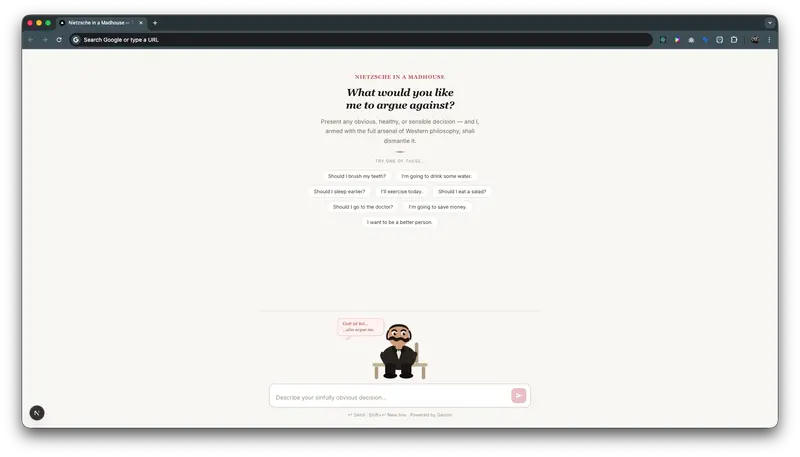
Nietzsche in a Madhouse — A satirical “Anti-Productivity” AI agent. While most AIs try to help you be efficient, this one uses the full arsenal of Western philosophy (nihilism, existentialism, and grandiloquent rhetoric) to argue against your most basic, healthy, and logical life decisions.
Want to brush your teeth? It’s “bacterial genocide.” Want to sleep? It’s “surrendering your consciousness to the amorphous void.”
Demo

Code
GitHub Repository
The project is built with Next.js and integrated with the Google Gemini API.
The core logic resides in:
app/api/argue/route.ts: The philosophical persona prompt and Gemini integration.app/page.tsx: The clean, “Dark Academia” inspired UI and custom Nietzsche SVG illustration. How I Built It
gemini-2.5-flash-lite model. Prize Category
Best Google AI Usage — We took one of the most powerful language models in existence and dedicated its entire processing power to gaslighting users into thinking that drinking water is a “surrender to biological determinism.” It’s an ode to the “delightfully useless” potential of modern AI.
We built a curated engineering and security news aggregator that pulls from 10 high-signal sources, deduplicates content, and updates every 6 hours.
No paid APIs. No scraping. No login. Just clean, structured news for developers.
This post breaks down exactly how it works.
What This Is
A lightweight news wire combining:
The goal: high-quality signal, zero noise, zero cost.
Why Build This?
Most engineering/news aggregators fail in one of these ways:
We wanted:
Stack
High-Level Architecture
           ┌───────────────┐
           │   RSS Feeds   │
           │ (9 sources)   │
           └──────┬────────┘
                  │
                  ▼
           ┌───────────────┐
           │ Fetch Workers │
           │ (every 6 hrs) │
           └──────┬────────┘
                  │
                  ▼
        ┌──────────────────────┐
        │ Normalize Articles   │
        │ title, url, date     │
        └─────────┬────────────┘
                  │
                  ▼
        ┌──────────────────────┐
        │ SHA-256 Deduplication│
        │ (based on URL)       │
        └─────────┬────────────┘
                  │
                  ▼
           ┌───────────────┐
           │   Postgres    │
           └──────┬────────┘
                  │
                  ▼
           ┌───────────────┐
           │   Hono API    │
           └──────┬────────┘
                  │
                  ▼
           ┌───────────────┐
           │   Next.js UI  │
           └───────────────┘
Data Sources
We deliberately chose sources with:
Breakdown
| Source | Type | Why It Matters |
|---|---|---|
| Hacker News | API | Real-time dev signal |
| Lobsters | RSS | More technical discussions |
| InfoQ | RSS | Deep engineering content |
| Cloudflare Blog | RSS | Infra + performance insights |
| Krebs on Security | RSS | Trusted security reporting |
| The Hacker News | RSS | Security news (broader) |
| NIST NVD | RSS/API | Verified vulnerabilities |
| GitHub Blog | RSS | Platform + ecosystem updates |
| OpenAI Blog | RSS | AI developments |
| Anthropic Research | RSS | AI + safety research |
Fetching Strategy
We run a simple scheduled job:
// every 6 hours
cron.schedule("0 */6 * * *", async () => {
  await fetchAllSources();
});
Why every 6 hours?
Deduplication (Key Part)
Different sources often post the same story.
We solve this using SHA-256 hashing of URLs.
import { createHash } from "crypto";

function hashUrl(url: string) {
  return createHash("sha256").update(url).digest("hex");
}
Why URL hashing?
Tradeoff
Normalization
Each source has its own format. We normalize into a single shape:
type Article = {
  title: string;
  url: string;
  source: string;
  publishedAt: Date;
};
This keeps the frontend simple and predictable.
API Layer (Hono)
Example endpoint:
app.get("/articles", async (c) => {
  const articles = await db.query.articles.findMany({
    orderBy: (a, { desc }) => [desc(a.publishedAt)],
    limit: 100,
  });

  return c.json(articles);
});
Minimal, fast, no overengineering.
Frontend (Next.js)
Limitations
What We’d Improve
Try It
The news wire is open to everyone:
👉 https://clawship.app/blog/engineering-security-news-wire
Connect with Us
BuzzFeed is circling the drain. The company just reported a net loss of $57.3 million for 2025, its stock is trading at $0.70 — that’s not a typo, seventy cents — and in its latest earnings report, the company included the phrase every investor dreads: “substantial doubt about the Company’s ability to continue as a going concern.”
Translation: we might go bankrupt.
And the man responsible for this spectacular implosion, CEO Jonah Peretti, has learned absolutely nothing. His plan? Build more AI apps.
You cannot make this up.
The Anatomy of a Self-Inflicted Wound
Rewind to January 2023. ChatGPT had just exploded into public consciousness. Every CEO with a quarterly earnings call was scrambling to say “AI” as many times as humanly possible. Peretti was no exception. He published an internal memo announcing BuzzFeed’s hard pivot to AI, promising it would “enhance” the company’s quizzes by generating personalized responses.
The stock shot from $3 to $15 overnight. For a brief, intoxicating moment, Wall Street believed BuzzFeed had found its second act.
Then people actually used the AI quizzes.
They were terrible. Generic, repetitive, soulless — the digital equivalent of a fortune cookie written by a committee. Nobody shared them. Nobody talked about them. The engagement numbers told a story the stock price had temporarily masked: nobody wants AI-generated content from a company whose entire value proposition was human creativity and cultural fluency.
But Peretti didn’t course-correct. He doubled down. By May 2023, he was promising that AI would “replace the majority of static content” on BuzzFeed. And just to make the symbolism absolutely perfect, he’d shuttered BuzzFeed News — the Pulitzer Prize-winning journalism division — the month before.
Let that sink in. He killed actual journalism and replaced it with robot slop. In the same quarter. On purpose.
The Slop Factory
What followed was entirely predictable to anyone who’d spent five minutes thinking about why people visit media websites in the first place.
BuzzFeed started quietly publishing entire articles generated by AI. Not “AI-assisted” in the way a journalist might use a tool to speed up research. Fully AI-generated, top to bottom, with all the hallmarks: bland prose, recycled structures, the unmistakable whiff of content that exists not because a human had something to say, but because an algorithm determined it should exist.
Readers noticed immediately. The articles were sloppy, repetitive, and devoid of the voice that had made BuzzFeed culturally relevant in the first place. Traffic cratered. The stock that had briefly kissed $15 began its slow, grinding descent to where it sits today — below a dollar.
The company has since reduced its debt from $180 million to around $60 million and slashed operating costs. But when your CFO is publicly discussing “strategic conversations” about “liquidity issues,” those cost cuts aren’t a turnaround strategy. They’re hospice care.
Why This Matters Beyond BuzzFeed
BuzzFeed’s collapse is not just a cautionary tale about one company’s bad bet. It’s a live demonstration of the fundamental delusion that has gripped the media and tech industries since ChatGPT launched: the idea that AI can replace human creative work without anyone noticing or caring.
Here’s the uncomfortable truth that every executive chasing the AI content dream doesn’t want to hear: people can tell.
Maybe not always on the first read. Maybe not on every piece. But in aggregate, over time, the difference between content created by someone who cares and content generated by a model optimizing for token probability becomes glaringly obvious. It’s the difference between a restaurant with a chef and a vending machine with good packaging.
BuzzFeed at its peak — love it or hate it — had a voice. “Which Disney Princess Are You?” was stupid, sure, but it was stupid in a specific, human, culturally aware way that made people share it with their friends. That voice was the product. The quizzes and listicles were just the delivery mechanism.
When Peretti replaced the voice with an algorithm, he didn’t just cut costs. He removed the only thing people were coming for.
The Open Source Counter-Narrative
Here’s what makes the BuzzFeed disaster particularly frustrating: AI can genuinely augment creative work. The tools exist. Open source language models from projects like Llama, Mistral, and others have made it possible for small teams and individual creators to use AI as a collaborator rather than a replacement.
The difference is in the approach. Using an open source model to help a journalist research faster, draft outlines, or catch errors is fundamentally different from using GPT to vomit out 500 articles a day and hoping nobody notices. One makes humans better at their jobs. The other eliminates the humans and hopes the audience is too dumb to care.
Spoiler: the audience isn’t dumb.
The open source AI community has been making this argument for years. When you run your own models, fine-tune them on your own data, and use them as tools in a human-driven workflow, you get genuinely useful outcomes. When you hand the keys to a proprietary API and tell it to “make content,” you get BuzzFeed in 2025.
The distinction matters enormously. Big tech companies selling AI-as-a-service have every incentive to tell you their models can replace your workforce. That’s how they sell subscriptions. Open source alternatives give you the power to decide how AI fits into your work, without an API provider’s quarterly targets influencing the answer.
Peretti’s Delusional Endgame
The most telling detail in BuzzFeed’s earnings report isn’t the $57.3 million loss. It isn’t the going-concern warning. It’s that Jonah Peretti, after presiding over one of the most visible AI failures in media history, still thinks the answer is more AI.
He wants to build “new AI apps” and bring them to market this year. With what money? With what credibility? The man just demonstrated, in the most public way possible, that he doesn’t understand why his own company was successful. And his solution is to do more of the thing that killed it.
This is the sunk cost fallacy operating at a corporate scale. Peretti can’t admit the AI pivot was a mistake because that would mean the last three years — the layoffs, the news division shutdown, the stock collapse — were all for nothing. So instead, he’s going to ride the ship all the way to the ocean floor, insisting the iceberg was actually a feature.
What BuzzFeed Should Have Done
This isn’t complicated. The playbook was right there:
Keep BuzzFeed News. Credible journalism was the company’s most valuable asset. It gave BuzzFeed legitimacy that no number of quizzes could replicate. Shutting it down to save money while spending on AI was like selling your house to buy lottery tickets.
Use AI as a tool, not a replacement. Let your writers use AI to work faster. Automate the boring parts — metadata, SEO optimization, image tagging. Keep humans doing the creative work that humans are good at.
Invest in community, not content volume. BuzzFeed’s audience was a community. They shared content because it was culturally relevant and felt personal. You can’t build community with algorithmically generated slop. You build it by employing people who understand culture.
Open source your tools. Imagine if BuzzFeed had built an open source content creation toolkit that other media companies could use. They’d have positioned themselves as a technology leader instead of a cautionary tale.
None of this happened because Peretti, like so many tech-adjacent executives, fell for the most seductive lie in the AI hype cycle: that the technology is so good, you don’t need the humans anymore.
The Bigger Picture
BuzzFeed is not unique. Across the media landscape, companies are making the same bet — replacing writers, editors, and creators with AI systems that produce more content at lower cost. Some are doing it quietly. Some, like BuzzFeed, are doing it loudly and badly.
The ones that survive will be the ones that figure out the right balance: AI as amplifier, not replacement. Humans in the loop, not out of it. Tools that make creative work better, not tools that eliminate creative work entirely.
The market is already rendering its verdict. BuzzFeed’s stock is at seventy cents. Meanwhile, media companies that invested in actual journalism — The New York Times, The Athletic, even niche outlets with loyal subscriber bases — are doing fine. Readers will pay for quality. They will not pay for, or even tolerate, slop.
The Lesson No One Wants to Learn
The BuzzFeed story should be required reading in every boardroom where an executive is proposing an “AI content strategy.” Not because AI is bad — it isn’t. But because the fastest way to destroy a company is to automate away the thing that makes it valuable.
BuzzFeed was valuable because of its people. Its writers understood internet culture in a way that couldn’t be distilled into a prompt. Its editors knew which topics would resonate and which wouldn’t. Its community managers built relationships that drove sharing and engagement.
All of that was thrown away for the promise of cheaper content at scale. And now the company is warning investors it might not survive the year.
Jonah Peretti built something genuinely important with BuzzFeed. Then he burned it down because a chatbot told him it could do the same thing for less.
It couldn’t.
It never could.
And if you’re running a company right now, thinking about replacing your creative team with AI, look at BuzzFeed’s stock price and ask yourself: do you really want to be next?
For Day 58 of my #100DaysOfCode journey, my goal was to build a basic but fully functional Task Management App using Next.js. Up until this point, I had been learning individual Next.js concepts: server and client components, routing with the App Router, data fetching and caching, API routing, server actions, and connecting to a MongoDB database. I felt confident with each concept in isolation, but I hadn’t yet put them all together in a single project.
So today’s goal was simple: build something real, something CRUD-based, that forces me to use everything I’ve learned so far in one place.
What I Built
The app is a simple Task Manager where you can create, view, edit, and delete tasks. Each task has a title, description, and a status (pending, in-progress, or completed). The app has three pages and three components:
Pages:
/tasks — displays all tasks stored in the database/tasks/new — a form to create a new task/tasks/[id] — a pre-filled form to edit an existing taskComponents:
TaskList — receives all tasks and maps over themTaskCard — displays an individual task with Edit and Delete optionsTaskForm — a reusable form used on both the create and edit pages 🛠 Concepts Used
[id]
TaskForm and TaskCard that handle user interaction and form inputsaction propclientPromise without MongooserevalidatePath — to refresh the page cache after every mutation so the UI always reflects the latest database stateredirect — to send the user back to /tasks after creating or updating a task Folder Structure
next-crud-app/
├── app/
│   ├── page.js               --> Landing page
│   └── tasks/
│       ├── page.js           --> Lists all tasks (Server Component)
│       ├── new/
│       │   └── page.js       --> Create task form page (Server Component)
│       └── [id]/
│           └── page.js       --> Edit task form page (Server Component)
├── actions/
│   └── tasks.js              --> All server actions (CRUD)
│
├── db/
│   └── mongodb.js            --> MongoDB connection
│
│
├── components/
│   ├── TaskCard.jsx          --> Single task display (Client Component)
│   ├── TaskForm.jsx          --> Reusable form (Client Component)
│   └── TaskList.jsx          --> Maps over tasks (Server Component)
db/mongodb.js — sets up and exports the MongoDB client connection used across all server actionsactions/tasks.js — the heart of the app; contains all five CRUD functions that interact with MongoDBtasks/page.js — an async server component that fetches all tasks and passes them down to TaskList
tasks/[id]/page.js — receives the dynamic id from params, fetches that specific task, and passes it to TaskForm for pre-filling The Interesting Part — actions/tasks.js
The most interesting and challenging file to write was actions/tasks.js. This is where all the CRUD logic lives and where everything connects together.
What made it challenging was that I initially wrote it based on how I thought it would work, similar to how I had written a contact form previously. I passed plain objects to functions and queried MongoDB by id as a plain string. But I quickly ran into several issues I wasn’t aware of:
Server actions receive FormData, not plain objects.
When a server action is connected to a form via the action prop, Next.js automatically passes FormData to it. You have to use formData.get("fieldName") to extract values — you can’t just pass a plain object.
MongoDB _id is an ObjectId, not a string.
When querying, updating, or deleting by _id, you need to wrap the id with new ObjectId(id) from the mongodb package. A plain string won’t match anything in the database.
revalidatePath and redirect are required.
Without revalidatePath, the page cache doesn’t update after a mutation, so the UI won’t reflect changes. Without redirect, the user just stays on the form page after submitting.
Serialization is needed when returning data.
MongoDB returns special document objects that can’t be passed directly as props to client components. Wrapping the result in JSON.parse(JSON.stringify(data)) converts it to a plain JavaScript object that Next.js can safely pass across the server-client boundary.
"use server";
import clientPromise from "../db/mongo";
import { ObjectId } from "mongodb";
import { revalidatePath } from "next/cache";
import { redirect } from "next/navigation";

export async function createTask(formData) {
  const client = await clientPromise;
  const db = client.db("taskapp");
  await db.collection("tasks").insertOne({
    title: formData.get("title"),
    description: formData.get("description"),
    status: formData.get("status"),
    createdAt: new Date(),
  });
  revalidatePath("/tasks");
  redirect("/tasks");
}
What I Struggled With
Two things genuinely confused me during this build:
1. Understanding which file uses which component and why.
With multiple pages and components, I kept getting confused about who imports what and why. For example, I wasn’t sure if TaskList should also import TaskForm, or whether TaskForm belonged on the page directly. Mapping out the dependency chain clearly helped a lot:
tasks/page.js → TaskList → TaskCard
tasks/new/page.js → TaskForm
tasks/[id]/page.js → TaskForm
actions/tasks.js → used by TaskCard and TaskForm
2. Understanding how actions/tasks.js actually works.
I initially wrote the file by instinct based on my contact form experience. But server actions in a CRUD context behave differently; they receive FormData, need ObjectId for queries, and require revalidatePath to keep the UI in sync. Once I understood these gaps, the file made complete sense.
Conclusion
What made this project unique as part of my #100DaysOfCode journey is that it wasn’t about learning something new; it was about connecting everything I already knew into one working app. It’s one thing to understand server actions in isolation, and another thing entirely to wire them up to a form, pass the right data, hit the database, and have the UI update automatically.
This project gave me that full picture for the first time. It also revealed the gaps in my understanding that I wouldn’t have found without actually building something.
What’s Next
The app is fully functional but completely unstyled. The next step is to add Tailwind CSS to style the UI and then deploy it on Vercel.
Stay tuned for Day 59!


Join us on April 2 at 9 AM Pacific for the monthly AI, ML and Computer Vision Meetup!
Talks will include: