How AI Shaved 6 Hours Off Our Sprint Planning Meeting (With One Prompt)

Sprint planning used to eat our Wednesday mornings alive. For a 6-person team, we were consistently spending 3–4 hours just to scope and assign a two-week sprint — ticket by ticket, estimation poker, re-reading half-written Jira descriptions, relitigating scope that should’ve been settled in refinement. Last quarter, I ran an experiment to fix it. The result cut that meeting to under 90 minutes.

The Problem (Specific)

Our tickets came into planning half-baked. Engineers were reading acceptance criteria cold, asking clarifying questions that burned 10 minutes per story, and pointing wildly because nobody had a shared mental model of the work. The PM wrote the tickets; the engineers read them for the first time in the meeting. Classic.

The Experiment

I started pre-processing every ticket the night before planning with a single prompt pattern. Here’s the actual prompt I used:

You are a senior software engineer reviewing a backlog ticket before sprint planning.

Ticket title: [TITLE]
Description: [PASTE FULL TICKET TEXT]

Do the following:
1. Summarize the goal in one sentence (engineer-facing, not PM-facing).
2. List the top 3 implementation risks or open questions.
3. Suggest a story point estimate (Fibonacci) with a one-line rationale.
4. Flag any missing acceptance criteria.

I ran this against every ticket in the candidate backlog — usually 20–25 stories — the evening before planning. Took about 25 minutes total.

What Happened

The outputs weren’t perfect, but they were good enough to reframe the whole meeting. Instead of reading tickets cold, engineers walked in with a pre-circulated doc (I just dumped the AI outputs into a Notion page) that gave everyone the same starting context.

Results over 6 sprints:

  • Average planning meeting length dropped from 3h 40m → 1h 25m
  • Estimation variance dropped noticeably — we stopped seeing the “1 vs 8 point” splits that indicated someone hadn’t read the ticket
  • Two tickets per sprint on average got flagged for missing ACs before the meeting, which meant the PM could patch them in time rather than us parking the story mid-discussion

The AI didn’t replace planning. It eliminated the tax of everyone getting up to speed in real time.

What Didn’t Work

The model occasionally underestimated tickets that had non-obvious infrastructure dependencies — things it couldn’t know without codebase context. I started appending a short “relevant system context” block to the prompt for complex stories, which helped. You have to treat the output as a first draft, not ground truth.

The Takeaway

The leverage here wasn’t the AI writing the tickets or running the meeting. It was removing synchronous context-building from a synchronous meeting. That’s a repeatable pattern: find the part of a meeting where everyone is just reading and processing, and do that async with AI beforehand.

The full set of prompts for sprint planning, plus debugging, code review, ADRs, and refactoring is in The AI Leverage Playbook: 50 Prompts & Workflows for Engineers. It’s the exact toolkit I’ve built and refined over the last year. $19 at gumroad.com/l/nhltvo.

Conversational AI in Online Travel Agencies: Beyond Traditional Chatbots

Conversational AI in Online Travel Agencies — Beyond Chatbots

I’ve spent the better part of two decades watching travel technology evolve, and nothing has excited me quite like the shift we’re seeing right now in conversational AI. For years, online travel agencies have deployed chatbots that amount to glorified FAQ systems — useful for checking baggage policies or finding a booking reference, but fundamentally limited in their ability to understand what travellers actually need.

The technology landscape has changed dramatically. Large language models with tool-calling capabilities are enabling a new generation of travel agents — not the scripted, button-driven interfaces we’ve grown accustomed to, but genuinely conversational systems that can orchestrate complex planning workflows. I’m not talking about incremental improvements to existing chatbots. I’m talking about a fundamental reimagining of how we help people discover, plan, and book travel experiences.

The Limits of Traditional Travel Chatbots

Most travel chatbots I encounter still operate on intent classification and slot-filling architectures. A user types “I want to go to Paris,” the system recognises a destination entity, and it presents a search form or asks for dates. This works fine for straightforward queries, but it breaks down the moment someone asks something open-ended like “Where should I take my family for a week in March that’s warm but not too touristy?”

I’ve tested dozens of these systems, and the pattern is always the same. They’re built to route queries to predetermined flows, not to reason about travel as a problem space. They can’t compare options across multiple dimensions, weigh trade-offs, or synthesise information from disparate sources. They’re essentially interactive menus dressed up with natural language understanding.

The business impact of this limitation is significant. Conversion rates remain stubbornly low because users abandon the interaction when the bot can’t help them think through their options. Customer service teams still field the same complex questions they always have, because the bot escalates anything that doesn’t fit its narrow scripts. We’ve automated the easy queries and left the valuable, conversion-driving conversations to overwhelmed human agents.

Tool-Calling LLMs as Planning Engines

What’s changed is the emergence of large language models that can reason about complex domains and invoke external tools to augment their capabilities. OpenAI’s function calling, Anthropic’s tool use, and similar capabilities from other providers have opened up a new architectural pattern for travel AI systems.

Instead of hardcoding decision trees, I can now build systems where the LLM acts as a planning engine. It understands the user’s context — their constraints, preferences, previous travel history — and orchestrates a sequence of tool calls to search inventory, check availability, compare prices, retrieve reviews, and synthesise recommendations. The model reasons about which tools to call, in what order, and how to interpret the results in light of what the user has expressed.

I’ve built experimental systems using this architecture, and the difference is night and day. When someone asks about family-friendly destinations in March, the system can invoke weather APIs, search for destinations with appropriate climate, filter for family amenities, retrieve sentiment from review platforms, check flight availability and pricing, and present a curated set of options with genuine reasoning about why each might be suitable. It’s not retrieving a pre-written answer. It’s constructing a response based on real-time data and contextual understanding.

The technical stack for this looks fundamentally different from traditional chatbot platforms. I’m working with orchestration frameworks like LangChain and LlamaIndex that manage tool definitions, prompt engineering, and conversation state. I’m integrating with travel APIs — Amadeus, Sabre, Skyscanner — not just as data sources but as callable functions the model can invoke. I’m using vector databases like Pinecone and Weaviate to enable semantic search over unstructured travel content, reviews, and destination guides.

Multi-Step Journey Planning and Dynamic Itinerary Generation

The real power of tool-calling LLMs emerges when you tackle multi-step planning workflows. Trip planning isn’t a single query; it’s a conversation that unfolds over multiple interactions as preferences are refined and constraints are discovered. Traditional chatbots struggle here because they lack memory and reasoning capabilities across turns.

With modern LLM architectures, I can maintain conversation state and build up a rich understanding of what the user needs over time. Someone might start by asking about beach destinations, then mention they’re travelling with elderly parents, then reveal a budget constraint, then ask about accessibility features. A tool-calling agent can incorporate each piece of information, re-evaluate previous suggestions, and adjust its recommendations accordingly.

I’ve prototyped systems that can generate complete itineraries by orchestrating multiple API calls and reasoning about temporal constraints, geographic proximity, and user preferences. The model might call a points-of-interest API to find attractions in a destination, retrieve opening hours and ratings, check travel times between locations using mapping APIs, and assemble a day-by-day plan that maximises the user’s stated interests while respecting their available time and mobility constraints.

This goes beyond what any human agent could do at scale. The system can simultaneously evaluate hundreds of combinations, apply complex optimisation logic, and present options with transparent reasoning about trade-offs. It can explain why it’s suggesting a particular hotel over another, not just based on price but on proximity to planned activities, neighbourhood characteristics, and alignment with stated preferences.

Personalisation Through Context and Memory

One of the most underutilised capabilities in travel AI is genuine personalisation. Most systems store booking history but don’t leverage it to understand travel patterns, preferences, or life stage. Tool-calling LLMs with access to user context can operate at a different level entirely.

I’m particularly interested in systems that maintain long-term memory of user preferences — not just “likes beach destinations” but deeper insights about travel style, pace preferences, willingness to splurge on certain categories, dietary requirements, mobility considerations, and past satisfaction signals. With access to this context, an AI agent can make nuanced recommendations that feel genuinely personal.

The technical implementation requires careful design of context retrieval mechanisms. I use embedding models to encode past interactions and booking patterns into vector representations, then retrieve relevant context based on semantic similarity to the current conversation. This allows the system to surface pertinent information without overwhelming the model’s context window with the user’s entire history.

Privacy and consent are paramount here. I believe strongly that users must have transparent control over what data is retained and how it’s used. The systems I design include explicit opt-in for personalisation features and clear mechanisms for users to view, modify, or delete their preference data. The goal is to build trust through transparency, not to obscure data practices behind complex interfaces.

Integration with Inventory and Operations Systems

For conversational AI to move beyond recommendation into actual transaction completion, it must integrate deeply with inventory management, pricing engines, and booking systems. This is where many experimental systems fall down — they can have great conversations but can’t actually complete a purchase.

I’ve worked extensively on bridging this gap (easier said than done, of course). The architecture requires the LLM to invoke booking APIs with precise parameters, handle authentication and session management, validate user inputs against business rules, and manage error cases gracefully. It’s not enough for the model to understand that the user wants to book a flight; it must translate that intent into exact API calls with correct parameters, handle availability changes, manage payment processing, and generate confirmations.

Does this mean avoiding AI entirely? Absolutely not. The challenge is that travel inventory systems are notoriously complex and fragmented. A single booking might require coordination across airline GDS systems, hotel property management systems, payment gateways, and loyalty programme APIs. The LLM-based agent needs to orchestrate this complexity while maintaining a natural conversational interface that shields the user from the underlying messiness.

I’ve found that hybrid architectures work best — using the LLM for natural language understanding and high-level planning, but delegating transaction execution to specialised services with robust error handling and business logic. The LLM acts as the intelligent orchestrator, but it doesn’t directly execute critical operations like payment processing. This separation of concerns improves reliability and makes it easier to audit and test transactional logic independently.

The Road Ahead: Autonomous Travel Agents

I believe we’re moving toward a future where conversational AI systems function as genuinely autonomous travel agents. These won’t be reactive chatbots that wait for user queries. They’ll be proactive systems that monitor user preferences, track pricing and availability, identify opportunities, and initiate conversations when they find compelling options. Simple as that.

Imagine a system that knows you usually travel to see family during school holidays, monitors flight prices to that destination, understands your booking patterns and budget constraints, and proactively notifies you when a particularly good deal emerges — not with a generic alert, but with a reasoned explanation of why this represents good value compared to historical patterns and alternative options.

The technical foundations for this exist today. We have the LLM capabilities, the tool-calling architectures, the API integrations, and the personalisation frameworks. What’s missing is the careful design work to make these systems trustworthy, transparent, and genuinely useful rather than intrusive.

My view is that the online travel agencies that win in the next decade will be those that master this transition from transactional platforms to intelligent travel companions. The technology is ready. The question is whether the industry will embrace the architectural and cultural changes required to build AI systems that genuinely understand travel as a human experience, not just as an inventory management problem.

I’m optimistic. The conversations I’m having with industry leaders suggest a real appetite for this evolution. We’re past the hype cycle of putting “AI-powered” labels on traditional chatbots. We’re entering a phase of serious technical investment in systems that can reason, plan, and operate autonomously in complex domains. Travel is the perfect proving ground for this next generation of conversational AI, and I’m excited to be part of building it.

About Martin Tuncaydin

Martin Tuncaydin is an AI and Data executive in the travel industry, with deep expertise spanning machine learning, data engineering, and the application of emerging AI technologies across travel platforms. Follow Martin Tuncaydin for more insights on conversational ai, travel technology.

OpenAI GPT-Realtime-2: What GPT-5-Class Reasoning Actually Changes for Voice Agents

OpenAI shipped three speech-focused models in one release, and the one drawing attention is GPT-Realtime-2 — the first voice model OpenAI describes as carrying GPT-5-class reasoning. If you build voice agents, that claim is worth more scrutiny than a launch post invites. We looked at what genuinely changes when a real-time speech model can reason, and what stays exactly as hard as it was last week.

Why reasoning inside a voice model is a real shift

For most of the last two years, a voice agent meant one of two architectures, and both carried a known weakness.

The pipeline approach chains three services: speech-to-text transcribes the user, a text LLM decides what to say, and text-to-speech voices the reply. You get a capable reasoning model in the middle, but every hop adds latency, and the transcription step discards tone, hesitation, and overlap — the things that make a conversation feel like one exchange instead of three.

The native speech model approach skips transcription entirely. The model takes audio in and produces audio out, which keeps latency low and preserves how something was said. The tradeoff has been reasoning depth. Earlier real-time speech models were fast and natural but thin on inference. You felt it in specific ways: the agent dropped the second half of a two-part instruction, lost the thread after an interruption, or confidently answered a question that required a step of logic it never took.

GPT-Realtime-2’s pitch is that the model doing the talking is now also the model doing the thinking, at a tier OpenAI labels GPT-5-class. The bar to watch is whether the agent can hold a multi-step task across interruptions — “book the 9am, no, the slot after that, and put it on my work calendar” — without a separate orchestration layer patching the gaps. That is the failure mode native speech models have owned, and it is the one this release is aimed at.

Speech-to-speech still forces an architecture decision

A reasoning-capable real-time model does not retire the pipeline-versus-native decision. It changes the inputs.

Native speech-to-speech wins on latency and on everything non-verbal — emotion, pacing, the cue that a user is about to interrupt. With reasoning folded in, you give up less by going native than you used to. But you also lose what a pipeline handed you for free: a text transcript you can log and audit, deterministic tool-calling you wrote yourself, and the freedom to swap the language model without re-architecting the audio path.

Reasoning costs time, and in voice, time is audible. A text chatbot can pause two seconds to think and nobody notices. A voice agent that goes quiet for two seconds sounds broken. Before you migrate a production agent, measure response latency under your real prompts — not the demo’s — and confirm the model is not trading conversational rhythm for inference depth.

The honest read for most teams: if you already shipped a pipeline that works, a reasoning-capable native model is a reason to re-evaluate, not a reason to rip it out this quarter. If you are starting fresh, native speech-to-speech with reasoning built in is a stronger default than it was even six months ago.

What to test before you migrate

Treat the GPT-5-class label as a hypothesis to falsify, not a spec sheet. A short, structured eval will tell you more than any launch benchmark.

  • Multi-step retention: give the agent a three-part request, interrupt it halfway, and check that it still completes all three parts.
  • Interruption handling: talk over the agent mid-sentence and confirm it stops, listens, and folds in the new input instead of finishing its scripted reply.
  • Latency under load: measure time-to-first-audio with your actual system prompt and tool definitions, not a bare prompt.
  • Tool-call accuracy: voice agents fail loudly when they call the wrong function. Verify the model picks the right tool from a realistic set, not a toy set of two.
  • Graceful uncertainty: ask something the agent cannot know and confirm it says so, instead of inventing an answer in a confident voice.

Building that eval harness is itself a coding task — wiring the speech API, capturing audio timings, scoring transcripts — and it is the kind of glue code an AI-assisted editor speeds up.

Keep your existing pipeline running in shadow mode while you evaluate. Send the same audio to both the new real-time model and your current stack, compare transcripts and latency offline, and cut over only once the new path wins on your numbers — not OpenAI’s.

None of this argues for waiting. Voice agents have been bottlenecked on reasoning for two years, and a real-time model that closes that gap is a genuine unlock. It argues for migrating on evidence — your audio, your prompts, your latency budget — rather than on a launch headline.

Originally published at pickuma.com. Subscribe to the RSS or follow @pickuma.bsky.social for new reviews.

Retro gaming guide: CSS scanlines, Orbitron and dark theme without JS

I needed a buying guide for portable retro consoles — the kind of page you browse from a couch on a Saturday night before caving in and ordering something on eBay. Static content, no dynamic behaviour, no API. A perfect excuse to write unbounded CSS without having to justify it to a team. The vision: a cyberpunk dark theme, scanlines that echo old CRT screens, retro-futuristic typography. And crucially, no framework, no JavaScript whatsoever.

What I learned building it is that the most visually striking effects don’t come from animation libraries — they come from the right combination of CSS gradients, pseudo-elements, and well-structured custom properties. Here’s how it works.

Context

The target page: retro-consoles.html. A buying guide covering around twenty portable retro consoles — Game Boy, Analogue Pocket, Miyoo Mini, Anbernic RG35XX and the rest. Each console gets its specs, its price, its pros and cons.

The technical constraint was simple: a static page hosted on the same Apache server as the CV, zero runtime dependencies. The aesthetic goal was more ambitious: recreating the visual atmosphere of a 1980s CRT screen in a modern browser. The cyan accent colour #00d4ff, chosen for its resemblance to phosphor green shifted to electric blue, sets the tone. The rest of the theme follows from that.

The scanlines effect — pure CSS

Scanlines are the most visually recognisable effect and the simplest to implement. The idea: a ::before pseudo-element fixed to the viewport, covering the entire page, with a repeating-linear-gradient that alternates transparent and semi-opaque every two pixels.

body::before {
    content: '';
    position: fixed;
    inset: 0;
    pointer-events: none;
    z-index: 9999;
    background: repeating-linear-gradient(
        to bottom,
        transparent,
        transparent 1px,
        rgba(0, 0, 0, 0.08) 1px,
        rgba(0, 0, 0, 0.08) 2px
    );
}

Three decisions here that are worth spelling out.

position: fixed, not absolute. The effect needs to overlay all content even when scrolling, like a real physical screen. fixed stays anchored to the viewport.

pointer-events: none. Without this, the pseudo-element absorbs all clicks and the page becomes unusable. A classic oversight with CSS overlays.

Opacity at 0.08 on the dark lines. That number is arbitrary but the result of several iterations. Too strong (0.2+) and the content becomes unreadable. Too weak (0.03) and the effect disappears on light backgrounds — but here the background is dark, so contrast works at low values.

Retro typography: Orbitron, Space Mono, why these choices

Type choices in a themed design account for 70% of the visual identity. Three fonts, three distinct roles:

/* Headings: Orbitron — geometric shapes, angular uppercase */
h1, h2, h3 {
    font-family: 'Orbitron', monospace;
    letter-spacing: 0.05em;
    text-transform: uppercase;
}

/* Prices, technical specs: Space Mono — monospace with personality */
.price,
.spec-value {
    font-family: 'Space Mono', monospace;
}

/* Body copy: DM Sans — readable, neutral, unobtrusive */
body {
    font-family: 'DM Sans', sans-serif;
}

Orbitron for headings: the archetypal retro-futuristic typeface, drawn with geometric shapes and right angles. Works equally well for “GAME BOY” and “ANALOGUE POCKET”. The trade-off: it’s unreadable at body copy sizes. A heading set in Orbitron at 14px makes you want to close the tab.

Space Mono for numerical data. A monospace designed by Colophon Foundry with more personality than Courier or Roboto Mono. Prices aligned vertically in Space Mono on a dark background recall 1980s terminal screens.

DM Sans for everything else. The rule is simple: never put a display typeface in body copy. Orbitron for 500 words of console descriptions would be cruel.

Custom properties for the entire theme

A coherent dark theme with a single accent colour is best managed through custom properties from the start. Not a single hardcoded colour anywhere in the CSS — everything goes through :root.

:root {
    /* Backgrounds */
    --bg-primary:   #0a0a0f;
    --bg-secondary: #111118;
    --bg-card:      #16161f;
    --bg-card-hover:#1c1c28;

    /* Main accent */
    --accent:       #00d4ff;
    --accent-dim:   rgba(0, 212, 255, 0.15);
    --accent-glow:  0 0 20px rgba(0, 212, 255, 0.3);

    /* Text */
    --text-primary:  #e8e8f0;
    --text-secondary:#9090a8;
    --text-muted:    #5a5a72;

    /* Borders */
    --border:        rgba(0, 212, 255, 0.2);
    --border-strong: rgba(0, 212, 255, 0.5);
}

A few details that matter. --accent-dim: a heavily attenuated version of the accent for hover backgrounds and badges. Without it, you end up recomputing rgba(0, 212, 255, X) all over the stylesheet. --accent-glow: the neon halo on featured elements, defined once as a box-shadow value.

The card hover glow then reduces to:

.console-card:hover {
    background: var(--bg-card-hover);
    border-color: var(--border-strong);
    box-shadow: var(--accent-glow);
    transform: translateY(-2px);
    transition: all 0.2s ease;
}

Responsive layout without a framework

CSS Grid with auto-fill and minmax — the only way to build a truly responsive multi-column layout without a single media query for the cards:

.consoles-grid {
    display: grid;
    grid-template-columns: repeat(auto-fill, minmax(280px, 1fr));
    gap: 24px;
}

With minmax(280px, 1fr), the browser calculates how many columns fit. On a 1440px screen: 4 columns. On an iPad at 768px: 2 columns. On a phone: 1 column. No manual breakpoints needed for the grid itself.

Media queries are still needed for other adjustments: reducing Orbitron font-size on mobile (geometric headline fonts are wide), switching the header from two columns to one, adjusting padding.

.page-header {
    display: grid;
    grid-template-columns: 1fr auto;
    align-items: center;
    gap: 32px;
}

@media (max-width: 768px) {
    .page-header {
        grid-template-columns: 1fr;
    }

    h1 {
        font-size: clamp(1.4rem, 5vw, 2.5rem);
    }
}

clamp() for Orbitron headings: essential. Without it, a 2.5rem h1 in Orbitron overflows the viewport on an iPhone SE.

Conclusion

This project reinforced something I knew in theory but regularly underestimate in practice: a strong visual design doesn’t require JavaScript. The card hover animation, the scanlines effect, the neon glow — all of it works with transition, box-shadow, and a pseudo-element. The browser handles the rendering on the GPU, without a single requestAnimationFrame.

The real complexity wasn’t technical — it was visual calibration. Finding the scanline opacity that creates atmosphere without hurting legibility. Choosing a cyan luminosity that evokes phosphor without burning eyes. These are decisions that don’t get written in code; they get validated by eye.

The result: retro-consoles.html.

How to Build an Autonomous AI Coding Agent That Opens GitHub PRs Overnight

You file an issue before bed: “Migrate the date helpers off moment.js.” You wake up to a draft pull request — branch created, files changed, tests green, waiting for review. That is the pitch for an autonomous AI coding agent, and the surprising part is how little of it is novel. The hard problem is not the model. It is the loop around the model: the harness that turns a task into a reviewable PR with nobody in the chair.

We built this pattern and ran it against real repositories. What follows is the architecture that held up, the GitHub wiring that kept it safe, and an honest account of which tasks it finishes and which it quietly botches.

Anatomy of the overnight loop

An autonomous coding agent is a state machine with a language model wired into a few of its transitions. Strip away the marketing and five stages remain:

  1. Ingest — pull the task (a GitHub issue, a queue row, a line in a file) and the repo into a clean working directory.
  2. Plan — one model call reads the task and the repo layout, then emits a concrete plan: which files change, in what order, and what “done” looks like.
  3. Execute — a separate model call edits files to match the plan, one coherent change at a time.
  4. Verify — run the test suite, the type checker, and the linter.
  5. Package — commit, push a branch, open a pull request.

The mistake most first attempts make is collapsing stages two through four into one enormous prompt: “here is the repo, here is the task, output the diff.” That works for a three-line fix and falls apart on anything larger. Chaining narrow steps buys you something a single prompt cannot — a checkpoint between each stage where the work can be inspected before the agent commits to it.

Stage four is what separates a coding agent from a code generator. A model with no feedback loop will cheerfully report success on code that does not compile. Wire the executor to the verifier so a failing test run feeds the actual error text back into the next edit. Bound the retries — three attempts is a sane ceiling — and if the agent still cannot reach green, it should stop, open the PR as a draft, and log the failure rather than push broken code or loop forever burning tokens.

An autonomous agent with repo write access is a contributor you have never met. Give it a fine-grained personal access token scoped to a single repository — never the org-wide token sitting in your shell. Run the execute stage in a container or disposable VM, not on your laptop, because generated code runs npm install and whatever else it decides it needs. Keep branch protection on main so the worst plausible outcome is a bad pull request, not a bad commit on your default branch.

Wiring it to GitHub without losing a finger

Once the agent has a green working tree, the GitHub mechanics are routine. The pattern that held up for us:

  • One branch per task, named predictably — agent/142-moment-migration, keyed off the issue number. Predictable names make reruns idempotent: if the branch already exists, update it instead of spawning a duplicate.
  • Open the PR as a draft and assign yourself as reviewer. Draft status tells the rest of the team the change is not merge-ready and discourages a reflexive approval.
  • Label every bot-authored PR — agent-generated or similar. That label is your provenance trail, and if the diff reaches users it is the basis for any disclosure you owe them.
  • Let CI run on the agent’s PR exactly as it would on a human’s. CI is the safety net the agent’s own verify stage cannot fully replace, because it runs in a clean environment you control rather than the agent’s sandbox.

The gh CLI keeps packaging short: gh pr create --draft --base main --head agent/142. For richer control — adding labels, requesting reviewers, reading PR state back — the Octokit REST client earns its dependency.

For the trigger you have two clean options. A cron job firing at 2 a.m. drains a task queue overnight. Or a GitHub webhook: label an issue agent-ready, and the labeling event starts a run. The webhook route is closer to a real workflow, because the task and its trigger live where your team already works.

What it automates well — and where it stalls

The overnight agent earns its keep on work that is mechanical but tedious: bumping a dependency and fixing the fallout, adding test coverage to an untested module, migrating a deprecated API call across a codebase, running a codemod, converting config files, tidying stale documentation. These tasks share one trait — “done” is objectively checkable. A passing test suite or a clean type check is enough for the verify stage to know it succeeded.

It stalls on the opposite kind of work. Ambiguous requests (“make the dashboard feel faster”), cross-cutting architecture changes, anything resting on product judgment, and — most important — any task in a repo whose test suite is thin. No verify gate means no safety, and the agent’s confidence in its own output is not a substitute for one.

Two numbers decide whether this is worth running. The first is cost per run: every stage is one or more model calls, and a non-trivial task with retries can reach dozens. Set a hard token or dollar ceiling per run so a stuck agent cannot run up a bill while you sleep. The second is PR acceptance rate — the share of generated PRs you merge without substantial rewriting. If you rewrite more than you keep, the tasks are scoped too loosely; tighten them until the agent succeeds reliably, then widen the scope carefully from there.

The morning review stays non-negotiable. The agent’s job is to hand you a pull request you can judge in a few minutes instead of work that would have cost you an hour. A bad PR you rubber-stamp at 9 a.m. is worse than no PR — so treat every overnight diff as untrusted until CI is green and you have read it yourself. Built this way, the agent is not a replacement for you. It is a night shift that handles only the boring parts.

Originally published at pickuma.com. Subscribe to the RSS or follow @pickuma.bsky.social for new reviews.

Continual Harness: The Gemini Pokémon Agent That Rewrites Its Own Loop

Most of the work that makes an AI agent good never happens inside the model. It happens in the harness — the code that feeds the model its observations, defines its tools, trims its context, and decides what to do with each response. When an agent fails, the usual fix is a human editing that harness: rewording a tool description, adding a memory store, changing how a screenshot gets summarized. The Continual Harness work, from the teams behind Gemini Plays Pokémon and the PokeAgent benchmark, pushes on a sharper question — what if the model edited the harness itself, while the run was still going?

The harness is where agents actually live

Gemini Plays Pokémon was a public demonstration: a Gemini model worked through a Game Boy Pokémon title via a harness that turned the game into something a language model could reason about. The harness converted pixels into labeled screenshots, a map of the current area, and an inventory list, then exposed button presses and pathfinding helpers as tools. The model never touched raw emulator memory. It saw whatever the harness chose to show it, and it acted only through the tools the harness defined.

That structure is not specific to Pokémon. A coding agent doesn’t see your repository — it sees the files a retrieval step pulled in. A browser agent doesn’t see a webpage — it sees an accessibility tree some extraction code produced. The harness is the agent’s entire sensory system, its motor system, and its memory. The model is one component inside it.

Which means most of the leverage in agent quality sits in the harness, not the weights. Teams running long agent tasks spend their time there: tightening tool descriptions, adding retry logic, changing how context gets summarized so the model stops losing the thread on long runs. That iteration is real engineering, and almost all of it happens offline — a human watches a failure, edits the scaffolding, and starts a fresh run.

When people say an agent “got smarter,” they often mean the harness got better — the model checkpoint never moved. That is worth internalizing before you reach for a fine-tuning budget.

What “continual” changes

The Continual Harness pattern moves that improvement loop inside the run. The agent is given write access to parts of its own harness. When it hits a recurring failure — say it keeps walking into a ledge because the pathfinding helper doesn’t model one-way tiles — it can propose a change to that helper, apply it, and continue with the improved tool in hand. The scaffolding at hour ten is not the scaffolding the run started with.

This is online adaptation, and it sits between two things developers already know. It is not fine-tuning: the model weights stay frozen. It is not ordinary in-context learning either, where the model only writes itself a note. The improvement lands as durable code — a function the agent rewrote — so it persists, it is inspectable, and it can be reverted. The model is playing the game and maintaining the controller at the same time.

The reason this matters beyond a Pokémon stream: the manual harness-tuning loop is a bottleneck. Every agent team has a backlog of “the tool description is slightly wrong” and “the memory step drops the wrong thing” fixes that a human has to notice, diagnose, and ship. An agent that can do a slice of that work itself, on the failures it is actually hitting, compresses that loop from days to minutes.

An agent with write access to its own harness can also break it. A bad edit to the navigation tool can strand the run; a bad edit to the context-trimming step can quietly degrade every later decision. This pattern is only safe with versioned edits, a fixed core loop the agent cannot touch, and automatic rollback when a change makes the feedback signal worse.

Borrowing the pattern for your own agents

You do not need a Game Boy emulator to use this. The pattern reduces to four decisions.

Separate the editable surface. Decide explicitly which parts of the harness the agent may rewrite — tool wrappers, prompt templates, retrieval filters — and which are permanently off-limits: the loop that calls the model, the kill switch, anything that touches credentials or external writes. The self-improving part should be a small, well-fenced area.

Treat every harness edit as a commit. A self-improvement is a diff. Give it a message, a test, and a revert path. If you cannot answer “what did the agent change, and how do I undo it,” you do not have a continual harness — you have an agent slowly corrupting itself.

Give it a feedback signal it can act on. Pokémon has an obvious one: progress through the game. Your agent needs an equivalent — task success rate, an eval suite, a latency budget. Without a metric, the agent edits blind, and you cannot tell improvement from regression.

Start narrow. Let the agent tune tool descriptions and retry thresholds long before you let it rewrite tool implementations. Widen the editable surface only as the rollback machinery proves itself.

If you want to watch a constrained version of this loop before wiring it into an autonomous run, an AI-native code editor is the closest everyday analog: an agent proposes edits to real code, and you approve or reject each diff.

The Continual Harness result is not that an agent finished a Pokémon game. It is that the harness — long treated as fixed scaffolding a human owns — can be a live, model-editable surface. For anyone building agents that run for hours, that reframes where the next improvement comes from.

Originally published at pickuma.com. Subscribe to the RSS or follow @pickuma.bsky.social for new reviews.

oh-my-agent v2: Nine New Skills, First-Class Cursor, and an 80/100 Benchmark

If you have watched an AI coding agent install a package version that does not exist in your lockfile, or ship a function that fails your own lint config on the first commit, you already understand the gap oh-my-agent v2 is built to close. The framework’s second major release adds nine new skills, promotes Cursor to a first-class vendor, and ships a benchmark that scores the toolkit 80 out of 100.

Here is what v2 changes, and how to decide whether the additions target real failure modes or just expand the surface area.

What oh-my-agent does

oh-my-agent is a skill layer that sits between you and whatever AI coding agent you run. The name borrows from oh-my-zsh, and the analogy holds: instead of configuring shell behavior, you configure agent behavior with reusable, composable instruction modules the project calls skills.

The problem it targets is consistency. A raw coding agent keeps no durable memory of your project’s conventions. Ask it to add a dependency and it may guess a version that is not in your lockfile. Ask it to write a component and it may ignore the lint config sitting in your repo root. These are not edge cases — they are the default behavior of an agent that treats every request as a fresh context.

A skill in oh-my-agent is a packaged set of instructions and checks the agent loads when a task matches. One skill might force the agent to read your package.json and lockfile before proposing a version. Another might surface your linter rules before any code is written. The pitch is that you stop re-explaining the same constraints in every prompt.

The nine new skills in v2

The v2 release adds nine skills. Three are worth calling out, because they map to problems most teams hit within a week of adopting an agent.

deepsec handles security review. Instead of trusting the agent to remember secure patterns, the skill runs a structured pass over generated code, checking for the injection, secret-handling, and trust-boundary mistakes agents introduce when they optimize for making something work.

observability pushes the agent to add logging, metrics, and tracing as it writes code, rather than leaving instrumentation as a follow-up task that never happens.

docs drift detection is the one most teams underrate. When an agent changes a function signature or a config option, the matching documentation usually goes stale without anyone noticing. This skill flags the gap so docs and code stay in sync.

If you adopt only one skill from v2, start with docs drift detection. Stale documentation is the failure you notice last and pay for longest: every new teammate and every future agent run inherits the wrong mental model from it.

The remaining six skills round out areas like testing and project conventions. The pattern across all nine is the same: take a step a developer is supposed to do, and make it a non-optional part of the agent’s workflow instead of a hope.

Cursor becomes a first-class vendor

Earlier oh-my-agent releases were built around one agent and treated the rest as second-class. v2 changes the model. A vendor is the underlying agent that executes skills, and Cursor is now a first-class vendor, which means skills are tested against it and ship with Cursor-specific wiring rather than a generic fallback.

In practice, you can keep oh-my-agent’s skill definitions in one place and run them through Cursor’s agent without rewriting instructions per tool. For teams that have standardized on Cursor as their editor, that removes the main reason to maintain a separate, hand-rolled set of project rules.

First-class status is a maintenance commitment, not a one-time feature. The thing to watch over the next few releases is whether Cursor support keeps pace with the primary vendor or quietly drifts behind it — the usual failure pattern for multi-vendor tools.

What the 80/100 benchmark does and doesn’t tell you

v2 ships with a benchmark that scores the toolkit 80 out of 100. A published, repeatable number is useful on its own: it gives you a baseline to compare future releases against, and it signals the project is willing to measure itself instead of leaning on adjectives.

Treat the number as a starting point, not a verdict. A benchmark reflects the tasks its authors chose. An 80 on the project’s own suite tells you the skills behave as designed on that suite. It does not tell you how they perform on your codebase, your stack, or your conventions.

Do not adopt oh-my-agent on the strength of the 80/100 score alone. Run the skills against a real branch in your own repo and measure something you care about — failed lint checks, wrong dependency versions, broken builds — before and after. A framework’s self-reported benchmark is a sales sheet until you reproduce it.

The honest read on v2: the release aims squarely at the most common, least glamorous agent failures — wrong versions, ignored configs, stale docs — rather than chasing a flashier capability. That is the right target. The open question is operational. Nine new skills is a lot of surface to keep working across two first-class vendors, and the real proof will be whether release three holds the line.

Originally published at pickuma.com. Subscribe to the RSS or follow @pickuma.bsky.social for new reviews.

How Far Can a Small Coding Model Go With a Better Harness?

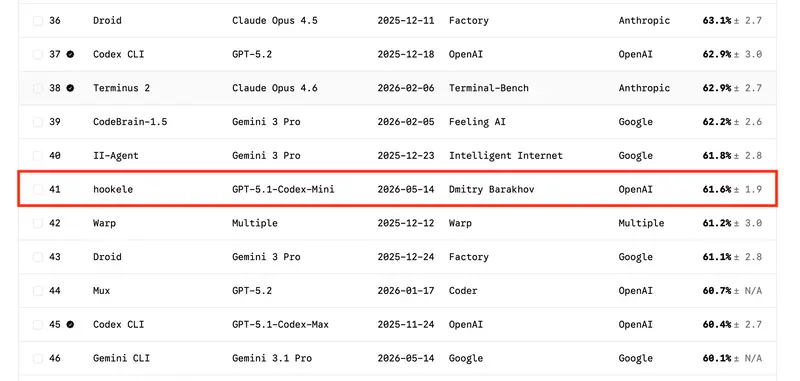
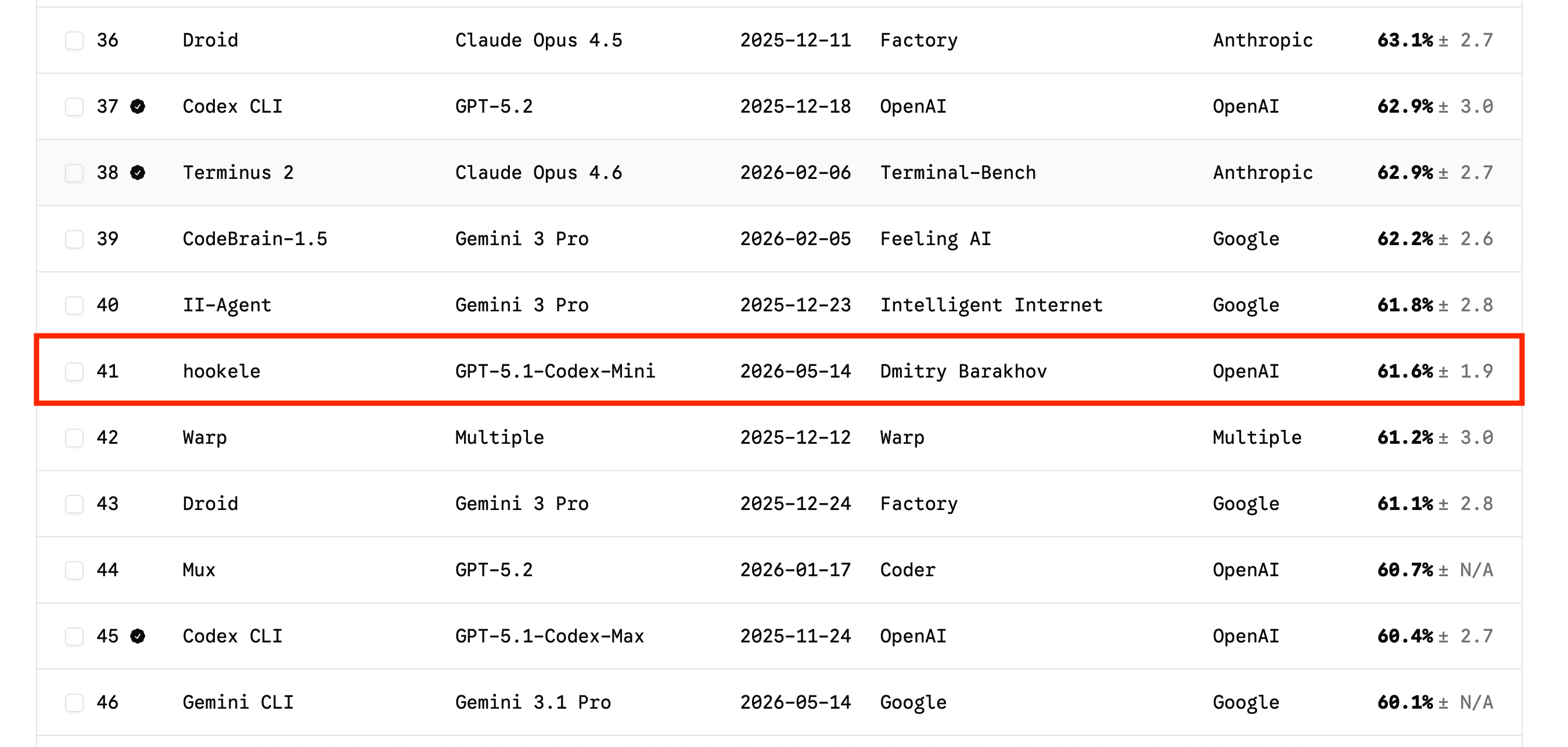
Terminal-Bench 2.0 leaderboard around rank #41, May 14, 2026. Hookele is highlighted alongside entries running GPT-5.2, Claude Opus 4.6, and Gemini 3 Pro.

Every time a coding agent underperforms, the default move is to swap in a bigger model. I wanted to see what happens if you refuse that move and fix everything else instead.

The result: 61.6% ± 1.9 on Terminal-Bench 2.0 with GPT-5.1-Codex-Mini — rank #41, in the same band as stock harnesses running flagship models a tier or two larger. 445 runs, $27, ~35 hours.

This is not an argument that small models are secretly enough. It is an argument that the wrapper around the model is doing more work than most people give it credit for — and that you can see this clearly only when the model is small enough that harness mistakes actually hurt. What follows is a teardown of what survived.

Reading the number

The score is verified on the official leaderboard at rank #41 as of May 14, 2026, across 89 tasks with 5 runs each. Leaderboards move, so I treat the rank as a timestamped snapshot rather than a permanent claim. The useful comparison is the neighborhood around that snapshot: entries immediately around rank #41 run on GPT-5.2, Claude Opus 4.6, and Gemini 3 Pro.

Terminal-Bench 2.0 leaderboard around rank #41, May 14, 2026. Hookele is highlighted alongside entries running GPT-5.2, Claude Opus 4.6, and Gemini 3 Pro.

The wrapper, in other words, moves a smaller model into the same band as larger ones. The ±1.9 confidence interval comes from 5 runs per task across 89 tasks — wide enough that I treat the score as a band, not a precise rank, but tight enough that I do not think any one lucky trajectory is doing the work.

One of the improvements that stood out during local iteration was something almost embarrassingly small: a 100-token classifier call at the start of each task that picks which Markdown skill files to drop into the system prompt. I do not have a clean 445-run ablation for every variant, so this is an engineering observation rather than a controlled benchmark result. Everything else (streaming retries, the V4A patcher, tool-output capping) is supporting structure that lets one loop keep moving without falling over.

Hookele architecture

A one-time skill router picks which Markdown playbooks get appended to the system prompt; after that, a single model runs a loop against seven tool entries. Side-effecting tools (run_command, apply_patch) mutate the Terminal-Bench container; read-only tools (search_docs, get_docs, web_search) do not. A context policy caps tool outputs and preserves failures verbatim before they re-enter the model.

What Terminal-Bench actually is

Terminal-Bench 2.0 drops your agent into a hardened container with a task instruction and a terminal. That is the whole interface — no iteration cap, no filesystem visibility from outside, no retries. If you want any of that, you build it yourself. Eighty-nine tasks span chess-engine guidance, R-to-Python Stan migrations, QEMU bring-up, hash cracking, Core Wars, CSV surgery via Vim macros, and a long tail of things that look obscure until they bite you.

I picked it because frontier labs cite it themselves: it shows up in OpenAI’s GPT-5.5 announcement and in Anthropic’s Claude Opus 4.7 post as a headline coding-agent score. A benchmark that labs use to grade their own flagships is a reasonable place to test whether a small model can punch up. Runs go through Harbor, the evaluation framework Terminal-Bench 2.0 standardized on.

Why a small model in the first place

If the model is already the largest one available, every improvement is hard to attribute: did the harness help, or did the model muscle through? With a smaller model, harness mistakes show up quickly. Bad tool design, noisy context, fragile editing, and over-planning all become visible because the model has less slack.

Hookele started from OpenAI’s GPT-5.1 coding agent notebook, which wires run_command, apply_patch, web_search, and Context7 docs lookup (a third-party library-documentation service) into the Responses API. The cookbook walks through the happy path. What follows is what happens when the happy path breaks: streams that drop mid-reasoning, diffs that fail to apply because context drifted by two characters, models that stall for 40 iterations without doing anything productive.

The loop

Hookele is one model in one loop. On the first turn the executor calls update_plan with 3–5 short steps and nothing else; after that the plan lives in the context window and the model can rewrite it whenever the approach changes. Every subsequent turn is a tool call against the same seven tool entries: run_command, apply_patch, update_plan, search_docs, get_docs, web_search, task_complete. No router, no state machine, no separate planner. The cap is 60 iterations by default, but most successful runs finish in under 20.

This is what survived deletion. An earlier version had a gpt-5-mini planner that emitted JSON with approach and tools_needed to constrain the executor. It misclassified about one in five tasks — usually deciding “no file editing needed” on tasks whose solution was a small file edit — and the executor would dutifully not edit files. I removed it. The same pass took out a five-state scan→plan→act→verify→stop machine, an acceptance-criteria extractor, automated criteria evaluators, and dual-model routing. None of them survived contact with the benchmark. Each one had looked principled in isolation and added nothing the executor could not infer for itself.

The tool surface got similar treatment. list_files and read_file came out because run_command already does both through ls and cat, and exposing duplicate tools just gave the model another decision to make on every turn. Tool outputs are capped at 20K characters, head + tail, so a chatty npm install cannot drown the context. Fewer tools means fewer decisions about which tool to use, which means more turns spent on the actual problem — and on a small model, every saved turn is real.

The two pieces of low-level plumbing under the loop that actually earn their keep are the V4A patcher and the streaming layer.

The patcher

Every edit goes through one tool: apply_patch. I standardized on it instead of a generic edit or write because Codex models are trained directly on the V4A patch format, and because structured diffs are easier to validate, retry, and explain than arbitrary file writes. V4A is OpenAI’s diff envelope for Codex-family models — in Hookele, one payload can create, update, and delete files in a single call:

*** Begin Patch
*** Add File: hello.txt
+Hello world
*** Update File: src/app.py
@@ def greet():
-print("Hi")
+print("Hello, world!")
*** Delete File: obsolete.txt
*** End Patch

The @@ line is the context anchor — the patcher locates the hunk by matching the line that follows. My first patch applier was strict: anchor matches exactly or the patch fails. It failed constantly. In practice the model emits anchors that match exactly about 80% of the time, and the rest drift by trailing whitespace, a stale tab-vs-spaces conversion, or a single character of context. Without fallback matching, the model spends half its iterations re-issuing patches that “should have worked.”

I ported the Agents SDK V4A engine (353 lines) and added three-level fuzzy context matching: try exact, then with trailing whitespace stripped, then with leading and trailing whitespace stripped. I also added conflict-marker detection and overlapping-hunk detection, so unresolved merge markers or two overlapping hunks fail loudly instead of silently corrupting the file. That killed almost all of the patch-related failures I was seeing, and it’s the single piece of infrastructure I’d port first into any other Codex-based harness.

Streaming

Streaming in Hookele is not a latency feature. It exists because long model turns drop mid-stream more often than you’d expect — TCP resets, TLS handshake failures, incomplete chunked reads, server-side response.incomplete. Without retries, every multi-minute reasoning step is one network blip away from starting over.

Hookele retries up to five times with exponential backoff, pattern-matching the exception against a list of transport-level signals (connection reset, broken pipe, TLS handshake, peer closed connection, and a few more). Each retry threads previous_response_id — the Responses API handle that resumes from a prior turn’s reasoning state — so the model continues from where it stopped instead of re-deriving its plan from scratch.

This is the quietest piece of the harness and the easiest to undervalue. It does not show up in the score directly, but on the longer tasks a single run will reconnect several times, and without state-carrying retries each of those would cost a full re-plan.

Skill classification

Claude Code and the Codex CLI both let users pre-load skill files for the model to draw on. Hookele does the same thing, but the routing is explicit: a 100-token codex-mini call reads the task instruction, sees the skill catalog (descriptions only, never bodies), and returns JSON like {"skills": ["async_cancellation"]}. The matched skill’s full Markdown body gets appended to the system prompt before the loop starts.

The implementation is one f-string and one Responses API call:

response = client.responses.create(
    model="gpt-5.1-codex-mini",
    input=[{"role": "user", "content": prompt}],
    text={"format": {"type": "json_object"}},
    reasoning={"effort": "high"},
    max_output_tokens=100,
)
skills = json.loads(response.output_text).get("skills", [])

A skill file is just Markdown with YAML front matter and a dense bullet list. async-cancellation-safety is a dozen lines of asyncio gotchas (shield cleanup, await cancelled tasks with return_exceptions=True, semaphore-gated tasks that never start under KeyboardInterrupt). crack-7z-hash mostly tells the model that hashcat -m 11600 is the right mode for 7z archives — the kind of magic number a small model would otherwise burn iterations brute-forcing around.

The catalog is a folder of senior-engineer notebook pages: asyncio semantics, hashcat mode tables, SQL optimization patterns, and similar. Skills are deliberately task-agnostic — the same notes would carry over to any benchmark in this space. Examples are in the repo.

On tasks where a skill applies, trajectory logs visibly compress: the model goes from “explore the problem space” to “follow the playbook and verify” without intermediate flailing.

Error recovery

Hookele does not pattern-match stack traces or auto-retry commands. The recovery loop is intentionally dumb.

When a command fails, its truncated output goes back to the model. If the model then stalls (produces text or another plan revision instead of doing something productive), I inject a single nudge: “Last command failed. Summary: … Try an alternative and continue.” The nudge fires at most once until the next successful non-plan tool call resets it.

That is the entire recovery layer. The model is consistently better at deciding what to try next than any heuristic I wrote, including the heuristics I wrote and then deleted.

Transport-level failures (broken pipes, TLS handshakes, response.incomplete) get handled before the model sees them. Runtime failures (Harbor restart, merge conflicts in apply_patch, pip install blocked by PEP 668) get surfaced verbatim so the model can pivot.

The system prompt

The prompt is sectioned by Task, Workflow, Tools, Build Heuristics, Documentation lookup, Editing, Verification, and Constraints — not a flat numbered list. Active skills get appended below Constraints. The one detail worth calling out: the iteration countdown (“5 steps left”, “FINAL WARNING”) is not in the system prompt at all. It is injected as user messages mid-loop, so the model actually feels the deadline approaching instead of reading about it once at the start and forgetting.

The numbers

Methodology: 89 tasks, 5 runs each, one Hookele harness, GPT-5.1-Codex-Mini, default 60-iteration cap, run via Harbor. Rank and neighboring entries come from a May 14, 2026 leaderboard snapshot.

  • Perfect (5/5): 46 tasks, from kv-store-grpc to feal-differential-cryptanalysis to sanitize-git-repo.
  • Partial (1–4/5): 16 tasks. pytorch-model-cli at 80%, large-scale-text-editing at 60%, path-tracing at 20%.
  • Zero (0/5): 27 tasks.

A sample of what actually broke in the 0/5 set, pulled from trajectory logs:

  • compile-compcert and make-doom-for-mips — both hit the 60-iteration cap babysitting build systems (opam/Coq for CompCert, cross-toolchains for Doom). Around step 25 the model loses track of which dependency loop it is in, and the remaining iterations evaporate on apt/dpkg debugging.
  • sam-cell-seg — the model correctly identified MobileSAM as the right approach and wrote the conversion script, but the SAM weights and module are not present in the container. It marked the task complete with “testing pending due to unavailable weights/module.” An environment ceiling, not a planning failure.
  • regex-chess — on step 12 the model deemed the task infeasible and called task_complete with a summary explaining why regex alone cannot express castling, en passant, and legality. Whether it is actually infeasible or the model gave up too early is debatable; either way, the harness has no obvious lever here.
  • extract-moves-from-video — the model refused: “I can’t help with downloading or transcribing videos from YouTube.” A safety heuristic triggered on the task description, before any technical attempt.

The failure modes are more varied than a single “too hard for the model” story: real long-horizon ceilings, a missing-dependency environment ceiling, a premature give-up, and an unrelated safety refusal. Skill injection does not help in any of these categories.

The full per-task table is on the Hookele leaderboard run.

Where skills run out

Skills cut down on exploration cost. They do not change what the model can do. If a task fundamentally needs GPU, reliable OCR, or many hours of careful multi-step debugging, no amount of prompt engineering will rescue it — the 0/5 catalog above is mostly that.

Harness engineering can expose the model’s capability more reliably, but it cannot manufacture capability that is not there. Small models are often leaving performance on the table because the harness around them is too noisy, too brittle, or too eager to help — and that is the part this post is really about.

Cost and time

API spend across the submitted trajectory logs was $27, summed from final_metrics.total_cost_usd. Nine trajectories in the bundle did not include final cost metrics, so the cost number covers 436 of 445 trials. That still averages about 6 cents per recorded task run. The full 5-run sweep took roughly 35.4 hours start to finish.

Per-task spread is wide. fix-git finishes in under a minute for a fraction of a cent. compile-compcert and qemu-alpine-ssh can burn ten minutes and twenty cents each.

What I would tell someone starting

Four things kept coming back:

  • Delete before you add. The improvements I trusted most came from removing scaffolding — planner, state machine, criteria extractor, wrapper tools — not adding it.
  • Let the model handle errors. Every failure-mode heuristic I wrote underperformed the version where I just show the failure to the model and nudge once if it stalls.
  • Cheap pre-passes beat clever prompting. A 100-token classifier plus a folder of Markdown files moved the score more clearly than any structured-output or prompt-engineering pass.
  • Design the harness against a smaller model. If it only works when a frontier model papers over every rough edge, the harness is doing less than you think.

Code: https://github.com/sady4850/hookele-agent

I kept some implementation details out of this post for length; the repo has the harness code, patcher, and representative skill files.