Automated Windows App Deployment to Microsoft Store

Automated Windows App Deployment to Microsoft Store

How to achieve end-to-end automation from version parsing to Store release, saying goodbye to tedious manual operations.

Background

If you have an Electron application you want to list on the Microsoft Store, you’ll likely run into this problem: the Store doesn’t support separate installation processes—you have to package the desktop application and server payload together into a complete AppX/MSIX package.

That would be manageable enough. But the problem continues. Each time you release a new version, you need to:

  1. Check if desktop and server versions have been updated
  2. Check out code from the corresponding tags
  3. Download and inject the server payload
  4. Build the MSIX package
  5. Manually upload to the Microsoft Store
  6. Configure store information and pricing

If every step requires manual operation, that’s too much hassle. And it’s error-prone—you might not even remember which steps you’ve completed and which you haven’t.

Actually, this isn’t really anyone’s fault—manual operations are naturally prone to omissions. It’s just that we really didn’t want to go through this hassle every time, so we decided to solve this problem once and for all—by automating the entire process.

About HagiCode

The solution shared in this article comes from our practical experience in the HagiCode project. As an AI code assistant, HagiCode provides both desktop and web clients and needs to support multiple distribution channels. In implementing automated Windows Store deployment, we’ve developed a complete automation solution.

Speaking of which, this was probably an unexpected bonus. What started as a simple time-saver ended up becoming this comprehensive solution.

Technical Architecture Analysis

This problem actually involves coordinating multiple technical layers. We can break it down into five layers:

Version Coordination Layer

First, we need to know when a new version needs to be released. We need to parse the latest versions of desktop and server components from an Azure index (a blob storage we use to store build artifacts), then determine whether a new Store package needs to be generated.

It’s like asking yourself: Is it time to do this now?

Workspace Management Layer

AppX builds depend on source code-level configuration and runtime layout, so we can’t simply repackage existing build artifacts. We need to check out code from a specific tag in the desktop repository to ensure the correct source code state is used for the build.

After all, if the source code is wrong, everything else is wasted effort.

Runtime Packaging Layer

This is the core part. We need to inject the server payload into the desktop application’s packaging layout. This way, when the application starts, it will detect the packaged runtime and enter Steam mode (offline mode).

If this step isn’t done well, all previous efforts are wasted.

Build Output Layer

Use electron-builder to generate an MSIX package that meets Store requirements. This step needs to run in a Windows environment because AppX builds require the Windows SDK.

Some things just need to be done in the right place—won’t work elsewhere.

Distribution Layer

Finally, publish to GitHub Releases and the Microsoft Store. GitHub Release serves as backup and version tracking, while the Microsoft Store is面向终端用户.

Everything is ready, just needs this final push.

Overall Architecture Design

┌─────────────────────────────────────────────────────────────┐
│                    package-release workflow                  │
├─────────────────────────────────────────────────────────────┤
│  ┌─────────────────┐    ┌─────────────────┐                │
│  │ resolve_plan    │───▶│   build         │                │
│  │ (Version parsing & skipping) │    │   (MSIX build)    │                │
│  └─────────────────┘    └────────┬────────┘                │
│         │                       │                          │
│         ▼                       ▼                          │
│  ┌─────────────────┐    ┌─────────────────┐                │
│  │ skip_summary    │    │   publish       │                │
│  │ (Skip report)   │    │   (Publish)     │                │
│  └─────────────────┘    └────────┬────────┘                │
│                                 │                          │
│                                 ▼                          │
│                        ┌─────────────────┐                 │
│                        │ publish_store   │                 │
│                        │ (Store publish) │                 │
│                        └─────────────────┘                 │
└─────────────────────────────────────────────────────────────┘

The entire process is driven by GitHub Actions and can be triggered on a schedule (every 4 hours) or manually. When manually triggered, you can specify specific desktop and server versions, or force a rebuild.

Actually, once every four hours isn’t that frequent—code updates vary in speed, but this approach is safer.

Implementation Details

1. Build Plan Resolution

The first step is to determine whether a new version needs to be built. We need to parse the current versions of desktop and server components, then check whether a corresponding release already exists.

// scripts/resolve-dispatch-build-plan.mjs
export async function resolveDispatchBuildPlan({
  eventName,
  eventPayload,
  desktopAzureSasUrl,
  serverAzureSasUrl,
}) {
  // Parse trigger inputs
  const trigger = normalizeTriggerInputs({ eventName, eventPayload });

  // Parse desktop and server versions from Azure index
  const [desktopRelease, serverRelease] = await Promise.all([
    resolveIndexRelease({ 
      azureSasUrl: desktopAzureSasUrl,
      platformId: 'win-x64' 
    }),
    resolveIndexRelease({ 
      azureSasUrl: serverAzureSasUrl,
      platformId: 'win-x64' 
    })
  ]);

  // Generate release tag
  const desktopTag = normalizeGitTag(desktopRelease.version);
  const releaseTag = deriveStoreReleaseTag(desktopRelease.version, serverRelease.version);
  // For example: desktop-v1.2.3-server-v4.5.6

  // Check if already exists (avoid duplicate builds)
  const existingRelease = await findReleaseByTag(packerRepository, releaseTag);
  const shouldBuild = !existingRelease || trigger.forceRebuild;

  return {
    release: { tag: releaseTag, exists: Boolean(existingRelease) },
    build: { shouldBuild, skipReason },
    upstream: { desktop: { tag: desktopTag }, server }
  };
}

The key in this step is the skip logic—if the same version combination has already been built, there’s no need to run the entire build process again. This saves CI costs and time.

Doing the same thing repeatedly probably doesn’t make much sense. After all, time and resources are limited.

2. Workspace Preparation

Once you’ve decided to build, you need to prepare a clean build environment. We use git worktree to check out code from a specific tag.

// scripts/prepare-packaging-workspace.mjs
export async function preparePackagingWorkspace({
  planPath,
  platformId,
  workspacePath,
  desktopSourcePath
}) {
  // Use git worktree to check out desktop code from specific tag
  await runCommand('git', [
    '-C', resolvedDesktopSourcePath,
    'worktree', 'add', '--detach',
    desktopWorkspace,
    `refs/tags/${plan.upstream.desktop.tag}`
  ]);

  // Validate workspace
  const validation = await validateDesktopWorkspace({
    desktopWorkspace,
    storePackageConfig
  });

  // Create workspace manifest
  const workspaceManifest = {
    desktopWorkspace,
    runtimeInjectionRoot: validation.runtimeRoot,
    desktopTag: plan.upstream.desktop.tag,
    desktopRef,
  };

  return workspaceManifest;
}

The advantage of using worktree is that it doesn’t affect the main working directory, builds can run in parallel, and it’s easy to clean up after the build completes.

After all, no one wants their main working directory messed up because of a build.

3. Server Payload Injection

This step downloads and injects the server payload into the correct location.

// scripts/stage-server-payload.mjs
export async function stageServerPayload({
  planPath,
  workspacePath,
  platformId,
  azureSasUrl
}) {
  // Download server payload from Azure index
  const assetSource = resolveAssetDownloadUrl({ asset, sasUrl: azureSasUrl });
  await downloadFromSource({ 
    sourceUrl: assetSource, 
    destinationPath: downloadPath 
  });

  // Extract and validate
  await extractArchive(downloadPath, extractionPath);
  const runtimeRoot = await resolveRuntimeRoot(extractionPath);
  const validation = await validateServerPayloadRoot(runtimeRoot, platformId);

  // Inject into packaging runtime layout
  // Target path is resources/portable-fixed/current
  // This path will be mapped to extra/portable-fixed/current in AppX
  await copyDir(runtimeRoot, targetPath);
}

The key is the path mapping—resources/portable-fixed/current gets packaged to extra/portable-fixed/current in the AppX, so the application detects the local runtime at startup and enters offline mode.

Paths are unforgiving—one wrong character and it won’t be found.

4. MSIX Build

With the prepared workspace and server payload, you can build the MSIX package.

// scripts/build-appx.mjs
export async function buildAppx({
  planPath,
  workspacePath,
  platformId
}) {
  // Generate Store-specific electron-builder config overlay
  const overlayConfig = await writeStoreElectronBuilderConfig({
    desktopWorkspace: workspaceManifest.desktopWorkspace,
    sourceConfigPath: storePackageConfig.desktop.electronBuilderConfigPath,
    outputConfigPath: 'electron-builder.store.yml'
  });

  // Run desktop build command
  await runShellCommand(
    buildDesktopStoreCommand(overlayConfig.outputPath, desktopScripts),
    workspaceManifest.desktopWorkspace
  );

  // Collect MSIX output
  const storeOutputs = await findStoreOutputs(pkgDirectory);
  const artifactPath = path.join(
    workspaceManifest.outputDirectory, 
    artifactFileName
  );
  await copySingleFile(primaryOutput, artifactPath);
}

The electron-builder configuration needs to include Store-specific metadata like package identity, publisher display name, etc. This information will be used during Store submission.

If the configuration is wrong, the package won’t build. Nothing more to say about that.

5. Publishing to GitHub

After the build completes, you need to publish the artifacts to GitHub Releases.

// scripts/publish-release.mjs
export async function publishRelease({
  planPath,
  artifactsDir,
  outputDir,
  forceDryRun
}) {
  // Build publication artifact manifest
  const publicationArtifacts = await buildPublicationArtifacts({
    plan,
    artifactsDir,
    outputDir
  });

  if (!dryRun) {
    // Create or update GitHub Release
    const releaseResult = await upsertReleaseNotes(
      plan.release.repository,
      plan.release.tag,
      token,
      { name, body }
    );

    // Upload assets
    for (const upload of publicationArtifacts.uploads) {
      await uploadReleaseAsset({
        release: releaseResult.release,
        filePath: upload.filePath,
        fileName: upload.fileName
      });
    }
  }
}

GitHub Release serves as version tracking and backup—even if the Store publication fails, the build artifacts are preserved.

It’s always good to have a backup plan. What if you need to roll back someday?

6. Publishing to Microsoft Store

The final step is publishing to the Store using the Microsoft Store CLI.

# .github/workflows/package-release.yml
publish_store:
  runs-on: windows-latest
  steps:
    - name: Configure Microsoft Store CLI
      uses: microsoft/[email protected]

    - name: Publish MSIX packages to Store
      shell: pwsh
      run: |
        msstore reconfigure --tenantId $env:AZURE_AD_TENANT_ID ...
        msstore publish "$($package.FullName)" -id $env:MICROSOFT_STORE_PRODUCT_ID

This step needs to run on a Windows runner because the Microsoft Store CLI requires a Windows environment.

Some things just need to be done in the right place—won’t work in a different environment.

Practical Guide

Configuration Files

The Store package configuration file defines package identity and build settings:

{
  "packageIdentity": {
    "displayName": "Hagicode",
    "publisherDisplayName": "newbe36524",
    "publisher": "CN=8B6C8A94-AAE5-4C8B-9202-A29EA42B042F",
    "identityName": "newbe36524.Hagicode",
    "backgroundColor": "transparent",
    "languages": ["en-US", "zh-CN", "zh-Hant"]
  },
  "supportedWindowsTargets": ["win-x64"],
  "desktop": {
    "submodulePath": "inputs/hagicode-desktop",
    "electronBuilderConfigPath": "electron-builder.yml",
    "buildScript": "build:appx",
    "runtimeInjectionPath": "resources/portable-fixed/current"
  }
}

Configuration is painful to change, so it’s best to get it right the first time.

Workflow Triggers

Can be triggered on schedule or manually:

on:
  schedule:
    - cron: '0 */4 * * *'  # Run every 4 hours
  workflow_dispatch:
    inputs:
      desktop_version:
        description: 'Desktop version selector'
        required: false
      server_version:
        description: 'Server version selector'
        required: false
      force_rebuild:
        description: 'Force rebuild even if exists'
        type: boolean
      dry_run:
        description: 'Build only, do not publish'
        type: boolean

Automatic or manual, as long as it runs in the end.

Key Considerations

  1. Git Tag Requirements: The desktop repository must contain tags corresponding to release versions (e.g., v1.2.3), otherwise the build will fail

  2. Azure SAS URL: Need to configure DESKTOP_AZURE_SAS_URL and SERVER_AZURE_SAS_URL environment variables to access the index

  3. Microsoft Store Credentials: Need to configure the following secrets:

    • AZURE_AD_APPLICATION_CLIENT_ID
    • AZURE_AD_APPLICATION_SECRET
    • AZURE_AD_TENANT_ID
    • SELLER_ID
    • MICROSOFT_STORE_PRODUCT_ID
  4. Runtime Validation: Server payload must contain required runtime files, otherwise packaging will fail

  5. Windows Runner: AppX builds and Store publishing need to run on Windows runners

  6. Duplicate Detection: Scheduled runs check for existing release tags to avoid unnecessary builds

We’ve probably stepped on all these pits, so writing them down as a reminder. After all, who wants to make the same mistakes twice?

Summary

Windows Store automated deployment looks complex, but when broken down into independent steps, each step isn’t difficult. The key is:

  • Use git worktree to manage build environments
  • Inject server payload into the correct path
  • Use electron-builder to generate MSIX packages
  • Use Store CLI for final publishing

This solution has been running stably in the HagiCode project for several months, basically achieving the goal of “full automation”—except for initial credential and setup configuration, subsequent version releases require no manual intervention.

Actually, many things are like this—they look difficult but are straightforward to do. It just takes some patience and experimentation.

If you’re working on similar automation, I hope this article provides some reference. Of course, every project is different and may need adjustments based on specific requirements.

After all, all roads lead to Rome—some roads are just easier to travel than others…

References

Original Article & License

Thanks for reading. If this article helped, consider liking, bookmarking, or sharing it.
This article was created with AI assistance and reviewed by the author before publication.

Flux OCIRepository: the GitOps that stopped using Git

Originally published on Podo Stack

Ask ten platform engineers what GitOps means and at least eight will say “the cluster pulls manifests from Git.” That’s the part everyone remembers, and it’s the part Flux is quietly walking away from. The new default isn’t Git. It’s an OCI registry, the same one your container images already live in.

This issue is about what happens when you stop polling Git and start polling a registry, why Flux added that capability, and what it tells you about what GitOps was always actually about.

Architectural Pattern: when the registry becomes the source of truth

The original GitOps loop looked like one arrow. Git on one end, cluster on the other, a controller in the middle that did git clone, ran kustomize build or helm template, then kubectl apply. Whatever was in main was what ran. Reconcile every minute. Done.

A monorepo with two hundred apps is not a thin arrow. The controller does a shallow clone, sure, but it’s still pulling commit history, branch metadata, and the entire tree just to read one path. SOPS-encrypted secrets need decryption inside the cluster. Helm rendering needs the chart cache. The “cluster pulls from Git” sentence hides a lot of work happening inside the cluster, on every reconcile, for every tenant.

The other thing that arrow hides is authentication. Git over SSH means an SSH key sitting in a Secret inside the cluster, with whatever blast radius that key has. Git over HTTPS means a token doing the same. Both are long-lived credentials. Neither integrates with the cloud IAM that already governs every other thing the cluster touches. You end up with a parallel auth domain just for Source Controller, which then needs its own rotation policy, its own incident response when it leaks, its own grumpy security review.

The Gitless GitOps move is to take that work out of the cluster. CI does the rendering. CI does the decryption. CI runs conftest, kyverno test, kubeconform, whatever your policy stack is. The output – a frozen tarball of plain manifests – gets pushed to an OCI registry as an artifact, tagged with the commit SHA. The cluster never sees Git. It pulls one tarball, content-addressed by digest, and applies it.

What “immutable” actually buys you

Git is mutable. You can force-push. You can rewrite history. You can delete a branch. Most teams have policies against it, but the storage layer itself doesn’t care. A tag in Git is a movable label.

An OCI artifact pinned by digest is the opposite. sha256:abc123... resolves to exactly one byte sequence forever, or it resolves to nothing. The registry can refuse new pushes to an immutable tag, the way ECR and Harbor both can. There’s no “force push” verb in the OCI spec.

When your Kustomization references an OCIRepository by digest, you get something Git can’t give you cheaply: the exact bytes that ran in staging are the exact bytes that run in prod. Hydration drift, the thing that bites every team with a complex Helm setup, stops being possible because hydration happened once, in CI, and got frozen.

Content-addressed delivery, the same way images work

You don’t git clone your application into the kubelet. You build a binary, layer it into an image, push the image to a registry, and the kubelet pulls a content-addressed blob. The image digest is the contract. The registry handles authentication, replication, caching, signing, scanning. None of that lives in Git.

OCI artifacts extend the same pipe to non-image payloads. The spec carved out mediaType for arbitrary content. Helm charts have been shipping as OCI artifacts for years. Flux’s OCIRepository source is the same idea for plain manifests. The bytes are different, the wrapper and the delivery mechanism are identical to what you already trust for application images.

  • Git stops being a delivery channel. It goes back to being a code review system, which is what it was good at.
  • The registry becomes the configuration plane, sitting next to the image plane, sharing auth and replication and signing.
  • The cluster does one thing: pull a tarball by digest, unpack, apply. No template engines, no decryption, no policy evaluation. The complicated work is upstream.

Where Bucket fits

OCIRepository covers the case where you’ve got a real registry. Some teams don’t, or don’t want to. Bucket is the same idea with S3 or GCS or any S3-compatible store underneath. Source Controller polls the bucket, packs whatever’s there into a tarball, exposes it over HTTP to the rest of Flux. The semantics match: pull a frozen blob, apply it.

Bucket shines for things that have no business being in Git. ML model files of two gigabytes each, the kind nobody wants in their commit history. Database dumps for ephemeral environment seeding live well here too. Big static assets, init-container payloads, similar story. Object storage is the right primitive for any of these, and Source Controller treats it as a first-class source.

Three docs cover the rest of what’s worth knowing on the architectural side.

RFC/KEP Read: OCIRepository, Bucket, and the hydration pipeline

The Flux pieces that make this work split across two controllers. Source Controller is the one that turns external storage into in-cluster Artifacts. Kustomize Controller (or Helm Controller, depending on what you’re rendering) reads those Artifacts and applies them.

The OCIRepository CRD

A minimal OCIRepository looks like this:

apiVersion: source.toolkit.fluxcd.io/v1
kind: OCIRepository
metadata:
  name: app-manifests
  namespace: flux-system
spec:
  interval: 5m
  url: oci://ghcr.io/podostack/app-manifests
  ref:
    tag: v1.4.0
  provider: generic

The interesting fields:

  • url: registry path, no tag. Tag and digest go under ref.
  • ref.tag / ref.semver / ref.digest: three ways to pin the version. Tag is the loosest, semver lets you say ">=1.4.0 <2.0.0", digest is the strongest contract.
  • provider: generic, aws, azure, or gcp. The non-generic providers wire in cloud IAM, so the controller’s ServiceAccount carries IRSA or Workload Identity instead of a static credential.

Pinning to a digest is what gets you the immutable guarantee. Pinning to a tag is convenient but the tag can move – unless the registry enforces immutability, which most do for production paths.

The reconcile loop is straightforward. Source Controller hits the registry every interval, compares the resolved digest against what it has, pulls and extracts on change, and exposes the result at an HTTP endpoint for other Flux controllers.

Verification with cosign

The spec.verify block is where this pattern stops being just “git over a different transport” and starts being something Git can’t match cheaply:

spec:
  verify:
    provider: cosign
    matchOIDCIdentity:
      - issuer: "^https://token.actions.githubusercontent.com$"
        subject: "^https://github.com/podostack/app/.+$"

This says: refuse to use this artifact unless cosign verifies it was signed in a GitHub Actions run on a workflow inside the podostack/app repo. Keyless signing through Fulcio means there’s no key to rotate, no key to leak, no key sitting in a secret somewhere. The signature ties the artifact back to the CI workflow that produced it through OIDC.

If you’ve read Issue #016 on Kyverno, this is the supply-chain end of the same picture. Kyverno verifies image signatures at admission. Flux verifies manifest signatures at source. Both lean on Sigstore, both reject unsigned blobs by default once the verify block is in place. The cluster ends up with a clean property: nothing applied to it exists without a chain of custody back to a CI run.

The Bucket CRD

apiVersion: source.toolkit.fluxcd.io/v1
kind: Bucket
metadata:
  name: ml-models
  namespace: flux-system
spec:
  interval: 10m
  provider: generic
  bucketName: prod-ml-models
  endpoint: s3.eu-central-1.amazonaws.com
  region: eu-central-1
  ignore: |
    !*.onnx
    !*.pt
    logs/
    tmp/

The trap people fall into is leaving ignore empty. Source Controller will then try to pack the entire bucket into a tarball in memory, and if the bucket is half a terabyte of training data, it does not end well. The ignore field uses .gitignore syntax, and treating it as required is the right move.

The CI side: flux push artifact

flux push artifact oci://ghcr.io/podostack/app-manifests:v1.4.0 
  --path=./dist/manifests 
  --source="$(git config --get remote.origin.url)" 
  --revision="main@sha1:$(git rev-parse HEAD)"

The --source and --revision flags land in artifact annotations and the Flux UI uses them to show the producing commit. Git stops being the delivery channel but stays the audit trail.

What you do before flux push artifact is where the pattern earns its keep. The CI pipeline renders manifests with kustomize build overlays/prod (or helm template . -f values-prod.yaml, depending on which you live in). Encrypted secrets get sops --decrypt‘d, sealed back with kubeseal only if the cluster can’t decrypt at runtime. Then the policy gate – conftest test or kyverno test against the rendered output – catches RBAC and image-policy violations before anything ships. That gate is the step everyone underestimates the first time they wire this up. After policy passes, kubeconform does a schema check, then cosign sign signs the artifact with the CI workflow’s OIDC token. Schema first, signature second: a broken manifest shouldn’t get a signature it doesn’t deserve.

Every one of those steps used to happen, in some half-form, inside the cluster. Now it’s done once in CI, frozen into one tarball, and reconciliation becomes pure apply.

Wiring it to Kustomization

The Kustomization resource that consumes an OCIRepository only changes one field compared to the GitRepository version:

apiVersion: kustomize.toolkit.fluxcd.io/v1
kind: Kustomization
metadata:
  name: app
  namespace: flux-system
spec:
  interval: 10m
  path: "./deploy/prod"
  prune: true
  sourceRef:
    kind: OCIRepository
    name: app-manifests

sourceRef.kind: OCIRepository instead of GitRepository. That’s the whole migration. When I first did this, I expected drama in the Helm Controller – health checks, decryption providers, all of it. There was none. The rest of Flux doesn’t care which Source kind it consumes, and the downstream pipeline kept working unchanged.

What the cluster actually sees

End to end, three things end up on the cluster, and that’s the entire surface area:

  • One OCIRepository resource pointing at a registry.
  • One Kustomization resource pointing at that OCIRepository.
  • A 200KB tarball pulled from the registry every five minutes.

What’s not there is the more interesting list. There’s no .git directory hidden under /var/lib. No long-lived SSH key parked in a Secret. No template engine running on the reconcile path. The cluster does pull-and-apply against a content-addressed blob, the same shape of operation it already does for every container image.

Hot Take: GitOps was never about Git

The name is a marketing accident.

When Weaveworks coined “GitOps” in 2017, the point was the loop, not the storage. Git happened to be the durable thing everyone had. The loop is what mattered, and the loop works just as well with an OCI registry on the other end.

The standard objection runs something like: “Git gives me an audit log. Git gives me PR-based review. Git gives me branch protection. You’re throwing all of that away.”

Git is still the place where humans write YAML and review each other’s changes. Pull requests still gate merges. Branch protection still keeps main clean. CODEOWNERS still routes reviews. Signed commits still tie changes to identities. None of that goes anywhere. What changes is what happens after the merge.

Pre-OCI, the merge to main was the deploy. The controller polled the branch and applied whatever was there. The “audit log of what shipped” was the same as the “audit log of what got reviewed.” Convenient, and also kind of fragile: a force-push or a poorly-reviewed merge ships immediately.

Post-OCI, the merge to main triggers CI. CI renders, validates, signs, and pushes an artifact. The digest is what the cluster runs. “What was running on cluster X at 14:00 UTC” becomes a registry query. The signature on the artifact links back to the CI workflow run, which links back to the commit, which links back to the PR. The chain is longer but stronger, because every link is verifiable cryptographically.

The team most likely to benefit already runs a serious image-supply-chain stack: cosign on every image, replicated registry, air-gapped pulls, scanning on push. Adding manifests to that same pipe costs almost nothing. The team least likely to benefit runs a dozen apps with no monorepo, no air gap, no signing requirements – for them GitRepository is the right answer. The pattern earns its complexity when scale or supply-chain demands push back against Git’s limits, not before.

There’s a cultural shift hiding in this too. The team that owns the registry is usually the security or platform team; the team that owns Git is usually the application team. Moving the deploy boundary from Git to the registry shifts where the supply-chain controls live. Issue #004 covered the same dynamic from the Crossplane and Backstage angle – the platform layer wants its own contract with the cluster, separate from whatever application teams push.

GitOps was a name for a loop. The loop still runs. The plumbing got better.

What’s next

Issue #019 picks up the supply-chain thread with image-pull policy and registry mirroring in air-gapped clusters – the other half of “what does the cluster actually pull.” Issue #020 follows with the Image Preload Operator, which finishes the picture by warming the kubelet’s image cache so the artifacts you just signed and shipped don’t pay cold-start latency on first deploy.

The arrow into the cluster is getting interesting again.

  • Ilia

Bulkhead Pattern for Resilience

Don’t Let Your System Go Down in Flames: Embracing the Bulkhead Pattern for Rock-Solid Resilience

Imagine you’re at a fancy dinner party. Everything’s going great – the food is delicious, the company is engaging, and the wine is flowing. Suddenly, the waiter trips and sends a tray of drinks flying, drenching a few guests. Disaster, right? Well, maybe not entirely. If the restaurant had a clever seating arrangement where guests are divided into smaller, independent sections, the spilled drinks might only affect one table, leaving the rest of the party to continue enjoying their evening.

This, my friends, is the essence of the Bulkhead Pattern in the world of software architecture. It’s all about partitioning your system to prevent a single point of failure from taking down everything. Think of it as building watertight compartments on a ship. If one compartment springs a leak, the others remain dry, keeping the ship afloat. In our digital ocean, a “leak” could be a failing service, an overloaded database, or a runaway process.

So, buckle up, because we’re about to dive deep into the world of bulkheads, exploring why they’re your best friend when it comes to building resilient systems that can weather any storm.

The “Why” Behind the Bulkhead: Because Shit Happens (and We Need to Prepare)

Let’s be honest, building software is rarely a perfectly smooth sailing experience. Things break. Services go down. Networks get flaky. Sometimes, a bug in one tiny corner of your application can have a domino effect, bringing your entire system to its knees. This is where the bulkhead pattern swoops in, like a superhero with a really effective fire extinguisher.

The core idea is to isolate resources and operations into distinct groups (bulkheads). If one group experiences an issue – say, a surge of requests overwhelming a particular microservice – that issue is contained within that specific bulkhead. It doesn’t get to infect and cripple the other parts of your system. This means that even if a significant portion of your application is struggling, other critical functionalities can continue to operate, providing a degraded but still functional experience for your users.

What Do You Need Before You Start Building Your Digital Ship’s Compartments? (Prerequisites)

Before you start frantically partitioning your code, it’s helpful to have a few things in place. These aren’t strict requirements, but they make implementing the bulkhead pattern a whole lot smoother and more effective.

  • Understand Your System’s Dependencies: You need to know which parts of your system rely on which other parts. Think of it like mapping out your ship’s plumbing and electrical systems. Where are the critical junctions? What services are tightly coupled?
  • Identify Potential Failure Points: Where are the most likely places for things to go wrong? Is it a third-party API you integrate with? A database that’s prone to high load? A computationally intensive background process? Pinpointing these helps you decide where to build your bulkheads.
  • Microservices or Service-Oriented Architecture (SOA): While you can apply bulkhead concepts to monolithic applications, it’s significantly more natural and impactful in a distributed system like microservices or SOA. Each microservice can essentially become its own bulkhead.
  • Resource Management Awareness: You need to be mindful of how resources like threads, connections, and memory are allocated and consumed. Bulkheads often revolve around limiting these resources per functional area.
  • Observability is Key: You can’t fix what you can’t see. Having robust logging, monitoring, and tracing in place is crucial to understand when a bulkhead is under stress and why.

The Superpowers of the Bulkhead Pattern: Why You’ll Love It

So, what are the tangible benefits of adopting this pattern? Prepare to be impressed!

  • Improved Resilience and Availability: This is the headline act! By containing failures, the overall availability of your system dramatically increases. Users might experience a slight slowdown in one area, but the core functionalities remain accessible. No more complete outages from a single rogue process!
  • Enhanced Stability: When failures are isolated, they are less likely to cascade. This leads to a more stable and predictable system, reducing those heart-stopping moments when everything grinds to a halt.
  • Faster Recovery: Because failures are contained, it’s often easier and quicker to diagnose and fix the issue within a specific bulkhead. You’re not hunting through the entire system; you’re focused on a smaller, isolated area.
  • Predictable Performance: By limiting resources per bulkhead, you can prevent one noisy or demanding operation from starving others. This leads to more consistent performance across your application.
  • Easier Scaling: When you need to scale a particular part of your system, you can do so independently. You don’t need to worry as much about scaling the entire application if only one component is a bottleneck.

But Wait, There’s a Catch (The Disadvantages)

No pattern is perfect, and the bulkhead pattern is no exception. It’s important to be aware of the potential downsides:

  • Increased Complexity: Implementing and managing bulkheads adds another layer of complexity to your architecture. You need to carefully design and configure these partitions, which can require more development effort.
  • Potential for Underutilization of Resources: If your bulkheads are too rigidly defined and a particular resource within a bulkhead is consistently underutilized, that resource might not be available to other parts of the system that could benefit from it. This can lead to inefficient resource allocation.
  • Overhead in Communication: If you’re partitioning based on services, there might be increased network overhead for inter-service communication. However, this is often a trade-off for resilience.
  • Difficult to Retrofit: If you have a large, existing monolithic application, retrofitting bulkhead patterns can be a significant undertaking. It’s much easier to design for this from the ground up.
  • Tuning Can Be Tricky: Finding the right balance for resource limits within each bulkhead can require a lot of experimentation and tuning. Too strict, and you might limit legitimate operations; too loose, and you defeat the purpose of the bulkhead.

The Nitty-Gritty: Features and Implementation Techniques

So, how do we actually build these digital compartments? The bulkhead pattern manifests in several ways, often by strategically managing resources.

1. Thread Pool Bulkheads

This is a very common and effective way to implement the bulkhead pattern, especially in systems that handle concurrent requests. The idea is to dedicate specific thread pools to different types of operations or to different downstream dependencies.

The Problem: If you have a single, large thread pool for all your incoming requests, and one request triggers a long-running or slow operation (e.g., a call to a sluggish third-party API), it can tie up threads in that pool. This prevents other requests from being processed, even if they are quick and simple.

The Solution: Create separate thread pools for different types of operations or dependencies.

  • Example Scenario: Imagine an e-commerce application. You might have one thread pool for handling user profile requests, another for product catalog searches, and a third for processing orders (which might involve external payment gateways).

Code Snippet (Conceptual using Java and Spring Boot):

// Configuration for different thread pools
@Configuration
public class ThreadPoolConfig {

    @Bean(name = "profileThreadPool")
    public ThreadPoolTaskExecutor profileThreadPool() {
        ThreadPoolTaskExecutor executor = new ThreadPoolTaskExecutor();
        executor.setCorePoolSize(5); // Max 5 threads for profile operations
        executor.setMaxPoolSize(10);
        executor.setQueueCapacity(50);
        executor.setThreadNamePrefix("Profile-");
        return executor;
    }

    @Bean(name = "catalogThreadPool")
    public ThreadPoolTaskExecutor catalogThreadPool() {
        ThreadPoolTaskExecutor executor = new ThreadPoolTaskExecutor();
        executor.setCorePoolSize(10); // Max 10 threads for catalog operations
        executor.setMaxPoolSize(20);
        executor.setQueueCapacity(100);
        executor.setThreadNamePrefix("Catalog-");
        return executor;
    }

    @Bean(name = "orderThreadPool")
    public ThreadPoolTaskExecutor orderThreadPool() {
        ThreadPoolTaskExecutor executor = new ThreadPoolTaskExecutor();
        executor.setCorePoolSize(3); // Max 3 threads for order operations (more critical/potentially blocking)
        executor.setMaxPoolSize(5);
        executor.setQueueCapacity(30);
        executor.setThreadNamePrefix("Order-");
        return executor;
    }
}

// Service using specific thread pools
@Service
public class UserService {

    @Autowired
    @Qualifier("profileThreadPool")
    private ThreadPoolTaskExecutor profileThreadPool;

    public CompletableFuture<UserProfile> getUserProfileAsync(String userId) {
        return CompletableFuture.supplyAsync(() -> {
            // Simulate a potentially slow operation
            try {
                Thread.sleep(2000);
            } catch (InterruptedException e) {
                Thread.currentThread().interrupt();
            }
            return new UserProfile(userId, "John Doe");
        }, profileThreadPool); // Execute on the profile thread pool
    }
}

@Service
public class ProductService {

    @Autowired
    @Qualifier("catalogThreadPool")
    private ThreadPoolTaskExecutor catalogThreadPool;

    public CompletableFuture<Product> searchProductAsync(String query) {
        return CompletableFuture.supplyAsync(() -> {
            // Simulate product search
            return new Product("XYZ", "Awesome Gadget");
        }, catalogThreadPool); // Execute on the catalog thread pool
    }
}

In this example, if the getUserProfileAsync operation takes a long time, it will only consume threads from the profileThreadPool. The catalogThreadPool and orderThreadPool remain unaffected, allowing product searches and order processing to continue smoothly.

2. Resource Pooling Bulkheads (Connections, etc.)

Beyond threads, you can also partition other shared resources like database connections or client connections to external services.

The Problem: A single connection pool shared across all operations might get exhausted if one part of the system makes an unusually large number of connection requests.

The Solution: Maintain separate connection pools for different types of operations or different downstream services.

  • Example Scenario: An application that interacts with multiple databases. Instead of one massive connection pool, you’d have separate pools for each database. Or, an application that calls several different third-party APIs. Each API client could have its own dedicated pool of HTTP connections.

Code Snippet (Conceptual with HikariCP for Database Connections):

// Configuration for multiple data sources and connection pools
@Configuration
public class DataSourceConfig {

    @Bean(name = "primaryDataSource")
    @ConfigurationProperties(prefix = "spring.datasource.primary")
    public DataSource primaryDataSource() {
        return DataSourceBuilder.create().build();
    }

    @Bean(name = "secondaryDataSource")
    @ConfigurationProperties(prefix = "spring.datasource.secondary")
    public DataSource secondaryDataSource() {
        return DataSourceBuilder.create().build();
    }

    // You would typically configure HikariCP specific properties for each datasource
    // e.g., spring.datasource.primary.hikari.maximum-pool-size=10
    //       spring.datasource.secondary.hikari.maximum-pool-size=5
}

// Example of using different data sources in services
@Service
public class PrimaryDataService {

    @Autowired
    @Qualifier("primaryDataSource")
    private DataSource primaryDataSource;

    public void performOperation() {
        // Use primaryDataSource for operations
    }
}

@Service
public class SecondaryDataService {

    @Autowired
    @Qualifier("secondaryDataSource")
    private DataSource secondaryDataSource;

    public void performOperation() {
        // Use secondaryDataSource for operations
    }
}

Here, the primaryDataSource and secondaryDataSource would each have their own configured connection pools (managed by HikariCP in this case). A heavy load on the primary database won’t exhaust connections needed for the secondary database.

3. Service-Level Bulkheads (Microservices)

In a microservices architecture, each service can inherently act as a bulkhead for itself and its dependencies.

The Problem: A failure in one microservice can cascade and bring down dependent services.

The Solution: Isolate microservices. Implement circuit breakers and rate limiters at the boundaries of each microservice.

  • Example Scenario: A “User Service” and an “Order Service.” If the “User Service” becomes unresponsive, the “Order Service” should be able to gracefully degrade or inform the user of the issue without crashing itself. This is often achieved using libraries like Resilience4j or Hystrix.

Code Snippet (Conceptual with Resilience4j in Java):

// Using Resilience4j for a circuit breaker around a call to another service
@Service
public class OrderService {

    private final RestTemplate restTemplate;

    public OrderService(RestTemplate restTemplate) {
        this.restTemplate = restTemplate;
    }

    @CircuitBreaker(name = "userServiceCircuitBreaker", fallbackMethod = "getDefaultUserFallback")
    public User getUserFromUserService(String userId) {
        // This call might fail if the UserService is down or slow
        return restTemplate.getForObject("http://user-service/users/" + userId, User.class);
    }

    // Fallback method to provide a graceful response when the circuit breaker trips
    public User getDefaultUserFallback(String userId, Throwable t) {
        System.err.println("UserService is unavailable. Falling back for user: " + userId + " - " + t.getMessage());
        return new User(userId, "Guest User", "N/A"); // A default or cached user object
    }
}

In this example, getUserFromUserService is protected by a circuit breaker. If calls to the “user-service” start failing repeatedly, the circuit breaker will “trip,” preventing further calls and immediately executing the getDefaultUserFallback method. This protects the “Order Service” from being blocked by a failing “User Service.”

4. Timeouts and Retries

While not strictly bulkheads themselves, well-configured timeouts and retry strategies are essential companions. They help enforce the boundaries of your bulkheads by preventing operations from hanging indefinitely.

  • Timeouts: Set strict limits on how long an operation is allowed to run. If it exceeds the timeout, it’s considered a failure.
  • Retries: After a failure, a retry strategy can attempt the operation again. However, uncontrolled retries can overwhelm a struggling service. This is where bulkheads come into play – retries should ideally happen within the context of a bulkhead to prevent them from causing further damage.

When to Use the Bulkhead Pattern

The bulkhead pattern is a powerful tool, but it’s not a silver bullet for every situation. Here are some prime candidates for its application:

  • Applications with Third-Party Integrations: If your system relies on external services that are prone to instability or latency.
  • High-Traffic Systems: To prevent a sudden surge in traffic from overwhelming a specific component.
  • Systems with Diverse Operation Types: When you have operations with vastly different performance characteristics (e.g., CPU-bound vs. I/O-bound).
  • Microservices Architectures: To isolate services and prevent cascading failures.
  • Anywhere Resource Exhaustion is a Concern: If you’re worried about a single component consuming all available threads, connections, or memory.

The Future of Resilience: Beyond the Basic Bulkhead

The bulkhead pattern is a foundational concept. Modern resilience frameworks often build upon these ideas, offering more sophisticated features like:

  • Rate Limiting: Explicitly controlling the number of requests allowed into a system or a specific component over a period.
  • Circuit Breaking with Different States: More nuanced control over when to open, close, and half-open the circuit.
  • Bulkhead implementations with adaptive sizing: Systems that can dynamically adjust the number of resources allocated to bulkheads based on real-time performance.

Conclusion: Building Unsinkable Systems, One Compartment at a Time

The bulkhead pattern is not just a technical concept; it’s a mindset. It’s about acknowledging the inherent fragility of complex systems and proactively designing for failure. By intelligently partitioning your resources and operations, you can build applications that are not only robust but also graceful in their degradation.

Think back to our dinner party analogy. A well-designed restaurant with separate dining areas can absorb a spill at one table and continue to serve its other patrons. Similarly, a well-architected software system with bulkheads can weather storms, keep its core functionalities alive, and provide a much better user experience than a system that crumbles under the slightest pressure.

So, go forth and build your digital ships with strong bulkheads. Your users (and your sanity) will thank you for it!

The Wrong Question: Why Blameless Culture Builds Better Engineering Teams

The case for blameless culture — not as a feel-good HR initiative, but as a practical operating principle for teams building systems too complex for any one person to fully understand.

It’s 2:47am.

Production is down.

A deploy went out an hour ago, the on-call engineer is staring at a graph that fell off a cliff, and somewhere in a Slack channel someone is typing the question that quietly poisons engineering organizations:

“Who pushed this?”

It feels like a reasonable question.

Something broke. Someone did it. Find them, talk to them, make sure it doesn’t happen again. Clean, logical, satisfying.

It’s also almost always the wrong question.

The teams that figure this out tend to:

  • ship faster,
  • recover quicker,
  • learn more effectively,
  • and retain their best engineers longer.

The teams that don’t keep repeating the same classes of incidents while wondering why “people keep making mistakes.”

What Blameless Culture Actually Means

There’s a common misconception that “blameless” means “no accountability.”

It doesn’t.

Blameless culture isn’t the absence of responsibility — it’s the redirection of attention.

A blameless team still cares deeply about:

  • understanding what went wrong,
  • identifying who was involved and what decisions they made,
  • holding people responsible for follow-through on fixes,
  • and maintaining a high quality bar.

What it stops treating as useful is punishment as the primary mechanism for improvement.

The premise is simple:

In a sufficiently complex system, the question “who caused this?” almost always resolves to “a competent engineer doing reasonable work in a context that made the bad outcome easier than the good one.”

The outage, the data loss, the bad deploy — these are usually the visible tip of a much larger iceberg:

  • missing guardrails,
  • unclear ownership,
  • undocumented assumptions,
  • brittle tooling,
  • or processes that quietly invite mistakes.

Punish the engineer at the tip, and the iceberg remains.

Why Blame Feels Right (And Why That’s a Trap)

Blame is psychologically satisfying for the same reason scapegoating has existed in every human culture for thousands of years:

it provides closure.

Something bad happened.

We identified the cause.

We addressed it.

We move on.

The problem is that blame as an organizational instinct has predictable failure modes.

1. It Teaches People to Hide Things

The fastest way to ensure you never hear about the near-miss is to punish people for the misses.

Engineers learn quickly.

If reporting mistakes costs them socially or professionally, they’ll route around the reporting.

Incidents become sanitized.

Near-misses disappear.

The organization slowly loses its ability to see itself clearly.

2. It Optimizes for the Wrong Outcome

Blame focuses on the last person who touched the system.

But the last person to touch the system is rarely where the leverage is.

The leverage is usually in:

  • the deploy process that allowed the change,
  • the test suite that didn’t catch it,
  • the review process that waved it through,
  • or the documentation that failed to explain a constraint.

Punishing the engineer doesn’t improve any of those.

3. It Selects Against the People You Most Want to Keep

Senior engineers who can work anywhere tend to leave organizations where incidents become career events.

The engineers who stay often become more risk-averse.

Which means:

  • fewer ambitious changes,
  • slower iteration,
  • more defensive engineering,
  • and less ownership of ambiguous work.

You end up with a team optimized for self-preservation rather than impact.

4. It Misunderstands How Complex Systems Fail

Human factors researchers like Sidney Dekker and James Reason have spent decades documenting this:

In complex systems, failures are almost never caused by a single bad actor.

They emerge from the unlucky alignment of many individually reasonable decisions.

Blame assumes a simple causal chain. Real incidents almost never have one.

What Changes When Blame Leaves the Room

Teams that genuinely commit to blamelessness — not just as a slogan, but as a discipline — tend to see a set of compounding changes.

Postmortems Become Useful

When the document isn’t a trial, it can be honest.

Engineers describe:

  • what they actually thought,
  • what they actually tried,
  • what they misunderstood,
  • and where their mental model diverged from reality.

That’s the raw material organizations need to improve.

A defensive postmortem teaches you nothing. An honest one teaches you everything.

Near-Misses Get Reported

This is one of the highest-leverage effects.

For every outage that happens, there are usually many more that almost happened.

Caught at the last second. Or mitigated in staging. Or rolled back before users noticed.

In a blame culture, those incidents disappear. In a blameless culture, they become cheap learning opportunities.

Incident Response Gets Faster

When engineers aren’t worried about implicating themselves, they share information faster.

The unspoken fear of:

“Will this make me look bad?”

slows down active incident response more than most organizations realize.

Removing that fear speeds teams up.

Junior Engineers Ramp Faster

The cost of being wrong strongly determines how quickly junior engineers grow.

In blame-heavy environments, juniors learn to:

  • defer,
  • ask permission constantly,
  • avoid ownership,
  • and stay inside safe boundaries.

In blameless environments, they learn to:

  • take swings,
  • recover,
  • communicate clearly,
  • and build judgment.

Systemic Fixes Actually Get Built

When conversations move from:

“Be more careful.”

to:

“What would make this class of mistake impossible?”

teams start investing in compounding improvements:

  • better tests,
  • safer deploy tooling,
  • stronger defaults,
  • clearer ownership,
  • and more visible operational signals.

Each fix removes an entire category of future incidents.

What Blameless Culture Is Not

Blamelessness gets misused often enough that it’s worth being explicit about the boundaries.

It’s Not Consequence-Free

If an engineer repeatedly ignores process, cuts corners, or refuses feedback, that’s a performance issue.

Blameless culture doesn’t mean ignoring patterns.

It means not treating a single incident as evidence of bad character.

It’s Not the Absence of Standards

Some of the most rigorous engineering organizations in the world are also deeply blameless.

The quality bar is still high.

The difference is that standards are enforced through systems, not shame.

It’s Not “Everything Is the Company’s Fault”

There’s a lazy version of blamelessness that gestures vaguely at “the system” while removing all individual responsibility.

That’s not useful either.

Engineers still own their work.

The shift is in what happens after mistakes occur.

It’s Not Infinitely Patient With Repeated Mistakes

If the same person repeatedly makes the same category of mistake after systemic fixes are already in place, that’s a signal.

Blamelessness is a default posture for learning.

Not permanent immunity.

How To Actually Do It

Cultural change is mostly invisible work.

But there are a few practices that consistently distinguish teams that live this from teams that merely say it.

Write Postmortems in the Second-Person Plural

Instead of:

“Alex deployed a bad change.”

write:

“We deployed a change that…”

The information content is the same, but the framing changes everything: one treats an individual as the defendant, the other treats the team as the system.

Ask “How?” Before “Who?”

Compare:

“Who reviewed this?”

vs.

“How did this make it through review?”

The first surfaces a person, the second surfaces a process gap.

One produces defensiveness, the other produces better systems.

Separate Incident Reviews From Performance Reviews

These should never happen in the same room, with the same incentives, on the same timeline.

The moment an incident review starts feeling like a performance evaluation, honesty collapses.

Reward Engineers Who Surface Their Own Mistakes

This is one of the strongest cultural signals leadership can send.

The engineer who says:

“I deployed something I shouldn’t have. Here’s what I learned.”

should be visibly appreciated for transparency.

The behavior organizations reward becomes the behavior they get.

Fix the System, Every Time

Every postmortem should produce at least one concrete change:

  • a test,
  • a guardrail,
  • a tooling improvement,
  • a documentation fix,
  • or a process adjustment.

If the only takeaway is:

“Be more careful.”

then nothing meaningful was learned.

“Be more careful” is the null result of incident analysis.

Make Leaders Go First

Culture is set by what senior people do, not what they say.

The first time a VP, tech lead, or founder publicly owns a mistake and frames it as a learning opportunity, the organization recalibrates.

The first time they punish someone for an honest mistake, it recalibrates in the opposite direction.

The Deeper Point

There’s a version of this argument that’s purely pragmatic:

  • blameless cultures recover faster,
  • incidents become learning opportunities,
  • teams ship more confidently,
  • and organizations retain stronger engineers.

All of that is true.

But the deeper point is this:

Modern software systems are too complex for any one person to fully understand.

Teams of dozens or hundreds of engineers build:

  • distributed systems,
  • continuously deployed infrastructure,
  • services with millions of users,
  • and architectures evolving faster than any individual can mentally model.

In that environment, the question:

“Who is responsible for this failure?”

is usually less useful than:

“What about our system made this failure possible, and what would make it impossible next time?”

Blame is a tool from a simpler world. One where individuals could meaningfully own the totality of an outcome.

That world no longer describes modern software engineering.

The teams that understand this — the ones that shift from punishment to learning, from defense to curiosity, from individuals to systems — are the ones that will build the best software over the next decade.

The rest will keep asking who pushed the bad commit. And they’ll keep wondering why the same kinds of incidents keep happening.

The best teams don’t have fewer mistakes. They have better conversations about them.

Further Reading

If this topic resonated, these are worth reading:

  • The Field Guide to Understanding “Human Error” — Sidney Dekker
  • John Allspaw’s writing on incident analysis
  • Google’s SRE Workbook chapters on postmortem culture

None of them are specifically about software, but all of them are deeply relevant to software.

How to detect and block Mailinator emails (and 4,000+ disposable domains)

Mailinator gives anyone a working inbox at any @mailinator.com address with no signup, no password, no verification. For your application, that means free-tier abuse, fake signups, and a contact database full of addresses nobody owns. Here is what Mailinator actually is, why a blacklist alone is not enough, and how to block it reliably.

What is Mailinator?

Mailinator is a free, public disposable email service. Anyone can send mail to [email protected] and read it at mailinator.com without registering, logging in, or proving ownership. Inboxes are public — if you know the address, you can read the mail. Messages auto-delete after a few hours.

The service exists for a real reason. Developers use it to test signup flows, password resets, and transactional email without polluting personal inboxes. QA engineers use it to verify that delivery actually works. The problem is that the same property that makes it useful for testing — anyone can claim any address instantly — makes it the path of least resistance for anyone who wants to avoid giving you a real email.

Mailinator email lookup: how it works in practice

A user types [email protected] into your signup form. They open https://www.mailinator.com/v4/public/inboxes.jsp?to=j8djk2 in another tab. Your welcome email arrives there. They click the verification link, claim the free trial, and walk away. The address you stored in your database is shared with anyone on the internet who guesses or learns it.

Mailinator also operates several alternative domains for users trying to get past simple blocklists: @maildrop.cc, @guerrillamail.com, @throwawaymail.com, @10minutemail.com, and dozens more. Mailinator itself sells a paid tier for legitimate enterprise testing with private inboxes — most of the public abuse comes from the free public side.

Mailinator disposable email risks for your application

The risks depend on what your application does, but they fall into three buckets:

1. Free trial and credit abuse
Every SaaS with a free trial faces this. A single person creates dozens of accounts using [email protected], [email protected], and so on. Each account claims the trial credits, free API calls, or starter quota. For a tool with a generous free tier and meaningful unit costs (AI inference, video processing, SMS), this drains real money. Stripe will not chargeback you because nobody charged anything — the damage is on the cost side.

2. Compromised email-verification security
If your “email verification” step just confirms that someone can receive a message at the address, Mailinator passes it trivially. Anyone who can guess the address can read the verification link. Any account using a Mailinator address has no real owner — there is no second factor, no recovery channel that only one person controls. Treating these accounts as “verified” gives a false sense of security.

3. Marketing list and deliverability damage
Mailinator inboxes auto-delete. Messages are read once or not at all. If your sender reputation depends on engagement metrics (Gmail, Outlook, Yahoo all weight this heavily), having a meaningful chunk of your list at @mailinator.com drags your domain reputation down. You can ship the best email campaign of your life and it will land in spam because your list has too many addresses nobody opens.

Why a regex check is not enough

The standard email regex like /^[^@]+@[^@]+.[^@]+$/ happily accepts [email protected], [email protected], and [email protected]. The address is syntactically valid. The domain exists. Messages actually deliver. There is nothing the regex can catch — disposable email isn’t a malformed address, it’s a perfectly valid address you don’t want.

You need a different category of check entirely: looking up whether the domain itself belongs to a known disposable service.

Approach 1: Static blocklist

The simplest defence is a list of disposable domains. Maintained lists exist on GitHub:

// JavaScript example — works the same in any language
import disposableDomains from "./disposable-domains.json"

const isDisposable = (email) => {
  const domain = email.split("@")[1]?.toLowerCase()
  return disposableDomains.has(domain)
}

if (isDisposable(formData.email)) {
  return res.status(400).json({ error: "Please use a non-disposable email address" })
}

This blocks maybe 80 percent of the disposable traffic you will see. The reason it isn’t 100 percent: disposable services launch new domains weekly. By the time your blocklist updates, the latest @catchmail.io or @spamgone.org has already been used to register hundreds of trial accounts. You are always slightly behind.

Approach 2: MX record lookup

Mailinator and most disposable services share a small set of MX records. A DNS query for the domain’s mail exchangers reveals not just whether the domain receives mail (it does) but who runs that infrastructure.

$ dig +short MX mailinator.com
10 mail2.mailinator.com.
20 mail.mailinator.com.

$ dig +short MX guerrillamail.com
20 mx-guerrillamail.com.

Combine MX-resolution with a pattern check on the MX hostname. A domain whose MX points at mail.mailinator.com is clearly Mailinator regardless of what the apex domain is called. This catches white-label disposable services that share the same backend.

This is also where you catch the second-biggest signup problem: domains with no MX records at all. A typo like [email protected] passes regex but fails MX lookup. Rejecting these saves you from bounces and the sender-reputation hit they cause.

Approach 3: Full verification — MX, disposable, role-based, syntax

The robust signup check combines all four signals:

  1. RFC-5322 syntax parse (not just a regex — catches subtle malformation)
  2. MX record lookup (rejects typo domains and abandoned domains)
  3. Disposable domain match (rejects Mailinator and ~4,000 others)
  4. Role-based prefix detection (admin@, info@, noreply@ — flag but don’t always block)

The Tickstem verify API does all four with a single call. Here is the Go SDK example:

import "github.com/tickstem/verify"

client := verify.New(os.Getenv("TICKSTEM_API_KEY"))

result, err := client.Verify(ctx, "[email protected]")
if err != nil {
    log.Printf("verify failed: %v", err)
    return // fall back to accept-and-warn, never block on outage
}

if result.Disposable {
    return errors.New("please use a non-disposable email address")
}
if !result.MXFound {
    return errors.New("email domain does not appear to accept mail")
}
if result.RoleBased {
    log.Printf("signup with role-based address: %s", email)
    // proceed but flag for review
}

Same check in Python:

from tickstem import VerifyClient

client = VerifyClient(api_key=os.environ["TICKSTEM_API_KEY"])
result = client.verify("[email protected]")

if result.disposable:
    raise ValueError("please use a non-disposable email address")
if not result.mx_found:
    raise ValueError("email domain does not appear to accept mail")

Same in Node.js:

import { VerifyClient } from "@tickstem/verify"

const client = new VerifyClient({ apiKey: process.env.TICKSTEM_API_KEY })
const result = await client.verify("[email protected]")

if (result.disposable) {
  throw new Error("please use a non-disposable email address")
}
if (!result.mxFound) {
  throw new Error("email domain does not appear to accept mail")
}

What about catch-all and unverifiable domains?

A small caveat: mailbox-level verification (does this exact inbox exist?) is unreliable in 2026. Most mail servers run in catch-all mode at the gateway, accepting any address for the domain and bouncing later. SMTP probing — actually connecting to port 25 and asking the server — gets blocked by every major cloud provider as part of anti-spam policy.

For practical purposes, “the inbox accepts mail at the gateway” is the strongest signal you can get without sending the message. MX + disposable + role-based covers the cases that actually matter for signup flows. Catch-all aside, you do not need port 25 probing.

Comparison: blocklist vs MX vs full verification

Approach Catches Mailinator Catches new disposable domains Catches typos Latency
Regex only No No No 0ms
Static blocklist Yes No No 1ms
MX lookup only No No Yes 50–150ms
Full verification API Yes Yes Yes 80–200ms

One important caveat: never make signup completely dependent on a third-party API. If the verification service has an outage, your signup should fail open with a logged warning, not block legitimate users. Treat the result as a strong signal, not a hard gate when the network call itself fails.

What to put in the rejection message

The exact wording of the rejection message matters. “We do not accept Mailinator addresses” tells a knowledgeable attacker exactly which check you are running, and they will try the next service. Better:

  • Generic and polite: “Please use a non-disposable email address” — works, but obvious
  • Specific and informative: “This appears to be a disposable inbox. Please use a work or personal email address” — most useful for honest users who typoed
  • Best for security-sensitive flows: Accept the signup, mark the account as restricted, require additional verification (phone, SSO, credit card pre-auth) before unlocking the full feature set
    The third option is the safest pattern for high-value services. You never tell the attacker exactly what tripped the check, and you do not lose legitimate users who happen to use a service you do not recognise.

Mailinator alternatives users will try

For completeness, the most common disposable services users switch to when Mailinator is blocked:

  • Guerrilla Mail — @guerrillamail.com, @sharklasers.com
  • 10 Minute Mail — @10minutemail.com, several rotating domains
  • Temp Mail — @temp-mail.org and similar
  • Yopmail — @yopmail.com
  • Maildrop — @maildrop.cc
  • EmailOnDeck — multiple rotating domains

All of these are covered by the maintained blocklists linked above. A blocklist-plus-MX-check stack catches them all.

Try it

The Tickstem verify API does the full check (syntax, MX, disposable, role-based) in a single call and returns a structured result. The Free tier includes 500 verifications per month — enough for most early-stage applications. Larger volumes are covered by Starter, Pro and Business plans.

Install the SDK in your language of choice:

  • Go: go get github.com/tickstem/verify
  • Node.js: npm install @tickstem/verify
  • Python: pip install tickstem

You can also try the verification with a single curl call against our public endpoint — see the verification documentation for details.

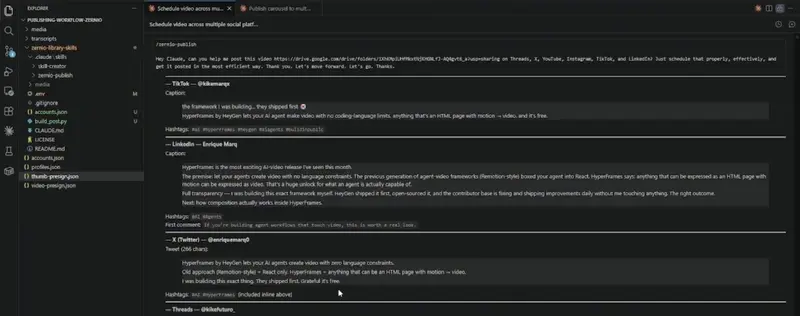
Auto-Post to 9 Platforms with Claude Code and Zernio

post drafts in claude

What you’ll build: An agent that analyzes video or images and generates platform-optimized captions, hashtags, and titles—then publishes to 9 social platforms at once.

The problem

Manual posting kills momentum. You format content for Instagram, then rewrite everything for TikTok. Again for LinkedIn. Again for X. A single video turns into a 2-hour job.

With this setup, one prompt becomes nine scheduled posts – captions, hashtags, and format conversions all handled automatically.

What you need

  • A Zernio account (free tier: 2 platforms)

  • Claude Code installed

  • 30 minutes to set up; 5 minutes per post after

Step 1: Connect platforms in Zernio

Zernio is the layer that handles the actual platform integrations. Without it, you’d need to build separate OAuth flows, API integrations, media handling, and rate-limit management for each platform (months of work before Claude could publish a post).

With Zernio, that’s already done. Claude talks to one API; Zernio handles the cross-platform part.

  1. Log in at zernio.com

  2. Go to your profile and click Connect platform for each account you use (Instagram, TikTok, X, YouTube, LinkedIn, Threads, Pinterest, etc.)

  3. Authorize Zernio for each

  4. Verify each shows in your dashboard

Step 2: Get the Zernio Publishing skill

The skill includes platform-specific guidelines for 9 platforms -hashtag rules, character limits, format specs, tone cues. You’re not training Claude from scratch.

  1. Download the skill from the Zernio library GitHub repo

  2. Extract the zip

  3. You’ll get:

zernio-library-skills/
├── .claude/
│   └── skills/
│       ├── zernio-publish/                    ← the publishing skill
│       │   ├── SKILL.md
│       │   ├── reference/                       deep API + per-platform docs
│       │   └── templates/manifest.json
│       └── skill-creator/                     ← Anthropic's official skill-creator
│                                                  bundled for when you add more skills
├── .env                                       ← ZERNIO_API_KEY (placeholder until you fill it)
├── CLAUDE.md                                  ← architectural map of the repo
├── README.md
├── LICENSE                                    ← MIT
└── .gitignore

Keep the folder structure intact. Claude needs reference/platforms/ to look up rules when writing captions.

Step 3: Add the skill to your project

  1. Open VS Code or use Claude Code / Cowork directly

  2. Create a new folder for this project or use an existing one

  3. Extract the zip and copy the entire folder to your project root

  4. Your file tree should show .claude/zernio-publishing/ at the top level

In Cowork: Go to Skills → + Create skill → Upload skill and select the folder.

Step 4: Set up your API key

Claude needs a Zernio API key to publish.

  1. Log in to Zernio

  2. Go to API keys (settings)

  3. Click Create key, name it (e.g., “claude-publishing”)

  4. Copy it

Create a .env file in your project root:ZERNIO_API_KEY=your-key-here

Claude Code reads this automatically—never paste keys into prompts.

Step 5: Test with a simple prompt

Start with one video and 2–3 platforms to confirm the skill works.

Give Claude this:

I have a short-form video at [path/to/video.mp4]. Can you analyze it, create optimized posts for Instagram, TikTok, and LinkedIn, and schedule them using Zernio?

Claude will:

  1. Load the skill and platform guidelines

  2. Analyze your video

  3. Generate captions, hashtags, titles, and first comments

  4. Call Zernio to stage the posts

  5. Show you a preview before publishing

Step 6: Review before you approve

Claude shows all posts before publishing. You control what goes live.

You’ll see something like:

post drafts in claude

Request changes if needed. Say “Approve” when it looks good.

Note: First comments are easy to miss if you skim the preview. Read the full output before approving—Instagram, TikTok, and LinkedIn generate engagement hooks you might not see at first glance.

Step 7: Scale to multiple platforms

Once you’re confident with a few, the system handles format conversion and batching automatically.

You can:

  • Post to 9 platforms at once: Video or carousel becomes optimized for each platform’s native format

  • Convert formats: Carousels become videos for platforms that don’t support multi-image

  • Batch multiple assets: Claude processes everything and schedules it all

Example:

I have a carousel at [Google Drive link] and a 30-second clip at [path]. Convert the carousel to video and post both to Instagram, TikTok, X, YouTube, LinkedIn, and Threads. Optimize each for that platform. Schedule for tomorrow at 9 AM.

What’s next

You own a system that turns one prompt into nine scheduled posts—all optimized and formatted. A video that took 2 hours to post manually now takes 5 minutes to set up and approve.

The time saved compounds. This week: 2 hours back. Next month: 20+ hours back. That’s time spent creating instead of grinding.

Check posts in Zernio or directly on each platform. Track analytics and iterate. The system learns as you refine your voice.

scheduled posts in zernio dashboard

Questions or running into issues? Drop them in the comments.

Google is turning productivity into an AI subscription. Be careful what you rent.

Google I/O just gave us a pretty clear picture of where everyday software is going: more AI in the tools we already use, more proactive help, and more reasons to add another subscription to the budget.

I get the appeal. If your email, documents, calendar, meetings, search, and notes can all understand context together, that can save real time. Nobody wakes up excited to summarize a meeting or dig through old messages to find the one decision everyone forgot. If Gemini can take that mess and turn it into a useful starting point, great.

But there is a catch here that deserves more attention. Productivity is slowly becoming something we rent by the month.

The trend is bigger than one Google announcement

In the last 48 hours, Google published a cluster of I/O updates around Workspace, Gemini, Search, and AI subscriptions. The headlines tell the story by themselves: new ways to create and get things done in Google Workspace, a more proactive Gemini app, AI Search updates, and new Google AI subscription tiers.

That is not a small feature release. It is a direction. Google wants Gemini to sit across the day, not just inside a chat box. Write the doc. Prep the meeting. Pull the search results together. Remember the context. Suggest the next move.

Some of that will be useful. Some of it will be noise. The hard part is that both usually arrive in the same product demo.

The best AI tools remove chores, not judgment

There is a version of AI productivity that I actually want. It handles the boring setup work and leaves the decision to me.

  • Turn a rough meeting transcript into clean notes.
  • Find the email thread where a client changed scope.
  • Draft a first pass of a proposal that I can rewrite in my own voice.
  • Summarize a long document before I decide whether it is worth reading fully.

That is useful because it gives time back without pretending to be wiser than the person using it.

The weaker version is the one that tries to make every moment feel optimized. A nudge here, a generated reply there, a suggestion before I even know what I think. At some point, the tool stops reducing friction and starts filling every quiet space with machine-made momentum.

Developers already know this feeling. Autocomplete is helpful until you start accepting code you did not really read. The same habit can happen in writing, planning, prayer notes, business decisions, and family scheduling. Convenience can train you to stop paying attention.

The subscription question is personal

The awkward part is price. AI costs money to run, so it makes sense that companies are pushing paid plans. But users now have to ask a more honest question: which parts of my thinking am I willing to place behind a monthly bill?

For a business, a paid AI plan may be easy to justify. If it saves a few hours a month, the math works. For an individual, it is messier. One subscription for storage. One for music. One for video. One for design. One for code. Now one for the assistant that sits inside everything.

That is how the internet gets expensive in small, quiet steps.

Use it, but keep a line

My rule is simple: use AI where it helps you start faster, but be careful when it starts deciding what deserves your attention.

Let it summarize. Let it organize. Let it draft the boring first version. But do not outsource taste, conviction, discernment, or responsibility. Those are the parts that make your work yours.

Google’s I/O updates are a reminder that AI is leaving the novelty phase and moving into the rent. That does not make it bad. It does mean we should be more deliberate.

Before paying for another AI tier, ask what it will actually remove from your day. If the answer is busywork, maybe it is worth it. If the answer is attention, think twice.

Originally published at https://blog.jenuel.dev/blog/google-ai-subscriptions-productivity-rent-attention

How to Normalize Audio with FFmpeg (Volume, Loudnorm, and API)

Originally published at ffmpeg-micro.com

FFmpeg audio normalization trips up even experienced developers. The loudnorm filter alone has 6 parameters, a two-pass workflow that requires parsing JSON from stderr, and behavior that changes depending on whether you feed it MP4, WAV, or MKV. Most guides skip the hard parts.

This post covers three approaches to fixing audio levels with FFmpeg: simple volume scaling, broadcast-standard loudnorm normalization (EBU R128), and a cloud API that handles it without installing anything.

Quick answer: normalize audio to -16 LUFS with FFmpeg

ffmpeg -i input.mp4 -af "loudnorm=I=-16:TP=-1.5:LRA=11" -c:v copy output.mp4

This applies EBU R128 loudnorm normalization targeting -16 LUFS (the standard for streaming platforms). The -c:v copy flag passes video through untouched so only the audio gets re-encoded.

Approach 1: Simple volume adjustment with the volume filter

The volume filter is the simplest way to change audio levels. It multiplies every sample by a fixed factor.

Halve the volume:

ffmpeg -i input.mp4 -af "volume=0.5" -c:v copy output.mp4

Double the volume:

ffmpeg -i input.mp4 -af "volume=2.0" -c:v copy output.mp4

Adjust by decibels (more precise):

ffmpeg -i input.mp4 -af "volume=6dB" -c:v copy output.mp4

The volume filter is predictable but dumb. It doesn’t analyze the source audio first, so you can easily clip loud sections or amplify noise in quiet ones. For consistent levels across multiple files, you need actual normalization.

Approach 2: EBU R128 normalization with loudnorm

The loudnorm filter implements the EBU R128 broadcast standard. Instead of blindly scaling amplitude, it measures perceived loudness (LUFS) and adjusts dynamically.

Single-pass normalization (good enough for most cases):

ffmpeg -i input.mp4 -af "loudnorm=I=-16:TP=-1.5:LRA=11" -c:v copy output.mp4

What the parameters mean:

  • I=-16 sets the target integrated loudness to -16 LUFS. YouTube uses -14, Spotify uses -14, podcasts typically use -16 to -19.
  • TP=-1.5 sets the true peak ceiling to -1.5 dBTP. This prevents clipping on lossy codecs like AAC and MP3 that can overshoot 0 dB during decoding.
  • LRA=11 sets the loudness range to 11 LU. This controls how much dynamic range the output keeps.

Two-pass normalization (more accurate):

Pass 1 – Analyze and capture stats:

ffmpeg -i input.mp4 -af "loudnorm=I=-16:TP=-1.5:LRA=11:print_format=json" -f null - 2>&1 | tail -12

Pass 2 – Apply the measured values:

ffmpeg -i input.mp4 -af "loudnorm=I=-16:TP=-1.5:LRA=11:measured_I=-19.6:measured_TP=-5.9:measured_LRA=0.6:measured_thresh=-29.6:offset=0.1:linear=true" -c:v copy output.mp4

Which approach should you use?

Scenario Best approach Why
Quick fix on one file volume filter Simple, predictable, no analysis needed
Batch normalize for a platform loudnorm single-pass EBU R128 standard, good enough for streaming
Mastering or archival quality loudnorm two-pass Most accurate, preserves dynamics
Automated pipeline Cloud FFmpeg API No installation, scales with your workflow

Common pitfalls

Forgetting -c:v copy and re-encoding the entire video. Without it, FFmpeg re-encodes the video stream too. This takes 10-50x longer.

Using volume instead of loudnorm for batch processing. The volume filter applies the same gain to every file. loudnorm measures each file and targets a consistent output level.

Setting the true peak ceiling to 0 dBTP. Lossy codecs generate intersample peaks during decoding that can exceed the encoded peak by 1-3 dB.

Running loudnorm on already-normalized audio. Double-normalizing compresses dynamics further each pass. Check levels first.

FAQ

What LUFS level should I target for YouTube?
YouTube normalizes all audio to -14 LUFS. Targeting -14 means YouTube won’t touch your audio. -16 is close enough that the difference is barely audible.

Can I normalize audio without re-encoding the video?
Yes. Use -c:v copy to pass the video stream through unchanged. Only the audio gets re-encoded.

What is the difference between loudnorm and dynaudnorm?
loudnorm targets a specific LUFS level per the EBU R128 standard. dynaudnorm adjusts volume frame-by-frame and can introduce pumping artifacts. For most use cases, loudnorm is the right choice.

Why Your AI Agent Keeps Making the Same Mistakes (And a Structured Fix)

I ran into this maintaining production agent skills. Here’s what I found: as far as I can tell, nobody has systematically addressed how to organize error-related knowledge inside skills. Maybe someone has and I just haven’t found it — but in everything I looked at, this angle was missing. And here’s what worked for me.

What Everyone Else Is Doing

I looked around the usual places — official forums, technical blogs, developer communities. Here’s roughly what I found:

Player What They Cover What’s Missing
Hermes official docs ## Pitfalls section header — one line of guidance No format spec, no size limits
agentskills.io best practices “Gotchas” as flat bullet lists No decision tables, no structure
Claude Code community (Jenny Ouyang’s SSOT Audit) Skill auditing tools: broken paths, orphans, duplicates No content-level governance — no rules for how pitfalls should be categorized, formatted, or sized
“AI Skills in Production” guide (Tao An) System reliability, circuit breakers, structured output Knowledge document governance

One pattern stands out: everyone checks whether skill files resolve correctly and whether content is duplicated. But nobody asks — when an agent hits an error mid-execution, can it efficiently find the correct fix in SKILL.md or its reference files?

“Won’t bigger models just handle this?”

Fair question. If context windows keep growing, do we even need structure?

Partially. Bigger contexts solve reading — the model can ingest everything. But they don’t solve attention. Anthropic’s own context engineering research documents the “lost in the middle” effect: critical details buried in a long flat list get overlooked. Every irrelevant item your agent has to scan past is noise competing with the signal it actually needs.

Think of it this way: you could give someone a 500-page manual or a 1-page troubleshooting card. They can read both, but the card is faster. This is an efficiency problem, not a capability problem.

What Worked for Me

After banging my head against this for a while, I landed on five rules for organizing error documentation in skills (PITFALL Rules):

Rule 1: Categorize when >5 items

Group by priority. The specific names depend on what your skill handles, but the structure looks like:

Priority What Goes Here Example Categories
Highest Symptom → diagnosis → fix decision tables Anomaly Diagnosis, Error Recovery
High Tool-specific gotchas, API quirks Tool Traps, Integration Gotchas
Medium Data formats, parameter edge cases Data & Parameters, Input Validation
Low Project conventions, naming rules Project Conventions, Style Rules

Key principle: anomaly diagnosis always goes first, because that’s what agents need when something breaks.

Rule 2: Decision tables for diagnostics

Instead of prose like “sometimes the task times out because there’s too much data and you should split it”, write this:

| Symptom | Diagnosis | Fix |
|---------|-----------|-----|
| Task timeout, no output written | Check if output file exists | Don't retry same config. Split input and rerun |
| Same input fails ≥3 times | Persistent bottleneck | Bypass delegation, process directly in main session |

An agent can scan the Symptom column, find a match, and read the Fix — typically 1-2 steps instead of reading through 30 prose items.

Rule 3: Don’t duplicate the skill body (when applicable)

This applies to operation-manual-style skills — ones with detailed step-by-step instructions and inline warnings (⚠️). If your skill body already explains a gotcha right next to the relevant operation, the pitfall section should give a one-line cross-reference only. Pitfalls cover blind spots the body doesn’t address.

For reference-style or API-doc-style skills where the body doesn’t include inline warnings, this rule doesn’t apply — all error knowledge goes in the pitfall section.

Rule 4: Pre-append checklist

Before adding any item: Is the section already categorized? → Which category? → Does it need a decision table? → Does it duplicate an existing item? → Too many items? Consider splitting to a separate file.

Rule 5: Quality audit

After refactoring, check 7 dimensions: categorized, decision tables for diagnostics, no flat lists >5, no duplicates, <50% body-text overlap, no prose narratives, no information loss.

Does It Actually Work? An A/B Experiment

I wanted data, not just intuition. So I ran A/B tests.

How the test works

I picked three real errors from production agent skills. For each error, I constructed two isolated contexts — one group of agents only saw the old flat-list pitfall documentation, another only saw the new structured version. Same error description, same prompt. Multiple runs per version to reduce randomness.

Scoring

Each test run is scored on 4 dimensions:

Dimension Scale Meaning
Diagnosis Accuracy 0-2 0 = wrong, 1 = partially correct, 2 = pinpointed root cause
Fix Accuracy 0-2 0 = wrong fix, 1 = right direction but not actionable, 2 = correct and executable
Wrong Suggestions N (penalty) Number of misleading or irrelevant suggestions
Reasoning Steps N (penalty if >3) How many intermediate steps from problem to fix

Overall Score = Diagnosis + Fix − Wrong Suggestions − (Steps > 3 ? 1 : 0). Max: 4. Min: -2.

Scenario A — Task Timeout

  • Error: Two sub-agents both timed out at 600 seconds with no output
  • Old version: Fix buried as item #2 in a 32-item flat list, described in prose as “occasionally succeeds, occasionally times out”
  • New version: Decision table placed as the first category, Fix column directly says “split to 1 item per task”

  • Shared behavior: Both versions correctly diagnosed the root cause — dense analysis workload + 2-item batch config

  • Old version’s quirk: Misunderstood “batch” as a 2-item unit, suggested splitting into 2 sub-agents instead of 4; averaged 3.7 reasoning steps

  • New version’s advantage: No ambiguity in the Fix column; averaged 3.0 reasoning steps

Score: Flat list 3.0 avg → Structured 4.0 avg (+1.0)

Scenario B — Session Connection Lost

  • Error: After 2 successful operations, connection broke mid-task — session appeared alive in listings but commands silently failed
  • Old version: Relevant information scattered across 4 separate sections (24 items total), had to be pieced together
  • New version: Consolidated into one decision table — symptom → diagnosis → fix at a glance

  • Shared behavior: Both versions tried to match the error against known patterns

  • Old version’s quirk: Diagnosed as “session ID changed after navigation” — plausible but wrong, assembled from fragments across 4 sections

  • New version’s advantage: Found a partial match against the decision table, explicitly flagged it as partial, gave a conservative fix (stop and report) plus a meta-suggestion to add a new row for this scenario

Score: Flat list 1.0 → Structured 3.0 (+2.0)

Scenario C — Duplicate Database Records

  • Error: Write operation created duplicate rows instead of replacing existing ones, due to a missing unique constraint
  • Old version: Last item in an 11-item flat list, but the item itself was clearly written
  • New version: Placed under a “Database” category with a fixed position

  • Shared behavior: Both versions scored perfectly — diagnosis and fix both correct

  • Old version’s quirk: The item was well-written enough to find regardless of position

  • New version’s advantage: Category placement makes location more predictable, but in this case it didn’t matter

Score: Flat list 4.0 → Structured 4.0 (0)

Summary

Metric Flat List Structured Change
Overall Score 2.67 3.67 +37%
Fix Accuracy 1.67 2.0 +20%
Reasoning Steps 3.6 2.7 -25%

Three findings:

1. Scattered information = biggest win. Scenario B went from 4 sections of 24 items to 1 decision table — a +2.0 improvement. When error knowledge is scattered across a document, agents waste steps piecing together clues.

2. Decision tables remove ambiguity. The flat-list version described “occasionally succeeds, occasionally times out.” An agent misunderstood and gave the wrong fix. The decision table directly says what to do — no room for misinterpretation.

3. Decision tables make agents honest. When no table row perfectly matched the symptoms, the agent said “partial match” instead of forcing a wrong answer. Flat lists don’t encourage this kind of honesty.

Try It

The whole project is up on my repo — feedback welcome: github.com/seanyan1984/skill-pitfalls

It’s framework-agnostic — the rules work for any markdown-based skill or prompt documentation. If your error knowledge is growing wild in your agent skills, give it a try.

𝗜𝗻𝘁𝗲𝗴𝗿𝗮𝘁𝗶𝗼𝗻 𝗼𝗳 𝘀𝗼𝘀 𝗿𝗲𝗽𝗼𝗿𝘁 𝗶𝗻 𝗜𝗻𝗰𝗶𝗱𝗲𝗻𝘁 𝗠𝗮𝗻𝗮𝗴𝗲𝗺𝗲𝗻𝘁 𝗣𝗶𝗽𝗲𝗹𝗶𝗻𝗲𝘀.

Monitoring and observability tools — Grafana, Prometheus, traces, logs — tell you that something is wrong and where. They do not tell you what the host operating system was doing at that moment: which processes were consuming memory, what the kernel OOM killer decided, whether a filesystem was having an I/O contention problem, what the block device queue looked like, what firewall rules were in effect. That data lives on the node, is often ephemeral, and disappears or changes as the system recovers.

The purpose of integrating the widely available open-source 𝘀𝗼𝘀 𝗿𝗲𝗽𝗼𝗿𝘁 Linux command into the pipeline is to 𝗰𝗮𝗽𝘁𝘂𝗿𝗲 𝘁𝗵𝗮𝘁 𝗢𝗦-𝗹𝗲𝘃𝗲𝗹 𝘀𝗻𝗮𝗽𝘀𝗵𝗼𝘁 𝗮𝘂𝘁𝗼𝗺𝗮𝘁𝗶𝗰𝗮𝗹𝗹𝘆, 𝗮𝘁 𝘁𝗵𝗲 𝗺𝗼𝗺𝗲𝗻𝘁 𝗼𝗳 𝘁𝗵𝗲 𝗮𝗹𝗲𝗿𝘁, 𝗯𝗲𝗳𝗼𝗿𝗲 𝘁𝗵𝗲 𝗲𝘃𝗶𝗱𝗲𝗻𝗰𝗲 𝗱𝗲𝗴𝗿𝗮𝗱𝗲𝘀 without requiring a human to log into the node and collect it manually.

More specifically it achieves four things:

𝗦𝗽𝗲𝗲𝗱 𝗼𝗳 𝗱𝗶𝗮𝗴𝗻𝗼𝘀𝗶𝘀. The data is already collected and analysed by the time the SRE opens the alert. They review findings instead of gathering evidence.

𝗘𝘃𝗶𝗱𝗲𝗻𝗰𝗲 𝗽𝗿𝗲𝘀𝗲𝗿𝘃𝗮𝘁𝗶𝗼𝗻. Memory state, kernel ring buffer entries, and process tables are ephemeral. Automated collection catches them before the system recovers and overwrites them.

𝗥𝗲𝗱𝘂𝗰𝗲𝗱 𝘁𝗼𝗶𝗹. Manual OS diagnostics during an incident are slow, error-prone, and inconsistent between engineers. Presets make the collection reproducible and automatic.

𝗖𝗼𝗺𝗽𝗹𝗲𝘁𝗲𝗻𝗲𝘀𝘀. Every incident of the same type produces the same shape of data, making cross-incident comparison and pattern recognition — including by an AI analysis tool meaningful and reliable.

In short: monitoring tells you the what, tracing tells you the where, and sos report presets tell you the why automatically, consistently, and fast enough to be useful during the incident rather than after it.

The best part is that you do not need to install anything.

If you like to know how can this be done, this article contains detailed instructions on how can this be achieved for a concrete production environment involving Kubernetes, Grafana and Ansible

visit sos-vault for a complete reference on how to use sos report command effectivley