Sharing my experience as senior software engineer worked with 10 years in Bloomberg, Kraken and integrated most of the exchanges world wide
The Financial Information eXchange (FIX) protocol is one of the most widely used communication standards in global financial markets.
It powers:
- Pre-trade communication
- Trade execution
- Post-trade workflows
- Regulatory reporting
- Order routing
- Market data dissemination
According to QuickFIX, the open-source implementation of FIX:
“The Financial Information Exchange (FIX) Protocol is a message standard developed to facilitate the electronic exchange of information related to securities transactions.”
While that definition sounds straightforward, the scale at which FIX operates in modern electronic trading is massive.
Over the last 10 years working at Bloomberg and more than a year working with Kraken’s institutional trading infrastructure, I’ve worked extensively with FIX connectivity across more than 30 global exchanges and venues spanning:
- Equities
- Futures
- Options
- FX
- Crypto
- Multi-asset execution systems
This article explains:
- Why FIX became the industry standard
- How FIX messages are structured
- How production trading systems actually parse FIX
- How custom FIX tags are introduced
- Lessons learned integrating dozens of exchanges
- Why FIX still dominates despite newer protocols
The Pain Point FIX Solved
Before FIX became mainstream, trading workflows were heavily manual.
Orders were communicated through:
- Phone calls
- Emails
- Proprietary terminals
- Human brokers
This caused major operational problems:
- Incorrect order routing
- Traders placed on hold during volatile markets
- Delayed executions
- Human transcription errors
- Lack of auditability
As electronic markets evolved, firms needed:
- Standardized communication
- Machine-readable protocols
- Low-latency execution
- Automated confirmations
- Reliable session management
FIX solved this problem by creating a universal messaging standard between counterparties.
Today, almost every major financial institution supports FIX in some form.
Firms Driving FIX Adoption
The FIX Trading Community includes firms such as:
- Bloomberg
- Goldman Sachs
- Citi
- Bank of America
- JP Morgan
- Exchanges and ECNs globally
Initially designed for equities, FIX now powers:
- Fixed income trading
- FX trading
- Derivatives
- Crypto institutional execution
- Clearing workflows
Even modern crypto venues expose FIX gateways for institutional clients because many hedge funds and execution algos already rely on FIX-native infrastructure.
At Kraken, for example, FIX connectivity is critical for institutional order flow where reliability and deterministic behavior matter more than retail-friendly APIs.
What Exactly Is a FIX Message?
At its core, FIX is just structured key-value messaging.
A FIX message consists of:
- Header
- Body
- Trailer
Each field contains:
Example:
8=FIX.4.4|35=D|55=AAPL|54=1|38=100|
Where:
- 8 → BeginString
- 35 → MsgType
- 55 → Symbol
- 54 → Side
- 38 → Quantity
In reality, the delimiter is a non-printable SOH character rather than “|”.
Anatomy of a FIX Message
A typical FIX order message looks like this:
8=FIX.4.4
9=176
35=D
49=CLIENT1
56=EXCHANGE
34=215
52=20260521-12:01:01.001
11=ORD12345
55=BTCUSD
54=1
38=10
40=2
44=65000
59=0
10=128
Interpretation:
- MsgType=D → New Order Single
- Side=1 → Buy
- OrdType=2 → Limit Order
- Price=65000
- Symbol=BTCUSD
The trailer checksum validates message integrity.
Real-World FIX Is Much More Complex
Most tutorials stop at simple examples.
Production FIX systems are significantly more complicated.
Over the years integrating 30+ exchanges, I encountered:
- Exchange-specific FIX dialects
- Vendor-specific extensions
- Custom authentication flows
- Proprietary risk tags
- Non-standard sequencing behavior
- Different heartbeat expectations
- Unique session reset semantics
Even when two exchanges claim FIX 4.4 compliance, behavior can differ dramatically.
The protocol is standardized.
Implementations are not.
That is where most engineering complexity begins.
FIX Engines and Session Management
One of the most widely used FIX engines is QuickFIX.
A simplified Python FIX application interface looks like:
class Application(_object):
    def onCreate(self, sessionID): return
    def onLogon(self, sessionID): return
    def onLogout(self, sessionID): return
    def toAdmin(self, message, sessionID): return
    def toApp(self, message, sessionID): return
    def fromAdmin(self, message, sessionID): return
    def fromApp(self, message, sessionID): return
These callbacks handle:
- Session lifecycle
- Administrative messages
- Application messages
- Heartbeats
- Resend requests
- Sequence synchronization
FIX sessions are stateful.
This is one of the most important aspects new engineers often overlook.
Every session maintains:
- Incoming sequence numbers
- Outgoing sequence numbers
- Heartbeat intervals
- Replay state
- Gap fills
- Recovery flows
At Bloomberg, ensuring session resiliency during volatile market conditions was critical because even a temporary sequence mismatch could impact downstream order routing.
At Kraken, maintaining deterministic session behavior across crypto market volatility introduced another layer of operational complexity.
Why Low-Latency FIX Parsers Avoid String Splits
One major misconception is that FIX parsing is “simple”.
Technically yes.
Operationally no.
In high-frequency trading systems, performance matters enormously.
Naive implementations use:
But low-latency trading systems avoid repeated string splitting because:
- It creates allocations
- Requires multiple passes
- Increases CPU cache misses
- Adds latency jitter
Instead, production-grade systems often use:
- Single-pass byte parsers
- Zero-copy parsing
- Buffer reuse
- SIMD optimizations
- Custom memory pools
At Bloomberg, low-latency parsing became especially important during high market throughput events where millions of FIX messages could flow through systems in very short intervals.
Repeating Groups — Where FIX Gets Interesting
FIX supports repeating groups.
These allow nested structures inside messages.
Examples include:
- Multi-leg option strategies
- Basket orders
- Allocation instructions
- Multiple parties/accounts
Example conceptually:
NoLegs=2
LegSymbol=BTCUSD
LegSide=1

LegSymbol=ETHUSD
LegSide=2
Repeating groups are one reason why FIX parsers become non-trivial.
The parser must understand:
- Group boundaries
- Group counts
- Nested tag hierarchies
- Dynamic schemas
Many exchange-specific bugs emerge precisely from malformed repeating groups.
Custom FIX Tags in Real Trading Systems
One of the most practical aspects of FIX engineering is custom tags.
Although FIX defines standard tags, almost every exchange or broker introduces proprietary extensions.
Examples include:
- Internal routing metadata
- Risk checks
- Account mappings
- Algo instructions
- Liquidity flags
- Exchange-specific behaviors
Custom tags usually exist in higher numeric ranges:
- 5000+
- 9000+
- User-defined namespaces
For example:
9001=InternalStrategyID
9100=SmartOrderFlag
9205=RiskProfile
Across Bloomberg integrations and later crypto exchange connectivity, I frequently worked with:
- Adding custom tags
- Extending FIX dictionaries
- Supporting venue-specific semantics
- Mapping internal OMS fields to external FIX schemas
This often required:
- XML FIX dictionary modifications
- Parser extensions
- Validation rule updates
- Backward compatibility handling
One challenge with custom tags is ensuring they do not break:
- Counterparty parsers
- Certification environments
- Session-level validation
This becomes increasingly difficult when supporting dozens of venues simultaneously.
FIX Across Traditional Finance and Crypto
One interesting evolution over the past decade is how crypto markets adopted institutional FIX infrastructure.
Initially, crypto APIs were primarily REST and WebSocket based.
But institutional participants demanded:
- Stable session protocols
- Deterministic order workflows
- Existing OMS compatibility
- Standard execution semantics
As a result, many crypto exchanges introduced FIX gateways.
However, crypto FIX implementations sometimes differ significantly from traditional finance:
- Different sequencing models
- Exchange-specific order semantics
- Non-standard market structures
- Faster protocol evolution
Working across both TradFi and crypto FIX ecosystems highlighted how adaptable the protocol remains despite being decades old.
Sample Order Cancel Request Using QuickFIX
Example Python code:
from quickfix import *

def sendOrderCancelRequest():
    message = quickfix.Message()
    header = message.getHeader()

    header.setField(quickfix.BeginString("FIX.4.2"))
    header.setField(quickfix.SenderCompID("CLIENT"))
    header.setField(quickfix.TargetCompID("EXCHANGE"))
    header.setField(quickfix.MsgType("F"))

    message.setField(quickfix.OrigClOrdID("123"))
    message.setField(quickfix.ClOrdID("321"))
    message.setField(quickfix.Symbol("BTCUSD"))
    message.setField(quickfix.Side(Side_BUY))
    message.setField(quickfix.Text("Cancel My Order"))

    Session.sendToTarget(message)
Notice:
- MsgType=F → Order Cancel Request
- OrigClOrdID links the original order
- Session.sendToTarget handles routing
In production systems, additional logic typically exists for:
- Retry handling
- Duplicate suppression
- Session recovery
- Risk validation
- Audit logging
Why FIX Still Dominates
Despite newer protocols and APIs, FIX remains dominant because:
- It is battle-tested
- Institutions already use it
- OMS/EMS systems depend on it
- It supports extensibility
- It works across asset classes
- It has mature operational tooling
Even modern low-latency systems frequently use:
- Binary protocols internally
- FIX externally
FIX acts as the interoperability layer between institutions.
Final Thoughts
FIX may appear simple at first glance:
- Tag=value pairs
- SOH delimiters
- Standard message types
But at scale, FIX engineering becomes deeply sophisticated.
After spending:
- 10 years at Bloomberg
- More than a year working with Kraken connectivity
- Integrating across 30+ exchanges globally
I’ve seen firsthand how much engineering effort goes into:
- Reliable session management
- Low-latency parsing
- Exchange certification
- Custom tag interoperability
- Resiliency during volatile markets
The protocol has survived multiple generations of market evolution because it solved a fundamental problem exceptionally well:
standardized electronic communication between trading systems.
And despite its age, FIX continues to remain at the core of global electronic trading infrastructure.
Thanks for reading.
Pritesh Gaur



 Volvo, Google Gemini destekli yeni sistemle araçların kameradan gördüklerini analiz edip açıklamasını sağlıyor. Yapay zekâ tabelaları okuyup çeviriyor ve çevre hakkında bilgi verebiliyor.
 CES 2026 Fuarı’nda yapay zeka odaklı hazırlanan bilgisayar modeli AMD Ryzen AI Halo da tanıtılmıştı. Doğrudan Nvidia’nın DGX Spark’ına rakip olarak tasarlanan küçük boyutlu yapay zeka sistemi, AMD’nin yeni açıklamasına göre gücünü Ryzen AI Max+ 395’ten alıyor ve 200 milyar parametreli yapay zeka modellerini lokal olarak çalıştırabiliyor. AMD, cihazın DGX Spark ile kıyaslandığında GPT OSS 120B modelinde token bazında %7’ye varan seviyede daha yüksek performans verdiğini iddia ediyor. Şirket, Qwen 3.5 122B modelinde ise farkın %12’ye kadar çıktığını belirtiyor. Geliştiricilere yönelik tasarlanan ürünü 128 GB LPDDR5x RAM ile pazara sunacak olan AMD, cihazın hem Linux hem de Windows desteğine sahip olduğunu açıklıyor. Bu konuda yalnızca Linux desteği bulunan DGX Spark’tan ayrılan cihaz, 10 Gbps ethernet çıkışıyla geliyor, 2 TB PCIe Gen 4×4 SSD ile üç adet USB-C portu taşıyor ve WiFi 7 / Bluetooth 5.4 kablosuz bağlantı teknolojilerine destek veriyor. HDMI 2.1b de taşıyan 120W TDP değerine sahip AI Halo, […]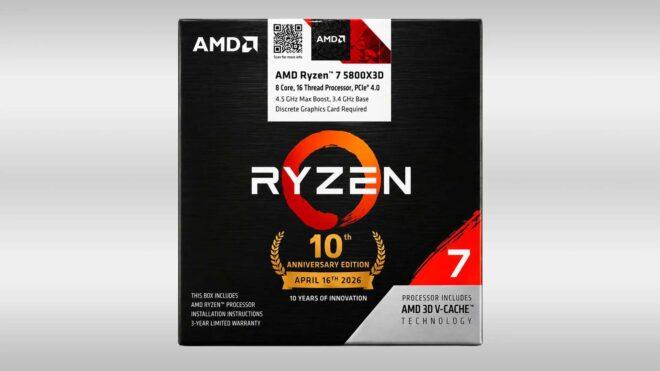
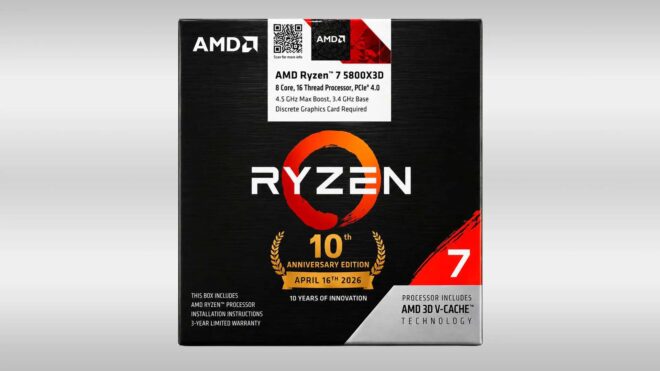 İlk sızıntısı geçtiğimiz ay yapılan AMD Ryzen 7 5800X3D AM4 10th Anniversary Edition işlemci modeli, çok yakında resmi olarak tanıtılacak gibi görünüyor. Hindistan merkezli bir satış kanalında resmi kutu görselleriyle birlikte yaklaşık 310 dolardan listelenen işlemci, ilk olarak 2022’de pazara sunulmuş, oyunlarda gösterdiği yüksek performansla büyük beğeni toplamış ve 2023 yılında üretimden kaldırılmıştı. Yeni sürümde performansı iyileştirmeye yönelik bir adım atması beklenmeyen AMD, bu özel sürümü her pazara götürmeyebilir.



 WaBetaInfo tarafından yapılan keşfe göre WhatsApp, yakında “kaybolan mesaj” altyapısına yeni bir imkan daha ekleyecek. Bu temelde gönderilen bir mesajın karşı taraftan örneğin okunduktan 5 dakika sonra ya da okunduktan 10 dakika sonra otomatik olarak silinmesi mümkün olacak. Yani bu yeni süreçte otomatik silme sayacı gönderme zamanına göre değil, okunma durumuna bakılarak başlatılacak. Bu altyapıda da okunmayan mesajlar 24 saat içerisinde otomatik olarak silinecek. Hem iOS hem de Android tarafında test edilen özelliğin herkese ne zaman açılacağı henüz tam olarak bilinmiyor.
 Anthropic, geçtiğimiz hafta “Claude” için Elon Musk’ın özel uzay şirketi SpaceX ile iş birliği yaptığını duyurdu. Musk’ın yapay zeka şirketi xAI’ın da sahibi olan SpaceX’in “Colossus 1” isimli veri merkezini temel alan iş birliği hakkında şirket, “SpaceX ile yaptığımız yeni ortaklık sayesinde işlem kapasitemizi ciddi oranda artırıyoruz. Bu adım Claude Code ve Claude API kullanım limitlerini yukarı çekmemize olanak sağladı. Bugünden itibaren Claude Code’un Pro, Max ve Team planlarındaki 5 saatlik limiti iki katına çıkarıyor, Pro ve Max planlarındaki yoğun saat kısıtlamalarını kaldırıyor ve Opus modelleri için API limitlerini önemli ölçüde yükseltiyoruz. SpaceX ile vardığımız mutabakat çerçevesinde, şirketin Colossus 1 veri merkezindeki tüm kapasiteyi kullanacağız. Bu sayede 300 megavattan fazla ek kapasiteye kavuşmuş olacağız.” ifadelerini kullanmıştı. Yakında ilk operasyon kârını açıklayacağını duyuran Anthropic, bugün öğrendiğimiz kadarıyla yapılan iş birliği kapsamında Mayıs 2029’a kadar SpaceX’e aylık tam 1,25 milyar dolar ödeme yapacak. Anlaşmanın SpaceX’e toplamda 40 milyar doların üzerinde gelir getirebileceği […]