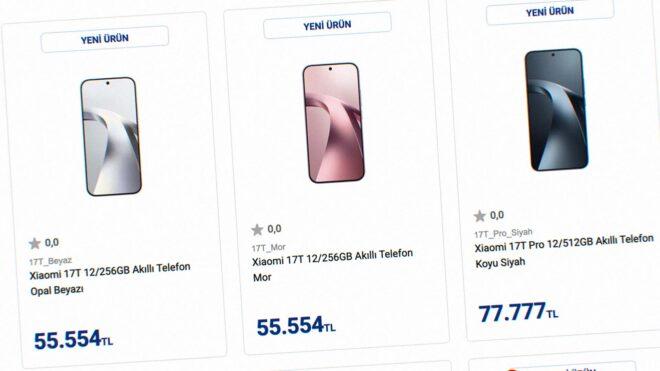
Xiaomi 17T ve 17T Pro’nun Türkiye fiyatları ortaya çıkmış olabilir

Xiaomi 17T ve 17T Pro

Xiaomi 17T ve 17T Pro'nun Türkiye fiyatları ortaya çıkmış olabilirVatan Bilgisayar bugün resmi olarak 28 Mayıs’ta satışa sunulacak Xiaomi 17T ve 17T Pro modelleri için erken bir listeleme gerçekleştirdi. Eğer listelenen fiyatlar doğruysa 17T modeli 12 GB RAM + 256 GB depolama özelinde 55 bin TL’ye, 17T Pro ise 12 GB RAM + 512 GB depolama özelinde 77 bin TL fiyatla pazara çıkarılabilir. Avrupa’da 750 euro fiyatla satılacağı söylenen Xiaomi 17T, 6,59 inç boyutunda 120 Hz AMOLED ekran, MediaTek Dimensity 8500 Ultra işlemci, 12 GB LPDDR5X RAM, 256/512 GB UFS 4.1 depolama, 67W şarj destekli 6.500 mAh batarya ve 32 megapiksel selfie kamerası ile geliyor. Cihazın arkasında ise 50 megapiksellik Light Fusion 800 sensörlü geniş açı, 5x optik zoom sunan 50 megapiksel telefoto ve 12 megapiksel ultra geniş açı kameralar bir araya getiriliyor. Avrupa’da 999 euro fiyatla satılacağı söylenen Xiaomi 17T Pro ise sızıntıya göre 6,83 inç boyutunda 144 Hz AMOLED ekran, MediaTek Dimensity 9500 işlemci, 12 GB LPDDR5X […]

Xiaomi 17T ve 17T Pro’nun Türkiye fiyatları ortaya çıkmış olabilir yazısı ilk olarak Teknoloji haberleri – LOG üzerinde yayınlandı.

Bilkom, dış iskelet üreticisi HyperShell’i Türkiye’ye getiriyor

Bilkom

BilkomBugün bir basın açıklaması paylaşan Bilkom, dış iskelet üreticisi HyperShell’i Türkiye’ye getireceklerini duyurdu. “İş birliği kapsamında HyperShell’in insan hareketini desteklemeye, fiziksel eforu azaltmaya ve outdoor deneyimleri güçlendirmeye odaklanan ürünleri, Bilkom güvencesiyle Türkiye pazarına sunulacak. Giyilebilir robotik teknolojileri; outdoor yaşam, kişisel mobilite, ergonomi, saha aktiviteleri ve aktif yaşam trendleriyle birlikte tüketici teknolojileri içinde yeni bir gelişim alanı oluşturuyor. Hafif, taşınabilir ve yapay zeka destekli dış iskelet sistemleri, kullanıcıların hareket kapasitesini destekleyen yeni nesil çözümler arasında öne çıkıyor. Bilkom, HyperShell iş birliğiyle bu yeni nesil kategoriyi Türkiye’de daha görünür ve erişilebilir hale getirmeyi hedefliyor.” diyen şirket, ürünlere yönelik olarak şunlara değindi: “HyperShell X Serisi; yürüyüş, doğa sporları, bisiklet, seyahat, fotoğrafçılık ve yüksek efor gerektiren saha aktiviteleri gibi farklı kullanım senaryolarına yönelik geliştirilen dış iskelet ürünlerinden oluşuyor. Seride yer alan X Go, X Pro, X Carbon ve X Ultra modelleri, kullanıcının hareketlerini gerçek zamanlı olarak algılayan AI MotionEngine teknolojisiyle insan hareketine uyum sağlayan […]

Bilkom, dış iskelet üreticisi HyperShell’i Türkiye’ye getiriyor yazısı ilk olarak Teknoloji haberleri – LOG üzerinde yayınlandı.

Single List Keyboard Handling

Prologue

A while ago, I decided to develop a fully accessible main navigation component in React and write a series of articles documenting the steps it took to create a non-trivial accessible component.

In my last article, the focus was actually on creating the components and adding a transformation utility to convert JavaScript objects into actual navigation. The base navigation component at this stage supports screen reader functionality through structured HTML and WAI-ARIA attributes, the ability to open and close a list through pointers and the Enter and Space keys.

This article, along with its accompanying release, focuses on basic keyboard handling for screen/keyboard users in a single list.

Note: This article is one of a series demonstrating how to build a React navigational component from scratch while considering accessibility through the process. The articles are accompanied by a GitHub repository with releases tied to one or more articles; each building on the previous, until a fully implemented navigation component is complete.

Each release and its associated tag contain fully runnable code for the article. The code discussed in this article is available in the release. and may be downloaded at release 0.4.0.

Examples have been updated in this release, enabling keyboard handling for a single list. Examples include a vertically aligned single list and horizontally aligned components with links and buttons for verifying operability.

While code examples are written in JavaScript for brevity, all actual code is written in Typescript and targets React 19.x. Examples use Next.js 16.x, which is not required to run the navigation component.

You can view the requirements for the Single List Keyboard Release along with previous requirements.

Follow along either by downloading the release and running the examples while examining the codebase, or by activating the link accompanying each code snippet to view the full file on GitHub.

This article is fairly long. It contains code and explanations. The code for this release is displayed, and the corresponding GitHub source is linked. Use these anchor links to move to the items of interest.

Content Links

  • Introduction
  • Acceptance Criteria
  • Holding Data in a Provider

    • NavigationListProvider
    • navigationListReducer
    • useNavigation
  • Registering a Focusable Element

    • NavigationList
    • NavigationItem
    • SubNavigation
  • Keyboard Handler

    • useNavigationList
    • NavigationItem

      • handleCommonKeyDown
    • SubNavigation
  • Summary

Introduction

This article is the first of three detailing keyboard handling in a universally accessible navigation component; It is also the simplest.

In my experience, many developers seem to expect keyboard handling to be a browser feature, and it’s been rare on the contracts I’ve worked on to see code that handles much custom keyboard input. Keyboard handling works well with native browser elements, but not as well with custom widgets, where developers need to handle code navigation requirements.

While most developers seem to understand that a keyboard is necessary for screen reader users, the fact that many people use a keyboard alongside a screen to navigate isn’t always obvious. Users of screen readers have a variety of key combinations they may use to navigate through structures such as headings, links, form elements and tables. Users who navigate the screen with a pointer can simply move their cursor to a specific element and click. Unfortunately, the keyboard flexibility is limited for screen/keyboard users, who are the only ones who must navigate a page linearly. Navigation is not as easy for someone who can see a screen and depends on a keyboard for both input and navigation.

Those who use a screen and keyboard have expectations that developers should not only be aware of, but should strive to match. For those developers who work with a screen, testing how focus moves within a component is actually easy; just use the keyboard. Developers should always ensure a component is fully navigable with the Tab/Shift+Tab key combinations, which are required for both screen and screen reader users, and that any custom keyboard handling for screen users is implemented and works correctly.

To do so, developers need to receive acceptance criteria that detail what happens when a key is used.

When developers don’t receive information about keyboard handling requirements when implementing a custom widget, efforts to bring the code into compliance with accessibility standards can run into snags. Keyboard handling can be compromised, and what actually gets implemented might be more focused on the letter of the law than the spirit, as is demonstrated by the following video.

Since the focus of this navigation component is accessibility, the acceptance criteria must specify what happens on each key press.

Return to Content Links

Acceptance Criteria

Single List Keyboard Handling

  • AC 1 – Pressing the HOME Key should take a user to the first item in the current List.
  • AC 2 – Pressing the END Key should take a user to the last item in the current list.
  • AC 3 – Pressing the LEFT-ARROW key should take a user to the previous item in the current list.
  • AC 4 – If focus is already on the first item in the current list, pressing the LEFT-ARROW key should take the user to the last item in the current list.
  • AC 5 – Pressing the RIGHT-ARROW Key should take a user to the next item in the current list.
  • AC 6 – If focus is already on the last item in the current list, pressing the RIGHT-ARROW Key should take a user to the first item in the current list.

The keyboard support section in the Disclosure Navigation pattern in the APG requires interpretation. The guide references moving buttons to buttons and links to links. Both are focusable elements, and depending on where each lies, navigation can move from a button to a link, or from a link to a button, within a single list.

Hand-eye coordination is key in this instance. We expect the cursor to move in the direction indicated by the arrow keys. When the cursor moves to an unexpected location, it’s jarring; if it disappears entirely, the site can appear broken.

Return to Content Links

Holding Data in a Provider

Navigation in a sublist requires a focusable element, in this case either a button or a link, to be able to determine its sibling in a list and move according to the acceptance criteria.

Each link and button in a list is rendered in its own component, with no real way to know about, much less access, the others.

Data for each focusable item in a particular list can be stored in a context provider, along with functions to register and retrieve the collective data. Since each focusable element is part of a list, the best data structure to hold the information is an array.

NavigationListProvider

Context providers hold data along with functions for retrieving and setting it. Each list works with its own copy of the provider, and the data in its array consists of each individual link or button element within the list items it contains. Each focusable element, whether a button or a link, can only focus on siblings contained in the list it resides in.

export function NavigationListProvider({ children }) {
  const [state, dispatch] = useReducer(navigationListReducer, {
    items: [],
  });

  const getCurrentListItems = useCallback(() => {
      return state.items;
    }, [state.items]);

  const registerItemInCurrentList =  useCallback((focusableEl) => {
      dispatch({ type: "REGISTER_ITEM", item: focusableEl });
    }, []);

  return (
    <NavigationListContext.Provider
      value={{
        getCurrentListItems,
        registerItemInCurrentList,
      }}
    >
      {children}
    </NavigationListContext.Provider>
  );
}
NavigationListProvider.context = NavigationListContext;

GitHub (release 0.4.0) – NavigationListProvider.tsx

Given the nature of the data, useReducer is a better solution than useState. A reducer still uses the state object but can manage more complex logic. Since state updates to the NavigationListProvider affect multiple components and changes might depend on others, it makes sense to use the provided reducer hook rather than the state hook.

navigationListReducer

export function navigationListReducer(
  state,
  action,
) {
  switch (action.type) {
    case "REGISTER_ITEM": {
      if (state.items.includes(action.item)) return state;
      return { ...state, items: [...state.items, action.item] };
    }
    default: {
      return state;
    }
  }
}

GitHub (release 0.4.0) – navigationListReducer.ts

Like most reducers, actions are held in a switch, even though there is only one action type, REGISTER_ITEM. When called, a focusable element (action.item) is passed through and checked to determine if it already exists in the array. If not, it is added in.

A context provider is not exposed to public components; instead, a hook is used to execute functionality that can be passed through the registration function and to add additional functionality when necessary.

useNavigationList

export function useNavigationList() {
  const navigationListContextObj = use(NavigationListContext);
  const { registerItemInCurrentList } =
    returnTrueElementOrUndefined(
      !!navigationListContextObj,
      navigationListContextObj,
    );

  return {
    registerItemInCurrentList,
  };
}

A common pattern for a hook associated with a context provider is to load the provider’s public functions and either use them in the hook or pass them through to another component. For the moment, the registration function is just passed through, so it may be imported into the navigation components.

Return to Content Links

Registering a Focusable Element

In order for the array to be used with keyboard handling, the focusable elements must be registered (added) into the data array. The first step is to wrap each list within its own context provider.

NavigationList

export default function NavigationList({...) {
  const listProps= {...};

  return (
    <NavigationListProvider>
      <List key={`list-$id`} {...listProps}>
        {children}
      </List>
    </NavigationListProvider>
  );
}

GitHub (release 0.4.0) – NavigationList.tsx

With the NavigationListProvider now wrapping the List component, each list item can access any other list item stored in its copy of the data array. It’s important to understand that each list maintains its own array of items and cannot access items across lists.

NavigationItem

export default function NavigationItem({...}) {
  const {
    registerItemInCurrentList,
  } = useNavigationList();

  const currentPath = ...;

  const linkRef = useRef(null);

  useEffect(() => {
    if (linkRef.current !== null) {
      registerItemInCurrentList(linkRef.current);
    }
  }, [ linkRef, registerItemInCurrentList]);


  const listItemProps = { ... };

  const linkProps = {
    ... ,
    ref: linkRef,
    ...rest,
  };

  return ( ... );
}

GitHub (release 0.4.0) – NavigationItem.tsx

Code that has already been discussed in previous releases is represented by ellipses; only new code is given.

Focusable elements are stored in ref objects, but reading the element through ref.current can lead to unreliable code during renders. Since the elements held in the ref object are just pointers to the DOM elements, it’s safe to extract them and store them separately as read-only.

References to elements are not populated right away; the focusable element, in this case a link, needs to be rendered before the information is available, so the useEffect() that registers the link into the currentlistitems array only runs when the ref. current is not null.

SubNavigation

export default function SubNavigation({...}) {
  const {
    registerItemInCurrentList,
  } = useNavigationList();

  const buttonRef = useRef(null);

  const [isSubListOpen, setIsSubListOpen] = useState(false);

  useEffect(() => {
    if (buttonRef.current !== null) {
        registerItemInCurrentList(buttonRef.current);
    }
  }, [buttonRef, registerItemInCurrentList]);

  const handlePress = () => {
    setIsSubListOpen(!isSubListOpen);
  };
    ...
    ref: buttonRef,
  };
  ...
}

GitHub (release 0.4.0) – SubNavigation.tsx

The code to register a button is almost identical to the code registering a link. The only difference is that the reference being passed is a button element.

Return to Content Links

Keyboard Handler

With the data structure set up and items registered, it’s finally time to shift the focus to handling the appropriate keys, and attention turns back to the acceptance criteria.

  • AC 1 – Pressing the HOME Key should take a user to the first item in the current List.
  • AC 2 – Pressing the END Key should take a user to the last item in the current list.
  • AC 3 – Pressing the LEFT-ARROW key should take a user to the previous item in the current list.
  • AC 4 – If focus is already on the first item in the current list, pressing the LEFT-ARROW key should take the user to the last item in the current list.
  • AC 5 – Pressing the RIGHT-ARROW Key should take a user to the next item in the current list.
  • AC 6 – If focus is already on the last item in the current list, pressing the RIGHT-ARROW Key should take a user to the first item in the current list.

The only keys being handled now are home, end, and the left and right arrows. If the focus is on the first element in the list and the left arrow key is pressed, then focus should jump to the last element in the list, and the opposite should happen if the focus is on the last element and the right key is pressed. Focus should move to the first element.

useNavigationList

Since the functionality needs to access data stored in the context provider, the functions are created in the hook.

 export function useNavigationList() {
  const navigationListContextObj = use(NavigationListContext);
  const { getCurrentListItems, registerItemInCurrentList } =
    returnTrueElementOrUndefined(
      !!navigationListContextObj,
      navigationListContextObj,
    );

  const currentListItems = getCurrentListItems();

  const _getCurrentIndex = useCallback(
      (currentlyFocusedEl) => {
        return currentListItems.indexOf(currentlyFocusedEl);
      },
      [currentListItems],
    );

    const shiftFocus= ( focusableEl) => {
      focusableEl.focus({ preventScroll: true });
    };

    const setFirstFocus = () => {
      shiftFocus(currentListItems[0]);
    };

    const setLastFocus = () => {
      shiftFocus(currentListItems[currentListItems.length - 1]);
    };

    const setNextFocus = ( currentlyFocusedEl) => {
      const newIndex = _getCurrentIndex(currentlyFocusedEl) + 1;
      if (newIndex >= currentListItems.length) {
        setFirstFocus();
      } else {
        shiftFocus(currentListItems[newIndex]);
      }
    };

    const setPreviousFocus = ( currentlyFocusedEl) => {
      const newIndex = _getCurrentIndex(currentlyFocusedEl) - 1;
      if (newIndex < 0) {
        setLastFocus();
      } else {
        shiftFocus(currentListItems[newIndex]);
      }
    };

    return {
      registerItemInCurrentList,
      setFirstFocus,
      setLastFocus,
      setNextFocus,
      setPreviousFocus,
      shiftFocus,
    };
} 

GitHub (release 0.4.0) – useNavigationList.tsx

A reminder that the code discussed earlier is represented by ellipses; only the new code is shown.

It’s useful to know when a private or public function is used, and I do so by prefacing private functions with an underscore.

To provide a fresh copy of the data to the hook, don’t call the data directly; it won’t refresh. Instead, a getter is retrieved from the context provider, getCurrentListItems(). You’ll note an alias for currentListItems that calls the getter each time. When used this way, the code always returns an updated copy of the array, making it more natural to work with.

A custom function, shiftFocus(), is used instead of implementing focus within each publicly called function to standardize how scrolling is handled. In these cases, scrolling should be prevented when navigation is displayed in a horizontal layout to prevent extraneous shifts when sublists open and close.

The rest of the code is self-explanatory; focus is shifted depending on the key pressed: Home and End, sends focus to the first or last children in the list, while the right or left arrow key sets focus depending on where the currently focused element is; If the focus is at the end of the list when setNextFocus is called, focus then moves to the first element and if the focus is at the beginning of the list when setPreviousFocus is called, focus moves to the end. Otherwise, focus shifts to the respective sibling on either side of the current element.

With the focus functions created, it’s time to use them.

NavigationItem

export default function NavigationItem({ ... }) {
  const {
    registerItemInCurrentList,
    setFirstFocus,
    setLastFocus,
    setNextFocus,
    setPreviousFocus,
  } = useNavigationList();
  const currentPath = ...;
  …

 const handleKeyDown = (e) => {
      const linkEl = linkRef.current;

      switch (e.key) {
        case Keys.HOME:
        case Keys.END:
        case Keys.LEFT:
        case Keys.RIGHT:
          e.preventDefault();
          e.stopPropagation();
          break;
      }

      handleCommonKeyDown(
        e,
        linkEl,
        setFirstFocus,
        setLastFocus,
        setNextFocus,
        setPreviousFocus,
      );
    };
  …

  const linkProps = {
    ...
    onKeyDown: handleKeyDown,
    ref: linkRef,
    ...rest,
  };

  return (..);
}

The setters from the hook are retrieved, and a handleKeyboard function is created. Rather than setting preventDefault and stopPropagation in each case statement, I use a switch that sets them on all the keys at once. And because both links and buttons handle these keys in the same way, a common keyboard handler is created and called rather than duplicating the code across components.

When calling a function outside the render, everything necessary must be passed in, including all the hook calls.

handleCommonKeyDown

export const handleCommonKeyDown = (
  e,
  currentlyFocusedEl,
  setFirstFocus,
  setLastFocus,
  setNextFocus,
  setPreviousFocus
) => {
  switch (e.key) {
    case Keys.HOME:
      setFirstFocus();
      break;
    case Keys.END:
      setLastFocus();
      break;
    case Keys.LEFT:
      setPreviousFocus(currentlyFocusedEl);
      break;
    case Keys.RIGHT:
      setNextFocus(currentlyFocusedEl);
      break;
  }
};

GitHub (release 0.4.0) – handleCommonKeyDown.tsx

The common key handler is quite straightforward; each specific key triggers a function in the hook to decide the next item to shift to.

SubNavigation

export function SubNavigation({...}) {
    const {
        currentListItems,
        parentRef,
        registerListItem,
        setFirstFocus,
        setLastFocus,
        setNextFocus,
        setPreviousFocus
    } = useNavigationList();
   const {
        registerListItem, 
        setFirstFocus, 
        setLastFocus, 
        setNextFocus, 
        setPreviousFocus} = useNavigationList();

   const buttonRef = useRef(null);
    ...

  useEffect(() => {
    const currentButtonEl = buttonRef.current;
    if (currentButtonEl !== null) {
       registerItemInCurrentList(currentButtonEl);
    }
  } , [buttonEl, buttonRef, isSubListOpen, registerItemInCurrentList]);

    const handleKeyDown = (e) => {
        const buttonEl = buttonRef.current;

        switch (e.key) {
            case Keys.HOME:
            case Keys.END:
            case Keys.LEFT:
            case Keys.RIGHT:
                e.preventDefault();
                break;
        }

        handleCommonKeyDown(
          e, 
          buttonEl, 
          setFirstFocus, 
          setLastFocus, 
          setNextFocus, 
          setPreviousFocus
       );

    ...

    const buttonProps: ButtonProps = {
        ...
        onKeyDown: handleKeyDown,
        onPress: handlePress,
        ref: buttonRef,
        ...
    };

    ...
    return ( ...)
}

GitHub (release 0.4.0) – SubNavigation.tsx

Notice how stopPropagation() is not included in the top switch. This is because the button component I use from react-aria-components already calls stopPropagation() itself, so I don’t need to set it. This may differ from the button component you are working with. Otherwise, the code for SubNavigation is similar to that already seen in NavigationItem.

Return to Content Links

Summary

Handling link references to multiple components becomes straightforward when a provider holds the data and the functions that call and manipulate it. A hook passes through necessary provider functions as well as its own to provide keyboard handling within a single list.

With all the code added to support single-list keyboard handling, the question arises: Does it work?

Part of the issue with demonstrating keyboard handling is the inability to show which key is being used as focus moves. It’s one of the reasons keyboard accessibility is so hard to demonstrate during sprint demos. I’ll be providing videos I make that detail what I am doing and which keys I’m pressing as I guide you through the enhancements.

I’ll be back with another article soon, focusing on CSS design and applying a layout to the default horizontal navigation.

9 SaaS development companies worth knowing (a technical look)

Most agency roundups are written for product managers and founders. This one isn’t.

If you’re a CTO, lead engineer, or the person who’ll actually own the codebase after the agency hands it off, you care about different things: what stack they default to, whether they write tests, how the CI/CD is set up on day one, and who’s actually on the team. Not logo counts.

Here’s the same list, filtered for what engineers want to know.

1. Brocoders

Stack: React, Node.js, Python/Django, PostgreSQL, AWS/GCP

The default setup is a React frontend against a Node.js API layer, Postgres for the data store, and AWS for infra. They use GitHub Copilot and similar tools in their engineering workflow, which shows up in hour estimates, and they publish production-ready SaaS boilerplates at bcboilerplates.com covering auth, user management, billing, and admin patterns.

For multi-tenant SaaS, Brocoders go schema-per-tenant on Postgres (row-level security where performance allows) with per-tenant rate limiting at the API layer. GraphQL is available as an API layer option, though REST is the default.

CI/CD is set up as a line item in discovery, not an afterthought. Typical pipeline: GitHub Actions, containerized builds, staging and prod environments separated from day one.

Team composition: cross-functional from the start, product strategist included in early sprints. Engineers stay on the account; there’s no discovery team that hands off to a separate build team.

Clutch: 5.0 across 38 reviews, which is statistically unusual. Read the actual reviews, not just the score.

2. Netguru

Stack: React, React Native, Ruby on Rails, Node.js, AWS

Primarily a Rails and React shop with a strong design practice. Good choice if your MVP needs polished UX before your Series A. Less obvious choice if your architecture needs to be GraphQL-native or if you’re building something data-heavy.

Their engineering process is Jira + Figma + Slack, two-week sprints, and a dedicated PM. Code quality reviews come up consistently in client feedback.

Best technical fit: design-led consumer SaaS, early-stage fintech, mobile-first products.

3. Upsilon

Stack: Cloud-native SaaS, AWS-first

Lean team (10-49 engineers), US-headquartered. Built 25+ SaaS MVPs. Their model is speed to functional prototype, so they’re well-matched for founders who need working software in under 3 months to validate with real users.

Less established on enterprise compliance. If you need SOC 2 controls baked in from sprint one, ask explicitly.

4. Intellectsoft

Stack: React, Node.js, .NET, AWS, blockchain where relevant

The compliance-first option. Their work is in regulated industries: healthcare, fintech, legal. They run strong test coverage and have documented QA processes. On-time record is solid. Not for sub-$50K engagements.

If you’re building something that needs HIPAA controls or a financial audit trail, they’re worth a serious look. Ask about how they handle secrets management and access control audits in the discovery phase.

5. ScienceSoft

Stack: .NET, Java, React, Azure/AWS, Salesforce, ServiceNow

30+ years old, which means they’ve seen things go wrong at scale. The $5K minimum is genuinely rare for the quality tier they operate at. Their breadth (cybersecurity, SharePoint, mobile, healthcare IT) is both a strength and a risk: you want to know which vertical your project lands in and who specifically is assigned.

Incident response under 24 hours is documented across multiple reviews. That’s the number that matters at 2am.

6. Railsware

Stack: Ruby on Rails, React

The expensive option ($100-$149/hr) and proud of it. Portfolio includes GitLab, Calendly, and Buffer. Their engineers challenge assumptions in discovery, which you want from a partner who’ll be responsible for architecture decisions.

If you’re building Rails-native B2B SaaS and want minimal technical debt, they’re genuinely competitive at that. If you’re expecting microservices or a Go/Rust backend, they’re probably not the fit.

7. Simform

Stack: AWS, DevOps-first, IaC heavy

Cloud-native engineering with strong DevOps automation. Good if your architecture needs serious IaC (Terraform, CDK) from the start and you want blue/green deployments as a standard, not a nice-to-have.

The AI engineering story is less clear. Before scoping, ask for concrete examples of MLOps pipelines, not just “we support AI features.”

8. Intellias

Stack: AWS/GCP, microservices, data platforms, AI/ML integrations

1,000-9,999 engineers, enterprise contracts, multiple scrum teams in parallel. If you’re migrating a monolith to microservices or need 5 teams running concurrently, they have the depth to do that. If you’re a 3-person startup, you’ll likely get junior staffing.

Notable on production reliability: near-zero incident rate comes up in reviews. Jira-based project management, Clutch 4.9.

9. ELEKS

Stack: ML/BI integration, data engineering, standard web SaaS

2,100+ engineers, founded 1991. If your SaaS is data-heavy and you need ML features (churn prediction, demand forecasting, anomaly detection) treated as first-class concerns with proper MLOps, ELEKS has the data engineering depth for that. Ask for case studies with specific metric lifts, not just “we used ML.”

What to check before you sign

A few things that matter more than stack preferences:

CI/CD on day one. Ask if pipeline setup is a line item in the discovery phase or something bolted on later. Agencies that treat it as optional tend to treat monitoring as optional too.

Who’s actually on the account. Get names and LinkedIn profiles of the engineers who’ll work on your project. Ask if they stay for the duration or rotate off. The engineer who did discovery should be in the first sprint.

Hour estimates and tooling disclosure. Ask directly: “Do your engineers use AI coding assistants? Which ones? How does that affect your estimates?” A vendor using GitHub Copilot or Cursor should be estimating 30-50% fewer hours for standard modules. If they’re not, you’re paying for reinvented wheels.

Multi-tenant architecture decision. If you’re building SaaS with multiple customers on shared infrastructure, ask how they handle tenant isolation. Schema-per-tenant vs. row-level security have very different performance profiles at scale. Get an opinion in discovery, not post-launch.

Post-launch on-call. Ask who’s on call after go-live and what the SLA is for critical bugs. “We’ll respond quickly” is not an SLA.

Material Nova — The Best VS Code Theme of 2026


🎨 Material Nova — The Best VS Code Theme of 2026

“Your editor is where you spend 8+ hours a day. It deserves to be beautiful.”

If you’ve been jumping between One Dark Pro, Dracula, Tokyo Night, and Ayu trying to find the one — your search is over.

Material Nova is here. And it’s not just another color scheme — it’s a premium, meticulously engineered coding workspace built on Google’s legendary Material Design palette.

🤔 Why Another VS Code Theme?

Fair question. The marketplace has hundreds of themes. So what makes Material Nova different?

Most themes are ports — someone grabs a popular palette, slaps it into a JSON file, and ships it. Material Nova was built differently:

  • ✅ Deeply optimized semantic highlighting for JS, TS, React (TSX/JSX), Python, C#, HTML/CSS, and JSON
  • ✅ WCAG-compliant contrast ratios to reduce eye strain during late-night sessions
  • ✅ 15 distinct variants for every mood, lighting condition, and aesthetic preference
  • ✅ High Contrast editions for every dark variant
  • ✅ Zero performance impact — pure hand-crafted JSON, no background scripts

Material Nova v2.1.0 just dropped with two brand-new variants — Nebula and Sakura. Read on for the full breakdown.

🎭 15 Variants — One for Every Mood

This is where Material Nova truly shines. Whether you’re coding at 2am or pair-programming in a sunny office, there’s a variant made for you.

🌑 Dark Variants

Variant Background Vibe
Material Nova Default #263238 The classic Google Material experience
Material Nova Darker #212121 Deep matte gray for ultimate night coding
Material Nova Palenight #292D3E Vibrant purple-blue synthwave aesthetic
Material Nova Ocean #0F111A Calming deep-sea navy layout
Material Nova Deepforest #141F1D Organic dark forest green comfort
Material Nova Sakura 🌸 #1D1921 Premium cherry blossom-inspired rose charcoal
Material Nova Nebula 🌌 #12101E Celestial deep space galactic aesthetic

💡 Light Variant

Variant Background Vibe
Material Nova Lighter #FAFAFA Perfect for bright daylight or outdoor offices

⚡ High Contrast Editions

Every dark variant ships with a High Contrast (HC) sister edition for developers who prefer sharp borders and maximum visibility — including a true OLED pitch-black option with #121212 and #09080F backgrounds.

🌌 What’s New in v2.1.0

The latest release is the biggest update yet:

Introducing Material Nova Nebula

A stunning galactic-inspired dark theme with deep space aesthetics. Background #12101E, foreground #E1DFEE — feels like coding among the stars. The HC variant pushes to OLED black at #09080F.

Introducing Material Nova Sakura 🌸

The most-requested theme from the community. A soft rose-charcoal layout inspired by cherry blossoms — background #1D1921, foreground #E3D6DF. Elegant, warm, and unlike anything else on the marketplace.

Automated Theme Compilation

Palettes are now compiled using standard-version automation — ensuring consistency across all 15 variants with zero runtime overhead.

⚡ Install in 60 Seconds

# Option 1: From VS Code Command Palette
1. Open Extensions panel → Ctrl+Shift+X (or Cmd+Shift+X)
2. Search: Material Nova
3. Click Install
4. Press Ctrl+K → Ctrl+T to open theme picker
5. Select your variant. Done. ✅

# Option 2: Via CLI
code --install-extension dhavalkurkutiya.vsc-material-nova

⚙️ Recommended Settings

Get the absolute best experience with these settings.json tweaks:

{
  "editor.fontFamily": "JetBrains Mono, Fira Code, monospace",
  "editor.fontSize": 14,
  "editor.lineHeight": 1.6,
  "editor.letterSpacing": 0.5,
  "editor.fontLigatures": true,
  "editor.cursorBlinking": "smooth",
  "editor.cursorSmoothCaretAnimation": "on"
}

Font tip: Pair Material Nova with JetBrains Mono for the sharpest ligature rendering. It’s free and the difference is night and day.

🆚 How It Compares

Feature Material Nova One Dark Pro Dracula Tokyo Night
Variants 15 4 3 6
High Contrast editions ✅ All variants ❌ ❌ Partial
Semantic highlighting ✅ Deep Partial Partial Partial
WCAG contrast compliance ✅ ❌ ❌ ❌
OLED black support ✅ ❌ ❌ ❌
Background scripts Zero None None None

🏁 Final Verdict

If you care about your editor environment — and you should — Material Nova is the most complete VS Code theme available right now.

15 variants. Semantic highlighting. WCAG-compliant contrast. Zero performance cost. And it’s completely free.

Stop settling for a theme that’s “good enough.” Your 8-hour-a-day workspace deserves better.

→ Install Material Nova on VS Code Marketplace

👨‍💻 About the Author

Material Nova is crafted with passion by Dhaval Kurkutiya.

Licensed under MIT — free to use, customize, and enjoy. Made with ❤️ by Dhaval Kurkutiya.

Inference Routing Is Becoming an Infrastructure Placement Problem

inference placement orchestration — the Inference Execution Plane governing substrate selection across GPU cluster, dedicated silicon, and sovereign on-prem

The request arrives. The model answers. For most teams, everything in between is invisible — a gateway rule, a load balancer entry, maybe a classifier someone wrote three months ago. That worked when inference meant one cluster and one model family. The execution environment was fixed, so the routing decision was trivial.

That assumption is gone. Enterprise inference now spans GPU clusters, dedicated inference silicon, giant-context processors, provider APIs, and sovereign on-premises substrates — each with different physics, different cost models, and different failure domains. Every routing decision is now implicitly a placement decision. And the application layer was never designed to make it correctly.

Inference placement orchestration is the discipline of governing those decisions at the infrastructure level — where the signals, the authority, and the system visibility actually exist.

inference placement orchestration — the Inference Execution Plane governing substrate selection across GPU cluster, dedicated silicon, and sovereign on-prem

Note: Cost-aware model routing asks: which model should answer this request? Infrastructure-aware inference placement asks: where should this request execute — on which substrate, under which topology, within which latency and sovereignty constraints? Those are no longer the same problem. The first is covered in Cost-Aware Model Routing in Production. This post covers the second.

The Routing Frame Is Obsolete

The API gateway inherited inference routing the same way it inherited everything else — by default, because it was already in the path. When inference ran on a single cluster against a single model family, that was fine. The gateway forwarded the request. The cluster handled it. Routing was endpoint selection, and endpoint selection was trivial because there was essentially one endpoint.

That architecture encoded an assumption that no longer holds: that the execution environment is fixed. Once inference spans multiple substrate types, the routing decision stops being about which model handles the request and starts being about which execution environment the request enters. Those are materially different problems.

An API gateway that was designed to balance HTTP traffic across homogeneous nodes is not equipped to arbitrate between a GPU cluster optimized for throughput, a dedicated inference accelerator optimized for deterministic low latency, and a provider API optimized for burst elasticity. The decision variables — physics, cost tier, latency class, failure domain, sovereignty boundary — exist at the infrastructure layer. The gateway doesn’t see them.

The teams that recognize this shift early won’t be scrambling to retrofit placement logic into application code when they add their second substrate type. The ones that don’t will discover the problem the hard way: through latency variance they can’t explain, cost anomalies that don’t map to request volume, and sovereignty violations that the application registered as successful responses.

Inference Placement Orchestration Requires a New Architectural Layer

What’s needed is a formal definition of what has been informally accumulating as scattered decisions across application code, gateway configs, and ad-hoc infrastructure policy.

The Inference Execution Plane is the infrastructure layer responsible for substrate selection, topology awareness, latency SLA enforcement, and execution cost assignment across heterogeneous inference substrates. It is not a product category. It is an architectural function — the placement authority layer that governs where inference workloads execute and under what constraints.

This distinction matters: the Inference Execution Plane is not the inference platform. It is not Kubernetes for AI, inference middleware, or orchestration tooling. Those systems manage the lifecycle of inference services. The Execution Plane governs the placement decisions that determine which service handles which workload, under which infrastructure conditions, within which policy boundaries.

The function exists in every multi-substrate inference deployment today. The problem is that it’s distributed across systems that weren’t designed to own it — application routers with no infrastructure telemetry, gateway configs that hardcode substrate assumptions, and team boundaries that give application engineers authority over decisions that require infrastructure visibility.

Formalizing the Inference Execution Plane as an explicit architectural layer is the first step toward placing that authority correctly.

inference execution plane — placement authority layer governing substrate selection, topology awareness, and latency SLA enforcement

Multi-Substrate Inference Is a Physics Problem Disguised as an API Problem

The most common misread of the inference routing problem is that it’s a software problem — better classifiers, smarter gateways, more granular routing rules. That framing misses the underlying issue.

Multi-substrate inference is fundamentally a physics problem. Each substrate class carries materially different execution characteristics that determine whether a given request belongs there:

Substrate Optimized For Governing Constraint
GPU cluster Throughput, parallel batch Memory bandwidth, tensor parallelism
Dedicated inference silicon (Groq-class) Deterministic low latency Fixed execution timing, queue depth
Giant-context processors (Cerebras-class) Large context windows On-chip SRAM locality
Provider API Burst elasticity External rate limits, egress cost
Sovereign on-premises Compliance boundary Jurisdiction, air-gap policy

These aren’t performance tiers. They’re architecturally distinct execution environments with different physics. Routing a latency-sensitive synchronous request to a throughput-optimized GPU cluster doesn’t just affect response time — it enters a different queuing model, a different memory locality regime, and potentially a different failure domain. The request may succeed. The infrastructure cost of that success may be invisible to the application.

This is what separates inference placement from the training/inference hardware split that became visible at GTC 2026. Hardware fragmentation didn’t create the placement problem — it made it unavoidable. When a single GPU cluster handled everything, substrate arbitration didn’t matter. Once training and inference silicon diverge, and dedicated inference accelerators enter the stack, every request carries an implicit substrate assignment. The question is whether that assignment is made deliberately or by default.

Deterministic networking becomes relevant here at a layer most teams haven’t reached yet: when the interconnect itself is part of the inference execution path, fabric topology becomes a placement input. The request isn’t just selecting a substrate — it’s selecting a path through an interconnect fabric with its own latency characteristics, congestion domains, and saturation thresholds.

This is workload arbitration. Calling it routing undersells the problem.

Application Routers Are Blind to Infrastructure Signals

The practical consequence of application-layer routing is a structural information gap. Application routers are optimized for what they can observe. Infrastructure signals are outside their observability boundary entirely.

The two signal sets don’t overlap:

Application-visible: request type, token count, tenant identity, SLA tier, model preference

Infrastructure-visible: rack congestion, GPU memory pressure, interconnect saturation, inference queue depth, east-west traffic load, regional failover state, reserved vs. burst substrate allocation, power and cooling headroom

The application router optimizes locally against the signals it can see. The infrastructure absorbs the cost of decisions made without the signals it holds. On a single substrate, this gap is manageable. On multi-substrate deployments, it becomes a structural failure mode.

Locality Collapse is the formal name for what happens when this gap goes unaddressed. It is the loss of topology-aware execution locality caused by routing systems that optimize for endpoint availability rather than infrastructure placement efficiency. The consequences compound as the substrate footprint grows: hidden cross-zone bandwidth amplification, interconnect congestion from misrouted workloads, latency variance that doesn’t track request complexity, sovereignty leakage from spillover that the application never flags, and egress multiplication from cross-region routing that was never modeled.

The most acute expression of Locality Collapse is inference spillover: the primary substrate saturates, the router spills traffic to the next available endpoint — typically a provider API — and the application layer registers a successful response. From the application’s perspective, the request resolved. From the infrastructure’s perspective, a sovereignty boundary may have been crossed, egress cost multiplied, latency doubled, and the spillover event went completely unlogged because the routing system had no model of substrate boundaries.

locality collapse and inference spillover — routing without substrate topology awareness causing sovereignty leakage and egress amplification

Placement Authority Migrates to the Infrastructure Control Plane

The core problem is not that application teams lack visibility into infrastructure signals. It’s that application code has no mechanism to arbitrate shared infrastructure scarcity — and multi-substrate inference creates exactly that condition.

When inference runs on shared GPU infrastructure, placement decisions affect every tenant on the cluster. An application router making substrate assignments without infrastructure telemetry cannot know whether it is consuming reserved capacity, triggering burst allocation, contributing to interconnect saturation, or pushing a congested substrate further into degradation. These are infrastructure governance problems. Solving them requires infrastructure authority.

What application teams cannot own:

  • Cross-region execution decisions
  • GPU tier consumption across tenants
  • Sovereignty boundary traversal
  • Congestion avoidance across shared fabric
  • Interconnect utilization policy
  • Reserved vs. burst substrate allocation
  • Power-aware placement under capacity constraints

The correct owner is the infrastructure control plane. The implementation patterns vary — topology-aware placement engines, inference schedulers with live infrastructure telemetry feeds, policy-aware substrate brokers — but the architectural principle is consistent: placement decisions require the global infrastructure visibility that only the platform layer holds.

This is the same migration that has happened at every prior layer of infrastructure complexity. The CI/CD pipeline became the infrastructure control plane for configuration and deployment. The CLI became a governance surface when agentic systems started consuming it. Inference placement is following the same arc — authority is migrating to the layer that has the system visibility to exercise it responsibly.

inference placement authority migrating from application layer to infrastructure control plane

Inference Placement Is the New Load Scheduling

The transition inference placement is undergoing has a direct precedent in infrastructure history.

VMs needed schedulers. When virtual machines proliferated, placement decisions moved out of manual admin processes and into infrastructure-layer schedulers. DRS, SDRS, affinity rules. The application team didn’t own host placement. The platform layer did.

Containers needed orchestrators. When containers scaled beyond what manual placement could manage, Kubernetes took over bin packing, resource negotiation, and topology-aware scheduling. Application teams don’t own node placement. The orchestrator does.

Inference workloads now need topology-aware execution scheduling. The pattern is identical. The execution environments have fragmented. The placement variables — substrate physics, interconnect topology, sovereignty policy, cost tier — exceed what application-layer routing can manage with the signals available to it. The function needs to move.

What’s different this time is the compression. The transition from VMs to schedulers took years. The transition from containers to orchestrators took years. The hardware substrate split in inference happened over months, driven by dedicated silicon entering production alongside GPU clusters at a pace that enterprise planning cycles weren’t designed to absorb.

The Invisible-Until-Scale Failure Mode

Single-substrate inference deployments hide placement problems. The topology is simple, the substrate is fixed, and the routing decision space is small. Multi-substrate deployments expose placement problems as distributed systems problems. The failure mode isn’t a discrete event. It’s variance accumulation.

The first symptoms are almost never outages. They’re measurement anomalies: latency jitter that doesn’t track request complexity, inconsistent token throughput across nominally identical requests, degraded tail latency that looks like infrastructure noise, regional quality divergence that only appears in percentile metrics, inference queue oscillation that smooths out before anyone investigates. By the time the failure mode is clearly legible as a placement problem, it has typically been accumulating for weeks.

This is the same pattern documented in autonomous systems drift — gradual degradation that produces no single alerting event until the accumulated variance crosses a threshold. Inference observability at the execution layer, not just the model output layer, is the prerequisite for catching this early. Without placement-level telemetry, the variance looks like noise. With it, the pattern is identifiable.

The specific failure sequence: a degraded inference node stays in the routing pool because the application router has no infrastructure health signal — only endpoint availability. Traffic continues flowing to a substrate that is congested, throttled, or queued deep. The application sees elevated latency and assumes model load. The infrastructure knows the substrate is saturated. The routing system has no mechanism to act on that knowledge because the signal doesn’t cross the application/infrastructure boundary.

Architect’s Verdict

Inference routing is following the same arc as every other placement problem in enterprise infrastructure. It starts in the application layer because that’s where the first workload lives and the first engineer with a deadline made a decision. It stays there until the complexity of shared infrastructure, heterogeneous substrates, and cross-boundary policy makes application-layer authority untenable.

The organizations that scale AI infrastructure successfully will not be the ones with the best models. They will be the ones that turn inference placement into an infrastructure discipline before scale forces it on them — before the second substrate type enters production, before the first sovereignty incident, before the first multi-tenant GPU contention event exposes the placement logic that was never designed to handle it.

The ones that don’t will eventually discover they built a distributed infrastructure scheduler inside application code — without the telemetry, the placement policy, or the authority to operate it correctly.

Additional Resources

Originally published at rack2cloud.com

I just build a League MBTI Analytics

 Does your real-life personality match your playstyle? I built a tool that translates your 2026 playstyle data into an MBTI Archetype with dynamic share cards!

Instead of a generic text quiz where people lie to make themselves look better, this analyzes how you actually act under pressure. I want to see if the mapping holds up at scale. Did it accurately call out your playstyle flaws or your main champion pool? Roast the UI, critique the data logic, or flame my archetype mapping in the comments—I’ll be hanging out to answer questions and tweak the algorithm live based on your feedback.

İddia: “PlayStation State of Play etkinliğinde Hogwarts Legacy 2 ve yeni God of War oyunu tanıtılabilir”

İddia:

İddia: "PlayStation State of Play etkinliğinde Hogwarts Legacy 2 ve yeni God of War oyunu tanıtılabilir"Sony dün 2 Haziran tarihli yeni “State of Play” etkinliğini duyurdu. 60 dakika süreceği açıklanan etkinlikte “Marvel’s Wolverine” başta olmak üzere PS5’e gelecek çok sayıda oyun hakkında yeni bilgiler verilecek ve görüntüler paylaşılacak. İddiaya göre etkinlikte uzun süredir merakla beklenen Hogwarts Legacy 2 de duyurulabilir. Resmi olarak 2027’de çıkacağı düşünülen oyuna ek olarak, Faye’ye odaklanan yeni bir “God of War” duyurusu da “State of Play” beklentileri arasında yer alıyor.

İddia: “PlayStation State of Play etkinliğinde Hogwarts Legacy 2 ve yeni God of War oyunu tanıtılabilir” yazısı ilk olarak Teknoloji haberleri – LOG üzerinde yayınlandı.

Why I Built My Own Site with Astro, Not WordPress when I use WordPress for a Living

The short version — WordPress is a brilliant tool — it’s also the wrong tool for a site that’s nothing but articles, calculators, and a sitemap. Tinkernotes has no logins, no comments, no checkout, and no database it can’t live without. So it’s an Astro site built as static HTML and served from Cloudflare Pages. The result is a site that costs £0/month to host, ships almost no JavaScript, and can’t be hacked the ways WordPress sites get hacked. If you’re a WP dev sitting on a content project, this is the build I’d push you towards.

I’ve spent eight years shipping WordPress and WooCommerce for a UK agency — custom plugins, themes, gateway integrations, the lot. WordPress pays my mortgage. So the most reasonable question about this site is: why isn’t it WordPress? I’ve had that question from two developers I respect already. Here’s the long answer.

The choice I was expected to make

If you’d asked me to build a content site any year from 2014 to about 2022, the answer was reflex: WordPress. Pick a host, install WP, drop in a block theme or build one, add Yoast for SEO, write. I could have had Tinkernotes live in an afternoon and never thought about it again. That’s not a knock on WordPress — that is WordPress’s superpower. It collapses “publish a website” into a solved problem.

But “I already know how” is a sunk cost, not a reason. So before defaulting, I wrote down what this site actually has to do:

  1. Render articles, reviews, and guides from text I write.
  2. Run two interactive calculators in the browser.
  3. Generate a sitemap, meta tags, and structured data.
  4. Be fast, and stay cheap.

That’s the whole list. Notice what’s not on it: no user accounts, no comments, no shopping cart, no form that writes to a database, no content edited by anyone but me. The moment I saw the list written out, WordPress stopped looking like the obvious answer and started looking like a lot of moving parts solving problems I don’t have.

What WordPress would be carrying that I don’t need

A standard WordPress install is a PHP application that boots on every request, talks to a MySQL database, runs the plugin and theme hook stack, and assembles HTML — then you bolt a caching plugin on top to avoid doing most of that. It’s a dynamic system pretending to be a static one because, for a content site, static is what you actually want.

Everything dynamic about WordPress is also its attack surface and its maintenance bill:

  • The database. A dependency, a backup job, and a thing that can get out of sync.
  • PHP version drift. Hosts deprecate, plugins lag, you babysit the gap.
  • Plugin updates. Yoast, a cache plugin, a security plugin — each one a small recurring risk and another notification.
  • The login page. /wp-admin and /wp-login.php are probed by bots within minutes of going live. Every WP site I’ve ever run shows it in the logs.

None of that is hard for me — I do it for clients every week. But it’s all labour, and it’s labour in service of capabilities this site will never use. Zero of those moving parts make a single article load faster for a reader.

The framing

A blog is read far more often than it’s written. WordPress optimises the writing moment — the dashboard — and pays for it on every read with a PHP and database round-trip. A static site inverts that: do the work once at build time, then serve plain files forever.

The stack I chose, and what each piece does

Nothing here is exotic. It’s the boring, well-trodden static stack — which is exactly the point.

Astro is the framework. I write content as MDX — Markdown with frontmatter, plus the ability to drop components into the prose. Astro renders every page to plain HTML at build time and ships zero JavaScript by default. The interactive bits — the 3-year cost calculator and the hosting cost calculator — are Svelte “islands”: JS loads only for that component, only on the pages that use it. The article you’re reading ships no framework JavaScript at all.

Cloudflare Pages hosts it. I push to main on GitHub, Cloudflare builds the site and serves the static output from its edge network. There’s no origin server to keep patched, because there’s no origin server. The free tier covers unlimited bandwidth and 500 builds a month — comfortably more than a one-person site needs.

Git is the CMS. Content lives in the repo as .mdx files. Every edit is a commit; every commit is a diff, a history, and a one-line rollback. I get drafts via branches and review via pull requests — the workflow I already use for code, now also for prose.

For a developer this is a feature, not a compromise. For a non-technical client it would be a non-starter, and that distinction matters — I’ll come back to it.

What I gave up coming from WordPress

I want to be honest about the trade, because “just use a static site” advice usually isn’t.

What I gained

  • No server to patch, no PHP version to chase, no database to back up
  • Hosting cost is £0/month on Cloudflare Pages — and stays £0 under traffic spikes
  • No /wp-admin to be brute-forced; the attack surface is basically static files
  • Pages render as pre-built HTML — fast without a caching plugin bolted on
  • Content is versioned in Git: real diffs, real history, instant rollback

What it cost me

  • No dashboard — publishing means a commit and a build, not a “Publish” button
  • No mobile editing, no “fix a typo from my phone in the pub” moment
  • A content rebuild runs on every change; fine at this size, slower at thousands of pages
  • The plugin ecosystem is gone — anything WP gives you free, you wire up yourself
  • It is a developer workflow: hand this stack to a non-dev client and it falls over

The last one is the real boundary. WordPress’s enduring genius is that it hands a non-technical person a usable website and the means to run it. The day-to-day editor isn’t meant to touch code. Astro-on-Git assumes the editor is the developer. For Tinkernotes — a personal site I both build and write — that assumption holds perfectly. For most of my agency clients it would be indefensible.

What changed once it was live

Three things, concretely.

Performance came for free. No caching plugin, no CDN to configure, no image optimisation stack to tune. The pages are already static HTML with hashed assets, served from the edge. I set a Lighthouse budget of 95+ and hitting it has mostly been about not breaking it, rather than chasing it.

The security worry just… left. There’s no admin login to harden, no plugin CVE feed to watch, no “is this theme still maintained” question. A static file can’t run a SQL injection. That’s not nothing — a meaningful share of agency emergency work is cleaning up compromised WordPress installs.

Cost went to zero and stayed there. No managed WordPress host, no renewal-rate surprise twelve months in. If a post ever does numbers, Cloudflare’s edge absorbs it on the same free tier — a static file under load is still just a static file. (Renewal-rate games are exactly the trap I dig into in the Kinsta UK review and Hostinger UK review — worth a read if you are hosting WordPress.)

When I’d still reach for WordPress — and I would

This isn’t a conversion story. WordPress is still the right call when the site needs the things WordPress is for:

  • A non-technical person has to publish and manage content independently.
  • The site is genuinely dynamic — accounts, comments, gated content, member areas.
  • It’s a shop. WooCommerce on WordPress is still where I’d start most UK ecommerce builds — the whole Shopify vs WooCommerce comparison exists because that decision is rarely obvious.
  • You need to move fast with a known team and a deep plugin ecosystem behind you.

The mistake isn’t choosing WordPress. The mistake is choosing it by reflex — defaulting to a dynamic CMS for a job that’s pure content, then spending the project budget caching and securing your way back to the static site you could have built directly.

The takeaway

Match the tool to the workload, not to your CV. Tinkernotes is content and calculators with one developer-author, so it’s static HTML on the edge. Your next build might point straight back at WordPress — and that’s fine, as long as you actually looked.

If you want the longer version of who’s writing this and why, the about page covers it. The short version: I still write WordPress for a living. I just stopped assuming it was the answer before I’d heard the question.

More from Tinkernotes:

Hello! I’m a balloon artist who started 3D modeling

Hi, I’m mitarashi6bear 👋
I’m from Japan.

What I do

My main job is balloon art — creating various characters and figures using balloons to entertain people. It’s a craft built around making 3D forms from scratch.

That love of building shapes naturally pulled me toward Blender. I started learning 3D modeling as a hobby, and now I occasionally take small commissions too. Going from physical sculpture to digital felt surprisingly fun — the mindset of “how do I build this shape?” carries over really well.

Why I started making add-ons

Recently I started developing Blender add-ons, and the reason is pretty simple: I kept running into small workflow annoyances that Blender doesn’t handle out of the box.

Things like:

  • Reloading textures from an external app requires clicking through several menus every single time
  • Moving an object’s origin to its bottom center (super common when placing props) takes more steps than it should

So I just… fixed them. Nothing fancy, just small tools to remove the friction from my own workflow. If they’re useful to others, great.

What I’ll be posting here

  • Blender add-on releases and explanations
  • Small Blender tips I pick up while learning
  • Maybe some thoughts on the overlap between physical craft and 3D modeling

I’m still very much learning, so expect a mix of “here’s a tool I made” and “here’s something that confused me for way too long.”

My add-ons are available on Gumroad:
👉 https://epartworks.gumroad.com

Nice to meet you all!