Fixing WSL Errors on Windows 11

Fixing WSL Errors on Windows 11: From Missing LxssManager to WSL2 Migration

Recently, I ran into a frustrating WSL2 issue while setting up my development environment on Windows 11. Everything had been working fine before — Docker, Node.js, npm, and my Linux workflow inside Ubuntu.

Then suddenly, WSL started failing.

At first, it looked like a simple Node.js issue because running:

npm -v

returned:

WSL 1 is not supported. Please upgrade to WSL 2 or above.
Could not determine Node.js install directory

But after checking further on the Windows side, things became much more interesting.

Running:

wsl

returned:

The service did not respond to the start or control request in a timely fashion.
Error code: Wsl/0x8007041d

And then the biggest clue appeared:

Get-Service LxssManager

Output:

Cannot find any service with service name 'LxssManager'.

At that point, it became clear this was not just a Node.js issue. The actual problem was that the WSL service stack itself had become corrupted.

After debugging virtualization, Hyper-V, WSL features, and repairing Windows components, I finally restored WSL properly and migrated the distro fully to WSL2.

This article documents the entire debugging and recovery process so others can fix the same issue faster.

If you’re trying to use Node.js, Docker, or modern development tools inside Windows Subsystem for Linux (WSL) and suddenly encounter errors like:

WSL 1 is not supported. Please upgrade to WSL 2 or above.
Could not determine Node.js install directory

or on Windows:

The service did not respond to the start or control request in a timely fashion.
Error code: Wsl/0x8007041d

this guide walks through how to debug and repair the issue safely on Windows 11.

Understanding the Problem

In this case, there were actually two separate issues:

  1. The WSL service stack on Windows was partially broken.
  2. The Linux distro was still running on WSL1 instead of WSL2.

Modern developer tools such as:

  • Node.js
  • npm
  • Docker Desktop
  • VS Code Remote WSL
  • Kubernetes tooling

work significantly better — and sometimes only work correctly — with WSL2.

Symptoms

Windows-side Errors

Running WSL commands failed with:

wsl

Output:

The service did not respond to the start or control request in a timely fashion.
Error code: Wsl/0x8007041d

Checking the WSL service:

Get-Service LxssManager

Output:

Cannot find any service with service name 'LxssManager'.

This indicated the WSL service registration was corrupted or missing.

Linux-side Errors

Inside Ubuntu:

npm -v

Output:

WSL 1 is not supported. Please upgrade to WSL 2 or above.
Could not determine Node.js install directory

This meant the distro was still using WSL1.

Why This Happens

This usually occurs after one of the following:

  • Interrupted Windows updates
  • Corrupted optional Windows features
  • Broken Docker Desktop installation/removal
  • Hyper-V or virtualization issues
  • Debloating scripts or registry cleaners
  • Failed WSL upgrades

The missing LxssManager service is especially important because it powers the WSL infrastructure.

Step 1: Verify Virtualization

Open PowerShell as Administrator:

systeminfo | findstr /i virtualization

You should see:

Virtualization Enabled In Firmware: Yes

If not:

  • Enter BIOS/UEFI
  • Enable Intel VT-x or AMD-V/SVM
  • Save and reboot

Step 2: Repair Windows Components

Run these commands in Administrator PowerShell:

DISM /Online /Cleanup-Image /RestoreHealth

Then:

sfc /scannow

These commands repair corrupted Windows system files and component registrations.

Reboot after both commands complete.

Step 3: Re-enable WSL Features

Disable broken components first:

dism /online /disable-feature /featurename:Microsoft-Windows-Subsystem-Linux /norestart

dism /online /disable-feature /featurename:VirtualMachinePlatform /norestart

dism /online /disable-feature /featurename:HypervisorPlatform /norestart

Reboot.

Then re-enable them:

dism /online /enable-feature /featurename:Microsoft-Windows-Subsystem-Linux /all /norestart

dism /online /enable-feature /featurename:VirtualMachinePlatform /all /norestart

dism /online /enable-feature /featurename:HypervisorPlatform /all /norestart

Enable Hyper-V launch:

bcdedit /set hypervisorlaunchtype auto

Reboot again.

Step 4: Update Windows 11

Go to:

Settings → Windows Update → Check for updates

Install:

  • Cumulative updates
  • Optional updates
  • Feature updates
  • Servicing stack updates

Reboot after installation.

Step 5: Verify WSL Service

Check if the service exists:

Get-Service LxssManager

Expected output:

Status   Name          DisplayName
------   ----          -----------
Running  LxssManager   LxssManager

If the service still does not exist, perform an in-place repair upgrade of Windows 11.

Step 6: In-Place Repair Upgrade (Recommended)

If WSL services are still missing, the cleanest solution is an in-place Windows repair.

Download the Windows 11 installer from Microsoft and choose:

Keep personal files and apps

This repairs:

  • Missing system services
  • Broken Hyper-V registrations
  • Corrupted WSL components
  • Windows component store issues

without deleting personal data.

Step 7: Upgrade from WSL1 to WSL2

Once Windows is repaired, migrate your distro to WSL2.

Check current versions:

wsl -l -v

Example:

NAME      STATE   VERSION
Ubuntu    Running 1

Set WSL2 as default:

wsl --set-default-version 2

Convert the distro:

wsl --set-version Ubuntu 2

Verify again:

wsl -l -v

Expected:

VERSION = 2

Step 8: Verify Node.js and npm

Inside WSL:

node -v
npm -v

Both commands should now work correctly.

Why WSL2 Matters for Developers

WSL2 includes:

  • A real Linux kernel
  • Better filesystem performance
  • Docker compatibility
  • Improved networking
  • Better Node.js compatibility
  • Proper Linux syscall support

For modern web development, DevOps, and container workflows, WSL2 is effectively required.

Recommended Setup After Repair

After fixing WSL:

  • Install Node.js using nvm
  • Use Docker Desktop with WSL2 integration
  • Store projects inside the Linux filesystem (~/projects)
  • Use VS Code Remote WSL extension
  • Keep Windows and WSL updated regularly

Removing Ubuntu from WSL

To remove Ubuntu from WSL on Windows, you unregister the distro. This completely deletes the Linux environment and all associated files.

Step 1 — See Installed WSL Distros

Open PowerShell:

wsl -l -v

Example output:

  NAME      STATE   VERSION
* Ubuntu    Running 2

Step 2 — Stop WSL

Before unregistering the distro, shut down WSL:

wsl --shutdown

Step 3 — Uninstall Ubuntu from WSL

Run:

wsl --unregister Ubuntu

If your distro name is different, use the exact name:

wsl --unregister Ubuntu-22.04

This permanently deletes:

  • Linux files
  • /home directory
  • Installed packages
  • User configuration

This action cannot be undone.

Step 4 — Remove Leftover App (Optional)

If Ubuntu was installed from Microsoft Store:

Settings → Apps → Installed apps

Search for:

Ubuntu

Then click:

Uninstall

Step 5 — Verify Removal

Run:

wsl -l -v

Ubuntu should no longer appear.

Reinstall Ubuntu Cleanly

If your goal is to repair filesystem corruption or reset the environment, reinstall Ubuntu cleanly:

wsl --install -d Ubuntu

WSL2 Disk Space Tip: Enable Sparse VHD Storage

WSL2 stores Linux files inside a virtual disk (ext4.vhdx). Over time this file can grow very large and not automatically shrink.

To reclaim disk space efficiently, newer WSL versions support sparse virtual disks.

Check current WSL version:

wsl --version

To optimize and compact WSL storage:

wsl --shutdown

Then from PowerShell:

Optimize-VHD -Path "$env:LOCALAPPDATAPackages<DISTRO_PACKAGE>LocalStateext4.vhdx" -Mode Full

You may need Hyper-V PowerShell tools enabled.

Another useful command for newer WSL builds:

wsl --manage <distro-name> --set-sparse true

Example:

wsl --manage Ubuntu --set-sparse true

Sparse mode helps reduce unnecessary disk growth and improves storage efficiency for development environments.

Final Thoughts

The key insight during debugging was recognizing that this was not simply a Node.js problem.

The real issue was:

  • a broken WSL service stack on Windows
  • combined with an outdated WSL1 distro

Once the Windows virtualization stack and WSL services were repaired, upgrading to WSL2 resolved the development environment issues completely.

If you encounter missing LxssManager, 0x8007041d, or WSL1 compatibility problems, focus on repairing Windows components first before reinstalling developer tools.

Your app is not Netflix. Stop building like it is.

A developer’s job is to find the simplest solution to a problem. But being simple is actually harder than it sounds.
So why are you over-engineering everything ?

Let me introduce you to Toto.
Toto just finished a great training program. He learned architecture, good practices, microservices, DevOps with Kubernetes, Jenkins, the whole thing. Now Toto has to build an app for a client probably under 1,000 users.

But Toto builds a microservice for every feature. Multiple databases. A massive CI/CD pipeline. He thinks he is doing the right thing. But he is not. He does not need any of that.
Six months later.

Bug in production. 2am. Toto’s mega-architecture is down. He has to debug alone across 12 microservices and his mind keeps saying if only I had kept it simpler. If only I had built an architecture that matched my actual needs.

The message is simple.

Use the architecture and tools you actually need. A solid monolith, Docker, and GitHub Actions will handle 90% of real projects. Microservices are not a sign of skill knowing when NOT to use them is.

Don’t fall into this trap. I almost did. Maybe you will too.
This story is fictional. But you probably know a Toto.

Resolving inter-service communication issue

This week was heck of a roller coaster of emotions, trying to solve an issue. All I faced is the same error again and again. Precisely, error code 307 and 422 that is Temporary Redirect Unprocessable Entity respectively.

Started with a simple notebook for gateway service just like I did for ingestion service at its starting phase. But here is a catch, this time i am dealing gateway service, meaning I need to use uvicorn command here. In case of ingestion service, when I started, all I did is assign a file path to a variable, pass it to PyPDFLoader, split the returned Document into chunks and store them into a storage, called as vector store.

I used uvicorn when I was ready with all the class definitions and folder structures, just to wrap the core script around fastapi and deal with api testing using postman. The functionality that I assigned for gateway is different. As the name suggests, it shall act as a mediator between the client and the backend. For that I need to connect gateway service to ingestion service.

I installed all the necessary libraries in a virtual environment, namely fastapi, uvicorn and httpx, activated the virtual environment. I had an impression that i need use schema validation for the incoming data, convert it to dictionary using .model_dump() and then pass it to httpx.AsyncClient().post(), since i am using post operation.

The post operation has been used because the file shall be uploaded using postman, shall help to store the embeddings in a database. That uploaded file shall be of type UploadFile imported from fastapi library. At the end i stated uvicorn.run() statement to activate my gateway service..

This is where the story begins…

I encountered my first issue in jupiter notebook running a uvicorn statement from where gateway service shall begin to run. I forgot that even jupiter notebook run on a server and since i am running it locally, of course it shall run on localhost.

What I discovered is that while stating on jupyter it is incorrect to use uvicorn statement as:

The reason the first method did helped because a jupyter notebook is not just a text document, it is an active web application. It requires its own constantly running event loop in the background to handle cell executions, process outputs, and communicate with your browser. When I called uvicorn.run(), uvicorn attempts to start a brand new event loop to listen for incoming web requests. Python’s standard asyncio library strictly forbids starting a new event loop while one is already running in the same thread. It throws the RuntimeError to prevent the two managers from fighting over control.

By thread I mean a worker which executes a set of instructions available as a recipe.

instead the following code fragment needs to be used:

A simple screenshot captured from my github repo. The output was previously showcased after running that cell and then commented it out.

Another alternative can by stating the following in a notebook cell :

%%writefile main.py
from fastapi import FastAPI
app = FastAPI()

@app.get("/")
def read_root():
    return {"Hello": "World"}

this shall automatically create a main.py file sibling to the notebook file and the following uvicorn command can be used:

!uvicorn main:app --port 8001 --reload

However my issue has not finished yet. This was just the first part.
The second part is while uploading a pdf in postman, and clicking on Send button, I faced a series on errors one after another.

now even after making some amendments in jupyter notebook, i encountered the error which is shown previously in my codebase. I had to restart the session again and again, may be because of the fact that the previously compiled python script persisted even after making changes. So i shifted to simple .py file which was a better option.

After I was fed up of facing the same error for 2 days, I browsed in google “do i need schema validation using pydantic when a function param of type fastapi.UploadFile, wrapped around the given pydantic model and apply .model_dump() just to be passed in httpx.AsyncClient() ?”

The answer was, only when multiple parameters are passed in the function, in this the function name is forward_to_ingestion, but this time i have only 1 param.

Plus I was mixing things up unncessarily putting .model_dump() after wrapping Around IngestionSchema pydantic class not reallizing that I already put UploadFile at the function header to begin with. I removed the schema defintion then.

At that time i used .model_dump, hoping this would return a json data, but where is the key, i completely forgot that it is simply a variable incoming before which the content within the uploaded file needs to read. At least i did the right thing to use await and .read() for that.

The result is still the same..made me check what mistake did i commit in ingestion service, in an isolated fashion, no inter service communication in this case. Was running fine..

i passed the same snippet to AI, told me to use

tempfile.NamedTemporaryFile

helps to keep memory leakage in check and for security reasons.

meanwhile i also faced 307 error code..specifying /ingest/

I removed the trailing slash in postman, after I crashed into another error

The terminal showed this

One thing i was sure there is something still missing in my gateway service. I passed this snippet:

it simply added follow_redirects=True because of the fact that

httpx does not follow HTTP redirects by default, which is crucial for forwarding files and post data.

I then encountered another problem this time it timeout error, not shown in postman but in terminal.

In postman the same internal server error is shown.

I then specified timeout argument as well.

And I did not believe, it really worked…after seeing this in postman

Yes it is my fault that i should have specified status code as 201 since 200 is the default status code, which does not help in debugging.

But this taught me one thing is to NEVER GIVE UP!!

I built an email cleaner. CSV parsing took longer than the actual validators.

I’ve been building databridge.so by myself for a while. It’s an email list cleaner that explains every decision. Most cleaners give you back “74/100, risky” and that’s all you get. You cannot audit it. So I built one where every row in the cleaned CSV carries the actual reason it was flagged.

A few things I expected to be quick that weren’t.

CSV parsing ate the most time

This is the part I’d skip in any project brief. “Oh, we’ll just use a CSV library.” Then you get a real export from a real CRM and it has:

  • A UTF-8 BOM at the start that breaks header parsing if you don’t strip it
  • Curly quotes from a Google Sheets export instead of straight quotes
  • Mixed line endings (CRLF and LF in the same file, somehow)
  • Ragged rows where the header has 5 columns and some rows have 4 or 6
  • The file is labeled UTF-8 but is actually latin1
  • Commas inside cells without proper escaping
  • A row that contains a literal newline inside a quoted cell

Most cleaners just reject malformed files. I spent weeks getting the parser to repair what’s repairable and clearly flag what isn’t. It is by far the least glamorous part of the codebase and it taught me the most.

“Risky” without a reason is useless

The thing that bothered me most about every cleaner I tested was this. You upload 10,000 emails. You get back 6,200 valid, 2,300 risky, 1,500 invalid. Cool. Now your boss asks “why were these 2,300 flagged?” and the answer is a confidence score with no context.

I wanted the answer to be in the export. So the cleaned CSV has a column for the verdict and a column for the reason, per row. “Domain has no MX.” “Likely typo on gmial.com.” “Role-based address (info@).” Stuff a non technical person can read.

Things that surprised me

A few smaller things worth mentioning:

Typo repair is easy to do too aggressively. Fine to suggest gmial.com becomes gmail.com. Not fine to suggest a random 4-letter domain becomes anything, the false positive rate is too high. I gated repair to longer domains and a small set of high-confidence target providers.

Auto-repair on the file level is way more work than you think. Not just parsing — you have to be confident enough to say “this broken row, here’s what I think it should be” without overwriting actual user data. I lean conservative: repair when there’s one obvious fix, flag otherwise.

Stack

Next.js, Supabase Postgres, Railway workers for the heavy validation, Upstash for queue and cache, Resend for transactional mail. Nothing exotic.

Three open questions

Genuinely curious what people think:

  1. Single deliverability score vs per-check breakdown. A single number flattens signal. bad TLD + role-based is worse than the sum of its parts. But people want one number. I expose both and let the caller pick. Not sure that’s right.

  2. Plus aliases in dedup. [email protected] vs [email protected]. Outreach users want them collapsed, lifecycle people want them separate. I keep them separate by default but get this question a lot.

  3. Async vs sync for small batch jobs. Right now batches are async with a webhook on completion. Some users want a sync response for under 100 rows. Worth supporting both shapes or is that just complexity?

if you want to poke at it. Happy to take pushback in the comments.

databridge.so

How I Would Learn Full-Stack Development in 2026 If I Started From Zero

If I had to start learning full-stack development from zero in 2026, I would not try to learn everything.

That is the biggest mistake many beginners make.

They search for a “full-stack developer roadmap” and suddenly feel like they need to learn:

  • HTML
  • CSS
  • JavaScript
  • TypeScript
  • React
  • Next.js
  • Node.js
  • Databases
  • Docker
  • Testing
  • Cloud hosting
  • System design
  • AI tools
  • A hundred other things

That is overwhelming.

If I started again, my goal would be simple:

Build real applications as early as possible.

Not watch tutorials forever.

Not memorize every framework.

Not wait until I feel ready.

Just build, break things, fix them, and improve.

The Stack I Would Choose

If I started from zero in 2026, I would choose one simple stack and stick with it.

My beginner stack would be:

  • Frontend: HTML, CSS, JavaScript, React
  • Backend: Node.js with Express
  • Database: PostgreSQL
  • Styling: Tailwind CSS
  • Tools: Git, GitHub, VS Code, browser dev tools
  • Deployment: Vercel, Render, Railway, Fly.io, or a simple VPS later
  • AI tools: ChatGPT, Cursor, or Copilot as helpers

I would not try to learn React, Vue, Angular, Svelte, and Solid at the same time.

I would not start with Kubernetes.

I would not start with microservices.

I would not try to become an expert in everything.

The goal is not to choose the perfect stack.

The goal is to choose a stack that helps you build real projects.

Phase 1: Learn the Basics of the Web

I would start with the basics:

  • HTML
  • CSS
  • JavaScript
  • Responsive layouts
  • Forms
  • Buttons
  • Inputs
  • Flexbox
  • Grid
  • DOM manipulation
  • Fetch API
  • Async/await

This stage does not need to take forever, but it is important.

If you skip the basics, everything later becomes harder.

For example:

  • If you do not understand HTML forms, React forms feel confusing.
  • If you do not understand CSS layout, Tailwind feels random.
  • If you do not understand JavaScript arrays and objects, API responses feel difficult.

At this stage, I would build small projects like:

  • A landing page
  • A pricing page
  • A calculator
  • A todo list
  • A simple weather app
  • A responsive portfolio homepage

These projects may seem basic, but they teach the foundation that everything else depends on.

Phase 2: Learn Git Early

I would learn Git early.

Not advanced Git.

Just the basics:

  • git init
  • git status
  • git add
  • git commit
  • git push
  • Branches
  • Pull requests
  • Basic merge conflicts

Then I would upload every project to GitHub.

This gives you two benefits:

  • You learn version control.
  • You build proof that you are actually creating things.

A messy GitHub with real projects is better than an empty GitHub with perfect intentions.

Phase 3: Learn React by Building Interfaces

After the basics, I would learn React.

But I would not watch a huge course passively.

I would learn one concept, then build something with it.

For example:

  • Components: build cards and sections
  • Props: build reusable buttons and profile cards
  • State: build counters, modals, tabs, and forms
  • Effects: fetch data from an API
  • Routing: build a multi-page app
  • Forms: build login and signup screens

At the beginning, I would avoid:

  • Redux
  • Complex state libraries
  • Advanced patterns
  • Overengineering

The beginner goal is simple:

Can I build a useful interface?

Can I pass data around?

Can I fetch data?

Can I handle loading and error states?

Can I make the app work on mobile?

Once I can do that, I would recreate common app screens:

  • Dashboard
  • Settings page
  • User profile
  • Login page
  • Blog homepage
  • Product listing page
  • Checkout-style form

This is where you start thinking like a frontend developer.

Phase 4: Learn Backend Basics

Once I can build frontend apps, I would learn backend development.

I would start with Node.js and Express because it is simple and teaches the core ideas.

I would learn:

  • HTTP methods
  • Routes
  • Controllers
  • Request and response
  • Middleware
  • Validation
  • Error handling
  • Authentication basics
  • Password hashing
  • REST API design
  • Database queries

Then I would build small APIs:

  • Notes API
  • Blog API
  • Habit tracker API
  • Bookmark manager API
  • Simple user authentication system

At this point, the most important thing is understanding the full request-response loop:

  • A user clicks a button.
  • The frontend sends a request.
  • The backend receives it.
  • The backend validates it.
  • The backend talks to the database.
  • The backend returns data.
  • The frontend updates the UI.

That loop is the heart of full-stack development.

Once you understand that, full-stack development becomes much less mysterious.

Phase 5: Learn SQL and PostgreSQL

I would learn SQL earlier than many beginners do.

A lot of beginners start with MongoDB because it feels easier. MongoDB can be useful, but I would personally choose PostgreSQL as my main beginner database.

Why?

Because SQL teaches you how data relates.

Real applications often have relationships like:

  • Users have posts.
  • Posts have comments.
  • Orders have products.
  • Students have lessons.
  • Mentors have bookings.

I would learn:

  • Tables
  • Rows
  • Columns
  • Primary keys
  • Foreign keys
  • One-to-many relationships
  • Many-to-many relationships
  • Joins
  • Migrations
  • Basic database design

Then I would use an ORM like Prisma, Drizzle, or TypeORM.

But only after I understand the basics of SQL.

The mistake is not using an ORM.

The mistake is using an ORM without understanding what it does.

Phase 6: Build Real Full-Stack Projects

This is where everything comes together.

I would not build random toy projects forever.

I would build projects that feel close to real products.

For example:

  • A task management app
  • A blog CMS
  • A booking app
  • A feedback platform
  • A small SaaS dashboard
  • A habit tracking app
  • A simple marketplace

These projects teach important full-stack concepts:

  • Authentication
  • Permissions
  • Database structure
  • API design
  • Frontend state
  • Deployment
  • Error handling
  • User experience

This is where you stop just learning syntax and start learning how software actually works.

Phase 7: Deploy Everything

A project is not finished when it works on your laptop.

A project is finished when someone else can open it in a browser and use it.

So I would deploy every serious project.

Deployment teaches real-world lessons:

  • Environment variables break.
  • Databases need connection strings.
  • CORS errors happen.
  • Build commands fail.
  • APIs need production URLs.
  • Logs become important.
  • Performance starts to matter.

This stage can be frustrating, but it is extremely valuable.

You become a better developer when you ship things.

Phase 8: Add TypeScript

I would not start with TypeScript on day one.

But I also would not wait too long.

Once JavaScript, React, and API communication make sense, I would add TypeScript.

I would learn:

  • Basic types
  • Interfaces
  • Type aliases
  • Union types
  • Optional properties
  • Function types
  • Typing React props
  • Typing API responses
  • Basic generics

The goal is not to become a TypeScript expert immediately.

The goal is to write safer code and understand professional codebases more easily.

Phase 9: Use AI, But Do Not Let It Think For You

Learning full-stack development in 2026 without AI would be unnecessary.

AI tools can help a lot.

They can:

  • Explain errors
  • Generate small examples
  • Review your code
  • Suggest improvements
  • Explain unfamiliar syntax
  • Help with boilerplate
  • Quiz you on concepts

But there is a danger.

If AI writes everything and you do not understand it, you are not learning.

You are just collecting code you cannot maintain.

My rule would be:

If AI writes it, I need to understand it before I move on.

Use AI as a mentor.

Do not use it as a replacement for your brain.

Phase 10: Learn Debugging

Most beginners think coding is mainly about writing code.

But real development is often about debugging.

I would intentionally practice:

  • Reading error messages
  • Using console.log properly
  • Using browser dev tools
  • Inspecting network requests
  • Checking response codes
  • Reading backend logs
  • Searching documentation
  • Reproducing bugs
  • Isolating problems

Debugging is one of the most valuable skills you can build.

The better you get at debugging, the faster you learn everything else.

My 6-Month Beginner Roadmap

If I had six months to learn full-stack development from zero, I would structure it like this:

Month 1: Web Basics

  • HTML
  • CSS
  • JavaScript
  • Git
  • Responsive layouts
  • Small projects

Month 2: React

  • Components
  • Props
  • State
  • Effects
  • Routing
  • Forms
  • API calls

Month 3: Backend Basics

  • Node.js
  • Express
  • REST APIs
  • Validation
  • Error handling
  • Authentication

Month 4: Databases

  • PostgreSQL
  • SQL basics
  • Relationships
  • Migrations
  • ORM basics

Month 5: Full-Stack Projects

  • Build two serious projects
  • Add authentication
  • Connect frontend and backend
  • Use a database
  • Deploy the apps

Month 6: Polish and Portfolio

  • Add TypeScript
  • Improve UI
  • Refactor code
  • Add basic tests
  • Write project case studies
  • Build a simple portfolio

This would not make you a senior developer.

But it would give you a strong foundation.

More importantly, it would give you proof that you can build real things.

What I Would Avoid

If I started again, I would avoid:

  • Watching tutorials without building
  • Changing stacks every two weeks
  • Trying to learn everything at once
  • Copy-pasting AI code without understanding it
  • Avoiding deployment
  • Learning advanced architecture too early
  • Comparing myself to experienced developers
  • Waiting until I feel ready

You do not become ready first.

You become ready by building.

Final Thoughts

Full-stack development can look intimidating because there are many layers:

  • Frontend
  • Backend
  • Database
  • Authentication
  • APIs
  • Deployment
  • Security
  • Testing
  • Performance

But you do not need to master all of them before you start.

You need to start small.

Build something.

Break something.

Fix it.

Repeat.

That is how you learn.

The best way to learn full-stack development in 2026 is not to collect more tutorials.

It is to build increasingly realistic applications until the pieces start connecting in your head.

Start simple.

Stay consistent.

Deploy your work.

Use AI wisely.

And most importantly:

Do not wait until you understand everything.

You never will.

That is part of the job.

Want help learning full-stack development with a clear roadmap, real projects, and personal guidance? Check out my Full-Stack Developer Mentoring.

Partition Evolution: Change Your Partitioning Without Rewriting Data

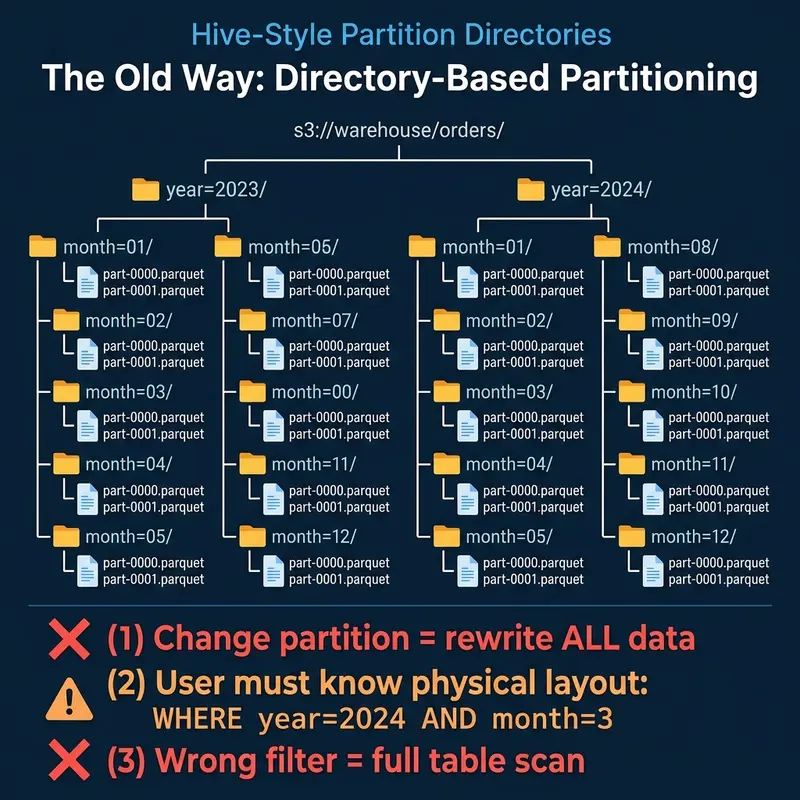
Hive-style directory-based partitioning with its three core problems

This is Part 4 of a 15-part Apache Iceberg Masterclass. Part 3 covered metadata-driven performance. This article explains how Iceberg handles the problem that has plagued data lakes for over a decade: what happens when your partition strategy needs to change.

Partitioning determines how data is physically organized in storage, and it is the single most impactful factor for query performance on large tables. Get it right and queries skip 95% of the data. Get it wrong and every query scans everything. The problem is that requirements change, data volumes grow, and the partition strategy that worked last year becomes a bottleneck this year.

Table of Contents

  1. What Are Table Formats and Why Were They Needed?
  2. The Metadata Structure of Current Table Formats
  3. Performance and Apache Iceberg’s Metadata
  4. Technical Deep Dive on Partition Evolution
  5. Technical Deep Dive on Hidden Partitioning
  6. Writing to an Apache Iceberg Table
  7. What Are Lakehouse Catalogs?
  8. Embedded Catalogs: S3 Tables and MinIO AI Stor
  9. How Iceberg Table Storage Degrades Over Time
  10. Maintaining Apache Iceberg Tables
  11. Apache Iceberg Metadata Tables
  12. Using Iceberg with Python and MPP Engines
  13. Streaming Data into Apache Iceberg Tables
  14. Hands-On with Iceberg Using Dremio Cloud
  15. Migrating to Apache Iceberg

The Hive Problem: Partitioning Is Permanent

Hive-style directory-based partitioning with its three core problems

In Hive and other traditional data lake systems, partitions are physical directories. A table partitioned by year and month has a directory structure like:

s3://warehouse/orders/year=2023/month=01/part-0000.parquet
s3://warehouse/orders/year=2023/month=02/part-0000.parquet
...

This design has three fundamental problems:

Changing partitions requires rewriting all data. If a table is partitioned by month and you need daily partitions (because data volume grew and monthly partitions are now too large for efficient queries), you must read every file, re-partition it, and write it back. For a petabyte table, this means a petabyte of compute and I/O, hours of processing, and downtime for consumers.

Users must know the physical layout. Queries must explicitly reference partition columns using the exact partition column names: WHERE year = 2024 AND month = 3. If a user writes WHERE order_date = '2024-03-15', Hive does not recognize that order_date maps to year = 2024, month = 3, and it scans the entire table. This creates a constant burden on users to understand and correctly use the physical layout.

Wrong filters produce silent full scans. There is no error, no warning. The query runs, it just reads every partition. Teams discover the problem only when they notice query times are 50x slower than expected.

How Iceberg Solves This

Iceberg partition evolution showing how old and new partition specs coexist without rewriting data

Iceberg separates the logical partition specification from the physical data layout through two mechanisms: hidden partitioning (covered in Part 5) and partition evolution.

The Partition Spec

Every Iceberg table has a partition spec that defines how source columns map to partition values. The spec does not create directories. Instead, it records partition values as metadata in manifest entries alongside each data file.

-- Create a table partitioned by month
CREATE TABLE orders (
  order_id BIGINT,
  order_date DATE,
  amount DECIMAL(10,2),
  status STRING
) PARTITIONED BY (month(order_date))

When data is written, the engine computes the partition value (month('2024-03-15') = 2024-03) and stores it in the manifest entry for that file. The file itself can live at any path; there is no requirement for a month=2024-03/ directory.

Evolving the Spec

When data volume grows and monthly partitions become too coarse, you change the spec:

ALTER TABLE orders SET PARTITION SPEC (day(order_date))

This is a metadata-only operation. It takes milliseconds. No data is read or rewritten. What happens internally:

  1. The current partition spec (Spec 0: month(order_date)) is preserved in the table’s metadata history.
  2. A new partition spec (Spec 1: day(order_date)) is set as the active spec.
  3. All existing data files retain their Spec 0 partition values in their manifest entries.
  4. All new data written to the table uses Spec 1.

The table now contains files with two different partition specs. This is not a broken state. It is the designed behavior.

How Query Planning Handles Multiple Specs

How engines resolve queries across multiple partition specs by evaluating each independently

When a query filters on order_date, the engine must correctly prune files regardless of which spec they were written under. Here is the process:

SELECT * FROM orders
WHERE order_date BETWEEN '2023-12-01' AND '2024-01-31'

For Spec 0 files (monthly): The engine translates the date range into month values: 2023-12 and 2024-01. It checks manifest entries with Spec 0 partition values and keeps files where the month partition is either 2023-12 or 2024-01. All other months are skipped.

For Spec 1 files (daily): The engine translates the date range into day values: 2024-01-01 through 2024-01-31. It checks manifest entries with Spec 1 partition values and keeps files where the day partition falls within that range. All other days are skipped.

Result: Both old and new files are correctly pruned using their respective specs. The query returns accurate results from files written under different partition strategies, without the user knowing or caring about the spec history.

Real-World Scenarios

Growing From Monthly to Daily

The most common evolution. A startup begins with monthly partitions when data volume is 10 GB/month. Two years later, data volume is 500 GB/month and monthly partitions produce files too large for efficient processing. Evolving to daily partitions makes new data more granular while old data remains accessible.

Adding a Partition Column

A table partitioned only by date starts receiving queries that heavily filter by region. Adding a partition on region (using bucket(16, region)) improves pruning for those queries:

ALTER TABLE orders SET PARTITION SPEC (day(order_date), bucket(16, region))

Old files remain partitioned by date only. New files are partitioned by both date and region. Queries that filter on date work correctly for both old and new files. Queries that filter on region get pruning benefits only for new files.

Removing a Partition Column

If a partition column becomes irrelevant (e.g., a geographic region is no longer used for filtering), you can evolve the spec to remove it. Old files keep their partition values, but new files are no longer organized by that column. Dremio and other engines handle this transparently during query planning.

What About the Old Data?

After a partition evolution, old data continues to work correctly but may have suboptimal organization. The old monthly files are coarser than the new daily files, meaning queries against historical data scan larger files than necessary.

Two options:

  1. Leave it alone. If historical data is queried infrequently, the cost of less-optimal pruning is minimal. This is the zero-effort approach.

  2. Compact old data. Run a compaction job that rewrites old files under the new spec. This produces daily-partitioned files for the historical data too, but requires compute resources. Dremio’s automatic table optimization can handle this for tables managed by Open Catalog.

How Other Formats Handle This

How Other Formats Handle This

Delta Lake’s Liquid Clustering is a different solution to the same problem. Instead of static partitions, it uses adaptive clustering that reorganizes data in the background. The tradeoff: Liquid Clustering requires ongoing background compute, while Iceberg’s partition evolution is a one-time metadata operation with optional follow-up compaction.

Partition evolution is one of the features that makes Iceberg a safe long-term choice. It means the partitioning decision you make today is not permanent. Part 5 covers hidden partitioning, the other half of Iceberg’s partitioning story.

Books to Go Deeper

Free Resources

What Google Play’s I/O 2026 Updates Look Like From a Solo Indie Puzzle Developer

Play Console recommends a custom store listing for the

This is a submission for the Google I/O Writing Challenge.

I chose the Google Play announcements from Google I/O 2026 because they are not abstract for me.

My name is Alla Kuznetsova. I am an indie developer and the person building Marble Sudoku, a mobile puzzle game where classic Sudoku logic is played with colorful marbles instead of numbers. I publish the game under Luma Play. Luma Play is not a large studio and there is no separate product group behind me; it is my small indie label.

So my main problem right now is not only how to make the game better.
But also how to help the right players find it, and then also analyze their behavior on the application page. This article is my experience working with Google AI and updating the Google Play console from Google.

That is why the Google Play updates felt important. Play Shorts, Ask Play, Gemini-assisted store listings, keyword recommendations, and AI-powered insights inside Play Console all point in the same direction: Google Play is becoming less like a static shelf and more like an active discovery system.

And for a solo indie developer, discovery is everything.

The Part That Immediately Made Sense: Custom Listings by Gemini For Real Search Intent

After reading the announcement, I opened Play Console to see whether these updates were already visible in my real workflow.

They were.

In Grow overview, Play Console showed a very specific recommendation for Marble Sudoku: create a custom store listing for users searching for ‘sudoku.’

Play Console recommends a custom store listing for the 'sudoku' search intent

Marble Sudoku by Gemini

Play Console recommends a custom store listing for the ‘sudoku’ search intent.

That was interesting because it was not generic advice like ‘improve your store page.’ It was tied to a concrete search intent.

The console said my app receives significant traffic from searches for ‘sudoku,’ but the conversion rate for that term is lower than the average conversion rate. The suggested action was to create a custom store listing for that term, with a potential conversion-rate impact of +2 percentage points.

Generate suggested descriptions using Gemini

This is exactly the kind of recommendation a solo developer can use.

For a big studio, +2pp might be one line in a growth report. For me, it is a test plan.

Marble Sudoku can be understood in several different ways:

  • classic Sudoku, but visual
  • Sudoku without numbers
  • a relaxing logic puzzle
  • a color puzzle with rules
  • a marble puzzle with a calm feel

Those are different entry points. A Sudoku fan wants to know the logic is real. A casual puzzle player may care more about the look and the feeling. Someone who avoids numbers needs to understand that this is visual, not math-heavy.

A single default store page cannot speak perfectly to all of them.

That is why custom store listings are useful. They let me match the store page to the intent behind the search.

Gemini Makes The Idea Faster, But Not Automatic

From that recommendation, I opened the custom store listing flow. Play Console had already set the target keyword to ‘sudoku.’ The page also showed a Gemini note saying that store listing descriptions had been generated based on that search keyword.

The custom store listing flow is already targeted to the 'sudoku' keyword and references Gemini.

The custom store listing flow is already targeted to the ‘sudoku’ keyword and references Gemini.

That is where the I/O announcement started to feel real.

The flow connected three things that are usually separate:

  1. Google Play sees a search opportunity.
  2. It suggests a custom listing.
  3. Gemini helps draft listing content.

For one developer, this is powerful. I do not have an ASO department. I do not have a dedicated person writing twenty store-page variants. Usually, every experiment costs time and focus.

If Gemini can turn a keyword opportunity into a first draft, that lowers the cost of testing.

And in my session, the generation flow also showed the rough edge: the description could not be generated and Play Console asked me to try again later.

Gemini generation failed in the custom listing flow.

That did not make the feature useless. It made it feel real.

The announcement says AI can help with store listing creation. The developer experience says: yes, but I still need to review, retry, edit, and understand what I am publishing.

That is probably the right relationship with AI in ASO. Not ‘AI replaces positioning,’ but ‘AI helps create more testable versions of positioning.’

Play Shorts Sounds Perfect For My Game, But The Upload Path Confused Me

The I/O update I was most excited about was Play Shorts.

For Marble Sudoku, short vertical video makes immediate sense. The game is easier to understand in motion than in a screenshot.
But when I checked the YouTube videos section in Play Console, the workflow became confusing.

The YouTube videos section says YouTube Shorts and live videos will not be displayed.

The YouTube videos section says YouTube Shorts and live videos will not be displayed.

The requirements are clear, but the workflow is not. Play Shorts sounds like a portrait short-form video format, while the current YouTube video section says that YouTube Shorts will not be displayed. I understand the idea, but I still could not figure out how to upload the right kind of video.

The connected playlist shows zero videos available for Play.

The connected playlist shows zero videos available for Play.

That is useful feedback, but it still leaves me guessing. Video could be one of the best discovery surfaces for Marble Sudoku, because the game is easier to understand in motion. But for Play Shorts to be useful to indie developers, the upload path needs to be clearer.

Ask Play Changes What Search Means

Another update that stood out to me was Ask Play, Google’s AI-powered discovery experience.

Players usually do not search for games they do not know exist. Almost nobody wakes up and searches for “Marble Sudoku.” They search for intent: a relaxing puzzle, Sudoku without numbers, a beautiful logic game, something calm but still challenging.

That is why Ask Play matters. If Google Play starts understanding what players mean, not only what they type, niche games have a better chance to be discovered.

But it also raises the quality bar. My store listing needs to explain the game very clearly: this is Sudoku logic, with colors and marbles instead of numbers. It is calm, but still a real puzzle. That is not just marketing copy anymore. It is discovery input.

What I Wish Play Console Did Next

Because I already use Gemini API outside Play Console, I can imagine a more complete workflow inside the console itself.

For events, I would love an AI assistant that helps create the full package: cover image, tagline, description, translations, policy checks, and tone variants.

For new builds, I would love AI-assisted release notes. Play Console could ask what changed, or read a structured changelog, and suggest short user-facing update text.

For video, I would love a clearer eligibility explainer. If a playlist has 0 videos available for Play, tell me exactly why: Short, monetized, private, copyrighted, wrong format, or still processing.

These may sound like small workflow improvements, but for a solo developer they matter. AI does not replace strategy for me. It removes repetitive friction around strategy.

My Practical Plan After I/O

After checking the announcements and Play Console, I see these updates as one workflow.

First, I would create a custom store listing for “sudoku” that speaks directly to Sudoku players.

Second, I would create another listing for the “relaxing puzzle” angle.

Third, I would prepare short vertical gameplay videos, even if the Play Shorts path is not fully clear yet.

Fourth, I would keep using Gemini API for event and social creative, but connect those experiments back to Play Console data.

The goal is not to create more content. The goal is to better match player intent with the first thing they see.

My Main Takeaway

My impression after Google I/O 2026 is optimistic, but not blindly optimistic.

Google Play is moving toward active discovery: search intent, AI recommendations, short videos, custom listings, and reporting working together.

For large studios, that gives scale. For solo developers, it gives a chance.

and for solo developers, that chance often looks like automation: one person being able to create the kind of consistent, colorful, multi-channel presence that normally requires a marketing department.

The tools still need clarity. Gemini-assisted listings are promising, but generation can fail. Play Shorts sounds perfect for mobile games, but the relationship between Play Shorts, YouTube videos, preview videos, and unsupported YouTube Shorts is still confusing.

So my takeaway is this:

Google Play’s new discovery tools do not remove the need for ASO thinking. They make ASO more testable.

and for Marble Sudoku, that is enough to be exciting.

I Already Use Gemini, Just Outside Play Console

One reason these announcements caught my attention is that I already use the Gemini API in my own workflow.

I use it to generate visual ideas and covers for Google Play events, social posts, and community updates. I also run a DEV blog for Luma Play, where I share Marble Sudoku updates, screenshots, leaderboard posts, and cozy puzzle moments with my game character: dev.to/lumaplay.

Thanks to Gemini, I can fill my public channels with colorful content instead of leaving them empty between releases. I use it as part of a publishing loop across my site, DEV, X, Micro.blog, Tumblr, Bluesky, Reddit, LinkedIn and other places where players or developers may discover the game.

Micro.blog visual by Gemini:

Micro.blog publishing for Marble Sudoku

Reddit visual by Gemini:

visual profile for Marble Sudoku

This is not AI for novelty. It is AI because a solo developer has repeating creative work every week: event images, post copy, update notes, short captions, store experiments, and localization drafts.

For an indie developer, this kind of automation is not a luxury. It is one of the only realistic ways to compete with media giants that have teams for trailers, social posts, store copy, localization, community updates, and paid creative testing.

So when I see Gemini appear inside Play Console, I do not see it as just a nice demo. I see something that could save hours of repetitive work.

For me, the next natural step would be an AI event workflow inside Play Console: choose the event type, describe what changed, and get a draft package with a cover image, tagline, event description, translations, and a policy checklist.

The same could happen when uploading a new build. Play Console could suggest user-facing release notes from the developer’s changelog.

That would be useful because, to compete with media giants, I need to spend less time rebuilding the same marketing workflow manually and more time improving the game.

Disclosure

I used AI assistance to organize and edit this post. The product experience, critique, screenshots, examples, and final opinions come from my real work on Marble Sudoku and my own review of Play Console.

Forgetting the Myth of “Ease of Integration” When Selling Digital Products with Bitcoin

The Problem We Were Actually Solving

We had a digital product that we were eager to sell to customers worldwide. However, our chosen payment gateway refused to support international transactions, citing anti-money laundering (AML) and know-your-customer (KYC) regulations. This was a problem not just for us, but for many other digital product creators who rely on global sales to sustain their businesses. The question was: how could we accept Bitcoin payments without being bound by the limitations of traditional payment gateways?

What We Tried First (And Why It Failed)

In our early attempts to integrate Bitcoin payments, we tried using popular libraries like Stripe’s Bitcoin integration and a few other open-source libraries. While they offered a convenient API, we soon realized that they relied on the same flawed underlying architecture that the payment gateways used – namely, the need for intermediaries to process transactions. As a result, we encountered issues with scalability, security, and processing fees that outweighed the convenience.

The Architecture Decision

After hitting a brick wall with the popular libraries, we decided to take a more radical approach. We chose to implement our own Bitcoin payment processing system from scratch, using Node.js and a custom-built payment processor. This decision was motivated by our desire to have complete control over the payment flow, as well as the need to ensure scalability, security, and low transaction costs. We also opted for a decentralized approach, using a combination of off-chain and on-chain transactions to facilitate fast and secure payments.

What The Numbers Said After

After deploying our custom payment processor, we noticed a significant improvement in our transaction processing times, with average latency dropping from 30 seconds to just 3 seconds. Allocation counts for memory usage also decreased by 40%, allowing us to process more transactions without sacrificing performance. Meanwhile, security improved substantially, thanks to our custom-built processor’s ability to verify transactions without relying on intermediaries. Of course, there were still some unexpected issues, like the one time we had to deal with a rogue transaction that tried to drain our wallet – but that’s a story for another time.

What I Would Do Differently

Looking back on our experience, I would advise against trying to integrate Bitcoin payments using the popular libraries. While they may seem convenient, they’re often built on shaky ground and will inevitably lead to scalability issues and security concerns. Instead, I would recommend taking a more radical approach, like we did, and building a custom payment processor from scratch. It may take time, effort, and expertise, but the benefits far outweigh the costs. After all, when it comes to selling digital products, the last thing you want is to be held hostage by a payment system that’s more interested in profits than in supporting your business.

Samsung Galaxy S27 Pro için yeni kamera detayları paylaşıldı

Samsung Galaxy S27 Pro

Samsung Galaxy S27 Pro2027’nin başında pazara sunulacak Samsung Galaxy S27 serisinde “Galaxy S27, Galaxy S27+, Galaxy S27 Pro ve Galaxy S27 Ultra” modellerinin yer alacağı aktarılıyor. Dün 6,47 inç boyutunda 120 Hz OLED ekranla donatılacağı ve entegre S Pen ile gelmeyeceği söylenen Galaxy S27 Pro, Çinli kaynak Ice Universe’e göre Galaxy S27 Ultra ile aynı geniş açı ve ultra geniş açı kameraları (her iki kamerada da yeni sensörler kullanılacağı belirtiliyor) taşıyacak. İki telefon arasında görüntüleme açısından fark yaratan noktanın ise “telefoto” kamera olacağı söyleniyor. Henüz net bir açıklama yok ancak Galaxy S27 Pro’da Galaxy S27 Ultra’ya kıyasla daha az optik yakınlaştırma/zoom sunulabilir.

Samsung Galaxy S27 Pro için yeni kamera detayları paylaşıldı yazısı ilk olarak Teknoloji haberleri – LOG üzerinde yayınlandı.

My 4-Step Regex Debugging Workflow (That Actually Saves Time)

I’ve written hundreds of regular expressions over the years, and I still get them wrong on the first try. Here’s the debugging workflow I’ve settled on that consistently gets me from “why isn’t this matching” to “oh, that’s why” in under a minute.

Step 1: Isolate One Pattern at a Time

The most common mistake I see (and make) is testing a monster regex all at once. If you’re validating an email with a complex pattern and it’s not working, break it down: test just the local part, then the domain, then combine them. This alone has saved me hours of staring at a wall of backslashes and brackets.

Step 2: Check Your Quantifier Greediness

This one bites everyone. A pattern like <.*> against "<div>hello</div>" matches the entire string, not just the opening tag. The fix: add ? to make it lazy — <.*?>. I can’t count how many “my regex is broken” posts on Stack Overflow boil down to this. Whenever a pattern matches too much, my first instinct is to check for greedy quantifiers.

Step 3: Toggle the Flags

Flags change everything. hello matches “hello” — but add the i flag and hello now matches “HELLO”, “Hello”, and “hElLo”. The ^ anchor matches the start of a string by default, but with the m (multiline) flag, it matches the start of each line. I often toggle the g (global) flag off during debugging to focus on the first match, then turn it back on to check all occurrences.

Step 4: Use a Real-Time Tester

This is the game-changer. Rather than write-test-rewrite cycles in my code editor, I use a live regex tester that highlights matches as I type. Seeing matches highlighted instantly — and seeing capture groups broken out individually — makes pattern bugs obvious in seconds. I use CodeToolbox Regex Tester because it runs entirely in the browser (no data uploads) and includes presets for common patterns like email, URL, and IPv4 to use as starting points.

The complete workflow takes less than a minute once it becomes habit: isolate → check greediness → toggle flags → test live. These four steps have saved me more debugging time than any regex cheatsheet ever has.

What’s your go-to regex debugging trick? I’d love to hear what works for you in the comments.