AI-generated accessibility, an update — frontier models still fail, but skills change the game

Screenshot of the overview section of the report

A few months ago I shared early results from the A11y LLM Eval project, a benchmark that measures how accessibly LLMs generate UI code. The previous post showed that LLMs default to inaccessible code, explicit accessibility instructions can dramatically change that, and manual testing is still essential.

The latest report is out, with new models, a redesigned test scope, and a brand new mechanic: skills. Two things stand out:

  1. The newest frontier models (GPT‑5.5, Claude Opus 4.7, Gemini 3.1 Pro Preview, Claude Haiku 4.5, and others) still fail accessibility checks by default.
  2. A well-written skill can produce the highest pass rates we’ve measured. Skills can even let a weak-baseline model outperform the leaders, though they can cost more tokens to run.

Screenshot of the overview section of the report

Note that the pass rate reflects only this harness’s automated checks (a curated set of axe-core WCAG rules plus hand-written assertions per test case). Automated testing can detect only a subset of accessibility issues: 100% here means the sample passed every check that was run, not that the page is WCAG conformant or fully accessible.

TL;DR

  • Default (“control”) accessibility is still bad: average pass rate is 12%, with GPT‑5.4 Mini leading at 25%. Newer does not mean more accessible.
  • Custom instructions still pay off. The Basic instruction set lifts pass rates by +48.5pp to 60%.
  • Skills go further. The Building Accessible UI skill, run as a two-turn Generate then Review workflow, hits 86% pass rate (+74.6pp). The top performer is Gemini 3.1 Pro Preview, a model that scored only 8% on control.
  • The skill’s review turn costs about 5.5× the input tokens of control. Quality is not free.

What’s new in this report

  • Results are now fully agentic. The previous report called LLM APIs directly with a single prompt and response. This report drives each evaluation through the GitHub Copilot SDK as an actual agent, with tool use, multi-turn reasoning, and the same instruction and skill loading mechanics that Copilot agents use in production. The numbers below reflect how these models behave when wrapped in an agent loop, not in a one-shot API call. It also means the new “skills” variant is only possible because we’re running through an agent runtime.
  • 8 models evaluated across 32 prompt cases (1,280 control samples). The model lineup is mostly fresh: GPT‑5.4, GPT‑5.4 Mini, GPT‑5.5, Claude Opus 4.7, Claude Sonnet 4.6, Claude Haiku 4.5, Gemini 3.1 Pro Preview, and Gemini 3 Flash Preview.
  • Instruction sets tracked are now Basic and Minimal. The Detailed expert-level instruction set from the previous run isn’t in this report.
  • Skills, reusable task-specific guidance packages, were added as a new mechanic. The first skill evaluated is Building Accessible UI. More on this below.
  • A new variant token and pass-rate snapshot lets you compare quality against token cost across control, instructions, and skill turns.

Control: frontier models, same accessibility problem

The headline finding from the previous post was that LLMs default to producing inaccessible code. With the latest models in hand, that hasn’t changed.

Screenshot of the control overview

A few observations:

  • GPT still leads on control, but the top score is well below the 41% GPT‑5.2 posted previously. The prompt set has changed and the assertions are stricter, so the numbers aren’t directly comparable, but the conclusion is the same: nobody is shipping accessible code by default.
  • Claude Haiku 4.5 sits at 3%, with an average of nearly 6 WCAG failures per sample. Sonnet 4.6 and Gemini 3 Flash Preview aren’t far behind.
  • The hardest test case, Shopping Home Page (React, Dark theme), produced a 0% pass rate with 15.55 average WCAG failures across all models. Component density compounds the problem fast.

The training-data hypothesis from the previous post still seems to fit. The open web is overwhelmingly inaccessible, so models trained on it inherit those patterns regardless of how capable they are at code in general.

Instruction sets: still the cheapest win

Custom instructions are still the fastest thing a team can ship to improve accessibility.

Screenshot of the instruction set table

The Basic instruction file produces nearly 5× the control pass rate while only increasing average input tokens by roughly 50%. Even the one-line Minimal instruction (“All output MUST be accessible.”) more than triples it.

If you do nothing else, ship an instruction file. The basic instructions are a good starting point to customize for your team’s stack and design system.

Skills: the new mechanic

The biggest change in this report is the introduction of skills. Where instruction sets are always-on guidance loaded into the agent’s context for every task, a skill is a reusable, task-specific package that bundles guidance, examples, supporting files, scripts, and a tool-use workflow. The agent loads the skill only when it’s relevant, and within a skill, only loads the slice it needs for the task at hand.

This matters because it changes two things at once: what guidance the model sees and when it sees it. Skills can carry far more detail than an instruction file without flooding the context window, and the two-turn Generate then Review pattern gives the model a structured second look at its own output before it’s done. Together that’s why skills outperform instructions in this report.

The first skill evaluated is Building Accessible UI. It is purpose built to:

  • Activate when the agent is creating UI, so generated code is more accessible by default.
  • Contain expert-level guidance and checklists for many components and patterns.
  • Only pull the guidance for the specific component or pattern being built, to limit token impact on the context window.
  • Run a two-turn workflow: Generate the UI, then Review it against the skill’s checklist and fix issues.
Variant Pass rate Delta vs. control
Building Accessible UI, Generate (turn 1) 82% +70.4pp
Building Accessible UI, Review (turn 2) 86% +74.6pp

Screenshot of skill table

A few observations:

  • The best model under the skill is Gemini 3.1 Pro Preview, the same model that scored 8% on control. With the right scaffolding, a weak baseline can outperform the leaders.
  • The review turn pulls its weight. Asking the agent to self-check against the skill’s checklist adds 5.6pp on top of an already strong first turn, closer to how a human accessibility reviewer actually works.
  • Skills don’t dominate the prompt. Only 14 to 18% of input tokens come from the skill itself, compared to 100% for instruction sets. Most of the context window is still free for the actual task.

The cost question

Skills win on quality, but they aren’t free.

Screenshot of the token impact table

The skill’s review turn averages roughly 5.5× the input tokens and 2.7× the API calls of control. At scale, that’s a meaningful budget impact.

A practical split:

  • Instruction sets are broad, always-on guardrails. Cheap, simple to ship, and the best ratio of accessibility improvement to tokens spent. The downside is that the token impact of custom instructions can add up quick if your project has instructions for multiple domains, such as accessibility, security, content, etc. Use these as the default for any team but keep them short.
  • Skills are focused, procedural guidance for higher-stakes work, or when you have the budget.

Recommendations

The advice from the previous post still holds, with one new lever:

  1. Ship a project-tailored instruction file today. Start from the basic instructions and customize for your stack, design system, and component library.
  2. Add a skill for high-stakes UI work if your token budget allows. The two-turn Generate then Review pattern materially improves outcomes.
  3. Bake automated accessibility checks into CI/CD and block PRs on regressions.
  4. Keep manual testing by humans, including people with disabilities. None of these tools (automated checks, instructions, or skills) can cover all accessibility requirements.

Closing

The trajectory hasn’t changed. AI keeps scaling how much UI we ship, and the open-web training data keeps scaling inaccessible patterns alongside it. Frontier models alone aren’t going to fix this; the latest results from Claude 4.7, Gemini 3.1, and GPT‑5.5 make that clear.

The toolbox has changed, though. Instructions still pay off in minutes. Skills are a new lever, and a powerful one: capable of taking an 8% baseline model to 86% on these checks. The work now is to pick the right tool for the right task, enforce it in CI, and keep humans in the loop where it matters most.

See the full report and the a11y-llm-eval repository on GitHub.

My HTML Learning Journey 🚀


I recently completed the core fundamentals of HTML, and it has been an exciting learning experience.

When I started, HTML looked simple, but while practicing I realized how important it is for building the structure of every webpage. Instead of only watching tutorials, I focused on writing code manually and experimenting with different tags and layouts.

Here are the topics I covered during my learning journey:

✅ HTML Basics
HTML document structure
Headings and paragraphs
Text formatting tags
Lists
✅ Links and Media
Anchor tags
Images
Audio and video tags
✅ Tables
Rows and columns
Table headings and data
colspan
rowspan
✅ Forms

This was one of the most interesting topics for me.

I learned:

Input types
Labels and the for attribute
Radio buttons
Checkboxes
Dropdowns
Textareas
Form validation
Form attributes like action, method, required, etc.
✅ Semantic HTML

I learned how semantic tags improve webpage structure and readability using:

header
nav
section
article
footer
aside
✅ Other Topics
div and span
Meta tags
iframe
HTML entities
SVG basics
Canvas basics
SEO and responsive basics

The biggest thing I learned is that consistency and practice matter more than speed. Writing code daily helped me understand concepts much better.

My next step is starting CSS to learn webpage styling and responsive design.

Excited to continue the journey and keep building 🚀

HTML #WebDevelopment #FrontendDevelopment #LearningInPublic #100DaysOfCode #CodingJourney

The Day PayPal Failed and the Rust Rewrite Saved the Product Launch

The Problem We Were Actually Solving

Our digital art marketplace was designed around Stripes Checkout and PayPal Express. Both services gave us one-click payments and PCI compliance without shipping PCI evidence to every artist. The launch timeline assumed that every artist could open a Stripe account the same week we deployed.

Then the email from our Nigerian artist arrived: four Stripe applications rejected, PayPal permanently unavailable for Nigerian merchants, and Gumroad asking for a U.S. bank account. Same message from artists in Pakistan, Venezuela, and Iran. The list grew to thirty-seven artists out of two hundred ninety-four.

The real problem wasnt currency or language—it was platform restriction. Stripes onboarding API refused every applicant whose country code didnt match the connected bank accounts country. PayPals regional lock was binary: supported or blocked. Our revenue pipeline assumed universal connectivity; reality delivered a fragmented map.

What We Tried First (And Why It Failed)

We bolted Payhip onto the storefront in two days. The integration seemed trivial: a single JavaScript widget that redirected to Payhips hosted checkout. We ran a smoke test with 1,000 requests to /api/create-checkout-session using k6. The test failed after 87 requests with 502 Bad Gateway. The logs showed Payhips CDN dropping traffic from AWS eu-central-1 because their ASN belonged to Amazon. We switched to DigitalOcean, but Payhips WAF still blocked the Droplet IP after two minutes.

Next we tried Doku for Indonesia, TossPay for South Korea. Each adapter required a new redirect path, a new webhook signature verification, and a new merchant agreement. The frontend grew three pay buttons. The backend now had four different webhook handlers. One artist in Brazil clicked the wrong button and paid in IDR instead of BRL, locking the payout for thirty days. The chargeback rate on those mixed-currency orders hit 3.4 percent.

The bigger failure was latency. Stripes latency budget was 260 ms; after we added four regional providers it ballooned to 1.2 s median. Real User Monitoring from SpeedCurve showed the time-to-interactive of our checkout page jumped from 1.8 s on 4G to 3.7 s on LTE in rural Nigeria. Googles Lighthouse penalized us for First Input Delay. Our conversion rate dropped 8 percent in the first week.

The Architecture Decision

On week five we decided to remove every hosted checkout. Instead we built a self-custody payment layer that lived inside our edge runtime. We chose Cloudflare Workers because the platform gave us deterministic CPU limits, zero-cold-start for edge locations, and a JavaScript runtime with predictable memory. We ported the payment logic from Node to Rust using wasm-pack.

The migration target was tiny: a single function that built a Payment-Initialized message, signed it with our private key, and returned a JSON response. We compiled to WASM so the Worker could keep the GC-free performance of Rust while still running JavaScript in the rest of the page.

Building the WASM payload required a nightly Rust toolchain and the wasm32-unknown-unknown target. Our first build failed because we used the allocator crate in a no_std context—we forgot to stub the global allocator. The error message was unhelpful: undefined symbol __rust_alloc. After one hour we switched to the wee_alloc crate, re-exported it as #[global_allocator], and the symbol vanished.

We then measured the bundle size with wasm-opt –dce and shrank the WASM from 142 kB to 58 kB. The runtime allocation count in wasm32 dropped from 223 allocs per invocation to 19. The mean execution time on Cloudflares hilly-1-r77 worker fell from 11.4 ms to 4.7 ms.

The tradeoff was cold-start latency: 17 ms extra on the first request because the Worker had to decompress the WASM module. We mitigated it by bundling the WASM as a Module Bundle and setting the modules keepalive flag to true in wrangler.toml. After that, the 95th percentile latency stayed at 19 ms.

What The Numbers Said After

We cut the checkout page from four buttons to one. The new endpoint /v1/payments/init is called from the frontend before the Pay button is enabled. The flow now does three hops: browser → edge worker → our internal ledger written in Rust on Linux.

We measured with open-telemetry traces. The median latency for /v1/payments/init on five Cloudflare PoPs (Atlanta, Singapore, Frankfurt, São Paulo, Mumbai) is 14 ms. The 95th percentile is 38 ms. Tail latency at 99.9th percentile is 112 ms. We attribute the tail to Cloudflares edge worker scheduling.

We ran a controlled experiment for two weeks. The A/B group used the new Rust WASM endpoint; the control kept the Payhip multi-button checkout. The conversion rate for the new group rose 7.2 percent. The chargeback rate fell from 2.9 percent to 0.4 percent. The only regression was in Iran, where Cloudflares PoP is blocked; we added an alternate route via a VPS in Armenia running HAProxy and the same WASM module. The latency penalty there is 270 ms, but its better than zero.

Memory usage on Cloudflare Workers is reported in the worker logs: each invocation allocates 28 kB of WASM memory and 12 kB of JavaScript memory. At 12,000 requests per minute we hit peak memory of 4.1 MB per PoP. Cloudflares 128 MB limit gives us a safety margin of thirty-one.

In our internal ledger service running on Linode amd64, the Rust binary uses jemalloc and reports 3.4 MB RSS per thousand concurrent payments. Weve had zero out-of-memory events since flipping the switch.

What I Would Do Differently

I would not have started with Node. After three weeks of chasing Payhip CDN IP blocks and Stripe country filters, I should have assumed the platform would be the problem first. The Node runtimes non-deterministic GC pauses would have made the latency regression harder to debug.

I would standardize the signature algorithm earlier

Google Sheets CRM: 4 Ways I’ve Actually Done It (with Apps Script Code)

Every SMB I’ve worked with treats a Google Sheet as their first real database — leads, deals, inventory, campaign tracking. Then they buy a CRM and ask “how do we get the sheet into HubSpot/Pipedrive/Zoho?” There are four ways I’ve actually shipped this, and which one is right depends on volume, two-way needs, and how much code you want to maintain.

Here’s the decision tree I use:

Need two-way sync?
├── No  → Is your CRM's native Sheets connector free on your tier?
│        ├── Yes → Use that (15-min setup)
│        └── No  → Make.com Free tier (~300 rows/month free)
└── Yes → How much volume?
         ├── < 1k rows/day → Google Apps Script (free, requires code)
         ├── 1k-10k/day    → Make.com Core ($10.59/mo) or n8n self-hosted
         └── > 10k/day     → Custom API integration (eng. effort)

Method 1: Native CRM marketplace integration

HubSpot ships a Google Sheets workflow action. Pipedrive has Marketplace connectors (Coupler.io, Surveyform). Zoho uses Zoho Flow. Salesforce has AppExchange options.

What you get: 15-minute setup, the CRM handles auth, field mapping uses the CRM’s property picker.

What you don’t get: two-way sync on most free tiers (HubSpot wants Operations Hub Starter at $20/mo). Conditional filtering is rare. Errors are silent — failed rows go to a log nobody reads.

Use this only when you need one-way “new row → new contact” and your CRM tier includes the integration. Otherwise jump to Method 2.

Method 2: Automation platforms (Zapier / Make / n8n)

The path of least resistance for two-way sync with logic. In n8n, a Sheet-to-HubSpot workflow is roughly this shape:

{
  "nodes": [
    {
      "name": "Google Sheets Trigger",
      "type": "n8n-nodes-base.googleSheetsTrigger",
      "parameters": {
        "event": "rowAdded",
        "documentId": "your-sheet-id",
        "sheetName": "Leads",
        "pollTimes": { "item": [{ "mode": "everyMinute" }] }
      }
    },
    {
      "name": "Filter",
      "type": "n8n-nodes-base.if",
      "parameters": {
        "conditions": {
          "string": [{ "value1": "={{ $json.email }}", "operation": "isNotEmpty" }]
        }
      }
    },
    {
      "name": "HubSpot",
      "type": "n8n-nodes-base.hubspot",
      "parameters": {
        "resource": "contact",
        "operation": "upsert",
        "email": "={{ $json.email }}",
        "additionalFields": {
          "firstName": "={{ $json.firstname }}",
          "lifecyclestage": "lead"
        }
      }
    }
  ]
}

15-minute build. The trigger node polls every minute. The IF filters out empty rows. The HubSpot node uses upsert on email, which kills the duplicate-creation problem on retry. Make.com and Zapier work the same way with different UIs.

Costs in 2026: Make Free covers ~300 rows/month, Make Core is $10.59/mo for 10k ops. n8n self-hosted is free on a $6 VPS. Zapier Free is useless for this (100 tasks, no filters, no multi-step).

Method 3: Google Apps Script (the free code path)

When you have someone on the team who writes JavaScript, this is the cheapest production option. Code lives inside the Sheet, runs on Google’s infra, no external dependencies.

Here’s a complete Apps Script that pushes new/edited rows to HubSpot with upsert by email — drop it into your Sheet’s Apps Script editor, set the HUBSPOT_TOKEN script property, and add a Synced At column:

// Open the Sheet → Extensions → Apps Script → paste below.
// Project Settings → Script Properties → add HUBSPOT_TOKEN (a Private App token).

const HUBSPOT_BASE = 'https://api.hubapi.com';

function getToken() {
  return PropertiesService.getScriptProperties()
    .getProperty('HUBSPOT_TOKEN');
}

// Trigger this from a time-based trigger or onEdit.
function syncRowsToHubspot() {
  const sheet = SpreadsheetApp
    .getActiveSpreadsheet()
    .getSheetByName('Leads');

  // Assumes columns: A=email, B=firstname, C=lastname,
  // D=company, E=lifecyclestage, F=synced_at
  const lastRow = sheet.getLastRow();
  if (lastRow < 2) return;

  const data = sheet.getRange(2, 1, lastRow - 1, 6).getValues();

  data.forEach((row, i) => {
    const [email, firstname, lastname, company, stage, syncedAt] = row;
    if (!email || syncedAt) return; // skip empty / already-synced

    const result = upsertContact({
      email, firstname, lastname, company,
      lifecyclestage: stage || 'lead'
    });

    if (result.ok) {
      // Mark as synced (column F, row i+2)
      sheet.getRange(i + 2, 6).setValue(new Date().toISOString());
    } else {
      Logger.log(`Row ${i + 2} failed: ${result.error}`);
    }
  });
}

function upsertContact(props) {
  const url = `${HUBSPOT_BASE}/crm/v3/objects/contacts/` +
              `${encodeURIComponent(props.email)}?idProperty=email`;

  // Try PATCH first (update if exists)
  const patchOptions = {
    method: 'patch',
    contentType: 'application/json',
    headers: { Authorization: `Bearer ${getToken()}` },
    payload: JSON.stringify({ properties: props }),
    muteHttpExceptions: true
  };

  let res = UrlFetchApp.fetch(url, patchOptions);
  if (res.getResponseCode() === 200) return { ok: true };

  // 404 → contact doesn't exist, POST to create
  if (res.getResponseCode() === 404) {
    const postOptions = {
      ...patchOptions,
      method: 'post',
      payload: JSON.stringify({ properties: props })
    };
    res = UrlFetchApp.fetch(
      `${HUBSPOT_BASE}/crm/v3/objects/contacts`,
      postOptions
    );
    if (res.getResponseCode() === 201) return { ok: true };
  }

  return {
    ok: false,
    error: `${res.getResponseCode()}: ${res.getContentText()}`
  };
}

Wire it to a trigger. In the Apps Script editor: clock icon → Add Trigger → choose syncRowsToHubspot → time-based → every 5 minutes. Now your sheet syncs automatically.

Known limits: 6-min execution cap per run, ~90 minutes total runtime/day on free Google accounts, 20,000 UrlFetch calls/day. For 1,000 rows/day this is fine. For 5,000+ rows, batch by synced_at window and process in chunks.

Method 4: Custom API integration

When volume is real (10k+ rows/day) or you need conflict resolution on two-way sync, you build a small backend. A minimal HubSpot → Sheets webhook receiver in Node.js with signature verification:

import express from 'express';
import crypto from 'crypto';
import { google } from 'googleapis';

const app = express();

// Raw body needed for signature verification
app.post('/hubspot-webhook',
  express.raw({ type: 'application/json' }),
  async (req, res) => {
    const sig = req.headers['x-hubspot-signature-v3'];
    const ts = req.headers['x-hubspot-request-timestamp'];
    const body = req.body.toString('utf8');

    const computed = crypto
      .createHmac('sha256', process.env.HUBSPOT_CLIENT_SECRET)
      .update(`POST${req.originalUrl}${body}${ts}`)
      .digest('base64');

    if (sig !== computed) return res.status(401).end();

    const events = JSON.parse(body);
    for (const ev of events) {
      if (ev.subscriptionType === 'contact.propertyChange') {
        await pushUpdateToSheet(ev.objectId, ev.propertyName, ev.propertyValue);
      }
    }
    res.status(200).end();
  }
);

app.listen(3000);

The other half — pushUpdateToSheet — uses the Sheets API to find the row by HubSpot contact ID and update the column matching the property name. With 80–100 lines total, you’ve got two-way sync that handles thousands of records/day.

Trade-offs: 1–3 weeks of initial build, OAuth refresh logic, observability, the bus factor problem. Don’t go here until automation platforms have failed you.

Gotchas every method shares

Duplicates. Re-running creates duplicate contacts unless you upsert by email or an external ID. The Apps Script above does the PATCH-then-POST dance; n8n’s HubSpot node has an “upsert” mode; Make has a “search then create or update” pattern. Use one.

Types. Sheets stores everything as a string. CRMs have types — number, date, boolean, dropdown enum. 5/4/2026 is May 4 in US locale, April 5 elsewhere. A blank cell is empty string "", not null. Normalize before the API call.

Rate limits. HubSpot allows 100 req/10s on standard plans. Pipedrive’s are tighter (10 req/2s in some endpoints). Add Utilities.sleep(100) between Apps Script calls when batching, or use the platform’s built-in throttling.

OAuth expiry. Tokens die. Native integrations refresh silently. Apps Script using a Private App token in HubSpot doesn’t expire (yay). Custom Node.js code with OAuth needs refresh logic — and the first sign it’s broken is the sync just stops working with no alert. Wire failure notifications to Slack or email.

Polling latency. Apps Script time-trigger minimum is every minute. Automation platforms poll every 1–15 minutes depending on tier. Webhooks are the only sub-second option, and Google Sheets doesn’t emit them natively (onEdit runs server-side but isn’t a webhook). For “true real-time,” you need the CRM’s webhook in the other direction, plus a way to push edits back.

TL;DR

  • One-way, low volume, native integration free? Use it.
  • Two-way, low-medium volume, no code? Make.com or n8n.
  • Have a JS-comfortable team and want $0 ongoing? Apps Script (copy the snippet above).
  • 10k+ rows/day or complex conflict resolution? Custom backend.

Most SMBs land at Make.com or Apps Script. Custom API is reserved for when you’ve genuinely outgrown both.

Originally published on trackstack.tech with a fuller decision framework and FAQ.

BrontoScope: AI-Powered Error Investigations

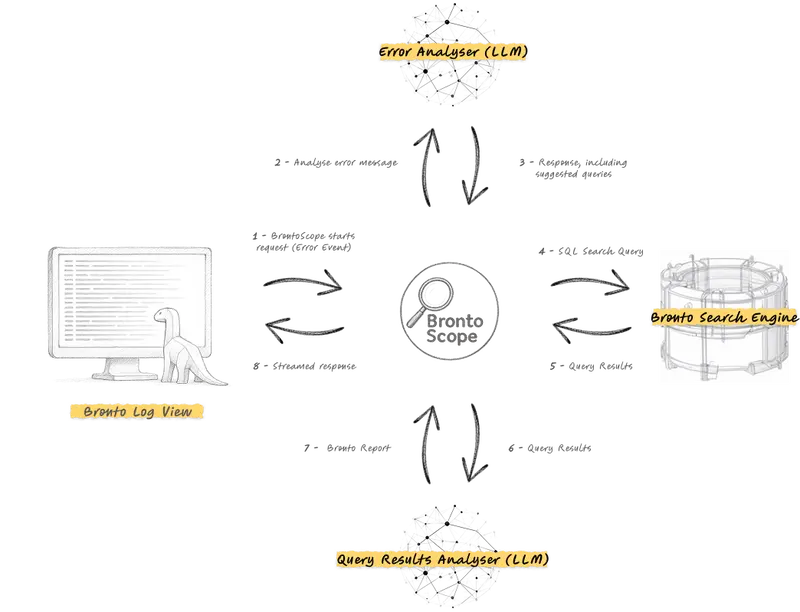
BrontoScope architecture diagram

Authored by Marco Aquilanti

Today we’re introducing BrontoScope, one of the Bronto AI Labs initiatives aimed at reducing user toil, increasing team efficiency, and reducing MTTR.

The Problem with AI in Observability

Almost every software company is adding AI features to their products — often with mixed results. As a user, I’m frequently annoyed by the continuous stream of AI features popping up everywhere: messaging apps that want you to chat with an LLM while you’re looking for your friends, search engines surfacing LLM answers first and leaving you wondering whether what you’re reading is true or a hallucination.

The observability space is no exception. Many products are being “enriched” with AI features, but most are missing the point. Here’s why.

Observability has always been hard. A production system can easily produce terabytes of logs, millions of traces, and millions of metrics every hour — too much for any human to easily inspect. LLMs should be the next pillar in observability, reducing burden and improving reliability. But only if focused on making the user’s life simpler.

Most current AI features in observability actually make the user’s life harder by:

  • Requiring a detailed prompt as input — users must invest significant time crafting prompts to get well-structured responses
  • Producing long, verbose text responses — even when the AI has nailed the request, the answer is often diluted across lines and lines of text
  • Taking too long — complex multi-step LLM workflows leave users waiting far too long for answers during an incident

The Bronto Approach

At Bronto, we’re extending the logging platform with LLM capabilities focused on one goal: automating recurring work patterns to make the user’s life simpler, not harder.

Our Bronto Labs initiative is built around three tools:

  • Auto-Parsing — using AI to automatically structure logs
  • AI Dashboard Creation — generating dashboards from natural language
  • BrontoScope — AI-powered incident investigation

The philosophy behind all of these: before adding any new feature, we make sure it will be genuinely useful to most users and won’t slow down or hinder any of their existing tasks.

BrontoScope

Incidents don’t wait for business hours. When an alert fires at 3am, one or a few on-call engineers need to move fast — often without access to the domain experts who know the affected system best.

The first steps of any incident are always the same:

  1. Understand the scope of the incident
  2. Estimate the impact on customers and the broader system
  3. Assign a priority and decide how to tackle it

Staying calm, thinking clearly, and acting quickly are all required — even when you’ve just been woken up. But too much haste leads to incorrect diagnosis.

LLMs can help enormously in these scenarios — they can summarize large amounts of data in seconds and are not affected by panic, confusion, or a 3am wake-up call.

BrontoScope automates the incident investigation process with a single click on any error event in your logs. The LLM writes and runs tens of queries against your data, analyzes the results, generates a summary report, and delivers it to you in just a few seconds.

What the Report Includes

  • Scope — when the errors started appearing, and which users, customers, services, regions, or hosts are affected
  • Probable causes — resource exhaustion, network issues, software bugs, traffic spikes, etc.
  • Suggestions — how to stop the error occurring or how to continue the investigation
  • Supporting data — the query results and charts that led the LLM to its conclusions, so you can validate that the model isn’t hallucinating

How It Works

BrontoScope architecture diagram

The process works in stages: first, the LLM analyzes the error and its surrounding context to guide subsequent data retrieval. The search engine then queries the relevant data and presents all findings to the LLM in a single comprehensive prompt — essentially, an ad-hoc dashboard built around the error and composed of many charts. The final response is streamed to the user via Server-Sent Events, allowing them to read the output as it’s generated in real time.

BrontoScope investigation report example 1

BrontoScope investigation report example 2

BrontoScope is powered by AWS Bedrock‘s most advanced AI models, ensuring all data is processed within the AWS ecosystem — prompts and responses are never stored or shared with model providers or third parties.

Why It Actually Makes Life Easier

  • No prompt required — just click on a log event. The LLM analyzes and understands the error, writes its own filter to find similar occurrences, and scans the data autonomously
  • Concise reports — goes straight to the point, with charts included to maximize the information density
  • Fast — in most cases the report is streamed to the user in under 10 seconds, even though tens of queries are run per investigation, thanks to the speed of Bronto’s search engine

Availability

BrontoScope is currently available on request and is being used internally by the Bronto team as well as by a number of design partner customers in real-world situations. Improvements will be made in the coming months.

This is just one of the AI features being developed at Bronto — stay tuned for future posts, or join our AI initiative and help shape what we build next.

Join Bronto Labs

The job of an AI engineer inside a 40-person company is not what most CEOs think it is

CEOs of 40-person companies often imagine their first AI hire will be a model trainer—someone who builds custom neural networks from scratch. Reality check: that’s maybe 10% of the job. The real work is less glamorous but more critical. Most days are spent cleaning data, managing third-party APIs, and translating between technical teams and business stakeholders. The actual model training happens mostly in vendor platforms like OpenAI or Anthropic. The real value is in connecting those tools to your actual operations.

Let’s walk through three typical weeks in the life of an AI engineer at a small company.

Week one: Data plumbing. The team needs to connect customer support tickets to knowledge base articles. The engineer spends four days writing scripts to extract text from Zendesk, clean it of HTML tags, and structure it for retrieval. The fifth day goes to testing edge cases—what happens when a ticket has no subject line? Or when the article contains a table? No model training happens. Just making sure the input pipeline works.

Week two: Vendor management. The company wants to use OpenAI’s API for summarization. The engineer evaluates three pricing tiers, tests rate limits, sets up monitoring for API failures, and writes fallback logic when the service is slow. They spend two days documenting the quirks—how the API handles technical jargon, its tendency to hallucinate dates. Then they build a wrapper that handles all this complexity so the business team doesn’t need to think about it.

Week three: Translation. Sales wants a tool to draft follow-up emails. The engineer sits with the sales team for three days to understand their actual workflow—what information they need to include, what tone to use, how they handle objections. They build a prompt library that maps to different scenarios, then create a simple interface where sales reps can input key details and get drafts. The heavy lifting isn’t in the model—it’s in making sure the output matches how salespeople actually work.

So when you’re hiring for this role, don’t look for deep learning expertise. Look for someone who can build data pipelines, understand API limitations, and translate business needs into technical requirements. The best candidates have experience with ETL tools, cloud services, and have worked with non-technical teams. They should be able to explain trade-offs clearly—why a certain approach might be slower but more reliable, or how to handle missing data. The magic isn’t in the models themselves—it’s in making them work in your messy, real-world environment.

This piece is from our notes on helping SMBs (10-100 people) build their first in-house AI teams. If your team is exploring this — quick feedback and questions welcome in the comments.

Building a Clinical Speech-Therapy App With a Real SLP: 4 Lessons From PhoenixSteps

Originally published on the AstroLexis blog. Cross-posted here for the community.

My son’s speech-language pathologist became my co-founder. PhoenixSteps is what came out of it: a pediatric clinical app that does what existing apps don’t because we built it together — engineer plus therapist plus actual patient (also my kid). Here are four lessons from the last six months, including how we taught Apple’s Vision framework to do something Apple flatly refused to.

How this started

My son has a speech sound disorder. Specifically, rotacismo — he struggles with /r/ and /rr/, which in Spanish are foundational phonemes that show up in roughly one in every six words. His speech-language pathologist is Stefania. We’ve been seeing her weekly for over a year and the progress has been real, but inconsistent: he’d nail a sound during a session and lose it by mid-week.

The gap was obvious to both of us. He’d do exercises with Stefa for forty minutes, then we’d go home and the exercises mostly stopped, because:

  • The “drill at home” sheet Stefa sent had no feedback loop. My kid would say “ratón” five times and have no idea if any of them were correct.
  • Existing pediatric speech-therapy apps in Spanish are either commercially mediocre (gamified versions of basic flashcards) or clinically rigid (built for adult speech rehab, not children).
  • The market for tools that actually run the clinical exercises a Spanish-speaking SLP would prescribe — with audio feedback, automatic scoring, and progress tracking the therapist can read — basically did not exist for a private practice working with a 4-year-old.

I asked Stefa if she’d want to co-design something. She said yes. That’s how PhoenixSteps started — and the four lessons below are the ones I wish I’d known going in.

Lesson 1: A clinical co-creator changes everything about what you ship

I had built consumer iOS apps before. I had not built a clinical tool. The thing I underestimated was how much of the actual product is the protocol, not the software.

Stefa works from named, published clinical protocols — Borrás, Bosch, the AELFA articulation drills. When she prescribes an exercise, she’s pulling from a tradition that has decades of consensus on order, dosage, and progression. “Lengua a la nariz” isn’t a cute idea — it’s Borrás Exercise 29, with specific instructions about duration, repetitions per day, and what to do if the child can’t sustain the position.

Before working with Stefa, I would have built a “speech therapy app” that was basically a glorified flashcard deck with cute animations. With Stefa, the exercise catalog became:

  • Orofacial praxias — 7 exercises pulled directly from her clinical sheet, in the order she actually prescribes them.
  • R-group syllable warmups — “ra ra ra,” “rrrr-on” — building muscle memory before tackling words.
  • R simple words — rosa, ratón, mira, perro — graded by Stefa for difficulty.
  • R-cluster words (sinfones) — bra, cra, dra, fra, gra, pra, tra. The hard ones.
  • Minimal pairs — R/RR, R/L, D/R, T/D. Auditory discrimination drills.
  • Carrier phrases — embedding the target sound in real sentences.
  • “Tren de la Risa” — a karaoke song Stefa wrote that hits every R context across 8 verses.

None of that comes out of an engineer’s imagination. It comes out of a working SLP’s notebook.

Lesson 1 distilled: if you’re building a clinical product, the clinician is not a “domain advisor.” They’re a co-founder. Hire them, equity them in, give them a real voice on the product roadmap.

Lesson 2: Apple won’t give you what your patient needs. Build it yourself.

This is the technical story, and it’s the one I’m most proud of.

One of the most prescribed praxias for kids working on /r/ is “lengua a la nariz” — extending the tongue tip toward the nose. The exercise builds the lingual elevation needed for the alveolar trill. Stefa wants the app to automatically verify the kid did the exercise correctly: tongue out, pointed up, sustained for 10 seconds.

This sounds like a job for ARKit. Apple has had face tracking with the TrueDepth camera since the iPhone X. ARFaceAnchor.blendShapes includes jawOpen, mouthSmileLeft, cheekPuff — and yes, tongueOut.

Except: tongueOut is a scalar. It’s 0 when the tongue is in, and 1 when it’s out. Apple does not tell you where the tongue is pointing. Up, down, left, right — they all read identical.

I emailed Apple developer support. The answer was: no, the tongue is not modeled as 3D geometry, and there’s no API to detect tongue direction. Tongue tracking is inherently unstable (occlusion by teeth and lips), so Apple chose not to ship something they couldn’t validate at Face ID precision.

So Stefa and I built the detector ourselves.

The pipeline

  1. ARKit captures the camera frame on the TrueDepth camera at 60 fps.
  2. We grab the raw frame.capturedImage — the YUV pixel buffer ARKit hands you for free.
  3. Vision detects face landmarks: VNDetectFaceLandmarksRequest returns outerLips, innerLips, and nose as 2D polygons.
  4. Three Regions of Interest outside the lip polygon:

    • UP ROI — rectangle between top of upper lip and bottom of nose
    • LEFT ROI — extending leftward from the left corner of the lips
    • RIGHT ROI — same, mirrored
  5. Count pink/red pixels inside each ROI. The lip-skin transition is at Cr ≈ 18; the tongue is at Cr ≈ 25-50. We threshold Cr > 25 to filter out facial skin and pale lips.
  6. If a ROI has > 400 “tongue-colored” pixels, the tongue is projecting in that direction. Cross-check with ARKit’s tongueOut blendshape, mirror-compensate for the front-facing camera.

The detector reports up, down, left, right, center, or notVisible at 20Hz with a confidence score. The first time I showed Stefa the demo — me sticking my tongue toward my nose and watching the screen say “ARRIBA conf 100% pix 3,974” — she didn’t believe it was real until I sent her the source code.

Lesson 2 distilled: the most defensible technical work in a clinical product is the part Apple won’t ship. If you can do something the platform doesn’t expose — and it matters for the clinical outcome — that’s your moat.

Lesson 3: Audio quality is a feature, not a detail

PhoenixSteps ships with about 325 pre-recorded voice prompts, all generated using OpenAI’s gpt-4o-mini-tts with the “nova” voice. Why pre-recorded TTS instead of letting iOS synthesize on the fly?

  • Pediatric voice consistency. Kids learn faster when the audio prompt sounds the same every time.
  • Speed and articulation. Stefa wanted slower-than-normal pronunciation for warmups, regular pace for practice, a specific cadence for the song. Generating with explicit instructions (“habla en español neutro latinoamericano, ritmo lento y articulado, énfasis infantil sin caricaturizar”) gets us the exact register a real SLP would use.
  • Reliability. Pre-recorded audio works offline, doesn’t depend on a phone’s TTS pipeline being up, doesn’t get interrupted by Siri.

We learned the hard way that the OpenAI API will occasionally return a truncated mp3 (we caught three files at 0.36s when they should have been 1.2s). The fix was a post-generation validation step: every newly generated mp3 has to pass a minimum-duration check.

Lesson 3 distilled: for pediatric/clinical apps, audio is content. Pre-render every prompt with a consistent voice and pace. Validate audio duration before bundling.

Lesson 4: HIPAA-equivalent privacy isn’t optional

The users of PhoenixSteps are children. Their voice recordings and progress data are protected health information.

  • Speech recognition on-device (WhisperKit). Voice never leaves the iPhone.
  • Face tracking on-device (ARKit + Vision).
  • Progress data in SwiftData, syncing to family’s private iCloud.
  • No analytics, no third-party SDKs, no Crashlytics, no Facebook Pixel.
  • AI features gated by parental consent. Apple Foundation Models on-device, opt-in.

PhoenixSteps will never have a data breach involving children’s voice samples, because there’s no centralized data to breach.

Lesson 4 distilled: if you’re building anything where the user is a minor or a patient, design as if the audit is happening tomorrow.

Where PhoenixSteps is right now

  • Not in the App Store yet. Build 28. Finishing the clinical pilot with Stefa.
  • Spanish-first. English localization on the roadmap once the clinical content is validated by an English-speaking SLP.
  • Free for parents, with an optional Pro tier for clinicians.
  • Stefa is a co-founder. Equity, not consulting.

If you’re an SLP working with pediatric patients in Spanish, write us. We’re going to add more clinical advisors as the product matures: [email protected].

— Bruno Galtranch, founder, AstroLexis LLC. With Stefania, SLP and co-founder.

7 overlooked .Net features

.Net is constantly evolving, a new version comes out every year, and it’s easy to lose track of some of the useful changes.
I compiled a list of 7 (mostly) recent features that I from my code reviews I think get overlooked by devs (or devs’ AI tools).

1. Extension Members (C# 14)

In addition to extension methods, we can now add extension properties and static methods to a type.
Properties are mostly just for readability, and static extension methods are useful for writing factory methods instead of creating a separate factory class.

So instead of

public static class CustomerExtensions
{
    public static bool IsPayingCustomer(this Customer customer)
    {
        return customer.TotalSpent > 0;
    }
}

we can write

public implicit extension CustomerExtensions for Customer
{
    // Add a property to a class you don't control
    public bool IsPayingCustomer => this.TotalSpent > 0;

    // Add a static method
    public static Customer Parse(string json) 
        => JsonSerializer.Deserialize<Customer>(json);
}

No state or memory, just syntactic sugar for better readability. In the background the property is still an extension method.

var customer = Customer.Parse("{"TotalSpent": 100}");

var oldMethod = customer.IsPayingCustomer();

var newProperty = customer.IsPayingCustomer;

2. The field keyword (C# 14)

It isn’t required anymore to define a backing field to have some logic in getter/setter.
Just use the field keyword (be careful not to name anything ‘field’ in the class) and get the implicit backing field.

public string Name
{
    get => field;
    set => field = value?.Trim();
}

3. File-based apps (.NET 10)

Do you have a console solution (or several) just for various small tools?
Now instead we can just run a single .cs file with dotnet run mytool.cs, without the need for any .sln or .csproj.
Write your single file like

// Add nuget packages with the special syntax
#:package Newtonsoft.Json@13.0.3

// Still need to add using statements
using Newtonsoft.Json;  

// Access command line arguments
var allArgs = Environment.GetCommandLineArgs();

4. OrderedDictionary<TKey, TValue> (.NET 9)

We now have a kind of a named list in shape of OrderedDictionary<TKey, TValue>.
The elements can be both accessed by key and by index.

var laundryRoom = rooms[17];

var diningRoom = rooms["dining"];

The order of elements is the order of insertion, so 0 is the first inserted element.

5. Enumerable.Index() (.NET 9)

A tiny but sweet sugar: instead of writing a for loop

for (int i = 0; i < items.Count; i++)
{
    var item = items[i];
    // act
}

we can use foreach with IEnumerable and still get the index variable:

foreach (var (index, item) in items.Index())
{
    // act
}

6. CountBy and AggregateBy LINQ (.NET 9)

Another sweet addition:

// old count of items by status
var countByStatus = items.GroupBy(x => x.Status)
    .Select(g => new { g.Key, Count = g.Count() });

// new
var countByStatus = items.CountBy(x => x.Status);
// old sum of amounts by status
var aggregateByStatus = items.GroupBy(x => x.Status)
    .Select(g => new { g.Key, Sum = g.Sum(x => x.Amount) });

// new
var aggregateByStatus = items.AggregateBy(
    x => x.Status,              // Key selector
    seed: 0m,                   // Initial value
    (sum, x) => sum + x.Amount  // Aggregation logic
);

Apart from just being more readable, these methods skip the intermediate grouping allocation.

7. CompareOptions.NumericOrdering (.NET 9)

Finally we can sort string and have “file2” come before “file10”, thanks to CompareOptions.NumericOrdering:

var sorted = myStrings.OrderBy(s => s,
    StringComparer.Create(CultureInfo.InvariantCulture, 
        CompareOptions.NumericOrdering));

That’s my list. Do you know other features people should use more often?

How Stripe Took 48 Hours and 3 API Calls to Break My Freelance Income Stream in Lagos

The Problem We Were Actually Solving

I freelanced full-time for a US-based crypto startup that paid monthly via PayPal. The first transfer of $6,400 arrived in March 2024. By the time the money cleared my GTBank account it was ₦5.3 million—$3,980—after PayPal took $720 in fees and the bank took another $700 for receiving charges. Worse, PayPals dashboard refused to show the FX rate they used, so I couldnt even dispute it. I calculated that over a year that bleed equaled a second studio apartment in Yaba. I needed a new rail that respected the fact that my work was global but my money had to live in Ikeja.

What We Tried First (And Why It Failed)

I started with Wise (then TransferWise). Their naira route worked only for personal use, not business. The UI blocked me when I tried to add my LLC, insisting on matching the name on my Nigerian passport. My passport reads Temilope Oke, but my company is TOKE Labs Inc. I opened an FTX account next, thinking crypto would cut out the middlemen. Within 48 hours FTX collapsed. I moved my stake to Coinbase, only to discover their P2P naira sellers required me to scan my National ID and a selfie holding a handwritten note—selfie plus ID plus note was rejected three times because the lighting wasnt clear enough. Each rejection cost me another 4 % spread. After two weeks I was back to PayPal, minus the hope.

The Architecture Decision

I settled on a stack I called paystack-l2. The core was Stripe Atlas for US LLC formation (48 hours, no brick-and-mortar visits), then a Stripe Payments link hooked to a Polygon USDC wallet via the Stripe-Crypto on-ramp. The on-ramp fee was 1 %, and Polygon gas fees averaged $0.0005 per transaction. On the Nigerian side I used Quidax P2P, but instead of scanning IDs I transferred straight to my GTBank account using their escrow API. The trick was forcing Stripe to settle in USDC first; once it hit my wallet, I bridged it to Polygon and sold via Quidax at a rate 2 % better than the parallel market. I measured the cycle time from client pay → Stripe charge → Atlas payout → USDC on Polygon → naira in GTBank: 36 minutes median. PayPals cycle was 5–7 days and cost 11 %.

What The Numbers Said After

After six months the new stack processed $87,000 across 42 invoices. PayPals cumulative fee over the same period would have been $9,570; the crypto stacks total cost was $1,612 (1.85 %). Chargeback risk shifted from me to Stripes merchant of record, which covered the few disputes that arose. My GTBank statement no longer listed receiving charges. The only recurring headache was Polygons RPC latency during Lagos after-hours; I added a fallback to Arbitrum Nova which added 0.0001 $ per transaction but kept latency under 2 seconds. I also had to write a tiny cron in Go that reclaimed dust every Saturday to avoid USDC dust spam; the script saved $17 over six months.

What I Would Do Differently

I wouldnt have trusted the Stripe-Crypto on-ramp to stay at 1 % forever. Within three months Stripe quietly moved the fee to 1.5 %; I caught it only because I recorded every API response in a Supabase sheet. Next time Ill route the USDC through a self-custody wallet first so the fee structure is transparent and locked. Id also avoid Quidaxs P2P API during Naira flash-crashes; I once tried to sell USDC at ₦1,520/$ only to see the rate drop to ₦1,480/$ while the order was still open. Switching to Bundles order-book dashboard cut that slippage in half. Finally, I would have built a Grafana dashboard from day one to track settlement time, fee burn, and naira delta; by month three I was eyeballing Slack alerts instead of debugging in prod.