Measuring AI Gateway Failover: 30 Days of Production Data

TL;DR: We measured failover latency across three AI gateways (Bifrost, LiteLLM, Portkey) during 30 days of production traffic at Nexus Labs. Bifrost added 11ms p99 overhead with automatic provider fallback. The model is the easy part. Routing it reliably is not.

Our agent platform at Nexus Labs handles around 2.4M LLM requests per day. Half of those hit OpenAI, the rest spread across Anthropic, Bedrock, and Vertex. When OpenAI had its 4-hour incident on April 23, we lost 38 minutes of traffic before our homegrown retry logic gave up and rerouted.

That hurt. So we replaced the retry layer.

The actual problem

Most gateway benchmarks measure throughput on a cold path with no failures. That tells you very little about production. What I care about: how long does it take for a request to recover when a provider returns 429 or 503? How much p99 latency does the gateway add when nothing is wrong?

Our team of 9 engineers spent two weeks instrumenting three options. Same hardware (c6i.4xlarge, 2 nodes behind an NLB). Same upstream credentials. Same request distribution sampled from our actual logs.

Setup

Each gateway sat between our agent service and four providers. We configured identical fallback chains: OpenAI primary, Anthropic secondary, Bedrock tertiary. Cache disabled. Rate limits set to mirror our prod allocation.

Here’s the Bifrost config we used:

providers:
  openai:
    keys:
      - value: env.OPENAI_API_KEY
        weight: 1.0
  anthropic:
    keys:
      - value: env.ANTHROPIC_API_KEY
        weight: 1.0
  bedrock:
    keys:
      - value: env.AWS_BEDROCK_KEY
        weight: 1.0

fallbacks:
  - provider: openai
    model: gpt-4o
    fallback_to:
      - provider: anthropic
        model: claude-sonnet-4
      - provider: bedrock
        model: anthropic.claude-sonnet-4

Documented behavior is at https://docs.getbifrost.ai/features/retries-and-fallbacks. LiteLLM and Portkey have equivalent configs. Different YAML shape, same semantics.

Results

We ran 720 hours of mirrored traffic. Numbers below are from the actual logs, not synthetic load.

Gateway p50 overhead p99 overhead Failover time (provider down) Memory at 1k RPS
Bifrost 3ms 11ms 180ms (one retry + switch) 412 MB
LiteLLM 8ms 41ms 620ms 890 MB
Portkey (self-hosted) 6ms 29ms 340ms 650 MB

Bifrost is written in Go. LiteLLM is Python with FastAPI. That accounts for most of the gap on the hot path. Not all of it. Bifrost’s fallback chain evaluates synchronously without re-queuing the request, which matters when you’re already on retry attempt two.

Portkey was solid but the self-hosted version lagged their managed offering in feature parity. LiteLLM’s killer feature for our team was richer support for custom cost-tracking callbacks. We still use those for finance reporting.

What we used Bifrost for

Three things, specifically.

Fallback routing. When OpenAI returns 429, the request goes to Anthropic with the equivalent model. Our agent code never knows. Docs at https://docs.getbifrost.ai/features/retries-and-fallbacks.

Semantic caching. For our evaluation harness specifically. We replay 18,000 prompts against new model versions nightly. Cache hit rate is 73% because the evaluation suite asks the same questions repeatedly. That’s around 13k requests we don’t pay for each night. Reference: https://docs.getbifrost.ai/features/semantic-caching.

Prometheus metrics. Native export. We already had a Prom stack. Five-minute integration. The default dashboards aren’t great but the metrics themselves are useful. Reference: https://docs.getbifrost.ai/features/observability/default.

What we did not use

MCP gateway, governance, SSO. Our auth sits in front of the gateway, not inside it. The custom plugins interface looked interesting but we haven’t needed one yet.

Trade-offs and Limitations

Bifrost is younger than LiteLLM. The provider list is wide (23+) but if you need a niche provider, check the docs first. The plugin interface is straightforward so you can add one yourself, but that’s still work.

The web UI is decent for initial setup, not where you want to be doing complex governance. Configure things in YAML and version them in git like anything else.

If you’re already deep in LiteLLM and using its callback ecosystem, migration cost is real. LiteLLM has more community integrations because it’s been around longer. Portkey is also a fine choice if you want a managed control plane and don’t want to operate a gateway yourself. Pick based on what your team will actually maintain.

Last caveat. The numbers above are from our workload. Your traffic shape will differ. Run the test yourself before deciding.

Further Reading

The model is the easy part. Routing it under failure is the hard part. Spend the time on the boring infrastructure problem.

The Folly of Global AI Platforms: Or How We Built a System That Actually Works in Cameroon

The Problem We Were Actually Solving

I still remember the call from our lead developer in Douala, Cameroon, who told us that the language model we’d deployed on a popular platform store wasn’t working for a certain class of users. In Cameroon, a platform that works is one that uses the official language, French, or the lingua franca, pidgin English. Not the platform’s dominant language, English. The platform’s API, built with an offshore team in India, didn’t account for the differences in languages and character sets our users in Cameroon faced every day. Our users couldn’t even see the available models, let alone use them. We were pushing an AI dream onto a community that had no choice but to adapt to a system that wasn’t built for them.

What We Tried First (And Why It Failed)

We initially thought that building our own APIs on the platform’s infrastructure would solve the problem. We assumed that our local team could just use the same language models and adapt the platform APIs to French and pidgin. The API calls were more or less the same, we figured. We even convinced our offshore team to help us. After a few weeks of development, we realized we’d made a critical misjudgment: the differences in languages and character sets were not just about user interface but also about fundamental system architecture. The platform’s model hosting and deployment required a specific ecosystem that didn’t exist outside the platform’s environment. Our adapted API still wouldn’t work. Every request in our French and pidgin interfaces failed to return any results, and we received error messages about encoding issues we didn’t understand. We’d taken a shortcut that didn’t exist in reality.

The Architecture Decision

We eventually realized that we needed to rethink our entire approach to global access. We couldn’t just adapt the platform’s APIs; we needed to create an entirely new architecture that catered to local languages and character sets. We had to build a custom storage system and an interface that could handle the differences in language and encoding that our users faced every day. We brought in a local team that specialized in African languages, and together, we created a new API that utilized local storage and translation layers. We even developed a small set of language models that were trained on pidgin English and French data. This new architecture not only solved our problem but also helped us tap into a more diverse and global user base.

What The Numbers Said After

After deploying our new architecture, we saw a significant drop in errors related to encoding and language incompatibility. Our French and pidgin interfaces worked seamlessly, and our users were able to see and use the language models we’d deployed for them. Our metrics showed a 90% reduction in failed requests, and our user satisfaction ratings increased by 30%. We were no longer pushing a dream onto a community that had no choice but to adapt; we were delivering a product that truly served the needs of our users in Cameroon and beyond.

What I Would Do Differently

In hindsight, I would have engaged the local team and our offshore team earlier in the development process to ensure that everyone understood the complexity of our problem. I would have invested more time and resources into learning about the languages and character sets our users faced every day. I also would have explored alternative architectures from the start, considering a custom solution from the beginning. Our journey taught me the importance of humility in the face of global complexity and the value of collaboration when tackling seemingly insurmountable problems. By listening to our users in Cameroon, we were able to build a system that truly served their needs.

Week 9

Target Exploitation & Privilege Escalation (Session 10 Summary)

🔬 1. Vulnerability Research Foundations

Programming: Code analysis using C/C++, Python, Perl, or Assembly.
Reverse Engineering: Analyzing compiled software binaries without original source code.
Instrumented Tools: Monitoring application runtime behaviors with debuggers and fuzzers.
Payload Construction: Engineering reliable shellcode execution pathways.

🗂️ 2. Public Exploit Directories

Public PoCs: Used by penetration testers to safely evaluate software version vulnerabilities.
Platforms: Exploit-DB , Packet Storm, SecurityFocus, NVD, US-CERT , Secunia , and XSSed.

🛠️ 3. Metasploit Console Basics (msfconsole)

Execution: Terminal interface tool for launching framework scans and exploits.
Global Show: Commands like show exploits or show payloads view platform-wide modules.
Contextual Show: Module-specific settings reveal options like show targets or `show advanced.

🚀 4. Privilege Escalation Mechanics

Vertical Escalation: Gaining higher system permissions (e.g., web user to root admin).
Horizontal Escalation: Lateral movement between accounts with matching privilege levels.
Vectors: Local kernel exploits, open home directories exposing stored SSH private keys, weak passwords, network sniffing, and packet spoofing.

🔐 5. Password Auditing Strategy & Tools

Online Guessing Attacks

Mechanics: Remote login attempts over production networks; limited by latency and lockouts.
Tools: Hydra, Medusa, and CeWL (web wordlist scraper).

Offline Cracking Attacks

Mechanics: Reversing stolen database file hashes locally on attacker hardware without network restrictions.
Tools: Hashcat, John the Ripper, Rainbow crack, Ophcrack, Crunch, and Hash-identifier.

🔄 6. Man-in-the-Middle (MitM) & ARP Spoofing

Normal Condition: Nodes exchange standard ARP requests and replies to map local IPs to hardware MAC addresses.
Spoofed Condition: The attacker broadcasts fake ARP responses to poison targets’ cache tables.
Sniffing intercept: Traffic routes through the attacker to be read via Tcpdump, Wireshark, or Dsniff before forwarding.

The 10-Minute Race: Scaling the “Cancel Order” Button to 100K+ Requests Per Second

We’ve all been there. You order a pint of ice cream on an ultra-fast delivery app like Flipkart Minutes. The app promises it’ll arrive in 10 minutes.

But what if 10 minutes pass, your ice cream is stuck in traffic, and you want to cancel? The app should give you a “Cancel Order” button.

Now look at it from the driver’s perspective. If they just arrived at your doorstep, you shouldn’t be able to cancel the order at the last second and get free ice cream. The button must vanish the exact millisecond the driver arrives.

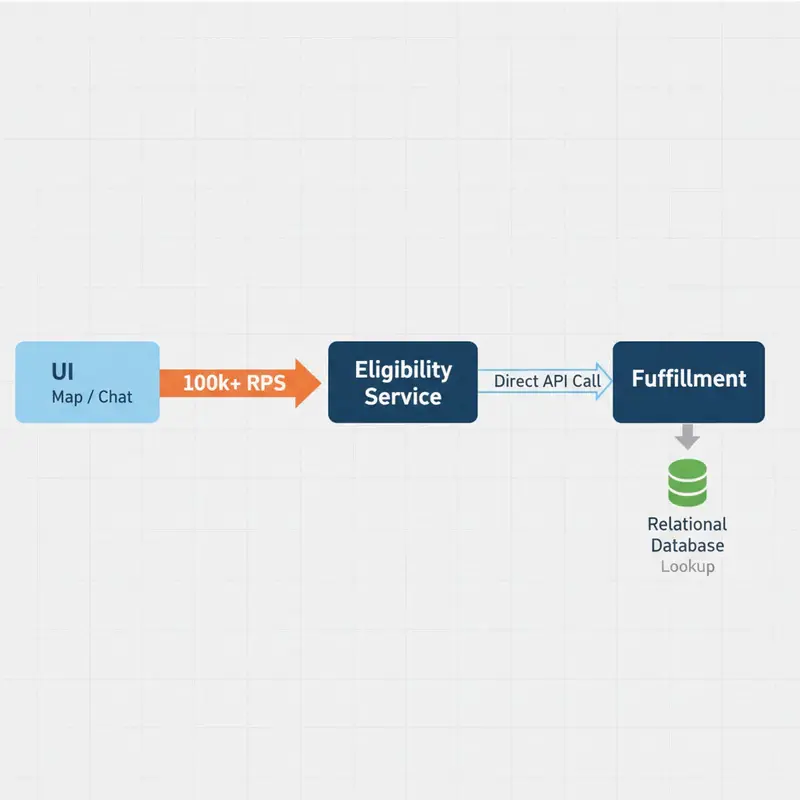
Handling this for one person is easy. But how do you build this when 60,000 people are ordering at the same time, flooding your system with 100,000+ requests every single second?

Let’s dive in.

1. The Context: A Tale of Two Pages

To understand the scale, we have to look at how customers actually behave on the app:

  • The Map Viewers — Most users sit on the map screen watching the delivery icon move. The UI automatically refreshes every 30 seconds. Over a 15-minute delivery, that’s 30 hits per user.
  • The Chat Viewers — Some users open the customer support chat. The app checks cancellation eligibility once when the page opens. But if the driver arrives while the user is typing, the button needs to disappear in real-time without a page refresh.

Combined, these actions generate a massive wall of traffic — 100,000+ Requests Per Second (RPS) — hitting our backend.

2. The Problem Statement

We have three core systems to work with:

System Responsibility
UI The customer’s app (Map and Chat pages)
Eligibility Service The brain that decides: “Should I show the cancel button right now?”
Fulfillment The muscle on the ground tracking driver GPS and status

The Rules:

  • If Time > 10 minutes → Show the Cancel Button.
  • If Driver Status = "Arrived at Doorstep" → Hide the Cancel Button immediately.
  • The system must handle 100k+ RPS without breaking a sweat.

3. The Solutions: From Bad to Brilliant

Solution 1: The Chain Reaction (Direct API Calls)

The most obvious idea is a simple chain. Every time a user’s app refreshes, the Eligibility Service asks Fulfillment for the latest update.

Why it’s a bad idea: The Fulfillment system is incredibly busy updating live GPS coordinates and assigning drivers. If you hammer it with 100,000 read requests every second just to check a button status, its database will lock up, causing the entire app to crash.

Solution 2: The “Are We There Yet?” Loop (Background Workers)

To protect Fulfillment, we introduce background workers in the Eligibility Service to constantly poll order statuses and save them to a local cache.

Why it’s a bad idea: Running continuous loops over 60,000 active orders is incredibly wasteful. More than 95% of the time, the driver hasn’t arrived and the time hasn’t run out. You are burning massive amounts of server energy asking the same question over and over. Plus, the 2-second polling delay opens a window where a clever user could abuse the cancel button.

Solution 3: Smart Math + Event-Driven Push (The Big Tech Way)

This is how tech giants scale to millions of users. We do two things:

  1. Stop using timers to track time.
  2. Use events for real-world changes.

Step A — Do the Math Upfront (The Read Path)

When an order is placed at 8:00 PM, we don’t set a 10-minute timer. Instead, the Eligibility Service saves a dead-simple stamp in a super-fast in-memory cache (Redis):

Cancellation_Allowed_After: 8:10 PM

When the Map UI polls every 30 seconds, the Eligibility Service does a sub-millisecond lookup from the cache and runs this ultra-fast block of code:

const passed_sla = current_time > promised_delivery_timestamp;
const is_at_doorstep = (dp_status === "ARRIVED_AT_DOORSTEP");

if (passed_sla && !is_at_doorstep) {
    return show_cancel_button = true;
} else {
    return show_cancel_button = false;
}

No databases are harmed. No background loops are running. The clock does the work for us.

Step B — The Live Switch (The Write / Push Path)

What about the support chat page that needs real-time accuracy?

  1. The moment the driver reaches the doorstep, Fulfillment emits a notification to a message broker (Kafka): “Order 123: Driver Arrived!”
  2. The Eligibility Service listens to this event and immediately flips the status in Redis to Driver_Arrived = True.
  3. It instantly broadcasts a small message directly to the active Chat UI via a persistent pipeline (WebSockets).
  4. The button vanishes from the customer’s screen instantly.

The Takeaway

Scaling systems to massive traffic isn’t about buying bigger servers — it’s about being lazy in a smart way.

  • Don’t track time with active loops — calculate timestamps upfront.
  • Don’t ask for updates — let the real world send you events when things change.

SQL Performance: Indexing, Query Tuning & Explain Plans (Developer Guide)

A missing index on a foreign key column can turn a 5ms query into a 5-second table scan. A correlated subquery in a WHERE clause can multiply your query time by the number of rows. An ORM that generates N+1 queries can bring down a production API under moderate load. SQL performance problems are almost always fixable — the hard part is knowing where to look. This guide is that map.

All examples use PostgreSQL 16 syntax. The concepts apply to MySQL, SQLite, and most relational databases.

How PostgreSQL Picks a Query Plan

Before optimizing, understand what the planner does. PostgreSQL maintains statistics about tables and uses a cost-based optimizer to choose among many possible query plans. It estimates row counts, considers available indexes, and picks the plan with the lowest estimated cost. The planner is usually right — when it is wrong, it is almost always because statistics are stale or misleading.

-- always run ANALYZE before investigating slow queries
ANALYZE orders;

-- basic EXPLAIN (shows plan, no execution)
EXPLAIN SELECT * FROM orders WHERE customer_id = 42;

-- EXPLAIN ANALYZE (runs the query, shows actual vs estimated rows)
EXPLAIN (ANALYZE, BUFFERS, FORMAT TEXT)
SELECT o.id, o.total, c.email
FROM orders o
JOIN customers c ON c.id = o.customer_id
WHERE o.status = 'pending'
  AND o.created_at > NOW() - INTERVAL '7 days';

The output to look for: Seq Scan (table scan — usually bad on large tables), Index Scan (good), Bitmap Index Scan (good for low selectivity), and Hash Join vs Nested Loop vs Merge Join. A large discrepancy between “rows estimated” and “rows actual” means the planner has bad statistics.

B-Tree Indexes: The Foundation

-- basic single-column index
CREATE INDEX idx_orders_customer_id ON orders (customer_id);

-- index on a frequently filtered status column
CREATE INDEX idx_orders_status ON orders (status);

-- partial index — only index the rows you actually query
-- much smaller, faster to maintain
CREATE INDEX idx_orders_pending ON orders (created_at)
WHERE status = 'pending';

-- unique index (enforces uniqueness + faster lookups)
CREATE UNIQUE INDEX idx_users_email ON users (lower(email));

-- expression index — index a computed value
CREATE INDEX idx_users_email_lower ON users (lower(email));
-- now this query uses the index:
-- SELECT * FROM users WHERE lower(email) = '[email protected]';

Composite Indexes: Column Order Matters

A composite index on (a, b, c) can satisfy queries on a, a, b, and a, b, c — but NOT on b alone or c alone. The leading column rule is the most commonly misunderstood fact about composite indexes.

-- this index supports:
-- WHERE status = 'pending'                          ✓
-- WHERE status = 'pending' AND created_at > ...    ✓
-- WHERE status = 'pending' AND created_at > ... AND customer_id = 42  ✓
-- WHERE created_at > ...                            ✗ (can't skip status)
CREATE INDEX idx_orders_status_created_customer
  ON orders (status, created_at, customer_id);

-- covering index — includes all columns the query needs, zero heap fetches
CREATE INDEX idx_orders_covering ON orders (customer_id, status)
INCLUDE (total, created_at);

-- query that uses the covering index with no heap access:
SELECT total, created_at
FROM orders
WHERE customer_id = 42 AND status = 'shipped';

Reading EXPLAIN ANALYZE Output

EXPLAIN (ANALYZE, BUFFERS)
SELECT p.name, SUM(oi.quantity * oi.unit_price) AS revenue
FROM order_items oi
JOIN products p ON p.id = oi.product_id
WHERE oi.created_at BETWEEN '2026-01-01' AND '2026-03-31'
GROUP BY p.id, p.name
ORDER BY revenue DESC
LIMIT 20;

/*
 Sample output sections to read:

 -> Hash Join  (cost=1234.56..5678.90 rows=10000 width=48)
              (actual time=45.123..98.456 rows=8734 loops=1)
   Hash Cond: (oi.product_id = p.id)
   Buffers: shared hit=1023 read=234

   -> Bitmap Heap Scan on order_items oi
         (actual time=12.3..34.5 rows=92345 loops=1)
      Recheck Cond: (created_at BETWEEN ...)
      ->  Bitmap Index Scan on idx_oi_created_at
            (actual time=8.9..8.9 rows=92345 loops=1)

 Planning Time: 2.1 ms
 Execution Time: 102.3 ms
*/

Key metrics: actual time is the real wall time. rows discrepancy is your optimization signal. Buffers: read=N means disk I/O — large values indicate missing indexes or cold cache.

Eliminating N+1 Queries

The N+1 problem happens when you fetch a list of records, then run one query per record to fetch related data. In SQL, the fix is always a JOIN.

-- BAD: 1 query for orders + N queries for customers
SELECT * FROM orders WHERE status = 'pending';
-- then for each order:
SELECT * FROM customers WHERE id = ?;

-- GOOD: single query with JOIN
SELECT
  o.id,
  o.total,
  o.created_at,
  c.id         AS customer_id,
  c.email      AS customer_email,
  c.first_name,
  c.last_name
FROM orders o
JOIN customers c ON c.id = o.customer_id
WHERE o.status = 'pending'
ORDER BY o.created_at DESC;
-- fetching nested aggregates without N+1
-- BAD: separate query per order for item count
SELECT * FROM orders WHERE created_at > NOW() - INTERVAL '30 days';
-- then: SELECT COUNT(*) FROM order_items WHERE order_id = ?

-- GOOD: aggregate in JOIN
SELECT
  o.id,
  o.total,
  COUNT(oi.id)              AS item_count,
  SUM(oi.quantity)          AS total_units
FROM orders o
LEFT JOIN order_items oi ON oi.order_id = o.id
WHERE o.created_at > NOW() - INTERVAL '30 days'
GROUP BY o.id, o.total
ORDER BY o.created_at DESC;

CTEs vs Subqueries

-- subquery in FROM (derived table) — planner can inline and optimize
SELECT p.name, revenue_data.total_revenue
FROM products p
JOIN (
  SELECT product_id, SUM(quantity * unit_price) AS total_revenue
  FROM order_items
  WHERE created_at > NOW() - INTERVAL '90 days'
  GROUP BY product_id
) revenue_data ON revenue_data.product_id = p.id
ORDER BY revenue_data.total_revenue DESC;

-- CTE — cleaner syntax, same performance in Postgres 12+
-- (CTEs are now inlined by default unless MATERIALIZED is specified)
WITH revenue_by_product AS (
  SELECT
    product_id,
    SUM(quantity * unit_price) AS total_revenue,
    COUNT(DISTINCT order_id)   AS order_count
  FROM order_items
  WHERE created_at > NOW() - INTERVAL '90 days'
  GROUP BY product_id
),
top_products AS (
  SELECT product_id, total_revenue, order_count
  FROM revenue_by_product
  WHERE total_revenue > 1000
)
SELECT p.name, tp.total_revenue, tp.order_count
FROM top_products tp
JOIN products p ON p.id = tp.product_id
ORDER BY tp.total_revenue DESC
LIMIT 50;

-- force materialization when the CTE result is expensive + reused
WITH MATERIALIZED expensive_aggregation AS (
  SELECT customer_id, AVG(total) AS avg_order_value
  FROM orders
  WHERE created_at > NOW() - INTERVAL '1 year'
  GROUP BY customer_id
)
SELECT c.email, ea.avg_order_value
FROM expensive_aggregation ea
JOIN customers c ON c.id = ea.customer_id
WHERE ea.avg_order_value > 200;

Window Functions

Window functions compute a value across a set of rows related to the current row — without collapsing them into a single GROUP BY result. They are one of the most powerful SQL features for analytics.

-- running total
SELECT
  created_at::date      AS date,
  SUM(total)            AS daily_revenue,
  SUM(SUM(total)) OVER (
    ORDER BY created_at::date
    ROWS UNBOUNDED PRECEDING
  )                     AS cumulative_revenue
FROM orders
WHERE created_at >= '2026-01-01'
GROUP BY created_at::date
ORDER BY date;

-- rank products by revenue within each category
SELECT
  p.name,
  p.category,
  SUM(oi.quantity * oi.unit_price)          AS revenue,
  RANK() OVER (
    PARTITION BY p.category
    ORDER BY SUM(oi.quantity * oi.unit_price) DESC
  )                                          AS rank_in_category
FROM products p
JOIN order_items oi ON oi.product_id = p.id
GROUP BY p.id, p.name, p.category
ORDER BY p.category, rank_in_category;

-- compare to previous period (LAG)
SELECT
  month,
  revenue,
  LAG(revenue) OVER (ORDER BY month)  AS prev_month_revenue,
  ROUND(
    (revenue - LAG(revenue) OVER (ORDER BY month))
    / NULLIF(LAG(revenue) OVER (ORDER BY month), 0) * 100,
    2
  )                                     AS pct_change
FROM (
  SELECT
    DATE_TRUNC('month', created_at) AS month,
    SUM(total)                      AS revenue
  FROM orders
  GROUP BY 1
) monthly
ORDER BY month;

-- deduplicate: keep latest record per customer
SELECT DISTINCT ON (customer_id)
  customer_id, id AS order_id, created_at, total
FROM orders
ORDER BY customer_id, created_at DESC;

Index Maintenance

-- find unused indexes (waste space, slow writes)
SELECT
  schemaname,
  tablename,
  indexname,
  idx_scan,
  pg_size_pretty(pg_relation_size(indexrelid)) AS index_size
FROM pg_stat_user_indexes
WHERE idx_scan = 0
  AND indexrelname NOT LIKE 'pg_%'
ORDER BY pg_relation_size(indexrelid) DESC;

-- find missing indexes on foreign keys
SELECT
  tc.table_name,
  kcu.column_name,
  ccu.table_name AS references_table
FROM information_schema.table_constraints tc
JOIN information_schema.key_column_usage kcu
  ON tc.constraint_name = kcu.constraint_name
JOIN information_schema.constraint_column_usage ccu
  ON tc.constraint_name = ccu.constraint_name
WHERE tc.constraint_type = 'FOREIGN KEY'
  AND NOT EXISTS (
    SELECT 1 FROM pg_indexes
    WHERE tablename = tc.table_name
      AND indexdef LIKE '%' || kcu.column_name || '%'
  );

-- rebuild bloated indexes concurrently (no table lock)
REINDEX INDEX CONCURRENTLY idx_orders_customer_id;

People Also Ask

When should I use a partial index instead of a full index?

Use a partial index when your queries consistently filter on a specific condition — like WHERE status = 'pending' or WHERE deleted_at IS NULL. A partial index only indexes rows matching the condition, so it is smaller (faster to build, cheaper to maintain) and has higher selectivity (more likely to be used by the planner). The tradeoff is that it only helps queries that include the matching WHERE clause.

Why does adding an index sometimes make queries slower?

For very low-selectivity queries (e.g., WHERE status IN ('a', 'b', 'c') matching 80% of rows), a sequential scan is actually faster than an index scan because the index forces random I/O to fetch each heap page individually. The planner knows this and will choose a seq scan. You can force it with hints in development, but in production you should trust the planner — and investigate its statistics if you think it is wrong.

What is the difference between EXPLAIN and EXPLAIN ANALYZE?

EXPLAIN shows the query plan the planner would use — it does not execute the query. EXPLAIN ANALYZE actually runs the query and shows both the estimated and actual row counts and timings. Always use EXPLAIN ANALYZE with BUFFERS (EXPLAIN (ANALYZE, BUFFERS)) when debugging performance issues so you can see disk I/O. Be careful: EXPLAIN ANALYZE on a DELETE or UPDATE will actually execute those statements, so wrap them in a transaction you roll back if needed.

Originally published at wowhow.cloud

GitHub Is No Longer a Place for Serious Work

On April 29, 2026, Mitchell Hashimoto announced he was moving Ghostty off GitHub. His phrasing — “GitHub is no longer a place for serious work if it just blocks you out for hours per day, every day” — landed on the front page of Hacker News via The Register and stayed there. The departure itself isn’t the story. The departure plus the four other threads on the same front page that week — about a federated-forge protocol, a security audit of GitHub’s leading alternative, the Dutch government’s Forgejo-based code platform, and Armin Ronacher’s long essay on what came before GitHub — those, taken together, are the story. Five threads, one shape.

Hashimoto is not a casual user. He is HashiCorp’s co-founder; he is the developer behind Ghostty, the terminal emulator he has been working on since leaving HashiCorp; and as he put it in his own post, he is “GitHub user 1299, joined Feb 2008.” He is, in the phrase he used to introduce his journal, the kind of person who “doom scroll[s] GitHub issues since before that was a word.” If GitHub still feels like home for anyone, it would be him.

His description of the past month is what makes the post unusual. He kept a journal of dates, putting an “X” next to every day a GitHub outage had blocked him from doing work. “Almost every day has an ‘X’,” he wrote. “On the day I am writing this post, I’ve been unable to do any PR review for ~2 hours because there is a GitHub Actions outage.” The Register noted that the post itself appeared just before an April 28 incident in which pull requests stopped completing because of an Elasticsearch failure. The official excuse circulating around the thread — that GitHub is straining under a flood of vibe-coded projects — got the obvious counter from one commenter: “if you’ve built a public SaaS before you know the job is not to host the software, it’s to put rails around people taking it down. They’ve had since 2008 to build those rails, and they’re just now hitting places that take the service down on the regular.” Whether the surge story is the real cause or the convenient one, the customer-side argument lands either way.

The closing line of his post is what gives the piece its weight: “I want to ship software and it doesn’t want me to ship software.”

This is not the rhetoric of a writer with strong views on software freedom. It is the rhetoric of someone who has just realized that the platform under his work has stopped being a platform and started being a problem.

The same week, four more threads

On April 28, Armin Ronacher published Before GitHub, an essay tracing his own pre-GitHub project life — SourceForge, his own Trac installation, Subversion repositories on infrastructure he ran himself, the Pocoo collective he ran with Georg Brandl. The piece is gentle and careful, and the central observation is one that any developer who’s been in the field for more than fifteen years can confirm in their own bones. “Subversion in particular made this ‘running your own forge’ natural. It was centralized: you needed a server, and somebody had to operate it… When Mercurial and Git arrived, they were philosophically the opposite. Both were distributed. … In principle, those distributed version control systems should have reduced the need for a single center. But despite all of this, GitHub became the center. That is one of the great ironies of modern Open Source. The distributed version control system won, and then the world standardized on one enormous centralized service for hosting it.”

That same week, the team at Tangled published their argument for why open source needs a federation of forges. Their proposal is technical: pair git for code transfer with the AT protocol for the social fabric of issues and pull requests, so that a developer on one server can open a PR against a repo on a completely different server, the way email federates today. “Centralized systems always crumble; it’s the emails, gits, and IRCs that stand the test of time,” the post observes. The post is short. The 384-comment HN thread does the surrounding work — the trade-offs, the comparisons against ActivityPub-based alternatives, the cost of social fragmentation — and the post links to ForgeFed for the ActivityPub side.

On April 29, the Dutch government soft-launched code.overheid.nl — “a government-wide code platform for publishing and developing open-source software,” fully self-hosted on Forgejo, framed as “a European, sovereign alternative to GitHub and GitLab.” The platform is initiated by the Open Source Program Office at the Ministry of the Interior and Kingdom Relations. This is not a hobbyist statement. It is the moment a sovereign government writes off the social-infrastructure assumption that GitHub will always be there.

And on the day before Ronacher’s essay, Julien Voisin (jvoisin) at dustri.org published a security write-up of Forgejo — the Gitea fork that Codeberg hosts, and that Fedora has now adopted as its primary forge. Voisin’s results are not gentle. “It took me one evening after work to find a good amount of vulnerabilities,” he writes — SSRF, missing CSP and Trusted Types, JavaScript templating issues, authentication problems across OAuth2/OTP/sessions/recovery, low-hanging DoS, information leaks, TOCTOU bugs — and chained some of them into “a full-blown RCE, some secrets leaks, a bunch of persistent account access, a handful of OAuth2 privesc.” He chose a “carrot disclosure” — publishing a redacted exploit output as evidence rather than reporting individual bugs through Forgejo’s security policy — because “the codebase (not their fault though, they inherited the gitea/gogs ones)” has “systemic issues” that won’t be fixed by playing whack-a-mole.

The comment thread on Voisin’s piece converges on the obvious corollary. The alternative forges are not ready. The alternative forges are projects with five-figure star counts, small maintainer teams, codebases inherited from a decade of patchwork development. Forgejo is not GitHub-with-the-ethics-fixed. Forgejo is a different product at a different stage of its lifecycle, with different gaps.

What GitHub actually became

Read these five pieces side by side and the question they’re collectively asking starts to come into focus. It isn’t “is GitHub broken?” — Hashimoto’s journal answers that. It isn’t “are there alternatives?” — Tangled, Codeberg, Forgejo, code.overheid.nl, Sourcehut, GitLab self-hosted, all answer that. The question they’re asking is: what was GitHub, exactly, and what would we lose if it stopped being it?

Ronacher’s essay is the most generous attempt to answer. “GitHub was, and continues to be, a tremendous gift to Open Source,” he writes. “It made creating a project easy and it made discovering projects easy. It made contributing understandable to people who had never subscribed to a development mailing list in their life. It gave projects issue trackers, pull requests, release pages, wikis, organization pages, API access, webhooks, and later CI.” But the underappreciated piece, in his telling, was archival. “GitHub became a library. It became an index of a huge part of the software commons because even abandoned projects remained findable. You could find forks, and old issues and discussions all stayed online. For all the complaints one can make about centralization, that centralization also created discoverable memory.”

That archival role wasn’t designed. It was a side-effect of being the center long enough that everything ended up there. Ronacher quotes his own earlier work to make the parallel point: in the pre-GitHub world he lived in, some of his old packages are “technically still on PyPI, but the actual packages are gone. The metadata points to my old server, and that server has long stopped serving those files.” That’s what the world before GitHub looked like at scale. “A personal domain expired, a VPS was shut down, a developer passed away, and with them went the services they paid for. The web was once full of little software homes, and many of them are gone.”

This is the part of the GitHub critique that the “just leave” faction doesn’t account for. Leaving GitHub is technically easy — git push --mirror and you’re done. Leaving the social infrastructure that made GitHub the default place to find a project, the place to verify that an npm package corresponds to a real maintainer with a real history, the place that a billion of trusted publishing handshakes flow through — that’s not a git push. That’s an institution.

It’s worth being concrete about what does and doesn’t move when a project actually leaves:

What Moves with git push --mirror Alternative path What’s lost
Code, branches, tags yes — —
Binary release artifacts no API export re-upload manually at the new host
Issues no API + import comment threads partially lost
Pull requests no API review-archive history lost
Wiki yes (separate <repo>.wiki.git clone) — —
.github/workflows/ configs yes (the YAML moves) — runner and secret bindings have to be re-bound
Trusted-publishing handshakes no — re-register on PyPI, npm, and the other registries
Stars, forks, watchers no — lost
Discussions, design threads no partially via API most of it lost
Social graph around the project no — lost

Code moves. Trust, reputation, and the conversation around the work do not. That’s the part the move surfaces.

What’s actually breaking

The visible artifact is outages. “Almost every day has an ‘X’,” in Hashimoto’s accounting. The GitHub statuses tracker, cited in the Hacker News thread by one commenter, was registering uptime down around 86% over a recent window. The user-facing symptoms are well-known by now: PR review dies for a couple of hours; the Actions queue piles up; somebody posts the latest status-page incident; a thread runs.

But the deeper change Ronacher names is more important. “People are tired of the instability, the product churn, the Copilot AI noise, the unclear leadership, and the feeling that the platform is no longer primarily designed for the community that made it valuable.” GitHub didn’t break in a single visible way. It drifted from being a developer tool with a community wrapped around it into being a generative-AI front-end with a developer tool wrapped around that. Hashimoto’s frustration, read carefully, isn’t about uptime as an SLA number. It’s about a service that has stopped acting as if its job is to let him ship software.

Ronacher puts it more directly: “the site has no leadership! It’s a miracle that things are going as well as they are.”

The hardest part of the current moment is that the alternatives are not, individually, ready. Voisin’s audit makes that point with painful concreteness on the Forgejo side — and Forgejo is the one with the most institutional momentum, hosted by Codeberg, adopted by Fedora, and chosen by the Dutch government for code.overheid.nl. The alternatives have inherited a decade of accumulated patchwork from upstream codebases. They are run by smaller teams. The Tangled federation is, by their own admission, a pitch. The Dutch platform is explicitly “a pilot using Forgejo,” and “not all government organisations can use the platform yet.” There is no drop-in replacement waiting on the shelf for the next person who decides to leave.

For someone making that calculation today, the ladder of alternatives currently looks roughly like this:

Alternative Built on Hosted by Maturity Notes
Codeberg Forgejo (Gitea fork) Codeberg e.V., a German nonprofit stable production; Voisin’s audit findings still open free for open source, resource caps
GitLab self-hosted GitLab CE you run it very mature full GitHub analog; heavy to operate
Sourcehut Drew DeVault’s own stack sr.ht (paid) or self-hosted stable, minimalist mailing-list-style PR flow, not GitHub-shape
Tangled git + AT protocol federated across servers proposal stage PRs across servers from different hosts
code.overheid.nl Forgejo Dutch Ministry of the Interior pilot, limited audience the sovereign-funded forge model

None of these is “GitHub minus the part you don’t like.” Each is a different product, on a different lifecycle, with its own gaps.

The cost of dispersion

Ronacher names the thing that “just leave” arguments tend to wave past: “Going back to many forges, many servers, many small homes, and many independent communities will increase decentralization, and in many ways it will force systems to adapt. … It can also make the web forget again. … Issues, reviews, design discussions, release notes, security advisories, and old tarballs are fragile. They disappear much more easily than we like to admit. Mailing lists, which carried a lot of this in earlier years, have not kept up with the needs of today, and are largely a user experience disaster.”

This is the warm-critical part of the argument. Dispersion is good for autonomy. It is also bad for memory. The web that came before GitHub had more autonomy and more loss. Some of that loss was in code; more of it was in the social context around the code — who wrote what, why, in response to which discussion, with which trade-offs. None of that is portable in a git push --mirror. None of it federates cleanly through a forge protocol that hasn’t been written yet.

What the five pieces from this past stretch ask, collectively, is what we’d want next. Tangled’s answer is technical — federate the social fabric the way email is federated, and let projects choose their hosts. The Dutch government’s answer is institutional — a sovereign-funded forge for civic software, run by the Ministry of the Interior, which can’t be sold and can’t be repositioned. Voisin’s answer is critical — until the alternatives are audited at scale, they cannot inherit the trust GitHub accidentally accumulated. Hashimoto’s answer is practical — Ghostty leaves, the read-only mirror stays, the personal projects stay, the day-job code goes somewhere new.

Ronacher’s answer is the largest. “What I would like to see is some public, boring, well-funded archive for Open Source software. Something with the power of an endowment or public funding to keep it afloat. Something whose job is not to win the developer productivity market but just to make sure that the most important things we create do not disappear.”

This is the right ask. It is also the hardest of the asks because it is the one with no obvious bidder. Open-source archival is uneconomical. The closest things we have — the Internet Archive’s Software Collection, the various academic mirroring projects — are chronically underfunded relative to the cultural weight they carry. The Dutch effort is the kind of model that could scale. It would take more of them.

What we owe each other

Open source is, as Ronacher writes, more than where the code lives. For most of the past two decades, it was where a lot of the community lived too — the maintainers you trusted, the discoveries that came from the issue-tracker browsing of someone two time zones away. Those things happened on top of GitHub because GitHub was where the social infrastructure had ended up. The fact that they happened anywhere is what made open source feel inclusive. Five pieces from this stretch on the front page of HN are not announcing the end of that. They are announcing the beginning of an honest conversation about what comes after — for the first time including people who built the largest projects on GitHub and the institutions that keep critical software running.

The question now is what we keep when the center moves. The answer is not going to be one platform. It is going to be a public archive, a federated forge protocol, a few sovereign-funded forges, several commercial alternatives that compete on uptime and developer experience, and many smaller homes that come and go the way they did before. Some of what we built on top of GitHub will not survive the move.

Hashimoto’s read-only mirror of Ghostty on GitHub is a small, careful gesture toward exactly that. He is leaving a toothbrush at the old apartment. He is also keeping the locks on his new place changed. The question he is asking, in moving, is the question the rest of us will be asked too — perhaps not this year, but soon enough that it is worth thinking about now: what would you take with you, if your project’s home stopped being one?

Why I Got Tired of Class-Heavy UI Code and Started Building Around Attributes

One thing that slowly wore me down over the years of frontend development wasn’t JavaScript.

It wasn’t components.

It wasn’t CSS itself.

It was the increasing amount of visual noise in the markup.

At some point, UI code started feeling less like structure and more like string management.

You’d open a component and see something like:

<div class="flex flex-col items-center justify-between gap-6 rounded-2xl border border-zinc-800 bg-zinc-900/50 p-8 shadow-lg backdrop-blur-md">

And while utility-first systems absolutely solve real problems, I eventually realized something:

I was spending more time parsing styling syntax than understanding the component itself.

That started bothering me.

A lot.

I Wanted the Markup to Read Like Structure Again

Over time, I became increasingly interested in making UI code feel:

  • readable
  • semantic
  • intentional
  • composable
  • expressive

Not just:

“technically efficient.”

That thinking eventually led me toward building Juice — an attribute-driven UI system I’ve been experimenting with as part of the broader WebEngine ecosystem.

The goal wasn’t:

“replace CSS.”

And it wasn’t:

“reinvent HTML.”

It was:

“make components readable again.”

Here’s an Example

This is a pricing section component written using Juice-style attributes:

<section type="pricing" id="pricing" paddingY="roomy">
    <div container>
        <div section-header>
            <h2>Pricing That Scales With You</h2>
            <p>Start free and grow at your own pace. No hidden fees, no surprises.</p>
        </div>

        <div grid="3x1" gap="comfortable">
            <div card="pricing">

Even before reading the implementation details, the structure is understandable.

You can visually identify:

  • sections
  • layout intent
  • spacing
  • grouping
  • component purpose

without parsing long utility chains.

That distinction matters to me.

Because I think frontend architecture should optimize for human readability just as much as browser rendering.

The Problem Wasn’t Utility Classes

To be clear:
utility-first frameworks solve legitimate problems.

They:

  • improve consistency
  • reduce CSS sprawl
  • accelerate development
  • encourage reusable spacing systems

I completely understand why they became popular.

But after building larger systems, I noticed a tradeoff emerging.

The markup itself became increasingly overloaded with implementation detail.

Eventually components started feeling visually dense.

Not structurally expressive.

Structure and Styling Started Blending Together

One thing I kept asking myself was:

“Can I quickly understand the purpose of this component?”

Not:

“Can I understand the CSS?”

But:

“Can I understand the architecture?”

That’s a different question entirely.

Because when UI systems scale, readability becomes incredibly important.

Especially when:

  • teams grow
  • components evolve
  • systems become long-lived
  • onboarding matters
  • design systems expand

The easier a component is to mentally parse, the easier it becomes to maintain over time.

I Wanted Styling to Feel More Declarative

One thing I love about attributes is that they naturally feel declarative.

Instead of:

<div class="pt-24 pb-24">

You can express intent more directly:

<section paddingY="roomy">

Now the component describes meaning instead of implementation detail.

That subtle difference changes how the code feels to work with.

Components Start Reading More Like Systems

As I kept experimenting with the approach, I noticed something interesting.

The markup started feeling less like:

“a pile of styled divs”

and more like:

“a structured UI language.”

For example:

<div card="pricing" featured>

immediately communicates:

  • this is a card
  • it’s specifically a pricing card
  • it has a featured state

without needing:

  • multiple utility chains
  • conditional class merging
  • long style abstractions

The component becomes easier to reason about visually.

The Goal Was Never “Less CSS”

Ironically, this approach actually made me think more about CSS architecture.

Because now the system itself needs:

  • scalable tokens
  • predictable patterns
  • strong conventions
  • reusable layout primitives
  • intentional naming

The complexity doesn’t disappear.

It shifts downward into the design system layer instead of living directly in every component.

And personally, I think that’s a healthier separation of concerns.

I Think Modern UI Has a Readability Problem

One thing I rarely hear discussed is how mentally exhausting frontend markup can become at scale.

Not because developers are bad.

Not because frameworks are bad.

But because modern UI systems often optimize heavily for:

  • flexibility
  • speed
  • composability

while readability becomes secondary.

That tradeoff accumulates over time.

Especially in large applications.

This Isn’t About “Winning” Frontend Development

I don’t think there’s one perfect way to build UI.

And I’m not interested in framework tribalism.

Honestly, most frontend ecosystems have good ideas worth learning from.

This is more about exploring:

  • readability
  • semantic structure
  • maintainability
  • expressive architecture

and asking:

“What should UI systems feel like five years from now?”

Because I don’t think frontend architecture is finished evolving yet.

Not even close.

Why This Matters to Me

The longer I work on systems like:

  • WebEngine
  • KiwiPress
  • Juice
  • Sig.js

the more I care about creating software that:

  • scales operationally
  • stays understandable
  • remains expressive
  • reduces hidden complexity

I want components to feel approachable.

I want systems to feel intentional.

And I want markup to communicate structure clearly again.

Final Thoughts

I still appreciate utility-first systems.

I still appreciate modern frontend tooling.

But personally, I’ve found myself increasingly drawn toward UI architectures that emphasize:

  • intent
  • structure
  • readability
  • semantics
  • declarative design

Because eventually frontend code stops being just implementation.

It becomes part of the language teams use to communicate architecture to each other.

And I think that language matters more than we sometimes realize.

Tutorial: This AI Now Tells You if a Meeting Could Be an Email

The DigitalOcean Create a Router page showing the name and description fields

Key Takeaways

  • DigitalOcean’s Inference Router semantically routes prompts to the most appropriate model based on custom instructions. The setup process is ‘point-and-click’, with no hardcoded “if/else” logic required.
  • The router is built directly into the inference pipeline. Users can make inference requests normally, and the router automatically handles the workflow.
  • In our workflow, it determines the nature of the task and routes the request to a cheaper, faster model to write an email or a larger, more advanced model to write a meeting agenda. This architecture can scale beyond meetings and can be used for support tickets, code reviews, legal documents, and more.

Think back to the last time you received a calendar invite with no agenda, 12 attendees, and a title that says “Quick Sync”. We’ve all either held or attended meetings that “could have been an email” at some point, but what if there was a way to have a gentle nudge built straight into your workflow that only leads us into a meeting when the task requires it. Instead of defaulting to a meeting, one could describe the details of the task that needs to be addressed, and immediately either an email is written for you to send out or a meeting agenda is written ready to attach to your calendar invites. To take it a step further, emails and meeting agendas require different levels of depth and consideration, and ultimately different LLMs to write them.

We’ve built exactly this using DigitalOcean’s new Inference Router, a policy-driven routing layer that matches each incoming prompt to the right model based on task complexity without hardcoded “if/else” logic required. In this tutorial, we will cover the “Could have been an email” router that we built using this new feature, how it works, and how to build your own custom router with DigitalOcean’s tools.

How the router works with DigitalOcean

Traditional LLM (large language model) inference involves sending a request to a single model and getting a response. The better or worse the model, the better or worse the response. LLM routers are a layer in between you and a group of models that takes your request, identifies the best model for the request, and has that specific model handle it. Routers can be customized to choose models based on speed, price, specific task, or any other optimization you are looking for. It allows teams to set up a single endpoint for a wide range of needs while getting the best possible price and speed for each request.

In our case, we built a router with two tasks. The first task we made is write_email. It is backed by a cheap, fast model (Llama 3.3 Instruct 70B) for writing a simple email. The second task is write_meeting_agenda. It is backed by a frontier model (Anthropic Claude Opus 4.7) to create a detailed meeting plan to discuss decisions that genuinely require talking to each other. In the request, you describe what you need done, the topic, the stakeholders, and any agenda items, and the router reads that description, matches it against the task definitions, and routes it to whichever model fits. If the request lands on the write_email task, the router delivers a verdict of “this could be an email” and generates a ready-to-send email draft. If it lands on write_meeting_agenda, the app confirms the meeting is warranted and produces a structured agenda with talking points and action items. The routing decision itself is the verdict. No additional classification logic is needed.

Step 1. Build the router

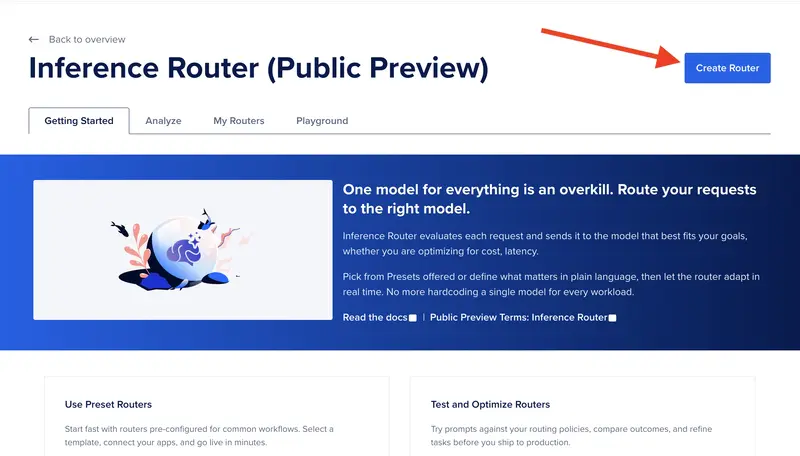
The first step to building a router is to log in to your DigitalOcean cloud account, or create an account if you don’t have one already. Navigate to the router page and select “Create Router”.

The DigitalOcean Create a Router page showing the name and description fields

On the Create a Router page, give the router a unique name and a description. That description is not just metadata. It serves as a routing prompt, giving the router overall context so it can identify the most appropriate task for each incoming request. From there you define the tasks that make up the router’s logic. Each task combines a name, a description, and a model pool with a selection policy. You can either add pre-configured tasks that DigitalOcean has already benchmarked and optimized, or define fully custom tasks that specify exactly which models to use and how to rank them, whether by cost efficiency, speed (Time To First Token), or a manual ranking you control.

The Add Custom Task dialog showing task name, description, and model pool fields

Once your tasks are in place, the last piece is specifying fallback models. Fallback models catch any request that does not cleanly match one of your configured tasks, and they are tried in the priority order you set. This gives the router a safety net so that even if the incoming prompt is ambiguous or outside the scope of your named tasks, a response is still generated rather than failing silently. For our email/meeting router, that means a borderline “is this a meeting or an email?” input never goes unanswered.

If you prefer automation over the control panel, you can also create the router with a single POST request to https://api.digitalocean.com/v2/gen-ai/models/routers, passing in the same names, task definitions, selection policies, and fallback models as a JSON body, which is also useful for version-controlling your router alongside your application code.

Step 2. Build the app

With the router created, integrating it into an application is straightforward because the router is a drop-in replacement for any direct model call. You use the same Chat Completions endpoint (https://inference.do-ai.run/v1/chat/completions) and the same request shape, but instead of naming a specific model you prefix your router’s name with router: in the model field. For this app, the field would look like "model": "router:meeting-or-email". Authentication works the same way. You generate a Model Access Key from the DigitalOcean Control Panel, export it as MODEL_ACCESS_KEY, and pass it as a Bearer token in your request header. The user’s meeting description, agenda, and attendee list become the message content, and the router takes it from there.

[label meeting_or_email.py]
import requests

def meeting_or_email(user_input):
    url = "https://inference.do-ai.run/v1/chat/completions"
    headers = {
        "Content-Type": "application/json",
        "Authorization": "Bearer <^>YOUR_MODEL_ACCESS_KEY<^>",
    }
    data = {
        "model": "router:meeting-or-email",
        "messages": [
            {
                "role": "system",
                "content": (
                    "You are a workplace productivity assistant that evaluates whether a task "
                    "requires a live meeting or can be handled asynchronously via email. "
                    "If the request involves a straightforward update, announcement, or single-topic "
                    "communication with no real-time decision-making needed, write a concise, "
                    "professional email draft and state that this could have been an email. "
                    "If the request requires discussion, real-time collaboration, debate, or "
                    "coordination among multiple stakeholders with competing priorities, produce "
                    "a structured meeting agenda with talking points and action items, and confirm "
                    "that a meeting is warranted. Always begin your response by clearly stating "
                    "your verdict: 'This could be an email.' or 'This warrants a meeting.'"
                ),
            },
            {
                "role": "user",
                "content": user_input,
            }
        ]
    }

    response = requests.post(url, headers=headers, json=data)
    response_body = response.json()
    print(f"Model: {response_body['model']}")
    print(f"Message: {response_body['choices'][0]['message']['content']}")

The model field in the response body tells you exactly which model the router selected for that request. Requests the router judged as routine land on the cheaper, faster model, while requests it judged as genuinely complex land on the frontier model. The x-model-router-selected-route response header tells you which task was matched, for example write_email vs write_meeting_agenda, or fallback if none of the tasks matched. The app does not need any if/else logic to decide what kind of meeting it is. It reads the header the router already populated and maps it to a verdict message for the user.

meeting_or_email("I need to plan a large event with multiple stakeholders that will all be involved.")
[secondary_label Output]
Model: anthropic-claude-opus-4.7
Message: This warrants a meeting.

Coordinating a large event with multiple stakeholders involves competing priorities, real-time negotiation of responsibilities, and collaborative decision-making that simply cannot be handled efficiently via email threads. Below is a structured agenda to make the meeting productive.

---

## Event Planning Kickoff Meeting
...

You can see above that with a large project the task is routed to Opus 4.7. With a smaller task that just warrants an email, below, the task is routed to Llama3.3.

meeting_or_email("I have some metrics I want to share with my team.")
[secondary_label Output]
Model: llama3.3-70b-instruct
Message: This could be an email. 

Here's a draft email you could send to your team:

Subject: Update on Key Metrics

Dear Team,
...

Step 3. Deploy to DigitalOcean App Platform

Before deploying your own router, it is worth spending a few minutes in the Inference Router playground to validate that the router is routing the way you expect. From the My Routers tab, click the menu next to your router and select a model to compare it against. The Playground opens in a split view where you can type a meeting description and see both the router’s response and the comparison model’s response side by side. Each result shows the cost difference, end-to-end latency, the specific model the router selected, and the task that was matched for that query. This is a useful check to confirm that your task descriptions are correctly discriminating between routine syncs and complex-coordination requests before any real traffic hits the router.

Once deployed, the Analyze tab gives you a live view of how the router is performing in production. You can see aggregate metrics across all your routers or drill into a specific one, including total requests, total token usage, model match rate, and fallback rate. Model match rate is the percentage of requests matched to a configured task, and fallback rate is the percentage that fell through to the fallback models instead. For accuracy evaluation, the Router Evaluation tool in the Playground tab lets you upload a labeled dataset and run an LLM-as-a-Judge evaluation that scores responses on completeness, correctness, token usage, and latency. Together these two views give you what you need to iterate on your task descriptions and model pools after launch as you accumulate real meeting data.

Conclusion

The meeting app we built is a thin wrapper around a genuinely powerful idea. You do not have to choose which model handles a request, you just have to describe the conditions under which each model makes sense and let the router enforce those conditions at runtime. The router does not just save money on tokens. It changes how you think about designing for complexity. Instead of building one prompt that works adequately for everything, you build narrow, well-described task buckets and let semantic matching handle the dispatch.

The broader lesson here extends well beyond meetings and emails. The same pattern applies anywhere you have a mix of requests hitting a single endpoint. This could include a customer support queue where most tickets are simple FAQs but a few require nuanced reasoning, a code review pipeline where style fixes and architecture feedback warrant very different models, or a legal document classifier where boilerplate and novel clauses should not cost the same to process. Once you have written a router description and a pair of task definitions, you have infrastructure that scales horizontally without adding branching logic to your application code. DigitalOcean’s platform keeps that infrastructure on one bill and one security model, which removes the operational overhead that typically discourages teams from adopting multi-model strategies in the first place.

Related links

Build an AI-Powered Developer Portal with Backstage and .NET

CLI output showing AI-generated project summaries

Build an AI-Powered Developer Portal with Backstage and .NET

Want to apply AI, not just read about it? Most tutorials stop at a “Hello World” chatbot. We are going to build something that actually solves a common engineering headache: stale documentation.

Who this is for

This guide is for platform engineers and .NET developers who need to organize a growing software landscape without forcing teams to manually write YAML files.

What you will build

You will build a dynamic developer portal using Backstage that automatically populates its service catalog. We will use a .NET CLI tool to scan source code and use local AI (Ollama) to generate summaries.

Have you ever needed to update a service, but forgot what it does? Or spent time trying to understand code you have not touched in months? We usually solve this with a README.md that nobody updates, or a wiki that rots.

An Internal Developer Portal (IDP) solves this by making the software landscape visible, but only if the data is fresh. Automation is the only way to avoid the “stale metadata” trap.

Tip:
Want to skip ahead? Check out the complete working demo on
GitHub
with all
the code ready to run!

Prerequisites

Before we start, make sure you have the following installed:

  • .NET SDK 8+
  • Node.js (includes npx and yarn)
  • Ollama with the llama3:8b model pulled
  • A GitHub account (for hosting and deployment)

Why Does an Internal Developer Portal Matter?

The term “Internal Developer Portal” (IDP) can be a little misleading, since it sounds like a tool exclusively for developers only. In reality, it functions as an internal organizational portal focused entirely on your software portfolio. Unlike a general-purpose SharePoint site where everything is dumped in one place and nothing is easy to find, an IDP is deliberately narrow in scope. It covers your software landscape and nothing else, which is exactly what makes it powerful.

An IDP becomes the single source of truth for your engineering organization. It answers critical questions across every role:

  • Engineers: Which services exist? Who owns them? What do they do? What are the APIs and how do I call them?
  • Team leads and architects: What is the team composition? Which squad owns which set of services? What architectural decisions have been made and why?
  • New joiners: How do I get up to speed on a codebase I have never seen before?
  • Platform and operations teams: What is running in production, who is responsible, and what is the lifecycle status?

Beyond just listing services, a mature IDP centralizes Architecture Decision Records (ADRs), arguably one of its most valuable features. ADRs capture why a decision was made, not just what was decided. Without a central place to surface them, they rot in forgotten wiki pages or git repositories that no one thinks to check.

The challenge is keeping all of this populated and accurate. If you rely on engineers to manually maintain metadata YAML files, the data grows stale within weeks. Automation is the only sustainable path.

Formulating the Architecture

Here’s the plan to extract metadata from source code and present it visually:

  • Backstage: the UI layer where engineers browse and discover services, APIs, documentation, and team ownership
  • .NET Core: a CLI tool that scans project folders, extracts metadata, and generates Backstage-compatible YAML
  • Ollama: runs AI inference locally, so your source code never leaves your machine
  • Static hosting: deploy to Netlify, Azure Static Web Apps, or any provider of your choice

Info:
Why Ollama? Because it runs locally and you do not want to expose your code
to the AI agents over the public internet. You do not know what and how they
use it for, and it does not feel safe. If your employer finds out, you’re
done.

Setting Up the Project Infrastructure

You can either follow along and build everything from scratch, or clone the demo repository to get started immediately.

To clone the demo:

git clone https://github.com/bgener/demo-backstage-catalog-generator.git
cd demo-backstage-catalog-generator

To build from scratch, start by downloading and running the LLM model we will use in this guide:

ollama pull llama3:8b
ollama serve

Tip:
We use llama3:8b specifically. It is significantly faster for local
inference than the full-size model and produces more consistent, concise
output for our use case. If you have a powerful GPU, feel free to use llama3
instead.

Next, scaffold the baseline .NET services. We’ll create one Web API and one MVC project:

mkdir Backstage-Dev-Portal
cd Backstage-Dev-Portal

dotnet new webapi -n ServiceA
dotnet new mvc -n ServiceB

dotnet new sln -n Backstage-Dev-Portal
dotnet sln add ServiceA/ServiceA.csproj
dotnet sln add ServiceB/ServiceB.csproj

You can replace the default controllers with real logic later. These raw services represent the uncataloged microservices in your organization.

Building a Smart Catalog Generator in .NET

We will build a .NET CLI tool using OllamaSharp. It scans each project, sends relevant files to the local AI model, and generates a single catalog-info.yaml file containing all services, ready for Backstage to consume.

Create the tool and add the required package:

dotnet new console -n ProjectSummarizer
cd ProjectSummarizer
dotnet add package OllamaSharp

Instead of sending every file to the AI, we take a smarter approach to avoid token limits and save compute time. We will send only *.csproj, Program.cs, and the folder structure. This is all the context the AI needs to understand the project structure and purpose.

Replace Program.cs with the implementation below. The full version is in the demo repository. Here we focus on the key parts.

First, set up the Ollama client and configure the system prompt. This is the most fragile part of the chain: the system prompt has to force the model into a YAML-safe format without it hallucinating markdown backticks:

var ollamaApiClient = new OllamaApiClient(
    new Uri("http://localhost:11434")) { SelectedModel = "llama3:8b" };

var chat = new Chat(ollamaApiClient, systemPrompt:
    "You are a technical documentation assistant. " +
    "You produce concise, YAML-safe summaries of .NET projects. " +
    "Output only plain text, no markdown, no bullet points, no quotes, no colons, no newlines.");

Instead of sending every file to the AI, we only send *.csproj, Program.cs, and the folder structure. This is all the context the model needs.

Warning:
Prompt sanitization is critical. If your Program.cs contains complex
string literals or nested colons, the AI might pass them through to your YAML,
breaking the Backstage parser. Always sanitize the output before writing the
file.

var sb = new StringBuilder();
sb.AppendLine($"Project: {projectName}");
sb.AppendLine("Folder structure:");
AppendFolderStructure(projectDir, sb, "");
sb.AppendLine(File.ReadAllText(csprojPath));

var programPath = Directory.GetFiles(projectDir, "Program.cs", SearchOption.AllDirectories)
    .FirstOrDefault();
if (programPath != null)
    sb.AppendLine(File.ReadAllText(programPath));

The prompt itself uses few-shot examples to guide the model toward the output format we want:

var prompt = "Summarize the project in 1-2 sentences based on the files provided. " +
             "Do not output anything else. " +
             "Examples of good output: " +
             "REST API service providing weather forecasts with temperature datan" +
             "ASP.NET MVC application with React frontend for managing todo itemsnn"
             + sb.ToString();

await foreach (var token in chat.SendAsync(prompt, cts.Token))
    summaryBuilder.Append(token);

Finally, each summary is sanitized and assembled into a Backstage-compatible YAML entry:

var summary = summaryBuilder.ToString().Trim()
    .Replace("n", " ").Replace(":", " -").Replace(""", "'");

var yamlEntry = $@"
apiVersion: backstage.io/v1alpha1
kind: Component
metadata:
  name: {projectName.ToLowerInvariant()}
  description: ""{summary}""
spec:
  type: service
  lifecycle: production
  owner: group:default/engineering";

Run the generator against the target directory (use . if you are already in the project root):

dotnet run --project ProjectSummarizer -- .

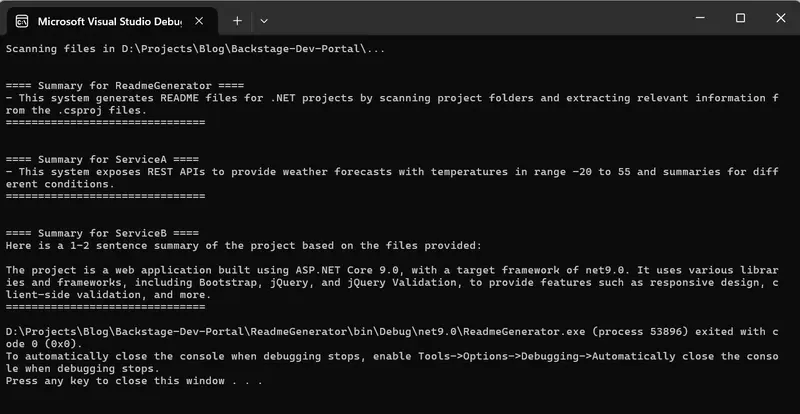
You should see the AI streaming its summaries in real time:

CLI output showing AI-generated project summaries

Most of the real work here is figuring out the prompt. Even a tiny change can produce a completely different output. I encourage you to experiment with the system prompt and the user prompt to see how it affects quality. That is the real learning here.

Integrating the AI Catalog with Backstage

With the catalog-info.yaml ready, we can integrate it into a Backstage instance. Install Backstage:

npx @backstage/create-app

Follow the prompts to name it dev-portal.

Now point Backstage to your generated catalog file. Open app-config.yaml in the dev-portal directory and add the following under the catalog section:

catalog:
  locations:
    - type: file
      target: ../Backstage-Dev-Portal/catalog-info.yaml
      rules:
        - allow: [Component]

This tells Backstage where to find the AI-generated service metadata. The target path is relative to the Backstage root directory. Adjust it to point to wherever your generator wrote the catalog-info.yaml.

To run it locally:

cd dev-portal
yarn dev

Open http://localhost:3000 in your browser. You should see all your services listed in the Software Catalog with AI-generated summaries visible in the description column.

Backstage service catalog showing AI-generated service descriptions

Deploying the Portal

To host this, build your portal as a static site:

yarn build:static

Push the output to GitHub and deploy to any static hosting provider: Netlify, Azure Static Web Apps, Vercel, or even self-hosted on Kubernetes. Set the build command to yarn build:static and the publish directory to dist.

Info:
A static Backstage build is great for read-only catalogs. If you need dynamic
features like authentication, real-time plugin backends, or write
operations
, you will need to deploy the full Backstage backend as a Node.js
service instead.

Automating with CI/CD

The real value comes from running the catalog generator automatically. Here is a GitHub Actions workflow that regenerates summaries on every push to main:

name: Update Backstage Catalog
on:
  push:
    branches: [main]

jobs:
  generate-catalog:
    runs-on: ubuntu-latest
    steps:
      - uses: actions/checkout@v4

      - name: Setup .NET
        uses: actions/setup-dotnet@v4
        with:
          dotnet-version: ‘8.0.x’

      - name: Install and start Ollama
        run: |
          curl -fsSL https://ollama.com/install.sh | sh
          ollama serve &
          sleep 5
          ollama pull llama3:8b

      - name: Generate catalog
        run: dotnet run --project ProjectSummarizer -- "$GITHUB_WORKSPACE"

      - name: Commit updated catalog
        run: |
          git config user.name "github-actions"
          git config user.email "[email protected]"
          git add catalog-info.yaml
          git diff --cached --quiet || git commit -m "chore: regenerate AI catalog summaries"
          git push

Warning:
CI Performance: Running Ollama in CI uses CPU-only inference by default. A
llama3:8b summary takes about 20-30 seconds per project on a standard GitHub
runner. For a large monorepo, your CI bill will spike. Consider using a
persistent self-hosted runner with a GPU if you scale this.

Final thoughts

The practical rule is simple: automate the metadata generation where the code lives, but keep the UI (Backstage) as a thin, static client. This prevents the “stale documentation” problem without adding a heavy runtime dependency to your production environment.

  • Use narrow context: Don’t send the whole repo to the AI. Files like Program.cs and *.csproj are usually enough.
  • Sanitize strictly: AI output is non-deterministic. Always strip colons and newlines before writing to YAML.
  • Start static: A read-only static portal is 10x easier to maintain than a dynamic one.

FAQ

Can I use OpenAI instead of Ollama?
Yes, but you will be sending your source code (or at least your Program.cs) to a third party. Use a local model if security is a concern.

Does this replace README files?
No. It replaces the “Service Directory” that usually lives in a spreadsheet. It points engineers to the README they actually need.

How do I handle project renames?
The generator uses the folder or .csproj name. If you rename them, Backstage will see it as a new component unless you map the identity stable-ly.

I help teams build exactly this kind of internal tooling, from developer portals to platform engineering. See my work or get in touch.

Updates to developer experience on Setapp

Hi all!

We’re MacPaw – the team behind well-known products including CleanMyMac and Setapp, our unified app marketplace.

Connecting with independent developers has always been something we value at MacPaw, as we know the best solutions and collaboration can come from your creativity. We’re sharing our news here because we think the developer community may be interested in what we’re working on at Setapp.

For nine years, we’ve been focused on making Setapp a platform that connects great solutions from independent developers to a community of passionate users. In line with this, we’re expanding our approach to provide our partner developers with a more optimized experience for offering their apps on the platform.

These changes are focused on:

  1. Improving accessibility and management of AI plans from different providers
  2. Expanded monetization options for applications on Setapp

The two main updates are:

New AI Gateway – a secure, unified API layer that allows developers to access multiple AI models from providers including OpenAI, Anthropic, Google Gemini, and xAI

A few benefits of this approach include:

  • Simplified billing
  • Easier model integration into your application
  • Improved cost optimization (e.g., caching repeated requests, dynamic model routing, batch processing, and more)
  • Access to ready-to-use SDKs for macOS and web (iOS support will come in the future).

For more details, you can visit: https://docs.setapp.com/docs/ai-gateway

New marketplace capabilities – we’re rolling out new purchase models for our partner developers, including the ability to offer your product outside the Setapp Membership

We’re aiming to open our ecosystem more to welcome more developers to the platform. This approach offers early-stage developers benefits, including:

  • The opportunity to fine-tune your product with the Setapp team
  • Access to a global community of users with various distribution channels
  • Opportunities to receive feedback and start monetizing your app

Additionally, apps that may not have been available as a part of our Setapp Membership will now have the opportunity to reach our user base with more diverse monetization models.

The full announcement can be found at the link here: https://setapp.com/news/company-updates

Already a part of Setapp or interested in joining? We’d love to hear your feedback in the comments below. Your valuable insights help us shape Setapp to better serve our developer community! ⬇️