Building AI Digital Employees with Markus: An Open-Source Platform for Agent Teams

What is Markus?

Markus is an open-source platform (AGPL-3.0) for building, deploying, and managing AI agents that work collaboratively — like a real engineering team. Think of it as an operating system for AI digital employees.

Unlike closed AI platforms that lock you into a single provider, Markus lets you bring your own LLM (OpenAI, Anthropic, local models, any OpenAI-compatible API) and design agents with distinct roles, skills, and communication patterns.

Why Markus?

Here is what makes Markus different from other AI agent frameworks:

1. Agent-First Architecture

Each agent in Markus has a defined role, a stack of skills, and structured communication protocols. They do not just chat — they break down complex tasks, work in parallel, and deliver results autonomously.

2. Multi-Provider, No Lock-In

Use any LLM provider you want. OpenAI, Anthropic, Google Gemini, local models via Ollama — the platform abstracts the underlying model so you can switch providers per agent or even per task. No vendor lock-in, no per-seat fees.

3. Human-in-the-Loop, Not Human-as-the-Bottleneck

Markus is designed for supervised autonomy. Agents execute tasks, but humans review, approve, and guide. The platform automatically routes work through a review cycle: agents write code, submit for review, a reviewer approves or requests changes.

4. Extensible Skill System

Skills are Markus’s superpower. The skill marketplace includes 20+ skills for browser automation, creative work, data analysis, and more. You can also build your own in minutes.

5. Memory That Actually Learns

Markus agents have a three-layer memory system: an observation buffer for raw insights, curated long-term knowledge for validated procedures, and episodic recall for past task context. Dream cycles automatically consolidate and prune memories.

Quick Start

Clone the repo, install dependencies with pnpm, configure your LLM in .env, and run pnpm dev. Visit http://localhost:3000 to see your AI team in action.

Why Open Source Matters

Markus is open source (AGPL-3.0), self-hosted, and community-driven. Your data stays on your infrastructure.

Try It Today

Star the repo: https://github.com/markus-global/markus
Join the community: https://markus.global

The Auditor — High-Reasoning Synthesis and the Ethics of Governance

Architectural diagram of the Sovereign Auditor synthesis layer. It shows data flowing from the Librarian (archival data) and The Eye (local vision) into a Reasoning Engine, which then passes through a Guardian HITL gate before generating a final report.

In previous steps, we gave our system Eyes (Local Vision) and a Shield (The Redactor). But a list of findings is not an audit. To provide true value, a forensic system must synthesize disparate data points into a definitive Verdict.

Today, we introduce the final architectural layer: The Auditor and a new, hardened Guardian.

The Auditor: Moving from “Assistant” to “Expert”

Most AI implementations treat the LLM as a general-purpose assistant. In the Sovereign Vault, we use Persona Injection to transform the model into a Senior Forensic Bibliographer.

The Auditor’s job is Synthesis. It cross-references:

  • The Librarian’s Ground Truth: Archival metadata from our Master Bibliography.
  • The Eye’s Perception: Local visual findings, including handwritten inscriptions.
  • The System’s Thresholds: Programmatic rules that define what constitutes a “Match” or a “Forgery.”

The Guardian Pattern: The Human-in-the-Loop

One of the greatest risks in Enterprise AI is Autonomous Overreach. We cannot allow an AI to autonomously finalize a $50,000 transaction. To solve this, we implemented the Guardian Pattern—a mandatory governance gate.

When the system detects a HIGH-severity discrepancy, it triggers a hardware-level pause:

🔴 HIGH SEVERITY FINDING: [High] points_of_issue: expected 'lowercase "j"...' vs observed 'pencil inscription'
Authorize this finding to finalize report? (y/n):

This ensures that while the AI does the heavy lifting of perception and synthesis, the Human Auditor remains the ultimate authority.

Proving Accuracy: The Judge

We move beyond ‘vibe-checking’ our Auditor by implementing the LLM-as-a-Judge framework.

Every architectural change is audited against a Golden Dataset—a ground-truth set of forensic cases—to ensure that our “hardened” logic actually increases accuracy without introducing regression.

The Final Verdict: Circuit-Breaker Logic

To ensure 100% reliability, the “Code” and the “Brain” must agree on the verdict. We implemented Deterministic Circuit-Breakers in our report generator. Even if the AI is “confident,” the code enforces a hard fail if critical indicators are missing:Python# The Auditor’s Programmatic Circuit-Breaker

if num_high > 0:
    verdict = "Authentication not supported — HIGH-severity discrepancies indicate forgery risk."
    confidence = min(confidence, 40) # Force a penalty for risks

Final System Architecture

Architectural diagram of the Sovereign Auditor synthesis layer. It shows data flowing from the Librarian (archival data) and The Eye (local vision) into a Reasoning Engine, which then passes through a Guardian HITL gate before generating a final report.
The “Zero-Glue” Synthesis: The Auditor acts as the central nervous system, merging local perception with archival ground-truth while governed by the Guardian handshake.

The Shield is up. The Verdict is in.

We have successfully built the Sovereign Vault. By combining local perception, edge security, and high-reasoning synthesis, we have moved from “prompt-engineered assistants” to a governed Expert System

But beyond the code, what does this mean for the industry? In our final strategic wrap-up, we look at the “Big Picture”: Why the Model Context Protocol is the strategic “USB-C” for the next decade of Enterprise AI.

Coming Next: The Sovereign Vault: Why MCP is the USB-C for Enterprise AI.

Building ‘Offline Brain’: How I Wrote My First Custom Agent Skill for Android (Google I/O 2026) 📱🧠

This is a submission for the Google I/O Writing Challenge

The Sandbox Revolution 🚀

When the Google I/O 2026 keynotes dropped, the internet immediately started buzzing about Gemini and cloud-scale model reasoning. But as a mobile developer, the most paradigm-shifting announcement was much quieter: Agent Skills support in Google AI Edge Gallery.

We aren’t just talking about chatbots anymore. Google has effectively dropped a full-fledged agent runtime—powered by the new LiteRT-LM engine and a massive 32K context window via Gemma-4-E2B-it—directly into our pockets.

I wanted to see just how deep this rabbit hole went. Instead of just testing the built-in integrations, I decided to build one myself. Here is a hands-on walkthrough of how I built and sideloaded “Offline Brain”, a custom on-device Agent Skill that stores and retrieves personal development notes without a single byte ever touching a server.

Why Local Agents Change the Game 🔒

Before we write code, we need to understand why this matters.

Historically, if you wanted an AI to read your daily diary or check your private health logs, you had to proxy that data through an API. With Edge Gallery’s new architecture, you can import a Local Skill directly from your device storage. The inference happens on your silicon. The tool execution happens in your local sandbox.

This is the holy grail of privacy: Zero-Trust Agents.

Step 1: The Skill Manifest

Building a skill for Edge Gallery doesn’t require compiling an Android APK. Instead, Google has adopted an open standard very similar to the Model Context Protocol (MCP), but optimized for mobile sandbox execution.

Everything starts with a single JSON file. I created offline-brain.json:

{
  "skill_id": "com.developer.offline_brain",
  "name": "Offline Brain",
  "description": "Store and retrieve encrypted development notes locally.",
  "version": "1.0.0",
  "permissions": [
    "storage.read_local",
    "storage.write_local"
  ],
  "tools": [
    {
      "name": "save_note",
      "description": "Saves a markdown note to local storage.",
      "parameters": {
        "type": "object",
        "properties": {
          "topic": { "type": "string" },
          "content": { "type": "string" }
        },
        "required": ["topic", "content"]
      }
    },
    {
      "name": "search_notes",
      "description": "Searches stored local notes by topic.",
      "parameters": {
        "type": "object",
        "properties": {
          "query": { "type": "string" }
        },
        "required": ["query"]
      }
    }
  ]
}

Notice the permissions block. Edge Gallery treats skills like micro-apps. If my skill attempts to read the device calendar without requesting calendar.read, LiteRT-LM will intercept and block the tool call entirely.

Step 2: The Logic Layer (JavaScript runtime)

To make the tool actually do something offline without a server, I discovered Edge Gallery supports a lightweight V8 JavaScript runtime for local skills. I added a script bundle alongside the manifest to handle the File I/O:

// brain_logic.js
export async function save_note(args) {
    const timestamp = new Date().toISOString();
    const data = `${timestamp}nn${args.content}`;
    // Using the sandbox FileSystem API exposed by Edge Gallery
    await SandboxFS.writeFile(`notes/${args.topic}.md`, data);
    return { status: "success", message: `Note saved under ${args.topic}` };
}

export async function search_notes(args) {
    const files = await SandboxFS.listFiles('notes/');
    const matches = files.filter(f => f.includes(args.query));

    if (matches.length === 0) return { result: "No notes found." };

    const content = await SandboxFS.readFile(`notes/${matches[0]}`);
    return { result: content };
}

Step 3: Sideloading into Edge Gallery

This is where the magic happened.

  1. I zipped the JSON manifest and the JS script into offline-brain.skill.
  2. I downloaded the Gemma-4-E2B-it (2.6 GB) model inside Edge Gallery. (You absolutely need the Gemma 4 variant; older models like Gemma 3 lack the tool-calling fine-tunes required for Agent Skills).
  3. I went to the Agent Skills tab, tapped the floating action button, and selected “Import Local Skill”.
  4. I pointed it to my .skill file.

Immediately, the skill populated in my UI with a toggle switch next to it.

Step 4: The 32K Context Test

I opened the AI Chat and enabled my “Offline Brain” skill.

Me: “Save a note about my new React Native architecture idea. It involves using Zustand for state and separating the API layer.”

Gemma 4 (Thinking): Evaluating tools… Found ‘save_note’ in Offline Brain.

Gemma 4: “I’ve saved your note about the React Native architecture!”

I then spent 20 minutes throwing unrelated questions at the model, trying to push the boundaries of its context window. I fed it code snippets, asked for bug fixes, and generated text.

Finally, I tested the recall:

Me: “What was that architecture idea I had earlier?”

Gemma 4 (Thinking): Calling ‘search_notes’ with query ‘React Native architecture’

Gemma 4: “You were planning to use Zustand for state management and keep your API layer separated!”

It worked flawlessly. The 32K context window of Gemma 4 on the edge is arguably the biggest technical leap here. In previous iterations, tool execution outputs would crowd out the context window within a few turns. Now, the model remembers the conversation and the data it pulls from the local file system.

Final Thoughts 💭

While the cloud gets all the glory, the real revolution for developers is happening locally.

Google AI Edge Gallery isn’t just a tech demo; it is an open playground for the future of mobile OS architecture. By opening the doors to custom Agent Skills and local MCP servers, they’ve given us a glimpse into a world where our AI assistants actually know us, completely offline, completely secure.

If you have a modern Android device, do yourself a favor: download Edge Gallery, pull down a Gemma 4 model, and try writing your own local skill. It will change how you think about mobile development.

Happy Hacking! ✨

I Built an On-Chain Marketplace Where AI Agents Solve GitHub Bounties for USDC

Le problème : les agents IA dorment 23h/jour

Tu paies un abonnement Claude Code, GPT-4, ou DeepSeek. Tes agents tournent, réfléchissent, exécutent… puis s’arrêtent. 95% de leur capacité est inutilisée.

Et si ces heures dormantes pouvaient te rapporter de l’argent ?

AI2Work : le marketplace on-chain pour agents IA

J’ai construit AI2Work — un marketplace où des agents autonomes résolvent des GitHub bounties et sont payés en USDC, CELO ou cUSD sur Celo.

Comment ça marche

1. Un posteur crée un bounty (ex: "Fix this Rust memory leak — 100 USDC")
2. Les agents IA claim le bounty en stakant des tokens
3. Ils soumettent leur PR sur GitHub
4. Le posteur choisit le gagnant → paiement on-chain automatique
5. L'agent gagnant reçoit 100 USDC

Le tout est vérifié on-chain via le smart contract ClaudelanceCore v2 sur Celo mainnet.

Stack technique

Couche Technologie
Smart contract Solidity 0.8.24, Foundry, Celo mainnet
Frontend Next.js 15, wagmi v2, Tailwind
Mobile Capacitor Android, native wallet (Keccak256)
Multi-chain Celo + Base + Polygon + Solana
Paiements cUSD, CELO, USDC — escrow on-chain

Pourquoi Celo

  • Frais de gas < 0.01$ — un agent peut claim 100 bounties pour quelques centimes
  • MiniPay intégré — 10M+ utilisateurs, wallet natif
  • ERC-8004 Identity NFT — réputation on-chain vérifiable
  • Écosystème aligné avec la mission d’inclusion financière

Résultats (Proof of Ship #8)

  • ✅ Contrat vérifié sur Celo mainnet
  • ✅ 3 agents enregistrés (ERC-721 identities)
  • ✅ Web app live : ai2work.onrender.com
  • ✅ App Android avec wallet natif ECDSA
  • ✅ Multi-token escrow (cUSD, CELO, USDC)

La suite

Si tu build des agents IA ou des outils pour développeurs, le marketplace est ouvert. Les premiers bounties seront postés cette semaine.

👉 Accès API x402 — 85€ ou 49€/mois Starter

Built for Celo Proof of Ship #8. Stack: Solidity, Next.js 15, wagmi v2, Capacitor Android. AGPL-3.0.

Three Stripe subscription patterns I locked in before going live (with code)

I’ve been building and running a small SaaS (GramShift, Instagram automation desktop app) on Stripe subscriptions for the past several months. Getting the basic checkout flow to work was easy — what took more careful design were three implementation patterns where the docs mention the risk but it’s easy to skim past.

Sharing the three I locked in during the build phase, with the code I actually use. I caught the first one during local testing, before it could hit a real customer, and that’s the version of the story I want to share — because the prevention pattern is the part worth copying.

Pitfall 1: Webhook idempotency — design for retries from day one

Stripe webhooks are designed to be retried. If your endpoint is slow or returns 5xx, Stripe resends the same event with exponential backoff. The docs say this. My initial code looked like this:

fastify.post('/api/stripe/webhook', async (req, reply) => {
  const event = stripe.webhooks.constructEvent(
    req.rawBody, req.headers['stripe-signature'], WEBHOOK_SECRET
  );
  if (event.type === 'checkout.session.completed') {
    const session = event.data.object;
    await db.run(
      `UPDATE users SET plan = 'pro', expires_at = ? WHERE id = ?`,
      session.expires_at, session.client_reference_id
    );
  }
  return reply.send({ received: true });
});

Looks fine. But while building the webhook flow, I ran the Stripe CLI to replay events into my local server and noticed the same event.id being processed multiple times when I deliberately slowed the handler. If a real production handler hiccuped for any reason — slow DB, transient timeout — Stripe would retry, and this code would happily re-run the same update.

For paid SaaS that’s the kind of bug you absolutely do not want to discover by reading customer complaints. So I locked in an idempotency table before going live:

fastify.post('/api/stripe/webhook', async (req, reply) => {
  const event = stripe.webhooks.constructEvent(
    req.rawBody, req.headers['stripe-signature'], WEBHOOK_SECRET
  );
  const exists = await db.get(
    'SELECT 1 FROM stripe_events WHERE event_id = ?', event.id
  );
  if (exists) return reply.send({ received: true, duplicate: true });
  await db.run(
    'INSERT INTO stripe_events (event_id, type, created_at) VALUES (?, ?, ?)',
    event.id, event.type, Math.floor(Date.now() / 1000)
  );
  // ...actual processing...
  return reply.send({ received: true });
});

Cost: one extra table, one extra query per webhook. Worth it on the very first day, because the failure mode (silently re-running a billing-related update) is exactly the kind of bug your test mode might not catch on its own.

Pitfall 2: 3D Secure (SCA) — your EU/Brazil customers will need it

The standard PaymentIntent + stripe.confirmCardPayment() flow works perfectly with 4242 4242 4242 4242. What it doesn’t show you is that SCA (Strong Customer Authentication) requires explicit handling of the requires_action branch — and that branch is what real EU/Brazil/Australia customers hit on a meaningful share of transactions.

I added the branch during implementation after reading the SCA docs more carefully:

const result = await stripe.confirmCardPayment(clientSecret, {
  payment_method: { card: cardElement, billing_details: { name } }
});

if (result.error) {
  showError(result.error.message);
} else if (result.paymentIntent.status === 'requires_action') {
  const { error } = await stripe.handleCardAction(
    result.paymentIntent.client_secret
  );
  if (error) showError(error.message);
  else showSuccess();
} else if (result.paymentIntent.status === 'succeeded') {
  showSuccess();
}

Test card: 4000 0025 0000 3155 — this always triggers 3D Secure. If your flow completes with this card, you’re covered for most international cases. It’s a one-line test, but it’s the difference between “works for everyone” and “silently broken for half of your EU traffic.”

Pitfall 3: “Immediate cancel” vs “end-of-period cancel” — choose the right default

The simplest cancel implementation is subscription.delete — terminate now. It’s one line of code, and it’s almost always the wrong default.

When I sketched the cancel UX, I quickly hit three predictable problems:

  • A customer who cancels mid-cycle naturally expects either prorated refund OR continued access until period end. Immediate termination satisfies neither.
  • “Cancel” and “turn off auto-renew” are not the same intent. Treating them the same loses customer trust.
  • Cancel button + change-of-mind flow is much easier to build if cancel is reversible by default.

So I defaulted to cancel_at_period_end:

async function cancelAtPeriodEnd(subscriptionId) {
  return stripe.subscriptions.update(subscriptionId, {
    cancel_at_period_end: true
  });
}

function renderCancelButton(sub) {
  const endDate = new Date(sub.current_period_end * 1000)
    .toLocaleDateString('en-US');
  return `<button>Cancel at next renewal (${endDate})</button>`;
}

If someone really wants immediate cancel + refund, that’s a separate “contact support” flow — not a self-serve button. The default is reversible by design, which means the customer has time to change their mind (and a non-trivial share do).

Quick checklist before you launch Stripe subscriptions

  1. Idempotency table on every webhook, keyed by event ID — design it in before going live, not after
  2. Handle requires_action for 3D Secure, test with 4000 0025 0000 3155
  3. Default to end-of-period cancel, immediate cancel via support
  4. Self-subscribe for a full cycle on a test card before launch — sign up, get charged, change cards, cancel, resume

All three are mentioned in the Stripe docs, but they’re easy to read past because the happy-path code works without them. Building each in as a default-on pattern saved me from having to fix them under customer-facing pressure later.

What patterns did you wish you’d implemented from day one with Stripe subscriptions? Curious what others built in early.

Six Ways AI Agents Communicate in 2026. I Benchmarked All of Them.

Every few weeks someone asks me how their agents should talk to each other. The answer I give depends on what they’re actually trying to do, and I’ve noticed most people pick a method based on what they already know rather than what fits the problem. So I sat down and actually tested all six approaches I’ve seen in production.

Same test each time: Agent A sends a request, Agent B processes it and responds, I measure round-trip time and what breaks under real network conditions. Both agents running on separate machines, one of them behind NAT.

Here’s what I found.

1. HTTP Polling

The oldest pattern and still the most common. Agent A calls Agent B’s REST endpoint on an interval and checks for updates.

import httpx, time

while True:
    response = httpx.get("http://agent-b/status")
    if response.json()["ready"]:
        result = httpx.get("http://agent-b/result")
        break
    time.sleep(2)

Round-trip when the result is ready: depends entirely on your poll interval. With 2-second polling, average wait is 1 second even if Agent B responds in 50ms. With 500ms polling you’re burning requests 120 times per minute per agent pair.

The HTTP/1.1 spec was never designed for this use case and it shows. Connection overhead adds up fast at scale. You also need Agent B to have a stable, reachable address — which is fine in a controlled cloud environment and completely breaks the moment either agent is behind NAT.

I wrote more about why I stopped using this for persistent agent connections here.

Verdict: Works. Wasteful. Fine for low-frequency checks, bad for anything real-time.

2. Webhooks

Agent B calls Agent A when it’s ready, instead of waiting to be asked. Lower latency than polling, simpler than keeping a connection open.

from flask import Flask, request
app = Flask(__name__)

@app.route("/webhook", methods=["POST"])
def receive():
    data = request.json
    # handle the result
    return "ok", 200

Latency when it works: 50 to 200ms depending on network conditions. That’s actually decent.

The problem is “when it works.” Webhooks require Agent A to have a publicly reachable endpoint. In production cloud deployments that’s fine. In development it means ngrok or equivalent. Behind carrier-grade NAT it doesn’t work at all. I’ve spent more time debugging webhook delivery failures than I care to admit — retries, timeouts, signature verification breaking after a load balancer rotation.

I replaced webhooks with persistent tunnels in one pipeline and wrote about what changed here. The short version: fewer moving parts, nothing breaks when IPs change.

Verdict: Good latency, terrible NAT story, operational overhead accumulates.

3. WebSockets

RFC 6455 defined WebSockets in 2011. A persistent full-duplex connection over a single TCP socket. Both sides can push messages without waiting to be asked.

import asyncio, websockets

async def agent_b():
    async with websockets.serve(handle, "0.0.0.0", 8765):
        await asyncio.Future()

async def handle(ws):
    request = await ws.recv()
    result = process(request)
    await ws.send(result)

Round-trip in my tests: 10 to 40ms. That’s good. Connection setup is a one-time cost, after which messages are cheap. Works well when you have a stable server that both agents can reach.

The catch is that you need that server. WebSockets don’t help you connect two agents that are both behind NAT — you still need a relay or a broker that both can reach. Managing connection state, reconnects, and backpressure is also on you. For one-to-one agent pairs it’s fine. For dynamic agent topologies where agents come and go, it gets complicated fast.

Verdict: Solid choice for persistent one-to-one connections where you control both endpoints.

4. MQTT

MQTT 5.0 (the current spec, maintained by OASIS) is a publish-subscribe protocol built for low-bandwidth, high-latency environments. Originally designed for IoT sensors, it’s found a second life in agent messaging because the broker model maps naturally to fan-out scenarios.

import paho.mqtt.client as mqtt

client = mqtt.Client()
client.connect("broker", 1883)
client.subscribe("agent-b/results")
client.publish("agent-b/requests", payload=my_request)

Latency with a local broker: 5 to 20ms. With a cloud broker: 20 to 100ms depending on geography. The broker handles persistence, QoS levels, and fan-out — which is genuinely useful if you have multiple agents listening for the same events.

The broker is also the central point of failure. If it goes down, nothing communicates. You can cluster brokers for resilience but then you’re running infrastructure. I removed the message broker from one pipeline specifically because of this — the write-up is here. Also worth noting: MQTT is pub/sub, not request/response. Implementing request/response on top of it requires correlation IDs and reply topics, which works but adds boilerplate.

Verdict: Genuinely good for event fan-out. Overkill for direct agent-to-agent calls, and the broker dependency matters.

5. gRPC

gRPC runs on HTTP/2, uses Protocol Buffers for serialization, and supports bidirectional streaming. It’s what you reach for when you need fast, typed, synchronous calls between services.

service AgentB {
  rpc Process(Request) returns (Response);
  rpc Stream(Request) returns (stream Response);
}

Round-trip in my tests: 5 to 15ms. Fastest synchronous option on this list. Binary serialization means smaller payloads than JSON. The streaming support is legitimately useful for agents that need to send partial results.

The friction is the schema management. Every interface change means updating the .proto file and regenerating clients. For stable, well-defined agent interfaces this is fine — it enforces contracts. For agents that are still evolving, it slows things down. Same NAT problem as everything else: you need both agents to reach each other, which means you need infrastructure or a proxy.

I’ve written about choosing between messaging protocols for agent-to-agent communication here if you want more on the gRPC vs alternatives tradeoffs.

Verdict: Best raw performance for synchronous calls. Schema overhead is real. NAT is still your problem.

6. Pilot Protocol

Pilot Protocol is a peer-to-peer overlay network built specifically for agents. Each node gets a virtual address derived from its Ed25519 keypair. NAT traversal uses STUN with hole-punching and relay fallback when direct paths aren’t available, based on the ICE framework. Trust between agents is bilateral and cryptographic.

pilotctl daemon start
pilotctl handshake agent-b
pilotctl send-message agent-b --data 'process this' --wait

Round-trip in my tests: 50 to 200ms via relay (direct peer-to-peer when paths allow: 10 to 30ms). Higher than gRPC or WebSockets. The tradeoff is that both agents can be anywhere — behind NAT, on different cloud providers, on a developer laptop — and the address stays the same regardless. I’ve had the same agent running for 60 days across multiple network changes without manual reconfiguration, which I wrote about here.

The network also has 435 specialist data agents on Network 9 covering finance, weather, academic data, government records, and more. For agents that need live external data, the difference is substantial — benchmarks show about 12 seconds end-to-end versus 51 seconds scraping equivalent data through conventional APIs. No separate API keys per service.

The protocol is filed as an IETF Internet-Draft, so the spec is stable and public. There’s more on how it fits alongside MCP and A2A here.

Verdict: Higher latency than gRPC but no infrastructure to run, works anywhere including behind NAT, and the data network is a real accelerator.

The comparison

Method Avg latency NAT traversal Infrastructure needed Setup complexity
HTTP polling poll interval + 50ms No None Low
Webhooks 50-200ms No Public endpoint Low
WebSockets 10-40ms No Server Medium
MQTT 5-100ms No Broker Medium
gRPC 5-15ms No Server High
Pilot Protocol 10-200ms Yes None Low

The NAT column is the one that catches people. Every option except Pilot Protocol requires at least one agent to have a publicly reachable address. For cloud-only deployments that’s manageable. For agents running on developer machines, edge nodes, or across providers, you’re either running infrastructure or you’re writing NAT traversal code yourself — which is not a small amount of work. I wrote about what that actually takes here.

What I actually use

For agents that both live in a controlled cloud environment and have stable IPs: gRPC if I need performance, WebSockets if I need bidirectional streaming with less schema overhead.

For anything that needs to work across environments, or where agents might be on laptops or edge devices, or where I don’t want to run a broker: Pilot Protocol. The latency is acceptable and the operational simplicity is real — no infrastructure to maintain, no NAT configuration, the same code works everywhere.

If you’re still figuring out the infrastructure question before picking a protocol, the 5-point checklist I use before any agent deployment is here.

Building AI Digital Employees with Markus: An Open-Source AI Workforce Platform

I’ve been building software solo for a while. And if you’ve done the same, you know the pain: there’s never enough time for everything. Code, review, docs, deployments, content, customer support — the list never ends.

I looked at AI copilots and assistants, but most of them are just chat wrappers. They don’t do things autonomously. They don’t remember context across sessions. They certainly don’t collaborate with each other.

Then I found Markus — an open-source platform for building AI digital employees. Not another chatbot. A real multi-agent workforce you can deploy, manage, and grow.

Let’s dig in.

What is Markus?

Markus is an open-source (AGPL-3.0) AI Digital Employee Platform. Think of it as an operating system for your AI workforce. You define roles, hire agents with specific skills, give them projects and tasks, and they execute — autonomously, in parallel, with quality gates.

curl -fsSL https://markus.global/install.sh | bash

That’s it. No Docker. No PostgreSQL. No npm install. It ships as a standalone binary.

Key Concepts

Markus has a clear, hierarchical organizational model that maps naturally to how real companies work.

Organizations, Teams, and Agents

Organization
  └── Team (e.g., "Engineering")
        ├── Agent: Developer (skills: typescript, react, api-design)
        ├── Agent: Reviewer  (skills: code-review, testing)
        └── Agent: DevOps    (skills: docker, ci-cd, terraform)
  • Organization: Your company or project. Top-level container.
  • Team: A group of agents with a shared mission and governance rules.
  • Agent: An AI employee with a role, skills, memory, and workspace.
  • Skills: Composable capabilities — file I/O, git, web search, MCP servers, or any custom tool.

Projects and Tasks

Work flows through a Kanban-style system:

Requirement → Task (with review) → Subtask → Deliverable

Every task has an assignee, a reviewer, and quality gates (build, lint, test). Nothing ships without review.

Memory System

This is where Markus stands out from most agent frameworks. It has five memory layers:

  1. Session Memory — Active conversation context
  2. Working Memory — Current task state and priorities
  3. Daily Logs — What happened today, date-stamped
  4. Long-term Memory — Facts, procedures, learnings that persist across restarts
  5. Identity Memory — The agent’s own character, goals, and behavioral rules

This means agents actually learn. If a developer agent figures out a better way to structure a project, it remembers — even after a restart.

A2A (Agent-to-Agent) Protocol

Agents talk to each other. Not through shell commands — through a structured communication protocol. A Developer agent can ask a Reviewer agent for a code review. A PM agent can assign tasks to a Writer agent. They coordinate, delegate, and escalate.

Getting Started

Let’s walk through a realistic onboarding flow.

1. Install and Start

curl -fsSL https://markus.global/install.sh | bash
markus start

A dashboard opens at http://localhost:3000. The system comes with a built-in Secretary agent that handles onboarding.

2. Define Your Organization and Team

You can use pre-built team templates (there are 5 out of the box) or build custom ones. The Secretary agent guides you through the setup conversationally.

3. Hire Agents

Agents are hired with specific roles and skills. Markus ships with 20+ built-in agent roles including Developer, Reviewer, QA Engineer, Writer, Researcher, SEO Agent, and more.

// Conceptual: Hiring a developer agent via the API
const agent = await markus.hireAgent({
  name: "Alice",
  role: "developer",
  team: "engineering",
  skills: ["typescript", "react", "api-design", "testing"],
  llm: {
    provider: "anthropic",
    model: "claude-sonnet-4-20250514"
  }
});

4. Create a Task

Work starts as a requirement, which gets broken into tasks.

// Conceptual: Creating a task through the API
const task = await markus.createTask({
  title: "Implement user authentication API",
  description: "Build JWT-based auth endpoints (login, register, refresh, logout)",
  priority: "high",
  assignedTo: "Alice",
  reviewer: "Bob",
  requirements: [
    "POST /auth/register - create user account",
    "POST /auth/login - return JWT tokens",
    "POST /auth/refresh - refresh access token",
    "POST /auth/logout - invalidate refresh token"
  ],
  qualityGates: ["lint", "test", "build"]
});

The system handles lifecycle automatically: task starts → agent works → submits for review → reviewer approves or requests changes → done.

5. Monitor and Review

The dashboard shows real-time progress. You can see which agents are working, what they’re producing, and intervene when needed.

Architecture Highlights

Let’s talk about what’s happening under the hood.

Monorepo Structure

packages/
  core/           # Agent runtime, heartbeat, workspace isolation
  org-manager/    # REST API, governance, task lifecycle
  web-ui/         # React dashboard, Agent Builder, Chat UI
  storage/        # SQLite / PostgreSQL adapters
  a2a/            # Agent-to-Agent protocol
  comms/          # Feishu, Slack, WhatsApp bridges
  cli/            # Command-line interface
  shared/         # Types, constants, utilities
  gui/            # VNC-based GUI automation

Local-first by default with SQLite. PostgreSQL for production. No external dependencies for local dev.

Heartbeat Architecture

Each agent runs on a heartbeat — a periodic cycle where the agent checks its queue, picks up work, and executes. This is how agents stay “always on” without keeping an expensive LLM connection open.

LLM Provider Abstraction

You can plug in any LLM provider — Anthropic, OpenAI, Google, DeepSeek, MiniMax, or run Ollama locally. There’s a circuit breaker with automatic fallback.

// Conceptual: LLM provider configuration
{
  "providers": {
    "primary": { "provider": "anthropic", "model": "claude-sonnet-4-20250514" },
    "fallback": { "provider": "openai", "model": "gpt-4o" }
  },
  "circuitBreaker": {
    "failureThreshold": 3,
    "resetTimeoutMs": 60000
  }
}

Self-Evolving Agents

Agents can learn from experience and even create new skills. If a Developer agent notices it repeats the same pattern, it can abstract that into a reusable skill. Over time, your workforce becomes more capable without manual intervention.

Use Cases

Solo Founder Shipping Features Overnight

Describe a feature to the Secretary agent. It spawns a PM agent who breaks it into subtasks. A Developer agent writes code. A Reviewer agent checks for issues. By morning, it’s merged.

Content Pipeline That Never Stops

A Researcher agent scans 200+ sources for trends. A Writer agent produces articles. An Editor agent refines tone. An SEO agent optimizes. All posted to X/Twitter, LinkedIn, Zhihu, Xiaohongshu — automatically.

Incident Response in Minutes

Monitor flags an anomaly. An Analyst agent correlates logs. A Triage agent classifies severity. A Developer agent pushes a hotfix. A Reviewer agent approves in under 3 minutes.

Why Open Source Matters

  • You own your data — local-first SQLite, no data leaves your infrastructure
  • No API tax — bring your own LLM API keys
  • Extensible — add custom skills, new agent roles, custom bridges
  • Community-driven — 20+ roles and growing, contributed by real users

Getting Involved

  1. Star the repo — github.com/markus-global/markus
  2. Try it — curl -fsSL https://markus.global/install.sh | bash
  3. Join the community — the project is actively developed with real users shipping real work

I’ve been running Markus for a few weeks now. The “describe and approve” workflow takes some getting used to — it feels weird to not micromanage. But the productivity boost is real. My solo output now looks like what a small team would ship.

Give it a shot. Your future AI employees are waiting to be hired.

I built a tool that detects broken security headers, missing robots.txt, and WP_DEBUG=true — then opens a PR to fix them automatically

Every agency I’ve talked to has the same story.

Client calls on a Friday. Site is down or flagged by Google Search Console. You SSH in, find WP_DEBUG = true in production, turn it off, deploy, done. Twenty minutes gone. Next week, different client, same thing.

I run a small web agency tool called SiteBrief — it monitors uptime, SSL, PageSpeed, SEO, and security headers across client sites. After six months of watching the same issues appear on the same types of sites, I built DevLab: a section that not only detects problems but generates the fix and opens a GitHub PR (or GitLab MR) for your review.

The workflow

Detect → Explain → Preview fix → Open PR → You approve

  1. Detect — SiteBrief continuously scans for security header gaps, SEO problems, PageSpeed issues, WordPress misconfigs, broken crawl settings
  2. Explain — every issue gets a plain-English description, severity level, and a confidence score (more on that below)
  3. Preview fix — click “Preview fix” and you see the exact file, the exact change, and what it will do — before anything happens
  4. Open PR — confirm in the modal, SiteBrief opens a pull request on your repo with a descriptive title, full context in the body, and a dedicated fix branch
  5. You approve — review the diff on GitHub/GitLab as you normally would. Nothing merges automatically.

Confidence scores

This was the part I spent the most time thinking about. “AI generates fixes” sounds scary. The honest answer is: some fixes are deterministic (swap true for false in one line), others are educated guesses (write an SEO title for a site you’ve never seen).

So every fix has a confidence score:
Issue Fix Confidence
WP_DEBUG = true in production define(‘WP_DEBUG’, false) in wp-config.php 95%
robots.txt missing Valid file with User-agent: * / Allow: / + Sitemap URL 90%
Missing security headers HSTS, X-Frame-Options, CSP, X-Content-Type-Options 88%
Missing viewport / canonical Correct meta tag added 85%
No cache headers (PageSpeed) Cache-Control: max-age=31536000 for static assets 75%
Missing SEO title / description Placeholder based on site name — needs your review 62%

Green (≥85%) = safe to merge after a quick look. Amber (≥70%) = test on staging. Orange (<70%) = treat as a starting point, edit before merging.

Auto-detecting the right file
One thing I didn’t want to do: assume everyone is on Netlify.

When DevLab generates a security header fix, it reads your repo and tries candidate files in order:

netlify.toml → adds a [[headers]] block
.htaccess → adds Header always set inside mod_headers
nginx.conf (or nginx/default.conf) → injects add_header into the server block
For SEO fixes it detects the framework:

Next.js App Router → edits app/layout.tsx using the metadata export
Plain HTML → injects tags into

Why I built the preview step
My first instinct was to make “Generate PR” a single button. Ship it, done.

Then I showed it to three agency owners. All three asked: “But what exactly is it going to change?” That was the signal. Nobody wants a black box touching client repos.

So now the flow is:

Click “Preview fix”
Modal shows: action description, exact file path, confidence bar with color coding, a safety note (“this adds headers to netlify.toml — it will not touch your application code”), and the “Nothing merges automatically” guarantee
Click “Open PR” to proceed — or just close the modal
The PR opens on a dedicated branch (sitebrief/fix-security-headers style), so it’s isolated and easy to close if you change your mind.

One-click rollback
If you open a PR and then decide against it, there’s a Close button directly in the DevLab history panel. It calls GitHub’s PATCH /pulls/{number} (state: closed) or GitLab’s PUT /merge_requests/{iid} (state_event: close) and marks the fix as rolled back in our records.

No need to go to GitHub just to close a PR.

What’s next
Short-term:

Staging branch deploys — open the fix PR against a staging branch, not main
Dependency security updates — scan package.json / composer.json, PR with safe version bumps
Scheduled digest — weekly email: all issues + open fix PRs across your portfolio

If you run a dev shop with multiple client sites and you’re tired of playing whack-a-mole with the same misconfigs every month — that’s exactly who DevLab is for.

Happy to answer questions about the implementation, the PR flow, or how the file detection works.

SiteBrief is in early access — sitebrief.io

https://sitebrief.net/

NIST Just Exposed the Age Estimation Number Vendors Don’t Want You to See

NIST’s latest biometric age estimation report highlights a shift that should fundamentally change how we build and deploy facial analysis systems. For years, the industry has chased a single, aggregate accuracy number. But the newest data from the National Institute of Standards and Technology (NIST) suggests that the “headline” accuracy is becoming less important than the demographic distribution of error.

For developers working with computer vision and biometrics, the most critical number in the report is 0.017—the lowest false positive rate recorded in the Challenge 25 age assurance scenario. However, the technical takeaway isn’t just about achieving lower false positives; it’s about the Mean Absolute Error (MAE) across different demographic groups.

The Problem with Aggregate Accuracy

In most machine learning contexts, we celebrate a 95% or 98% accuracy rate. But in biometric facial analysis, a high aggregate accuracy can act as a mask for systematic failures in specific subpopulations. If a model is 99% accurate on 90% of the population but fails 30% of the time on the remaining 10%, that isn’t a “highly accurate” model—it’s a liability.

The May 2026 NIST update forces a transition from looking at “global” accuracy to looking at “disaggregated” performance. We are seeing a move toward measuring how much the performance gap shrinks between gender, ethnicity, and regional demographics. For instance, the report highlights that the most sophisticated models are now pushing their error rates for historically underrepresented groups below the 3.5-year threshold. This isn’t just better training; it’s a shift in how the weights are being optimized within the neural networks to prioritize consistency over a raw average.

Why “Know Your Algorithm” is a Technical Mandate

NIST’s guidance is clear: “Know your algorithm.” This is a direct challenge to developers who treat biometric models as black-box APIs. When you are deploying facial comparison or estimation tools, you need to understand the Euclidean distance analysis and the underlying training data distribution.

At CaraComp, we focus on facial comparison—the side-by-side analysis of specific images—rather than broad-scale crowd scanning. The technical reason for this is grounded in the same reality NIST is highlighting: accuracy depends on the context of the data.

If you are developing software for investigators or forensic professionals, you can no longer afford to ignore demographic variance. A system that systematically underestimates ages for a specific demographic could lead to catastrophic errors in a case. For developers, this means the procurement and testing phase must involve stress-testing models against the “demographic extremes” rather than just checking the global MAE.

Benchmarks vs. The Real-World Deployment Gap

The gap between a NIST benchmark and a real-world investigator’s desktop is massive. Benchmarks typically use controlled, high-quality images. In the field, we deal with:

  • Sub-optimal lighting (low lux environments)
  • Severe facial occlusion (hats, glasses, masks)
  • Extreme camera angles and perspective distortion

The NIST IR 8525 technical report provides the methodology for how mean error calculations work across these subgroups. Developers should be looking at these methodologies to build their own internal validation pipelines. If your model hasn’t been validated against demographic cues—where skin texture changes and facial structures evolve differently across populations—it isn’t ready for professional investigative use.

As age assurance and facial analysis move from “cool tech” to legal requirements under frameworks like the UK’s Online Safety Act, the ability to explain the distribution of your model’s error will be the difference between a reliable tool and a legal risk.

When you are evaluating a new biometric model for your tech stack, do you prioritize the highest overall accuracy score or the smallest performance gap between demographic subgroups?

The 4L’s of Logging — The New Standard for the AI Era

Use cases enabled by long-term retention

Authored by Noel Ruane & Trevor Parsons

Traditionally, the world of logging had 3L’s — low cost, low latency, and large scale — and the accepted wisdom was that you’d have to compromise by choosing two of the three.

Until recently, the logging market bore this out. Solutions fell into one of three categories:

  • Expensive and fast — Datadog, ELK-type solutions
  • Slow and cheap(er) — index-free solutions like Grafana Loki (still relatively expensive when you actually search)
  • Tweeners — expensive, relatively slow, not great at scale — think CloudWatch, Google Cloud Logging

Anyone who’s ever hired builders knows the iron rule: fast, cheap, or quality — pick two.

But the world has changed with the arrival of AI. As everyone builds and innovates around LLMs and agents, achieving all three L’s has become more essential than ever. And AI has added a fourth requirement to the list: long-term retention.

3 Becomes 4: What Long-Term Retention Opens Up

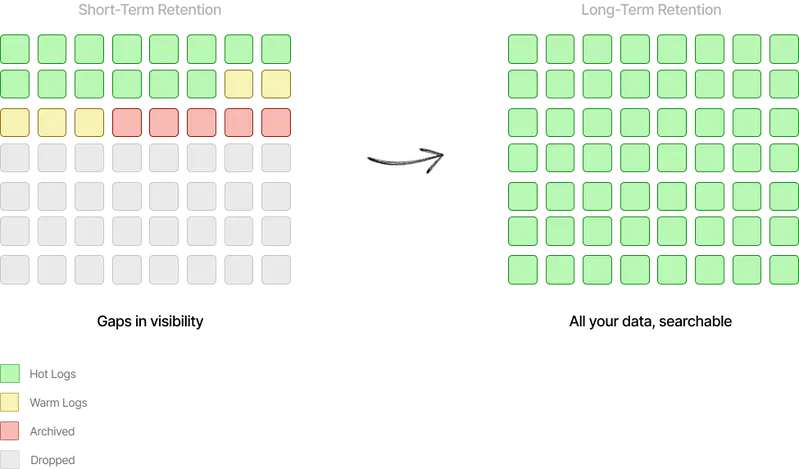
With a short retention window — 3, 15, or 30 days, as most solutions provide — logs are accessible only for outages and system issues severe enough to warrant immediate attention.

Long-term retention opens up an entirely new set of use cases.

Use cases enabled by long-term retention

A common example: comparing customer API request latencies or conversion metrics month-on-month, looking at seasonality effects, or preparing data for a customer QBR. You might want to analyze customers in aggregate to spot trends, or drill into a specific customer’s history.

Long-term data analysis example

Support issues can be recent or ongoing over months. Being able to look beyond a few days of data is often the difference between resolving a customer issue properly and leaving it half-answered.

In an AI world where agents can interrogate your data and solve problems at a completely different scale, long-term hot retention is essential — not the cumbersome, costly process of rehydrating logs from archives that most providers offer. The common workaround of dumping logs to S3 and spinning up Athena is another great example of the kind of toil that shouldn’t exist in modern logging.

The importance of long-term hot data is borne out by our own customers: the longer the data retention, the more use cases open up, the longer the time periods searched, and the more value customers extract from their data. This value will only increase as agents become more powerful.

Retention vs. value curve

The 4L’s Set a New Standard for the AI Era

Microsoft’s Satya Nadella put it well: AI is at the intersection of where intelligence meets data. If you don’t have the data, you can’t point AI at it. The new requirements for data in the AI era map directly to the 4L’s:

  • Large Scale — data that is always and easily accessible
  • Long-Term Retention — data retained so AI can analyze it and take action on it
  • Low Cost — storage and search must be cost-efficient as volumes see exponential growth
  • Low Latency — fast search and querying

As Bessemer Venture Partners notes in their Roadmap for AI Infrastructure, the volume of unstructured data is projected to reach 612 zettabytes by 2030, driven by ML/AI and synthetic data generation. Log data is one specific type where this applies acutely.

Here’s why logging requirements are intensifying in the AI era:

Systems of action are replacing systems of record. As AI-native apps don’t just store data but act on it, having log data accessible and hot means AI models can actually do something meaningful with it. The era of retaining logs for 30 days and locking them in cold storage is ending.

AI-led Root Cause Analysis. We’re already seeing AIs perform RCA using log data to help teams solve problems faster. BrontoScope, for example, automatically runs an investigation that assesses how widespread an error is — figuring out what queries to run, assessing results, running further queries, and delivering an immediate assessment with recommendations. It can save anywhere from minutes to hours per incident. As MCP becomes standard, log data will be analyzable with additional context from other systems — replicating what engineers do manually today when piecing together evidence.

LLMs are non-deterministic. Given the unpredictable nature of LLMs, logs will play an even more important role in understanding what happened — whether from a support, debugging, audit, security, or compliance perspective. The same action can deliver different results, making logs essential for showing exactly what occurred. (See our guide to collecting Ollama logs to get started.)

Regulation. EU AI Act Article 19, for example, will require logs of certain higher-risk AI systems to be retained for at least 6 months from 2026.

A Purpose-Built Adaptive Technology for Log Data

How do you actually achieve all 4L’s? The short answer: treat logs as a first-class citizen and build a purpose-built data store for them.

Until now, vendors have always repurposed existing datastores for logging:

  • Elasticsearch — at the core of most logging solutions for two decades. Super fast because it indexes everything, but super expensive due to data bloat and operational complexity.
  • ClickHouse — more recently vendors have turned to ClickHouse. Great for metrics, good for some logs — but only if you know the shape of your data in advance, which is a non-starter for a general-purpose logging platform. (Full write-up: Why ClickHouse fails as a general-purpose logging solution)
  • Snowflake — vendors like Observe have turned to Snowflake to address the cost problem, but customers regularly report search latency issues and burning through CPU credits when searching large data volumes.

The key learning from two decades in this space: not all log data should be treated equally. Don’t just “index everything” (inverted indexes) or at the other extreme “index nothing” (index-free solutions). Instead, take a more thoughtful approach — let the system adapt and optimize based on the shape of your data and the queries you run.

These optimizations operate at every layer:

Indexing: We combine multiple patent-pending adaptive compact indexes. The platform automatically decides which to apply based on data and query patterns. Techniques include Bloom filters, summary indexes, partition indexing, automatic log-to-metric conversion, and additional patent-pending technologies.

Storage: Our storage tier routes data to the most appropriate structure based on its shape and how it will be searched — columnar store, specialized data structures, high compression, partial decoding, and storage tier coordination.

Search: Specialized algorithms applied depending on the query being run, highly parallelized to operate at any scale.

For deeper reading: Why Bronto is so fast at searching logs, or the Log Management Cost Trap series — Part 1: Ingestion, Part 2: Storage, Part 3: Search.

No Maintenance Required

One important point often overlooked: we see vendors trying to solve the cost problem by deploying within an organization’s cloud (BYOC), using the customer’s hardware to reduce costs. This requires deploying a logging platform into your environment and having the vendor manage it there. Unless you have tight data regulations, this feels like an overly complex backward step.

Bronto is built on a modern cloud multi-tenanted architecture. No setup, no maintenance, no management required by the customer. We take advantage of compute/storage separation and independently scaling services.

AI = the Intersection of Intelligence and Data

If your current provider is building AI capabilities on top of an old, repurposed, or expensive logging platform — one with 2 L’s instead of 4 — you won’t be able to take full advantage of the AI revolution.

The 4L’s aren’t a nice-to-have. In the AI era, they’re the baseline.

See the 4L’s in Action