GitHub Internal Repositories Breached: Source Code and Internal Data Allegedly Exfiltrated in 2026 Supply Chain Attack

Introduction

In one of the most alarming cybersecurity incidents of 2026, GitHub confirmed unauthorized access to its internal repositories on May 20, 2026. According to reports, attackers managed to exfiltrate nearly 4,000 private repositories containing sensitive internal source code, development tools, and organizational data.
What makes this breach especially concerning is the attack vector: a malicious Visual Studio Code extension installed on an employee’s device. The incident demonstrates how modern cyberattacks are increasingly targeting developer environments and software supply chains instead of traditional network perimeters in the GitHub Attack 2026

Soon after the breach, a threat actor appeared on underground forums claiming responsibility and offering the stolen data for sale. The actor reportedly demanded between $50,000 and $95,000, threatening to leak the data publicly if no buyer emerged.
The incident serves as a powerful reminder that even the world’s largest technology platforms remain vulnerable when developer endpoints and third-party tools are compromised.

How the Attack Started
The breach reportedly began with a compromised employee workstation infected through a poisoned VS Code extension. Once installed, the extension provided attackers with access to the developer environment and internal systems.
From there, the attackers moved laterally across GitHub’s infrastructure and extracted thousands of internal repositories. These repositories allegedly contained:
Internal platform source code
Proprietary development tools
Organizational configurations
CI/CD workflow data
Internal scripts and automation files
GitHub later confirmed that the incident was limited to internal systems and that customer repositories were not impacted.

Why VS Code Extensions Are a Growing Cybersecurity Risk
Modern developer tools are designed for flexibility and productivity, but that convenience also introduces serious security risks.
VS Code extensions operate with deep access inside the developer environment. A malicious extension can potentially:
Read sensitive source code files
Access local project directories
Capture authentication tokens
Interact with integrated terminal sessions
Extract cloud credentials from AWS, Azure, or GCP
Steal CI/CD secrets and configuration files
Because developers often work with privileged access, compromising a single endpoint can give attackers a pathway into critical infrastructure and internal repositories.
This is why IDE extensions are becoming one of the fastest-growing attack surfaces in software supply chain security.

Timeline of the GitHub Breach
Initial Compromise
The attack began when an employee device was infected through a malicious VS Code extension.
Internal Access
After gaining access, attackers navigated GitHub’s internal systems and collected private repositories.
Data Exfiltration
Large amounts of source code were archived into compressed .tar.gz files before exfiltration.
Underground Forum Listing
The attackers later advertised the stolen data on cybercrime forums, claiming possession of approximately 4,000 private repositories.
Public Disclosure
On May 20, 2026, GitHub publicly acknowledged the breach and launched an investigation.

Technical Breakdown of the Attack
Security researchers believe the malicious extension likely functioned as both a credential harvester and persistence mechanism.
Once installed, the extension may have:
Captured authentication sessions
Accessed developer tokens
Monitored terminal activity
Uploaded internal files to attacker-controlled infrastructure
The leaked directory listings reportedly showed multiple compressed archive files containing internal projects and repositories, indicating a systematic data collection process.
This suggests the attackers were focused on long-term access and organized exfiltration rather than immediate disruption.

Threat Actor Motivation
The individual behind the breach reportedly stated that the operation was not intended as ransomware. Instead, they described it as a “retirement payday,” emphasizing financial motivation in the Brand Protection Software in the Actor Motivation.
The attackers invited bids exceeding $50,000 and threatened to release the data publicly if no buyer was found.
This reflects a growing trend in cybercrime where stolen source code and intellectual property are treated as high-value underground commodities.

Potential Risks and Industry Impact
If the leaked repositories are authentic, the consequences could extend far beyond GitHub itself.
Potential risks include:
Discovery of Hidden Vulnerabilities
Attackers and researchers may uncover previously undisclosed weaknesses within GitHub’s platform.
Supply Chain Attacks
Compromised internal tools could be leveraged to target downstream services and developers.
Phishing and Social Engineering
Internal knowledge could help threat actors create highly convincing phishing campaigns.
Reverse Engineering
Proprietary systems and workflows may be analyzed and replicated by malicious actors.
The breach also raises broader concerns about trust in developer platforms and software supply chain security.

GitHub’s Response
Following the incident, GitHub reportedly took several immediate actions:
Isolated the compromised employee device
Rotated exposed credentials and secrets
Increased monitoring for suspicious activity
Investigated affected repositories and systems
Confirmed no customer repositories were impacted
The company continues monitoring for potential follow-on attacks and unauthorized activity.

Security Lessons for Organizations
This breach highlights several critical lessons for organizations and development teams.
Audit Developer Extensions
Only approved and verified IDE extensions should be allowed within enterprise environments.
Strengthen Endpoint Security
Developer devices should receive the same level of protection as production infrastructure.
Monitor CI/CD Pipelines
Continuous monitoring can help detect unauthorized access and abnormal behavior.
Enforce Least Privilege Access
Developers should only have access to the systems and repositories required for their work.
Rotate Secrets Regularly
Frequent credential rotation reduces the impact of stolen authentication tokens.

Conclusion
The May 2026 GitHub breach demonstrates how a single compromised developer endpoint can escalate into a major platform-level security incident in happend in the Dark web Monitoring .
By exploiting a malicious VS Code extension, attackers allegedly gained access to thousands of internal repositories and sensitive development resources. The incident reinforces a harsh reality in modern cybersecurity: supply chain attacks are no longer theoretical threats — they are active, evolving, and targeting the tools developers trust every day.
As organizations continue embracing cloud-native development and third-party integrations, securing developer environments must become a top priority. The future of cybersecurity will depend not only on protecting servers and networks, but also on securing the software ecosystem itself.

GitHub Attack 2026- https://foresiet.com/blog/github-supply-chain-attack-2026/
Brand Protection software –https://foresiet.com/solutions/brand-protection/|
dark web monitoring-https://foresiet.com/

Stop drowning in files: auto-organize your Google Drive with n8n (free workflow JSON)

Your Google Drive is a mess. Don’t lie.

Downloads folder. Desktop. Shared drives. Inbox attachments saved without thinking. After a year of casual saving, you’ve got PDFs next to vacation photos next to invoices next to half-finished presentations — and nothing is findable.

The fix isn’t a “digital declutter weekend.” That takes hours and you’ll slide back in two weeks. The fix is an automation that runs forever and silently keeps everything sorted for you.

Here’s a 4-node n8n workflow that watches a Google Drive folder and automatically moves every new file into the right sub-folder — PDFs, Images, Spreadsheets, Documents, Presentations, Videos — with a date prefix so files sort chronologically without renaming anything manually.

What the workflow does

Node 1 — Google Drive Trigger: watch a folder

Polls a specific Google Drive folder every minute for new files. The moment a file lands in your “Inbox” folder (your drop zone), the workflow fires.

Node 2 — Code node: classify by type + generate new name

Looks at the file’s MIME type and filename extension:

  • application/pdf or .pdf → PDFs
  • image/* or .jpg/.jpeg/.png/.gif/.svg/.webp → Images
  • spreadsheet MIME or .xlsx/.xls/.csv → Spreadsheets
  • document MIME or .doc/.docx/.txt/.md → Documents
  • presentation MIME or .ppt/.pptx → Presentations
  • video/* or .mp4/.mov/.avi → Videos
  • Everything else → Other

Also prepends today’s date: 2026-05-22_invoice-client.pdf. Every folder sorts automatically from oldest to newest — no manual date-tagging ever.

Node 3 — Google Drive: move to folder

Moves the file from the Inbox folder into the classified sub-folder. Two-second operation. The original file is gone from your drop zone, organized where it belongs.

Node 4 — Google Sheets: log the action

Appends a row to a FileLog sheet: fileId, fileName, targetFolder, newName. Full audit trail: every file ever sorted, when it was sorted, where it went.

Setup (5 minutes)

  1. Create the folder structure in Google Drive:

    • Inbox/ (your drop zone)
    • Files/PDFs/
    • Files/Images/
    • Files/Spreadsheets/
    • Files/Documents/
    • Files/Presentations/
    • Files/Videos/
    • Files/Other/
  2. Import the JSON into n8n (New Workflow → Import from clipboard)

  3. Connect your Google account in the Drive Trigger, Drive, and Sheets nodes (one OAuth connection covers all three)

  4. Set your folder IDs in Node 1 (Inbox folder ID) and Node 3 (target folder IDs — one per category). Get folder IDs from the URL when you open a folder in Drive: drive.google.com/drive/folders/FOLDER_ID_HERE

  5. Create a Google Sheet called FileLog and set its ID in Node 4

  6. Activate the workflow — it now runs forever

From now on: drop anything into Inbox, it’s organized in under 60 seconds.

Full workflow JSON

{
  "name": "File Organizer",
  "nodes": [
    {
      "parameters": {
        "pollTimes": {"item": [{"mode": "everyMinute"}]},
        "triggerOn": "specificFolder",
        "folderToWatch": {"__rl": true, "value": "YOUR_INBOX_FOLDER_ID", "mode": "id"}
      },
      "id": "fo1", "name": "Watch Google Drive",
      "type": "n8n-nodes-base.googleDriveTrigger", "typeVersion": 1, "position": [240, 300]
    },
    {
      "parameters": {
        "jsCode": "const file = $input.first().json;nconst name = file.name || '';nconst mime = file.mimeType || '';nlet folder = 'Other';nif (mime.includes('pdf') || name.endsWith('.pdf')) folder = 'PDFs';nelse if (mime.includes('image') || /\.(jpg|jpeg|png|gif|svg|webp)$/i.test(name)) folder = 'Images';nelse if (mime.includes('spreadsheet') || /\.(xlsx|xls|csv)$/i.test(name)) folder = 'Spreadsheets';nelse if (mime.includes('document') || /\.(doc|docx|txt|md)$/i.test(name)) folder = 'Documents';nelse if (mime.includes('presentation') || /\.(ppt|pptx)$/i.test(name)) folder = 'Presentations';nelse if (mime.includes('video') || /\.(mp4|mov|avi)$/i.test(name)) folder = 'Videos';nconst datePrefix = new Date().toISOString().split('T')[0];nreturn [{ json: { fileId: file.id, fileName: name, targetFolder: folder, newName: datePrefix + '_' + name } }];"
      },
      "id": "fo2", "name": "Classify File Type",
      "type": "n8n-nodes-base.code", "typeVersion": 2, "position": [480, 300]
    },
    {
      "parameters": {
        "operation": "move",
        "fileId": "={{ $json.fileId }}",
        "folderId": "={{ $json.targetFolder }}"
      },
      "id": "fo3", "name": "Move to Folder",
      "type": "n8n-nodes-base.googleDrive", "typeVersion": 3, "position": [720, 200]
    },
    {
      "parameters": {
        "operation": "append",
        "documentId": {"__rl": true, "value": "YOUR_SHEET_ID", "mode": "id"},
        "sheetName": {"__rl": true, "value": "FileLog", "mode": "name"},
        "columns": {"mappingMode": "autoMapInputData"}
      },
      "id": "fo4", "name": "Log Action",
      "type": "n8n-nodes-base.googleSheets", "typeVersion": 4.5, "position": [720, 400]
    }
  ],
  "connections": {
    "Watch Google Drive": {"main": [[{"node": "Classify File Type", "type": "main", "index": 0}]]},
    "Classify File Type": {"main": [[{"node": "Move to Folder", "type": "main", "index": 0}, {"node": "Log Action", "type": "main", "index": 0}]]}
  },
  "settings": {"executionOrder": "v1"},
  "tags": [{"name": "file-management"}]
}

Customizations

Add more file types
The Code node’s classification logic is just a series of if/else statements. Add a line like:

else if (/.(zip|tar|gz)$/i.test(name)) folder = 'Archives';

for ZIP files, audio files, code files — whatever categories you need.

Use it as a shared team inbox
Share the Inbox folder with your team. Now anyone on the team can drop files and they’ll auto-sort into the right place. Works great for shared client deliverables, design assets, or contract PDFs.

Add Slack notification
Append a Slack node after Node 3:

"✅ {{$json.fileName}} → {{$json.targetFolder}}"

Great for team awareness when important files arrive.

Email attachment auto-saver
Pair this workflow with an n8n Gmail trigger that saves all attachments to the Inbox folder. Now every email attachment is automatically sorted by type and logged — your inbox clutter permanently solved.

Add AI-based naming
Replace the date prefix logic in the Code node with a call to the OpenAI or Claude API to generate a clean descriptive filename based on file content (for text-readable files). More complex but powerful for documents with generic names like scan001.pdf.

Why this compounds

Unlike a “clean up your files” session that you’ll undo in a month, this workflow runs silently forever. The longer it runs, the better your files are organized. Set it up once in 5 minutes, and your Drive is permanently sorted.

The audit log in Sheets also means you can easily answer: where did that file go? Search by filename, filter by date, done.

Get the full automation bundle

This workflow is part of our 15-template n8n automation bundle — each one covering a different business use case: lead capture, invoice generation, AI customer support, social media automation, price monitoring, and more.

Grab the full bundle at stripeai.gumroad.com — pre-tested, documented, ready to activate.

Built with n8n. Self-hostable, open source, no vendor lock-in.

Secure Firmware Updates with a Secure Element: Building Trust Into the Bootloader

Imagine your embedded device is deployed somewhere in the field – a smart meter, an industrial sensor, a vehicle ECU. You find a critical bug. You push a fix. The device downloads the new firmware over the air and flashes it.

But here’s the uncomfortable question: how does the device know that firmware actually came from you?

Anyone sitting on the same network could send a firmware package. A compromised update server could serve a malicious binary.

Without a proper trust mechanism, your device is one bad OTA away from running someone else’s code.

This is the problem a Secure Element solves – and this post walks through exactly how it works, from the chip itself to the bootloader verification flow.

What Is a Secure Element?

A Secure Element (SE) is a small, tamper-resistant chip whose one job is to safely store cryptographic keys and run crypto operations – without ever exposing those keys to the outside world.

Think of it as a locked safe soldered onto your board. Even if an attacker gets full control of your main CPU, dumps your flash, or probes your bus lines, the keys inside the SE remain out of reach.

It protects against:

  • Physical attacks (chip probing, decapping, glitch injection)
  • Software attacks (privilege escalation, memory dumps)
  • Side-channel attacks (power analysis, timing attacks)

Common SE chips used in embedded systems: ATECC608A, SE050, TPM 2.0.

What Can a Secure Element Do?

A Secure Element is not just a key storage box – it is a self-contained cryptographic engine. Here is what it can do:

Key generation and storage – private keys are created and stored inside the chip and never leave it, not even during factory programming

Digital signatures (ECDSA / Ed25519) – signs or verifies data using stored keys; the core operation behind firmware verification

Key agreement (ECDH)– two parties derive a shared encryption key from exchanged public keys, without the secret ever crossing the wire

Symmetric encryption (AES) – encrypts and decrypts data directly on-chip; used to protect firmware package contents in transit

Hashing (SHA-256) – computes a fixed 32-byte fingerprint of any data; one byte changed = completely different hash

True random number generation (TRNG) – hardware entropy source for generating nonces, session keys, and signature randomness

Monotonic counter – a number that only goes up, never down, even across power cycles; blocks firmware downgrade attacks

Certificate storage – stores X.509 certificates to prove device identity during TLS or OTA authentication

Why Firmware Updates Need Signature Verification

When a device receives an OTA update, it has no way of knowing by default whether that firmware is genuine or has been tampered with.

An attacker could:

  • Intercept the OTA transfer and swap in malicious firmware
  • Replay an older, vulnerable firmware version
  • Extract a key from plain flash memory, sign a fake binary, and serve it

Signature verification closes this. The firmware is cryptographically signed by the manufacturer before it ever leaves the build system. The bootloader verifies that signature on the device before touching a single flash sector. If verification fails, nothing gets flashed.

The Secure Element is what makes this guarantee solid – the verification key lives inside hardware-protected storage, not in flash memory where it can be read or replaced.

The Verification Flow – Step by Step

On the Manufacturer Side

  1. Firmware binary is compiled and a version header is attached (version number, hardware revision, magic bytes).
  2. A SHA-256 hash of the entire firmware is computed – a fixed 32-byte fingerprint of the binary.
  3. That hash is signed using an ECDSA private key stored in a Hardware Security Module (HSM) on the build server. The result is a signature.
  4. Package is uploaded to the OTA server. The final package ships as:
{ firmware binary + version header + ECDSA signature }

On the Device Side – Inside the Bootloader

1. Firmware package arrives and is written to a staging area in flash.
   (Primary firmware slot is untouched at this point.)

2. Bootloader reads the firmware header:
   - Magic number   → is this a valid package format?
   - Hardware rev   → is this firmware built for this exact hardware?
   - Version number → is this newer than what is currently running?

3. Bootloader computes SHA-256 over the full firmware binary.
   → 32-byte hash of exactly what was received.

4. Bootloader hands the hash + the signature to the Secure Element:
   SE.verify(hash, signature, public_key)

5. Secure Element runs ECDSA verification internally:
   - Uses the public key it has stored inside it
   - Mathematically checks whether the signature was produced
     by the matching private key over this exact hash
   - Returns PASS or FAIL - nothing else leaves the SE

6a. PASS:
    → Erase the primary firmware slot
    → Copy firmware from staging to primary slot
    → Increment the SE monotonic counter (locks out older versions)
    → Reboot and jump to new firmware entry point

6b. FAIL:
    → Erase the staging area
    → Boot the existing firmware as a safe fallback
    → Log the failure for reporting on next server connection

The key insight: the private key that signed the firmware on the build server never exists on the device. Only the public key is on the device – locked inside the SE. A public key can verify signatures but cannot create them. So even if an attacker fully dumps the device’s flash, they cannot forge firmware that passes verification.

Anti-Rollback: Why a Valid Signature Is Not Enough

Here is a subtle attack worth understanding. Firmware v1.2 had a vulnerability – you patched it in v1.3. But v1.2 was real firmware, signed by your real private key. Its signature is completely valid.

An attacker replays the old v1.2 package. Signature check passes. Device flashes vulnerable firmware. You are back to square one.

The fix is the SE monotonic counter – a number stored inside the SE that only ever increments.

SE stores: minimum_allowed_version = 1.3

Bootloader receives firmware v1.2:
  1.2 < 1.3  →  REJECTED, even though signature is valid.

After successfully flashing v1.4:
  SE increments counter → minimum_allowed_version = 1.4
  This cannot be undone by software.

Because the counter is inside the SE, no software attack – not even a full OS compromise – can reset it.

Conclusion

Firmware security is not just about encryption or passwords. It is about establishing a chain of trust – from the moment code leaves your build system to the moment a device executes it.

The Secure Element is the hardware anchor of that chain. The private key stays with you. The public key stays locked in silicon on the device. The bootloader does the verification. And the monotonic counter makes sure there is no going back.

I Thought Domain-Driven Design Was a Waste of Time. I Was Wrong.

The first time someone explained Domain-Driven Design (DDD) to me, I thought it was a lot of ceremony for very little payoff.

Aggregates, value objects, bounded contexts — a whole vocabulary to learn. I had shipped plenty of features without any of it. My honest assumption: this will just slow me down.

I was wrong. Here’s the short version of how I found out.

The project that changed my mind

I worked on a system with a hierarchy — Site, then Aggregator, then a unit under that. A “plan” existed at every level.

In the code, all three were just plan. Same name, same shared object, everywhere.

It worked — until it didn’t. Features started colliding. A change to one level’s plan quietly broke another. Every function needed a comment explaining which plan it meant. New people asked the same question every week: “is this the site plan or the unit plan?”

The code ran fine. The understanding around it was rotting.

That’s the exact problem DDD is built to fix.

What DDD actually is

DDD is not a framework. Nothing to install. It’s a discipline: design your software around the business problem, not the database or the framework.

The patterns get all the attention, but the real value is in two boring ideas.

1. Ubiquitous language — name things honestly

Pick precise words and use them everywhere — in conversations, tickets, and the code itself.

If the business has a “draft plan” and a “submitted plan,” those exact words belong in your class names. Not plan with a vague status field. The moment a name is vague, logic starts hiding inside it.

My entire mess traced back to one overloaded word.

2. Bounded context — stop forcing one model

“Customer” means different things to billing, support, and analytics. Forcing one shared Customer class gives you 40 fields nobody dares touch.

A bounded context is a line you draw: inside this boundary, a word means exactly one thing. Cross the line, you’re allowed a different model.

This is also the most reliable way to answer “how do I split this microservice?” — split where the domain actually splits.

The patterns, in one line each

  • Entity — has a stable identity over time (an order stays that order).
  • Value object — defined only by its values (money, a date range).
  • Aggregate — a group of objects with one entry point that enforces the rules.
  • Repository — hides how data is stored from your domain code.
  • Domain event — something meaningful happened (PlanSubmitted).

But these only make sense after the language and boundary work. Reach for them first and you get fancy code that models nothing real.

When to skip DDD

My old skepticism wasn’t wrong — just aimed at the wrong project.

Skip DDD if: the app is simple CRUD, the project is small or short-lived, or the complexity is technical (algorithms, performance) rather than business logic.

Use DDD if: the domain is genuinely complex and the software has to live and evolve for years.

“This will slow me down” is correct — for simple projects. It’s completely wrong for complex ones.

What I’d tell my earlier self

The patterns are not the point. You can memorize aggregates and value objects and still build a mess.

The point is the boring stuff: talk to the people who understand the business, agree on exact words, draw honest boundaries, and let the code follow.

DDD is overhead. On a simple project, bad trade. On a complex one meant to last, it’s the cheapest insurance you’ll ever buy.

Originally published on mrsajib.com. I write weekly about backend engineering and building software that lasts.

AI Content Is Getting Tagged Like Livestock — And That’s Actually Good

This is a submission for the Google I/O Writing Challenge

The Invisible Ink That’s About to Change Everything

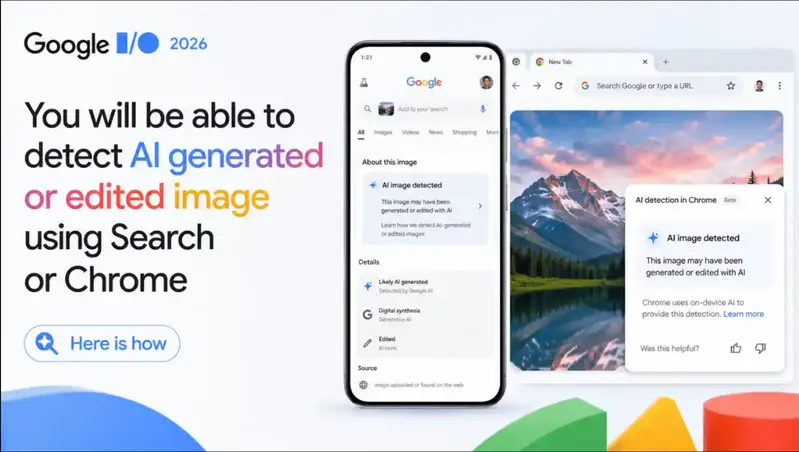
Three years ago, Google quietly launched SynthID — an imperceptible digital watermark baked into AI-generated images, videos, and audio. Most developers barely noticed. It felt like an internal safety checkbox for Gemini products.

At Google I/O 2026, that changed. SynthID didn’t just get an update — it got a mandate.

Sundar Pichai stepped on stage and announced something genuinely surprising: OpenAI is adopting SynthID. So are Kakao and ElevenLabs. Nvidia had already joined last year. In a single keynote moment, what was once a Google-only feature became an emerging industry standard — and it’s now rolling out into Google Search and Chrome, where billions of people actually browse the web.

As someone who cares about the long-term health of the web, this is the I/O announcement I keep thinking about.


What SynthID Actually Is

SynthID is Google DeepMind’s invisible watermarking technology. When you generate an image with Gemini, it doesn’t just hand you a PNG — it bakes an imperceptible signal directly into the pixel values. Same with video frames. Same with audio waveforms. The watermark is not a visible stamp. It has no metadata tag that disappears on re-save. It lives in the content itself.

That distinction matters a lot. Most attempts at AI content labeling rely on metadata — a tag that says “made with AI” tucked into the file’s EXIF data. That tag disappears the moment someone screenshots the image, re-uploads it, or runs it through a compression tool. Metadata is fragile.

SynthID’s watermark is designed to survive:

  • Cropping and resizing
  • Compression (JPEG, WebP, etc.)
  • Screenshots
  • Re-encoding of video and audio
    When you upload something to SynthID Detector, it reads that embedded signal and tells you whether it’s there — and whether it covers the whole file or just part of it.

What SynthID Actually Does (and How It Differs from C2PA)

Before getting into why this matters, it’s worth clearing up a common point of confusion — because Google announced two complementary systems at I/O 2026, and they do very different things.

SynthID embeds an invisible watermark directly into the pixels of an AI-generated image, the waveform of audio, or the frames of a video. It’s designed to survive compression, cropping, rotation, and re-encoding. You can’t see it. You can’t easily strip it. When you upload a piece of content to SynthID Detector, it tells you whether the content carries that invisible signal.

C2PA Content Credentials, on the other hand, is cryptographically signed metadata — a kind of tamper-evident receipt that records who created a file and how it was edited, step by step. The Pixel 10 is now the first device to write C2PA credentials natively inside its camera app. This tells you: “This photo came from a real camera and was not subsequently edited with generative AI.”

The key insight from Google’s I/O presentation is that these two systems are complementary, not competing:

  • SynthID says: “This was made by AI.”
  • C2PA says: “This was made by a real camera.”

As OpenAI themselves put it when announcing their own adoption: watermarking can survive transformations like screenshots, while metadata can carry richer provenance context when it does survive. You need both layers for anything close to reliable content verification.

The Numbers That Make This Real

Let me put the scale in perspective, because the scale here is actually the story:

  • SynthID has now tagged more than 100 billion images and videos
  • It has watermarked the equivalent of 60,000 years’ worth of audio
  • SynthID Detector (launched at I/O 2025) has already been used 50 million times globally
  • Until I/O 2026, all of that verification happened inside the Gemini app — a destination most people never visit

That last point is the crux of the problem SynthID just solved. You can build the best detection technology in the world, but if it lives behind an app most people don’t open, it doesn’t protect the web. It protects a walled garden.

Moving SynthID verification into Google Search — via Lens, AI Mode, and Circle to Search on Android — and into Chrome, meets users where they already are.

Why OpenAI Adopting SynthID Is the Headline Nobody’s Writing Loudly Enough

The most significant thing about the SynthID announcement at I/O 2026 isn’t the Chrome integration or the Search rollout. It’s that Google’s biggest AI competitor is now embedding Google’s watermarking standard into ChatGPT-generated images.

Think about what that means architecturally. OpenAI’s new provenance system pairs SynthID’s invisible watermark with C2PA metadata — dual-layer verification across both methods. They also launched a public verification tool to check for both signals. This isn’t a company being polite to a competitor. This is a company acknowledging that shared infrastructure for AI content provenance is more valuable than proprietary fragmentation.

For developers, this is the rare standards moment worth paying close attention to. When the two largest AI labs in the world converge on the same provenance technology, you’re watching a de facto standard form in real time. That has serious implications for how we’ll build applications that handle user-generated or AI-generated content going forward.

What This Means If You Build for the Web

If you’re building anything that deals with user-uploaded images, AI-generated content, or media pipelines, here’s what’s changing under your feet:

1. Content verification is moving to the infrastructure layer.
Google is launching an AI Content Detection API for partners. Verification won’t just be something users do manually — it’ll be callable from your backend.

2. Your users will start encountering verification prompts in Search and Chrome.
When someone right-clicks an image in Chrome or taps “About this image” in Search, they’ll see SynthID or C2PA information if it’s present. This changes user expectations. They’ll start asking why your platform doesn’t show them provenance data.

3. The Pixel 10 sets a new hardware benchmark.
Native C2PA signing in the device camera app means phones will soon ship with content authenticity as a first-class feature, not an afterthought. That’s a precedent Android OEMs and eventually Apple will likely follow.

4. The arms race is real but the asymmetry is shifting.
Google DeepMind researcher Pushmeet Kohli was direct about this on stage: “A technology like this will always be attacked.” Watermarking and watermark removal is an ongoing adversarial game. But with 100 billion+ pieces of tagged content already in the wild, the signal-to-noise ratio is finally reaching a usable threshold.

The Honest Critique

None of this is perfect, and it would be lazy to write this post without acknowledging that.

SynthID only detects SynthID. If someone generates an image with a tool that doesn’t use this standard — and there are many — it simply won’t show up as watermarked. The detection isn’t “this is or isn’t AI,” it’s “this does or doesn’t carry a SynthID watermark.” That’s a meaningful distinction.

Metadata can be stripped. C2PA credentials live in a file’s metadata, and a simple re-save can remove them. SynthID survives more transformations, but with sufficient adversarial effort, it can reportedly also be circumvented. Google disputes that any known public bypass actually works at scale, but the company also acknowledges they’re playing a long adversarial game.

The fragmentation problem isn’t fully solved. Microsoft has its own content watermarking approach. Meta does too. The fact that OpenAI joined SynthID is huge progress, but “most of the generative stack” is not the same as “all of it.”

The Bigger Picture

What I find genuinely interesting about this I/O announcement — beyond the technical details — is the signal it sends about where the industry thinks trust is going.

For the past few years, “AI detection” has mostly been a charade. Consumer tools that claim to detect AI-written text have notoriously high false-positive rates. Detection by vibes (does it look too smooth? too generic?) is worse. The honest answer has been: at the content layer, you often can’t tell.

SynthID is a different bet. Instead of detecting AI content after the fact from its appearance, you watermark it at generation time and verify the watermark later. It moves the verification problem from “pattern recognition on outputs” to “cryptographic provenance.” That’s a fundamentally more tractable approach.

The EU AI Act’s draft Code of Practice is already pointing in this direction — requiring multi-layer approaches combining C2PA metadata, imperceptible watermarking, and centralized logging. What Google announced at I/O 2026 isn’t just a product update. It’s the beginning of the infrastructure that a regulated, trust-aware AI web is going to need.

Three years from now, I think we’ll look back at this I/O as the moment content provenance went from a Google experiment to a web primitive. Whether that transition actually makes the internet more trustworthy depends on how many more companies adopt it, how the adversarial landscape evolves, and whether policymakers create the right incentive structures to enforce it.

But the direction is right. And the scale is finally there to matter.

Have you started thinking about content provenance in your own projects? I’d love to hear how others are thinking about integrating SynthID or C2PA verification into their stacks.

ESP32 Into a Speech-to-Text Device

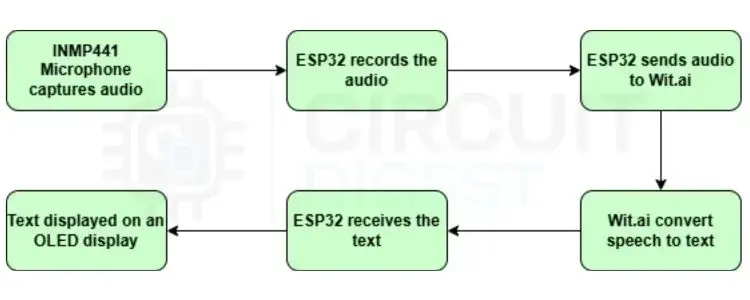
Block Diagram of ESP32 Speech to Text

Typing commands into a serial monitor feels old once you start playing with voice interfaces.

So I decided to try something more interesting — building a small ESP32 Speech to Text system using an INMP441 I2S microphone and an OLED display. The setup listens to speech, sends audio to a cloud API, and converts spoken words into text almost instantly.

And honestly, seeing your own words appear live on a tiny OLED screen feels surprisingly futuristic for such a small project.

Why I Didn’t Use Offline Speech Recognition

At first, I thought about running everything directly on the ESP32.
Then reality hit.

Speech recognition models are heavy. The ESP32 simply doesn’t have enough processing power or memory to run large speech-to-text models locally in a reliable way. Instead of fighting hardware limitations for days, I used a cloud-based speech recognition service called Wit.ai.

The ESP32 only handles:

  • audio capture
  • WiFi communication
  • displaying results

The cloud handles the difficult AI processing.

Way simpler.

How This Project Works

Block Diagram of ESP32 Speech to Text

The workflow is actually pretty clean.

The INMP441 microphone captures audio using the I2S protocol. The ESP32 records the audio as 16-bit PCM data and sends it over HTTPS to Wit.ai using WiFi.

Once processed, Wit.ai sends back the recognized text in JSON format.

The ESP32 extracts the text and displays it on:

  • OLED display
  • Serial Monitor

So the whole system behaves almost like a tiny voice assistant.
Press button → speak → get text.

Components Used

Components Required

The hardware setup is very small:

  • ESP32 development board
  • INMP441 I2S microphone
  • 0.91-inch OLED display
  • push button
  • jumper wires
  • breadboard

That’s it.

No extra audio shield.

No Raspberry Pi.

No expensive AI hardware.

Setting Up Wit.ai Was Easier Than Expected

I honestly expected cloud AI setup to be painful.
But the process was surprisingly simple:

  • Create a Wit.ai app
  • Copy the Service Access Token
  • Paste token into Arduino code

Done.

The ESP32 sends raw audio directly to:

api.wit.ai

using HTTPS requests.
No custom server setup required.

OLED Feedback Makes the Project Feel Alive

One thing I really liked was the OLED status updates.
The display switches between:

  • Connecting…
  • Ready
  • Listening…
  • Processing…

It makes the device feel interactive instead of just dumping logs into Serial Monitor.

Once the recognized text appears on the OLED, the project suddenly feels much more polished.

Future Upgrades I Want to Try

This setup can easily evolve into:

  • voice-controlled home automation
  • smart assistants
  • speech logging systems
  • WhatsApp voice notifications
  • MQTT-based voice dashboards

You could even combine it with text-to-speech later and create a complete two-way voice assistant using only ESP32 hardware.

For a small microcontroller project, this one feels surprisingly close to real-world AI systems.

AI Projects, ESP32 Projects,

Why Simple Audio Transcription Fails in Healthcare: The Need for Clinical Reasoning Engines

Building AI tools for healthcare is one of the most rewarding spaces in tech right now, but it’s also a minefield of unique workflow hurdles. Many developers enter this market thinking that building a helpful medical tool is as simple as combining a standard transcription API wrapper with an LLM prompt to summarize conversation text.

However, if you talk to clinicians—especially specialists like physical therapists—you quickly learn that generic audio transcription models are failing them. Here is why simple speech-to-text falls flat, and why the industry is shifting toward deeply integrated software solutions.

The Flaw of “Digital Tape Recorders”

Generalized medical scribes act like automated recorders. They capture conversational audio from a patient session and dump a massive block of summary text. For a primary care doctor doing a basic check-up, that might suffice.

But specialized medicine isn’t just a conversation; it’s a dynamic data collection environment.

Consider an outpatient physical therapy evaluation. A physical therapist is evaluating gait patterns, testing Manual Muscle Testing (MMT) grades, measuring range of motion (ROM) parameters, and mapping out functional goal progressions under rigid regulatory rules (like the 8-minute billing rule).

When a generic LLM tries to clean up that audio, it misses the contextual medical hierarchy. The therapist is forced to spend valuable time manually copying, pasting, and formatting a sloppy transcript into their structured fields anyway—a tedious workflow gap known as “pajama time.”

Shifting the Architecture to Clinical Reasoning Engines

To build something that actually sticks, the product paradigm has to evolve from audio summary tools to specialized logic frameworks.

Instead of parsing an entire raw audio transcript post-session, a dedicated clinical reasoning engine like Notation by Fownd acts as a real-time interpreter. It works by running ambient processing alongside the clinical interaction, extracting structural metrics and clinical logic directly from the ambient room noise as the session unfolds.

By prioritizing the structural clinical logic over literal raw transcription, the system can instantly map data points directly into structured, compliant SOAP notes without forcing the provider into an editing loop.

Solving the Deployment Friction with Browser Layer Execution

The final bottleneck isn’t the AI accuracy—it’s EMR (Electronic Medical Record) interoperability. Hospital systems and private clinic owners are notoriously protective of their legacy databases. They heavily resist complex custom integrations, backend API overhauls, or heavy local software installations.

The solution to this friction is deploying your interface directly on the browser layer. By developing the application as a secure browser extension, the software can sit comfortably on top of any web-based legacy EMR interface.

Instead of forcing a user to constantly alt-tab or copy-paste between windows, the browser extension injects the parsed data from the clinical reasoning engine natively into the target input fields.

Conclusion

As developers and innovators, our goal should be making the technology completely invisible. In healthcare, that means moving away from broad, generic speech-to-text apps and building hyper-focused domain solutions that actively protect clinicians from administrative burnout.

The 114KB Span Attribute That Hid Our LCP Data

A React Native WebView debugging story about LCP, data URLs, and trace attributes

We recently ran into a strange Sentry performance issue in a React Native app.

The short version:

Our LCP transaction existed in Sentry, but we could not query it by the attributes we attached to it.

That sounded contradictory at first. If the transaction was there, why could not Trace Explorer find it?

The answer turned out to be a single span attribute:

lcpUrl = data:image/png;base64,...

In one iOS event, that value was about 114KB before Sentry normalized it.

The symptom

We were measuring WebView performance inside a React Native app. For each WebView page load, we reported two custom Sentry transactions:

Online Customer Support (FCP)
Online Customer Support (LCP)

Both transactions used the same operation:

ui.web_page_load

And we attached searchable attributes such as:

metricInfo = FCP | LCP
pageTitle
pageUrl
host
path
durationMs

In Sentry Transaction Summary, the LCP transaction was visible. We could open sampled events and see slow LCP data for the page.

But in Trace Explorer, this query returned no iOS LCP rows:

span.op:ui.web_page_load metricInfo:LCP os.name:iOS pageTitle:"Online Customer Support"

FCP worked. Android worked. iOS LCP did not.

That is the kind of bug that makes you distrust the dashboard before you distrust your own instrumentation.

What we found in the raw event

When we pulled the raw event from the Sentry API, the iOS LCP transaction existed. The transaction name was correct:

Online Customer Support (LCP)

But the trace data was not what we expected. The event still had fields like:

durationMs
host
lcpElement
lcpUrl

But important fields we expected to query by were missing from the indexed span data:

metricInfo
pageTitle
pageUrl
path

The suspicious field was lcpUrl.

For that iOS LCP event, lcpUrl was not a normal network URL. It was a base64 data URL:

data:image/png;base64,...

Sentry showed the value as truncated, and the event metadata indicated the original value was much larger. In our case, the original attribute value was around 114KB.

The production difference: iOS sent 114KB, Android sent 100 characters

This was the detail that made the investigation click.

In production, the same WebView LCP instrumentation behaved very differently across platforms:

Field iOS Android
lcpUrl original length 114,130 chars 100 chars
Sentry _meta Saved as 7,683 chars with !limit Complete
metricInfo Missing Present
pageTitle Missing Present
pageUrl Missing Present

The iOS LCP transaction was real, but it carried an enormous lcpUrl value. Sentry normalized the oversized field, and the attributes we depended on for aggregation were not available in Explore.

That explains the contradiction:

  • Transaction Summary could still find the event by transaction name.
  • Explore could not find it by attributes like metricInfo, pageTitle, or path.

Android looked fine because its entry.url value was already short before we sent it to Sentry.

Why Android looked fine

We built a small WebView test page to isolate where the truncation happened.

The test page generated a real 800×500 PNG, embedded it as a base64 data URI, and made it the LCP candidate. The full data URI was 1,601,014 characters.

On Android, the results were:

DOM img.src.length              = 1,601,014
AndroidBridge.postLcpUrl(url)   = 1,601,014
PerformanceObserver entry.url   = 100

That told us the React Native bridge was not truncating the value. A normal JavaScript-to-Android bridge could receive the full 1.6MB string.

The 100-character value came from PerformanceObserver / Chromium before our injected script sent anything to React Native.

On iOS Safari WebView, entry.url kept the full data URI. That is closer to the literal resource URL, but in this case it was exactly what made the telemetry event dangerous.

The platform chain looked like this:

iOS Safari WebView
  PerformanceObserver -> entry.url = full base64 URI
    -> postMessage to React Native
      -> Sentry span attribute
        -> oversized field normalized
          -> aggregation attributes missing in Explore

Android Chromium WebView
  PerformanceObserver -> entry.url = 100 characters
    -> Sentry span attributes stay small
      -> dashboard query works

We also found Chromium source paths that use a 100-character URL elision pattern for internal presentation/logging-style output. I would treat this as an implementation detail, not a Web API contract. It explained our production data, but it is not something application logic should depend on.

Why did LCP have a data URL?

The browser Largest Contentful Paint API can expose information about the element that became the LCP candidate. Depending on the content, the entry may include a URL-like value for the resource.

In a WebView, the largest contentful element can be an image. If that image is embedded as a data URL, the value can become:

data:image/png;base64,<a very long string>

Our injected WebView script collected that value and forwarded it to React Native. React Native then attached it as a Sentry span attribute.

That was the mistake.

We did not actually need the image bytes. We only wanted to measure page performance by page title, host, path, metric type, and duration.

The fix

We removed lcpUrl and lcpElement from the Sentry span attributes.

Before, our LCP payload included extra diagnostic details:

reportWebSpan("LCP", lcpValue, {
  lcpElement,
  lcpUrl,
});

After the fix, we only report the metric value and stable dimensions:

reportWebSpan("LCP", lcpValue);

The Sentry attributes now stay small and useful:

metricInfo
pageTitle
pageUrl
host
path
durationMs

After removing the oversized fields, the LCP data appeared correctly in the query again.

What I should have caught earlier

This bug came from a well-intentioned bit of instrumentation code. It tried to capture more context for LCP debugging. That sounds reasonable when you are writing the code.

But observability data has different rules from application data.

A field is not harmless just because it is technically available. Before sending it to a telemetry system, it should pass a few checks:

  • Is it bounded in size?
  • Is it low-cardinality enough to query and aggregate?
  • Does it help answer a real production question?
  • Could it contain private or user-specific data?
  • Could one bad value make the rest of the event harder to index or search?

lcpUrl failed those checks.

lcpElement was also not needed for our dashboard. It added noisy DOM details without improving the metrics we actually used.

One more small trap: our performance transactions were sampled. With tracesSampleRate: 0.2, historical examples were naturally sparse. That made the bug feel more mysterious than it was.

Lessons learned

For custom performance instrumentation, especially in WebViews, keep span attributes boring.

Good attributes are small, stable, and useful for grouping:

metricInfo = LCP
pageTitle = Online Customer Support
host = example.com
path = /customer-service
durationMs = 3020

Bad attributes are large, unique, or accidentally full of payload data:

lcpUrl = data:image/png;base64,...
outerHTML = <huge DOM subtree>
requestBody = ...

My final notes from this one:

  1. entry.url is not equally useful across WebViews. Android Chromium may give you a short, elided value, while iOS Safari WebView may give you the full data URI.
  2. Sentry span attributes should not contain potentially huge strings.
  3. A platform that silently truncates a dangerous value can hide a bug in your instrumentation.
  4. Spec-like behavior is not always operationally safe. Returning the full URL may be correct, but sending it to telemetry was still wrong.

The dashboard was not wrong. The data model was wrong.

And in this case, deleting two fields made the metric visible again.

How to Scale AI Development Beyond Prototype Speed

One thing that isn’t talked about enough in AI right now is how easy it has become to mistake a working demo for a production-ready system.

You can build a working prototype in a few days, whether it’s a chatbot that understands internal documents, a recommendation engine plugged into your product data or a document processor that cleans up messy inputs. It runs smoothly in a controlled environment, the demo lands well and the CEO immediately asks, “When can we ship this?”

That’s usually when the real challenges start.

Today, 82 percent of developers use AI coding tools daily, yet the leap from working demo to deployed product has not accelerated at the same pace. In fact, 42 percent of companies abandoned most of their AI initiatives in 2025, up from just 17 percent the year before, according to S&P Global. Research from RAND Corporation suggests that roughly 80 percent of AI projects fail to reach production, about twice the failure rate of traditional IT initiatives.

Most teams can now demonstrate that an idea is feasible, but the real difficulty begins after that milestone. Even when a prototype performs well, its architecture is rarely tested under production conditions such as sustained user load, enforced security controls and regulatory oversight. As deployment approaches, integration friction surfaces, security reviews introduce scrutiny and compliance requirements reshape design decisions, exposing the fact that what worked in a sandbox was never engineered for production accountability.

The gap between a working system and a deployable system is where most AI initiatives quietly slow down. This article examines why moving from a working prototype to a production-ready system is difficult and outlines the structural shifts required to make that move successfully.

Why the Last Mile Is Harder Than It Looks

The real difference between a prototype and a production system isn’t about polish. It’s about the environment. A prototype runs in a controlled sandbox with a limited scope and a narrow objective. Production requires the system to become part of the company’s operating infrastructure, which changes both the expectations and the level of accountability attached to it.

Moving from a sandbox environment to production changes the nature of the work because what feels like rapid progress during feasibility is simply the result of operating within a tightly contained scope. But once you aim for deployment, the system has to handle real traffic, fit with existing systems and meet governance standards that didn’t matter during the demo. The key question becomes, “Can this reliably support the business?”

When teams bring stalled prototypes to us, we see the same pattern. The demo works, but it wasn’t built to last. Often, there’s no real backend, or the system uses tools chosen for speed rather than for alignment with the company’s production setup. These choices make early progress easy but create integration problems that show up as soon as deployment is discussed.

The contrast becomes clearer when you lay the two out side by side:

Prototype Production
Reliability Tolerates instability and manual fixes Requires consistent uptime and predictable performance
Integration Isolated or loosely connected to convenient tools Integrates with identity providers, CRM/ERP and internal data pipelines
Compliance Rarely considered during early build Must satisfy GDPR, SOC 2 and industry requirements
Operations Minimal monitoring, no rollback discipline Requires monitoring, version control, rollback strategy and clear ownership

The Five Failure Patterns Killing AI Deployments

High failure rates show the problem is common, but they don’t explain how things go wrong inside engineering teams. In reality, stalled AI projects usually follow five common patterns that show up soon after the first demo.

1. Pilot Paralysis

Many organizations start with a proof of concept but never plan how to move it into production. The first goal is to show it works, but after that progress slows because no one has mapped out how it will integrate, scale or run in the real world. Nearly half of AI proofs of concept never get deployed, not because the idea was bad but because the project wasn’t set up to go beyond the demo. What seemed like progress ends up as a dead end, wasting time and resources.

2. Model Fetishism

Teams often get too focused on improving model metrics like F1 scores or latency while the work needed to embed the product piles up in the background. A model that works well on its own doesn’t add value until it’s part of a stable application and connected to real systems. By the time the bigger engineering work becomes urgent, earlier shortcuts usually need to be fixed, which delays deployment and pushes results further away.

3. The Quality Gap

Research from CodeRabbit shows that AI-generated code can have much higher defect rates than traditional code, with some studies finding up to 1.7 times more issues. Fast code generation speeds up prototyping, but it also means more work is needed to validate, test and strengthen the code before deployment.

In controlled tests, many of these problems stay hidden. But in real use, they show up as fragile behavior, missed edge cases, security risks and production issues that hurt confidence and add technical debt.

4. Disconnected Tribes

Misalignment between business and technical teams is a common reason AI projects fail. Usually, it’s not because people refuse to work together but because the line between product goals and technical work gets blurry.

As AI tools make rapid generation seem easy, product owners and executives often add technical language directly into prompts and specifications. This causes requirements to mix architectural terms with business goals, and teams start debating implementation details before clarifying what the system should actually deliver. In many cases, getting clear on intent solves more problems than extra development because once the goal is clear, engineering decisions make more sense. When that clarity is missing, integration and compliance gaps often show up late, leading to costly rework and delayed deployment.

5. The Missing Operational Layer

Many AI systems are built without a clear plan for monitoring, rollback procedures or version control. This often goes unnoticed during the demo phase. But once real users rely on the system, the lack of monitoring and update controls creates operational risks.

Without clear monitoring, issues surface late and are harder to diagnose. Without tested rollback plans, teams hesitate to deploy updates. Without version discipline for model changes, regressions become difficult to trace. Over time, this slows release velocity and weakens confidence in the system.

What the 33% Who Succeed Do Differently

While failure rates are high, a minority of organizations consistently navigate the transition from prototype to production. Research from MIT Sloan Management Review and BCG highlights a clear contrast: internal AI builds succeed roughly 33 percent of the time, while initiatives involving strategic partnerships succeed at nearly 67 percent. That is effectively a twofold difference in reported success and reflects more than access to talent. It reflects structure.

What sets that minority apart isn’t model complexity but how they manage the move to deployment.

In practice, partnerships bring objectivity. External engineers and experts are less affected by sunk cost bias and more willing to question unclear requirements or weak architectural choices made during prototyping. Instead of rushing to improve the demo, successful teams take time to clarify what the system really needs to deliver.

Being willing to refine requirements, not just outputs, changes the project’s direction. The conversation moves from “What can the model generate?” to “What does the business actually need this system to do?” This alignment reduces integration problems and reveals compliance and infrastructure needs before they become obstacles.

In theory, organizations with strong infrastructure and clear requirements might be able to bring a system into production on their own. In reality, those conditions are rare once the complexity of deployment becomes clear. Teams that reach production aren’t always more skilled. They are more deliberate. They see deployment as an engineering transition that requires clarity, teamwork and disciplined iteration, not just more experimentation.

The Production Deployment Methodology

When a prototype stalls, adding features rarely fixes the real issue because most failures at this stage come from gaps that were invisible during the demo. A production transition requires structure rather than more velocity. In practice, it should follow a four-phase methodology designed to bridge the gap between a successful experiment and a stable product.

Phase 1: Production Audit and Requirement Deconstruction

The first step is not writing code but reviewing the original prompt alongside the current output and business expectations. What looks like a model limitation is often a requirement problem, because business goals and technical assumptions tend to blur during rapid prototyping. This phase focuses on separating intent from implementation where clarifying constraints usually resolves issues that teams previously attributed to model behavior. This is also where common blind spots appear, such as missing integration paths or architectural shortcuts that were acceptable in a sandbox but are fragile in production.

Phase 2: Constraint Rebuild and Stability Testing

Once requirements are clarified, the system is rebuilt under stricter constraints to shift the focus from feasibility to resilience. The system is tested against change and infrastructure pressure to determine if it can tolerate updates or if it depends on manual fixes. This phase surfaces operational risk early before deployment magnifies it, asking what fails when real authentication and data flow are introduced.

Phase 3: Architectural Hardening

Only after the logic is stable does structural reinforcement begin. Prototypes are often tied to convenient tools that make early iteration easy but leave the eventual deployment fragile. The system is reorganized into modular components so that changes in one area do not cascade into others. Hope AI enables this by generating composable elements that fit within a broader architecture rather than isolated fragments. This ensures that iteration becomes controlled instead of disruptive.

Phase 4: Deployment Readiness Validation

The final phase validates production conditions before launch by introducing monitoring and defining rollback paths. Integration points are stress-tested and ownership boundaries are clarified to ensure the end goal is operational confidence rather than another demo. Production readiness is not a final polish step but the result of introducing discipline early enough that scaling does not expose hidden fragility.

The Hidden Cost of DIY

Keeping an AI deployment fully in-house often seems efficient at first, especially if the prototype already exists and the team knows the system. But the real costs show up once the prototype faces real infrastructure, governance and operational checks. These costs appear in a few predictable ways:

  • Time cost: Enterprise AI deployments often take months to stabilize, even after proving they work. This is mostly because teams have to fix the architecture, address compliance gaps and add monitoring that wasn’t part of the original build.

  • Team cost: When senior engineers are pulled into fixing integration, designing monitoring and preparing for audits, their focus shifts away from core product work. This slows progress and reduces competitive advantage.

  • Failure cost: High-profile AI projects affect reputation. When deployment takes too long or systems fail in real use, executive confidence drops, and the organization becomes less willing to try new things.

  • Rework tax: Architectural shortcuts that speed up a prototype rarely survive compliance checks, security reviews or infrastructure alignment. Fixing them late often requires more work than building things right from the start.

The Path to Production: A Case Study in Engineering Validation

The value of this approach is clear when you apply it to a stalled prototype. A financial services company built a document-processing agent that could accurately summarize complex loan applications. The internal demo impressed leadership, who expected a quick launch. The real problems appeared as deployment got closer.

The system was built quickly using scripts connected to a hosted database that didn’t meet the company’s security standards. While the model worked well on its own, integrating it with existing workflows raised compliance issues and revealed performance problems. The architecture was never designed for the company’s production environment.

The project started with a two-week production audit. Instead of blaming inconsistent outputs on the model, the team first looked at the original prompts and business logic. Many issues thought to be hallucinations were actually caused by unclear requirements and overloaded instructions. Clarifying intent fixed the instability before any architectural changes were made.

Once the requirements were clear, the system was rebuilt as modular components and integrated with the company’s existing infrastructure. Monitoring was added, access controls were formalized and compliance needs were built into the design. Deployment only continued after these changes were validated.

The result was not a marginal improvement but a transition in system posture. Security review cycles were shortened, integration failures dropped significantly and the agent moved from an isolated proof of concept to a production-ready service embedded within the firm’s operational workflow.

The Forward Deployed Engineering Advantage

Forward Deployed Engineering places experienced engineers directly into the deployment phase of complex systems, where feasibility ends and infrastructure reality begins. It adds value not by piling on features but by bringing structured validation when informal iteration is no longer sufficient. The advantages are practical and show up in specific ways:

  • External objectivity: Internal teams are often too close to a system to see the architectural shortcuts or requirement drift that have accumulated during rapid development. An external engineering partner evaluates the system with a specific mandate to identify the subtle issues that quietly block deployment.

  • Requirement discipline: Many production failures originate in ambiguous product logic rather than model capability. By separating business intent from technical implementation, FDE reduces confusion before it spreads into integration and compliance decisions.

  • Structural realignment: Instead of extending a brittle prototype, the focus shifts toward reorganizing the system so that components align with existing infrastructure and governance constraints.

  • Pre-deployment risk reduction: By addressing integration gaps, monitoring exposure and architectural fragility early, FDE reduces the likelihood of high-visibility deployment failures.

At Bit Cloud, Forward Deployed Engineering defines how systems move from feasibility to stability, ensuring they are reliable enough to ship and resilient enough to scale.

What to Do Next

The high failure rate of AI projects doesn’t mean the technology is flawed. It shows the gap between a successful experiment and a stable product. Organizations that reach production know AI is rarely just about modeling. It is an engineering transition. Moving beyond the sandbox mindset takes validation, structure and discipline before scaling is possible.

The path to production doesn’t have to be a long cycle of rework. It starts with a clear look at what you have now: Are the requirements clear? Does the architecture fit real infrastructure? Are integration and compliance built into the design or left for later?

If you’re unsure about those questions, the next step isn’t to add more features. It is to do a structured production assessment. At Bit Cloud, Forward Deployed Engineering is built for this stage, focusing on validating the architecture, clarifying requirements and ensuring you’re ready to deploy before moving forward.

A careful review can reveal the exact gaps that are preventing a prototype from shipping and outline a practical path to stable deployment.

Possibility shows an idea can work. Engineering shows it can last.