Çinli Alibaba’dan AI çıkartması: Yeni Qwen modeli ve çipler tanıtıldı
Alibaba, 35 saat kesintisiz çalışabilen yeni yapay zeka modeli Qwen3.7-Max’i ve üç kat daha güçlü Zhenwu M890 çipini tanıttı. Şirket, “AI factory” vizyonunu da resmen duyurdu.
Elon Musk’ın yapay zeka şirketi xAI’ın, sohbet robotu Grok’u geliştirmek için vergi belgelerini paylaşan çalışanlara vaat ettiği 420 dolarlık ödemenin halen ödenmediği iddia edildi.
Turkcell, yeni 5G SA aboneliğini satışa sundu. 1 günlüğüne ultra yüksek hızla 5G deneyimi için 5G Boost+, 1 aylık isteyenler için 5G+ Yayıncı paketi mevcut. İşte paketlerin fiyatı:Every team has one. Sometimes it is called utils.ts or helpers.py. Sometimes it has the name of a domain concept that originally meant something specific and has since absorbed everything tangentially related. The file is large enough that nobody opens it casually. It has multiple maintainers, each of whom understands a different third of it. New additions go into it because that is where similar things already live, and the file gets larger.
This is the god file: a single file that has grown to do too much, and that resists the refactor that would split it because the refactor is large and the file mostly works.
The god file is one of the most agent-hostile shapes a codebase can take.
How files get this big
No file is born five thousand lines long. The growth is incremental.
The file starts as something reasonable: a module that handles one thing, three hundred lines, well-organized. A developer adds a function related to the thing. Another developer adds a function that is related to one of the existing functions, but also touches a new concept. The new concept does not justify its own file, so it lives in this one. Over time, the file accumulates concepts that share an author, a directory, or nothing in particular except convenience.
The reason nobody splits it is that splitting it is a project. The file is imported from many places. Each import has to be updated. The functions inside have shared private helpers that have to be sorted out. Tests for the file have the same problem in miniature. The estimate for the refactor is “a sprint,” and a sprint is always too expensive when the file is “fine.”
So the file stays. New developers add to it because the existing functions are there. The agent does the same. The file grows.
Why agents struggle here
The god file is expensive for an agent in three specific ways.
The first is context budget. The agent loads files into its working memory to understand them. A five-thousand-line file consumes a large fraction of that budget for a small change. The agent has less room left for the rest of the codebase — the calling files, the tests, the conventions. Quality drops, not because the agent is dumber, but because it is operating with less situational awareness.
The second is pattern dilution. The agent pattern-matches against the file it is editing. A file with five hundred coherent lines teaches the agent one strong pattern. A file with five thousand lines teaches the agent ten weak patterns, often contradictory. The agent picks one, often the wrong one for the specific change.
The third is the path-of-least-resistance problem. When asked to add new functionality, the agent looks for where similar functionality lives. It finds the god file. It adds to the god file. The file grows by one more function, in the same shape as the previous additions. The agent, like every previous contributor, has chosen the cheap path. The file is now slightly more god-like.
A small coherent file is a force multiplier for an agent. A god file is a tax.
When size is actually the problem
It is worth being careful about the diagnosis. Not every large file is a god file. A file that defines a complex but coherent thing (a state machine, a parser, a single algorithm) may legitimately be large. The size is not the smell. The smell is unrelated things sharing a file.
The diagnostic question is: if you had to give this file a name that described what it does, in a single concept, could you? parser.ts is a coherent file even at three thousand lines, because everything in it is parser. helpers.ts is incoherent at five hundred lines, because nothing about the name tells you what is in it. The size is downstream of the coherence.
A useful test: pick five functions from the file at random. Do they belong together? If yes, the file is big but legitimate. If no, the file is a junk drawer with a misleading name.
Splitting by concern
The right way to split a god file is not by line count. It is by concern.
Look at the functions in the file. Group them by what they are for, not by what they touch. Two functions that both manipulate strings are not necessarily related; two functions that both implement steps of the same workflow are.
For each group, ask: would this group, alone, make sense as a file? Does it have a name that describes what it does? Are the dependencies between this group and the rest of the file mostly external, or mostly internal?
Groups that score well on this become candidate files. Move them. The imports update mechanically. The tests follow. The original god file shrinks by one concept; the codebase gains a coherent module.
This is the kind of refactor an agent is good at, given a clear scope. “Move these eight functions to a new file called pricing.ts, update all callers, and split the corresponding test file.” A concrete instruction. The agent does the mechanical work. A human reviews the result.
Limit the size mechanically
Once you have done the initial split, the way to keep the file from re-growing is the same as with every other limit: make it mechanical.
Most linters can enforce a maximum file length. Set the limit slightly above your current largest legitimate file. The build fails when a file exceeds it. New code cannot grow a file past the limit; it has to go somewhere else.
The limit is a forcing function, not a precise number. The point is not that 500 is correct and 501 is wrong. The point is that the team is forced to make an active decision when a file approaches the limit, instead of letting it drift past 1,000, 2,000, 5,000 without noticing.
The agent will respect the limit because the agent runs the linter. It will offer to put new functions in new files when the existing file is near the threshold. The default direction shifts from “grow the god file” to “split the god file,” which is what you wanted.
First steps
If your codebase has god files and you want to start fixing them:
Find your largest source file. Count its lines. Note the number. Open it and look at the function list. Are they coherent? Or is the file a junk drawer?
If it is a junk drawer, pick the most distinct group of functions — the smallest set you can extract without untangling shared dependencies. Move that group to its own file. Update imports. Run tests. Ship the PR.
Add a max-lines rule to your linter, set 20% above the largest file you have decided to keep. The build now prevents new files from exceeding the limit.
Quarterly, look at the file-length distribution. Pick the largest file. Split one group. Repeat.
Add a rule to AGENTS.md: “When adding new functions, prefer creating a new file in a domain-appropriate directory over extending a large existing file. Files larger than [N] lines are a smell; do not extend them without splitting at the same time.”
The god file did not arrive overnight. It will not leave overnight. But the trajectory matters. A team that splits one group per quarter is on a path toward a codebase made of coherent modules. A team that does not is on a path toward one file that contains everything, and an agent that gets worse the more it touches the codebase.
The size of any one file is small. The cost of letting them all grow is not.
The AI Whirlwind: Why Your Local Agent Matters More Than Ever
The air is thick with talk of AI. Nvidia’s profit hits an astounding $58.3 billion, and giants like OpenAI and SpaceX are reportedly eyeing IPOs. These headlines signal a gold rush, a furious pace of development driven by immense capital. But for us, the engineers building intelligent agents for real-world automation, these grand pronouncements mean something deeper. They point to a crossroads: a future dominated by a few, or an opportunity for us to build something fundamentally different — AI agents that truly serve users on their own devices.
Beyond the Hype: The Trust Deficit and Data Ethics
Google’s supposed “Antigravity” moment, often viewed as a “bait and switch,” highlights a persistent challenge: the gap between grand AI promises and the opaque reality of centralized systems. For many, trusting a black-box AI operated by a distant entity remains difficult. This skepticism isn’t unfounded.
Consider the growing discussion around whether “AI is just unauthorised plagiarism at a bigger scale.” This accusation cuts to the core of trust and intellectual property. When large models are trained on vast, often unverified, datasets, how can we guarantee ethical outputs from our own agents? This isn’t just a legal or philosophical issue; it’s an engineering responsibility.
For developers building local AI agents, data provenance is paramount. We cannot rely on the same ‘train on everything’ approach. This means a shift towards smaller, more curated datasets, with a focus on explicit consent and ethical sourcing. It demands more intentional data collection, synthesis, or fine-tuning on domain-specific, verified data, not just indiscriminate scraping. This controlled environment on local hardware gives us, and our users, much-needed visibility and control over the data an agent processes and learns from.
Navigating the Regulatory Current: Policy, Jobs, and Transparency
The world is catching up to AI’s impact. Recent news of Governor Gavin Newsom’s executive order aimed at AI job loss and former President Trump’s plans for AI model oversight underscore a societal awakening to the implications of AI. Concerns range from economic disruption to the broader societal impact of opaque AI systems.
This is where the local AI agent truly shines. When an agent operates entirely on a user’s hardware, its actions are inherently more transparent and auditable to that user. There’s no remote server making unseen decisions, no cloud provider potentially accessing private data. This personal ownership offers a path to more accountable and trustworthy AI implementations, directly addressing some of the regulatory fears around uncontrollable, centralized AI.
Python 3.15: Your Workbench for Autonomy
While headlines fixate on billion-dollar chip foundries and cloud compute, we’re focused on the developer’s workbench. Python 3.15, with its less-heralded features, continues to provide incremental improvements that are highly significant for local agent performance and reliability.
Updates to the type system, for example, improve code clarity and reduce runtime errors, which is critical when building complex, autonomous systems. Performance enhancements, even minor ones, translate directly into better responsiveness and lower power consumption for agents running on consumer hardware.
Consider how meticulous typing and asynchronous programming aid in creating dependable, efficient agents:
import asyncio
from typing import TypedDict, Literal
class AgentTask(TypedDict):
id: str
action: Literal["process_data", "notify_user"]
payload: dict
async def execute_task(task: AgentTask):
# Simulate a task running locally on consumer hardware
print(f"Agent {task['id']} starting {task['action']}...")
await asyncio.sleep(0.05) # Small delay to simulate computation/I/O
if task['action'] == "process_data":
# Perform local data processing (e.g., image resize, text analysis)
result_size = len(str(task['payload']).encode('utf-8'))
print(f"Processed data for {task['id']}. Payload size: {result_size} bytes")
elif task['action'] == "notify_user":
# Trigger a local notification or update a UI element
message = task['payload'].get('message', 'status update')
print(f"Notified user for {task['id']} about: {message}")
print(f"Agent {task['id']} finished {task['action']}.")
async def main():
tasks = [
AgentTask(id="analytics_agent_01", action="process_data", payload={"log_file": "sensor_data.csv", "lines": 1200}),
AgentTask(id="notifier_agent_02", action="notify_user", payload={"message": "Daily report generated"}),
AgentTask(id="data_cleaner_03", action="process_data", payload={"database_entry": "cleanup_needed", "records": 500})
]
await asyncio.gather(*(execute_task(t) for t in tasks))
if __name__ == "__main__":
asyncio.run(main())
Using TypedDict and Literal (features that have evolved in recent Python versions and continue to improve) ensures that our agent tasks are well-defined and less prone to errors. asyncio allows multiple agent sub-tasks to run concurrently on limited hardware, making efficient use of available resources without needing complex multiprocessing setups. These are the practical considerations that empower us to build truly reliable and efficient agents for local deployment.
The Community Engine: Learning from Flipper One’s Journey
The Flipper Zero community’s recent call for help to bring Flipper One to life illustrates the spirit of open collaboration necessary for pushing hardware-bound projects forward. Building AI agents for diverse consumer hardware faces similar challenges: optimizing models for different chipsets, managing varied memory footprints, and engineering for low-power operation.
This reminds us that building truly useful, localized agents isn’t a solo endeavor. Sharing strategies for model quantization, efficient inference engines, and creative data handling within our community is essential. It’s how we collectively advance the state of practical, personal AI.
The Path Forward: True Agent Autonomy
The financial might of Nvidia and the IPO ambitions of OpenAI show the scale of the AI ambition. But they don’t dictate the only path. Our path, building agents on personal hardware, is about user empowerment.
It’s about creating automated workflows that respect privacy, ensure data control, and operate reliably without external dependency. This is crucial for automation that truly serves the individual, fostering autonomy over our digital lives.
Want to ensure your agents run with integrity and control? Explore tools designed for ethical and efficient agent development. Check out AgentGuard for resources that support transparent and user-centric automation.
The AI world is in flux. While the big players chase valuations, we continue to build, focusing on accountability, user control, and practical engineering. The future of AI is not just about raw power; it’s about principled autonomy, starting right on your desktop, smartphone, or any consumer device you control.
This is a submission for the Hermes Agent Challenge
What I Built
OracleOps is a Hermes Agent plugin and skill pack that turns any messaging app your team already uses into a senior Oracle DBA you can DM at 3 AM.
📡 One install. Any chat platform.
The demo runs in Telegram, but the same OracleOps skills work identically in Slack, Discord, Microsoft Teams, WhatsApp, Signal, and Email — anywhere Hermes Agent’s messaging gateway reaches. Zero code changes between platforms. Bank ops team on Teams, startup ops team on Discord, on-call engineer on WhatsApp? Same bot, same skills, same audit log.
You message your bot, “Why is this query slow: SELECT * FROM orders WHERE customer_id = 42?“
The agent:
customer_id forcing a 500,000-row full scan to return 5 rows)It solves three pain points that Oracle DBAs deal with every week:
dbms_xplan.display_cursor, eyeballing wait events, and typing the same five v$session queries you typed last weekBuild cost: $0. Runs on Oracle Cloud Infrastructure’s permanent free tier. Repo includes a reproducible 7-trap demo schema so anyone can clone, install, and see all skills working in 60 seconds.
Demo
60-second screencap of the full diagnose → recommend → confirm → verify cycle in Telegram:
What the demo captures:
| Step | What happens |
|---|---|
| 1 | I ask, “What’s slow in my database right now?“ |
| 2 | Agent calls top-sql-this-hour skill → returns ranked SQL by elapsed time |
| 3 | I ask, “Why is this query slow: SELECT * FROM orders WHERE customer_id = 42?“ |
| 4 | Agent runs diagnose-slow-query → calls oracle_explain_plan + oracle_describe_table → identifies missing index |
| 5 | Agent proposes CREATE INDEX IX_ORDERS_CUSTOMER_ID ON orders(customer_id)
|
| 6 | I reply, “Yes“ |
| 7 | Agent fires oracle_write_with_confirmation, gets a fresh execution plan, verifies the fix worked |
The headline numbers from the live ADB run:
| Before | After | |
|---|---|---|
| Plan operation | TABLE ACCESS STORAGE FULL |
INDEX RANGE SCAN |
| Cost | 709 | 8 |
| Predicate |
filter() (post-scan) |
access() (index lookup) |
| Rows touched | 500,000 | ~5 |
98.9% cost reduction. From a Telegram message.
Every write the agent makes is appended to an audit log. Here is the entry the demo produced:
{
"ts": "2026-05-18T23:23:15Z",
"user": "admin",
"dsn": "oracleopsdemo_high",
"sql": "CREATE INDEX IX_ORDERS_CUSTOMER_ID ON orders(customer_id)",
"user_confirmation_token": "Yes",
"reason": "Create missing index on orders.customer_id to fix full table scan on 500K-row table — estimated 99% reduction in query cost.",
"rows_affected": 0
}
The user_confirmation_token field is the user’s literal reply that was required before the SQL ran. The reason captures the agent’s rationale. Together they form a compliance-friendly trail of every destructive thing the agent has ever done on your database.
Code
Repo: https://github.com/shopsmartai/oracleops
Install one-line:
hermes plugins install shopsmartai/oracleops
hermes plugins enable oracleops
Then drop the skills into your Hermes skills directory:
git clone https://github.com/shopsmartai/oracleops /tmp/oracleops-skills
cp -r /tmp/oracleops-skills/skills/* ~/.hermes/skills/
Configure Oracle credentials and restart the gateway:
hermes config set ORACLE_USER admin
hermes config set ORACLE_PASSWORD 'your-password'
hermes config set ORACLE_DSN your_db_high
hermes config set ORACLE_WALLET_DIR "$HOME/oracle-wallets/yourdb"
hermes config set ORACLE_WALLET_PASSWORD 'your-wallet-password'
hermes gateway restart
MIT licensed. Repo includes:
oracle_db toolset My Tech Stack
| Layer | What I used |
|---|---|
| Agent runtime | Hermes Agent v0.14 from Nous Research |
| Model | Anthropic Claude Sonnet 4.6 (switched from Gemini after hitting free-tier 429s) |
| Messaging | Telegram via Hermes’ bundled gateway (one of 7 supported — Slack, Discord, Teams, WhatsApp, Signal, Email all work identically) |
| Plugin language | Python 3.11 with oracledb 4.0 in thin mode (no Instant Client install) |
| Database | Oracle Autonomous Database 23ai / 26ai on Oracle Cloud Always Free Tier |
| Auth to ADB | mTLS via wallet (cwallet.sso, tnsnames.ora) |
| Skill format | agentskills.io Markdown with YAML frontmatter |
| Audit log | JSON Lines at ~/.hermes/oracleops/writes.jsonl
|
| Hosting | OCI ARM Ampere A1 free tier (4 OCPU / 24 GB RAM) – $0/month total |
How I Used Hermes Agent
Five Hermes capabilities did the heavy lifting:
1. The plugin contract (register(ctx) + JSON-schema tools)
OracleOps registers 5 tools into the oracle_db toolset using Hermes’ ctx.register_tool API. Each tool is a Python function that accepts (args: dict, **kwargs), returns a JSON string, and exposes a JSON Schema for parameters. The result is that the language model can decide when to call my tools the same way it decides when to call Hermes’ built-in tools – no special prompting needed. I followed Spotify’s bundled plugin as the template; the contract is genuinely clean.
2. agentskills.io format for skills
Skills live in 7 separate Markdown files with YAML frontmatter. Hermes loads them at runtime; the agent picks the right skill based on the description and when_to_use fields. The skills are portable – they work in Claude Code, Cursor, OpenHands, and Letta without modification. So even if a user doesn’t run Hermes, they can drop these skills into any agent that speaks the same format.
This is something I didn’t fully appreciate until I’d written the third skill: I’m not building Hermes-only software. I’m building a portable Oracle DBA playbook that happens to run on Hermes today.
3. Confirmation-gated writes
This was the killer feature for the safety story. The oracle_write_with_confirmation tool requires user_confirmation_token as a mandatory parameter. The calling skill’s job is to collect the user’s literal “yes” in the immediately prior chat turn and pass it through. The tool refuses to execute unless the token is in a small allowlist of affirmatives (yes, y, confirm, proceed, etc.).
Every executed write hits a JSON Lines audit log outside the plugin directory. Even if the plugin gets uninstalled or rewritten, the historical trail of “what did the agent do with my consent” survives. This is the answer to that Hacker News thread titled “An AI agent deleted our production database.”
4. Messaging gateways (the multi-platform story)
I wired Telegram for the demo with hermes setup gateway — about 2 minutes of clicks in BotFather plus one hermes config set for the allowlist. The same OracleOps install also serves:
| Platform | Status | Setup |
|---|---|---|
| Telegram | ✅ demo | BotFather token |
| Slack | ✅ supported | Socket Mode bot token |
| Discord | ✅ supported | Application + Message Content Intent |
| Microsoft Teams | ✅ supported | Bot Framework + Adaptive Cards |
| ✅ supported | Meta Cloud API or Twilio | |
| Signal | ✅ supported |
signal-cli linked to your number |
| ✅ supported | IMAP/SMTP |
Crucially, the skills don’t change. All 7 OracleOps skills are platform-agnostic Markdown — the Hermes gateway plugin handles the protocol differences (token-by-token streaming on Telegram/Slack, message-batched on Email, etc.). So when the bank ops team prefers Microsoft Teams and the startup ops team prefers Discord, the same OracleOps deployment serves both audiences with zero code rework.
The allowlist (TELEGRAM_ALLOWED_USERS / SLACK_ALLOWED_USERS / etc.) restricts who can DM the bot. This matters: an Oracle DBA agent with no allowlist is a remote-code-execution surface to anyone who finds the bot username.
5. The orchestrator pattern with subagents on call
The orchestrator skill is the front door for natural-language complaints. It classifies user intent into 9 buckets and either calls one specific skill or fans out (via Hermes’ delegate_task) to three diagnostics in parallel for generic “the database is slow” questions. The subagents run concurrent SQL against the ADB so the response time stays under 10 seconds even when three diagnostics are needed.
I also wired a kill-session-suggestion skill for the worst-case 3 AM scenario: a blocking session that won’t release. The skill walks the blocker chain, names the lock type, estimates rollback time, and proposes ALTER SYSTEM KILL SESSION with explicit @<inst_id> syntax for RAC clusters. Same confirmation gate, same audit log.
The 8 engineering problems I hit
Most of these weren’t in the docs. Sharing them so anyone building on Hermes can shortcut the painful parts.
1. The Hermes plugin contract isn’t pip install
hermes plugins install takes a Git URL or owner/repo, not a local path. My first attempt at packaging the plugin as plugins/oracle/ nested inside a project repo was wrong. The plugin manifest, registration code, and Python tool modules must live at the root of a Git repo – the repo IS the plugin. I learned this by reading ~/.hermes/hermes-agent/plugins/spotify/ source.
2. Oracle passwords break naive connection-string parsers
Oracle allows passwords containing @, #, !, /, and most punctuation. My initial parser did split("@", 1) on user/password@dsn, which broke on passwords containing @. Fix: prefer three separate env vars (ORACLE_USER, ORACLE_PASSWORD, ORACLE_DSN) and only fall back to combined parsing with rsplit("@", 1) for the simple case.
3. PL/SQL anonymous blocks shred under split(";")
My demo seed had a BEGIN ... END; / block for stats gathering. Naive Python split(";") produced 7 invalid fragments that all failed with ORA-00900. Fix: wrote a proper splitter that tracks PL/SQL block boundaries (BEGIN/DECLARE … /) separately from plain SQL terminators. Bonus: it also respects semicolons inside string literals.
4. Hermes’ bundled venv doesn’t ship pip
The Hermes Python venv at ~/.hermes/hermes-agent/venv/ came pip-less – Hermes is managed with uv. To install oracledb, the path was python -m ensurepip --upgrade && python -m pip install oracledb>=2.0. Tucked this into the README for users.
5. Skill required_environment_variables must match the plugin’s env vars exactly
Three of my SKILL.md files listed ORACLE_CONNECTION_STRING in required_environment_variables. The plugin uses the three-separate-vars form. Result: the agent refused to run those skills with “Please provide ORACLE_CONNECTION_STRING.” Fix: align the skill manifests with the plugin’s actual env var contract. (Caught it during the first real Telegram test, which is exactly when an integration test should catch it.)
6. Session memory caches old skill content across gateway restarts
After updating SKILL.md and restarting the gateway, the same Telegram session kept asking for the old env var. The fix is to start a fresh session (Hermes has /new). I didn’t expect this; the skill file on disk is the source of truth, but in-session conversation state preserves the model’s earlier reasoning.
7. Gemini 2.5 Pro’s free tier has limit: 0
The setup wizard reported “paid ✓” for my Gemini key, but the actual quota was zero for gemini-2.5-pro. Symptoms: HTTP 429 RESOURCE_EXHAUSTED for every request. Fix paths: (a) switch to gemini-2.5-flash which IS free-tier accessible, or (b) attach billing to the Google Cloud project. I ended up switching to Anthropic Claude Sonnet 4.6 entirely – better instruction-following for structured Oracle SQL analysis and the free credits cover the demo budget.
8. Telegram bot tokens are RCE if not allowlisted
By default, a Hermes bot accepts messages from any Telegram user that finds it. With OracleOps active, that means anyone can ask the bot to run SQL against my database. Mitigation: hermes config set TELEGRAM_ALLOWED_USERS <my_user_id>. Anyone outside the allowlist gets ignored at the gateway layer before the agent ever sees their message.
What I learned about Hermes Agent that wasn’t in the docs
register(ctx), not class-based. It’s ctx.register_tool(name, toolset, schema, handler, check_fn, emoji) per tool. Simple, clean, fewer ceremony than I expected.check_fn is for graceful degradation, not gating. A tool with check_fn returning False stays listed in hermes tools but won’t dispatch. Users see the tool exists; runtime errors clearly explain “set ORACLE_USER…” instead of the tool silently disappearing.~/.hermes/hermes-agent/venv/. Plugin dependencies install into this venv with the path-explicit python -m pip install pattern.hermes plugins list is global; hermes tools list is per-platform. A toolset can be enabled globally but disabled for Telegram or CLI specifically. Worth knowing during testing. What I would build next
awr-summary-now + top-sql-this-hour + find-lock-contention into a daily 8 AM Telegram digest using Hermes’ NL cron. Hermes has this built in; I ran out of time before adding the cron syntax to the README.orders_status_idx two weeks ago – the fix then was…” This is what 23ai’s in-database vector index makes possible.diagnose-<app>-pattern skill so future diagnoses skip the discovery phase. I designed the MEMORY captures with this in mind; the Curator hooks are next.v$ queries should use gv$ and walk inst_id for cluster databases. Single-instance ADB doesn’t need it, but on-prem RAC does. Pure plumbing, no new ideas. Thanks
diagnose-slow-query‘s 7-pattern bottleneck table came from those conversations.Try the live install with hermes plugins install shopsmartai/oracleops and tell me what breaks. PRs welcome. The code is MIT.

Part 7 of 7 — The Mac Kubernetes Lab: A Production-Mirror Setup from Scratch.
Previously in Part 6: We wired up Vault Kubernetes auth, installed Crossplane with the AWS provider, and applied LimitRanges mirroring the production configuration that resulted from a real disk-pressure incident. The EKS mirror is complete. Now we focus on Day 2 — actually using the thing sustainably.
There’s a question I had when I first put this lab together that nobody had answered for me cleanly: Will my cluster survive a stop?
You’re going to want to stop it. The whole point of a local lab is that it gets out of your way when you’re not using it. A four-VM cluster running 24/7 is fine on paper, but you’ve also got Slack, six browser tabs, and an IDE eating memory. Knowing exactly what survives a stop, and what doesn’t, and what manual steps you need on the way back up is the difference between “lab I use every day” and “lab I built once and abandoned.”
This final article is the runbook I wish I had at the start. Stop/start without losing state, CKS exam scenarios this cluster is purposely built for, and the shell setup that makes the whole thing pleasant to live with.
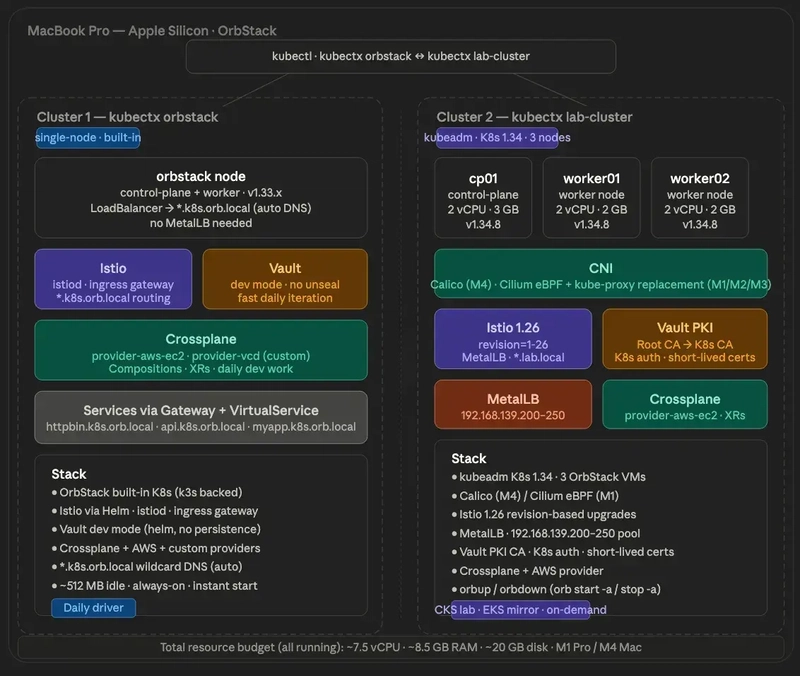
The full setup, recapped:
Seven articles in, here’s what’s running:

Cluster 1 — kubectx orbstack
Cluster 2 — kubectx lab-cluster
Stop/start without losing state
The biggest question I had when I first set this up was the one I led with — will the cluster survive a stop? The answer is yes, with one exception.
Stopping
# 💻 Mac
orb stop -a # stop all VMs
orb stop k8s # stop the native cluster (optional — fine to leave running)
What persists:
What is released:
Starting back up
# 💻 Mac
orb start -a
Then follow these steps in order:
Step 1 — Unseal Vault. This is the one manual step that can’t be automated away:
# 🖥️ VM: vault
export VAULT_ADDR='http://127.0.0.1:8200'
vault operator unseal $(grep 'Unseal Key 1' ~/vault-init.txt | awk '{print $NF}')
vault status
# Sealed: false ← what you want
Vault seals itself on every shutdown by design. That’s a security feature; an unsealed Vault that survives reboots is, by definition, less secure. In production, you’d use auto-unseal with AWS KMS or Azure Key Vault. For the lab, one manual unseal command is fine.
Step 2 — Verify the cluster:
# 💻 Mac
kubectx lab-cluster
kubectl get nodes # Ready within ~30 seconds
kubectl get pods -A # everything restarts automatically
Step 3 — Re-export session variables: This is the friction I underestimated when I started. Environment variables don’t persist across SSH sessions anything you exported in a previous session is gone:
# 🖥️ VM: vault (when doing PKI or auth work)
export VAULT_ADDR='http://127.0.0.1:8200'
export VAULT_ROOT_TOKEN=$(grep 'Initial Root Token' ~/vault-init.txt | awk '{print $NF}')
# 🖥️ VM: cp01 (when doing kubeadm or cert work)
export CP_IP=$(hostname -I | awk '{print $1}')
# 💻 Mac (when doing Istio or MetalLB work)
export VAULT_IP=$(orb run -m vault hostname -I | awk '{print $1}')
export INGRESS_IP=$(kubectl get svc istio-ingress -n istio-system
-o jsonpath='{.status.loadBalancer.ingress[0].ip}')
Step 4 — Regenerate /tmp files if needed. /tmp on OrbStack VMs clears on reboot:
# 🖥️ VM: vault
vault read -field=certificate pki_k8s/issuer/default > /tmp/lab-ca.crt
Persistence quick reference
Shell setup that makes it pleasant
Put these in your ~/.zshrc:
# 💻 Mac — add to ~/.zshrc
alias klab="kubectx lab-cluster"
alias korb="kubectx orbstack"
alias kns="kubens"
alias k="kubectl"
alias kgp="kubectl get pods -A"
alias kgn="kubectl get nodes -o wide"
alias orbup="orb start -a"
alias orbdown="orb stop -a"
Daily flow becomes short:
orbup # start everything
ssh vault@orb # unseal Vault
vault operator unseal $(grep 'Unseal Key 1' ~/vault-init.txt | awk '{print $NF}')
# exit vault VM
klab # switch to lab cluster
kgn # verify nodes
kgp # verify pods
CKS exam preparation:
The VM lab cluster is purpose-built for CKS. Real kubeadm cluster, real etcd, real kubelet config files. The exam gives you a similar environment, and having practiced the same scenarios on a cluster where you control every layer makes a meaningful difference.
The scenarios I practice most:
Pod Security Admission:
PSA replaced PodSecurityPolicy in Kubernetes 1.25. The CKS exam tests your ability to enforce pod security standards at the namespace level.
# 💻 Mac
kubectl create namespace restricted-ns
# Enforce the restricted profile - blocks privilege escalation, host networking, etc.
kubectl label namespace restricted-ns
pod-security.kubernetes.io/enforce=restricted
pod-security.kubernetes.io/audit=restricted
pod-security.kubernetes.io/warn=restricted
# Test - this pod should be blocked
kubectl run test --image=nginx -n restricted-ns
# Error from server (Forbidden): pods "test" is forbidden: violates PodSecurity
RBAC
# 💻 Mac
# Create a role that can only read pods
kubectl create role pod-reader
--verb=get,list,watch
--resource=pods
-n restricted-ns
# Bind it to a service account
kubectl create rolebinding pod-reader-binding
--role=pod-reader
--serviceaccount=restricted-ns:default
-n restricted-ns
# Test with impersonation
kubectl auth can-i list pods
--as=system:serviceaccount:restricted-ns:default
-n restricted-ns
# yes
kubectl auth can-i delete pods
--as=system:serviceaccount:restricted-ns:default
-n restricted-ns
# no
Audit policy:
The exam often asks you to configure an audit policy on the control plane. This requires editing the kube-apiserver static pod manifest directly:
# 🖥️ VM: cp01
sudo tee /etc/kubernetes/audit-policy.yaml <<EOF
apiVersion: audit.k8s.io/v1
kind: Policy
rules:
- level: RequestResponse
resources:
- group: ""
resources: ["secrets"]
- level: Metadata
resources:
- group: ""
resources: ["pods"]
- level: None
users: ["system:kube-proxy"]
EOF
Add these flags to /etc/kubernetes/manifests/kube-apiserver.yaml:
- --audit-policy-file=/etc/kubernetes/audit-policy.yaml
- --audit-log-path=/var/log/kubernetes/audit.log
- --audit-log-maxage=30
- --audit-log-maxbackup=10
The kubelet restarts kube-apiserver automatically when the manifest changes.
NetworkPolicy: default-deny
# 💻 Mac
# Deny all ingress and egress by default
kubectl apply -f - <<EOF
apiVersion: networking.k8s.io/v1
kind: NetworkPolicy
metadata:
name: default-deny-all
namespace: default
spec:
podSelector: {}
policyTypes:
- Ingress
- Egress
EOF
# Then selectively allow what's needed
kubectl apply -f - <<EOF
apiVersion: networking.k8s.io/v1
kind: NetworkPolicy
metadata:
name: allow-dns
namespace: default
spec:
podSelector: {}
policyTypes:
- Egress
egress:
- ports:
- port: 53
protocol: UDP
- port: 53
protocol: TCP
EOF
Short-lived admin certificates from Vault PKI
A CKS best practice — use short-lived credentials instead of long-lived kubeconfig files:
# 🖥️ VM: vault
# Issue a 1-hour admin certificate
vault write pki_k8s/issue/admin
common_name="kubernetes-admin" ttl=1h
The output gives you a certificate and private key. Build a kubeconfig from them that expires in one hour. Instead of a kubeconfig with a long-lived client cert, you issue a fresh cert each session. When it expires, access is revoked automatically. In production, this is enforced at the Vault role level (max_ttl=2h) you physically cannot issue a cert with a longer TTL.
Trivy image scanning
CKS includes container image security. Trivy is the tool used on the exam:
# 🖥️ VM: cp01 — install trivy
curl -sfL https://raw.githubusercontent.com/aquasecurity/trivy/main/contrib/install.sh | sudo sh -s -- -b /usr/local/bin
# Scan an image
trivy image nginx:latest
# Scan for HIGH and CRITICAL only
trivy image --severity HIGH,CRITICAL nginx:latest
Five things I learned building this
OrbStack is genuinely better than Multipass, not just faster. The native DNS, instant boot, and real LoadBalancer IPs remove an entire category of friction I had normalised. I didn’t realise how much time I was spending on /etc/hosts edits until I stopped having to do them.
T*he M1 vs M4 CNI difference is a kernel capability issue, not an OrbStack bug.* Once I understood that iptables NAT is restricted in unprivileged LXC containers on M1, Cilium was the obvious fix. Knowing this also makes it easier to debug similar issues in other restricted container environments; CI systems, Docker-in-Docker, anywhere Kubernetes is running inside something it doesn’t quite own.
**Vault PKI is worth the setup cost. **You could let kubeadm generate self-signed certs and skip a whole chapter. But having a lab that uses the same certificate hierarchy as production means the mental model transfers directly. Short-lived admin certs stop being a theoretical best practice and start being how you actually work.
Session variables are the biggest day-to-day friction. Anything that doesn’t persist to .bashrc gets lost between sessions. I’ve been burned by an empty $CP_IP, causing a “not a valid IP address” error in the kubeadm config more times than I’d like to admit. Persist in what you can.
Document as you go. This whole series came out of runbook notes I was writing for myself while I built the lab. Writing each step down caught several places where the process was more manual than it needed to be, and meant I could replicate the setup on another machine in a day instead of a weekend. If you’ve built something complicated, writing it up is one of the higher-leverage things you can do, even if you never publish it.
The full series
Part 1: Why I Replaced Multipass with OrbStack and what an M1 vs M4 Mac taught me about local Kubernetes.
Part 2: One Command, One Working Kubernetes Cluster! Building My Daily-Driver Lab on OrbStack.
Part 3: Building a Production-Grade Vault PKI for a Local kubeadm Cluster Without the Shortcuts.
Part 4: Same Cluster, Different Mac: A Debugging Story About Unprivileged LXC Containers, iptables, and Why Cilium Replaces kube-proxy.
Part 5: How I Practise Istio Upgrades Locally Before Touching Production EKS.
Part 6: The Disk-Pressure Incident That Taught Me to Always Set LimitRanges and Other Lessons from Mirroring EKS Locally.
Part 7 (this article): The Day 2 Reality of Running a Kubernetes Lab on Your Mac: Stop/Start, CKS Scenarios, and What I Learned Building It.
Resources
I’m Noah Makau, a DevSecOps engineer based in Nairobi. I run a small DevOps consultancy and hold CKA, CKAD, and the AWS Solutions Architect Professional certifications, currently preparing for CKS. I write about Kubernetes, Vault, Crossplane, and the day-to-day of running platforms that actually have to stay up.
Originally published at blog.arkilasystems.com
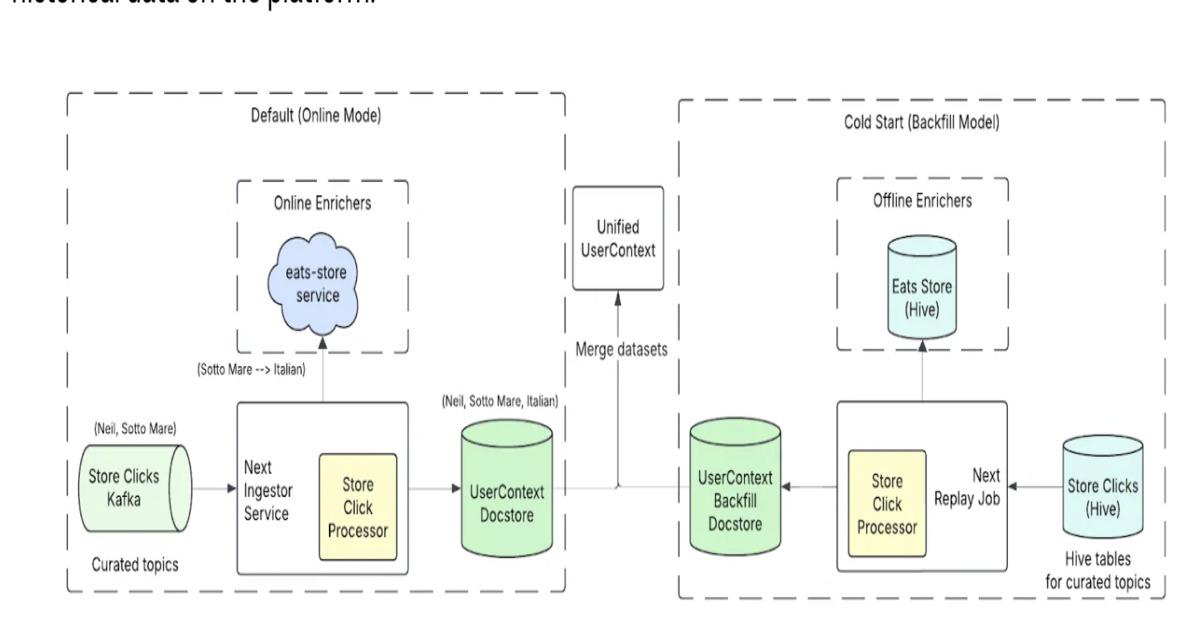
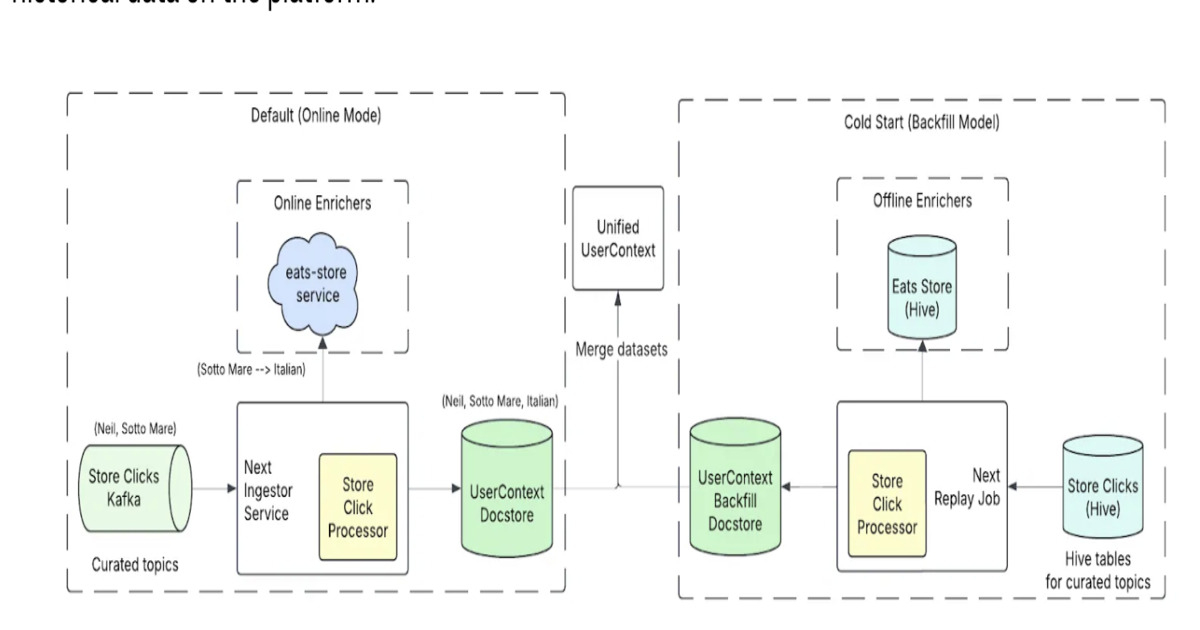
Uber updates its Uber Eats Home Feed recommendation system using near real-time user sequence features and a Generative Recommender model. The system evolves from hand-crafted features to transformer-based sequence modeling, reduces feature freshness from 24 hours to seconds, and shifts from pointwise scoring to listwise GenRec for improved contextual ranking and real-time personalization.
By Leela Kumili
If you’re an Airtable power user, you’ve hit the wall: Airtable’s native automations are limited, Zapier gets expensive fast, and the built-in scripting doesn’t talk to your other tools easily.
n8n changes that. It’s a free, self-hostable automation platform that connects Airtable to anything — Slack, Gmail, Notion, Postgres, OpenAI, custom webhooks, REST APIs — with full conditional logic, loops, and branching. No per-task fees.
Here are 5 workflows that serious Airtable users actually need.
1. Auto-Sync Airtable Records to a Real Database
Airtable is great for prototyping but hits limits fast: 50K rows on free, no SQL joins, no triggers. When you outgrow it, you don’t need to abandon your Airtable setup — just sync it.
What it does: Every hour, n8n reads all Airtable records modified in the last hour, upserts them into Postgres (or MySQL, SQLite, Supabase), and logs sync stats to a Google Sheet. Your Airtable stays as the friendly UI; the database becomes the source of truth for reports, analytics, and your engineering team.
Trigger: Schedule (hourly)
{
"name": "Airtable to Postgres Sync",
"nodes": [
{
"type": "n8n-nodes-base.scheduleTrigger",
"name": "Every Hour",
"parameters": { "rule": { "interval": [{ "field": "hours", "minutesInterval": 1 }] } }
},
{
"type": "n8n-nodes-base.airtable",
"name": "Get Modified Records",
"parameters": {
"operation": "list",
"filterByFormula": "IS_AFTER({Last Modified}, DATEADD(NOW(), -1, 'hours'))"
}
},
{
"type": "n8n-nodes-base.postgres",
"name": "Upsert to DB",
"parameters": {
"operation": "upsert",
"conflictTarget": "airtable_id"
}
},
{
"type": "n8n-nodes-base.googleSheets",
"name": "Log Sync Stats",
"parameters": { "operation": "append" }
}
]
}
Pro tip: Use Airtable’s LAST_MODIFIED_TIME() formula field to track changes precisely. Set conflictTarget to your Airtable record ID so upserts are idempotent.
2. Airtable Record Created → Slack Alert + Personalized Email
The classic Airtable automation “send email on record creation” is basic. You want routing, enrichment, and multi-channel notification.
What it does: When a new record is created in your CRM base (new lead, new project, new ticket), n8n (1) posts a formatted Slack message with all key fields, (2) classifies the record using OpenAI (e.g., lead score, sentiment, priority), (3) updates the Airtable record with the AI classification, and (4) sends the contact a personalized welcome email.
Trigger: Airtable trigger (polling every minute)
{
"name": "New Airtable Record → Slack + AI + Email",
"nodes": [
{
"type": "n8n-nodes-base.airtableTrigger",
"name": "New Record",
"parameters": { "event": "create", "pollTimes": { "item": [{ "mode": "everyMinute" }] } }
},
{
"type": "n8n-nodes-base.slack",
"name": "Notify Team",
"parameters": { "text": "New record: *{{ $json.Name }}* — {{ $json.Status }}" }
},
{
"type": "@n8n/n8n-nodes-langchain.openAi",
"name": "Classify Record",
"parameters": { "prompt": "Score this lead 1-10 and return JSON: { score, reasoning, next_action }. Lead: {{ $json }}" }
},
{
"type": "n8n-nodes-base.airtable",
"name": "Update Record with Score",
"parameters": { "operation": "update" }
},
{
"type": "n8n-nodes-base.gmail",
"name": "Send Personalized Email"
}
]
}
3. Daily Airtable Status Report → Email Digest
Your Airtable base has projects, tasks, or tickets. You want a daily digest without opening 6 different views.
What it does: Every morning at 8 AM, n8n queries your Airtable base for records matching specific statuses (overdue, due today, in review, blocked), groups them by owner or category using a Code node, builds an HTML email with a clean summary table, and sends it to the whole team. One email replaces 15 minutes of manual checking.
Trigger: Schedule (daily 8AM)
{
"name": "Daily Airtable Digest",
"nodes": [
{
"type": "n8n-nodes-base.scheduleTrigger",
"name": "Daily 8AM",
"parameters": { "rule": { "interval": [{ "field": "cronExpression", "expression": "0 8 * * *" }] } }
},
{
"type": "n8n-nodes-base.airtable",
"name": "Get Overdue Items",
"parameters": { "operation": "list", "filterByFormula": "AND(IS_BEFORE({Due Date}, TODAY()), {Status} != 'Done')" }
},
{
"type": "n8n-nodes-base.airtable",
"name": "Get Due Today",
"parameters": { "operation": "list", "filterByFormula": "IS_SAME({Due Date}, TODAY(), 'day')" }
},
{
"type": "n8n-nodes-base.code",
"name": "Build HTML Digest",
"parameters": { "jsCode": "// Merge overdue + due today, build HTML table rowsnconst overdue = $('Get Overdue Items').all();nconst today = $('Get Due Today').all();nconst html = `<h2>Overdue (${overdue.length})</h2>` + overdue.map(i => `<li>${i.json.Name}</li>`).join('');nreturn [{ json: { html } }];" }
},
{
"type": "n8n-nodes-base.gmail",
"name": "Send Digest",
"parameters": { "subject": "Daily Airtable Digest — {{ $now.toFormat('MMM d') }}" }
}
]
}
4. Airtable Form Submission → Multi-Step Onboarding
Airtable forms are great for capturing data. But native form automations are limited: no branching, no waiting, no multi-step sequences.
What it does: When someone submits your Airtable form (contact request, project intake, onboarding survey), n8n triggers a full multi-step onboarding: immediate confirmation email, creates a Notion page for the project, creates a Google Drive folder, sends a Slack notification, and schedules a follow-up email 3 days later via a Wait node.
Trigger: Airtable trigger (new record in form submissions table)
{
"name": "Form → Full Onboarding",
"nodes": [
{ "type": "n8n-nodes-base.airtableTrigger", "name": "New Form Submission" },
{ "type": "n8n-nodes-base.gmail", "name": "Confirmation Email" },
{ "type": "n8n-nodes-base.notion", "name": "Create Project Page" },
{ "type": "n8n-nodes-base.googleDrive", "name": "Create Drive Folder" },
{ "type": "n8n-nodes-base.slack", "name": "Notify Team" },
{ "type": "n8n-nodes-base.wait", "name": "Wait 3 Days", "parameters": { "amount": 3, "unit": "days" } },
{ "type": "n8n-nodes-base.gmail", "name": "Day 3 Follow-Up Email" }
]
}
Pro tip: Use the Airtable Update Record node after each step to write status back (e.g., Notion page: [URL], Drive folder: [URL]). Your Airtable base becomes a live dashboard of every onboarding step.
5. Bi-Directional Airtable ↔ Notion Sync
Teams split between Airtable (operations) and Notion (documentation/wikis) constantly re-enter data. Stop.
What it does: n8n runs every 15 minutes. Records created or updated in Airtable get synced to a Notion database (matching fields by name). Changes in Notion (status updates, comments) get pushed back to Airtable. A Code node handles field type mapping (Airtable multi-select → Notion multi-select, dates, URLs). Conflicts are resolved by last-modified timestamp.
Trigger: Schedule (every 15 minutes)
{
"name": "Airtable <-> Notion Sync",
"nodes": [
{
"type": "n8n-nodes-base.scheduleTrigger",
"name": "Every 15 Min",
"parameters": { "rule": { "interval": [{ "field": "minutes", "minutesInterval": 15 }] } }
},
{
"type": "n8n-nodes-base.airtable",
"name": "Get Airtable Changes",
"parameters": { "operation": "list", "filterByFormula": "IS_AFTER(LAST_MODIFIED_TIME(), DATEADD(NOW(), -15, 'minutes'))" }
},
{
"type": "n8n-nodes-base.code",
"name": "Map Fields",
"parameters": { "jsCode": "// Convert Airtable field format to Notion propertiesnreturn items.map(item => ({n json: {n title: item.json.Name,n status: item.json.Status,n airtable_id: item.json.idn }n}));" }
},
{
"type": "n8n-nodes-base.notion",
"name": "Upsert Notion Page",
"parameters": { "operation": "update" }
},
{
"type": "n8n-nodes-base.notion",
"name": "Get Notion Changes",
"parameters": { "operation": "getAll", "filter": { "timestamp": "last_edited_time", "last_edited_time": { "past_minute": {} } } }
},
{
"type": "n8n-nodes-base.airtable",
"name": "Update Airtable",
"parameters": { "operation": "update" }
}
]
}
Get the Complete Template Pack
All 5 workflows above — plus 8 more — are available as ready-to-import .json files in the FlowKit n8n template pack.
Browse and download: https://stripeai.gumroad.com
Each template is fully documented with setup instructions, required credentials, and customization notes. Import, configure your credentials, and run.
Using any of these in your stack? Let me know in the comments what you’re connecting Airtable to — I’m always looking for the next workflow to add.
This is a submission for the Gemma 4 Challenge: Build with Gemma 4
What I Built
The Problem
In Industrial IoT systems, we work with deterministic logic. A sensor gives a specific value, and hardware has physical limits that cannot be changed. Recently, many developers are using LLMs (like Gemma 4) to manage workflow logic and decision making.
However, there is a big problem. The nature of probabilistic AI and deterministic hardware is different. An LLM is a probabilistic generator that predicts the next text. LLM is not a control system for hardware. If an AI agent sends a command that ignores physical constraints, for example, trying to move a robot arm when battery is very low, the hardware will try to do it. This can cause expensive equipment failure.
Thus, we need a governance layer between the AI and the actual hardware execution.
The Solution
I developed SilverAi, a lightweight Python middleware that works like a filter for our hardware. Its job is to check agent requests against the current system state before any command is sent to the driver.
SilverAi does not “reason” or think about the command. It only checks if the command violates hard-coded safety rules.
For implementation, I use Python decorators to define the safety constraints. These rules are checked before the function body runs.
@guard(
rules=[
MaxLoad(100.0),
rules.BatteryMin(20),
StateGate("motor_temp", max_value=80.0),
]
)
def _execute_guarded(...) -> Dict[str, Any]:
...
By separating the AI agent intent from the validation layer, we do not need the LLMs to be “smart” about safety. This is because, with SilverAi, the model can propose actions, but it cannot override the rules.
SilverAi also comes with a dry-run mode. This lets developers simulate hardware problems (like thermal overload or connection loss) without needing real physical machines.
Finally, in SilverAi, when a request is blocked, the reason is logged. This creates an audit trail to understand why an operation was stopped, which is very important for troubleshooting IoT systems.

Figure 1: The moment the SilverAi guardrail saves the hardware. Arize Phoenix trace showing the guard_check intercepting and blocking a hazardous AI command that exceeded the 100.0 maximum belt load limit.
Demo
Code
How I Used Gemma 4
For this project, I chose the Gemma 4 E4B model.
The system needed to run on local industrial hardware without a dependency on a cloud-based GPU cluster. In a warehouse or EOC environment, we cannot rely on low-latency internet or massive server-grade compute just to parse a telemetry string.
The E4B model was the right fit because it provides the necessary reasoning capability for high-level workflow parsing while maintaining a local footprint that does not choke a standard industrial workstation. It is the correct tool for a system where the “intelligence” is secondary to the deterministic safety layer it sits behind.
As we know, industrial systems are flooded with unstructured data—operator log notes, legacy serial strings, and unformatted maintenance overrides. Traditional automation requires rigid, hardcoded string parsing (like Regex), which breaks the moment an operator types a command differently.
Gemma 4 unlocked semantic translation of unstructured intent.
When an operator inputs a natural language command—such as “Divert package PKG-400 to Aisle 3 because the main sorter is jamming”, Gemma 4 successfully parses the messy string, identifies the operational intent, and structures it into a JSON payload ({"route": "Aisle 3", "load": 5.0}).
This is where the model’s intelligence becomes a liability. Gemma 4 is smart enough to interpret the human operator’s intent, but because it is a probabilistic model, it is completely oblivious to real-time physical telemetry. It does not know that while it successfully generated the routing plan, a hardware sensor just reported a thermal spike on the Aisle 3 motor.
That is exactly why this architecture is a two-tier system: Gemma 4 unlocks the flexibility to understand unstructured human input, while the SilverAi middleware provides the determinism to block that input the millisecond it violates a physical invariant.
Wrap-up
If an automation system depends on the LLM being “smart enough” to be safe, the system is already broken. Our goal wtih SilverAi is not to make AI safe, but to build a safety layer that ignores AI suggestions when they violate the physical laws of the machine.