
This didn’t start as a tooling migration—it started with my own curiosity.
Oxlint and Oxfmt were suddenly everywhere. People were claiming massive speed improvements and near-instant TypeScript linting. That sounded great, but most benchmarks were tiny demo projects. I wanted to see what happens in a real Angular codebase.
There was also a real problem underneath the curiosity. ESLint + Prettier had slowly become friction. Linting was slow enough that I noticed developers (including myself) stopped running it locally. Checks moved to pre-commit. Pre-commit got slow enough that --no-verify became the norm. That’s usually the point where tooling stops helping and starts getting in the way.
So I tried replacing ESLint + Prettier with Oxlint + Oxfmt using Vite+. Here’s what actually happened.
First Important Clarification
I did not replace Angular CLI. Angular CLI still handles:
ng serveng buildng test
What I replaced was only the quality tooling layer:
- ESLint (mostly)
- Prettier
- Most of the old JS/TS linting path
Vite+ became the runner for linting and staged file checks, while Oxfmt handled formatting.
Why Not Biome?
Biome came up immediately. Biome is great, especially for greenfield JS or React projects.
But Angular has one big requirement: @angular-eslint rules. Biome doesn’t support Angular ESLint plugins. Oxlint doesn’t fully support Angular either, but it allows Angular TypeScript rules via plugins, which made it usable for Angular projects.
The Angular Limitation
Oxlint cannot lint Angular templates yet. Templates require a custom parser, so ESLint is still required for .html files. However, Angular TypeScript rules can now run inside Oxlint, meaning ESLint is only needed for templates.
Final Tool Responsibility Split
| File Type | Formatting | Linting |
|---|---|---|
| .ts | Oxfmt | Oxlint + Angular TS rules |
| .html | Oxfmt | ESLint (Angular template rules) |
| .css / .scss | Oxfmt | Stylelint (rules only) |
- Oxfmt handles formatting everywhere.
- ESLint only handles Angular templates.
- Stylelint only handles CSS rules and property order.
- Oxlint handles all TypeScript linting.
Once I understood this split, the setup actually felt simpler than before.
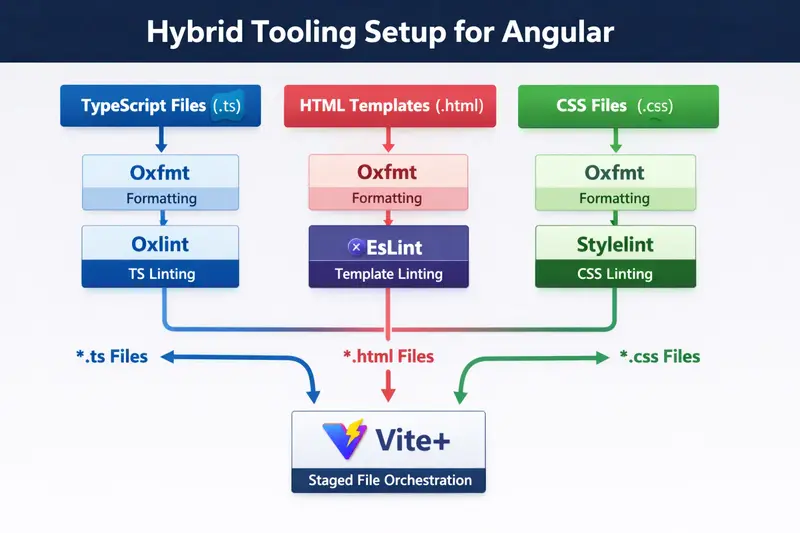
Core Idea of the Setup
What this really means is… Vite+ acts as a high-speed traffic controller. Instead of running a heavy ESLint process on every file, it routes each file type to the fastest tool that can handle it correctly.
The orchestration lives in the Vite+ config:
// vite.config.js
import { defineConfig } from 'vite-plus';

export default defineConfig({
  ignorePatterns: ['dist/**', '.angular/**', 'node_modules/**'],

  staged: {
    '*.ts': 'vp lint --fix',
    '*.{json,html}': 'vp fmt',
    '*.html': 'eslint --fix',
    '*.{css,scss}': ['vp fmt', 'stylelint --fix'],
  },
});
Formatting rules live separately in .oxfmtrc.json:
{
  "$schema": "./node_modules/oxfmt/configuration_schema.json",
  "singleQuote": true,
  "semi": true,
  "printWidth": 100,
  "tabWidth": 2,
  "trailingComma": "all"
}
That detail matters. In this setup, keeping Oxfmt rules in .oxfmtrc.json turned out to be more reliable than nesting them inside vite.config.js.
That split ended up being the more maintainable option: runner config in vite.config.js, tool rules in tool-specific files.
Step-by-Step Setup for Your Angular Project
1. Install dependencies
npm install --save-dev vite-plus stylelint stylelint-config-standard stylelint-order stylelint-config-recess-order @angular-eslint/eslint-plugin @angular-eslint/template-parser @angular-eslint/eslint-plugin-template
2. Configure Oxlint (.oxlintrc.json)
{
  "jsPlugins": ["@angular-eslint/eslint-plugin"],
  "ignorePatterns": ["dist/**", ".angular/**", "node_modules/**"],
  "rules": {
    "no-debugger": "error",
    "no-var": "error",
    "prefer-const": "error",
    "@typescript-eslint/no-unused-vars": "warn",
    "@angular-eslint/no-output-native": "error",
    "@angular-eslint/use-lifecycle-interface": "warn",
    "@angular-eslint/component-selector": [
      "error",
      { "type": "element", "prefix": "app", "style": "kebab-case" }
    ]
  }
}
3. Configure Oxfmt (.oxfmtrc.json)
{
  "$schema": "./node_modules/oxfmt/configuration_schema.json",
  "singleQuote": true,
  "semi": true,
  "printWidth": 100,
  "tabWidth": 2,
  "trailingComma": "all"
}
4. Configure ESLint for Templates (eslint.config.js)
import templateParser from '@angular-eslint/template-parser';
import templatePlugin from '@angular-eslint/eslint-plugin-template';

export default [
  {
    files: ['**/*.html'],
    languageOptions: {
      parser: templateParser,
    },
    plugins: {
      '@angular-eslint/template': templatePlugin,
    },
    rules: {
      '@angular-eslint/template/button-has-type': 'error',
      '@angular-eslint/template/no-negated-async': 'warn',
      '@angular-eslint/template/alt-text': 'error',
    },
  },
];
5. Configure Stylelint (.stylelintrc.json)
{
  "extends": ["stylelint-config-standard", "stylelint-config-recess-order"],
  "ignoreFiles": ["dist/**", "node_modules/**", ".angular/**"],
  "rules": {
    "color-no-invalid-hex": true,
    "unit-no-unknown": true,
    "property-no-unknown": true,
    "declaration-block-no-duplicate-properties": true,
    "color-named": "never",
    "no-empty-source": null
  }
}
6. Update package.json scripts
"scripts": {
    "ng": "ng",
    "start": "ng serve",
    "build": "ng build",
    "test": "ng test",
    "lint": "vp lint",
    "lint:fix": "vp lint --fix",
    "lint:html": "eslint "src/**/*.html"",
    "lint:styles": "stylelint "src/**/*.{css,scss}"",
    "lint:styles:fix": "stylelint "src/**/*.{css,scss}" --fix",
    "format": "vp fmt --check",
    "format:fix": "vp fmt"
  },
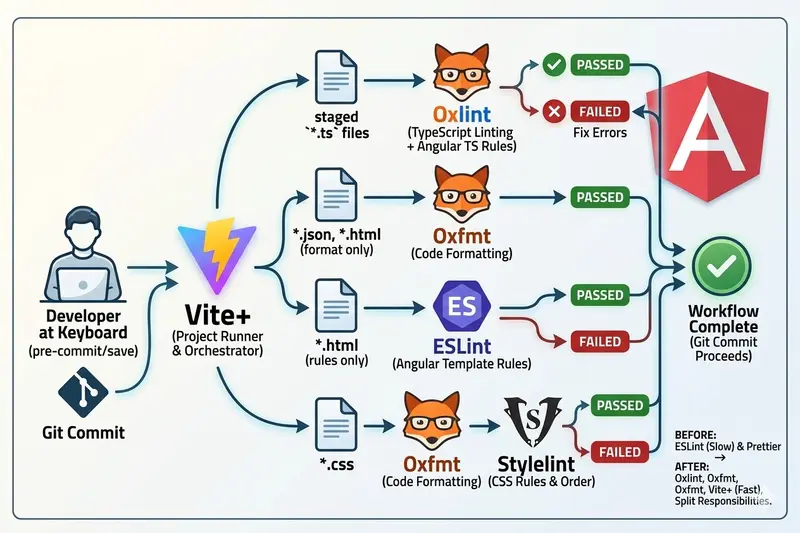
Before vs After Tooling
| Before | After |
|---|---|
| ESLint (TS + HTML) | Oxlint (TypeScript) |
| Prettier | ESLint (HTML templates only) |
| Stylelint | Stylelint (CSS rules only) |
| Manual formatting drift | Oxfmt (formatting everywhere) |
| One big lint pipeline | Vite+ orchestrating specialized tools |
Biggest Improvement
Yes, Oxlint is faster than ESLint. But the biggest win was the workflow:
- Before: Pre-commit was slow → After: Pre-commit fast again.
- Before: Developers skipped lint locally → After: Developers run lint locally.
- Before: Lint ran mostly in CI → After: Faster feedback loops.
Things to Watch Out For
- Oxlint auto-fix is more limited than ESLint.
- ESLint is still required for Angular templates.
- You will still maintain multiple config files: This is a trade-off for speed.
-
Keep rules separate from orchestration: For larger apps, don’t force everything into
vite.config.js.
Who Should Consider This?
Good fit if:
- You have a large Angular project where ESLint runs are noticeably slow.
- Your team is starting to bypass pre-commit hooks.
Not necessary if:
- Your project is small and ESLint is already fast.
- Your team prefers standard, non-hybrid tooling only.
Final Thoughts
For Angular projects today, the best setup might not be replacing ESLint completely, but splitting responsibilities. Using Oxlint for TS, ESLint for templates, Stylelint for styles, and Vite+ as the orchestrator creates a stack that is faster and easier to reason about. Most importantly, it’s a setup that actually gets used.
🚀 Full boilerplate and working config: angular-viteplus